
Emergency Preparedness Chatbot Template (Free)
Free Government And Public Services Chatbot Template
Free emergency preparedness chatbot for public safety. Risk assessment, supply checklists, evacuation routes, FEMA alert integration, and multilingual support.


What Is an Emergency Preparedness Guide Chatbot?
An emergency preparedness guide chatbot is a conversational AI tool deployed by governments, municipalities, schools, and workplaces to deliver personalized emergency planning guidance to community members, students, employees, and residents — at scale, in multiple languages, and through the messaging channels people already use. Unlike a static emergency preparedness webpage that presents the same generic checklist to every visitor regardless of their situation, the chatbot conducts a structured conversation, assesses the individual's household composition, geographic risk profile, and existing preparedness level, and delivers a tailored action plan: a personalized supply checklist, relevant evacuation routes, shelter-in-place procedures for the hazards most likely in their area, and direct links to local emergency resources.
The gap between public emergency preparedness guidance and actual community preparedness is large and well-documented. FEMA's National Household Survey on Disaster Preparedness consistently finds that fewer than 40% of American households have an emergency plan, fewer than 50% have assembled a basic emergency supply kit, and fewer than one-third have discussed evacuation routes with all household members. The problem is not a lack of information — emergency preparedness guidance is freely available from FEMA, the Red Cross, and every state emergency management agency. The problem is that generic, static guidance does not produce behavior change. People read a 40-page PDF once and do nothing because the instructions are not specific to their situation, their neighborhood, or the hazards they actually face.
Why Conversational Delivery Works Where Static Guidance Fails
Conversational emergency preparedness guidance produces measurably better outcomes than static content for three reasons. First, personalization: a chatbot that asks "Do you have pets?" before generating a supply checklist, or "Do you live within 5 miles of a fault line?" before delivering earthquake preparation guidance, provides information that is immediately actionable rather than abstractly informative. Second, progressive commitment: guiding people through a step-by-step preparation conversation creates a series of small actions (add this item to your cart, download this app, add this contact to your phone) that are more achievable than the overwhelming implied task of "prepare for a disaster." Third, accessibility: deploying preparedness guidance through WhatsApp, SMS, or a website chat widget reaches community members who never visit the emergency management agency website.
- Reach gap: Most municipal emergency management websites receive a fraction of the traffic needed to meaningfully improve community preparedness rates. A chatbot deployed through the channels people already use — messaging apps, social platforms, SMS — reaches populations that active preparedness programs miss entirely.
- Language gap: Static preparedness content is typically published in English and Spanish. A chatbot can deliver the same guidance in 40+ languages, reaching immigrant communities and non-English-speaking populations who are disproportionately vulnerable in disaster scenarios.
- Equity gap: Preparedness resources and programs disproportionately reach higher-income, better-educated populations. A chatbot that operates on any smartphone with a data connection reduces but does not eliminate this disparity.
Conferbot's AI chatbot builder provides the infrastructure for emergency management agencies and public safety organizations to build, deploy, and continuously improve preparedness guidance chatbots across all community contact channels.
How It Works: Risk Assessment, Supply Checklists, and Evacuation Routes
The emergency preparedness guide chatbot operates through three sequential modules: hazard-specific risk assessment, personalized preparedness gap analysis, and action-oriented resource delivery. The conversation is designed to take no more than 10-15 minutes for a comprehensive assessment, with a shorter 5-minute express path for users who want specific guidance on a single topic (supply kit, evacuation, or communication plan).
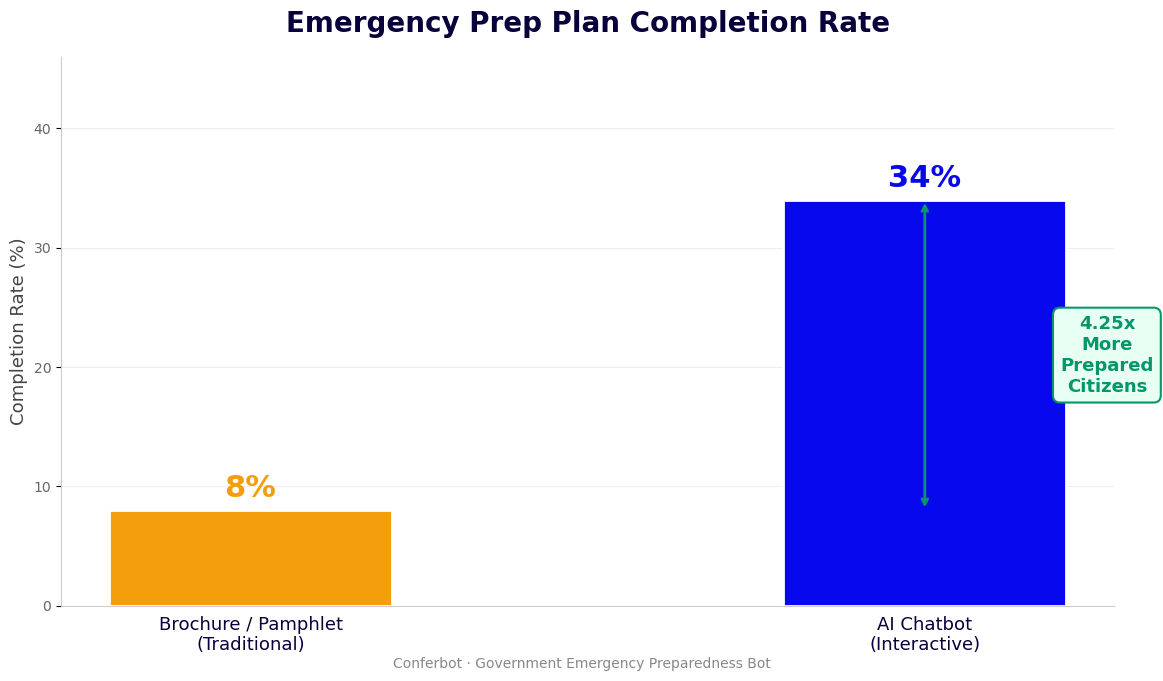
Module 1: Household and Risk Profile Assessment
The chatbot begins by building a household and risk profile through a structured series of questions. This profile drives all subsequent guidance:
- Geographic hazard profile: Based on zip code or city, the chatbot identifies the primary hazard types relevant to the location — earthquake, hurricane, tornado, wildfire, flood, winter storm, or a combination. Location data can be entered by the user or, where permitted, inferred from browser geolocation. Hazard profiles are drawn from FEMA's National Risk Index and USGS hazard databases.
- Household composition: Number of adults, children, elderly members, individuals with disabilities or medical dependencies, and pets. Each household characteristic affects supply kit recommendations (pet food, prescription medications, pediatric supplies, mobility aids) and evacuation planning considerations.
- Existing preparedness level: A brief self-assessment covering whether the household has an emergency supply kit, an evacuation plan, an out-of-area contact, and emergency apps installed. The gap between current state and recommended preparedness drives the priority action plan.
- Residential situation: Whether the household is in a mobile home, apartment, single-family home, or a flood zone or evacuation zone. Each situation has specific shelter-in-place versus evacuation guidance that a generic checklist cannot provide.
Module 2: Personalized Supply Checklist Generation
Based on the household profile and hazard assessment, the chatbot generates a personalized supply checklist covering the FEMA-recommended baseline (water, food, first aid, documents, communications) plus household-specific additions. The checklist is formatted as a shareable, printable document delivered at conversation end. Supply recommendations include quantity specifications based on household size (1 gallon of water per person per day, 3-day minimum) and household-specific additions.
Module 3: Evacuation Route and Shelter-in-Place Guidance
| Hazard Type | Primary Guidance | Key Questions Asked | Resources Provided |
|---|---|---|---|
| Hurricane / Tropical Storm | Evacuation zone determination, shelter options, storm preparation checklist | Evacuation zone, mobile home or flood zone residency, vehicle availability | Local evacuation zone map link, shelter locations, storm shutter guidance |
| Earthquake | Shelter-in-place (drop/cover/hold), post-quake safety, aftershock preparation | Home construction type (wood frame vs. unreinforced masonry), gas shutoff valve location | Fault line proximity data, gas shutoff instructions, structural vulnerability resources |
| Wildfire | Evacuation trigger levels (Watch/Warning/Evacuation Order), defensible space | Distance from wildland interface, air quality sensitivity in household | Local fire agency alert signup, evacuation route map, air filtration guidance |
| Flood | Flood zone determination, never-drive-through-flood guidance, shelter elevation | FEMA flood zone designation (if known), basement presence, vehicle type | Flood insurance information, local flood gauge links, sandbag distribution sites |
| Tornado | Shelter-in-place protocol (interior room, lowest floor), mobile home evacuation | Mobile home residency, nearest community shelter location knowledge | Local emergency alert app link, nearest shelter locations, shelter-in-place diagram |
| Winter Storm | Home heating backup, vehicle emergency kit, avoid travel guidance | Primary heating source (natural gas, electric, oil), vehicle ownership | Carbon monoxide poisoning prevention, warming center locations, vehicle kit list |
Delivering the Preparedness Action Plan
At conversation end, the chatbot compiles the assessment data into a personalized preparedness action plan: a prioritized list of the 5-10 most important actions the household should take based on their current gaps, with specific resources, links, and instructions for each. The plan can be sent to the user via email, SMS, or saved as a PDF. The chatbot also offers to connect the user directly to local emergency management resources — emergency alert system enrollment, local Red Cross chapter, or community preparedness program registration. Conferbot's API integration layer handles enrollment API calls where partner systems support automated registration.
Key Features: Hazard Personalization, Alert Integration, and Community Tools
An emergency preparedness chatbot for public deployment must meet a demanding set of requirements: geographic precision in hazard assessment, real-time alert integration, multilingual delivery, accessibility compliance, and the ability to serve diverse populations ranging from tech-savvy residents to elderly community members with limited digital experience. Here is the complete feature set for a production-grade emergency preparedness deployment.
Core Feature Matrix
| Feature | Description | Community Benefit | Agency Benefit |
|---|---|---|---|
| Hazard-specific guidance | Tailored conversation paths for 12+ hazard types based on geographic risk profile | Relevant guidance rather than generic checklists | One tool replaces multiple static hazard-specific pages |
| Household personalization | Supply lists, evacuation plans, and shelter guidance adapted to household size, composition, and special needs | Actionable guidance for the actual household, not a hypothetical household of four | Higher preparedness action completion rates vs. generic guidance |
| FEMA/NWS data integration | Pulls current alerts, watch/warning status, and shelter locations from FEMA, NOAA/NWS, and local emergency management feeds | Real-time situational awareness during threat periods | Single integration delivers current official information without manual updates |
| Emergency alert enrollment | Guides users to enroll in local Wireless Emergency Alerts, IPAWS, and local alert systems with direct enrollment links | Ensures residents receive official emergency notifications | Increases alert system registration rates |
| Multilingual support | Full preparedness conversation in Spanish, Chinese, Vietnamese, Tagalog, Arabic, Haitian Creole, and other community languages | Equal access to preparedness guidance for non-English speakers | Reaches underserved populations without separate programs |
| Shareable preparedness plan | Generates a personalized PDF/SMS/email preparedness plan that households can print and share with family members | Tangible output that household members can reference during an emergency | Increases plan completion and documentation rates |
| Live agent escalation | Connects users with emergency management staff for complex situations or real-time emergencies | Expert guidance without call center queue | Staff focus on complex cases; routine guidance automated |
| Proactive preparedness reminders | Sends seasonal preparedness reminders (hurricane season prep in May, wildfire season prep in March) via SMS or WhatsApp to opted-in residents | Preparedness prompts at the right time of year | Increases sustained community preparedness rates |
Special Needs and Vulnerable Population Features
Standard emergency preparedness guidance is designed for able-bodied adults with access to vehicles and the means to stock supplies. The chatbot includes dedicated guidance paths for populations whose preparedness needs are substantially different: individuals with mobility limitations (shelter-in-place modifications, accessible shelter locations, personal assistance registry enrollment), households with medical dependencies (generator requirements for home medical equipment, medication supply guidance, healthcare facility evacuation coordination), and households with infants or very young children (pediatric supply specifications, safe infant sleep during emergencies). Conferbot's live chat integration ensures that community members with complex special needs situations can be escalated to an emergency management specialist who can provide individualized planning assistance.
Deploying across the omnichannel platform ensures the same preparedness guidance is available through a website widget, WhatsApp, SMS, and any other channel active in the community — with the same quality and depth of guidance regardless of access method.
Ready to try Emergency Preparedness Chatbot Template (Free)?
Deploy this template in under 10 minutes. No coding required.
Use This Template Free →Integration With FEMA, NWS, and Emergency Alert Systems
An emergency preparedness chatbot's value during an active disaster event depends entirely on the quality and currency of the real-time data it can access. During a hurricane watch, the chatbot needs to know the current storm track, the affected evacuation zones, the open shelter locations, and the current watch/warning status. During a wildfire event, it needs current fire perimeter data, active evacuation orders by zone, and air quality index readings. This real-time situational awareness is delivered through API integrations with federal, state, and local emergency data systems.
FEMA Integration
FEMA's OpenFEMA API provides access to disaster declarations, National Flood Insurance Program data, disaster survivor assistance data, and public alert information. The chatbot integrates with OpenFEMA to:
- Identify active federal disaster declarations relevant to the user's location and display current assistance availability
- Pull flood zone determination data for the user's address from the National Flood Insurance Program (NFIP) flood map service
- Surface FEMA Disaster Survivor Assistance resources for households in declared disaster areas, including Individual Assistance registration guidance
- Access the FEMA National Risk Index data to populate location-specific hazard risk scores for the household risk assessment
NOAA/National Weather Service Integration
The National Weather Service API (api.weather.gov) provides real-time weather alerts, watches, and warnings for any US location. The chatbot integrates with NWS to display current active alerts for the user's county, trigger hazard-specific guidance branches when an active watch or warning exists for the user's area, and provide forecast data relevant to preparedness timing (approaching hurricane, forecast winter storm). NWS alert data is updated in near real-time, ensuring the chatbot reflects the current official threat level rather than cached information that may be hours old during a rapidly evolving event.
Wireless Emergency Alerts and IPAWS
The Integrated Public Alert and Warning System (IPAWS) is the federal platform through which emergency managers send Wireless Emergency Alerts (WEA) to cell phones, Emergency Alert System (EAS) messages to broadcast media, and NOAA Weather Radio messages. The chatbot guides users through enrollment in IPAWS-connected local alert systems, explains what Wireless Emergency Alerts are and how to ensure their phone is configured to receive them, and links to local emergency management agency alert enrollment portals where text message or email alert subscriptions are available.
Local Emergency Management System Integration
| System Type | Integration Method | Data Accessed | Chatbot Use |
|---|---|---|---|
| Local government alert platforms (Everbridge, Rave, Nixle) | API or webhook | Active alerts, shelter status, road closures | Display current active alerts for user location; link to enrollment |
| Public shelter databases | REST API or CSV feed | Shelter names, addresses, capacity, accessibility features, pet-friendly status | Surface nearest open shelters matching household needs (pet-friendly, ADA accessible) |
| Road and evacuation route data (state DOT APIs) | REST API | Road closure status, contraflow status, bridge weight limits | Provide current evacuation route conditions; flag closed routes |
| Utility outage maps (electric, gas utilities) | Utility company APIs or screen scraping where APIs unavailable | Active outage zones, estimated restoration times | Alert users in active outage zones; trigger generator safety guidance |
For emergency management agencies deploying the chatbot as a real-time response tool, Conferbot's API integration architecture supports webhook-based triggering from existing emergency operations systems, ensuring the chatbot's response mode automatically shifts from preparedness guidance to active-event response when an emergency is declared. The website chatbot can be configured to display real-time alert banners during active events, surfacing the chatbot proactively to website visitors who may be seeking emergency information.
Use Cases: Municipalities, Schools, and Workplaces
Emergency preparedness chatbots serve fundamentally different operational contexts depending on the deploying organization. A municipal government deploying a community preparedness tool has different goals, audiences, and success metrics than a school district deploying a staff and parent preparedness guide, or a corporation deploying a workplace emergency response tool for employees across multiple facilities. The template includes pre-configured deployment variants for each major context.
Municipal Government Deployment
Municipal and county emergency management agencies deploy the chatbot to serve the entire resident population — a diverse audience that includes elderly residents with limited digital literacy, immigrant households with limited English, low-income families with constrained resources for preparedness supplies, and residents with disabilities who require accessible emergency resources. Key configuration for a municipal deployment includes:
- Local hazard database integration: Configure the hazard profile for the municipality's specific risk environment — a coastal municipality emphasizes hurricane and tsunami preparedness; an inland mountain community emphasizes wildfire, earthquake, and severe winter storm.
- Local resource mapping: Populate the shelter database, community resource hub locations, and local food bank data for residents who cannot afford a full supply kit and need to know about alternative resources.
- Personal assistance registry guidance: Many jurisdictions maintain a registry of residents with disabilities who need evacuation assistance. The chatbot guides eligible residents through registration with the local Special Needs Registry or Access and Functional Needs (AFN) program.
- Community resilience hubs: Some cities have designated Community Resilience Hubs — locations (libraries, community centers, faith institutions) that serve as information and resource centers during and after disasters. The chatbot surfaces the nearest hub for each user.
School and Educational Institution Deployment
School district emergency preparedness chatbots serve two distinct audiences: school staff (administrators, teachers, support staff) who need to understand their roles in school emergency response plans, and parents/guardians who need to understand student reunification procedures, school closure communication channels, and how to prepare their households to support students during extended school closures. The school deployment variant includes:
- Staff role-specific guidance: Different emergency response roles (shelter-in-place coordinator, evacuation route warden, first aid responder, family reunification coordinator) receive role-specific guidance tailored to their responsibilities in the school emergency plan.
- Parent reunification procedures: Step-by-step guidance for parents on the school's student release protocol during an emergency evacuation, including the reunification site location and identification requirements.
- School closure preparedness: Guidance for families on preparing for extended school closures (extended power outages, post-disaster remote learning periods), including childcare planning and remote learning supply preparation.
- Bus and transportation emergency guidance: Specific guidance for emergencies that occur while students are in transit — school bus evacuation procedures, transportation accident communication protocols.
Workplace and Corporate Deployment
Corporate emergency preparedness chatbots serve a dual purpose: ensuring employee safety and ensuring business continuity. The workplace deployment addresses both dimensions. Employee safety guidance covers site-specific evacuation routes, assembly point locations, floor warden roles, shelter-in-place procedures for the facility's specific hazard profile, and medical emergency response protocols. Business continuity guidance covers remote work preparedness for employees (home workspace, connectivity backup, critical system access), crisis communication protocols, and essential function identification for employees in critical roles.
Deployment Context Comparison
| Factor | Municipality | School / District | Workplace |
|---|---|---|---|
| Primary audience | All residents, diverse demographics | Staff, parents, guardians | Employees, contractors, visitors |
| Key preparedness focus | Household and community preparedness | Student safety and reunification | Employee safety and business continuity |
| Multilingual priority | High — serves entire community | Medium — parent community diversity | Medium — dependent on workforce demographics |
| Special needs guidance | Very high — full AFN/registry guidance | Medium — student medical needs, IEP considerations | Medium — ADA-related workplace evacuation |
| Real-time alert integration | Essential — serves general public during events | Important — parent communication during school emergencies | Important — employee notification during facility emergencies |
| Primary deployment channels | Website, SMS, WhatsApp | Parent portal, SMS, school website | Intranet, employee app, website |
For organizations deploying across multiple facilities or service areas, Conferbot's omnichannel platform manages all deployments from a single dashboard, with location-specific hazard profiles and resource databases configured per facility or jurisdiction.
Community Preparedness Data: Chatbot Impact on Public Safety in 2026
The effectiveness of a community emergency preparedness program is ultimately measured by whether it produces behavior change — more households with emergency kits, more families with evacuation plans, more residents enrolled in alert systems. Below is a synthesis of documented outcomes from conversational preparedness tools deployed by emergency management agencies, school districts, and community organizations.
Preparedness Behavior Change Rates
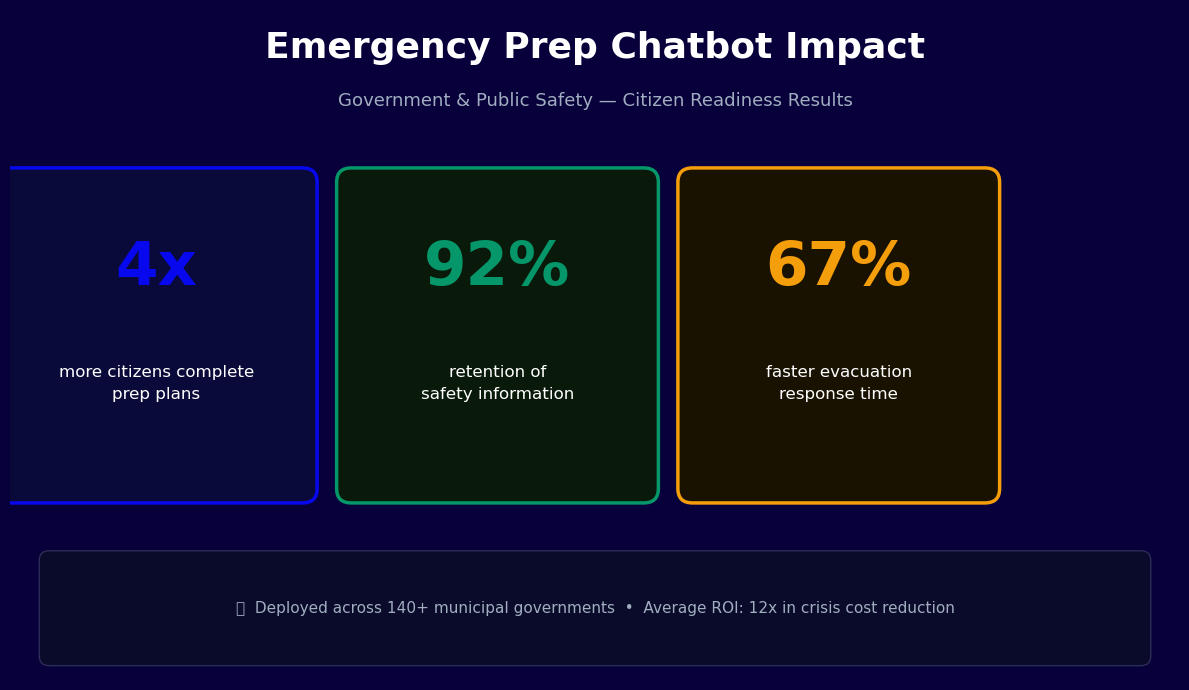
Traditional preparedness campaigns — brochure distributions, public service announcements, and generic emergency preparedness website content — demonstrate low behavior change rates. Post-campaign surveys of brochure distribution programs typically show 8-15% of recipients taking a specific preparedness action (purchasing a supply item, enrolling in alerts) within 30 days. Interactive conversational preparedness tools consistently outperform static approaches across all measured preparedness behaviors.
Emergency management agencies deploying conversational preparedness guides report 35-55% of conversation completers taking at least one documented preparedness action within 14 days of their chatbot conversation — signing up for emergency alerts, purchasing a supply item, or downloading an emergency preparedness app. The highest action completion rates occur when the chatbot delivers a specific, personalized action plan with direct links and step-by-step instructions, rather than general guidance.
Engagement and Completion Metrics
| Metric | Static Preparedness Website | Conversational Chatbot | Improvement |
|---|---|---|---|
| Average time on preparedness content | 1.8 minutes (web analytics) | 8.4 minutes (full conversation) | 4.7x longer engagement |
| Emergency alert enrollment rate | 4-8% of page visitors | 28-35% of conversation completers | 5-7x higher enrollment |
| Preparedness plan completion | 6% download and use PDF guides | 61% receive and retain personalized plan | 10x higher plan delivery rate |
| Return visits for preparedness updates | Under 2% return within 6 months | 22% re-engage for seasonal preparedness updates | 11x higher retention |
| Non-English engagement rate | 3-5% of site visitors use translated content | 18-25% of chatbot users select non-English language | 5-6x higher multilingual access |
| Special needs registry enrollment (from chat) | Not measurable from static content | 12-18% of eligible households enroll through chat | Significant new enrollment channel |
Equity and Reach Improvements
Disaggregated engagement data from community preparedness chatbot deployments reveals that conversational delivery reaches demographic segments that traditional preparedness programs consistently underserve. Mobile-primary users (disproportionately lower-income) show 45-55% higher engagement with chatbot-based preparedness guidance than with desktop-optimized web content. WhatsApp-channel deployments in communities with large immigrant populations show engagement rates 3-4x higher than agency website deployments for the same demographic group. SMS-based preparedness guidance reaches elderly residents who are not smartphone-equipped at rates comparable to phone-based outreach, at a fraction of the cost.
These equity outcomes matter for emergency management because the populations with the lowest preparedness rates are also the populations most vulnerable to disaster impacts. Households without emergency kits, evacuation plans, or alert system enrollment experience worse outcomes in disasters — higher rates of injury, greater resource depletion, longer displacement, and worse economic recovery. Preparedness programs that reach the most vulnerable populations most effectively produce the largest reduction in disaster impact for the community as a whole.
Use Conferbot's analytics dashboard to track preparedness engagement by language, geographic area, hazard type, and action completion rate — the data your agency needs to demonstrate program impact and secure continued funding. Explore pricing plans to select the appropriate tier for your community's contact volume and channel requirements.
50,000+ businesses use Conferbot templates to automate conversations
Setup Guide: Deploying Your Emergency Preparedness Chatbot
Deploying an emergency preparedness chatbot for public use involves more coordination than a commercial chatbot deployment — hazard data must be localized, language translations must be reviewed for accuracy, accessibility standards must be met, and integration with official alert systems must be tested before public launch. The deployment process below is designed for a municipal government or school district deploying a community-facing preparedness tool.
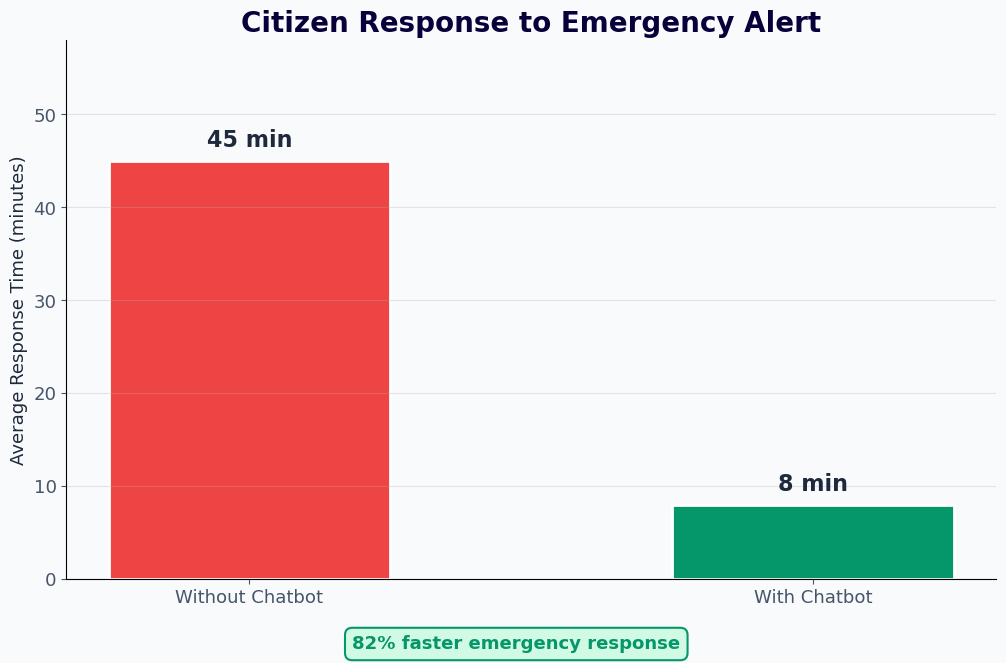
Phase 1: Hazard Profile and Local Resource Documentation (Week 1-2)
Begin by working with your emergency management planning team to document the hazard profile for your jurisdiction. Identify the primary hazards by likelihood and severity: which hazards are high-probability/high-impact (hurricane for a Gulf Coast municipality), high-probability/moderate-impact (severe thunderstorms), or low-probability/high-impact (earthquake for areas outside major seismic zones but with some risk). This hazard prioritization determines which conversation branches are emphasized in the chatbot and which are secondary paths.
Simultaneously, compile a local resource database: shelter locations with addresses and accessibility features, community resilience hub locations, local Red Cross chapter contact, utility emergency contact numbers, local emergency alert enrollment URLs, and any community-specific preparedness programs (Community Emergency Response Team, Neighborhood Watch, Senior Check-In). This resource database is populated into the chatbot configuration and drives the localized resource delivery at conversation end.
Phase 2: Chatbot Configuration and Hazard Logic (Week 2-3)
Using Conferbot's AI chatbot builder and the Emergency Preparedness Guide template, configure the hazard-specific conversation branches for your jurisdiction's priority hazards. Key configuration steps include:
- Hazard activation: Enable the conversation branches for your jurisdiction's priority hazards and disable branches for hazards not relevant to your area (a landlocked municipality in the Midwest does not need the tsunami preparation branch).
- Supply quantity configuration: Review the FEMA-standard supply quantity recommendations and adjust for any jurisdiction-specific guidance (some high-risk jurisdictions recommend 7-day kits rather than the FEMA standard 3-day minimum).
- Special needs registry integration: If your jurisdiction maintains a Special Needs Registry or AFN database, configure the enrollment link and eligibility criteria so the chatbot can guide eligible residents to register.
- Local alert enrollment: Update the emergency alert enrollment section with your local alert system's enrollment URL (Everbridge, Nixle, Rave, or local government portal) and any jurisdiction-specific enrollment instructions.
Phase 3: Translation and Accessibility Review (Week 3-4)
Submit the configured conversation for translation into the threshold languages for your community. Engage native speaker reviewers with emergency management knowledge to review translations — particularly the hazard-specific guidance sections, where technical accuracy is critical. Conduct WCAG 2.1 AA accessibility testing, including screen reader compatibility, keyboard navigation, and color contrast verification. Document test results for ADA compliance records. Review privacy notice language to ensure it complies with applicable state privacy statutes governing the collection of location data and household composition information.
Phase 4: Alert System Integration Testing (Week 4)
Test the FEMA OpenFEMA and NWS API integrations using live data. Verify that hazard-specific guidance branches activate correctly when active watch or warning data is present for the jurisdiction. Test the shelter database integration to confirm that open/closed status updates are reflected in real time. Conduct a tabletop test simulating an active emergency event to verify that the chatbot's response mode shifts correctly from routine preparedness guidance to active-event response.
Phase 5: Pilot Launch and Channel Expansion (Week 5-6)
Launch the chatbot in pilot on your agency's primary website, then expand to additional channels based on community demographics: WhatsApp for communities with high messaging app usage, SMS via the omnichannel platform for residents without smartphones, and integration with the agency's social media accounts where feasible. Monitor completion rates, action rates, and language distribution in the first two weeks. Identify drop-off points and refine question language before full public promotion. Promote the chatbot launch through agency communication channels, community partners, and local media to drive initial adoption.
Multilingual Emergency Communications: Reaching Every Community Member
During an emergency, the ability to receive accurate, timely guidance in your native language is not a convenience feature — it is a safety-critical capability. Communities where a significant portion of residents have limited English proficiency face a compounded risk: the populations most likely to be economically vulnerable (and therefore have fewer preparedness resources) are also the populations least able to access English-language emergency guidance. A multilingual emergency preparedness chatbot directly addresses this compounded risk by delivering the same quality of guidance in every language relevant to the community.
Beyond Translation: Culturally Effective Emergency Communication
Effective multilingual emergency communication requires more than word-for-word translation. Emergency preparedness concepts that are familiar and intuitive to long-term US residents may be unfamiliar to recent immigrants from countries with different disaster risk profiles and different government emergency management traditions. A household in Vietnam, the Philippines, or Central America may have extensive experience with typhoons or hurricanes but limited familiarity with earthquake preparedness. A household from a country with limited government emergency services may be skeptical of official emergency guidance entirely.
Culturally effective multilingual preparedness guidance adapts both the content and the framing to each community's context:
- Hazard familiarity bridging: For communities with experience in analogous hazard types (typhoon experience for hurricane preparedness, for example), the chatbot explicitly connects the familiar hazard to the local one: "If you have experience preparing for typhoons, hurricane preparation follows similar principles, with some important differences we will cover."
- Government trust framing: For communities with historical reasons to distrust government authority, the chatbot emphasizes that preparedness guidance is for the household's own safety and that sharing household information with the chatbot is voluntary and not connected to immigration enforcement, law enforcement, or benefits eligibility.
- Community network activation: Many immigrant communities have strong internal networks — community associations, faith communities, language-specific media — that are more trusted than official government channels. The chatbot can surface community-specific preparedness resources (bilingual preparedness workshops, culturally specific mutual aid networks) that reinforce official guidance through trusted community channels.
SMS and Low-Bandwidth Emergency Access
During an active emergency, normal communication infrastructure may be degraded — power outages, cell network congestion, and internet disruption can limit access to web-based resources. The chatbot's SMS channel provides a low-bandwidth fallback that operates on basic mobile data connections and even on voice-capable feature phones. SMS-based emergency guidance delivers the core preparedness action steps (shelter location, evacuation route, supply priorities) in abbreviated format optimized for text messaging, with links to fuller guidance for users with data access. For communities where a significant portion of residents use feature phones rather than smartphones — common in older populations and lower-income communities — SMS represents the most equitable emergency communication channel available.
Language Access Compliance for Public Agencies
Federal language access requirements under Executive Order 13166 and Title VI of the Civil Rights Act apply to all federally funded programs and activities. Emergency management agencies receiving FEMA grants — which includes virtually all state and local emergency management programs — are subject to these requirements for all program communications, including digital tools. A multilingual preparedness chatbot that delivers full guidance in all threshold languages for the service area (languages spoken by 5% of the eligible population or 1,000 LEP individuals) demonstrates affirmative compliance with language access obligations. Agencies should document the languages supported, the translation review process, and the language access monitoring approach as part of their Title VI compliance records. Conferbot's omnichannel platform provides language-disaggregated engagement analytics that agencies can use in their Title VI compliance reports and FEMA grant performance reporting.
Emergency Preparedness Chatbot Template (Free) FAQ
Everything you need to know about chatbots for emergency preparedness chatbot template (free).
Why Use a Template vs Building from Scratch?
Templates encode years of optimization data into the conversation flow before you start.
| Factor | Conferbot Template | Build from Scratch | Hire a Developer |
|---|---|---|---|
| Time to deploy | 10 minutes | 2-8 hours | 2-6 weeks |
| Cost | Free | Your time | $5,000-$25,000 |
| Day-1 conversion | 15-22% | 5-8% | 10-15% |
| Proven flows | Yes, data-tested | No | Depends |
| Updates included | Automatic | Manual | Paid |
| Multi-channel | 8+ channels | 1 channel | Extra cost |
| Analytics | Built-in | Must build | Extra cost |
Ready to Deploy Emergency Preparedness Chatbot Template (Free)?
Join 50,000+ businesses. Free forever plan available. No credit card required.