1 Free Templates Available

Best Construction Chatbot Templates

Get free, ready-to-use construction chatbot templates that help boost conversions and automate customer interactions. Start building in 2 minutes with no coding required.

100% Free
No Coding Required
Instant Deploy
🤖
67%
Higher Conversions
2min
Setup Time
24/7
Automated
1+
Templates

Explore Templates & Resources

Browse templates, learn about the category, or find answers to common questions

Categories29

Construction Templates

Choose from our collection of proven construction chatbot templates

1templates
Construction Contractor Chatbot - Construction template preview

Construction Contractor Chatbot

A professional construction and general contracting chatbot that helps homeowners and businesses scope projects, get preliminary estimates, view portfolios, and schedule consultations. Built for general contractors, home renovation companies, and construction firms to capture leads from missed calls and after-hours inquiries.

Construction
11uses
9likes

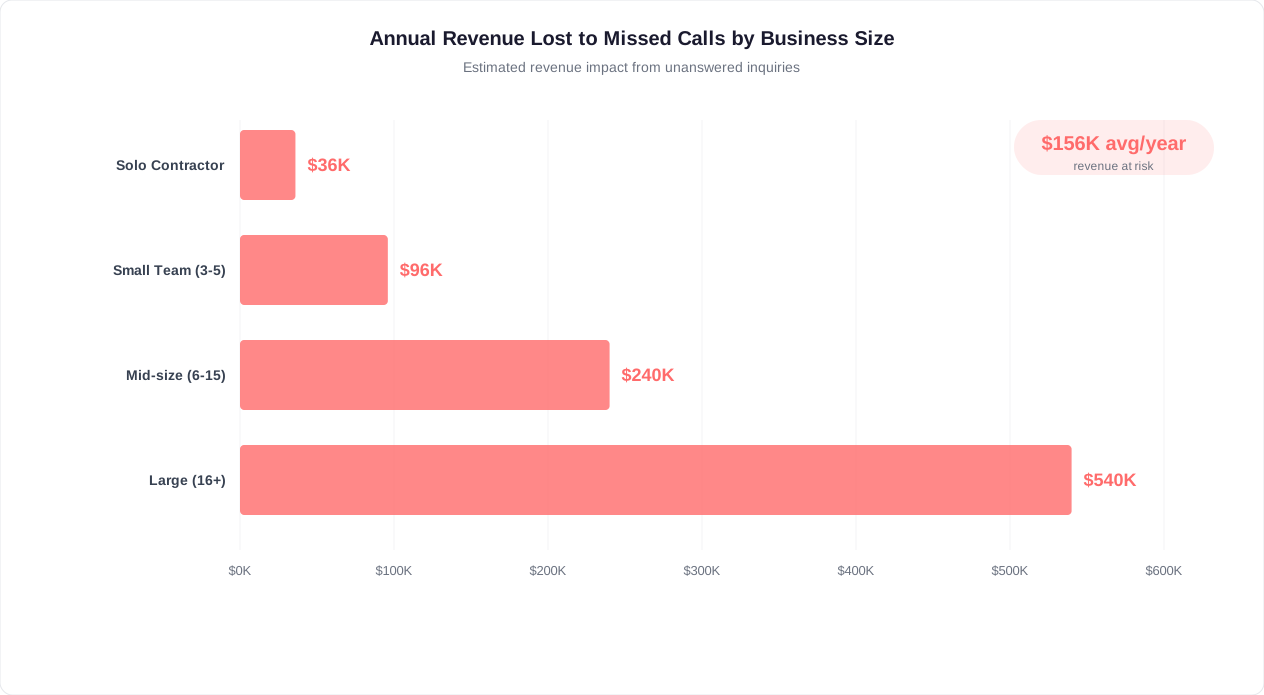
The Missed Call Problem: Why Contractors Lose $156K+ Per Year

Construction professionals spend their days on job sites, not sitting by a phone. Yet the phone remains the primary way homeowners and property managers reach out for estimates and project inquiries. The result is a staggering volume of missed calls that translate directly into lost revenue. Industry research shows that the average general contractor misses 40-60% of inbound calls during working hours -- and nearly 100% after hours. With the average residential project value ranging from $15,000 to $85,000, even a handful of missed opportunities per month adds up to six figures in lost annual revenue.

The math is sobering. A mid-sized contracting firm receiving 30 inbound inquiries per week misses approximately 15-18 of them. If just 30% of those missed calls would have converted to projects with an average value of $28,000, the contractor is losing $156,000 or more annually -- not from poor workmanship or bad reviews, but simply from being unavailable when prospects reach out. A construction chatbot deployed on your website and WhatsApp captures every single inquiry instantly, regardless of whether you are on a roof, in a trench, or driving between sites.

Revenue lost to missed calls by construction business size showing $156K+ annually for mid-sized contractors

Key Industry Stat

General contractors miss 40-60% of inbound calls during working hours and nearly 100% after hours. With average project values of $15K-$85K, this translates to $156,000+ in annual lost revenue for a mid-sized firm receiving just 30 inquiries per week.

Why Traditional Solutions Fail Contractors

Contractors have tried various workarounds for the missed call problem, and none adequately solve it:

SolutionCostLead Capture RateQualification DepthAvailability
VoicemailFree15-20% leave messagesNone24/7 (passive)
Answering service$200-$800/mo70-80%Minimal (name + number)Business hours
Office receptionist$3,000-$4,500/mo85-90%ModerateBusiness hours
Website contact formFree2-5%Low24/7 (passive)
Construction chatbot$49-$149/mo35-55%Deep (project details)24/7 (interactive)

The Speed-to-Lead Advantage

In construction, speed-to-lead is everything. Research from the National Association of Home Builders shows that 78% of homeowners hire the first contractor who responds with a substantive answer. Not the cheapest, not the most experienced -- the first one who engages meaningfully. When a homeowner decides they want a kitchen remodel or a deck built, they contact 2-3 contractors. The one who responds first with relevant questions and helpful information wins the job the majority of the time.

A chatbot provides instant, substantive responses to every inquiry. While your competitors' phones ring unanswered on a busy Tuesday morning, your chatbot is gathering project details, providing ballpark timelines, and scheduling site visits. By the time you check your phone at lunch, you have a fully qualified lead with project scope, photos, budget range, and a confirmed appointment -- while your competitors have a voicemail they might return tomorrow. Build your always-available lead capture system with the no-code chatbot builder in under 30 minutes.

Real-World Impact by Business Size

  • Solo contractor (5-10 inquiries/week): Captures 3-5 additional qualified leads per week, adding $45,000-$120,000 in annual project revenue.
  • Small crew (15-25 inquiries/week): Recovers 8-12 missed leads weekly, translating to $180,000-$350,000 in additional annual revenue.
  • Mid-sized firm (30-50 inquiries/week): Prevents loss of 15-25 leads weekly, protecting $350,000-$700,000+ in annual pipeline value.

The construction chatbot does not replace your phone -- it ensures that when your phone is unavailable, prospects still receive immediate, professional engagement that keeps them in your pipeline rather than moving to the next contractor on their list.

Automated Project Scoping and Lead Qualification

Not every inquiry is worth a site visit. The construction industry has a well-known problem with tire-kickers -- people who request estimates with no intention of moving forward, homeowners with budgets far below project reality, or prospects seeking free consulting rather than actual construction services. A skilled estimator's time costs $75-$150 per hour, and a typical site visit consumes 2-4 hours including travel. Sending your best people to unqualified leads is one of the most expensive mistakes a construction business can make. An AI-powered project scoping chatbot gathers the critical information needed to qualify leads before you invest a single hour of field time.

The chatbot walks prospects through a structured but conversational scoping process that feels helpful rather than interrogative. It asks about project type, scope, timeline, budget range, property details, and decision-making authority -- all the questions an experienced estimator would ask on a first phone call, but available instantly and consistently for every single inquiry. By the time the lead reaches your team, you already know whether it is worth pursuing and have enough detail to provide an intelligent preliminary assessment.

The Qualification Framework

An effective construction lead qualification chatbot evaluates prospects across five dimensions, using natural language processing to understand nuanced responses:

Qualification DimensionWhat the Bot AsksWhy It MattersDisqualification Signal
Budget alignmentBudget range, financing statusPrevents mismatched expectationsBudget 50%+ below project reality
Timeline readinessDesired start date, urgencyAligns with your availability"Just exploring" with no timeline
Decision authorityProperty ownership, other decision-makersEnsures you are talking to the buyerTenant without landlord approval
Scope clarityProject description, square footage, special requirementsDetermines estimating complexityExtremely vague, no specific project
Service area fitProperty address or zip codeEnsures geographic feasibilityOutside your service radius

Conversational Scoping in Action

Rather than presenting a long form, the chatbot engages naturally. A homeowner might say "I want to remodel my kitchen" and the chatbot responds with targeted follow-up questions: What is the approximate size of the kitchen? Are you looking to change the layout or keep the existing footprint? Will you need new appliances? Do you have specific materials in mind -- granite countertops, custom cabinetry? Each answer refines the scope and helps your estimator arrive at the site visit with a preliminary understanding of the project.

The chatbot also collects visual information that dramatically improves pre-qualification. It prompts prospects to upload photos of the current space, inspiration images, sketches, or architectural drawings. For renovation projects, photos of existing conditions help your team identify potential complications -- structural concerns, outdated electrical panels, asbestos-era materials -- before committing to a site visit. This visual intake, combined with conversational scoping, gives your estimators more pre-visit information than a traditional 15-minute phone call.

ROI Insight

Construction businesses using chatbot pre-qualification report 60-70% reduction in unqualified site visits, saving an average of 12-18 hours per week in estimator time. At $100/hour estimator cost, that is $62,400-$93,600 in annual productivity recovered.

Lead Scoring for Construction

The chatbot assigns a lead score based on qualification responses, automatically routing leads to the appropriate workflow:

  • Hot leads (score 80-100): Budget-ready, timeline within 30 days, clear scope, decision-maker confirmed. These get immediate notification to your sales team or estimator for same-day follow-up.
  • Warm leads (score 50-79): Interested but missing one element -- perhaps budget is uncertain or timeline is 60-90 days out. These enter a nurture sequence with periodic check-ins via WhatsApp or email.
  • Cold leads (score below 50): Missing multiple qualification criteria. The chatbot provides helpful resources (budget guides, project planning checklists) and invites them to return when ready, without consuming estimator time.

This intelligent routing ensures your highest-value resource -- estimator field time -- is reserved for prospects most likely to become paying clients. Configure custom scoring rules through the no-code builder to match your specific qualification criteria and project minimums.

Trade-Specific Scoping Templates

Different construction trades require different qualifying questions. A roofing chatbot needs to know about roof pitch, material preferences, and storm damage claims. A plumbing chatbot asks about water heater age, pipe material, and whether there is an active emergency. An electrical chatbot inquires about panel capacity, desired upgrades, and permit requirements. Conferbot provides pre-built scoping templates for 20+ construction trades that you can customize with your specific qualifying criteria and service parameters.

Estimate Request and Site Visit Scheduling

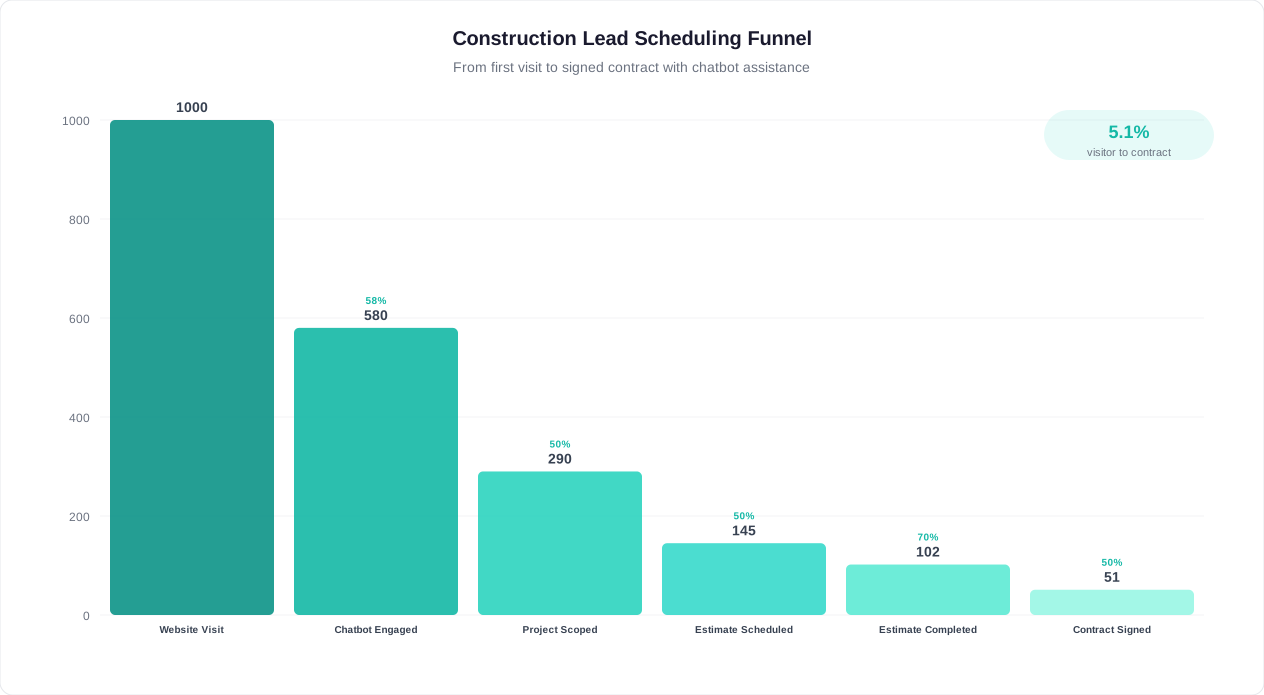
The estimate scheduling process is where construction businesses lose the most qualified leads. A prospect who has already expressed interest, described their project, and indicated budget readiness will abandon the process if scheduling a site visit requires phone tag or email back-and-forth. Studies show that 35% of qualified construction leads are lost between initial inquiry and scheduled estimate -- not because the prospect chose a competitor, but because the scheduling friction caused them to procrastinate and eventually forget or deprioritize the project. A contractor scheduling chatbot eliminates this drop-off by allowing instant, frictionless appointment booking.

The scheduling chatbot integrates with your team's calendar system to show real-time availability, allowing prospects to book a site visit immediately after completing the scoping conversation. There is no waiting for a callback, no email exchange, and no uncertainty about when someone will show up. The prospect selects a convenient time slot, confirms their address, and receives an instant confirmation -- all within the same chat conversation where they described their project. This seamless transition from scoping to scheduling captures leads at their peak moment of interest.

Intelligent Scheduling Logic

Construction scheduling is more complex than booking a doctor's appointment. The chatbot handles the unique requirements of field-based scheduling:

Scheduling FactorHow the Chatbot Handles ItBusiness Benefit
Geographic clusteringGroups appointments by zip code/area to minimize drive timeSaves 3-5 hours/week in travel
Estimator specializationRoutes kitchen remodels to interior specialist, structural work to engineering-trained estimatorMore accurate first estimates
Visit durationAllocates 30 min for simple projects, 90 min for complex renovations based on scopePrevents scheduling conflicts
Weather sensitivityOffers indoor alternatives for exterior project estimates during forecast rainReduces cancellations
Homeowner availabilityOffers early morning, lunch hour, and evening slots for working homeownersHigher show rates

Pre-Visit Preparation Workflow

Once a site visit is scheduled, the chatbot continues working. It sends a preparation checklist to the homeowner: clear the work area if possible, have any HOA guidelines available, gather inspiration photos, note any specific concerns. This preparation means your estimator arrives at a site where the homeowner is ready and informed, reducing visit duration by 20-30% and improving estimate accuracy.

The chatbot also compiles a pre-visit brief for your estimator that includes all scoping information, uploaded photos, stated budget range, timeline expectations, and any special requirements mentioned during the conversation. Your estimator reviews this brief before arriving, enabling them to prepare preliminary material lists, identify potential challenges, and arrive with informed questions rather than starting from scratch.

Estimate scheduling funnel showing lead-to-appointment conversion rates with and without chatbot automation

Automated Reminders and No-Show Prevention

No-shows are a significant cost in construction. When a homeowner forgets about a scheduled estimate, your estimator wastes 30-60 minutes in travel plus the blocked time slot. The chatbot implements a multi-touch reminder sequence:

  • 48 hours before: Confirmation message with option to reschedule if plans changed
  • 24 hours before: Reminder with estimator name and what to prepare
  • 2 hours before: "Your estimator [Name] is on the way" message with arrival window
  • Post-visit (same day): Thank-you message with timeline for receiving the formal estimate

This sequence reduces no-show rates from the industry average of 20-30% to under 8% for chatbot-scheduled appointments. Connect the reminder workflow through omnichannel messaging to reach homeowners on their preferred platform -- SMS, WhatsApp, or email.

Scheduling Impact

Construction businesses using chatbot scheduling report 45% more estimates booked per month, 65% reduction in scheduling-related phone calls, and no-show rates dropping from 20-30% to under 8%. Each additional completed site visit represents $4,200-$12,600 in potential project revenue.

Follow-Up After the Estimate

The chatbot's role does not end at the site visit. After your estimator delivers the formal proposal, the chatbot follows up at configured intervals: "Have you had a chance to review the estimate? Do you have any questions I can help with?" This persistent but non-pushy follow-up keeps your proposal top-of-mind and provides an easy channel for prospects to ask clarifying questions without needing to call. Construction businesses report that chatbot follow-up sequences convert 15-25% more proposals into signed contracts compared to manual follow-up alone.

Set up your complete estimate scheduling and follow-up workflow using the no-code chatbot builder with pre-built construction scheduling templates.

After-Hours Lead Capture for Construction Businesses

Construction business owners know a frustrating truth: the people who need their services work the same hours they do. Homeowners research contractors and request estimates during evenings and weekends -- precisely when construction businesses are closed. Data from construction industry marketing platforms shows that 62% of contractor website traffic occurs between 6 PM and 9 AM, with peak activity on Sunday evenings as homeowners plan their week ahead. Without an after-hours engagement system, these visitors browse your portfolio, read your reviews, and then leave without making contact -- often reaching a competitor who responds first the next morning.

An after-hours construction chatbot transforms these silent evening visitors into captured, qualified leads waiting in your inbox every morning. The chatbot engages visitors with the same professionalism and project-scoping capability as your best receptionist, gathering project details, photos, budget ranges, and scheduling preferences -- even at 11 PM on a Saturday. When you arrive Monday morning, instead of an empty voicemail box, you have a queue of fully scoped leads ready for follow-up and appointment booking.

When Construction Leads Actually Arrive

Time Window% of Website Traffic% of Form SubmissionsChatbot Capture RateAvg. Project Value
6 AM - 8 AM (pre-work)8%5%32%$22,000
8 AM - 5 PM (business hours)38%65%42%$35,000
5 PM - 9 PM (evening)32%22%38%$28,000
9 PM - 6 AM (overnight)14%5%28%$18,000
Weekends22%8%35%$42,000

Notice the dramatic gap between traffic and form submissions during after-hours periods. While 62% of traffic arrives outside business hours, only 30% of form submissions occur during those times. The chatbot closes this gap by actively engaging visitors rather than passively waiting for them to fill out a form. Weekend visitors, who often represent the highest-value projects (homeowners planning major renovations), are particularly responsive to chatbot engagement.

After-Hours Opportunity

Weekend website visitors to construction sites have the highest average project value ($42,000) but the lowest form submission rate (8% of total). These are homeowners seriously planning major projects -- exactly the leads you cannot afford to miss. Chatbot engagement captures 35% of these high-value visitors.

Emergency and Urgent Request Handling

Some after-hours inquiries are time-sensitive: a burst pipe, storm damage, a broken furnace in winter. The chatbot identifies emergency keywords and urgency signals, routing these contacts differently from standard project inquiries. For emergency-capable contractors (plumbers, roofers, electricians, HVAC), the chatbot can:

  • Trigger immediate SMS alerts to on-call personnel for true emergencies
  • Provide emergency mitigation guidance (shut off water main, cover exposed roof area) while help is dispatched
  • Collect damage documentation -- photos, videos, descriptions -- that help your team prepare before arrival
  • Communicate estimated response times and set expectations for after-hours service rates

This emergency handling capability turns your chatbot into a 24/7 dispatch system that captures high-urgency, high-value service calls that would otherwise go to whichever competitor the homeowner finds first at 2 AM. Deploy after-hours emergency handling across website, WhatsApp, and other channels through omnichannel deployment.

The Morning Briefing

Each morning, the chatbot delivers a summary of overnight activity: new leads captured, their qualification scores, project types, and recommended next actions. Your sales team or office manager starts the day with a prioritized list of prospects to contact, complete with project details and the prospect's stated availability for callbacks. This "morning briefing" approach means no lead captured at midnight sits untouched until someone remembers to check the inbox -- every after-hours lead gets prompt morning follow-up, maintaining the speed-to-lead advantage that wins construction projects.

Chatbots for Commercial vs. Residential Contractors

Commercial and residential construction operate on fundamentally different scales, timelines, and decision-making processes -- and the chatbot serving each must reflect these differences. A homeowner asking about a bathroom remodel has different needs, vocabulary, and expectations than a commercial property manager requesting a tenant improvement proposal or a general contractor seeking subcontractor bids. Effective construction chatbot templates account for these distinctions with tailored conversation flows, qualification criteria, and response patterns for each market segment.

The most successful construction businesses deploy segment-specific chatbot configurations that speak each audience's language. A residential chatbot uses approachable language, discusses budget in terms of monthly payments or project ranges, and focuses on aesthetics and lifestyle improvements. A commercial chatbot uses industry terminology, discusses scope in terms of square footage and tenant requirements, and focuses on timelines, compliance, and total cost of ownership. Conferbot's no-code builder allows you to create separate flows or a single intelligent bot that adapts based on the visitor's identified segment.

Residential vs. Commercial Chatbot Requirements

FeatureResidential ChatbotCommercial Chatbot
Language styleFriendly, jargon-free, reassuringProfessional, technical, industry-specific
Budget discussionRanges ($15K-$25K), monthly paymentsPer SF costs, total project budgets, bid packages
Decision timelineDays to weeksWeeks to months (committees, approvals)
Qualification focusBudget, timeline, homeownershipProject scale, bid deadline, prequalification
Content offeredPortfolio photos, testimonials, financingSafety records, bonding capacity, project sheets
Follow-up cadenceQuick (1-2 days)Extended (weeks, aligned to bid schedules)
Key integrationsCalendar, reviews, photo galleryPlan rooms, prequalification systems, CRM

Residential Chatbot Strategies

Residential prospects are often navigating construction for the first time. They are anxious about costs, timelines, and whether they will be satisfied with the result. The residential chatbot builds confidence through:

  • Portfolio matching: "I see you are interested in a kitchen remodel. Here are three recent kitchen projects similar to what you described -- would you like to see more details on any of these?"
  • Budget guidance: "Based on your kitchen size and the finishes you mentioned, similar projects in your area typically range from $35,000 to $55,000. Would you like to discuss what affects that range?"
  • Process education: "Here is what the typical kitchen remodel process looks like: design (2-3 weeks), permitting (1-2 weeks), demolition and construction (6-8 weeks). I can walk you through each step."
  • Social proof: "We have completed 47 kitchen remodels in [City] with a 4.9-star average rating. Would you like to read reviews from homeowners with similar projects?"

Commercial Chatbot Strategies

Commercial prospects -- property managers, developers, facility directors -- have different pain points. They need to know you can handle the scale, meet deadlines, and navigate regulatory requirements. The commercial chatbot demonstrates capability through:

  • Prequalification data: Proactively sharing bonding capacity, insurance coverage, safety EMR rating, and minority/veteran certifications that commercial clients require.
  • Project matching: "We have completed 12 tenant improvement projects over 10,000 SF in the past year. Here is a relevant case study for a similar retail buildout."
  • Bid process support: "I can help you submit an RFP or bid invitation to our estimating team. What is the bid deadline, and do you have plans available for download?"
  • Compliance awareness: Asking about Davis-Bacon requirements, prevailing wage obligations, LEED certification goals, and ADA compliance needs upfront.

Dual-Market Tip

Contractors serving both markets should use a single chatbot with an early routing question: "Are you looking for help with a residential project or a commercial/business project?" This simple branch allows the conversation to adapt tone, vocabulary, qualification criteria, and follow-up workflows to each segment -- all from one deployment.

Multi-Family and Developer Workflows

Multi-family and real estate development projects require specialized chatbot handling. These prospects often represent repeat business worth millions in lifetime value. The chatbot recognizes developer inquiries and routes them to senior estimators, provides corporate capability statements automatically, and facilitates multi-project pipeline discussions. For property management companies needing ongoing maintenance and renovation services, the chatbot can manage recurring service requests, preventive maintenance scheduling, and tenant improvement coordination across an entire portfolio.

Whether you serve homeowners, commercial clients, or both, configure your segment-specific flows with Conferbot's no-code builder and deploy across web, WhatsApp, and other channels simultaneously.

Subcontractor Coordination and Trade-Specific Routing

General contractors and construction managers face a constant coordination challenge: matching incoming project inquiries to the right specialty trade, managing subcontractor availability, and ensuring that leads requiring multiple trades are properly scoped before the first site visit. A construction chatbot with trade-specific routing acts as an intelligent dispatcher that identifies the trades needed for each project and routes inquiries to the appropriate team members or subcontractor partners -- instantly and accurately, without the typical game of phone tag that delays project initiation.

Consider a homeowner who contacts a general contractor about "fixing up their basement." This single inquiry might involve framing, electrical, plumbing, HVAC, drywall, flooring, and finish carpentry -- six or seven distinct trades. Without intelligent routing, the inquiry goes to whoever answers the phone, gets a generic response, and requires multiple follow-up calls to scope properly. With a chatbot, the conversation naturally uncovers which trades are needed, what the homeowner has already arranged, and what they need the GC to handle, enabling proper multi-trade coordination from the first interaction.

Trade Identification and Routing Logic

The chatbot uses natural language processing to identify trade requirements from conversational descriptions and route accordingly:

Prospect SaysTrades IdentifiedRouting ActionPriority Level
"My roof is leaking into the attic"Roofing, possibly insulationRoute to roofing team + flag urgencyEmergency
"I want to add a bathroom to my basement"Plumbing, electrical, framing, tile, HVACRoute to GC estimator (multi-trade)Standard
"Need to upgrade my electrical panel"ElectricalRoute to electrical division/subStandard
"Building a new house from scratch"All trades (new construction)Route to new construction PMHigh value
"Pipes froze and burst overnight"Plumbing, water mitigation, drywallEmergency dispatch + mitigation tipsEmergency

Subcontractor Availability Management

For general contractors who rely on subcontractor networks, the chatbot can check availability before promising timelines. When a prospect asks about timeline for a kitchen remodel, the chatbot references your subcontractor availability calendar to provide realistic start dates rather than optimistic guesses that lead to disappointed clients. This integration prevents the common problem of selling a project on a timeline your subs cannot support.

The chatbot can also serve as a subcontractor intake tool. When your trusted subs have capacity, they update their availability through a simple chatbot interface. When your subs are booked, the chatbot automatically adjusts timeline estimates for new prospects or flags that additional subcontractor sourcing is needed for the project type.

Coordination Efficiency

General contractors using chatbot-based trade routing report 40% faster project initiation and 55% fewer miscommunication issues during the scoping phase. Multi-trade projects are properly identified at first contact rather than discovered incrementally over multiple site visits.

Trade-Specific Question Libraries

Each construction trade has unique qualifying questions that determine scope and complexity. The chatbot maintains specialized question libraries for each trade:

  • Roofing: Roof type (flat/pitched), approximate square footage, age of current roof, storm damage (insurance claim?), material preference (shingle/metal/tile), number of layers currently installed
  • Electrical: Panel age and amperage, specific issues (flickering, tripping breakers), desired additions (EV charger, hot tub, home office), knob-and-tube concerns, permit history
  • Plumbing: Water heater age and type, pipe material (copper/PEX/galvanized), well or municipal water, sewer or septic, known issues (low pressure, discoloration, odor)
  • HVAC: System age, fuel type, square footage heated/cooled, ductwork condition, desired efficiency improvements, any zones not reaching temperature
  • Concrete/Masonry: Area dimensions, current surface condition, load requirements (vehicle traffic?), drainage concerns, decorative vs. structural purpose

Multi-Contractor Project Coordination

For large projects requiring multiple contractors, the chatbot facilitates coordination from the start. It identifies all trades needed, checks which your company handles in-house versus which require subcontractors, and creates a preliminary project coordination timeline. The prospect receives a comprehensive understanding of their project's complexity and a realistic timeline, while your project managers receive a pre-organized scope breakdown that accelerates the estimating process.

Configure trade routing rules, subcontractor databases, and coordination workflows through the API integration system to connect with your existing project management and scheduling tools.

Integration with Construction CRM and Project Management

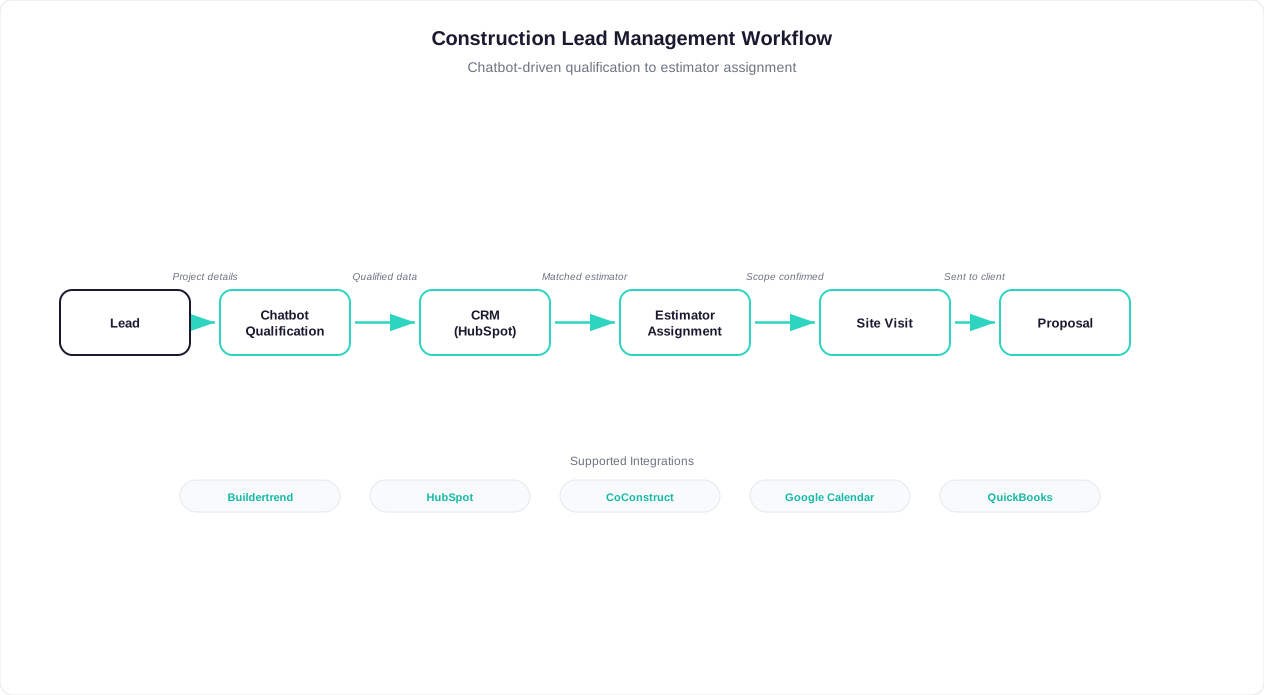
A construction chatbot delivers maximum value when it connects seamlessly with the tools your team already uses daily. Isolated leads sitting in a chatbot dashboard create extra work -- your team has to manually transfer information into your CRM, estimating software, and project management system. With proper API integration, every lead captured by the chatbot flows automatically into your existing workflow, creating contacts, populating project fields, attaching photos, and triggering follow-up sequences without any manual data entry.

The construction industry relies on specialized software that general-purpose chatbot platforms often ignore. From estimating tools like ProEst and STACK to project management platforms like Procore, Buildertrend, and CoConstruct, and CRMs like JobNimbus and MarketSharp, your chatbot needs to speak the language of construction technology. Conferbot's integration framework connects with these industry-specific tools through native integrations and a flexible API that ensures chatbot-captured data arrives in the right system, in the right format, ready for your team to act on.

Integration Ecosystem for Construction

CategoryPopular ToolsData Synced from ChatbotAutomation Enabled
Construction CRMJobNimbus, MarketSharp, LeapContact, project scope, photos, lead scoreAuto-create opportunity, assign rep
Project managementProcore, Buildertrend, CoConstructProject details, client info, timelinesCreate lead/project, populate scope
Estimating softwareProEst, STACK, Clear EstimatesScope details, dimensions, material prefsPre-populate estimate, attach photos
General CRMHubSpot, Salesforce, PipedriveFull contact and conversation dataPipeline stage, task assignment, nurture
Calendar/schedulingGoogle Calendar, Calendly, AcuityAppointment details, attendees, notesBook estimate, send confirmations
AccountingQuickBooks, Xero, FoundationCustomer record, project classificationCreate customer, link to estimate
Data flow diagram showing construction chatbot integration with CRM, project management, and estimating tools

Zero-Touch Lead Processing

The goal of integration is zero-touch lead processing -- from first chatbot interaction to CRM record to scheduled estimate without any manual intervention. Here is what this looks like in practice:

  1. Chatbot captures lead: Homeowner describes kitchen remodel project, uploads photos, indicates $40K-$60K budget, wants to start in 6 weeks.
  2. CRM record created: New opportunity automatically appears in your CRM with all chatbot conversation data, photos attached, lead scored as "hot."
  3. Estimator assigned: Based on project type and geography, the CRM assigns the lead to the appropriate estimator and sends them a notification.
  4. Estimate pre-populated: Your estimating software receives project dimensions, material preferences, and scope notes, giving the estimator a head start.
  5. Appointment booked: The chatbot already scheduled a site visit on the estimator's calendar with the homeowner's address and access instructions.
  6. Reminder sequence activated: Automated reminders go to both the homeowner and estimator at configured intervals before the visit.

This entire workflow happens in seconds, without anyone on your team touching a keyboard. The first human involvement is the estimator reviewing their pre-visit brief before driving to the site.

Integration Impact

Construction businesses with fully integrated chatbot workflows report 75% reduction in administrative lead processing time, 90% fewer data entry errors, and 3x faster speed-to-first-contact. The average office manager saves 8-12 hours per week previously spent on manual lead intake and CRM updates.

Webhook and API Flexibility

For construction businesses using custom or legacy systems, Conferbot provides webhook endpoints and a RESTful API that can push chatbot data to virtually any system. Common custom integration scenarios include:

  • Custom estimating spreadsheets: Chatbot data auto-populates your Excel or Google Sheets estimating templates with project dimensions and material selections.
  • Dispatch systems: Emergency service calls trigger immediate dispatch notifications with location, issue description, and customer contact information.
  • Inventory/purchasing: Preliminary material requirements from chatbot scoping flow into your purchasing system for early availability checks.
  • Reporting dashboards: Lead volume, source, type, and conversion data feeds into your business intelligence tools for marketing ROI analysis.

Set up integrations through the integration configuration panel with pre-built connectors for popular construction tools, or use the API documentation to build custom connections to specialized systems.

Getting Started with Your Construction Chatbot

Launching a construction chatbot does not require technical expertise or weeks of setup. Conferbot's no-code chatbot builder includes pre-built construction templates that you can customize and deploy in under an hour. Whether you are a solo roofer or a 50-person general contracting firm, the setup process follows the same straightforward path: choose your template, customize your services and qualification criteria, connect your calendar, and deploy to your website and messaging channels.

The key to a successful construction chatbot deployment is starting focused and expanding over time. Rather than trying to build a bot that handles every possible scenario on day one, begin with your highest-value use case -- typically lead capture and estimate scheduling for your primary service -- and add capabilities as you see results and understand how prospects interact with the bot. Construction businesses that follow this incremental approach report faster time-to-value and higher long-term satisfaction than those who attempt comprehensive deployments from the start.

Step-by-Step Deployment Guide

StepActionTime RequiredWhat You Need
1Choose your construction template (GC, roofing, plumbing, electrical, etc.)5 minutesKnow your primary trade/services
2Customize services, service area, and pricing ranges15-20 minutesService list, zip codes served, project minimums
3Set qualification criteria and lead scoring rules10-15 minutesMinimum project value, ideal client profile
4Connect calendar for estimate scheduling5 minutesGoogle Calendar or scheduling tool access
5Set up notifications (email, SMS, or app alerts for new leads)5 minutesEmail address, phone number
6Deploy to website (single line of code or WordPress plugin)5-10 minutesWebsite access or developer contact
7Optional: Deploy to WhatsApp, Facebook, Google Business10-15 minutes per channelBusiness accounts on each platform
8Test the complete flow (submit test lead, verify notifications)10 minutesA second device or browser

Total setup time: 45-75 minutes for a fully functional construction chatbot capturing leads, qualifying prospects, and scheduling estimates.

Choosing the Right Template

Conferbot offers specialized construction templates for different trades and business models:

  • General Contractor template: Multi-trade scoping, subcontractor routing, project complexity assessment, new construction and renovation flows.
  • Roofing template: Storm damage assessment, insurance claim guidance, roof type identification, material selection, emergency tarp service.
  • Plumbing/HVAC template: Emergency vs. scheduled service routing, system age assessment, diagnostic questions, maintenance plan enrollment.
  • Electrical template: Panel assessment, safety concern triage, upgrade scoping, EV charger installation, code compliance questions.
  • Remodeling template: Room-by-room scoping, design preference capture, budget range alignment, inspiration photo collection.
  • Landscaping/Hardscape template: Property size assessment, project type selection, maintenance vs. installation, seasonal scheduling.

Quick Start Tip

Start with the template closest to your primary service, customize the services list and qualification criteria, and deploy. You can add complexity, integrations, and additional channels over the following weeks as you see how prospects interact with your bot. Most construction businesses see their first qualified lead within 48 hours of deployment.

Optimization After Launch

Once your chatbot is live, monitor its performance and optimize based on real data:

  • Week 1-2: Review all conversations. Are prospects dropping off at a specific question? Simplify or reword it. Are they asking questions the bot cannot answer? Add those to your knowledge base.
  • Week 3-4: Analyze lead quality. Are the leads the chatbot scores as "hot" actually converting to projects? Adjust scoring weights if needed.
  • Month 2: Add your second-highest-value use case. If you started with lead capture, add estimate follow-up. If you started with residential, add a commercial flow.
  • Month 3+: Connect integrations with your CRM and project management tools. Add WhatsApp and social channels. Implement post-project review collection.

Measuring Success

Track these metrics to quantify your construction chatbot ROI:

  • Leads captured per week: Total new inquiries the chatbot collects (target: 50-100% increase over pre-chatbot baseline)
  • Qualification rate: Percentage of captured leads that meet your criteria (target: 60-80%)
  • Estimate booking rate: Percentage of qualified leads who schedule a site visit (target: 40-60%)
  • Show rate: Percentage of scheduled estimates where the homeowner is available (target: 85-92%)
  • Proposal-to-close rate: Track whether chatbot-originated leads close at higher rates than other sources
  • Response time: Measure how quickly leads receive substantive engagement (target: under 30 seconds, 24/7)

Ready to stop losing leads to missed calls and slow follow-up? Start with a free construction chatbot template from Conferbot's no-code builder and capture your first qualified lead today. Deploy across your website, WhatsApp, and social channels through omnichannel deployment to ensure you never miss another opportunity -- no matter where or when prospects reach out.

FAQ

Construction Templates FAQ

Everything you need to know about chatbots for construction templates.

🔍
Popular:

Most construction businesses can deploy a fully functional chatbot in under one hour using Conferbot's pre-built construction templates. Choose your trade-specific template (general contractor, roofing, plumbing, electrical, remodeling, etc.), customize your services and service area, connect your calendar, and deploy to your website. No coding is required. You can add additional channels like WhatsApp and Facebook in 10-15 minutes per channel after your initial website deployment.

Yes, the chatbot operates completely independently on your website and messaging channels -- it does not require you to be online or available. It captures leads, qualifies prospects, collects project details, and schedules estimates 24/7 regardless of your availability. When you regain connectivity, you will find fully qualified leads with project scopes, photos, and scheduled appointments waiting in your inbox or CRM. The bot handles everything from first contact through appointment booking without any intervention from you.

The chatbot uses natural language processing to identify project types from conversational descriptions and adapts its questions accordingly. A prospect mentioning a kitchen remodel gets questions about cabinet preferences, countertop materials, and appliance needs. Someone asking about a roof replacement gets questions about current roofing material, home square footage, and storm damage. The bot maintains trade-specific question libraries for 20+ construction specialties and can identify multi-trade projects that require general contractor coordination.

Yes, the chatbot evaluates prospects across five qualification dimensions: budget alignment (is their budget realistic for the project?), timeline readiness (do they have a start date in mind?), decision authority (are they the property owner or decision-maker?), scope clarity (do they have a specific project, not just vague interest?), and geographic fit (are they in your service area?). Each response contributes to a lead score that automatically categorizes leads as hot, warm, or cold, ensuring your estimator's time is spent only on serious prospects.

Yes, Conferbot integrates with popular construction industry tools including project management platforms (Procore, Buildertrend, CoConstruct), CRMs (JobNimbus, MarketSharp, Leap), estimating software (ProEst, STACK, Clear Estimates), and general business tools (QuickBooks, Google Calendar, HubSpot). Data flows automatically from chatbot conversations into your existing systems -- contacts are created, projects are initiated, and estimates are pre-populated without manual data entry. Custom integrations are available through webhooks and the REST API.

The chatbot identifies emergency keywords and urgency signals (burst pipe, roof leak, no heat, flooding) and routes these contacts differently from standard inquiries. For emergency-capable contractors, it can trigger immediate SMS alerts to on-call personnel, provide emergency mitigation guidance (shut off water main, cover exposed areas), collect damage photos and documentation, and communicate estimated response times. This ensures time-sensitive, high-value emergency calls reach you immediately rather than sitting in a voicemail box until morning.

A construction chatbot costs $49-$149 per month compared to $3,000-$4,500 per month for a full-time receptionist. The chatbot is available 24/7 (not just business hours), captures leads with deeper project qualification than a typical phone call, never calls in sick, and handles unlimited simultaneous conversations. Construction businesses report capturing 50-100% more leads, reducing unqualified site visits by 60-70%, and recovering $156,000+ in annual revenue previously lost to missed calls. The typical ROI payback period is under 30 days.

Absolutely. You can deploy a single chatbot with an early routing question that identifies whether the visitor needs residential or commercial services. Based on their answer, the conversation adapts its tone (friendly vs. professional), vocabulary (budget ranges vs. per-SF costs), qualification criteria (homeownership vs. bid deadlines), and follow-up workflows. Alternatively, you can create separate bots for each segment if you prefer completely distinct experiences. Both approaches work seamlessly with Conferbot's no-code builder.

The chatbot prompts prospects to upload photos at relevant points in the conversation -- current condition of the space, inspiration images, architectural drawings, or damage documentation. Prospects can upload directly within the chat widget on your website or send photos via WhatsApp and other messaging channels. All uploaded files are attached to the lead record and passed to your CRM and estimating tools through integrations, giving your team visual context before the first site visit.

When the chatbot encounters a question outside its configured knowledge base, it responds honestly that it does not have that specific information and offers to connect the prospect with your team. It captures the question and the prospect's contact details, then notifies your team for follow-up. You can review unanswered questions in your dashboard and add answers to your chatbot's knowledge base over time, making it progressively smarter. The bot never fabricates answers or provides inaccurate information about your services, pricing, or capabilities.

How to Use Construction Chatbot Templates

Siga estos sencillos pasos para configurar su chatbot construction y ponerlo en funcionamiento en minutos

🏗️

1. Choose Your Template

Select from project inquiry, estimate scheduling, lead qualification, and after-hours capture templates.

✏️

2. Customize Your Services

Add your trade specialties, service area, project types, licensing info, and portfolio highlights.

🔗

3. Connect Your CRM

Integrate with Buildertrend, CoConstruct, HubSpot, or your preferred CRM for automated lead routing.

🎯

4. Set Up Lead Scoring

Configure project scope qualification, budget ranges, timeline assessment, and priority routing rules.

📊

5. Deploy & Stop Missing Leads

Launch on your website and messaging channels. Capture leads 24/7 while you're on the job site.

Por Qué Elegir Nuestras Plantillas Construction ?

Compare los beneficios de usar plantillas profesionales versus construir desde cero

Con las Plantillas de Conferbot

  • Implementación en 10 minutos
  • Patrones de conversión probados
  • Mejores prácticas de la industria incluidas
  • Integraciones listas para usar
  • Actualizaciones y mejoras continuas
  • Soporte experto 24/7
  • Gratis para comenzar

Construcción desde Cero

  • Semanas o meses de desarrollo
  • Enfoque de prueba y error
  • Sin patrones probados
  • Configuración de integración compleja
  • Carga de mantenimiento continua
  • Recursos de soporte limitados
  • Costos de desarrollo altos

¿Listo para Transformar Su Construction?

Únase a miles de empresas usando nuestras plantillas construction para automatizar conversaciones y mejorar resultados