
Get Unmatched Conversational Automation Abilities with Conferbot Chatbots Powered by OpenAI
No credit card required
Human + Bot, Working Together
Combine the efficiency of chatbots with the empathy of human agents for the best customer experience.
Seamless Bot-to-Human Handoff
Automatically transfer conversations from chatbot to human agent when needed, with full context and conversation history preserved for a smooth customer experience.
Intelligent Conversation Routing
Route conversations to the right agent based on skill, department, language, or availability with smart load-balancing and round-robin distribution.
Quick Responses & Canned Replies
Equip agents with pre-written responses for common questions, reducing response time and maintaining consistency across your support team.
Why Live Chat Matters
The best support strategy combines automated bot responses with human expertise when it counts.
Seamless Handoff
Automatically transfer conversations from bot to human agent when needed, with full context and chat history preserved.
Smart Routing
Route conversations to the right agent based on skill, department, language, or availability. Load-balance across teams.
Agent Dashboard
Real-time dashboard for agents to manage multiple conversations, view customer profiles, and track queue metrics.
Canned Responses
Pre-built response templates for common queries. Agents respond faster with one-click or keyboard shortcut access.
Typing Indicators
Real-time typing indicators, read receipts, and presence status so users know when agents are active.
Multi-Channel
Handle live conversations from website, WhatsApp, Messenger, and other channels in one unified inbox.
How Live Chat Integration Works
Set up live chat with bot-to-human handoff in minutes.
Set Up Handover Rules
Configure when conversations should transfer from chatbot to human agent - based on keywords, sentiment, or user request. Set up pre-chat forms to collect context.
Agents Join From Unified Inbox
Support agents see incoming conversations in a unified inbox with full chatbot transcript, visitor info, and conversation context. No context is lost.
Resolve and Close with CSAT
Agents resolve the issue, add internal notes, and close the ticket. The visitor receives a satisfaction survey. All metrics are tracked in analytics.
Live Chat for Every Team
See how teams across industries use bot + human live chat to deliver exceptional customer experiences.
Customer Support
Bot handles FAQs and routine queries, escalates complex issues to live agents with full context
Sales Assistance
Bot qualifies leads and books demos, hands off hot prospects to sales reps in real-time
Healthcare
Bot triages patient queries, connects urgent cases to medical staff with symptom summary
Banking
Automated balance checks and FAQs, live agent for loan applications and dispute resolution
E-Commerce
Bot handles order tracking and returns, live agents for complex complaints and VIP customers
Enterprise
IT helpdesk automation with escalation to L2/L3 support engineers when needed
Ready for Hybrid Support?
Combine chatbot automation with live human support for the ultimate customer experience. Start free, no credit card required.
What Is Live Chat and Why It Matters in 2025
Live chat is a real-time messaging channel that connects website visitors directly with human support agents. For the bigger picture of how automated and human conversations work together, see our guide on what a chatbot is. Unlike email (24-48 hour response) or phone (hold times averaging 11 minutes), live chat delivers instant human assistance with median first response times under 30 seconds. In 2025, live chat has become the preferred support channel for 73% of customers, surpassing phone and email for the first time in customer satisfaction surveys.
Why Live Chat Outperforms Other Channels
The data is clear: live chat delivers the highest customer satisfaction of any support channel. CSAT scores for live chat average 85-90%, compared to 61% for email and 44% for phone. The reasons are straightforward - users get immediate answers without leaving the page they are on, agents can handle multiple conversations simultaneously (increasing efficiency), and the text-based format creates a written record that both parties can reference.
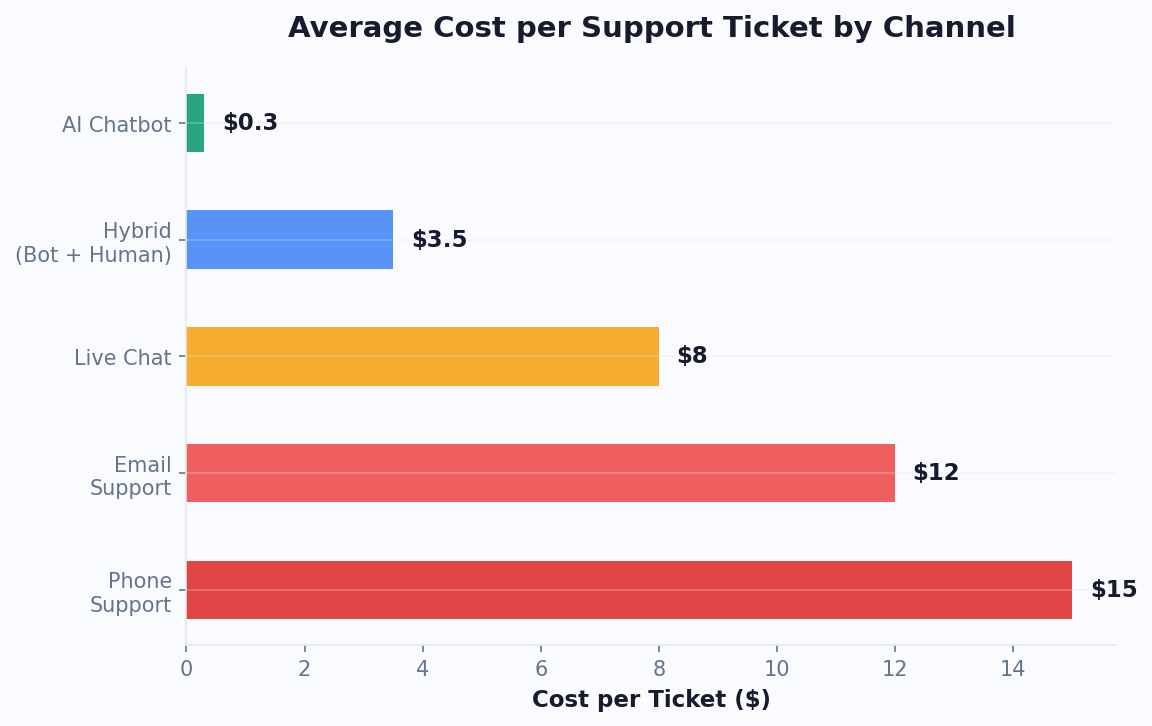
For businesses, live chat is also the most cost-effective human support channel. The average cost per live chat interaction is $5-$8, compared to $12-$15 for phone calls. This is because agents handle 3-5 simultaneous chats (vs. one phone call), and the asynchronous nature allows agents to research answers while the customer waits briefly rather than sitting in silence on a phone line.
Modern live chat software goes far beyond simple messaging. It includes visitor tracking (see what page they are on), conversation history, agent collaboration tools, automated routing, canned responses, and - critically - integration with chatbots for hybrid human-AI support. Conferbot's live chat combines AI-powered automation for common questions with seamless handoff to human agents for complex issues, giving you the efficiency of automation with the empathy of human support. For details on how AI handles the first line, see our customer support chatbot guide.
Live Chat vs Chatbot: Complete Comparison
The live chat vs chatbot debate is increasingly a false dichotomy - the best solution combines both. However, understanding their individual strengths helps you design the optimal hybrid approach for your team.
Feature-by-Feature Comparison
| Dimension | Live Chat (Human) | Chatbot (AI) | Hybrid |
|---|---|---|---|
| Availability | Business hours only | 24/7/365 | 24/7 with human backup |
| Response time | 30 sec - 2 min | Instant (<1 sec) | Instant + human when needed |
| Cost per interaction | $5 - $12 | $0.10 - $0.50 | $0.50 - $3 |
| Empathy/nuance | Excellent | Limited | Excellent (escalation) |
| Scalability | Linear (more agents = more cost) | Near-infinite | Scales efficiently |
| Complex issues | Excellent | Moderate | Excellent |
| Consistency | Varies by agent | 100% consistent | Consistent baseline |
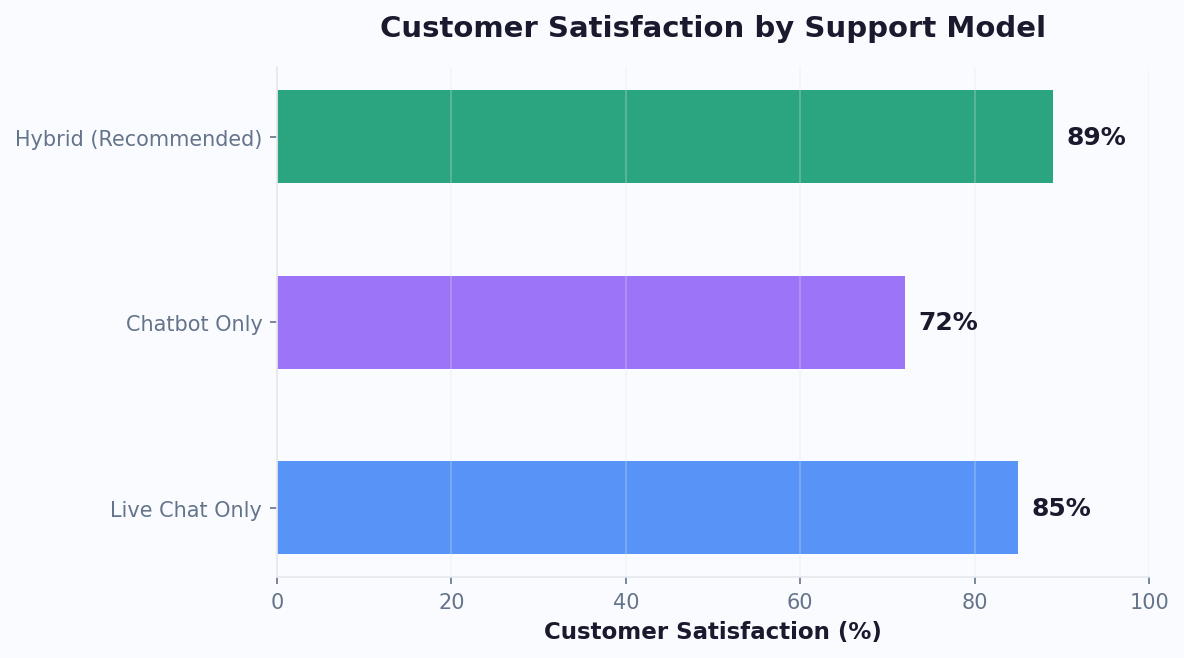
| CSAT score | 85-90% | 70-80% | 88-93% |
The hybrid model consistently outperforms both pure live chat and pure chatbot approaches on customer satisfaction. By letting the chatbot handle routine questions (60-70% of volume) and routing complex issues to humans, you get the best of both worlds: instant response for simple queries and expert human help for nuanced problems.
The key insight is that live chat and chatbots are not competitors - they are complementary tools. A well-designed AI chatbot acts as a first responder, gathering context and resolving simple issues, while live agents focus their expertise on the 30-40% of conversations that truly need human judgment. This model substantially reduces agent workload while actually improving customer satisfaction because agents are less overwhelmed and can give each complex case the attention it deserves.
The Hybrid Model: Bot + Human Working Together
The hybrid support model represents the gold standard of modern customer service. It combines AI automation for speed and scale with human agents for empathy and complex problem-solving. Businesses running hybrid support tend to see meaningfully lower costs than pure human chat while maintaining higher CSAT than pure chatbot support.
How the Hybrid Flow Works
Layer 1 - AI Triage: Every incoming conversation starts with the chatbot. It greets the user, identifies their intent, and attempts to resolve their issue using the AI knowledge base. For common questions (shipping status, business hours, pricing, password resets), the bot resolves the issue instantly - typically handling 60-70% of all incoming volume.
Layer 2 - Smart Escalation: When the bot detects it cannot resolve the issue (low confidence, complex multi-part question, frustrated user, explicit request for human help), it seamlessly transfers the conversation to a human agent. Critically, the agent receives the full conversation context - the user never has to repeat themselves.
Layer 3 - Agent Assist: Even after handoff, AI continues to help. It suggests relevant knowledge base articles, provides templated responses, and flags similar past cases. This "copilot" mode helps new agents perform at experienced-agent levels and reduces average handling time considerably.
Escalation Triggers
Configure automatic escalation based on:
- Sentiment detection: Negative sentiment or frustration language triggers immediate human routing
- Confidence threshold: When AI confidence drops below 70%, escalate rather than guess
- Topic-based rules: Billing disputes, complaints, and cancellations always go to humans
- User request: "Talk to a human" or "connect me to an agent" - always honor immediately
- Loop detection: If the bot asks for clarification twice without resolution, escalate
The hybrid model works across all channels - web, WhatsApp, Messenger, and Instagram. Agents see all channels in a unified inbox, and users can start on one channel and continue on another without losing context. This omnichannel hybrid approach is what modern customers expect from support teams.
Agent Productivity: Metrics That Matter
Live chat agent productivity directly impacts both customer satisfaction and operational costs. Understanding key productivity metrics helps you staff appropriately, train effectively, and identify improvement opportunities.
Agent Performance Benchmarks
| Metric | Average | Top Performers | With Bot Assist |
|---|---|---|---|
| Concurrent chats | 3-4 | 5-6 | 6-8 |
| First response time | 45 seconds | 15 seconds | Instant (bot) → 20s (agent) |
| Average handle time | 11 minutes | 7 minutes | 5 minutes |
| Chats per hour | 4-6 | 8-10 | 10-14 |
| Resolution rate | 78% | 92% | 95% |
| CSAT score | 82% | 94% | 93% |
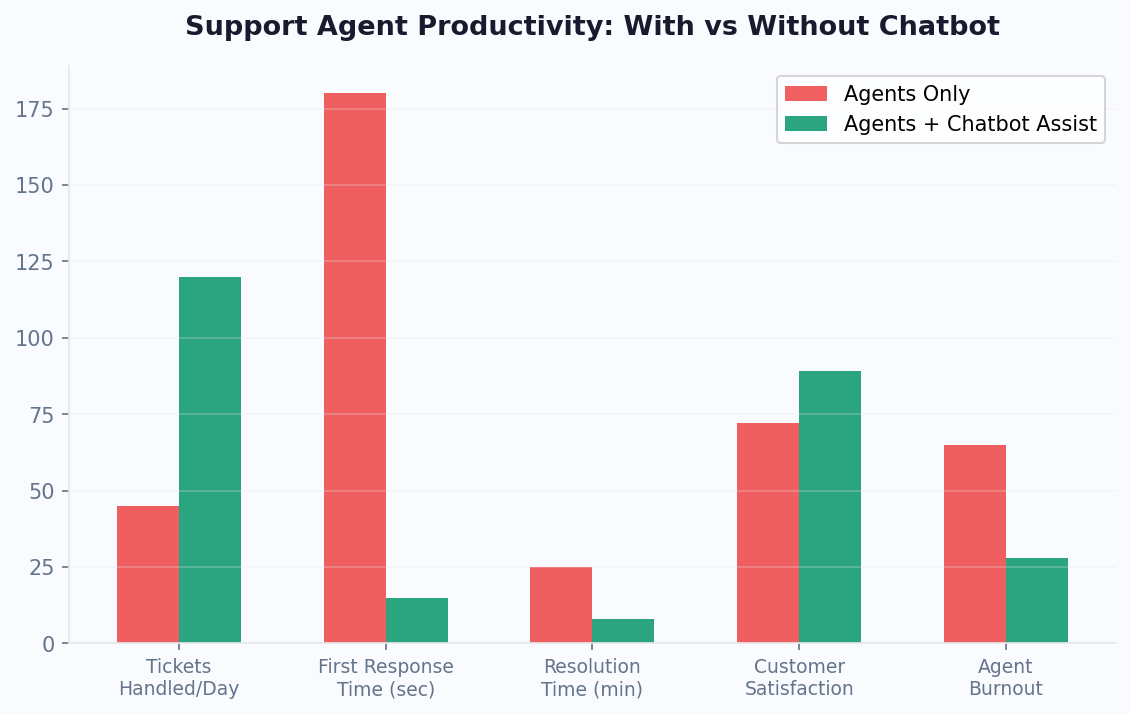
The "With Bot Assist" column shows the dramatic impact of the hybrid model on agent metrics. When a chatbot handles initial triage, collects context, and resolves simple issues before escalation, agents receive conversations that are pre-qualified and contextualized. This eliminates the repetitive "how can I help you" and "can you provide your order number" exchanges that consume 30-40% of a typical chat interaction.
Key productivity levers include:
- Canned responses: Pre-written answers for common follow-ups save 15-20% of typing time
- Knowledge base integration: One-click article insertion rather than searching and copy-pasting
- Smart routing: Directing conversations to the agent most qualified to handle them reduces transfers and repeat explanations
- Auto-close rules: Automatically closing inactive chats after a set period frees up agent capacity
Monitor these metrics in real-time with Conferbot analytics and use the data to identify training needs, optimize staffing schedules, and measure the impact of process changes.
Setting Up Bot-to-Human Handoff
The quality of your bot-to-human handoff experience directly determines whether hybrid support feels seamless or frustrating. A well-implemented handoff preserves context, sets expectations, and routes to the right agent - making the transition invisible to the customer. Here is how to configure it properly.
Handoff Configuration Steps
Step 1: Define escalation triggers. In your Conferbot dashboard, navigate to the handoff settings and configure when conversations should transfer to humans. Set confidence thresholds (recommended: 60-70%), keyword triggers (e.g., "speak to human," "complaint," "cancel"), and topic-based rules.
Step 2: Set up agent routing. Configure how escalated chats are distributed. Options include round-robin (evenly distributed), skill-based (matching topic to agent expertise), load-balanced (sent to least busy agent), or priority-based (VIP customers to senior agents). Use the team management feature to define agent skills and availability.
Step 3: Configure context transfer. Ensure agents receive full conversation history, user-provided information (name, email, account number), bot's assessment of the issue, and any relevant knowledge base articles. This context panel appears alongside the chat window so agents never ask users to repeat information.
Step 4: Set up queue management. When all agents are busy, configure queue behavior: estimated wait time display, position in queue, option to leave a message and get a callback, or option to continue with the bot while waiting.
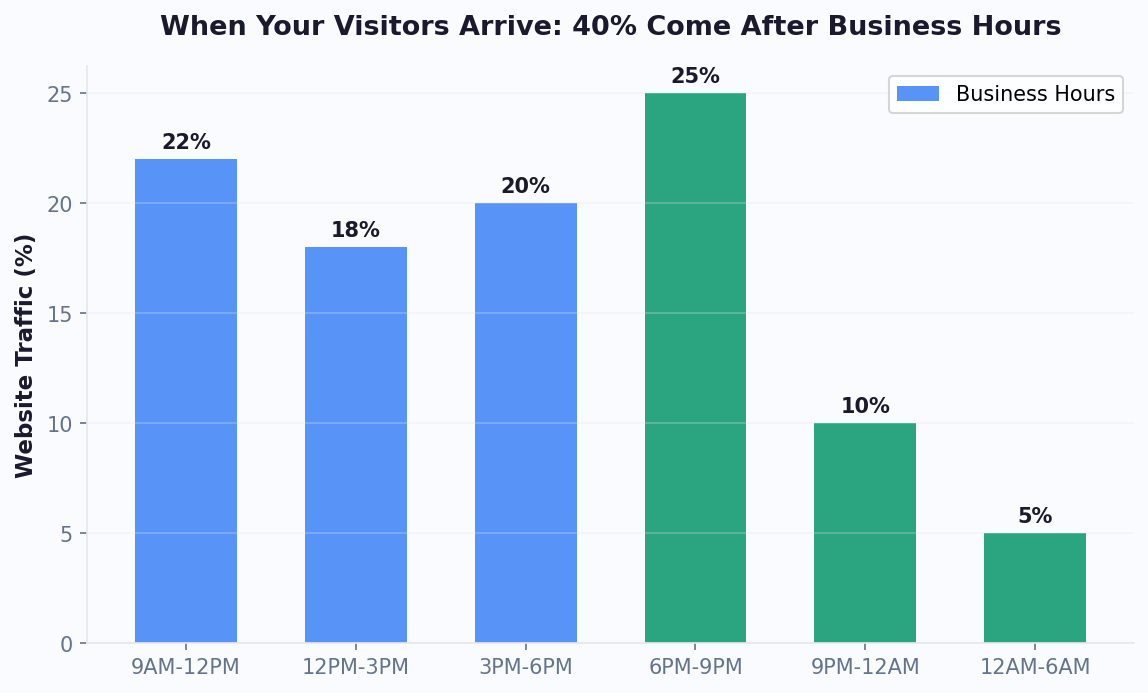
Step 5: Define offline behavior. When live chat is unavailable (outside business hours), configure the bot to acknowledge the limitation, collect the user's question and contact info, and promise follow-up during business hours. The ticketing system automatically creates a ticket for morning follow-up.
Best Practices for Smooth Handoffs
- Always tell the user what is happening: "I'm connecting you with a specialist who can help with this."
- Provide estimated wait time: "You'll be connected in about 30 seconds."
- Never force users to repeat information - display the bot conversation to the agent
- Allow agents to see bot confidence scores so they understand why the escalation happened
- Enable agents to send conversations back to the bot for simple follow-up questions
Businesses with well-configured handoffs tend to see notably higher CSAT on escalated conversations compared to those with abrupt or context-less transfers. The difference is entirely in execution quality.
Multi-Channel Live Chat: One Inbox, Every Platform
Modern customers do not stick to one channel. They might start a conversation on your website, follow up on WhatsApp, and check status on Instagram. Multi-channel live chat unifies all these conversations in a single agent inbox, providing continuous context regardless of which platform the customer uses.
Supported Channels
Conferbot's live chat integrates with:
- Website widget: Embedded chat on your site with customizable appearance and triggers
- WhatsApp Business: Full WhatsApp API integration with template messages, media support, and business verification
- Facebook Messenger: Direct integration with your Facebook page for social support
- Instagram DMs: Respond to Instagram direct messages from the same inbox
- SMS: Two-way SMS conversations for customers who prefer text messaging
- Email: Email threads displayed as conversations in the agent interface
Unified Customer View
When a customer contacts you on any channel, the agent sees their complete history across all channels. If someone chatted on your website last week and now messages on WhatsApp, the agent has full context. This eliminates the most frustrating customer experience - repeating yourself across channels.
The unified inbox also enables channel-switching. An agent can suggest moving from web chat to WhatsApp for asynchronous follow-up, or from social media to a private channel for sensitive information. The conversation continues seamlessly with full history preserved.
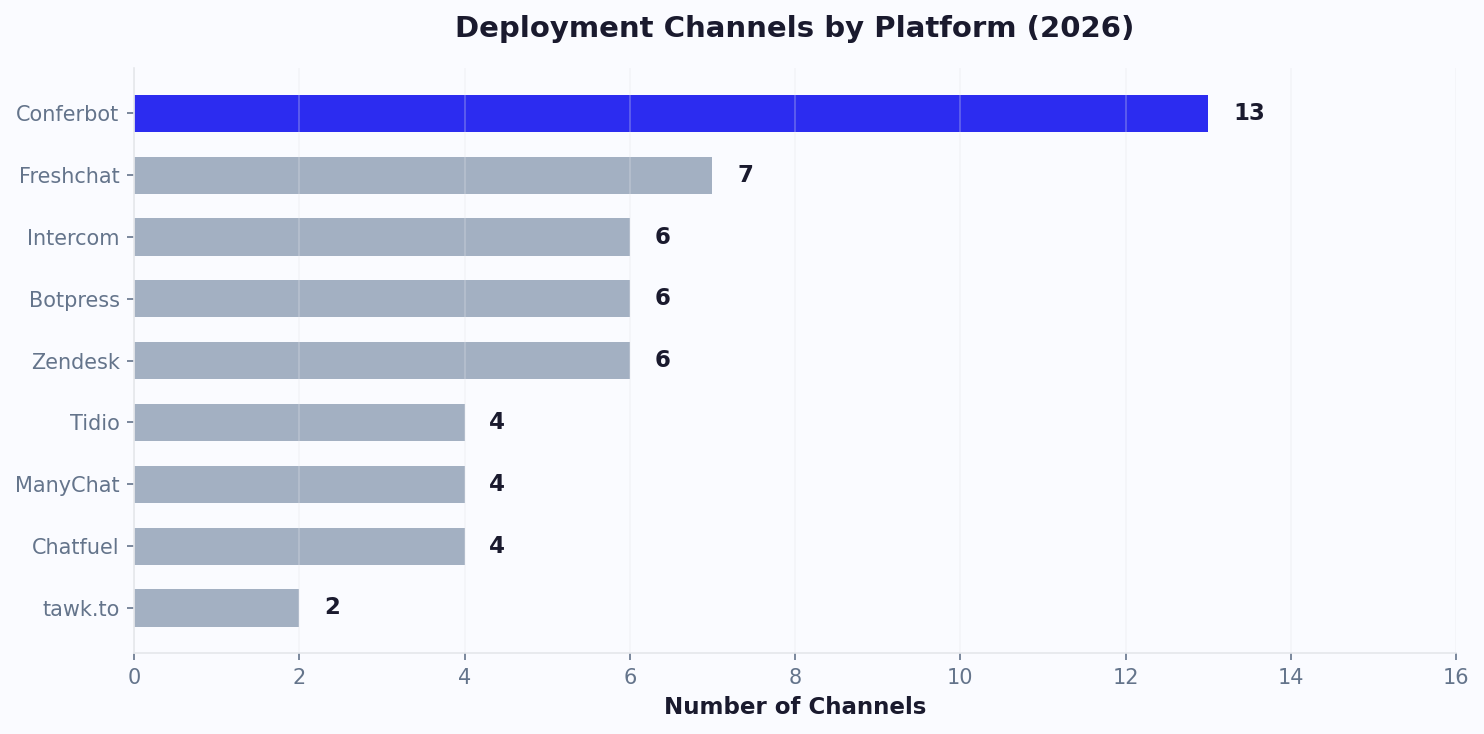
Channel distribution data shows interesting patterns: 45% of support conversations start on websites, 30% on WhatsApp, 15% on Messenger, and 10% on Instagram. However, resolution rates are highest on WhatsApp (89%) because its asynchronous nature allows for file sharing, location sending, and ongoing follow-up without requiring both parties to be online simultaneously.
Set up multi-channel live chat through the integrations hub - each channel connects in under 5 minutes. For a comprehensive omnichannel strategy, see our omnichannel chatbot feature page.
Live Chat Metrics to Track for Continuous Improvement
Effective live chat management requires tracking the right metrics at the right frequency. Here are the essential KPIs for live chat operations, organized by category, with industry benchmarks and optimization strategies for each.
Response Metrics
- First Response Time (FRT): Target under 30 seconds. Every 10-second increase above 30s reduces CSAT by 2 points. Use automated greetings and bot triage to achieve sub-5-second initial responses.
- Average Response Time: Target under 60 seconds between messages. Long pauses mid-conversation feel worse than a queue wait. Use canned responses and KB integration to keep response times consistent.
- Queue Wait Time: Target under 60 seconds. Display queue position and estimated wait. If consistently above 2 minutes, either add agents or expand bot capabilities to handle more issues.
Quality Metrics
- First Contact Resolution (FCR): Target 75-85%. Measures conversations resolved without follow-up. Low FCR indicates training gaps or insufficient agent authority to resolve issues.
- Customer Satisfaction (CSAT): Target 85-92%. Collect after every conversation with a simple 1-5 star rating. Track by agent, by topic, and by channel to identify patterns.
- Net Promoter Score (NPS): Triggered periodically, not after every chat. Measures whether the support experience makes customers likely to recommend you.
Efficiency Metrics
- Agent Utilization: Target 70-80%. Below 60% means overstaffed; above 85% means agents are overwhelmed and quality drops.
- Cost per Conversation: Track total live chat cost (salaries + tooling) divided by conversations handled. Benchmark: $5-$8. With bot assist reducing volume, this drops to $3-$5 effective cost.
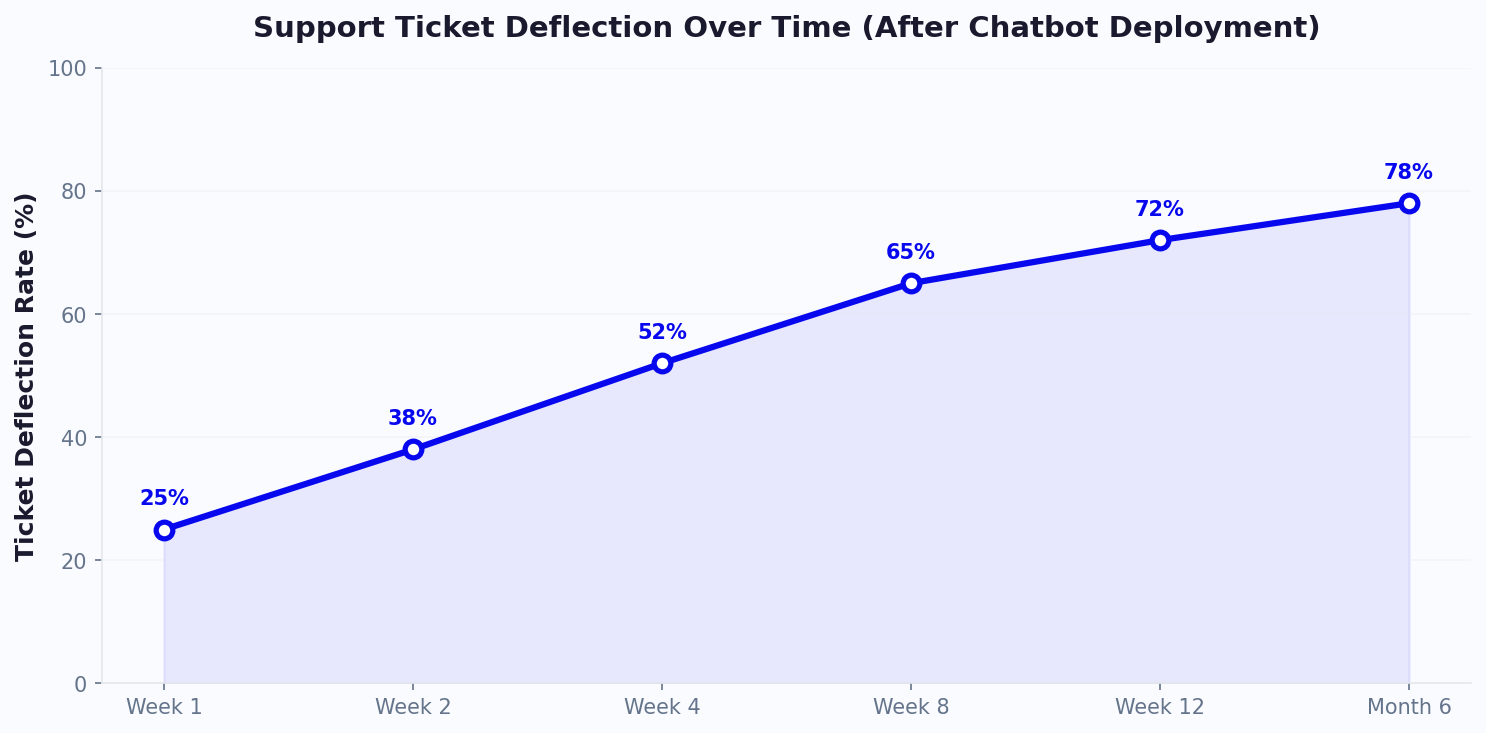
- Deflection Rate: Percentage of conversations resolved by the bot without human intervention. Target 60-70%. Higher is possible with a well-trained knowledge base.
Review metrics weekly in your analytics dashboard. Monthly, run deeper analysis on trends, agent performance, and topic distribution. Quarterly, benchmark against industry standards and adjust staffing and bot capabilities accordingly.
Live Chat Best Practices for High CSAT
High-performing live chat operations share common best practices that consistently drive satisfaction above 90%. These are proven strategies from teams handling large volumes of conversations annually.
Conversation Design
- Personalize immediately: Use the customer's name and reference their history. "Hi Sarah, I can see you contacted us about your order #4521 last week - is this related?"
- Set expectations upfront: If an issue will take time to investigate, say so. "Let me look into this - it'll take about 2 minutes. I'll update you as soon as I have an answer."
- Use positive language: Instead of "I can't do that," say "What I can do is..." Frame limitations as alternatives.
- Close proactively: End with "Is there anything else I can help with?" and a brief summary of what was resolved.
Operational Excellence
- Staff to demand curves: Analyze hourly chat volume and schedule agents accordingly. Most businesses see peaks at 10-11am and 2-3pm local time.
- Create escalation paths: Define clear levels - agent > senior agent > team lead > manager. Ensure every issue has a resolution path.
- Build a canned response library: Start with your top 20 most common responses. Update monthly based on new FAQs. Canned responses save 15-20% of agent time while maintaining consistency.
- Implement quality reviews: Review 5-10 random conversations per agent per week. Score on accuracy, tone, resolution, and efficiency. Use findings for targeted coaching.
Technology Optimization
- Bot pre-qualification: Let the bot gather name, email, and issue category before routing to agents. This saves 45 seconds per conversation.
- Contextual triggers: Show proactive chat invitations based on user behavior - time on page, scroll depth, cart value, or exit intent.
- Post-chat automation: Send automated follow-up emails with conversation transcripts, satisfaction surveys, and relevant knowledge base articles.
Teams that implement these practices systematically tend to see meaningful CSAT improvements within the first quarter. Combine these human best practices with Conferbot's automation features for optimal results. Review our complete support chatbot guide for detailed implementation strategies.
Scaling Your Live Chat Team: From 1 Agent to 50
Growing a live chat operation from a single agent to a full team introduces organizational challenges beyond simply hiring more people. Here is a scaling playbook based on common growth stages and the strategies that work at each level.
Growth Stages
Stage 1: Solo Agent (1-3 people, 0-500 chats/month). At this stage, one person handles all conversations. The priority is establishing processes: create a knowledge base, build canned response templates, and configure basic bot automation for after-hours and FAQs. Deploy a chatbot to handle 50-60% of volume so the solo agent focuses on complex issues only.
Stage 2: Small Team (3-8 agents, 500-2,000 chats/month). Introduce shift scheduling, basic skill-based routing, and team performance tracking. Establish SLAs (e.g., first response under 60 seconds). Use team management to assign roles and monitor performance. The bot should now deflect 65-70% of volume.
Stage 3: Department (8-20 agents, 2,000-8,000 chats/month). Add team leads, formalize quality reviews, implement tiered routing (L1/L2/L3), and create specialized queues by topic. Introduce agent coaching programs and regular calibration sessions. Bot deflection target: 70-75%.
Stage 4: Operation (20-50+ agents, 8,000+ chats/month). Full workforce management with forecasting, multi-department structure, advanced routing algorithms, and real-time monitoring dashboards. Create dedicated teams for different channels or product lines. Invest in AI copilot tools that suggest responses and auto-populate information.
Key Scaling Metrics
- Agent-to-supervisor ratio: 8-12 agents per team lead
- Training investment: 40 hours initial training, 4 hours/month ongoing
- Quality review frequency: 5 conversations/agent/week
- Bot deflection goal: Increase 5% per quarter through continuous bot improvement
The most important scaling lever is not hiring - it is bot optimization. Every 10% improvement in bot resolution rate is equivalent to 2-3 additional human agents in capacity. Invest heavily in your AI knowledge base to train the bot on new topics as they emerge, and use analytics to identify the highest-volume human-handled topics that could be automated next. Check pricing plans for team size options and agent seats included at each tier.
Live Chat FAQ
Everything you need to know about implementing AI chatbots for live chat. Get answers about features, pricing, implementation, security, and industry-specific solutions.
Continue Exploring
Explore features, connect third-party tools, and browse ready-made templates.
Deep-dive pillar guides, real use cases, and the chatbot & AI glossary.