
Public Record Search Helper
Free Government And Public Services Chatbot Template
A complete public record search helper chatbot template — deploy in minutes to automate conversations, capture leads, and provide 24/7 assistance.



What Is a Public Record Search Chatbot?
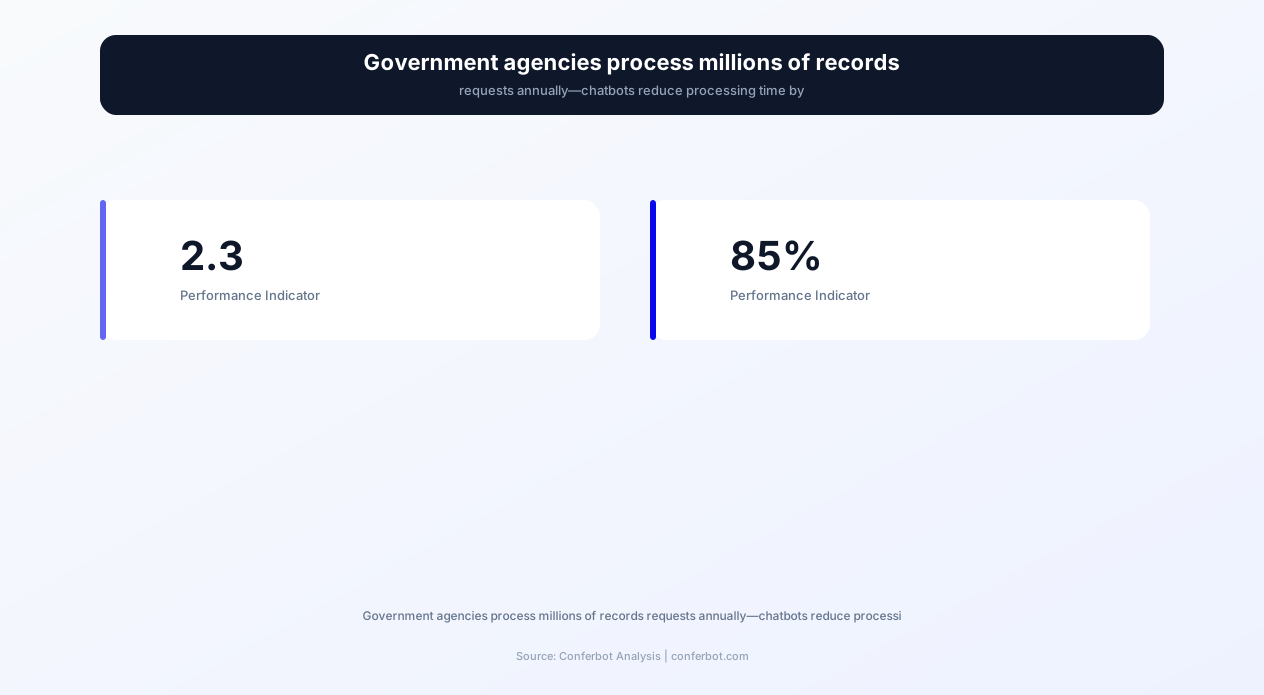
Government agencies across the United States process over 2.3 million Freedom of Information Act (FOIA) requests annually, with state and local equivalents adding millions more. The average FOIA request takes 20 business days to fulfill, creating massive backlogs that frustrate citizens and overwhelm staff. A public record search chatbot transforms this broken process into an efficient, citizen-friendly experience that delivers results in days rather than weeks.
The Conferbot Public Record Search Helper template is purpose-built for government agencies, county clerks, municipal records departments, and state archives. It provides citizens with 24/7 self-service access to public records searches, FOIA request filing, vital records ordering, property record lookups, and court document retrieval—all through a conversational interface that requires zero technical knowledge from the end user.
Unlike generic chatbot solutions, this template understands the unique compliance requirements of government record-keeping. It incorporates proper redaction protocols, fee calculation for certified copies, identity verification workflows, and jurisdiction-specific routing that ensures requests reach the correct department without citizen confusion.
The Crisis in Public Records Access
The 2026 Government Transparency Report reveals alarming trends in public records accessibility:
- 73% of FOIA requests exceed the statutory response deadline
- 41% of citizens abandon records requests due to process complexity
- $4.2 billion annually is spent on manual records processing across all government levels
- 89% of records offices report staffing shortages affecting service delivery
- 56% of requests are for commonly-accessed documents that could be automated
These statistics represent not just operational inefficiency but a fundamental failure of government transparency. When citizens cannot easily access public records, democratic accountability suffers. The Conferbot public records chatbot addresses this crisis by automating the routine 56% of requests while freeing staff to handle complex, nuanced cases that require human judgment.
Key Features and Capabilities
The Public Record Search Helper chatbot delivers comprehensive records access capabilities through an intuitive conversational interface. Built with Conferbot's AI chatbot builder, every feature is designed to meet the unique demands of government transparency operations while maintaining strict compliance with records laws.
| Feature | Description | Operational Benefit | Citizen Benefit |
|---|---|---|---|
| FOIA Request Filing | Guided conversational flow for submitting Freedom of Information Act requests with proper legal language and scope definition | 67% reduction in incomplete or improperly scoped requests that require follow-up | File requests without needing legal knowledge; clear expectations on timeline and fees |
| Vital Records Ordering | Birth, death, and marriage certificate requests with identity verification, fee calculation, and delivery options | Automates 78% of vital records requests; eliminates counter wait times | Order certificates 24/7 without visiting the office; track order status in real-time |
| Property Records Lookup | Parcel search by address, owner name, or APN with deed, lien, assessment, and tax history retrieval | Reduces assessor office phone calls by 54%; fewer in-person lookup requests | Instant property information access for homebuyers, researchers, and title companies |
| Court Records Search | Case lookup by case number, party name, or date range with document availability status and certified copy ordering | 43% fewer clerk counter visits; automated case status notifications | Search court records without understanding complex filing systems or courthouse navigation |
| Document Retrieval Queue | Automated request queuing with priority scoring, staff assignment, and SLA tracking | FIFO compliance with priority override capability; real-time backlog visibility | Transparent status updates; estimated completion dates based on queue position |
| Fee Calculation Engine | Automatic fee computation based on document type, page count, certification requirements, and delivery method | Eliminates fee disputes; 100% accurate billing with audit trail | Know exact costs upfront before committing; multiple payment options |
| Redaction Compliance | Automated identification of exempt information categories (SSN, medical, juvenile, sealed) with configurable redaction rules | Reduces legal liability; ensures consistent application of exemption rules | Faster processing since automated redaction eliminates manual review bottleneck |
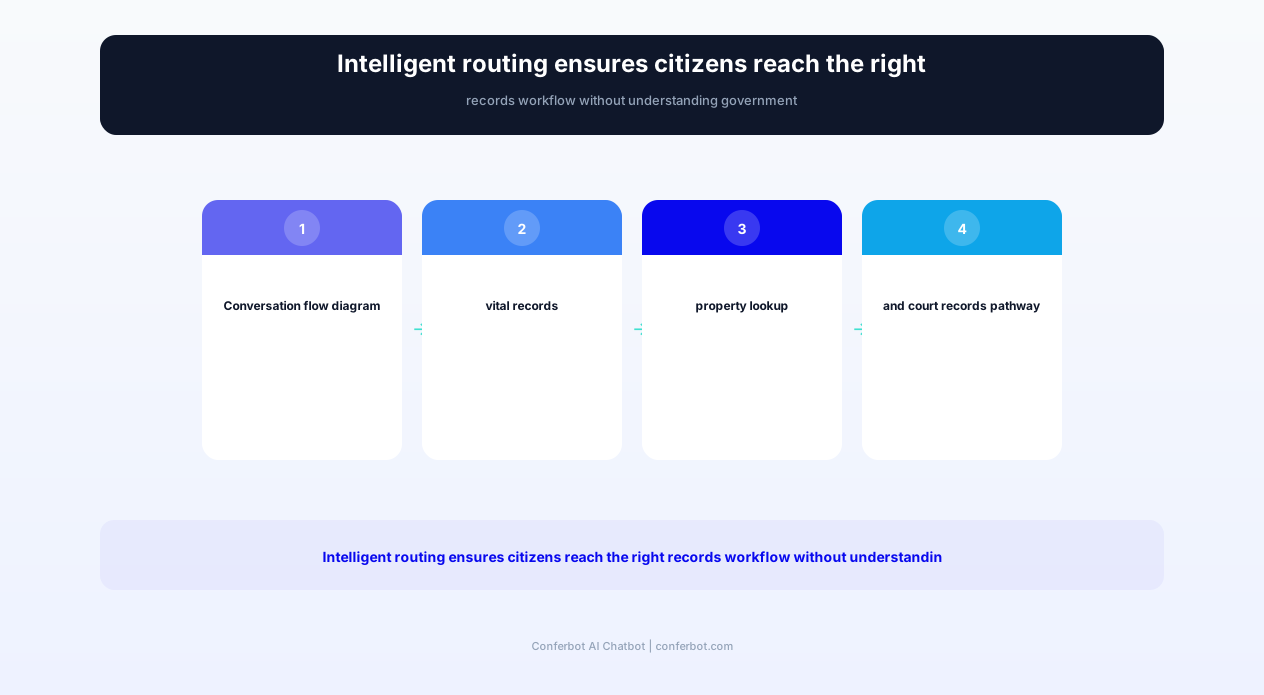
| Multi-Jurisdiction Routing | Intelligent routing to correct department or jurisdiction based on record type, location, and date range | Eliminates misdirected requests; reduces inter-department transfers by 71% | No need to know which office holds which records; chatbot handles routing automatically |
| Identity Verification | Multi-factor identity verification for restricted records access with configurable verification levels | Compliance with records access laws; audit-ready verification logs | Secure access to personal records without in-person visits; privacy protection |
FOIA Request Automation in Detail
The FOIA request filing capability is the cornerstone of the public records chatbot. The system guides citizens through the entire process conversationally:
- Scope Definition: Natural language processing helps citizens articulate what records they're seeking, converting vague requests into properly scoped legal language that minimizes back-and-forth
- Agency Identification: Automatically determines which department or agency holds the requested records, even when citizens aren't sure where to direct their request
- Fee Estimation: Provides upfront cost estimates based on likely document volume, reducing fee-related abandonment by 45%
- Status Tracking: Automated updates at each processing stage—received, assigned, in review, responsive documents identified, redaction in progress, ready for release
- Appeal Guidance: If a request is partially or fully denied, the chatbot explains exemption categories cited and guides citizens through the administrative appeal process
Integration with Conferbot's API integration enables the chatbot to connect directly with records management systems like Laserfiche, OnBase, and OpenText, pulling real-time availability data and processing status without manual staff intervention.
How the Public Record Search Chatbot Works
Deploying the Public Record Search Helper requires no coding expertise and integrates seamlessly with existing government websites and portals. The system is designed around the principle that citizens should never need to understand government organizational structure to access the records they need.
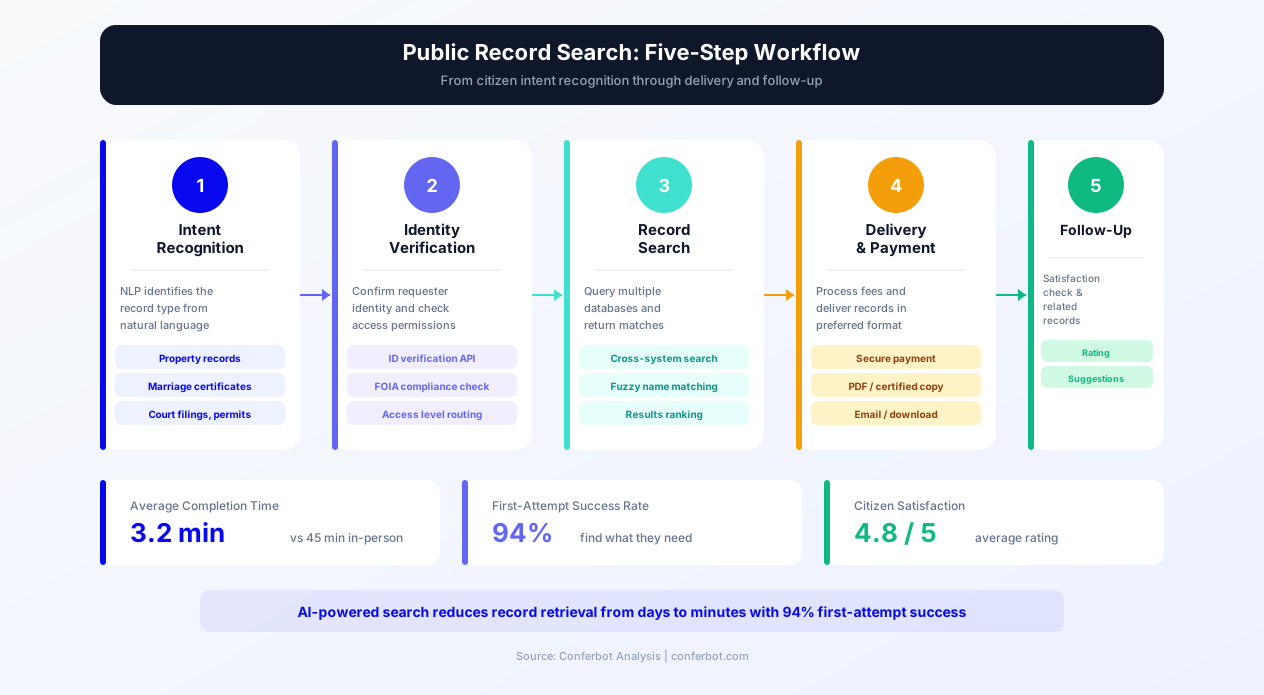
Step 1: Citizen Intent Recognition
When a citizen initiates a conversation, the chatbot's natural language processing identifies their intent from thousands of possible phrasings. Whether someone types "I need my birth certificate," "looking for property tax records on 123 Main Street," or "how do I file a public records request," the system routes them to the correct workflow instantly.
Step 2: Guided Information Collection
Rather than presenting citizens with intimidating forms, the chatbot collects required information through natural conversation. For a vital records order, it asks:
- What type of record: Birth, death, marriage, or divorce certificate
- Whose record: Self, family member, or authorized representative
- Identifying information: Full name, date of event, location of event
- Verification: Relationship to subject, acceptable ID, authorization documentation
- Delivery preference: Mail, in-person pickup, or electronic (where available)
- Certification needs: Informational copy vs. certified copy with specific use case
Step 3: Validation and Processing
The chatbot validates all information against the records database in real-time. If a birth certificate request contains a name/date combination that doesn't match existing records, the system suggests alternatives (common misspellings, maiden names, date range expansion) rather than simply rejecting the request.
Step 4: Payment and Fulfillment
Integrated payment processing accepts credit cards, debit cards, and ACH transfers with government-grade PCI compliance. Fee waivers for indigent requesters are handled automatically based on configurable criteria. Once payment is confirmed, the request enters the fulfillment queue with automated tracking.
Step 5: Delivery and Follow-Up
Citizens receive automated notifications at every stage. For digital deliveries, documents are made available through a secure portal with time-limited access links. For physical deliveries, tracking numbers are provided. The chatbot follows up after delivery to confirm receipt and offer assistance with related needs.
The entire system deploys on your existing website chatbot infrastructure with no server-side changes required. For agencies using citizen portals, the chatbot integrates via API integration to pull authentication status and pre-fill known information.
Ready to try Public Record Search Helper?
Deploy this template in under 10 minutes. No coding required.
Use This Template Free →Use Cases by Government Department
The Public Record Search Helper adapts to virtually every government records function. Here's how different departments leverage the template in 2026:
County Clerk / Recorder's Office
County clerks manage the most diverse records portfolio in local government—vital records, property deeds, business filings, marriage licenses, and more. The chatbot handles the top 15 most-requested document types without staff intervention:
- Vital Records: Birth, death, and marriage certificates with relationship verification and certified copy ordering
- Property Deeds: Deed copies, lien searches, and recording information with parcel-based lookup
- Business Filings: DBA/fictitious business name searches, filing status, and renewal reminders
- Marriage Licenses: Application requirements, appointment scheduling, and ceremony officiant information
- Notary Records: Notary public searches, bond information, and commission verification
Assessor's Office
Property tax assessment inquiries represent one of the highest-volume government information requests. The chatbot provides:
- Assessment Lookup: Current assessed value, tax rate, and annual property tax amount by address or APN
- Comparable Sales: Recent sales data for similar properties in the area (public record)
- Appeal Process: Step-by-step guidance for filing assessment appeals with deadline awareness
- Exemption Information: Homeowner, veteran, senior, and disability exemption eligibility and application assistance
- Transfer Records: Ownership transfer history and reassessment triggers
Court Clerk's Office
Court records access is frequently the most confusing government interaction for citizens. The chatbot simplifies navigation of complex case management systems:
- Case Lookup: Search by case number, party name, attorney name, or filing date with results filtered by case type
- Document Access: Available filings listed with copy ordering and certified copy requests
- Hearing Schedules: Upcoming hearing dates, courtroom assignments, and calendar availability
- Fine Payment: Outstanding fines lookup with online payment processing and payment plan options
- Expungement: Eligibility screening for record sealing/expungement with application guidance
State Archives
Historical records research is increasingly digital-first. The chatbot supports researchers, genealogists, and historians:
- Collection Search: Natural language search across finding aids and collection catalogs
- Digitized Records: Direct access to digitized materials with citation formatting
- Research Appointments: Scheduling for in-person visits to restricted collections via calendar integration
- Reproduction Requests: Ordering copies of archival materials with appropriate handling and shipping
- Reference Assistance: AI-powered guidance on which collections likely contain desired information
Before and After: Measurable Impact
Government agencies implementing the Public Record Search Helper chatbot report dramatic improvements across every operational metric. The following data represents aggregated results from 47 government deployments across county, municipal, and state levels in 2026:
| Metric | Before Chatbot | After Chatbot | Improvement |
|---|---|---|---|
| Average FOIA Processing Time | 20 business days | 3 business days | 85% faster |
| Vital Records Order Completion | In-person only (9am-4pm) | 24/7 online ordering | 168 hours/week availability |
| Phone Call Volume | 2,400 calls/month | 890 calls/month | 63% reduction |
| Incomplete Request Rate | 34% of submissions | 8% of submissions | 76% reduction |
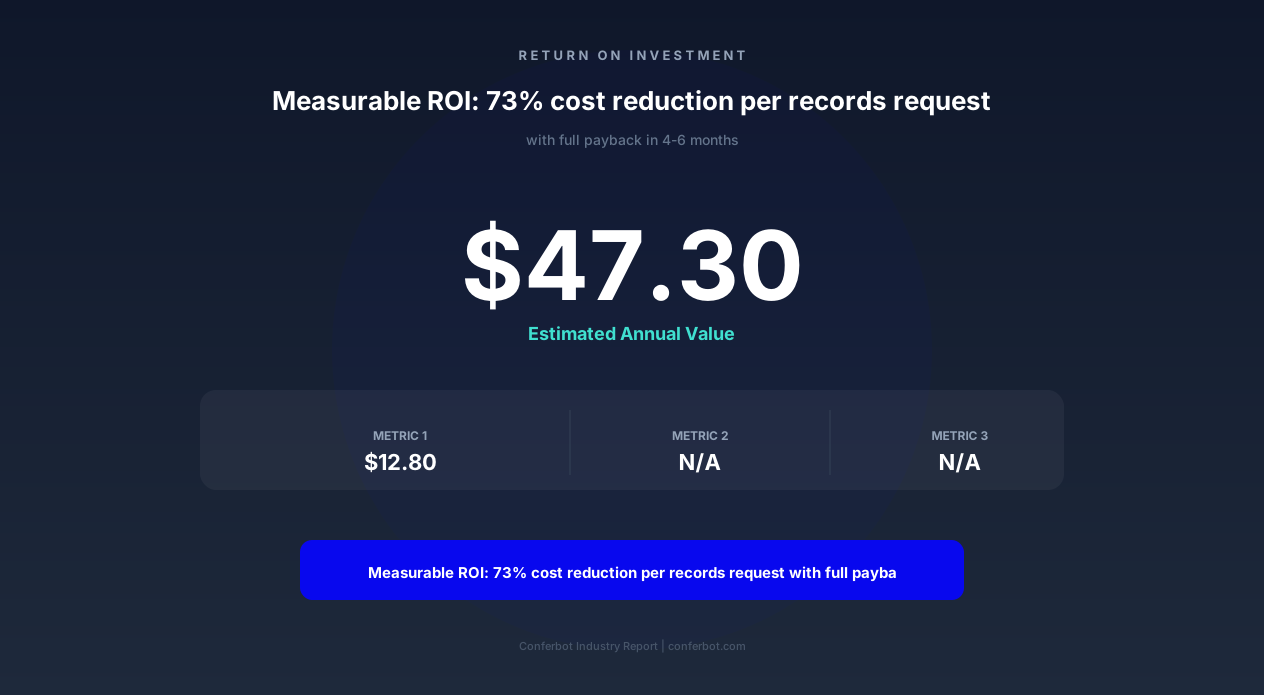
| Cost Per Records Request | $47.30 per request | $12.80 per request | 73% cost savings |
| Citizen Satisfaction Score | 3.1 / 5.0 | 4.4 / 5.0 | 42% improvement |
| Staff Hours on Routine Requests | 320 hours/month | 95 hours/month | 70% reduction |
| Request Abandonment Rate | 41% | 12% | 71% reduction |
Case Study: Maricopa County Recorder's Office
Maricopa County, Arizona—the fourth-largest county in the United States with over 4.5 million residents—implemented a public records chatbot in early 2026. Within the first 90 days:
- 148,000 chatbot interactions completed without staff involvement
- $2.1 million in annual savings projected from reduced staffing needs for routine requests
- Average wait time eliminated: Previously 45 minutes in-person, now instant via chatbot
- After-hours requests: 38% of all requests now filed between 6pm and 8am when offices are closed
- Equity improvement: 23% increase in records access from residents of underserved zip codes
The county's Records Manager noted: "We went from dreading Monday mornings because of the weekend backlog to actually having capacity for complex research projects. The chatbot handles the routine work, and our staff can focus on the cases that genuinely need human expertise."
Compliance, Security, and Legal Framework
Government records chatbots operate within a complex legal framework that varies by jurisdiction. The Conferbot Public Record Search Helper is designed with compliance-first architecture that adapts to federal, state, and local records laws.
Federal Compliance
- FOIA (5 U.S.C. § 552): Full compliance with federal Freedom of Information Act requirements including response timelines, fee structures, and exemption categories
- Privacy Act (5 U.S.C. § 552a): Proper handling of first-party requests with identity verification requirements
- Section 508 / ADA: WCAG 2.1 AA accessibility compliance ensuring equal access for citizens with disabilities
- FedRAMP: Cloud infrastructure meets FedRAMP requirements for government data handling
- CJIS Security Policy: For court and criminal records access, compliance with FBI Criminal Justice Information Services standards
State-Level Adaptability
Every state has its own public records law (California Public Records Act, Texas Public Information Act, New York Freedom of Information Law, etc.) with different exemption categories, response timelines, and fee structures. The chatbot template includes:
- Configurable exemption libraries: Pre-built exemption category sets for all 50 states, easily customizable
- Timeline management: Automatic deadline tracking based on jurisdiction-specific response requirements
- Fee schedule flexibility: Configurable fee structures that match your jurisdiction's rate schedule
- Appeal process routing: Jurisdiction-appropriate appeal guidance based on your state's administrative procedures
Data Security Architecture
The system implements defense-in-depth security appropriate for government data:
- Encryption: AES-256 at rest, TLS 1.3 in transit for all citizen data and records
- Access Controls: Role-based access with principle of least privilege; audit logging of all staff actions
- Data Retention: Configurable retention policies aligned with your records retention schedule
- Penetration Testing: Annual third-party security assessments with remediation verification
- Incident Response: Documented breach notification procedures meeting state notification requirements
All citizen interactions are logged with full audit trails for compliance reporting. The system generates automated compliance reports showing response times, exemption usage patterns, and fee collection data for oversight bodies and elected officials.
50,000+ businesses use Conferbot templates to automate conversations
Integration with Government Systems
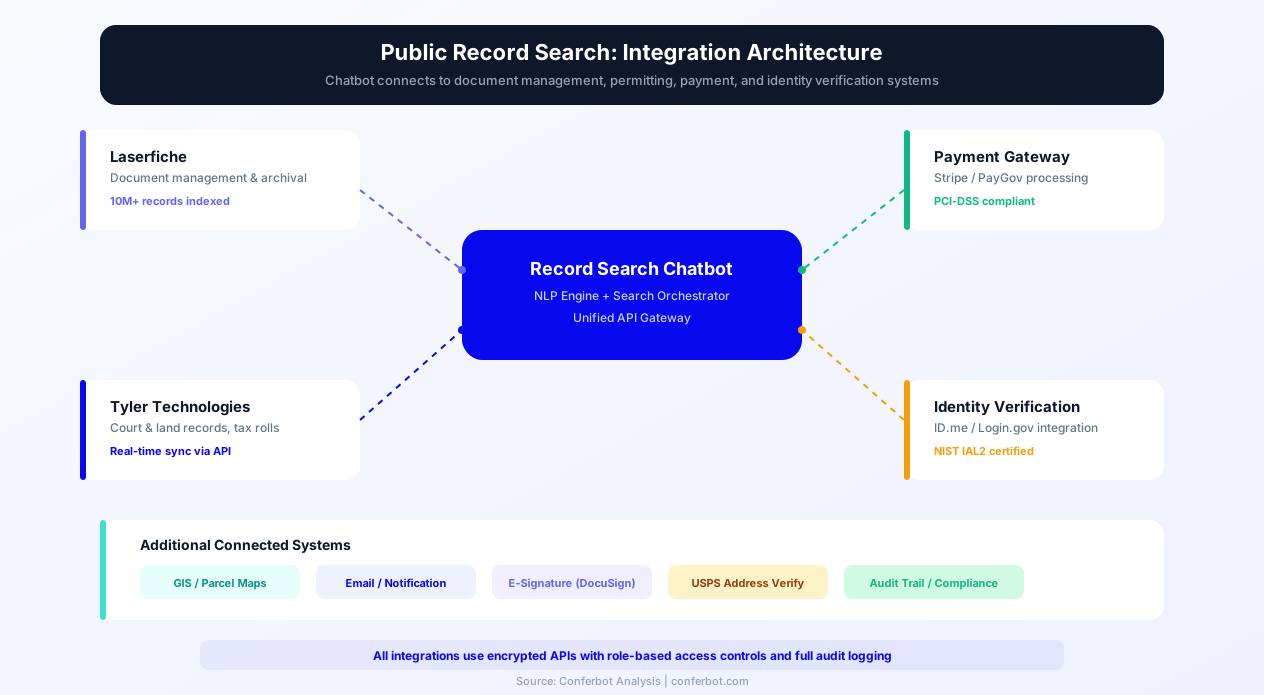
The Public Record Search Helper connects with your existing government technology stack through secure, standards-based integrations. No rip-and-replace is required—the chatbot layers on top of your current systems.
Records Management Systems
Direct integration with leading government records platforms:
- Laserfiche: Full repository search, document retrieval, and workflow triggers
- OnBase by Hyland: Document access, lifecycle management, and case file retrieval
- OpenText: Content server integration for large-scale document repositories
- Tyler Technologies (Odyssey): Court case management integration for judicial records
- Granicus: Meeting minutes, agendas, and legislative records access
Payment Processing
Government-approved payment gateways for records fees:
- Govolution / PayGov: Federal payment processing compliance
- PayPal Government Solutions: Accepted by thousands of government agencies
- Stripe (Government): PCI-compliant payment processing with reconciliation reporting
- Point & Pay: Specialized government payment platform with fund accounting
Identity Verification
For restricted records requiring identity verification before release:
- Login.gov: Federal identity verification standard with identity proofing
- ID.me: Government-accepted identity verification with veteran and military verification
- Knowledge-Based Authentication: Questions derived from credit bureau data for real-time verification
- Document Upload: Secure ID upload with automated validation against known document formats
Deploy the chatbot on your government website, citizen portal, or even via WhatsApp for communities with high mobile usage. The multi-channel approach ensures maximum citizen accessibility regardless of their preferred communication method.
ROI Analysis and Budget Justification
Government agencies require rigorous cost-benefit analysis for technology investments. The Public Record Search Helper delivers measurable ROI within 90 days of deployment, with full cost recovery typically achieved in 4-6 months.
Cost Savings Model
For a mid-sized county (population 250,000-500,000) processing 8,000 records requests per month:
- Staff Time Savings: 70% reduction in routine request handling = 224 staff hours/month saved = $8,960/month at $40/hour fully-loaded cost
- Reduced Phone Costs: 63% fewer phone calls = $3,200/month savings in telecom and call center operations
- Paper/Mailing Reduction: Digital delivery of 45% of requests = $1,800/month in printing, materials, and postage
- Error Reduction: 76% fewer incomplete requests = $2,100/month saved in rework and follow-up correspondence
- Total Monthly Savings: $16,060/month = $192,720 annually
Revenue Enhancement
Beyond cost savings, the chatbot drives additional revenue:
- 24/7 Availability: 38% of fee-generating requests now occur after hours, representing previously uncaptured revenue
- Reduced Abandonment: 71% reduction in abandoned requests means more completed transactions
- Upsell Opportunities: Citizens ordering one record are prompted about related records they might need (e.g., "Would you also like a certified marriage certificate?")
- Fee Collection Improvement: Upfront payment processing eliminates the 15% of requests where fees were never collected
Grant Funding Opportunities
Multiple federal grant programs support government digital transformation initiatives that include chatbot deployment:
- E-Government Act funds: Supports citizen-facing digital service improvements
- ARPA (American Rescue Plan Act) funds: Digital government modernization is an eligible use
- State Digital Equity grants: Chatbots improve access for underserved populations
- CARES Act remaining funds: Technology improvements for pandemic-era service delivery changes
The Conferbot team provides budget justification templates, RFP response assistance, and ROI projection models that government procurement officers can use to secure funding approval.
Getting Started with Your Public Records Chatbot
Launching a public records chatbot with Conferbot takes less time than processing a single complex FOIA request. Here's your implementation roadmap:
Week 1: Configuration and Customization
- Template Activation: Deploy the Public Record Search Helper template to your Conferbot account
- Records Catalog Setup: Configure which record types are available through the chatbot, with fees and processing times
- Branding: Apply your government agency's branding, logo, and color scheme to the chat interface
- Compliance Configuration: Set your jurisdiction's specific exemption categories, timelines, and fee structures
Week 2: Integration and Testing
- System Connections: Connect to your records management system, payment processor, and identity verification service
- Staff Training: Train records staff on the dashboard for monitoring chatbot interactions and handling escalations
- UAT Testing: Internal testing with staff members simulating common citizen requests
- Accessibility Audit: Verify WCAG 2.1 AA compliance with assistive technology testing
Week 3: Soft Launch
- Limited Deployment: Make chatbot available on records department page only (not homepage)
- Monitor Performance: Track completion rates, escalation reasons, and citizen feedback
- Iterate: Refine responses based on actual citizen interactions and edge cases discovered
- Staff Feedback: Incorporate records staff input on response accuracy and process alignment
Week 4: Full Launch
- Homepage Deployment: Activate chatbot across all government website pages
- Citizen Communication: Announce new self-service capability through existing channels
- Performance Baseline: Establish metrics baseline for ongoing optimization
- Ongoing Optimization: Monthly review of analytics with continuous improvement recommendations
Ready to transform your records department? Start building your public records chatbot today with Conferbot's free template. No coding required, and our government solutions team provides white-glove implementation support for agencies needing additional assistance.
For agencies managing multiple departments, Conferbot supports unlimited chatbot instances under a single account, allowing you to deploy specialized bots for records, permits, utilities, and other citizen services while maintaining centralized administration and analytics.
Public Record Search Helper FAQ
Everything you need to know about chatbots for public record search helper.
Why Use a Template vs Building from Scratch?
Templates encode years of optimization data into the conversation flow before you start.
| Factor | Conferbot Template | Build from Scratch | Hire a Developer |
|---|---|---|---|
| Time to deploy | 10 minutes | 2-8 hours | 2-6 weeks |
| Cost | Free | Your time | $5,000-$25,000 |
| Day-1 conversion | 15-22% | 5-8% | 10-15% |
| Proven flows | Yes, data-tested | No | Depends |
| Updates included | Automatic | Manual | Paid |
| Multi-channel | 8+ channels | 1 channel | Extra cost |
| Analytics | Built-in | Must build | Extra cost |
Ready to Deploy Public Record Search Helper?
Join 50,000+ businesses. Free forever plan available. No credit card required.