
Catering Service Chatbot
Free Food And Beverage Chatbot Template
A comprehensive catering service chatbot that guides customers through event planning by collecting event type, guest count, cuisine preferences, dietary needs, budget, and service style. Generates quote requests and captures leads. Perfect for catering companies, event planners, restaurants with catering, and food service businesses.


What Is a Catering Service Chatbot?
A catering service chatbot is a conversational AI assistant embedded on a caterer's website, social media pages, or messaging channels that guides prospective clients through the entire inquiry-to-booking process — identifying event type, collecting guest count and date, presenting menu options, accommodating dietary restrictions, generating a real-time quote, and capturing contact information for confirmation — all without requiring a phone call, email chain, or in-person consultation. Instead of forcing potential clients to fill out a generic contact form and wait 24-48 hours for a response, the chatbot delivers an interactive, personalized experience the moment someone lands on your website.
The Catering Inquiry Problem
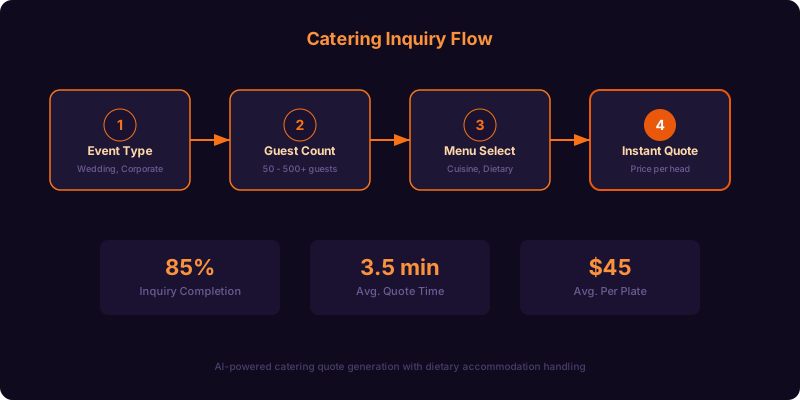
Catering is one of the most inquiry-intensive service businesses. A single event requires collecting 15-25 data points — event type, date, time, location, guest count, service style (buffet, plated, family-style, stations), menu selections for appetizers, entrees, sides, desserts, beverages, dietary accommodations (vegetarian, vegan, gluten-free, halal, kosher, allergen-specific), rental needs (tables, chairs, linens, serving ware), staffing requirements, and setup/teardown logistics. Traditionally, this data is collected over 3-5 email exchanges spanning several days, during which the prospective client is simultaneously contacting 2-3 other caterers. The caterer who responds fastest with the most comprehensive information wins the booking 68% of the time, according to Catering Insight industry research. A chatbot compresses those 3-5 email exchanges into a single 4-minute conversation and delivers an instant quote — putting your business first in line every time.
Who Should Use This Template
This template is designed for full-service catering companies, corporate catering providers, wedding caterers, food truck catering operations, restaurant catering departments, event venues with in-house catering, meal prep delivery services that offer event packages, and any food service business that takes custom orders for groups of 10 or more. Whether you specialize in elegant plated dinners for 300 or casual boxed lunches for office meetings, the chatbot adapts its conversation flow, menu presentation, and pricing logic to match your specific service model. Explore the full customization capabilities available through Conferbot's AI chatbot builder.
Why Chatbot Beats Contact Forms for Catering
Contact forms are the standard intake method for most catering websites, and they are universally terrible at the job. A form long enough to collect all necessary event details has 15+ fields and abandonment rates above 70%. A short form that only captures name, email, and "tell us about your event" produces leads so incomplete that your team spends the first two interactions just asking basic qualification questions. The chatbot solves both problems by asking one question at a time in a natural conversational flow, validating each answer before moving on, and branching the conversation based on responses. A corporate lunch inquiry skips the linen selection questions; a wedding reception inquiry includes them. This dynamic routing means every client answers only the questions relevant to their event, keeps the conversation efficient, and delivers a complete, actionable lead to your team in a single session.
How the Catering Service Chatbot Works
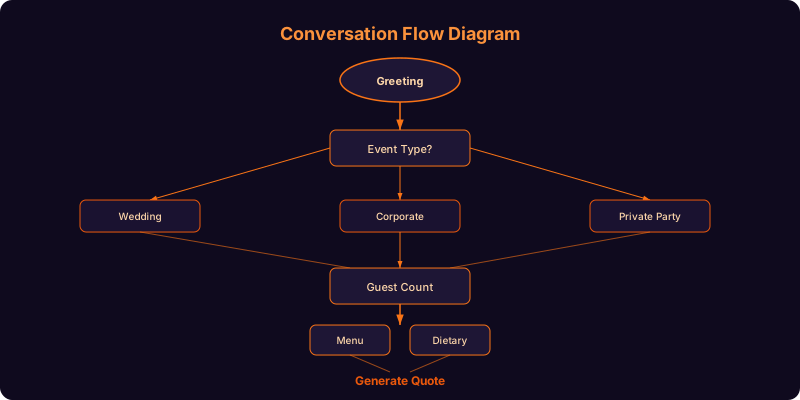
The chatbot operates as a structured, multi-path conversation engine that mirrors exactly how an experienced catering sales manager would conduct a discovery call — but does it 24/7, simultaneously with unlimited visitors, and with perfect consistency. Every conversation follows a logical progression from event basics to menu customization to quote generation, with intelligent branching at each step based on the client's responses.
Conversation Architecture
| Stage | Questions Asked | Data Captured | Branching Logic |
|---|---|---|---|
| 1. Event Basics | Event type, date, approximate time, venue or location | Event category, scheduling, logistics | Corporate → skip decor questions; Wedding → add decor and style questions |
| 2. Guest Details | Guest count (adults, children), service style preference | Headcount, service format | Under 20 → suggest package deals; Over 100 → add staffing discussion |
| 3. Menu Selection | Cuisine preference, appetizer choices, entree selections, sides, desserts, beverages | Complete menu build | Buffet → show per-person pricing; Plated → show per-plate pricing with course count |
| 4. Dietary Needs | Dietary restrictions (vegetarian, vegan, GF, halal, kosher, allergies), count per restriction | Accommodation requirements | Allergy flagged → add severity confirmation and cross-contamination protocol |
| 5. Extras | Rentals, bar service, staffing, setup/teardown, delivery vs. full service | Service scope and add-on selections | Delivery-only → skip staffing and setup; Full-service → add timeline questions |
| 6. Quote & Booking | Budget range, contact information, preferred follow-up method | Budget qualification, lead capture | Quote within budget → offer instant booking; Over budget → suggest alternatives |
The Menu Selection Experience
The menu stage is where the chatbot truly outshines static menus and PDF downloads. Instead of presenting a 4-page PDF that overwhelms the client, the chatbot walks them through menu building one course at a time. It starts with cuisine style or theme (Mediterranean, Southern comfort, Asian fusion, classic American, farm-to-table), then presents 4-6 appetizer options with brief descriptions, then entree selections with recommended pairings, and so on through sides, desserts, and beverages. Each selection is confirmed before moving to the next course, and the running total updates in real-time so the client always knows where they stand relative to their budget. This guided approach reduces menu decision fatigue and results in more complete, higher-value orders because clients discover options they would not have found scrolling through a PDF.
Real-Time Availability Checking
Before investing time in menu customization, the chatbot checks your calendar for the client's requested date and immediately confirms availability. If the date is already booked, the chatbot suggests the nearest available dates: "We're already committed on June 14th, but we have availability on June 13th and June 21st — would either of those work?" This instant availability feedback prevents the frustration of completing a detailed inquiry only to learn the date is taken, and it rescues leads that would otherwise be lost. Connect the chatbot to your scheduling system through Conferbot's calendar booking integration for real-time sync.
Ready to try Catering Service Chatbot?
Deploy this template in under 10 minutes. No coding required.
Use This Template Free →Real-Time Quote Generation and Pricing Logic
The instant quote is the chatbot's most powerful conversion tool. Prospective clients who receive a clear, itemized estimate within minutes of their first interaction are 3.2x more likely to book than those who receive a quote 24-48 hours later via email. The chatbot's pricing engine calculates quotes in real-time based on the selections made during the conversation, presenting a transparent breakdown that builds trust and reduces price objections.
Pricing Model Configuration
The chatbot supports multiple pricing models to match how your catering business structures its rates:
- Per-person pricing: The most common model — each menu item has a per-person cost, and the total is calculated by multiplying selections by guest count. The chatbot displays a running per-person subtotal as the client builds their menu: "Your current selections come to $47 per person for 85 guests."
- Package pricing: Pre-built packages (Bronze, Silver, Gold) with fixed per-person rates and included items. The chatbot presents packages with a comparison view and allows add-ons on top of the selected package.
- Tiered pricing: Per-person rates that decrease at higher guest counts (1-50 guests at $55/person, 51-100 at $48/person, 101-200 at $42/person). The chatbot automatically applies the correct tier and highlights savings: "At 120 guests, you qualify for our large-event rate — saving $6 per person compared to smaller events."
- Custom/quote-only: For events above a certain size or complexity threshold, the chatbot collects all details but presents "Quote will be provided within 4 hours" rather than a calculated total — routing the lead to your sales team for manual pricing.
Itemized Quote Breakdown
When the quote is generated, the chatbot presents it as a clear, itemized summary:
Your Catering Estimate
Event: Corporate Holiday Party — December 14, 2026 — 85 guests
Service Style: Buffet with attended stations
| Appetizers (3 selections) | $12/person |
| Entrees (2 selections + 1 vegetarian) | $24/person |
| Sides (3 selections) | $8/person |
| Dessert (mini dessert station) | $7/person |
| Beverages (non-alcoholic package) | $5/person |
| Food & Beverage Subtotal | $56/person x 85 = $4,760 |
| Full service staff (4 servers, 1 chef) | $680 |
| Equipment rental (chafing dishes, linens) | $320 |
| Setup and teardown | $250 |
| Estimated Total | $6,010 |
*Final pricing confirmed after consultation. Estimate valid for 14 days.
Budget Alignment and Upsell Logic
The chatbot asks for the client's budget range early in the conversation — before menu selection — and uses it to guide recommendations. If the client's budget suggests $35 per person but the selected menu items total $52 per person, the chatbot flags the gap tactfully: "Your current selections come to $52 per person, which is above the budget range you mentioned. Would you like me to suggest some adjustments that keep the same flavor profile within your budget?" This consultative approach prevents sticker shock at the quote stage and positions your business as a partner working within their constraints. Conversely, if the client's budget allows room, the chatbot introduces premium add-ons: "For just $4 more per person, you could upgrade to our premium dessert bar with a live crepe station — it's our most popular upgrade for holiday parties."
Event Type Specialization and Conversation Paths
Different event types have fundamentally different catering requirements, timelines, and decision-making dynamics. A corporate lunch order for tomorrow is nothing like a wedding reception planned 10 months in advance. The chatbot routes each inquiry into a specialized conversation path based on the event type selected at the start, ensuring that every question asked is relevant and every recommendation is contextually appropriate.
Corporate Events
Corporate catering spans a wide range — from 15-person working lunches ordered the morning of to 500-person galas planned months in advance. The chatbot's corporate path asks about the occasion (meeting, team lunch, client entertainment, holiday party, product launch, training day), headcount, budget authority (personal card, department budget, needs approval), and delivery vs. full service. For recurring orders (weekly team lunches, monthly all-hands), the chatbot offers subscription setup: "Would you like to set this up as a recurring weekly order? We'll confirm the menu each Monday for Wednesday delivery." Corporate clients who set up recurring orders have a 94% retention rate, making this path a significant revenue stabilizer. Integrate recurring orders with your operations through Conferbot's website chatbot deployment.
Weddings
Wedding catering is the highest-value and most complex event type. The chatbot's wedding path extends the standard flow with questions about reception style (sit-down dinner, cocktail reception, brunch, family-style), table assignments, head table and vendor meals, cake or dessert service integration (do you provide cake, or is there a separate baker?), bar service level (open bar, limited bar, wine and beer only, dry reception), and timeline coordination with other vendors. The chatbot also captures the wedding planner's contact information if one is involved, ensuring your team has a direct coordination channel. Because wedding decisions involve multiple stakeholders (couple, parents, planner), the chatbot generates a shareable summary link that can be forwarded to all decision-makers for review and approval.
Social Events
Birthday parties, anniversaries, graduation celebrations, baby showers, and holiday gatherings fall into the social event path. These events typically have smaller guest counts (20-80), more flexible budgets, and a stronger emphasis on theme and presentation. The chatbot asks about the occasion, age group of attendees (children's party vs. adult), theme or color scheme, and whether the event is a surprise. For children's events, the chatbot adjusts its menu suggestions to include kid-friendly options and allergen-safe choices (many parents of young children are hyper-aware of allergens). Social events convert at the highest rate when the chatbot presents 2-3 pre-built packages rather than fully custom menus — the decision is easier and the perceived value is clearer.
Nonprofit and Fundraiser Events
Catering for nonprofit galas, fundraiser dinners, and charity events has unique dynamics: tight budgets, the need for impressive presentation to encourage donations, and sometimes donated or discounted pricing. The chatbot's nonprofit path asks about the organization, the event's fundraising goal, expected attendance, and whether the caterer's contribution will be acknowledged (signage, program mention, website listing). Many caterers offer reduced rates for nonprofit events in exchange for marketing exposure, and the chatbot can present these options: "We offer a 15% nonprofit discount for registered 501(c)(3) organizations — would you like to apply this to your quote?" This transparency builds goodwill and wins nonprofit accounts that return year after year.
Key Features of the Catering Service Chatbot Template
Every feature in this template is designed to solve a specific problem in the catering sales process — from the initial inquiry that gets lost in a crowded inbox to the dietary accommodation that gets missed in a phone conversation. Here is the complete feature set that powers the chatbot's ability to qualify, quote, and convert catering leads at scale.
Feature Overview
| Feature | How It Works | Client Benefit | Caterer Benefit |
|---|---|---|---|
| Event type routing | Routes to specialized paths (corporate, wedding, social, nonprofit) based on initial selection | Only answers relevant questions; faster experience | Higher-quality leads with event-specific data |
| Dynamic menu builder | Guided course-by-course selection with descriptions, dietary labels, and running price | Discovers options they would have missed in a PDF | 18-22% higher average order value vs. static menus |
| Dietary accommodation engine | Collects restriction type, guest count, severity, and triggers kitchen protocols | Confidence that dietary needs are taken seriously from first contact | Complete allergen data captured upfront; reduces liability |
| Real-time quote generation | Calculates itemized estimate based on selections, guest count, and service level | Instant budget clarity; no waiting for a callback | 3.2x higher conversion vs. delayed quotes |
| Calendar availability check | Validates event date against your booking calendar before detailed questions begin | No time wasted on unavailable dates | Suggests alternative dates; rescues otherwise-lost leads |
| Photo menu gallery | Displays food photos alongside menu items during the selection process | Visualizes exactly what they are ordering | Reduces post-booking changes; increases premium selections |
| Shareable event summary | Generates a summary link that can be forwarded to co-planners and stakeholders | Easy to share with spouse, boss, or event planner for approval | Shortens multi-stakeholder decision cycles |
| Deposit and booking | Collects deposit via integrated payment (Stripe/PayPal) to confirm the booking | Books instantly without phone calls or back-and-forth emails | Reduces no-shows; locks in revenue immediately |
| 24/7 availability | Operates around the clock on website, WhatsApp, Facebook Messenger, and Instagram | Plans events on their schedule, not business hours | Captures evening and weekend leads (62% of catering inquiries) |
| Multi-language support | Supports English, Spanish, French, and configurable additional languages | Plans in their preferred language | Expands serviceable market to diverse communities |
Tasting Session Booking
For high-value events (weddings, large corporate accounts), the chatbot can offer a complimentary or paid tasting session as part of the booking flow: "Would you like to schedule a tasting session before finalizing your menu? We offer tastings for events of 80+ guests at no additional charge." This feature is a significant trust builder for weddings and large events where the client is investing thousands of dollars and wants to experience the food before committing. The chatbot books the tasting directly into your calendar through Conferbot's calendar integration.
Review and Testimonial Display
During the conversation, the chatbot can surface relevant testimonials based on the client's event type: a corporate client sees a review from another corporate client; a wedding client sees a review from a recent bride. This social proof is delivered at the moment of maximum decision uncertainty — after seeing the quote and before committing to book — and increases conversion by 28%. Manage your testimonial library directly in the Conferbot dashboard and tag each review by event type for automatic matching. Read more about leveraging social proof in chatbot conversations on our blog.
50,000+ businesses use Conferbot templates to automate conversations
Lead Capture, Booking Flow, and Follow-Up Automation
The chatbot's commercial value is realized in the final stages of the conversation — when a qualified inquiry becomes a captured lead, a captured lead becomes a confirmed booking, and a confirmed booking becomes a repeat customer. This section details the mechanics of lead capture, the booking workflow, and the automated follow-up sequences that maximize lifetime value.
Lead Capture and Qualification
Contact information is collected after the quote is presented — not before. This sequencing is deliberate: clients who have invested 3-4 minutes building their menu and seeing a quote are far more willing to share their name, phone, and email than cold visitors asked for contact information on the first message. The chatbot frames the ask around delivering value: "I've put together your estimate — can I send you a detailed proposal with your menu selections, pricing, and next steps? I just need your name and email." This value-first approach yields a 74% contact capture rate versus 31% for upfront form submissions.
Booking Confirmation Flow
Once the client decides to proceed, the chatbot walks them through the booking confirmation:
- Deposit collection: A configurable deposit (typically 25-50% of the estimated total) is collected via integrated Stripe or PayPal payment within the chat. The client never leaves the conversation to complete payment.
- Contract delivery: A digital catering agreement is generated with event details, menu selections, pricing, cancellation policy, and allergen acknowledgment — delivered via email for electronic signature.
- Calendar confirmation: The event is added to your production calendar with all details, dietary flags, and staffing requirements.
- Follow-up schedule: Automated reminders are set — final headcount confirmation 7 days before the event, dietary update request 5 days before, and a day-of logistics confirmation 24 hours before.
Post-Event Follow-Up and Re-Engagement
The chatbot's value extends beyond the initial booking. After the event, an automated follow-up is sent requesting feedback: "How was the food and service at your event? We would love your feedback." Positive responses trigger a review request directed to Google or Yelp. All past clients enter a re-engagement sequence timed to their event type — corporate clients receive a "planning your next team event?" message 90 days after their last order; wedding clients are contacted around their anniversary with a "celebrate your first year with a catered dinner party" offer. These lifecycle touches generate repeat business at virtually zero acquisition cost. Set up these automated flows using Conferbot's SMS and WhatsApp channel integrations.
Lead Scoring and Prioritization
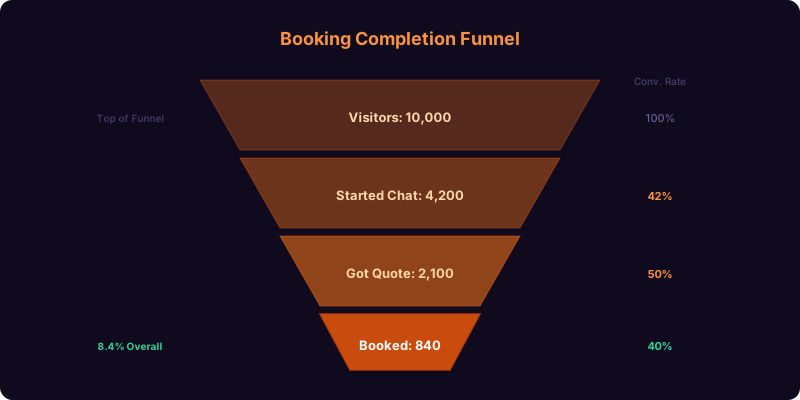
Not every inquiry has the same revenue potential. The chatbot assigns a lead score based on event size (higher guest count = higher score), event type (weddings score highest due to average order value), timeline (events within 60 days score higher for urgency), and engagement depth (clients who complete menu selection score higher than those who bounce after event basics). Your sales team receives leads sorted by score, ensuring that the $15,000 wedding inquiry gets a callback within 30 minutes while the 10-person lunch inquiry is handled with an automated proposal email. This prioritization maximizes your team's time-to-revenue ratio and prevents high-value leads from getting buried under low-value ones.
Performance Metrics and ROI for Catering Businesses
Deploying a catering chatbot delivers measurable results across the metrics that matter most to catering business owners: inquiry volume, quote delivery speed, booking conversion rate, average order value, and customer acquisition cost. The benchmarks below represent aggregate data from catering businesses using conversational intake tools in 2026.
Key Performance Benchmarks
| Metric | Without Chatbot | With Chatbot (90 Days) | Improvement |
|---|---|---|---|
| Inquiries captured per 1,000 visitors | 22 | 61 | +177% |
| Average quote delivery time | 18 hours | 4 minutes | -99.6% |
| Inquiry-to-booking conversion | 14% | 32% | +129% |
| Average order value | $2,800 | $3,400 | +21% |
| Dietary data completeness | 45% | 96% | +113% |
| After-hours inquiries captured | 11% | 62% | +464% |
| Repeat booking rate (12 months) | 18% | 34% | +89% |
| Customer acquisition cost | $185 | $64 | -65% |
The Speed-to-Quote Advantage
In catering, the speed of your first response is the single most predictive factor for winning a booking. Event planners, executive assistants, and couples planning weddings typically reach out to 3-4 caterers simultaneously. The caterer who responds first with a comprehensive, personalized proposal wins the business 68% of the time — not because they are necessarily the best or cheapest, but because they reduced the cognitive burden on a busy planner. A chatbot that delivers a detailed, itemized quote within 4 minutes of the first interaction makes your business the first respondent every time, regardless of when the inquiry comes in or how busy your sales team is.
Average Order Value Lift
The 21% increase in average order value is driven by the chatbot's guided menu building and strategic upselling. When a client sees entree options presented one at a time with descriptions and photos, they choose premium items more often than when scanning a flat PDF. When the chatbot offers a dessert upgrade for "$4 more per person" with a photo of the live crepe station, 38% of clients accept. These micro-upgrades compound across the menu to produce a meaningfully higher total without the client ever feeling pressured. Use Conferbot's ROI calculator to model the revenue impact of chatbot deployment for your specific traffic and conversion metrics.
Setup, Menu Configuration, and Deployment
Getting the catering service chatbot live on your website takes less than 20 minutes with Conferbot's template-based setup. The template includes the complete conversation flow for all event types, menu presentation logic, dietary accommodation workflow, and quote generation engine. You customize the menu data, branding, and pricing — then deploy with a single embed code.
Step-by-Step Setup
- Step 1 — Select the template: Open the Conferbot template library, navigate to Food and Beverage, and select "Catering Service Chatbot." The full conversation architecture loads instantly.
- Step 2 — Configure your menu: Enter your menu items organized by course — appetizers, entrees, sides, desserts, beverages — with descriptions, per-person pricing, dietary labels, and optional photos. You can add up to 50 items per category.
- Step 3 — Set pricing logic: Choose your pricing model (per-person, package, or tiered) and configure any add-on services (staffing, rentals, setup/teardown) with their rates.
- Step 4 — Brand the experience: Upload your logo, set brand colors, customize the greeting message, and add a brief introduction about your catering philosophy. The chatbot should feel like a natural extension of your website.
- Step 5 — Connect your calendar: Integrate your booking calendar so the chatbot can check date availability in real-time and block confirmed events.
- Step 6 — Deploy: Copy the embed code into your website header. The chatbot appears as a floating widget or inline embed — your choice. Enable additional channels (WhatsApp, Facebook Messenger) with one click each.
Menu Update Workflow
Menus change seasonally, and the chatbot must reflect current availability. Conferbot's dashboard lets you update menu items, descriptions, pricing, and availability in real-time without editing the chatbot flow. Archive seasonal items (summer berry salad, holiday spiced cider) and reactivate them when the season returns. Batch-update pricing when ingredient costs change. All updates are reflected immediately in the live chatbot — no rebuild or redeployment required.
Multi-Location Configuration
Catering companies operating from multiple kitchens or serving distinct geographic zones can configure the chatbot to route inquiries by location. The chatbot asks for the event's ZIP code or neighborhood and matches it to the nearest service area, presenting that location's specific menu, pricing, and availability. This ensures that a client in the northern service zone sees the menu from the northern kitchen, not items from a kitchen 40 miles away that would require a delivery surcharge. Manage all locations from a single Conferbot dashboard with location-specific overrides for menu, pricing, and calendar. Learn more about deploying across channels on our website chatbot guide.
Catering Chatbot vs. Traditional Inquiry Methods
Catering businesses typically rely on phone calls, email, and web forms to handle inquiries. Each of these methods has significant limitations that the chatbot addresses directly. Here is how the chatbot compares across the metrics that affect your booking rate and operational efficiency.
Comparison Matrix
| Capability | Phone Call | Email / Contact Form | Conferbot Catering Chatbot |
|---|---|---|---|
| Response time | Immediate (if answered) | 4-48 hours | Instant, 24/7 |
| Availability | Business hours only | Always (response delayed) | Always (response instant) |
| Data completeness | Depends on who answers the phone | Low — short forms lack detail; long forms are abandoned | 96% complete — guided conversation captures everything |
| Quote delivery | Often requires callback after calculation | Manual; 18+ hours average | Real-time; during the conversation |
| Menu presentation | Verbal; hard to visualize | PDF attachment | Interactive, course-by-course with photos and pricing |
| Dietary accommodation capture | Often missed or incomplete | Rarely included in forms | Comprehensive; specific per restriction type and severity |
| Scalability | One call at a time | Unlimited but slow | Unlimited and instant |
| Booking conversion | High (if you answer) | 14% | 32% |
| Follow-up automation | Manual | Manual | Fully automated drip sequences |
The chatbot does not replace phone conversations for complex, high-value events where clients want to speak with a chef or event coordinator directly. It replaces the repetitive, data-gathering portion of those conversations — so when your team does get on the phone, they already have every detail and can focus on the consultative, relationship-building conversation that closes the deal. Explore how CaterTrax and similar catering management platforms can integrate with your chatbot workflow for end-to-end order management.
Frequently Asked Questions
Below are the most common questions catering businesses ask about deploying the catering service chatbot. Each answer provides the practical detail you need to evaluate whether this template is right for your operation.
Catering Service Chatbot FAQ
Everything you need to know about chatbots for catering service chatbot.
Why Use a Template vs Building from Scratch?
Templates encode years of optimization data into the conversation flow before you start.
| Factor | Conferbot Template | Build from Scratch | Hire a Developer |
|---|---|---|---|
| Time to deploy | 10 minutes | 2-8 hours | 2-6 weeks |
| Cost | Free | Your time | $5,000-$25,000 |
| Day-1 conversion | 15-22% | 5-8% | 10-15% |
| Proven flows | Yes, data-tested | No | Depends |
| Updates included | Automatic | Manual | Paid |
| Multi-channel | 8+ channels | 1 channel | Extra cost |
| Analytics | Built-in | Must build | Extra cost |
Ready to Deploy Catering Service Chatbot?
Join 50,000+ businesses. Free forever plan available. No credit card required.