
LINE चैटबॉट बिल्डर
LINE के प्रमुख बाजारों में उपयोगकर्ताओं से जुड़ें - जापान, ताइवान, थाईलैंड और इंडोनेशिया। कैरोसल टेम्प्लेट, क्विक रिप्लाई और सुपर-फास्ट 30-सेकंड रिप्लाई टोकन की सुविधा।
LINE चैटबॉट फीचर्स
शक्तिशाली स्वचालित बातचीत बनाने के लिए आपको जो कुछ भी चाहिए
LINE Official Account एकीकरण
कैरोसल टेम्प्लेट (10 कॉलम तक)
हां/नहीं विकल्पों के लिए कन्फर्म टेम्प्लेट
क्विक रिप्लाई (13 आइटम तक)
रिच मीडिया समर्थन
यूज़र प्रोफ़ाइल जानकारी
तेज़ प्रतिक्रियाओं के लिए 30-सेकंड रिप्लाई टोकन
निर्बाध मानव हैंडऑफ
आप क्या बना सकते हैं?
शुरू करें 13 सरल चरणों में
अपने LINE चैटबॉट को कनेक्ट करने के लिए इस गाइड का पालन करें
LINE Developers Console (developers.line.biz) पर जाएं
एक Provider बनाएं (या मौजूदा का चयन करें)
एक नया Messaging API Channel बनाएं
Basic सेटिंग्स से Channel ID कॉपी करें
Basic सेटिंग्स से Channel Secret कॉपी करें
एक लॉन्ग-लाइव्ड Channel Access Token जारी करें
Conferbot में, Channels → LINE → Connect पर जाएं
Channel ID, Channel Secret, और Access Token दर्ज करें
Conferbot से Webhook URL कॉपी करें
LINE Console में, Webhook URL पेस्ट करें
'Use webhook' विकल्प को सक्षम करें
ऑटो-रिप्लाई और ग्रीटिंग संदेशों को अक्षम करें (वैकल्पिक)
आपका LINE बॉट लाइव है!
Introduction
LINE is not just another messaging app - it is the digital infrastructure of daily life in Japan, Taiwan, Thailand, and Indonesia. With over 230 million monthly active users concentrated in these four markets, LINE functions as the primary communication tool, mobile payment platform, news source, and e-commerce gateway for hundreds of millions of people.
In Japan alone, LINE reaches 95 million users - roughly 75% of the entire population. It is used for everything from personal chats and business communication to government alerts and restaurant reservations. In Taiwan, Thailand, and Indonesia, LINE holds similar market dominance. For any business targeting these regions, LINE is not optional - it is essential.
LINE Official Accounts let businesses interact with customers through the Messaging API, offering features like carousel templates, quick replies, rich media, and 30-second reply tokens for lightning-fast responses. But manually managing these interactions is impractical at scale. A chatbot automates the work while delivering the instant, personalized experiences that LINE users expect.
With Conferbot's no-code chatbot builder, you can deploy a LINE chatbot in minutes. Design conversational flows with our visual builder, integrate AI-powered responses, and connect to your LINE Official Account without writing any code. This guide covers LINE's unique platform features, setup process, market-specific strategies, and best practices for success in 2026.
New to chatbot building? Read our complete guide to building a chatbot without coding. Want to combine LINE with global channels like WhatsApp and Messenger? Deploy on all three with Conferbot's omnichannel platform. Browse our template library for ready-to-customize LINE bot flows.
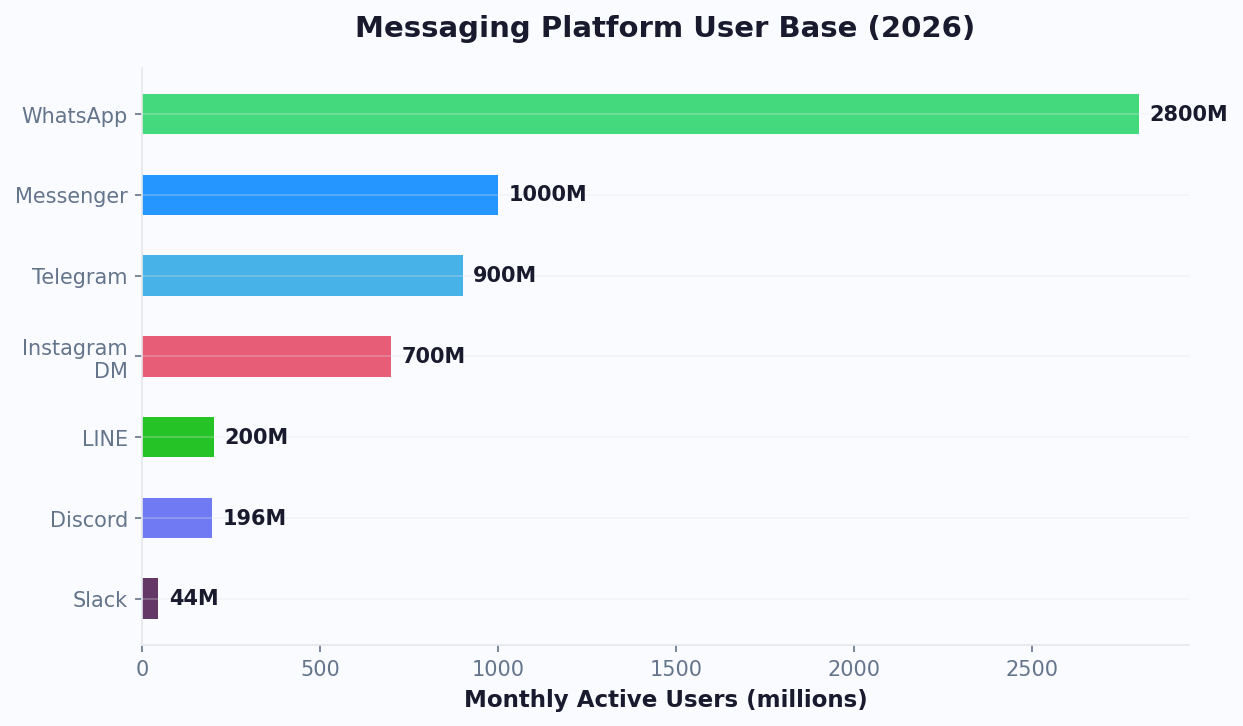
LINE Messaging API Capabilities
LINE's Messaging API offers a rich set of templates and interaction types designed for the mobile-first Asian market. Understanding these capabilities is key to building effective LINE chatbots.
Message Templates
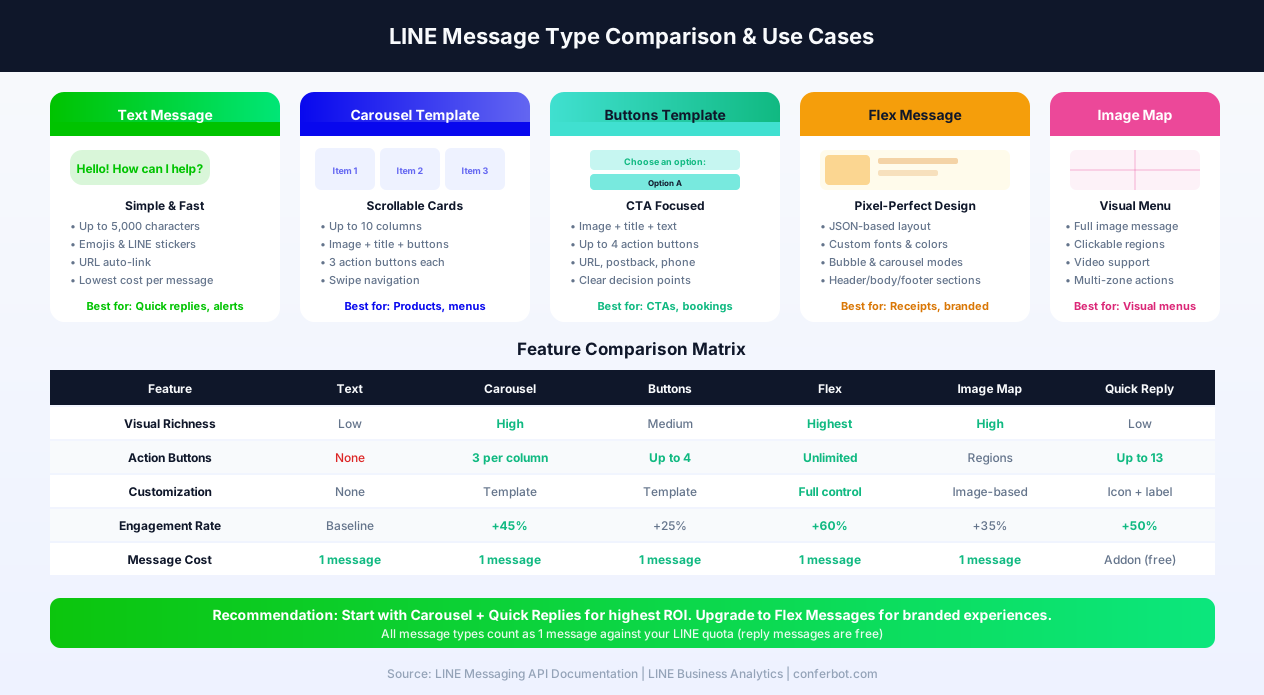
- Carousel Templates - Up to 10 horizontal scrolling columns, each with an image, title, text, and up to 3 action buttons. Perfect for product catalogs, menu displays, and property listings. The most visually rich template in LINE's toolkit
- Confirm Templates - Simple Yes/No or binary choice messages with two action buttons. Ideal for confirmations, opt-ins, and decision points
- Buttons Templates - A message with an image, title, text, and up to 4 action buttons. Use for CTAs like booking, purchasing, or navigating to specific bot flows
- Image Map Messages - Full-image messages with clickable regions, enabling rich visual menus and interactive images
- Flex Messages - Highly customizable JSON-based messages with flexible layouts, fonts, and colors. The most design-flexible option for brands that need pixel-perfect control
Quick Replies
Up to 13 quick reply items displayed as horizontally scrollable buttons below a message. Quick replies can trigger text, URL, date picker, camera, camera roll, or location sharing actions - far more versatile than text-only options.
Reply Tokens
LINE uses a unique reply token system. When a user sends a message, LINE provides a reply token valid for 30 seconds. This enables extremely fast response cycles but requires your bot infrastructure to be responsive. Conferbot handles this seamlessly through its optimized webhook processing.
User Profile
Access the user's display name, profile picture, language, and status message for personalized interactions. Combined with LINE's regional focus, this enables market-specific personalization.
Rich Menus
A persistent visual menu displayed at the bottom of the chat screen. Unlike text-based persistent menus on other platforms, LINE's rich menu is a full image with tappable regions, enabling visually branded navigation.
LINE Official Account Types
LINE offers different account types that affect your chatbot's capabilities and reach:
| Feature | Free Plan | Light Plan | Standard Plan |
|---|---|---|---|
| Monthly Price | Free | ~$50/month | ~$150/month |
| Free Messages/Month | 200 (Japan), 500 (others) | 5,000 | 30,000 |
| Additional Messages | Not available | ~$0.05 each | ~$0.03 each |
| Messaging API | Yes | Yes | Yes |
| Rich Menu | Yes | Yes | Yes |
| Verified Badge | Application required | Application required | Application required |
All plan tiers support the Messaging API, meaning you can connect a Conferbot chatbot regardless of which plan you choose. The key difference is message volume -- the free plan's 200-message limit (in Japan) can be quickly consumed by active bots. For businesses with significant customer traffic, the Light or Standard plan is recommended. Note that reply messages (responses to user-initiated messages) do not count against your monthly quota -- only push messages (business-initiated) are counted. This makes the free tier viable for support bots where customers message first.
LINE Pay Integration
LINE Pay is one of the most widely used mobile payment platforms in Japan, Taiwan, and Thailand. Integrating LINE Pay with your chatbot enables in-chat transactions: customers browse products through carousel templates, select items, and complete payment without leaving the LINE app. In Japan, LINE Pay processes over $30 billion in annual transactions, and merchants using LINE Pay with chatbots report 25% higher average order values compared to redirecting users to external payment pages. The seamless payment experience reduces cart abandonment and builds customer trust in conversational commerce.
LIFF (LINE Front-end Framework)
LIFF allows you to create rich web experiences that run inside the LINE app. Think of it as LINE's equivalent of Telegram Mini Apps. LIFF apps can access user profile information, share content back to LINE chats, and provide interactive experiences that go beyond what standard message templates offer. Use cases include detailed product configurators, interactive maps for store locators, complex forms for insurance quotes or loan applications, and gamified loyalty programs. Your Conferbot chatbot can launch LIFF apps at specific conversation points -- for example, when a user wants to customize a product or fill out a detailed application, the bot opens the LIFF app for the complex interaction and returns to conversational mode afterward.
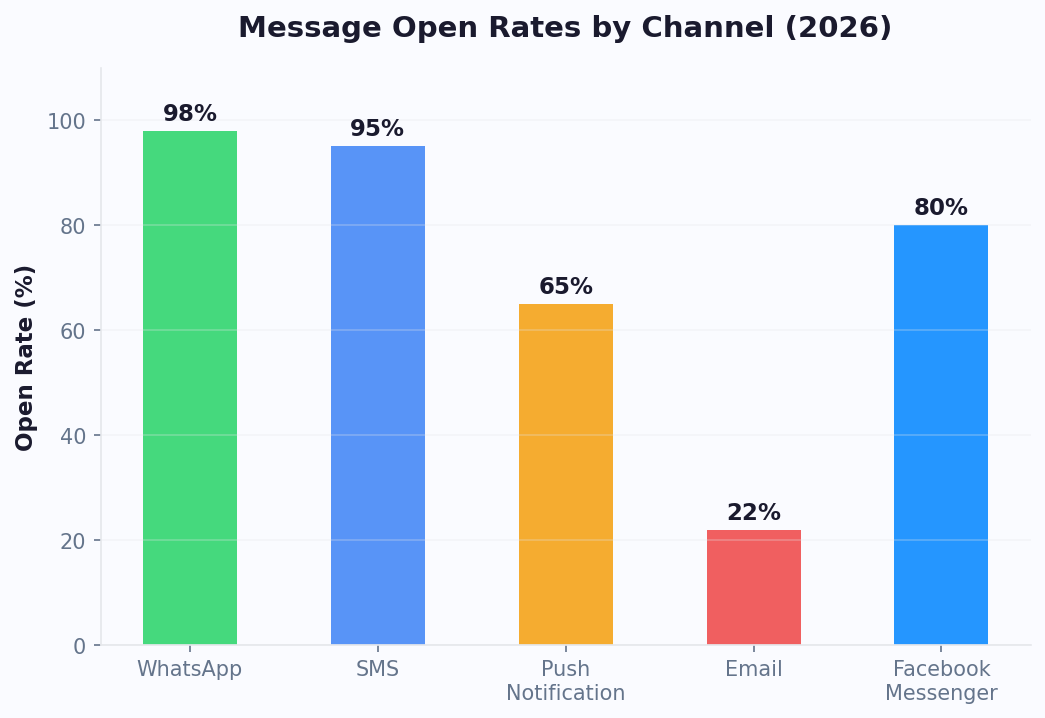
Step-by-Step LINE Bot Setup
Setting up a LINE chatbot involves creating a LINE Official Account and connecting it through the Messaging API. Here is the complete process.
Prerequisites
- A LINE account (personal account is fine to start)
- Access to the LINE Developers Console
- A Conferbot account
Step 1: Build Your Chatbot
Start in the Conferbot dashboard by creating a chatbot with the visual builder. For LINE's Asian markets, consider using templates designed for customer support or e-commerce, and customize with local language content.
Step 2: Create a LINE Channel
- Go to developers.line.biz and log in with your LINE account
- Create a Provider (your company or project name) if you do not have one
- Click "Create a new channel" and select Messaging API
- Fill in the channel details: name, description, category, and region
- Accept the terms and create the channel
Step 3: Collect Your Credentials
- In the channel's Basic settings, copy the Channel ID and Channel Secret
- Navigate to the Messaging API tab
- Scroll to "Channel access token" and click Issue to generate a long-lived token
- Copy the Channel Access Token
Step 4: Connect to Conferbot
- In Conferbot, go to Channels → LINE → Connect
- Enter your Channel ID, Channel Secret, and Channel Access Token
- Conferbot generates a Webhook URL - copy it
Step 5: Configure the Webhook
- Back in the LINE Developers Console, go to the Messaging API tab
- Paste the Webhook URL from Conferbot into the Webhook URL field
- Click Verify to confirm the connection
- Enable the "Use webhook" toggle
- Optionally, disable "Auto-reply messages" and "Greeting messages" in the LINE Official Account settings to prevent conflicts with your bot
Your LINE chatbot is now live. Add it as a friend using the QR code in the LINE Developers Console and send a test message. Setup takes approximately 10 minutes.
Key LINE Bot Features with Conferbot
Conferbot adds intelligent automation to LINE's already powerful messaging platform, creating a complete engagement solution for Asian markets.
Carousel-Driven Commerce
LINE's 10-column carousel templates are perfect for product browsing. Build interactive catalogs where users swipe through products, tap for details, and proceed to purchase - all within the LINE chat. This commerce-in-chat experience matches the shopping habits of LINE's core markets where mobile commerce dominates.
Multi-Language AI Responses
LINE spans four linguistically distinct markets. With OpenAI integration, your bot can understand and respond in Japanese, Mandarin Chinese, Thai, Bahasa Indonesia, and English - handling the linguistic diversity of LINE's user base automatically.
Rich Menu Design
Configure visually branded rich menus that serve as the main navigation for your bot. Unlike simple text menus, LINE rich menus use full images with tappable zones, enabling creative, on-brand navigation that feels like a mini-app.
Reply Token Optimization
LINE's 30-second reply token window demands fast bot response times. Conferbot's infrastructure is optimized for LINE's reply token system, processing incoming messages and generating responses well within the window to ensure every user receives a timely reply.
Omnichannel Continuity
Customers who start on LINE can continue conversations on your website, WhatsApp, or other channels through Conferbot's omnichannel platform. This is especially valuable for international businesses that serve LINE-dominant Asian markets alongside WhatsApp-dominant regions.
AI Knowledge Base for Asian Markets
Connect your product documentation, FAQ content, and support articles to Conferbot's AI knowledge base. The AI processes queries in Japanese, Mandarin, Thai, and Bahasa Indonesia, delivering accurate answers from your existing content without requiring you to build separate flows for each language. This dramatically reduces the setup time for multi-market LINE deployments.
Calendar Booking for LINE
Service businesses in LINE's markets can integrate calendar booking directly into LINE conversations. Customers book appointments, reserve restaurant tables, or schedule consultations through quick reply buttons and date pickers -- all within LINE. The bot syncs with Google Calendar or Outlook to manage availability in real time.
Analytics for Asian Markets
The analytics dashboard tracks LINE-specific metrics: friend additions, message delivery rates, carousel engagement, quick reply usage, and conversation completion rates by market.
LINE Official Account Setup & Strategy
Your LINE Official Account is the foundation of everything - your chatbot, your broadcast messaging, your rich menus, and your friend relationships all operate through this account. Getting the account setup and strategy right is critical for long-term success in LINE's APAC markets. For the latest account types, features, and pricing, see the LINE for Business official portal.
Account Types and Verification
LINE offers three account verification levels, each unlocking different capabilities:
- Unverified Account - Available to anyone immediately. Basic features including Messaging API, rich menu, and bot functionality. Sufficient for development, testing, and small businesses. Account appears with a gray badge
- Verified Account (Blue Badge) - Available after LINE reviews your business. Unlocks the ability to appear in LINE's search results, increasing discoverability. Required for businesses that want organic friend growth. Application requires business registration documents and takes 5-10 business days
- Premium Account (Green Badge) - Invitation-only for large brands or available via special application. Provides the highest visibility in search, priority placement in recommendations, and access to premium features. Typically reserved for brands with 100,000+ friends
Messaging Quota Strategy
Managing your monthly message quota is one of the most important operational decisions for LINE chatbots. Here is how to optimize:
- Reply messages are free - When a user messages your bot first, the response does not count against your quota. This means support bots and FAQ bots can handle unlimited volume for free as long as the customer initiates the conversation
- Push messages count - Broadcast messages, promotional campaigns, and proactive notifications all count against your monthly quota. Design your push strategy carefully to maximize impact within your allocation
- Narrowcast targeting - Instead of broadcasting to all friends, use LINE's narrowcast feature to target messages to specific audience segments (by gender, age, location, or engagement level). This reduces message waste and improves ROI per message
- Message consolidation - Use Flex Messages and carousels to pack multiple pieces of information into a single message instead of sending several text messages. One carousel with 10 products counts as one message - 10 individual product texts would count as 10
Friend Acquisition Strategy
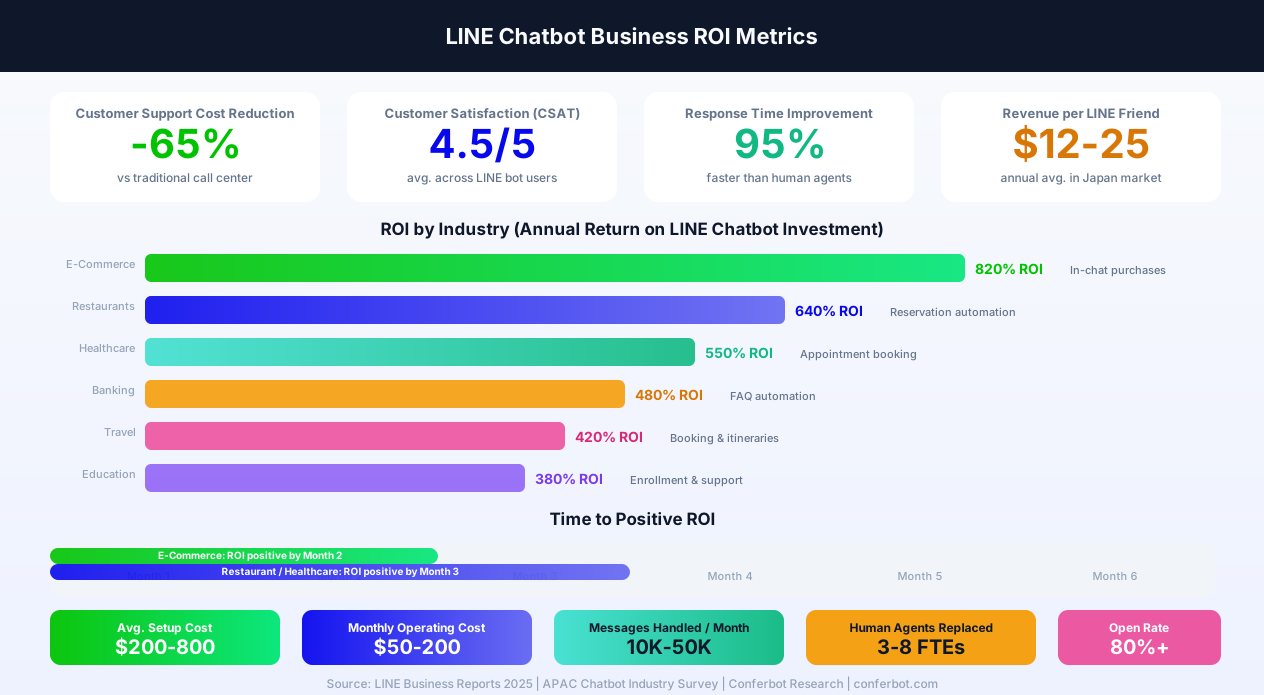
Growing your LINE friend base is the equivalent of building an email list - except with 80%+ open rates compared to email's 20-30%. Effective friend acquisition tactics include:
- QR codes in physical locations - Print QR codes on receipts, table tents, product packaging, in-store displays, and business cards. In Japan, QR code scanning is second nature
- Add-friend incentives - Offer a coupon, discount, or free item for adding your Official Account as a friend. In Japan, brands offering a 10% discount for adding see 3-5x higher friend acquisition rates
- LINE Ads - Run friend-add campaigns through LINE's advertising platform. Target by demographics, interests, and location. Average cost per friend: $0.30-1.50 depending on market and targeting
- Website integration - Embed LINE add-friend buttons and QR codes on your website, especially on mobile pages. Use UTM parameters to track which pages drive the most friend additions
- Cross-channel promotion - Promote your LINE account on Instagram, Facebook, and Google My Business. In APAC markets, "follow us on LINE" drives higher engagement than "follow us on social media"
Account Management Best Practices
- Set a greeting message - Configure an auto-greeting that introduces the bot, explains what it can do, and displays the rich menu. This is the first impression every new friend receives
- Disable LINE's auto-reply - When using Conferbot, disable LINE's built-in auto-reply and greeting in the Official Account Manager to prevent duplicate responses
- Monitor block rate - If your block rate exceeds 15-20%, you are likely sending too many push messages or delivering irrelevant content. Reduce frequency and improve targeting
- Track friend growth - Monitor net friend additions (adds minus blocks) weekly. Declining growth signals content or engagement issues
LINE Rich Menu Design & Optimization
The rich menu is arguably the most important visual element of your LINE chatbot experience. It is a persistent, tappable image that appears at the bottom of the chat screen - the first thing users see when they open your account. A well-designed rich menu increases engagement by 3x compared to text-based navigation and can drive 70% of all bot interactions. Understanding rich menu design is essential for LINE success.
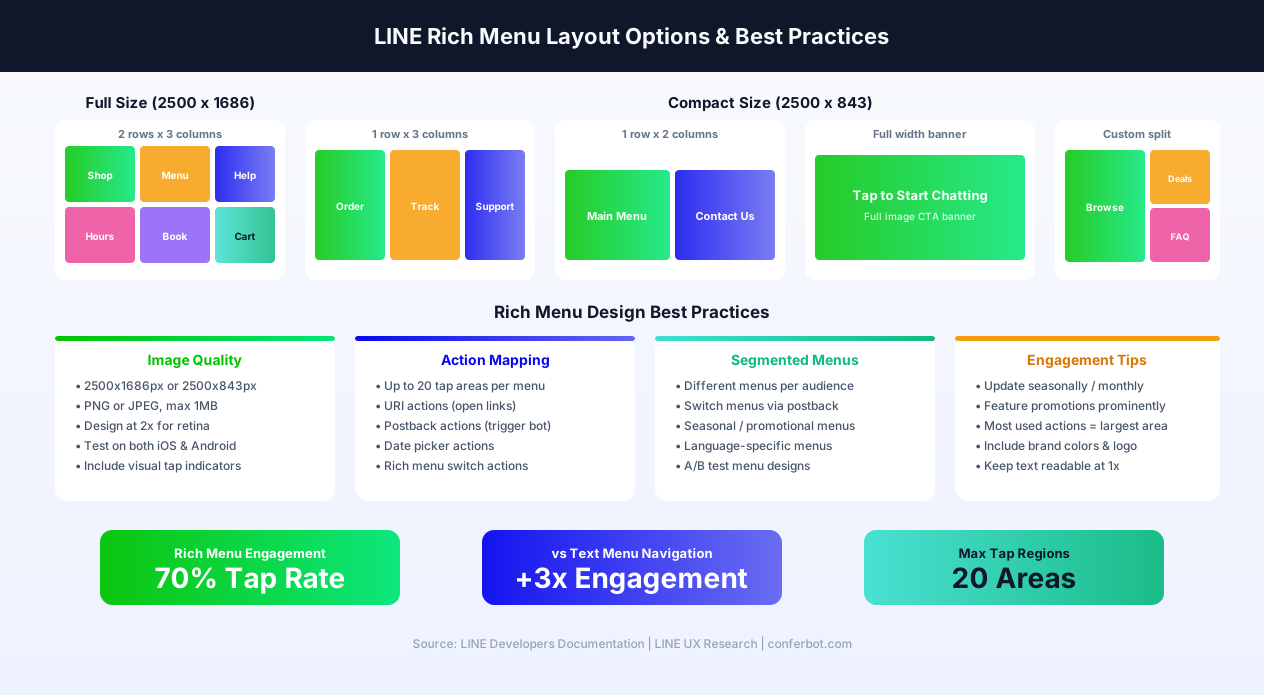
Rich Menu Sizes and Layouts
LINE supports two rich menu sizes, each with different layout options. For the complete design specifications, see the LINE Developers rich menu documentation.
- Full Size (2500 x 1686 pixels) - The larger format occupies more screen real estate and supports up to 20 tappable regions. Best for accounts with 4-6 primary actions. Available layouts: 2 rows x 3 columns, 1 row x 3 columns, 2 rows x 2 columns, and custom region definitions
- Compact Size (2500 x 843 pixels) - Half the height of the full menu, taking up less chat space. Best for accounts with 1-3 primary actions where you want the conversation area to remain prominent. Available layouts: 1 row x 2 columns, 1 row x 3 columns, and full-width single action
Design Best Practices
- Visual hierarchy - Place the most important action (typically "Start Ordering" or "Get Support") in the largest, most prominent position. Use color contrast to draw attention to primary CTAs
- Clear tap indicators - Include visual cues (icons, borders, hover-like shadows) that make it obvious the menu is tappable. Users should instantly understand that each section is an interactive button
- Brand consistency - Use your brand colors, fonts, and imagery. The rich menu is a brand touchpoint - it should look like a natural extension of your marketing materials
- Retina-ready images - Design at 2500px width for crisp rendering on high-DPI screens. Export as PNG (for transparency) or JPEG (for photos), keeping file size under 1MB
- Test on both platforms - Rich menus render slightly differently on iOS and Android. Test your design on both platforms before deploying, paying attention to font rendering and image scaling
Segmented Rich Menus
One of LINE's most powerful features is the ability to display different rich menus to different audience segments. This enables personalized navigation based on user attributes or conversation state:
- New user vs returning user - Show a "Getting Started" menu to new friends and a "Reorder / Track Order" menu to existing customers
- Language-based menus - Display Japanese menus to Japan-based users and English menus to international users, detected via the user's LINE language setting
- Promotional menus - Swap in seasonal or campaign-specific menus during sales events, holidays, or product launches. Return to the standard menu afterward
- State-based menus - Change the menu based on conversation context. For example, during an ordering flow, show an order-focused menu. After order completion, switch to a tracking-focused menu
Rich Menu Action Types
Each tappable region in a rich menu can trigger one of several action types:
- Postback action - Sends a hidden data payload to your Conferbot chatbot, triggering a specific conversation flow without displaying any text in the chat. Best for menu navigation
- Message action - Sends a text message as if the user typed it. The message appears in the chat and the bot responds. Best when you want the interaction to be visible in the conversation history
- URI action - Opens a URL in the LINE in-app browser or launches a LIFF app. Best for linking to external pages, booking systems, or web applications
- Date/time picker action - Opens LINE's native date and time picker. Best for appointment booking and scheduling flows
- Rich menu switch action - Switches to a different rich menu (from the per-user rich menu set). Best for creating multi-level navigation within the rich menu system
Measuring Rich Menu Performance
Track these metrics through Conferbot analytics to optimize your rich menu design:
- Tap rate - Percentage of users who tap any rich menu item. Target: 50-70%. Below 40% suggests the design is not engaging or intuitive
- Tap distribution - Which menu items get the most taps. If one item gets 80% of taps, consider making it the primary CTA and reorganizing other items
- Conversion rate per menu item - Track which menu items lead to completed transactions, bookings, or support resolutions
- Menu collapse rate - How often users minimize the rich menu. High collapse rates may indicate the menu is too large or the user prefers text-based interaction
LINE Mini App (LIFF) Integration
LINE Mini Apps - powered by the LINE Front-end Framework (LIFF) - let you build full web applications that run inside the LINE app. Think of them as LINE's answer to WeChat Mini Programs or Telegram Web Apps. LIFF bridges the gap between conversational chatbot interactions and complex web experiences, enabling use cases that message templates alone cannot handle. For developer documentation, see the official LIFF documentation on LINE Developers.
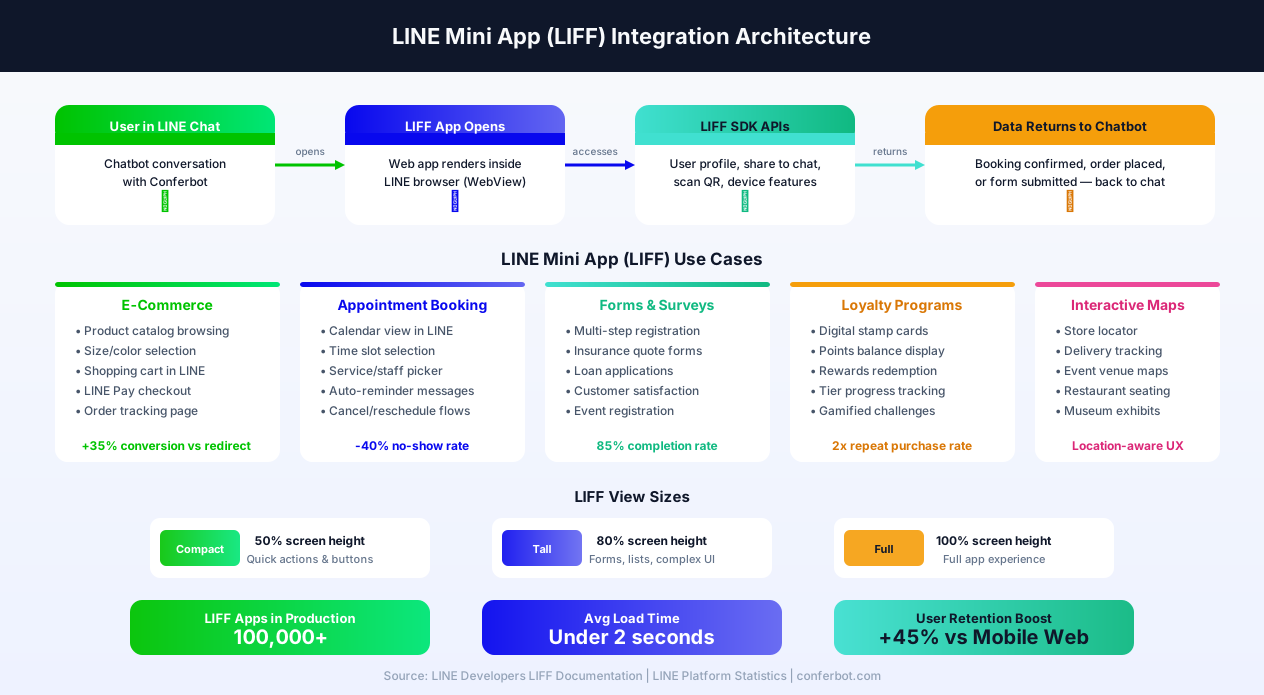
What Is LIFF?
LIFF (LINE Front-end Framework) is a JavaScript SDK that allows web applications to run within the LINE app's in-app browser. When a user taps a LIFF URL, the web app opens inside LINE - not in an external browser - maintaining the user experience within the LINE ecosystem. The key capabilities include:
- User identity - LIFF automatically provides the user's LINE profile (display name, user ID, profile picture) without requiring a separate login. This eliminates authentication friction and enables personalized experiences
- Share to chat - Your LIFF app can share messages, Flex Messages, or content back into LINE chats, enabling viral sharing of products, bookings, or results
- QR code scanning - Access the device camera for QR code scanning directly within the LIFF app. Useful for loyalty programs, event check-in, and inventory management
- Bluetooth - Connect to LINE Beacon devices for proximity-based experiences
LIFF View Sizes
LIFF apps can open in three sizes, each suited to different use cases:
- Compact (50% screen height) - Opens as a bottom sheet overlay. Best for quick actions like confirmation dialogs, simple selections, or QR code scanners. The user can still see the chat behind the LIFF app
- Tall (80% screen height) - Opens as a near-full-screen overlay with a small chat preview at the top. Best for forms, lists, and multi-step flows that need significant screen space
- Full (100% screen height) - Takes over the entire screen. Best for immersive experiences like product configurators, interactive maps, or full e-commerce browsing
Chatbot + LIFF App Workflow
The most powerful pattern is combining your Conferbot chatbot with LIFF apps for a hybrid experience:
- Conversational entry point - The user interacts with your chatbot through text, quick replies, or rich menu taps. The bot handles FAQ, basic queries, and navigation conversationally
- LIFF handoff for complex tasks - When the user needs to perform a complex action (browse products with filters, fill a multi-field form, view a calendar, or complete a payment), the bot presents a button that opens the LIFF app
- LIFF completes the task - The user interacts with the full web interface inside LINE, completing their booking, purchase, or form submission
- Return to chat - After the LIFF task is complete, the app can send a confirmation message back to the chat (using the LIFF SDK's share capability) and close, returning the user to the conversation
LIFF Use Cases by Industry
| Industry | LIFF App Use Case | Impact |
|---|---|---|
| E-Commerce | Product catalog with filters, cart, and LINE Pay checkout | +35% conversion vs external redirect |
| Healthcare | Appointment booking calendar with doctor/service selection | -40% no-show rate |
| Food & Beverage | Interactive menu with customizations and order tracking | +28% average order value |
| Insurance | Multi-step quote forms with document upload | 85% form completion rate |
| Events | Venue maps, session schedules, QR check-in | 60% faster check-in |
| Loyalty | Digital stamp cards, rewards catalog, tier progress | 2x repeat purchase rate |
LIFF vs Standard Message Templates
When should you use a LIFF app versus LINE's built-in message templates?
- Use message templates when the interaction is simple: browsing up to 10 products (carousel), making a binary choice (confirm template), selecting from up to 4 options (buttons template), or navigating a conversation tree
- Use LIFF apps when the interaction is complex: browsing 50+ products with search and filters, filling out forms with 5+ fields, displaying interactive maps or calendars, processing payments, or showing data visualizations
Conferbot's visual builder lets you trigger LIFF URLs from any point in your conversation flow - link a button, quick reply, or rich menu action to your LIFF app. The transition is seamless from the user's perspective.
LINE Chatbot for Japan & Asia Pacific
LINE is not just popular in Japan - it is effectively the internet for a significant portion of the population. Understanding the cultural, linguistic, and behavioral nuances of each LINE market is the difference between a chatbot that delights users and one that gets blocked. This section provides market-specific strategies for the four core LINE markets.
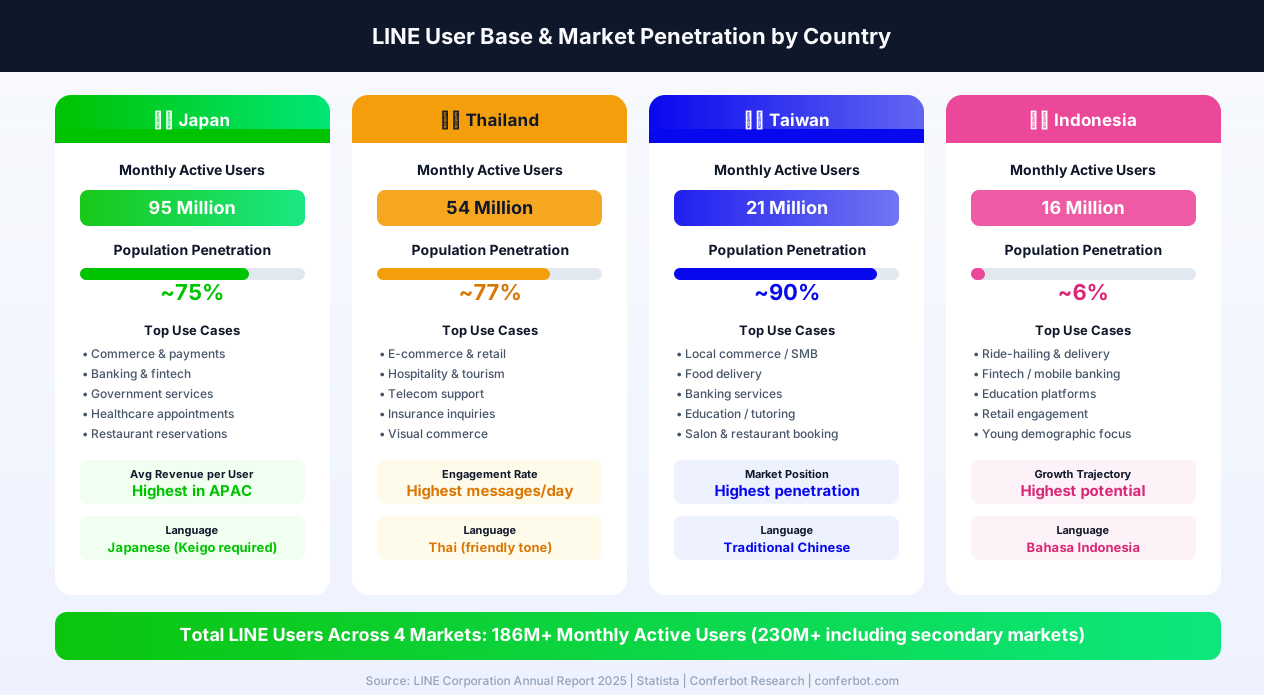
Japan: The Flagship Market (95M Users)
Japan is LINE's most mature and lucrative market. Success here requires attention to cultural detail that goes far beyond translation.
- Language: Keigo (honorific Japanese) - Japanese business communication requires keigo, the formal register of Japanese with specific verb conjugations and vocabulary. A chatbot using casual Japanese (tameguchi) in a business context will feel disrespectful and unprofessional. Work with native Japanese speakers to ensure all bot responses use appropriate keigo levels. The general rule: use teineigo (polite form) as the baseline, upgrading to sonkeigo (respectful form) when referring to the customer's actions
- Response expectations - Japanese consumers expect responses within seconds. The cultural norm of immediate acknowledgment ("I understand, let me check that for you") is important - even a brief delay should include a processing indicator. Conferbot's optimized reply token handling ensures sub-second responses
- Sticker culture - LINE stickers are deeply integrated into Japanese communication. Using appropriate LINE stickers in bot responses (available through the Messaging API) makes the bot feel more natural and engaging. Avoid stickers in formal business contexts; use them in casual consumer interactions
- Seasonal marketing - Japanese commerce revolves around seasonal events: New Year (osechi, fukubukuro), Golden Week, Obon, Christmas/Year-end. Your chatbot should recognize these periods and adjust messaging, promotions, and rich menus accordingly
- Mobile payment integration - LINE Pay and PayPay are dominant. Enable in-chat payment through LINE Pay for the lowest friction checkout experience
Thailand: The Most Engaged Market (54M Users)
Thai LINE users are the most active per capita, sending more messages per day than any other market. This creates both opportunity and risk for chatbot engagement.
- Language: Warm, friendly Thai - Thai business communication is warmer and more personal than Japanese. Use polite but approachable language. Include Thai particles (kha/khap) for politeness. Avoid overly stiff or formal tones, which feel unnatural in Thai culture
- Visual commerce dominance - Thai consumers are highly visual. Carousel templates with product images drive significantly higher engagement than text-based product descriptions. Invest in high-quality product photography optimized for mobile screens
- Food and hospitality focus - Thailand's tourism and food industries are LINE chatbot power users. Restaurant bots that show menus with images and enable table reservations perform exceptionally well. Hotel bots that handle booking inquiries and concierge requests reduce front desk workload by 40-60%
- Rabbit LINE Pay - Thailand uses Rabbit LINE Pay (a co-branded product with Rabbit, the transit card). Integration enables seamless payments for transportation, retail, and food delivery through the LINE chatbot
Taiwan: Highest Penetration Market (21M Users, ~90%)
Taiwan has the highest LINE penetration rate globally - roughly 90% of the population uses LINE. This makes it the closest thing to a universal messaging platform.
- Language: Traditional Chinese - Taiwan uses Traditional Chinese characters (not Simplified Chinese used in mainland China). This distinction is critical - using Simplified Chinese in a Taiwan-facing bot signals that you do not understand the market
- SMB dominance - Taiwan's LINE ecosystem is driven by small and medium businesses. Restaurants, salons, tutoring centers, and local shops use LINE as their primary customer communication channel. Chatbots that handle reservations, order tracking, and FAQ are the highest-value use cases
- LINE Today integration - LINE Today (news) is extremely popular in Taiwan. Content marketing that links from LINE Today articles to your chatbot can drive significant friend acquisition
- Cultural considerations - Taiwanese consumers value convenience and efficiency. Bot flows should be streamlined with minimal steps to reach the desired action. Quick replies and rich menus that reduce typing are especially effective
Indonesia: The Growth Market (16M Users)
Indonesia represents LINE's highest growth potential. While market penetration is lower (approximately 6% of the population), LINE's user base is concentrated in urban centers and the young demographic - the most digitally active segment.
- Language: Bahasa Indonesia - Indonesian is one of the most accessible languages for chatbot localization, with a Latin alphabet and relatively straightforward grammar. However, colloquial Indonesian (bahasa gaul) differs significantly from formal Indonesian. Use a semi-formal tone that feels natural to urban millennials and Gen Z
- Fintech and education focus - Indonesia's LINE chatbot sweet spots are fintech (loan inquiries, account management, financial literacy) and education (course enrollment, tutoring schedules, student support). These align with the country's young, digitally native user base. For LINE's latest regional strategy and business tools, see LY Corporation's official investor relations
- Data connectivity awareness - Internet speeds in Indonesia vary significantly. Optimize bot responses for lower bandwidth - use compressed images, avoid large LIFF apps on first interaction, and default to text + quick replies for initial engagement
- Competitive landscape - WhatsApp is the dominant messaging app in Indonesia overall. LINE's strength is in the premium, urban segment. Position your LINE chatbot as a premium channel complementing WhatsApp for broader reach using Conferbot's omnichannel platform
Multi-Market Deployment Strategy
For businesses operating across multiple LINE markets, Conferbot provides a unified management approach: build your core conversation logic once, then create market-specific versions with localized language, rich menus, and cultural adaptations. Use the analytics dashboard to compare performance across markets and allocate resources to the highest-performing regions. The AI knowledge base handles multi-language queries automatically, reducing the need for market-specific conversation flows.
LINE Chatbot Use Cases by Market
LINE chatbot use cases vary by market due to different consumer behaviors and regulations. Here are the highest-impact applications across LINE's key regions.
Japan
Japan is LINE's largest and most mature market. Effective chatbot use cases include restaurant reservations (especially important in Japan's dining culture), retail loyalty programs, product launches with carousel previews, train and travel information, healthcare appointment booking, and government services. Japanese consumers are highly receptive to brand interactions on LINE, with 70% of LINE users following at least one business account.
Taiwan
LINE dominates Taiwan's messaging landscape. Key use cases include e-commerce order management, food delivery coordination, banking and financial services, educational institution communications, and small business customer service. Taiwan's LINE ecosystem is particularly strong for local commerce - small restaurants, salons, and shops rely on LINE bots for reservation management.
Thailand
Thailand has one of LINE's most engaged user bases. Popular chatbot applications include hospitality and tourism (hotel bookings, tour information), e-commerce product recommendations, telecom customer support, insurance inquiries, and government service chatbots. Thai consumers are particularly responsive to visual commerce through carousel templates.
Indonesia
Indonesia represents a high-growth LINE market. Effective use cases include ride-hailing and delivery support, financial services (especially mobile banking), education and tutoring, healthcare appointment scheduling, and retail customer engagement. Indonesia's young, mobile-first population makes it an ideal market for conversational commerce.
Cross-Market Applications
For international businesses operating across multiple LINE markets, chatbot templates for lead generation and customer support can be localized for each market while maintaining consistent brand experience and backend automation.
LINE vs Other Asian Messaging Platforms
LINE competes with several platforms across Asia. Here is how it compares for chatbot deployment.
| Feature | LINE | KakaoTalk | ||
|---|---|---|---|---|
| Monthly Active Users | 230M+ | 2.7B+ | 1.3B+ | 53M+ |
| Key Markets | Japan, Taiwan, Thailand, Indonesia | Global | China | South Korea |
| Carousel Templates | Up to 10 columns | No | Yes | Yes |
| Quick Replies | Up to 13 items | Up to 3 buttons | Yes | Yes |
| Rich Menu | Visual image-based | No | Custom menus | Yes |
| Flex Messages | Yes (highly customizable) | No | Mini Programs | No |
| Payment Integration | LINE Pay | WhatsApp Pay (limited) | WeChat Pay | KakaoPay |
| API Accessibility | Open (global developers) | Open (Meta API) | Restricted (China-based entity required) | Open (Korean market) |
| Bot Setup Complexity | Moderate | Moderate | Complex | Moderate |
| Free Messaging Tier | Yes (limited messages/month) | No (conversation-based) | Varies | Yes |
When to choose LINE: LINE is essential if your business targets Japan, Taiwan, Thailand, or Indonesia. In these markets, no other platform comes close in terms of reach and engagement. For global coverage, combine LINE with WhatsApp for Western markets and use Conferbot's omnichannel platform to manage all channels from one dashboard.
LINE Bot Compliance & Data Residency
Operating a LINE chatbot in the APAC region requires understanding a complex web of privacy laws, data residency requirements, and platform-specific policies that vary significantly across Japan, Thailand, Taiwan, and Indonesia. Non-compliance can result in fines, account suspension, and reputational damage in markets where trust is paramount.
Japanese Privacy Laws (APPI)
Japan's Act on the Protection of Personal Information (APPI) was significantly strengthened in its 2022 revision and is one of the most stringent privacy frameworks in Asia. Key requirements for LINE chatbot operators include:
- Purpose specification - You must clearly specify and disclose the purpose for which you collect personal information through the chatbot. Include this in your LINE Official Account description and privacy policy
- Consent for data use - Obtain explicit consent before using personal data collected through the chatbot for purposes beyond the original intent (e.g., using support conversation data for marketing)
- Cross-border transfer restrictions - Transferring personal data of Japanese residents to servers outside Japan requires either the user's consent, an adequacy finding for the destination country, or contractual safeguards equivalent to APPI protections
- Data breach notification - Breaches affecting 1,000+ individuals must be reported to the Personal Information Protection Commission (PPC) within 3-5 days
- Right to deletion - Japanese users have the right to request deletion of their personal data. Your chatbot must support data deletion requests
Thailand PDPA
Thailand's Personal Data Protection Act (PDPA), fully enforced since June 2022, mirrors GDPR in many respects. For LINE chatbots operating in Thailand:
- Lawful basis required - Collect and process personal data only with consent, contractual necessity, or legitimate interest. Chatbot conversations that collect customer data need a clear legal basis
- Data Protection Officer - Organizations processing significant amounts of Thai personal data should appoint a DPO
- Penalties - Fines up to 5 million THB (~$140,000 USD) for violations, plus potential criminal penalties for directors
Taiwan PDPA
Taiwan's Personal Data Protection Act requires:
- Collection notice - Inform users at the point of data collection about who is collecting the data, what it is used for, and their rights
- Security measures - Implement appropriate technical and organizational measures to protect personal data
- Cross-border transfer controls - The National Development Council can restrict cross-border data transfers by industry
Indonesia PDP Law
Indonesia's Personal Data Protection Law (PDP Law), enacted in 2022, establishes comprehensive data protection requirements:
- Consent-based processing - Explicit consent required for processing personal data, with specific requirements for the consent mechanism
- Data localization considerations - While not requiring strict data localization, the government can restrict cross-border transfers for national security or economic reasons
- Significant penalties - Fines up to 2% of annual revenue for violations
LINE Platform Data Policies
Beyond country-specific laws, LINE has its own data policies that your chatbot must comply with. LINE's platform policies are documented in the LINE Messaging API Development Guidelines:
- User data usage - Data received through the Messaging API (user profiles, messages, events) must only be used for the purpose of operating your bot service. You cannot sell, share, or repurpose this data without explicit user consent
- Message content retention - LINE does not retain message content on its servers after delivery. Your chatbot server is responsible for any conversation data storage and must comply with applicable privacy laws
- Token security - Channel access tokens must be stored securely and never exposed in client-side code. Compromised tokens can be revoked through the LINE Developers Console
- Rate limiting - LINE enforces rate limits on API calls. Exceeding limits can result in temporary suspension. Conferbot's infrastructure manages rate limiting automatically
Conferbot's Compliance Approach
Conferbot addresses APAC compliance requirements through:
- Data minimization - Conferbot stores only the data necessary for chatbot operation and conversation context. No excessive data collection or retention
- HTTPS encryption - All data in transit is encrypted with TLS 1.2+. Webhook communications with LINE's servers use secure endpoints
- User data controls - Dashboard tools for data export and deletion, supporting APPI, PDPA, and PDP Law right-to-deletion requirements
- Consent management - Build consent collection flows into your chatbot using Conferbot's visual builder, documenting consent for regulatory compliance
Conferbot vs LINE Official Account Manager vs Custom Build
Businesses building LINE chatbots have three primary approaches: Conferbot's no-code platform, LINE's built-in Official Account Manager tools, and custom development using the Messaging API SDK. Each serves different needs, and the right choice depends on your team's technical capabilities, budget, and scale requirements.
Conferbot for LINE
Conferbot is designed for businesses that need sophisticated LINE chatbot automation without development resources. Key advantages include:
- No-code visual builder - Design complex conversation flows, product catalogs, and support trees with drag-and-drop. No JavaScript or server infrastructure required
- 10-minute setup - From account creation to live LINE chatbot. Connect your Channel ID and Access Token, configure the webhook, and you are live
- AI-powered responses - Upload your knowledge base and the AI handles customer queries in Japanese, Thai, Chinese, and Indonesian automatically
- Omnichannel - The same bot works on LINE, WhatsApp, website, Messenger, and 10+ other channels. No other LINE bot solution offers this breadth
- Built-in live chat - Native human handoff when the bot cannot resolve an issue. No third-party integration needed
- Analytics dashboard - Track LINE-specific metrics (friend growth, message volume, carousel engagement) alongside cross-channel performance
- Predictable pricing - Monthly subscription based on usage, not per-message or per-API-call pricing
LINE Official Account Manager
LINE's built-in tools provide basic automation for Official Account management:
- Auto-reply keywords - Set keyword-triggered automatic responses. Limited to simple keyword matching - no AI, no conversation flows, no context awareness
- Greeting messages - Configure a welcome message for new friends. Single message only - no interactive onboarding flows
- Rich menu builder - Built-in tool for creating and managing rich menus. Adequate for simple menus but limited customization
- Broadcast messaging - Send push messages to all friends or segments. Effective for campaigns but not conversational
- Limitations - No conversation flows, no AI responses, no human handoff, no analytics beyond basic message delivery metrics, no cross-channel deployment. Suitable only for the simplest chatbot needs
Custom Development (Messaging API SDK)
Building a custom LINE bot using the official SDK offers maximum flexibility:
- Full API access - Complete control over every message type, event handler, and LINE API capability. Flex Messages, LIFF apps, LINE Pay, LINE Beacon - everything is available
- Any language/framework - Official SDKs for Node.js, Python, Java, Go, PHP, Ruby, and Perl. Deploy on any infrastructure
- Custom integrations - Connect to any database, CRM, ERP, or third-party API without platform limitations
- Limitations - Requires 2-4 months of development, ongoing server hosting and maintenance costs ($200-2,000+/month for infrastructure), developer salaries, and testing overhead. No visual builder - everything is code. No built-in analytics, live chat, or omnichannel support
Decision Framework
| Factor | Conferbot | LINE OA Manager | Custom Build |
|---|---|---|---|
| Setup Time | 10 minutes | 5 minutes | 2-4 months |
| Monthly Cost | From $29/mo | Free (basic) | $500-3,000+ (dev + hosting) |
| Technical Skills | None required | None required | Full-stack developers |
| Conversation Flows | Visual builder + AI | Keyword matching only | Unlimited (coded) |
| AI Responses | Built-in (OpenAI) | No | Custom integration |
| Human Handoff | Built-in | No | Custom build |
| Omnichannel | 14+ channels | LINE only | Custom (per channel) |
| Flex Messages | Supported | No | Full access |
| LIFF Apps | URL integration | No | Full access |
| Best For | Most businesses | Very basic needs | Complex custom requirements |
For the vast majority of businesses building LINE chatbots in 2026, Conferbot provides the optimal balance of capability, speed, and cost. The LINE Official Account Manager is sufficient only for the simplest auto-reply needs, and custom development makes sense only when you need deep integration with proprietary systems that no platform can provide out of the box. Compare Conferbot pricing against your estimated custom development costs.
LINE Chatbot Best Practices
LINE's Asian markets have distinct communication norms. Following these best practices ensures your bot resonates with local users.
1. Localize, Do Not Just Translate
Direct translation misses cultural nuances. Japanese users expect polite, formal language (keigo) in business interactions. Thai users appreciate friendly, warm tones. Work with native speakers to craft messages that feel natural, not robotic. Cultural fit matters more than technical features in LINE's markets.
2. Maximize Carousel Templates
LINE's carousel templates are its standout feature. Use them liberally for product showcases, service menus, location guides, and step-by-step tutorials. Each carousel column should have a compelling image, concise text, and a clear action button. Test that images display well on both iOS and Android.
3. Design an Effective Rich Menu
The rich menu is the first thing users see when they open your chat. Design it as the "home page" of your bot - include the most common actions (Order, Support, FAQ, Hours, Location). Update the rich menu seasonally or for promotions to keep the experience fresh.
4. Respect the Message Quota
LINE Official Accounts have monthly message quotas on free and lower-paid plans. Design your bot to be efficient with messages - combine information into single responses, use carousels instead of multiple messages, and avoid unnecessary follow-ups. Monitor message usage in your LINE Official Account Manager.
5. Optimize for 30-Second Reply Tokens
Every user message generates a reply token valid for 30 seconds. Your bot must respond within this window. Conferbot handles this automatically, but be aware when designing flows that require external API calls - keep integrations fast.
6. Use Quick Replies for Navigation
LINE's 13-item quick replies provide excellent navigation. Use them to guide users through complex flows without typing. Include action types beyond text - date pickers for bookings, location sharing for nearby store searches, and camera access for product photo submissions.
7. Monitor with Analytics
Track friend additions, block rates, message open rates, and carousel tap rates through Conferbot analytics. High block rates signal that your bot is too aggressive. Low carousel engagement suggests your content or images need improvement.
Getting Started with Your LINE Chatbot
If your business serves customers in Japan, Taiwan, Thailand, or Indonesia, a LINE chatbot is one of the highest-impact investments you can make. Here is how to start.
Quick Start Path
- Sign up for Conferbot and select a template for your use case - customer support, lead generation, or e-commerce
- Localize your content for your target market's language and cultural norms
- Create your LINE Messaging API channel in the LINE Developers Console
- Connect to Conferbot by entering your Channel ID, Channel Secret, and Access Token
- Configure the webhook and test with a personal LINE account
- Design your rich menu to serve as the bot's visual home page
- Launch and promote your LINE Official Account through QR codes, website links, and in-store materials
Market Entry Strategy
- Start with one market - Get your bot working perfectly in one country before expanding to others
- Leverage LINE's ecosystem - Integrate with LINE Pay for transactions, LINE Beacon for in-store experiences, and LINE Login for frictionless authentication
- Combine with other channels - Use Conferbot's omnichannel platform to serve LINE users in Asia and WhatsApp users globally from one dashboard
LINE chatbots are the gateway to four of Asia's most lucrative consumer markets in 2026. With Conferbot, you get enterprise-grade automation without the complexity of building on the Messaging API from scratch. View pricing and start building your LINE chatbot today.
LINE Beacon: Proximity Marketing
LINE Beacon is a Bluetooth Low Energy (BLE) technology that connects physical locations to your LINE chatbot. When a customer with LINE installed on their phone walks near a LINE Beacon device, your bot can automatically send a personalized message - a welcome greeting, a coupon code, a menu, or a loyalty stamp. This bridges the gap between online chatbot engagement and in-store experiences. Beacon hardware costs approximately $30-50 per unit and covers a radius of 5-50 meters (configurable). Use cases include: retail stores sending personalized discount codes when customers enter, restaurants displaying the daily menu when diners are seated, museums providing exhibit information as visitors move through galleries, and event venues distributing schedules and maps to attendees. In Japan, where LINE Beacon adoption is highest, merchants using proximity-triggered coupons report 18-25% higher redemption rates compared to push message coupons, because the offer arrives at the exact moment of purchase intent. Your Conferbot chatbot receives beacon entry events through the Messaging API and triggers location-specific conversation flows automatically.
LINE VOOM: Social Feed Integration
LINE VOOM (formerly LINE Timeline) is LINE's social feed feature where users consume short-form content, similar to Instagram Stories or TikTok. Your LINE Official Account can post to VOOM to reach followers in a feed context rather than a chat context. While your chatbot operates in the messaging channel, VOOM posts drive users into chatbot conversations through call-to-action links. Effective VOOM strategies include posting product highlights with "Chat to order" CTAs, sharing customer success stories with links to support bot flows, running interactive polls that continue as chatbot conversations, and announcing flash sales where purchase happens through the bot. VOOM posts are free (they do not count against your message quota), making them an efficient way to re-engage followers and funnel them into your chatbot. LINE VOOM reaches 30-40% of your followers organically, significantly higher than typical social media organic reach.
Flex Messages: Rich Card Design
Flex Messages are LINE's most powerful message format - JSON-based templates that give you pixel-level control over layout, typography, colors, and spacing. Think of them as mini web pages that render natively inside the LINE chat. While standard carousel and button templates work for most use cases, Flex Messages unlock experiences like order confirmation receipts with itemized pricing and delivery tracking buttons, boarding passes with QR codes, appointment confirmations with calendar integration, product comparison cards with side-by-side feature tables, and interactive loyalty cards showing points balance and tier progress. Flex Messages support three layout types: bubble (single card), carousel (scrollable cards), and container (grouped elements). Each bubble can contain header, hero (image), body, and footer sections with independent styling. The Conferbot visual builder generates Flex Message JSON automatically when you design rich card flows - no manual JSON editing required. For advanced customization, use LINE's Flex Message Simulator to preview designs before deploying through Conferbot.
LINE Notification Messages
LINE Notification Messages are a special message type designed for transactional and service notifications - order confirmations, appointment reminders, delivery updates, and payment receipts. Unlike regular push messages that count against your monthly quota, Notification Messages have a separate pricing structure and are permitted even when users have not explicitly opted in to marketing messages (subject to LINE's notification message guidelines). This makes them ideal for essential service communications. To use Notification Messages, your LINE Official Account must be approved for the Notification Message API. Conferbot handles the API integration - configure your notification triggers (order placed, appointment booked, delivery dispatched) and the SDK sends the appropriate Notification Message through LINE's dedicated channel. Notification Messages achieve 90%+ open rates because they appear as standard LINE messages with the visual authority of a verified business account.
Regional Market Data and Strategy
Understanding LINE's market penetration by region is essential for targeting and budgeting. Here is the current landscape:
| Market | Monthly Active Users | Population Penetration | Primary Use Cases | Payment Integration |
|---|---|---|---|---|
| Japan | 95 million | ~75% | Commerce, banking, government, dining, healthcare | LINE Pay (dominant) |
| Thailand | 54 million | ~77% | E-commerce, hospitality, telecom, insurance | Rabbit LINE Pay |
| Taiwan | 21 million | ~90% | Local commerce, food delivery, banking, education | LINE Pay |
| Indonesia | ~16 million | ~6% (but growing in urban centers) | Ride-hailing, fintech, education, retail | LINE Pay (via partners) |
Japan is the most mature market with the highest average revenue per user. Japanese consumers expect polished, detailed interactions with formal language (keigo). Chatbot response times under 2 seconds are expected. Thailand has the highest engagement rates - Thai users send more messages per day than any other LINE market. Visual commerce through carousels performs exceptionally well in Thailand. Taiwan has the highest penetration rate at approximately 90% of the population, making it the closest to a universal messaging platform. Local small businesses rely heavily on LINE for customer communication. Indonesia represents the highest growth opportunity, particularly in urban centers like Jakarta and Surabaya. The younger demographic is highly receptive to chatbot-driven commerce.
For multi-market deployments, build your core chatbot flows in Conferbot's visual builder, then localize content for each market. Use the AI knowledge base to handle language-specific queries automatically. Track performance by market in the analytics dashboard to optimize spending and content for each region. Combine LINE with WhatsApp to cover both Asian and global markets from a single omnichannel dashboard.
Why Conferbot for LINE
- No code required - Build LINE bots with our visual AI chatbot builder
- Multi-language AI - AI knowledge base supports Japanese, Mandarin, Thai, and Bahasa Indonesia
- Carousel commerce - 10-column carousels for product browsing and in-chat shopping
- Rich Menu design - Visually branded navigation that serves as your bot's home screen
- Reply token optimization - Infrastructure built for LINE's 30-second response window
- Calendar booking - Let customers book appointments directly in LINE with calendar integration
- Rich integrations - Connect LINE Pay, CRMs, and e-commerce platforms via integrations hub
- Omnichannel - Combine LINE with WhatsApp, Messenger, and your website
- Real-time analytics - Track friend additions, engagement, and conversion with built-in analytics
See how Conferbot compares to other chatbot platforms for LINE automation.
How Conferbot Compares for LINE
Most platforms charge per message, per seat, or limit channels by tier. Here's how Conferbot is different.
| Feature | Conferbot | Typical Competitor |
|---|---|---|
| Channels included | 13+ (all plans) | 3-6 (varies by tier) |
| Pricing model | Flat rate from $19/mo | Per-seat or per-message |
| AI chatbot builder | Yes (plain English) | No or limited |
| Native mobile SDKs | 4 (Android, iOS, Flutter, RN) | None (WebView only) |
| Knowledge base AI | Included | Add-on ($30-99/mo) |
| Live chat handoff | Included | Higher tiers only |
| Calendar booking | Built-in | Third-party required |
| Setup time | Under 10 minutes | Hours to days |
LINE FAQ
Everything you need to know about chatbots for line.
Continue Exploring
Explore features, connect third-party tools, and browse ready-made templates.