
The No-Code Revolution: Why You No Longer Need Developers to Build Chatbots
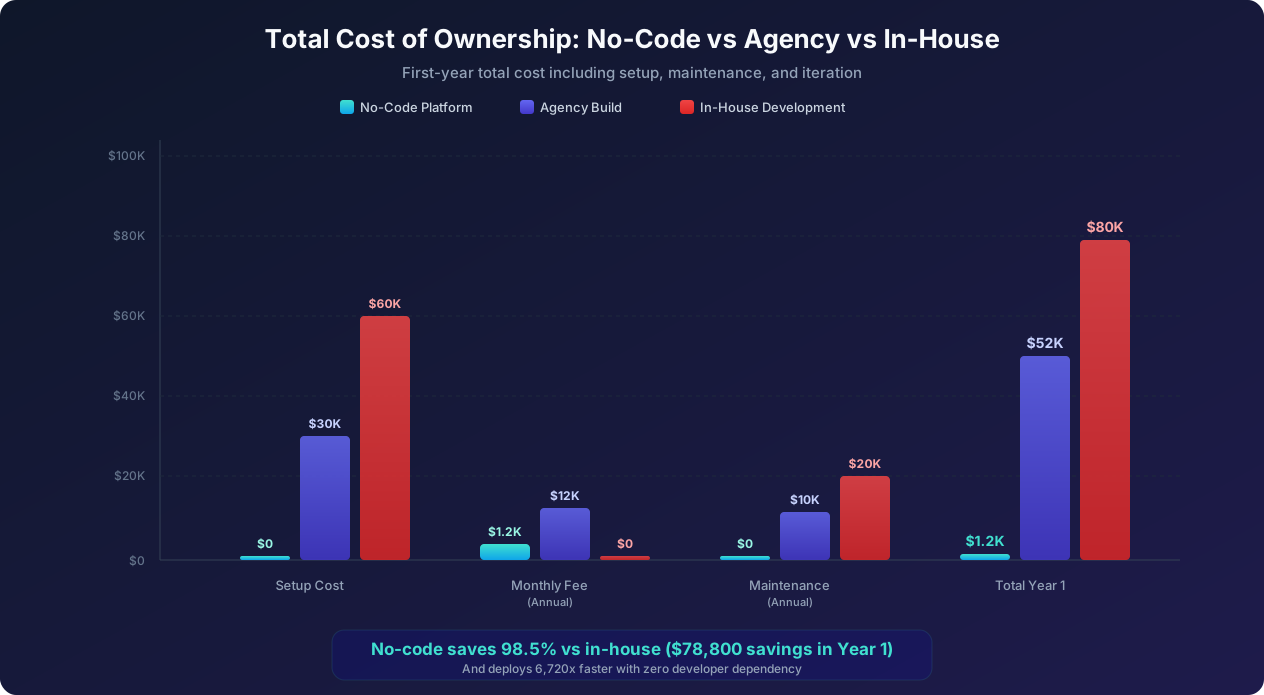
Five years ago, building a chatbot meant hiring a development team, spending months on NLP training, writing thousands of lines of code, and investing $50,000 to $150,000 before your bot could handle its first conversation. Today, no-code chatbot builders -- part of a movement Forrester's low-code/no-code market report values at $21 billion -- let anyone with a browser create a fully functional, AI-powered chatbot in under 30 minutes for a fraction of the cost.
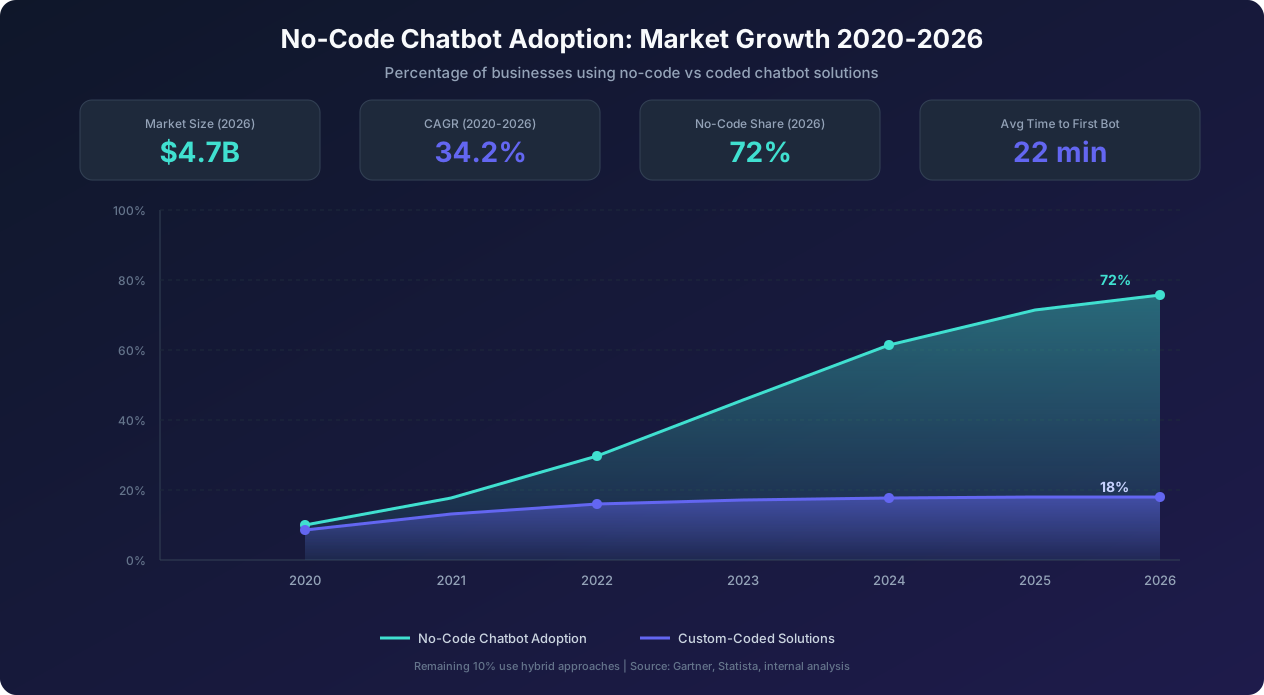
This shift is not a minor convenience improvement. It is a fundamental democratization of conversational AI that has made chatbots accessible to small businesses, solo entrepreneurs, marketing teams without technical resources, and enterprise departments that cannot justify the development queue wait time. In 2026, 72% of all new chatbot deployments use no-code platforms, up from just 28% in 2020. The market for no-code chatbot tools has grown to $4.7 billion, with a 34.2% compound annual growth rate.
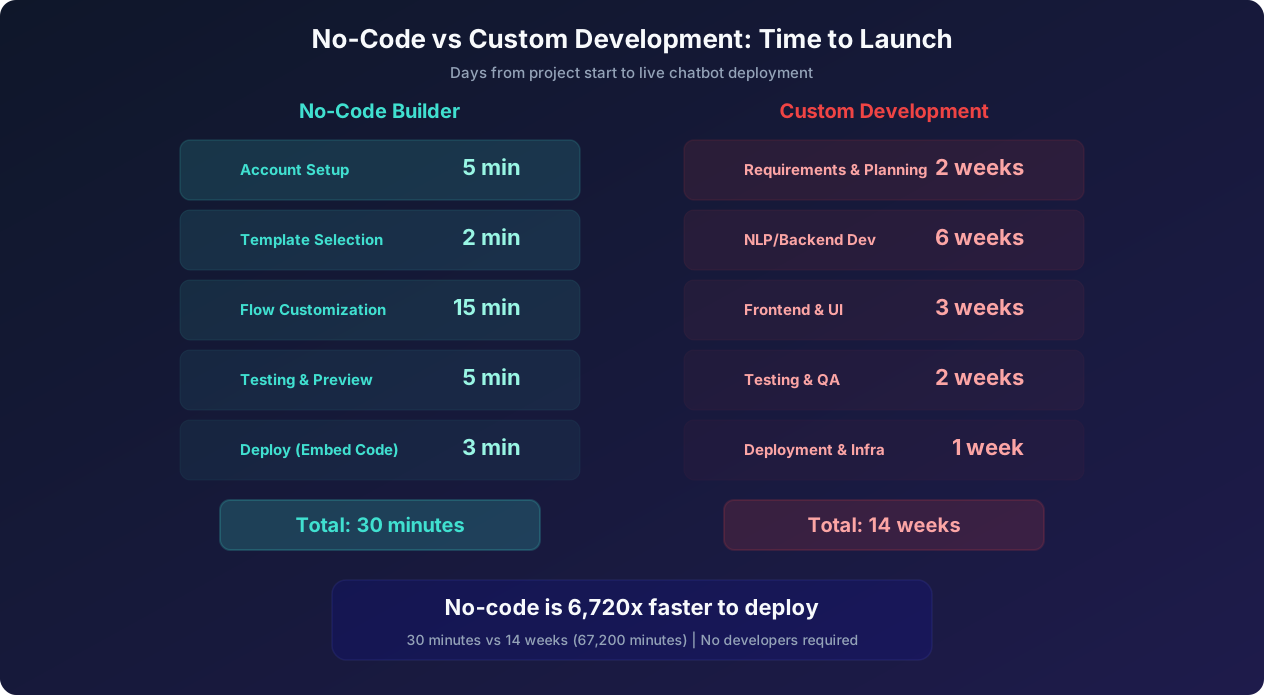
The quality gap has closed dramatically as well. Modern no-code builders offer GPT-powered natural language understanding, drag-and-drop flow builders with conditional logic, 50 or more pre-built templates by industry and use case, native integrations with CRMs and helpdesks and payment processors, advanced analytics dashboards, and omnichannel deployment to websites, WhatsApp, Instagram, Slack, and more. These are not toy chatbots. They are production-grade conversational experiences that handle millions of interactions daily for businesses of every size.
This guide covers everything you need to know about no-code chatbot builders: how they work, what features to look for, step-by-step tutorials for building three common bot types, a detailed platform comparison, and honest guidance on when custom development still makes more sense. Whether you have never built a chatbot before or you are evaluating whether to switch from a coded solution to a no-code platform, this guide will help you make an informed decision and get started quickly. If you are interested in leveraging GPT specifically, our GPT-powered chatbot for business guide dives deeper into that topic.
What No-Code Chatbot Builders Are and How They Work
A no-code chatbot builder is a software platform that lets you create, configure, deploy, and manage chatbots using visual interfaces, which Gartner's application platform research predicts will power 70% of new business applications by 2027 instead of programming languages. Rather than writing code to define conversation flows, NLP intents, and API integrations, you use drag-and-drop editors, form-based configuration panels, and template libraries to build your bot.
Core Architecture
Under the hood, no-code chatbot builders handle the same technical complexity as custom-coded chatbots. The difference is that they abstract that complexity behind visual interfaces. Here is what happens behind the scenes when you build a bot with a no-code tool:
1. Visual Flow Engine: When you draw a conversation flow by connecting message nodes, the builder compiles this into a state machine that manages conversation state, handles branching logic, and tracks where each user is in the flow. You see a visual diagram. The system sees a directed graph with transition rules, variable assignments, and conditional evaluations.
2. Natural Language Processing: When you define intents and training phrases through the UI, the platform trains a machine learning model (increasingly powered by large language models like GPT-4) to recognize user intent from free-text input. This is the same NLP pipeline that custom-coded bots use, but configuration happens through a training interface rather than code.
3. Integration Layer: When you connect your chatbot to a CRM, email platform, or database through the builder's integration panel, the platform generates the necessary API calls, handles authentication, manages error states, and maps data between systems. You configure the connection with dropdowns and field mappings. The system generates the REST API calls and webhook handlers.
4. Deployment Engine: When you click "deploy," the platform generates the embed code, widget assets, and API endpoints necessary to run your chatbot on the target channel (website, WhatsApp, Slack, etc.). For website deployment, this is typically a JavaScript snippet. For messaging platforms, it involves OAuth connections and webhook registration.
What You Can Build Without Code
The capabilities of modern no-code chatbot builders cover the vast majority of chatbot use cases:
- Lead generation bots: Qualify visitors, collect contact info, score leads, and push to CRM
- Customer support bots: Answer FAQs, troubleshoot issues, create support tickets, and escalate to agents
- Appointment booking bots: Check calendar availability, book meetings, send reminders, and handle rescheduling
- E-commerce assistants: Product recommendations, order tracking, cart recovery, and returns processing
- Survey and feedback bots: Collect structured data through conversational interfaces
- Employee self-service bots: HR queries, IT helpdesk, onboarding guides
- Event registration bots: Event info, ticket purchase, attendee management
- Quiz and assessment bots: Interactive quizzes for engagement or qualification
The use cases where no-code builders struggle are highly specialized scenarios requiring custom NLP models trained on domain-specific data (medical terminology, legal jargon), deeply integrated workflows spanning five or more enterprise systems with complex business logic, bots requiring real-time processing of large datasets, and bots that need custom UI components beyond standard chat widgets.
The No-Code Advantage: Speed and Iteration
The greatest advantage of no-code builders is not just faster initial deployment. It is faster iteration. With custom code, changing a conversation flow means code review, testing, and deployment cycles that can take days or weeks. With a no-code builder, you can change a greeting message, add a new branch, or update a response in minutes and publish instantly. This rapid iteration capability means no-code chatbots can be A/B tested and optimized continuously, leading to significantly better performance over time.
Essential Features to Look For: The Complete Comparison Framework
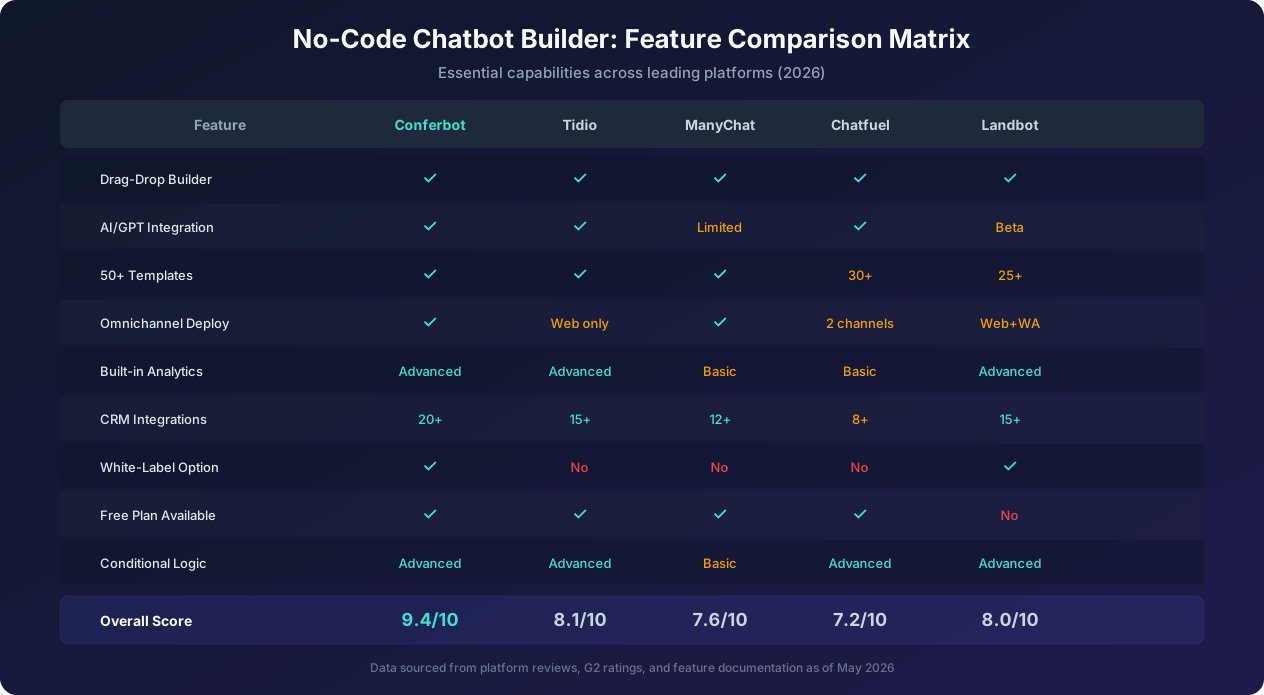
Not all no-code chatbot builders are created equal. Here is a comprehensive comparison of the features that matter most, including natural language processing capabilities that IBM's NLP overview identifies as the core technology enabling AI chatbots to understand human intent, ranked by importance for different use cases.
Tier 1: Must-Have Features
Visual Flow Builder: The core of any no-code platform. Look for drag-and-drop node editing, zoom and pan on large flows, undo/redo support, flow duplication and templates, and the ability to create reusable sub-flows (like a common lead capture sequence you use in multiple bots). The builder should feel responsive and intuitive even for complex flows with 50 or more nodes.
AI and NLP Capabilities: At minimum, the platform should offer intent recognition (understanding what the user means, not just keyword matching), entity extraction (pulling specific data like names, dates, and numbers from user messages), and fallback handling (graceful responses when the bot does not understand). In 2026, the best platforms offer GPT-powered responses that can handle open-ended questions without explicit training for every possible input.
Multi-Channel Deployment: Your chatbot should deploy to your website, WhatsApp, Facebook Messenger, Instagram, Slack, and Microsoft Teams from a single build. Building separate bots for each channel defeats the purpose of no-code efficiency. Look for platforms that let you build once and deploy everywhere with channel-specific customizations (like using WhatsApp quick replies or Instagram story mentions).
Pre-Built Templates: Templates accelerate your first deployment from 30 minutes to 10 minutes. Look for templates organized by industry (e-commerce, SaaS, healthcare, real estate) and use case (lead generation, support, booking, survey). The best platforms offer 50 or more templates with customizable flows, pre-written copy, and suggested integrations.
Tier 2: High-Value Features
CRM and Tool Integrations: Native integrations with your existing tools eliminate manual data transfer. Priority integrations include CRMs (Salesforce, HubSpot, Pipedrive), email platforms (Mailchimp, SendGrid), helpdesks (Zendesk, Freshdesk, Intercom), calendars (Google Calendar, Calendly), payment processors (Stripe, PayPal), and analytics (Google Analytics, Segment). Webhook support and Zapier connectivity extend integration capabilities to thousands of additional tools.
Conditional Logic and Variables: The ability to store user responses in variables and use those variables to control flow logic is essential for any bot beyond basic FAQ. For example: if the user says their team size is over 50, route them to the enterprise sales flow rather than the self-serve signup. Look for support for if/else conditions, comparison operators, string matching, and mathematical operations on variables.
Analytics Dashboard: You cannot optimize what you cannot measure. The analytics dashboard should show conversation volume, completion rates, drop-off points in flows, individual message performance, user satisfaction scores, and conversion metrics. Advanced platforms offer funnel analysis, cohort tracking, and A/B test result visualization.
Tier 3: Nice-to-Have Features
White-Label and Custom Branding: For agencies or businesses that want the chatbot to match their brand completely, white-label options remove the platform's branding. Look for customizable colors, fonts, avatars, widget positions, and the ability to use your own domain for chatbot URLs.
Team Collaboration: For larger organizations, look for role-based access control, approval workflows for flow changes, version history, commenting on flow nodes, and shared template libraries across team members.
Live Chat Handoff: When the chatbot cannot handle a query, seamless handoff to a live agent preserves the customer experience. Look for platforms that pass the full conversation context to the agent, support assignment rules (route to the right team based on query type), and provide a unified agent inbox for managing both chatbot and live chat conversations.
Feature Prioritization by Use Case
| Feature | Lead Gen Bot | Support Bot | Booking Bot | E-commerce Bot |
|---|---|---|---|---|
| Visual flow builder | Essential | Essential | Essential | Essential |
| AI/NLP | Nice to have | Essential | Nice to have | Essential |
| CRM integration | Essential | Important | Important | Essential |
| Calendar integration | Important | Nice to have | Essential | Nice to have |
| Payment integration | Not needed | Not needed | Important | Essential |
| Analytics | Essential | Essential | Important | Essential |
| Live chat handoff | Important | Essential | Nice to have | Essential |
| Multi-channel | Important | Essential | Important | Essential |
Step-by-Step Tutorial: Building a Lead Generation Bot in 10 Minutes
Let us build a lead generation chatbot from scratch using a no-code builder. This tutorial uses Conferbot as the platform, but the concepts apply to any no-code tool. By the end, you will have a working bot that greets visitors, qualifies them with targeted questions, captures their contact information, and sends qualified leads to your CRM.
Step 1: Choose Your Template (2 Minutes)
Log into your no-code platform and navigate to the template gallery. Select the "Lead Generation" or "Lead Qualification" template. This gives you a pre-built flow with the essential structure: greeting, qualification questions, contact capture, and thank-you message. Starting from a template is faster than building from scratch and ensures you do not miss critical flow elements.
The template typically includes five to seven nodes: a welcome message, two to three qualification questions, a contact information capture, and a confirmation or next-steps message. Each node is pre-populated with placeholder copy that you will customize in the next step.
Step 2: Customize Your Greeting and Questions (4 Minutes)
Click on the greeting node and replace the placeholder text with a greeting that matches your brand and speaks to your target audience. Following conversation design best practices, use a question format that signals relevance:
Instead of: "Welcome! How can I help you?"
Use: "Looking to increase your website conversions? I can help you find the right solution in 2 minutes."
Now customize each qualification question. The best lead gen bots ask three to four questions maximum to balance qualification depth with completion rate. Here is a proven question sequence for B2B lead generation:
- Question 1 (Company size): "How large is your team?" with quick-reply buttons: "1-10 employees," "11-50 employees," "51-200 employees," "200+ employees"
- Question 2 (Use case): "What is your primary goal?" with buttons: "Generate more leads," "Improve customer support," "Automate internal processes," "Something else"
- Question 3 (Timeline): "When are you looking to get started?" with buttons: "This week," "This month," "Next quarter," "Just researching"
Use button-based responses rather than free text for qualification questions. Buttons increase completion rates by 35-50% compared to open-ended questions because they reduce cognitive load and eliminate typing effort, especially on mobile devices.
Step 3: Configure Lead Scoring and Routing (2 Minutes)
Use conditional logic to route leads based on their answers. For each response option, assign a score or tag:
- Company size 200+: Tag as "Enterprise," add 3 points
- Company size 51-200: Tag as "Mid-Market," add 2 points
- Goal = Generate more leads: Add 2 points (high-intent signal)
- Timeline = This week: Add 3 points (urgency signal)
- Timeline = Just researching: Add 0 points
Set routing rules: leads with 5 or more points go to the "high-priority" path (immediate calendar booking offer), while leads with fewer than 5 points go to the "nurture" path (content offer and email capture). This ensures your sales team focuses on the hottest leads while still capturing information from early-stage prospects.
Step 4: Set Up Contact Capture and CRM Integration (2 Minutes)
Add a contact capture node that collects email address (required), name (required), and phone number (optional). For the high-priority path, add a calendar booking widget that lets the lead schedule a call directly. For the nurture path, offer a valuable content download (whitepaper, case study, or tool) in exchange for the contact information.
Connect the CRM integration: select your CRM (HubSpot, Salesforce, Pipedrive, etc.) from the integration panel, authenticate with your account, and map the chatbot variables to CRM fields. Most platforms support field mapping through a visual interface: drag the "email" variable to the "Email" CRM field, "company_size" to a custom property, and so on. The integration should also pass the lead score and conversation transcript so your sales team has full context.
Step 5: Deploy and Test (1 Minute)
Preview the bot by clicking the "Test" button and walk through the entire flow as a visitor would. Verify that all branches work correctly, that variables are captured properly, and that the CRM integration fires successfully (check your CRM for the test lead). Once verified, click "Deploy" and copy the embed code to your website. Most platforms provide a simple JavaScript snippet that you paste before the closing body tag. The chatbot appears as a widget on your site within seconds.
Total time from start to live deployment: under 10 minutes with a template, or approximately 20 minutes building from scratch.
Step-by-Step Tutorial: Building a Customer Support Bot
Support bots differ from lead gen bots in one fundamental way: the user comes with a specific problem and expects a resolution, not a sales pitch. This changes the conversation design significantly. Here is how to build an effective support bot with a no-code builder.
Step 1: Import Your Knowledge Base (5 Minutes)
The most critical step for a support bot is loading your knowledge base. There are several approaches depending on what content you already have:
- FAQ import: If you have an existing FAQ page or document, most platforms can import question-answer pairs directly. Upload a CSV with columns for question, answer, and category, or point the platform at your FAQ URL for automatic extraction.
- Document upload: Modern AI-powered platforms can ingest entire documents (PDFs, help center articles, product documentation) and automatically generate conversational responses from the content. Upload your help center content and the platform's GPT integration will use it to answer questions.
- Manual entry: For smaller knowledge bases, create Q&A pairs manually through the platform's content editor. Start with the 20 most common questions (which typically cover 80% of support volume based on the Pareto principle) and expand over time.
Step 2: Design the Triage Flow (3 Minutes)
Support bots need to quickly identify what the user needs and route them to the right information or team. Create a triage flow with these elements:
Initial greeting: "Hi there! I am here to help. What can I assist you with today?" followed by category buttons based on your top support topics: "Billing and Payments," "Technical Issue," "Account Management," "Product Questions," "Other."
Category sub-flows: Each category button leads to a sub-flow with more specific options. For example, "Billing and Payments" expands to: "View my current plan," "Update payment method," "Request a refund," "Billing question," "Other billing issue."
Resolution paths: Each specific issue maps to one of three resolution types: (1) instant answer from the knowledge base, (2) guided troubleshooting workflow (step-by-step diagnostic), or (3) human agent handoff for complex or sensitive issues.
Step 3: Configure Escalation Rules (2 Minutes)
Not everything should be handled by the bot. Configure escalation triggers for these scenarios:
- Explicit request: User says "talk to a human" or "agent" -- immediate handoff
- Repeated failure: Bot fails to resolve the query after 2 attempts -- offer handoff
- High-value account: If the user identifies as an enterprise customer or the CRM shows high account value -- fast-track to senior support
- Sensitive topics: Cancellation requests, data deletion, complaint escalation -- route to retention or senior team
- Negative sentiment: If the platform detects frustrated language -- empathy message plus handoff offer
When handing off, the bot should pass the full conversation history, identified issue category, any troubleshooting steps already attempted, and the user's account information (if authenticated). This prevents the user from having to repeat themselves, which is the number-one frustration with chatbot-to-agent transitions.
Step 4: Add Self-Service Actions (3 Minutes)
The best support bots do not just answer questions. They take action. Using integrations, connect your bot to backend systems so it can perform common support actions directly:
- Order tracking: Integrate with your order management system to provide real-time delivery status
- Password reset: Trigger password reset emails through your authentication system
- Subscription changes: Connect to your billing system to upgrade, downgrade, or pause subscriptions
- Return initiation: Start return processes and generate return labels through your e-commerce platform
Each action integration uses the platform's visual integration builder. Select the service, authenticate, define the trigger condition (user selects "track my order"), specify the data to send (order ID from the conversation), and define how to display the response (show delivery status and tracking link).
Step 5: Set Up Feedback Collection (1 Minute)
After every resolution (both bot-resolved and agent-resolved), collect a satisfaction rating. A simple "Was this helpful? Yes / No" followed by an optional comment field provides the data you need to identify content gaps and improve the bot over time. Aim for a 4.0 or higher star average. Scores below 3.5 on any specific topic indicate that the knowledge base content for that topic needs improvement.
Step-by-Step Tutorial: Building an Appointment Booking Bot
Booking bots convert website visitors into scheduled appointments, consultations, demos, and meetings. They are particularly effective for service businesses (salons, clinics, consultancies) and B2B sales teams. Here is how to build one in under 15 minutes.
Step 1: Connect Your Calendar (2 Minutes)
Start by integrating your calendar system. Most no-code platforms support Google Calendar, Microsoft Outlook, Calendly, and other scheduling tools natively. The integration needs two-way access: reading availability (to show open slots) and writing events (to book appointments).
Configure your availability rules: business hours (for example, Monday to Friday, 9 AM to 5 PM), appointment duration (30 minutes for consultations, 60 minutes for demos), buffer time between appointments (15 minutes), maximum daily appointments (8 per day), and advance booking window (book up to 30 days ahead, no same-day bookings).
Step 2: Design the Booking Flow (4 Minutes)
The booking flow needs to collect enough information to prepare for the appointment without creating so much friction that the user abandons. Here is the optimal sequence:
Greeting and intent confirmation: "Want to schedule a free consultation? I can find a time that works for you in about a minute." The word "free" and the time estimate ("about a minute") both reduce friction.
Service selection (if applicable): "What type of appointment are you looking for?" with options matching your services. For a dental practice: "General Checkup," "Teeth Cleaning," "Cosmetic Consultation," "Emergency." Each service can have different duration and availability rules.
Date preference: "When would you prefer to come in?" with a date picker or quick-reply buttons showing the next 5 available days: "Tomorrow (Tue May 27)," "Wed May 28," "Thu May 29," "Next week," "Show me more dates."
Time selection: Once a date is selected, show available time slots for that day: "Available times on Tuesday: 10:00 AM, 11:30 AM, 2:00 PM, 3:30 PM." Display only actually available slots by querying the calendar API in real time.
Contact information: Collect name, email, and phone number. For returning customers, use recognition ("Welcome back, Sarah!") and pre-fill known information.
Confirmation: Display the complete booking summary: date, time, service type, location (or video link), and any preparation instructions. Include a "Confirm" button and a "Change something" option.
Step 3: Configure Automated Reminders (2 Minutes)
No-shows cost businesses between $150 and $500 per missed appointment depending on the industry. Automated reminders reduce no-shows by 40-60%. Set up a reminder sequence:
- 24 hours before: Email reminder with appointment details and a reschedule/cancel link
- 2 hours before: SMS or WhatsApp reminder ("Your appointment is in 2 hours at 123 Main St. Reply C to confirm or R to reschedule.")
- Post-appointment: Follow-up message requesting a review or offering rebooking
Step 4: Handle Edge Cases (3 Minutes)
Good booking bots handle the inevitable edge cases gracefully:
- No availability: "I do not have any openings on Tuesday. How about Wednesday at 10 AM or Thursday at 2 PM?" Always suggest alternatives rather than just saying "no slots available."
- Cancellation requests: "I understand you need to cancel. Your appointment on Tuesday at 10 AM has been cancelled. Would you like to reschedule for another day?" Make cancellation easy but always offer rescheduling.
- Rescheduling: Link directly to the rescheduling flow with the existing booking details pre-loaded. Do not make the user re-enter information they already provided.
- Multiple bookings: For businesses that allow it (like salons booking multiple services), support adding additional services to the same time slot or booking back-to-back slots.
- Time zone handling: Detect the user's time zone automatically and display all times in their local time. Confirm the time zone explicitly: "These times are shown in Eastern Time (ET). Is that correct?"
Step 5: Deploy and Optimize (2 Minutes)
Deploy the booking bot on your website, Google Business Profile, and relevant messaging channels. Monitor the booking completion rate (percentage of users who start the flow and complete a booking) and the no-show rate (percentage of booked appointments that are missed). A healthy booking bot achieves 55-70% completion rate and reduces no-shows to under 15% with automated reminders.
Platform Comparison: Choosing the Right No-Code Builder for Your Needs
The no-code chatbot builder market has dozens of platforms. Here is a detailed comparison of the top options across the dimensions that matter most.
Conferbot
Best for: All-around excellence -- lead generation, support, booking, and internal bots. Strongest combination of AI capabilities, template library, and ease of use.
Standout features: 50+ industry-specific templates, GPT-powered AI responses, visual flow builder with advanced conditional logic, 20+ native CRM and tool integrations, omnichannel deployment (web, WhatsApp, Slack, Teams, Instagram, Messenger), built-in analytics with funnel visualization, white-label option, and a generous free plan for getting started.
Pricing: Free plan available with basic features. Paid plans start at $19 per month for small businesses and scale to enterprise tiers with custom pricing. All paid plans include AI features, unlimited chatbots, and priority support.
Limitations: Enterprise features like SSO and advanced compliance controls are only available on higher-tier plans.
Tidio
Best for: E-commerce businesses already using Shopify or WooCommerce. Strong live chat integration alongside chatbot functionality.
Standout features: Deep e-commerce platform integrations, combined chatbot and live chat in one interface, visitor tracking and behavior-based triggers, Lyro AI assistant for automated responses.
Pricing: Free plan for up to 50 conversations per month. Paid plans from $29 per month. AI features are an additional cost.
Limitations: Limited to web deployment (no WhatsApp or social channels in base plans). Template library is smaller than Conferbot. Analytics are basic compared to dedicated solutions.
ManyChat
Best for: Social media marketing automation, particularly Instagram and Facebook Messenger campaigns.
Standout features: Strongest Instagram automation capabilities, excellent for marketing sequences and drip campaigns, good broadcast messaging features, Instagram story mention triggers and comment automation.
Pricing: Free plan for Instagram and Messenger with limited features. Pro plans from $15 per month based on contact count.
Limitations: Weak website chatbot capabilities. AI features are limited compared to competitors. Flow builder is less intuitive for complex logic. Not suitable for customer support use cases.
Chatfuel
Best for: Facebook Messenger bots with AI capabilities. Good for businesses whose primary customer channel is Facebook.
Standout features: Strong Messenger-specific features, built-in AI with ChatGPT integration, e-commerce features for Facebook shops, audience segmentation tools.
Pricing: Business plan from $14.39 per month. Enterprise plans with custom pricing.
Limitations: Limited multi-channel support. Web widget is basic compared to competitors. Template library is smaller. Analytics could be deeper.
Landbot
Best for: Visually stunning conversational landing pages and WhatsApp bots. Strong design-forward approach.
Standout features: Beautiful conversational landing page builder, strong WhatsApp Business integration, excellent visual flow builder, good for surveys and forms replacement.
Pricing: Sandbox (free) for testing. Starter from $45 per month. No free production plan.
Limitations: More expensive than competitors. No free plan for production use. Limited AI capabilities compared to Conferbot or Tidio. Fewer native integrations.
Decision Matrix
| If you need... | Choose... | Because... |
|---|---|---|
| Best all-around platform | Conferbot | Strongest feature set across all use cases, best AI, most templates |
| E-commerce focus | Tidio | Deepest Shopify/WooCommerce integration, combined live chat |
| Instagram/Facebook marketing | ManyChat | Best social media automation, comment and story triggers |
| Messenger-first business | Chatfuel | Purpose-built for Facebook Messenger with AI |
| WhatsApp or visual landing pages | Landbot | Best WhatsApp integration, beautiful conversational pages |
When Custom Development Still Makes More Sense Than No-Code
No-code builders are the right choice for 80% of chatbot projects. But there are legitimate scenarios where custom development, which McKinsey's IT project research shows runs over budget in 66% of cases delivers better results despite the higher cost and longer timeline.
Scenario 1: Deeply Specialized NLP Requirements
If your chatbot needs to understand highly technical domain language that general-purpose NLP models handle poorly, custom development may be necessary. Examples include medical chatbots that need to parse symptom descriptions with clinical accuracy, legal chatbots that must interpret jurisdiction-specific terminology, and financial chatbots processing complex transaction descriptions. However, with GPT-powered no-code platforms in 2026, this gap has narrowed significantly. Test your specific use case on a no-code platform before assuming you need custom NLP.
Scenario 2: Complex Multi-System Orchestration
When your chatbot needs to coordinate actions across five or more backend systems in a single conversation flow with complex conditional logic, custom code provides more control. For example, a chatbot that needs to simultaneously check inventory across three warehouses, calculate shipping from the nearest location, apply customer-specific pricing from the ERP, check credit limits from the financial system, and create a draft order -- all in one conversation step. Most no-code platforms support two to three integrations per flow step, but deeply chained orchestration may exceed their capabilities.
Scenario 3: Custom UI Requirements
If your chatbot needs a completely custom interface that goes beyond the standard chat widget (embedded product configurators, interactive maps, drag-and-drop elements within the chat, or augmented reality previews), custom development is necessary. No-code platforms provide configurable but fundamentally standard chat widgets.
Scenario 4: On-Premises or Air-Gapped Deployment
For organizations with strict data sovereignty requirements that prohibit cloud-hosted solutions, custom development with on-premises deployment is the only option. Most no-code platforms are cloud-hosted SaaS applications. Some enterprise platforms offer private cloud deployment, but fully air-gapped environments require custom builds.
Scenario 5: Chatbot as Core Product
If the chatbot is your product (you are building a conversational AI platform, a virtual assistant product, or a chatbot that is the primary user interface for your service), custom development gives you the control and differentiation you need. No-code platforms are designed for chatbots that support your business, not chatbots that are your business.
The Hybrid Approach
Many organizations start with no-code for rapid deployment and proof of concept, then selectively introduce custom components as needs evolve. For example, you might use Conferbot for the conversational interface and flow management while building a custom backend service for complex business logic. The no-code platform handles the conversation, captures user inputs, and calls your custom API for processing before displaying the result. This hybrid approach gives you 80% of the speed advantage of no-code with the flexibility of custom code where it matters most.
Deployment Best Practices: Launching Your Bot for Maximum Impact
Building the chatbot is half the work. Deploying it effectively determines whether it delivers results. Here are the deployment and optimization practices that separate successful chatbot launches from underwhelming ones.
Pre-Launch Checklist
Before going live, verify every element of your chatbot:
- Flow completeness: Walk through every possible path in the conversation. Verify that every branch has an endpoint (no dead ends). Test with unexpected inputs to confirm fallback handling works.
- Integration testing: Submit test data through every integration and verify it arrives correctly in the target system. Check CRM field mapping, calendar event creation, email delivery, and webhook responses. Test with edge case data (special characters in names, international phone numbers, unusual email formats).
- Mobile experience: Test the chatbot on multiple mobile devices. More than 60% of chatbot interactions happen on mobile. Verify that buttons are large enough to tap, messages are readable without horizontal scrolling, and the chat widget does not obscure critical page content.
- Performance: Measure response time for each message, especially those that call external APIs. Users expect chatbot responses within 1-2 seconds. If an integration call takes longer, display a typing indicator so the user knows the bot is working.
- Copy review: Read every message out loud. Does it sound natural? Is the tone consistent throughout? Are there typos or grammatical errors? Does the bot use the right level of formality for your audience? For writing better chatbot messages, our chatbot copywriting guide has detailed best practices.
Launch Strategy
Soft launch (Week 1): Deploy the chatbot on a single page (typically the homepage or highest-traffic landing page) and monitor closely. Watch for unexpected user inputs, integration failures, and flow dead ends. Fix issues in real time. Target: 100-500 conversations to validate the core flow.
Expanded launch (Weeks 2-3): Deploy across all relevant pages. Add page-specific greetings that match visitor intent (pricing page gets a different greeting than the blog). Announce the chatbot via email to existing customers or internal communications for employee-facing bots.
Full optimization (Weeks 4+): Begin A/B testing greeting messages, flow variations, and CTA placements. Use analytics data to identify and fix drop-off points. Expand the knowledge base based on questions the bot could not answer. Set up regular review cycles (weekly for the first month, bi-weekly thereafter).
Trigger Strategy
When and how the chatbot appears dramatically affects engagement. Best practices for trigger configuration:
- Time delay: Wait 5-10 seconds before showing the chatbot proactively. Immediate popup feels intrusive. A 5-second delay lets the visitor orient themselves on the page first.
- Scroll trigger: Show the chatbot when the visitor scrolls past 50% of the page, indicating they are engaged with the content.
- Exit intent: Trigger the chatbot with a special offer when the visitor moves to close the tab or navigate away. This is highly effective for lead generation (30-40% higher capture rate than passive widget).
- Page-specific: Pricing pages get an immediate, helpful trigger ("Questions about pricing?"). Blog pages get a delayed, less intrusive trigger. Product pages get a recommendation trigger.
- Returning visitors: Recognize returning visitors and adjust the greeting. Instead of repeating the welcome message, acknowledge their return: "Welcome back! Last time you were looking at our Pro plan. Ready to get started?"
Ongoing Optimization Cycle
The most successful chatbot deployments follow a continuous optimization cycle. Review analytics weekly to identify the top drop-off point in your flow. Hypothesize why users drop off at that point (message too long, question too personal, unclear options). Make one targeted change to address the drop-off. Measure the impact over the following week. Repeat with the next drop-off point. This incremental approach produces steady, compounding improvements: a 5% improvement per month results in 80% better performance over a year.
Was this article helpful?
No-Code Chatbot Builder FAQ
Everything you need to know about chatbots for no-code chatbot builder.
About the Author
Conferbot Team specializes in conversational AI, chatbot strategy, and customer engagement automation. With deep expertise in building AI-powered chatbots, they help businesses deliver exceptional customer experiences across every channel.
View all articles