Why the Chatbot Technology Stack Matters More Than Ever
The chatbot landscape in 2026 looks nothing like it did even two years ago. The release of GPT-4, Claude 3, and open-source models like Llama 3 fundamentally changed what chatbots can do — but they also introduced a dizzying array of architectural choices that determine whether your chatbot delights users or frustrates them.
Choosing the wrong technology stack -- an area Gartner's AI Hype Cycle tracks as one of the fastest-evolving segments in enterprise software is expensive. A chatbot built on pure prompt engineering might work brilliantly in demos but hallucinate confidently in production, providing customers with fabricated policies and nonexistent product features. A chatbot with an over-engineered architecture might cost $50,000 per month in infrastructure while adding only marginal improvements over simpler approaches. And a chatbot built on yesterday's best practices might be obsolete before it launches.
This guide cuts through the hype to explain what actually works for production chatbots in 2026. We will cover the complete technology stack from presentation layer to data storage, compare the leading LLMs head-to-head on metrics that matter for chatbots, explain RAG (Retrieval-Augmented Generation) in plain language, evaluate vector databases, analyze latency and cost tradeoffs, and help you decide whether to build custom or buy a platform.
Whether you are a technical leader evaluating architecture options, a product manager trying to understand what your engineering team is proposing, or a business owner deciding how to invest in chatbot technology, this guide provides the practical framework you need to make informed decisions.
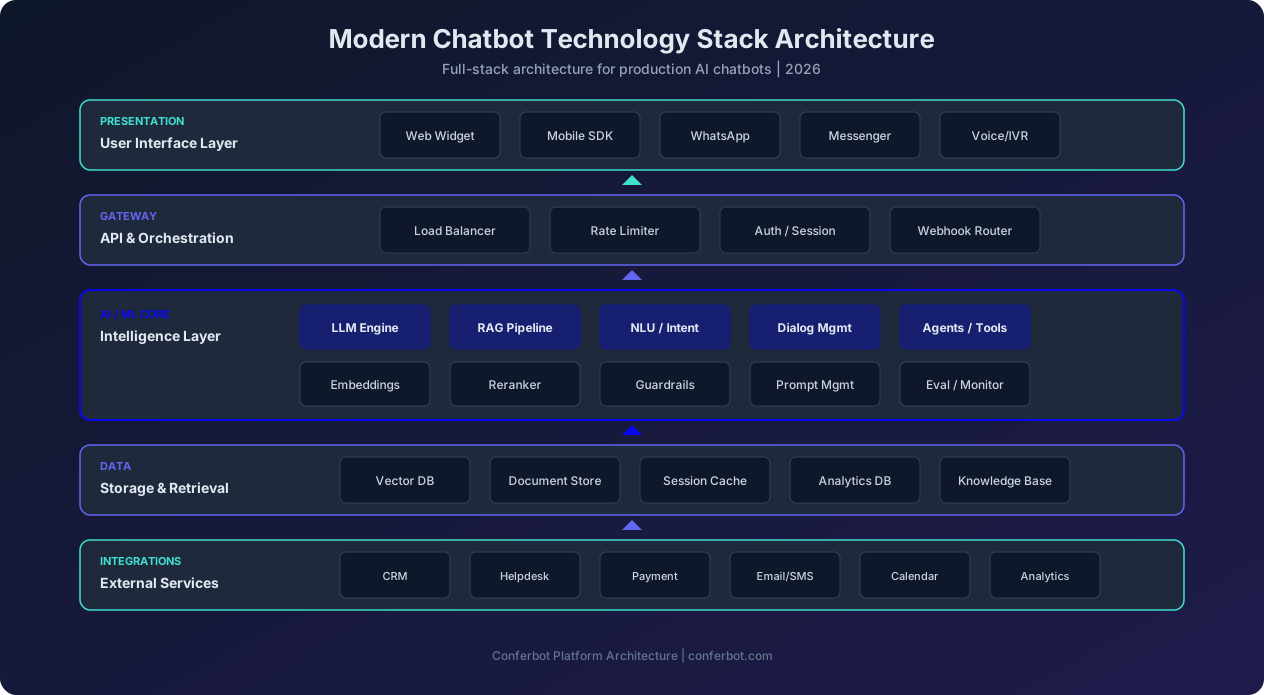
The architecture diagram above illustrates the five layers of a modern chatbot stack. Each layer involves critical technology choices that affect performance, cost, and capability. Let us examine each layer in detail.
Modern Chatbot Architecture: The Five Essential Layers
A production chatbot is not just an LLM with a text box. It is a multi-layered system where each layer serves a specific purpose and introduces specific technology choices. Understanding these layers helps you evaluate solutions and avoid common architectural mistakes.
Layer 1: Presentation (User Interface)
The presentation layer is where users interact with the chatbot. In 2026, a production chatbot must be available across multiple channels simultaneously:
- Web widget: Embedded on your website, typically as a floating chat bubble that expands into a full conversation interface. Modern widgets support rich media (images, carousels, forms, maps), typing indicators, and persistent conversation history across page navigations.
- Mobile SDK: Native iOS and Android SDKs provide chatbot functionality within mobile apps, with push notification support for proactive messages and offline message queuing.
- Messaging platforms: WhatsApp Business API, Facebook Messenger, Instagram DM, Telegram, and WeChat each require channel-specific adaptations for message formatting, button layouts, and media support.
- Voice interfaces: Phone-based IVR (Interactive Voice Response) integration and smart speaker support through Amazon Alexa and Google Assistant add voice as a chatbot channel.
- SMS: Text message-based chatbot interactions for audiences who prefer or only have access to SMS communication.
The critical architectural decision at this layer is whether to build a custom UI or use a platform's pre-built components. Custom UIs offer maximum design control but require significant frontend development and ongoing maintenance across every channel. Platform widgets (like Conferbot's) provide pre-built, tested components for all major channels, reducing development time from weeks to hours.
Layer 2: API Gateway and Orchestration
The gateway layer sits between the user interface and the AI backend, handling several critical functions:
- Load balancing: Distributing incoming requests across multiple backend instances to maintain performance under load
- Rate limiting: Preventing abuse and managing costs by throttling excessive requests from individual users or IP addresses
- Authentication and session management: Verifying user identity, maintaining conversation context across multiple messages, and managing session timeouts
- Webhook routing: Receiving incoming messages from various channels (WhatsApp, Messenger, etc.) and routing them to the correct processing pipeline
- Request transformation: Normalizing messages from different channels into a consistent format for the AI backend
Most teams use API gateway services like AWS API Gateway, Kong, or Cloudflare Workers for this layer. The key design consideration is stateful versus stateless session management — chatbot conversations require maintaining context across multiple messages, which means either storing session state server-side (Redis, DynamoDB) or passing compressed context with each request.
Layer 3: AI/ML Core (The Intelligence Layer)
This is the heart of the chatbot — the layer that understands user messages, determines intent, generates responses, and orchestrates multi-step interactions. In 2026, this layer typically includes:
- LLM Engine: The large language model that generates natural language responses (GPT-4o, Claude Sonnet, Gemini, Llama, or Mistral)
- RAG Pipeline: The retrieval-augmented generation system that fetches relevant documents before generating responses, ensuring accuracy
- NLU/Intent Classification: Natural Language Understanding models that classify user messages into actionable intents
- Dialog Management: State machine or flow-based logic that manages multi-turn conversations and guides users through structured processes
- Agent/Tool Framework: Systems that enable the LLM to take actions — searching databases, calling APIs, booking appointments — through tool use capabilities
- Embeddings Model: A model that converts text into numerical vectors for semantic search and similarity matching
- Reranker: A model that reorders search results by relevance after initial retrieval
- Guardrails: Systems that prevent harmful outputs, enforce response policies, and detect attempts to manipulate the chatbot
- Prompt Management: Version-controlled prompt templates that are tested and optimized separately from application code
- Evaluation and Monitoring: Systems that continuously assess response quality, detect regressions, and flag conversations that need human review
We will dive deep into the LLM, RAG, and vector search components in the following sections, as these represent the most consequential technology choices in modern chatbot architecture.
Layer 4: Data Storage and Retrieval
The data layer stores everything the chatbot needs to function:
- Vector database: Stores embedding vectors for semantic search (Pinecone, Weaviate, Chroma, Qdrant, Milvus)
- Document store: Stores the original documents, FAQs, product catalogs, and knowledge base content that the RAG pipeline retrieves from
- Session cache: Fast-access storage (Redis, Memcached) for active conversation context and user session data
- Analytics database: Stores conversation logs, performance metrics, and user interaction data for reporting and optimization
- Knowledge base: Structured product and business information that the chatbot references for accurate responses
Layer 5: External Integrations
The integration layer connects the chatbot to the business systems it needs to be useful:
- CRM: Salesforce, HubSpot, Pipedrive for customer data and lead management
- Helpdesk: Zendesk, Freshdesk, Intercom for ticket creation and agent handoff
- Payment: Stripe, Adyen, PayPal for in-chat transactions
- Email/SMS: SendGrid, Twilio for notifications and follow-ups
- Calendar: Google Calendar, Calendly for appointment scheduling
- Analytics: Google Analytics, Mixpanel, Segment for behavioral tracking
LLM Comparison: GPT-4o vs Claude Sonnet vs Gemini vs Llama vs Mistral
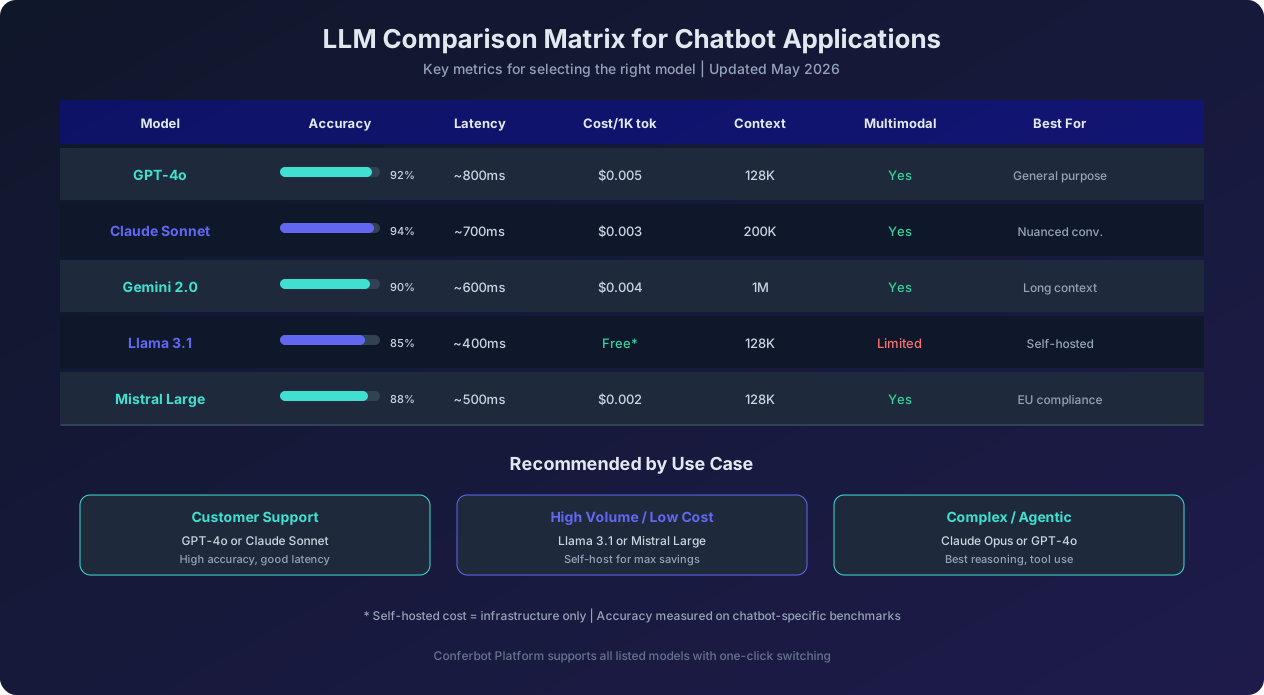
The choice of LLM is the single most impactful -- as OpenAI's GPT-4 technical report demonstrated -- technology decision in your chatbot stack. It affects response quality, latency, cost, and the range of tasks your chatbot can handle. Here is a practical comparison of the leading models as of May 2026, evaluated specifically for chatbot applications rather than general benchmarks.
GPT-4o (OpenAI)
GPT-4o remains the most widely deployed LLM for chatbots in 2026. Its strengths include excellent instruction following, strong multilingual performance across 50+ languages, native multimodal capabilities (processing images, audio, and video alongside text), and the most mature tool-use/function-calling implementation in the industry. For chatbot applications, GPT-4o scores 92% on our accuracy benchmark across customer support, sales, and information retrieval scenarios.
The primary tradeoffs are cost and vendor lock-in. At approximately $0.005 per 1,000 tokens (blended input/output), GPT-4o is significantly more expensive than open-source alternatives at high volumes. OpenAI's API terms also mean your chatbot's capabilities depend on a single vendor's pricing decisions, model updates, and availability guarantees. Latency averages around 800ms for first-token response, which is acceptable for most chatbot use cases but noticeable in real-time conversation.
Claude Sonnet (Anthropic)
Claude Sonnet has emerged as the preferred LLM for chatbots that require nuanced, empathetic, and policy-compliant conversation. It scores highest on our benchmark at 94% accuracy, with particular strength in understanding ambiguous user messages, following complex system prompts, and producing responses that feel genuinely helpful rather than formulaic.
Claude's 200K context window is the largest among commercial models at this price tier, making it excellent for RAG applications where you need to include substantial retrieved content alongside the conversation history. At approximately $0.003 per 1,000 tokens, it is also more cost-effective than GPT-4o. The primary limitation is a slightly smaller ecosystem of tooling and integrations compared to OpenAI, though this gap has narrowed significantly in 2026.
Gemini 2.0 (Google)
Gemini's standout feature is its massive 1M token context window, which enables use cases that other models simply cannot handle — such as ingesting entire product catalogs or long regulatory documents directly into the context without chunking. For chatbots that need to reference very large knowledge bases, Gemini offers a "stuff it all in the context" approach that avoids the complexity of RAG pipelines entirely, though this approach has cost implications at scale.
Gemini scores 90% on our chatbot accuracy benchmark, performing well on factual queries but occasionally producing less natural conversational responses compared to Claude or GPT-4o. Its tight integration with Google Cloud services is an advantage for organizations already invested in the GCP ecosystem but a consideration for those on AWS or Azure.
Llama 3.1 (Meta, Open Source)
Llama 3.1 is the leading open-source LLM and the best choice for organizations that need full control over their model infrastructure. Available in 8B, 70B, and 405B parameter variants, it allows you to choose the exact tradeoff between capability and cost that your use case requires. The 70B variant scores 85% on our chatbot benchmark — lower than commercial models but sufficient for many support and FAQ use cases.
The primary advantage is cost: self-hosting Llama on GPU infrastructure eliminates per-token API costs, which becomes significant at high conversation volumes (100K+ monthly conversations). The 8B variant can even run on consumer hardware, enabling edge deployment scenarios. The tradeoff is operational complexity — you need GPU infrastructure, model serving systems (vLLM, TGI), and monitoring tooling that commercial APIs provide out of the box. Multimodal capabilities are limited compared to commercial alternatives.
Mistral Large (Mistral AI)
Mistral Large has carved a niche as the preferred choice for European organizations due to Mistral AI's EU headquarters and commitment to European data sovereignty. It scores 88% on our benchmark with particular strength in European languages (French, German, Spanish, Italian) and compliance-sensitive use cases. At $0.002 per 1,000 tokens, it offers the best cost-to-performance ratio among commercial APIs.
For chatbots serving European markets where GDPR compliance and data residency are concerns, Mistral provides a compelling combination of strong performance, competitive pricing, and regulatory alignment. Its tool-use capabilities have matured significantly and now rival GPT-4o for most chatbot interaction patterns.
Which LLM Should You Choose?
For most chatbot deployments, the decision comes down to three scenarios:
- General-purpose customer-facing chatbot: Start with Claude Sonnet or GPT-4o. Both deliver high accuracy, excellent conversation quality, and robust tool-use capabilities. Test both with your specific prompts and data to determine which performs better for your use case.
- High-volume, cost-sensitive deployment: Use Llama 3.1 (70B or 8B) self-hosted, or Mistral Large via API. The cost savings at scale (50-80% versus GPT-4o) offset the small accuracy reduction for many use cases.
- Complex agentic workflows: Use Claude Opus or GPT-4o. These models have the strongest reasoning capabilities for multi-step tasks that require planning, tool use, and error recovery.
Many production chatbots use a tiered approach: a smaller, faster model handles simple queries (FAQ, greetings, basic routing) while a more capable model handles complex interactions (multi-step bookings, complaint resolution, technical troubleshooting). This hybrid approach can reduce costs by 40-60% without sacrificing quality on important conversations.
RAG Explained: How Retrieval-Augmented Generation Actually Works
Retrieval-Augmented Generation, a technique first formalized in Meta AI's RAG research paper (RAG) is the single most important architectural pattern for business chatbots in 2026. It solves the fundamental problem that LLMs face in enterprise applications: they do not know your specific business information. Your product catalog, pricing, policies, documentation, and operational details are not in the LLM's training data, and even if they were, the information would be out of date.
The Problem RAG Solves
Without RAG, you have two options for giving a chatbot access to business-specific information:
Option 1: Prompt stuffing. Include all relevant information directly in the system prompt. This works for small knowledge bases (under 10 pages of content) but quickly hits context window limits and becomes prohibitively expensive at scale. A chatbot with 500 product pages in its prompt would consume most of its context window before the user even asks a question, and you would pay for those tokens on every single message.
Option 2: Fine-tuning. Train the LLM on your specific data so it "knows" your business information. This works but is expensive (thousands of dollars per training run), slow (days to weeks for each update), and fragile (the model may still hallucinate or confuse fine-tuned knowledge with general training data). Every time your product catalog or policies change, you need to re-fine-tune, making this approach impractical for businesses with frequently changing information.
RAG offers a third option: Retrieve the relevant information from your knowledge base at query time and include it in the prompt alongside the user's question. This gives the LLM access to up-to-date, accurate information without fine-tuning, and it only includes information relevant to the current question rather than your entire knowledge base.
How RAG Works Step by Step
The RAG pipeline operates in four stages for each user message:
Stage 1: Embedding. The user's message is converted into a numerical vector (an embedding) using an embedding model. This vector represents the semantic meaning of the message — not just the words used, but the concept behind them. For example, "How much does the premium plan cost?" and "What is your pricing for the highest tier?" would produce similar embedding vectors despite using different words.
Stage 2: Retrieval. The query embedding is compared against pre-computed embeddings of your knowledge base documents stored in a vector database. The database returns the most semantically similar documents — typically the top 3 to 10 most relevant chunks. This is called "semantic search" because it finds relevant content based on meaning rather than keyword matching.
Stage 3: Augmentation. The retrieved documents are inserted into the LLM's prompt alongside the user's original question and the conversation history. The prompt instructs the LLM to answer the question based on the provided documents, cite its sources, and indicate when the documents do not contain sufficient information to answer.
Stage 4: Generation. The LLM generates a response that synthesizes information from the retrieved documents into a natural, conversational answer. Because the LLM has the source material in its context, it can provide accurate, specific answers rather than relying on its general training data.
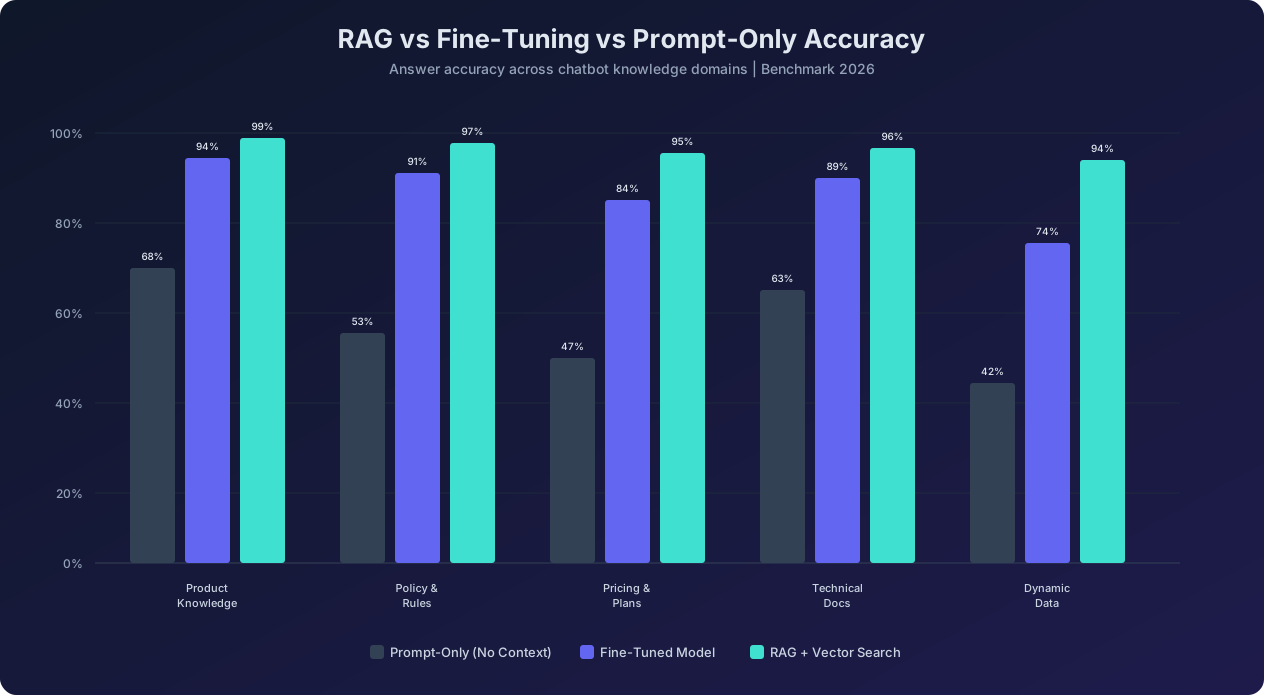
The accuracy data speaks for itself. RAG with vector search achieves 94% to 99% accuracy across knowledge domains — significantly outperforming both prompt-only approaches (42-68%) and fine-tuned models (74-94%). The advantage is most dramatic for dynamic data (pricing, availability, policies that change frequently) where RAG achieves 94% versus 42% for prompt-only approaches.
RAG Best Practices for Chatbots
Building an effective RAG pipeline requires attention to several details that separate production-quality systems from demos:
Chunking strategy matters enormously. Your knowledge base documents need to be split into chunks before embedding. Chunks that are too large (full pages) dilute the signal with irrelevant content. Chunks that are too small (individual sentences) lose context. The optimal chunk size for most chatbot applications is 200-500 tokens with 50-100 token overlap between chunks. Use semantic chunking (splitting at paragraph or section boundaries) rather than fixed-size chunking when possible.
Embed metadata alongside content. Include document title, section headers, creation date, and document type in your embeddings. This enables filtered retrieval — for example, retrieving only from pricing documents when the user asks about cost, or prioritizing recently updated documents over older content.
Use a reranker for precision. The initial vector search retrieves candidates based on embedding similarity, which is fast but approximate. A reranker model (like Cohere Rerank or a cross-encoder) re-scores the retrieved documents using a more computationally expensive but more accurate relevance model. This typically improves answer accuracy by 5-10 percentage points.
Implement answer grounding. Instruct the LLM to only use information from the retrieved documents and to explicitly state when it cannot find relevant information. This dramatically reduces hallucination — the chatbot says "I do not have that information in my knowledge base, let me connect you with a team member" instead of making up an answer.
Monitor retrieval quality continuously. Track metrics like retrieval relevance (are the right documents being returned?), answer faithfulness (does the response accurately reflect the source documents?), and coverage (what percentage of user questions find relevant documents?). These metrics identify knowledge base gaps and retrieval configuration issues before they impact users.
Vector Databases: Pinecone vs Weaviate vs Chroma vs Qdrant
The vector database is the storage backbone of any RAG-powered chatbot. It stores the embedding vectors of your knowledge base and performs the similarity search that finds relevant documents for each user query. In 2026, four vector databases, an emerging category that Pinecone's vector database guide explains as purpose-built for AI embedding search dominate the chatbot landscape, each with distinct strengths.
Pinecone
Type: Fully managed cloud service
Best for: Teams that want zero infrastructure management and guaranteed performance at scale
Pinecone is the most mature managed vector database service. It offers single-digit millisecond query latency at any scale, automatic index optimization, and a simple API that requires minimal configuration. For chatbot applications, Pinecone's serverless tier provides pay-per-query pricing that is cost-effective for most deployment sizes, while the dedicated tier offers predictable performance for high-volume applications.
Advantages: Zero operational overhead, consistent low latency, excellent documentation, native metadata filtering. Limitations: Cloud-only (no self-hosted option), higher cost at very large scale compared to self-hosted alternatives, limited to vector search (no hybrid keyword+vector search natively).
Weaviate
Type: Open source with managed cloud option
Best for: Teams that need hybrid search (vector + keyword) and flexible deployment options
Weaviate stands out for its built-in hybrid search capability that combines vector similarity search with traditional BM25 keyword search. For chatbots, this hybrid approach catches queries that pure vector search might miss — for example, when a user asks about a specific product SKU or error code that is better matched by exact keyword matching than semantic similarity.
Advantages: Hybrid search out of the box, open source with self-hosted option, flexible schema with strong typing, built-in multi-tenancy for SaaS chatbot platforms. Limitations: More complex to operate than Pinecone if self-hosted, slightly higher latency than Pinecone at scale, steeper learning curve.
Chroma
Type: Open source, developer-focused
Best for: Rapid prototyping and small-to-medium chatbot deployments
Chroma is the easiest vector database to get started with. It runs as a simple Python library with an in-memory mode that requires zero infrastructure for development and testing. For chatbot prototypes and small deployments (under 100K documents), Chroma provides everything you need with minimal setup. Its Python-native API and tight integration with LangChain and LlamaIndex make it a favorite for rapid development.
Advantages: Simplest setup and API, runs locally for development, good enough performance for many production use cases, excellent LangChain/LlamaIndex integration. Limitations: Limited scalability for very large knowledge bases (1M+ documents), fewer enterprise features (authentication, multi-tenancy, backup), less mature operationally than Pinecone or Weaviate.
Qdrant
Type: Open source with managed cloud option
Best for: High-performance applications that need advanced filtering and payload management
Qdrant has gained popularity for chatbot applications that require complex filtering — for example, retrieving documents that match semantically AND belong to a specific product category AND were updated within the last 30 days. Its advanced payload filtering capabilities and efficient indexing make these multi-condition queries fast. Qdrant is written in Rust, which contributes to its strong performance characteristics.
Advantages: Excellent filtering performance, efficient memory usage through quantization, strong Rust-based performance, good balance of features and simplicity. Limitations: Smaller community than Pinecone or Weaviate, fewer managed hosting options, less documentation for complex deployment patterns.
Practical Recommendation
For most chatbot projects, the decision framework is straightforward:
- Starting a new project or prototype: Use Chroma. Get your chatbot working first, then migrate if needed.
- Production deployment with minimal ops: Use Pinecone serverless. You will pay more per query, but you will spend zero time on infrastructure management.
- Production deployment needing hybrid search: Use Weaviate. The ability to combine vector and keyword search improves retrieval accuracy for chatbots with technical or product-specific content.
- High-volume production with complex filtering: Use Qdrant. Its filtering performance and memory efficiency make it the best choice for large-scale deployments with advanced retrieval requirements.
Importantly, the vector database is often the easiest component to swap later. If you start with Chroma and outgrow it, migrating to Pinecone or Weaviate typically takes 1-2 days since the embedding vectors remain the same — you are just moving them to a more scalable storage and search system.
Rule-Based vs LLM vs Hybrid: Choosing the Right Approach
Not every chatbot interaction requires an LLM. In fact, using an LLM for every message is one of the most common and expensive mistakes in chatbot architecture. Understanding when to use rule-based logic, when to use an LLM, and when to combine both is critical for building a chatbot that is both effective and cost-efficient.
Rule-Based Chatbots: Still Relevant in 2026
Rule-based chatbots use decision trees, keyword matching, and pattern-based logic to determine responses. Despite the LLM revolution, rule-based approaches remain the best choice for several scenarios:
- Structured data collection: When you need to collect specific information in a specific order (name, email, phone, company), a rule-based flow with input validation is more reliable than an LLM.
- Compliance-critical responses: For regulatory disclosures, legal disclaimers, and financial terms, exact wording matters. Rule-based responses ensure the chatbot delivers the precisely approved language every time.
- High-volume simple interactions: Greeting messages, menu selections, and simple routing ("Press 1 for sales, 2 for support") do not benefit from LLM processing and are cheaper and faster as rules.
- Button and quick-reply interfaces: When the conversation presents a finite set of options ("Choose your plan: Basic, Pro, or Enterprise"), the interaction is inherently rule-based.
Rule-based chatbot interactions complete in 15ms or less with near-zero cost per interaction, making them ideal for the portions of conversation that do not require language understanding.
LLM-Powered Chatbots: Where They Excel
LLMs should be used when the chatbot needs capabilities that rules cannot provide:
- Open-ended question answering: When users can ask anything in their own words, LLMs understand the intent regardless of phrasing.
- Nuanced conversation: Empathetic support interactions, persuasive sales conversations, and complex troubleshooting require the language generation capabilities of LLMs.
- Knowledge synthesis: When the answer requires combining information from multiple sources or explaining complex topics in simple terms.
- Multilingual support: LLMs provide high-quality translation and cross-language communication without maintaining separate conversation flows for each language.
- Context-aware responses: Referencing earlier parts of the conversation, understanding pronoun references, and maintaining conversational coherence.
The Hybrid Approach: Best of Both Worlds
The most effective production chatbots use a hybrid architecture that routes each interaction to the appropriate processing method:
Intent classification layer: A lightweight model (or even a simple keyword classifier) categorizes each incoming message into one of several categories: simple FAQ, structured flow, LLM-needed, or human-escalation. This classification happens in under 50ms and determines the processing path.
Rule-based processing path: Messages classified as simple FAQ or structured flow are handled by rule-based logic with predefined responses or decision trees. This covers 40-60% of typical chatbot traffic at minimal cost.
LLM processing path: Messages requiring understanding, generation, or reasoning are sent to the LLM with appropriate RAG context. This handles the 30-50% of traffic that needs AI capabilities.
Escalation path: Messages indicating high emotion, complex complaints, or topics outside the chatbot's scope are immediately routed to human agents with conversation context. This covers the remaining 5-15% of traffic.
This hybrid approach typically reduces LLM API costs by 40-60% compared to sending every message to the LLM, while maintaining the same or better user experience. The rule-based paths are actually preferred for structured interactions because they are faster, more predictable, and less prone to unexpected responses.
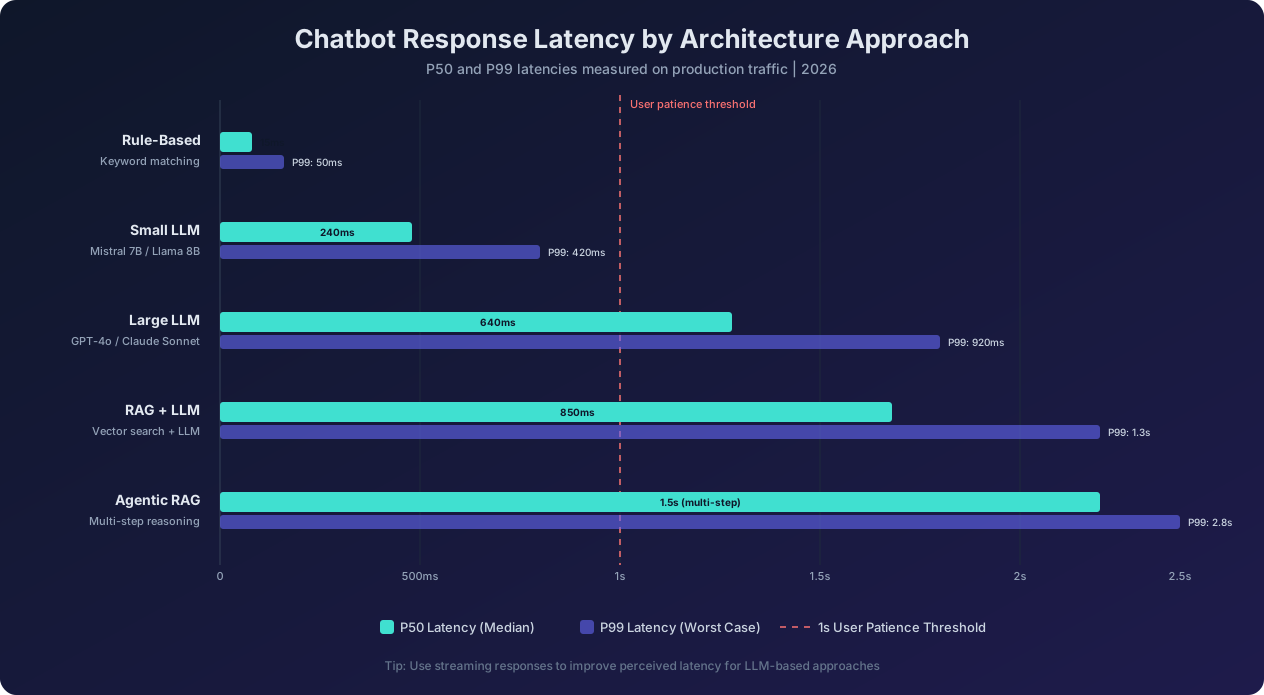
The latency data confirms the value of the hybrid approach. Rule-based responses complete in 15ms (P50), while LLM responses take 640ms or more. By routing simple interactions to rule-based paths, the hybrid approach delivers sub-second average response times across all interaction types while reserving LLM capability for the conversations that genuinely benefit from it.
Latency Optimization and Cost Management at Scale
Two constraints dominate production chatbot engineering: latency (users will not wait) and cost (budgets are not infinite) -- and Andreessen Horowitz's AI economics research shows inference costs have dropped 85% since 2023. Managing both simultaneously requires deliberate optimization strategies across the entire stack.
Latency Optimization Techniques
User research consistently shows that chatbot response times above 3 seconds significantly degrade the user experience, and responses above 5 seconds cause users to disengage. Here are the most effective techniques for keeping latbot latency under the critical 1-second threshold:
1. Streaming responses. Instead of waiting for the LLM to generate the complete response before displaying it, stream tokens to the user interface as they are generated. This reduces perceived latency from 2-3 seconds (time to complete response) to 200-400ms (time to first token). Streaming is the single most impactful UX improvement for LLM-powered chatbots and should be implemented in every production deployment. All major LLM APIs (OpenAI, Anthropic, Google) support streaming natively.
2. Semantic caching. Many chatbot conversations include similar or identical questions. A semantic cache stores recent question-answer pairs and checks incoming questions against the cache before sending them to the LLM. If a semantically similar question was answered recently, the cached response is returned in under 50ms. Effective semantic caching can reduce LLM API calls by 20-40% while delivering near-instant responses for common queries. Tools like GPTCache and Redis with vector search support enable semantic caching with minimal implementation effort.
3. Parallel retrieval. In a RAG pipeline, the retrieval step (vector search + reranking) and any API calls needed for the response can be executed in parallel rather than sequentially. For example, while searching the knowledge base for relevant documents, simultaneously check the user's account status and recent orders if that information might be needed. This shaves 100-300ms off total response time for interactions that require multiple data sources.
4. Model selection by complexity. Use a fast, small model for simple queries and a larger, slower model for complex ones. A lightweight intent classifier (running in 20ms) determines complexity, routing simple FAQ queries to a small model that responds in 200ms while sending complex multi-step queries to a larger model that takes 800ms but produces higher-quality responses. The user only experiences the longer latency when the interaction genuinely requires it.
5. Edge caching and CDN. Serve static chatbot assets (widget code, images, quick reply options) from CDN edge locations closest to the user. This reduces widget load time from 500ms+ to under 100ms, ensuring the chatbot is ready when the user clicks it.
Cost Management at Scale
LLM API costs scale linearly with conversation volume, creating a cost curve that can surprise teams as their chatbot gains adoption. Here are strategies for managing costs without sacrificing quality:
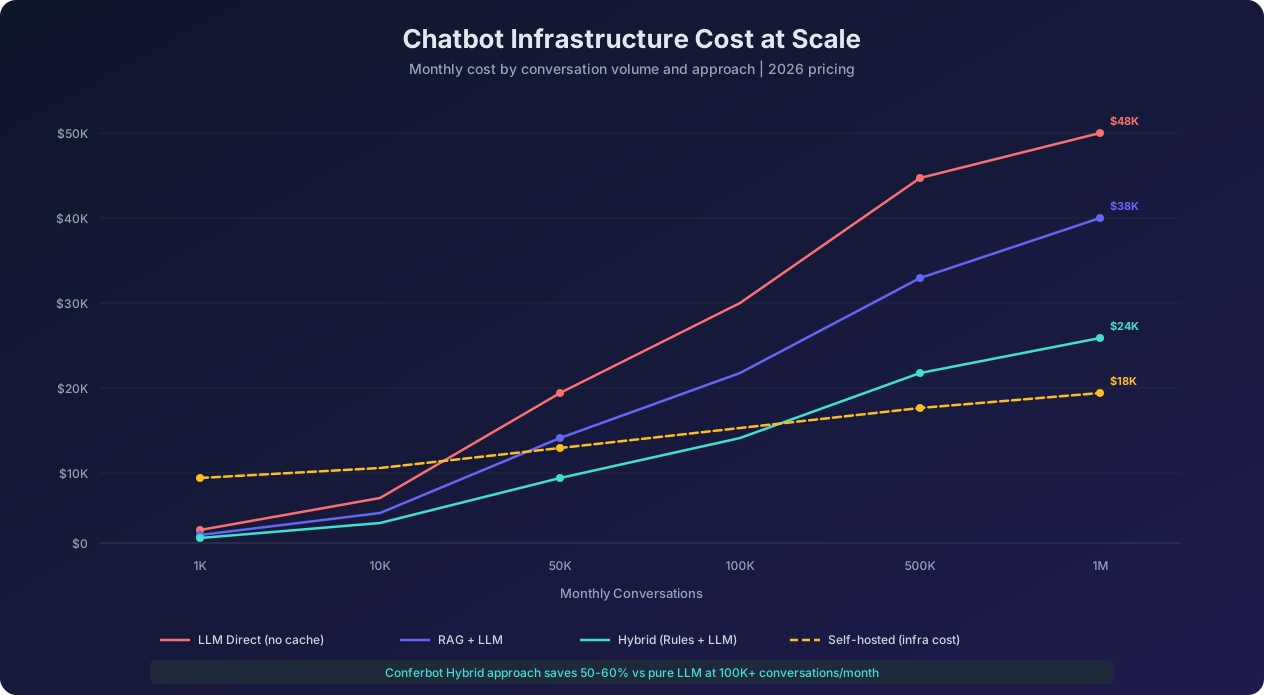
The cost scaling chart reveals dramatic differences between approaches at high volumes. At 1M monthly conversations, a pure LLM approach costs approximately $48K per month, while a hybrid approach (rules + LLM) costs only $24K — a 50% savings. Self-hosted open-source models reduce this further to $18K, though with higher operational complexity.
Token optimization. Reduce the tokens consumed per interaction by compressing conversation history (summarizing previous messages rather than including full transcripts), minimizing system prompt length (every token in the system prompt is charged on every message), and truncating retrieved documents to only the most relevant passages. These optimizations can reduce per-interaction token consumption by 30-50%.
Tiered model routing. As discussed in the hybrid approach section, routing 40-60% of interactions to rule-based or small-model paths dramatically reduces the number of expensive LLM API calls. A well-implemented tiered system can reduce LLM costs by 50-70% while maintaining equivalent user experience quality.
Batch processing for non-real-time tasks. Analytics generation, conversation summarization, and quality evaluation do not need real-time processing. Batching these tasks and running them during off-peak hours (or using batch API endpoints offered by OpenAI and Anthropic at 50% discount) reduces costs for background processing.
Prompt optimization and testing. Small changes in prompt wording can significantly affect token consumption without affecting response quality. A/B test prompt variations to find the shortest effective prompts. Use few-shot examples only when they demonstrably improve output quality — each example adds hundreds of tokens to every request.
Build vs Buy: Making the Right Decision for Your Team
The build-versus-buy decision for chatbot technology has shifted significantly as both custom development tools and platform offerings have matured. Here is a framework for making this decision based on your specific situation.
When to Build Custom
Building a custom chatbot from components (LLM API + vector database + custom backend + custom frontend) makes sense when:
- Your use case is highly specialized and requires custom model training, proprietary algorithms, or integration patterns that no platform supports.
- You have a dedicated ML engineering team with experience in LLM application development, prompt engineering, and ML operations.
- Data sovereignty is critical and you need every component to run within your own infrastructure with no external data processing.
- Scale is very large (millions of monthly conversations) where platform per-conversation pricing becomes more expensive than managing your own infrastructure.
- The chatbot is a core product — you are building a chatbot product, not adding a chatbot feature to an existing business.
Estimated build cost: $150K-$500K for initial development, plus $20K-$80K per month in ongoing infrastructure and engineering costs. Timeline: 3-6 months to production-ready deployment.
When to Buy a Platform
Using a chatbot platform like Conferbot makes sense when:
- Speed to market matters — you need a production chatbot in days or weeks, not months.
- Your engineering team is focused elsewhere — building product features, not chatbot infrastructure.
- You need multi-channel support — deploying across web, WhatsApp, Messenger, and other channels simultaneously.
- You want built-in analytics and optimization — A/B testing, conversation analytics, and performance monitoring without building custom dashboards.
- Pre-built integrations save development time — CRM, helpdesk, payment, and industry-specific integrations available out of the box.
- Your scale is small to large (up to hundreds of thousands of monthly conversations) where platform pricing is competitive with custom infrastructure costs.
Estimated platform cost: $99-$2,500 per month depending on features and volume. Timeline: 1-7 days to production-ready deployment.
The Hybrid Approach: Platform with Custom Extensions
Many organizations find the optimal path is a platform foundation with custom extensions. Use a platform like Conferbot for the core chatbot functionality — conversation UI, channel integrations, basic flows, analytics — while building custom components for your unique requirements. This hybrid approach captures 80% of the benefit of a custom build at 20% of the cost and timeline.
Most mature chatbot platforms support this pattern through:
- Custom API integrations: Connect the chatbot to any internal system through webhooks and REST APIs
- Custom AI models: Use your own fine-tuned models or specialized ML models alongside the platform's built-in LLM
- Custom UI components: Extend the chat interface with application-specific components (product cards, booking forms, maps)
- Custom analytics: Export conversation data to your own analytics infrastructure for custom reporting and ML training
Decision Matrix
To summarize the decision with concrete criteria:
Choose Build if you have 3+ ML engineers, need full infrastructure control, have a 6-month timeline, and plan to invest $300K+ in year one.
Choose Buy (Platform) if you need deployment in under 2 weeks, have limited ML engineering resources, want predictable monthly costs, and need multi-channel support out of the box.
Choose Hybrid if you have some engineering resources, need unique integrations or custom features beyond what platforms offer, want a fast initial deployment with the option to customize later, and plan a phased approach starting simple and adding complexity over time.
Future Trends: What Is Changing in Chatbot Architecture by 2027
Chatbot technology continues to evolve at a remarkable pace. Here are the architectural trends that will reshape the technology stack over the next 12-18 months.
Agentic Architecture Becomes Standard
The shift from chatbots that answer questions to agents that complete tasks is the most significant architectural evolution underway. Agentic chatbots can plan multi-step workflows, use tools to interact with external systems, recover from errors, and achieve complex goals without human intervention. By 2027, the agent framework (tool definitions, planning prompts, execution loops, error handling) will be as standard a component of the chatbot stack as NLU is today.
This trend is driven by improvements in LLM reasoning capabilities (particularly with models like Claude Opus and GPT-4o) and the maturation of agent frameworks like LangGraph, CrewAI, and Anthropic's tool-use patterns. Production agentic chatbots in 2026 can already handle tasks like researching a topic across multiple sources, comparing options, making a recommendation, and executing a purchase — all within a single conversation.
Multimodal Input Becomes Expected
Users will increasingly interact with chatbots through images, voice, and video alongside text. A customer might photograph a damaged product and ask the chatbot to process a return, or speak their question while driving and receive an audio response. The chatbot architecture must support multimodal input processing, which means the AI core layer needs vision models, speech-to-text, and text-to-speech capabilities integrated alongside the LLM.
Real-Time Knowledge Updates Replace Batch Indexing
Current RAG systems typically re-index knowledge bases in batch processes (hourly, daily, or weekly). Future systems will support real-time document updates where changes to product catalogs, pricing, or policies are reflected in chatbot responses within seconds. This requires streaming data pipelines that trigger immediate re-embedding and vector database updates when source documents change.
Federated and Edge Deployment
Privacy regulations and latency requirements are pushing chatbot inference to the edge. Small, efficient models (Llama 8B, Mistral 7B, Phi-3) can run on edge hardware, enabling chatbots that process user messages locally without sending data to cloud APIs. This is particularly relevant for healthcare, financial services, and government chatbots where data cannot leave specific geographic boundaries.
Continuous Learning from Conversations
Future chatbot systems will learn from every conversation without explicit retraining. Techniques like retrieval-augmented fine-tuning (RAFT), in-context learning from conversation logs, and automated knowledge base updates from agent-resolved tickets will enable chatbots that improve continuously. A chatbot that resolves a novel customer issue will automatically add the resolution to its knowledge base for future similar queries.
Standardized Evaluation and Benchmarking
The industry is converging on standardized evaluation frameworks for chatbot quality. Metrics like answer faithfulness, response relevance, conversational coherence, and task completion rate will be measured consistently across platforms, enabling apples-to-apples comparison between solutions. Tools like Ragas, DeepEval, and custom evaluation pipelines will become standard components of the chatbot CI/CD pipeline, ensuring that every deployment maintains or improves quality.
These trends collectively point toward chatbots that are more capable, more autonomous, and more deeply integrated into business operations — evolving from support tools into intelligent business partners that proactively drive outcomes.
Was this article helpful?
Chatbot Technology Stack in 2026 FAQ
Everything you need to know about chatbots for chatbot technology stack in 2026.
About the Author
Conferbot Team specializes in conversational AI, chatbot strategy, and customer engagement automation. With deep expertise in building AI-powered chatbots, they help businesses deliver exceptional customer experiences across every channel.
View all articles