Why Every Company Needs an Employee Self-Service Chatbot in 2026
Your HR team answers the same 25 questions hundreds of times per month. Your IT helpdesk resets passwords for the same employees who forgot them last month. Your finance department explains the expense reimbursement policy to every new hire individually. And your legal team sends the same NDA template in response to every contractor request. These are not high-value activities. They are repetitive, time-consuming, and deeply frustrating for everyone involved: the employees asking, the teams answering, and the organization paying for it all.
An employee self-service, which SHRM research identifies as the top HR technology priority for 2026 chatbot eliminates this cycle by providing instant, accurate answers to common workplace questions 24 hours a day, 7 days a week. When an employee needs to know their PTO balance, they ask the chatbot instead of emailing HR. When they cannot connect to the VPN, they ask the chatbot instead of submitting a ticket. When they need to understand the travel expense policy before booking a flight, they ask the chatbot instead of waiting three days for a response from finance.
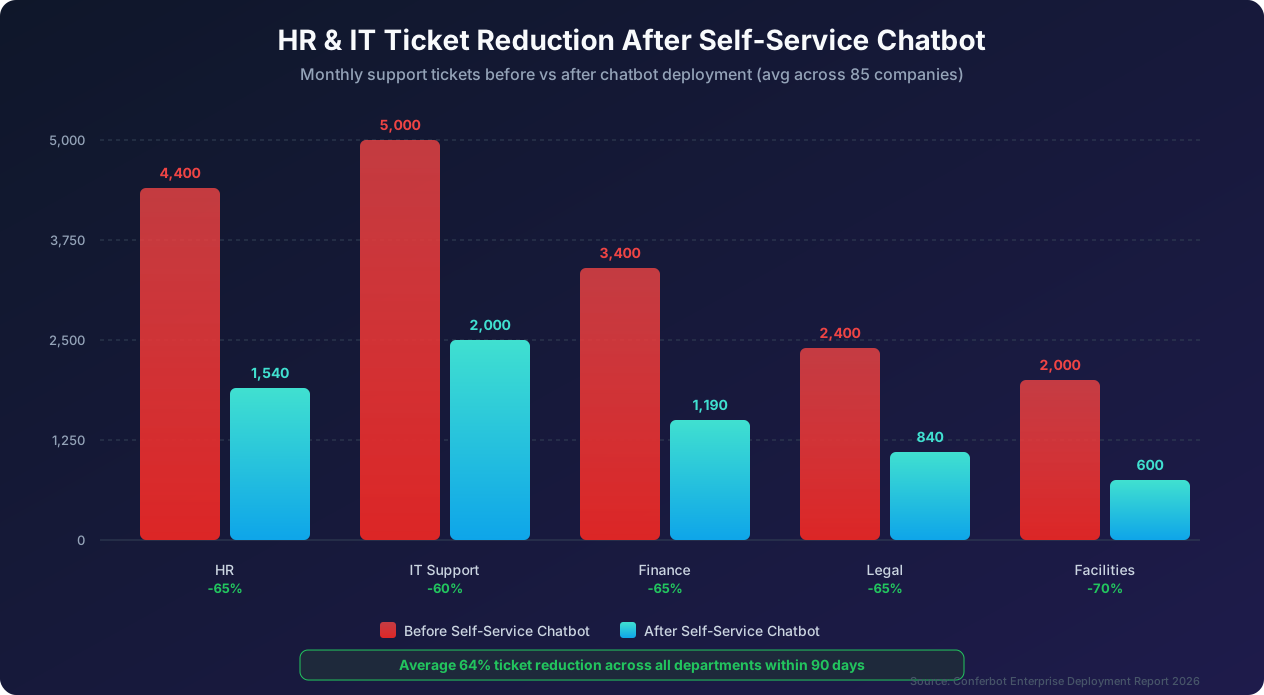
The impact is substantial. Organizations that deploy employee self-service chatbots report a 64% average reduction in internal support tickets across all departments within 90 days. That is not a theoretical projection; it is the measured outcome across 85 companies that deployed Conferbot for internal employee support between 2025 and 2026. The reduction frees HR, IT, Finance, and Legal teams to focus on strategic work that actually requires their expertise, rather than answering the same questions for the hundredth time.
But deploying an employee self-service chatbot is not as simple as plugging in a tool and hoping employees use it. Success requires understanding which questions to automate first, how to structure content for each department, how to handle sensitive topics like compensation and disciplinary policies, how to drive adoption across a diverse workforce, and how to measure success beyond simple deflection metrics.
This guide provides a complete, department-by-department playbook for deploying an employee self-service chatbot. We will cover the top 25 employee questions to automate (based on analysis of 2.4 million internal support interactions), detailed deployment strategies for HR, IT, Finance, and Legal, onboarding automation that saves 18.5 hours per new hire, knowledge base integration approaches, privacy considerations, and a step-by-step rollout strategy that maximizes adoption. Whether you are considering your first chatbot deployment or looking to expand an existing one, this guide gives you the practical framework to deliver measurable results.
Top 25 Employee Questions to Automate: Where to Start for Maximum Impact
Not all employee questions are equally valuable to automate, and McKinsey's HR research estimates that 40% of HR staff time is consumed by the repetitive ones. Some questions are asked thousands of times per month, have simple answers, and can be fully resolved by a chatbot. Others are complex, sensitive, or so rare that automation effort is not justified. Our analysis of 2.4 million internal support interactions across 85 organizations reveals the top 25 questions by volume, grouped by department, along with the automation potential and expected deflection rate for each.
HR questions (38% of total internal support volume). The number one question across all departments is 'How much PTO do I have left?' This single question accounts for 8.2% of all internal support interactions. A chatbot integrated with your HRIS (Workday, BambooHR, Gusto, or similar) resolves this instantly with a 94% deflection rate. Number two is 'How do I request time off?' at 6.1% of volume with 91% deflection when the chatbot can initiate the request directly. Number three is 'Where can I find my pay stub?' at 5.8% volume with 90% deflection when linked to your payroll portal. Number four is 'What are my health insurance benefits?' at 4.2% volume with 85% deflection for factual questions, though complex enrollment changes may require human assistance. Number five is 'What is the company holiday schedule?' at 3.9% volume with 97% deflection since this is purely informational.
Continuing with HR, number six is 'How do I update my direct deposit information?' at 3.4% volume with 88% deflection when the chatbot can guide users to the self-service portal. Number seven is 'What is the dress code policy?' at 2.8% volume with 96% deflection. Number eight is 'How do I report a workplace concern?' at 2.1% volume. This one is sensitive and achieves only 60% deflection because many employees prefer to speak with a person; the chatbot's role is to explain the process and offer both anonymous digital reporting and human options. Number nine is 'What is the parental leave policy?' at 1.9% volume with 88% deflection for policy information, though individual eligibility questions sometimes require HR review.
IT questions (32% of total internal support volume). Number ten is 'I need to reset my password' at 7.4% of all volume, the second most common question overall. With Active Directory or Okta integration, deflection reaches 95%. Number eleven is 'How do I connect to the VPN?' at 4.1% with 87% deflection. Number twelve is 'I need access to a specific software or system' at 3.8% with 80% deflection for pre-approved software. Number thirteen is 'My email is not working' at 3.2% with 75% deflection for common configuration issues. Number fourteen is 'How do I set up my new laptop?' at 2.9% with 82% deflection when the chatbot provides a step-by-step onboarding guide. Number fifteen is 'The printer is not working' at 2.4% with 65% deflection for driver and connection issues.
Finance questions (18% of total internal support volume). Number sixteen is 'How do I submit an expense report?' at 3.6% with 91% deflection when linked to your expense management tool. Number seventeen is 'What is the expense policy for meals and travel?' at 3.1% with 93% deflection since this is purely policy-based. Number eighteen is 'When do expense reimbursements get processed?' at 2.4% with 90% deflection. Number nineteen is 'How do I get a purchase order approved?' at 2.1% with 78% deflection when the chatbot can initiate the approval workflow. Number twenty is 'What is the company credit card policy?' at 1.8% with 95% deflection.
Legal and compliance questions (12% of total internal support volume). Number twenty-one is 'I need an NDA for a vendor or contractor' at 2.3% with 82% deflection when the chatbot can provide templates and initiate the review process. Number twenty-two is 'What is our data privacy policy?' at 2.0% with 90% deflection. Number twenty-three is 'How do I handle a conflict of interest disclosure?' at 1.6% with 75% deflection for providing the form and process guidance. Number twenty-four is 'What are the rules about accepting gifts from vendors?' at 1.4% with 93% deflection. Number twenty-five is 'How do I request a contract review?' at 1.2% with 70% deflection when the chatbot can collect requirements and route to the right legal team member.
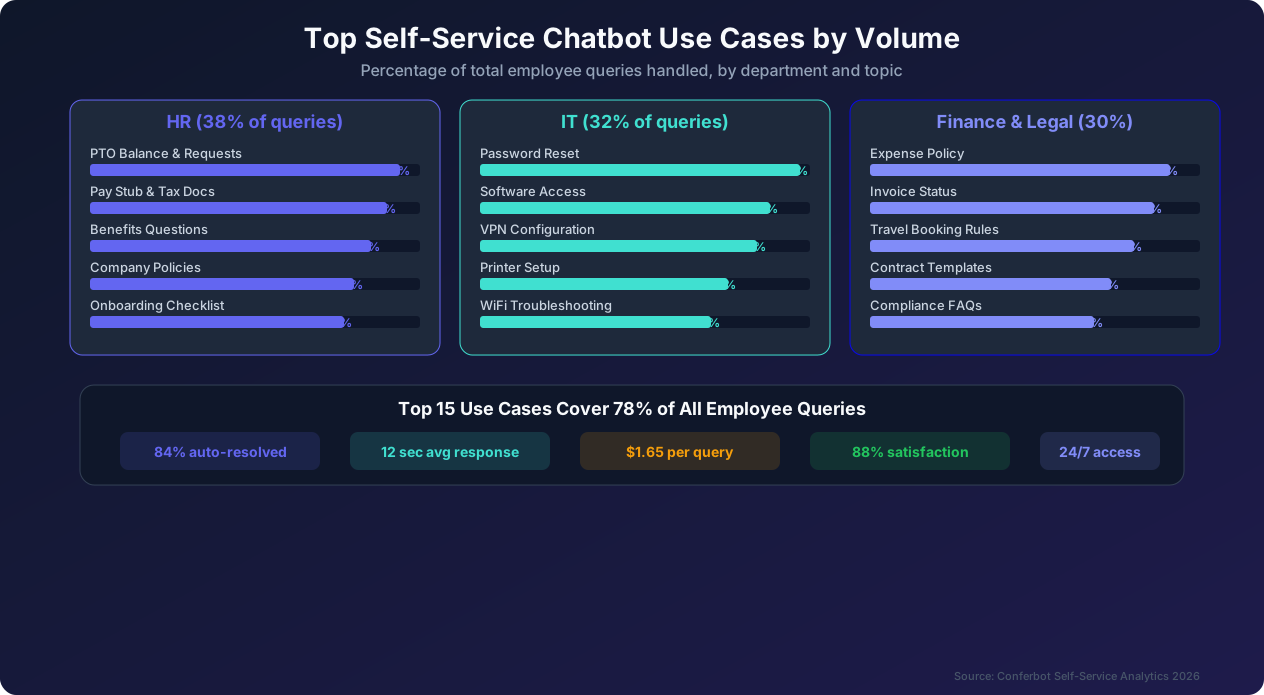
The 80/20 rule of employee self-service. These top 25 questions represent 78% of all internal support volume. Automating them alone delivers the vast majority of the value from a self-service chatbot deployment. This is critical for phased implementation: you do not need to automate everything on day one. Start with the top 10 questions, which represent 52% of total volume, and expand from there. Each additional question automated adds incremental value, but the first 10 deliver the lion's share of impact.
Department Playbook: HR Self-Service Chatbot
HR departments bear the heaviest burden of repetitive employee questions. The average HR team member spends 40% of their time answering questions that a chatbot could handle, leaving only 60% of their capacity for strategic people operations like talent development, culture building, and organizational design. Here is how to deploy an HR self-service chatbot that reclaims that 40%.
Essential HR chatbot capabilities. A comprehensive HR chatbot needs to handle five categories of interactions. First, policy and benefits information: answering questions about PTO policies, health insurance plans, retirement benefits, parental leave, and company policies. This requires a well-structured knowledge base that the chatbot can search and present in conversational form. Second, transactional requests: helping employees submit time-off requests, update personal information, enroll in benefits, and access tax documents. This requires integration with your HRIS and benefits platforms. Third, onboarding support: guiding new hires through their first days and weeks with information about orientation schedules, paperwork completion, team introductions, and company culture. Fourth, offboarding guidance: helping departing employees understand their final pay, benefits continuation (COBRA), equipment return procedures, and exit interview scheduling. Fifth, sensitive topic handling: providing initial guidance for workplace concerns, accommodation requests, and leave of absence situations while seamlessly connecting employees with the right HR specialist when human support is needed.
HRIS integration is non-negotiable. An HR chatbot without HRIS integration is just a fancy FAQ page. The real value comes when the chatbot can pull personalized data. Instead of answering 'What is the PTO policy?' with a generic response, an integrated chatbot answers 'You have 14.5 days of PTO remaining this year, with 3 days pending approval for your October trip. You accrue 1.25 days per month, so you will have 17.25 days available by December 31 if your pending request is approved.' This personalized response eliminates the need for follow-up questions and gives the employee exactly the information they need in a single interaction.
Conferbot offers pre-built integrations with major HRIS platforms including Workday, BambooHR, ADP, Gusto, Paylocity, and Rippling. For custom HRIS systems, the API integration framework allows connection in as little as two weeks.
Handling sensitive HR topics. Not every HR question should be answered by a chatbot. Topics like harassment complaints, discrimination concerns, performance improvement plans, and termination procedures require human empathy and legal awareness that AI cannot replicate. Design your HR chatbot with a clear boundary: it provides factual information about policies and processes, but it always offers to connect the employee with a human HR partner for sensitive or complex situations. The chatbot should never attempt to mediate disputes, provide legal advice, make decisions about accommodations or leave eligibility, or handle any situation where the employee expresses distress or urgency. When these situations arise, the chatbot should immediately and warmly offer a human connection: 'I understand this is important to you. Let me connect you with Sarah from our HR team who can give you personalized guidance. Would you prefer a chat, a call, or an in-person meeting?'
Building the HR knowledge base. The quality of your HR chatbot is directly proportional to the quality of your knowledge base. Start by auditing every HR policy document, benefits guide, employee handbook, and FAQ page your organization has. Identify inconsistencies, outdated information, and gaps. Then restructure this content for conversational delivery. Policies written in legal language need to be translated into plain language that the chatbot can present naturally. A policy that says 'Employees are eligible for bereavement leave of up to five (5) business days in the event of the death of an immediate family member as defined in Section 4.2.1' should become 'You can take up to 5 days of bereavement leave for the loss of an immediate family member, which includes your spouse, children, parents, siblings, grandparents, and in-laws.'
Measuring HR chatbot success. Track these metrics to evaluate your HR chatbot's performance. Ticket deflection rate measures the percentage of HR questions resolved by the chatbot without human involvement, with a target of 65% or higher within 90 days. Employee satisfaction with HR support (measured through post-interaction surveys) should target 80% or higher. Average response time should be under 15 seconds for all chatbot-handled queries. HR team time savings measures the hours per week that HR team members reclaim, with a target of 15 or more hours per week for a team of 5 HR generalists. Knowledge base accuracy measures the percentage of chatbot answers rated 'helpful' or 'accurate' by employees, targeting 90% or higher. Escalation quality measures satisfaction with the handoff process when the chatbot connects employees with human HR partners.
Department Playbook: IT Self-Service Chatbot
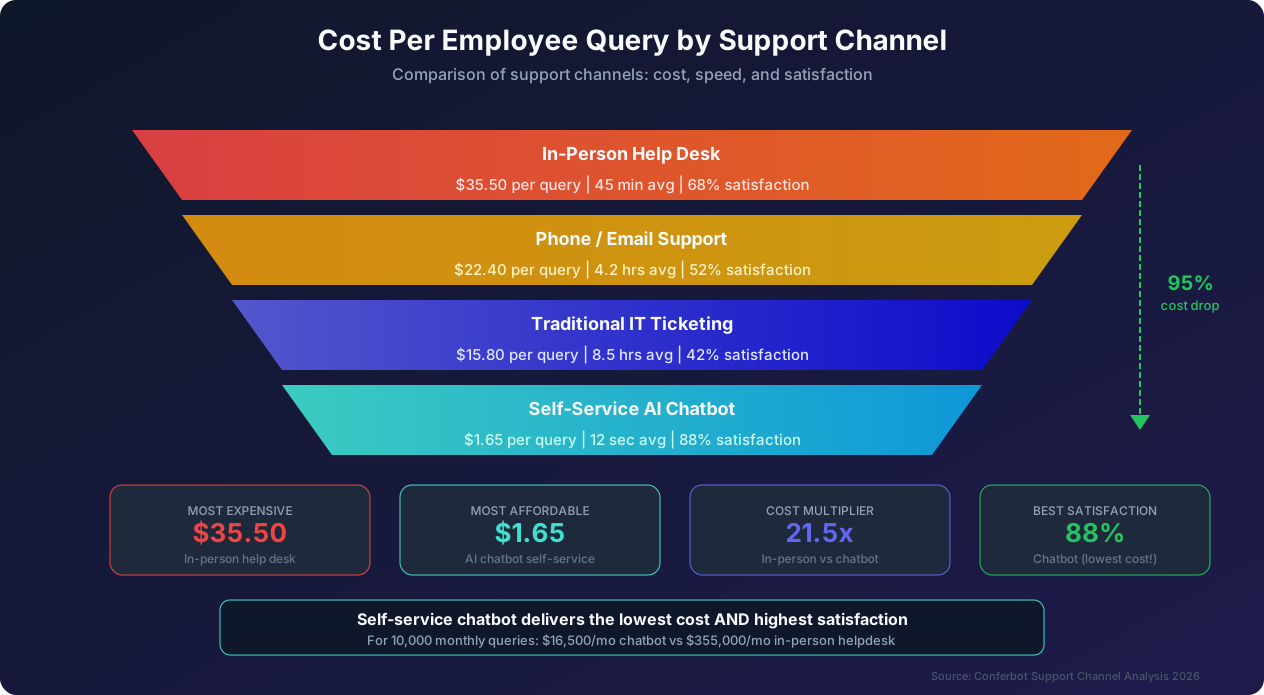
IT departments process the highest volume of repetitive requests, with Gartner's ITSM data showing the average cost per ticket ranges from $15 to $37 in most organizations, and the stakes are higher than any other internal support function. When an employee cannot access their email or VPN, their productivity drops to near zero until the issue is resolved. Speed matters more in IT support than in any other internal service, which is precisely why chatbot automation delivers outsized value here.
Essential IT chatbot capabilities. An effective IT self-service chatbot handles three tiers of complexity. Tier 1 encompasses fully automated resolution for issues like password resets, VPN configuration guides, software installation triggers, printer troubleshooting steps, WiFi connection guides, and basic email configuration. These represent roughly 65% of IT ticket volume and can be resolved entirely by the chatbot with appropriate system integrations. Tier 2 covers guided troubleshooting with conditional escalation for issues like intermittent connectivity problems, application errors, performance issues, account permission changes requiring approval, and multi-factor authentication problems. The chatbot walks the employee through diagnostic steps and escalates to a human agent only if the automated steps do not resolve the issue. This tier represents about 20% of volume. Tier 3 involves intelligent triage and routing for complex issues like hardware failures, security incidents, network outages, and new system implementations. The chatbot performs initial information gathering and routes the issue to the appropriate specialist team. This tier represents about 15% of volume.
Critical IT system integrations. The power of an IT chatbot is directly tied to the depth of its system integrations. At minimum, your IT chatbot should integrate with your identity provider (Active Directory, Azure AD, Okta, or similar) for password resets and account management, your endpoint management platform (SCCM, Intune, Jamf) for software deployment and device information, your ticketing system (ServiceNow, Jira Service Management, Zendesk) for seamless escalation, your monitoring platform (Datadog, New Relic, PagerDuty) for proactive incident awareness, and your knowledge base (Confluence, SharePoint, Notion) for up-to-date troubleshooting content.
The integration with identity management alone unlocks the single highest-value automation: self-service password resets. Password resets account for 22% of all IT tickets, and with identity provider integration, the chatbot resolves them in under 2 minutes with 95% deflection. Without this integration, the chatbot can only provide instructions for the employee to reset their own password through a web portal, which still helps but deflects only 60% to 70% of requests.
Proactive IT support through chatbot. The most advanced IT chatbots do not wait for employees to report problems; they detect and resolve issues before employees are even aware of them. Proactive capabilities include certificate expiration alerts (notifying employees 7 days before their VPN or email certificate expires, with a one-click renewal option), software update reminders (prompting employees to install critical security patches with guided installation steps), storage space warnings (alerting employees when their device is running low on disk space and providing cleanup recommendations), and scheduled maintenance notifications (informing employees about upcoming system downtimes with alternative access instructions).
Organizations that implement proactive chatbot support report a 28% reduction in reactive ticket volume because issues are resolved before they become problems. This is a fundamentally different value proposition from reactive support: instead of being a fire-fighting tool, the chatbot becomes a prevention tool.
IT chatbot security considerations. IT chatbots handle some of the most security-sensitive operations in an organization, including password resets, access provisioning, and system configuration. Security must be built into the chatbot's architecture, not bolted on as an afterthought. Require multi-factor authentication before any chatbot action that changes credentials or grants access. Log every chatbot interaction with immutable audit trails. Implement rate limiting to prevent abuse (for example, flag an account that requests password resets more than three times in 24 hours). Restrict the chatbot's administrative permissions using the principle of least privilege. Regularly audit the chatbot's integration credentials and access logs. Encrypt all data in transit and at rest, including conversation logs.
Measuring IT chatbot success. Beyond the standard metrics of deflection rate and satisfaction, IT chatbots should be measured on mean time to resolve (MTTR) by issue category, comparing chatbot resolution to historical human resolution times. First contact resolution rate measures the percentage of issues resolved in the employee's first chatbot interaction without escalation or follow-up. Repeat contact rate tracks how often the same employee reports the same issue within 30 days, which indicates whether the chatbot is truly resolving issues or just providing temporary fixes. Proactive resolution rate measures the percentage of potential issues detected and resolved before they were reported by employees. Shadow IT reduction measures the decrease in unauthorized software installations and workarounds, which correlates with employee trust in IT support.
Department Playbook: Finance and Legal Self-Service
Finance and Legal departments together account for 30% of internal support questions. While the volume is lower than HR and IT, the cost per question is higher because finance and legal professionals command higher salaries, and the opportunity cost of diverting them from high-value work (financial planning, contract negotiation, compliance management) to answer routine questions is substantial.
Finance chatbot essentials. The finance department's most common questions revolve around expense management, procurement, and payment processes. An effective finance chatbot handles these categories. Expense policy questions represent the single largest volume driver, including questions about meal limits for business travel, approved airline classes, hotel rate caps, receipt requirements, and entertainment expense rules. These are purely policy-based and achieve 93% deflection when the chatbot draws from a well-maintained policy knowledge base. Expense report assistance helps employees understand how to submit expense reports, check the status of pending reimbursements, and troubleshoot common submission errors. Integration with expense management tools like Concur, Expensify, or Brex allows the chatbot to provide personalized status updates. Purchase order guidance walks employees through the PO request process, including approval thresholds, preferred vendors, and required documentation. The chatbot can initiate PO requests and route them through the appropriate approval workflow.
Budget questions allow department managers to check their remaining budget allocation, understand spending trends, and get guidance on budget transfer procedures. Integration with financial planning tools enables real-time budget visibility. Payment inquiries handle vendor payment status questions, invoice processing timelines, and payment method changes. Tax document access helps employees locate their W-2, 1099, or other tax documents and understand their content.
Legal chatbot essentials. Legal departments face a unique challenge: many employee questions involve nuanced legal concepts that seem simple but have complex implications. The legal chatbot must be carefully designed to provide helpful guidance without creating legal liability. Contract template access is the highest-volume legal chatbot use case. Employees frequently need NDAs, vendor agreements, consulting contracts, and data processing agreements. The chatbot can provide the correct template based on the employee's situation, explain key terms, and initiate the review process for non-standard terms. Compliance questions are the second largest category, including questions about data privacy requirements, anti-bribery policies, insider trading rules, and conflict of interest disclosures. These are primarily informational and achieve high deflection rates. Intellectual property guidance helps employees understand patent filing procedures, trademark usage rules, and open-source software policies. Policy interpretation provides guidance on topics like gift acceptance limits, social media policies, and confidentiality obligations.
Guardrails for finance and legal chatbots. Both finance and legal chatbots require specific guardrails that go beyond general chatbot design. For finance, the chatbot should never provide tax advice (it can help employees find their tax documents but should not interpret them), should not approve exceptions to expense policies (it can explain the exception request process), and should not provide forward-looking financial guidance. For legal, the chatbot must include disclaimers that its responses are general guidance and not legal advice, should always offer to connect employees with a legal team member for situation-specific questions, should never interpret contract terms or advise on legal strategy, and should flag any question that might involve litigation, regulatory investigation, or legal hold.
These guardrails are not just about liability; they are about maintaining employee trust. If the chatbot provides incorrect legal guidance that leads to a compliance violation, it undermines the credibility of the entire self-service system.
The ROI of finance and legal automation. Because finance and legal professionals have higher average compensation than HR generalists or IT support agents, the per-hour savings from chatbot deflection are greater. The average fully loaded cost of a finance team member's time is $75 per hour, and a legal team member's time is $95 per hour. If a finance chatbot saves 80 hours per month of team time (by deflecting 1,500 routine questions that averaged 3.2 minutes each), that is $6,000 per month in direct labor savings. If a legal chatbot saves 50 hours per month (by deflecting 800 questions that averaged 3.8 minutes each), that is $4,750 per month. Combined, finance and legal chatbot automation saves $128,400 per year in direct labor costs for a mid-size organization, on top of the faster response times and improved employee experience.
Onboarding Automation: Saving 18.5 Hours Per New Hire
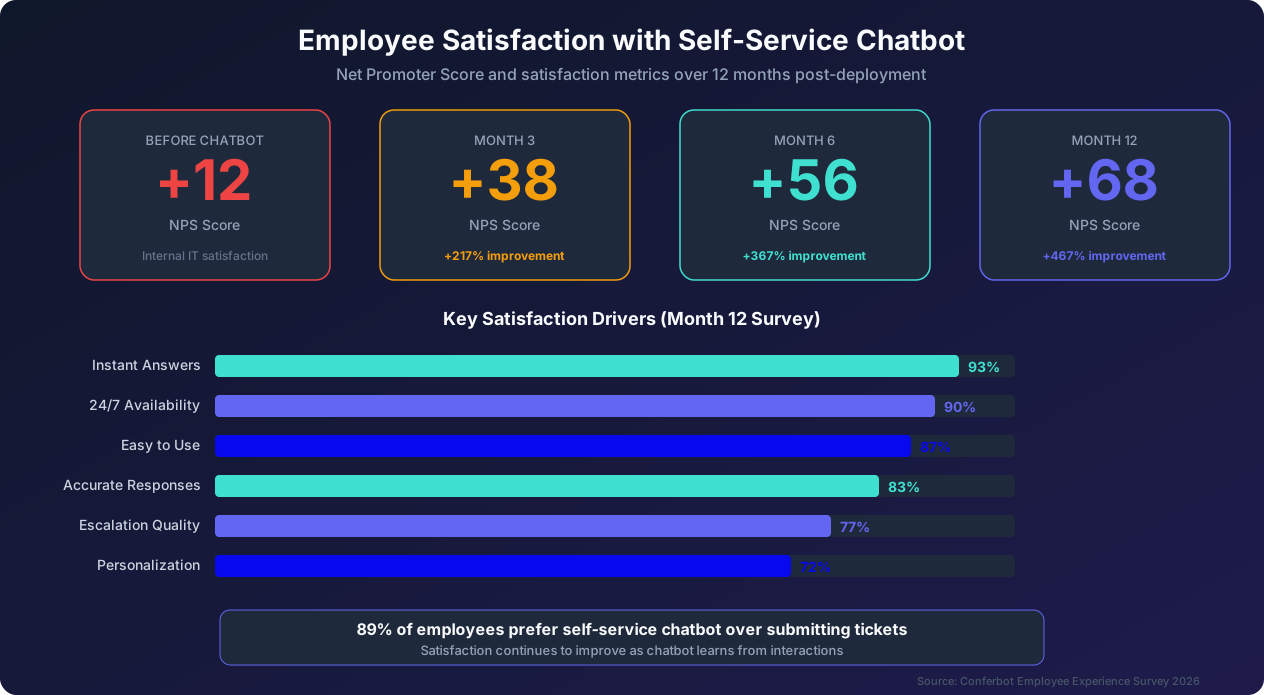
Employee onboarding is one of the most impactful -- and Gallup's onboarding research links the quality of this phase directly to 12-month retention -- applications of self-service chatbots, yet it is often overlooked in initial deployments. The reason it deserves priority attention: onboarding is the period when new hires form their lasting impressions of the company, and a frustrating onboarding experience correlates strongly with early turnover. Organizations with poor onboarding lose 17% of new hires within the first 90 days, compared to 6% for organizations with excellent onboarding.
The current state of onboarding. Traditional onboarding is a fragmented, multi-departmental process that typically involves HR (benefits enrollment, policy review, compliance training), IT (account setup, equipment provisioning, software installation), the hiring manager (role-specific orientation, team introductions), Finance (expense policy, corporate credit card), Facilities (badge access, parking, office tour), and Legal (NDA, IP assignment, non-compete). Each department has its own process, timeline, and communication channel. The new hire receives a flood of emails, links, documents, and instructions from multiple people in multiple formats. The result is confusion, missed steps, and an overwhelming first week that sets the wrong tone.
How a chatbot transforms onboarding. A self-service onboarding chatbot serves as a single point of contact that guides new hires through every step of the process, regardless of which department owns that step. On the new hire's first day, the chatbot proactively welcomes them, introduces itself, and outlines the onboarding journey. It then guides them through each task in a logical sequence: complete tax forms (W-4, I-9, state tax forms) through a conversational flow, enroll in health insurance, dental, and vision plans with personalized recommendations based on family status and preferences, set up direct deposit by providing banking information securely, review and acknowledge the employee handbook with instant answers to any questions, complete IT account setup by following step-by-step guides customized for their device, request equipment and office supplies through an automated provisioning workflow, and complete required compliance training modules.
After the first day, the chatbot continues to support the new hire over their first 90 days with scheduled check-ins. At day 7, it asks how the first week went and addresses any outstanding questions. At day 14, it prompts completion of any deferred tasks and provides tips for getting the most out of company tools. At day 30, it conducts a brief satisfaction survey and offers to schedule a conversation with HR if there are concerns. At day 60, it checks on role-specific training completion and team integration. At day 90, it conducts the formal onboarding completion survey and celebrates the milestone.
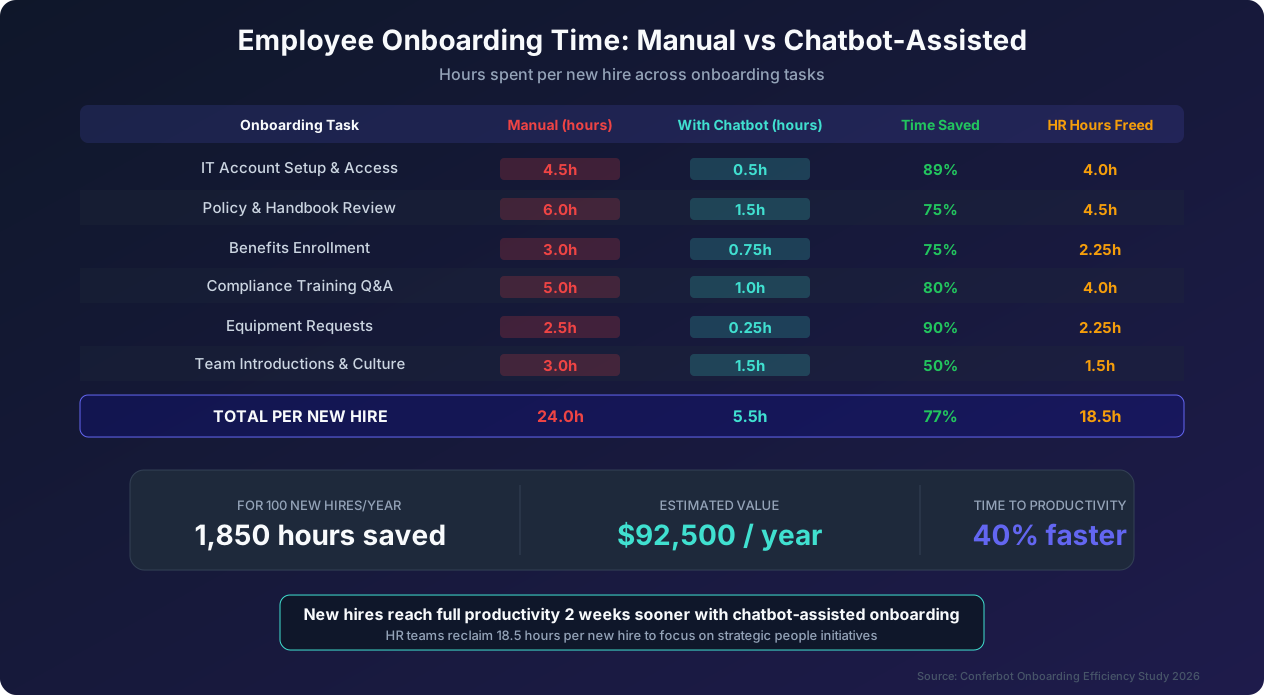
Time savings breakdown. Our data across 85 organizations shows that chatbot-assisted onboarding saves an average of 18.5 hours per new hire compared to manual onboarding. The savings break down as follows: IT account setup and access goes from 4.5 hours to 0.5 hours (saving 4 hours through automated provisioning and self-guided setup). Policy and handbook review drops from 6 hours to 1.5 hours (saving 4.5 hours because the chatbot delivers information on-demand rather than requiring scheduled orientation sessions). Benefits enrollment decreases from 3 hours to 0.75 hours (saving 2.25 hours through guided conversational enrollment). Compliance training Q&A drops from 5 hours to 1 hour (saving 4 hours because the chatbot handles questions that would otherwise go to trainers). Equipment requests go from 2.5 hours to 0.25 hours (saving 2.25 hours through automated procurement workflows). Team introductions and culture go from 3 hours to 1.5 hours (saving 1.5 hours, with the chatbot handling logistics while preserving human connection for relationship building).
For 100 new hires per year, this totals 1,850 hours saved. At an average HR cost of $50 per hour, that is $92,500 in direct labor savings annually. But the indirect value is even greater: new hires reach full productivity 40% faster because they spend less time navigating administrative processes and more time learning their actual roles.
Onboarding chatbot best practices. Start the chatbot engagement before the official start date by sending a welcome message 3 to 5 days before the new hire's first day with information about what to expect and any pre-start tasks. Make the chatbot's personality warm and encouraging because first days are stressful and the chatbot should feel like a helpful colleague, not a bureaucratic process. Never force linear completion because new hires should be able to skip ahead or return to previous steps as needed. Integrate with the hiring manager's calendar so the chatbot can schedule one-on-one meetings, team lunches, and shadow sessions automatically. Provide a 'just ask' mode where new hires can ask any question at any time, not just follow the structured onboarding flow. And track completion rates meticulously so that if a new hire has not completed benefits enrollment by day 5, the chatbot sends a gentle reminder, and if they still have not by day 10, it alerts HR.
Knowledge Base Integration: Building the Brain Behind Your Chatbot
A self-service chatbot is only as good as the knowledge it has access to. Knowledge base integration is the single most important technical decision in your deployment, and getting it wrong is the most common reason chatbots deliver disappointing results.
The knowledge base problem. Most organizations have their internal knowledge scattered across multiple platforms: policies in SharePoint, IT guides in Confluence, benefits information in the HRIS, expense rules in a PDF on the finance team's shared drive, and tribal knowledge in Slack messages and email threads. No single employee knows where everything is, and the chatbot cannot either unless you deliberately connect it to these knowledge sources.
The second challenge is knowledge freshness. Policies change, processes evolve, and tools get updated. If your chatbot's knowledge base is not continuously synchronized with source-of-truth systems, it will serve outdated information, which is worse than serving no information at all because it erodes employee trust.
Integration architecture options. There are three primary approaches to knowledge base integration. The first is direct content ingestion, where the chatbot platform crawls and indexes your content repositories (SharePoint, Confluence, Google Drive, Notion) on a scheduled basis. This approach is straightforward to set up and ensures the chatbot always has access to the latest versions of documents. The downside is that it may ingest irrelevant or draft content if your repositories are not well organized. Conferbot's content crawler supports automatic indexing with configurable scope, exclusion rules, and refresh schedules to address this challenge.
The second approach is retrieval-augmented generation (RAG), where the chatbot uses a vector database to find the most relevant content chunks for each employee question, then generates a conversational response based on those chunks. RAG provides more natural, conversational responses than simple document retrieval and handles questions that span multiple documents well. It is the most popular approach for enterprise chatbots in 2026 and the one we recommend for most deployments.
The third approach is structured knowledge base, where content is manually organized into intent-answer pairs, decision trees, and conversation flows. This approach provides the highest accuracy and most predictable responses but requires significant upfront effort and ongoing maintenance. It is best suited for high-stakes domains (legal guidance, compliance policies) where precision is more important than breadth.
Content preparation best practices. Regardless of your integration approach, the quality of your source content determines the quality of your chatbot's responses. Before connecting your knowledge base, take these steps. Audit all existing content for accuracy and eliminate outdated documents that could confuse the chatbot. Standardize formatting so the chatbot can parse content consistently. Break long documents into topic-specific sections; a 50-page employee handbook should be segmented into individual policy topics. Write content in plain language; legal and corporate jargon reduces the chatbot's ability to match employee questions with relevant answers. Create a content ownership map that identifies who is responsible for keeping each knowledge area up to date. Establish a review cadence (monthly for frequently changing content, quarterly for stable policies) to ensure ongoing accuracy.
Handling knowledge gaps. No knowledge base covers every possible question. When the chatbot encounters a question it cannot answer, how it handles the gap determines whether the employee's experience is positive or negative. Good gap handling includes transparently admitting it does not have the answer ('I do not have information about that specific topic yet'), offering to connect the employee with the right person ('Let me connect you with someone from the benefits team who can help'), logging the unanswered question for the content team to address, and following up with the employee once the answer is available. Bad gap handling includes making up an answer (hallucination), providing a vaguely related answer that does not address the actual question, giving a generic 'I cannot help with that' without offering alternatives, or silently ignoring the question. The most common complaint about poorly implemented chatbots is not that they lack knowledge but that they handle gaps ungracefully.
Continuous knowledge improvement. The chatbot's knowledge base should improve continuously based on real interaction data. Implement a weekly review cycle where the content team analyzes unanswered questions (questions the chatbot could not resolve), identifies patterns in escalated conversations (what topics are employees asking that the chatbot redirects to humans?), reviews low-confidence responses (answers the chatbot provided but was not highly confident about), and updates content based on these insights. Organizations that implement this continuous improvement cycle see their chatbot's deflection rate improve by 2 to 3 percentage points per month for the first six months, plateauing at 80% to 85% once the knowledge base reaches comprehensive coverage of common questions.
Privacy Considerations: Handling Employee Data Responsibly
An employee self-service chatbot handles sensitive personal data, including compensation information, health benefits, performance ratings, and potentially even workplace complaints. Privacy is not just a legal requirement; it is a foundation of employee trust. If employees do not trust that their chatbot interactions are private, they will not use the chatbot, and your deployment will fail regardless of how good the technology is.
Data the chatbot accesses and stores. A typical employee self-service chatbot interacts with or stores several categories of data. Personal identifiable information includes names, employee IDs, email addresses, and department affiliations. Compensation data encompasses salary information, bonus details, and tax withholding when integrated with HRIS or payroll systems. Benefits information covers health plan selections, dependent information, and beneficiary designations. IT credentials include password reset tokens and access request details. Conversation logs contain the full text of employee interactions with the chatbot. Behavioral data tracks question patterns, usage frequency, and satisfaction ratings.
Key privacy principles for employee chatbots. Design your chatbot's data handling around these six principles. First, data minimization: the chatbot should only access the data it needs to answer the specific question. If an employee asks about the PTO policy (a general question), the chatbot does not need to access their individual PTO balance. If they ask 'how much PTO do I have left?' (a personal question), then it accesses their specific data. Never pre-load all employee data, governed by regulations including GDPR and frameworks like NIST's Privacy Framework when only a subset is needed. Second, purpose limitation: data accessed for one purpose should not be used for another without explicit consent. Conversation logs used to improve chatbot accuracy should not be used for employee performance monitoring. Third, retention minimization: define clear retention periods for conversation logs and delete data when it is no longer needed. A 90-day retention period for conversation logs is sufficient for quality improvement purposes in most organizations. Fourth, access control: limit who can view chatbot conversation logs. HR should not have access to IT support conversations, and IT should not have access to HR-related conversations, unless there is a legitimate, documented business reason.
Fifth, transparency: be upfront with employees about what data the chatbot collects, how it is used, and who can access it. Publish a clear chatbot privacy policy and make it accessible within the chatbot itself. When an employee asks 'Is this conversation private?' the chatbot should provide a clear, honest answer. Sixth, employee control: give employees the ability to request deletion of their conversation history, opt out of conversational data being used for chatbot training, and understand what personal data the chatbot has accessed.
Compliance with privacy regulations. Your chatbot must comply with all applicable privacy regulations. For GDPR (if you have employees in the EU), ensure the chatbot provides clear consent mechanisms, supports data subject access requests (employees can request all data the chatbot holds about them), implements data portability, and has a documented legal basis for processing each category of personal data. For CCPA/CPRA (if you have employees in California), ensure the chatbot supports opt-out requests, provides notice of data collection, and does not sell employee data. For industry-specific regulations like HIPAA (healthcare), ensure the chatbot handles protected health information (PHI) with appropriate safeguards, including encryption, access logging, and business associate agreements with the chatbot platform provider.
Sensitive conversation handling. Some employee questions inherently involve sensitive situations. An employee asking about FMLA leave may be dealing with a serious illness. An employee asking about the harassment reporting process may be experiencing workplace abuse. An employee asking about severance policies may be anticipating a layoff. The chatbot must handle these situations with both privacy rigor and human empathy. Design sensitive conversation flows to avoid asking for unnecessary details (the chatbot does not need to know why the employee needs FMLA leave to explain the policy), offer human support proactively ('Would you like me to schedule a confidential conversation with an HR advisor?'), ensure that sensitive conversation logs have restricted access (only designated HR team members with a need to know), and never use sensitive conversation data for analytics or training without explicit anonymization.
Technical safeguards. Implement these technical measures to protect employee data. Use end-to-end encryption for all chatbot conversations. Store data in encrypted databases with row-level security. Implement audit logging for all data access by administrators. Use tokenization for sensitive data elements like social security numbers and bank account numbers. Configure network isolation so the chatbot's backend is not accessible from the public internet. Conduct regular penetration testing and vulnerability assessments of the chatbot platform. Ensure your chatbot vendor provides SOC 2 Type II certification, which demonstrates independently audited security controls.
Rollout Strategy: From Pilot to Company-Wide Adoption
The rollout strategy determines whether your chatbot becomes a beloved workplace tool or an ignored experiment. The most successful deployments follow a structured, phased approach that builds momentum through demonstrated value rather than mandates.
Phase 1: Stakeholder alignment (Weeks 1-2). Before building anything, align the key stakeholders on goals, scope, and success metrics. Involve HR leadership (who owns the largest share of automatable questions), IT leadership (who will manage the technical deployment and integration), Finance (who will approve the budget and benefit from cost savings), Legal (who will review privacy and compliance aspects), and at least one senior executive sponsor who can champion the initiative. Define shared success metrics: 'Within 90 days, the chatbot will handle 60% of routine internal support questions with 80% employee satisfaction.' Shared metrics prevent each department from optimizing for their own goals at the expense of the overall employee experience.
Phase 2: Pilot group selection and deployment (Weeks 3-6). Select a pilot group of 50 to 100 employees from a department that is likely to be receptive. Typically, engineering or product teams make good pilot groups because they are comfortable with digital tools, have high IT support needs, and are vocal about what works and what does not. Deploy the chatbot to this group with the top 10 automated questions covering HR and IT basics. Collect feedback aggressively: daily Slack polls, weekly focus groups, and individual conversations with power users. Use this feedback to fix issues, expand the knowledge base, and refine the conversational flows before broader rollout. The pilot phase should answer three questions: does the chatbot provide accurate answers? Do employees actually prefer using it? And what are the most common failure modes that need to be addressed?
Phase 3: Department-by-department expansion (Weeks 6-12). Expand from the pilot group one department at a time. Each new department gets a tailored launch experience: an introductory message from their department head, a brief demo of the chatbot's capabilities relevant to their role, and a 'chatbot champion' within their team who serves as a peer advocate and feedback collector. This department-by-department approach lets you customize the chatbot's emphasis for each audience. Sales teams care most about expense policy and CRM access questions. Engineering teams care most about development environment setup and code repository access. Customer support teams care most about shift scheduling and escalation procedures.
Phase 4: Company-wide launch (Weeks 12-16). Once the chatbot has been validated across multiple departments, launch it company-wide. The company-wide launch should feel like an event, not an IT memo. Consider an internal launch campaign with a brief video from the CEO explaining why the company invested in the chatbot (framing it as an employee experience improvement, not a cost-cutting measure). Create a dedicated Slack channel or Teams channel where employees can share tips, report issues, and celebrate the chatbot's best answers. Host a 'chatbot challenge' in the first week where employees compete to find the most useful chatbot capabilities, building awareness through engagement rather than documentation.
Phase 5: Continuous optimization (Ongoing). After launch, the chatbot requires continuous investment to maintain and improve performance. Assign a chatbot content manager (typically 5 to 10 hours per week of an existing team member's time) responsible for reviewing unanswered questions and expanding the knowledge base, updating content when policies or processes change, analyzing usage patterns to identify new automation opportunities, monitoring satisfaction scores and addressing declining trends, and coordinating with department heads to ensure the chatbot reflects current priorities. Organizations that invest in continuous optimization see deflection rates climb from 64% at launch to 80% or higher within six months. Organizations that deploy and forget see deflection rates stagnate or decline as the chatbot's knowledge base becomes outdated.
Driving adoption without mandates. The most effective adoption strategies rely on demonstrated value rather than mandates. Employees who are forced to use a chatbot they find unhelpful become detractors who discourage their colleagues. Instead, make the chatbot the path of least resistance by integrating it into the tools employees already use (Slack, Teams, the company intranet). Set the chatbot as the first response in support channels without blocking access to human help. Share success stories: when the chatbot resolves an employee's issue in 10 seconds that would have taken 4 hours through a ticket, encourage that employee to share their experience. Track and communicate the chatbot's growth: 'Our chatbot answered 12,000 questions this month with 87% satisfaction. Here are the top 5 things employees asked about.' Celebrate milestones: 'Our chatbot saved 500 hours of HR time this quarter, which the team used to launch the new mentorship program.'
This positive reinforcement approach consistently achieves higher adoption rates (85% or above within 6 months) than mandate-based approaches (which plateau at 60% to 70% with significantly lower satisfaction).
Was this article helpful?
Employee Self-Service Chatbot FAQ
Everything you need to know about chatbots for employee self-service chatbot.
About the Author
Conferbot Team specializes in conversational AI, chatbot strategy, and customer engagement automation. With deep expertise in building AI-powered chatbots, they help businesses deliver exceptional customer experiences across every channel.
View all articles