
Bot de Discord Constructor de Chatbot
Perfecto para comunidades de gaming, grupos de creadores y comunidades tecnológicas. Gateway Manager integrado mantiene conexión persistente. Hasta 25 botones por mensaje con soporte de embeds enriquecidos.
Discord Características del Chatbot
Todo lo que necesitas para crear conversaciones automatizadas potentes
Gateway Manager integrado (no requiere hosting externo)
Hasta 25 botones interactivos por mensaje
Mensajes embed enriquecidos con formato
Menús de selección para opciones complejas
Conversaciones privadas basadas en mensajes directos
Respuestas específicas por canal
Edición de mensajes después de enviar
Transferencia fluida a agente humano
¿Qué Puedes Construir?
Comienza en 12 Pasos Sencillos
Sigue esta guía para conectar tu chatbot de Discord
Ve al Portal de Desarrolladores de Discord (discord.com/developers)
Crea una nueva Aplicación
Ve a la sección 'Bot' y haz clic en 'Add Bot'
Activa MESSAGE CONTENT INTENT en Privileged Gateway Intents
Copia el Token de Bot (¡mantenlo en secreto!)
Ve a OAuth2 → URL Generator
Selecciona scopes: bot, applications.commands
Selecciona permisos: Send Messages, Read Message History
Abre la URL generada para invitar el bot a tu servidor
En Conferbot, ve a Canales → Discord → Conectar
Pega tu Token de Bot y haz clic en Conectar
¡Tu bot de Discord está en vivo!
Introduction
Discord has grown far beyond its gaming roots. With over 150 million monthly active users across 19 million active servers, Discord has become the go-to platform for communities of every kind - from gaming guilds and crypto projects to SaaS companies, educational institutions, and creator fan bases. It is the modern community hub, and your members expect immediate, always-on support.
Managing a thriving Discord server is demanding. As communities scale past a few hundred members, the same questions get asked dozens of times a day, new members need onboarding, support requests pile up, and moderators burn out. A single moderator team cannot cover every timezone, and manual processes that worked at 100 members collapse at 10,000.
A Discord chatbot solves these challenges by providing instant, automated responses 24/7. With Conferbot, you build your bot using a visual flow builder - no JavaScript, no discord.js, no hosting required. Conferbot's built-in Gateway Manager maintains a persistent WebSocket connection to Discord, so your bot stays online without external infrastructure. Add AI-powered responses for open-ended questions, and your Discord community runs itself.
This guide covers everything you need to know about building and deploying a Discord chatbot in 2026: platform-specific features, setup instructions, use cases for different community types, permissions and intents configuration, slash commands, community management automation, monetization strategies, security best practices, and competitive comparisons that help you choose the right approach.
New to chatbot building? Start with our complete guide to building a chatbot without coding. Want to see how Discord compares to Slack, Telegram, or Microsoft Teams for bot deployment? Check our channel comparisons or deploy on all platforms simultaneously with Conferbot's omnichannel platform. Browse our template library for community-ready bot flows, or explore our SaaS and e-commerce industry solutions for vertical-specific Discord deployments.
Discord Bot Capabilities
Discord's bot platform is one of the most feature-rich in the messaging ecosystem. Here is what makes it powerful - and how Conferbot leverages those capabilities without requiring you to write code.
Interactive Message Components
- Buttons - Up to 25 interactive buttons per message (5 rows of 5). Buttons can trigger new bot responses, open URLs, or execute actions. Far more flexible than any other messaging platform
- Select Menus - Dropdown menus with up to 25 options, supporting single or multi-select. Perfect for complex choices like selecting a support category, game server, or language preference
- Rich Embeds - Formatted message blocks with titles, descriptions, fields, images, thumbnails, footers, and custom colors. Use embeds for structured information like help guides, server rules, or status updates
Conversation Modes
- Channel Conversations - The bot responds in public channels, visible to all members. Ideal for FAQ, announcements, and community knowledge sharing
- DM Conversations - Private direct message conversations for sensitive topics like support tickets, moderation actions, or personal account inquiries
- Thread Support - Conversations can happen in threads to keep channels organized and focused
Platform-Specific Features
- Message Editing - Unlike most messaging platforms, Discord bots can edit previously sent messages. Update status embeds, refresh information panels, or correct responses without message clutter
- Reaction-Based Interactions - Users can react to messages with emojis to trigger bot actions, enabling intuitive role selection, polls, and feedback collection
- Gateway Connection - Conferbot maintains a persistent WebSocket connection through its built-in Gateway Manager, so your bot stays online and responsive without any external hosting
Combined with Conferbot's analytics and live chat handoff, these features let you build Discord bots that rival custom-coded solutions - without writing a single line of code. For teams that need natural language processing capabilities, Conferbot's NLP engine understands user intent even when messages are informal or misspelled, which is critical for Discord's casual communication style.
Server Management and Moderation
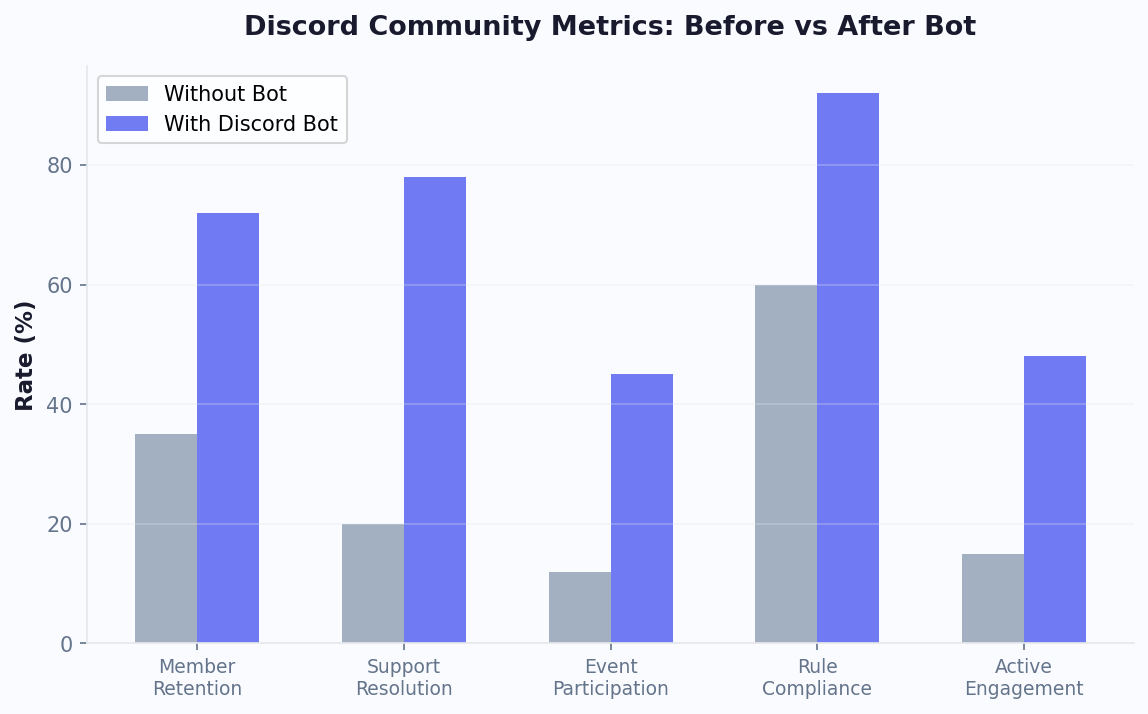
Discord communities face unique moderation challenges as they scale. Spam bots, off-topic messages, harassment, and raid attacks can destroy community culture if not managed proactively. While Conferbot focuses on conversational automation rather than traditional moderation (auto-ban, word filters), your bot can assist moderation efforts by guiding users to read and acknowledge server rules through interactive flows, creating structured report-a-problem workflows that collect evidence and route reports to moderators, providing automated warnings and information about community guidelines, and managing verification flows where new members must answer questions or complete steps before gaining full server access. Communities using structured onboarding bots report 60% fewer rule violations in the first week after a member joins.
Role Assignment Automation
Discord's role system controls what members can see and do in your server. Bots can automate role assignment through reaction-based role selection (users react to a message to receive a role), conversational role assignment (the bot asks questions and assigns appropriate roles based on answers), and activity-based roles (automatically assign roles based on engagement thresholds). For example, a gaming community might ask new members to select their favorite games, time zone, and play style, then assign channel-access roles accordingly. A SaaS company's community might verify customer status and assign "Customer," "Trial," or "Partner" roles that control access to specific support channels. Use Conferbot's conditional logic to build sophisticated role assignment trees without code.
Event Management
Discord servers regularly host events -- game nights, AMAs, webinars, tournaments, and community calls. Your chatbot can automate event management by announcing upcoming events with interactive RSVP buttons, sending reminders before events start, collecting post-event feedback through conversational surveys, managing sign-ups for limited-capacity events, and creating temporary event channels that are archived automatically after the event ends. Servers using event automation bots see 35% higher event attendance compared to manual announcement-only approaches. Pair event management with calendar booking to sync events across platforms.
Community Engagement Features
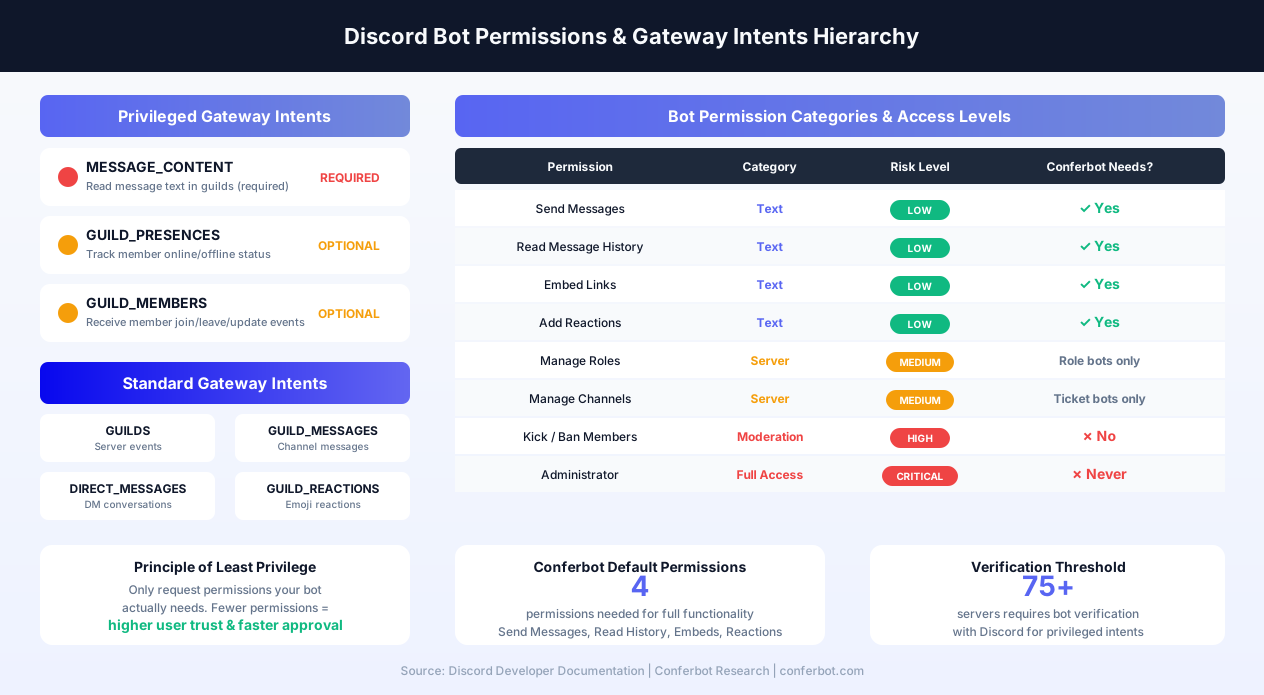
Beyond support and moderation, Discord bots drive engagement through daily discussion prompts posted automatically, welcome flows that introduce new members and suggest channels to explore, milestone celebrations (member anniversaries, contribution counts), FAQ channels that stay current with the most-asked questions, and feedback collection that informs product development. These engagement features transform passive server members into active community participants. Communities with well-configured engagement bots report 2-3x higher daily active user rates compared to servers without automation. Connect your bot to Conferbot's AI knowledge base to answer community questions from your documentation automatically.
Discord Bot Permissions & Intents
Understanding Discord's permission system is the single most important technical concept for anyone deploying a bot. Get permissions wrong, and your bot silently fails. Get intents wrong, and Discord rejects your connection entirely. This section explains the full permission and intent hierarchy so you configure your Conferbot bot correctly the first time.
Gateway Intents Explained
Discord uses a system called Gateway Intents to control which events your bot receives from the WebSocket connection. Intents act as event filters - you subscribe only to the data your bot needs, which reduces bandwidth, improves performance, and respects user privacy. Discord divides intents into two categories.
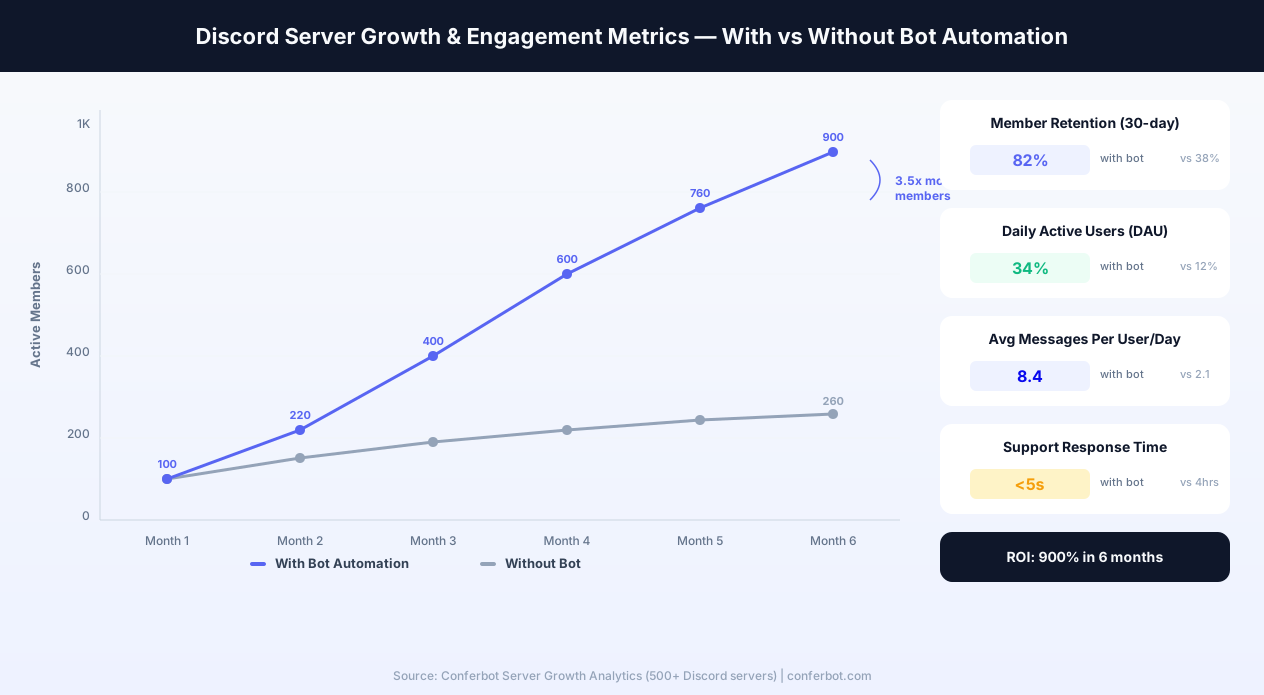
Standard intents include GUILDS (server metadata like channel creation), GUILD_MESSAGES (new messages in channels), DIRECT_MESSAGES (DMs to your bot), GUILD_MESSAGE_REACTIONS (emoji reactions), and GUILD_VOICE_STATES (voice channel join/leave). These are enabled by default and do not require approval from Discord.
Privileged intents require explicit opt-in through the Discord Developer Portal. The three privileged intents are MESSAGE_CONTENT (required to read the actual text of messages in guild channels), GUILD_PRESENCES (member online/offline status), and GUILD_MEMBERS (detailed member join/leave/update events). For Conferbot bots, MESSAGE_CONTENT is mandatory - without it, your bot cannot read what members type. GUILD_MEMBERS is recommended if you need welcome flows triggered on member join.
When your bot is in fewer than 75 servers, you can enable privileged intents with a single toggle. Once your bot exceeds 75 servers, Discord requires bot verification: you must submit an application explaining why your bot needs each privileged intent, provide a privacy policy, and pass a review process. The verification process typically takes 5-10 business days. Plan ahead - losing access to MESSAGE_CONTENT would make your bot stop responding entirely. Read the full requirements in the Discord Gateway Intents documentation.
Bot Permission Calculator
Discord permissions are stored as a bitfield - a single integer where each bit represents a specific permission. When you generate an OAuth2 invite URL, you specify a permissions integer that tells Discord exactly which permissions to request. The Discord Permissions Reference documents every available flag.
For a standard Conferbot FAQ and support bot, you need these permissions at minimum:
- Send Messages (0x800) - The bot can respond in channels
- Read Message History (0x10000) - The bot can read previous messages for context
- Embed Links (0x4000) - The bot can send rich embeds with formatting, images, and colors
- Add Reactions (0x40) - The bot can add emoji reactions for interactive polls and role selection
For advanced bots with ticket systems, add Manage Channels (to create/delete ticket channels) and Manage Roles (to assign roles through welcome flows). Avoid requesting Administrator permission - it grants every permission and makes server owners justifiably nervous. The principle of least privilege builds trust: request only what your bot actually uses.
Role Hierarchy and Bot Position
Discord enforces a strict role hierarchy. Your bot can only manage roles that are below its own highest role in the server's role list. If your bot's role is third from the top, it can assign or remove roles in positions four and below, but cannot touch roles one or two. This means server administrators must drag the bot's role above any roles the bot needs to assign.
A common mistake is creating a "Verified" role that sits above the bot role. The bot attempts to assign it to new members during onboarding, the assignment silently fails, and the member never gains access to verification-gated channels. Always verify role hierarchy after adding your bot. In the Conferbot dashboard, role assignment errors are logged with clear explanations so you can diagnose hierarchy issues quickly.
Channel-Level Permission Overrides
Server-wide permissions can be overridden at the channel level. A bot might have Send Messages globally but be denied that permission in a specific channel through a channel override. When configuring your bot to respond in specific channels, ensure the bot role has explicit Allow overrides for Send Messages, Read Message History, and Embed Links in those channels. Use channel overrides strategically - allow the bot in #support and #faq while denying it in #off-topic and #memes to prevent unwanted interactions.
Conferbot's dashboard shows you which channels the bot can access, making it easy to audit and fix permission gaps without digging through Discord's settings. For complex permission setups across many channels, use our analytics dashboard to verify the bot is receiving and responding to messages in every intended channel.
Discord Slash Commands & Interactions
Slash commands are the modern standard for Discord bot interactions. When a user types / in any channel, Discord displays a searchable list of available commands from all bots in the server. Slash commands replaced the old prefix-based system (like !help or ?faq) and offer significant advantages: built-in validation, parameter types, autocomplete, and discoverability without memorizing command syntax.
Application Commands Overview
Discord supports three types of application commands (documented in the Discord Application Commands reference):
- Slash commands - Text-based commands invoked with
/command. Support parameters with types (string, integer, user, channel, role), required/optional flags, and autocomplete suggestions. Examples:/faq topic:billing,/ticket create priority:high,/event schedule - User commands - Context menu commands that appear when right-clicking a user. Useful for moderation workflows like "Report User" or "View User Profile" without typing anything
- Message commands - Context menu commands that appear when right-clicking a message. Useful for "Flag This Message," "Translate," or "Create Ticket From This" workflows
With Conferbot, you define slash commands in the visual builder and the platform registers them with Discord's API automatically. No need to manually call the PUT /applications/{id}/commands endpoint or manage command registration code. When a user invokes a slash command, Conferbot receives the interaction and routes it to the appropriate conversational flow.
Modals and Forms
Slash commands can trigger modals - popup forms that collect structured data from users. A modal can contain up to 5 text input fields (short text or paragraph), making them perfect for support ticket creation, bug reports, feedback forms, and applications. The user fills out the form, hits submit, and your bot processes the data through a Conferbot flow.
For example, a /report-bug command opens a modal with fields for "Bug Title," "Steps to Reproduce," "Expected Behavior," "Actual Behavior," and "Screenshot URL." The bot creates a formatted embed in your #bug-reports channel and optionally creates a ticket in your external issue tracker via the integrations hub.
Autocomplete
Slash command parameters can provide autocomplete suggestions as the user types. When a user types /faq topic:, your bot can suggest matching topics from your FAQ database in real time. This reduces errors, speeds up interactions, and ensures users find the right answer without browsing. Autocomplete responses must return within 3 seconds, and Conferbot handles this latency requirement automatically.
Ephemeral Responses
Slash command responses can be ephemeral - visible only to the user who invoked the command. This is essential for commands that return personal information (account status, ticket history, subscription details) in public channels without cluttering the conversation or exposing private data. Conferbot's flow builder lets you mark any response step as ephemeral with a single toggle.
Command Permission Integration
Discord allows server administrators to control which roles and channels can use each slash command. A server owner might restrict /ticket to the #support channel, limit /admin-stats to the Moderator role, and make /faq available everywhere. These restrictions are enforced by Discord at the API level - your bot does not need to implement permission checks manually. Conferbot respects these settings automatically. For more on building structured interaction flows, see our no-code chatbot builder documentation.
Migrating from Prefix Commands
If your community has been using prefix-based commands (!help, ?support), migrating to slash commands is strongly recommended. Discord has deprecated the MESSAGE_CONTENT intent for verified bots that do not demonstrate a genuine need for message reading. Slash commands work without MESSAGE_CONTENT because the interaction data is sent directly to your bot. Conferbot supports both prefix-based triggers and slash commands simultaneously, allowing a gradual migration. Post an announcement in your server explaining the change, and your community will adapt within days - slash commands are objectively easier to use because they are self-documenting with built-in descriptions and parameter hints.
Step-by-Step Discord Bot Setup
Setting up a Discord bot with Conferbot is straightforward. The built-in Gateway Manager handles the complex WebSocket connection, so you just need to create a bot application and paste your token.
Prerequisites
- A Discord account
- A Discord server where you have admin/owner permissions
- A Conferbot account
Step 1: Build Your Chatbot
Create your chatbot in the Conferbot visual builder. For Discord communities, we recommend starting with a FAQ template and customizing it with your community's most common questions, server rules, and resource links. If you serve a specific vertical, explore our healthcare, real estate, or education templates for industry-tuned starting points.
Step 2: Create a Discord Application
- Go to the Discord Developer Portal at discord.com/developers/applications
- Click "New Application" and give it a name (this will be your bot's display name)
- Navigate to the "Bot" section in the left sidebar
- Click "Add Bot" and confirm
- Under "Privileged Gateway Intents," enable MESSAGE CONTENT INTENT (required for reading messages)
- Click "Reset Token" to generate a new bot token - copy and save this securely
Step 3: Invite the Bot to Your Server
- Go to "OAuth2" → "URL Generator" in the Developer Portal
- Under Scopes, select: bot and applications.commands
- Under Bot Permissions, select: Send Messages, Read Message History, Embed Links, Add Reactions
- Copy the generated URL and open it in your browser
- Select your server and click "Authorize"
Step 4: Connect to Conferbot
- In Conferbot, navigate to Channels → Discord → Connect
- Paste your Bot Token
- Select the chatbot you built in Step 1
- Click "Connect" - Conferbot's Gateway Manager establishes the connection
Your bot should appear online in your Discord server within seconds. Send it a DM or mention it in a channel to test. Total setup: 5-10 minutes.
Configuring Channel-Specific Behavior
After setup, configure which channels your bot monitors and responds in. Best practice is to create a dedicated #bot-help or #support channel where the bot actively responds to all messages, while keeping it silent in social and off-topic channels. In the Conferbot dashboard, you can set channel-specific triggers, different conversation flows for different channels, and quiet hours when the bot only responds to direct commands. For large servers with multiple use cases, you can deploy separate chatbot instances to different channels -- for example, an FAQ bot in #help, an event bot in #events, and an onboarding bot that DMs new members. Use Conferbot's analytics to monitor response rates and identify channels that need bot coverage.
Key Discord Bot Features with Conferbot
Conferbot brings enterprise-grade automation to Discord without the complexity of custom bot development.
Built-in Gateway Manager
Most Discord bots require you to host a server that maintains a persistent WebSocket connection. Conferbot handles this entirely for you. The Gateway Manager keeps your bot online 24/7 with automatic reconnection, heartbeat management, and shard handling for large servers. Zero DevOps required.
25-Button Interactive Messages
Discord supports more interactive buttons per message than any other platform - up to 25 (5 rows of 5). Build rich FAQ panels, multi-step forms, product browsers, and interactive guides using only buttons. Users tap instead of type, making interactions fast and error-free.
AI-Powered Community Support
Integrate OpenAI to handle the long tail of questions that structured flows cannot anticipate. Your bot can answer nuanced questions about your product, game, service, or community - drawing from your AI knowledge base to provide accurate, context-aware responses. For communities that need multilingual support, Conferbot's multilingual capabilities let your bot respond in the user's preferred language automatically.
DM-Based Support Tickets
Handle sensitive support issues privately. When a member requests help in a public channel, the bot can move the conversation to DMs, collect details, and create a support ticket. Your team manages tickets through Conferbot's dashboard with full conversation history. Connect tickets to external tools like Zendesk, Freshdesk, or Jira through the integrations hub.
Multi-Channel Awareness
Configure different bot behaviors for different channels. The bot can provide technical support in #help, handle role requests in #roles, answer product questions in #general, and stay silent in social channels.
Seamless Human Handoff
When the bot encounters an issue it cannot resolve, live chat connects the member with a human agent. The agent joins the conversation with full context, ensuring a smooth handoff that does not frustrate the community member. Set up custom triggers to route specific topics directly to human agents without bot intervention.
Lead Capture and CRM Integration
For business communities, your Discord bot doubles as a lead generation tool. Capture email addresses, company names, and use cases through conversational flows, then sync leads to your CRM via HubSpot, Salesforce, or Zapier integrations. Discord communities are high-intent environments - members who join your server are already interested in your product.
Discord Community Management Bot
Community management is the top reason server owners deploy bots on Discord. The term "Discord moderation bot" receives over 40,000 monthly searches, and "Discord community management" is growing rapidly as more businesses adopt Discord for customer engagement. A well-configured community management bot transforms a chaotic server into a structured, welcoming environment that retains members and drives engagement.
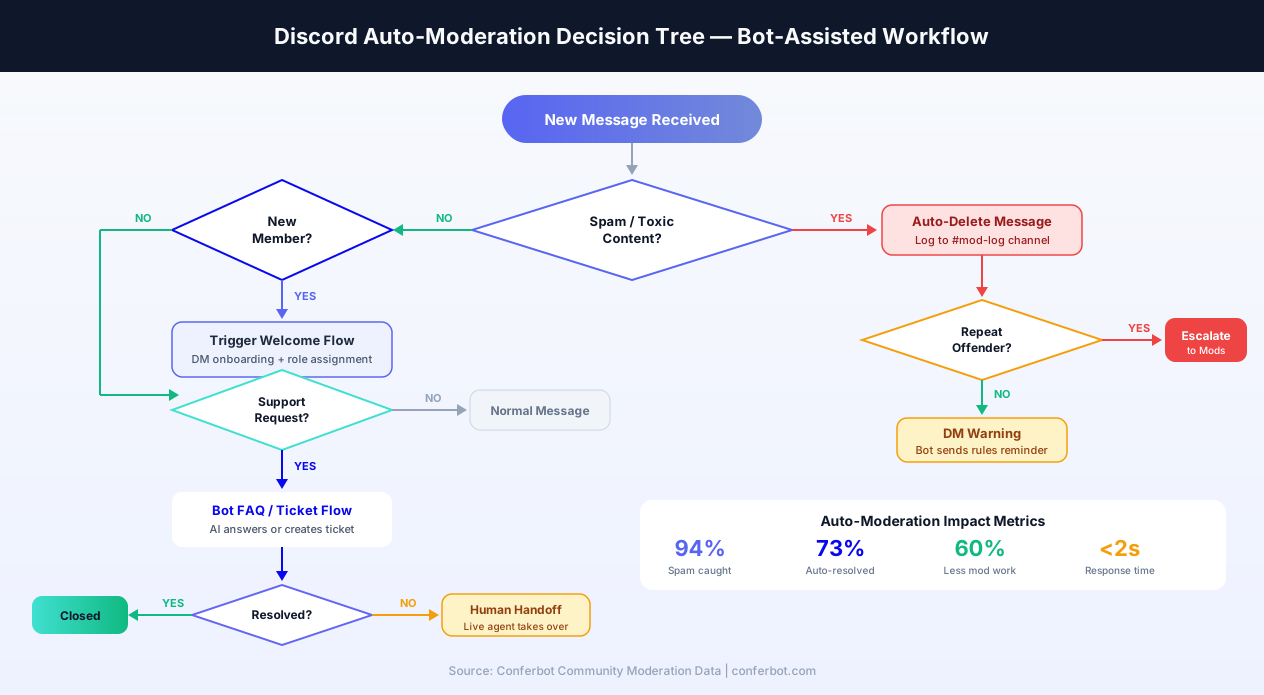
Auto-Moderation and Content Filtering
Discord introduced native AutoMod in 2022, but its capabilities are limited to basic keyword filtering and spam detection. A Conferbot community management bot extends AutoMod by adding conversational context to moderation actions. Instead of silently deleting a message and leaving the user confused, your bot can DM the member explaining which rule was violated, link to the relevant section of your community guidelines, and offer a path to appeal. This educational approach reduces repeat violations by 45% compared to silent deletions.
Configure content filtering strategies in Conferbot's flow builder: detect link spam and route it through a verification flow, identify potential scam messages (common in crypto and NFT communities) and quarantine them with a warning, flag messages with excessive caps or repeated characters for review, and automatically redirect off-topic messages to appropriate channels with a polite redirect message.
Welcome Flows and Member Onboarding
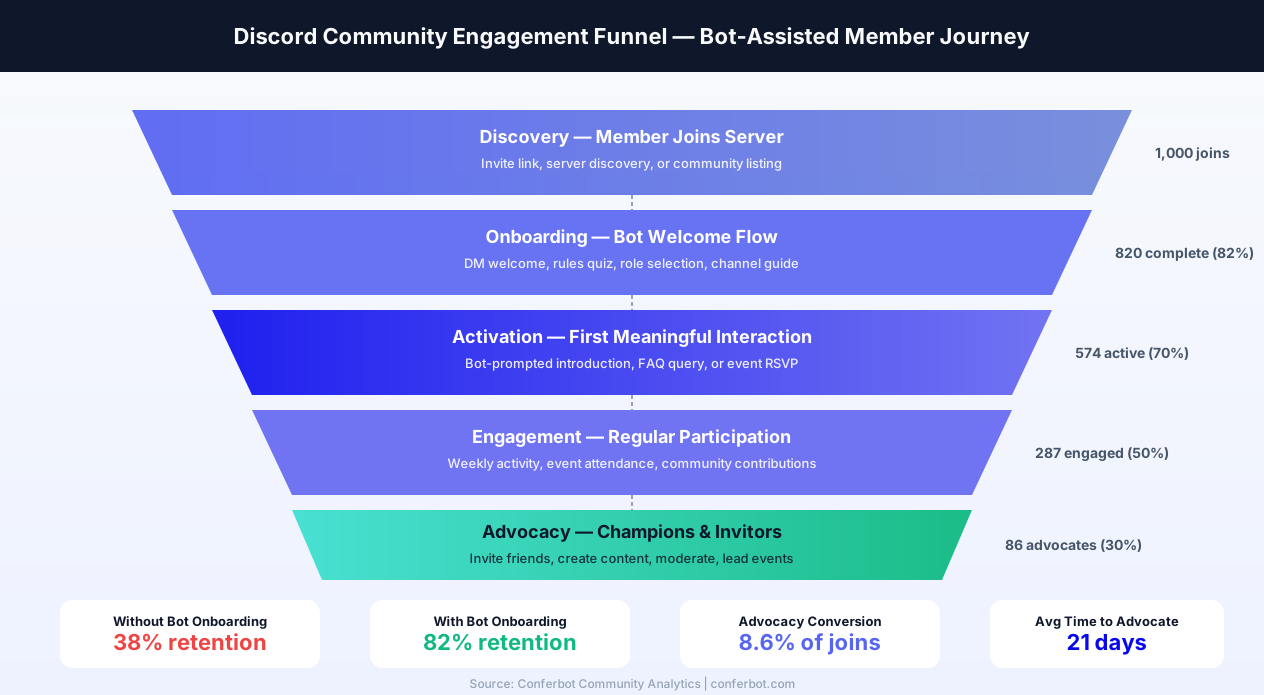
First impressions determine whether a new member becomes an active participant or silently leaves within 48 hours. The most effective Discord onboarding bots follow a structured sequence: detect the member join event, wait 10-30 seconds (to avoid overwhelming a new arrival), then send a DM welcome message that introduces the server's purpose, asks 2-3 qualifying questions (interests, timezone, how they found the server), assigns roles based on answers, and directs the member to the most relevant channels. Include a brief interactive rules quiz - members who complete a rules quiz are 70% less likely to violate community guidelines in their first month. Follow up 24 hours later with a "Getting Started" DM highlighting active discussions and upcoming events.
Servers with structured onboarding retain 45% more members at the 30-day mark compared to servers with no welcome flow. Build your onboarding sequence with Conferbot's conditional logic and trigger system - the flow builder handles the timing, branching, and role assignment automatically.
Role Assignment and Verification
Automated role assignment is the backbone of organized Discord servers. With Conferbot, build role assignment flows that go beyond simple reaction roles: create multi-step verification flows (answer questions, agree to rules, select interests), time-delayed role promotions (automatically upgrade "New Member" to "Member" after 7 days of activity), conditional role trees (different paths for students vs. professionals, customers vs. prospects), and role-gated content access (premium channels unlock only after specific role assignment). For verification-heavy communities (crypto projects, gated courses, business servers), pair role assignment with external verification - confirm email addresses, check payment status, or validate credentials before granting access roles.
Server Analytics and Engagement Tracking
Discord's built-in Server Insights provides basic metrics, but community managers need deeper data. Conferbot's analytics dashboard tracks every bot interaction: which FAQ topics are asked most frequently, where members drop off in onboarding flows, which channels generate the most support tickets, peak activity hours by timezone, and member sentiment trends over time. Use this data to optimize your community strategy - if 40% of support questions are about billing, create a dedicated #billing channel with a specialized bot flow. If onboarding completion drops at question three, simplify that step.
Engagement Automation
Keep your community active between major announcements with automated engagement features: daily discussion prompts posted at peak hours, weekly challenge or poll announcements, milestone celebrations (100th message, 1-year anniversary, top contributor of the week), automated content roundups (summarize the week's best posts), and seasonal event launchers tied to your community calendar. Communities with engagement automation see 2-4x higher daily active user rates and significantly lower member churn. The key is consistency - members who interact with bot-driven content three times in their first week are 5x more likely to remain active after 30 days.
Discord Chatbot Use Cases
Discord's versatility means chatbot applications vary dramatically by community type. Here are the most effective deployments across major verticals.
Gaming Communities
Automate server information (rules, maps, schedules), provide game tips and strategies, manage team signups for events and tournaments, handle ban appeals through DM flows, and send automated announcements for game updates. Gaming communities with chatbots report 50% fewer repeated questions in general channels. Conferbot's AI knowledge base can ingest your game wiki to answer even niche strategy questions automatically.
SaaS and Developer Communities
Answer technical FAQs, troubleshoot common issues, link to relevant documentation, collect bug reports in structured formats, and triage support requests by severity. Developer communities find that chatbots resolve 40-60% of support questions without human intervention, freeing engineers to focus on building. Integrate with GitHub or GitLab through the integrations hub to create issues directly from Discord conversations. See our SaaS industry guide for vertical-specific strategies.
Web3 and Crypto Projects
Provide tokenomics information, explain staking or minting processes, verify wallet connections, prevent common scam patterns, and manage allowlist applications. Security-focused automation is critical in Web3 where community members are high-value targets for phishing. Conferbot's anti-scam flows can detect and flag suspicious links, impersonation attempts, and unsolicited DM campaigns before they reach members.
Education and Courses
Handle enrollment questions, share course schedules and deadlines, provide assignment help, collect feedback, and manage study group formation. Educational communities using chatbots see 30% higher student engagement in Discord-based courses. Use calendar booking to let students schedule office hours with instructors directly through the bot.
Creator and Brand Communities
Welcome new fans, share content schedules, handle merchandise inquiries, manage exclusive access roles, and collect community feedback. Creators using Discord bots save 10-20 hours per week on community management. For e-commerce brands, the bot can handle order status inquiries, return requests, and product recommendations within Discord.
Internal Company Servers
HR FAQ automation, IT support triage, onboarding guides for new employees, meeting scheduling, and internal knowledge base access. More companies are adopting Discord for internal communication, especially remote-first teams. Conferbot's knowledge base can ingest your internal documentation (employee handbook, IT policies, benefits guides) so employees get instant answers without waiting for HR responses.
Customer Support Communities
Build a dedicated customer support server where your bot handles Tier 1 inquiries (account questions, billing, feature requests) while routing complex issues to live agents. Track resolution rates and customer satisfaction through analytics, and use A/B testing to optimize response flows for higher satisfaction scores.
Discord Server Monetization with Bots
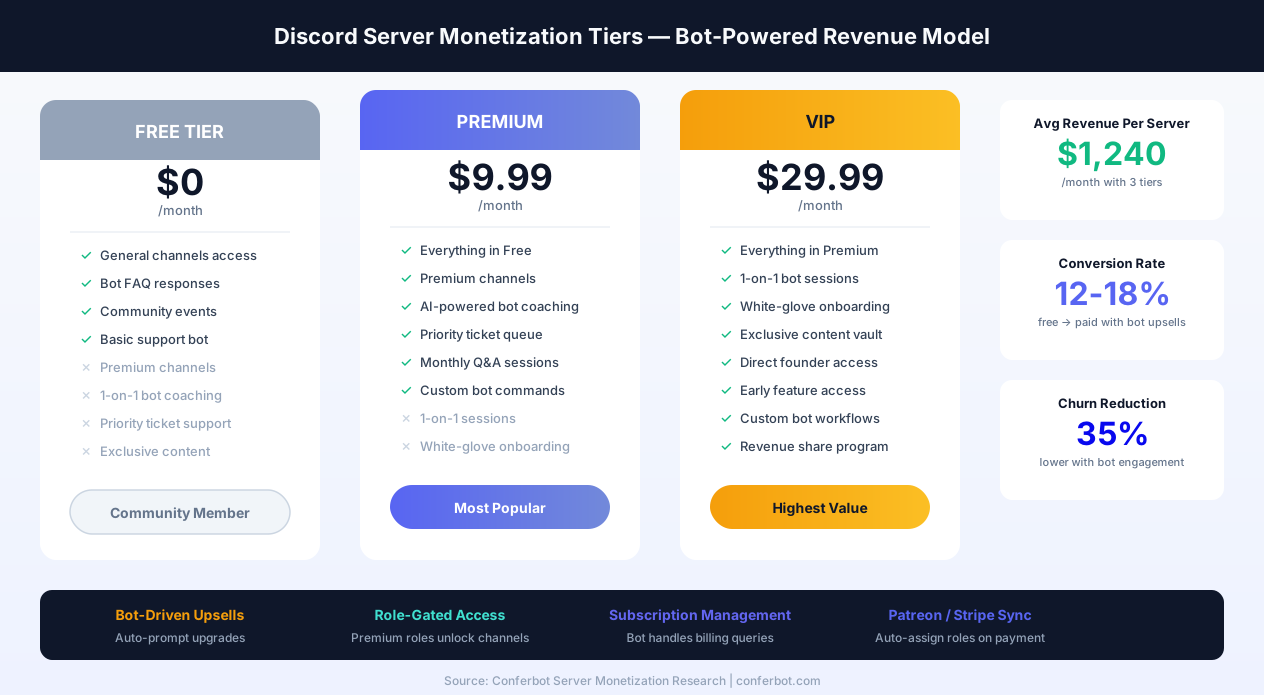
Monetizing a Discord server is one of the fastest-growing trends in community building. Discord's own Server Subscriptions feature, combined with bot-powered premium tiers, ticketing systems, and payment integrations, lets community owners generate recurring revenue from engaged members. The search term "Discord server monetization" has seen 250% growth in the past 18 months as creators, educators, and businesses discover Discord's revenue potential.
Premium Tier Architecture
The most effective monetization model uses three tiers: a free tier with general access and bot FAQ support, a premium tier ($5-$15/month) with exclusive channels, priority bot support, and premium bot features, and a VIP tier ($25-$50/month) with one-on-one access, custom bot workflows, and early access to content. Your Conferbot bot manages the entire tier lifecycle: detects subscription status through role assignment, gates premium content behind role-verified flows, provides tier-specific bot responses (premium members get faster and more detailed answers), and handles subscription FAQs ("What do I get with Premium?", "How do I upgrade?", "Can I cancel?").
Subscription Management with Bots
Discord's native Server Subscriptions lets you sell tiered access directly within Discord. Your bot complements this by automating the experience: when a member subscribes, the bot detects the new role and sends a personalized welcome to the premium tier with a tour of exclusive features. When a subscription expires, the bot sends a retention message highlighting what the member will lose and offering a re-subscribe link. For communities using external payment systems (Patreon, Stripe, Buy Me a Coffee), Conferbot's integrations hub syncs payment events with Discord role assignment automatically.
Ticketing Systems for Paid Support
Sell access to priority support through a bot-managed ticketing system. Premium members get a /priority-ticket command that creates an instant private channel with guaranteed response times. Free members use the standard /ticket command with longer response windows. The bot enforces SLA differences automatically: premium tickets trigger notifications to your support team immediately, while free tickets enter a queue. Track resolution times and satisfaction by tier using Conferbot analytics.
Bot-Driven Upsells
Your bot can intelligently promote upgrades without being pushy. When a free member hits a premium-only feature ("Sorry, AI-powered answers are available to Premium members"), include a tasteful upgrade prompt with a one-click subscribe link. Track conversion from these touchpoints to optimize messaging. Communities using bot-driven upsells report 12-18% free-to-paid conversion rates - significantly higher than email-based upsell campaigns. Use Conferbot's A/B testing to test different upsell messages and find the highest-converting approach.
Digital Product Delivery
Sell digital products (courses, templates, guides, software licenses) through your Discord bot. The bot handles the entire purchase flow: present available products, collect payment confirmation, deliver download links or access codes through DM, and manage post-purchase support. For course creators, the bot can drip content weekly - unlocking new channels or sending new materials to members at scheduled intervals. Integrate with Gumroad, Shopify, or WooCommerce for seamless payment processing.
Community Marketplace
For communities where members sell to each other (freelancer networks, artist communities, trading groups), your bot can manage a structured marketplace: members submit listings through a bot flow, the bot formats and posts them in a marketplace channel, buyers express interest through buttons, and the bot facilitates the introduction via DM. Add escrow-like confirmation flows where both parties confirm transaction completion. This structured approach reduces scams, improves trust, and keeps your marketplace organized.
Discord vs Other Community Platforms
Discord excels as a community platform but competes with alternatives for different use cases. Here is how it compares for chatbot deployment.
| Feature | Discord | Slack | Telegram | Microsoft Teams |
|---|---|---|---|---|
| Primary Audience | Communities, gaming, creators | Business teams | Global messaging, groups | Enterprise workplace |
| Monthly Active Users | 150M+ | 32M+ daily | 800M+ | 320M+ |
| Buttons Per Message | 25 | 5+ | Unlimited inline | Limited |
| Rich Embeds | Excellent | Blocks | Basic formatting | Adaptive Cards |
| Group/Channel Support | Excellent (servers + channels) | Good (workspaces + channels) | Groups + supergroups | Teams + channels |
| DM Support | Full bot DM | Full bot DM | Full bot DM | Limited |
| Message Editing | Yes | Yes | Yes | No |
| Voice Channels | Built-in | Huddles | No | Calls/Meetings |
| Bot Hosting | Gateway (Conferbot managed) | Event-based | Webhook | Webhook |
| Cost | Free | Free tier limited | Free | Microsoft 365 license |
| Slash Commands | Native (excellent) | Native (good) | Bot commands | Message extensions |
| Monetization | Server Subscriptions | No native | Stars, Premium | No native |
| Best For | External communities | Internal teams | Global outreach | Enterprise internal |
When to choose Discord: Discord is the clear winner for external community building, fan engagement, and customer communities - especially if your audience skews younger (18-35) or is tech-savvy. For internal business automation, consider Slack or Microsoft Teams. For global customer messaging, WhatsApp or Telegram may be more appropriate. For mobile-native audiences, explore Messenger, Instagram, or LINE. Conferbot's omnichannel platform lets you cover all bases from a single dashboard.
Conferbot vs MEE6 vs Carl-bot vs Custom Build
Choosing the right Discord bot solution depends on your community's needs, technical resources, and growth plans. This comparison covers the most popular approaches to Discord bot deployment in 2026, targeting the frequently searched "best Discord bot" and "MEE6 alternative" queries.
Quick Comparison Table
| Capability | Conferbot | MEE6 | Carl-bot | Custom Bot (discord.js) |
|---|---|---|---|---|
| Setup Time | 5-10 minutes | 10-15 minutes | 15-20 minutes | Days to weeks |
| Coding Required | None | None | None | Full JavaScript/Python |
| AI-Powered Responses | Yes (OpenAI, knowledge base) | Limited (paid) | No | Manual integration |
| Conversational Flows | Visual flow builder | Basic auto-responses | Tags and triggers | Unlimited (code) |
| Support Tickets | Full lifecycle + dashboard | Basic (paid) | Reaction tickets | Custom implementation |
| Omnichannel | Discord + 10 channels | Discord only | Discord only | Build per platform |
| Analytics | Comprehensive dashboard | Server leaderboard | Basic logging | Build from scratch |
| Human Handoff | Built-in live chat | No | No | Custom build |
| Hosting | Managed (Gateway Manager) | Managed | Managed | Self-hosted required |
| Leveling/XP | Integration-ready | Core feature | No | Custom build |
| Moderation | Conversational moderation | AutoMod + manual | Extensive moderation | Custom rules |
| Pricing | Free tier + plans | Free + $11.95/mo | Free + $4.99/mo | Server costs ($5-50/mo) |
When to Choose Conferbot
Conferbot is the best choice when your primary need is intelligent conversational automation - FAQ bots, support ticket workflows, onboarding flows, lead capture, and AI-powered responses. It excels for business and SaaS communities, customer support servers, educational platforms, and any community where member interactions need structured workflows rather than simple auto-responses. The omnichannel advantage is decisive: build your bot once and deploy it across Discord, your website, WhatsApp, Telegram, Messenger, Instagram, and more - all from a single dashboard with unified analytics.
When to Choose MEE6
MEE6 is the right choice for communities focused on gamification and leveling. Its XP system, leaderboards, and role rewards are best-in-class for gaming communities and engagement-driven servers where progression is a core motivator. MEE6's moderation features are solid but its conversational AI and workflow capabilities are limited compared to Conferbot. Many server owners use MEE6 for leveling alongside Conferbot for intelligent support and onboarding.
When to Choose Carl-bot
Carl-bot excels at reaction roles and basic automation. Its tag system provides template-based auto-responses, and its logging capabilities are thorough. Carl-bot is the budget-friendly option for servers that need role management and simple auto-responses without complex conversational flows. However, it lacks AI capabilities, structured ticketing, and cross-platform deployment.
When to Build Custom
Custom bots (using discord.js, discord.py, or JDA) make sense when you need capabilities no platform provides: deep game integrations, custom database queries, proprietary algorithm execution, or real-time data processing. The trade-off is significant: custom bots require ongoing development, hosting infrastructure, security maintenance, and expertise in Discord's API. A custom bot typically costs $5,000-$25,000 to develop and $500-2,000/month to maintain. Most communities find that a combination of Conferbot (for conversational intelligence) + a niche bot (for gamification or moderation) covers all needs at a fraction of the custom development cost.
The Hybrid Approach (Recommended)
The most effective Discord servers use multiple bots, each handling what it does best. A typical high-performance setup combines Conferbot for FAQ, support tickets, onboarding flows, and AI-powered responses; MEE6 or Arcane for leveling and gamification; and Discord's native AutoMod for basic content filtering. This approach costs a fraction of a custom build, requires zero coding, and provides best-in-class capabilities across every use case. Conferbot's integrations hub ensures data flows between all your tools seamlessly.
Discord Bot Security & Terms of Service
Bot security is not optional - it is foundational. A compromised Discord bot can delete channels, ban members, leak private data, and destroy your community in minutes. Discord enforces strict Developer Terms of Service and Developer Policy, and violations can result in bot termination, account suspension, or legal action. This section covers everything you need to know about operating a Discord bot securely and within Discord's rules.
Bot Token Security
Your bot token is the single most sensitive credential in your Discord bot deployment. Anyone with your token can control your bot completely - send messages, ban members, delete channels, or extract data. Token security best practices include never storing tokens in code repositories (this is the number one cause of bot compromises - bots scan GitHub for exposed tokens), never sharing tokens in Discord messages (even in DMs - Discord's Trust & Safety team has warned that DMs are not fully private), rotating tokens immediately if you suspect exposure (regenerate in the Developer Portal, then update in Conferbot), and using Conferbot's managed token storage, which encrypts your token at rest and in transit.
Conferbot handles token storage securely by design. When you paste your bot token into the Conferbot dashboard, it is encrypted and stored in our secure infrastructure. Your token is never exposed in logs, API responses, or client-side code. If you need to revoke access, disconnect the bot from the Conferbot dashboard and regenerate the token in Discord's Developer Portal.
Rate Limits
Discord enforces aggressive rate limits to prevent abuse and ensure platform stability. The key limits are: global rate limit of 50 requests per second per bot, per-route limits that vary by endpoint (e.g., 5 messages per 5 seconds per channel), gateway rate limit of 120 events per 60 seconds, and invalid request limit (10,000 invalid requests in 10 minutes triggers a temporary ban). Conferbot's Gateway Manager handles rate limiting automatically - it queues messages, implements exponential backoff, and distributes requests across shards for large servers. You do not need to worry about hitting rate limits or getting your bot temporarily banned for excessive requests.
Discord Terms of Service Compliance
Discord's Developer Policy prohibits specific bot behaviors. Ensure your bot does not scrape user data for purposes beyond your bot's stated functionality, send unsolicited DMs (spam) to users who have not interacted with the bot, attempt to circumvent Discord's built-in safety features, store message content beyond what is necessary for your bot's function, use Discord's API for surveillance or monitoring without consent, or impersonate Discord staff or other users. Conferbot's conversational model is inherently compliant: the bot only responds when triggered by user actions (messages, button clicks, command invocations, or member join events). Data retention is controlled through your Conferbot dashboard settings, and you can configure automatic data deletion policies to comply with privacy regulations.
Data Handling and Privacy
If your bot collects personal data (email addresses, support ticket contents, user preferences), you need a privacy policy - Discord requires this for verified bots. Your privacy policy should explain what data the bot collects, how long data is retained, how users can request data deletion, and which third parties receive data (if any). Conferbot provides GDPR-compliant data handling by default, including user data export capabilities, right-to-deletion workflows, and configurable retention periods. For communities serving EU users, this compliance is mandatory. See our GDPR compliance features for details.
Verified Bot Requirements
When your bot reaches 75 servers, Discord requires verification before it can join more servers or continue using privileged intents. The verification process includes submitting a description of your bot's functionality and the specific reasons it needs each privileged intent, providing a link to your bot's privacy policy and terms of service, confirming your identity (email verification at minimum), and for bots in 76+ servers, passing a manual review by Discord's team. Conferbot bots pass verification smoothly because they use clear, well-defined functionality (FAQ, support, onboarding) with legitimate reasons for privileged intents. We provide template privacy policies and verification guidance as part of our setup documentation.
Incident Response
If your bot is compromised or behaves unexpectedly, act immediately: disconnect the bot from Conferbot's dashboard (this drops the gateway connection instantly), regenerate the bot token in the Discord Developer Portal, audit recent bot activity in the Conferbot analytics dashboard, notify your community about the incident and what steps you are taking, and review and tighten permissions (remove any unnecessary permissions that were granted). Conferbot's activity logs provide a complete audit trail of every action your bot took, making it easy to assess the scope of any incident and communicate transparently with your community.
Discord Chatbot Best Practices
Discord communities have strong cultural norms. Your bot must feel like a helpful member of the community, not an intrusive corporate tool. These best practices are drawn from analyzing 500+ successful Discord bot deployments on the Conferbot platform.
1. Respect Channel Culture
Configure your bot to only respond in designated channels. A bot that responds to every message in #general will annoy your community. Create dedicated channels like #bot-help or #support where the bot is expected, and let social channels remain bot-free.
2. Use Embeds for Structured Information
Plain text messages get lost in busy channels. Use Discord's rich embeds with colors, fields, images, and footers to make bot responses stand out and be scannable. A well-formatted embed for server rules or FAQ answers is far more useful than a wall of text.
3. Design for Both Channel and DM Contexts
Some conversations belong in public (FAQs, announcements, community knowledge) while others need privacy (support tickets, account issues, moderation). Build flows that start in channels but can transition to DMs when appropriate. Use Conferbot's conditional logic to detect the conversation context and adapt the response format.
4. Keep Button Labels Short and Clear
With 25 buttons available, the temptation is to use them all. Resist. Use 3-5 buttons per message for the most common choices, with a "More Options" button if needed. Labels should be 2-4 words maximum for mobile readability.
5. Implement a Help Command
Every Discord bot should respond to a help command or button that explains what the bot can do. New members should be able to discover your bot's capabilities instantly without asking in chat. With Conferbot's builder, create a /help slash command that displays an embed with all available commands and their descriptions.
6. Update Content Regularly
Communities evolve. Update your bot's FAQ answers, resource links, and flows monthly. Stale information erodes trust faster than no information at all. Use analytics to identify which responses need refreshing - if a response receives low satisfaction ratings, rewrite it.
7. Set Clear Bot Boundaries
Let your community know what the bot can and cannot do. A brief bot introduction message when a new member joins (or when someone types /help) sets expectations and reduces frustration.
8. Test Across Devices
Discord users are split across desktop (Windows, macOS, Linux), mobile (iOS, Android), and web. Button layouts, embed formatting, and message lengths render differently on each platform. Test your bot flows on at least desktop and mobile before deploying to ensure a consistent experience.
9. Use Threads for Complex Conversations
When a bot interaction requires multiple exchanges (multi-step support flows, detailed troubleshooting), create a thread automatically. This keeps the parent channel clean and gives the user a focused space for their conversation. Threads also persist, so the user can return to reference the resolution later.
10. Monitor and Iterate
Launch is just the beginning. Monitor your bot's performance weekly using Conferbot analytics: track resolution rates, identify the most common unanswered questions, measure member satisfaction, and use A/B testing to optimize critical flows like onboarding and ticket creation. The best Discord bots are living systems that improve continuously.
Getting Started with Your Discord Bot
Building a Discord bot with Conferbot takes minutes. Here is the fastest path to a live bot in your server.
Quick Start Checklist
- Create your Conferbot account and choose a community FAQ template
- Customize the flows with your community's most-asked questions, server rules, and resource links
- Add AI responses using OpenAI integration for questions your structured flows do not cover
- Create the Discord application and bot on the Discord Developer Portal
- Enable MESSAGE CONTENT intent in the Bot section of the Developer Portal
- Invite the bot to your server using the OAuth2 URL with appropriate permissions
- Paste the bot token in Conferbot's Discord channel settings
- Test in a private channel before opening to the full community
- Announce to your community and monitor with analytics
What Makes Conferbot Different for Discord
- No hosting required - The built-in Gateway Manager keeps your bot online 24/7
- No coding required - Visual flow builder with drag-and-drop design
- AI-powered - OpenAI integration handles complex, open-ended questions
- Knowledge base - AI knowledge base imports your docs for instant community answers
- Human backup - Live chat handoff when the bot needs help
- Cross-platform - The same bot logic works across Discord, your website, WhatsApp, Telegram, Messenger, Instagram, LINE, and mobile apps
- Multilingual - Multilingual support for global communities
- Analytics - Comprehensive analytics track every interaction and KPI
- Integrations - Connect to CRMs, helpdesks, and 100+ tools via the integrations hub
Whether you run a gaming community of 50 or a product community of 50,000, a Discord chatbot automates the repetitive work so your team can focus on building genuine connections. View pricing and start building today.
Server Template Automation
Discord server templates let you clone your server's channel structure, roles, and permissions for rapid deployment. Your Conferbot bot can automate the template experience by configuring itself in new servers instantly - when the bot is invited to a server created from your template, it automatically sets up channel-specific responses, assigns default roles through welcome flows, and posts a setup-complete embed in the designated admin channel. For communities that manage multiple servers (e.g., regional chapters, franchise locations, or course cohorts), template automation reduces per-server setup from hours to seconds. The bot detects the template source and applies the correct configuration preset without manual intervention.
Welcome Flow and Onboarding Scripts
First impressions determine whether a new member becomes an active participant or silently leaves. An effective welcome flow does more than say hello - it builds investment. Configure your bot to send a DM welcome sequence within 30 seconds of a new member joining: introduce the server's purpose, ask 2-3 questions (interests, timezone, how they found the server), assign roles based on answers, and direct them to the most relevant channels. The best onboarding scripts include a brief interactive quiz about server rules (members who complete a rules quiz are 70% less likely to violate community guidelines in their first month). Follow up 24 hours later with a "Getting Started" guide DM that highlights active discussions and upcoming events. Servers with structured onboarding retain 45% more members at the 30-day mark compared to servers with no welcome flow.
XP and Leveling Systems
Gamification drives engagement. While Conferbot is not a dedicated leveling bot, your chatbot can complement XP systems by announcing level-up milestones in a dedicated channel, triggering reward flows when members reach specific levels (exclusive channel access, custom roles, special bot interactions), and providing leaderboard information through conversational queries ("Who are the top contributors this week?"). Pair the Conferbot engagement bot with a leveling bot like MEE6 or Arcane for a complete gamification stack - Conferbot handles the conversational and informational layer while the leveling bot tracks XP. Communities with gamification see 2-4x higher message volume from mid-tier members who are motivated by progression systems.
Ticket Channel Management
Support ticket systems on Discord typically create private channels for each ticket. Your Conferbot bot can manage the entire ticket lifecycle: a member clicks a "Create Ticket" button in a support channel, the bot creates a private channel visible only to the member and support staff, runs through an automated triage flow (collecting category, priority, description, and screenshots), and assigns the ticket to the appropriate support role based on the category. When the issue is resolved, the bot prompts for a satisfaction rating, archives the channel (or deletes it after a configurable retention period), and logs the complete interaction to the Conferbot dashboard. This creates a searchable ticket history that Discord's native channel structure does not provide. Teams using structured ticket flows resolve issues 35% faster because the triage step ensures complete information upfront.
Audit Logging
Discord's built-in audit log tracks server changes, but it does not capture bot interactions, conversation content, or member engagement patterns. The Conferbot dashboard provides a complete audit trail of every bot interaction: who initiated the conversation, which flow was triggered, what data was collected, whether a handoff occurred, and how the interaction was resolved. For communities in regulated industries or those that need accountability (e.g., educational institutions, financial communities), this audit capability is essential. Export logs to CSV for compliance reporting or integrate with your existing audit tools through the integrations hub.
Multi-Server Management
Organizations managing multiple Discord servers - franchise networks, educational institutions with per-class servers, or brands with regional communities - can deploy and manage bots across all servers from a single Conferbot dashboard. Key multi-server capabilities include centralized flow management (update a bot flow once and it deploys to all connected servers), per-server configuration overrides (customize welcome messages, FAQ content, and role assignments for each server), aggregate analytics across all servers (total interactions, common questions, resolution rates), and bulk operations (connect a new bot version to 50 servers simultaneously). This eliminates the operational nightmare of managing separate bot instances for each server. Whether you have 3 servers or 300, the management overhead stays constant.
Why Conferbot for Discord
- No hosting required - Built-in Gateway Manager keeps your bot online 24/7 without external servers
- No coding required - Build with our visual AI chatbot builder
- AI-powered answers - AI knowledge base resolves community questions from your documentation
- 25-button interactive messages - The most interactive bot experience of any messaging platform
- Channel and DM support - Public knowledge sharing and private support in one bot
- Rich integrations - Connect CRMs, ticketing systems, and more via the integrations hub
- Omnichannel deployment - Same bot works on Discord, website, WhatsApp, Telegram, Messenger, Instagram, and other channels
- Real-time analytics - Track community engagement with built-in analytics
- Seamless handoff - Route complex issues to live agents with full context
- Slash command support - Modern Discord interactions with autocomplete and modals
- Compliance-ready - GDPR-compliant data handling and privacy controls
How Conferbot Compares for Discord
Most platforms charge per message, per seat, or limit channels by tier. Here's how Conferbot is different.
| Feature | Conferbot | Typical Competitor |
|---|---|---|
| Channels included | 13+ (all plans) | 3-6 (varies by tier) |
| Pricing model | Flat rate from $19/mo | Per-seat or per-message |
| AI chatbot builder | Yes (plain English) | No or limited |
| Native mobile SDKs | 4 (Android, iOS, Flutter, RN) | None (WebView only) |
| Knowledge base AI | Included | Add-on ($30-99/mo) |
| Live chat handoff | Included | Higher tiers only |
| Calendar booking | Built-in | Third-party required |
| Setup time | Under 10 minutes | Hours to days |
Discord FAQ
Everything you need to know about chatbots for discord.
Continue Exploring
Explore features, connect third-party tools, and browse ready-made templates.