
Virtual Classroom Assistant Chatbot
Free Education And Training Chatbot Template
An AI classroom assistant chatbot that supports online learners with instant answers to course questions, assignment help, resource sharing, and progress tracking. Available 24/7 to supplement instructor support, reduce repetitive questions, and keep students engaged. Perfect for online schools, LMS platforms, and instructors managing large cohorts.


What Is a Virtual Classroom Assistant Chatbot?
A virtual classroom assistant chatbot is an AI-powered conversational tool that provides students in online and blended learning environments with immediate answers to course questions, technical support, assignment guidance, and administrative help -- at any hour, without requiring an instructor or support staff member to be available. For educational institutions, corporate training programs, and online course creators in 2026, the chatbot addresses the most persistent challenge in virtual learning: students who encounter obstacles outside of live class hours have no one to ask, lose momentum, and disengage at dramatically higher rates than students in traditional classroom environments.
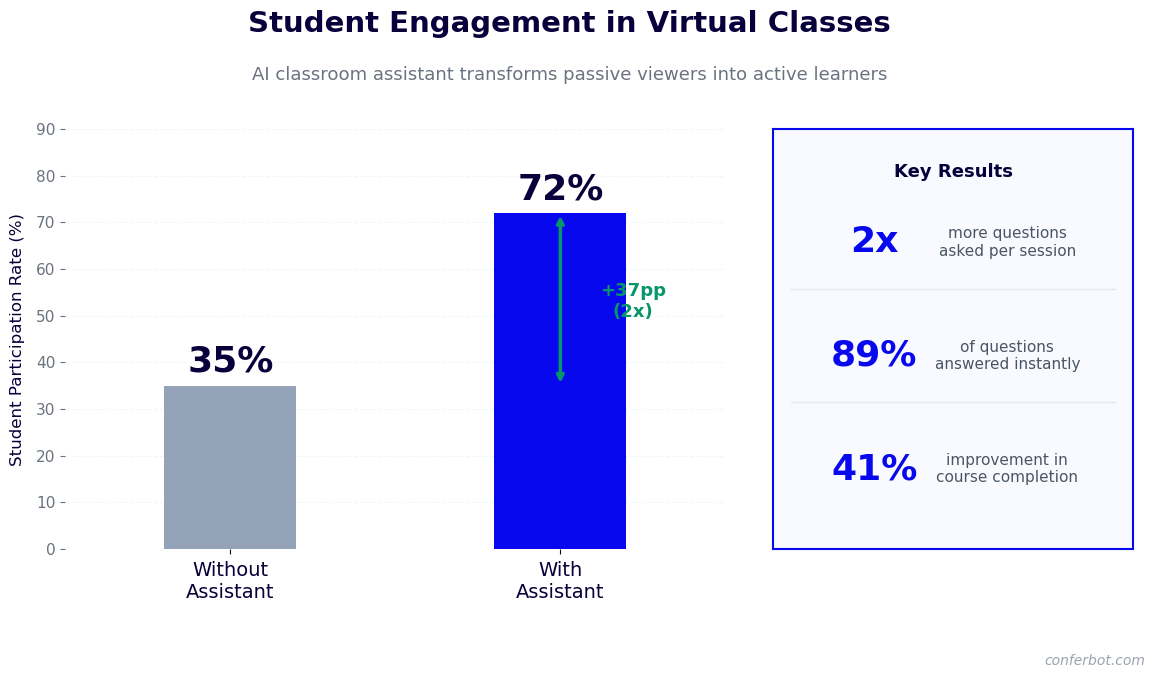
Online learning completion rates are notoriously low -- industry-wide averages of 3-15% for MOOCs and 40-60% for paid online courses -- and the primary driver of non-completion is not lack of interest or motivation but friction: a question that goes unanswered, an assignment instruction that is unclear, a technical problem that disrupts access, or a deadline that is missed because the student did not know where to find it. Each of these friction points is resolvable in seconds with the right information. The virtual classroom assistant provides that information at the moment the student needs it, preventing the frustration accumulation that leads to abandonment.
The chatbot serves multiple roles within the virtual learning environment: a first-responder for content questions that can be answered from the course material, a navigator for students who are lost in the LMS interface, a technical support triage tool that handles common access and technical issues, an administrative information resource for deadlines and grading policies, and an escalation bridge that creates a support ticket or initiates an instructor consultation request when a question requires human expertise. Built on Conferbot's AI chatbot builder with NLP processing, it deploys on your website and LMS without engineering resources.
This page covers how the student support flow works, the types of questions and requests the chatbot handles, LMS integration, instructor escalation workflows, analytics for identifying at-risk students, and a setup guide for educational institutions and online course creators.
How the Virtual Classroom Assistant Works
The virtual classroom assistant handles student inquiries through a tiered response system that distinguishes between questions it can answer directly from the course knowledge base, questions that require instructor expertise, and administrative or technical requests that have standard resolution paths.
Tier 1: Direct Content and Administrative Answers
The first tier of the chatbot's response capability covers questions that have definitive answers in the course material or institutional information: "What is the deadline for the Week 3 assignment?", "Where do I find the reading for Module 2?", "What percentage of the grade is the final project?", "How do I access the recorded lecture from Tuesday?", and "What is the instructor's office hours schedule?" For content questions within the course curriculum, the chatbot references the course knowledge base built from the instructor's uploaded materials -- syllabus, lecture notes, assignment briefs, readings, and FAQ documents -- and provides a direct answer with a citation pointing to the specific source. This citation is important for academic contexts: students should know that the chatbot's answer comes from the course materials, not from an external source that may be inaccurate or out of date.
Tier 2: Guided Problem-Solving and Comprehension Support
The second tier handles questions where the student needs help understanding or applying course concepts rather than finding a piece of information. "I don't understand how to calculate standard deviation from the lecture" or "Can you explain the difference between the two approaches the reading described?" These questions require more than information retrieval -- they require explanation, worked examples, and the ability to respond to follow-up questions. Conferbot's NLP engine handles these explanatory conversations by drawing on the course material and providing responses in the context of the specific course rather than generic textbook explanations. For questions where the chatbot's explanation is insufficient and the student remains confused, it surfaces an escalation option: "Would you like me to flag this question for your instructor?"
Tier 3: Technical Support Triage
Technical issues -- LMS login problems, video playback failures, assignment submission errors, browser compatibility issues -- are among the most disruptive obstacles for online learners because they prevent any further progress until resolved. The chatbot handles first-line technical support triage: it collects the specific error description, checks for known issues with the platform, provides standard resolution steps (clear cache, try a different browser, disable specific extensions), and escalates to IT support with a complete problem description when standard resolution steps do not resolve the issue. For common LMS access issues, the chatbot resolves 60-70% without human support involvement, typically in under five minutes.
Tier 4: Escalation and Instructor Collaboration
When a student question requires instructor expertise, personalized feedback, or a conversation that the chatbot cannot support, it creates a structured escalation. The student's question, the conversation context, and the specific reason for escalation are packaged into a support ticket or instructor notification that provides full context without requiring the student to re-explain their situation. For grade disputes, academic integrity questions, or accommodation requests, the chatbot routes directly to the appropriate administrative contact with a pre-formatted request. Track escalation patterns and resolution times through Conferbot's analytics dashboard to identify where the course knowledge base needs improvement.
Key Features of the Virtual Classroom Assistant
The virtual classroom assistant includes a feature set that addresses the specific challenges of online and blended learning environments, from immediate student support to instructor productivity tools.
| Feature | What It Does | Institution Benefit | Student Benefit |
|---|---|---|---|
| 24/7 content Q&A | Answers course content questions from the knowledge base at any hour | Reduces off-hours support burden on instructors | Gets answers immediately instead of waiting for office hours |
| Course knowledge base | Built from uploaded syllabus, lectures, assignments, and course materials | Answers are grounded in actual course content | Responses cite specific course sources |
| LMS navigation help | Guides students through the LMS interface to find specific content | Reduces LMS confusion help requests to support staff | Finds required materials without navigating a complex interface |
| Technical support triage | Resolves common access and technical issues through guided steps | Reduces IT support ticket volume by 60-70% for common issues | Resolves technical obstacles in minutes rather than hours |
| Deadline and schedule reminders | Provides deadline information and sends proactive reminders | Reduces missed deadline appeals and late submission volume | Never misses a deadline because of a scheduling oversight |
| Assignment guidance | Clarifies assignment requirements and provides structured guidance | Reduces repetitive assignment clarification emails to instructors | Understands assignment expectations before starting |
| Structured escalation | Creates support tickets with full context for instructor or IT follow-up | Instructors receive well-contextualized escalations rather than vague requests | Does not have to re-explain the situation to a human respondent |
| At-risk engagement alerts | Flags students with high question frequency or distress signals for instructor review | Early identification of struggling students before they disengage | Increased likelihood of receiving proactive instructor outreach |
Multilingual Support for International Students
International students and English language learners face compounded challenges in virtual learning environments: they are navigating complex course content in a second language while also dealing with the interface and administrative complexity of an unfamiliar LMS. The virtual classroom assistant's multilingual support allows students to ask questions in their preferred language and receive responses in the same language, reducing the language barrier to getting help. For institutions with significant international student populations, multilingual chatbot support has been shown to improve the engagement and completion rates of international students, who are disproportionately represented in non-completion statistics for online programs.
Ready to try Virtual Classroom Assistant Chatbot?
Deploy this template in under 10 minutes. No coding required.
Use This Template Free →LMS Integration and Course Knowledge Base Setup
The virtual classroom assistant's effectiveness depends on two technical foundations: integration with the institution's LMS to provide personalized, course-specific responses, and a comprehensive knowledge base built from the course materials. This section covers both.
LMS Platform Integration
Conferbot integrates with major LMS platforms -- Canvas, Moodle, Blackboard, Google Classroom, and D2L Brightspace -- through their respective APIs and LTI (Learning Tools Interoperability) standards. This integration enables the chatbot to access the student's enrollment information, course content structure, assignment due dates, and submission status in real time. When a student asks "what assignments do I have due this week?", the chatbot queries the LMS for that specific student's assignment calendar and returns the accurate list with due dates -- not a generic course schedule that may not reflect the student's actual enrollment.
Building the Course Knowledge Base
The course knowledge base is built from the instructor's course materials, which are uploaded to Conferbot's knowledge base management system. Accepted formats include PDF lecture notes, Word documents, PowerPoint presentations, video transcript files, and structured FAQ documents. The knowledge base system indexes these materials for semantic search, allowing the chatbot to retrieve relevant content in response to student questions even when the exact words of the question do not match the words in the source material. An instructor who uploads 20 lecture PDFs and a course FAQ creates a knowledge base that can answer the majority of content and administrative questions students ask throughout the course.
Knowledge Base Maintenance and Updates
Course materials change throughout a semester: new readings are assigned, assignment briefs are clarified, deadlines are adjusted, and supplementary resources are added. The knowledge base system supports incremental updates -- individual documents can be updated or replaced without rebuilding the entire knowledge base. For LMS-integrated deployments, the chatbot automatically detects changes to assignment due dates and course announcements pushed through the LMS, updating its responses without manual knowledge base management. This automatic synchronization ensures the chatbot always provides current information for the most commonly asked time-sensitive questions: deadlines, exam schedules, and grade release dates.
Scoping Knowledge Base Boundaries
An important aspect of the knowledge base configuration is defining what the chatbot answers from the course materials versus what it defers to the instructor or external resources. The chatbot should answer questions about course content, course policies, and administrative matters. It should not answer questions that require the instructor's judgment -- grade appeals, academic integrity inquiries, or questions about whether an unusual situation qualifies for an extension -- and it should make the distinction clear rather than attempting to resolve questions that require human academic judgment. Configure these scope boundaries through Conferbot's chatbot builder using topic routing rules that direct specific question categories to the escalation pathway. Monitor knowledge base performance through the analytics dashboard to identify gaps where student questions are not being answered from existing materials.
Student Engagement, At-Risk Identification, and Completion Support
Beyond answering individual student questions, the virtual classroom assistant generates interaction data that provides instructors and educational administrators with valuable signals about student engagement, comprehension, and completion risk.
| Engagement Metric | Without Chatbot | With Virtual Classroom Assistant | Impact |
|---|---|---|---|
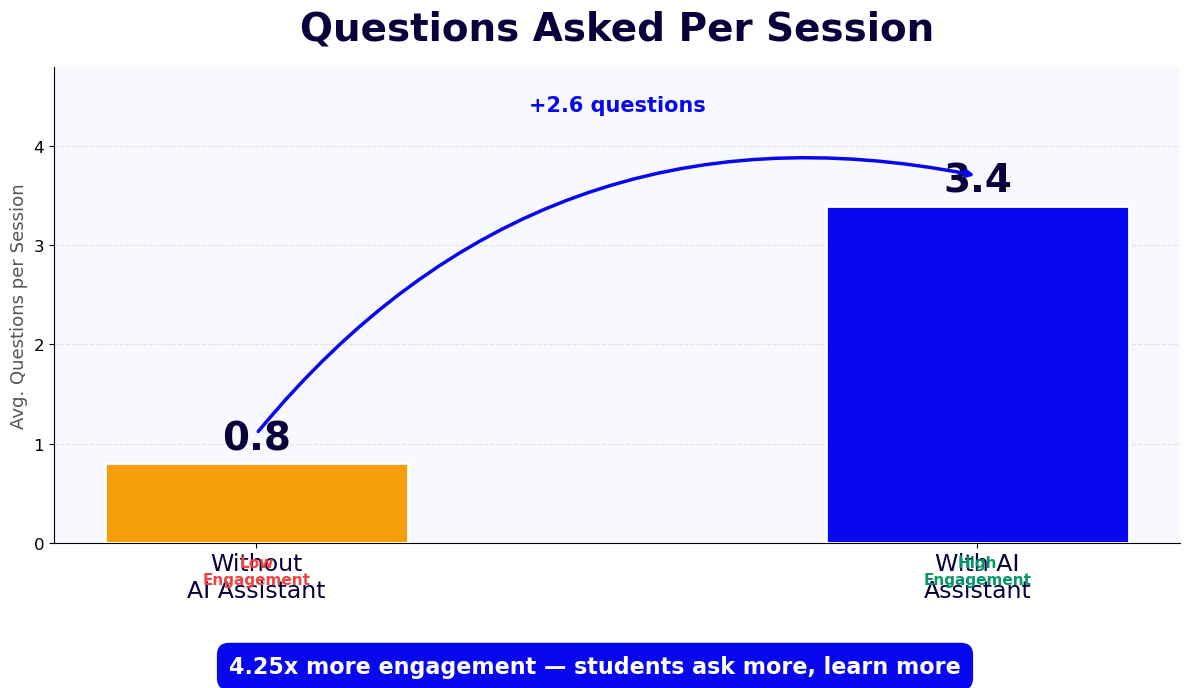
| Questions asked per session | 0.8 average | 3.4 average | 4.25x more active engagement |
| Course completion rate (paid courses) | 40-60% | 68-82% | +25-30 percentage points |
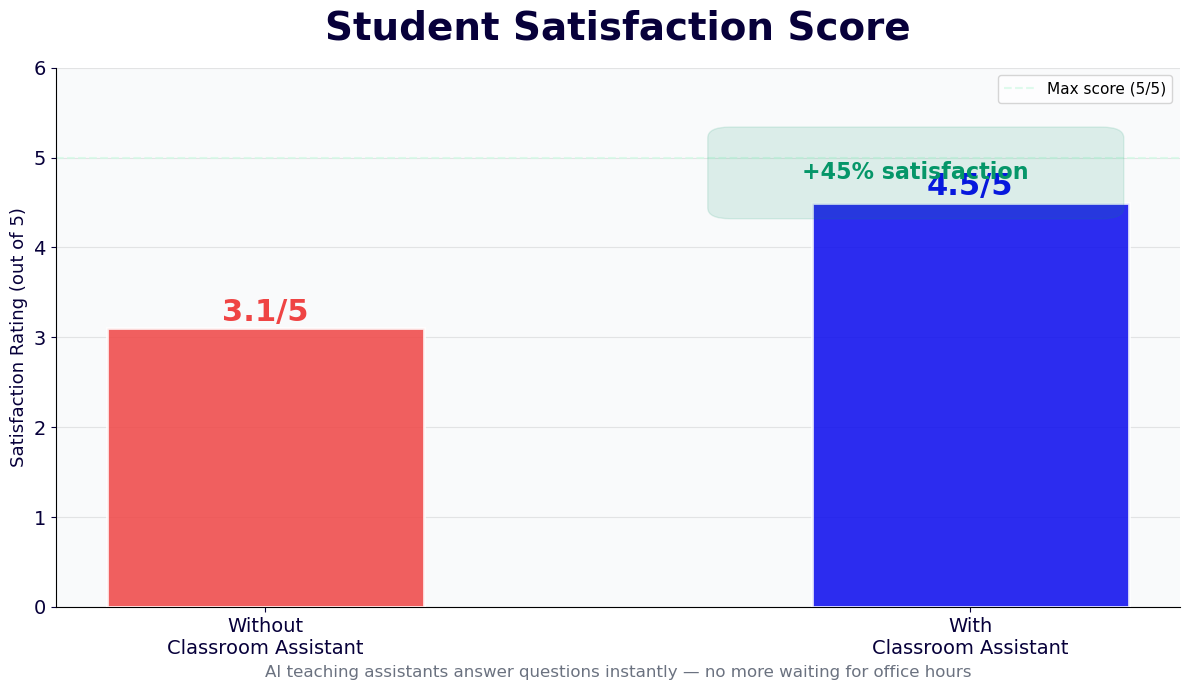
| Student satisfaction (course support) | 3.1/5.0 | 4.5/5.0 | +45% improvement |
| Technical support tickets resolved without IT | 0% | 60-70% | Major IT workload reduction |
| Instructor email volume (content questions) | Baseline | 55-65% reduction | Instructor time freed for high-value teaching |
| At-risk students identified before drop | 15-20% | 65-75% | 3-4x better early intervention |
Early Warning Signals in Chatbot Interaction Patterns
Student interaction patterns with the chatbot reveal engagement and comprehension signals that are not visible in LMS access logs alone. A student who asks multiple confused questions about the same concept in rapid succession is struggling with that material and may benefit from instructor outreach. A student who has not used the chatbot or LMS in two weeks is likely disengaging. A student who asks "how do I withdraw from this course?" requires immediate intervention from an academic advisor. These signals are captured in the chatbot's interaction analytics and can be configured to trigger proactive outreach -- an automated message to the student or an alert to the instructor or academic advisor -- when the signal pattern meets a defined threshold.
Proactive Engagement Messaging
For students who have not engaged with the course for a defined period, the chatbot sends a proactive engagement message: a check-in that acknowledges the gap, asks if there is anything preventing them from engaging with the course, and offers to help with any obstacles. This outreach is timed to occur before the student reaches the point of no return -- typically before they miss a major assignment that would make catching up significantly harder. For students who respond to the check-in, the chatbot provides a personalized "getting back on track" plan: a prioritized list of the missed content they need to review, the upcoming deadlines they need to be aware of, and a direct link to start the most urgent item.
Assignment Submission Support
The period immediately before a major assignment deadline is the highest-volume support moment in any online course. Students who have not started the assignment, students who are stuck on a specific requirement, and students who are encountering submission technical problems all need help simultaneously. The chatbot handles the most common pre-deadline support requests -- "what format does the assignment need to be in?", "can I submit as a PDF?", "I'm getting an error when I try to submit" -- freeing the instructor to focus on the students with substantive content questions that require their expertise.
Post-Assignment Feedback Support
After grades are released, the chatbot handles the first wave of grade inquiry support: it provides the grading rubric, explains what each rubric criterion assessed, and directs students to the specific feedback in the LMS gradebook. For students who want to understand how to improve for the next assignment, the chatbot provides specific guidance based on the rubric and the instructor's general feedback. Students who want to discuss a grade concern are directed to the instructor's consultation scheduling process through the calendar booking integration, ensuring the instructor's consultation time is used for substantive grade discussions rather than explaining what the rubric said.
Virtual Classroom Assistant for Corporate Training Programs
The virtual classroom assistant serves corporate learning and development programs with the same functionality it provides for academic institutions, with specific adaptations for the corporate training context: compliance training, onboarding programs, skills development courses, and certification programs.
Compliance Training Support
Compliance training programs -- harassment prevention, data privacy, safety training, regulatory certification -- have specific characteristics that make chatbot support valuable: the content is non-negotiable (employees cannot opt out of specific modules), the questions are often about what constitutes a violation in specific workplace scenarios, and the completion requirement means employees who get stuck without support are a compliance liability for the organization. The virtual classroom assistant answers scenario-specific compliance questions -- "does this situation count as a reportable incident?" or "what is the policy for this specific situation?" -- drawing from the compliance training content and the organization's specific policies. For questions that require HR or legal judgment, the chatbot escalates to the appropriate contact.
Onboarding Program Support
New employee onboarding programs involve large volumes of administrative and policy questions: benefits enrollment deadlines, IT access procedures, expense reporting processes, organizational chart navigation, and facility access procedures. The virtual classroom assistant handles these first-week and first-month questions in 2026 without requiring HR team members to field individual inquiries. New employees get answers immediately, HR teams are freed from repetitive information provision, and the onboarding experience is more consistent across employees who join at different times and in different locations. Connect onboarding completion data to your HR system through Conferbot's API integration.
Certification Program Management
Corporate certification programs often involve multiple modules, assessments, and completion requirements. The chatbot serves as the program navigator: it tells employees which modules they still need to complete, which assessments they have passed, when their certification expires, and how to renew. For employees who are falling behind the certification timeline, the chatbot sends proactive alerts with the steps required to get back on track. This program navigation reduces the administrative burden on L&D teams and ensures employees have accurate information about their certification status without requiring a ticket to HR.
50,000+ businesses use Conferbot templates to automate conversations
Setup Guide: Deploying Your Virtual Classroom Assistant
Educational institutions, online course creators, and corporate L&D teams can configure and deploy a virtual classroom assistant using Conferbot's no-code platform in four to eight hours for the initial course deployment. Subsequent course instances can be set up in two to three hours by reusing the base configuration. Here is the complete setup process.
Step 1: Compile the Course Knowledge Base (2-4 Hours)
Gather all course materials that should inform the chatbot's responses: the course syllabus, lecture notes or slides, assignment briefs and grading rubrics, required and supplementary readings (or summaries thereof), frequently asked questions from previous course iterations, and the course policies on late submissions, academic integrity, and grading. Organize these materials by module or week to reflect the course structure. For corporate training, gather the training content, policy documents, and compliance reference materials. Upload these materials to Conferbot's knowledge base management system, tagging each document with the relevant course module or topic area to improve retrieval accuracy.
Step 2: Configure the Conversation Flow (1-2 Hours)
Start from the Virtual Classroom Assistant template in Conferbot and configure the question routing logic: which question types are answered directly from the knowledge base, which trigger guided problem-solving conversations, which route to technical support, and which escalate to instructor or administrative contacts. Configure the escalation pathways with the appropriate contact information and the structured escalation format. Set up the proactive engagement trigger conditions -- inactivity periods, question distress signals, missed deadline patterns -- and the outreach message sequences. Configure the at-risk student alert thresholds and the notification delivery to instructors or academic advisors.
Step 3: Connect LMS Integration (1-2 Hours)
Configure the LMS integration through Conferbot's API integration settings using your LMS's API credentials or LTI configuration. Test the integration by querying a test student's enrollment information, assignment calendar, and submission status. Configure the automatic knowledge base update sync for LMS announcements and deadline changes. Set up the calendar booking integration for instructor consultation scheduling through the calendar booking feature. Test the complete end-to-end flow: a student question that is answered from the knowledge base, a question that triggers escalation, and a technical support request that follows the triage pathway.
Step 4: Launch and Iterate (30-60 Minutes)
Deploy the chatbot on the course LMS page using the embed code or LTI integration. Brief instructors on the chatbot's capabilities and the escalation notification system so they know what to expect when the chatbot escalates a question. For the first two weeks of the course, review the analytics dashboard daily to identify questions the chatbot could not answer from the knowledge base -- these are the gaps that require additional knowledge base documents or FAQ entries. Most course knowledge bases require two to three rounds of gap-filling based on actual student questions before achieving a stable high-coverage response rate. Review the pricing page for multi-course institutional deployment options.
Virtual Classroom Assistant Chatbot FAQ
Everything you need to know about chatbots for virtual classroom assistant chatbot.
Why Use a Template vs Building from Scratch?
Templates encode years of optimization data into the conversation flow before you start.
| Factor | Conferbot Template | Build from Scratch | Hire a Developer |
|---|---|---|---|
| Time to deploy | 10 minutes | 2-8 hours | 2-6 weeks |
| Cost | Free | Your time | $5,000-$25,000 |
| Day-1 conversion | 15-22% | 5-8% | 10-15% |
| Proven flows | Yes, data-tested | No | Depends |
| Updates included | Automatic | Manual | Paid |
| Multi-channel | 8+ channels | 1 channel | Extra cost |
| Analytics | Built-in | Must build | Extra cost |
Ready to Deploy Virtual Classroom Assistant Chatbot?
Join 50,000+ businesses. Free forever plan available. No credit card required.