
Physical Therapy Appointment Chatbot
Free Healthcare Chatbot Template
A physical therapy appointment chatbot that helps patients book evaluations, describe their condition, and prepare for their first visit. Collects injury details and insurance information to streamline the intake process.



What Is a Physical Therapy Appointment Chatbot?
A physical therapy appointment chatbot is a conversational AI assistant designed for physical therapy clinics, rehabilitation centers, and sports medicine practices to guide patients through initial injury assessment intake, verify insurance coverage, book evaluation appointments, deliver home exercise program reminders, and track rehabilitation progress -- all through an automated conversation available around the clock. In 2026, physical therapy practices face a persistent operational challenge: the patients who need PT most urgently -- those in pain from a recent injury, surgery, or chronic condition flare-up -- are also the ones least willing to navigate a complicated booking process. They want to know three things immediately: Can you treat my condition? Do you accept my insurance? When can I come in? If your practice requires a phone call during business hours to answer these questions, you lose patients to the competitor down the street who makes it easier to start.
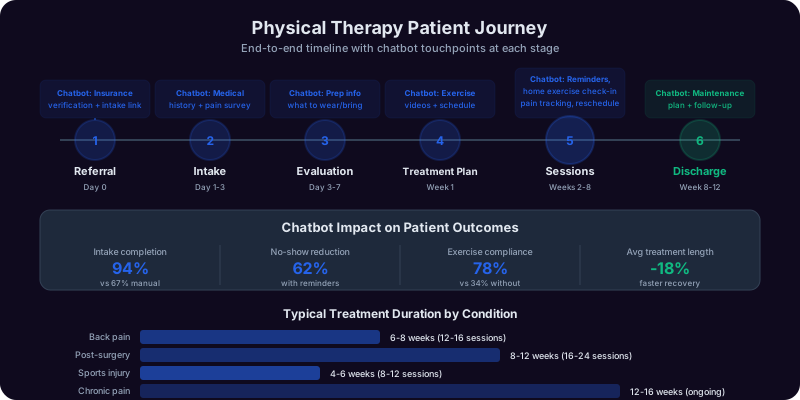
The physical therapy appointment chatbot solves this by handling the entire new-patient intake conversation automatically. A prospective patient finds your clinic through a Google search, physician referral, insurance directory, or word of mouth. They land on your website and start a conversation with the chatbot. The bot guides them through a structured assessment: What area of the body is affected? (shoulder, knee, back, neck, hip, ankle, wrist, elbow, or other) What is the nature of the condition? (post-surgical rehabilitation, sports injury, chronic pain, workplace injury, motor vehicle accident, or general mobility improvement) How long have you been experiencing symptoms? Do you have a physician referral? (required in some states, recommended in all) What insurance do you carry? The chatbot checks your accepted insurance list, confirms preliminary coverage, and presents available appointment times for an initial evaluation. Within 3-5 minutes, the patient has a confirmed appointment, and your front desk has a new patient record with complete intake information -- body region, condition type, symptom duration, referral status, and insurance details -- delivered to your practice management system.
This is not a generic medical booking tool repurposed for physical therapy. The conversation flow is designed around the specific intake requirements of PT clinics: body region assessment determines which therapist specializes in that area, condition type determines evaluation length and treatment approach, referral status determines whether a physician order is needed before the first visit, and insurance verification determines patient financial responsibility. Built on Conferbot's no-code builder, the physical therapy chatbot deploys on your website, WhatsApp, and social media channels within hours with no technical resources required.
According to the American Physical Therapy Association (APTA), over 60% of adults in the United States will experience a condition that could benefit from physical therapy at some point in their lives, yet only a fraction seek treatment. Common barriers include difficulty scheduling, uncertainty about insurance coverage, and not knowing where to start. The chatbot removes these barriers by providing instant answers to the questions that prevent patients from booking their first appointment.
How the Physical Therapy Appointment Chatbot Works
The physical therapy appointment chatbot follows a clinically informed intake flow that mirrors the questions your front-desk staff and intake coordinators ask during every new-patient phone call. Each stage collects information that is essential for scheduling the right appointment, preparing the treating therapist, and verifying insurance coverage.
Stage 1: Body Region and Condition Assessment
The conversation opens with an empathetic greeting that acknowledges the patient may be in pain and immediately moves to the most relevant question: What area of the body is bothering you? Options cover the major regions: neck, shoulder, upper back, lower back, hip, knee, ankle/foot, wrist/hand, elbow, and "multiple areas" or "other." After body region selection, the chatbot asks about the nature of the condition: post-surgical rehabilitation (with surgery type and date), sports or exercise injury, workplace injury (workers' compensation), motor vehicle accident, chronic or recurring pain, neurological condition, balance and fall prevention, or general mobility and strengthening. This two-step assessment routes the patient to the appropriate therapist specialization and determines the type and length of the initial evaluation using Conferbot's NLP capabilities.
Stage 2: Symptom Duration and Severity
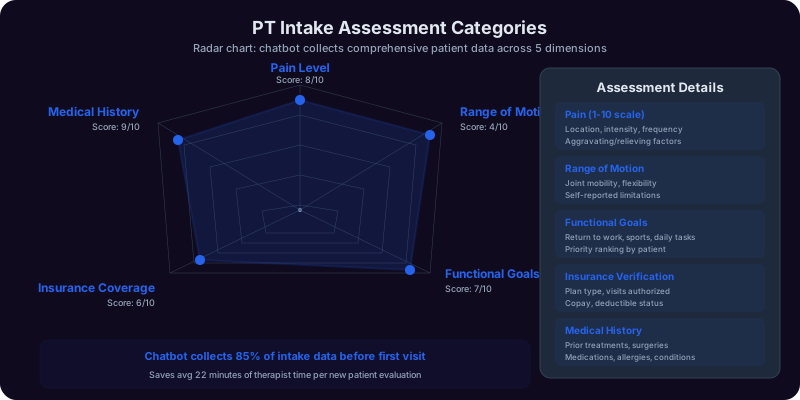
The chatbot collects timing and severity information that helps the therapist prepare for the evaluation. "How long have you been experiencing these symptoms?" (less than 1 week, 1-4 weeks, 1-3 months, more than 3 months). "How would you rate your current pain level?" (0-10 scale presented visually). "How is the condition affecting your daily activities?" (mild -- noticeable but does not limit activities, moderate -- limits some activities, severe -- significantly limits most activities). This information serves multiple purposes: it helps the therapist understand chronicity (acute vs. chronic conditions require different evaluation approaches), it establishes a baseline for measuring treatment progress, and it informs scheduling priority (a patient with severe, acute pain needs a sooner appointment than a patient with mild, chronic discomfort).
Stage 3: Referral and Medical History
The chatbot asks about physician referral status: "Do you have a referral from your physician for physical therapy?" In states with direct access, the chatbot explains: "In [state], you can see a physical therapist without a physician referral. However, many insurance plans require a referral for coverage. We recommend contacting your insurance or physician if you are unsure." In states requiring referral, the chatbot notes that a referral must be on file before or at the first visit. The chatbot also collects relevant medical history: previous PT for the same condition, surgical history related to the affected area, current medications relevant to treatment (blood thinners, pain medication), and any precautions or contraindications the therapist should know about.
Stage 4: Insurance Verification
Insurance verification is one of the most time-consuming front-desk tasks in physical therapy. The chatbot streamlines this by collecting insurance information upfront: insurance carrier, plan name, member ID, and group number. It then checks this against your practice's accepted insurance list. If the carrier is accepted, the chatbot confirms: "Great news -- we are in-network with [carrier name]. Your specific plan benefits (copay, deductible, visit limits) will be verified by our billing team before your first visit. You will receive a benefits summary before your appointment." If the carrier is not accepted, the chatbot offers alternatives: "We are currently out-of-network with [carrier]. We do offer self-pay rates starting at $[amount] per visit, and we can provide a superbill for out-of-network reimbursement. Would you like to proceed, or would you prefer to check if your plan has out-of-network benefits?"
Stage 5: Appointment Booking
With the clinical and insurance information collected, the chatbot presents available evaluation appointment slots. Slots are filtered by the appropriate therapist specialization: a knee post-surgical patient is shown availability with orthopedic-specialized therapists, a balance and fall prevention patient is shown slots with neurological or geriatric specialists. The chatbot books the initial evaluation (typically 45-60 minutes), confirms the appointment, and collects the patient's name, date of birth, phone number, email, and address for the new-patient record. The complete intake profile is delivered to your practice management system as a new patient record, with all clinical and insurance information populated.
Stage 6: Pre-Visit Instructions
After booking, the chatbot sends pre-visit instructions: what to bring (insurance card, photo ID, physician referral if applicable, list of medications, imaging reports if available), what to wear (comfortable clothing that allows access to the affected area), arrival time (15 minutes early for paperwork completion), and what to expect during the initial evaluation. These instructions are sent via the patient's preferred channel (SMS, email, or messaging platform) and reduce the no-show-causing confusion that occurs when patients do not know what to expect at their first PT visit.
Key Features: Injury Assessment, Insurance Verification, and Exercise Reminders
The physical therapy appointment chatbot includes features specifically designed for the clinical, administrative, and patient engagement workflows that PT practices manage daily. These address the real operational challenges that clinic owners, practice managers, and front-desk coordinators face.
Structured Injury and Condition Intake
The chatbot's clinical intake collects body region, condition type, symptom duration, pain severity, functional limitation level, and relevant medical history in a structured format that maps directly to the evaluation documentation your therapists create. Instead of deciphering a voicemail that says "My back hurts and I need to come in," the therapist opens the patient record and sees: "Lower back, chronic pain (3+ months), pain level 6/10, moderate functional limitation, previous PT for same condition 2 years ago, no surgical history, taking ibuprofen as needed." This structured intake saves 10-15 minutes of evaluation time that would otherwise be spent collecting basic history, allowing the therapist to start hands-on assessment sooner.
Intelligent Insurance Pre-Verification
Insurance verification is responsible for a significant share of front-desk labor in PT clinics. The chatbot collects insurance details during the booking conversation and performs preliminary verification against your accepted carrier list. This does not replace the detailed benefits verification your billing team performs (copay amounts, deductible status, visit limits, and authorization requirements still need to be confirmed with the payer), but it eliminates the most common insurance problem: patients who arrive for their first visit only to learn the clinic is out of network with their plan. The chatbot catches this mismatch at the booking stage, allowing the patient to make an informed decision about self-pay options or find an in-network provider -- a better experience for the patient and a protected appointment slot for your clinic.
Home Exercise Program Reminders
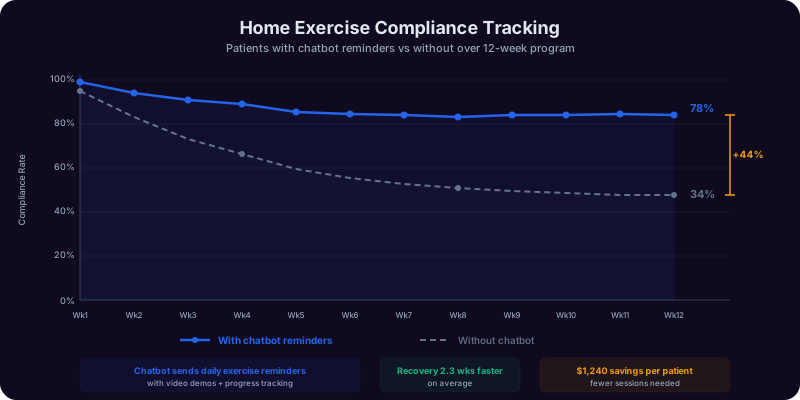
Adherence to home exercise programs is the single most significant factor in physical therapy outcomes, yet compliance rates are notoriously low -- studies published in the National Library of Medicine estimate that only 35-50% of patients consistently perform their prescribed exercises between visits. The chatbot addresses this by sending scheduled exercise reminders: "Hi [Name], it is time for your home exercises! Your therapist prescribed: 1) Hamstring stretches (3 sets of 30 seconds each side), 2) Bridge exercises (3 sets of 15 reps), 3) Clamshells with band (3 sets of 12 each side). Let us know when you have completed today's exercises!" Patients who respond that they completed their exercises receive encouragement. Patients who do not respond receive a gentle follow-up the next day. Exercise details are entered by the treating therapist after each visit and automatically populated in the reminder messages.
Progress Tracking and Outcome Measurement
The chatbot periodically collects patient-reported outcome measures between visits. Weekly check-ins ask about current pain level (0-10), functional improvement since starting therapy, and any new symptoms or concerns. This data is recorded in the patient's chart and provides the therapist with between-visit insight that informs treatment progression. A patient who reports increasing pain between visits may need a treatment modification, while a patient reporting steady improvement confirms the current plan is working. These between-visit data points create a more complete picture of the patient's recovery trajectory than the snapshots captured during in-clinic visits alone.
Therapist Specialization Matching
Physical therapy clinics typically employ therapists with different specializations: orthopedic, sports medicine, neurological, pediatric, geriatric, women's health, and vestibular rehabilitation. The chatbot's condition assessment data routes patients to therapists whose specialization matches their condition. A post-ACL-reconstruction patient is matched to a sports/orthopedic specialist. A stroke rehabilitation patient is matched to a neurological specialist. A patient with vertigo is matched to a vestibular therapist. This intelligent matching ensures optimal clinical outcomes and prevents the scheduling of patients with therapists who lack specific expertise in their condition, which is a common problem when front-desk staff manually assign therapists based solely on calendar availability.
Multi-Channel Patient Engagement
The chatbot operates across your website, WhatsApp, Facebook Messenger, and SMS. Patients can book appointments, receive reminders, report exercise completion, and communicate between-visit updates through whichever channel they prefer. Conferbot's omnichannel integration ensures all patient interactions flow into a unified record, giving therapists and front-desk staff a complete view of patient engagement regardless of communication channel.
Ready to try Physical Therapy Appointment Chatbot?
Deploy this template in under 10 minutes. No coding required.
Use This Template Free →Benefits for Physical Therapy Clinics and Rehabilitation Centers
The operational, clinical, and financial impact of deploying a physical therapy appointment chatbot is measurable across the metrics that matter most to PT practice owners: new patient volume, show rate, plan-of-care completion rate, patient satisfaction scores, and front-desk efficiency.
Convert More Website Visitors into Patients
Physical therapy clinic websites typically convert 2-5% of visitors into new-patient appointments. The vast majority of visitors leave without taking action because the only conversion option is a phone call (which they either cannot make during their workday or do not feel comfortable making) or a basic contact form (which provides no immediate value and has 5-10% submission rates). The chatbot engages visitors in a meaningful clinical conversation, answers their most pressing questions (Do you treat my condition? Do you accept my insurance? When can I start?), and books their appointment -- all within 3-5 minutes. Clinics deploying the chatbot see new-patient conversion rates increase to 8-15%, representing 10-25 additional new patients per month from existing website traffic.
Reduce No-Shows and Cancellations
New patient no-show rates in physical therapy average 15-25%, and each no-show costs the clinic $100-$200 in unrealized revenue plus the opportunity cost of the blocked schedule slot. The chatbot reduces no-shows through three mechanisms: pre-visit instructions that set clear expectations (reducing anxiety-driven no-shows), automated reminders at 48 hours, 24 hours, and 2 hours before the appointment, and easy rescheduling through the chatbot (patients who cannot make it are more likely to reschedule than cancel entirely when rescheduling is a simple text conversation). Clinics report 30-45% reductions in no-show rates after implementing chatbot-based reminders and pre-visit communication.
Improve Plan-of-Care Completion Rates
The biggest clinical and financial challenge in physical therapy is patient dropout. Studies consistently show that 30-50% of patients discontinue therapy before completing their plan of care. The chatbot combats dropout through ongoing engagement: exercise reminders keep patients active between visits, progress check-ins make patients feel monitored and accountable, and rebooking prompts catch patients who forget to schedule their next appointment. Clinics using chatbot-based patient engagement report 15-25% improvements in plan-of-care completion rates, which improves clinical outcomes and significantly increases per-patient revenue.
Free Front-Desk Staff from Phone Tag
Front-desk coordinators in PT clinics spend 2-4 hours per day on new-patient intake calls, insurance inquiries, appointment scheduling, and reminder calls. The chatbot automates the most repetitive portions of this work: new-patient intake, preliminary insurance verification, appointment booking, and automated reminders. This frees front-desk time for tasks that require human judgment: complex insurance authorizations, patient concerns that need empathetic human response, and coordination with referring physicians. Clinics report 40-60% reductions in front-desk phone time after chatbot deployment, enabling the same staff to support higher patient volumes.
Enhance Patient Satisfaction and Online Reputation
Patients who experience a smooth, professional intake process -- from initial chatbot conversation through pre-visit instructions, on-time evaluation start, and post-visit exercise reminders -- rate their overall experience significantly higher than patients who experienced long hold times, repeated information collection, and disorganized communication. Higher satisfaction scores translate to better online reviews, more physician referrals, and stronger word-of-mouth in the community. The chatbot creates systematic excellence in patient communication at every touchpoint, delivered consistently across all patients and all channels. Conferbot's analytics dashboard tracks patient satisfaction metrics alongside operational data so you can correlate experience improvements with business outcomes.
Patient Volume and Revenue Impact Data
Physical therapy clinics operate on patient volume and visit utilization. Every empty evaluation slot and every patient who drops out mid-plan-of-care represents lost revenue. Here is the data from PT clinics that have deployed chatbot-based intake and engagement.
| Metric | Phone Booking Only | With PT Appointment Chatbot | Impact |
|---|---|---|---|
| Website visitor to new patient conversion | 2-5% | 8-15% | 3-4x improvement |
| After-hours appointment capture | 0 (clinic closed) | 30-45% of chatbot bookings | Net new patients |
| New patient no-show rate | 15-25% | 8-14% | 35-45% reduction |
| Plan-of-care completion rate | 50-65% | 65-80% | +15-20 percentage points |
| Home exercise compliance | 35-50% | 55-70% | +20 percentage points |
| Front-desk phone time (daily) | 2-4 hours | 1-2 hours | 45-55% reduction |
| Average visits per patient (plan of care) | 8-12 visits | 11-16 visits | +3-4 additional visits |
| New patients per month (mid-size clinic) | 40-70 | 60-100 | +20-30 additional patients |
Revenue Impact Modeling
Consider a PT clinic with an average reimbursement of $120 per visit and an average plan of care of 10 visits per patient. If the chatbot adds 20 new patients per month, reduces no-shows from 20% to 12%, and improves plan-of-care completion by 15 percentage points (adding 2 visits per patient on average):
| Scenario | New Patients/Mo | Show Rate | Avg Visits | Revenue/Patient | Monthly New-Pt Revenue |
|---|---|---|---|---|---|
| Without chatbot | 50 | 80% | 10 | $1,200 | $48,000 |
| With chatbot | 70 | 88% | 12 | $1,440 | $88,704 |
| Difference | +20 | +8 pts | +2 | +$240 | +$40,704 |
The revenue improvement comes from three compounding factors: more new patients entering the clinic (chatbot captures after-hours and online inquiries that phone-only clinics miss), higher show rates (reminders and pre-visit preparation reduce no-shows), and more visits per patient (exercise reminders and progress tracking improve retention through the full plan of care). Even at conservative assumptions -- 10 additional patients with 1 extra visit each -- a clinic adds approximately $13,200 in monthly revenue from the chatbot alone.
Home Exercise Program Reminders and Compliance Tracking
Home exercise compliance is the most controllable factor in physical therapy outcomes. Patients who consistently perform their prescribed exercises recover faster, require fewer visits, report higher satisfaction, and are more likely to refer friends and family. Yet compliance is consistently low because patients forget, lose motivation, or do not understand the exercises. The chatbot provides the consistent, personalized follow-up that drives compliance.
How Exercise Reminders Work
After each therapy visit, the treating therapist enters or updates the patient's home exercise program in the chatbot system. The exercises are described in patient-friendly language with clear instructions: exercise name, sets, repetitions, hold duration, and any modifications. The chatbot sends reminders at therapist-specified intervals -- typically daily for the first week, then every other day as the program becomes habitual. Each reminder lists the specific exercises prescribed, making it easy for the patient to follow along without searching for a printed handout they may have lost or a patient portal they may have forgotten how to access.
Compliance Tracking and Therapist Feedback
When the patient receives an exercise reminder, they can respond with completion status: "Done," "Partially completed," or "Could not do it today." Reasons for non-completion are captured: pain during exercises, too busy, forgot, exercises too difficult, or exercises too easy. This data flows to the treating therapist before the next visit, providing valuable insight. A patient reporting "pain during exercises" may need a program modification. A patient consistently reporting "too busy" may need a shorter, more focused program. A patient reporting "too easy" may be ready for progression. Without this between-visit feedback, therapists operate blindly -- adjusting programs only at in-clinic visits without understanding what is happening between those visits.
Motivational Engagement
The chatbot celebrates compliance milestones: "You have completed your home exercises 5 days in a row! Consistency like this makes a real difference in your recovery. Keep it up!" And it gently re-engages lapsed patients: "We noticed you have not logged your exercises in 3 days. Even a short session helps maintain progress. Would you like to try a modified routine today?" These messages are designed to encourage without being judgmental or annoying -- the tone is supportive and understanding, acknowledging that life gets busy while reinforcing the importance of consistent exercise for recovery.
Educational Content Between Visits
The chatbot supplements exercise reminders with condition-specific educational content: articles about recovery timelines, tips for managing pain at home, guidance on when to apply ice versus heat, posture correction advice for back pain patients, and injury prevention strategies for sports medicine patients. This educational engagement positions your clinic as a trusted partner in the patient's recovery journey, not just a place they visit twice a week. Patients who feel educated and supported rate their experience higher and are more likely to complete their plan of care, refer others, and return to your clinic for future needs.
50,000+ businesses use Conferbot templates to automate conversations
Integration with EMR, Practice Management, and Billing Systems
A patient intake chatbot that operates independently from your practice management system creates double work for front-desk staff. Seamless integration with your existing EMR, PM, and billing systems is essential for the chatbot to function as a natural extension of your clinical workflow.
EMR and Practice Management Integration
Every new patient captured by the chatbot is automatically created in your practice management system through Conferbot's API integration framework. For clinics using WebPT, the chatbot creates a new patient record with demographics, insurance information, and clinical intake data mapped to the appropriate fields. For clinics on Clinicient (now Agile), Jane App, or HENO, the integration delivers the same structured data via API or webhook. The treating therapist opens the chart and finds the body region, condition type, symptom history, pain level, and functional limitation data already documented -- information that would otherwise require 10-15 minutes of interview time during the evaluation visit.
Insurance Verification Workflow
The chatbot's insurance data collection feeds your benefits verification workflow. Insurance carrier, plan, member ID, and group number are delivered to your billing team or eligibility verification service immediately after booking. For clinics using automated eligibility checking (through clearinghouses like Availity or Office Ally), the chatbot data provides the inputs needed to run verification before the patient arrives. For clinics that verify manually, the chatbot data eliminates the phone call to collect insurance information -- the billing coordinator simply runs the verification using the data already on file. This advance verification prevents the most common billing-related patient complaint in physical therapy: unexpected balance due at the first visit because coverage was not verified beforehand.
Appointment Reminder and Calendar Sync
The chatbot syncs with your practice calendar to display real-time availability filtered by therapist specialization. Appointments booked through the chatbot appear in your PM system calendar, and appointments booked by phone or in person are reflected in the chatbot's availability. Automated reminders (48-hour, 24-hour, and 2-hour) are sent through the patient's preferred channel, with one-tap confirm and reschedule options. For clinics using Google Calendar, Calendly, or embedded scheduling in their PM system, the integrations hub provides direct calendar sync.
Patient Satisfaction and NPS Tracking
After the final visit in a plan of care, the chatbot sends a satisfaction survey and Net Promoter Score question: "On a scale of 0-10, how likely are you to recommend our clinic to a friend or family member?" Responses are tracked in the analytics dashboard alongside clinical and operational metrics, enabling you to correlate patient experience with business outcomes. Patients who score 9-10 (promoters) receive a follow-up message with links to leave reviews on Google, Healthgrades, and Zocdoc. Patients who score 6 or below (detractors) are flagged for personal follow-up by the clinic manager to address concerns before they become negative reviews.
Getting Started with Your Physical Therapy Appointment Chatbot
Deploying the physical therapy appointment chatbot takes 2-4 hours for basic setup and 2-3 days for a fully integrated deployment with EMR connections, insurance verification workflow, and exercise reminder configuration. The process is designed for practice managers and clinic administrators with no technical background.
Step 1: Clone the Template
Open the Conferbot template library and select the Physical Therapy Appointment Chatbot. Click "Use This Template" to clone it to your workspace. The template includes the complete conversation flow: body region assessment, condition intake, symptom collection, insurance verification, appointment booking, and pre-visit instructions. Review the flow in the visual builder to understand the structure before customizing.
Step 2: Configure Clinical and Insurance Settings
Update the chatbot with your clinic-specific settings. Enter your accepted insurance carriers. Configure therapist profiles with their specializations, working schedules, and evaluation slot lengths. Set your direct-access messaging based on your state's regulations. If your clinic requires physician referrals for all patients, update the referral question to reflect this requirement. If you have multiple locations, configure location-specific availability and therapist assignments.
Step 3: Connect Your Practice Management System
In the Conferbot integrations hub, connect the chatbot to your EMR/PM system. Map the chatbot's data fields to your system's patient record fields. Configure the appointment sync to reflect real-time therapist availability. Set up notification workflows so front-desk staff are alerted when new patients book through the chatbot. Test the integration by completing a test booking and verifying the patient record appears correctly in your PM system with all clinical and insurance data populated.
Step 4: Set Up Exercise Reminders and Progress Tracking
Configure the exercise reminder system: set default reminder frequency (daily, every other day), customize the reminder message tone and format, and establish the compliance tracking workflow. Create exercise templates for common conditions (low back pain, post-ACL reconstruction, rotator cuff rehabilitation, total knee replacement) that therapists can quickly assign and customize for individual patients. Set up the weekly progress check-in questions and ensure responses are routed to the treating therapist's dashboard.
Step 5: Deploy and Monitor
Embed the chatbot on your clinic's website -- particularly the home page, services page, conditions-treated page, and insurance/billing page. Deploy across WhatsApp and Messenger for patients who prefer messaging. Ensure all clinic marketing materials (Google Business Profile, physician referral sheets, insurance directory listings) link to your website where the chatbot is available. Monitor the analytics dashboard for the first two weeks: track conversation starts, booking completion rates, insurance match rates, and no-show rates for chatbot-booked versus phone-booked appointments. Adjust the intake flow based on real patient interaction data -- common early optimizations include simplifying the condition description options and adjusting the insurance carrier list based on your actual patient mix.
Direct Access Physical Therapy and Chatbot-Driven Patient Acquisition
Direct access -- the ability for patients to see a physical therapist without a physician referral -- is legal in all 50 US states, though with varying restrictions. The chatbot is a powerful tool for direct-access patient acquisition because it addresses the primary barriers that prevent patients from seeking PT independently.
Educating Patients About Direct Access
Most patients do not know they can see a physical therapist without first visiting their primary care physician. The chatbot introduces this option naturally during the intake conversation. When asked about a physician referral, the chatbot explains: "In [state], you can begin physical therapy without a physician referral. Our therapists are trained to evaluate your condition and determine if physical therapy is appropriate, or if you should be referred to a physician for further evaluation. Many insurance plans cover direct-access PT visits -- we will verify your specific coverage before your first visit." This education alone expands your potential patient base to include people who are experiencing pain or limitation but have not yet seen a doctor -- a large and underserved population.
Capturing Self-Referred Patients
Self-referred patients (those coming directly without a physician referral) are among the most motivated and compliant PT patients. They have identified their problem, decided to take action, and chosen physical therapy as their treatment approach. The chatbot captures these patients at the moment of highest motivation -- when they are actively searching for help -- and converts them into booked appointments before that motivation fades. A patient who searches "physical therapy for knee pain near me" at 8 PM and finds your website with a chatbot that immediately assesses their condition, verifies insurance, and books an appointment for tomorrow morning is far more likely to follow through than a patient who has to remember to call your clinic during business hours the next day.
Competing with Urgent Care and Orthopedic Clinics
Patients experiencing musculoskeletal pain often default to urgent care or orthopedic clinic visits because these providers market themselves as immediately accessible. A PT clinic with a chatbot offering same-day or next-day evaluation appointments competes directly with these alternatives. The chatbot can position PT as the appropriate first stop: "For most muscle and joint pain, physical therapy is recommended as a first-line treatment. Our evaluation will determine the best course of action -- if imaging or physician consultation is needed, we will refer you appropriately." This messaging, supported by instant booking capability, captures patients who would otherwise spend $200-$500 at urgent care for the same condition that PT can treat more effectively.
Direct access combined with the chatbot's instant booking capability is the most significant growth opportunity for physical therapy clinics in 2026. The clinics that make it easiest for patients to start therapy -- without the friction of referral requirements, phone calls, and waiting -- will capture the largest share of the massive population of people experiencing musculoskeletal pain who currently receive no treatment at all.
HIPAA Compliance and Patient Data Protection
Physical therapy practices are covered entities under HIPAA, and any technology that collects or transmits patient health information must meet strict privacy and security requirements. The chatbot is designed with HIPAA compliance as a foundational requirement.
Protected Health Information (PHI) Handling
The chatbot collects information that qualifies as PHI under HIPAA: patient name, date of birth, health conditions, symptom descriptions, insurance information, and appointment details. All PHI collected through the chatbot is transmitted and stored using encryption standards that meet HIPAA requirements: TLS 1.3 for data in transit and AES-256 for data at rest. The chatbot does not collect or store highly sensitive clinical data (treatment notes, diagnoses, imaging results) -- this information remains within your HIPAA-compliant EMR system. The chatbot serves as the intake and engagement layer, collecting the minimum necessary information for scheduling and preliminary assessment.
Business Associate Agreement
Conferbot executes a Business Associate Agreement (BAA) with physical therapy practices, establishing the legal framework for handling PHI in compliance with HIPAA. The BAA defines Conferbot's obligations for data protection, breach notification, and compliance with the Privacy and Security Rules. Your practice should have a signed BAA in place before deploying the chatbot -- Conferbot's compliance team provides the agreement as part of the onboarding process for healthcare clients.
Access Controls and Audit Logging
Patient data collected through the chatbot is accessible only to authorized users within your practice through role-based access controls. Every access to patient data is logged with user identity, timestamp, and action taken, meeting HIPAA's audit trail requirements. The chatbot's access control system integrates with your practice's existing user management to ensure consistent permission levels across all systems. Conferbot's data security framework provides the administrative, physical, and technical safeguards required by the HIPAA Security Rule.
Patient Consent and Communication Preferences
The chatbot collects explicit consent for electronic communication before sending exercise reminders, appointment notifications, or progress check-ins. Patients can opt out of specific communication types while maintaining others (for example, receiving appointment reminders but not exercise prompts). All consent records are documented and timestamped, providing an audit trail that demonstrates your practice obtained appropriate authorization for each type of electronic patient communication. This consent management is built into the chatbot's conversation flow rather than buried in terms of service, ensuring meaningful patient agreement.
Physical Therapy Appointment Chatbot FAQ
Everything you need to know about chatbots for physical therapy appointment chatbot.
Why Use a Template vs Building from Scratch?
Templates encode years of optimization data into the conversation flow before you start.
| Factor | Conferbot Template | Build from Scratch | Hire a Developer |
|---|---|---|---|
| Time to deploy | 10 minutes | 2-8 hours | 2-6 weeks |
| Cost | Free | Your time | $5,000-$25,000 |
| Day-1 conversion | 15-22% | 5-8% | 10-15% |
| Proven flows | Yes, data-tested | No | Depends |
| Updates included | Automatic | Manual | Paid |
| Multi-channel | 8+ channels | 1 channel | Extra cost |
| Analytics | Built-in | Must build | Extra cost |
Ready to Deploy Physical Therapy Appointment Chatbot?
Join 50,000+ businesses. Free forever plan available. No credit card required.