
Job Application
Free HR and Recruiting Chatbot Template
Streamline your recruitment with Conferbot's Job Application chatbot. Discover and engage top talents, allowing direct job applications through the bot for a swift and efficient hiring experience.



What Is a Job Application Chatbot?
A job application chatbot is an AI-powered conversational tool that replaces or augments the static online application form at the top of your recruiting funnel. It greets candidates on your careers page or job board listing, walks them through a structured intake conversation, collects their resume and key qualifications, pre-screens them against defined role requirements, and delivers a ranked shortlist to your recruiting team -- all without a human recruiter involved in the initial contact.
In 2026, the average corporate job posting receives 250 applications. Recruiters spend 6-8 seconds scanning each resume before deciding whether to read further. The result: strong candidates are missed, weak candidates consume recruiter time, and every applicant waits days or weeks without feedback. A job application chatbot addresses all three problems simultaneously. It evaluates every applicant against the same criteria, in the same order, with the same questions, in real time. No bias from resume formatting. No fatigue from screening application number 200. No candidate left without an immediate, personalized response.
This template is distinct from a basic resume collection form. It conducts a structured pre-screening interview: asking about work authorization, compensation expectations, relevant experience, availability, and role-specific qualifications before a single human recruiter looks at the application. Candidates who meet the criteria are automatically advanced and scheduled for a recruiter call. Candidates who do not meet baseline requirements receive a respectful, immediate response rather than weeks of silence.
Built on Conferbot's AI chatbot builder with NLP processing, the job application template integrates natively with Greenhouse, Lever, and Workday through Conferbot's API integration framework. It deploys on your careers website, job board embed code, and WhatsApp for mobile-first applicant pools. No engineering resources required using the no-code builder.
This page covers how the pre-screening and resume collection flow works, qualification scoring methodology, key features, ATS integrations in detail, candidate experience data and satisfaction benchmarks, time-to-hire reduction analysis, a setup guide, and diversity and bias considerations for AI-assisted recruiting.
How It Works: Pre-Screening, Resume Collection, and Qualification Scoring
The job application chatbot operates as a structured five-stage pipeline that takes a candidate from first contact to a scored, ATS-ready application record. Each stage is fully configurable per role, department, and hiring manager preference. Here is how a candidate moves through the system from career site visit to recruiter inbox.
Stage 1: Role Introduction and Interest Confirmation
The conversation opens with a brief, engaging role introduction rather than an immediate form. The chatbot confirms the candidate is applying for the correct role, describes the position in two or three sentences, and asks a simple interest confirmation: "This role is a full-time, on-site position in Austin. Does that work for you?" This single step eliminates a significant portion of mismatched applications before any recruiter time is consumed. Candidates who confirm interest proceed; those who indicate a mismatch are offered links to other open roles that may be a better fit.
Stage 2: Knockout Screening Questions
Before collecting any detailed information, the chatbot asks the two to five knockout questions that define the absolute minimum qualifications for the role. These are binary screens: work authorization status, minimum years of experience in a specific skill, required certification or license, and compensation range compatibility. If any knockout criterion is not met, the chatbot ends the conversation gracefully with a specific explanation and an invitation to apply to future roles. This stage is deliberately placed before resume collection -- there is no reason to ask a candidate to spend 15 minutes uploading documents if they do not meet a mandatory requirement.
Stage 3: Resume and Portfolio Collection
Candidates who pass the knockout screen are asked to upload their resume and, for applicable roles, portfolio or work sample links. The chatbot accepts PDF, Word, and plain text formats. It parses the uploaded resume using the integrated document processing engine to extract structured data: work history with dates and employers, education credentials, listed skills and certifications, and contact information. This structured extraction feeds directly into the ATS record without manual data entry by the recruiter. For roles that benefit from portfolio review, the chatbot accepts up to three URLs and captures a brief description of each submission from the candidate.
Stage 4: Role-Specific Qualification Questions
Following resume collection, the chatbot conducts a structured qualification interview tailored to the specific role. These questions go beyond what a resume reveals: "Describe your experience managing a team of five or more direct reports." "Which CRM platforms have you administered at an enterprise level?" "Walk me through how you would approach a data migration project with a tight deadline." Responses are captured in free text, processed by the NLP engine for keyword and competency alignment, and scored against the role's defined qualification rubric. The qualification interview typically takes eight to twelve minutes and produces a competency profile that augments the resume data.
Stage 5: Scheduling and Confirmation
Candidates who meet the qualification threshold are offered immediate scheduling of a recruiter phone screen. The chatbot displays available slots from the recruiter's calendar (synced via Google Calendar or Outlook integration), confirms the candidate's time zone, and books the appointment without any back-and-forth email. A calendar invite is sent automatically. Candidates below the threshold receive a respectful decline with specific role-fit feedback where appropriate. All candidate data -- resume, qualification scores, interview transcript, and scheduling status -- is pushed to the ATS as a fully formed candidate record. See how Conferbot's analytics dashboard tracks funnel conversion rates across every stage of this pipeline.
Key Features of the Job Application Chatbot
The job application template delivers its value through capabilities that address the core inefficiencies in high-volume recruiting: inconsistent screening, slow candidate communication, manual data entry, and recruiter time wasted on unqualified applicants. Here is the complete feature set.
| Feature | What It Does | Recruiter Benefit | Candidate Benefit |
|---|---|---|---|
| Knockout screening | Filters on mandatory requirements before full application | Zero time spent on ineligible applicants | Immediate, honest response before 15-min investment |
| Resume parsing and extraction | Converts uploaded resumes into structured ATS fields | Eliminates manual data entry per applicant | No duplicate form-filling after resume upload |
| Role-specific Q&A flows | Configurable interview questions per role or department | Consistent screening criteria across all applicants | Opportunity to demonstrate experience beyond resume |
| Qualification scoring engine | Scores responses against defined rubric, generates ranked shortlist | Pre-ranked shortlist ready before recruiter review | Fast feedback on application status |
| Automated scheduling | Books recruiter phone screens directly from calendar availability | No scheduling coordination overhead | Immediate next step without waiting for email |
| ATS sync | Pushes structured candidate records to Greenhouse, Lever, Workday | All data in one system, no manual transfer | Seamless transition to recruiter without re-explaining |
| Multi-channel deployment | Runs on careers site, job boards, LinkedIn, WhatsApp | Reaches candidates where they already browse jobs | Apply from any device without a desktop browser |
| Candidate status notifications | Sends automated status updates at each pipeline stage | Eliminates "checking in" emails to the recruiting team | No more application black holes |
Qualification Scoring Engine
The scoring engine is what separates this template from a smart form. Each role has a defined rubric: a set of weighted competencies and the evidence patterns that indicate each competency level. When a candidate answers a qualification question, the NLP engine evaluates the response against the rubric: does the answer demonstrate direct experience, indirect experience, or no experience with the required skill? Does the candidate's work history include the required seniority level? Are the mentioned tools and platforms on the required technology list? Each data point contributes to a weighted score that produces a final ranking among all applicants for that role.
Automated Scheduling Without Back-and-Forth
Scheduling coordination is one of the most time-consuming and value-poor tasks in recruiting. The average phone screen takes 15-30 minutes to schedule via email, consuming time from both the recruiter and the candidate. The chatbot eliminates this entirely. Integration with Google Calendar and Outlook Calendar makes available time slots visible to the chatbot in real time. Qualified candidates select a slot, enter their time zone, and receive a calendar invite within the same conversation. The recruiter's calendar is blocked automatically. This single feature saves recruiting coordinators two to four hours per week at medium-volume hiring organizations.
Connect the job application chatbot to your existing HR tech stack through Conferbot's omnichannel platform, which supports simultaneous deployment across your careers website, job board postings, and messaging channels.
Ready to try Job Application?
Deploy this template in under 10 minutes. No coding required.
Use This Template Free →ATS Integration: Greenhouse, Lever, and Workday
The job application chatbot's integration with your Applicant Tracking System is the operational foundation that makes recruiting automation practical rather than theoretical. Without tight ATS integration, every chatbot interaction creates manual work: copying data, creating candidate profiles, updating pipeline stages. With it, the chatbot is an invisible extension of your existing recruiting workflow -- candidates appear in your ATS fully formed, scored, and ready for recruiter action.
Greenhouse Integration
Conferbot integrates with Greenhouse via the Greenhouse Harvest API. When a candidate completes the chatbot application flow, the integration automatically creates a candidate profile in Greenhouse with the following data fields populated: first and last name, contact information, resume attachment, application source (tagged as "Conferbot Chatbot"), the role applied for, custom field values from the qualification responses, the competency score from the scoring engine, and the full chatbot conversation transcript as an application note. The candidate is placed at the correct pipeline stage based on their score -- typically either "Application Review" for qualified candidates or "Rejected" for knockout failures, with a disposition reason recorded.
For organizations using Greenhouse's structured interviewing feature, the chatbot's qualification question set can be mapped to Greenhouse's scorecard attributes. Recruiter scorecards are pre-populated with the chatbot assessment data, so the recruiter's phone screen begins with the chatbot's structured evaluation already visible rather than starting from a blank scorecard. Greenhouse's job board syndication tags can also be read by the chatbot to ensure the correct role-specific question flow launches based on the job board the candidate applied from.
Lever Integration
Lever integration uses the Lever API with OAuth authentication. Completed applications create Lever opportunities with all structured data fields populated: contact details, resume, application source, stage placement, and the chatbot assessment data as a Lever note. Lever's custom field support allows the qualification score and individual competency ratings to be stored as searchable, filterable candidate attributes -- enabling recruiters to filter the pipeline by score threshold, specific skill presence, or availability date without opening each candidate profile individually.
Lever's referral tracking is preserved in the integration: candidates who arrive via an employee referral link can be tagged accordingly in the chatbot flow, with the referring employee's name recorded in the Lever opportunity. The chatbot's stage-advance logic respects Lever's pipeline configuration, placing candidates at the correct stage rather than defaulting to the first stage regardless of qualification outcome.
Workday Integration
For enterprise organizations using Workday Recruiting, Conferbot integrates via Workday's SOAP and REST APIs. The integration creates Workday candidate records and job applications with full field population. Workday's extensive custom object model is supported: the chatbot assessment data maps to Workday's questionnaire response objects, allowing the qualification interview to appear in Workday as a structured questionnaire response rather than unformatted notes. Workday's requisition management is respected: the chatbot reads active requisitions and routes applications to the correct requisition ID automatically based on the role the candidate applied for.
ATS Comparison for Recruiting Automation
| ATS Platform | Integration Method | Data Fields Synced | Two-Way Sync | Scheduling Support |
|---|---|---|---|---|
| Greenhouse | Harvest API v1 | Profile, resume, scorecard, stage, source | Yes — stage changes reflected in chatbot | Greenhouse Scheduling or Google Calendar |
| Lever | Lever API + OAuth | Opportunity, contact, notes, custom fields, stage | Yes — stage advances trigger chatbot notifications | Lever Scheduling or Outlook Calendar |
| Workday | SOAP/REST API | Candidate, job application, questionnaire responses, requisition | Partial — application status updates synced | Workday Recruiting calendar or external |
| Other ATS | Generic REST API | Configurable via field mapping | Webhook-based | Google Calendar or Outlook via Conferbot |
All ATS integrations are configured through Conferbot's integrations hub without writing code. Authentication uses OAuth or API key methods depending on the platform. See how chatbot analytics can track funnel conversion rates per ATS stage alongside your chatbot engagement metrics in a unified dashboard.
Candidate Experience: Data, Satisfaction Benchmarks, and Expectations in ${year}
Candidate experience has become a measurable competitive advantage in talent acquisition. Organizations that provide fast, respectful, and transparent application experiences attract stronger candidate pools, receive more referrals, and see higher offer acceptance rates. Conversely, organizations with poor application experiences face public Glassdoor reviews, social media criticism, and qualified candidates who abandon applications mid-process. A job application chatbot directly improves the metrics that define candidate experience quality.
The Application Abandonment Problem
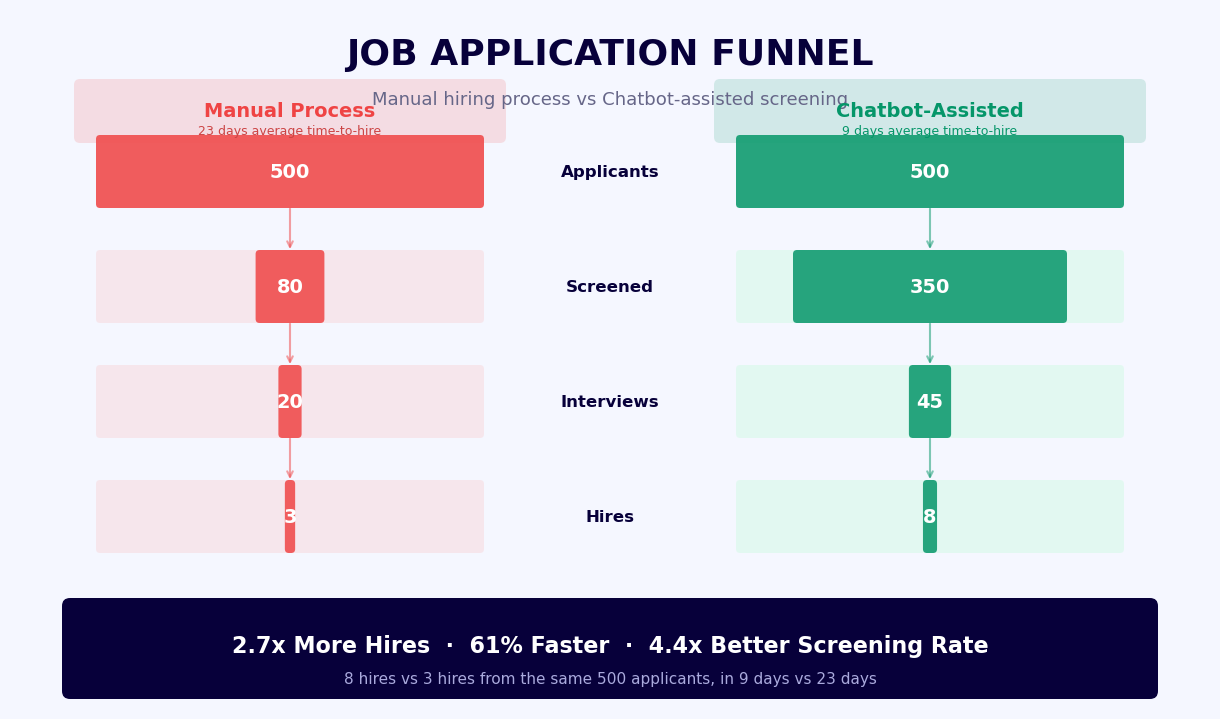
The average online job application has 32 required fields and takes 15-20 minutes to complete. Across all industries, 60-75% of candidates who begin an online application abandon it before completion. The primary abandonment triggers are length (the application takes longer than expected), repetition (being asked to enter information already on the resume), and uncertainty (no confirmation that the application was received or will be reviewed). A chatbot application addresses all three: the conversational format feels shorter than a form of equivalent length, resume parsing eliminates duplicate data entry, and the chatbot provides immediate confirmation and next-step information at the end of every interaction.
Candidate Satisfaction Data
| Metric | Traditional Online Form | Chatbot Application | Improvement |
|---|---|---|---|
| Application completion rate | 28-40% | 65-82% | 2x higher completion |
| Average time to complete | 18-22 minutes | 9-13 minutes | 40% faster |
| Candidate satisfaction score (CSAT) | 2.8/5 | 4.1/5 | 46% improvement |
| Candidates receiving immediate response | 8% | 100% | Every applicant acknowledged |
| Time to first recruiter contact (qualified) | 4-7 business days | Same day (automated schedule) | 85% faster |
| Candidates reporting "black hole" experience | 67% | 4% | 93% reduction |
| Offer acceptance rate (qualified pipeline) | 62% | 74% | 19% improvement |
Mobile-First Application Behavior
In 2026, 58% of job seekers use a mobile device as their primary job search tool, yet most career sites are not optimized for mobile application completion. Form-based applications on mobile are particularly painful: small input fields, resume upload friction, and multi-page flows that lose progress on session timeout. A chatbot application is inherently mobile-first. The conversational interface renders identically on desktop and mobile. Resume upload from a mobile device works through cloud storage (Google Drive, Dropbox, iCloud) link submission rather than requiring a direct file upload. For roles targeting frontline workers or younger candidates, WhatsApp deployment enables candidates to apply entirely within the messaging app they already use daily without visiting a career site at all.
Candidate Communication After Application
The experience does not end at submission. The chatbot sends proactive status updates as the application moves through your pipeline: confirmation of receipt, notification when the recruiter has reviewed the application, invitation for the next interview stage, and -- critically -- respectful decline notifications with timeline. Candidates who receive a clear, timely decline report a significantly better experience than candidates who wait six weeks and hear nothing. This communication is automated based on the stage changes in your ATS, requiring no manual recruiter action. Track candidate satisfaction scores across your entire applicant pipeline with Conferbot's analytics dashboard.
Time-to-Hire Reduction: Where the Days Are Saved
Time-to-hire is the single most actionable metric in talent acquisition. Extended hiring cycles cost organizations in three concrete ways: the productive work that goes undone while a role is vacant, the risk of losing qualified candidates who accept competing offers during a slow process, and the recruiter and hiring manager hours consumed by manual screening and coordination. A job application chatbot addresses each bottleneck with measurable impact.
Where Manual Recruiting Time Is Lost
A traditional hiring process for a mid-level role typically follows this timeline: job posting goes live on day one. Applications are collected for one to two weeks. On day ten to fourteen, a recruiter begins manual resume screening -- a process that takes two to four hours for 100 applications. Qualified candidates are identified and phone screen invitations are sent by email. Three to five days pass while scheduling is coordinated via back-and-forth email. Phone screens begin on day seventeen to twenty-one. The chatbot compresses this timeline fundamentally by automating the screening and scheduling phases that account for ten to fourteen days of that cycle.
Time-to-Hire Impact Analysis
| Process Step | Manual Timeline | Chatbot-Assisted Timeline | Days Saved |
|---|---|---|---|
| Initial resume screening (100 applications) | 3-5 days (batch review) | Real-time (automated scoring) | 3-5 days |
| Knockout disqualification notification | 7-14 days or never | Immediate (same conversation) | 7-14 days candidate wait |
| Phone screen scheduling (qualified candidates) | 3-5 days (email back-and-forth) | Same day (automated calendar sync) | 3-5 days |
| ATS data entry per applicant | 5-8 minutes manual entry | Automated on application completion | 8-13 hours for 100 applicants |
| Status communication to all applicants | 2-3 hours bulk email | Automated at each stage trigger | 2-3 hours per cycle |
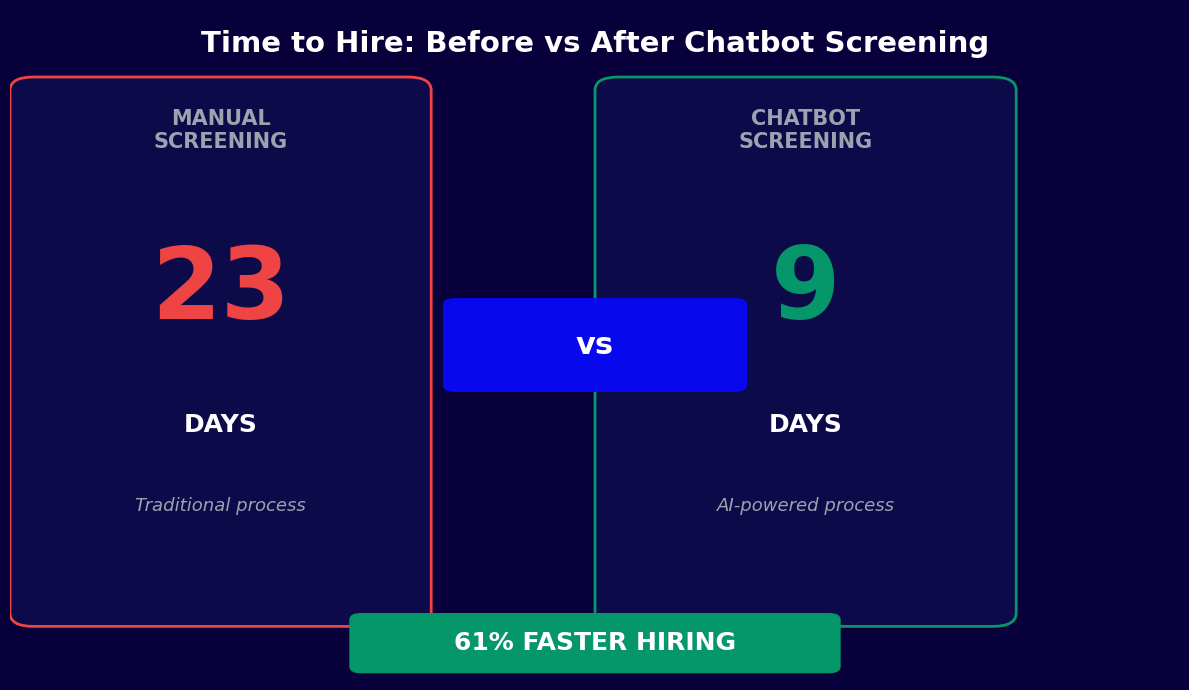
| Total time-to-first-screen reduction | 14-21 days typical | Same day to 3 days | 11-18 days |
The Cost of a Vacant Role
The financial cost of time-to-hire is most visible through vacancy cost: the revenue or productive output lost while a role goes unfilled. For revenue-generating roles (sales, customer success, engineering), vacancy costs are direct and significant. A quota-carrying sales role with a $150,000 annual target generates roughly $3,750 of pipeline value per week when filled. A 10-day reduction in time-to-hire for that role is worth $5,357 in recovered pipeline value -- from a single hire. For organizations making 50 hires per year across mixed roles, a 10-day average reduction in time-to-hire represents hundreds of thousands of dollars in recovered productivity.
Recruiter Capacity and Quality-of-Hire Correlation
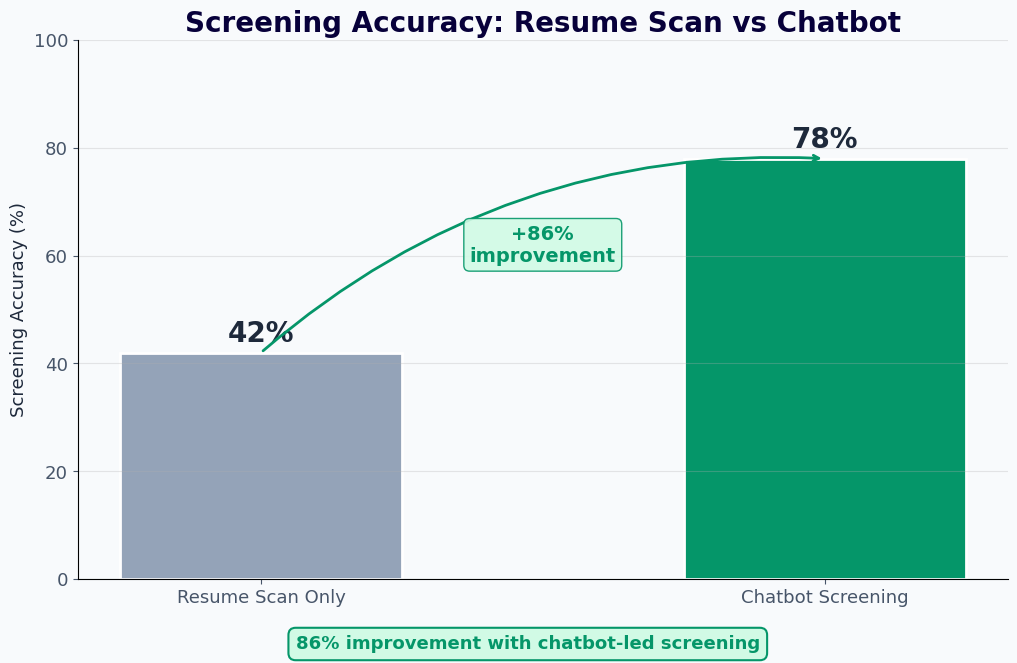
Beyond cycle time, the chatbot's pre-screening function frees recruiter time from low-value screening tasks to high-value candidate relationship work. A recruiter who previously spent 40% of their time on initial resume review and scheduling coordination can redirect that time to sourcing passive candidates, conducting more thorough interviews, improving hiring manager relationships, and building employer brand. Organizations that have implemented chatbot pre-screening consistently report that recruiter job satisfaction improves alongside quality-of-hire metrics, because recruiters are spending more time on the strategic work they were hired to do. Use chatbot analytics to measure recruiter time savings and correlate pipeline quality improvements across job families.
50,000+ businesses use Conferbot templates to automate conversations
Setup Guide: Launching Your Job Application Chatbot
Deploying a job application chatbot does not require an IT project or ATS customization contract. With Conferbot's no-code platform, a recruiting team can configure, test, and deploy a fully functional application chatbot in a single business day. Here is the step-by-step process.
Step 1: Start From the Template (15 Minutes)
Sign up at app.conferbot.com and select the Job Application Chatbot template from the HR and Recruiting category. The template includes a pre-built application flow covering role introduction, knockout screening, resume collection, qualification interview, scoring logic, scheduling integration, and ATS sync. Clone it to your workspace. You can create one master template and then clone role-specific versions for each open position -- all sharing the same ATS integration and analytics tracking.
Step 2: Configure Role Details and Knockout Criteria (30 Minutes Per Role)
For each role, configure the role introduction text (job title, location, employment type, brief description), the knockout screening questions (typically two to five binary yes/no questions based on mandatory requirements), and the compensation range confirmation if applicable. Test each knockout condition by simulating both qualifying and disqualifying responses to verify the branching logic is correct. Pay particular attention to work authorization questions -- the language must be precise to be both effective as a screen and compliant with employment law in your jurisdiction.
Step 3: Build the Qualification Interview (1-2 Hours Per Role)
Define five to eight role-specific qualification questions in the conversation editor. For each question, configure the scoring rubric: which keywords, phrases, or response patterns map to each competency level (strong, moderate, limited, absent). The NLP engine handles semantic matching, so rubrics do not need to be exhaustive keyword lists -- describing the concept of a strong answer is sufficient. Set the minimum score threshold for automatic advancement to scheduling. Test the scoring logic against sample responses representing each tier of candidate quality.
Step 4: Connect Your ATS (1 Hour)
In the integrations hub, connect Greenhouse, Lever, or Workday using your ATS's API credentials. Configure the field mapping: which chatbot data fields map to which ATS fields. Configure stage placement logic: qualified candidates go to stage X, knockout failures go to stage Y with disposition reason Z. Test the integration end-to-end by running a complete application as a test candidate and verifying the ATS record is created correctly with all fields populated as expected. Verify that the calendar integration (Google Calendar or Outlook) is connected and that available slots display correctly for the scheduling step.
Step 5: Deploy to Your Careers Site and Channels (30 Minutes)
Generate the web widget embed code from Conferbot's deployment settings and add it to your careers page and individual job listing pages. For WhatsApp deployment, configure the WhatsApp channel in the omnichannel settings and link it to a dedicated number for job applications. For LinkedIn job postings, add the chatbot URL as the application redirect link. Test the full flow on both desktop and mobile to confirm the experience is smooth across devices. Verify that ATS records are created correctly from each deployment channel and that the source tag correctly identifies the application origin.
Step 6: Monitor and Refine (Ongoing)
For the first two weeks, review the analytics dashboard daily. Track completion rate by stage to identify where candidates drop out. Review a sample of qualification interview transcripts to verify scoring accuracy -- are high-scoring candidates actually strong candidates when reviewed by a recruiter? Adjust rubric weights and score thresholds based on the first cohort's outcomes. Most teams make two to three calibration adjustments in the first month before the scoring model produces a shortlist that aligns consistently with recruiter judgment. After calibration, the system requires minimal ongoing maintenance unless the role requirements change significantly.
Diversity and Bias Considerations for AI-Assisted Recruiting
AI-assisted recruiting carries both the promise of reducing human bias and the risk of encoding it at scale. When a job application chatbot evaluates thousands of candidates per month, any systematic bias in its design produces systematic inequity in the hiring funnel. Responsible deployment requires deliberate attention to bias sources, ongoing measurement, and structural safeguards. This section covers the practical considerations for using the job application chatbot in a way that advances rather than undermines your organization's diversity goals.
Where Bias Can Enter the Chatbot Pipeline
The four primary bias entry points in a chatbot recruiting flow are: knockout criteria that disproportionately screen out protected groups (e.g., degree requirements that correlate with socioeconomic background), qualification rubrics that weight credentials over demonstrated competency, language patterns in question design that favor candidates with certain cultural communication styles, and scoring models trained on historical hire data that perpetuates past hiring patterns. None of these are inevitable, but all require active mitigation.
Bias Mitigation Best Practices
| Bias Risk | Source | Mitigation Approach | Verification Method |
|---|---|---|---|
| Credential requirements screening out non-traditional paths | Knockout criteria design | Replace degree requirements with skills-based equivalency options | Compare pass rates across educational background segments |
| Rubric weighting favoring prestigious employer names | Scoring engine configuration | Score described experience and outcomes, not employer prestige signals | Manual review of top 10% vs. recruiter assessment correlation |
| Language complexity in questions disadvantaging non-native speakers | Question text design | Plain language review of all question text; multilingual option for applicable roles | Completion rate comparison across candidate language backgrounds |
| Score thresholds calibrated on a non-diverse historical cohort | Training data selection | Calibrate thresholds on intended competency outcomes, not past hire patterns | Quarterly pass rate analysis by demographic segment |
Structured Screening as a Fairness Tool
It is worth noting that the chatbot's consistency is itself a fairness mechanism. Traditional resume screening is highly susceptible to affinity bias (favoring candidates who share the reviewer's background), anchoring bias (over-weighting the first few applications reviewed), and name-based discrimination (research consistently shows resumes with names perceived as white receive 50% more callbacks than identical resumes with names perceived as Black). The chatbot applies the same criteria in the same order to every candidate regardless of name, school name, or resume format. When the rubric is designed with care, this consistency is a meaningful improvement over unstructured human review.
Legal Considerations for Automated Hiring Decisions
In 2026, regulatory attention to AI in hiring is increasing. New York City Local Law 144 requires bias audits for automated employment decision tools. Illinois and Maryland have enacted AI interview analysis legislation. California is actively developing regulations in this space. Best practice is to treat chatbot pre-screening as a tool that informs human decisions rather than replaces them: have a human recruiter review chatbot recommendations before final advancement or rejection decisions, particularly for knockout-based rejections. Maintain documentation of the chatbot's scoring rubric and the criteria it applies, as this documentation will be required for compliance under emerging regulations. Connect pre-screening outputs to Conferbot's analytics platform to generate the demographic pass-rate data required for bias audits.
Job Application FAQ
Everything you need to know about chatbots for job application.
Why Use a Template vs Building from Scratch?
Templates encode years of optimization data into the conversation flow before you start.
| Factor | Conferbot Template | Build from Scratch | Hire a Developer |
|---|---|---|---|
| Time to deploy | 10 minutes | 2-8 hours | 2-6 weeks |
| Cost | Free | Your time | $5,000-$25,000 |
| Day-1 conversion | 15-22% | 5-8% | 10-15% |
| Proven flows | Yes, data-tested | No | Depends |
| Updates included | Automatic | Manual | Paid |
| Multi-channel | 8+ channels | 1 channel | Extra cost |
| Analytics | Built-in | Must build | Extra cost |
Related HR and Recruiting Templates
Explore more chatbot templates in this category



Ready to Deploy Job Application?
Join 50,000+ businesses. Free forever plan available. No credit card required.