
Volunteer Coordinator Chatbot
Free Non Profit And Charity Chatbot Template
A complete volunteer coordination chatbot that helps nonprofits recruit, screen, and schedule volunteers — covering interest areas, availability, skills assessment, and orientation signup all in one conversation.



What Is a Volunteer Coordinator Chatbot?
A volunteer coordinator chatbot is a conversational AI assistant that automates the complete volunteer management lifecycle -- from initial signup and onboarding through skill-based matching, shift scheduling, event coordination, hour tracking, and recognition -- through an interactive chat interface available 24/7 on your website, WhatsApp, and social media channels. It replaces the manual processes that consume volunteer coordinators' time -- spreadsheet management, phone calls, email chains, paper sign-up sheets, and manual hour tracking -- with a single automated system that handles every administrative task while the coordinator focuses on the human relationships that make volunteer programs thrive.
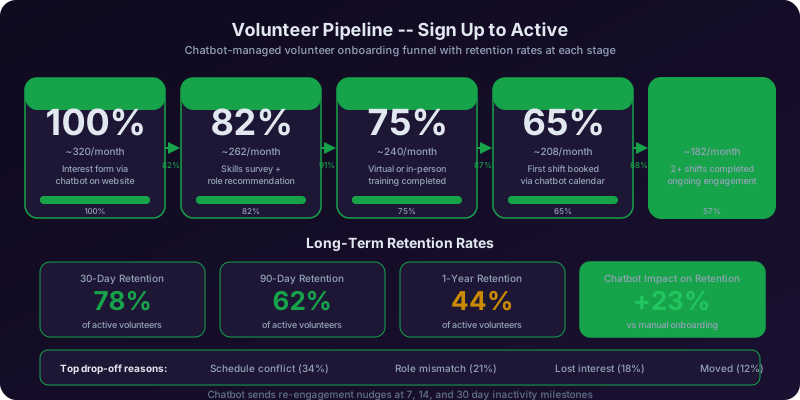
In 2026, nonprofit organizations face a persistent operational paradox. The Points of Light Foundation reports that volunteer coordination remains one of the most resource-constrained functions in the social sector. Organizations: they need more volunteers than ever to meet growing community demand, but the administrative infrastructure to recruit, onboard, schedule, and retain those volunteers is chronically understaffed. Most nonprofits have a single volunteer coordinator (if they have a dedicated coordinator at all) managing anywhere from 50 to 500+ active volunteers across multiple programs, events, and locations. That coordinator spends the majority of their time on administrative tasks -- responding to signup inquiries, matching volunteers to opportunities, coordinating schedules, sending reminders, tracking hours, and generating reports for grant compliance -- leaving precious little time for the relationship-building and community engagement that actually drives volunteer retention.
The volunteer coordinator chatbot addresses this imbalance by automating the administrative functions that do not require human judgment while preserving the coordinator's capacity for the work that does. A potential volunteer who discovers your organization at 11 PM on a Saturday can complete their signup, select opportunities that match their skills and interests, and book their first shift -- all before the coordinator arrives Monday morning. A returning volunteer can log hours, check upcoming shifts, and sign up for a new event in under two minutes through a chat conversation, without calling the office or navigating a complex volunteer management portal. A corporate group can coordinate a team volunteer day through the chatbot without generating a single email to the coordinator's inbox.
Built on Conferbot's no-code chatbot builder, the volunteer coordinator chatbot requires no development resources to deploy. Volunteer coordinators and nonprofit administrators configure volunteer opportunities, scheduling rules, skill categories, and recognition milestones through a visual interface. The chatbot deploys across channels within hours, immediately beginning to convert website visitors and social media followers into active, scheduled volunteers.
This guide covers the complete chatbot workflow -- volunteer signup, skill matching, shift scheduling, event coordination, hour tracking, and appreciation systems -- along with operational impact data, integration options, and deployment strategies for nonprofits of every size in 2026.
Volunteer Signup: Converting Interest Into Committed Participation
The gap between "I want to volunteer" and actually showing up for a first shift is where most nonprofit volunteer programs lose the majority of their potential participants. The traditional process -- fill out a form, wait for an email, schedule a call, attend an orientation, then wait for an assignment -- introduces so many friction points that only the most determined individuals make it through. The chatbot's signup module compresses this multi-step, multi-day process into a single conversation that takes under five minutes and ends with a confirmed first opportunity.
Information Collection
The chatbot collects the essential information needed to create a volunteer profile: name, email, phone number, location (ZIP code or neighborhood), age (for youth volunteer programs with age requirements), and any organizational affiliations (employer for corporate volunteer programs, school for student community service, religious organization for faith-based groups). The collection is conversational rather than form-like -- each question flows naturally from the previous response, making the process feel like a welcoming conversation rather than a bureaucratic intake. For returning volunteers who re-engage through the chatbot, it recognizes their information and skips the collection step entirely.
Motivation and Interest Discovery
Understanding why someone wants to volunteer is critical for matching them with opportunities that will sustain their engagement long-term. The chatbot asks what brought the person to the organization: personal connection to the cause, desire to give back to the community, need for community service hours (students, court-ordered service), employer volunteer program, wanting to build skills or experience, or social motivation (volunteering with friends or family). This motivation data informs both initial matching (a student needing service hours has different scheduling constraints than a retiree looking for meaningful engagement) and long-term retention strategy (a volunteer motivated by skill-building should be offered growth opportunities, while one motivated by social connection should be placed in team-oriented roles).
Availability and Commitment Level
The chatbot establishes the volunteer's availability and preferred commitment level upfront. Some volunteers are available for a single event; others want to commit to a recurring weekly shift. Some can only volunteer on weekends; others have weekday morning availability. The chatbot collects: preferred days and time windows, whether they are interested in one-time or recurring opportunities, how many hours per week or month they can commit, and any date restrictions (vacation periods, school schedules, seasonal availability). This availability data feeds directly into the shift scheduling system, ensuring the chatbot only presents opportunities the volunteer can actually attend.
Background Check and Compliance
Many volunteer roles -- particularly those involving children, vulnerable adults, or sensitive information -- require background checks, training completion, or other compliance steps. The chatbot identifies which compliance requirements apply based on the volunteer's selected interests and clearly communicates what is needed: "Working with youth programs requires a background check, which takes approximately one week. We can get that started now so you are cleared for your first shift." The chatbot initiates the compliance workflow (sending the background check authorization form, scheduling required training, or documenting existing certifications) within the signup conversation rather than adding it as a separate step that delays onboarding.
Immediate Next Steps
The most critical element of the signup flow is that it ends with a concrete next step, not a vague "we will be in touch." The chatbot presents available opportunities that match the volunteer's skills, interests, and availability, and invites them to book their first shift right there in the conversation. A volunteer who signs up at 10 PM and books a shift for Saturday morning at the food bank has made a commitment -- they have a date, time, location, and expectation. This immediate commitment dramatically reduces the attrition between signup and first participation that plagues traditional volunteer recruitment processes.
Skill Matching: Placing Volunteers Where They Create the Most Impact
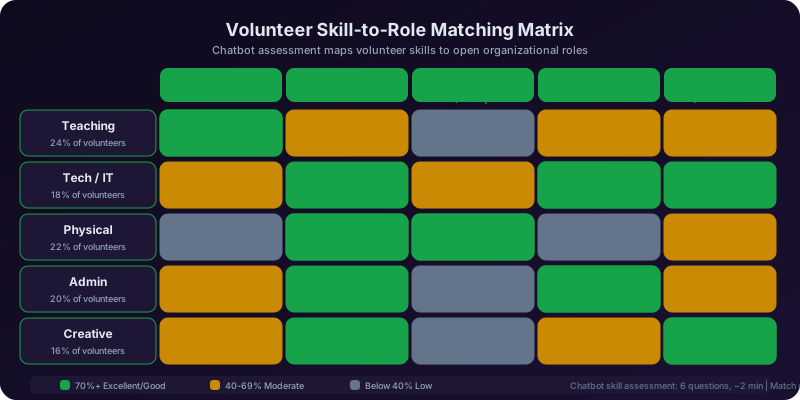
Skill matching is what separates a well-managed volunteer program from one that treats volunteers as interchangeable labor. A retired accountant who is assigned to stock shelves when they could be helping with financial literacy education is a wasted resource -- and they know it, which is why they stop showing up after two shifts. The chatbot's skill matching module identifies each volunteer's capabilities, interests, and professional background to place them in roles where they contribute meaningfully and feel valued.
Skills Inventory Collection
The chatbot conducts a skills inventory that goes beyond "what are you good at?" (a question most people cannot answer concisely). Instead, it presents categories of skills with specific examples: professional skills (accounting, marketing, legal, medical, IT, construction, event planning), language skills (bilingual or multilingual abilities), technical skills (computer literacy, social media management, graphic design, data entry), interpersonal skills (teaching, mentoring, counseling, public speaking), and physical capabilities (comfortable with physical labor, driving, lifting). Volunteers select the skills they want to contribute -- which is an important distinction from the skills they happen to have. A software developer who volunteers to escape screens should not be automatically assigned to database work.
Professional Background Utilization
Professionals bring specialized knowledge that multiplies the nonprofit's capacity when deployed correctly. The chatbot identifies volunteers with professional backgrounds that align with organizational needs: attorneys who can assist with legal aid clinics, healthcare professionals who can support health screening events, teachers who can lead tutoring programs, marketing professionals who can help with fundraising campaigns, and IT professionals who can maintain technology infrastructure. This professional matching creates high-impact volunteer placements that deliver services the nonprofit could not otherwise afford, while giving professionals a meaningful way to apply their expertise in service of the mission.
Interest-Based Matching
Beyond skills, the chatbot matches volunteers with opportunities that align with their interests and values. A volunteer passionate about environmental conservation is matched with park restoration and recycling education programs. A volunteer interested in working with children is directed toward youth mentoring and after-school programs. A volunteer who values direct community impact is matched with food distribution and shelter services rather than administrative roles. Interest alignment is the strongest predictor of long-term volunteer retention -- volunteers who care about the work they are doing return consistently, while those placed in roles disconnected from their interests quietly disengage.
Capacity and Comfort Assessment
Not every volunteer is suited for every role, and the chatbot assesses comfort levels for sensitive or demanding positions. Roles involving crisis response, grief support, homelessness services, or medical settings require emotional resilience and specific temperament. The chatbot asks about comfort with emotionally challenging situations, experience working with specific populations (people experiencing homelessness, individuals with disabilities, at-risk youth), and physical requirements (ability to stand for extended periods, lift heavy items, work outdoors in extreme temperatures). This honest assessment prevents placing well-intentioned volunteers in roles where they will be overwhelmed, which protects both the volunteer's wellbeing and the quality of service to the community.
Dynamic Matching Updates
Skill matching is not a one-time event. As volunteers gain experience, complete training, or develop new interests, the chatbot updates their profile. A volunteer who completes a CPR certification is now eligible for roles requiring first aid readiness. A volunteer who expresses interest in a leadership role after six months of service is flagged for mentorship opportunities. The chatbot periodically checks in with active volunteers: "You have been volunteering at the food bank for three months. Would you like to explore other opportunities that match your skills, or are you happy in your current role?" These check-ins demonstrate that the organization values the volunteer's growth -- not just their labor -- and provide the data the coordinator needs to make proactive placement adjustments.
Ready to try Volunteer Coordinator Chatbot?
Deploy this template in under 10 minutes. No coding required.
Use This Template Free →Shift Scheduling: Filling Every Position Without Administrative Overhead
Shift scheduling is the operational backbone of volunteer management -- and it is where most volunteer programs spend a disproportionate amount of coordinator time. The chatbot's scheduling module automates the end-to-end process: presenting available shifts, accepting signups, managing waitlists, sending reminders, handling cancellations, and finding replacements -- all through conversational interactions that take seconds rather than the phone calls and email chains that take hours.
Available Shift Presentation
The chatbot presents available volunteer shifts filtered by the volunteer's profile: their skills, interests, availability, and location. A volunteer who opens the chatbot and asks "What shifts are available this week?" sees only the opportunities that match their profile -- not a master list of 50 openings that they need to sort through manually. Each shift listing includes: the role and a brief description, the date, start time, and duration, the location (with a map link for in-person shifts), the number of spots remaining, any special requirements (background check, training, physical capability), and the contact person for the shift. This personalized, filtered presentation makes signing up effortless and ensures volunteers see the opportunities where they can contribute most effectively.
One-Tap Signup and Confirmation
Signing up for a shift through the chatbot requires a single confirmation: "I would like to sign up for the Food Bank shift on Saturday 9 AM." The chatbot confirms the booking instantly with a summary message and triggers automated confirmation via email or text. No forms to fill out. No approval workflow to wait for. No phone call to make during office hours. This immediacy captures volunteer commitment at the moment of highest motivation -- when they are actively looking at their calendar and deciding how to spend their time. Every additional step between intent and commitment loses a percentage of potential volunteers.
Recurring Shift Management
Volunteers who commit to recurring shifts (every Tuesday at the literacy center, every other Saturday at the shelter) set up their schedule once through the chatbot and are automatically booked for future occurrences. The chatbot sends a weekly or biweekly confirmation: "You are scheduled for your regular Tuesday shift at the Literacy Center this week. Reply CONFIRM to confirm, CANCEL to cancel." This recurring management system provides the coordinator with reliable staffing predictions while giving volunteers the flexibility to skip individual occurrences without disrupting their overall commitment.
Cancellation and Replacement
When a volunteer needs to cancel, the chatbot handles the process and immediately begins finding a replacement. The canceling volunteer receives a no-judgment acknowledgment (retention research shows that making cancellation stressful causes volunteers to ghost rather than cancel properly in the future). The chatbot then identifies qualified volunteers who are available at the canceled time slot and sends a targeted request: "A volunteer spot has opened for the Food Bank this Saturday from 9 AM to 12 PM. You are a great match for this role. Would you like to fill in?" This targeted replacement -- based on skills and availability rather than a mass email blast -- fills gaps faster and avoids the "volunteer fatigue" caused by constant blanket requests that most people ignore.
Shift Coverage Alerts
The chatbot monitors shift coverage and alerts the coordinator when staffing falls below minimum requirements. If a Saturday event needs 15 volunteers and only 10 are signed up with three days to go, the chatbot can automatically send targeted recruitment messages to qualified volunteers who have not yet signed up for that weekend. This proactive coverage management prevents the last-minute scramble that coordinators experience when they discover staffing gaps the day before an event. The analytics dashboard tracks coverage rates by shift type, day of week, and time of year, revealing patterns that inform recruitment strategy and scheduling optimization.
Event Coordination: Managing Large-Scale Volunteer Mobilization
Special events -- fundraising galas, community service days, disaster response efforts, awareness campaigns, and holiday drives -- require volunteer mobilization at a scale and pace that manual coordination cannot handle. The chatbot's event coordination module manages the entire volunteer side of event planning: role definition, volunteer recruitment, shift assignment, day-of coordination, and post-event wrap-up.
Event Creation and Role Definition
When the organization plans an event, the coordinator defines the volunteer roles needed through Conferbot's dashboard: how many volunteers per role, what skills each role requires, the time commitment for each role, and any special instructions. A community cleanup event might need 20 general volunteers for litter pickup, 5 drivers with personal vehicles for supply transport, and 3 experienced team leaders to manage zones. A fundraising gala might need 10 event setup volunteers, 8 registration desk volunteers, 15 servers, and 4 tech-savvy volunteers for AV equipment. The chatbot presents these role-specific opportunities to qualified volunteers based on their skill profiles.
Targeted Recruitment for Events
The chatbot's targeted recruitment reaches volunteers most likely to accept based on their profile data: past event participation, relevant skills, schedule availability, and interest alignment. Rather than sending a blast message to your entire volunteer list (which produces low response rates and annoys inactive volunteers), the chatbot identifies and messages the 50 volunteers most likely to accept, then expands to the next tier if needed. This targeted approach produces higher acceptance rates per message sent and respects the attention of volunteers who are unlikely to participate in the specific event type.
Corporate and Group Volunteer Coordination
Corporate volunteer groups are a significant resource for many nonprofits, but coordinating them is logistically complex: the company contact arranges the group, multiple employees sign up through different channels, and the coordinator juggles individual availability within the group commitment. The chatbot streamlines this by providing the company contact with a group registration link. The contact shares this link with employees, each of whom completes individual signup through the chatbot (selecting their preferred role and providing their information). The chatbot aggregates the group, tracks individual signups against the committed group size, and provides the company contact with a real-time registration dashboard. The coordinator sees the group's composition, role assignments, and any gaps -- all without a single coordination email.
Day-of Event Support
On event day, the chatbot serves as the volunteer communication hub. It sends morning-of reminders with location, parking, and what to bring. It handles late cancellations and routes replacement requests. It provides check-in functionality -- volunteers text "arrived" to the chatbot, which logs their presence and alerts the event lead. For multi-location or multi-shift events, the chatbot manages transitions: "Your morning shift at Station A ends at 12 PM. You are scheduled for the afternoon shift at Station C starting at 1 PM. Station C is a 10-minute walk east of your current location." This real-time coordination through the chatbot reduces the on-site chaos that typically accompanies large volunteer events.
Post-Event Follow-Up
After the event, the chatbot handles follow-up automatically: thanking each volunteer by name and role, logging their hours (confirmed by the event lead), collecting feedback about the event experience, sharing impact results ("Together, our 85 volunteers served 1,200 meals and collected 3 tons of food donations"), and presenting the next opportunity for continued engagement. This post-event sequence transforms a one-time event volunteer into a potential recurring participant -- the chatbot captures the positive momentum from the event experience and channels it toward the next commitment before it fades.
Hour Tracking: Accurate Records for Volunteers, Coordinators, and Grantors
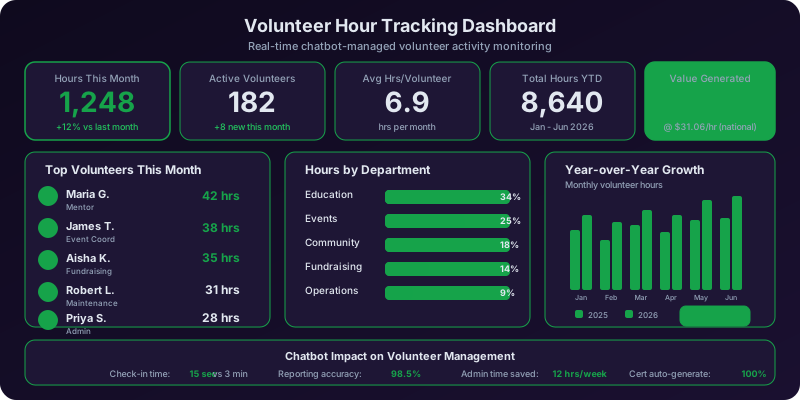
Volunteer hour tracking serves multiple stakeholders: volunteers who need verified service records, coordinators who need operational data, grant-funded programs that require documented volunteer contributions, and organizational leadership that needs to quantify volunteer impact for board reports and donor communications. The chatbot's hour tracking module serves all of these needs through a simple, frictionless logging process that produces accurate, verifiable records.
Check-In and Check-Out Logging
The most accurate hour tracking happens in real time. Volunteers check in through the chatbot when they arrive ("I'm here for my shift") and check out when they leave ("My shift is done"). The chatbot records the timestamps, calculates the duration, and logs the hours against the volunteer's profile and the specific program or event. For volunteers who forget to check in or out, the chatbot follows up with a prompt: "You were scheduled for a 3-hour shift at the food bank yesterday. Can you confirm your actual hours?" This follow-up captures hours that would otherwise be lost in manual tracking systems where volunteers forget to fill out paper timesheets.
Retroactive Hour Logging
Not all volunteer activities happen during scheduled shifts. Volunteers may spend time at home preparing materials, driving to pick up supplies, making phone calls for outreach campaigns, or providing professional services remotely. The chatbot allows volunteers to log these hours retroactively: "I spent 2 hours last Tuesday designing the flyer for the fundraiser." The chatbot records the hours with the volunteer's description and routes them to the coordinator for approval. This inclusive tracking captures the full scope of volunteer contribution -- not just the hours that happen on-site during scheduled shifts.
Student Service Hour Verification
Students volunteering for community service requirements (high school graduation requirements, college application portfolios, scholarship eligibility) need verified hour records from the organization. The chatbot generates verified hour statements that include the student's name, the organization name, the program served, the date range, the total verified hours, and a digital signature from the volunteer coordinator. Students can request these statements through the chatbot at any time -- "I need my service hour letter for my college application" -- and receive the document within minutes. This self-service verification eliminates the administrative burden of manually generating hour letters, which peaks during college application season and graduation certification periods.
Grant Compliance Reporting
Many nonprofit programs are funded by grants that require documented volunteer contribution as a matching or leverage component. The chatbot's hour tracking data feeds directly into grant compliance reports: total volunteer hours by program, volunteer-hours-to-dollars valuation using the Independent Sector's value of volunteer time (currently estimated at over $30 per hour nationally), individual volunteer documentation, and trend data showing growth or consistency of volunteer participation over the grant period. Coordinators can generate these reports through the analytics dashboard in minutes rather than the days of spreadsheet compilation that grant reporting traditionally requires.
Organizational Impact Quantification
The chatbot aggregates hour data into organizational impact metrics that serve board reports, annual reports, donor communications, and public relations: total volunteer hours contributed, dollar value of volunteer time, number of active volunteers, retention rates, hours per program area, and year-over-year growth trends. These metrics tell the story of community engagement in quantifiable terms that resonate with donors, board members, and community stakeholders. A statement like "In 2026, 342 volunteers contributed 18,500 hours of service valued at over $560,000" is a powerful narrative -- and the chatbot generates it automatically from logged data rather than requiring manual compilation.
50,000+ businesses use Conferbot templates to automate conversations
Appreciation and Recognition: The Key to Long-Term Volunteer Retention
Volunteer retention is the highest-leverage challenge in nonprofit volunteer management. Recruiting a new volunteer costs 3-5 times more effort than retaining an existing one, and experienced volunteers deliver 2-3 times the impact of first-timers who are still learning processes and building relationships. Yet most nonprofits invest heavily in recruitment and minimally in retention. The chatbot's appreciation and recognition module automates the consistent, personalized acknowledgment that keeps volunteers feeling valued -- which is the single strongest predictor of long-term commitment.
Milestone Recognition
The chatbot tracks volunteer milestones and triggers recognition messages at significant achievements: first shift completed, 10th shift completed, 50 hours contributed, 100 hours contributed, one-year anniversary, and custom milestones defined by the organization. Each recognition message is personalized with the volunteer's name, specific achievement, and a note about their impact: "Congratulations, Maria! You have just completed your 100th hour of volunteer service with our organization. Your dedication to the literacy program has helped 23 adult learners improve their reading skills this year. Thank you for making this possible." These automated but genuinely personalized messages create the recognition moments that volunteers remember -- and that they share with friends and family, generating organic recruitment.
Post-Shift Appreciation
Immediate post-shift appreciation reinforces the positive feeling volunteers have when they leave a meaningful service experience. The chatbot sends a thank-you message within hours of each shift completion: "Thank you for volunteering at the Community Kitchen today. The 85 meals served tonight would not have been possible without you. We hope to see you again soon." This consistent appreciation -- after every shift, not just major milestones -- establishes a pattern of acknowledgment that volunteers come to expect and value. The Corporation for National and Community Service research consistently shows that feeling appreciated is the number one factor in volunteer retention, ahead of schedule flexibility, cause alignment, and social connection.
Impact Reporting to Volunteers
Volunteers want to know that their work matters. The chatbot delivers periodic impact reports that connect volunteer hours to tangible outcomes: "This month, our food bank volunteers (including you!) sorted 12,000 pounds of food and served 850 families. Your Tuesday shifts contributed directly to this impact." These impact reports transform volunteer service from a time commitment into a measurable contribution -- giving volunteers a story they can tell about why they spend their Saturday mornings at the shelter instead of sleeping in. Impact data also provides volunteers with material for their own social media posts, professional profiles, and personal narratives, extending the organization's reach through authentic advocacy.
Birthday and Personal Recognition
The chatbot collects birthday information during signup (optional) and sends birthday messages to volunteers who share this data. A personalized birthday message from the organization -- "Happy birthday, James! The Community Garden team is grateful to have you as part of our volunteer family" -- is a small gesture with outsized impact on the volunteer's sense of belonging. Similarly, the chatbot can acknowledge personal milestones that volunteers share (graduation, new job, new baby) with congratulatory messages that demonstrate the organization sees volunteers as whole people, not just labor resources.
Referral Program Facilitation
Satisfied volunteers are the most effective recruitment channel for new volunteers. The chatbot identifies high-engagement volunteers (based on shift frequency, tenure, and feedback scores) and presents referral opportunities: "You have been an incredible part of our team. Do you have friends or family who might enjoy volunteering with us? Share this link and they can sign up in minutes." The chatbot tracks referral conversions, crediting the referring volunteer and welcoming the new volunteer with a mention of their connection: "Welcome! Your friend Sarah recommended our organization and we are excited to have you." Referral-driven volunteers have significantly higher retention rates than those recruited through advertising, making the referral program one of the most cost-effective recruitment strategies available.
Operational Impact: How the Chatbot Transforms Volunteer Program Management
The volunteer coordinator chatbot delivers measurable operational improvements across every dimension of volunteer program management. These improvements are not theoretical -- they reflect the documented experience of nonprofit organizations that have replaced manual volunteer coordination processes with chatbot-driven automation. The impact scales with program size: small nonprofits with 50 volunteers see time savings that free the coordinator for programmatic work, while large organizations with 500+ volunteers see efficiency gains that would otherwise require additional staff.
| Metric | Manual Coordination | Chatbot-Driven Coordination | Improvement |
|---|---|---|---|
| Signup to first shift | 7-14 days | 1-3 days | 75-80% faster |
| Signup completion rate | 30-45% (forms abandoned) | 70-85% (conversational) | Nearly doubled |
| Shift fill rate | 60-75% | 85-95% | +20-25 percentage points |
| No-show rate | 15-25% | 5-10% | 55-65% reduction |
| Hour tracking accuracy | 60-75% captured | 90-95% captured | +25-30 percentage points |
| Volunteer retention (6 months) | 35-45% | 55-70% | +20-25 percentage points |
| Coordinator admin time | 25-35 hours/week | 8-12 hours/week | 60-65% reduction |
| After-hours signup capability | Form only (no booking) | Full signup + scheduling | Complete 24/7 capability |
Time Savings for Coordinators
The most immediate impact is the reclamation of coordinator time. Tasks that previously consumed 20-30 hours per week -- answering signup inquiries, coordinating schedules, sending reminders, tracking hours, generating reports -- are handled by the chatbot automatically. The coordinator redirects this time toward high-value activities: building relationships with key volunteers, developing new programs, training volunteer leaders, cultivating corporate partnerships, and addressing the individual concerns that require human empathy and judgment. Coordinators consistently report that the chatbot does not replace them -- it removes the administrative burden that prevented them from doing the work they were hired to do.
Increased Volunteer Capacity
Higher signup completion rates, faster onboarding, better shift coverage, and improved retention compound into significantly increased organizational volunteer capacity. A nonprofit that increases signup completion from 40% to 80%, reduces time-to-first-shift from 10 days to 2 days, and improves six-month retention from 40% to 60% experiences a multiplicative increase in available volunteer hours. This increased capacity directly translates into expanded service delivery -- more meals served, more students tutored, more habitat restored, more community members supported -- without proportional increases in paid staff or budget.
Data-Driven Program Optimization
The chatbot generates structured data that enables evidence-based program management. Coordinators can identify which programs attract the most volunteers, which shifts are chronically understaffed, which recruitment channels produce the highest-retention volunteers, which recognition strategies correlate with increased engagement, and which volunteer segments are at risk of disengagement. This data transforms volunteer management from intuition-based to evidence-based -- a critical shift for organizations that need to demonstrate impact to funders, justify resource allocation to boards, and continuously improve the volunteer experience.
Integrations with Volunteer Management and Nonprofit Platforms
The volunteer coordinator chatbot delivers maximum value when it connects with the tools your nonprofit already uses. Conferbot's integration framework supports connections with volunteer management systems, nonprofit CRMs, communication platforms, and scheduling tools -- creating a unified volunteer operations infrastructure.
Volunteer Management Systems
For organizations using dedicated volunteer management platforms like Galaxy Digital, VolunteerHub, Better Impact, InitLive, or SignUpGenius, the chatbot pushes signup data, hour logs, and scheduling information directly into the platform. New volunteer profiles are created automatically with all chatbot-collected data. Hour logs sync bidirectionally so that hours logged through the chatbot appear in the management system and vice versa. Shift signups made through the chatbot update the management system's availability display. This bidirectional sync eliminates the manual data transfer between systems that creates errors and consumes coordinator time.
Nonprofit CRM Integration
For organizations that manage volunteers within their broader CRM (Salesforce Nonprofit Cloud, Bloomerang, Little Green Light, DonorPerfect), the chatbot creates or updates constituent records with volunteer-specific data. This integration is particularly valuable for organizations where volunteers are also donors -- a common overlap in the nonprofit sector. The CRM record shows the complete picture: donation history, volunteer hours, event attendance, and communication preferences. This unified view enables engagement strategies that recognize the volunteer-donor relationship: thanking a major donor for their financial contribution while also acknowledging their 200 hours of volunteer service.
Communication Platform Integration
The chatbot integrates with communication tools for multi-channel volunteer engagement. Email platforms (Mailchimp, Constant Contact, SendGrid) handle newsletter distribution and formal communications. SMS services (Twilio) deliver time-sensitive reminders and shift alerts. WhatsApp and Facebook Messenger provide conversational channels where volunteers interact with the chatbot on the platforms they already use daily. The volunteer chooses their preferred communication channel during signup, and all subsequent chatbot-initiated communications use that channel.
Calendar and Scheduling Integration
The chatbot syncs volunteer shifts to personal and organizational calendars through Google Calendar, Apple Calendar (iCal), and Outlook integration. When a volunteer books a shift, the chatbot sends a calendar invitation that appears on the volunteer's personal calendar alongside their other commitments. This integration reduces no-shows because the volunteer sees the shift in the context of their full schedule and receives the calendar app's own reminders in addition to the chatbot's reminders. For the organization, shift data syncs to a shared team calendar visible to all coordinators and program leads.
Background Check Services
For roles requiring background checks, the chatbot integrates with screening services (Sterling Volunteers, Verified Volunteers) to initiate the background check process directly within the signup conversation. The volunteer provides their consent and basic information through the chatbot, which transmits the data to the screening service. The chatbot notifies the volunteer when the background check is complete and clears them for the roles that required it. This seamless integration eliminates the separate form submissions, email chains, and manual tracking that traditionally delay volunteer onboarding for compliance-required roles.
Zapier and Webhooks
For tools without native Conferbot integration, Zapier and webhook connections extend the chatbot's reach. Common Zapier workflows for volunteer programs include: posting new volunteer signups to a Slack channel for team visibility, creating Trello cards for volunteer onboarding tasks, logging hours to a Google Sheet for custom reporting, and triggering Mailchimp automations when volunteers reach milestone hours. These no-code connections allow coordinators to build custom workflows without developer support.
Deploying Your Volunteer Coordinator Chatbot
Getting the volunteer coordinator chatbot live and accepting signups takes less than a day from initial configuration to production deployment. Conferbot's no-code platform handles the technical aspects, leaving the coordinator to focus on configuring the volunteer-specific parameters that make the chatbot effective for their program.
Initial Configuration
Setup involves four categories of program-specific data. First, volunteer opportunity definitions: the roles available, skill requirements for each, scheduling details, location information, and compliance requirements. Second, organization information: mission statement, programs, locations, and contact details that the chatbot uses to introduce new volunteers to the organization. Third, scheduling rules: shift durations, minimum lead time for booking, cancellation policy, maximum volunteers per shift, and recurring schedule patterns. Fourth, recognition milestones: the hour thresholds, anniversary dates, and achievement levels that trigger appreciation messages.
Brand and Tone Customization
The chatbot's voice should reflect the organization's culture and the warmth that nonprofit volunteers expect. A youth-focused organization may use an energetic, enthusiastic tone. An environmental nonprofit may use a grounded, mission-driven tone. A social services organization may use a warm, empathetic tone. The chatbot's greeting, conversation style, and closing messages are all customizable through Conferbot's builder. The chatbot should feel like a natural extension of the organization's volunteer team -- welcoming, grateful, and organized -- not a corporate technology tool that feels out of place in a mission-driven context.
Channel Deployment
Volunteers discover and engage with organizations through multiple channels. The chatbot deploys on your website (for visitors from organic search, social media, and referral links), WhatsApp (for direct referrals and community networks), Facebook Messenger (for social media volunteer recruitment campaigns), and Instagram (for visual storytelling that drives volunteer interest). Conferbot's omnichannel platform ensures consistent signup quality across all channels, and volunteer data is unified so that a person who starts on Facebook and later interacts on WhatsApp is recognized as the same volunteer with their profile intact.
Testing and Refinement
Before launching, test every conversation path through Conferbot's preview mode. Sign up as a first-time volunteer interested in food bank shifts. Then as a corporate group coordinator arranging a team day. Then as a student needing community service hours with a specific minimum. Then as a returning volunteer checking their hours and booking a new shift. Verify that each path collects the right information, presents appropriate opportunities, and completes the booking correctly. After launch, the analytics dashboard reveals signup completion rates, popular volunteer roles, peak engagement times, and retention trends -- giving you the data to refine the chatbot and optimize your volunteer program continuously.
Frequently Asked Questions
Below are the most common questions nonprofit organizations ask about the volunteer coordinator chatbot.
Volunteer Coordinator Chatbot FAQ
Everything you need to know about chatbots for volunteer coordinator chatbot.
Why Use a Template vs Building from Scratch?
Templates encode years of optimization data into the conversation flow before you start.
| Factor | Conferbot Template | Build from Scratch | Hire a Developer |
|---|---|---|---|
| Time to deploy | 10 minutes | 2-8 hours | 2-6 weeks |
| Cost | Free | Your time | $5,000-$25,000 |
| Day-1 conversion | 15-22% | 5-8% | 10-15% |
| Proven flows | Yes, data-tested | No | Depends |
| Updates included | Automatic | Manual | Paid |
| Multi-channel | 8+ channels | 1 channel | Extra cost |
| Analytics | Built-in | Must build | Extra cost |
Ready to Deploy Volunteer Coordinator Chatbot?
Join 50,000+ businesses. Free forever plan available. No credit card required.