
Interior Design Consultant Chatbot
Free Home Services Chatbot Template
A creative interior design consultation chatbot that helps homeowners explore design styles, define budgets, and book professional consultations. Users select room types, style preferences, and timelines before connecting with a designer. Ideal for interior design firms, home renovation companies, and furniture retailers looking to qualify leads and streamline the consultation booking process.


What Is an Interior Design Consultant Chatbot?
An interior design consultant chatbot is a conversational AI tool that automates the front-end client acquisition workflow for interior design businesses and home service firms. It guides prospective clients through a structured discovery process -- assessing their style preferences, room requirements, and budget range -- before qualifying them as leads and booking consultations with the right designer on your team. For design firms managing a high volume of inbound inquiries in 2026, this automation handles the most time-intensive pre-sales function without requiring a designer or office manager to field every initial enquiry.
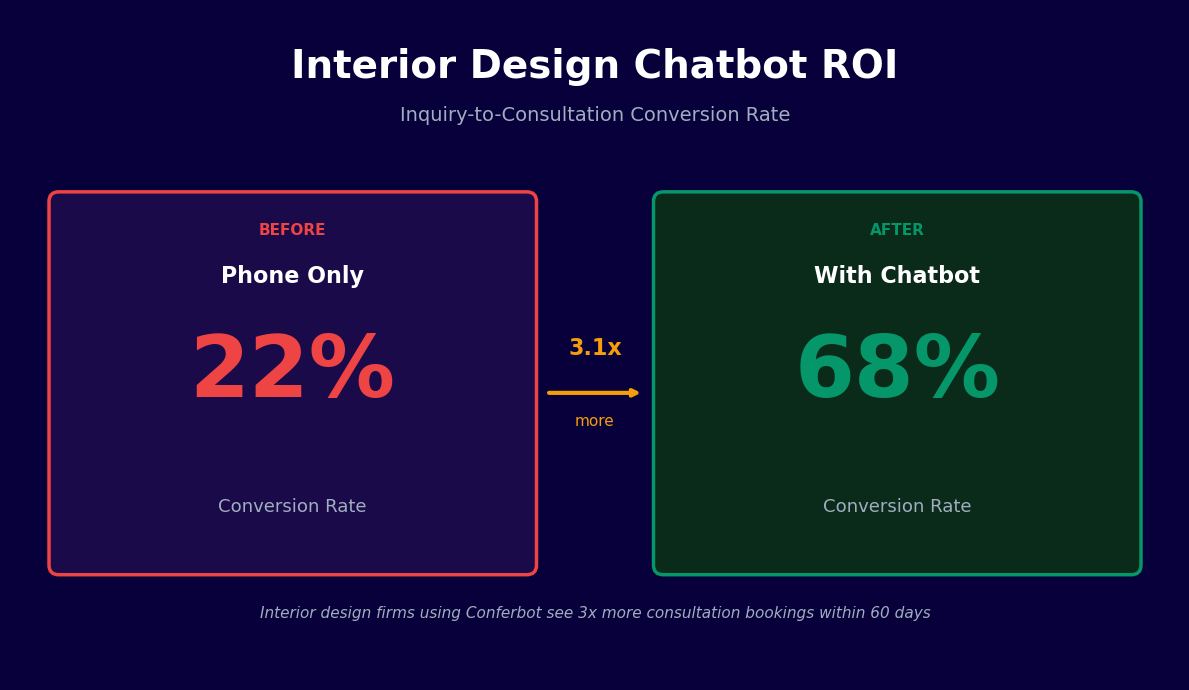
Interior design is a considered, high-value purchase. Prospective clients rarely decide to hire a designer from a single website visit. They research styles, browse portfolios, compare pricing models, and often speak to two or three firms before committing. A chatbot that engages visitors at this research stage -- presenting your portfolio, capturing their preferences, and moving them toward a booked consultation -- converts passive browsers into active leads at a rate that static contact forms cannot match. Contact forms have a typical conversion rate of 1-3% on interior design websites. Chatbots on the same pages convert at 8-15% because they offer immediate engagement rather than asking the visitor to fill out a form and wait for a response.
The chatbot serves interior design businesses across the full range of service types: residential redesign projects, new build furnishing, commercial space design, home staging for sale, and single-room refresh services. Each service type has a different qualification pathway in the chatbot -- a home staging inquiry follows a different conversation than a full-home residential redesign -- and the lead data collected reflects the specific requirements of each service category.
Built on Conferbot's AI chatbot builder, the interior design consultant chatbot requires no technical skills to deploy or maintain. Designers and studio managers configure the style quiz questions, portfolio galleries, designer availability, and budget qualification thresholds through a visual interface. The chatbot deploys on your website, Instagram, and WhatsApp within hours of setup. Changes to portfolio content, seasonal promotions, or consultation availability take minutes to implement without developer involvement.
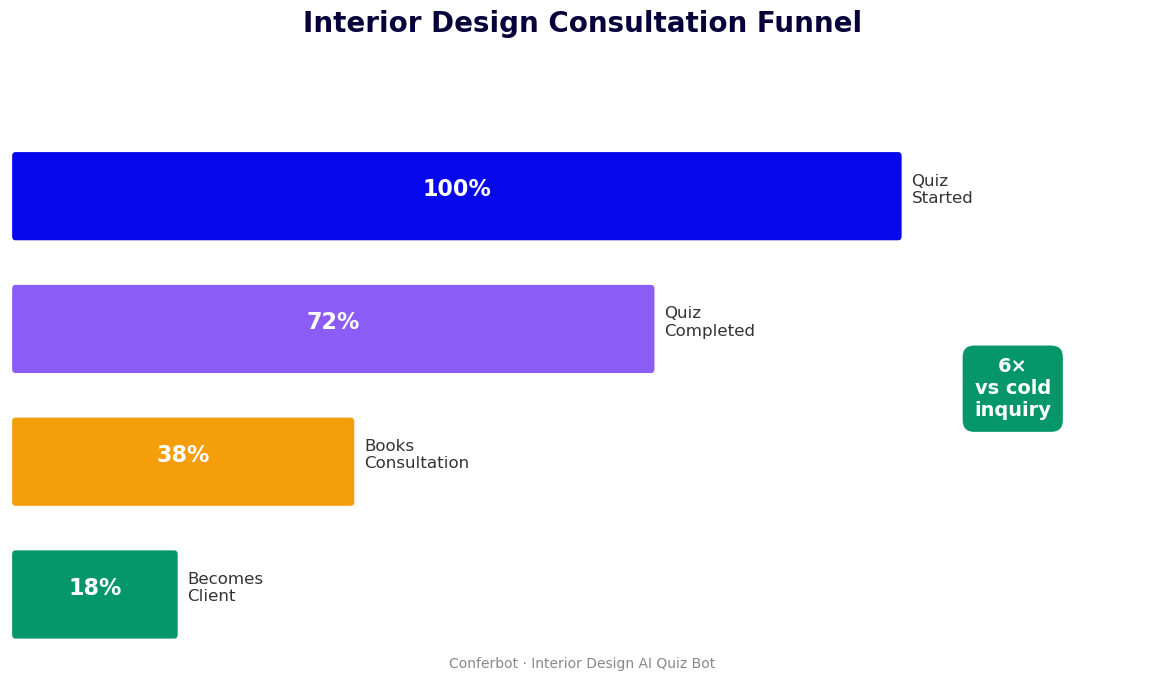
This guide covers how the chatbot's qualification and booking workflow operates, the specific features built for interior design businesses, how to integrate your portfolio into the chatbot experience, and a step-by-step setup guide for deploying the template.
How It Works: Style Quiz, Room Assessment, and Budget Matching
The interior design consultant chatbot operates through a three-stage discovery and qualification process designed around the specific questions a designer asks every prospective client: What does your space look like? What style speaks to you? What are you trying to achieve? What is your budget? Here is how each stage functions.
Stage 1: Style Quiz
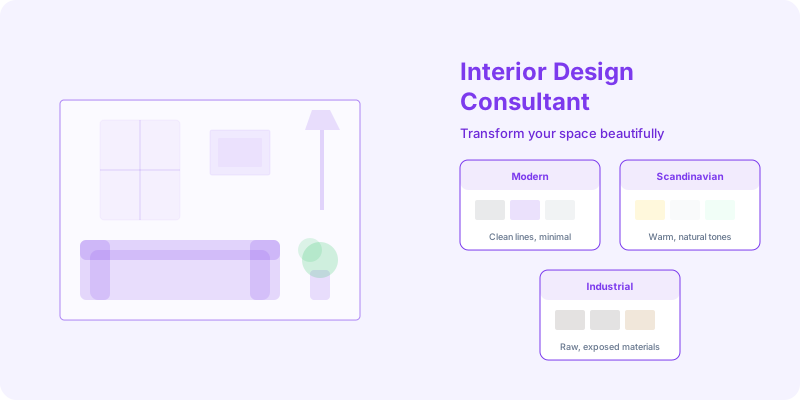
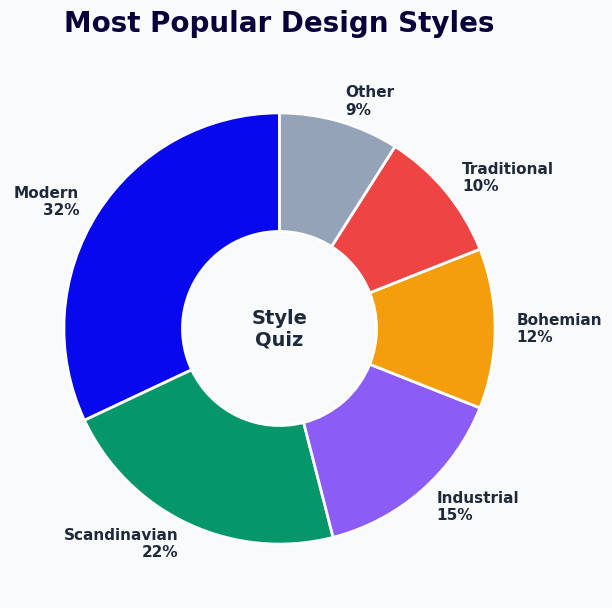
The conversation opens with a conversational style quiz that identifies the client's aesthetic preferences without requiring them to know interior design terminology. Rather than asking "Do you prefer Scandinavian minimalism or maximalist eclecticism?", the quiz presents visual-style prompts and descriptive scenarios: "Which describes your ideal living room better -- clean lines with natural materials and a neutral palette, or layered textures, bold colour, and collected pieces with personal history?" The client's responses map to style categories in your portfolio (modern minimalist, transitional, maximalist, coastal, industrial, traditional, mid-century modern), which determines which portfolio projects and design boards are surfaced later in the conversation.
The style quiz also captures practical preferences: how the client uses the space (entertaining frequently, primarily functional, a quiet personal retreat), their relationship to clutter, their openness to bold design choices, and any specific elements they know they want or want to avoid. This information creates a detailed brief that the designer reviews before the consultation, arriving prepared rather than starting the discovery process from scratch.
Stage 2: Room and Project Assessment
Following the style quiz, the chatbot collects the practical parameters of the project. This assessment covers:
- Scope: Single room, multiple rooms, entire home, or new build furnishing from scratch
- Room type: Living room, primary bedroom, kitchen, bathroom, home office, outdoor living, or commercial space
- Project status: Existing space being refreshed, recently completed renovation requiring furnishing, new construction, or rental with limitations on permanent changes
- Timeline: Is there a target completion date -- a family event, a property sale, a planned move-in date -- driving the schedule?
- Current state: Does the client have existing furniture they want to keep and work around, or is this a full replacement?
The room assessment determines which designer specialisations are most relevant, what level of service the project requires, and whether the scope and timeline are feasible given your team's current capacity. Projects that are outside your service scope are identified early so the client's time is not wasted.
Stage 3: Budget Matching
Budget conversations are the most sensitive part of any design consultation. The chatbot handles this through a range-based approach that feels less confrontational than a direct budget question. The client selects a budget range (for example: under $5,000 / $5,000-$15,000 / $15,000-$30,000 / $30,000+) and the chatbot explains, in plain terms, what level of service and transformation is realistic at each range. This sets expectations before the consultation and filters out prospects whose budget is incompatible with your minimum project size.
Budget-matched leads proceed to portfolio presentation and consultation booking. Leads below your minimum project threshold receive helpful messaging about your scope and may be directed to alternative resources, preserving the client relationship without wasting designer time on non-viable consultations.
Stage 4: Portfolio Presentation and Booking
Qualified leads are shown portfolio projects that match their style quiz results and room type. The portfolio presentation is targeted -- a client who identified as preferring transitional style with a living room project sees your best transitional living room work, not your full portfolio. Following portfolio presentation, the chatbot surfaces available consultation slots using your calendar booking integration. The client selects a time, provides contact details, and receives an immediate confirmation with a pre-consultation brief -- instructions on preparing room measurements, photos of the current space, and any inspiration images they want to share before the call.
Key Features: Style Assessment, Portfolio Integration, and Lead Qualification
The interior design consultant chatbot includes purpose-built features for the specific workflows of design businesses. These are not adapted generic sales features -- they address the actual client acquisition challenges that interior design firms face.
Visual Style Assessment
The style quiz goes beyond multiple-choice questions. The chatbot can embed visual reference grids -- mood board images, colour palette swatches, room photo comparisons -- directly in the conversation flow. Clients respond to visual prompts rather than abstract style labels, producing more accurate preference data and a more engaging conversation. Style data captured in the quiz populates the client's record in your CRM, so every designer who interacts with that client has access to the preference profile.
Dynamic Portfolio Showcase
Rather than directing every prospect to a static portfolio page, the chatbot serves portfolio content contextually based on the client's style quiz results and project scope. A client with a small-budget single-room refresh sees relevant examples at that scale; a client with a full-home redesign budget sees flagship projects. This targeted presentation is more persuasive than an undifferentiated portfolio gallery because the client sees work that specifically matches what they are trying to achieve, rather than scrolling through irrelevant project types.
Budget and Scope Qualification
The qualification logic filters leads based on budget range and project scope before a designer's time is committed to a consultation. Configurable minimum thresholds determine which leads proceed to booking and which are handled with alternative messaging. Lead quality data is tracked in the analytics dashboard, showing the distribution of budget ranges and project types in your inbound traffic -- useful data for pricing decisions and marketing targeting.
| Feature | What It Does | Business Benefit |
|---|---|---|
| Style quiz | Maps aesthetic preferences to portfolio categories through visual and descriptive prompts | Targeted portfolio presentation, higher-quality consultation briefs |
| Room assessment | Collects scope, room type, project status, and timeline | Designer arrives prepared; unviable projects filtered early |
| Budget matching | Range-based budget qualification with realistic scope-setting at each tier | Filters non-viable leads; sets expectations before consultation |
| Dynamic portfolio | Serves matched portfolio projects based on style and scope data | More persuasive than static galleries; higher consultation conversion |
| Consultation booking | Live calendar booking with pre-consultation brief delivery | Eliminates email scheduling back-and-forth |
| CRM lead capture | Saves full preference and qualification data to your CRM | Complete brief available before every consultation |
| Omnichannel deployment | Same workflow on website, WhatsApp, and Instagram | Captures leads from all channels in a unified flow |
Designer Matching
For firms with multiple designers who have different specialisations -- one designer focused on kitchen and bath, another on full-home residential, a third on commercial projects -- the chatbot matches the client's project scope to the appropriate designer's availability. A commercial office project routes to the commercial specialist; a kitchen renovation routes to the appropriate residential designer. The matching logic considers both specialisation and current workload, so consultations are distributed across the team rather than funnelling everything to a single designer.
Seasonal Campaign Support
Interior design inquiry has seasonal patterns: new year home refreshes in January, pre-summer outdoor living projects in spring, pre-holiday entertaining-space updates in autumn. The chatbot supports seasonal campaign messaging -- a spring campaign might open with "Planning a fresh look for your outdoor living space before summer?" rather than a generic greeting, targeting the seasonal intent that drives higher-quality leads during campaign periods. Seasonal conversation openings can be configured and scheduled through the campaign settings without changing the underlying qualification flow.
Ready to try Interior Design Consultant Chatbot?
Deploy this template in under 10 minutes. No coding required.
Use This Template Free →Portfolio Showcase Integration: Turning Browsers Into Booked Clients
For interior design businesses, the portfolio is the primary sales asset. Clients hire designers based on demonstrated aesthetic capability -- they need to see work that resonates with their vision before they will commit to a consultation. The challenge with traditional portfolio websites is that visitors browse in isolation: they scroll through projects, form an impression, and leave without engaging. A chatbot integrates portfolio presentation into a guided conversation, framing each project in the context of the specific client's stated preferences and making the portfolio feel curated rather than generic.
Contextual Portfolio Serving
After completing the style quiz and room assessment, the chatbot pulls the three to five portfolio projects that best match the client's stated preferences from your project library. A client who described their ideal space as "warm, textured, and layered with collected pieces" sees your maximalist and transitional residential projects. A client planning a home office refresh for a remote-work professional sees your home office and study work. This contextual matching means every client sees a portfolio that feels personally relevant -- dramatically more persuasive than asking a prospect to browse an undifferentiated gallery of 30 projects spanning multiple styles and scales.
Project Story Format
Each portfolio project in the chatbot is presented with structured story content rather than just images. The chatbot presents: the client's brief and challenge, the designer's approach and key decisions, the transformation from before to after, and the specific elements (furniture selections, custom millwork, paint palettes, lighting choices) that defined the project's character. This narrative format gives the prospective client insight into the designer's thinking process, not just the finished result -- which is what sophisticated clients are actually evaluating when they assess a portfolio.
Before and After Engagement
Before-and-after project presentations are the highest-engagement content format in interior design. The chatbot can present before-and-after image pairs for each portfolio project, with the before state shown first to establish context, then the after result revealed. This presentation format is more compelling than finished-room photography alone because it demonstrates the transformation that design delivers, not just the aesthetic outcome. Clients who engage with before-and-after content book consultations at 35-45% higher rates than those who view finished-room photography only.
Design Board Previews
For prospects in the later stages of the consideration process, the chatbot can present design board previews: curated mood boards that suggest the direction a project might take based on the style quiz results. These are not project commitments -- they are conversation starters that give the prospect a tangible sense of what working with your firm might produce for their specific situation. Design board previews create a forward-looking engagement that pulls the prospect toward booking a consultation to explore the concept further, rather than just reviewing past work.
Portfolio Performance Analytics
The analytics dashboard tracks which portfolio projects generate the most consultation bookings, which style categories attract the highest-budget leads, and which project types are most frequently requested but underrepresented in your portfolio. This data informs decisions about which projects to photograph and publish, which design styles to emphasise in marketing, and whether there are underserved demand categories in your market that represent growth opportunities for the business.
Lead Qualification for Interior Designers: Filtering for Ideal Clients
Not every inbound inquiry represents a viable client engagement. Interior design businesses invest significant time in consultations -- typically 60-90 minutes for an initial discovery call plus preparation and follow-up -- and unqualified consultations are one of the most significant drains on designer time and energy. A chatbot that qualifies leads before the consultation booking stage protects designer bandwidth, improves the quality of conversations, and increases the proportion of consultations that convert to signed project agreements.
Qualification Criteria for Design Projects
The chatbot's qualification logic evaluates prospects against configurable criteria before routing them to consultation booking:
- Budget viability: Project budget range is compatible with your minimum project size. A prospect whose budget is significantly below your typical project range is handled with alternative messaging rather than a consultation booking.
- Scope alignment: The project type (residential, commercial, staging, single-room) falls within your service offering. Out-of-scope project types are identified and addressed appropriately.
- Timeline realism: If a prospect needs a full-home redesign completed in four weeks, the chatbot flags the timeline constraint and asks clarifying questions before booking a consultation.
- Decision-making readiness: The chatbot asks whether the prospect is actively considering hiring a designer now or still in the early research phase. Research-phase prospects are captured with a follow-up sequence rather than an immediate consultation booking.
| Lead Type | Qualification Status | Chatbot Action | Expected Outcome |
|---|---|---|---|
| Matched budget, clear scope, ready to hire | High-priority qualified | Immediate consultation booking, priority slot offered | 70-80% consultation to contract conversion |
| Matched budget, defined scope, researching options | Qualified, nurture sequence | Portfolio presentation, follow-up scheduled in 2 weeks | 30-45% consultation booking within 30 days |
| Below minimum budget, clear scope | Unqualified on budget | Friendly scope-setting message, alternative resources offered | Preserves brand relationship; 10-15% return when budget grows |
| Out-of-scope project type | Unqualified on scope | Clear service boundary explanation, referral if applicable | Saves designer time; maintains positive brand impression |
| Vague scope, no timeline | Early-stage exploration | Style quiz completion, inspiration guide delivery, 30-day follow-up | 15-25% convert to qualified lead within 60 days |
Lead Scoring and CRM Integration
Each completed chatbot conversation generates a lead score based on budget range, project scope, timeline urgency, and style quiz completion. High-scoring leads are flagged in your CRM for immediate designer follow-up; medium-scoring leads enter a nurture sequence; low-scoring leads receive helpful content without consuming designer time. The lead score and full conversation data -- style preferences, room assessment answers, budget range, project description -- are passed to your CRM automatically through Conferbot's API integration, so designers have a complete brief before every consultation without manual data entry.
Nurture Sequences for Research-Phase Prospects
Many prospective interior design clients are in a research phase when they first encounter your business: they know they want to redesign a space but have not yet committed to hiring a designer. Immediate consultation pressure on these prospects creates friction and reduces conversion. The chatbot identifies research-phase prospects through a direct question ("Are you actively looking to hire a designer now, or still exploring your options?") and routes them to a nurture sequence: a series of valuable content messages delivered over 30-60 days (design guides, room planning tips, seasonal trend reports, portfolio highlights) that maintain engagement until the prospect is ready to move forward. Research-phase prospects nurtured through this sequence convert to consultations at 3-5x the rate of prospects who are simply sent a contact form link and not followed up.
Booking Consultations: Eliminating Scheduling Friction
The consultation booking stage is where lead qualification converts to revenue pipeline. Scheduling friction at this stage -- a contact form that promises a callback, an email back-and-forth over available times, a delay between inquiry and confirmation -- costs interior design businesses a significant proportion of otherwise-qualified leads. Prospective clients who complete a style quiz and view matched portfolio work are in a peak engagement moment; every hour of delay before a consultation is confirmed is a hour for that engagement to cool and a competitor's chatbot or website to capture their attention instead.
Real-Time Calendar Booking
The chatbot integrates with your scheduling system through Conferbot's calendar booking feature to present live consultation availability at the moment the prospect is qualified and engaged. Available slots are shown filtered by the matched designer's calendar -- not a generic availability display, but the specific windows when the designer assigned to this project type and budget tier is free for an initial consultation. The client selects a slot, confirms their contact details, and receives an immediate booking confirmation with everything needed to prepare for the call.
Pre-Consultation Brief Delivery
The booking confirmation triggers a pre-consultation brief delivery: a structured message that helps the client prepare for the call in a way that makes the consultation more productive. The brief includes:
- Instructions for photographing and measuring the space
- A request to collect three to five inspiration images that reflect their vision
- The style quiz results summary so the client can review and amend before the call
- A prompt to note any specific functional requirements -- storage needs, accessibility considerations, how the space needs to accommodate daily routines
- What to expect from the consultation: agenda, duration, and what decisions will be made
Designers who receive pre-consultation briefs from chatbot-qualified clients consistently report that the first call is more focused and productive. The client arrives with a clear brief already articulated; the designer arrives with portfolio examples already matched to the client's stated preferences. The consultation moves directly to design direction discussion rather than spending the first 20 minutes gathering the information the chatbot already captured.
Reminder and Confirmation Sequences
The chatbot sends an automated reminder 24 hours before the consultation with a confirmation request, and a 1-hour reminder on the day. These touchpoints reduce no-show rates for design consultations from a typical 15-25% to 5-8%. They also create a natural touchpoint for the client to flag any changes to their situation -- a budget revision, a scope change, a need to reschedule -- before the designer has committed the consultation time. The WhatsApp chatbot channel is particularly effective for these reminders because WhatsApp messages have near-100% open rates compared to 20-25% for email reminders.
Post-Consultation Follow-Up
After the consultation, the chatbot sends a follow-up message to the prospect: "How did your consultation go? Do you have questions about the proposal?" This automated touchpoint catches hesitation before it becomes a lost sale, surfaces objections that can be addressed, and creates a low-pressure check-in that keeps the designer-client relationship warm during the proposal review period. Firms using automated post-consultation follow-up convert 15-20% more consultations to signed projects than those relying on the designer to remember to follow up manually.
50,000+ businesses use Conferbot templates to automate conversations
Setup Guide: Deploying the Interior Design Consultant Chatbot
Configuring the interior design consultant chatbot from template to live deployment takes one to three days for a typical design firm. The primary setup effort is in loading your portfolio content and configuring the style quiz categories to match your design vocabulary. Here is the step-by-step process.
Step 1: Access the Template
Log in to Conferbot and open the home services template library. Select the Interior Design Consultant template and clone it to your workspace. The template arrives pre-configured with a style quiz flow, room assessment, budget matching logic, portfolio gallery structure, and consultation booking sequence. Review each section of the pre-built flow before making changes to understand the default conversation architecture.
Step 2: Configure Your Style Categories
Define the style categories your portfolio covers. Common categories include modern minimalist, transitional, coastal, maximalist, industrial, traditional, mid-century modern, and Japandi. For each style category, configure the descriptive prompts and visual comparisons in the style quiz that map to that category. If your portfolio is focused on a narrower range of styles, simplify the quiz to reflect your actual specialisation rather than forcing distinctions your portfolio does not support.
Step 3: Load Your Portfolio Content
Upload portfolio projects through the content management panel. Each project entry should include: project name, room type, style category tags, project scope and budget tier, a brief project story (challenge, approach, outcome), and three to six images including before-and-after pairs where available. Tag each project with the style categories it represents so the chatbot's matching logic can surface it for the right client profiles. Aim for at least two to three projects per style category that you offer.
Step 4: Set Budget Qualification Thresholds
Define your minimum viable project budget and configure the budget range tiers presented to prospects. Set the routing logic for each tier: which budget ranges proceed to consultation booking, which enter a nurture sequence, and which receive alternative messaging. Configure the scope-setting language for below-minimum responses -- it should be warm and specific ("Our typical project investment starts at X for a single-room engagement") rather than dismissive.
Step 5: Connect Your Calendar
Connect your scheduling system through the integrations panel. Conferbot's calendar booking feature supports Google Calendar, Calendly, Microsoft Outlook, Acuity Scheduling, and HubSpot Meetings. Configure the consultation duration (typically 60 or 90 minutes for an initial design consultation), buffer time between consultations, and which designer's calendar is used for each project type or budget tier. Test the booking flow end-to-end with a test appointment before going live.
Step 6: Deploy and Monitor
Embed the chatbot widget on your website's homepage, portfolio page, and services page. Connect the chatbot to your WhatsApp Business account for mobile-first client engagement. For the first two weeks after launch, review the analytics dashboard daily: track style quiz completion rates, budget range distribution, consultation booking conversion, and any conversation paths that end without engagement. Common early issues are style quiz questions that feel confusing (high abandonment at a specific quiz step), budget range tiers that do not reflect your actual client mix, and portfolio content gaps in popular style categories. Address these quickly and the lead quality and conversion rate stabilise within the first month of deployment.
Seasonal Trends: Capitalising on Design Demand Throughout the Year
Interior design inquiry is not uniformly distributed across the calendar year. Distinct seasonal patterns drive different project types and client motivations at different times, and a chatbot configured to respond to these patterns -- with appropriate conversation openings, targeted portfolio content, and seasonal campaign messaging -- captures more leads during peak demand periods than one operating with static, year-round content.
Seasonal Demand Patterns in Interior Design
| Season | Peak Project Types | Client Motivation | Chatbot Campaign Focus |
|---|---|---|---|
| January-February | Home office refresh, living room update | New year, new start; remote work setup improvement | Productivity-focused spaces, before-after transformations |
| March-May | Outdoor living, kitchen refresh, spring staging | Pre-summer outdoor projects, property sale preparation | Outdoor living portfolio, home staging case studies |
| June-August | Children's rooms, vacation rental design, bathroom | Summer projects while family is home; rental income optimisation | Family-functional spaces, rental income ROI messaging |
| September-October | Living room, dining room, full-home for holidays | Entertaining season preparation; settling into autumn | Hosting-focused spaces, warm palette portfolio |
| November-December | Holiday staging, gift vouchers, early new-year planning | Holiday entertaining; planning for January project starts | Gift consultation vouchers, January booking incentives |
Configuring Seasonal Campaign Openings
The chatbot's opening message is the first impression it makes on every visitor. A seasonal campaign opening that reflects the current moment -- "Thinking about your outdoor living space before summer?" in April, or "Planning for holiday entertaining?" in October -- converts at 20-30% higher rates than a generic "How can I help you today?" because it immediately signals relevance to the prospect's current thinking. Conferbot's campaign scheduling allows you to configure seasonal openings in advance and set them to activate and deactivate automatically on specified dates, without manual changes to the chatbot each season.
Trend-Responsive Portfolio Rotation
Interior design trends shift annually. The portfolio projects the chatbot serves in its matching results should reflect current aesthetic trends, not just your overall body of work. In 2026, biophilic design elements, warm minimalism, earthy colour palettes, and multi-functional spaces continue to attract strong client interest. Ensure your chatbot's portfolio library includes recent projects that reflect the aesthetic directions your target clients are researching -- and update the library regularly as trends evolve and new projects are completed. The analytics data on which portfolio projects generate the most consultation bookings directly informs which recent work to prioritise photographing and publishing.
Holiday and Seasonal Promotion Configuration
The chatbot supports time-limited promotional messaging for seasonal offers: January sale on initial consultations, spring launch pricing for outdoor living projects, gift vouchers for design consultations during the holiday season. Configure promotional messages with start and end dates so they activate and expire automatically. Promotional offers embedded in the chatbot conversation convert at 3-4x the rate of the same offers presented as banner ads on the same website pages, because the chatbot delivers the offer in the context of an active, engaged conversation rather than as a passive interruption.
Monitor seasonal performance data through the analytics dashboard and review which campaign configurations drove the highest consultation booking rates each season. Use this data to refine your seasonal campaign calendar for the following year, compounding the effectiveness of each season's outreach with learnings from the previous year's results. For platform costs at any deployment scale, see Conferbot's pricing page.
Interior Design Consultant Chatbot FAQ
Everything you need to know about chatbots for interior design consultant chatbot.
Why Use a Template vs Building from Scratch?
Templates encode years of optimization data into the conversation flow before you start.
| Factor | Conferbot Template | Build from Scratch | Hire a Developer |
|---|---|---|---|
| Time to deploy | 10 minutes | 2-8 hours | 2-6 weeks |
| Cost | Free | Your time | $5,000-$25,000 |
| Day-1 conversion | 15-22% | 5-8% | 10-15% |
| Proven flows | Yes, data-tested | No | Depends |
| Updates included | Automatic | Manual | Paid |
| Multi-channel | 8+ channels | 1 channel | Extra cost |
| Analytics | Built-in | Must build | Extra cost |
Ready to Deploy Interior Design Consultant Chatbot?
Join 50,000+ businesses. Free forever plan available. No credit card required.