
Salon Appointment Chatbot Template (Free)
Free Booking And Scheduling Chatbot Template
Book more clients and cut no-shows by 65% with a free salon appointment chatbot. Stylist matching, real-time availability, and WhatsApp reminders. Deploy in hours, no code needed.


What Is a Salon and Spa Appointment Scheduler Chatbot?
A salon and spa appointment scheduler chatbot is a conversational booking tool that automates the entire client acquisition and scheduling workflow for hair salons, nail studios, day spas, barbershops, and beauty clinics. It replaces phone-tag reservations, manual DM responses, and third-party booking apps by giving clients an instant, intelligent booking experience directly on your website, Instagram, or WhatsApp -- the channels where they already discover and engage with your business.
The economics of salon and spa businesses create a specific set of operational pain points that chatbot automation addresses directly. Revenue is entirely appointment-dependent -- an empty chair or treatment room is unrecoverable lost revenue. Client acquisition happens primarily through visual social media where discovery and booking intent occur simultaneously. No-shows and last-minute cancellations are endemic, and their financial impact on small businesses is disproportionately severe. Scheduling is time-consuming for front-desk staff, who spend hours daily managing bookings, confirmations, and changes that could be handled automatically.
In 2026, clients booking beauty services expect the same on-demand experience they get from ride-hailing, food delivery, and hotel booking apps. They want to book at 10 p.m. from their phone, see real-time availability for their preferred stylist, and receive instant confirmation without waiting for a response the next morning. A chatbot delivers exactly this experience at a fraction of the cost of the third-party platforms that charge per-booking commissions.
This template is built on Conferbot's no-code builder and integrates with the leading salon management software platforms including Vagaro, Fresha, and Square Appointments. It deploys across your website, WhatsApp, Instagram, and Messenger from a single configuration, with all bookings consolidated into one availability system to eliminate double-booking risk regardless of channel.
How It Works: Service Selection, Stylist Matching, and Slot Availability
The salon appointment scheduler follows a structured booking flow designed to match clients with the right service, the right provider, and the right time -- in under three minutes. The flow is configurable to your service menu, provider roster, and business rules.
Step 1: Service Selection
The conversation opens with a service menu presentation. Rather than asking clients to describe what they want in free text (which creates ambiguity), the chatbot presents your service categories as tappable options: Hair Color, Haircut and Style, Extensions, Nail Services, Facials, Massage, Waxing, and so on. Within each category, clients select their specific service. Conferbot's NLP engine also understands natural language requests ("I want a balayage" or "I need a gel manicure and pedicure") and maps them to the correct service in your catalog. Each service is displayed with its duration, price, and a brief description -- setting accurate client expectations before booking and reducing the conversation-at-checkout about what was expected.
Step 2: Stylist or Therapist Matching
Once the service is selected, the chatbot presents available providers. The matching logic is configurable across three modes. In client preference mode, clients select their preferred stylist, colorist, or therapist from a displayed roster with photos, specialties, and brief bios -- a format that drives rebooking with the same provider and builds the personal relationships that are the foundation of salon client retention. In first available mode, the chatbot skips provider selection and shows the earliest available slot across all qualified providers. In smart match mode, the chatbot asks about client preferences (color specialist, experience level, specific technique expertise) and recommends the best-matched provider. Smart match is particularly effective for new clients who do not yet have a preferred stylist.
Step 3: Real-Time Slot Availability
The chatbot queries your connected salon management system for real-time availability that accounts for the selected service duration, provider schedule, buffer times between appointments, and any blocked time. It presents the next three to five available slots rather than an open calendar, which reduces decision fatigue and accelerates booking. If no slots are available with the preferred provider in the next seven days, the chatbot proactively suggests the nearest available alternative provider with comparable qualifications. Clients who cannot find a match are added to a waitlist with automated notification when a cancellation opens a slot.
Step 4: Client Details and Booking Confirmation
For new clients, the chatbot collects name, contact details, and any relevant service notes (current hair color, allergies to products, skin sensitivities for spa services). For returning clients, it retrieves their profile from your salon management system, confirms their preferences, and skips redundant data collection. Booking confirmation is sent immediately with all appointment details, a calendar invite, the salon address and directions, and pre-appointment instructions specific to the service booked (arrive with clean, dry hair; avoid retinol for 48 hours before a facial).
Step 5: Automated Reminder Sequence
A configurable reminder sequence reduces no-shows without staff effort. The standard sequence: a 48-hour reminder with confirmation request, a 24-hour reminder with any pre-appointment preparation instructions, and a 2-hour reminder on the day. Clients respond with a single tap to confirm, reschedule, or cancel. Cancellations trigger instant waitlist notification. The reminder sequence is most effective via WhatsApp, where message open rates exceed 95% compared to under 25% for email.
Key Features of the Salon Appointment Scheduler
The salon appointment scheduler includes features calibrated to the specific operational requirements of beauty businesses. These are not generic booking capabilities -- they reflect the workflows, client relationships, and revenue patterns of salons and spas.
| Feature | What It Does | Business Impact |
|---|---|---|
| Stylist profile display | Shows provider photos, specialties, and portfolio links during selection | Increases rebooking rate by 20-30% |
| Multi-service booking | Allows clients to book multiple services in one conversation (color + cut, mani + pedi) | Increases average ticket value by 25-40% |
| Deposit collection | Collects configurable deposits for new clients or high-demand slots | Reduces no-show rate by 60-80% |
| Waitlist automation | Adds clients to a live waitlist and notifies instantly when a cancellation opens | Fills 50-70% of cancelled slots |
| Client notes and history | Captures and retrieves service notes, product preferences, and visit history | Enables personalized service at every visit |
| Multi-location routing | Directs clients to the nearest or preferred location in multi-salon groups | Optimizes capacity utilization across locations |
| Add-on upsell | Suggests relevant add-on services during booking (gloss treatment, express facial) | Incremental revenue on existing appointments |
Multi-Service Booking in a Single Conversation
Clients regularly want to combine services -- a full-color service with a haircut, a massage with a facial, a full set of nail services. The chatbot handles multi-service booking natively, sequencing the services to the same or different providers, matching service durations to available provider slots, and applying any package pricing or bundled discount that applies. This capability is a significant revenue driver: multi-service appointments have an average ticket value 35-50% higher than single-service bookings, and the conversational booking flow removes the friction that causes clients to underbooking when calling or using a standard booking form.
Intelligent Add-On Recommendations
When a client books a haircut, the chatbot asks if they would like to add a deep conditioning treatment. When a client books a manicure, it offers a paraffin wax treatment. These contextual suggestions, presented conversationally at the moment of highest engagement, generate incremental revenue without requiring staff to upsell. The suggestions are configurable by service category and can be weighted by margin or by inventory status for product-intensive add-ons.
Client Profile and History
The chatbot builds a persistent client profile that stores preferred stylist, service history, product preferences (color formula, preferred nail polish brands, skin sensitivity notes), contact preferences, and visit frequency. Returning clients are recognized by phone number or email, and the chatbot personalizes the booking experience with their history. This level of client intelligence was previously possible only in high-end salons with dedicated concierge staff -- a chatbot makes it operational for any salon size. Client data syncs bidirectionally with your connected salon management software via the API integration.
Ready to try Salon Appointment Chatbot Template (Free)?
Deploy this template in under 10 minutes. No coding required.
Use This Template Free →Integration with Salon Management Software: Vagaro, Fresha, and Square Appointments
The salon appointment scheduler is designed to work with the software your business already uses, not replace it. Integration with your salon management platform means that chatbot bookings flow directly into your existing schedule, client records, and reporting -- with no manual data transfer and no risk of double-booking.
Vagaro Integration
Vagaro is one of the most widely used salon and spa management platforms in North America, with strong features for multi-provider scheduling, client management, and point-of-sale. The Conferbot integration connects to the Vagaro API to read real-time provider availability, write new appointments to the Vagaro calendar, retrieve and update client records, and pull service menus. When a client books through the chatbot, the appointment appears in Vagaro immediately with all service details, client notes, and deposit status. The front desk team manages their day from Vagaro as usual -- the chatbot simply fills the schedule automatically. For salons using Vagaro's marketing features, client contact data captured through the chatbot is also available for Vagaro campaigns.
Fresha Integration
Fresha (formerly Shedul) is widely adopted for its subscription-free pricing model, making it popular among independent stylists and small salon groups. The Fresha API integration follows the same bidirectional sync pattern: availability reads, appointment writes, and client record management. One important operational note for Fresha users: Fresha's marketplace and the chatbot booking channel serve different client segments. Fresha marketplace drives new client discovery through Fresha's consumer app; the chatbot is deployed on your own channels (website, Instagram, WhatsApp) and captures clients who are already engaged with your brand. These are complementary acquisition channels, and bookings from both flow into the same Fresha calendar.
Square Appointments Integration
Square Appointments is the preferred platform for salons already using Square for payments, making deposit collection and checkout seamless. The Conferbot integration with Square Appointments connects through the Square Connect API, providing the same availability sync and booking write capability. The deposit collection feature integrates natively with Square Payments -- when the chatbot collects a booking deposit, it processes the payment through Square and records the deposit against the appointment in Square Appointments. This eliminates the need for separate payment links or manual deposit tracking. Salons using Square for client communications can also sync Square's client messaging with chatbot conversation history.
Other Platform Support and Custom Integrations
Beyond the three primary integrations, Conferbot supports connections to Mindbody (spa and wellness focus), Acuity Scheduling (independent stylists and small businesses), Booksy (barber and grooming shops), and Timely. Custom API integrations are available for proprietary salon management systems through the API integration framework. For salons that do not currently use a management platform, the chatbot's built-in scheduling engine maintains a native availability calendar that can be managed directly from the Conferbot dashboard, providing a functional scheduling solution without requiring a separate software subscription.
| Platform | Integration Type | Key Capabilities | Best For |
|---|---|---|---|
| Vagaro | API (bidirectional) | Full availability sync, appointment write, client records, POS data | Multi-provider salons, spas, multi-location groups |
| Fresha | API (bidirectional) | Availability sync, appointment write, client management | Independent stylists, small salon groups |
| Square Appointments | API (bidirectional) + Payments | Scheduling, deposit processing, client messaging sync | Salons using Square for payments and POS |
| Mindbody | API (bidirectional) | Class and service booking, membership validation, client records | Spa, wellness, and beauty hybrid businesses |
| Acuity Scheduling | API (bidirectional) | Availability sync, appointment write, intake forms | Independent stylists and single-provider businesses |
| Native (no integration) | Built-in scheduler | Visual availability calendar, manual schedule management | Businesses without existing management software |
No-Show Reduction: Data and Strategies
No-shows are a structural revenue problem for salons and spas. Unlike a restaurant that can seat walk-ins at a table vacated by a no-show, a salon's revenue units are provider time blocks that cannot be recovered after a missed appointment. The average no-show rate in the salon industry is 15-25%, with new clients and last-minute bookings showing significantly higher rates than established regulars. For a stylist with a $200 average ticket working a full schedule of eight appointments per day, a 20% no-show rate represents $320 in lost daily revenue -- over $80,000 annually.
The Reminder Sequence Effect
The most effective single intervention for reducing no-shows is a well-designed automated reminder sequence with a required confirmation response. The data across salon deployments:
| Reminder Method | No-Show Rate | Reduction vs. No Reminders |
|---|---|---|
| No reminders | 20-25% | Baseline |
| Email reminder (24h) | 14-18% | 25-35% reduction |
| SMS reminder (24h) | 10-14% | 40-50% reduction |
| WhatsApp reminder (48h + 24h) | 6-10% | 55-65% reduction |
| WhatsApp reminder + confirmation required | 4-7% | 65-75% reduction |
| Deposit + WhatsApp reminders | 1-3% | 85-90% reduction |
Deposit Strategy for New Clients
New client no-show rates run 2-3 times higher than established client rates because there is no relationship cost to missing an appointment. A configurable deposit requirement for new clients -- typically $20-50 or 25-50% of the service price -- creates a financial commitment that reduces no-shows to near zero among this high-risk segment. The chatbot collects the deposit during booking through an integrated payment link (Square, Stripe, or PayPal), confirms the amount and cancellation policy in the booking confirmation, and applies the deposit against the service at checkout. Clients who cancel with adequate notice (configurable, typically 24-48 hours) receive an automatic refund; clients who no-show forfeit the deposit, which compensates the stylist for the lost revenue.
Waitlist-Driven Recovery
When a cancellation occurs, the chatbot immediately queries the waitlist for clients waiting for the same provider, service, or time slot and sends an automated notification with a limited-time booking window (typically 30-60 minutes). Salons report that 50-70% of cancelled slots with waitlist coverage are refilled through this automated process, compared to under 20% when cancellations are managed manually by front-desk staff. The financial recovery from automated waitlist backfill alone typically covers the entire cost of the chatbot platform. Use the ROI calculator to model the impact for your specific appointment volume and average ticket value.
Rebooking at Checkout
The post-appointment follow-up sequence includes a rebooking prompt sent within 24 hours of the appointment: "Thank you for your visit -- would you like to book your next appointment with [Stylist Name]?" Clients who rebook immediately have a no-show rate that is 60-70% lower than clients who book cold in the future, because the appointment is a continuation of an active service relationship rather than a cold inquiry. Salons that implement systematic rebooking prompts report that 40-55% of clients rebook within the follow-up window, driving significant increases in client visit frequency and annual revenue per client.
Revenue Impact: The Financial Case for a Booking Chatbot
The revenue impact of a salon appointment scheduler chatbot operates across four mechanisms: recovering lost revenue from no-shows, capturing bookings that would otherwise be missed (after-hours, social media, competitors), increasing average ticket size through multi-service and add-on booking, and reducing the per-booking cost of third-party platform commissions. Here is the data on each.
No-Show Revenue Recovery
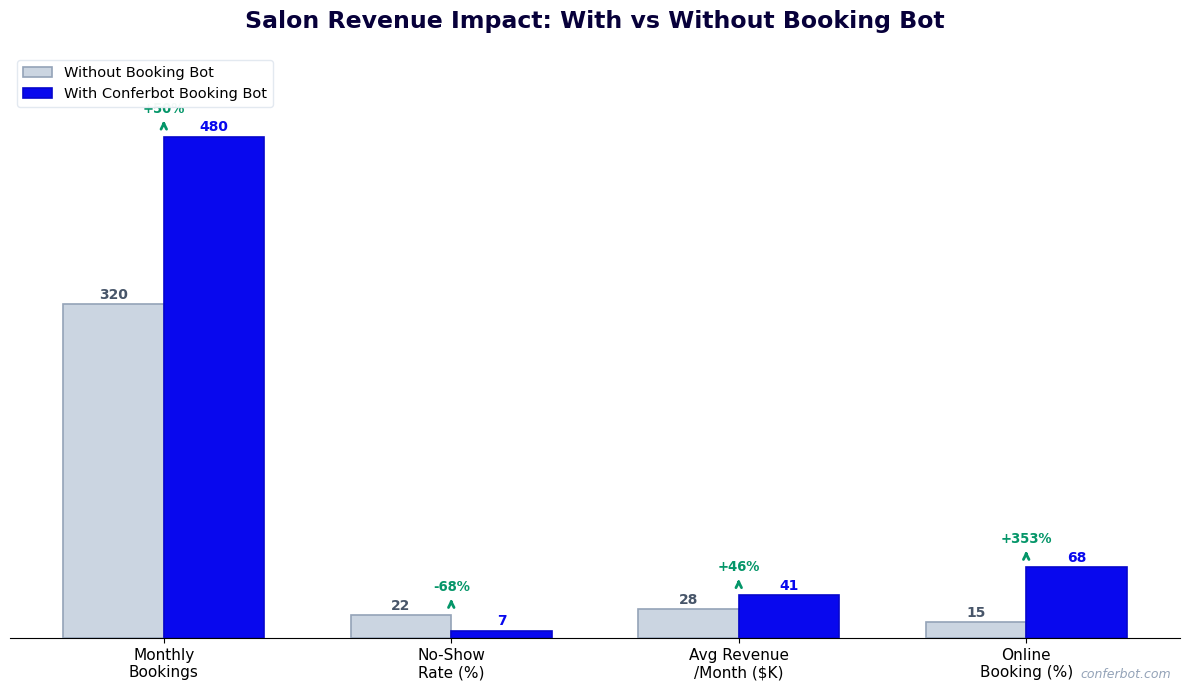
A mid-sized salon with four stylists, each averaging six appointments per day at an average ticket of $90, generates approximately $2,160 in daily revenue at full occupancy. At a 20% no-show rate, $432 is lost daily to empty chairs. Reducing no-shows to 5% through automated WhatsApp reminders and deposit collection recovers $324 daily -- $97,200 annually. This single impact typically exceeds the annual cost of a salon management platform and a chatbot subscription combined.
After-Hours and Social Media Bookings Captured
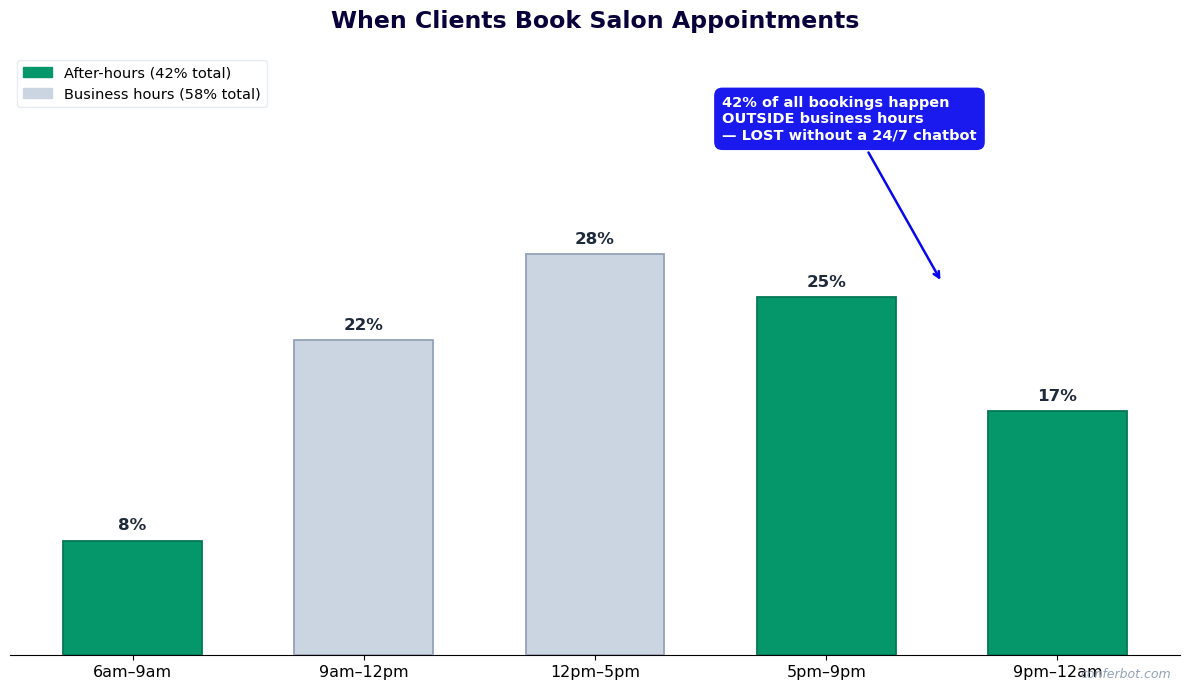
Industry data shows that 35-45% of online booking intent occurs between 8 p.m. and 10 a.m. -- outside standard salon operating hours when phone calls go to voicemail. A chatbot captures this demand in real time. Salons consistently report that 30-40% of chatbot bookings originate from after-hours sessions that would previously have resulted in the potential client booking with a competitor or simply not booking at all. For a salon with 200 monthly bookings, capturing an additional 60-80 after-hours appointments at an average $90 ticket represents $5,400-$7,200 in incremental monthly revenue.
Average Ticket Lift from Multi-Service and Add-On Booking
The conversational booking experience naturally drives multi-service booking. When a client books a haircut, the chatbot asks about color. When a client books a facial, it offers a lash lift add-on. When a client books a manicure, it suggests a pedicure. Salons report average ticket increases of 25-40% for clients who book via the chatbot compared to phone or standard online booking forms. On a base of 200 monthly appointments at an average $90 ticket, a 30% ticket increase represents $5,400 in additional monthly revenue from the same appointment volume.
Elimination of Third-Party Commission Costs
Third-party booking platforms charge commissions ranging from $1 to $3 per booking, with some premium placement fees adding further costs. For a salon processing 300 bookings per month, this represents $300-$900 in monthly platform fees -- fees that are eliminated when clients book through the salon's owned chatbot channel on its own website, Instagram, and WhatsApp. Shifting even 60% of bookings to the owned channel reduces third-party fees by $180-$540 monthly while the salon retains the client relationship and data.
| Revenue Impact Area | Typical Impact | Annual Value (4-Stylist Salon) |
|---|---|---|
| No-show reduction (20% to 5%) | $324/day recovered | $97,200 |
| After-hours bookings captured | 30-40% incremental booking volume | $64,800-$86,400 |
| Average ticket lift from multi-service | 25-40% ticket increase | $64,800-$103,680 |
| Third-party commission elimination | $300-$900/month saved | $3,600-$10,800 |
The aggregate revenue impact for a four-stylist salon deploying a booking chatbot typically reaches $80,000-$150,000 in the first year. Use the Conferbot ROI calculator with your specific appointment volume, average ticket, no-show rate, and channel mix to model a projection for your business.
50,000+ businesses use Conferbot templates to automate conversations
Instagram and WhatsApp Booking Strategies for Salons
For salons and spas, Instagram and WhatsApp are not optional channels -- they are where client acquisition and relationship maintenance actually happen. Instagram is the primary discovery channel for beauty services globally; WhatsApp is the preferred personal communication channel in most markets and the highest-converting booking channel available. A chatbot that is not deployed on both channels is leaving a substantial portion of potential bookings on the table.
Instagram: Converting Discovery Into Booked Appointments
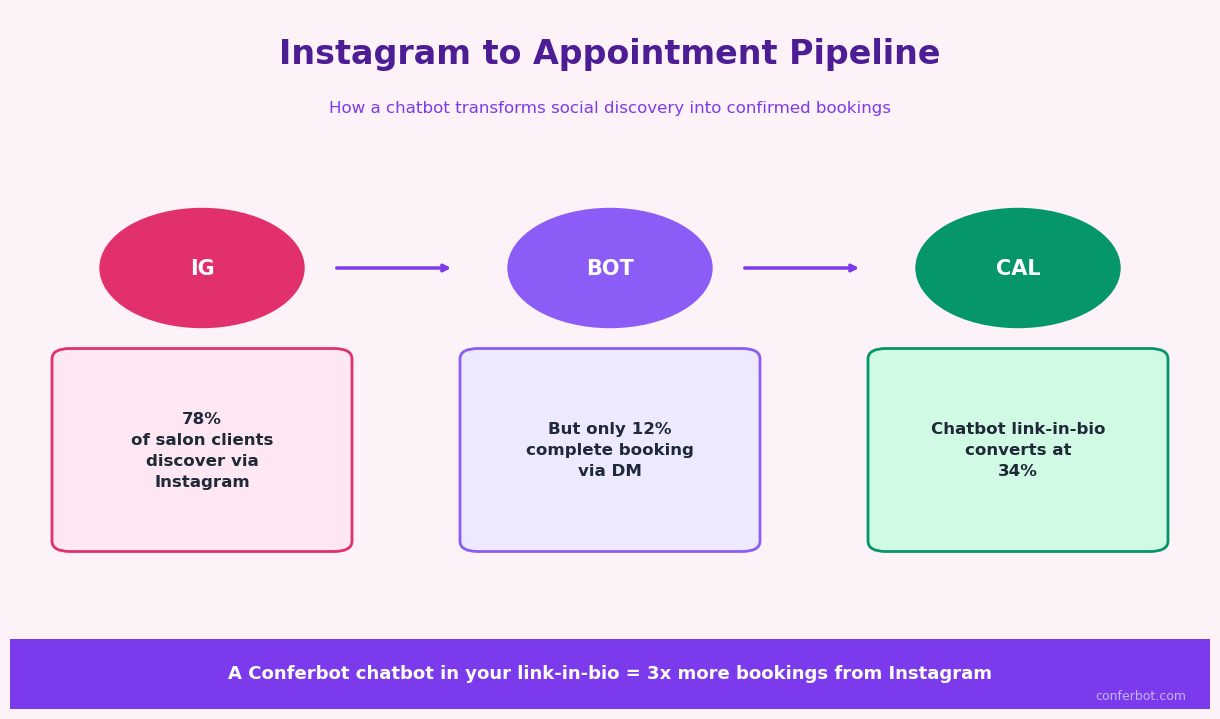
The typical Instagram journey for a salon client begins with seeing a before-and-after post, a reel of a balayage technique, or a recommendation from someone they follow. The purchase intent at that moment is high and short-lived -- if the booking process requires more than two steps, a significant percentage of that interest dissipates. The salon appointment chatbot deployed on Instagram captures this intent immediately.
When a user sends a DM to your salon's Instagram account -- whether they tap the "Book Now" button on your profile, reply to a story with "How much for this color?" or message "Can I get an appointment this week?" -- the chatbot responds instantly with the booking flow. This converts passive discovery content into active revenue. Salons that deploy Instagram chatbots consistently report that Instagram becomes their second-highest booking channel within 30-60 days, often surpassing their website in raw booking volume because Instagram's visual content generates higher intent than organic website visits.
Instagram chatbot strategy for salons: post service portfolio content (portfolio reels, transformation photos, before-and-afters) consistently and include a clear call to action in the caption ("DM us to book"). The chatbot handles all DM inquiries automatically -- you create the content, the chatbot converts the DMs. Configure the omnichannel integration so that bookings from Instagram flow into the same availability system as all other channels.
WhatsApp: The Highest-Converting Booking Channel
WhatsApp's combination of 98% message open rates, personal communication context, and native rich media support makes it the single highest-converting booking channel for salons in most markets. Clients who book via WhatsApp have measurably higher appointment completion rates, respond to reminders at higher rates, and rebook at higher rates than clients who book via other channels. This is likely because the WhatsApp booking interaction feels like communicating with the salon directly rather than transacting with a booking platform.
WhatsApp strategy for salons: prominently feature your WhatsApp number on all digital touchpoints (Instagram bio, website header, Google Business profile). Add a WhatsApp click-to-chat link in your Instagram bio and stories. Train reception staff to encourage clients to WhatsApp for future bookings. Once a client has your WhatsApp number and has had a positive chatbot interaction, they are likely to use that channel for all future bookings -- eliminating the friction of re-entering details on a booking platform every time.
For salons in markets where WhatsApp is the dominant messaging platform (Latin America, Southeast Asia, Middle East, Europe), WhatsApp deployment is not optional -- it is where your clients expect to communicate. Conferbot's WhatsApp Business API integration supports the full booking flow including rich media, appointment confirmations with calendar integration, and automated reminder sequences on the channel your clients already use daily.
Unified Multi-Channel Management
Managing separate booking flows on Instagram, WhatsApp, and your website creates operational complexity and double-booking risk. Conferbot's omnichannel platform maintains a single availability source of truth. Whether a client books via Instagram DM at 9 p.m., WhatsApp at 7 a.m., or your website at midday, every booking is written to the same calendar and reflected in real-time availability across all channels simultaneously. Front-desk staff and stylists see one schedule, with channel attribution visible for analytics purposes.
Setup Guide: Deploying Your Salon Appointment Scheduler
The salon appointment scheduler can be deployed in a single afternoon for a straightforward single-location setup or over two to three days for a multi-location salon group with existing management software integration. The following steps cover the complete deployment process.
Step 1: Select the Template and Configure Your Service Menu
Log into Conferbot and select the Salon Appointment Scheduler from the booking and scheduling template library. In the service configuration panel, add your service categories and individual services. For each service, specify: service name, duration (in minutes), price, a brief description for display during booking, whether a deposit is required, and which providers are qualified to perform it. This service-provider mapping is what enables the chatbot to show only available providers who can actually perform the requested service.
Step 2: Add Provider Profiles
Add each stylist, colorist, therapist, or technician as a provider profile. Include their name, photo, professional bio (2-3 sentences), specialties, and weekly schedule. The schedule configuration sets their working hours, lunch breaks, and any recurring blocked time. Provider profiles are shown to clients during the stylist selection step -- quality photos and concise specialty descriptions significantly increase the rebooking-with-same-provider rate, so invest a few minutes in this step. Use the no-code editor to customize the profile display format to match your salon's brand aesthetic.
Step 3: Connect Your Salon Management Software
Navigate to the integrations hub and select your platform: Vagaro, Fresha, Square Appointments, or another supported system. Follow the guided authentication flow to authorize Conferbot's access to your platform. Once connected, the chatbot pulls your existing provider schedules, service menus, and client records from the management platform -- you do not need to re-enter data you have already configured there. Test the sync by checking that the chatbot's displayed availability matches what you see in your management platform in real time.
Step 4: Configure Deposit and Cancellation Policy
Set your deposit rules: whether deposits are required for all clients or only new clients, the deposit amount (fixed or percentage), and your cancellation policy (how many hours' notice is required for a full refund). Connect your payment processor -- Square, Stripe, or PayPal -- through the payment integration settings. Test the deposit flow by booking a test appointment through the chatbot and verifying that the payment processes correctly and appears in your payment processor and salon management software.
Step 5: Configure Reminder Sequences
Set up your automated reminder schedule. The recommended configuration is a 48-hour reminder, a 24-hour reminder with confirmation request, and a 2-hour same-day reminder. Customize the message content for your salon's voice -- it should sound like your front desk, not a generic booking system. Configure the cancellation and rescheduling options within the reminder response, and set the waitlist notification trigger for when a cancellation is received.
Step 6: Deploy Across Channels and Go Live
Deploy the chatbot on your website by pasting the embed code into your site's HTML. Connect your WhatsApp Business number through the WhatsApp integration setup. Link your Instagram and Messenger accounts through the social media integration panel. Add the "Book Now" button to your Instagram bio and a WhatsApp booking link to your Google Business profile. Once all channels are live, run test bookings on each channel to verify the full flow, confirm that availability is syncing correctly, and that reminder sequences fire as configured. Monitor the analytics dashboard for the first week to catch any edge cases in the booking flow and fine-tune service durations or availability rules based on real booking patterns.
Salon Appointment Chatbot Template (Free) FAQ
Everything you need to know about chatbots for salon appointment chatbot template (free).
Why Use a Template vs Building from Scratch?
Templates encode years of optimization data into the conversation flow before you start.
| Factor | Conferbot Template | Build from Scratch | Hire a Developer |
|---|---|---|---|
| Time to deploy | 10 minutes | 2-8 hours | 2-6 weeks |
| Cost | Free | Your time | $5,000-$25,000 |
| Day-1 conversion | 15-22% | 5-8% | 10-15% |
| Proven flows | Yes, data-tested | No | Depends |
| Updates included | Automatic | Manual | Paid |
| Multi-channel | 8+ channels | 1 channel | Extra cost |
| Analytics | Built-in | Must build | Extra cost |
Ready to Deploy Salon Appointment Chatbot Template (Free)?
Join 50,000+ businesses. Free forever plan available. No credit card required.