
Employee Satisfaction Survey Chatbot Template (Free)
Free Surveys Chatbot Template
Run pulse surveys with 72% response rates using a free employee satisfaction chatbot. Anonymous feedback, engagement scoring, and HRIS sync — deploy today.


What Is an Employee Satisfaction Survey Chatbot?
An employee satisfaction survey chatbot is an AI-powered conversational tool that replaces static email surveys and annual engagement questionnaires with a dynamic, ongoing dialogue between HR teams and their workforce. Instead of asking employees to open a link, read a long-form survey, and submit a form — a process most employees either ignore or rush through — the chatbot conducts a structured micro-conversation via the tools employees already use: a website widget, Slack, Microsoft Teams, or WhatsApp. It captures honest responses, scores engagement across key dimensions, anonymizes sensitive feedback, and surfaces actionable intelligence for HR leaders and people managers.
The traditional annual engagement survey has a well-documented failure mode: it takes 25-40 minutes to complete, generates response rates between 20-30% among salaried workers, produces results that are months out of date by the time they are analyzed, and lands in a report that is reviewed once and shelved. Employee expectations have changed. Workers expect their feedback to be heard in real time, not catalogued annually. A chatbot-based pulse survey system addresses every weakness of the traditional model — shorter interactions, higher completion rates, continuous cadence, and immediate visibility into trends.
The Response Rate Problem
Low survey response rates are not an employee engagement problem — they are a survey design problem. When feedback tools are inconvenient, impersonal, or perceived as unsafe, employees disengage from the process. The chatbot removes the friction that kills response rates: there is no link to click, no new tab to open, no login required. The conversation begins where the employee already is and takes under three minutes to complete. The anonymization layer — visible and explained upfront — removes the fear that candid responses will be traced back to the respondent.
Who Deploys This Template
- HR teams at mid-market companies (100-2,000 employees): Replace annual engagement surveys with a continuous pulse system that gives HR business partners real-time visibility into team health without adding headcount.
- People operations teams at fast-growing startups: Track employee sentiment through rapid growth phases, identify early signs of burnout or disengagement before they become attrition, and demonstrate to leadership that people metrics are being tracked rigorously.
- Enterprise HR departments: Complement annual engagement surveys with monthly or quarterly pulse checks that maintain data between survey cycles and allow for targeted follow-up on specific issues.
- CHRO offices conducting culture transformation programs: Measure sentiment changes over time as culture initiatives roll out, with department-level granularity that shows which teams are responding to the change and which need additional support.
- Managers and team leads: Run team-level pulse surveys before and after significant changes — reorganizations, policy changes, return-to-office mandates — to gauge team reaction and identify support needs.
Conferbot's AI chatbot builder handles the branching logic required to ask follow-up questions based on low scores, route responses to the correct manager or HR partner, and maintain anonymity while still attributing responses to the correct department. The NLP engine interprets open-text feedback without requiring employees to respond in a specific format.
How the Employee Satisfaction Survey Chatbot Works
The chatbot operates through three interconnected functional layers: pulse survey delivery, real-time engagement scoring, and anonymous open-feedback collection. Each layer is designed to work independently or together, allowing HR teams to configure the survey cadence and depth that matches their organizational maturity and bandwidth for acting on results.
Pulse Survey Delivery
Pulse surveys are short, frequent check-ins — typically 3-7 questions — sent on a weekly, biweekly, or monthly cadence. The chatbot initiates the conversation proactively, pushing a message to employees via their configured channel at the scheduled time. The conversation is designed to take under three minutes. Questions rotate from a bank of validated items across five engagement dimensions: role clarity, manager effectiveness, workload and wellbeing, team cohesion, and growth and development. Rotating questions ensure that employees do not feel they are answering the same survey repeatedly while still maintaining tracking consistency across the dimensions that matter most.
Engagement Scoring Model
Each completed pulse conversation generates an engagement score for that employee in that cycle. Scores are aggregated at team, department, and organization levels — never displayed at the individual level unless the employee opts in. The scoring model weights responses across the five dimensions:
| Engagement Dimension | Weight in Score | Sample Question | Response Format |
|---|---|---|---|
| Role clarity and purpose | 20% | "How clearly do you understand what is expected of you in your role?" | 1-5 scale |
| Manager effectiveness | 25% | "How supported do you feel by your direct manager this week?" | 1-5 scale |
| Workload and wellbeing | 25% | "How manageable has your workload felt over the past two weeks?" | 1-5 scale |
| Team cohesion | 15% | "How connected do you feel to your immediate team right now?" | 1-5 scale |
| Growth and development | 15% | "Are you learning and growing in your role?" | Yes / Somewhat / No |
Anonymous Open Feedback
After the scored questions, the chatbot invites qualitative input: "Is there anything specific on your mind that you would like to share with HR or leadership?" This prompt is optional and explicitly anonymized — the bot explains: "Your response is anonymous. It will reach HR without any information that identifies you." This framing consistently produces the highest-value feedback in the system, surfacing specific concerns — a manager behavior, a process breakdown, a team conflict — that scored questions never capture. The open-text responses feed directly into the sentiment analysis layer. Connect the full data pipeline to your HRIS and people analytics tools through Conferbot's chatbot API integration.
Key Features of the Employee Satisfaction Survey Template
The employee satisfaction survey template is a production-ready HR engagement system, not a one-off form replacement. It is built for ongoing use across survey cycles, supports the anonymization and compliance requirements of sensitive HR data, and generates the structured output that HR analytics teams need to act on results confidently.
Feature Matrix
| Feature | Description | HR Benefit | Employee Benefit |
|---|---|---|---|
| Configurable pulse cadence | Weekly, biweekly, monthly, or event-triggered survey schedules | Continuous data without over-surveying fatigue | Short, predictable interactions rather than surprise surveys |
| Question bank rotation | Library of 60+ validated engagement questions auto-rotated by dimension | Sustained measurement across all engagement drivers | Fresh conversations rather than repetitive surveys |
| Anonymization engine | Responses decoupled from employee identity; department-only attribution | Higher honesty and participation; legal protection | Safe space for candid feedback without retaliation risk |
| Automated low-score alerts | Notifies HR partner when team or department score drops below threshold | Early warning system for team health deterioration | Issues escalated quickly rather than buried in annual reports |
| Sentiment trend tracking | NLP-based sentiment scoring on open-text responses over time | Tracks culture trajectory; identifies emerging themes | Qualitative feedback given equal weight to scored responses |
| Manager-level dashboards | Aggregated team scores visible to managers without individual-level data | Empowers managers to act without HR bottleneck | Managers held accountable with data rather than impressions |
| Multi-channel delivery | Slack, Teams, WhatsApp, website widget, and email channel support | Higher response rates by meeting employees where they work | No new tools to learn; familiar interfaces |
| Action planning prompts | Chatbot suggests specific HR actions based on score patterns | Bridges the gap from data to intervention | Visible evidence that feedback produces change |
eNPS Module
The template includes a dedicated Employee Net Promoter Score (eNPS) module that asks the standard eNPS question — "How likely are you to recommend this company as a place to work to a friend or colleague, on a scale of 0-10?" — on a quarterly basis and tracks the score over time. eNPS is a widely recognized benchmark that allows organizations to compare their workforce sentiment against industry norms. The chatbot follows up the eNPS score with a branching question: promoters are asked what they value most; passives are asked what would improve their experience; detractors are asked to identify the primary concern they would want leadership to address. This three-way branching produces richer insight than a single score. Review Conferbot's full HR use case library in the chatbot analytics documentation.
Ready to try Employee Satisfaction Survey Chatbot Template (Free)?
Deploy this template in under 10 minutes. No coding required.
Use This Template Free →HRIS Integration: Connecting Survey Data to Your People Systems
An employee satisfaction survey chatbot generates its maximum organizational value when its data is connected to the systems HR teams already use to manage the employee lifecycle. Without integration, survey results exist in isolation — a dashboard that HR must visit separately, data that cannot be correlated with turnover, performance, or compensation records. With HRIS integration, the chatbot becomes a continuous data feed that enriches every downstream people analytics use case.
Supported HRIS Platforms
| HRIS Platform | Integration Type | Data Synced From HRIS | Data Written Back |
|---|---|---|---|
| Workday | REST API | Employee roster, department hierarchy, manager relationships, tenure, location | Engagement scores by department and cycle; eNPS trend data |
| BambooHR | Native integration | Employee profiles, reporting structure, job titles, hire dates | Engagement scores as custom fields; survey completion flags |
| ADP Workforce Now | API / SFTP | Payroll-linked employee IDs, department codes, cost center mapping | Aggregated engagement data by cost center |
| SAP SuccessFactors | API | Org chart, employee profile data, performance review cycle alignment | Engagement KPIs to people analytics module |
| Rippling | Native integration | Employee directory, team structure, equipment and tools data | Engagement and eNPS scores by team |
| Custom HRIS | Webhook / REST API | Configurable employee data fields via JSON payload | Configurable output schema to match HRIS data model |
Employee Directory Sync
The HRIS integration synchronizes the employee directory daily, ensuring that survey invitations go to active employees only — departures are automatically removed from survey distribution lists and new hires are added at their configured onboarding milestone (typically 30, 60, or 90 days after start date, avoiding surveying employees before they have enough context to respond meaningfully). The sync also maintains the department and manager hierarchy so that team-level aggregations in the analytics dashboard always reflect the current organizational structure rather than a snapshot from the deployment date.
Turnover Correlation Analysis
When engagement score data is connected to HRIS turnover records, HR teams gain one of the most valuable leading indicators in people analytics: engagement score trajectory before resignation. Analysis consistently shows that employees who voluntarily resign had engagement scores trending downward for 6-12 weeks before their departure. With this data, HR teams can intervene proactively — identifying high-risk employees by engagement trend before they reach the point of decision. This capability requires both the chatbot data pipeline and the HRIS integration to be in place, and is accessible through Conferbot's chatbot analytics reporting module.
For organizations running website-based chatbot deployments alongside internal HR tools, the same conversation engine handles both the internal survey delivery and any public-facing career page or FAQ chatbot — reducing total platform cost and maintaining consistent brand voice across employee touchpoints.
Response Rate Comparison: Chatbot vs. Email Survey
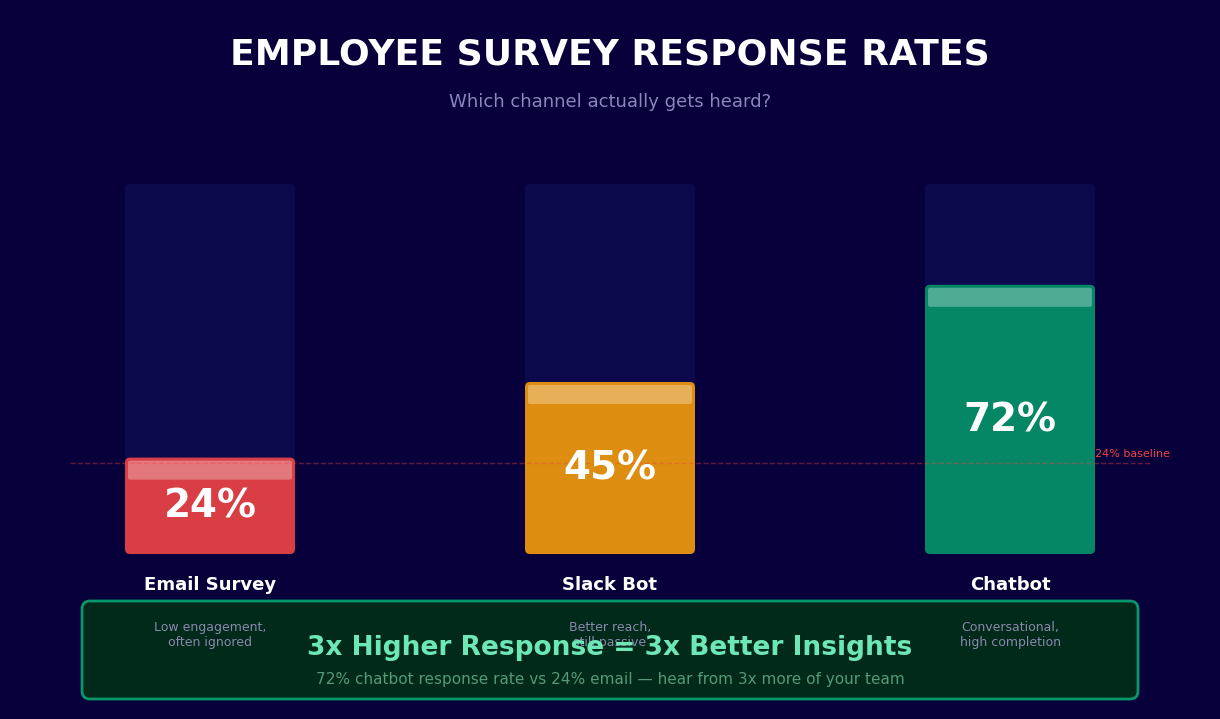
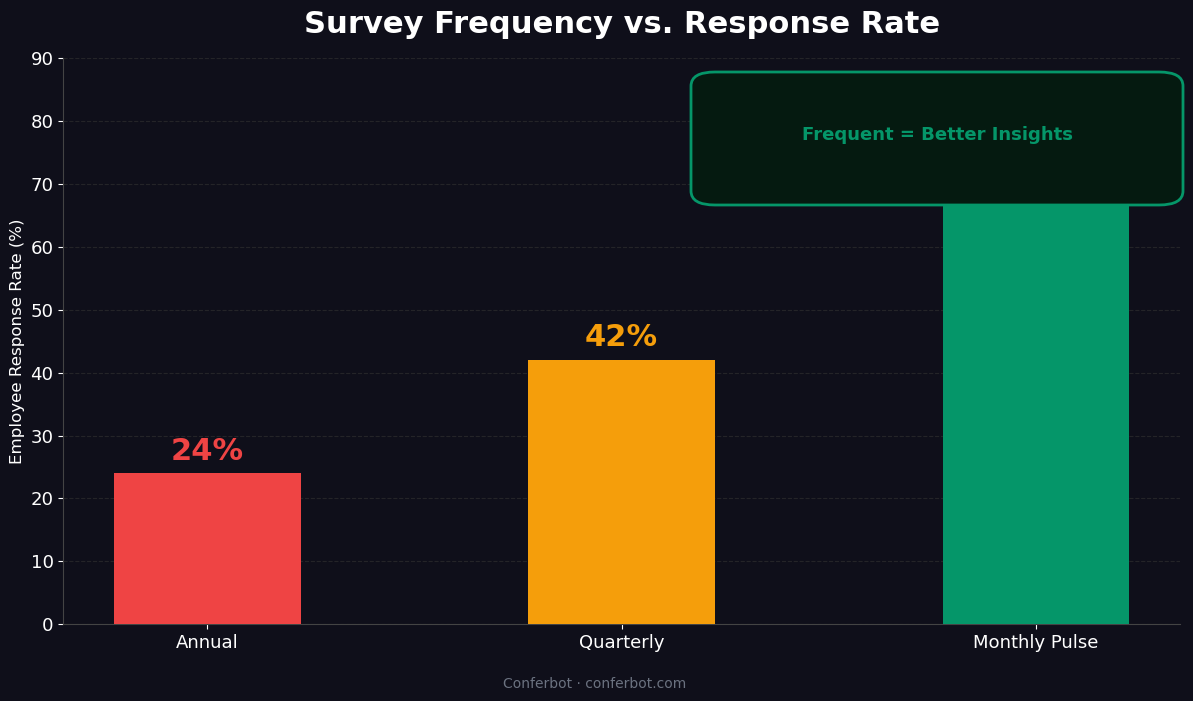
The most consistent finding across HR teams that switch from email-based engagement surveys to chatbot-based pulse surveys is the response rate. Email survey response rates have declined steadily over the past decade as inbox volume has increased and survey fatigue has grown. Chatbot-based surveys reliably outperform email by a factor of 2-4x because they operate on a different interaction model — they meet employees in their workflow rather than interrupting it with an inbox item that requires a conscious decision to open and act on.
Response Rate Benchmark Comparison
| Survey Channel | Average Response Rate | Median Completion Time | Data Freshness | Employee Perception |
|---|---|---|---|---|
| Annual email survey (traditional) | 24% | 28 minutes | Results 6-8 weeks after close | "Checkbox exercise — nothing changes" |
| Monthly email pulse survey | 31% | 8 minutes | Results within 1-2 weeks | "Too frequent; another thing in my inbox" |
| SMS-based pulse survey | 47% | 3 minutes | Real-time | "Quick but feels transactional" |
| Slack/Teams chatbot survey | 68% | 2.5 minutes | Real-time | "Natural; part of my workday flow" |
| WhatsApp chatbot survey | 72% | 2 minutes | Real-time | "Conversational; feels less like a form" |
Why Chatbot Response Rates Are Higher
The 72% chatbot response rate versus 24% for traditional email surveys reflects structural advantages, not just novelty. First, the chatbot removes the activation cost — there is no link to click, no browser to open, no login to authenticate. The survey arrives as a message in an interface the employee is already in. Second, the conversational format signals that responses are read and valued: a chatbot that responds to a "2 out of 5" manager score with "Thank you — I have noted this. Is there something specific your manager could do differently that would be helpful?" feels fundamentally different from a form that accepts all inputs with the same "Thank you for your response" confirmation. Third, the three-minute completion time aligns with micro-task attention spans in a way that 28-minute annual surveys do not.
Response Rate by Employee Segment
Response rates are not uniform across the workforce. Analysis of deployment data across Conferbot customers shows variation by employee segment:
- Frontline and deskless workers: WhatsApp and SMS channels achieve 74-78% response rates — significantly above office workers on Slack (65-72%) because mobile-first delivery matches their workflow.
- Remote employees: Slack and Teams channels achieve the highest completion rates (70-76%) when surveys are timed to align with the start of the workday in the employee's time zone.
- Manager and leadership population: Email pulse surveys remain competitive for senior leaders (44-52% response rates) who have high inbox discipline and prefer a familiar format for professional communications.
- New hires: 30/60/90-day milestone surveys via chatbot achieve 83-89% response rates — new employees are highly motivated to share feedback and appreciate that the company is asking early.
Deploy to your entire workforce across channels simultaneously using Conferbot's WhatsApp chatbot for mobile-first employees alongside the website chatbot for office-based teams.
Sentiment Analysis: Turning Open Feedback Into Actionable Themes
Scored survey questions tell HR teams how engaged employees are. Open-text responses tell them why. The sentiment analysis layer of the employee satisfaction chatbot automatically processes every open-text response — across all employees, all survey cycles — to identify the dominant themes, classify the emotional valence (positive, neutral, or negative), and surface the specific topics that are driving employee sentiment in each direction. This transforms a stream of individual text responses into a structured, searchable intelligence feed that HR teams can act on without reading thousands of individual comments.
How Sentiment Analysis Works
Each open-text response is processed through a three-layer NLP pipeline. First, the text is classified by sentiment valence — positive, neutral, or negative — and assigned a confidence score. Second, the text is mapped to a topic taxonomy covering the key drivers of employee experience: compensation and benefits, management and leadership, work-life balance, career growth, team dynamics, processes and tools, company direction, and physical or remote work environment. Third, the response is added to the rolling topic frequency and sentiment trend analysis that tracks how often each topic appears and whether it is trending more positive or more negative over time.
Sentiment Dashboard Output
| Output | Description | Update Frequency | Primary User |
|---|---|---|---|
| Organization sentiment score | Weighted average of all open-text valence scores across the workforce | Each survey cycle | CHRO, HR leadership |
| Top positive themes | Top 5 topics driving positive sentiment, with representative quotes (anonymized) | Each cycle | HR business partners |
| Top concern themes | Top 5 topics driving negative sentiment, with representative quotes | Each cycle | HR business partners, managers |
| Emerging themes alert | Topics that appear with significantly higher frequency than prior cycle | Real-time trigger | HR leadership |
| Department sentiment comparison | Sentiment score by department, sortable by score and trend direction | Each cycle | HR business partners |
| Manager-level theme summary | Topic frequency and sentiment for each manager's team (anonymized) | Each cycle | Managers, HR business partners |
Theme Trend Tracking
A single survey cycle produces a snapshot. Continuous pulse surveys produce a trend line. The most valuable output of the sentiment analysis system is not what employees are saying today — it is whether the themes they raise are improving, stable, or deteriorating. An organization that launched a flexible work policy six months ago can track whether "work-life balance" sentiment has improved since the policy took effect, and by how much. A company that promoted a divisive manager can see whether team sentiment in that department improved or declined in the 90 days following the change. This longitudinal view is what turns HR from a reactive function into a proactive one. All sentiment data feeds into Conferbot's chatbot analytics dashboard with full export capability for integration into your people analytics infrastructure.
50,000+ businesses use Conferbot templates to automate conversations
Setup Guide: Deploying an Employee Satisfaction Chatbot
Deploying an employee satisfaction survey chatbot is a people change management exercise as much as a technical implementation. The chatbot configuration takes hours; the organizational preparation — communicating anonymization policies, training managers on how to interpret results, establishing the action planning process — determines whether the tool produces lasting value or becomes another abandoned HR initiative. This guide covers both dimensions.
Phase 1: Design and Configuration (Week 1)
Begin with the survey design decisions that will shape your deployment. Open the Employee Satisfaction Survey template in Conferbot's AI chatbot builder and configure the following elements:
- Survey cadence: Choose the pulse frequency — monthly is the most common starting point for organizations new to continuous listening. Weekly pulses are appropriate for teams going through rapid change; quarterly for leadership populations.
- Question selection: Choose your initial question bank from the 60+ validated items, selecting 5-7 questions per cycle. Include the eNPS question on a quarterly rotation regardless of other question selection.
- Anonymization threshold: Set the minimum team size for reporting aggregated results — most organizations use 5 as the minimum to protect anonymity. Results for teams below this threshold are aggregated to the next level up.
- Alert thresholds: Define the engagement score level that triggers an automatic alert to the HR business partner (typically a score below 3.0 on a 5-point scale or a drop of 0.5 or more in a single cycle).
- Channel configuration: Select Slack, Microsoft Teams, WhatsApp, website widget, or email as the delivery channel for each employee segment.
Phase 2: HRIS Integration and Employee Import (Week 1-2)
Connect your HRIS using the integration panel and run the initial employee directory sync. Verify that the department hierarchy, manager relationships, and employee status fields sync correctly. Set the new hire inclusion rule — the point in the employee lifecycle at which newly joined employees are added to the survey distribution. Configure the departure exclusion rule to automatically remove employees from future surveys when their HRIS status changes to terminated or on leave.
Phase 3: Communication and Launch Preparation (Week 2)
Before sending the first pulse survey, communicate with the workforce. Employees who receive a chatbot survey with no advance notice and no explanation of anonymization will be skeptical. A two-stage communication — an all-hands or email announcement explaining the program, followed by a manager briefing covering how team results will be shared and acted on — dramatically improves both response rates and the quality of responses. Include explicit statements about anonymization: how it works, what HR can and cannot see at the individual level, and who reviews results.
Phase 4: First Survey Cycle and Results Review (Week 3-4)
Launch the first pulse cycle and monitor completion rates daily for the first three days. If completion rates are below 40% by day three, send a reminder message through the chatbot. After the cycle closes, conduct an HR team review of results before sharing with managers. Establish the "pre-read" practice: HR business partners review department-level data before managers see it so they can support managers in interpreting the results and developing appropriate responses. See Conferbot pricing for HR team plan options.
Action Planning: Turning Survey Results Into Measurable Change
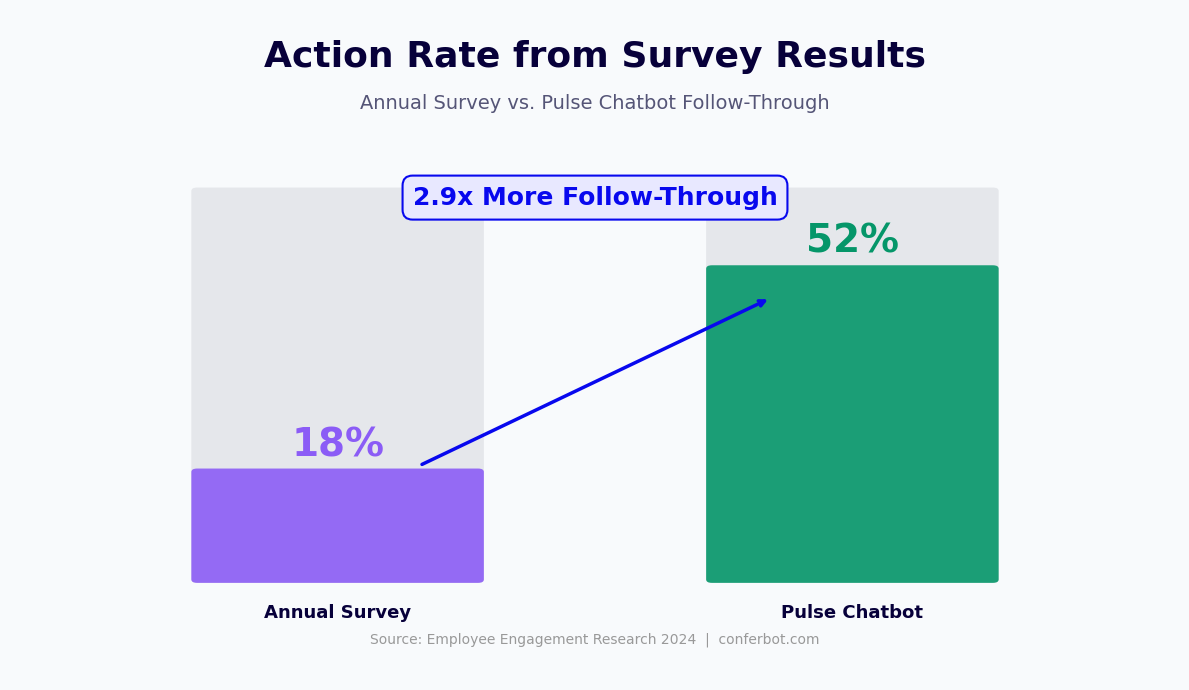
The most common failure mode of employee engagement programs is not low response rates — it is low action rates. Employees who complete surveys and see no evidence that their feedback influenced anything stop participating within two to three cycles. The action planning framework built into the employee satisfaction chatbot template is designed specifically to close the feedback-to-action loop: surfacing specific, prioritized recommendations for HR and managers, creating accountability for follow-through, and communicating back to employees what changed as a result of their input.
The Feedback-Action-Communication Loop
The chatbot supports a three-stage loop that operationalizes survey results:
- Feedback: Employees complete pulse surveys; open-text responses are processed through sentiment analysis; engagement scores and theme reports are generated for HR and managers.
- Action: HR business partners and managers review results, select priority issues from the theme analysis, and document specific actions they commit to taking in response. These actions are logged in the chatbot's action tracking module with owners and target dates.
- Communication: The chatbot proactively communicates back to employees on the next pulse cycle — "In the last survey, you raised concerns about meeting overload. Here is what has changed: your manager has implemented a meeting-free Friday morning policy." This closing of the loop is the most powerful driver of sustained participation.
Recommended Action Framework by Score Level
| Engagement Score | Category | Recommended Response | Timeline |
|---|---|---|---|
| 4.2 - 5.0 | High engagement | Identify and document what is working; use as model for lower-scoring teams | Within 2 weeks of results |
| 3.5 - 4.1 | Moderate engagement | Manager-led team conversation; identify 1-2 specific improvements | Within 3 weeks of results |
| 2.8 - 3.4 | Below threshold | HR business partner engagement; structured listening session; action plan with 30-day check-in | Within 2 weeks of results |
| Below 2.8 | Critical concern | HR leadership escalation; immediate manager meeting; root cause investigation; possible personnel action | Within 1 week of results |
Closing the Loop at Scale
Large organizations face a genuine challenge: how do you communicate back to 2,000 employees about the actions taken in response to their feedback without it becoming a generic, impersonal exercise? The chatbot solves this by delivering personalized action-response messages based on the themes that were most frequently raised in each department. An employee in the engineering department who raised "unclear priorities" as a concern receives a follow-up message about the specific changes leadership made to the quarterly planning process — not the general company-wide message about facilities improvements that is irrelevant to them. This theme-matched communication is automated based on the sentiment analysis output, requiring no manual personalization by the HR team. Connect the full action planning module to your project management tools through Conferbot's chatbot API integration to track follow-through on committed actions alongside other operational work.
Employee Satisfaction Survey Chatbot Template (Free) FAQ
Everything you need to know about chatbots for employee satisfaction survey chatbot template (free).
Why Use a Template vs Building from Scratch?
Templates encode years of optimization data into the conversation flow before you start.
| Factor | Conferbot Template | Build from Scratch | Hire a Developer |
|---|---|---|---|
| Time to deploy | 10 minutes | 2-8 hours | 2-6 weeks |
| Cost | Free | Your time | $5,000-$25,000 |
| Day-1 conversion | 15-22% | 5-8% | 10-15% |
| Proven flows | Yes, data-tested | No | Depends |
| Updates included | Automatic | Manual | Paid |
| Multi-channel | 8+ channels | 1 channel | Extra cost |
| Analytics | Built-in | Must build | Extra cost |
Ready to Deploy Employee Satisfaction Survey Chatbot Template (Free)?
Join 50,000+ businesses. Free forever plan available. No credit card required.