
Calendar Booking: Let Customers Schedule Appointments Through Your Chatbot
Let customers book appointments through your chatbot with Google Calendar and Outlook sync. Automated reminders, timezone handling, and confirmations.
No credit card required
Schedule Appointments Automatically
Turn your chatbot into a 24/7 booking assistant. Sync with Google Calendar and Outlook for real-time availability.
Seamless Calendar Sync
Two-way sync with Google Calendar and Microsoft Outlook ensures real-time availability. Bookings appear instantly on your calendar with no double-booking ever.
Smart Availability Management
Define available hours, buffer times between appointments, blackout dates, and per-service availability rules. Different schedules for different team members.
Automated Appointment Reminders
Send email and SMS reminders before appointments at configurable intervals. Reduce no-shows by up to 80% with multi-touch reminder sequences.
Why Calendar Booking Matters
Every missed booking is lost revenue. Make it effortless for customers to find a time and book instantly.
24/7 Booking
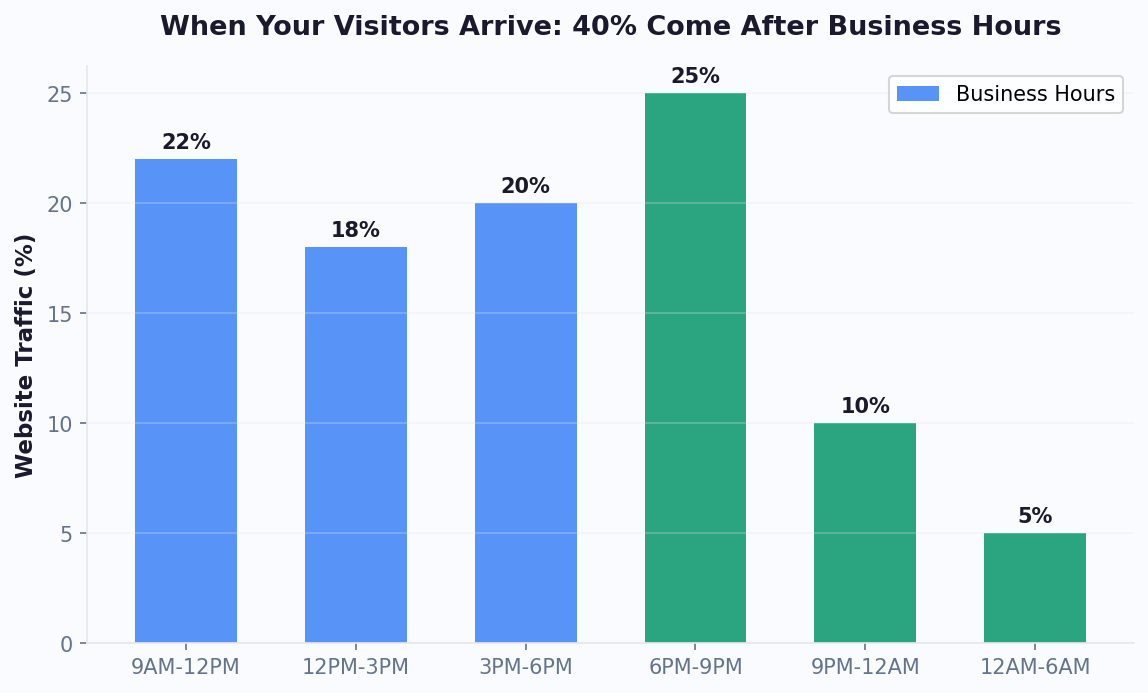
Customers book anytime, even outside business hours. The chatbot handles scheduling while you sleep.
Zero No-Shows
Automated reminders at configurable intervals reduce missed appointments dramatically.
Reduced Admin Work
No more email back-and-forth. Chatbot checks availability and books automatically.
Better Experience
Conversational booking feels natural. Customers pick a time and get confirmation in seconds.
Revenue Increase
More bookings from 24/7 availability and fewer no-shows add up to more revenue.
Time Savings
Eliminate manual scheduling and reclaim hours for higher-value activities.
How It Works
Connect your calendar and start accepting bookings in minutes.
Connect Your Calendar
Link your Google Calendar or Outlook account in one click. The chatbot reads your availability in real-time.
Set Booking Rules
Define available hours, appointment duration, buffer times, and advance booking limits. Different rules per service type.
Customers Book via Chat
Your chatbot shows available slots, collects customer details, books the appointment, and sends confirmation with calendar invite.
Booking for Every Business
From medical appointments to sales demos - scheduling that works for any industry.
Medical Appointments
Patients book visits, consultations, and follow-ups with automated reminders
Sales Demos
Qualified leads schedule product demos directly from pre-qualifying chatbot
Consultations
Legal, financial, and business consultants accept bookings with timezone handling
Service Scheduling
Salons, spas, and service providers accept bookings for specific services
Interview Booking
Candidates schedule interview slots with hiring managers automatically
Property Viewings
Real estate agents let buyers schedule property viewing appointments
Ready to Automate Scheduling?
Turn your chatbot into a 24/7 booking assistant. Start free, no credit card required.
Why Automate Appointment Booking with a Chatbot
Manual appointment scheduling is one of the most wasteful processes in modern business. Reception staff spend 30-40% of their time on the phone handling bookings, rescheduling, and confirmations. The average business loses $150,000 annually in staff time dedicated to scheduling tasks that a chatbot can handle in seconds. Automated chatbot appointment booking eliminates phone tag, reduces no-shows by 30-45%, and operates 24/7 - capturing bookings that would otherwise be lost outside business hours.
The Cost of Manual Scheduling
Consider the math: a healthcare clinic receiving 200 appointment requests per week, with each phone call averaging 4.5 minutes, consumes 900 minutes (15 hours) of staff time weekly just on scheduling. Add rescheduling, cancellations, and reminder calls, and scheduling alone can require a full-time employee. A chatbot handles the same volume instantly, simultaneously, and without errors in calendar availability.
Beyond direct cost savings, automated booking improves the customer experience. 67% of patients prefer online booking over phone calls. 78% of service bookings happen outside traditional business hours (evenings and weekends). Without 24/7 automated booking, these potential appointments simply do not happen - the customer forgets to call during business hours or books with a competitor who offers online scheduling.
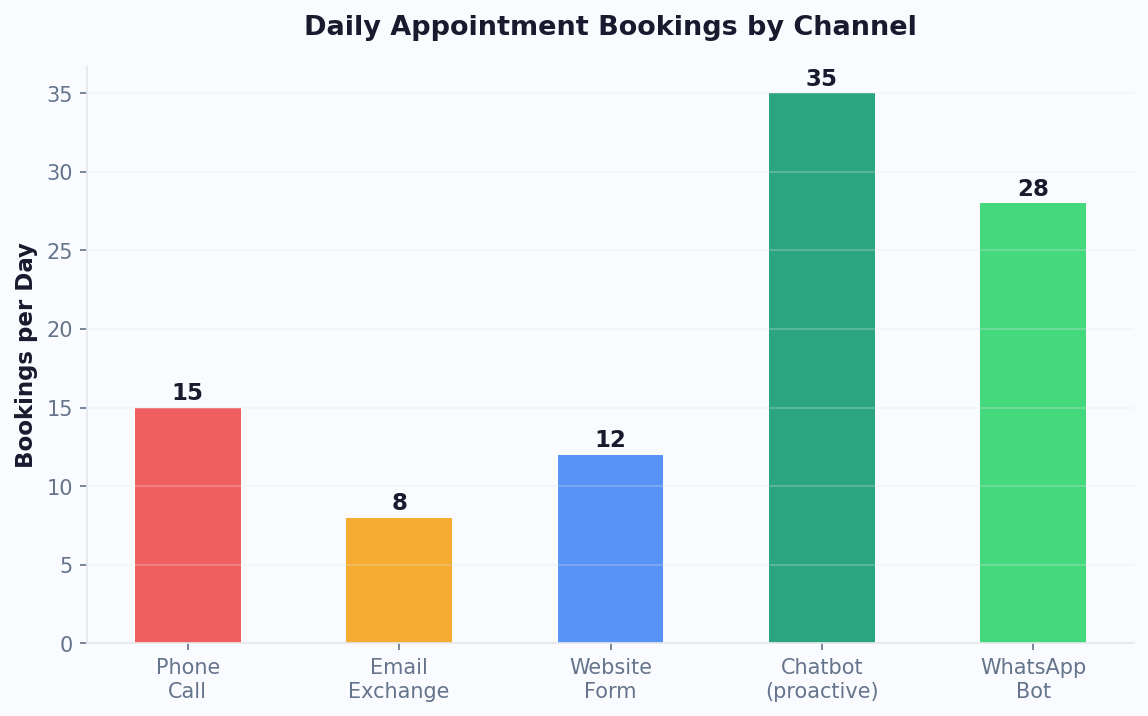
The revenue impact is significant. Businesses implementing chatbot booking see 25-35% more appointments booked per month, primarily from after-hours captures and reduced friction. When booking requires just answering 3-4 chatbot questions rather than calling, waiting on hold, and coordinating verbally, conversion from intent to booked appointment increases dramatically. Calculate the specific impact for your business with our chatbot ROI calculator.
How Chatbot Appointment Booking Works
Chatbot appointment booking integrates conversational AI with calendar systems to create a seamless scheduling experience. The process feels like texting a helpful receptionist - natural, fast, and available anytime.
The Booking Flow
Step 1: Intent Detection. When a user expresses interest in booking (clicks a "Schedule" button, visits a booking page, or types "I'd like to schedule an appointment"), the chatbot activates the booking flow.
Step 2: Service Selection. The bot presents available service types. For a dental clinic: cleaning, consultation, emergency, cosmetic. For a salon: cut, color, treatment, package. Each service has different durations and resource requirements that affect availability.
Step 3: Provider Selection (optional). If multiple providers are available, the bot asks for preference. "Do you have a preferred stylist, or would you like the first available?" This step can be skipped for single-provider businesses.
Step 4: Availability Display. The bot queries the connected calendar system in real-time and presents available time slots. Smart implementations show 3-5 options rather than an overwhelming calendar view. "I have openings on Tuesday at 2pm, Wednesday at 10am, and Thursday at 4pm. Which works best?"
Step 5: Information Collection. The bot collects necessary details: name, contact information, any specific notes (allergies for restaurants, insurance info for healthcare, etc.). For returning customers, this data is pre-filled from history.
Step 6: Confirmation & Reminder Setup. The appointment is booked in the calendar, a confirmation message is sent immediately, and automated reminders are scheduled (typically 24 hours and 2 hours before). The user can reschedule or cancel through the same chatbot interface.
The entire flow takes 60-90 seconds compared to 4-5 minutes by phone. Deploy booking bots across your website, WhatsApp, and Messenger so customers can book wherever they prefer to communicate.
No-Show Reduction: Data and Strategies
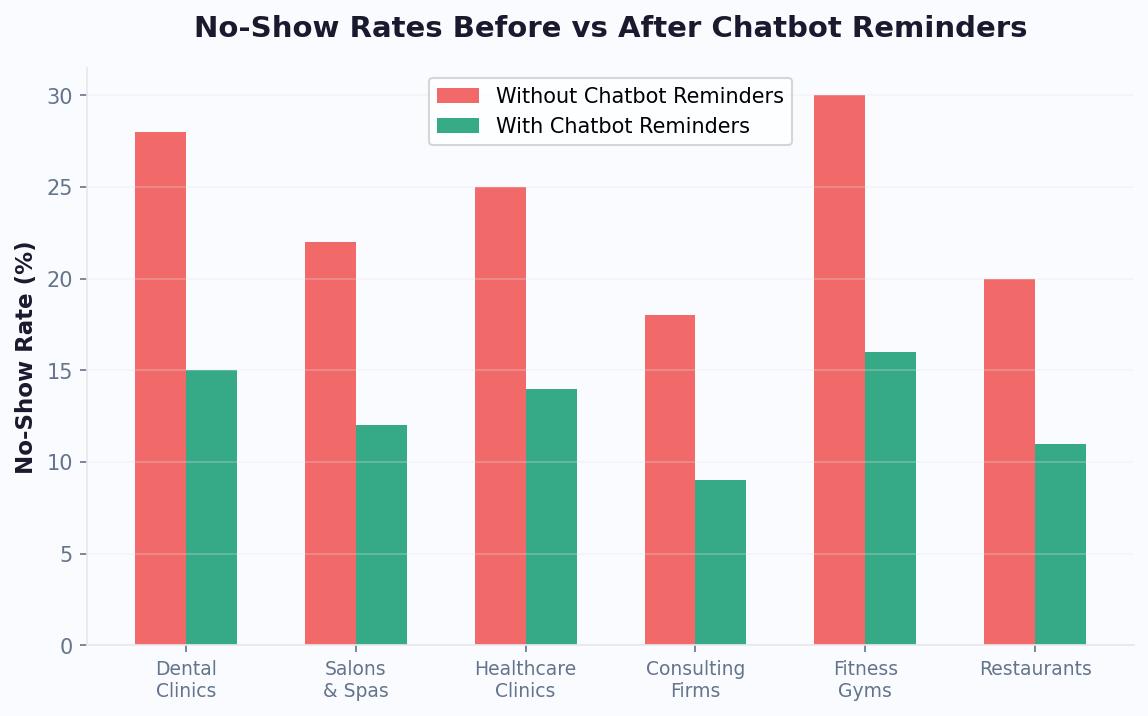
No-shows are one of the most expensive problems in service-based businesses. A missed appointment is not just lost revenue - it is wasted capacity that could have been filled by another customer. Chatbot booking systems reduce no-shows by 30-45% through automated reminders, easy rescheduling, and confirmation workflows.
No-Show Rates by Industry
| Industry | Avg No-Show Rate | With Chatbot Reminders | Revenue Saved (per location/yr) |
|---|---|---|---|
| Healthcare | 23% | 12% | $45,000 - $120,000 |
| Dental | 18% | 9% | $35,000 - $80,000 |
| Salon/Spa | 25% | 11% | $20,000 - $50,000 |
| Restaurant | 20% | 10% | $30,000 - $75,000 |
| Fitness/Personal Training | 30% | 15% | $15,000 - $40,000 |
| Professional Services | 15% | 7% | $25,000 - $60,000 |
How Chatbots Reduce No-Shows
- Multi-touch reminders: Automated messages at 48h, 24h, and 2h before appointment via the customer's preferred channel (SMS, WhatsApp, email)
- One-tap confirmation: "Your appointment is tomorrow at 2pm. Reply YES to confirm or RESCHEDULE to change." Making confirmation effortless increases response rates to 85%+.
- Easy rescheduling: Instead of calling to cancel, customers can reschedule through the chatbot in seconds. This converts cancellations into rescheduled appointments rather than lost revenue.
- Waitlist management: When a cancellation occurs, the bot automatically offers the slot to waitlisted customers, filling gaps that would otherwise go to waste.
The reminder sequence is key. Single reminders reduce no-shows by 15-20%, but the optimal multi-touch sequence (48h + 2h before) reduces them by 35-45%. Monitor no-show rates in your analytics dashboard to measure the impact of your reminder strategy.
Calendar Integrations: Connect Your Existing Tools
Conferbot's booking chatbot connects directly to your existing calendar infrastructure, ensuring real-time availability accuracy and eliminating double-bookings. No need to switch calendar systems - the chatbot works as a front-end to whatever you already use.
Supported Calendar Systems
- Google Calendar: Full two-way sync. Bot reads availability and creates events. Supports multiple calendars for multi-provider businesses.
- Microsoft Outlook/365: Native integration with Outlook calendars including shared calendars for team scheduling.
- Calendly: Uses Calendly's availability rules and event types. Perfect for teams already using Calendly who want a conversational booking experience.
- Cal.com: Open-source calendar integration with full feature support.
- Apple Calendar: iCal integration for businesses using Apple ecosystem.
- Custom/proprietary: Webhook and API-based integration for practice management software, salon software (Mindbody, Vagaro), and healthcare systems (Epic, Cerner).
Integration Architecture
The calendar connection works through Conferbot's integrations hub. Setup takes 2-5 minutes for standard calendar apps (Google, Outlook) and involves:
- Connecting your calendar account via OAuth (no passwords shared)
- Selecting which calendars to check for availability
- Setting buffer time between appointments (e.g., 15 minutes for cleanup)
- Defining business hours and appointment durations per service type
- Configuring timezone handling for multi-region businesses
For specialized industry software, Conferbot offers webhook-based integration where the booking bot sends appointment data to your system via HTTP. This works with any software that accepts external booking requests, including proprietary clinic management systems and restaurant reservation platforms.
The real-time sync is critical - it prevents the most frustrating booking experience: a customer selecting a time only to be told it is no longer available. Conferbot checks availability at the moment of display and again at confirmation, with sub-second response times ensuring accuracy even during high-volume periods.
Industry-Specific Booking Implementations
Different industries have unique booking requirements beyond simple "pick a time" functionality. Here is how chatbot booking adapts to specific industry needs with specialized flows and logic.
Healthcare
Healthcare booking requires insurance verification, provider specialty matching, and appointment type routing. The chatbot asks about symptoms or concerns to route to the appropriate specialist, verifies insurance coverage before confirming, and collects relevant medical history. Compliance features ensure HIPAA-appropriate data handling. Average booking time: 2 minutes vs. 8 minutes by phone.
Salon & Beauty
Salon bookings need service stacking (cut + color = 2.5 hours), stylist preference with fallback options, and product up-sell opportunities. The chatbot can recommend services based on past visits ("Would you like your usual cut and highlights?") and suggest add-ons ("We have a new deep conditioning treatment - want to add it for $25?"). This increases average booking value by 15-20%.
Restaurant
Restaurant reservations involve party size, seating preference (indoor, patio, private room), occasion notes, and dietary requirements. The chatbot can suggest optimal times for the requested party size when preferred times are full. Integration with table management systems ensures real-time capacity awareness. Special occasion flagging (birthdays, anniversaries) enables personalized service.
Professional Services
Consultants, lawyers, and financial advisors need intake information before appointments. The chatbot collects case details, determines meeting type (initial consultation vs. follow-up), and prepares the advisor with context before the meeting. This pre-qualification reduces unqualified bookings by 40% and makes meetings more productive.
Fitness & Wellness
Class-based bookings need capacity management (class size limits), waitlisting, package/membership verification, and recurring booking options. The chatbot can handle "Book me into Tuesday yoga every week for a month" as a single request.
Build industry-specific booking flows using the AI chatbot builder - describe your industry requirements in plain English and get a complete booking flow generated instantly. Browse booking templates for your industry.
Multi-Location Booking Management
Businesses with multiple locations face additional complexity in booking automation: matching customers to the right location, managing different provider schedules per location, and handling location-specific services and availability. A chatbot simplifies this for both the business and the customer.
Location Matching Strategies
Geolocation-based: Using the geolocation feature, the chatbot detects the user's location and suggests the nearest branch. "I see you're near our Downtown location. Would you like to book there, or prefer a different branch?"
Preference-based: Returning customers are offered their usual location first, with the option to switch. "Your regular stylist at the Oak Street location has availability on Thursday. Would you like to book there?"
Availability-based: When the preferred location has no availability, the bot suggests alternatives. "The earliest at Downtown is next week, but our Uptown location has an opening tomorrow at 3pm. Would that work?"
Implementation Considerations
- Separate calendars per location: Each location maintains its own calendar with unique providers, services, and hours
- Cross-location providers: Handle staff who work at multiple locations (e.g., a doctor splitting time between clinics)
- Location-specific services: Some services may only be available at certain locations (specialized equipment, certified providers)
- Timezone handling: For multi-region businesses, display times in the location's timezone with the customer's local time for reference
- Centralized reporting: View booking analytics across all locations in a single dashboard via Conferbot analytics
Multi-location booking bots reduce inter-location phone transfers by 80% and increase booking completion by 25% compared to systems that require customers to select a location before seeing any availability. The conversational approach naturally guides users to available slots across your network.
Reminder Sequences That Prevent No-Shows
The reminder sequence is the single most impactful feature of chatbot booking for reducing no-shows. But not all reminder strategies are equal - timing, channel, and content all affect whether a reminder actually prevents a no-show or gets ignored.
The Optimal Reminder Sequence
Confirmation (immediate): Sent the moment the booking is confirmed. Include date, time, location, service, and provider name. Add to calendar button. This is not a reminder per se, but it sets the foundation.
Reminder 1 (48 hours before): "Hi [Name], just a reminder about your [Service] appointment on [Day] at [Time] with [Provider]. Reply CONFIRM, RESCHEDULE, or CANCEL." The 48-hour window gives enough time to fill the slot if they cancel.
Reminder 2 (2-4 hours before): "Your appointment is in [X] hours at [Location]. Need directions? [Map link]. See you soon!" This is the critical reminder for preventing day-of forgetting.
Post-appointment follow-up (24 hours after): "How was your visit? Rate your experience 1-5." Collects feedback and keeps the relationship warm for rebooking.
Channel Optimization
- WhatsApp reminders: 98% open rate, 85% response rate. Best for consumer businesses. Send via WhatsApp integration.
- SMS reminders: 95% open rate, 40% response rate. Universal reach but less interactive.
- Email reminders: 22% open rate, 8% response rate. Best as supplementary channel for calendar attachment.
- Push notifications: 50% open rate. Good for app-based businesses using the mobile SDK.
Content Best Practices
- Always include the key details (date, time, location) - do not make them click through to see their appointment
- Make action buttons prominent (Confirm/Reschedule/Cancel)
- Include preparation instructions where relevant ("Please arrive 10 minutes early for paperwork")
- Personalize with the provider's name and the customer's name
- Keep messages under 160 characters for SMS compatibility
Businesses using the full multi-channel reminder sequence see no-show rates as low as 7-9%, compared to industry averages of 18-25%. The ROI is immediate and measurable - use analytics to track no-show rates before and after implementing reminders.
Booking Bot ROI: Calculate Your Savings
The return on investment for a chatbot booking system comes from four sources: staff time savings, no-show reduction, increased bookings from 24/7 availability, and higher average booking value through intelligent upselling. Here is how to calculate each component for your business.
ROI Calculation Framework
Staff Time Savings:
Formula: (Bookings per month x Average phone call duration x Staff hourly rate) / 60
Example: 800 bookings/month x 4.5 min x $25/hr = $1,500/month saved
No-Show Reduction Revenue:
Formula: (Monthly no-shows x Reduction percentage x Average appointment value)
Example: 160 no-shows/month x 45% reduction x $150 avg value = $10,800/month recovered
After-Hours Booking Revenue:
Formula: (Total monthly bookings x After-hours percentage x Average value)
Example: 800 bookings x 25% new after-hours x $150 = $30,000/month new revenue
Upsell Revenue:
Formula: (Monthly bookings x Upsell acceptance rate x Average upsell value)
Example: 800 bookings x 15% accept upsell x $30 avg = $3,600/month additional
Total Monthly Impact Example
- Staff savings: $1,500
- No-show recovery: $10,800
- After-hours revenue: $30,000
- Upsell revenue: $3,600
- Total monthly impact: $45,900
- Chatbot cost: $59/month (Business plan)
- ROI: 77,700%
Even conservative estimates (halving each figure) produce extraordinary ROI because the chatbot cost is so low relative to the revenue and savings it generates. The numbers vary significantly by industry and business size - use our chatbot ROI calculator with your specific numbers for a personalized estimate.
Compare Conferbot's booking capabilities and pricing against alternatives on our comparison page, and see current pricing plans for the features included at each tier.
Setup Guide: Your Booking Bot in 15 Minutes
Setting up a complete appointment booking chatbot with Conferbot takes 15-20 minutes including calendar connection, service configuration, and deployment. Here is the step-by-step process.
Quick Setup Steps
Step 1 (2 min): Create the bot. Use the AI builder with a prompt like: "Create a booking chatbot for [your business type]. Services: [list your services with durations]. Ask for name, phone, and any special requests. Show available times and confirm booking." Or start from a booking template in the template library.
Step 2 (3 min): Connect your calendar. Go to Integrations > Calendar and authenticate with Google Calendar, Outlook, or your preferred system. Select the calendars to check for availability.
Step 3 (3 min): Configure services. Define each bookable service with name, duration, buffer time, and any provider assignment. Set business hours and blocked-off times.
Step 4 (2 min): Set up reminders. Enable the reminder sequence (48h and 2h before appointment). Choose channels (WhatsApp, SMS, email) and customize message templates with your brand voice.
Step 5 (2 min): Test the flow. Walk through a complete booking as a customer would. Verify availability displays correctly, confirmation sends, and the calendar event appears in your system.
Step 6 (2 min): Deploy. Embed on your website and/or connect to messaging channels. Set up a booking trigger on relevant pages (services page, contact page, homepage).
Post-Launch Checklist
- Monitor first 20-30 bookings for any issues
- Check that calendar sync is working correctly (no double-bookings)
- Verify reminders are sending at correct times
- Review completion rate - if users abandon, simplify the flow
- Set up analytics goals to track bookings as conversions
After the first week, review analytics to optimize. Common adjustments: reducing the number of questions (show availability sooner), adjusting the number of time slots displayed (3-5 is optimal), and refining the service selection format (buttons vs. list). Your booking bot will become one of the highest-ROI tools in your business stack within the first month.
Continue Exploring
Explore features, connect third-party tools, and browse ready-made templates.