
Telehealth Triage System
Free Healthcare Chatbot Template
A comprehensive telehealth triage chatbot that collects patient symptoms, medical history, insurance details, and scheduling preferences to streamline virtual healthcare visits. Supports both video and phone consultations with automated appointment booking.


What Is a Telehealth Triage System Chatbot?
A telehealth triage system chatbot is an AI-powered front-end for virtual care workflows. It intercepts patient inquiries before they reach a clinician, gathers a structured symptom history, assigns a severity score, and routes the patient to the appropriate care pathway -- telehealth visit, in-person appointment, urgent care, or emergency services -- all without human staff involvement. For healthcare providers operating hybrid care models in 2026, this automation addresses the most resource-intensive bottleneck in virtual care: the unstructured, phone-heavy process of figuring out how sick a patient actually is before scheduling them.
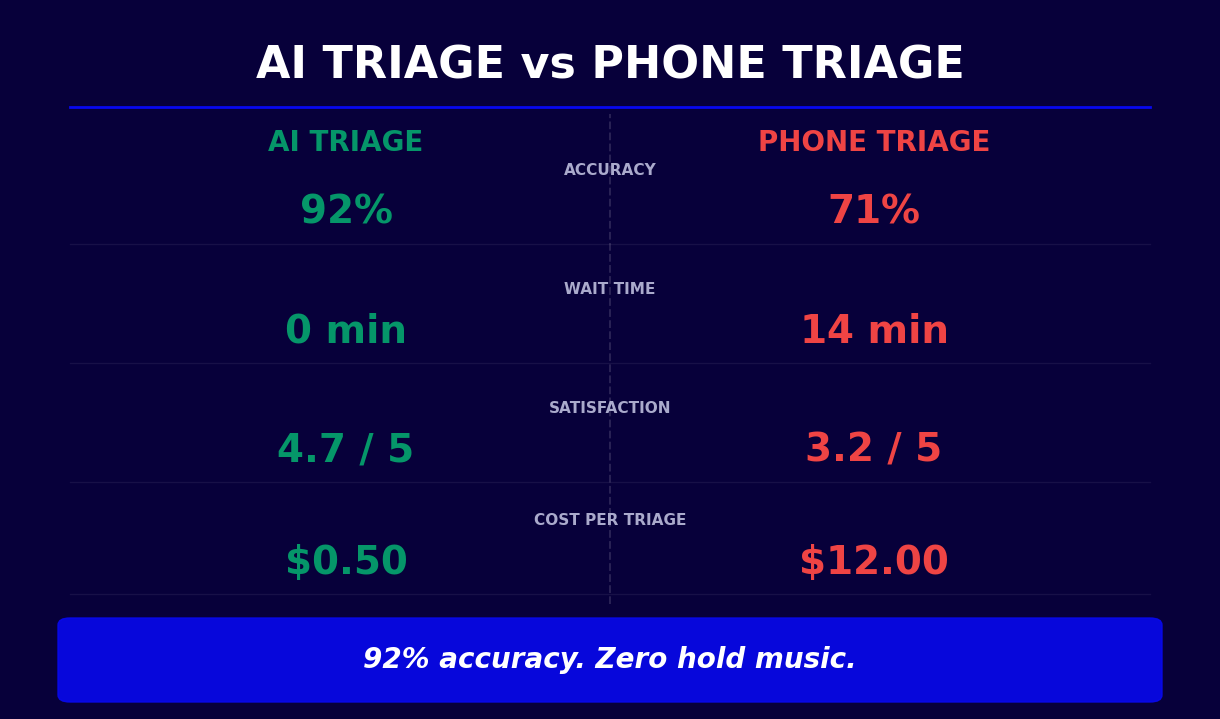
Traditional telehealth intake relies on patients self-selecting visit types, which consistently produces mismatches. Patients underbook (delaying care for genuinely urgent conditions) or overbook (requesting same-day telehealth for routine prescription refills, consuming physician time that could go to higher-acuity cases). A telehealth triage chatbot eliminates this guesswork by applying consistent clinical logic to every incoming patient request, regardless of time of day or staffing levels.
The chatbot is not a standalone product -- it is the front door of a complete virtual care workflow. It integrates with your scheduling system to book telehealth slots, connects to your EHR to pre-populate intake data, and hands off to your video platform when the clinical encounter begins. The clinician opens the visit with a complete AI-generated symptom summary rather than spending the first five minutes asking questions the chatbot already answered.
This template is purpose-built for healthcare providers running telehealth programs: primary care practices, urgent care groups, hospital systems with virtual care divisions, specialty practices offering remote consultations, and direct-to-consumer telehealth platforms. It handles the triage function that has historically been staffed by medical assistants or triage nurses, freeing those clinical resources for higher-value tasks.
Built on Conferbot's no-code builder, the telehealth triage system requires no engineering resources to deploy. Clinical administrators configure the symptom pathways, severity thresholds, and routing logic through a visual interface, then deploy across your website, patient portal, and messaging channels with a single click. Full HIPAA compliance and EHR integration are included.
How the Triage System Works: Symptom Intake to Care Routing
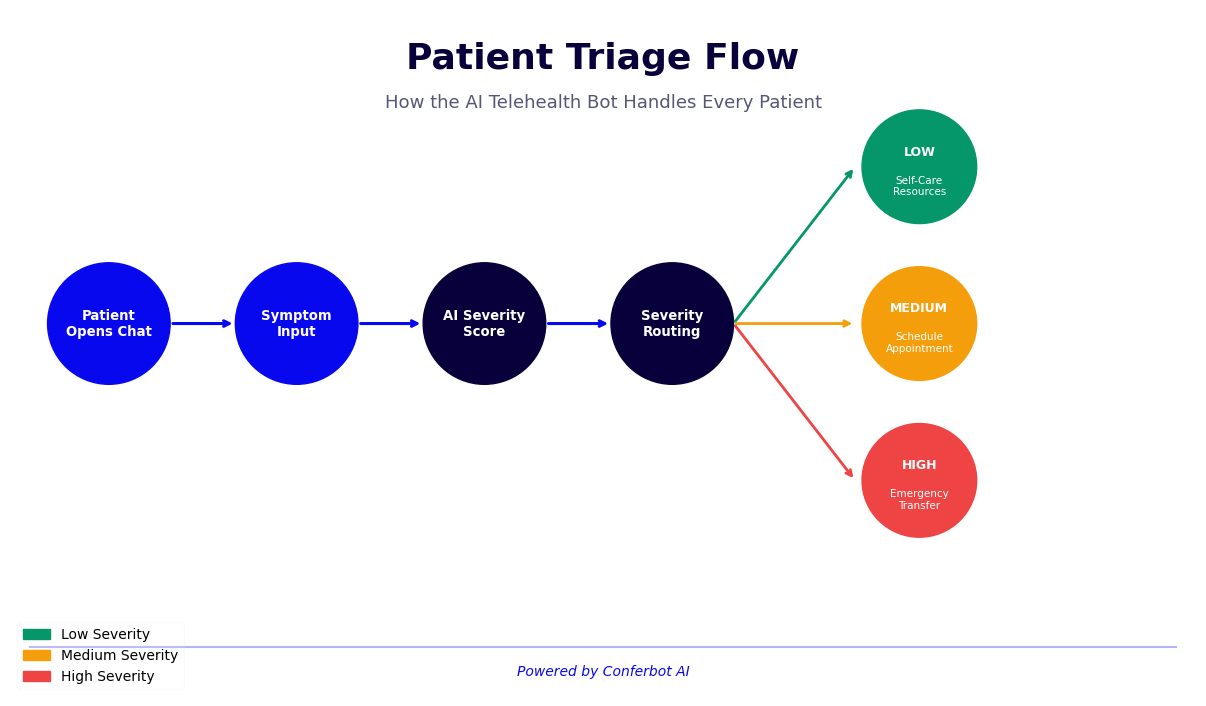
The telehealth triage system operates as a five-stage clinical pipeline. Each stage is configurable to match your organization's protocols, care settings, and provider mix. Here is how a patient moves from first contact to appropriate care in under six minutes.
Stage 1: Patient Identification and Consent
The conversation opens with patient identification -- new or returning -- and a configurable consent workflow that presents your organization's privacy notice, explains how symptom data will be used, and records explicit consent before any health information is collected. For returning patients, the chatbot can retrieve their record from your EHR to personalize the assessment. For new patients, it captures the demographic fields needed to create a preliminary chart. This stage takes under a minute and produces a documented consent record that satisfies HIPAA requirements.
Stage 2: Chief Complaint Capture
The patient describes their primary concern in natural language. Conferbot's NLP engine parses the free-text input, extracts symptoms and contextual cues, and maps them to standardized clinical terminology. The system recognizes synonym clusters ("chest tightness," "pressure in my chest," "my chest feels heavy" all route to the same assessment pathway), handles pediatric and adult presentations differently, and flags language patterns associated with mental health crises for immediate escalation.
Stage 3: Structured Symptom Intake
The chatbot conducts a dynamic symptom interview. Questions adapt based on prior answers rather than following a fixed script. For a patient reporting fever, the sequence probes duration, peak temperature, associated symptoms (rigors, rash, neck stiffness, difficulty breathing), recent travel, and relevant exposures. Each answer narrows the differential and adjusts the severity score. The intake collects the equivalent of a complete nursing assessment in 3-4 minutes, with structured data fields rather than free-text notes.
Stage 4: Severity Scoring
The chatbot applies a validated severity algorithm to the complete symptom profile. The algorithm evaluates symptom combinations against clinical decision rules, considers patient risk factors (age, chronic conditions, immunocompromise), and assigns a severity tier: Critical (emergency services required), High (same-day telehealth or urgent care), Moderate (telehealth within 24-48 hours), or Low (routine appointment or self-care). Red flag screening runs in parallel throughout the interview, triggering emergency escalation immediately if life-threatening indicators are detected regardless of the overall score.
Stage 5: Care Routing and Booking
The severity score drives automatic routing. Critical and High cases receive emergency instructions or are connected to on-call staff immediately. Moderate and routine cases are routed to the scheduling flow, where the chatbot shows available telehealth slots filtered by the appropriate provider type (urgent telehealth, primary care, specialist). The patient books their appointment within the conversation, receives confirmation, and gets pre-visit instructions -- all before a single staff member has been involved.
Key Features of the Telehealth Triage System
The telehealth triage system template includes a set of clinical and operational capabilities that distinguish it from generic chatbot builders or basic symptom lookup tools. These features are pre-configured and ready to deploy, with customization options for each.
Dynamic Symptom Pathways
Unlike static decision trees that follow the same sequence regardless of patient responses, the system uses branching logic that adapts to each answer. A patient who reports shortness of breath follows a different pathway depending on whether they also report chest pain (cardiac pathway), fever (respiratory infection pathway), or neither (anxiety or musculoskeletal pathway). This dynamic branching achieves clinical depth without requiring clinician involvement in every interaction.
Validated Severity Scoring
The severity algorithm incorporates established clinical decision rules: modified versions of the Manchester Triage System, NEWS2 scoring parameters for vital signs-related presentations, and PHQ-2 screening for mental health triage. Scoring thresholds are configurable by your clinical team to align with your organization's risk tolerance and care capacity. The system defaults to conservative thresholds that prioritize patient safety over operational efficiency.
Real-Time Emergency Escalation
At any point in the conversation, if the patient reports a red flag symptom combination -- sudden severe headache, chest pain with radiation, signs of stroke, pediatric respiratory distress -- the chatbot halts the standard flow, presents emergency instructions with the number for emergency services, and notifies on-call staff via your configured alert channels. This safety layer cannot be bypassed by configuration errors or unusual patient inputs.
Multilingual Support
The triage system supports conversations in over 50 languages, with medically accurate translations reviewed for clinical terminology accuracy. For patient populations with limited English proficiency, multilingual triage removes a critical barrier to appropriate care access. Language detection is automatic, or patients can select their preferred language at the start of the conversation.
Integrated Appointment Booking
Routing recommendations connect directly to your scheduling system. Patients book telehealth appointments without leaving the conversation, and the appointment record includes the complete symptom assessment, severity score, and triage rationale. This pre-populated context eliminates redundant intake questions at the start of the clinical visit.
Omnichannel Deployment
Deploy the same triage workflow across your website, patient portal, WhatsApp, Messenger, and Telegram. Patient data is unified across channels, so a patient who starts an assessment on WhatsApp and returns via the website is recognized as the same individual. See omnichannel configuration for setup details.
Analytics and Quality Monitoring
Conferbot's analytics dashboard tracks triage accuracy retrospectively (by comparing recommendations to actual visit dispositions), symptom distribution trends, escalation frequency, booking conversion rates, and channel-specific performance. These metrics support clinical quality improvement, staffing decisions, and regulatory reporting.
Ready to try Telehealth Triage System?
Deploy this template in under 10 minutes. No coding required.
Use This Template Free →HIPAA Compliance and Data Security
A telehealth triage chatbot handles Protected Health Information (PHI) from the first interaction. Symptom descriptions, medical history, triage outcomes, and appointment records are all PHI under HIPAA's Privacy Rule when linked to an identifiable patient. Compliance is not a feature to add later -- it must be the foundation of every design decision.
Business Associate Agreement
HIPAA requires that any vendor handling PHI on behalf of a Covered Entity signs a Business Associate Agreement (BAA). Conferbot provides a comprehensive BAA covering all platform components: data processing, storage, transmission, AI model inference, support access, and third-party subprocessors. The BAA defines breach notification timelines, data handling obligations, and permitted uses consistent with 45 CFR Parts 160 and 164.
Encryption Standards
All patient data transmitted through the triage chatbot is encrypted using TLS 1.2 or higher. Data at rest is encrypted with AES-256. Conversation logs containing PHI are stored in HIPAA-compliant cloud infrastructure (AWS GovCloud or equivalent), with encryption keys managed separately from the data they protect. End-to-end encryption is enforced for all channels, including WhatsApp Business API, which provides native E2E encryption when properly configured with Meta's BAA.
Access Controls and Audit Logging
Role-based access controls restrict PHI access to authorized personnel. Clinical administrators, QA reviewers, and technical staff have differentiated permission levels with the principle of least privilege applied throughout. Every PHI access event is logged in an immutable audit trail recording the user, data accessed, timestamp, and IP address. Audit logs are retained for a minimum of six years in compliance with HIPAA's documentation requirements and are available for compliance audits and breach investigations.
Minimum Necessary Standard
The triage system is designed around HIPAA's minimum necessary standard. The chatbot collects only the symptom and history data required to make a clinically sound triage recommendation -- no additional data collection is permitted beyond what is explicitly configured by the healthcare organization and disclosed to the patient. Data collection fields are auditable and each field must be justified in the workflow configuration.
Patient Consent Workflows
Before any health data is collected, the chatbot presents a configurable consent screen that includes your organization's Notice of Privacy Practices, an explanation of how symptom data will be used, the right to opt out, and explicit acknowledgment before proceeding. The consent record, including timestamp and the version of the notice presented, is stored with the conversation log as compliance documentation.
| HIPAA Requirement | Conferbot Implementation | Status |
|---|---|---|
| Business Associate Agreement | Comprehensive BAA covering all components | Included |
| PHI Encryption in Transit | TLS 1.2+ on all channels | Included |
| PHI Encryption at Rest | AES-256 in HIPAA-compliant cloud | Included |
| Access Controls | Role-based with least privilege | Included |
| Audit Logging | Immutable logs, 6-year retention | Included |
| Patient Consent | Configurable consent with NPP display | Included |
| Minimum Necessary | Auditable field-level justification | Included |
| Breach Notification | Defined in BAA, automated detection alerts | Included |
Clinical Use Cases by Care Setting
The telehealth triage system adapts to the clinical and operational context of different healthcare settings. Here are the primary use cases with specific configuration guidance for each.
Primary Care Practices
Primary care sees the broadest range of presenting complaints, from acute illness to chronic disease management. The triage chatbot handles after-hours symptom inquiries, pre-screens same-day appointment requests to determine urgency, and collects pre-visit history for scheduled appointments. Configured for a primary care context, the severity thresholds are calibrated to the full adult spectrum of conditions. The booking integration shows availability across providers in the practice with appropriate specialization flags (pediatric, geriatric, mental health).
Urgent Care Centers
Urgent care triage is fundamentally about directing patients to the appropriate setting: the urgent care center versus the ER. The chatbot evaluates whether a presenting complaint is within urgent care scope, provides wait time estimates to manage patient expectations, and clearly escalates cases that exceed urgent care capability to emergency services. This pre-visit triage reduces inappropriate urgent care visits for true emergencies and prevents patients from waiting in an urgent care queue for conditions that need immediate ER attention.
Hospital System Virtual Care Programs
Large hospital systems running virtual care programs process thousands of telehealth inquiries daily. At this scale, manual triage by nursing staff is unsustainable without significant headcount. The triage chatbot handles first-contact screening for the entire virtual care program, with severity scoring that maps directly to the system's existing care pathways: live clinician escalation for high-acuity, scheduled telehealth for moderate, async messaging for routine questions. Integration with the hospital's EHR ensures all interactions are documented in the patient's longitudinal record.
Specialty Telehealth Practices
Specialty practices -- dermatology, mental health, endocrinology, cardiology -- configure triage pathways specific to their clinical domain. A dermatology telehealth practice configures symptom intake to assess skin lesion characteristics, duration, and associated systemic symptoms, with severity routing based on features associated with malignancy or serious dermatologic conditions. A mental health practice configures the chatbot with PHQ-9 and GAD-7 screening, crisis detection with immediate escalation to crisis resources, and routing to the appropriate level of mental health care.
Direct-to-Consumer Telehealth Platforms
Consumer telehealth platforms handle high volumes of unscheduled, often first-time patients. The triage system manages queue prioritization by severity score, matches patients to available providers by complaint category, and provides expected wait times that improve patient experience. The chatbot's 24/7 availability means patients are never told to call back during business hours -- every inquiry receives immediate triage and appropriate routing.
Integration with EHR and EMR Systems
The clinical value of a telehealth triage chatbot multiplies when it operates as part of an integrated care workflow rather than a standalone tool. EHR integration is the bridge that transforms chatbot-collected data from a parallel record into a component of the patient's longitudinal health record.
HL7 FHIR Integration Standard
Conferbot's API integration framework implements HL7 FHIR R4, the current standard for healthcare data interoperability. FHIR resources used by the triage system include Patient (demographics), Condition (reported symptoms), Observation (severity scores, vital sign estimates), Appointment (booking data), and ClinicalImpression (triage assessment summary). This standardized data model ensures compatibility with any FHIR-compliant EHR platform and simplifies the integration mapping process.
Platform-Specific Integrations
Beyond the generic FHIR layer, Conferbot provides pre-built connectors for major EHR platforms. Epic integration uses Open.Epic APIs with support for MyChart patient portal embedding, allowing the triage chatbot to appear natively within the patient's existing portal interface. Cerner integration supports Oracle Health's Millennium platform and HealtheLife consumer portal. athenahealth integration uses the athenaOne API for practice management and scheduling. Additional connectors are available for Allscripts, NextGen, DrChrono, and Kareo.
Bidirectional Data Flow
The integration operates bidirectionally. Outbound from EHR to chatbot: the patient's demographic record, problem list, current medications, and known allergies are retrieved (with consent) to personalize the triage assessment. A patient with a documented history of asthma receives a respiratory symptom pathway that accounts for their condition. Inbound from chatbot to EHR: the complete symptom assessment, severity score, triage recommendation, and any red flags identified are written to the patient's chart as a clinical note or pre-visit summary, ready for the clinician before the appointment begins.
Telehealth Platform Handoff
When the triage recommendation is a telehealth visit, the chatbot orchestrates the complete handoff. It checks provider availability via the scheduling API, books the appointment, generates a telehealth session link, sends the link to the patient with preparation instructions, and pushes a notification to the assigned provider with the triage summary. The clinician enters the video session with the patient's symptom profile, severity score, and relevant history displayed -- eliminating the redundant intake questions that consume the first minutes of most telehealth visits.
Documentation Automation
After the telehealth visit, the chatbot's intake data can populate clinical documentation templates, reducing the physician's documentation burden. Chief complaint, history of present illness elements, and relevant review of systems are pre-filled from the structured chatbot intake. The clinician verifies, supplements with examination findings, and completes the note -- a process that takes a fraction of the time required when starting from scratch.
50,000+ businesses use Conferbot templates to automate conversations
ROI for Clinics and Healthcare Organizations
Deploying a telehealth triage system delivers financial returns through two mechanisms: revenue protection (ensuring the right patients reach providers promptly, reducing no-shows and lost appointments) and cost reduction (replacing high-cost manual triage labor with automated AI screening). Here is the data on both.
| Metric | Baseline (No Chatbot) | With Triage Chatbot | Annual Impact (50-Provider Group) |
|---|---|---|---|
| Triage nurse hours per 1,000 patient inquiries | 120-160 hours | 30-50 hours | $180,000-$240,000 labor savings |
| Telehealth no-show rate | 18-28% | 8-14% | $90,000-$150,000 revenue recovered |
| Inappropriate telehealth bookings | 20-30% | 6-10% | 30-50% improvement in visit quality |
| After-hours nurse call volume | 300-600/month | 80-160/month | $60,000-$100,000 overtime savings |
| Patient satisfaction score (triage) | 3.4/5.0 | 4.3/5.0 | Improved retention, reduced churn |
| Time-to-booking for urgent cases | 45-90 minutes | Under 10 minutes | Better outcomes for high-acuity cases |
Labor Cost Reduction
Triage nursing staff represent a significant recurring cost. At an average fully-loaded cost of $45-55 per hour for a triage RN, a practice receiving 1,000 patient inquiries per week spends $5,400-$8,800 weekly on manual triage labor. The chatbot handles 70-80% of those inquiries independently, reducing triage labor costs proportionally. The remaining staff handle complex cases, manage escalations, and perform higher-value clinical tasks. Practices using the Conferbot ROI calculator typically see payback within 60-120 days.
Revenue Recovery
Telehealth no-shows carry a direct revenue cost: the revenue from the missed appointment plus the opportunity cost of the unfilled slot. The triage chatbot's automated confirmation, reminder, and preparation workflow reduces no-show rates from an industry average of 18-28% to 8-14%. For a practice billing $150-250 per telehealth encounter, recovering 10 percentage points of no-show rate across 500 weekly appointments generates $75,000-$125,000 in annual revenue that would otherwise be lost.
Physician Time Recaptured
When patients arrive at telehealth appointments with complete pre-intake data, physicians save 4-6 minutes per visit on history-taking. Across a practice with 10 physicians each seeing 20 telehealth patients per day, that is 800-1,200 minutes of physician time recovered daily -- equivalent to 4-6 additional patient visits per day at zero additional cost. At an average telehealth revenue of $150-200 per visit, this represents $600-$1,200 in daily revenue opportunity for the practice.
Setup Guide: Deploying Your Telehealth Triage System
The telehealth triage system can be deployed in a production healthcare environment in 3-6 weeks. The timeline depends on EHR integration complexity and the depth of clinical validation your organization requires. Here is the step-by-step process.
Step 1: Access the Template
Start from the Conferbot healthcare template library and select the Telehealth Triage System template. Clone it to your workspace using the no-code builder. The template arrives pre-configured with validated symptom pathways, severity scoring logic, emergency escalation rules, and HIPAA-compliant data handling. You are configuring and customizing, not building from scratch.
Step 2: Configure Clinical Scope
In the template settings, define the clinical scope your triage system will cover. Select the symptom categories active for your practice (adult acute care, pediatric, mental health, chronic disease, dermatology, etc.). Set the severity thresholds that map to your care pathways. Define the routing logic: which severity tiers trigger same-day booking versus next-day versus routine. Review the emergency escalation rules with your clinical team and adjust the red flag criteria if your patient population has specific considerations.
Step 3: HIPAA Compliance Configuration
Execute your Business Associate Agreement with Conferbot (available in the account settings under Compliance). Configure data retention policies to match your organization's requirements. Set up role-based access controls: which staff members can view conversation logs, access analytics, and modify the clinical configuration. Upload your organization's Notice of Privacy Practices for display in the consent workflow. Verify the consent flow with your privacy officer before going live.
Step 4: Connect Your Systems
Use the integrations hub to connect your EHR, scheduling system, and telehealth platform. For EHR integration, provide your FHIR endpoint URL, client credentials, and test patient IDs. Map the chatbot's data fields to your EHR's chart structure using the visual field-mapping interface. Test the data flow with synthetic patient scenarios before connecting to production systems. For scheduling integration, connect your appointment booking system and configure the provider types, availability rules, and slot duration for telehealth visits.
Step 5: Clinical Validation
Before opening to patients, run a clinical validation phase. Work with physicians and triage nurses to test at least 50 clinical scenarios across your defined scope. Compare the chatbot's severity scores and routing recommendations to the clinical team's independent assessments. Document discrepancies and adjust thresholds or pathways accordingly. Specific attention should go to edge cases: rare presentations within common symptom categories, pediatric variations, and high-acuity presentations that must reliably trigger emergency escalation.
Step 6: Deploy and Monitor
Deploy on your primary channel (typically your website or patient portal) and open to a subset of patients -- a specific age group, condition category, or appointment type -- for the first two weeks. Monitor the analytics dashboard daily: track triage distribution, escalation rates, booking conversion, patient satisfaction scores, and any conversations that dropped before completion. Review a sample of completed conversations against clinical records to validate recommendation accuracy. Once the initial cohort performs satisfactorily, expand to your full patient population and additional channels.
Telehealth Triage System FAQ
Everything you need to know about chatbots for telehealth triage system.
Why Use a Template vs Building from Scratch?
Templates encode years of optimization data into the conversation flow before you start.
| Factor | Conferbot Template | Build from Scratch | Hire a Developer |
|---|---|---|---|
| Time to deploy | 10 minutes | 2-8 hours | 2-6 weeks |
| Cost | Free | Your time | $5,000-$25,000 |
| Day-1 conversion | 15-22% | 5-8% | 10-15% |
| Proven flows | Yes, data-tested | No | Depends |
| Updates included | Automatic | Manual | Paid |
| Multi-channel | 8+ channels | 1 channel | Extra cost |
| Analytics | Built-in | Must build | Extra cost |
Ready to Deploy Telehealth Triage System?
Join 50,000+ businesses. Free forever plan available. No credit card required.