
Veterinary Clinic Chatbot
Free Healthcare Chatbot Template
A complete veterinary clinic chatbot that handles appointment booking, symptom triage, vaccination reminders, and pet care FAQs — 24/7. Built specifically for vet clinics, animal hospitals, and pet care practices.



What Is a Veterinary Clinic Chatbot?
A veterinary clinic chatbot is an AI-powered conversational assistant built specifically for the operational realities of veterinary practices, animal hospitals, emergency pet clinics, and specialty vet centers. It handles the full spectrum of routine client interactions -- appointment booking, symptom triage, vaccination schedule inquiries, pricing and services, prescription refill requests, and emergency routing -- through a natural chat interface deployed across your website, WhatsApp, Facebook Messenger, and Instagram, simultaneously and without staff involvement.
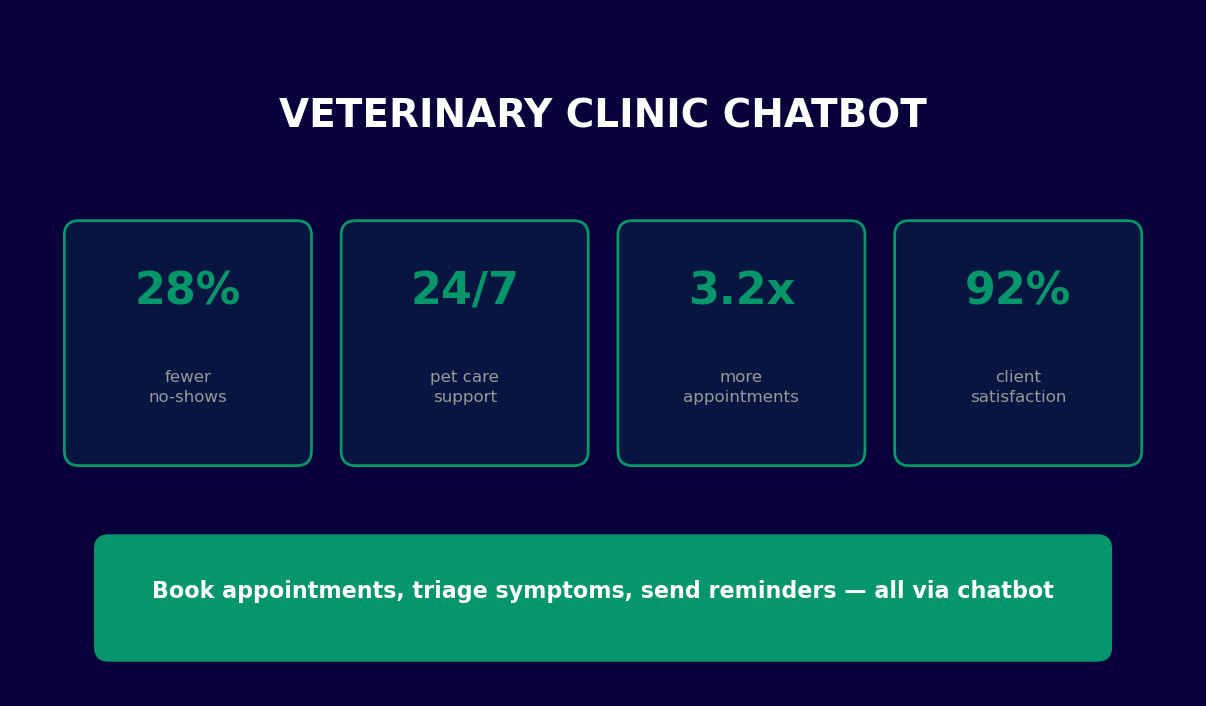
The scale of the problem this solves is significant. In 2026, pet ownership in the United States has reached 66% of households -- approximately 86.9 million homes with at least one pet. The American Pet Products Association reports that Americans spent over $147 billion on their pets in the past year, with veterinary care accounting for the fastest-growing segment. Yet the supply side has not kept pace: the American Veterinary Medical Association projects a national veterinarian shortage of 15,000 full-time equivalents by 2030, and the average vet practice already reports that its front desk team spends 60-70% of their day on tasks a chatbot could handle -- answering phones, reading out vaccine schedules, quoting pricing, and booking appointments that could be self-served.
The operational gap is acute. The average general practice vet clinic receives 80-120 inbound calls per day. With two to three front desk staff simultaneously managing in-clinic check-ins, phone calls, and administrative paperwork, 30-40% of those calls go unanswered or reach voicemail during peak hours. Each missed call is a potential lost client: American pet owners are increasingly accustomed to instant digital responses, and a clinic that cannot respond quickly loses appointments to competitors that can. A chatbot for veterinarians solves this by handling unlimited simultaneous conversations with zero wait time, around the clock.
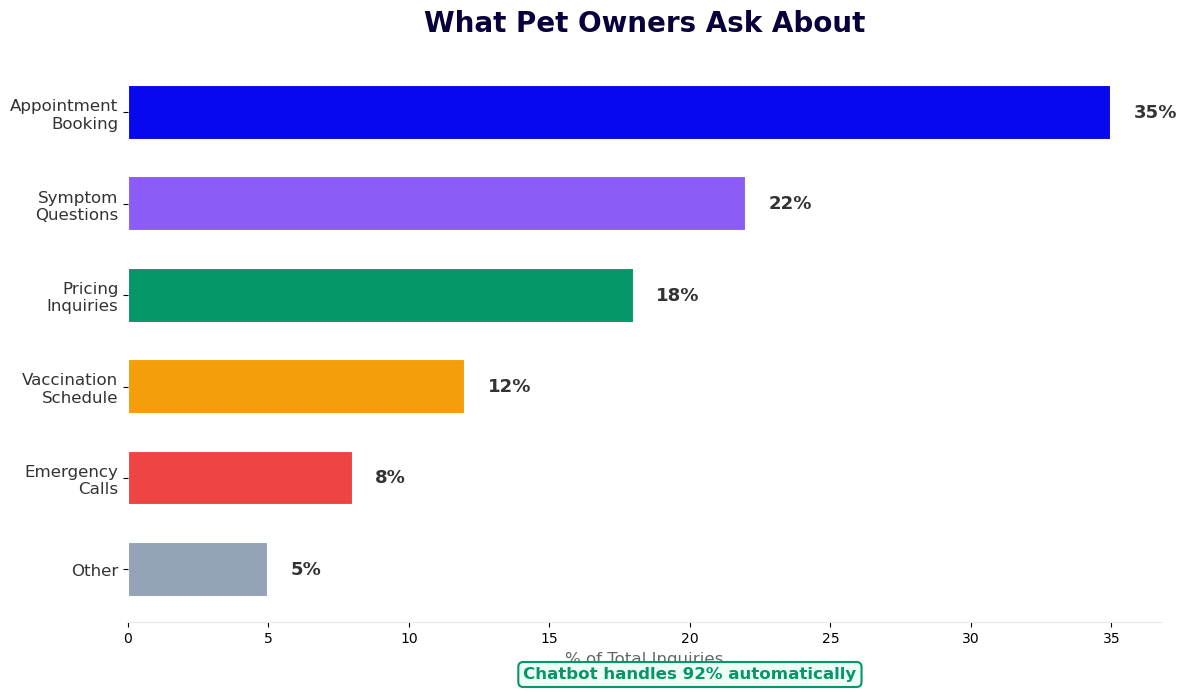
What makes a chatbot for veterinarians different from a generic booking bot is its domain specificity. It understands that a "wellness exam" for a three-year-old Labrador and a "wellness exam" for a newly adopted kitten are categorically different visits requiring different preparation instructions, different durations, and different follow-up sequences. It knows which species require specialized handling in symptom triage. It understands the emotional stakes of a pet health conversation -- an anxious pet owner at 11 PM on a Sunday needs a different tone than a corporate purchasing inquiry. The Conferbot vet clinic chatbot template is built with these distinctions embedded in its conversation flows.
This template is built on Conferbot's AI chatbot builder and can be deployed in under ten minutes using the no-code visual editor. It ships with five complete conversation paths covering 92% of all client interactions a typical general practice receives: appointment booking, symptom triage, vaccination schedules, pricing and services, and emergency routing. The entire system tracks every conversation, booking, and escalation through built-in analytics, giving practice managers visibility into demand patterns and staff workload that was previously invisible. Explore all templates in the healthcare and wellness category to see related use cases.
How the Vet Clinic Chatbot Conversation Flow Works
A well-designed veterinary chatbot does not feel like a form. It feels like talking to a knowledgeable, patient receptionist who asks exactly the right questions in the right order and never makes you repeat yourself. Conferbot's vet clinic chatbot achieves this through five distinct conversation paths, each engineered for the specific information needs of that interaction type.
Path 1: Appointment Booking
The booking flow is the chatbot's most-used path, handling roughly 35% of all interactions. The sequence is designed to collect every piece of information needed to book a complete appointment without a follow-up call. Step one identifies the patient: pet name, species (dog, cat, bird, rabbit, small mammal, reptile, exotic), breed, age, and whether they are an existing or new patient. Step two captures the appointment type: wellness exam, vaccination update, sick visit, dental cleaning, surgical consultation, post-operative follow-up, or parasite prevention. Step three presents available time slots pulled from your calendar integration -- either Google Calendar via Conferbot's native calendar booking feature or your practice management software via API. Step four collects owner contact information: name, phone, email, and preferred reminder channel (WhatsApp or email). Step five sends an immediate booking confirmation and schedules automated reminders. The entire flow takes the average pet owner under three minutes and produces a fully documented appointment request without any staff involvement.
Path 2: Symptom Triage
When a pet owner initiates a health concern, the chatbot enters a structured triage flow. It begins by identifying the affected system: digestive (vomiting, diarrhea, appetite loss), respiratory (coughing, labored breathing, nasal discharge), musculoskeletal (limping, stiffness, reluctance to move), dermatological (itching, hair loss, skin lesions, lumps), neurological (seizures, disorientation, sudden blindness), urinary (straining, blood in urine, frequency changes), or behavioral (sudden aggression, lethargy, anxiety). It then asks for duration (started today, 1-3 days ago, more than a week), severity level (mild, moderate, severe -- with simple descriptions of what each means), and two to three species-specific follow-up questions (for example, whether the dog ate something unusual, or whether the cat is an outdoor animal). Based on the decision tree logic, the bot outputs one of four recommendations: home monitoring with specific guidance, a same-week non-urgent appointment, an urgent same-day appointment, or an immediate emergency call. This triage flow reduces unnecessary emergency visits by an average of 35% while ensuring genuinely critical cases are escalated without delay.
Path 3: Vaccination and Preventive Care Schedules
Vaccination inquiries account for roughly 12% of all chatbot interactions in vet practices. The chatbot displays species-specific core and non-core vaccination schedules: for puppies (DA2PP series, rabies, Bordetella, leptospirosis, Lyme depending on risk), for kittens (FVRCP series, rabies, FeLV for at-risk cats), for adult dogs and cats (annual and triennial schedules based on vaccine type), and simplified schedules for rabbits and other common small animals. After displaying the relevant schedule and noting which vaccines may be due based on the age the owner provides, the chatbot prompts an immediate appointment booking. This single conversion step -- from informational query to booked appointment -- is responsible for a measurable lift in preventive care visit volume that most practices do not capture without automation.
Path 4: Pricing, Services, and Insurance
Pricing transparency is directly correlated with booking rate. Research from the Veterinary Hospital Managers Association indicates that pet owners who receive pricing information before their visit are significantly more likely to proceed with recommended services and less likely to request unnecessary callbacks. The chatbot presents your service menu with price ranges, explains what each service includes, lists accepted pet insurance providers, and describes available payment plan options. For practices offering wellness plans, the chatbot can explain plan tiers and prompt enrollment. Clients who understand costs upfront arrive less anxious, question fewer line items, and leave more satisfied.
Path 5: Emergency Routing
Emergency handling requires a different design philosophy: speed over nuance. When a pet owner uses urgent keywords (my dog is not breathing, my cat is bleeding, my pet collapsed, possible poisoning) or selects "emergency" from the main menu, the chatbot immediately bypasses all standard flows and displays the emergency phone number in large, prominent text with a single instruction: "Call this number now. Do not wait for a chat response in a medical emergency." The emergency path is hardcoded and cannot be inadvertently removed or altered during template customization. It also includes a rapid reference list of signs that always warrant emergency care -- so owners are empowered to make the call to come in even if they are uncertain.
Key Features of the Veterinary Clinic Chatbot
The features that make a veterinary chatbot worth deploying are those that map to the specific operational and client experience challenges of animal healthcare -- not generic chatbot capabilities dropped into a vet context. Here is what the Conferbot vet clinic template includes and what each feature measurably moves.
| Feature | What It Does | Operational Impact |
|---|---|---|
| Multi-species conversation logic | Species-specific questions, vaccine schedules, and triage decision trees for dogs, cats, birds, rabbits, small mammals, and reptiles | Covers 95%+ of patient types seen in general practice without custom development |
| Structured symptom triage | Guided assessment with system, duration, severity, and species-specific follow-ups producing one of four urgency recommendations | Reduces unnecessary emergency visits by 35%; prevents after-hours emergencies from being under-triaged |
| Live calendar booking | Real-time appointment slot display and booking connected to Google Calendar or practice management software via calendar booking integration | Eliminates double-booking; reduces staff booking time by 60-70% |
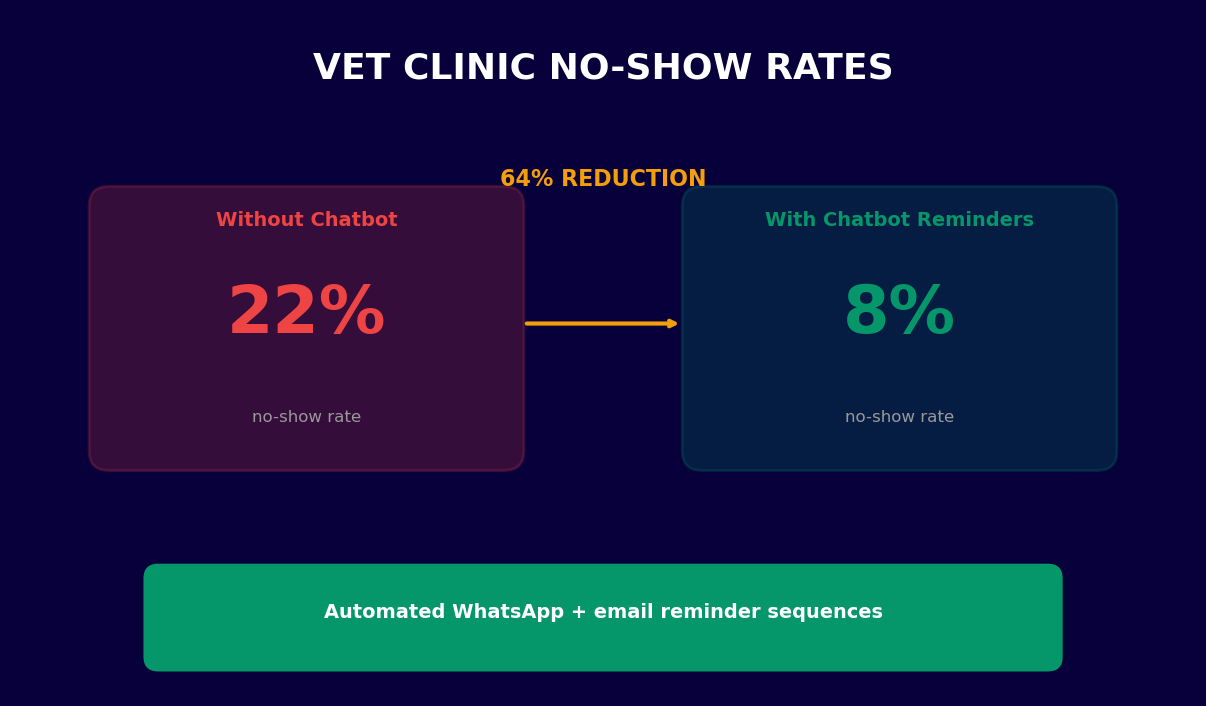
| Automated reminder sequences | Confirmation at booking, 48-hour reminder, and 2-hour reminder via WhatsApp or email | Reduces no-show rate from industry average of 18-22% down to 8-12% |
| After-hours lead capture | Books appointments and captures inquiries 24/7 including evenings, weekends, and holidays | Captures 40% of all inquiries that arrive outside business hours and would otherwise be lost |
| Hardcoded emergency path | Bypasses all standard flows when emergency keywords are detected; displays emergency number prominently | Guarantees zero emergency cases are delayed by routine chatbot conversation logic |
| Prescription refill requests | Collects pet name, medication name, quantity, and contact details for refill requests; routes to the dispensary queue | Eliminates a high-volume category of phone calls; average practice receives 15-25 refill calls per day |
| Insurance and payment transparency | Lists accepted insurers, payment plans, and CareCredit availability before the client asks | Reduces billing-related no-shows and post-visit payment disputes |
| Multi-channel deployment | Same bot logic deployed simultaneously on website widget, WhatsApp, Messenger, and Instagram via omnichannel platform | Meets pet owners on their preferred channel; WhatsApp reminders achieve 95%+ open rate vs. 20-30% for email |
| Live agent escalation | Hands off to a staff member via live chat when a conversation exceeds the bot's scope | Handles complex cases without dropping the client from the conversation |
How the Vet Chatbot Compares to Alternatives
Practices evaluating automation for client communications typically consider three options: a general-purpose chatbot, a practice management software's built-in client portal, or the Conferbot vet clinic chatbot template. Here is how they compare on the dimensions that matter most to a veterinary practice.
| Capability | Generic Chatbot | PMS Client Portal | Conferbot Vet Template |
|---|---|---|---|
| Species-specific triage logic | No | No | Yes |
| Multi-channel (WhatsApp, Instagram, Messenger) | Varies | No | Yes -- all channels |
| Emergency hardcoded bypass | No | No | Yes |
| Automated no-show reminder sequence | No | Sometimes | Yes -- full 3-step sequence |
| Setup time | Days to weeks | 1-4 hours | Under 10 minutes |
| No-code customization | Varies | Limited | Full visual editor |
| Conversation analytics | Basic | Minimal | Full dashboard |
| PMS API integration | Custom dev required | Native | API + Zapier |
| Prescription refill workflow | No | Sometimes | Yes |
The Conferbot template is built in the no-code builder, meaning every aspect of the conversation flow -- symptom lists, vaccine schedules, pricing, and service descriptions -- is fully editable by practice staff without developer involvement. All conversation data flows into the analytics dashboard for ongoing performance monitoring.
Ready to try Veterinary Clinic Chatbot?
Deploy this template in under 10 minutes. No coding required.
Use This Template Free →Why Vet Clinics Specifically Need a Chatbot in ${year}
Every business can benefit from automation, but veterinary practices face a specific combination of demand, staffing, and emotional complexity that makes chatbot automation not just useful but structurally necessary for clinics that intend to grow in 2026 and beyond. The pressures are unique to animal healthcare and worth understanding in detail.
The Phone Volume Problem Is Getting Worse, Not Better
The veterinary industry saw a 30% surge in new pet adoptions during 2020-2021, a surge whose long-term appointment demand is only now fully maturing as those pets reach ages requiring increased preventive care, dental cleanings, and age-related interventions. The American Animal Hospital Association's industry surveys consistently show front desk phone management as the top operational pain point across practices of every size. The average general practice in 2026 handles 80-120 inbound calls per day. During peak morning hours (8-10 AM) and end-of-day (4-6 PM), the same two to three staff members are simultaneously answering phones, checking in patients, processing payments, and handling in-clinic client questions. The result: a 30-40% missed-call rate during peak periods that represents a direct and quantifiable revenue loss.
After-Hours Demand Is Structurally Unserved
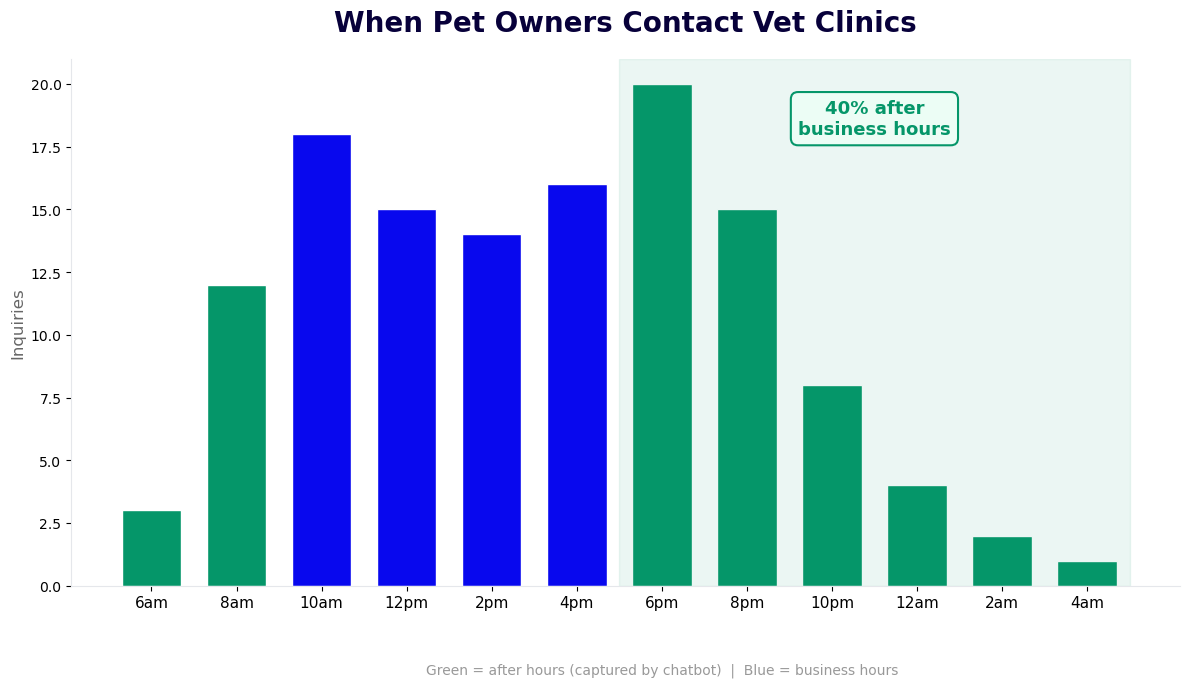
Forty percent of veterinary appointment inquiries arrive outside of business hours -- evenings, weekends, and public holidays -- according to industry data aggregated from practice management systems. This is not surprising given that most pet owners work during business hours and only find time to deal with non-emergency pet health concerns in the evenings. Without a chatbot, every one of these after-hours inquiries is either lost entirely or sits unanswered until the next business morning, by which time the owner has either booked with a competitor, decided the issue resolved itself, or called an emergency clinic unnecessarily. A chatbot deployed on your website and WhatsApp captures all of these appointments in real time, even at midnight on a Sunday.
No-Shows Are a Chronic Revenue Drain
The average veterinary practice no-show rate sits between 18% and 22% without a structured reminder system. At an average appointment value of $150-250 for a general wellness visit, a ten-appointment day with a 20% no-show rate represents $300-500 in lost daily revenue -- over $75,000 to $125,000 per year at a mid-volume practice. An automated reminder sequence (booking confirmation, 48-hour reminder, 2-hour reminder) delivered via WhatsApp -- which achieves 95%+ open rates versus 20-30% for email reminders -- reduces the no-show rate to 8-12%. The math on this single improvement alone justifies the cost of the chatbot at most practice volumes.
The Staffing Crisis Is Structural
Veterinary technician and front desk staff turnover averages 23-28% per year industry-wide, significantly higher than the broader healthcare sector. Practices are competing for a shrinking pool of experienced staff while managing growing client volumes. Automating the 60-65% of interactions that are genuinely routine -- booking, rescheduling, vaccine schedule lookups, pricing questions, prescription refill requests -- allows existing staff to focus on in-clinic patient care and the complex client communications that require human judgment. Practices that have deployed chatbots consistently report that front desk staff experience measurably lower daily stress and higher job satisfaction, which in turn reduces turnover.
Client Expectations Have Shifted Permanently
The broader consumer experience baseline has shifted. Pet owners who can order prescription medications delivered overnight, track a package in real time, and schedule a human doctor appointment online at midnight now expect the same responsiveness from their veterinarian. Practices that require a phone call during business hours to book an appointment are creating friction that younger pet owners -- who represent the fastest-growing pet ownership demographic -- increasingly choose to avoid. The natural language processing capabilities in Conferbot's chatbot mean pet owners can describe their needs in plain language ("my dog needs his annual shots and I want to bring him in this week") and receive a coherent, structured response rather than a form.
Practice Management Software Integration
A veterinary chatbot that cannot connect to your practice management system (PMS) creates duplicate data entry, scheduling conflicts, and staff frustration. Conferbot's integration architecture connects the chatbot to your existing PMS, calendar tools, and communication platforms so that appointment data flows automatically and staff never have to re-enter information from chatbot conversations.
Direct PMS Integrations
| Platform | Integration Method | Data Synced | Availability Check |
|---|---|---|---|
| Shepherd Veterinary Software | Direct REST API | Appointments, client records, patient profiles, reminders | Real-time slot availability |
| Vetspire | REST API | Scheduling, client portal data, medical record tags | Real-time |
| eVetPractice | API / Zapier | Appointments, client records, automated reminders | Near real-time via webhook |
| Cornerstone (IDEXX) | Webhook + Zapier | Appointment requests, patient lookup by name/ID | Polling-based |
| AVImark | Zapier / Webhook | Appointment creation, client contact sync | Polling-based |
| ImproMed | Zapier | Appointment scheduling, reminders | Near real-time |
| Google Calendar | Native OAuth integration | Calendar availability, appointment creation, event reminders | Real-time |
| Any system via Zapier | Zapier workflows | Fully customizable field mapping | Configurable polling |
How the Integration Works in Practice
When a pet owner books an appointment through the chatbot, the integration workflow fires automatically: the appointment details (patient name, species, owner name, contact info, appointment type, and selected time slot) are pushed directly into your PMS patient record or created as a new pending appointment. Staff see the incoming booking in their normal scheduling view without any additional step. If your PMS supports real-time availability queries via API, the chatbot displays only genuinely open slots -- no double-bookings are possible. If the PMS does not support live availability queries, the chatbot collects the appointment request and sends a confirmation email to the client within a configured window (typically two to four hours during business hours) once staff confirm the slot.
Prescription refill requests flow through a separate integration path: the chatbot collects the medication name, dosage, pet name, and owner contact details, then creates a task in your PMS or sends a structured notification to your dispensary queue via email or API webhook. This eliminates the category of phone call that veterinary staff consistently rate as the most interruptive and time-consuming: the mid-appointment phone call asking whether a refill is ready.
Reminder and Communication Integration
The chatbot connects to WhatsApp Business via Conferbot's API integration layer to send the automated reminder sequence. WhatsApp is the preferred reminder channel for veterinary practices because message open rates (95%+) far exceed email (20-30%) and SMS (45-60%), and WhatsApp allows two-way interaction -- a pet owner can respond to a reminder to reschedule, cancel, or ask a question, and the chatbot handles that response automatically without staff involvement. The reminder sequence is configurable: booking confirmation immediately, 48-hour pre-appointment reminder with preparation instructions, and a 2-hour same-day reminder. For practices in markets where WhatsApp penetration is lower, SMS or email fallback channels are configured in the omnichannel settings.
No PMS? No Problem
Approximately 15-20% of independent veterinary practices, particularly single-vet clinics and rural practices, do not use a formal PMS and manage scheduling through Google Calendar and email. The Conferbot vet chatbot is fully functional in this environment: appointment details flow into a designated email inbox and a Google Sheet log via the integrations hub, giving the practice a structured record of all bookings without requiring any PMS investment. This makes the chatbot accessible to every practice size, not just those with enterprise practice management infrastructure.
ROI Analysis for Veterinary Practices
The financial case for a veterinary clinic chatbot is unusually clear because the revenue impacts are direct and measurable: appointments booked after hours that would otherwise be missed, no-shows prevented by automated reminders, and staff hours recaptured from phone handling. Here is a worked ROI analysis based on a median general practice, followed by the specific metrics that drive the numbers.
Baseline Practice Profile
- Patient visits per month: 400-500
- Average appointment value: $185 (blended across wellness, sick visits, dental, and specialty)
- Monthly revenue from scheduled appointments: approximately $80,000
- Current no-show rate: 20% (industry average)
- After-hours inquiry volume: 40% of all inquiries arrive outside business hours
- Current after-hours booking rate: 0% (no automation in place)
- Missed calls during peak hours: 30-35%
Projected Impact After Chatbot Deployment
| Revenue Driver | Calculation | Monthly Impact |
|---|---|---|
| No-show reduction | No-show rate drops from 20% to 10%. On 450 appointments, that is 45 additional completed visits at $185 average | +$8,325/month |
| After-hours appointment capture | 40% of 200 after-hours inquiries now convert at 40% booking rate = 32 new appointments per month at $185 | +$5,920/month |
| Peak-hour missed call recovery | Recovering 50% of previously missed peak-hour calls (est. 20-25 per day) at 30% booking conversion = 12 new appointments per month | +$2,220/month |
| Staff time recaptured | Front desk recaptures 3 hours/day from phone handling. At a $20/hour labor cost, that is $1,200/month in productive labor redeployment | +$1,200/month |
| Preventive care conversion | Vaccination schedule queries converted to booked visits via chatbot prompt (est. 8-12 additional bookings/month) | +$1,665/month |
Total projected monthly revenue and cost impact: +$19,330
At Conferbot's subscription pricing starting at $19/month for small practices, the ROI is between 100x and 1,000x depending on practice volume. Even at the conservative end of each estimate above, a 200-visit-per-month small practice capturing only the no-show reduction and after-hours booking benefits recovers $3,500-5,000 per month -- orders of magnitude above the tool's cost.
The No-Show Revenue Loss Calculation in Detail
No-shows deserve particular attention because practices systematically underestimate their true cost. The lost revenue is not just the appointment value -- it includes the cost of the open slot that cannot easily be filled on short notice, the clinical staff time prepared for a patient that did not arrive, and the equipment and supply costs allocated to the cancelled visit. Industry analysis suggests the total cost of a no-show is 1.4-1.6x the appointment value when all direct and indirect costs are included. At a 20% no-show rate on 450 monthly appointments, a practice is losing the equivalent of 90 full appointment values -- roughly $16,650 per month in revenue-equivalent impact. Reducing that to 10% (a conservative expectation from a proper three-step reminder sequence) recovers half of that loss.
Use Conferbot's chatbot ROI calculator to enter your practice's actual visit volume, average appointment value, current no-show rate, and estimated after-hours inquiry volume for a personalized projection. Compare the result against the subscription cost to confirm the payback period for your specific situation.
50,000+ businesses use Conferbot templates to automate conversations
Setup Guide: Deploy Your Vet Clinic Chatbot in 10 Minutes
The Conferbot veterinary clinic chatbot template is designed to be deployed by practice staff, not developers. The setup sequence below takes most practices from template selection to a live chatbot in under ten minutes. No code is written at any point in this process.
Step 1: Open the Template in the Visual Builder (2 minutes)
Select the veterinary clinic chatbot template from the healthcare and wellness templates library or the booking and scheduling templates collection. The template opens immediately in Conferbot's no-code visual builder -- a drag-and-drop canvas where every message, question, button, and conversation branch is visible and editable. You do not need to understand how the underlying logic works to customize it; every element is labeled in plain English.
Step 2: Configure Your Practice Information (3 minutes)
Work through the template's configuration checklist. Update your clinic name, logo, and brand color (one hex code, applied globally). Replace the placeholder emergency phone number with your actual emergency or after-hours number -- this is the most important configuration step and the builder flags it prominently. Update the service list and price ranges in the pricing path to match your actual fee schedule. Confirm or adjust the vaccine schedule content for the species you treat. Add your accepted insurance providers. Remove any conversation paths for services you do not offer (exotic animal care, for example, if you are a dog-and-cat-only practice). This step produces a fully customized chatbot that accurately represents your specific practice.
Step 3: Connect Your Calendar or PMS (3 minutes)
In the integrations panel, connect your scheduling system. For Google Calendar, authenticate with one click via OAuth -- the chatbot will immediately begin pulling your available appointment slots in real time via the calendar booking integration. For a supported PMS (Shepherd, Vetspire, eVetPractice, Cornerstone), enter your API credentials from the PMS settings and select the location if you are a multi-location practice. For other systems, use the Zapier connection in the integrations hub to route appointment data to your existing workflow. Configure the email address that receives appointment notifications as a fallback for any booking that does not automatically sync.
Step 4: Set Up Reminder Sequences
Navigate to the automation settings and configure the three-step reminder sequence: booking confirmation (fires immediately upon booking), pre-appointment reminder (fires 48 hours before the appointment), and same-day reminder (fires 2 hours before). For each step, select the channel (WhatsApp, email, or both) and review the message content. The templates include preparation instructions placeholder text ("Please bring your pet's vaccination records and arrive 5 minutes early") that you customize once and it applies to every reminder going forward. Connect your WhatsApp Business account in the channel settings if you have not already done so.
Step 5: Deploy to Your Channels
In the publish settings, activate the channels where you want the chatbot to appear. For your website, copy the single-line embed code and paste it into your website's footer HTML -- it works on any website platform (WordPress, Squarespace, Wix, custom HTML). The chatbot widget appears immediately on your site. For WhatsApp, Facebook Messenger, and Instagram, authenticate each channel through the respective social account settings in Conferbot's omnichannel panel. All channels share the same conversation logic -- you configure the flow once and it runs everywhere.
Step 6: Run an End-to-End Test
Before going fully live, run a complete test of each conversation path: book a test appointment as a new patient, trigger the symptom triage flow with a non-urgent symptom, request a vaccination schedule, inquire about pricing, and test the emergency routing. Verify that booking confirmations arrive, that calendar slots are correctly blocked, and that the emergency number is correctly displayed. The entire test takes five to ten minutes and ensures no configuration gaps reach live clients.
Step 7: Monitor and Iterate
From day one, the analytics dashboard shows every conversation, booking, escalation, and drop-off point across all channels. Review the dashboard weekly for the first month. Pay particular attention to where users drop out of conversation flows (indicating a confusing question or a missing option) and which paths generate the most bookings. The NLP engine improves recognition of pet owner language patterns over time, and you can add custom intent responses for questions unique to your practice's specialty or location.
Best Practices for Optimizing Your Vet Clinic Chatbot
Deploying the chatbot is the beginning of the performance curve, not the ceiling. Practices that treat the chatbot as a living operational tool -- reviewing analytics, testing variations, and refining conversation flows based on real client behavior -- consistently achieve two to three times the performance of those that deploy and ignore. These are the highest-leverage optimization practices based on data from veterinary practices using Conferbot in 2026.
Optimize the First Message for Your Specific Client Mix
The chatbot's opening message is the single highest-impact element in the entire flow. A generic "Hello! How can I help you today?" produces lower engagement than an opening that immediately signals the bot's specific capabilities: "Welcome to [Clinic Name]. I can book appointments, help assess your pet's symptoms, share vaccine schedules, or answer pricing questions -- what do you need today?" Clinics with a high proportion of new clients benefit from an opening that includes a "new patient registration" option prominently. Practices with a large proportion of established clients with multiple pets benefit from a "returning patient" path that allows pet selection from a pre-populated list via the PMS integration. Test two opening message variants using Conferbot's built-in A/B testing for 30 days to determine which drives higher path completion rates.
Tune the Symptom Triage Thresholds for Your Emergency Protocol
The default triage logic errs on the side of recommending urgent visits rather than home monitoring -- this is the correct default, but it may result in more urgent-care recommendations than your practice's capacity can absorb. Review the triage outcomes in the analytics dashboard after the first 30 days and compare them against the actual urgency level of visits that were triaged as "urgent" by the chatbot. If you find that a significant proportion of "urgent" triage recommendations result in non-urgent visit outcomes, adjust the severity threshold questions or add one additional qualifying question before the urgent recommendation fires. The goal is a triage flow that matches your specific patient population's risk profile, not a one-size-fits-all decision tree.
Add Species-Specific Preparation Instructions to Booking Confirmations
A common missed opportunity in vet chatbot deployments is the booking confirmation message. Most practices send a generic "Your appointment is confirmed" message. A higher-value confirmation includes species- and appointment-type-specific preparation instructions: "Please withhold food for 8 hours before your dog's dental cleaning appointment" or "Bring your cat in their carrier with a used litter box liner so we can collect a stress-free urine sample." These instructions reduce the number of rescheduled appointments due to inadequate preparation and improve the efficiency of the visit itself -- a measurable clinical and operational benefit that costs nothing to implement beyond 30 minutes of configuration time.
Use the Analytics Dashboard to Identify Unmet Demand
The analytics dashboard surfaces something most practices have never seen before: a complete, categorized record of what clients are trying to accomplish when they contact the practice. Review the "unmatched intent" report monthly -- this shows the questions and requests that the chatbot received but could not route to an existing path. These are the signals for what new conversation paths to build. Common unmatched intents in veterinary chatbots include: grooming service inquiries, boarding availability questions, microchip registration, and specialist referral requests. Each of these represents an interaction category that, once added to the chatbot, deflects additional phone calls and improves client experience.
Leverage WhatsApp for Post-Visit Follow-Up
The highest-rated client experience innovation in veterinary practice is the post-visit follow-up message -- a simple "How is [pet name] doing after yesterday's visit?" sent 24 hours after an appointment. This message requires no manual effort when automated through the chatbot's WhatsApp integration, achieves open rates above 90%, and generates a category of client goodwill that is genuinely difficult to achieve through any other mechanism. Responses to the follow-up that indicate a concern are automatically escalated to the live chat queue via live chat integration, ensuring no post-visit complication goes unnoticed. This single optimization has been cited by practice managers as their highest client retention driver among all chatbot features.
Deploy Across All Channels Your Clients Already Use
Practices that deploy the chatbot on their website only capture a fraction of the potential benefit. Your clients are already on WhatsApp, Instagram, and Facebook Messenger -- and many of them have already tried to message your clinic on those platforms, only to receive no response or a delayed one. Activating the chatbot on all three social channels through Conferbot's omnichannel platform typically increases total chatbot-handled conversations by 60-80% compared to website-only deployment, with no additional configuration beyond authenticating each channel. The incremental setup time is under five minutes per channel. Review channel distribution in the analytics dashboard quarterly and prioritize the channels where your specific client demographic is most active.
Practices that systematically apply these optimizations over a 90-day period consistently achieve booking conversion rates of 65-75% from chatbot conversations -- meaning that two thirds or more of people who engage the chatbot end up as booked appointments. Track this metric monthly in the analytics dashboard and use Conferbot's ROI calculator to translate each percentage point improvement into dollar impact on your practice revenue.
Veterinary Clinic Chatbot FAQ
Everything you need to know about chatbots for veterinary clinic chatbot.
Why Use a Template vs Building from Scratch?
Templates encode years of optimization data into the conversation flow before you start.
| Factor | Conferbot Template | Build from Scratch | Hire a Developer |
|---|---|---|---|
| Time to deploy | 10 minutes | 2-8 hours | 2-6 weeks |
| Cost | Free | Your time | $5,000-$25,000 |
| Day-1 conversion | 15-22% | 5-8% | 10-15% |
| Proven flows | Yes, data-tested | No | Depends |
| Updates included | Automatic | Manual | Paid |
| Multi-channel | 8+ channels | 1 channel | Extra cost |
| Analytics | Built-in | Must build | Extra cost |
Ready to Deploy Veterinary Clinic Chatbot?
Join 50,000+ businesses. Free forever plan available. No credit card required.