Why Therapy Practices Are Deploying Chatbots in 2026
The mental health care system in the United States is under extraordinary strain, as the National Institute of Mental Health (NIMH) statistics confirm. The National Institute of Mental Health reports that one in five American adults — approximately 57.8 million people — experiences a mental illness in any given year. Yet fewer than half of those individuals receive any treatment. The gap between need and access is not primarily about therapist availability (though that is a factor). It is about the friction that prevents someone who is struggling from making that first contact with a provider.
Consider the typical pathway to therapy in 2026: a person decides they want help, searches for a therapist, lands on a practice website, finds a phone number, and then... does not call. They may be at work without privacy. They may be overwhelmed by anxiety that makes phone calls feel impossible. They may be searching at 11 PM when the office is closed. They may not know what kind of therapist they need or whether their insurance covers therapy. They abandon the search and tell themselves they will try again later. Many never do.
Research published in the Journal of Clinical Psychology estimates that the average person waits 11 years between first experiencing mental health symptoms and seeking treatment. Much of that delay is driven by barriers that a chatbot directly addresses: stigma, after-hours inaccessibility, confusion about insurance coverage, uncertainty about what type of therapist to see, and the emotional weight of making a phone call to say "I need help."
A therapy practice chatbot transforms the first-contact experience. Instead of a phone call during business hours, the prospective client engages with a warm, non-judgmental conversational interface that guides them through intake screening, matches them to the right therapist, verifies their insurance, and schedules their first appointment — at any hour, on any device, at their own pace. For individuals already struggling with anxiety, depression, or trauma, this friction reduction is not a convenience feature. It is a clinical access intervention.
This guide covers everything a therapy practice needs to know about deploying a chatbot: the intake screening flows that capture clinical data before the first session, the therapist matching algorithms that improve therapeutic alliance, the crisis routing protocols that ensure safety, the HIPAA compliance requirements that protect sensitive data, and the ROI analysis that justifies the investment. Whether you run a solo private practice or a multi-provider group with 50 therapists, this guide provides a complete implementation roadmap.
The Mental Health Access Crisis: Why Every Inquiry Matters
To understand why chatbot automation matters for therapy practices, you need to understand the fragility of the decision to seek help. Unlike a dental patient who schedules a cleaning as routine maintenance, a therapy client is making an emotionally loaded decision — often after weeks, months, or years of deliberation. When that person finally reaches out and encounters a barrier — voicemail, a callback that takes days, an overwhelming intake form — the probability of follow-through drops dramatically.
The Numbers That Define the Crisis
- 57.8 million American adults experience mental illness annually (NIMH, 2024)
- Less than 50% of those individuals receive treatment
- 11 years is the average delay between symptom onset and treatment seeking
- 68% of mental health searches happen outside business hours
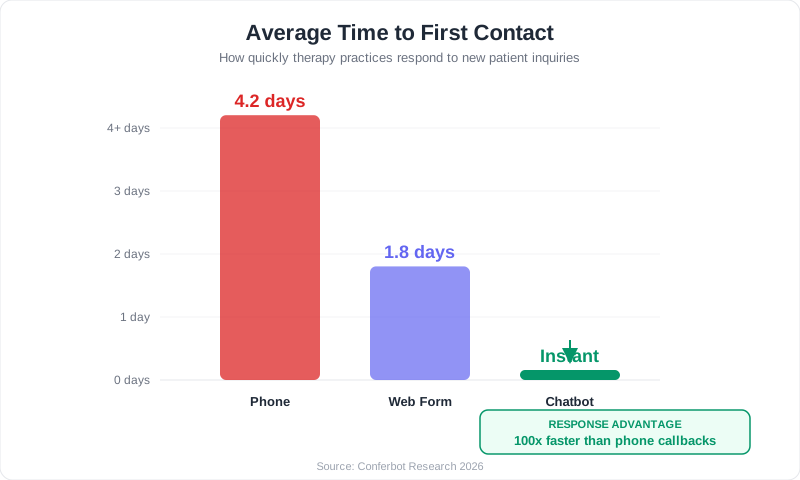
- 4.2 days is the average time for a therapy practice to return a phone inquiry
- 25-30% of scheduled first sessions result in no-shows
- 40% of clients who complete intake never attend a second session
That 4.2-day callback time is particularly devastating. A person who musters the courage to call a therapist's office at a moment of vulnerability — and reaches voicemail — enters a waiting period during which their motivation may fade, their coping mechanisms may reassert themselves, or they may simply conclude that the system is not designed to help them. By the time the office calls back on Tuesday, the window of motivation may have closed. A healthcare chatbot eliminates this waiting period entirely.
The After-Hours Opportunity
Mental health crises and moments of motivation do not follow a 9-to-5 schedule. The data is clear: 68% of mental health-related searches happen outside standard business hours — evenings, weekends, and holidays. These are the moments when someone lies awake at 2 AM unable to sleep, when a panic attack strikes on a Saturday morning, when a difficult family dinner triggers a decision to finally seek help. Practices without a chatbot lose every one of these inquiries to voicemail or form abandonment.
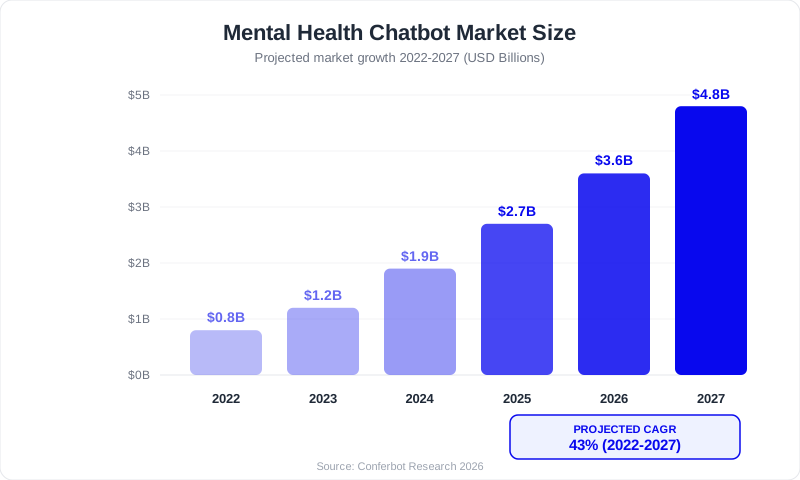
The market is responding. The mental health chatbot market is projected to grow from $0.8 billion in 2022 to $4.8 billion by 2027 — a 43% compound annual growth rate — driven by the convergence of demand-side pressure (more people seeking mental health care) and supply-side recognition (practices realizing they cannot scale intake through phone-only workflows). Practices that deploy chatbots now are capturing the clients that phone-only practices are losing.
Pre-Session Intake Screening: PHQ-9 and GAD-7 in a Chatbot
The clinical backbone of a therapy practice chatbot is its ability to conduct structured intake screening before the first session. This is not a generic contact form — it is a conversational adaptation of validated clinical instruments that captures the same information a therapist would collect in the first 15-20 minutes of an intake session, delivered in a format that feels like a supportive conversation rather than a medical questionnaire.
Why Conversational Intake Outperforms Forms
The completion rate difference between intake methods is dramatic and well-documented:
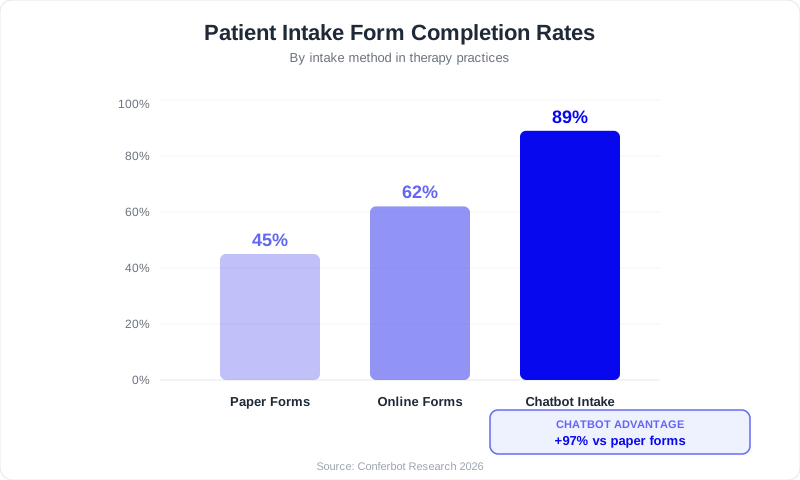
The reasons for the chatbot's 89% completion rate are rooted in UX psychology. A multi-page online form presents the full scope of the task upfront — the client sees "Page 1 of 8" and may feel overwhelmed before they start. A chatbot presents one question at a time, in a conversational context, with supportive acknowledgments between questions ("Thank you for sharing that. A few more questions to help us find the best fit for you."). This progressive disclosure technique keeps engagement high through the entire intake.
PHQ-9 Conversational Adaptation
The Patient Health Questionnaire-9 is the most widely used depression screening instrument in clinical practice. The chatbot adapts its nine items into conversational questions that preserve the clinical content while removing the sterile, form-like presentation. Each question covers a specific symptom domain over the past two weeks: loss of interest, depressed mood, sleep disturbance, fatigue, appetite changes, negative self-perception, concentration difficulty, psychomotor changes, and suicidal ideation.
The suicidal ideation item (PHQ-9 Item 9) receives special handling. If a client endorses any frequency of thoughts of being "better off dead" or of hurting themselves, the chatbot immediately pauses the screening and delivers crisis resources — the 988 Suicide and Crisis Lifeline, Crisis Text Line, and 911 — before asking if the client would like to continue the intake. Safety always takes priority over intake completion.
GAD-7 Conversational Adaptation
The Generalized Anxiety Disorder-7 screening covers excessive worry, difficulty controlling worry, restlessness, fatigue, concentration difficulty, irritability, and muscle tension. Like the PHQ-9 adaptation, the chatbot presents each item conversationally with four frequency response options that map to the standard 0-3 scoring system.
Additional Screening Modules
Beyond PHQ-9 and GAD-7, the chatbot can include optional screening modules based on the client's presenting concerns: trauma exposure questions for clients reporting PTSD symptoms, substance use screening (CAGE-AID adapted) for clients mentioning substance concerns, and sleep quality questions for clients reporting insomnia. Each module is triggered conditionally — a client presenting with work stress and anxiety sees PHQ-9 and GAD-7 only, while a client mentioning nightmares and flashbacks also sees the trauma module. This adaptive approach keeps the intake focused and efficient. For practices exploring how HIPAA-compliant AI chatbots handle screening data, we cover the compliance requirements in detail below.
Clinical Handoff Summary
At the end of the screening, the chatbot generates a structured clinical summary for the assigned therapist. This summary includes: presenting concerns (free text and categorized), PHQ-9 adapted score with severity category, GAD-7 adapted score with severity category, any crisis resource activations, therapist match rationale, insurance status, and the client's own words about what they are hoping to address in therapy. This last item — the client's stated goals in their own language — is clinically valuable because it preserves the client's framing of their experience, which the therapist can reference in the first session to build immediate rapport.
Therapist Matching: Connecting Clients to the Right Provider
The quality of the therapist-client match is the single strongest predictor of whether a client will stay in therapy long enough to benefit. The American Psychological Association identifies the therapeutic alliance — the quality of the working relationship between therapist and client — as the most consistent predictor of treatment outcomes, surpassing even the specific therapy modality used. A chatbot that facilitates accurate, preference-driven therapist matching is therefore not just an administrative tool; it is a clinical quality intervention.
The Five Matching Factors
The chatbot collects five matching factors, prioritized by how frequently clients rate each factor as important or very important in their therapist selection:
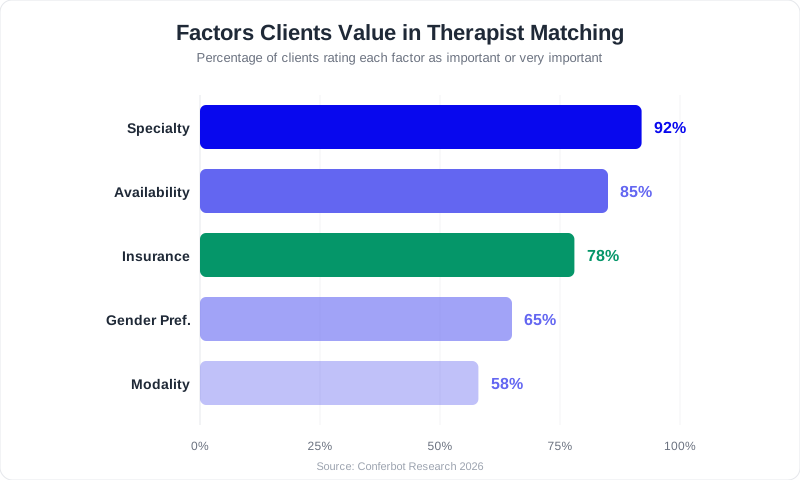
1. Specialty Match (92% rate as important): The client's presenting concern is matched against each therapist's listed specialties. A client presenting with PTSD is matched to therapists trained in trauma-focused therapies (EMDR, CPT, Prolonged Exposure), not to a generalist. The chatbot covers the full spectrum of presenting concerns: generalized anxiety, social anxiety, panic disorder, depression, PTSD, complex trauma, OCD, ADHD, relationship issues, grief, substance use, eating disorders, anger management, life transitions, work burnout, and identity exploration.
2. Availability Match (85%): Scheduling friction is the second most common reason clients do not follow through on therapy. The chatbot collects preferred days, time windows, and frequency, then compares against therapist availability. A match to a therapist with a 6-week wait is a match that will likely never convert to an attended session.
3. Insurance Match (78%): Insurance confusion is a major barrier to therapy access. Many clients do not know which therapists accept their plan, what their copay will be, or whether they have out-of-network benefits. The chatbot identifies the client's insurance provider and matches only to therapists credentialed on that panel, eliminating the common frustration of being matched to an out-of-network provider.
4. Gender Preference (65%): Gender preference in therapy is clinically meaningful, not merely a convenience. Trauma survivors, individuals discussing sexual health concerns, and clients from cultures with specific gender norms often have strong preferences. The chatbot asks this question respectfully and matches accordingly.
5. Modality Preference (58%): An increasing number of clients research therapy modalities before reaching out. They search for "EMDR therapist near me" or "DBT for emotional regulation." The chatbot captures these preferences and matches to therapists trained in the requested approach — CBT, DBT, EMDR, psychodynamic, ACT, somatic experiencing, and others.
Matching Outcomes
Practices that implement structured chatbot matching report significant improvements: first-session attendance rises from 70-75% to 88-92%, retention through session 8 improves from 45-55% to 68-75%, and re-matching requests drop from 18-22% to 6-8%. Every avoided re-match saves the client from repeating their story with a new therapist — an experience that can feel invalidating and that increases dropout risk. For practices managing appointment scheduling across multiple providers, the matching flow also reduces the coordinator burden of manually searching calendars and therapist profiles.
Crisis Resource Routing: Safety as the First Design Principle
Any technology that interacts with individuals experiencing mental health distress, following crisis intervention protocols from the 988 Suicide and Crisis Lifeline, has an ethical obligation to provide crisis resources when acute risk is detected. For therapy practice chatbots, this obligation is not optional or secondary — it is the first design principle. The chatbot must detect crisis signals accurately, respond immediately with appropriate resources, and document every interaction for clinical and legal review.
Three-Layer Crisis Detection
The chatbot uses a layered detection approach to ensure that no client in crisis falls through the cracks:
Layer 1 — Explicit selection: The main menu prominently offers an "I need help now" option. Selecting this immediately routes the client to crisis resources without any qualifying questions. The client does not need to explain why they need help or answer screening questions first.
Layer 2 — Screening detection: During PHQ-9 adapted screening, if the client endorses any frequency of thoughts of self-harm or suicidal ideation (Item 9), the chatbot immediately pauses the screening and delivers crisis resources. The screening continues only if the client explicitly indicates they would like to proceed after reviewing the resources.
Layer 3 — Natural language detection: Throughout the conversation, the chatbot monitors for crisis-related language using Conferbot's AI engine. This goes beyond simple keyword matching — it analyzes intent and context to identify expressions of suicidal ideation, self-harm, or imminent danger, even when those expressions use indirect language. This layer catches crisis signals that occur outside the structured screening flow.
Resources Delivered
When any crisis detection layer activates, the chatbot delivers the following resources clearly and prominently:
- 988 Suicide & Crisis Lifeline: Call or text 988 (24/7/365)
- Crisis Text Line: Text HOME to 741741 (24/7/365)
- Emergency Services: Call 911 for immediate danger
- SAMHSA National Helpline: 1-800-662-4357 for substance use and mental health referrals
- Veterans Crisis Line: Call 988, press 1
- Trevor Project: 1-866-488-7386 or text START to 678-678 (LGBTQ+ youth)
The resources are presented with a validation message: "It takes real strength to reach out when you are struggling. You do not have to face this alone." This messaging is deliberate — research on help-seeking behavior shows that validating the act of reaching out increases the likelihood of the person actually contacting a crisis resource.
Documentation and Follow-Up
Every crisis interaction is logged with timestamp, trigger type (explicit, screening, NLP), specific content that triggered the routing, resources delivered, and the client's subsequent actions. This documentation serves dual purposes: it provides the clinical team with a complete picture for follow-up, and it creates a record that demonstrates the practice provided appropriate, timely crisis resources — which is relevant for both ethical practice and liability management.
After delivering crisis resources, the chatbot asks if the client would like to be contacted by the practice for non-emergency follow-up when they are ready. This warm handoff preserves the relationship while maintaining appropriate boundaries — the chatbot does not attempt crisis counseling, diagnosis, or therapeutic intervention during a crisis interaction.
HIPAA Compliance for Therapy Practice Chatbots
Mental health data occupies a uniquely sensitive position within healthcare information. A breach of therapy intake data — screening responses, presenting concerns, substance use disclosures — can cause professional, personal, and social harm that exceeds almost any other category of health information. HIPAA compliance for therapy chatbots is not a checkbox exercise; it is a core design requirement that must inform every decision about what data the chatbot collects, how it transmits that data, and where it stores it.
Core HIPAA Requirements
Under the HIPAA Security Rule, any technology that handles Protected Health Information (PHI) on behalf of a covered entity must implement administrative, physical, and technical safeguards. For a therapy practice chatbot, the critical technical safeguards are:
- Encryption in transit: All data between the client's browser/device and the chatbot server must use TLS 1.2 or higher. Conferbot uses enterprise-grade TLS encryption.
- Encryption at rest: All stored conversation data, screening responses, and client information must be encrypted. Conferbot uses AES-256 encryption for stored data.
- Access controls: Role-based permissions ensure that only authorized staff access chatbot data. A front desk coordinator sees scheduling requests; a therapist sees clinical screening summaries.
- Audit logging: Every data access event must be logged with user identity, timestamp, and action. Logs must be retained for a minimum of six years.
- Business Associate Agreement: Your chatbot platform must sign a BAA committing to HIPAA-compliant data handling. Conferbot provides BAA support for healthcare practices.
42 CFR Part 2: Substance Use Protections
Practices that treat substance use disorders face additional requirements under 42 CFR Part 2, which restricts disclosure of substance use treatment records more strictly than HIPAA. If your chatbot intake collects substance use information, ensure your consent flow explicitly addresses Part 2 requirements. This is particularly relevant for practices offering dual-diagnosis treatment.
Data Minimization Strategy
The most effective compliance strategy for chatbots is to collect only what is necessary for the chatbot's purpose: intake qualification, screening summary, scheduling preference, and contact information. Detailed clinical information — trauma narratives, medication histories, psychiatric hospitalization records — should be collected within your secure EHR after the initial chatbot interaction. This minimization approach reduces both compliance risk and the blast radius of any potential data incident.
State-Level Considerations
Multiple states have mental health privacy laws that exceed HIPAA requirements. California (CCPA/CPRA), New York (Mental Hygiene Law Article 33), Texas (Health & Safety Code Chapter 611), and Connecticut all have specific mental health data protections. Review your chatbot deployment with a healthcare compliance attorney familiar with your state's requirements.
Reducing No-Shows: The Revenue Recovery Engine
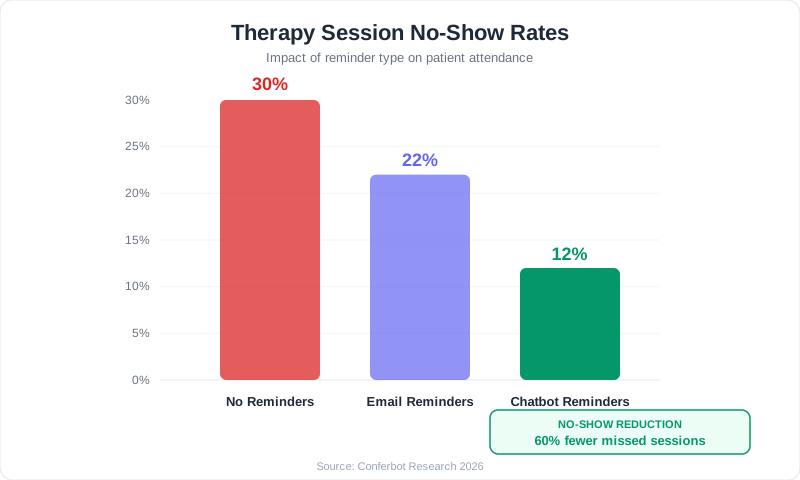
Therapy no-shows are more than a scheduling inconvenience, with American Psychological Association research showing they disrupt treatment continuity and practice financial health — they are a financial crisis for practices and a clinical setback for clients. A missed session means the therapist sits idle during a slot that could have served another client, the practice loses $150-250 in revenue, and the client's treatment momentum is disrupted. For clients who are ambivalent about therapy or struggling with the executive function challenges that often accompany depression and anxiety, a no-show can become the start of dropout.
The No-Show Problem in Therapy
Therapy has one of the highest no-show rates in healthcare, typically ranging from 20% to 30% depending on the practice, population, and payer mix. The reasons are both practical and psychological:
- Anxiety about the session itself: Clients with anxiety disorders may experience pre-session dread that makes avoidance feel easier than attendance.
- Forgetting: Weekly sessions can be easy to forget, especially for clients managing cognitive symptoms of depression or ADHD.
- Ambivalence: Clients who are not yet fully committed to therapy may skip when the emotional cost of attending feels too high.
- Logistical barriers: Transportation, childcare, and work schedule conflicts arise between scheduling and session date.
- Cost concerns: Clients who are surprised by their copay or uncertain about insurance coverage may avoid sessions rather than face financial stress.
How Chatbot Reminders Reduce No-Shows by 60%
The chatbot's reminder system addresses multiple no-show drivers through a multi-touch, multi-channel approach:
- 48-hour reminder: Sent via the client's preferred channel (SMS, WhatsApp, email). Includes session date, time, therapist name, and a warm message: "Your session with [Therapist] is in two days. We are looking forward to seeing you." This gives the client time to address logistical barriers.
- 24-hour reminder: A brief confirmation prompt asking the client to confirm attendance. If the client indicates they cannot attend, the chatbot offers rescheduling options immediately — converting a potential no-show into a rescheduled session that preserves revenue.
- 2-hour reminder: A final nudge with session logistics: location/telehealth link, parking instructions, or a reminder to find a quiet space for a telehealth session. For clients with anxiety, this reminder normalizes the upcoming session rather than leaving them to manage their anticipatory dread alone.
Revenue Impact
The financial impact is straightforward. For a 5-therapist practice where each therapist sees 15 clients per week at $175 per session with a 30% no-show rate, the baseline weekly revenue loss from no-shows is $3,937.50. Reducing no-shows to 12% through chatbot reminders recovers $2,362.50 per week — or $113,400 per year. That is revenue the practice was already generating in demand but losing to a solvable administrative problem.
Insurance Verification and Cost Transparency
Insurance confusion is one of the top three reasons prospective therapy clients do not follow through on scheduling. The behavioral health insurance landscape is genuinely complex: panel networks vary by therapist within the same practice, session limits differ by plan, copays can range from $0 to $75 depending on deductible status, and out-of-network benefits are poorly understood by most consumers. A chatbot that provides insurance guidance at the moment of inquiry — before the client has time to become discouraged — directly improves conversion rates.
How the Insurance Verification Flow Works
The chatbot's insurance path follows a structured approach:
- The client selects their insurance provider from a list of the most common behavioral health plans: Aetna, Cigna, UnitedHealthcare, Blue Cross Blue Shield, Anthem, Medicare, Medicaid, or Other.
- The chatbot identifies which therapists in your practice are credentialed with that insurer.
- It explains typical behavioral health coverage in plain language: "Most [Insurer] plans cover individual therapy sessions with a copay of $20-$50 per session after your deductible is met. Your plan may also have annual session limits. We will verify your specific benefits before your first session so there are no surprises."
- The client is offered a formal benefits verification — the chatbot collects the minimum information needed (plan type, member ID) and submits a verification request to the practice billing team.
- The results are communicated back to the client before their first session, including expected copay, deductible status, and any session limits.
Sliding Scale and Self-Pay
Not all therapy clients have insurance, and many practices offer sliding scale fees to increase accessibility. The chatbot explains available options: standard self-pay rates, sliding scale availability and the income documentation needed, and superbill generation for clients who want to seek out-of-network reimbursement from their insurer. This transparency is critical for capturing cost-sensitive clients who assume therapy is unaffordable without asking.
The Conversion Impact
Practices that provide insurance guidance through their chatbot report a 35-45% improvement in inquiry-to-appointment conversion compared to practices that defer insurance conversations to a callback. The reason is simple: when a client knows their approximate cost before scheduling, they schedule with confidence. When cost remains unknown, uncertainty creates hesitation, and hesitation in therapy-seeking often leads to dropout before the first session.
ROI Analysis: The Business Case for Therapy Practice Chatbots
The return on investment for a therapy practice chatbot is driven by four revenue streams that compound over time. Unlike some technology investments where ROI is theoretical, the therapy chatbot ROI is directly measurable through session revenue, no-show rates, client acquisition metrics, and staff efficiency.
Revenue Stream 1: No-Show Recovery
For a 5-therapist practice (15 sessions/therapist/week, $175/session, 48 weeks/year), reducing no-shows from 30% to 12% recovers:
- Baseline no-shows: 5 x 15 x 0.30 = 22.5 missed sessions/week
- With chatbot: 5 x 15 x 0.12 = 9 missed sessions/week
- Recovered sessions: 13.5/week x $175 = $2,362.50/week
- Annual recovery: $113,400
Revenue Stream 2: After-Hours Client Capture
With 68% of mental health searches happening outside business hours and the chatbot converting 3-5 additional clients per month who would have been lost to voicemail:
- 4 new clients/month x $175/session x 4 sessions/month = $2,800/month in new recurring revenue
- Assuming average client retention of 6 months: $2,800 x 6 = $16,800 lifetime value per monthly cohort
- Annual new revenue: $33,600-$50,400 (conservative estimate)
Revenue Stream 3: Intake Coordinator Efficiency
Automating 65-75% of phone intake saves 2-3 hours/day of coordinator time:
- 2.5 hours/day x $22/hour x 250 working days = $13,750/year in labor savings
- Alternatively: coordinator capacity redeployed to insurance authorization, retention calls, and client follow-up — activities that directly drive revenue
- Annual value: $13,750-$20,000
Revenue Stream 4: Retention from Better Matching
Improving 8-session retention from 50% to 70% means more clients complete treatment courses:
- Each additional session retained: $175
- For 20 new clients/month, improving retention by 20% across 8 sessions adds an average of 1.6 sessions per client
- 20 clients x 1.6 sessions x $175 = $5,600/month
- Annual retention revenue: $67,200
Total Annual ROI
| Revenue Stream | Annual Value |
|---|---|
| No-show recovery | $113,400 |
| After-hours capture | $33,600 - $50,400 |
| Intake efficiency | $13,750 - $20,000 |
| Retention improvement | $67,200 |
| Total | $227,950 - $251,000 |
Against a chatbot platform cost of $1,200-$2,400/year, the ROI exceeds 10,000%. Even if you discount these projections by 50% to account for practice-specific variables, the payback period is measured in days, not months.
Implementation Guide: From Template to Live in One Week
Deploying a therapy practice chatbot does not require technical expertise, developer resources, or a lengthy implementation timeline. Conferbot's no-code builder and therapy-specific template mean that a solo practitioner can be live within an hour, and a multi-provider group practice can complete full deployment in one to two weeks.
Day 1-2: Template Customization
Start from the template: Open Conferbot's therapy practice chatbot template in the no-code visual builder. Customize the practice name, branding colors, logo, and welcome message. The template includes pre-built flows for intake screening, therapist matching, insurance verification, appointment scheduling, and crisis routing.
Configure therapist profiles: For each therapist, enter their specialties, accepted insurance panels, available appointment slots, therapy modalities offered, and a brief bio. For solo practitioners, this step is simplified — the chatbot routes directly to your calendar.
Update insurance information: Add your practice's accepted insurance plans and any specific coverage notes (e.g., "We are in-network with Aetna, Cigna, and BCBS. We also offer superbills for out-of-network reimbursement.").
Day 3: Safety and Compliance Configuration
Verify crisis resources: Confirm all crisis resource phone numbers and text lines are current. Add your practice's after-hours crisis protocol if applicable. Test the crisis routing flow from main menu selection, from PHQ-9 Item 9 endorsement, and from keyword detection.
Review consent language: Add a consent statement at the beginning of the chatbot conversation explaining what data is collected, how it is used, and linking to your practice's privacy policy and HIPAA Notice of Privacy Practices.
Sign BAA: If you have not already, execute a Business Associate Agreement with Conferbot to ensure HIPAA compliance for PHI handling.
Day 4-5: Integration and Testing
Connect your EHR: Use Conferbot's API to connect the chatbot to your EHR (SimplePractice, TherapyNotes, Jane App, or others). Map chatbot intake fields to client record fields so screening data flows directly into the therapist's workspace.
Set up notifications: Configure email and SMS notifications for new intake submissions, crisis interactions (with immediate notification to clinical director), and scheduling requests.
Internal testing: Have your therapists, intake coordinator, and 2-3 trusted colleagues complete the full chatbot flow. Test every path: standard intake, crisis routing, insurance verification, and scheduling. Collect feedback on tone, clarity, and completeness.
Day 6-7: Launch
Embed on your website: Add the Conferbot script to every page of your practice website. Test that the chatbot widget appears correctly on desktop and mobile.
Soft launch: Run the chatbot for 3-5 days with a small widget and no proactive greeting. Review the first 10-20 conversations. Are clients completing intake? Are screening questions being understood? Are there drop-off points?
Full launch: Enable the proactive greeting ("Welcome. Looking for a therapist? I can help you find the right match and get started."), promote the chatbot on your Google Business Profile, and deploy on WhatsApp if applicable.
Post-Launch: 30-Day Optimization
Review analytics weekly. Focus on completion rates by path, drop-off points, unhandled questions, crisis interaction frequency, and time-of-day usage patterns. Adjust messaging, add knowledge base answers for common unhandled questions, and refine the therapist matching criteria based on actual matching accuracy.
Best Practices for Therapy Practice Chatbots
These best practices are drawn from therapy practices that have successfully deployed chatbots to improve access, efficiency, and client outcomes.
1. Lead with Warmth and Destigmatization
Every message in the chatbot should acknowledge the courage it takes to seek therapy. Avoid clinical jargon. Instead of "Please complete the following screening instrument," say "I would like to ask you a few questions about how you have been feeling recently. Your answers will help us match you with the right therapist." Small language adjustments dramatically affect completion rates and the client's emotional experience of the intake.
2. Make Crisis Resources Always Visible
Do not bury crisis resources behind menus or screening questions. Include a persistent "Need immediate help?" link or option that is visible throughout the conversation. Someone who starts the intake process in a stable state may become distressed during screening — the safety net must always be accessible.
3. Respect the Pace of Disclosure
Therapy clients are sharing sensitive, personal information. The chatbot should never rush. Include acknowledgment messages between sections: "Thank you for sharing that. Take your time with the next questions." Allow the option to skip questions the client is not ready to answer, and let them return to complete those items later.
4. Capture Clients' Own Words
Include at least one open-ended question: "In your own words, what are you hoping to address in therapy?" This free-text response is clinically valuable because it preserves the client's language and framing, which the therapist can reference in the first session to build rapport.
5. Optimize for Mobile
Over 70% of mental health searches happen on mobile devices. The chatbot must be fully responsive, with tap-friendly buttons, readable text at small sizes, and no horizontal scrolling. Test on both iOS and Android devices before launch.
6. Follow Up on Incomplete Intakes
If a client starts the intake and drops off, the chatbot can send a gentle follow-up message (if the client consented to communication): "We noticed you started an intake with us but did not finish. No pressure — you are welcome to pick up where you left off whenever you are ready." This follow-up recovers 15-20% of abandoned intakes.
7. Keep Screening Data in Context
Screening scores should always be presented to therapists with context — they are conversational adaptations, not formal diagnostic instruments. The intake summary should clearly note: "These scores reflect a conversational adaptation of the PHQ-9/GAD-7 and should be confirmed with standardized administration during the clinical intake session."
8. Update Therapist Profiles Regularly
As therapists change their availability, add new specialties, or join/leave insurance panels, the chatbot profiles must be updated. Outdated matching data creates the exact frustration the chatbot is designed to eliminate. Assign a staff member to review profiles monthly.
Was this article helpful?
About the Author
Conferbot Team specializes in conversational AI, chatbot strategy, and customer engagement automation. With deep expertise in building AI-powered chatbots, they help businesses deliver exceptional customer experiences across every channel.
View all articles