What Are GPT-Powered Chatbots and Why They Matter in 2026
GPT-powered chatbots represent a fundamental shift in how businesses communicate with customers. Unlike traditional chatbots that follow rigid decision trees and keyword matching, GPT-powered chatbots leverage large language models (LLMs) to understand natural language, interpret context, and generate human-like responses grounded in your business data.
The term "GPT-powered" has become an umbrella for chatbots built on any large language model, whether that is OpenAI's GPT-4o, Anthropic's Claude, Google's Gemini, or open-source alternatives like Llama and Mistral. What unites them is their ability to understand intent rather than just keywords, handle complex multi-turn conversations, and adapt their responses based on context.
The business impact is staggering. According to Gartner's 2025 forecast, conversational AI will reduce contact center agent labor costs by $80 billion by 2026. Meanwhile, McKinsey estimates that generative AI could add $2.6 to $4.4 trillion in value across industries annually, with customer operations being one of the highest-impact areas.
For small and mid-sized businesses, GPT-powered chatbots democratize capabilities that were previously available only to enterprises with massive engineering teams. Today, you can deploy a sophisticated AI chatbot that understands your products, follows your policies, and speaks in your brand voice, all without writing a single line of code. Platforms like Conferbot have made this accessible to businesses of every size, handling the technical complexity behind a simple drag-and-drop interface.
Here is what makes 2026 the inflection point: model costs have dropped 90% since 2023, accuracy has improved to the point where AI handles 70-85% of routine queries correctly, and no-code platforms have matured to the point where deployment takes hours instead of months. If you have been waiting for the right time to adopt AI-powered customer communication, that time is now.
GPT-Powered Chatbots vs. Rule-Based Bots: A Critical Comparison
Understanding the difference between GPT-powered and rule-based chatbots, as explained by IBM's AI chatbot guide, is essential before you invest in either approach. The distinction affects everything from customer satisfaction to ongoing maintenance costs. For an in-depth breakdown, see our detailed AI chatbot vs. rule-based comparison.
How Rule-Based Chatbots Work
Rule-based chatbots operate on predefined decision trees and keyword matching. You program specific triggers ("refund," "return," "cancel") and map them to scripted responses. They follow if-then logic: if the user says X, respond with Y. They cannot handle anything outside their programmed scenarios.
How GPT-Powered Chatbots Work
GPT-powered chatbots use large language models combined with your business data through Retrieval-Augmented Generation (RAG). They understand the meaning behind words, not just the words themselves. They generate unique responses for each conversation, drawing from your knowledge base to provide accurate, contextual answers.
Head-to-Head Comparison
| Capability | Rule-Based Bot | GPT-Powered Bot |
|---|---|---|
| Language understanding | Keyword matching only | Full natural language understanding |
| Handling typos and slang | Fails frequently | Handles naturally |
| Multi-turn conversations | Limited branching logic | Full context retention across turns |
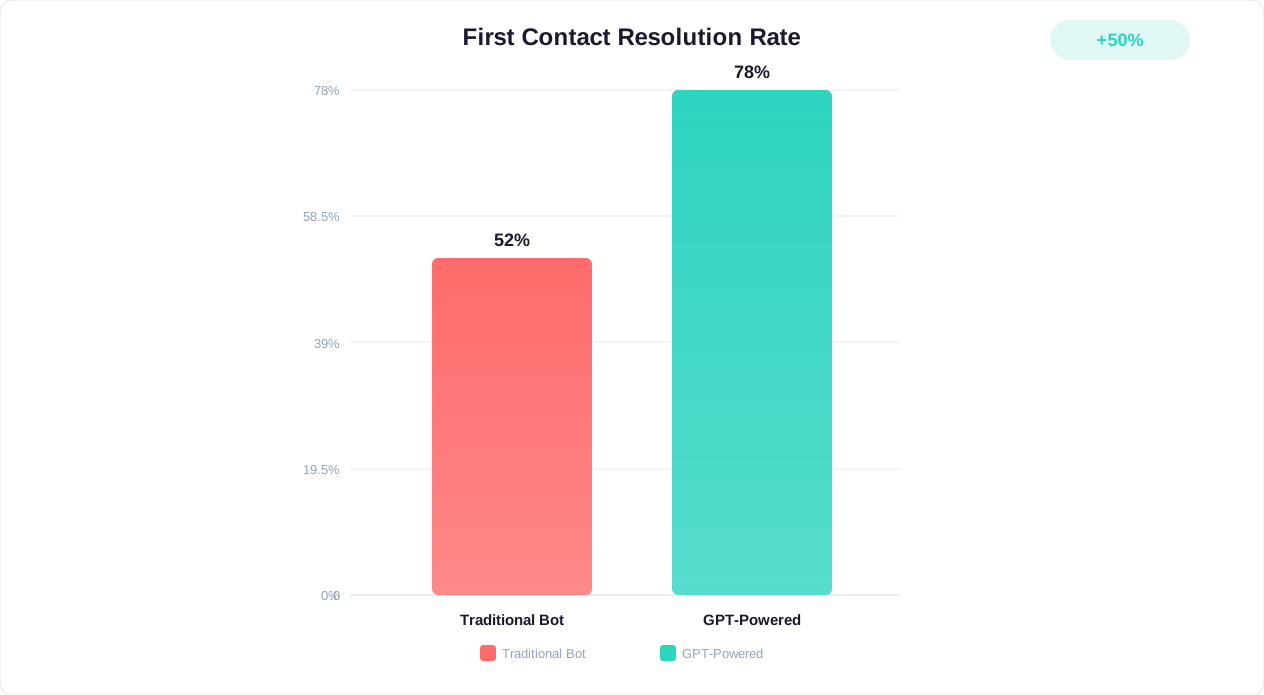
| Accuracy on trained topics | 40-60% | 85-95% |
| Setup time | Weeks (per flow) | Hours to days |
| Maintenance effort | High (manual updates) | Low (update knowledge base) |
| Scalability | Linear cost increase | Near-zero marginal cost |
| Multilingual support | Requires separate builds | Built-in (50+ languages) |
| Personalization | Basic (name insertion) | Deep (conversation history, preferences) |
The verdict for most businesses in 2026 is clear: GPT-powered chatbots deliver superior customer experiences at lower long-term costs. Rule-based bots still have a place for extremely simple, high-volume interactions where predictability is paramount (like order status lookups with exact inputs), but for any scenario requiring language understanding, GPT-powered is the standard.
The hybrid approach is often ideal. Use GPT-powered AI for understanding and response generation, but implement rule-based guardrails for critical actions like processing payments or modifying accounts. This gives you the flexibility of AI with the predictability of rules where it matters most.
Step-by-Step Guide: Building Your GPT Chatbot Without Code
Building a GPT-powered chatbot without coding is now a straightforward process that takes most businesses 2-4 hours for initial setup and 1-2 weeks for full optimization. Here is the complete process, broken into actionable steps. For a broader look at no-code chatbot creation, see our guide on how to build a chatbot without coding.
Step 1: Define Your Chatbot's Purpose and Scope
Before touching any platform, answer these questions:
- Primary goal: Is this for customer support, lead generation, sales assistance, onboarding, or internal knowledge management?
- Scope boundaries: What topics should the chatbot handle? What should it refuse to answer or escalate to a human?
- Success metrics: How will you measure success? Resolution rate, customer satisfaction score, leads captured, response time?
- Integration requirements: What existing systems (CRM, helpdesk, e-commerce platform) need to connect?
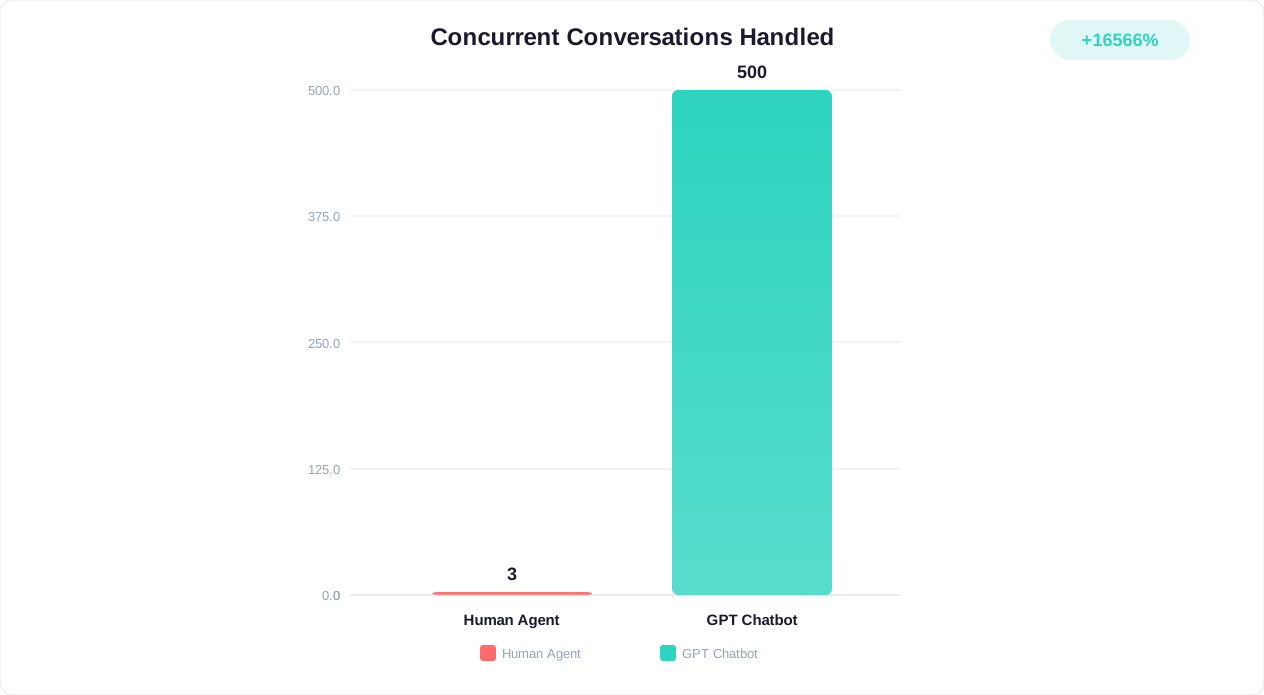
- Volume expectations: How many conversations per day do you expect? This affects platform choice and cost.
Step 2: Prepare Your Knowledge Base
Your chatbot is only as good as the data it learns from. Gather and clean your materials. As we cover in detail in our guide to training chatbots on business data, data quality is the single biggest factor in chatbot accuracy.
Collect these materials:
- FAQ documents (aim for 50-200 question-answer pairs covering your most common inquiries)
- Product or service documentation with current pricing, features, and specifications
- Company policies (returns, shipping, warranties, privacy)
- Support transcripts from your best agents (anonymized)
- Website content that answers customer questions
Clean your data by removing outdated information, resolving contradictions between documents, and ensuring every piece of content reflects your current business reality.
Step 3: Choose Your Platform
Select a no-code chatbot platform based on your requirements (we compare options in detail in the platform comparison section below). Key factors to evaluate include AI model options, integration capabilities, pricing structure, customization depth, and analytics features.
Step 4: Upload and Configure Your Knowledge Base
On your chosen platform:
- Upload documents: Most platforms accept PDF, DOCX, TXT, CSV, and web page URLs. Upload in logical batches by topic area.
- Configure knowledge retrieval: Set how many source chunks the AI should reference per response (typically 3-5 for best accuracy).
- Set response parameters: Configure tone (professional, friendly, casual), response length limits, and language preferences.
- Define escalation rules: Specify when the chatbot should hand off to a human agent, such as when customer sentiment is negative, confidence is low, or the topic is sensitive.
- Configure guardrails: Set boundaries on what the chatbot can and cannot say or do. Prevent it from making promises, offering unauthorized discounts, or discussing competitor products in ways you have not approved.
Step 5: Test Thoroughly Before Launch
Build a test bank of 50-100 questions covering:
- Common questions you know the bot should handle well
- Edge cases that test the boundaries of your knowledge base
- Adversarial inputs that try to break or confuse the bot
- Multi-turn conversations that require context retention
- Questions in different phrasings to test language understanding
Target a minimum 85% accuracy rate before going live. Most well-prepared knowledge bases achieve 90-95% on launch. Fix gaps by adding more data to weak areas, not by trying to engineer prompts around the gaps.
Step 6: Deploy and Monitor
Launch on your chosen channels (website widget, WhatsApp, Messenger, Slack, or all of them), then monitor closely for the first two weeks. Review conversation logs daily, identify patterns where the bot struggles, and continuously update your knowledge base to address gaps.
Choosing the Right AI Model: GPT-4, Claude, Gemini, and Open-Source Options
The AI model powering your chatbot significantly impacts response quality, cost, and capabilities. Here is an honest comparison of the leading options available in 2026, based on real-world performance in business chatbot deployments.
OpenAI GPT-4o and GPT-4.1
OpenAI's models remain the most widely deployed for business chatbots. GPT-4o offers an excellent balance of speed, accuracy, and cost, while GPT-4.1 provides enhanced instruction-following and longer context windows. According to OpenAI's current pricing, GPT-4o costs approximately $2.50 per million input tokens and $10 per million output tokens, making it cost-effective for high-volume deployments.
Best for: General-purpose business chatbots, customer support, sales assistance. The ecosystem is mature with extensive documentation and tool integrations.
Anthropic Claude (Sonnet and Haiku)
Claude excels at following nuanced instructions and maintaining consistent brand voice. Claude Sonnet offers strong reasoning at moderate cost, while Claude Haiku provides extremely fast responses at very low cost, ideal for high-volume support scenarios.
Best for: Businesses that need strict adherence to guidelines, long-form responses, or sensitive topic handling. Claude's constitutional AI approach makes it particularly good at staying within defined boundaries.
Google Gemini
Gemini integrates natively with Google's ecosystem (Search, Workspace, Cloud), making it compelling for businesses already invested in Google's stack. Gemini 2.0 Flash offers competitive pricing with strong multilingual capabilities.
Best for: Businesses deeply integrated with Google Workspace, those needing strong multilingual support, or those wanting native Search grounding.
Open-Source Models (Llama 3, Mistral, Qwen)
Open-source models offer full control over deployment and data privacy. Meta's Llama 3.1 (405B) approaches proprietary model quality, while smaller variants (8B, 70B) offer cost-effective options for focused use cases. Mistral's models provide strong performance for European language support.
Best for: Businesses with strict data residency requirements, those wanting to avoid vendor lock-in, or organizations with in-house ML engineering capability to manage deployment.
Model Selection Decision Framework
| Model | Cost per 1M tokens (in/out) | Speed (tokens/sec) | Best Use Case |
|---|---|---|---|
| GPT-4o | $2.50 / $10.00 | ~100 | General business chatbot |
| GPT-4.1 | $2.00 / $8.00 | ~90 | Complex reasoning tasks |
| Claude Sonnet | $3.00 / $15.00 | ~80 | Policy-sensitive support |
| Claude Haiku | $0.25 / $1.25 | ~150 | High-volume, cost-sensitive |
| Gemini 2.0 Flash | $0.10 / $0.40 | ~200 | Budget-friendly, multilingual |
| Llama 3.1 70B (self-hosted) | ~$0.50 / $0.70 | ~60 | Data privacy requirements |
Most no-code platforms, including Conferbot, abstract away the model choice by offering optimized defaults and allowing you to switch models without rebuilding your chatbot. This means you can start with one model and upgrade or change as your needs evolve, without losing your knowledge base or configurations.
Fine-Tuning vs. RAG: Which Approach Is Right for Your Business?
Two primary approaches exist for customizing a large language model, as detailed in Google Cloud's generative AI documentation with your business data: fine-tuning and Retrieval-Augmented Generation (RAG). Understanding the trade-offs is critical for making the right architectural decision. For a deep dive into the RAG approach, see our comprehensive guide to training chatbots on knowledge bases.
What Is Fine-Tuning?
Fine-tuning modifies the model's weights by training it on your specific data. You provide hundreds or thousands of example conversations demonstrating how you want the bot to respond, and the model adjusts its behavior patterns accordingly. Think of it as teaching the model a new skill versus giving it a reference book.
When fine-tuning makes sense:
- You need the bot to adopt a very specific conversational style or personality that is difficult to achieve through prompting alone
- You have thousands of high-quality example conversations to train on
- Response speed is critical and you want to minimize token usage by eliminating the retrieval step
- Your use case involves specialized jargon or domain-specific reasoning patterns
Limitations of fine-tuning:
- Expensive to create and maintain ($500-$5,000+ per training run depending on model and data size)
- Knowledge becomes stale as your business changes since it requires retraining
- Risk of catastrophic forgetting where the model loses general capabilities
- Requires significant ML expertise to do correctly
- Cannot easily update individual facts without full retraining
What Is RAG?
RAG keeps the base model unchanged and instead gives it access to your business data at query time. When a customer asks a question, the system searches your knowledge base, retrieves relevant information, and feeds it to the model alongside the question. The model generates a response grounded in your actual data.
When RAG makes sense (most businesses):
- Your information changes frequently (pricing, policies, product details)
- You want to update knowledge instantly without retraining
- You need to trace responses back to source documents for verification
- You have limited ML expertise and want a no-code solution
- You need to control costs predictably
Limitations of RAG:
- Slightly higher latency per response due to the retrieval step (typically 200-500ms additional)
- Quality depends heavily on how well your documents are chunked and indexed
- May struggle with questions requiring reasoning across many disparate documents
- Context window limits how much retrieved information can be included per response
The Practical Recommendation for 2026
For 90% of businesses building their first GPT-powered chatbot, RAG is the right choice. It is faster to implement, easier to maintain, more cost-effective, and delivers accuracy that meets or exceeds fine-tuning for most customer-facing use cases. The 10% who should consider fine-tuning are those with extremely specialized domains (medical, legal, financial) where the model needs to internalize complex reasoning patterns, not just access reference data.
Many businesses eventually adopt a hybrid approach: RAG for the knowledge base (product info, policies, FAQs) combined with light fine-tuning for conversation style and brand voice. But start with pure RAG. You can always add fine-tuning later if you identify specific gaps that RAG alone cannot address.
Integrating Your GPT Chatbot with Business Systems and Data
A GPT-powered chatbot becomes truly powerful when it connects to your existing business systems. Integration transforms it from a smart FAQ bot into an AI assistant that can take actions, access real-time data, and provide personalized experiences.
Essential Integrations for Business Chatbots
CRM Integration (Salesforce, HubSpot, Pipedrive): Allows the chatbot to access customer history, personalize responses based on purchase history, and create or update records. When a lead chats with your bot, it can automatically create a CRM contact, log the conversation, and assign a lead score based on engagement signals.
Helpdesk Integration (Zendesk, Freshdesk, Intercom): Enables seamless escalation from bot to human agent with full context transfer. The agent sees the entire bot conversation, the customer's issue summary, and the bot's confidence assessment. This eliminates the frustrating experience of customers repeating themselves.
E-commerce Integration (Shopify, WooCommerce, Magento): Gives the chatbot access to real-time inventory, order status, and product catalogs. Customers can check order tracking, initiate returns, and get product recommendations without human intervention.
Knowledge Base Integration (Notion, Confluence, Google Drive): Automatically syncs your internal documentation so the chatbot always reflects your latest information. When you update a policy in Notion, the chatbot's responses update within minutes.
Calendar and Scheduling (Calendly, Google Calendar): Allows the chatbot to check availability and book appointments directly within the conversation, eliminating the back-and-forth of scheduling.
Integration Architecture Patterns
Most no-code platforms offer three integration methods:
- Native integrations: Pre-built connectors that require only API key configuration. Conferbot offers native integrations with 50+ business tools.
- Webhook-based: The chatbot sends event data to your systems via HTTP webhooks when specific triggers occur (new lead captured, escalation requested, order inquiry).
- API actions: The chatbot can call external APIs during conversations to retrieve real-time data or perform actions. This is how features like live order tracking or inventory checks work.
Data Synchronization Best Practices
Keep your chatbot's knowledge current with these strategies:
- Scheduled syncs: Set up daily or weekly automatic re-crawls of your website and documentation portals to capture content changes.
- Event-driven updates: When a product price changes in your e-commerce system, push that update to the chatbot's knowledge base immediately.
- Version control: Maintain versioned snapshots of your knowledge base so you can roll back if an update introduces errors.
- Conflict resolution: When multiple sources contain the same information, define which source is authoritative to prevent contradictory responses.
The integration layer is what separates a toy demo from a production chatbot that genuinely reduces workload. Invest time here, and your chatbot becomes an extension of your team rather than just another channel to manage.
No-Code GPT Chatbot Platform Comparison (2026)
The no-code chatbot platform market has matured significantly. Here is an honest comparison of the leading platforms for building GPT-powered chatbots in 2026, based on capabilities, pricing, and real-world performance. For a deeper comparison focused purely on pricing, see our chatbot pricing comparison guide.
| Platform | AI Models | Starting Price | Best For | Key Limitation |
|---|---|---|---|---|
| Conferbot | GPT-4o, Claude, Gemini | Free tier / $19/mo | SMBs wanting fast setup with enterprise features | Newer brand vs. incumbents |
| Intercom Fin | GPT-4, proprietary | $0.99/resolution | Existing Intercom customers | Expensive at scale, locked into ecosystem |
| Tidio AI | Claude, GPT-4o | $29/mo (AI add-on) | E-commerce live chat + AI | AI features require premium tier |
| Chatbase | GPT-4o, GPT-4.1 | $19/mo | Simple GPT wrapper bots | Limited integrations and customization |
| Voiceflow | Any (via API) | $50/mo (Teams) | Complex conversational flows | Steeper learning curve |
| Botpress | GPT-4o, Claude, custom | Free tier / Pay-per-use | Developers wanting flexibility | Requires some technical skill for advanced features |
What Sets the Best Platforms Apart
When evaluating platforms, focus on these differentiators that matter most for long-term success:
- Knowledge base management: How easy is it to upload, organize, update, and version your business data? Can you import from URLs, documents, and APIs?
- Model flexibility: Can you switch between AI models without rebuilding? As models improve rapidly, lock-in to a single provider is risky.
- Analytics depth: Does the platform show you which questions the bot struggles with, which topics generate the most conversations, and where customers drop off?
- Channel deployment: Can you deploy the same bot across website, WhatsApp, Messenger, Slack, and other channels from a single configuration?
- Human handoff: How smooth is the escalation experience? Does the human agent receive full context? Can the bot triage and route to the right department?
- Customization: Can you match the bot's appearance and personality to your brand? Can you create custom actions and workflows?
Conferbot stands out for its combination of enterprise-grade AI capabilities (multi-model support, advanced RAG, rich analytics) with a setup experience simple enough for non-technical users. The free tier allows meaningful evaluation before committing, and the pricing scales predictably as your usage grows.
Cost Analysis: What a GPT-Powered Chatbot Actually Costs in 2026
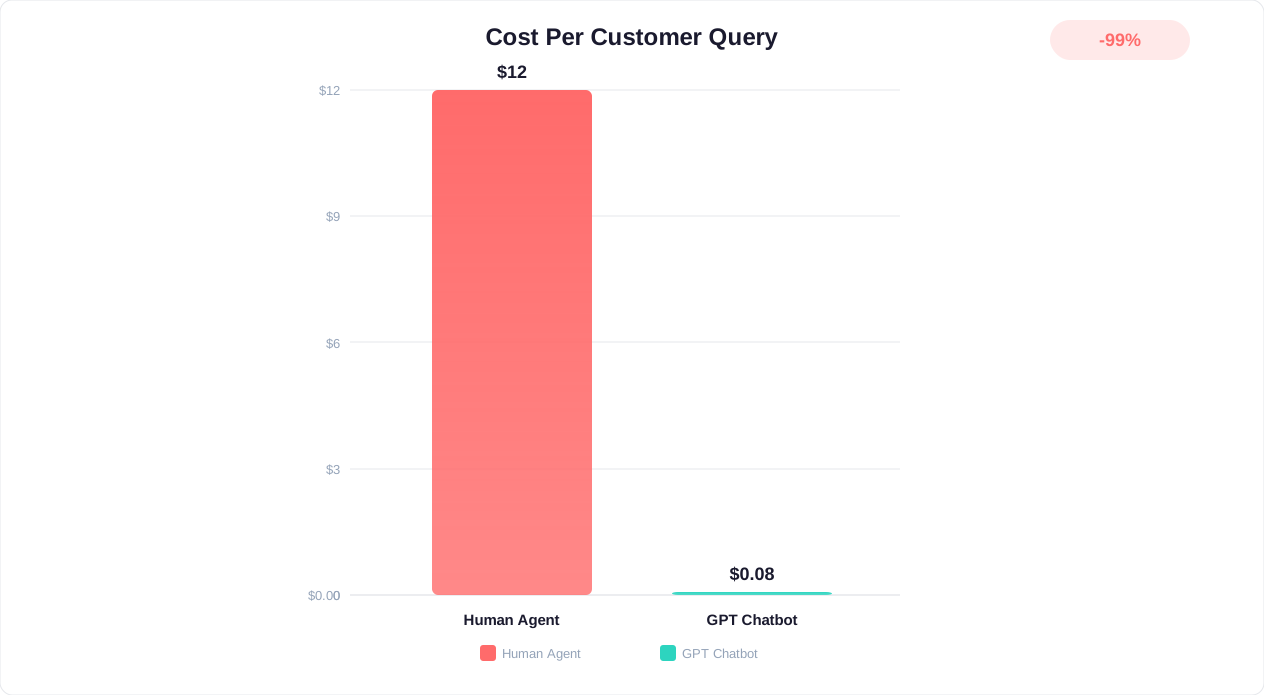
Understanding the true cost of a GPT-powered chatbot requires looking beyond the platform subscription fee. Here is a comprehensive breakdown covering all cost components, from initial setup to ongoing operations, along with the ROI data that justifies the investment.
Total Cost Components
| Cost Component | One-Time | Monthly (ongoing) |
|---|---|---|
| Platform subscription | $0 | $19-$299 depending on tier |
| AI model usage (token costs) | $0 | $20-$500 based on volume |
| Knowledge base preparation | $0-$2,000 (time investment) | 2-4 hours/month maintenance |
| Integration setup | $0-$500 | $0 (native integrations) |
| Custom development (if needed) | $0-$5,000 | $0-$500 |
Real Cost Scenarios
Small business (500 conversations/month): Platform fee ($19-$49/mo) + AI tokens (~$15-$30/mo) = $34-$79/month total. This replaces approximately 20-30 hours of human agent time worth $400-$750/month at average support wages.
Mid-market (5,000 conversations/month): Platform fee ($99-$199/mo) + AI tokens (~$100-$250/mo) = $199-$449/month total. This replaces approximately 150-200 hours of human agent time worth $3,750-$5,000/month.
Enterprise (50,000+ conversations/month): Platform fee ($299-$999/mo) + AI tokens (~$500-$2,000/mo) = $799-$2,999/month total. This replaces or augments a team that would cost $15,000-$40,000/month in fully loaded agent salaries.
ROI Calculation Framework
According to Statista's 2025 chatbot market report, businesses deploying AI chatbots see an average of:
- 60-70% reduction in routine support ticket volume
- $0.50-$1.00 cost per AI-resolved conversation vs. $5-$12 per human-handled ticket
- 35-50% improvement in first-response time
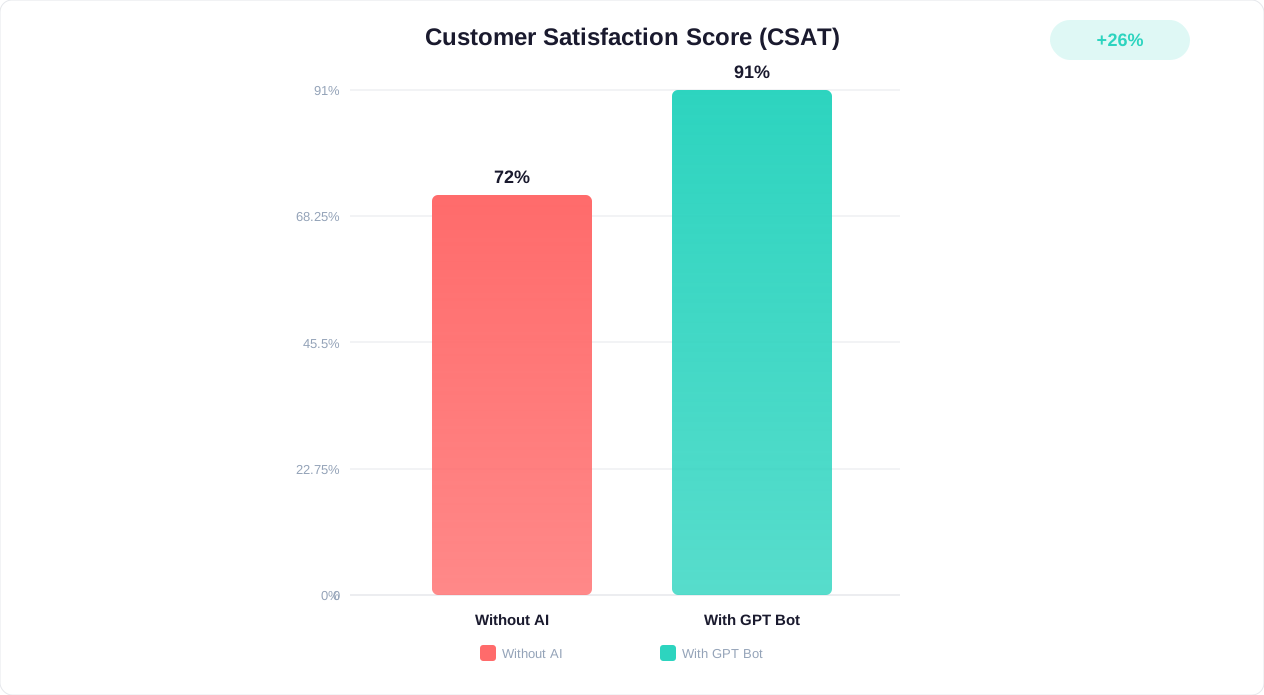
- 15-25% increase in customer satisfaction scores when AI handles routine queries correctly
- 3-6 month payback period for most small and mid-market deployments
The key insight is that GPT-powered chatbots do not need to handle 100% of conversations to deliver massive ROI. Even automating 40-50% of routine inquiries (order status, policy questions, basic troubleshooting) frees your human agents to focus on complex issues where they add the most value. This often improves both AI-handled satisfaction scores AND human-handled satisfaction scores, since agents are no longer burned out on repetitive tasks.
Hidden Costs to Watch
Be aware of these often-overlooked cost factors:
- Overage charges: Some platforms charge steep per-conversation fees once you exceed your tier limit. Understand the overage model before committing.
- Token waste from poor prompts: Inefficient system prompts and unnecessary context can inflate token costs by 2-3x. Optimize your prompts for conciseness.
- Integration maintenance: When APIs change or integrations break, someone needs to fix them. Factor in the time cost.
- Ongoing optimization: The chatbot is never truly "done." Budget 2-4 hours per month for reviewing analytics, updating knowledge, and improving weak areas.
Security, Privacy, and Compliance for GPT-Powered Chatbots
Deploying a GPT-powered chatbot means routing customer conversations through AI systems, which raises legitimate security and privacy concerns. Businesses in regulated industries (healthcare, finance, legal) face additional compliance requirements. Here is how to deploy confidently while protecting your customers and your business.
Data Privacy Fundamentals
Understand how your data flows through the system:
- Knowledge base data: Your uploaded business documents are stored by the platform and used to generate responses. Ensure the platform encrypts data at rest and in transit, and clarify their data retention policies.
- Conversation data: Customer messages and AI responses are logged for analytics and improvement. Understand who can access this data and how long it is retained.
- Model training: Critically, verify whether the platform uses your conversations to train or improve their AI models. Most enterprise-grade platforms (including Conferbot) explicitly do NOT use customer data for model training.
Compliance Requirements by Industry
GDPR (all EU customers): You must disclose that customers are interacting with AI, provide data access and deletion rights, and ensure data processing agreements are in place with your platform provider. The chatbot should be able to handle data subject access requests or escalate them to humans.
HIPAA (healthcare): If the chatbot may encounter Protected Health Information (PHI), you need a Business Associate Agreement (BAA) with your platform provider. Not all platforms offer HIPAA-compliant tiers, so verify this upfront if healthcare is your industry.
SOC 2 (B2B SaaS): If your clients require SOC 2 compliance from their vendors, your chatbot platform needs to be SOC 2 certified. Verify the platform's current certification status and scope.
PCI DSS (payment processing): If the chatbot handles credit card numbers or payment information, PCI compliance is required. Best practice is to never let the chatbot collect sensitive payment data directly. Instead, redirect users to your secure payment page.
Security Best Practices
- Minimize data exposure: Only upload data to the knowledge base that the chatbot genuinely needs. Do not upload internal financial data, employee records, or strategic documents unless the chatbot specifically needs them to serve customers.
- Implement access controls: Restrict who in your organization can modify the chatbot's knowledge base, system prompts, and configurations.
- Monitor for data leakage: Regularly test whether the chatbot reveals information it should not, such as internal processes, employee names, or competitor information from documents that were accidentally uploaded.
- Set up prompt injection defenses: GPT-powered chatbots can be susceptible to prompt injection attacks where malicious users try to override the chatbot's instructions. Use platforms that implement input sanitization and system prompt protection.
- Regular security audits: Quarterly reviews of conversation logs, access permissions, and knowledge base contents help catch issues before they become incidents.
Transparency with Customers
Research from HubSpot's 2025 State of AI report shows that 78% of consumers are comfortable interacting with AI chatbots when they know upfront it is AI. Trying to pass your chatbot off as human damages trust more than transparency does. Always include a clear disclosure that the customer is chatting with an AI assistant, and make human escalation easy to access.
Real-World Case Studies: GPT Chatbot ROI Across Industries
Theory is useful, but real results from real businesses tell the full story. Here are documented case studies showing what GPT-powered chatbots achieve across different industries and company sizes.
Case Study 1: E-Commerce (Mid-Market Fashion Retailer)
Company profile: Online fashion retailer with 50,000 monthly website visitors and 3-person support team handling 2,800 tickets/month.
Challenge: Support queue was 48+ hours during peak seasons. 65% of tickets were routine (order status, sizing, returns). Customer satisfaction had dropped to 3.2/5 stars.
Solution: Deployed a GPT-powered chatbot trained on their product catalog, sizing guides, return policy, and top 200 customer questions. Integrated with Shopify for real-time order tracking.
Results after 90 days:
- 68% of inbound queries resolved by AI without human intervention
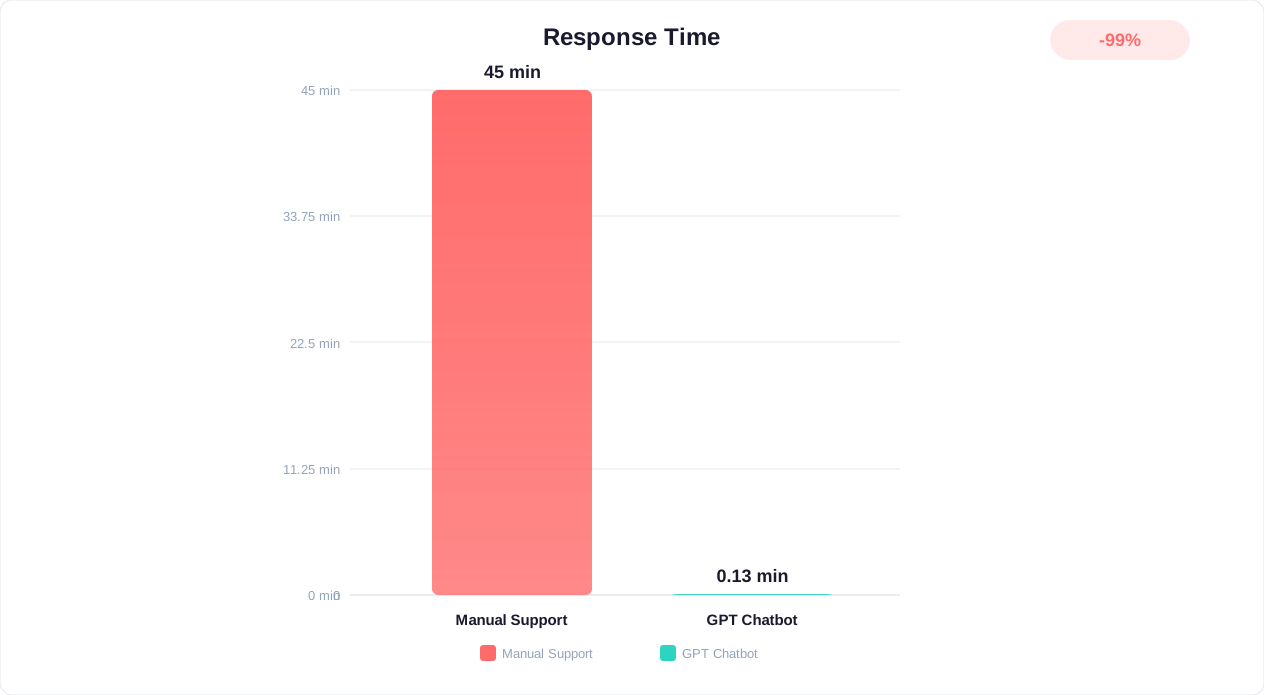
- Average response time dropped from 48 hours to 8 seconds
- Customer satisfaction increased to 4.4/5 stars
- Support team reduced ticket workload by 60%, refocused on VIP customer relationships
- Monthly cost savings: $4,200 (eliminated need for planned 4th hire at $3,500/mo + reduced overtime)
- ROI: 1,850% (monthly chatbot cost of $215 vs. $4,200 in savings)
Case Study 2: SaaS Company (B2B Project Management Tool)
Company profile: B2B SaaS with 12,000 active accounts and a 5-person support team handling technical queries, onboarding, and billing questions.
Challenge: First-response time averaged 4 hours. Complex product meant agents spent significant time on repetitive "how do I" questions. Churn analysis showed 23% of canceled accounts cited "lack of support responsiveness."
Solution: Implemented a GPT chatbot trained on their entire help center (400+ articles), API documentation, and a curated set of 150 troubleshooting scenarios. Added integration with their billing system for account-specific queries.
Results after 6 months:
- 73% of support conversations handled entirely by AI
- First-response time dropped to under 15 seconds (from 4 hours)
- Churn rate decreased by 18% (from 5.2% to 4.3% monthly)
- Support team productivity doubled: same team now supports 12,000 accounts vs. the 8,000 they struggled with before
- Annual revenue impact: $380,000 (from reduced churn alone, not counting operational savings)
- Payback period: 6 weeks
Case Study 3: Healthcare Clinic (Multi-Location Dental Practice)
Company profile: 4-location dental practice with 15,000 active patients. Front desk staff overwhelmed with phone calls for appointment scheduling, insurance questions, and post-procedure care inquiries.
Challenge: 40% of calls went unanswered during peak hours. Patients were leaving for competitors with better digital experiences. Staff spending 3+ hours daily on repetitive questions that could be answered from existing materials.
Solution: Deployed a HIPAA-compliant GPT chatbot on their website and patient portal, trained on appointment types, insurance accepted, pre and post procedure instructions, and clinic policies. Integrated with their scheduling system for real-time booking.
Results after 4 months:
- 52% of appointment bookings now completed via chatbot (previously all phone-based)
- Missed call rate dropped from 40% to 12%
- Front desk staff freed up 15+ hours/week for in-person patient care
- Patient satisfaction score increased from 4.1 to 4.6 out of 5
- Estimated new patient revenue: $8,500/month (from patients who would have called competitors after getting voicemail)
Case Study 4: Professional Services (Accounting Firm)
Company profile: Regional accounting firm with 800 business clients and seasonal demand spikes during tax preparation periods.
Challenge: During tax season (January-April), the firm received 200+ daily inquiries about document requirements, deadlines, and status updates. Junior staff spent 60% of their time answering repetitive questions instead of productive billable work.
Solution: GPT chatbot trained on document requirements by entity type, filing deadlines, required information checklists, and status update protocols. Integrated with their practice management system for client-specific status lookups.
Results after one tax season:
- 71% reduction in repetitive client inquiries handled by staff
- Junior staff recovered 25+ billable hours per week during peak season
- Client satisfaction increased (instant answers vs. 24-hour email wait)
- Revenue impact: $62,500 in additional billable hours recovered during the 4-month peak period
- Zero compliance incidents from chatbot responses (all answers sourced from verified firm documentation)
These results are consistent with broader industry data. McKinsey's research finds that generative AI in customer operations can improve productivity by 30-45% and customer satisfaction by 20+ points when implemented correctly.
10 Common Mistakes to Avoid When Building Your GPT Chatbot
After analyzing hundreds of chatbot deployments across our platform, identifying patterns consistent with Gartner's AI implementation research, these are the most common mistakes that lead to poor performance, wasted investment, or customer frustration. Avoiding these will put you ahead of 80% of businesses deploying chatbots for the first time.
Mistake 1: Launching Without Adequate Training Data
The most common failure mode. Businesses upload a sparse FAQ document with 10-15 questions and expect the chatbot to handle anything customers throw at it. Without comprehensive knowledge coverage, the chatbot will hallucinate answers or give generic non-responses to most queries. Fix: Aim for minimum 50-100 FAQ pairs plus detailed documentation covering all topics customers commonly ask about.
Mistake 2: Ignoring the Human Handoff Experience
Many businesses treat the chatbot as a standalone tool rather than part of a support system. When the bot cannot help, customers hit a dead end. Fix: Configure clear escalation triggers (low confidence, negative sentiment, explicit request) and ensure the handoff passes full conversation context to the human agent. Never make customers repeat themselves.
Mistake 3: Setting Unrealistic Expectations
Expecting 100% automation from day one leads to disappointment. Even the best chatbots should not handle everything. Fix: Start with a realistic goal of 40-60% automation for routine queries. Build toward 70-80% over 3-6 months as you expand the knowledge base based on identified gaps.
Mistake 4: Never Reviewing Conversation Logs
Deploying and forgetting. Without regular log review, you miss systematic failures, emerging topics the bot cannot handle, and quality degradation over time. Fix: Schedule weekly 30-minute sessions to review the lowest-rated conversations and conversations where the bot escalated to humans. Use these to identify knowledge gaps.
Mistake 5: Uploading Contradictory Information
When your knowledge base contains conflicting information (different return windows on different pages, inconsistent pricing, outdated vs. current policies), the AI cannot determine which version is correct. Fix: Audit all documents for contradictions before uploading. Designate a single source of truth for each topic and remove outdated versions.
Mistake 6: Making the Bot Pretend to Be Human
Trying to trick customers into thinking they are talking to a human always backfires. Customers feel deceived when they realize the truth, damaging brand trust far more than AI transparency would. Fix: Clearly identify your chatbot as AI from the first message. Frame it positively: "I'm [name], your AI assistant. I can help instantly with most questions, and I'll connect you with our team for anything complex."
Mistake 7: Over-Engineering the System Prompt
Writing a 3,000-word system prompt with dozens of rules, exceptions, and edge cases often confuses the model rather than helping it. Fix: Keep system prompts concise and focused. Use your knowledge base for detailed information and reserve the system prompt for personality, tone, and critical guardrails only.
Mistake 8: Ignoring Multilingual Needs
If any portion of your customers speak languages other than your default, they will attempt conversations in their language. An unprepared chatbot either responds in the wrong language or provides degraded quality. Fix: Configure your chatbot for the languages your customers actually use. Most GPT-powered bots handle 50+ languages natively. Ensure your knowledge base covers key topics in all supported languages if possible, or configure the bot to translate from your primary language.
Mistake 9: Not Testing Edge Cases
Only testing with polite, clear, well-formed questions. Real customers use slang, typos, run-on sentences, sarcasm, and sometimes attempt to manipulate the bot. Fix: Include adversarial testing in your QA process. Test with misspellings, ambiguous questions, attempts to make the bot say inappropriate things, and questions that sit at the boundary of multiple topics.
Mistake 10: Choosing a Platform Based on Price Alone
The cheapest platform is never the cheapest in total cost of ownership. Limited customization, poor analytics, and missing integrations create hidden costs in workarounds, manual processes, and suboptimal performance. Fix: Evaluate total value including time savings, integration capabilities, analytics depth, and scalability. A platform that costs $50/month more but saves you 10 hours of monthly maintenance work is dramatically cheaper in practice.
Was this article helpful?
How to Build a GPT-Powered Chatbot for Your Business Without Coding FAQ
Everything you need to know about chatbots for how to build a gpt-powered chatbot for your business without coding.
About the Author
Conferbot Team specializes in conversational AI, chatbot strategy, and customer engagement automation. With deep expertise in building AI-powered chatbots, they help businesses deliver exceptional customer experiences across every channel.
View all articles