
Why No-Code Chatbots Are Replacing Custom Development in 2026
Building a chatbot used to require a development team, months of work, and a six-figure budget. In 2026, that model is dead. No-code chatbot builders let anyone - marketers, support managers, small business owners - create sophisticated AI-powered bots in minutes, not months.
The Numbers Tell the Story
Customer interactions are increasingly being handled without a human agent. Yet most businesses have not deployed a chatbot. The gap is not desire - it is perceived complexity. Business owners assume chatbots require developers, NLP training data, and complex integrations.
They don't. Modern AI chatbot builders use large language models under the hood. You describe what you want in plain English, and the platform generates complete conversation flows automatically. No Python. No JavaScript. No API documentation. Just describe your use case and deploy.
No-Code vs Custom Development: The Real Comparison
| Factor | Custom Development | No-Code Builder |
|---|---|---|
| Time to deploy | 3-6 months | 10-30 minutes |
| Cost | $50,000-$200,000+ | $0-500/month |
| Technical skills needed | Full-stack development, NLP, ML | None |
| Maintenance | Ongoing developer time | Platform handles updates |
| AI capabilities | Must build or integrate | Built-in GPT-4 level AI |
| Channel deployment | Each channel is separate work | One-click multi-channel |
| Iteration speed | Days to weeks per change | Minutes |
The only scenario where custom development still makes sense is when you need deeply proprietary logic that no platform supports - and even that edge case is shrinking as no-code platforms add more flexibility. For a developer-oriented perspective, see our comparison of Python chatbots vs no-code builders. No-code platforms now dominate chatbot deployments among small and mid-size businesses.
Who Should Use a No-Code Chatbot Builder
If you answer yes to any of these, no-code is right for you:
- You want a chatbot deployed this week, not next quarter
- You do not have a dedicated development team for chatbot maintenance
- Your budget for chatbot development is under $10,000
- You need to deploy across multiple channels (website, WhatsApp, Messenger, etc.)
- You want to iterate quickly based on real conversation data
- Your use case is customer support, lead generation, appointment booking, or FAQ handling
That covers roughly 90% of businesses. Let's get into exactly how to build one.
Choosing the Right No-Code Chatbot Builder: What Actually Matters
There are dozens of chatbot builders on the market. Most comparison articles list 15-20 tools without helping you decide. Here is what actually matters when choosing a platform in 2026, ranked by impact on your results.
1. AI Quality (Most Important)
The single biggest differentiator between platforms is how well the AI understands and responds to users. Older platforms use simple keyword matching or decision trees - users must follow exact paths, and any deviation breaks the experience. Modern platforms use large language models that understand natural conversation, handle typos, interpret intent, and generate human-like responses.
What to look for: Does the platform use AI to generate responses, or does every response need to be manually written? Can it handle unexpected questions gracefully? Does it learn from conversations?
2. Channel Coverage
Your customers are not all on your website. A chatbot that only works on web leaves 60-70% of customer touchpoints uncovered. Look for omnichannel deployment:
- Essential: Website widget, WhatsApp, Facebook Messenger
- Important: Instagram DM, Telegram, SMS
- Nice to have: Slack, Microsoft Teams, Discord, LINE
- Advanced: React Native SDK, Flutter SDK, Android SDK, iOS SDK
Deploy once, serve everywhere. That is the standard in 2026. Avoid platforms that charge per channel or require separate builds for each.
3. Integration Capabilities
A chatbot that cannot connect to your existing tools is an island. Essential integrations include:
- CRM (HubSpot, Salesforce, Zoho)
- Calendar booking (Google Calendar, Calendly)
- Email marketing (Mailchimp, ActiveCampaign)
- Help desk (Zendesk, Freshdesk, Intercom)
- Payment processing (Stripe, PayPal)
- Zapier/Make for custom workflows
4. Knowledge Base Training
The best no-code chatbots in 2026 can be trained on your existing content. Upload your website pages, PDFs, help articles, or product documentation, and the AI learns your business automatically. This means accurate answers without manually writing hundreds of responses. Look for platforms with AI knowledge base capabilities.
5. Analytics and Optimization
You need to see what's working and what's not. Essential analytics include: conversation completion rates, drop-off points, popular questions, user satisfaction scores, and lead conversion metrics. Without data, you are guessing.
6. Pricing Transparency
Chatbot pricing is notoriously confusing. Some charge per message, per conversation, per contact, or per monthly active user. The differences at scale are enormous:
| Pricing Model | Cost at 5,000 conversations/month | Cost at 50,000 conversations/month |
|---|---|---|
| Per message ($0.01) | $500 (avg 10 msgs/convo) | $5,000 |
| Per conversation ($0.10) | $500 | $5,000 |
| Flat rate | $200-500 | $200-500 |
| Per seat + usage | $300-800 | $3,000-8,000 |
Flat-rate pricing protects you from bill shock as your chatbot succeeds. Avoid platforms where growth penalizes you financially.
Step-by-Step: Build Your First Chatbot in 10 Minutes (Zero Code)
Here is the exact process to go from zero to a working chatbot. We will use Conferbot's AI builder as the example, but the principles apply to any modern no-code platform.
Step 1: Define Your Chatbot's Job (2 Minutes)
Before you touch any tool, answer one question: What is the single most important thing this chatbot should do?
Common primary jobs:
- Lead capture: Collect visitor information and qualify their interest
- Customer support: Answer FAQs and resolve common issues
- Appointment booking: Let visitors schedule calls or meetings
- Product recommendation: Guide visitors to the right product
- Order tracking: Help customers check order status
Pick ONE primary job. You can add more later, but starting with a single focused purpose gets you deployed faster and produces better results than a bot that tries to do everything.
Step 2: Describe Your Bot in Plain English (1 Minute)
With AI-powered builders, you literally type what you want:
"Create a lead capture chatbot for a real estate agency. It should greet visitors, ask what type of property they're looking for (buy/rent/sell), ask their budget range, collect their email and phone number, and book a call with an agent."
The AI generates the complete conversation flow: welcome message, question sequence, validation logic, data collection, and confirmation message. You can review and edit any part.
Step 3: Customize the Flow (3 Minutes)
The AI-generated flow is your starting point. Customize it:
- Tone: Adjust language to match your brand (formal, casual, playful)
- Questions: Add or remove questions based on what your sales team needs
- Branching: Add conditional paths (e.g., if budget is over $1M, route to senior agent)
- Rich media: Add images, carousels, buttons, and quick replies for better engagement
- Fallback: Set what happens when the AI cannot answer (escalate to live chat, collect message for later)
Step 4: Train on Your Content (2 Minutes)
Upload your existing content so the AI can answer business-specific questions accurately:
- Your website URL (the bot crawls and learns from your pages)
- FAQ documents or help center articles
- Product catalogs or service descriptions
- Pricing information
The AI knowledge base processes these and enables your bot to answer questions about your business accurately without manual programming.
Step 5: Connect Your Tools (1 Minute)
Integrate with your existing stack:
- Connect your CRM so captured leads flow directly into your pipeline
- Link calendar booking so visitors can schedule without back-and-forth emails
- Set up email notifications so your team gets alerted on high-intent conversations
- Add Zapier/webhook integrations for custom workflows
Step 6: Deploy (1 Minute)
Choose where your chatbot lives:
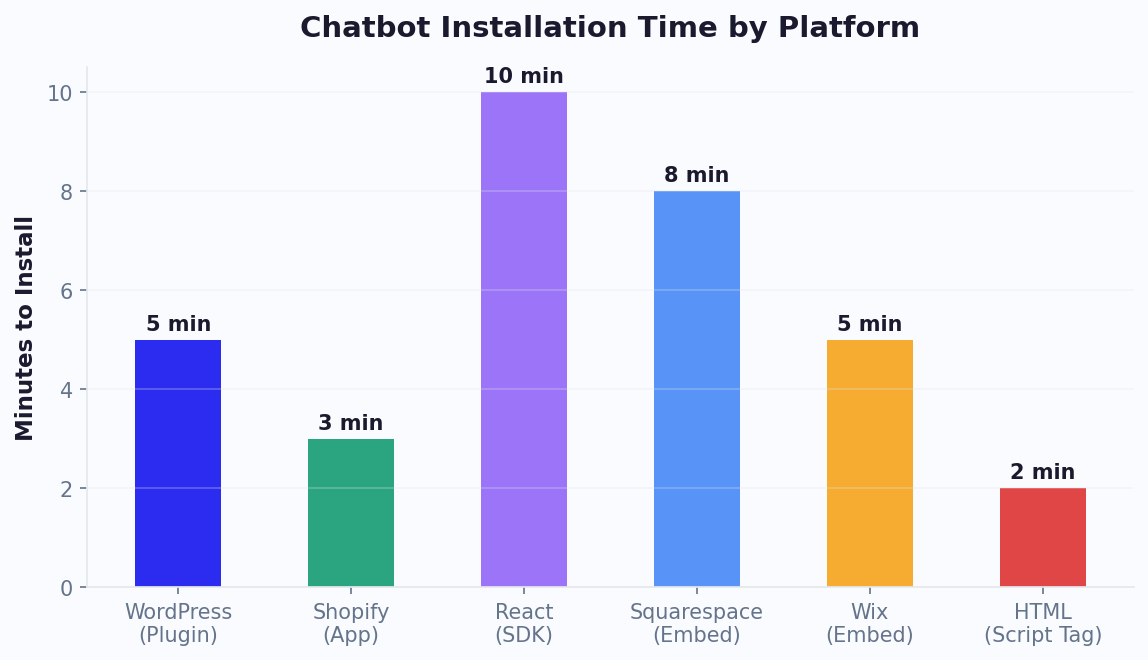
- Website: Copy-paste a single line of code into your site (works with WordPress, Shopify, React, Next.js, or any HTML site)
- WhatsApp: Connect your WhatsApp Business number
- Messenger: Link your Facebook page
- Multiple channels simultaneously: One bot, deployed everywhere
That is it. Your chatbot is live, handling visitors 24/7, in under 10 minutes. If you want to understand what the drag-and-drop canvas is doing underneath - nodes, branches, variables and where flows usually go wrong - our visual chatbot builder guide goes deeper.
5 Types of No-Code Chatbots You Can Build Today (With Use Cases)
1. Lead Generation Bot
Best for: B2B companies, service businesses, agencies, SaaS
What it does: Engages visitors proactively, asks qualifying questions, captures contact information, and scores leads based on responses. Replaces static contact forms with a conversational experience that converts better.
Key features needed: Conditional logic, CRM integration, lead scoring, email notifications, calendar booking
Example flow:
- Proactive greeting based on page visited (pricing page = high intent)
- Ask about company size and primary challenge
- Present relevant solution based on answers
- Offer to book a demo or send a case study
- Capture email and route to appropriate sales rep
Businesses using conversational lead generation chatbots see 30-50% higher conversion rates than those using traditional forms.
2. Customer Support Bot
Best for: E-commerce, SaaS, any business with recurring support questions
What it does: Answers common questions instantly using your knowledge base, resolves simple issues (password resets, order status, return instructions), and escalates complex problems to human agents with full context.
Key features needed: AI/NLP understanding, knowledge base training, live chat handoff, ticket creation, conversation history
Impact: The average support chatbot deflects 40-70% of support tickets while maintaining 85%+ customer satisfaction. That translates directly to reduced staffing costs and faster resolution times.
3. Appointment Booking Bot
Best for: Healthcare, salons, consultants, real estate, professional services
What it does: Shows available time slots, handles scheduling, sends confirmations and reminders, manages cancellations and rescheduling - all without human intervention.
Key features needed: Calendar integration, timezone handling, automated reminders, buffer time settings
Impact: Reduces no-shows by 25-40% through automated reminders and makes booking available 24/7 (not just during office hours when someone can answer the phone).
4. E-commerce Product Advisor Bot
Best for: Online stores with large catalogs, complex products, or personalization needs
What it does: Asks about preferences, budget, and use case, then recommends products from your catalog. Handles sizing questions, compares options, and answers pre-purchase concerns that cause cart abandonment.
Key features needed: Product catalog integration, recommendation logic, carousel displays, cart integration, abandoned cart recovery
Impact: Stores using product advisor chatbots see 15-35% increases in average order value because the bot cross-sells and upsells based on the customer's stated needs. E-commerce chatbot adoption has grown quickly year over year.
5. Internal Operations Bot
Best for: Companies with 50+ employees, HR departments, IT help desks
What it does: Handles employee questions about policies, benefits, IT issues, onboarding processes, and leave requests. Deployed on Slack or Microsoft Teams where employees already work.
Key features needed: Slack/Teams integration, HR system connections, approval workflows, document lookup
Impact: Reduces internal support tickets by 50-60% and cuts new employee onboarding time by 30% by providing instant answers to common questions.
7 Mistakes That Kill No-Code Chatbot Performance (And How to Avoid Them)
Mistake 1: Trying to Handle Everything from Day One
The problem: Building a bot that tries to handle support, sales, booking, feedback, and product recommendations simultaneously. The result is a confused bot that does nothing well.
The fix: Launch with one primary use case. Master it. Then expand. A lead capture bot that works perfectly is infinitely more valuable than a do-everything bot that frustrates users.
Mistake 2: Writing Like a Robot
The problem: Messages that read like system notifications: "Please provide your email address for further communication."
The fix: Write like a helpful human colleague: "What's the best email to reach you? I'll send over the details." Use contractions, ask one question at a time, and match your brand's conversational tone.
Mistake 3: No Escape Route
The problem: Forcing users through a rigid flow with no way to talk to a human, ask a different question, or restart.
The fix: Always provide a visible option to reach a human agent. Let users type freely at any point. Handle "I want to talk to someone" at every stage of the conversation.
Mistake 4: Ignoring Mobile Experience
The problem: Designing for desktop-width chat windows. On mobile (60-70% of traffic), long messages get cut off, buttons are too small, and carousels are unusable.
The fix: Keep messages under 60 words. Use quick-reply buttons instead of asking users to type. Test every flow on a phone before launching. Use mobile-optimized rich media elements.
Mistake 5: No Proactive Engagement
The problem: Placing a passive chat icon in the corner and waiting for visitors to click it. Only 2-5% will initiate on their own.
The fix: Trigger proactive messages based on behavior: time on page (15+ seconds), specific page visited (pricing), scroll depth, or exit intent. Proactive greetings increase engagement by 3-5x.
Mistake 6: Never Reviewing Conversations
The problem: Setting up the bot and forgetting about it. Conversations reveal what users actually ask vs. what you expected.
The fix: Review conversations weekly. Look for: questions the bot cannot answer (add to knowledge base), drop-off points (simplify that step), and unexpected use cases (new opportunities). Use conversation analytics to identify patterns at scale.
Mistake 7: Skipping the Handoff
The problem: The bot hits its limits and responds with "I don't understand" or loops the same unhelpful response.
The fix: Set clear escalation triggers: after 2 failed attempts, when user expresses frustration, when the question involves billing/account-specific issues, or when the user explicitly asks for a human. Pass full conversation context to the agent so the customer never repeats themselves.
Advanced Features You Can Build Without Code in 2026
No-code does not mean no-power. Here is what modern no-code chatbot platforms handle that used to require custom development.
AI-Powered Natural Language Understanding
Modern platforms like Conferbot use large language models that understand context, intent, and nuance. Users can type freely in their own words instead of selecting from rigid menu options. The AI interprets variations like "I wanna book a meeting", "can I schedule a call?", and "let's set up a time to chat" as the same intent - without you training any model manually.
Conditional Logic and Branching
Build complex decision trees visually. If a visitor says their budget is over $50K, route them to enterprise sales. If they are browsing at 2 AM, offer after-hours self-service options. If they visited the pricing page 3 times, trigger a discount offer. All of this is configurable through visual drag-and-drop logic builders.
Multi-Language Support
Deploy chatbots in 95+ languages without separate builds for each. The AI detects the visitor's language automatically and responds accordingly. For businesses serving international markets, this eliminates the need for separate chatbot instances per region. One bot, all languages, zero translation work.
File Upload and Processing
Accept file uploads directly in the chat: resumes for recruiting bots, documents for insurance claim bots, images for support ticket bots. The chatbot can process these files, extract relevant information, and route them to the appropriate team member.
Payment Collection
Collect payments directly within the conversation flow. Integrate Stripe or PayPal, present pricing options, and process transactions without redirecting users to external pages. Ideal for appointment deposits, subscription signups, or e-commerce purchases.
API Webhooks (No Coding Required)
Connect to any system that has an API through visual webhook builders or Zapier integration. Pull real-time data (inventory, pricing, order status) into conversations without writing a single line of code. Push conversation data to your CRM, analytics, or custom dashboards automatically.
A/B Testing
Test different greeting messages, question sequences, or response styles to see what converts better. Modern platforms let you split traffic and measure which chatbot version produces better outcomes - more leads captured, higher satisfaction scores, or faster resolution times.
Version Control and Rollback
Made a change that broke something? Version control lets you instantly roll back to any previous version of your chatbot. Test changes confidently knowing you can revert in one click. No developer needed for deployment or rollback.
Where to Deploy Your No-Code Chatbot: Platform-by-Platform Guide
Website (HTML/WordPress/Shopify/React)
How: Copy-paste a single script tag into your site header or use a platform plugin.
Time to deploy: 30 seconds for script tag, 2 minutes for plugin
Best practices:
- Position the chat widget in the bottom-right corner (users expect it there)
- Set a 5-10 second delay before the proactive greeting appears
- Customize colors to match your brand
- On mobile, use a smaller trigger button that expands to full-screen chat
Platform guides: WordPress | Shopify | React | Next.js
WhatsApp Business
How: Connect your WhatsApp Business API number through the chatbot platform. Messages flow through the same AI that powers your web chatbot.
Time to deploy: 15-30 minutes (includes WhatsApp Business API approval)
Best for: Businesses where customers prefer messaging over web browsing - especially in Asia, Latin America, and Europe where WhatsApp dominates.
Key advantage: Messages persist. Unlike web chat where the conversation disappears when the visitor leaves, WhatsApp conversations continue across sessions. You can send follow-ups, reminders, and promotions directly.
Facebook Messenger
How: Connect your Facebook Business Page. The same chatbot handles Messenger conversations.
Time to deploy: 5 minutes
Best for: Businesses with active Facebook presence or running Facebook ads. Messenger chatbots can be triggered directly from ad clicks (Click-to-Messenger ads), achieving 5-10x lower cost per lead than landing page forms.
Instagram DM
How: Connect your Instagram Business account. Automate responses to DMs, story replies, and comment mentions.
Best for: E-commerce brands, influencer businesses, service providers who get inquiries through Instagram. Handles "how much?" and "is this available?" questions automatically.
Telegram
How: Create a Telegram bot through BotFather, connect to your platform.
Best for: Tech-savvy audiences, crypto/fintech businesses, communities, and markets where Telegram is the primary messaging platform.
Slack / Microsoft Teams
How: Install the integration app in your workspace.
Best for: Internal chatbots (HR, IT help desk, onboarding) deployed where employees already work. Slack bots and Teams bots reduce context switching and make self-service natural.
Mobile Apps (Native SDKs)
How: Integrate the SDK into your iOS or Android app.
Best for: Companies with existing mobile apps who want in-app support without building custom chat UI. Available for Android, iOS, React Native, and Flutter.
Measuring Success: The Only 5 Metrics That Matter for Your Chatbot
Most chatbot platforms show dozens of metrics. Here are the only five that determine whether your chatbot is actually working.
1. Engagement Rate
What it measures: Percentage of visitors who interact with the chatbot
Benchmark: 15-30% for proactive chatbots, 2-5% for passive (icon-only) chatbots
How to improve: Add proactive greetings, trigger based on behavior (time on page, scroll depth), personalize the greeting based on the page visited
2. Completion Rate
What it measures: Percentage of started conversations that reach the goal (lead captured, question answered, booking made)
Benchmark: 60-80% for well-designed flows
How to improve: Shorten the flow (every additional question drops completion), add progress indicators, reduce friction at each step
3. Goal Conversion Rate
What it measures: Percentage of all visitors (not just those who chatted) who complete the chatbot's primary goal
Benchmark: 5-15% of total visitors converting through chatbot
How to improve: Optimize both engagement rate and completion rate. A 25% engagement rate with 70% completion = 17.5% conversion. Better than any landing page form.
4. Containment Rate (For Support Bots)
What it measures: Percentage of conversations resolved without human escalation
Benchmark: 60-75% for AI-powered bots, 30-40% for rule-based bots
How to improve: Review escalated conversations weekly. Each one is content the bot should learn. Add answers to your knowledge base for recurring questions. Within 90 days, containment should reach 70%+.
5. Customer Satisfaction (CSAT)
What it measures: How users rate their chatbot experience (typically 1-5 scale)
Benchmark: 4.0+ out of 5.0 for AI-powered bots
How to improve: Focus on resolution quality over speed. A bot that says "I can't help" quickly scores lower than one that tries multiple approaches before escalating gracefully.
Metrics to Ignore
These sound useful but do not predict success:
- Total messages sent: High message count might mean confused users going in circles
- Average session length: Longer is not always better. A quick answer can score higher satisfaction than a long conversation
- Number of active bots: Quality over quantity. One excellent bot beats ten mediocre ones
Set up a weekly review cadence using your platform's analytics dashboard. Spend 30 minutes reviewing the five core metrics, identify the biggest drop-off point, fix it, and measure again next week. This continuous improvement loop is what separates chatbots that generate ROI from those that gather dust. For detailed instructions on installing your finished chatbot, see our how to add a chatbot to any website guide. To understand which metrics matter, read our chatbot analytics metrics deep dive. And for a data-driven assessment of what your chatbot should be earning, check the chatbot ROI calculation guide.
Real No-Code Chatbot Examples: What Businesses Actually Build
Example 1: SaaS Company - Demo Booking Bot
Problem: 80% of demo request forms were abandoned. Visitors started filling them out but dropped off at the company size or budget questions.
Solution: Replaced the form with a conversational chatbot that asks the same questions but in a natural dialogue. The bot qualifies leads, checks calendar availability, and books demos without human intervention.
Result: Demo bookings increased 185%. The conversational format felt less intrusive than a rigid form, and the bot could answer objections in real time ("Is there a free trial?" → Yes, redirects to trial signup).
Example 2: Real Estate Agency - Property Matching Bot
Problem: Agents spent 60% of their time answering basic questions ("What's available in my budget?", "Do you handle rentals?") instead of closing deals.
Solution: Deployed a chatbot that asks buyers about property type, budget, preferred area, and timeline. The bot matches them with listings from the agency's database and books viewings with the appropriate agent.
Result: Agent productivity increased 40%. The chatbot pre-qualified leads so agents only met with serious buyers. After-hours lead capture went from zero to 35 qualified leads per month.
Example 3: E-commerce Store - Abandoned Cart Recovery
Problem: 73% cart abandonment rate, primarily due to unanswered questions about shipping times and return policy.
Solution: Chatbot triggers when users have items in cart and show exit intent. Asks if they have questions, provides instant answers about shipping, returns, and sizing, and offers a 10% discount for completing purchase now.
Result: Recovered 22% of abandoned carts. The chatbot paid for itself within 48 hours of deployment. Average order value increased 15% due to the bot suggesting complementary products during recovery conversations.
Example 4: Dental Clinic - Appointment and FAQ Bot
Problem: Receptionist overwhelmed with calls. 40% were simple questions ("What are your hours?", "Do you accept my insurance?", "How do I reschedule?"). Patients trying to book new appointments got busy signals.
Solution: WhatsApp chatbot handles FAQs, shows available slots, and books appointments. Sends automated reminders 24 hours before appointments.
Result: Phone calls dropped 45%. No-shows reduced (automated reminders). The receptionist now focuses on in-office patient experience instead of phone triage. New patient bookings from after-hours chat: 12 per month.
Example 5: Online Course Platform - Student Support Bot
Problem: Support team receiving 200+ tickets daily about login issues, certificate downloads, lesson access, and enrollment questions.
Solution: Support chatbot trained on the platform's help center. Handles password resets, generates certificate download links, explains enrollment processes, and escalates billing issues to humans.
Result: Support tickets dropped 62%. Average resolution time went from 4 hours to 30 seconds for bot-handled queries. Student satisfaction score increased from 3.8 to 4.4 out of 5.
Was this article helpful?
Build and deploy in 10 minutes. No coding needed.
How to Build a Chatbot Without Coding FAQ
Everything you need to know about chatbots for how to build a chatbot without coding.
About the Author
The Conferbot team writes about building, deploying, and improving AI chatbots.
View all articles

