
What Training a Chatbot Actually Means in 2026
The phrase "training a chatbot" gets thrown around a lot, but in 2026 it means something fundamentally different than it did even two years ago. Back then, training typically meant feeding thousands of labeled examples into a machine learning model and waiting hours (or days) for it to learn patterns. Today, for the vast majority of businesses, training a chatbot means connecting it to your existing knowledge so it can retrieve and synthesize accurate answers on demand. (source: OpenAI documentation on fine-tuning). (source: LangChain documentation on retrieval chains). (source: Hugging Face model hub).
This shift is powered by a technique called Retrieval-Augmented Generation (RAG). Instead of baking all knowledge directly into the model's weights, RAG-based chatbots work in two steps:
- Retrieval: When a user asks a question, the system searches your knowledge base to find the most relevant documents, paragraphs, or FAQ entries.
- Generation: The large language model (LLM) reads those retrieved passages and generates a natural-language answer grounded in your actual content.
This is how Conferbot's AI Knowledge Base works under the hood. You upload your documents, and the platform handles the rest -- chunking, embedding, indexing, and retrieval -- so your chatbot can answer questions using your company's own words and data.
The Role of Embeddings
At the heart of RAG is a mathematical concept called embeddings. An embedding is a numerical representation of a piece of text -- a way to turn words, sentences, or paragraphs into vectors (lists of numbers) that capture their meaning. When your knowledge base is embedded, every chunk of content gets a unique numerical fingerprint. When a user asks a question, that question also gets embedded, and the system finds knowledge chunks whose fingerprints are closest in meaning. (source: Pinecone guide on vector embeddings).
Think of it like a librarian who has memorized the location and content of every book in the library. When you ask a question, the librarian instantly pulls the three or four most relevant books off the shelf, reads the pertinent passages, and gives you a synthesized answer. That is RAG in action.
Knowledge Grounding: Why It Matters
Without knowledge grounding, LLMs rely entirely on their pre-trained knowledge -- which may be outdated, generic, or simply wrong for your specific business context. A chatbot powered by GPT-4 or Claude knows a lot about the world, but it knows nothing about your refund policy, your product specifications, or your internal SOPs unless you explicitly connect that information.
Knowledge grounding eliminates the most dangerous failure mode of AI chatbots: confident hallucination. When a grounded chatbot does not have relevant information in its knowledge base, it can say "I don't have information about that" rather than inventing a plausible-sounding but incorrect answer. This is critical for businesses where inaccurate information can damage trust, violate compliance requirements, or create legal liability.
According to AWS's documentation on knowledge bases for AI, RAG-based systems can reduce hallucination rates by up to 70% compared to standalone LLM responses. For businesses deploying customer-facing chatbots, that difference is the gap between a helpful tool and a reputational risk.
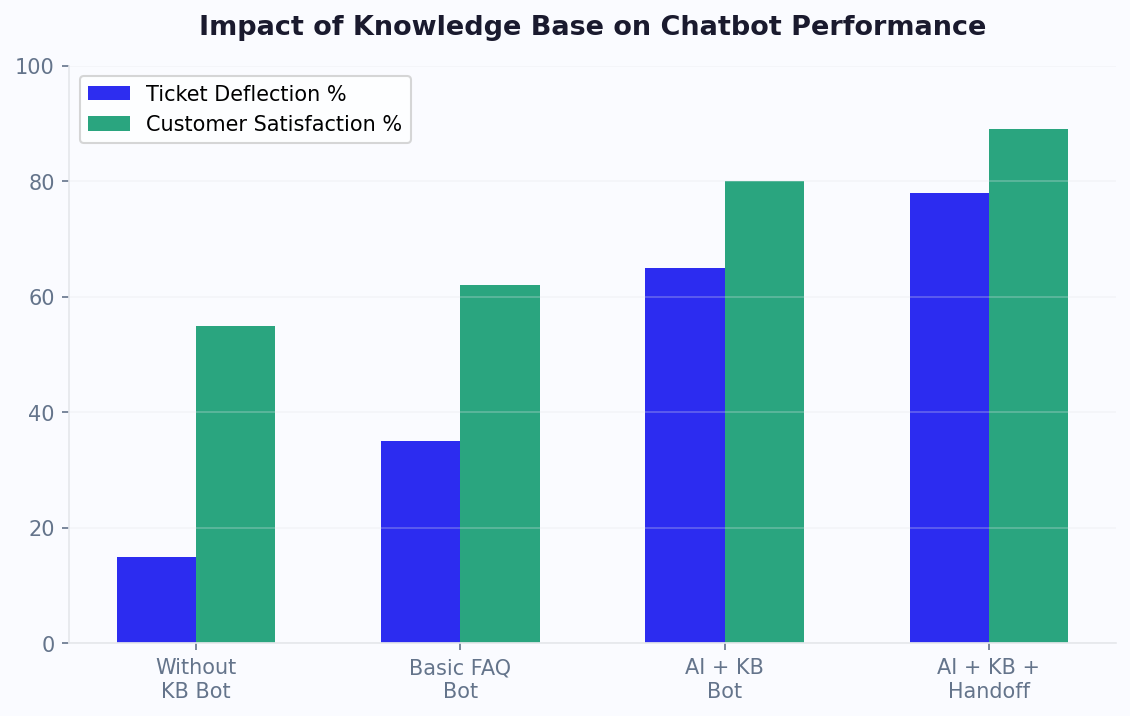
The bottom line: in 2026, "training" your chatbot almost always means building a high-quality knowledge base and connecting it via RAG -- not spending weeks on machine learning pipelines. This democratization is why businesses of every size can now deploy chatbots that give expert-level answers about their products and services. For a companion guide that focuses on preparing raw business documents rather than structured knowledge bases, see our guide to training chatbots on business data.
Gather Your Data: Help Articles, PDFs, SOPs, and FAQs
The quality of your chatbot's answers is directly proportional to the quality of the knowledge you feed it. Before you upload a single document, you need a systematic content audit to identify what you have, what is missing, and what needs updating. This phase is the most important step in the entire process -- skip it, and you will spend weeks debugging bad answers that trace back to bad source material. (source: AWS documentation on knowledge base retrieval).
The Content Audit Framework
Start by cataloging every piece of knowledge your business has that customers or employees might ask about. Cast a wide net first, then prioritize later. Here are the most common knowledge sources:
| Source Type | Examples | Typical Format | Priority |
|---|---|---|---|
| Help center articles | How-to guides, troubleshooting steps, feature docs | HTML, Markdown | High |
| FAQ pages | Pricing FAQ, product FAQ, shipping FAQ | HTML, Google Doc | High |
| Standard Operating Procedures | Return process, escalation protocol, onboarding steps | PDF, Word | High |
| Product documentation | Spec sheets, user manuals, API docs | PDF, Markdown | Medium |
| Email templates | Pre-written responses to common inquiries | Email, Google Doc | Medium |
| Training materials | Employee handbooks, onboarding decks | PDF, PowerPoint | Medium |
| Policy documents | Privacy policy, terms of service, compliance docs | PDF, HTML | Medium |
| Sales collateral | Pitch decks, case studies, product comparisons | PDF, PowerPoint | Low |
| Past chat and email logs | Common resolved tickets, chat transcripts | CSV, JSON | Low (for gap analysis) |
Prioritization: The 80/20 Rule
You do not need to upload everything on day one. In fact, starting with too much content can dilute retrieval accuracy. Follow the 80/20 rule: identify the 20% of topics that account for 80% of incoming questions. These are your priority documents.
To find your 80/20 topics, analyze three data sources:
- Support ticket categories: Export the last 90 days of tickets and group by topic. The top 10 categories are your starting point.
- Search analytics: If your help center or website has search, look at the top 50 queries. These reveal exactly what people are looking for.
- Google Search Console: Check what queries drive traffic to your help pages. These are the questions people ask Google about your product.
Content You Should NOT Upload
Not all content belongs in a chatbot's knowledge base. Exclude the following:
- Outdated content: Old product versions, deprecated features, superseded policies. Outdated answers are worse than no answer.
- Internal-only sensitive data: Salary information, employee performance reviews, financial projections, or anything that should not be surfaced to end users.
- Raw data dumps: Spreadsheets with thousands of rows, unstructured log files, or database exports. These confuse retrieval systems.
- Highly dynamic content: Real-time inventory levels, live pricing that changes daily, or stock availability. Use API integrations for these instead.
Gap Analysis: What Is Missing?
After your audit, you will almost certainly find gaps -- topics that customers frequently ask about but that have no documented answer. Common gaps include:
- Comparison pages (your product vs. competitors)
- Edge-case policies (what happens in unusual return scenarios)
- Integration-specific instructions
- Pricing clarifications beyond the pricing page
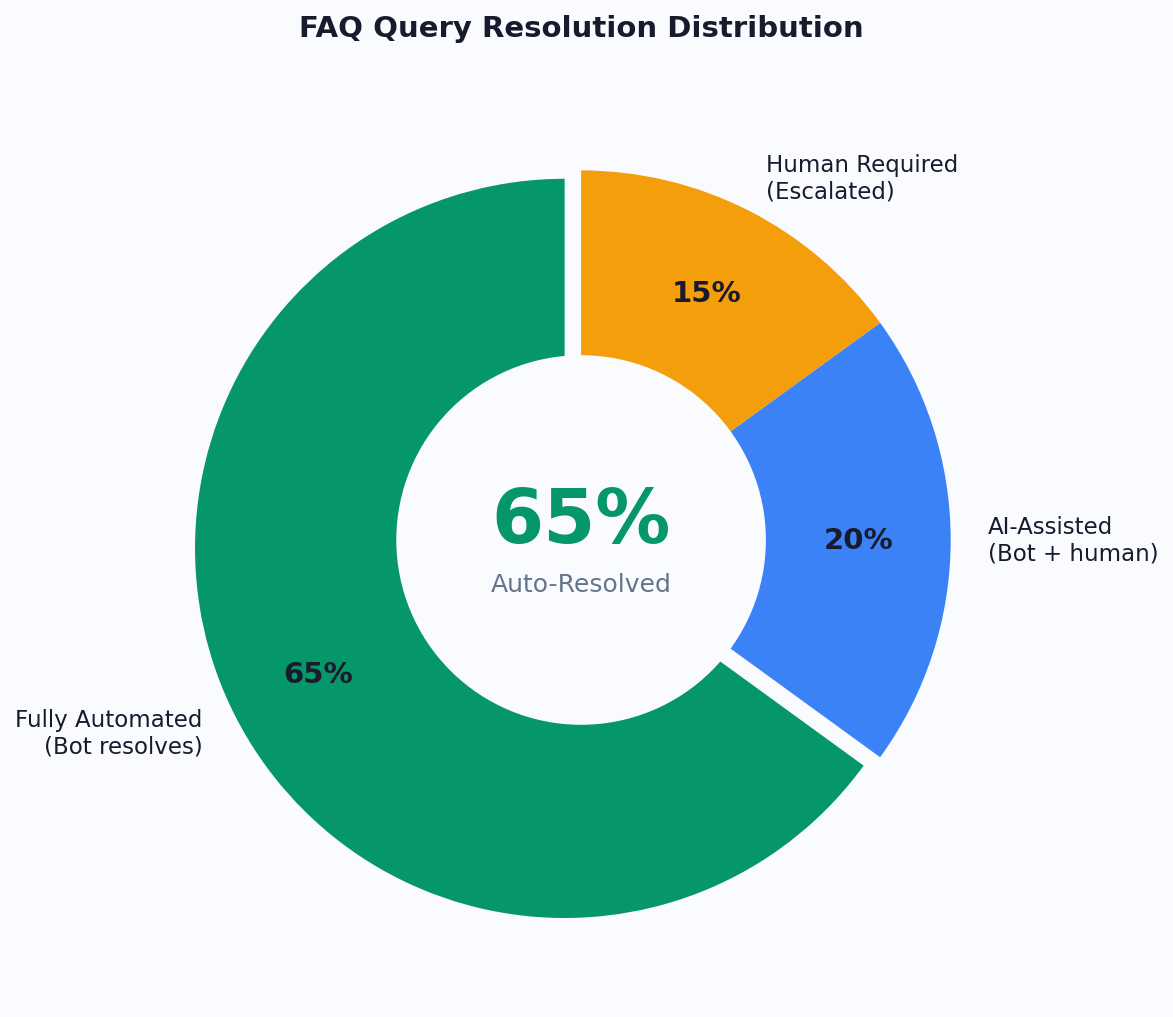
Document these gaps and create the missing content before uploading. A chatbot that says "I don't have that information" on a common question is a frustration point. Building with Conferbot's AI builder makes it simple to identify these gaps through conversation analytics after launch, but front-loading this work saves time.
Related: Chatbot vs FAQ Page: Which Actually Reduces Support Tickets?
Clean Up Before You Upload: Common Knowledge Base Mistakes
Uploading messy data into your chatbot's knowledge base is like giving a new employee a filing cabinet full of contradictory, incomplete, and outdated memos and then expecting perfect customer service. The adage "garbage in, garbage out" applies with full force to RAG-based chatbots. Data cleaning is not glamorous work, but it is the difference between a chatbot that impresses users and one that embarrasses your brand.
The Data Quality Checklist
Before any document goes into your knowledge base, run it through this checklist:
| Check | Why It Matters | How to Fix |
|---|---|---|
| Content is current and accurate | Outdated answers erode trust instantly | Review against current product/policy. Remove or update anything older than 6 months without a review. |
| No contradictions across documents | If Document A says "30-day returns" and Document B says "14-day returns," the chatbot may give either answer | Designate one canonical source per topic. Delete or archive duplicates. |
| Clear, plain language | Jargon-heavy or overly formal text produces stilted chatbot responses | Rewrite at an 8th-grade reading level. Replace acronyms with full terms on first use. |
| Proper structure with headings | Chunking algorithms use headings to split content logically | Add H2/H3 headings every 200-400 words. Use bullet points for lists. |
| No embedded images for critical text | Most RAG systems cannot read text inside images or screenshots | Extract text from infographics and add it as plain text or alt text. |
| Consistent terminology | If you call it "subscription" in one doc and "plan" in another, retrieval suffers | Create a glossary of preferred terms and standardize across all docs. |
| Appropriate scope and specificity | Overly broad documents dilute relevance; overly narrow ones miss context | Aim for documents that cover one topic thoroughly in 300-1,500 words. |
The Biggest Mistake: Contradictory Information
This is the single most common source of bad chatbot answers, and it is surprisingly easy to introduce. It happens when multiple documents address the same topic but were written at different times or by different teams. For example:
- Your help center says the free trial is 14 days, but your pricing page says 7 days
- An old SOP describes a three-step return process, but the current process has four steps
- Your FAQ says "email support responds within 24 hours" but your SLA page says 48 hours
When your chatbot encounters contradictory information, it has no reliable way to choose which version is correct. It may pick one at random, blend them into a confusing hybrid answer, or switch between them on different occasions -- all of which destroy user trust.
The fix: Designate a single "source of truth" for every topic. If your return policy is defined in the help center, then the help center article is canonical. Delete or update any other document that references the return policy to either link to the canonical source or match it word-for-word.
Formatting for Optimal Chunking
RAG systems break your documents into smaller pieces (chunks) for indexing and retrieval. How your content is structured directly affects how well it gets chunked. Follow these formatting guidelines:
- Use descriptive headings. A heading like "Return Policy for Domestic Orders" is far more useful for retrieval than "Section 3.2." When the system chunks by heading, the heading becomes metadata that helps the retrieval engine match queries.
- Keep paragraphs focused. Each paragraph should address one point. Long, rambling paragraphs that cover multiple topics will be chunked in ways that split related information.
- Front-load key information. Put the answer at the top of each section, followed by details and exceptions. This ensures that even if only the first chunk is retrieved, the user gets the core answer.
- Use tables for structured data. Pricing tiers, feature comparisons, and spec sheets work better as tables than as prose. Tables chunk cleanly and present well in chatbot responses.
- Avoid deeply nested content. A bullet list inside a numbered list inside a blockquote inside a tab will confuse chunking algorithms. Keep nesting to two levels maximum.
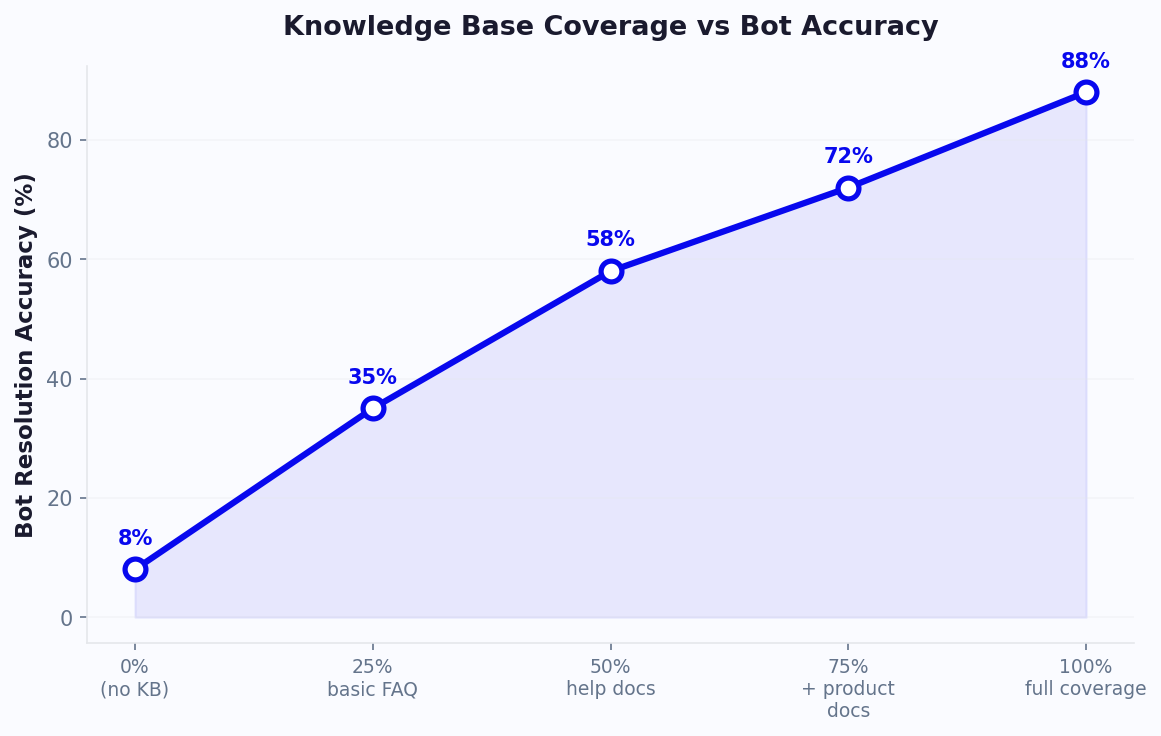
Taking the time to properly clean and format your knowledge base is an investment that pays dividends for as long as your chatbot is live. A well-structured 50-article knowledge base will outperform a messy 500-article one every time.
Related: Chatbot Analytics: 10 Metrics You Must Track to Prove ROI in 2026
Step-by-Step: Upload and Train in Conferbot
With your knowledge base cleaned and organized, you are ready to connect it to your chatbot. This section walks through the process in Conferbot's AI chatbot builder, though the concepts translate to any RAG-based platform.
Step 1: Create Your Knowledge Base Project
Log in to your Conferbot dashboard and navigate to the Knowledge Base section. Click "Create New Knowledge Base" and give it a descriptive name (for example, "Customer Support KB - Q2 2026" or "Product Documentation v3"). Naming matters because you may create multiple knowledge bases for different chatbot use cases later.
Step 2: Upload Your Content
Conferbot supports multiple upload methods. Choose the one that matches your content format:
| Upload Method | Supported Formats | Best For | Processing Time |
|---|---|---|---|
| File upload | PDF, DOCX, TXT, MD, CSV | Policy documents, SOPs, manuals | 1-5 minutes per file |
| URL crawl | Any public webpage | Help center articles, FAQ pages | 2-10 minutes per site |
| Copy-paste text | Plain text, HTML | Quick additions, email templates | Under 1 minute |
| Sitemap import | XML sitemap URL | Entire help centers or documentation sites | 5-30 minutes depending on size |
| API integration | JSON payloads | Dynamic content from CMS or databases | Real-time |
For most businesses, a combination of file uploads (for PDFs and Word docs) and URL crawls (for existing help center pages) covers 90% of content. Upload your highest-priority documents first -- the ones identified in your content audit.
Step 3: Configure Chunking and Indexing
After upload, Conferbot automatically chunks your content, generates embeddings, and indexes everything for retrieval. You can customize the following settings:
| Setting | Default Value | When to Change |
|---|---|---|
| Chunk size | 512 tokens | Increase to 768-1024 for long-form technical docs; decrease to 256 for short FAQ entries |
| Chunk overlap | 50 tokens | Increase to 100 if answers frequently span chunk boundaries |
| Retrieval count | 3 chunks | Increase to 5 for complex topics that require synthesizing multiple sources |
| Similarity threshold | 0.75 | Increase to 0.85 for higher precision (fewer but more relevant results); decrease to 0.65 for broader coverage |
For most use cases, the defaults work well. Only adjust these after you have tested the chatbot and identified specific retrieval issues.
Step 4: Set Chatbot Behavior and Guardrails
Configure how your chatbot should behave when answering questions from the knowledge base:
- System prompt: Define the chatbot's persona, tone, and scope. Example: "You are a helpful customer support agent for [Company Name]. Answer questions using only the provided knowledge base. If the answer is not in the knowledge base, say 'I don't have specific information about that, but I can connect you with our team.' Be concise and friendly."
- Fallback behavior: Choose what happens when the knowledge base does not contain a relevant answer -- options include a static message, live chat handoff via Conferbot's live chat, or a ticket creation form.
- Citation mode: Enable source citations so users can see which document the answer came from. This builds trust and helps you verify accuracy.
- Scope restriction: Limit the chatbot to only answer questions related to your knowledge base topics. This prevents it from going off-topic into general conversation or topics outside your business domain.
Step 5: Deploy to Your Channel
Connect your trained chatbot to the channels where your users are:
- Website widget: Add the chatbot to your website with a single line of embed code. Position it on specific pages or site-wide.
- Messaging platforms: Deploy to WhatsApp, Messenger, Slack, or Teams through Conferbot's channel integrations.
- Internal tools: For employee-facing chatbots, embed it in your intranet, Notion workspace, or internal portal.
The entire upload-to-deployment process typically takes 30 minutes to 2 hours depending on the volume of content. For a business with 50-100 help articles, expect about an hour from start to finish.
Step 6: Initial Smoke Test
Before opening the chatbot to real users, run a quick smoke test with 10-15 representative questions covering your most common topics. Verify that:
- Answers are accurate and match your source documents
- The tone matches your configured persona
- The fallback behavior works when you ask off-topic questions
- Citations (if enabled) point to the correct source documents
- The response time is acceptable (under 3 seconds for most queries)
If any answers are wrong, check the source document first -- nine times out of ten, the issue is in the content, not the technology. Review the analytics dashboard to see which chunks were retrieved for each question, which makes debugging straightforward.
Related: Chatbot to Human Handoff: Setup Guide, Best Practices, and Message Templates
Testing Your Chatbot's Accuracy (Edge Cases to Try)
Smoke testing catches obvious problems, but rigorous accuracy testing is what separates a good chatbot from a great one. The goal is not just to verify that the chatbot can answer common questions -- it is to find the failure modes that will frustrate real users and address them before launch.
The Testing Methodology
Structured testing should cover five categories of queries, from straightforward to adversarial. Plan to test at least 50-100 questions across these categories:
Category 1: Direct Knowledge Base Questions (20-30 questions)
These are questions with clear, direct answers in your knowledge base. They validate that basic retrieval and generation work correctly.
- "What is your return policy?"
- "How do I reset my password?"
- "What are your business hours?"
- "Do you ship internationally?"
Expected result: Accurate, concise answers that match your source documents. Accuracy target: 95%+.
Category 2: Paraphrased and Variant Questions (10-15 questions)
Users rarely ask questions exactly as they appear in your FAQ. Test that the chatbot handles natural variation in phrasing:
- "Can I get my money back?" (instead of "What is the refund policy?")
- "I forgot my login" (instead of "How do I reset my password?")
- "Do you deliver outside the US?" (instead of "Do you ship internationally?")
- "When are you guys open?" (instead of "What are your business hours?")
Expected result: Same quality answers as Category 1. If accuracy drops significantly, your embeddings may need tuning or your content may be too formal relative to how users actually speak.
Category 3: Multi-Part and Complex Questions (10-15 questions)
Real users often ask compound questions that require synthesizing information from multiple knowledge base entries:
- "I want to return a product I bought last month -- do I need the original packaging, and who pays for shipping?"
- "What's the difference between your Pro and Enterprise plans, and can I switch mid-billing-cycle?"
- "I'm having trouble with the API integration -- where can I find the documentation and is there a rate limit?"
Expected result: Complete answers that address all parts of the question. Accuracy target: 85%+. It is acceptable to answer most parts correctly and acknowledge when one part is outside the knowledge base.
Category 4: Out-of-Scope Questions (10-15 questions)
These are questions the chatbot should NOT attempt to answer. This tests your guardrails and fallback behavior:
- "What is the weather like in New York?" (completely off-topic)
- "Tell me about your competitor's pricing" (competitive intelligence)
- "What's your CEO's email address?" (potentially sensitive information)
- "Can you write me a poem about cats?" (misuse of the chatbot)
Expected result: A polite acknowledgment that the question is outside the chatbot's scope, followed by a redirection to appropriate resources or a human agent. The chatbot should NEVER make up an answer to an out-of-scope question.
Category 5: Adversarial and Edge Cases (5-10 questions)
These test the chatbot's robustness against tricky inputs:
- Very long messages (500+ words)
- Messages with typos, slang, or broken grammar
- Attempts to make the chatbot ignore its instructions (prompt injection)
- Questions that are partially in-scope and partially out-of-scope
- Repeated questions to check consistency
- Questions in languages other than your primary language
Expected result: Graceful handling without hallucination, confusion, or security breaches. The chatbot should maintain its persona and guardrails regardless of input.
Scoring and Tracking Results
Create a simple spreadsheet to track your test results:
| Metric | Target | How to Measure |
|---|---|---|
| Overall accuracy | 90%+ correct answers | Manual review of all test responses |
| Hallucination rate | Less than 5% | Count answers that contain fabricated information |
| Scope adherence | 95%+ out-of-scope correctly handled | Review all Category 4 and 5 results |
| Completeness | 85%+ for multi-part questions | Score partial credit for multi-part answers |
| Response consistency | Same answer for same question asked 3x | Repeat 10 questions and compare outputs |
If you fall short on any metric, the fix is almost always in the knowledge base content rather than in the technology settings. Review the questions where the chatbot failed, check what content was retrieved, and either improve the source document or add missing content.
When a specific answer is wrong and you are not sure why, our diagnostic guide to AI chatbots giving wrong answers classifies the failure into six types and gives a reproduce-confirm-fix routine for each.
Related: How to Calculate Chatbot ROI: Formula, Benchmarks, and Free Calculator
RAG vs Fine-Tuning: Which Approach Is Right for You?
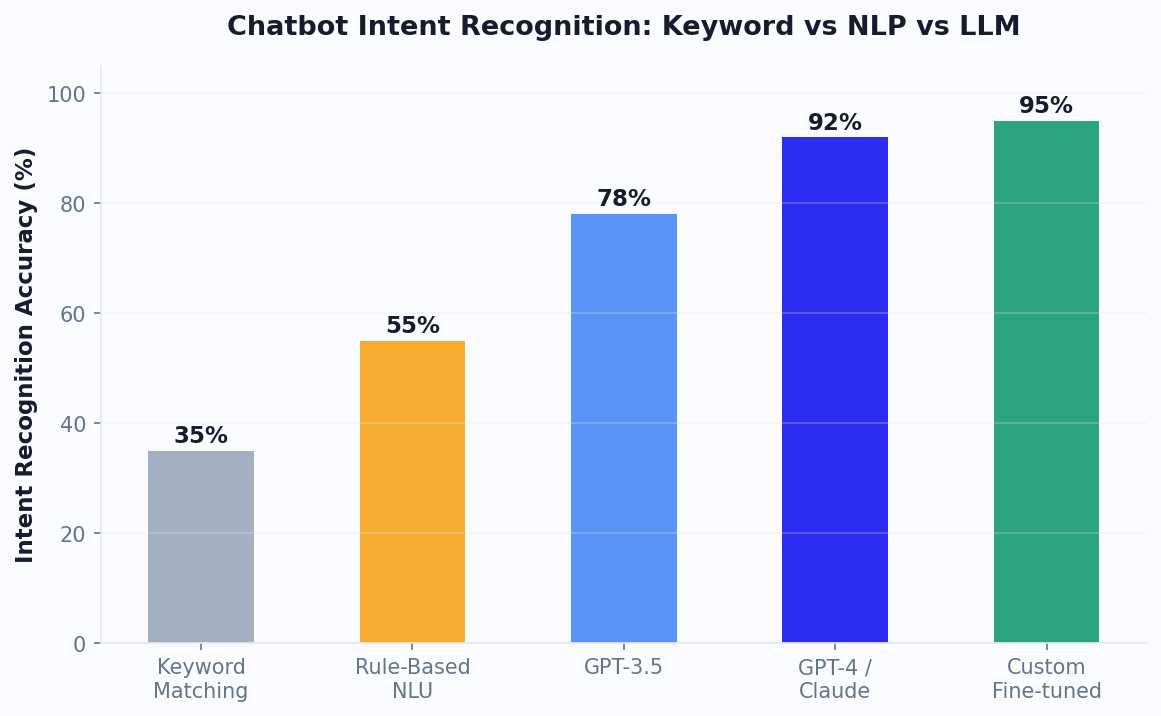
One of the most common questions from technical teams evaluating chatbot training approaches is whether to use RAG or fine-tuning. The short answer for most businesses: start with RAG. But the nuances matter, and understanding both approaches will help you make a more informed decision as your chatbot scales.
RAG (Retrieval-Augmented Generation)
As covered in the first section, RAG retrieves relevant content from your knowledge base at query time and feeds it to the LLM as context. The model's weights are never modified -- it is the same base model, just given your specific information to work with for each question.
How it works technically: Your documents are split into chunks, each chunk is converted into a vector embedding, and those embeddings are stored in a vector database. At query time, the user's question is also embedded, the nearest matching chunks are retrieved via similarity search, and those chunks are included in the LLM prompt alongside the question. The LLM generates an answer grounded in the retrieved content. For a deeper technical understanding, Pinecone's vector database documentation provides an excellent primer on how vector similarity search powers RAG systems.
Fine-Tuning
Fine-tuning modifies the actual weights of a language model by training it on your specific data. You provide hundreds or thousands of example input-output pairs, and the model adjusts its internal parameters to better produce outputs that match your examples.
How it works technically: You prepare a dataset of prompt-completion pairs (for example, question-answer pairs from your support history). The base model is then trained on this dataset for several epochs, adjusting its weights to better predict your specific completions. The result is a customized model that inherently "knows" your domain. OpenAI's fine-tuning documentation covers the technical details for their platform.
Head-to-Head Comparison
| Factor | RAG | Fine-Tuning |
|---|---|---|
| Setup time | Hours to days | Days to weeks |
| Data requirement | Existing documents (any format) | Hundreds of labeled Q&A pairs |
| Cost to implement | Low ($50-500) | High ($500-10,000+) |
| Ongoing cost | Vector DB hosting + LLM tokens | Model hosting + inference |
| Update speed | Instant (add/update documents) | Hours to days (retrain model) |
| Accuracy on known topics | Very high (95%+) | High (90%+) |
| Handles new topics | Add a document and it works immediately | Requires retraining |
| Hallucination risk | Low (grounded in source docs) | Medium (can still confabulate) |
| Transparency | Can cite exact source documents | Black box -- cannot trace answers |
| Technical expertise required | Low to medium | High (ML engineering) |
| Best for | Customer support, FAQ, documentation | Specialized tone/style, domain-specific language |
When to Use RAG (Most Businesses)
RAG is the right choice when:
- Your content changes frequently (products, policies, pricing)
- You need answers traceable to specific source documents
- You do not have ML engineering resources
- You want to be live in hours, not weeks
- Accuracy and trust are more important than creative language generation
- You need a no-code or low-code solution like Conferbot's AI Knowledge Base
When to Consider Fine-Tuning
Fine-tuning may be worth exploring when:
- You need the chatbot to adopt a very specific communication style (legal language, medical terminology, brand voice)
- You have thousands of high-quality example conversations from human agents
- Response latency requirements are extremely tight (fine-tuned models can be faster since they do not need the retrieval step)
- You are operating in a narrow, stable domain where content rarely changes
- You have ML engineers on staff or budget for external ML consultants
The Hybrid Approach
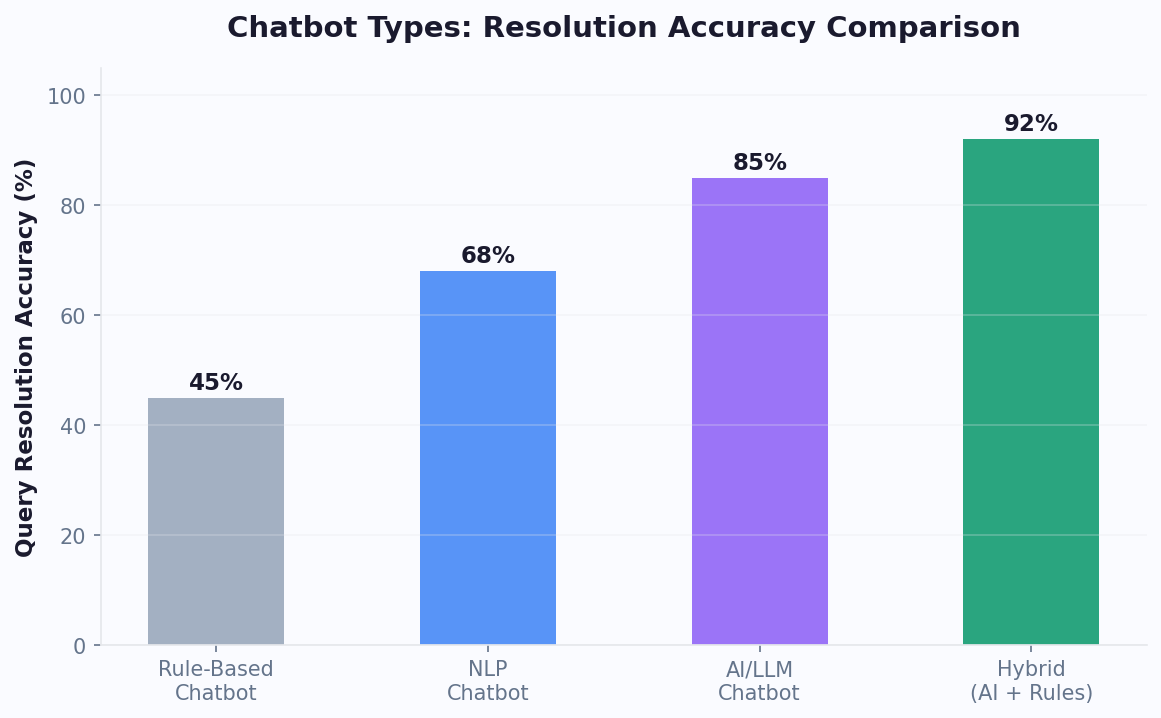
Many sophisticated deployments use both: a fine-tuned model for tone and style, with RAG for factual accuracy. The model is fine-tuned to match the brand voice and handle domain-specific language, while RAG ensures every factual claim is grounded in current source documents. LangChain's RAG tutorial demonstrates how to build these hybrid pipelines programmatically.
For Conferbot users, RAG is built into the platform and requires zero ML expertise. If your needs evolve to require fine-tuning, you can layer it on top without rebuilding your knowledge base infrastructure.
Keeping Your Knowledge Base Updated Over Time
Launching a trained chatbot is a milestone, not a finish line. Knowledge bases decay. Products change, policies evolve, new features launch, and old information becomes a liability. A chatbot trained on stale content is actively worse than no chatbot at all because it gives users false confidence in incorrect answers.
The businesses that get the best long-term results from their chatbots treat knowledge maintenance as an ongoing operational process, not a one-time project. Here is a framework for keeping your knowledge base accurate and complete.
The Maintenance Workflow
| Frequency | Activity | Time Required | Who Owns It |
|---|---|---|---|
| Weekly | Review unanswered and low-confidence queries from analytics | 30 minutes | Support lead or chatbot owner |
| Weekly | Add answers for recurring unanswered questions | 30-60 minutes | Content writer or support lead |
| Bi-weekly | Review chatbot satisfaction scores and identify declining topics | 20 minutes | Chatbot owner |
| Monthly | Audit top 20 knowledge base articles for accuracy | 1-2 hours | Subject matter experts |
| Quarterly | Full knowledge base review: remove outdated content, update all documents | 4-8 hours | Cross-functional team |
| Event-driven | Update KB immediately when products, pricing, or policies change | 15-30 minutes | Product or marketing team |
Triggering Updates: What Should Prompt Immediate Action
Some events require immediate knowledge base updates, not a scheduled review:
- Product launch or major update: Add documentation for new features, update existing docs that reference changed functionality.
- Pricing change: Update all references to pricing, including comparison pages and FAQ entries. Pricing inconsistencies are one of the highest-risk errors.
- Policy change: Returns, shipping, warranties, SLAs -- any policy change needs immediate KB reflection.
- Service disruption: If your service goes down, add a temporary FAQ entry explaining the situation and expected resolution. Remove it when resolved.
- Regulatory change: Compliance requirements that affect your product or service need same-day KB updates.
Building a Knowledge Update Pipeline
For larger teams, formalize the update process to prevent knowledge decay:
- Detection: Use your chatbot analytics to automatically flag queries with low confidence scores or high escalation rates. These are signals that content is missing or outdated.
- Triage: The chatbot owner reviews flagged items weekly and determines whether the issue is a content gap, outdated content, or a retrieval configuration problem.
- Creation/Update: Route content tasks to the appropriate author -- product team for feature docs, support team for troubleshooting guides, legal team for policy docs.
- Review: A second pair of eyes reviews the content for accuracy, clarity, and consistency with existing KB articles.
- Publish: Upload the new or updated content to the knowledge base. In Conferbot, updates take effect within minutes -- no retraining or redeployment needed.
- Verify: Test the chatbot with the specific queries that triggered the update. Confirm the new content is retrieved correctly.
Version Control for Your Knowledge Base
Treat your knowledge base like code -- track changes, maintain a changelog, and have a rollback plan:
- Changelog: Maintain a simple log of what was added, updated, or removed and when. This is invaluable for debugging when answer quality suddenly changes.
- Archive, don't delete: Move outdated content to an archive folder rather than permanently deleting it. You may need to reference old policies for customer disputes or compliance audits.
- Batch updates carefully: If you update 20 articles at once, test thoroughly before and after. Large batch changes can introduce unexpected retrieval shifts.
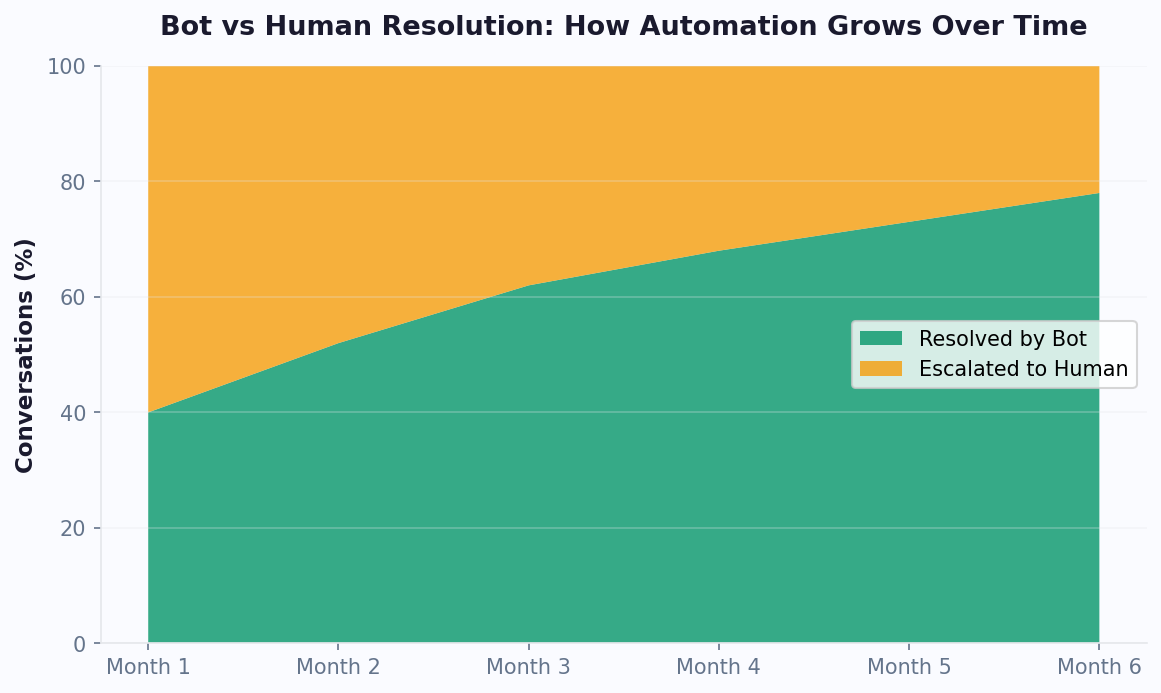
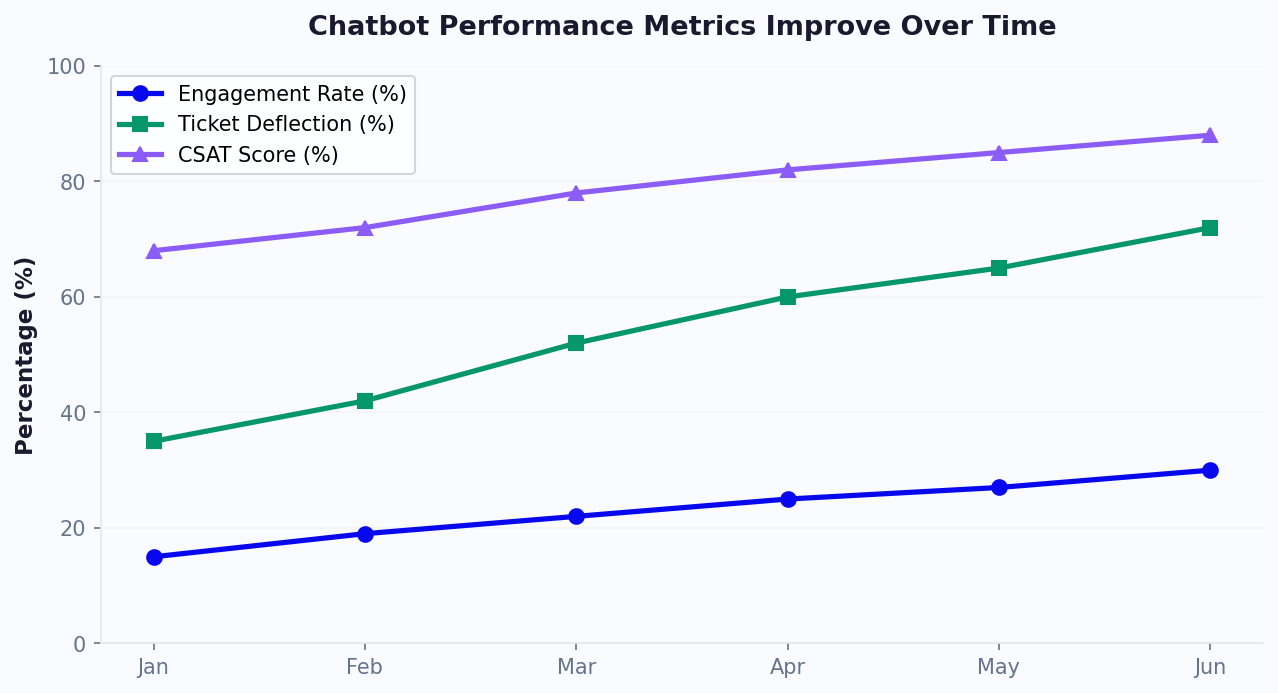
Businesses that follow this maintenance workflow consistently see their chatbot's accuracy and user satisfaction improve month over month rather than degrading. The time investment is modest -- typically 2-4 hours per week for a mid-sized knowledge base -- but the impact on chatbot quality is significant.
Measuring Answer Accuracy and Filling Knowledge Gaps
You cannot improve what you do not measure. Once your chatbot is live and handling real conversations, you need a metrics framework that tells you how well it is performing, where it is falling short, and what to fix next. This section covers the key metrics, how to track them, and how to systematically close knowledge gaps.
The Core Accuracy Metrics
| Metric | Definition | Target | How to Track |
|---|---|---|---|
| Resolution rate | Percentage of conversations resolved without human escalation | 60-80% | Analytics dashboard -- auto-tracked |
| Answer accuracy | Percentage of answers that are factually correct | 90%+ | Manual review of random sample (25-50/week) |
| Hallucination rate | Percentage of answers containing fabricated information | Less than 3% | Manual review flagging any unsourced claims |
| Confidence score | The system's own assessment of retrieval relevance | Average 0.80+ | System metric -- review distribution weekly |
| Fallback rate | How often the chatbot cannot find a relevant answer | Less than 20% | Count "I don't have information" responses |
| User satisfaction (CSAT) | Post-conversation rating from users | 4.0+/5.0 | Post-chat survey widget |
| Negative feedback rate | Percentage of answers rated unhelpful by users | Less than 10% | Thumbs-down clicks on chatbot responses |
The Knowledge Gap Analysis Process
Knowledge gaps are the topics your users ask about but your knowledge base does not cover (or covers inadequately). Identifying and closing these gaps is the highest-leverage activity for improving chatbot performance post-launch.
Step 1: Identify gaps from data. Review three data sources weekly:
- Low-confidence queries: Questions where the retrieval confidence score fell below your threshold. These indicate the knowledge base does not contain closely matching content.
- Escalated conversations: Every conversation that was escalated to a human agent is a potential gap. Categorize escalation reasons and look for patterns.
- Negative feedback: Answers that users flagged as unhelpful. Read the full conversation to understand why the answer missed the mark.
Step 2: Categorize gaps. Not all gaps are created equal. Sort them into four types:
- Missing content: The topic is not in the knowledge base at all. Solution: create new content.
- Outdated content: The topic is covered, but the information is stale. Solution: update the existing document.
- Insufficient detail: The topic is covered at a high level, but users need more specific information. Solution: expand the existing document with more detail, examples, or edge cases.
- Retrieval failure: The content exists and is accurate, but the retrieval system is not finding it for relevant queries. Solution: improve document titles, add synonyms, or adjust chunking settings.
Step 3: Prioritize by impact. Rank gaps by the number of users affected and the business impact of the gap. A gap that affects 100 users per week and causes them to leave the conversation is far more urgent than one that affects 5 users per month on a low-stakes topic.
Step 4: Close gaps systematically. Set a weekly goal for the number of gaps to close. For most businesses, closing 3-5 gaps per week results in steady, measurable improvement in chatbot performance.
Building a Feedback Loop
The most effective knowledge base management systems create a closed feedback loop where user interactions automatically surface improvement opportunities:
- User asks a question the chatbot handles poorly.
- The system flags it (via low confidence, user thumbs-down, or escalation).
- A human reviews the interaction and identifies the root cause (missing content, outdated info, or retrieval issue).
- The appropriate fix is made to the knowledge base.
- The fix is verified by testing the same question again.
- Metrics improve, and the cycle repeats with the next set of gaps.
This feedback loop is the engine that drives continuous improvement. Businesses that implement it see their chatbot's resolution rate increase by 5-10 percentage points per quarter in the first year, with accuracy approaching 95%+ for covered topics.
When to Revisit Your Architecture
If you have been maintaining your knowledge base diligently for 3-6 months and your metrics plateau below your targets, it may be time to revisit your technical setup. Common architectural improvements include:
- Switching embedding models: Newer embedding models (like those from OpenAI, Cohere, or open-source alternatives listed on the MTEB embedding leaderboard) may provide better semantic matching for your domain.
- Adjusting chunk size: If your content is highly technical with long explanations, larger chunks may improve answer completeness.
- Adding metadata filtering: Tag documents with metadata (product line, customer segment, region) and filter retrieval results to improve relevance.
- Implementing re-ranking: Add a second-stage ranking model that re-scores retrieved chunks based on more sophisticated relevance criteria.
These optimizations are advanced and typically only needed after you have exhausted content-level improvements. For most businesses using Conferbot's AI Knowledge Base, the platform handles these optimizations automatically, and the primary lever for improvement remains content quality.
To see how all of these metrics come together in practice, explore Conferbot's analytics suite, which provides real-time dashboards for every metric discussed in this guide. And if you are just getting started, visit our pricing page to find a plan that fits your knowledge base size and conversation volume.
Was this article helpful?
Build and deploy in 10 minutes. No coding needed.
How to Train a Chatbot on Your Knowledge Base in 5 Steps (2026 Guide) FAQ
Everything you need to know about chatbots for how to train a chatbot on your knowledge base in 5 steps (2026 guide).
About the Author
The Conferbot team writes about building, deploying, and improving AI chatbots.
View all articles
