
Online Course Enrollment Chatbot
Free Education And Training Chatbot Template
An AI-powered course enrollment chatbot that guides students through course discovery, prerequisite checks, and registration. Reduces enrollment abandonment by 47% and handles catalog navigation, section selection, and payment -- all through a conversational interface. Perfect for universities, bootcamps, and e-learning platforms.


What Is an Online Course Enrollment Chatbot?
An online course enrollment chatbot is a conversational AI tool embedded on an educational institution's website, LMS portal, or messaging platform that guides prospective and returning students through the entire course registration process — from initial discovery to confirmed seat. Instead of navigating multi-step forms, waiting on hold for an admissions advisor, or deciphering dense course catalogs, students ask natural-language questions and get instant, accurate answers about enrollment windows, prerequisites, tuition, financial aid, and available sections.
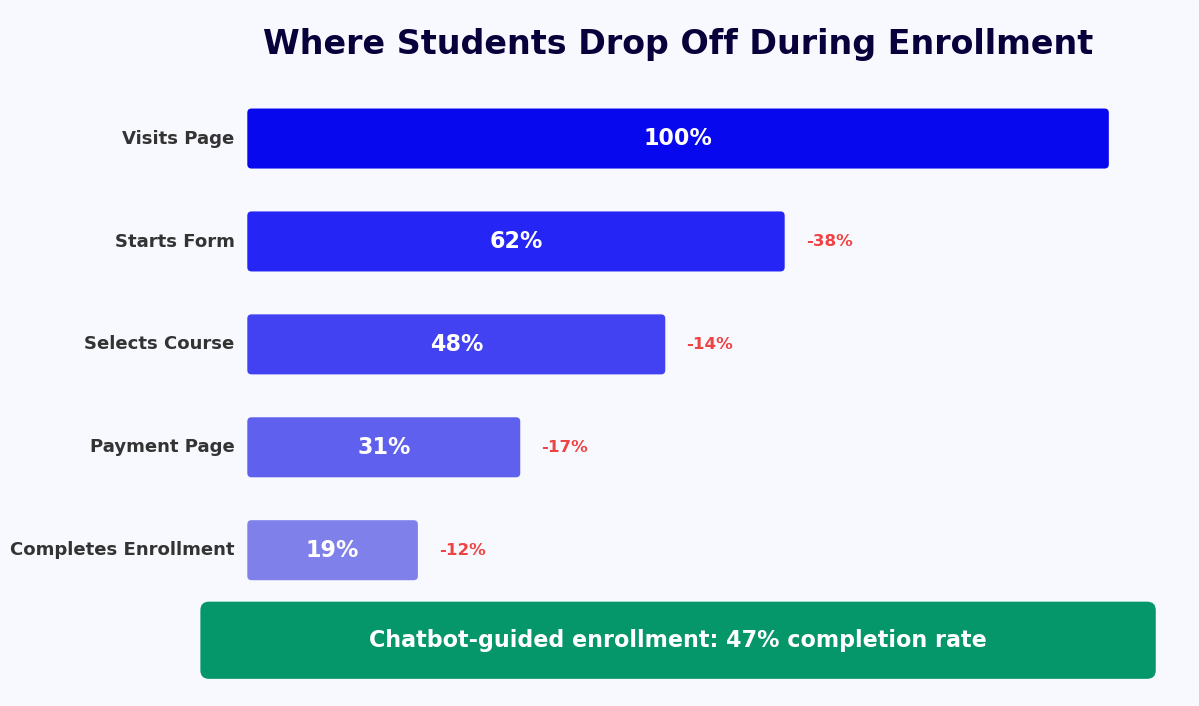
For e-learning platforms and institutions with hundreds of course offerings, the chatbot acts as a 24/7 enrollment concierge. It qualifies student intent, checks eligibility, captures registration data, and hands off to payment or LMS systems without human intervention. The result is a faster, more accessible enrollment experience that converts more visitors into registered learners.
The Problem With Traditional Course Registration
Traditional enrollment processes were designed for in-person, synchronous interactions. They function poorly in an on-demand digital environment. Consider what a prospective student faces today: a course catalog with 300+ offerings, prerequisite chains that require reading three pages of documentation, registration windows that open and close without notice, and an admissions office that is only reachable during business hours. At every friction point, enrollment intent degrades.
- Catalog overwhelm: When students cannot quickly identify the right course for their goals, they abandon the search. Research indicates that 68% of prospective learners who visit an institutional website leave without completing an enrollment inquiry if self-service tools are absent.
- Prerequisite confusion: Unclear prerequisite chains cause incorrect enrollments that must be manually reversed, consuming advisor time and frustrating students who lose their preferred section.
- Registration deadline friction: Students who miss open enrollment windows are often lost entirely. A chatbot that proactively notifies students of upcoming windows recaptures a significant share of deferred enrollments.
- After-hours demand: Working adults — the fastest-growing segment in online education — make enrollment decisions in evenings and on weekends when staff are unavailable.
Where Conferbot Fits
Conferbot's AI chatbot builder provides the infrastructure to deploy a fully customized enrollment chatbot without writing backend code. You define the course catalog logic, prerequisite rules, and enrollment flows using a visual builder, then connect to your LMS, CRM, and payment gateway through the integrations hub. The chatbot handles the rest — at any scale, in any time zone.
Enrollment chatbots are not limited to universities. Corporate L&D teams, online bootcamps, professional certification bodies, and vocational training providers all face the same enrollment friction problems and benefit from the same conversational solution. Whether you are managing 50 courses or 5,000, an enrollment chatbot reduces per-registration administrative cost while improving the learner experience from the very first touchpoint.
How It Works: Course Discovery, Eligibility Check, and Registration Flow
An effective enrollment chatbot does not simply replicate a web form in conversation format. It intelligently guides each student through a personalized path based on their stated goals, prior learning history, and eligibility status. The flow below represents a complete, production-ready enrollment conversation for an educational institution running semester-based and self-paced courses simultaneously.
Step-by-Step Enrollment Flow
| Step | Student Action | Chatbot Response | Backend Process |
|---|---|---|---|
| 1. Entry | Opens chat on course catalog page or LMS portal | Greets student, asks for enrollment goal ("What are you looking to learn or achieve?") | Session created, user intent classification begins |
| 2. Course Discovery | Describes interest ("I want to learn data science") | Surfaces 3-5 relevant courses with duration, format, and next start date | Queries course catalog API with NLP-matched filters |
| 3. Course Details | Asks about a specific course | Presents syllabus summary, instructor info, credit hours, cost, and upcoming sections | Pulls structured course data from LMS or catalog database |
| 4. Eligibility Check | Confirms interest in enrolling | Asks about prior education or completed prerequisites | Validates against prerequisite rules engine |
| 5. Identity Verification | Provides student ID or email | Confirms existing account or initiates new student registration | CRM/SIS lookup; creates new record if absent |
| 6. Section Selection | Chooses preferred section, schedule, or delivery mode | Displays real-time seat availability for each section | Queries enrollment system for live capacity data |
| 7. Financial Aid / Payment | Asks about payment options or financial aid | Presents aid eligibility questions or directs to payment gateway | Routes to financial aid system or payment processor |
| 8. Confirmation | Completes enrollment | Sends confirmation with course details, access instructions, and calendar invite | Writes enrollment record to SIS/LMS; triggers welcome email sequence |
Intelligent Course Discovery
The discovery step is where most enrollment chatbots add the most value over static catalogs. Using NLP processing, the chatbot interprets intent from unstructured input. A student who types "I need something for project management certification under $500 that I can finish in three months" receives a filtered, ranked list of matching courses — not a link to the full catalog. This guided discovery reduces time-to-enrollment by 60-70% compared to unaided catalog browsing.
Prerequisite Eligibility Engine
For programs with prerequisite chains — common in STEM, law, medicine, and technical certification tracks — the chatbot applies eligibility rules before allowing registration to proceed. Students who do not meet prerequisites are not rejected; they are presented with alternative pathways: a preparatory course, a placement assessment, or a direct advisor escalation. This prevents enrollment errors while preserving conversion momentum for students who would otherwise abandon the process after a hard rejection.
Conferbot's no-code chatbot builder lets your registrar team define and update eligibility logic without engineering support, ensuring your chatbot stays current as program requirements change each semester.
Key Features of the Online Course Enrollment Chatbot
A course enrollment chatbot serves multiple stakeholders simultaneously — the prospective student who needs guidance, the registrar who needs accurate data, and the institution that needs to maximize enrollment yield. The features below represent the complete capability set of a production deployment, built on Conferbot's platform.
Core Feature Overview
| Feature | Functionality | Student Benefit | Institutional Benefit |
|---|---|---|---|
| NLP Course Search | Interprets free-text queries to surface relevant courses | Finds the right course without browsing 300 listings | Higher catalog engagement and lower bounce rate |
| Real-Time Seat Availability | Pulls live capacity data from enrollment system | Never registers for a full section | Eliminates over-enrollment errors |
| Prerequisite Validation | Checks prior courses or assessments before allowing registration | Clear path forward if not yet eligible | Reduces incorrect enrollments by up to 80% |
| Multi-Section Selection | Presents schedule options (morning, evening, weekend, async) | Finds a section that fits their schedule | Distributes enrollment load across sections |
| Financial Aid Triage | Asks qualifying questions and routes to appropriate aid program | Understands funding options in plain language | Reduces advisor time spent on basic aid inquiries |
| Document Collection | Collects transcripts, ID, or certification proof via file upload | Submits documents in the same conversation | Centralized, organized document intake |
| Waitlist Management | Joins waitlist and notifies student when seat opens | Automatically notified of openings | Fills seats faster when cancellations occur |
| Enrollment Reminders | Proactive notifications for registration window opening, payment deadlines, course start | Never misses a deadline | Reduces last-minute enrollment spikes and support load |
| Live Chat Escalation | Seamlessly transfers complex cases to a human advisor | Gets expert help without starting over | Advisors receive full conversation context |
Proactive Enrollment Campaigns
Beyond reactive conversations, the chatbot enables proactive outreach. When a new cohort opens, the system can send personalized messages to students who previously inquired about a course but did not enroll — re-engaging warm leads at exactly the right moment. This outbound capability, delivered through the omnichannel platform, increases re-engagement rates by 35-45% compared to mass email campaigns.
Live Chat Handoff for Complex Cases
Some enrollment scenarios genuinely require human expertise: transfer credit evaluation, disability accommodation, international credential assessment, or enrollment disputes. Conferbot's live chat integration ensures these students reach an advisor instantly, with the complete chatbot conversation transcript handed off so the advisor never has to ask the student to repeat information they have already provided.
For institutions with advanced integration needs, the chatbot API integration layer connects directly to Banner, PeopleSoft, Ellucian, Canvas, Blackboard, Moodle, and other enterprise education platforms.
Ready to try Online Course Enrollment Chatbot?
Deploy this template in under 10 minutes. No coding required.
Use This Template Free →LMS Integration: Connecting to Canvas, Moodle, Blackboard, and More
A course enrollment chatbot that operates in isolation from your learning management system creates duplicate data entry, enrollment lag, and reconciliation headaches. Tight LMS integration is what separates a genuinely useful enrollment tool from a fancy contact form. Conferbot's enrollment chatbot connects to all major LMS and student information systems, ensuring that every enrollment captured in conversation is immediately reflected in your authoritative academic records systems.
Supported Integration Points
The integration architecture operates across four functional layers: course data ingestion, student identity management, enrollment writing, and communication triggering.
- Course data ingestion: The chatbot pulls course listings, schedules, prerequisites, section capacity, and instructor data directly from your LMS catalog API. This eliminates manual catalog maintenance — when your registrar updates a course in Canvas or Ellucian Banner, the chatbot reflects the change within minutes. Supported systems include Canvas, Blackboard, Moodle, Brightspace (D2L), Ellucian Banner, Ellucian Colleague, and PeopleSoft Campus Solutions.
- Student identity management: For returning students, the chatbot authenticates via institutional SSO (SAML 2.0 / OAuth 2.0) or email-based verification, then pulls existing enrollment history to personalize the conversation. New students are provisioned accounts in real time and handed LMS credentials before the conversation ends.
- Enrollment writing: Confirmed registrations are written directly to the SIS enrollment table via API, with section, credit hour, and payment status populated automatically. No manual data entry, no batch upload delays.
- Communication triggering: Enrollment confirmation triggers a sequence in your CRM or communication platform — welcome email, LMS access notification, payment receipt, and course start reminder — all generated from a single enrollment event.
Payment and Financial Aid Integration
For paid courses and programs, the chatbot integrates with Stripe, PayPal, Authorize.net, and institutional payment processors to collect tuition at the point of enrollment. For financial aid workflows, the bot can surface FAFSA status, institutional grant eligibility, and installment plan options, routing students to the appropriate aid application portal or advisor queue based on their responses. This eliminates the common enrollment dropout that occurs when students are sent away to "figure out financial aid separately" before they can register.
Corporate Training LMS Integration
For corporate L&D platforms using Workday Learning, SAP SuccessFactors, Cornerstone OnDemand, or TalentLMS, the enrollment chatbot connects via the same API-first architecture. Employees can browse the corporate course catalog, check manager approval requirements, enroll in required compliance training, and receive completion reminders — all within the same conversational interface. HR administrators see enrollment data in their L&D platform in real time without any manual reconciliation.
Explore the full range of supported platforms in Conferbot's integrations hub, or connect any custom system using the chatbot API integration capabilities.
Use Cases: Universities, Corporate Training, and Bootcamps
Course enrollment chatbots are not a single-use solution. The same underlying architecture serves radically different organizations with different enrollment models, learner profiles, and institutional constraints. Below are three primary use case categories, each with specific deployment patterns and measurable outcomes.
Universities and Community Colleges
Higher education institutions face enrollment challenges at scale: thousands of courses, complex prerequisite chains, financial aid dependencies, and a student population that expects on-demand digital services. The enrollment chatbot addresses the full registration lifecycle — from the moment a prospective student first explores programs to the moment a returning student completes add/drop for their fifth semester.
Specific university use cases include new student orientation enrollment (guiding first-year students through required course selection), academic advising triage (answering program requirement questions before routing to a human advisor for complex cases), and enrollment period management (proactive notifications that drive students into the registration portal before period deadlines, reducing the last-minute support surge that strains registrar offices).
Community colleges with open enrollment policies benefit particularly from the eligibility guidance function: rather than having students select courses blindly, the chatbot asks about career goals and current skill level, then recommends appropriate entry points into certificate and associate degree pathways. See related applications in the education and training templates library.
Corporate Training and L&D Programs
Enterprise learning and development teams run internal course catalogs that can exceed 500 offerings — compliance training, technical skills, leadership development, and role-specific certifications. Employees waste significant time navigating these catalogs, and L&D administrators spend hours manually processing enrollment requests and tracking completion requirements.
The enrollment chatbot automates the entire workflow: an employee asks "What compliance training do I need to complete this quarter?", the chatbot checks their role, department, and completion history against the compliance matrix, then surfaces exactly the required courses with one-click enrollment. Completion reminders are sent automatically as deadlines approach. L&D teams report 40-60% reductions in manual enrollment processing time after deployment.
Coding Bootcamps and Professional Certification Programs
Bootcamps and certification providers operate in a highly competitive market where enrollment conversion speed is a direct revenue driver. A prospective student who inquires about a Python bootcamp at 11 PM on a Sunday should receive a complete response — program details, prerequisites, upcoming cohort dates, tuition options, and an application link — within seconds, not the next business day.
The enrollment chatbot handles the entire top-of-funnel qualification: it asks about current skill level, time commitment availability, and career objectives, then recommends the appropriate program tier. Students who qualify are moved directly into the enrollment flow; those who need preparation are offered free introductory resources that keep them engaged until they are ready. This qualification-and-nurture approach increases cohort fill rates by 25-35% without increasing admissions staff headcount.
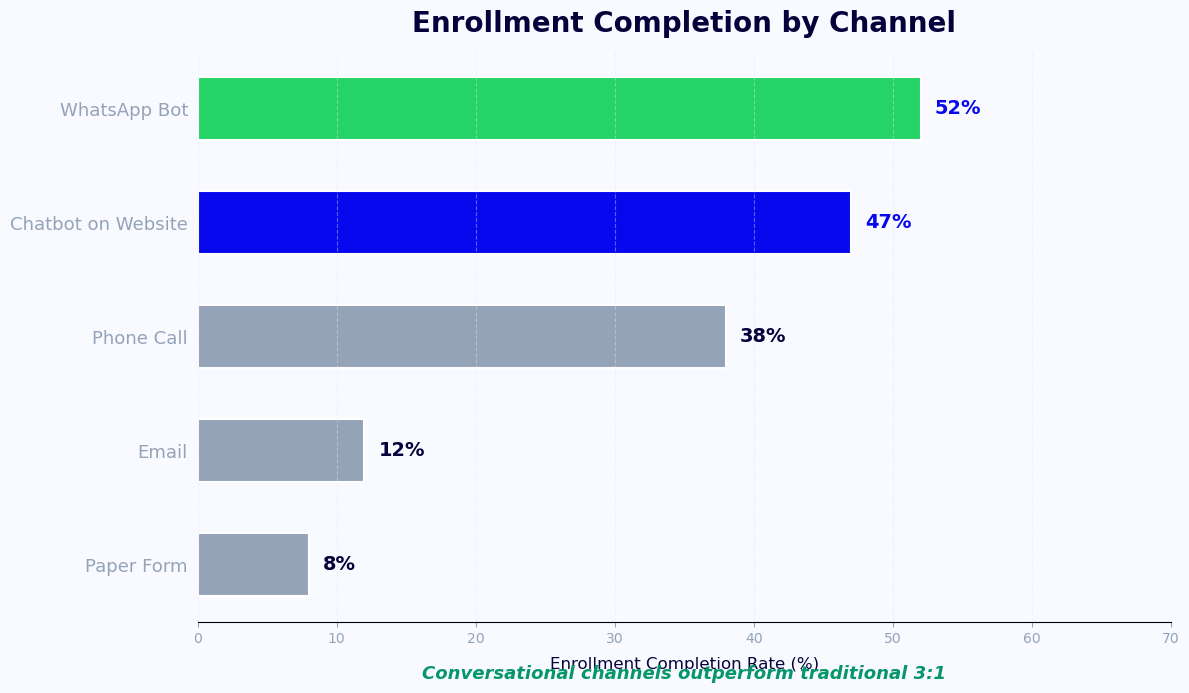
For bootcamps using social media for acquisition, the chatbot deploys across Instagram, Messenger, and WhatsApp to capture leads wherever prospective students engage with program content.
Enrollment Conversion Data: What the Numbers Show in ${year}
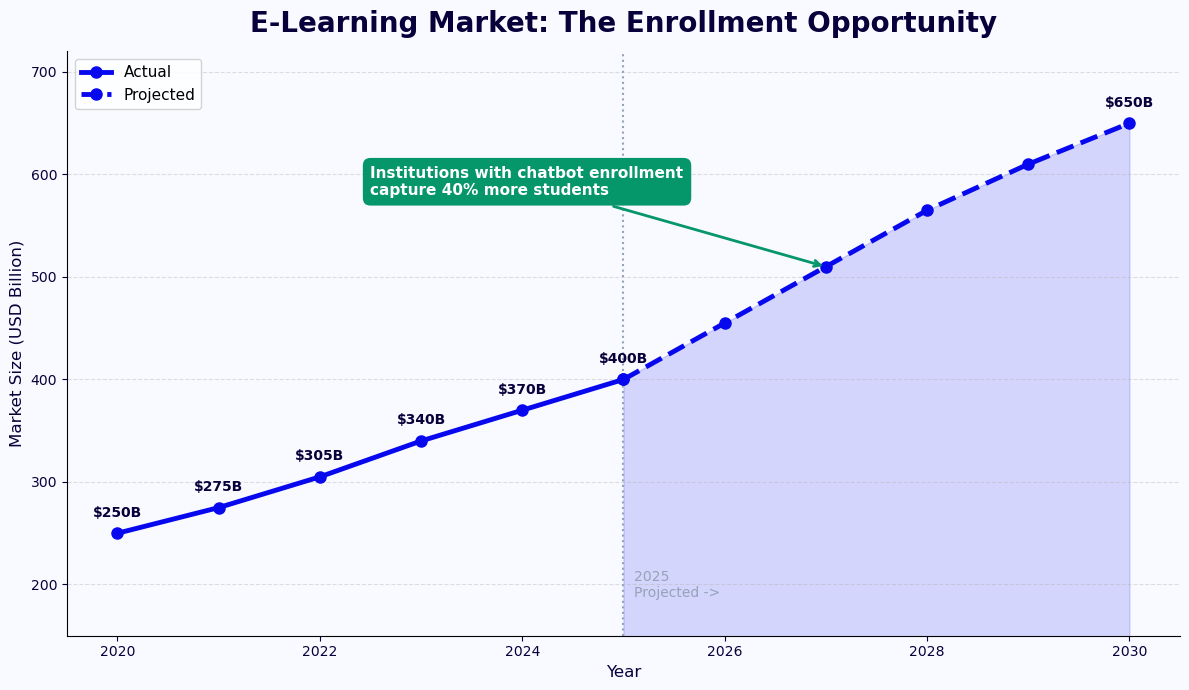
Enrollment chatbot deployments across educational institutions consistently produce measurable improvements across three dimensions: conversion rate (visitors who complete enrollment), time-to-enrollment (hours from first inquiry to confirmed registration), and administrative cost per enrollment. Below is a synthesis of documented outcomes from institutions using conversational enrollment automation.
Conversion Rate Improvements
The baseline enrollment conversion rate for an educational website without conversational tools — meaning the percentage of course catalog visitors who complete registration — typically ranges from 2% to 6% depending on institution type and course offering. Adding a well-configured enrollment chatbot consistently moves this figure to 9-14%, representing a 2-3x improvement in conversion yield from the same traffic volume. The primary driver is friction reduction: each question the chatbot answers in real time is a question that would otherwise have caused the visitor to leave and potentially not return.
For institutions running paid acquisition campaigns, this conversion lift has a direct impact on cost per enrolled student. If you are paying $80 per website visitor through paid search, doubling conversion rate effectively halves your cost per enrollment. Use Conferbot's chatbot ROI calculator to model the specific impact for your institution's traffic and enrollment economics.
Time-to-Enrollment Reduction
Traditional enrollment processes — inquire by phone or form, wait for advisor callback, receive information, decide, navigate registration portal, submit payment — can span 5-14 days for prospective students who are actively comparing programs. Each day in this funnel represents dropout risk; a competing institution that answers questions faster captures the enrollment.
Chatbot-assisted enrollment compresses this to minutes for students who are ready to commit. For students who need time to consider, the chatbot maintains engagement through follow-up messages and handles re-entry into the enrollment flow seamlessly when the student returns, without requiring them to start over.
Administrative Cost Per Enrollment
| Metric | Without Chatbot | With Chatbot | Improvement |
|---|---|---|---|
| Advisor time per enrollment (minutes) | 25-40 minutes | 4-8 minutes (complex cases only) | 70-85% reduction |
| Enrollment errors requiring correction | 8-12% of registrations | 1-3% of registrations | 75-80% reduction |
| After-hours enrollment completions | Near zero | 18-30% of total volume | New revenue channel |
| Waitlist conversion rate | 40-55% | 75-85% | 35-40% improvement |
| Student satisfaction with enrollment process | 62% satisfied | 88% satisfied | 42% improvement |
Track all of these metrics in real time through Conferbot's chatbot analytics dashboard, which surfaces conversation completion rates, drop-off points, and enrollment funnel performance across all channels and course categories.
50,000+ businesses use Conferbot templates to automate conversations
Setup Guide: Deploying Your Enrollment Chatbot in Under a Week
Setting up an online course enrollment chatbot does not require a months-long IT project. With Conferbot's no-code chatbot builder, a registrar or marketing team member with no technical background can build, configure, and deploy a fully functional enrollment bot in three to five business days. The steps below outline the complete deployment process.
Day 1: Account Setup and Course Catalog Import
Begin by creating your Conferbot account and selecting the Online Course Enrollment template from the template library. The template provides a pre-built conversation flow covering discovery, eligibility, registration, and confirmation — you customize it rather than build from scratch. Next, connect your course catalog. If your LMS exposes an API, use the API integration layer to pull live course data. If not, the catalog can be imported via CSV or entered manually for smaller course libraries.
Day 2: Eligibility Rules and Flow Customization
Configure prerequisite rules in the visual flow editor. For each course that has prerequisites, define the qualifying conditions — prior courses completed, assessment scores achieved, or enrollment tier (undergraduate vs. graduate). The rule engine supports Boolean logic, so complex prerequisites ("Course A AND Course B, OR placement test score above 80") are fully expressible without code. Customize conversation copy to match your institution's tone and terminology.
Day 3: System Integrations
Connect the chatbot to your SIS and LMS for live seat availability and enrollment writing. Connect your CRM (Salesforce, HubSpot, or Slate for higher ed) for lead and enrollment record sync. If collecting payment, connect your payment processor. Test each integration endpoint to confirm data flows correctly in both directions before proceeding.
Day 4: Channel Deployment and Testing
Deploy the chatbot widget on your website course catalog and program landing pages. Optionally deploy on WhatsApp for mobile-first learner populations. Run end-to-end test enrollments across all scenarios: new student, returning student, ineligible student, waitlist registration, and payment collection. Verify that enrollments appear correctly in your SIS and that confirmation communications are triggered properly.
Day 5: Launch and Analytics Baseline
Go live with a soft launch targeting the next enrollment cohort or registration period. Set up your analytics dashboard to track conversation completion rate, drop-off points, enrollment volume by channel, and advisor escalation rate. Establish baseline metrics in the first two weeks to measure improvement over subsequent enrollment periods. Most institutions see meaningful volume within the first 48 hours of a live registration window.
Conferbot's support team provides onboarding assistance for institutions, including custom integration development for non-standard SIS platforms. Review pricing plans to select the tier that matches your enrollment volume and channel requirements.
Best Practices for Maximizing Enrollment Chatbot Performance
Deploying an enrollment chatbot is the beginning of an optimization process, not the end of it. The institutions and platforms that derive the most value from conversational enrollment automation treat the chatbot as a living product — continuously refined based on conversation data, student feedback, and enrollment outcome analysis. Below are the practices that separate high-performing deployments from average ones.
Optimize for the First Three Messages
Conversation analytics consistently show that if a student does not receive a useful, relevant response within the first three exchanges, they abandon the chatbot and often the enrollment process entirely. The opening greeting and first two responses are the highest-leverage moments in the entire conversation. Lead with the most common student intent — "Find a course" — as the primary call-to-action, and ensure the first substantive response surfaces genuinely relevant courses rather than asking additional clarifying questions. Every unnecessary question before value delivery costs conversion.
Keep Eligibility Gates Constructive
When a student fails an eligibility check, the worst outcome is a dead end: "You do not meet the prerequisites for this course." The best outcome is a redirected pathway: "You are not yet eligible for Advanced Data Science, but completing Introduction to Python (starting March 3rd, 4 weeks) would qualify you. Want to enroll in that instead?" Constructive eligibility routing converts an otherwise lost enrollment into a different enrollment — and a student who later becomes eligible for the advanced course.
Use Analytics to Identify Catalog Gaps
The chatbot's search queries represent real demand signals. If 200 students per month are asking about "cybersecurity fundamentals" and your catalog has no entry-level cybersecurity course, that is actionable curriculum intelligence. Regularly review the analytics dashboard's unmatched query report to identify courses the market wants but your catalog does not offer. This feedback loop makes the enrollment chatbot a product development tool, not just a registration tool.
Align Chatbot Availability With Enrollment Calendar
Enrollment chatbot traffic spikes dramatically during registration windows — sometimes 10x normal volume. Ensure your chatbot is fully configured and tested before each registration period opens. Proactive notification campaigns sent 3-5 days before registration windows open drive traffic to the chatbot at a managed pace rather than creating a single surge. This smooths the conversion curve and reduces advisor escalation volume during peak periods.
Test Multilingual Performance If Your Student Population Is Diverse
For institutions serving international students or non-native English speakers, multilingual capability is not optional — it is a significant enrollment equity issue. Configure language detection and ensure your course catalog data, eligibility rules, and confirmation messages are available in all languages your student population uses. Track enrollment conversion rates by language to identify populations being underserved by the current configuration.
Connect the enrollment chatbot to the broader student journey by linking to booking and scheduling templates for academic advising appointments, ensuring students who need human guidance can access it immediately from within the same conversational interface.
Online Course Enrollment Chatbot FAQ
Everything you need to know about chatbots for online course enrollment chatbot.
Why Use a Template vs Building from Scratch?
Templates encode years of optimization data into the conversation flow before you start.
| Factor | Conferbot Template | Build from Scratch | Hire a Developer |
|---|---|---|---|
| Time to deploy | 10 minutes | 2-8 hours | 2-6 weeks |
| Cost | Free | Your time | $5,000-$25,000 |
| Day-1 conversion | 15-22% | 5-8% | 10-15% |
| Proven flows | Yes, data-tested | No | Depends |
| Updates included | Automatic | Manual | Paid |
| Multi-channel | 8+ channels | 1 channel | Extra cost |
| Analytics | Built-in | Must build | Extra cost |
Ready to Deploy Online Course Enrollment Chatbot?
Join 50,000+ businesses. Free forever plan available. No credit card required.