
Plumbing Service Chatbot
Free Home Services Chatbot Template
A professional plumbing service chatbot that helps homeowners describe plumbing issues, assess emergency severity, get service estimates, and schedule appointments. Designed for plumbers, plumbing companies, and home service providers to capture leads, dispatch emergency calls, and reduce missed opportunities after hours.



What Is a Plumbing Service Chatbot?
A plumbing service chatbot is a conversational AI assistant that handles the entire front-end customer interaction for plumbing companies: emergency triage, issue qualification, service scheduling, and lead capture. It operates 24/7 on your website, social media channels, and messaging platforms, ensuring that every homeowner who needs a plumber gets an immediate response regardless of the time of day or how many calls your office is already handling. For plumbing businesses in 2026, this solves the single most expensive operational problem: missed calls that become a competitor's revenue.
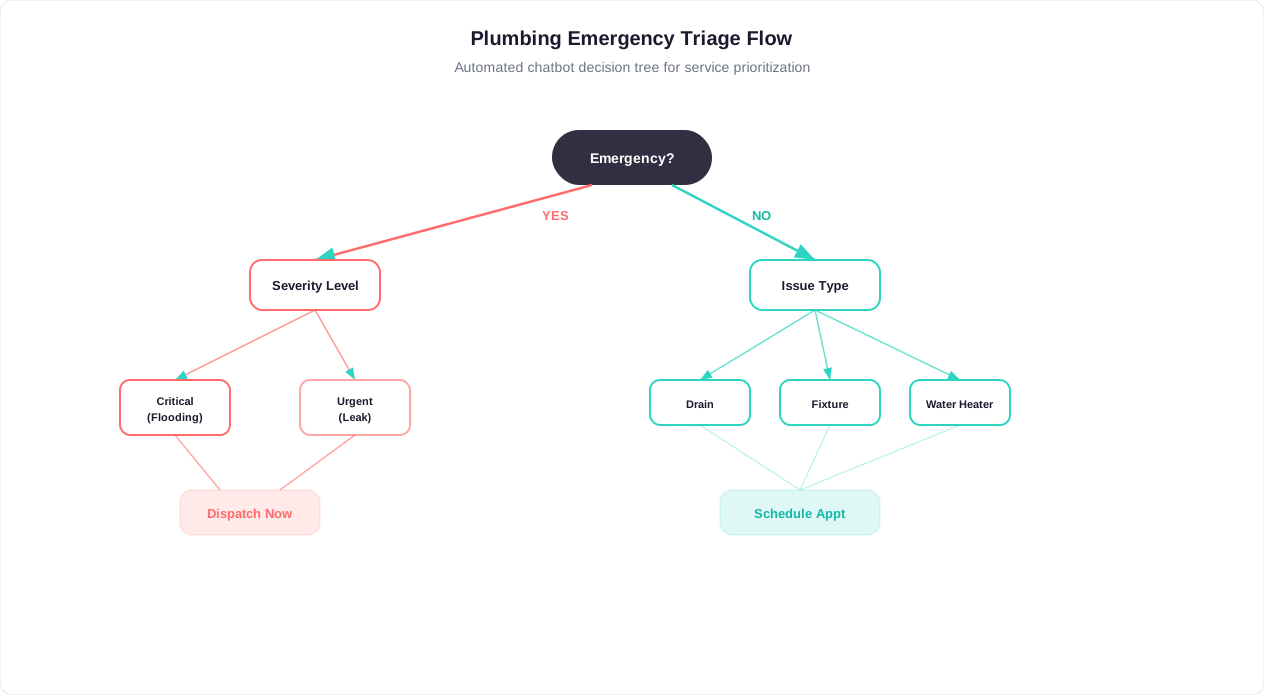
Plumbing is fundamentally different from scheduled home services like cleaning or lawn care. Over 40% of plumbing service requests involve some degree of urgency -- a customer whose basement is flooding at 11pm does not want to fill out a contact form and wait until Monday. They want confirmation that help is on the way within minutes. A plumbing chatbot provides that confirmation instantly: it assesses the emergency severity, collects the service address and contact information, and either dispatches the on-call plumber or books the earliest available appointment, all within a two-minute conversation.
Beyond emergency dispatch, the chatbot handles the full spectrum of plumbing customer interactions. Routine maintenance requests (water heater flushes, drain cleaning, fixture replacements) are captured with complete details and scheduled into available time slots. New construction and remodel inquiries collect project scope information for quoting. Commercial accounts report issues with building addresses and unit numbers for multi-location dispatch. The chatbot adapts its conversation flow based on the customer's situation, asking different questions for a burst pipe than for a dripping faucet.
Built on Conferbot's no-code builder, the plumbing service chatbot requires no programming to deploy or customize. Office managers and dispatchers configure the service types, emergency escalation rules, service areas, and scheduling logic through a visual interface. Deployment happens in hours, not weeks. Customizations -- adding a new service type, changing after-hours dispatch rules, updating seasonal messaging -- take minutes. The chatbot deploys on your website, WhatsApp, Facebook Messenger, and Google Business Profile, meeting customers wherever they reach out.
This guide covers the complete chatbot system: how it handles emergency dispatch, the conversation flow for routine service booking, integration with your dispatch and field service tools, the revenue data from plumbing companies already using chatbot automation, and how to get your plumbing chatbot live within a day.
How the Plumbing Dispatch and Booking Chatbot Works
The plumbing service chatbot follows a structured conversation architecture designed around the exact questions a skilled plumbing dispatcher asks on every call: Is this an emergency? What is the problem? Where is it? How bad is it? When do you need us? The flow is engineered to collect maximum useful information in minimum time while adapting the urgency of the conversation to the customer's situation.
Stage 1: Emergency Triage
Every conversation starts with emergency assessment. The chatbot asks directly whether the customer is dealing with an emergency situation -- active flooding, burst pipe, sewage backup, or complete loss of water. This is not buried three questions deep; it is the first thing asked because plumbing emergencies can cause thousands of dollars in water damage per hour of delay. When a customer selects or describes an emergency, the conversation path changes immediately: urgency-specific questions are asked, response time commitments are communicated, and the on-call plumber or dispatcher is notified within seconds through live chat escalation or automated dispatch alerts.
Stage 2: Issue Classification
The chatbot identifies the specific plumbing issue category: leaks and burst pipes, clogged drains, water heater problems, toilet issues, sewer and septic problems, or new installations. Each category triggers a tailored follow-up path. A water heater complaint generates questions about whether there is hot water at all, whether the unit is leaking, and the approximate age of the equipment. A clogged drain inquiry asks about which fixtures are affected, whether multiple drains are slow (indicating a main line problem), and whether there is any backup or overflow. This classification ensures the dispatched plumber arrives with the right tools, parts, and expectations.
Stage 3: Location and Severity Assessment
The chatbot pinpoints where in the property the issue is located (kitchen, bathroom, basement, outdoor, or multiple areas) and assesses the current severity level. Severity ranges from "water actively flowing" (requiring immediate response) through "slow leak" and "bad smell or gurgling" (indicating developing problems) to "just maintenance" (routine scheduling). This severity data, combined with the emergency triage from Stage 1, creates a complete urgency picture that drives scheduling priority. Active water flow situations are flagged for same-day or immediate dispatch regardless of the scheduling queue.
Stage 4: Property and Service Details
Property type matters for plumbing dispatch. A house has different access requirements than a high-rise apartment. Commercial properties may require after-hours scheduling to avoid business disruption. Multi-unit buildings need unit numbers and property manager contact information. The chatbot collects property type and then asks for a free-text description of the issue, allowing customers to provide the specific details that help the plumber prepare: "second floor bathroom, toilet running constantly, been happening for a week, tried jiggling the handle."
Stage 5: Scheduling and Contact Collection
With the issue fully documented, the chatbot moves to scheduling. Customers select their preferred timing (ASAP, today, tomorrow, this week, or flexible) and time window (morning, afternoon, evening, or anytime). The chatbot then collects the service address, customer name, phone number, and email for appointment confirmation. This contact information is validated in real time -- phone numbers are checked for format, emails are verified for syntax -- reducing junk submissions and ensuring the dispatcher can reach the customer.
Stage 6: Confirmation and Next Steps
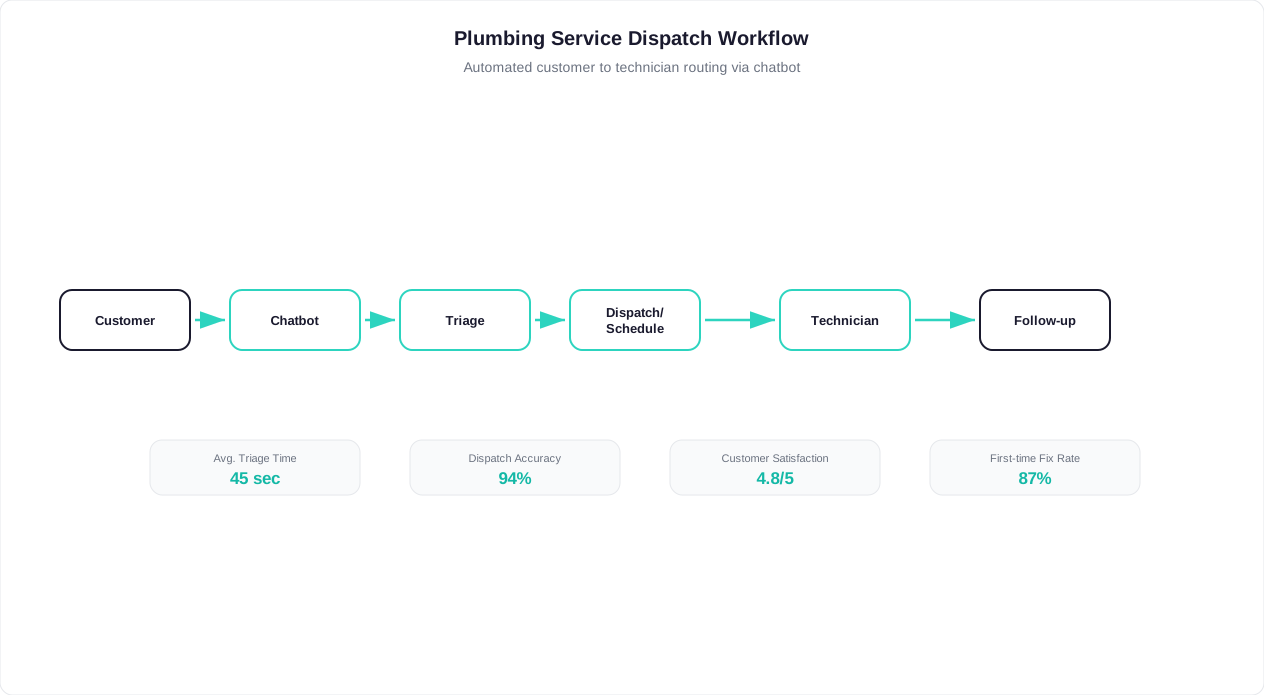
The customer receives an immediate confirmation summarizing their request: issue type, severity, service address, and requested timing. The confirmation includes what happens next (dispatcher confirmation within 30 minutes, plumber will call before arrival) and the emergency direct line for customers who need to escalate further. The complete service request is simultaneously sent to your dispatch system, CRM, or notification channel for immediate processing by your team.
Key Features: Emergency Triage, Service Scheduling, and Quote Requests
The plumbing service chatbot includes features purpose-built for the operational demands of plumbing businesses, where emergencies cannot wait, customers need immediate confidence that help is coming, and dispatchers are juggling multiple active jobs across different locations. These capabilities address the specific challenges that generic scheduling tools cannot solve for plumbing companies.
Intelligent Emergency Triage and Dispatch
The emergency triage system goes beyond a simple yes/no emergency question. It evaluates multiple signals to determine true urgency: the customer's initial selection, the issue type (burst pipe vs. dripping faucet), the severity level (active water flow vs. slow leak), and natural language signals in their description ("flooding," "everywhere," "can't turn it off"). When the combination indicates a genuine emergency, the chatbot activates the emergency dispatch workflow: immediate notification to the on-call plumber via SMS/push notification, response time commitment to the customer (typically "a plumber will contact you within 15 minutes"), and optional escalation to a live dispatcher through live chat handoff. False emergency detection is minimized through the multi-factor assessment, reducing unnecessary after-hours callouts.
| Feature | How It Works | Plumbing Company Benefit | Customer Benefit |
|---|---|---|---|
| Emergency triage | Multi-factor severity assessment using issue type, urgency selection, and keyword signals | Genuine emergencies dispatched immediately; false alarms avoided | Instant confirmation that help is on the way |
| Service area validation | ZIP code and city matching against configured service zones | No unprofitable out-of-area truck rolls | Clear response about coverage before waiting |
| After-hours capture | Full intake with emergency vs routine routing based on time of day | Captures 35%+ of inquiries that arrive outside business hours | Submit request at any hour without waiting until morning |
| Photo and video upload | In-conversation media attachments forwarded to dispatcher and plumber | Better preparation, occasional remote diagnosis | Show the problem visually instead of describing it |
| Multi-issue capture | Supports adding multiple issues within same conversation | Complete service request in one interaction | Report everything in one visit without calling back |
| Automated quote requests | Collects project scope and photos for estimator review | Eliminates back-and-forth calls for quote preparation | Get a quote without scheduling an in-person estimate |
Service Area Validation
Before completing a booking, the chatbot validates the service address against your configured service zones. Plumbing companies typically have defined service radiuses, and accepting jobs outside that area creates unprofitable truck rolls and scheduling disruptions. The chatbot checks ZIP codes, cities, or custom geographic boundaries and clearly informs customers who fall outside your area -- optionally suggesting partner companies or your nearest branch. For companies with multiple service trucks covering different zones, the chatbot routes requests to the appropriate dispatcher or scheduling queue based on the service address.
After-Hours Capture and Routing
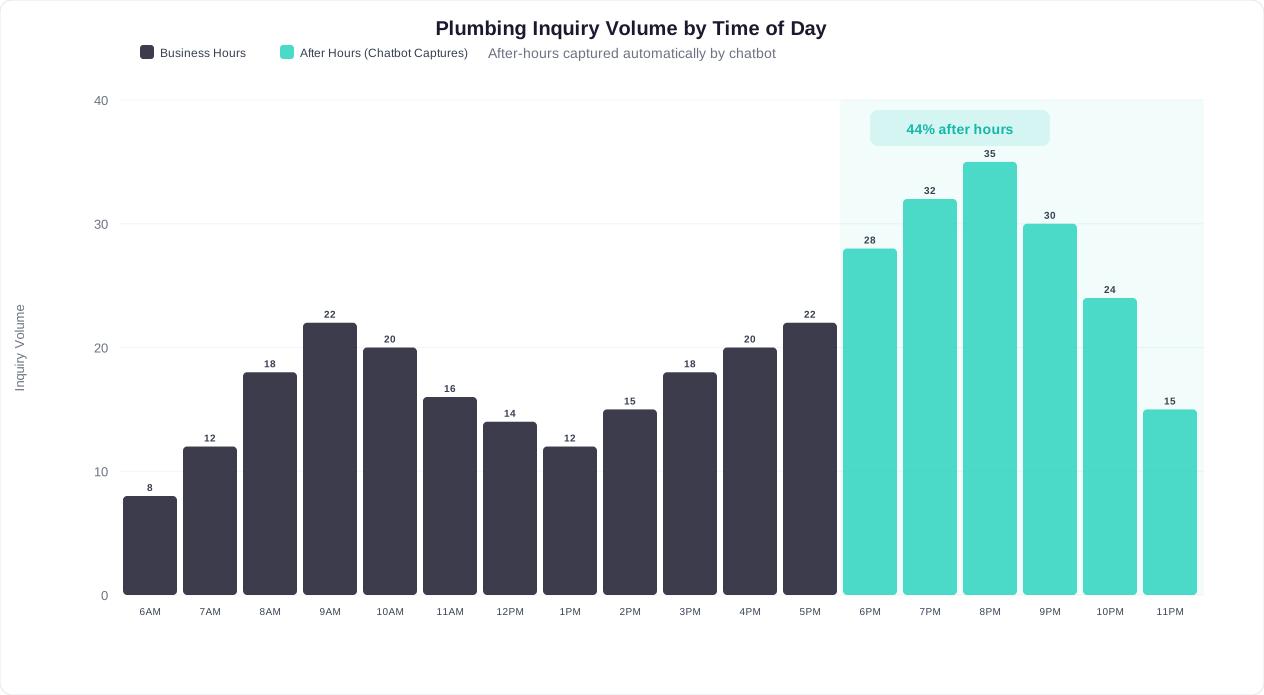
Over 35% of plumbing inquiries happen outside business hours. Without a chatbot, these become voicemails (50%+ never return the callback), competitor searches (the customer calls someone who answers), or form submissions that sit until Monday morning. The after-hours chatbot captures every inquiry with full details, automatically distinguishes true emergencies from routine requests, dispatches emergencies to the on-call plumber, and queues routine requests for next-business-day scheduling. The customer receives confirmation immediately regardless of the hour, and your team starts each morning with a pre-qualified queue of service requests rather than a stack of voicemails to return.
Multi-Issue and Repeat Customer Handling
Plumbing customers frequently have multiple issues to report ("while you're here, can you also look at the kitchen faucet?"). The chatbot supports capturing additional issues within the same conversation, associating them with the same service appointment. For returning customers connected through omnichannel integration, the chatbot recognizes them across channels, retrieves their service history and property information, and pre-fills known details -- reducing the conversation to just the new issue description and scheduling.
Photo and Video Upload
A picture of a leaking pipe tells the plumber more than three paragraphs of description. The chatbot supports image and video uploads within the conversation, allowing customers to photograph the issue, the affected area, and relevant equipment labels. These media attachments are forwarded to the dispatcher and assigned plumber, enabling better preparation, accurate quoting, and occasionally remote diagnosis that avoids a truck roll entirely ("That's just condensation on your cold water supply line -- completely normal in humid weather").
Automated Quote Requests
For non-emergency work like new installations, fixture replacements, and remodeling projects, the chatbot collects project scope information and generates quote requests. Customers describe what they need, provide photos of the current setup, specify materials preferences, and indicate their timeline. This information is packaged into a structured quote request for your estimator, eliminating the back-and-forth phone calls typically needed to gather enough information to prepare a quote. Customers receive a timeframe for when they will hear back with pricing.
Ready to try Plumbing Service Chatbot?
Deploy this template in under 10 minutes. No coding required.
Use This Template Free →Benefits for Plumbing Companies
Plumbing businesses operate in a uniquely challenging environment: unpredictable demand, high-value emergencies mixed with routine maintenance, intense local competition, and customers who make instant decisions about who to call based on responsiveness. The chatbot directly addresses these operational realities with measurable business impact.
Eliminate Missed Revenue from Unanswered Calls
Industry data shows that plumbing companies miss 30-50% of inbound calls during busy periods: the dispatcher is on another call, the phone rings while techs are in the field, or the call comes after hours. Each missed call represents $200-$800 in lost revenue for a typical residential plumbing job. A chatbot handles unlimited simultaneous conversations with zero missed interactions. For a company receiving 50 calls per day and missing 15 of them, recapturing even half of those missed opportunities adds $1,500-$6,000 in weekly revenue -- far exceeding any chatbot deployment cost.
Faster Emergency Response Times
In plumbing emergencies, response time is the deciding factor for homeowners. The customer with a burst pipe at midnight will call three companies and go with whoever confirms first. The chatbot provides an instant response at any hour: acknowledging the emergency, collecting the necessary information, and confirming that a plumber has been notified -- all within 90 seconds. This speed of initial response locks in the job before the customer moves on to a competitor, even if the actual plumber arrival time is the same as competitors who take 20 minutes to answer a voicemail callback.
Reduced Dispatcher Workload
Plumbing dispatchers spend 60-70% of their phone time on information gathering that the chatbot handles autonomously: What is the problem? Where are you located? When are you available? The chatbot pre-qualifies every lead with complete information, reducing the dispatcher's role to reviewing pre-packaged service requests, assigning plumbers, and handling the exceptions that genuinely require human judgment (complex commercial accounts, warranty disputes, scheduling conflicts). This typically reduces the dispatching labor requirement by 2-3 hours per day for a mid-size plumbing company.
Higher Quality Lead Information
Phone calls under time pressure produce incomplete information. The dispatcher forgets to ask about property access, the customer rushes through the address, the issue description is vague. The chatbot consistently collects every data point in its configured flow -- nothing is skipped regardless of volume pressure. Plumbers arrive at jobs with complete issue descriptions, photos, property type, access notes, and severity assessments. This preparation reduces on-site diagnostic time by 15-25 minutes per job and prevents "wrong truck, wrong parts" situations that require a return trip.
24/7 Professional Presence
Homeowners searching for a plumber at 10pm on a Sunday evaluate companies partly on whether they get an immediate response. A chatbot provides that professional, responsive presence at every hour -- no hold music, no voicemail, no "we'll call you back Monday." This consistent availability builds trust with customers before your plumber ever arrives and positions your company as reliable and responsive in a market where those qualities directly drive Google reviews and referrals.
Scalable Growth Without Proportional Staffing
Growing a plumbing company traditionally requires adding dispatchers as call volume increases. The chatbot breaks this linear relationship: it handles 5 simultaneous conversations as easily as 50, with no additional cost per interaction. Companies expanding into new service areas, adding service lines, or running marketing campaigns can absorb the resulting inquiry volume without scrambling to hire and train additional office staff. The growth bottleneck shifts from "can we answer the phone" to "do we have enough plumbers" -- which is where it belongs.
Lead Capture and Revenue Data
The financial impact of a plumbing chatbot is measurable within the first 30 days of deployment. Unlike many business tools where ROI is theoretical or delayed, the plumbing chatbot's value shows up immediately in captured leads that would have been lost, emergency jobs dispatched after hours, and scheduling efficiency gains that free dispatcher time for revenue-generating activities.
Before vs. After: Plumbing Company Performance Metrics
| Metric | Without Chatbot | With Plumbing Chatbot | Impact |
|---|---|---|---|
| Inbound inquiry capture rate | 50-65% | 95-99% | +35-45 percentage points |
| After-hours lead capture | 10-20% | 90-98% | 5-8x improvement |
| Emergency dispatch response time | 8-25 minutes | Under 2 minutes | 75-90% faster |
| Average leads per day (same traffic) | 6-10 | 12-18 | 2x lead volume |
| Appointment no-show rate | 15-22% | 6-10% | 55-60% reduction |
| Dispatcher hours on scheduling calls | 5-7 hrs/day | 1.5-2.5 hrs/day | 65-70% reduction |
| Cost per lead acquired | $45-$85 | $12-$25 | 60-70% reduction |
| Website visitor to lead conversion | 2-4% | 8-14% | 3-4x improvement |
Revenue Impact Calculation
Consider a plumbing company with 40 inbound inquiries per day (phone + web) and an average job value of $350. Without a chatbot, they capture 60% of inquiries (24 leads), close 70% of those (17 booked jobs), and generate approximately $5,950 in daily revenue. With a chatbot capturing 97% of inquiries (39 leads), closing 70% (27 booked jobs), the same traffic generates $9,450 daily. That is $3,500 in additional daily revenue -- over $100,000 per month -- from the same marketing spend and the same number of plumbers, simply by not losing leads to missed calls and slow response times.
After-Hours Revenue Recovery
Plumbing companies report that 30-40% of their chatbot bookings come outside business hours. These are not low-value tire-kickers; after-hours inquiries skew heavily toward emergencies and urgent issues with higher average job values ($450-$700 vs. $280-$350 for routine daytime bookings). A company capturing 8-12 after-hours service requests per week that previously went to competitors adds $3,600-$8,400 in weekly revenue. Emergency after-hours jobs, with their premium rates, push this figure even higher.
Customer Acquisition Cost Reduction
Marketing spend stays constant but lead volume increases when the chatbot captures inquiries that previously bounced (website visitors who did not call, after-hours visitors, mobile users who preferred chat to phone). The cost per acquired customer drops proportionally. Plumbing companies spending $5,000-$15,000 monthly on Google Ads and Local Service Ads see their effective cost per lead drop from $45-$85 to $12-$25 when the chatbot converts a higher percentage of the traffic those ads generate. The marketing budget becomes 2-3x more efficient without spending an additional dollar on advertising.
Lifetime Value Improvement
Customers acquired through the chatbot have higher rebooking rates than phone-acquired customers. The chatbot creates a communication channel for follow-up: maintenance reminders, seasonal service suggestions, and post-job check-ins that keep your company top-of-mind. First-time customers who received fast, professional chatbot service rebook at 45-55% rates within 12 months, compared to 25-35% for customers acquired through traditional phone interactions. This retention improvement compounds the revenue impact significantly over time.
After-Hours Emergency Dispatch Automation
Emergency plumbing work is the highest-revenue, highest-margin segment of most residential plumbing businesses. After-hours emergency calls command premium rates (typically 1.5-2x standard pricing), and homeowners facing active water damage will pay whatever is necessary for immediate resolution. Yet this is precisely the segment where most plumbing companies are weakest operationally: the office is closed, the phone rolls to voicemail, and the customer calls someone else. After-hours emergency dispatch automation transforms this weakness into a competitive advantage.
How After-Hours Emergency Dispatch Works
When a customer interacts with the chatbot outside business hours and indicates an emergency, a dedicated dispatch workflow activates. The chatbot collects the critical minimum information needed for emergency response: service address, nature of the emergency, whether the water supply has been shut off, and a callback phone number. This information is immediately pushed to the on-call plumber through multiple notification channels simultaneously -- SMS, push notification, email, and optional automated phone call. The plumber acknowledges receipt through a simple confirmation mechanism, and the chatbot informs the customer: "Your plumber has been notified and will call you within 15 minutes to confirm arrival."
Escalation Ladder
If the primary on-call plumber does not acknowledge the dispatch within the configured time window (typically 5-10 minutes), the chatbot escalates automatically. The secondary on-call plumber receives the same notification. If no acknowledgment occurs within the secondary window, the chatbot can escalate to the business owner, trigger a third-party answering service, or connect the customer directly with the dispatcher via live chat. This escalation ladder ensures that no genuine emergency goes unresponded, regardless of whether the primary on-call plumber is on another job, out of service range, or has their phone on silent.
Emergency Severity Scoring
Not every after-hours contact is a true emergency requiring immediate dispatch. A customer messaging at 9pm about a slowly dripping faucet does not need a plumber dispatched tonight at emergency rates. The chatbot's severity scoring system evaluates multiple factors -- the customer's self-reported urgency, the issue type, the severity description, and key phrases in their written description -- to determine whether the situation warrants immediate dispatch or next-morning priority scheduling. Situations scored below the emergency threshold receive a message: "Based on your description, this does not appear to require emergency dispatch tonight. I have scheduled you as the first priority appointment tomorrow morning. If the situation worsens, reply here and we will dispatch a plumber immediately."
Customer Communication During Wait
The gap between submitting an emergency request and the plumber calling back is anxiety-filled for a homeowner dealing with water damage. The chatbot fills this gap with useful communication: immediate acknowledgment that the request was received, confirmation that the plumber has been notified (with a specific callback timeframe), interim safety instructions ("If you have not already, locate your main water shut-off valve and turn it clockwise to stop the water supply"), and status updates if the escalation ladder activates. This communication sequence significantly reduces customer anxiety and the tendency to start calling competitors while waiting for your response.
After-Hours Data and Patterns
The emergency dispatch system generates valuable operational data: what times emergencies most frequently occur, which issue types dominate after-hours calls (burst pipes in winter, sewer backups year-round, water heater failures on weekends), average response times by on-call plumber, and acknowledgment reliability. This data informs on-call scheduling decisions, geographic positioning of on-call plumbers, and seasonal staffing adjustments. Companies that analyze their after-hours dispatch data systematically reduce average response times by 30-40% within six months through informed scheduling changes.
Revenue Protection
A plumbing company that loses 3-5 emergency calls per week to competitors (because no one answered at 11pm) is losing $2,000-$5,000 in weekly revenue at emergency rates. Over a year, that is $100,000-$260,000 in revenue that went to a competitor who simply answered faster. The chatbot eliminates this leakage entirely by providing instant response at any hour. The investment in after-hours dispatch automation typically pays for itself within the first week of deployment for companies in markets with moderate emergency call volume.
50,000+ businesses use Conferbot templates to automate conversations
Integration with Field Service and Dispatch Software
A plumbing chatbot operating as an isolated lead capture form creates a data entry problem: every service request must be manually transferred to your dispatch board, scheduling system, or CRM. Integration eliminates this manual step and makes the chatbot a seamless extension of your existing dispatch workflow, automatically creating work orders, checking plumber availability, and updating customer records without any human data entry.
Dispatch and Field Service Management Integration
Conferbot's API integration framework connects with the field service management platforms plumbing companies rely on. ServiceTitan integration provides bidirectional data flow: service requests captured by the chatbot create new jobs in ServiceTitan with all customer information, issue details, and scheduling preferences populated. Plumber availability in ServiceTitan controls what the chatbot shows to customers in real time -- no double-booking, no scheduling into windows that are already full. Similar integrations are available for Housecall Pro, Jobber, FieldPulse, Service Fusion, and Workiz. For companies using simpler scheduling tools, Google Calendar and Microsoft Outlook integrations are available through the integrations hub.
CRM and Customer Database Sync
Every chatbot interaction creates or updates a customer record. New customers get a complete profile created automatically: name, phone, email, service address, property type, and issue history. Returning customers are recognized (by phone number or email) and their existing profile is retrieved -- the chatbot can greet them by name, reference their property details, and skip information already on file. This customer data syncs bidirectionally with your CRM (HubSpot, Salesforce, or your FSM's built-in CRM), ensuring a single source of truth for customer information across all touchpoints.
Notification and Communication Channels
Service requests captured by the chatbot trigger notifications through your team's preferred channels. Emergency dispatch sends SMS and push notifications to on-call plumbers. Routine service requests send to your dispatcher's queue (email, Slack channel, or FSM notification). Quote requests route to your estimator. The notification routing is configurable by request type, urgency level, time of day, and service zone -- ensuring the right team member gets the right information at the right time without notification fatigue from irrelevant alerts.
Payment and Invoicing Connection
For companies that collect deposits or pre-authorize cards before dispatch (common for after-hours emergency work), the chatbot can integrate with payment processors through Conferbot's payment integration. Customers provide card information within the secure chat conversation, a hold or deposit is processed, and the plumber is dispatched with confirmation that payment is authorized. This eliminates the common problem of emergency dispatches where the customer is unreachable when the plumber arrives or disputes the emergency rate after the fact.
Review and Reputation Management
Post-service follow-up messages sent by the chatbot 24-48 hours after job completion include a direct link to your Google Business Profile review page. The conversational format ("How did your service go today? We would love your feedback.") generates review responses at 3-4x the rate of email follow-up requests. For plumbing companies competing in local search, review velocity is a critical ranking factor. Automated post-service review requests through the chatbot consistently generate 8-15 new Google reviews per month for active plumbing companies -- enough to meaningfully improve local search ranking within 3-6 months.
Analytics and Reporting
The chatbot's analytics dashboard provides operational intelligence beyond what traditional phone systems capture: conversation completion rates (what percentage of started conversations result in a booked job), drop-off points (where in the flow customers abandon), peak inquiry times, issue type distribution, emergency vs. routine ratio, and response time metrics. This data feeds operational decisions about staffing, marketing spend allocation, service area expansion, and seasonal preparation. Integration with Google Analytics tracks the chatbot's contribution to overall website conversion, providing a complete picture of the marketing funnel from ad click to booked job.
Getting Started with Your Plumbing Chatbot
Deploying the plumbing service chatbot from template to live on your website takes less than a day for most plumbing companies. The majority of setup time goes into configuring your specific service offerings and connecting your dispatch system. Here is the complete process from start to taking your first chatbot-generated service request.
Step 1: Clone the Template
Access the Conferbot home services template library and select the Plumbing Service Chatbot. Clone it to your workspace. The template arrives with a complete conversation flow pre-built: emergency triage, issue classification, severity assessment, property details, scheduling, and contact collection. Review the flow in the visual builder to understand the conversation structure before making changes. The default flow works well for most residential plumbing companies without modification -- customize only what is specific to your operation.
Step 2: Configure Your Service Details
Update the chatbot branding with your company name, colors, and logo. Configure your service area by entering the ZIP codes or cities you serve. Update the issue types if your company specializes (for example, adding "sump pump" or "gas line" as categories, or removing "sewer/septic" if you do not handle those jobs). Set your business hours so the chatbot knows when to route to your live dispatcher versus handling autonomously. Configure the emergency phone number that appears in confirmation messages.
Step 3: Set Up Emergency Dispatch
Configure your after-hours emergency dispatch rules: who receives emergency notifications (phone numbers for on-call plumbers), the acknowledgment timeout before escalation (recommended: 5-7 minutes), the escalation contacts, and the response time commitment the chatbot communicates to customers. Test the emergency flow end-to-end: submit a test emergency request and verify the notification reaches your on-call phone within seconds. This is the highest-stakes workflow in the chatbot and must work flawlessly before going live.
Step 4: Connect Your Dispatch System
Use the integrations hub to connect your field service management tool or scheduling system. For ServiceTitan, Housecall Pro, or Jobber, follow the OAuth connection flow and map the chatbot's service types to your system's job categories. For simpler setups, connect Google Calendar for availability and configure email notifications to your dispatcher. Test with a sample booking: verify the service request appears in your system with all fields correctly populated (customer name, phone, address, issue description, urgency level, preferred timing).
Step 5: Deploy on Your Website
Embed the chatbot on your website using the provided widget code -- a single script tag added to your site's footer. Place it on your homepage, services page, contact page, and any landing pages used for Google Ads or Local Service Ads traffic. The widget appears as a chat bubble in the corner of the screen, available for visitors to engage when they are ready. Configure the proactive greeting message that appears after a visitor has been on your site for a configurable delay (recommended: 5-8 seconds on service pages, 15-20 seconds on the homepage).
Step 6: Activate Additional Channels
Beyond your website, deploy the chatbot on WhatsApp Business (customers who prefer messaging can text your business number and interact with the same chatbot flow), Google Business Profile messaging (customers who find you in Google Maps can start a conversation directly), and Facebook Messenger (if your customer base uses Facebook). Each additional channel expands your capture surface without additional configuration -- the same conversation flow, emergency dispatch rules, and integrations apply across all channels.
Step 7: Monitor and Optimize
For the first two weeks, review the analytics dashboard daily. Key metrics to watch: conversation completion rate (target: 65-80% of started conversations reach the confirmation step), emergency escalation volume (verify it matches your expected emergency call frequency), and drop-off points (any step where more than 20% of users abandon indicates a friction point to address). Common first-week adjustments include rewording questions that confuse customers, adding issue types that customers describe but cannot select, and tuning the emergency severity threshold if too many non-emergencies are triggering after-hours dispatch. After the initial optimization period, weekly monitoring is sufficient.
Plumbing Service Chatbot FAQ
Everything you need to know about chatbots for plumbing service chatbot.
Why Use a Template vs Building from Scratch?
Templates encode years of optimization data into the conversation flow before you start.
| Factor | Conferbot Template | Build from Scratch | Hire a Developer |
|---|---|---|---|
| Time to deploy | 10 minutes | 2-8 hours | 2-6 weeks |
| Cost | Free | Your time | $5,000-$25,000 |
| Day-1 conversion | 15-22% | 5-8% | 10-15% |
| Proven flows | Yes, data-tested | No | Depends |
| Updates included | Automatic | Manual | Paid |
| Multi-channel | 8+ channels | 1 channel | Extra cost |
| Analytics | Built-in | Must build | Extra cost |
Ready to Deploy Plumbing Service Chatbot?
Join 50,000+ businesses. Free forever plan available. No credit card required.