
Property Valuation Estimator
Free Real Estate and Property Management Chatbot Template
Get instant and accurate property value estimates with Conferbot’s Property Valuation Estimator. Experience seamless evaluations, real-time market data, and 24/7 accessibility to enhance your real estate journey.



What Is a Property Valuation Estimator Chatbot?
A property valuation estimator chatbot is a conversational AI tool embedded on a real estate brokerage, agent, or investment platform that walks property owners, sellers, and investors through an instant property value estimate — gathering property-specific inputs through natural conversation, applying comparable sales data and market adjustment factors, and delivering a calibrated value range in real time. Unlike a static home value widget that returns a single algorithmic number with no context, the chatbot explains the estimate, qualifies the user as a seller or investor lead, and presents a clear path to an agent consultation.
In 2026, the first question a homeowner typically asks before deciding to sell is "What is my home worth?" The platforms that answer that question fastest — and most credibly — capture the listing relationship. Realtors and brokerages that respond with a generic automated estimate and no follow-through lose that listing to competitors who provide a personalized, expert-backed valuation experience. A property valuation estimator bot closes that gap by delivering an instant, conversation-based estimate that feels expert rather than algorithmic, while simultaneously qualifying the lead and booking a comparative market analysis (CMA) consultation.
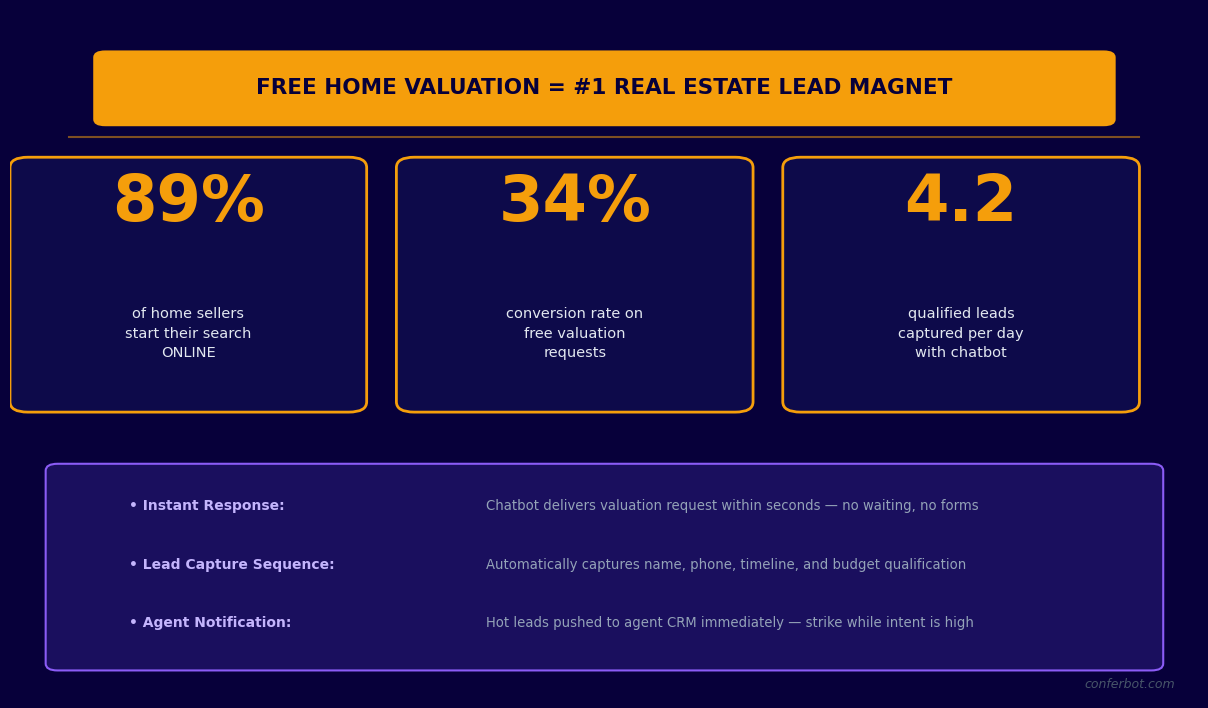
Static Valuation Widget vs. Chatbot Estimator
Automated Valuation Models (AVMs) like Zillow's Zestimate have a median error rate of 6-7% on off-market properties — a $30,000-$35,000 range on a $500,000 home. Static widgets present this number without context, leaving homeowners either overconfident (overpriced listing) or skeptical (dismisses the tool). A chatbot addresses both failure modes: it collects property-specific details the AVM cannot know (recent renovations, condition, unique features), applies them as explicit adjustments to the base estimate, and explains each factor in plain language. The result is an estimate the homeowner understands and trusts, delivered alongside a natural invitation to confirm it with a licensed agent.
- Higher lead capture rate: Chatbot valuation flows capture email and phone from 58-67% of users, compared to 18-24% for static AVM widgets, because users receive a more personalized estimate in exchange for their contact details.
- Better lead qualification: The conversation reveals seller motivation, timeline, and equity position — the three factors that determine lead quality for a listing agent — before any human time is invested.
- Lower cost per listing lead: A chatbot running 24/7 on your website captures valuation requests at 2am on a Sunday that would otherwise be lost until Monday morning, when a competitor has already responded.
Who Uses This Template
This template is purpose-built for residential listing agents, real estate teams, brokerages, iBuyers, property investment platforms, and any business where property valuation is the primary lead generation hook. It is equally applicable to commercial real estate platforms where an investment property value estimate opens the door to a broker relationship. Explore the full automation capabilities behind this bot in Conferbot's AI chatbot builder documentation.
How It Works: Property Details Intake, Comp Analysis, and Market Adjustments
The property valuation estimator bot operates through three sequential stages: structured data intake, comparable sales matching, and market adjustment calculation. Each stage builds on the previous one, creating a valuation that is more accurate and more credible than a pure AVM estimate — because it incorporates property-specific details that automated systems cannot access independently.
Stage 1: Property Details Intake
The bot begins by collecting the property's fundamental characteristics through a conversational intake flow. The sequence is designed to feel like a conversation with an informed agent rather than a data entry form. Each question is phrased to elicit accurate responses while maintaining engagement:
| Data Point | Bot Question | Valuation Use |
|---|---|---|
| Property address | "What is the address of the property you would like to value?" | Pulls tax records, MLS data, and recent comps for the specific location |
| Property type | "Is this a single-family home, condo, townhouse, or multi-family?" | Selects appropriate comp pool and adjustment model |
| Square footage | "Approximately how many square feet of living space does the property have?" | Core per-square-foot value calculation |
| Bedrooms and bathrooms | "How many bedrooms and bathrooms does it have?" | Bedroom/bathroom count adjustments against comps |
| Lot size | "What is the approximate lot size — do you know it in acres or square feet?" | Land value component, especially relevant in suburban and rural markets |
| Year built | "What year was the property built?" | Age-based depreciation adjustment, vintage premium for certain eras |
| Condition | "How would you describe the current condition? (Move-in ready, needs cosmetic updates, needs significant work)" | Condition adjustment: typically -3% to -12% vs. updated comps |
| Recent renovations | "Have there been any major renovations in the last 5 years — kitchen, bathrooms, roof, HVAC?" | Renovation premium: kitchen and bathroom updates typically add 3-7% to value |
| Special features | "Does the property have a pool, view, extra garage spaces, or other standout features?" | Feature adjustments based on local market premiums for each feature type |
Stage 2: Comparable Sales Analysis
With property details collected, the bot queries recent comparable sales data from connected data sources. Comps are filtered by proximity (typically 0.5-1 mile radius), recency (sold within the last 90-180 days), similarity (same property type, within 20% of subject square footage), and market tier (ensuring luxury homes are not compared to entry-level properties). The system identifies the 3-5 most comparable sales and calculates a base value per square foot from the comp set. This per-square-foot figure, multiplied by the subject property's square footage, produces the initial baseline value before adjustments.
Stage 3: Market Adjustment Calculation
The baseline value is then adjusted for the factors the comps do not perfectly reflect. Condition adjustments account for the subject's maintenance state relative to the average comp. Renovation premiums are added for verified improvements. Feature adjustments apply market-specific values for pools, views, and additional spaces. A market trend adjustment accounts for price movement in the specific zip code between the comp sale dates and the current valuation date — in a market appreciating at 0.8% per month, comps from 90 days ago require a 2.4% upward adjustment to reflect current pricing. The final output is a value range (not a single point estimate) that reflects the genuine uncertainty in comparable-based valuation while giving the homeowner a credible and actionable figure.
See the full range of conversational data collection capabilities available through Conferbot's no-code chatbot builder for customizing every intake question to your local market conventions.
Key Features: Conversational Intake, Live Data Queries, and Lead Scoring
The property valuation estimator chatbot combines real estate-specific data logic with Conferbot's conversational AI and lead generation infrastructure. The feature set is designed to serve two masters simultaneously: delivering a genuinely useful valuation experience for the homeowner, and capturing the lead qualification data agents need to prioritize follow-up effectively.
Feature Overview
| Feature | Description | Agent Benefit | Homeowner Benefit |
|---|---|---|---|
| Conversational property intake | 9-question structured intake covering all key valuation inputs, phrased conversationally | Collects data that improves estimate accuracy vs. AVM-only | Guided process feels expert, not like a form |
| Live comp queries | Real-time MLS or API-based comparable sales data retrieval on conversation completion | Estimates reflect current market, not static database | Valuation based on actual recent sales, not outdated data |
| Adjustment model | Condition, renovation, feature, and market trend adjustments applied to comp baseline | Produces defensible estimate the agent can stand behind | Understands why the number is what it is |
| Value range output | Delivers low-to-high range rather than single-point estimate, with explanation of range drivers | Sets realistic expectations before CMA consultation | Understands inherent uncertainty, builds trust vs. false precision |
| Seller motivation capture | Asks about selling timeline, reason for move, and equity awareness at the end of the valuation | Identifies hot sellers vs. curious homeowners for prioritization | Feels like a natural conversation, not interrogation |
| CMA booking | Offers to book a free comparative market analysis with a local agent at valuation completion | Converts valuation leads to CMA appointments in the same conversation | Clear next step to confirm the estimate with a professional |
| Lead scoring | Scores leads by timeline (under 90 days = hot), equity position, and motivation clarity | Prioritizes follow-up on genuinely ready sellers | Agent follow-up is timely and relevant |
| CRM integration | Creates contact and deal records in real estate CRMs (Follow Up Boss, LionDesk, KvCORE, HubSpot) | Zero manual data entry, complete lead profile in CRM | Personalized follow-up rather than generic drip |
| Report delivery | Sends a PDF valuation summary to the homeowner's email with comp data and adjustment breakdown | Creates branded touchpoint that keeps agent top-of-mind | Has a record to reference and share with family members |
NLP for Real Estate Context
Homeowners describe their properties imprecisely. "Just remodeled the kitchen" could mean a full gut renovation with $80,000 in improvements or new cabinet hardware and a fresh coat of paint. Conferbot's NLP engine detects ambiguity and follows up: "When you say remodeled — did you replace cabinets, countertops, and appliances, or was it more of a cosmetic refresh?" This clarification loop produces more accurate adjustment inputs without making the conversation feel like a form inspection. The same logic applies to condition descriptions — "good condition" in a 1985 home means something different than "good condition" in a 2018 build, and the bot accounts for that context.
Multi-Channel Delivery
The property valuation estimator deploys on your brokerage website, on WhatsApp (increasingly used for real estate inquiries in international markets), and on Facebook Messenger (where real estate Facebook ads drive significant inbound traffic). The same valuation logic, data integrations, and CRM connections apply across all channels from a single Conferbot configuration. Leads from all channels consolidate into the same analytics dashboard so you can measure which channel drives the highest-quality valuation leads.
Ready to try Property Valuation Estimator?
Deploy this template in under 10 minutes. No coding required.
Use This Template Free →Data Source Integrations: MLS, Zillow API, and County Records
A property valuation estimator is only as accurate as the data it pulls from. The three primary data sources for residential valuation — Multiple Listing Service (MLS) data, aggregator APIs like Zillow's, and county assessor records — each have distinct strengths, coverage gaps, and access requirements. Understanding how Conferbot's bot integrates with each source, and what each source contributes to the final estimate, is essential for configuring a valuation tool that produces defensible results.
MLS Data Integration
MLS data is the gold standard for comparable sales because it is the same source licensed agents use for formal CMAs. MLS access in the US requires either a licensed agent account, a broker API subscription, or an approved third-party data aggregator that has licensed MLS feeds. Conferbot integrates with MLS data via the RESO (Real Estate Standards Organization) Web API, which most regional MLSs support as of 2026. The integration queries recently sold listings within the configured radius and property type filters, returning price, square footage, bedroom/bathroom count, condition notes, and sold date. The RESO API connection requires your brokerage's MLS credentials or an aggregator API key — setup takes approximately 15 minutes through Conferbot's data source configuration panel.
Zillow API Integration
Zillow's API provides three data layers relevant to property valuation: the Zestimate (Zillow's AVM estimate for a given property), historical price data, and recent comparable sales data through Zillow's Bridge API. The integration works as follows:
- Zestimate as baseline: When a property address is entered, the bot can retrieve the current Zestimate as a starting baseline and then apply user-provided property details as adjustments. This approach is transparent — the bot shows the AVM baseline and then explains how specific property factors move the estimate up or down.
- Bridge API for comps: Zillow's Bridge API (available to licensed real estate professionals) provides comp data including sold price, sold date, and property characteristics for recent sales in the subject neighborhood. This data supplements or substitutes for direct MLS access where MLS credentials are not available.
- Coverage limitations: Zillow's data coverage is strongest in metropolitan markets. Rural and low-transaction-volume areas have thinner comp sets and lower AVM accuracy. In these markets, the bot should widen the search radius and extend the recency window to find sufficient comps, and should explicitly communicate the wider confidence interval to the user.
County Assessor Records Integration
County assessor records provide property-level data that is not always reflected in MLS listings: official square footage from permit records, lot dimensions, assessed value history, and permit history (which reveals whether renovations were properly permitted). Conferbot integrates with county assessor data through providers like ATTOM Data Solutions, CoreLogic, or direct county API access where available. Key uses in the valuation flow:
- Square footage verification: If a homeowner reports 2,200 square feet but county records show 1,950 (pre-addition permit) and 2,100 (post-addition permit), the bot flags the discrepancy and asks for clarification rather than using an unverified number in the calculation.
- Permit history: Unpermitted work is a significant liability in real estate transactions. County records reveal whether major renovations were permitted — an important qualifier for renovation adjustment values and a risk flag for potential buyers.
- Assessed value history: While assessed value is not a reliable market value proxy, assessed value trends signal how the county views the property relative to its neighborhood and can flag properties that are significantly over- or under-assessed compared to market sales.
Data Source Comparison
| Data Source | Comp Quality | Coverage | Access Requirement | Update Frequency |
|---|---|---|---|---|
| MLS (via RESO API) | Highest — same data agents use | US markets with MLS coverage | Licensed agent / broker API access | Real-time on sale entry |
| Zillow Bridge API | High in major markets, moderate in rural | National US coverage | Licensed professional API key | Updated within 24-48 hours of sale |
| County assessor records | Not comp data — property facts only | US county coverage (varies by county digitization) | ATTOM/CoreLogic subscription or direct county API | Weekly to monthly (varies by county) |
| ATTOM Data Solutions | High — aggregates MLS + public records | 155M+ US properties | Commercial data subscription | Daily updates |
For teams building a valuation bot without MLS API access, the recommended starting configuration is Zillow Bridge API (for comp data) plus ATTOM (for property facts and permit history). This combination provides sufficient data quality for a credible residential estimate across most US markets. Connect all data sources through Conferbot's API integration panel using the REST connector.
Accuracy Considerations: What a Chatbot Estimate Can and Cannot Do
Setting accurate expectations about valuation accuracy is not just ethically important — it is strategically important. A homeowner who receives a bot estimate of $520,000 and later receives an agent CMA of $485,000 will feel misled, even if the difference is entirely explainable by factors the bot could not assess. Conversely, a homeowner who receives a clearly explained $480,000-$530,000 range with a note that "a formal CMA will narrow this range based on an in-person inspection" will trust the agent who delivers the full consultation. Calibrated honesty about accuracy builds the relationship; false precision destroys it.
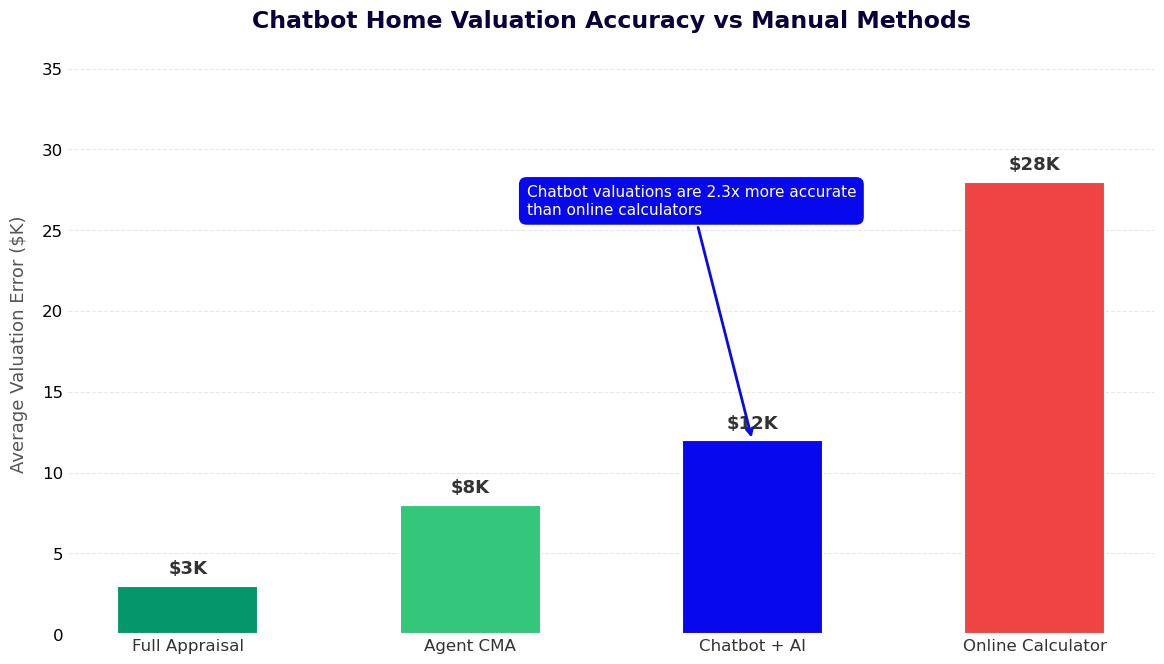
Sources of Estimation Error
Understanding where chatbot valuations deviate from actual market value helps configure the bot to minimize errors and communicate uncertainty appropriately:
- Condition subjectivity: "Move-in ready" means different things to different homeowners. A professional agent inspecting the property will catch deferred maintenance, water damage, HVAC age, and other condition factors that a homeowner either does not notice or does not disclose. Bot estimates should apply a modest conservative bias when condition is self-reported as "good" or better.
- Renovation quality variation: Not all kitchen renovations are equal. A $15,000 IKEA kitchen refresh adds less value than a $60,000 custom renovation, even if both are described as "kitchen remodel." The bot cannot assess quality — it can only apply a range-based adjustment and note that the actual value depends on quality level the agent can assess in person.
- Micro-location factors: Comp data within a half-mile radius may span dramatically different micro-market conditions — a street that backs onto a highway vs. one that faces a park can have 8-15% price differences within the same radius. Without physical inspection, the bot cannot account for specific location factors within the comp search area.
- Thin comp markets: In markets with fewer than 3-5 sales per year within the search radius and property type, any single outlier sale heavily influences the per-square-foot calculation. The bot should communicate the comp count explicitly and widen the confidence interval when fewer than 3 strong comps are available.
Median Error Rate Benchmarks by Market Type
| Market Type | Expected Bot Estimate Error | Zillow Zestimate Baseline Error | Primary Error Driver |
|---|---|---|---|
| Dense urban (NYC, LA, Chicago) | 4-6% | 4.5% | Condition and unit-specific factors in multi-family |
| Suburban mid-market | 5-8% | 6.2% | Condition self-reporting, renovation quality variation |
| Rural / low-transaction | 9-15% | 11.8% | Thin comp sets, land value uncertainty |
| Luxury (above $1.5M) | 8-12% | 10.5% | Unique features, limited comp volume at price tier |
| New construction communities | 3-5% | 3.8% | High comp similarity, recent sales data rich |
Legal and Compliance Considerations
The bot's valuation output must be clearly labeled as an automated estimate, not a formal appraisal or Broker Price Opinion (BPO). In the United States, only licensed appraisers can produce a formal appraisal under USPAP standards. Real estate agents and brokers can provide Broker Price Opinions in most states, but these require in-person inspection and written documentation. The bot's output should include a standard disclaimer: "This estimate is an automated calculation based on comparable sales data and information you have provided. It is not an appraisal, BPO, or formal valuation. Contact a licensed agent for an official comparative market analysis." Conferbot's template ships with legally reviewed disclaimer language that can be customized for your state's specific disclosure requirements.
Track estimate accuracy over time by comparing bot-provided ranges against eventual listing prices and sale prices for leads who proceed to listing. This closed-loop data feeds back into your adjustment model calibration. Use Conferbot's analytics dashboard to export lead outcome data for this analysis.
Lead Generation From Valuations: Converting Estimates Into Listing Appointments
A property valuation request is one of the highest-intent signals a homeowner can send to a real estate agent. Someone who asks "what is my home worth?" is, at minimum, thinking about selling — and at maximum, is 30-90 days from listing. The challenge is that most valuation tools fail to convert this intent into a listing relationship because they deliver the estimate and then present no compelling next step. The property valuation estimator bot is designed to close this gap with a structured lead conversion sequence embedded directly into the valuation experience.
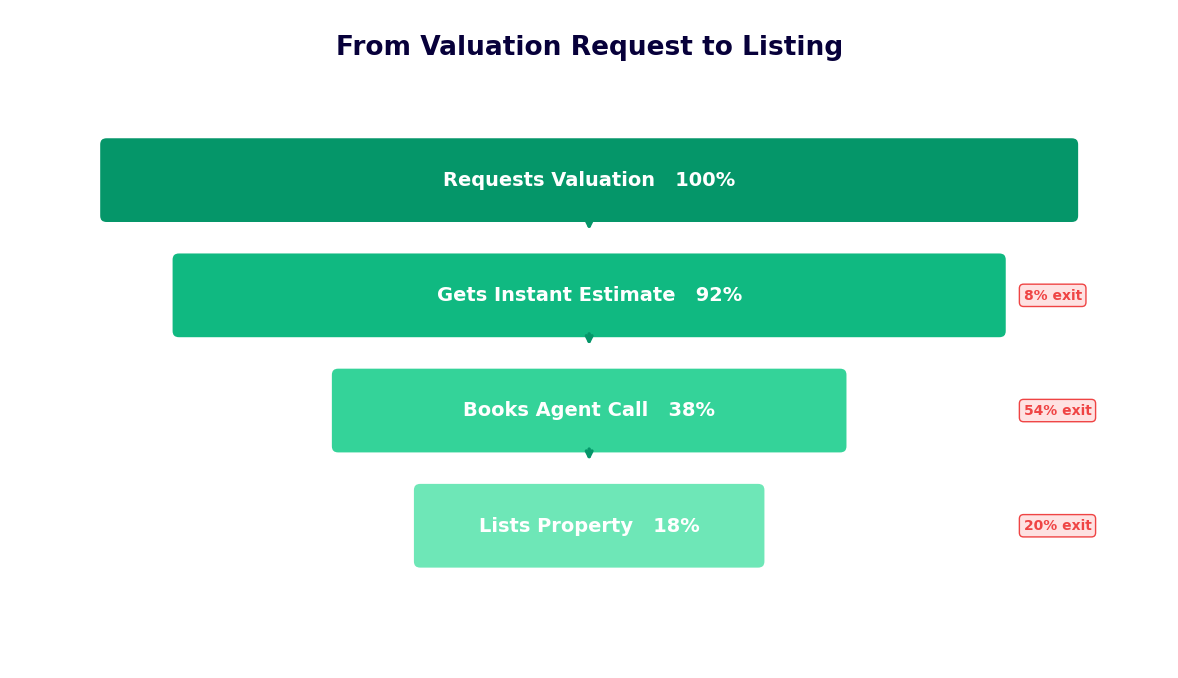
The Lead Generation Funnel Within the Valuation Flow
Lead capture is integrated into the valuation conversation at two natural moments — not as an interruptive gate before results, but as a value exchange after the estimate is delivered:
- At results delivery: After presenting the value range, the bot offers to send a full valuation report (PDF with comp details, adjustment breakdown, and market trend data) to the homeowner's email. This report delivery request captures email with a genuine value exchange rather than a forced gate. Opt-in rates for report delivery range from 58-72% because the homeowner understands what they are receiving.
- At CMA booking: After delivering the estimate and report, the bot presents the next natural step: "Our agents can sharpen this estimate with an in-person comparative market analysis — typically more accurate by 4-6%. Would you like to schedule a free CMA?" This offer is positioned as a service (accuracy improvement) rather than a sales call, which materially increases booking acceptance rates.
Seller Intent Qualification
Not all valuation requests represent imminent listing opportunities. A homeowner refinancing their mortgage, an estate executor estimating probate value, a neighbor curious about property values, and an active seller preparing to list all use valuation tools — but represent very different agent follow-up priorities. The bot captures intent signals through two questions after the estimate delivery:
- Reason for valuation: "Are you thinking of selling, refinancing, curious about your equity, or something else?" This single question segments leads into priority tiers before they reach the CRM.
- Timeline: "If you are thinking of selling, are you looking at this year, within 6 months, or within 90 days?" Timeline is the single strongest predictor of lead value for a listing agent.
Lead Scoring Model for Valuation Leads
| Signal | High-Priority Score | Medium-Priority Score | Low-Priority Score |
|---|---|---|---|
| Selling timeline | Under 90 days | 6-12 months | Exploring / no timeline |
| Reason for valuation | Planning to sell | Equity curiosity + mentions selling | Refinancing or pure curiosity |
| Equity position | 20%+ equity (motivated seller) | 5-20% equity | Underwater or unknown |
| CMA booking | Booked CMA during conversation | Expressed interest, did not book | Declined CMA offer |
| Contact completeness | Name + email + phone | Name + email | Email only |
Post-Valuation Nurture Sequencing
Homeowners who receive a valuation but are not ready to list in the next 90 days represent the most valuable segment of a real estate agent's long-term pipeline. A homeowner considering selling in 12 months who receives a monthly market update email — showing how their estimated home value has moved — from your agency is significantly more likely to call you when they are ready to list than one who received a one-time automated estimate with no follow-through. Configure CRM nurture sequences for valuation leads via Conferbot's integration with real estate CRMs: Follow Up Boss, LionDesk, KvCORE, or HubSpot. The valuation data feeds directly into personalized nurture content — "Your home's estimated value in [Zip Code] has increased by 3.2% since your valuation in March" — that keeps your agency top-of-mind through a 6-12 month consideration period.
See how valuation leads integrate with broader real estate lead generation strategy in the lead generation templates library. Explore the chatbot ROI calculator to estimate the listing revenue impact of deploying a 24/7 valuation bot on your brokerage website.
50,000+ businesses use Conferbot templates to automate conversations
Setup Guide: Configuring Your Property Valuation Estimator Bot
Deploying a property valuation estimator bot involves connecting data sources, configuring the adjustment model for your local market, setting up lead routing and CRM integration, and defining the post-valuation conversion flow. This guide covers each configuration step in the order they should be completed, with estimated time for each stage.
Step 1: Select and Connect Your Data Sources (20-30 Minutes)
Determine which data sources you have access to and configure them in Conferbot's data source panel. For most independent agents and small teams, the recommended starting configuration is:
- Zillow Bridge API: Apply for access through Zillow's developer portal with your real estate license credentials. Approval typically takes 2-5 business days. Once approved, enter your API key in Conferbot's integrations panel and configure the comp search parameters: search radius (default 0.75 miles), recency window (default 180 days), property type filter, and minimum comp count (default 3).
- ATTOM or county records: If you are subscribing to ATTOM, enter your API credentials in the same panel. For county-direct access, enter the county assessor API endpoint and any required authentication parameters. This step is optional for launch — the bot functions with comp data alone, adding county records improves accuracy for properties with permit history or discrepancies.
- MLS integration (if available): If your brokerage provides RESO API access, enter credentials here. MLS data will supersede Zillow comps where available, with Zillow serving as fallback in areas with lower MLS coverage.
Step 2: Configure the Adjustment Model (15 Minutes)
The adjustment model determines how property-specific factors move the estimate relative to the raw comp baseline. Default adjustment values in the template reflect national averages from Fannie Mae and CoreLogic research; these should be calibrated to your local market:
- Condition adjustments: Default values are -3% (needs cosmetic updates) and -10% (needs significant work) relative to updated-condition comps. Adjust based on your market's typical discount for deferred maintenance.
- Renovation premiums: Defaults are kitchen remodel +4%, bathroom remodel +2.5%, new roof +1.5%, new HVAC +1%. These vary significantly by price tier — renovation premiums are proportionally larger in mid-market homes than in luxury, where buyers expect high-end finishes as baseline.
- Feature adjustments: Pool premium (market-dependent: positive in the South, neutral or negative in northern climates), view premium (0-8% depending on market), additional garage space (2-4% per extra space in suburban markets).
Step 3: Configure the Valuation Output and Report (10 Minutes)
Set the confidence interval width (default: plus/minus 6% from the midpoint estimate) and the range communication language. Upload your agency logo and contact information for the PDF valuation report. Configure the report delivery email template — the email that sends the PDF to the homeowner's address — with your brand colors and a clear CTA inviting them to book a CMA. Use Conferbot's no-code chatbot builder to customize the in-conversation valuation language to match your agency's communication style.
Step 4: Set Up CRM Integration and Lead Routing (15 Minutes)
Connect your real estate CRM via OAuth or API key. Map chatbot-collected fields (address, property details, seller intent, timeline, contact information) to CRM contact and lead fields. Configure lead scoring rules that assign priority tags (Hot/Warm/Cold) based on the scoring model from the lead generation section. Set up routing rules for hot leads: immediate Slack or SMS notification to the listing agent responsible for the property's zip code, versus a daily digest for warm and cold leads.
Step 5: Configure the CMA Booking Flow (10 Minutes)
Connect the assigned listing agent's calendar via calendar booking integration. Configure CMA meeting duration (typically 45-60 minutes), advance booking window, and available time slots. Write the CMA offer message that appears after the valuation results — this is one of the highest-leverage copywriting decisions in the entire setup. Lead with the value of accuracy improvement, not the sales opportunity: "A free in-home CMA typically narrows this range by 4-6% and takes about 45 minutes" consistently outperforms "Schedule a free listing consultation."
Step 6: Deploy and Test (10 Minutes)
Deploy the bot on your website's most relevant pages: homepage, "What's My Home Worth?" landing pages, and seller resource pages. Run test valuations with addresses you know well — compare the bot's estimate to your own CMA knowledge to calibrate whether adjustments need tuning. Verify that the PDF report generates correctly, CRM records populate with the right field mapping, and the CMA booking calendar shows correct availability. Once three end-to-end tests pass cleanly, the bot is ready for live traffic.
Agent Follow-Up Workflows: Converting Valuation Leads Into Listings
A property valuation lead delivered to a CRM without a structured follow-up workflow is a missed listing opportunity. The conversion rate from valuation request to signed listing agreement depends almost entirely on the speed, relevance, and persistence of agent follow-up — not on the quality of the automated estimate. Agents who follow up within 5 minutes of a high-priority valuation lead convert listings at 4-7x the rate of those who follow up within 24 hours. Here is the complete follow-up workflow architecture optimized for each lead priority tier.
Hot Lead Follow-Up (Timeline Under 90 Days, Reason: Planning to Sell)
Hot valuation leads require immediate, personal outreach combined with relevant market intelligence. The workflow:
- 0-5 minutes: Agent receives SMS notification with lead name, property address, estimated value, timeline, and a direct link to the full CRM record. The notification message includes a suggested opening line for the call: "Hi [Name], I saw you just got a value estimate on your home at [Address] — I'm [Agent Name] from [Agency] and I have some current market data for your neighborhood I'd love to share."
- 5-15 minutes: Agent places a phone call. Research from the Harvard Business Review confirms that call-back within 5 minutes increases contact rate by 100x compared to a 30-minute delay. Voicemail script is pre-populated in the CRM task if no answer.
- Hour 1: If no phone contact, a personalized text message is sent with a direct link to the agent's booking page: "Hi [Name], I'm following up on your home value estimate — I can share updated comparable sales for your street. Would it be easier to chat by phone or schedule a quick CMA? [booking link]"
- Day 1: A personalized email with a neighborhood market snapshot (recent sales within 0.5 miles, median days on market, list-to-sale price ratio) from the agent. This email demonstrates local market expertise — the asset that differentiates an agent from an automated tool.
- Day 3, 7, 14: Follow-up touchpoints alternating between email and text, each delivering fresh market context rather than administrative "just checking in" messages.
Warm Lead Follow-Up (Timeline 6-12 Months)
Warm leads are not ready to list today but are on a defined path toward listing. The goal is to be the agent they call when that timeline shortens — not through aggressive sales follow-up, but through consistent value delivery over the consideration period:
- Day 1: Personal email from the agent acknowledging the timeline, validating the decision to start research early, and offering a market update subscription.
- Monthly: Automated market update email showing how the bot's estimated value range has shifted since the original valuation. Include 2-3 recent comparable sales from the homeowner's neighborhood with brief commentary from the agent. This keeps the agent's name associated with the homeowner's mental model of their property value — the most valuable positioning in a 12-month consideration period.
- Quarterly: A direct call or text from the agent checking in on the timeline. Many "12-month" sellers accelerate their timeline due to life events — job changes, family circumstances, market conditions. The agent who is already in the relationship at that moment gets the listing.
Cold Lead Nurture (Refinancing, Curiosity, No Timeline)
Cold leads enter a long-term nurture sequence with minimal manual agent involvement. A quarterly email with neighborhood market data, seasonal real estate market overviews, and a consistent CTA to get an updated valuation keeps the agency visible without consuming agent time. A meaningful percentage of cold leads convert to hot leads within 18-24 months as life circumstances change.
Follow-Up Workflow Performance Benchmarks
| Follow-Up Speed | CMA Booking Rate (Hot Leads) | Listing Conversion Rate | Time to Listing Agreement |
|---|---|---|---|
| Under 5 minutes (bot notification + immediate call) | 58% | 31% | 18 days average |
| 5-60 minutes (same-day rapid response) | 41% | 22% | 24 days average |
| 1-24 hours (next business day) | 23% | 13% | 35 days average |
| 24+ hours (delayed response) | 11% | 6% | 48 days average |
Conferbot's live chat integration allows agents to monitor high-priority valuation conversations in real time and intervene with a personal message at the exact moment a hot lead is most engaged — before the conversation ends. This real-time monitoring capability is particularly valuable for luxury or high-equity listing leads where the listing commission justifies immediate agent involvement. See how Conferbot's omnichannel platform unifies follow-up across website chat, WhatsApp, and email into a single agent dashboard. Explore Conferbot pricing to find the plan that scales to your monthly valuation lead volume.
Property Valuation Estimator FAQ
Everything you need to know about chatbots for property valuation estimator.
Why Use a Template vs Building from Scratch?
Templates encode years of optimization data into the conversation flow before you start.
| Factor | Conferbot Template | Build from Scratch | Hire a Developer |
|---|---|---|---|
| Time to deploy | 10 minutes | 2-8 hours | 2-6 weeks |
| Cost | Free | Your time | $5,000-$25,000 |
| Day-1 conversion | 15-22% | 5-8% | 10-15% |
| Proven flows | Yes, data-tested | No | Depends |
| Updates included | Automatic | Manual | Paid |
| Multi-channel | 8+ channels | 1 channel | Extra cost |
| Analytics | Built-in | Must build | Extra cost |
Related Real Estate and Property Management Templates
Explore more chatbot templates in this category






Ready to Deploy Property Valuation Estimator?
Join 50,000+ businesses. Free forever plan available. No credit card required.