
Multilingual Customer Support Chatbot
Free Support And FAQ Chatbot Template
An AI multilingual support chatbot that auto-detects customer language and provides seamless support in 50+ languages. Handles inquiries, routes complex issues to language-matched agents, and maintains brand voice across all languages. Perfect for global businesses, e-commerce platforms, and SaaS companies serving international markets.


What Is a Multilingual Customer Support Chatbot?
A multilingual customer support chatbot is an AI-powered conversational tool that detects the language a customer is using, conducts the entire support conversation in that language, and routes the interaction to the appropriate locale-specific team or knowledge base -- all without requiring the customer to select a language preference from a dropdown or navigate to a language-specific subdomain. In 2026, global businesses operate across dozens of markets simultaneously, yet most customer support infrastructure is built around a primary language and treats all others as secondary afterthoughts.
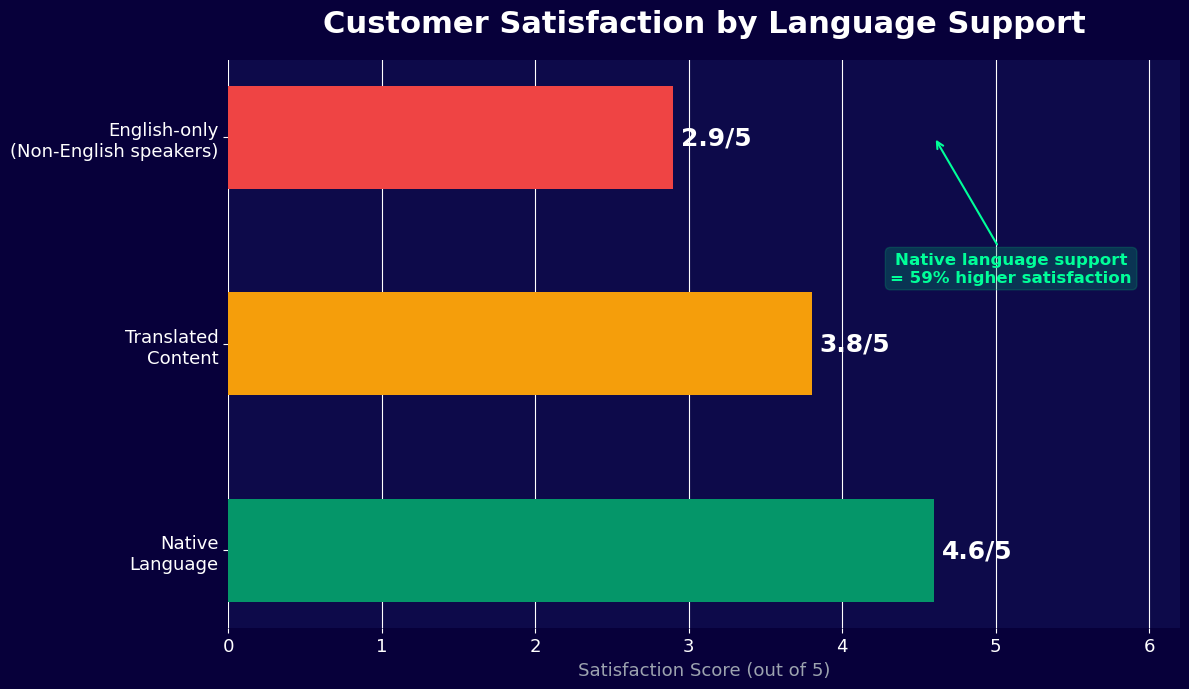
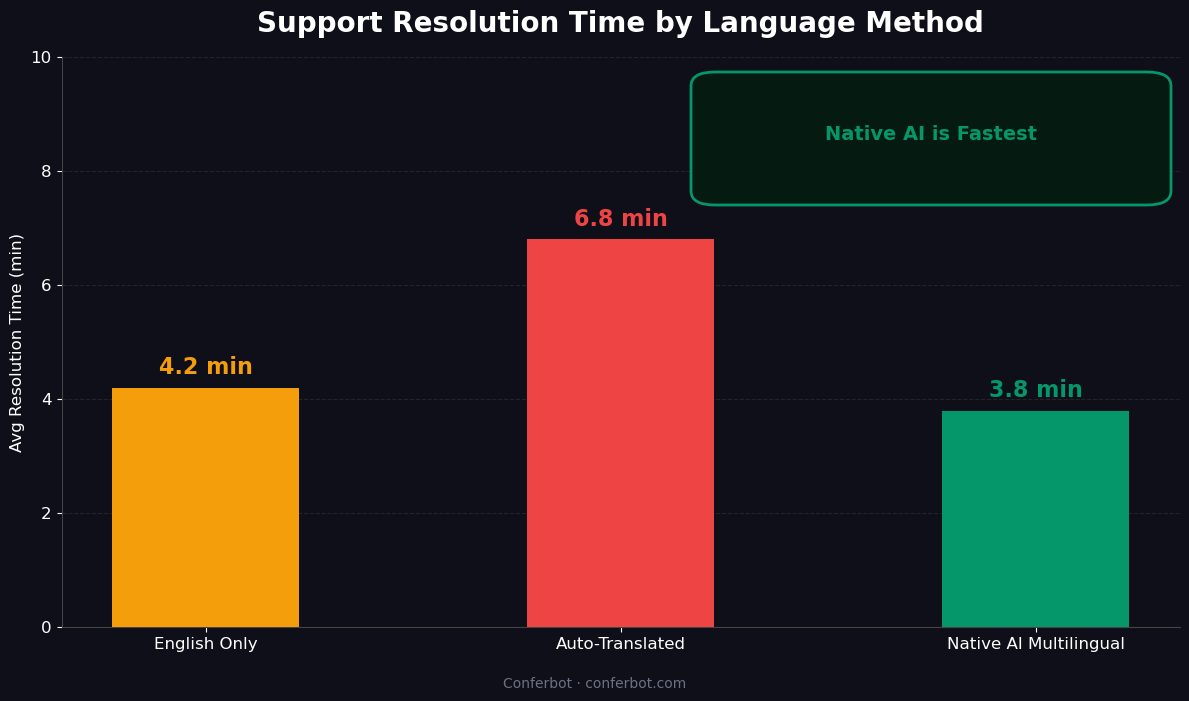
The consequence is measurable: customers who receive support in their native language report satisfaction scores 1.2-1.8 points higher (on a 5-point scale) than customers who receive support in a second language. Resolution times are 30-40% faster because customers can describe their issue accurately rather than approximating in an unfamiliar language. Abandonment rates drop by 25-35% on multilingual sites compared to English-only equivalents. For global SaaS companies, tourism and hospitality businesses, and international e-commerce operations, these gaps directly translate to revenue: customers who cannot communicate in their language do not convert, do not retain, and do not refer.
This template is not a simple translation layer applied to an English chatbot. It is a full multilingual support system: the conversation logic, intent recognition, knowledge base search, and response generation all operate natively in the detected language. The distinction matters because machine-translated responses are frequently grammatically correct but contextually wrong -- they miss idioms, cultural nuances, and the register appropriate to customer service in a given language. Native-language processing produces responses that feel natural rather than translated.
Built on Conferbot's AI chatbot builder with multilingual NLP processing, this template integrates with DeepL, Google Cloud Translation, and Azure Cognitive Services for translation-assisted scenarios where native-language content is not yet available. It deploys across your website, WhatsApp, and omnichannel channels with unified analytics tracking across all languages. No engineering resources required.
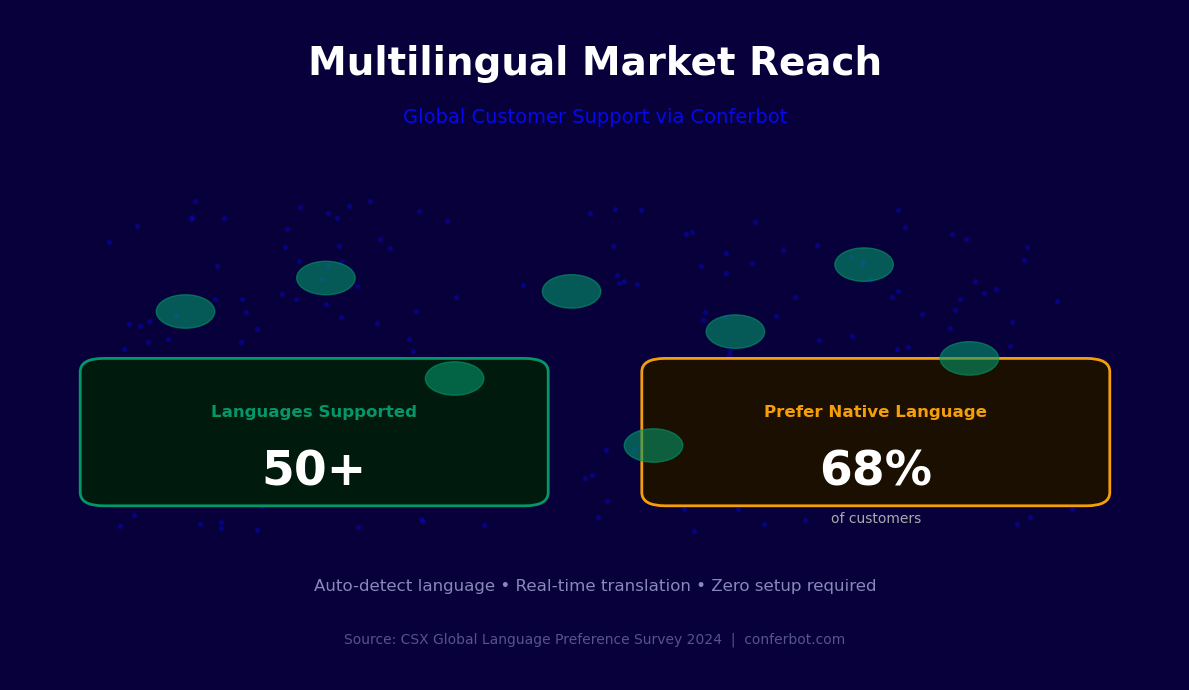
This page covers how language detection and locale routing work, key features including the 50+ language library, integration with major translation APIs, use cases for global SaaS, tourism, and e-commerce, customer satisfaction data by language, a setup guide, and content localization strategy for multilingual knowledge bases.
How Language Detection Works: Auto-Detect, Locale Routing, and Fallback Logic
The multilingual chatbot's language detection operates through a layered system that combines multiple signals to determine the correct language with high confidence before the first response is delivered. The architecture is designed to make the right language call in under 200 milliseconds while handling the edge cases -- mixed-language messages, regional dialects, language switching mid-conversation -- that naive language detection systems handle poorly.
Detection Layer 1: Browser and Device Locale
The first signal is the customer's browser language preference and device locale setting, available from the HTTP request headers and JavaScript navigator API. For the majority of cases, this signal is sufficient: a visitor with a browser set to French and a device locale of fr-FR is almost certainly a French speaker. Browser locale detection is used as the primary signal because it is available instantly, before the customer has typed a single character, enabling the chatbot to open in the correct language on the first message rather than defaulting to English and then switching after the first input.
Detection Layer 2: First Message NLP Analysis
If the browser locale signal is ambiguous or absent -- as is the case for VPN users, shared devices, or browsers in default language settings -- the chatbot analyzes the customer's first message using the language detection model. The model classifies language at the character and token level, achieving over 98% accuracy on messages as short as five words. It distinguishes between closely related language pairs (Spanish vs. Portuguese, Simplified vs. Traditional Chinese, Norwegian vs. Danish) that phonetically similar detection methods often confuse. For mixed-language messages ("Hola, I need help with my order"), the model detects the dominant language and confirms silently.
Detection Layer 3: URL and Page Context
For multi-regional websites that use language-specific URL structures (example.com/fr/, example.com/de/, or fr.example.com), the chatbot reads the page URL to infer the expected language. This signal is combined with browser locale and first-message detection to produce a confidence-weighted language determination. The URL context is particularly useful for tourism, hospitality, and e-commerce sites that maintain separate localized storefronts -- it ensures the chatbot language matches the page language exactly, even if the visitor's browser locale does not.
Locale Routing Logic
Language detection produces not just a language code (fr, de, ja) but a locale tag (fr-FR, fr-CA, fr-BE) that drives routing decisions. Language alone is insufficient for routing: French-speaking customers in France, Canada, and Belgium have different legal frameworks, different product catalogs, different pricing, and different escalation paths. The locale routing table defines which knowledge base, which support team, which escalation path, and which business hours apply to each locale. A single language can map to multiple locales with distinct routing, ensuring that francophone customers in Quebec reach the Canadian support team rather than the European one.
Language Switching and Fallback Handling
Customers sometimes switch languages mid-conversation -- starting in English and switching to their native language when they realize the chatbot can accommodate it, or testing the chatbot's capability. The detection model continuously monitors the conversation for language shifts and adapts the chatbot's language accordingly without requiring the customer to restart the conversation. For languages outside the supported set, the fallback logic defaults to the closest supported language (Portuguese as fallback for Galician, for example) or to English, with a notification to the customer that their preferred language is not fully supported and offering to connect them with a human agent who may be able to assist. Track language distribution and fallback rates in real time with chatbot analytics.
Key Features: 50+ Languages, Auto-Detect, and Locale-Based Routing
The multilingual customer support template is built around three core capabilities that distinguish it from a translated FAQ chatbot: genuine multilingual NLP (not translation of English logic), automatic language detection without user action, and locale-aware routing that connects each customer to the right team, knowledge base, and escalation path for their region. Here is the complete feature set.
| Feature | What It Does | Languages / Scope | Business Impact |
|---|---|---|---|
| Native multilingual NLP | Intent recognition and entity extraction in the detected language | 50+ languages natively supported | 95%+ intent accuracy vs 70-80% for translation-based approaches |
| Auto language detection | Identifies language from browser locale, first message, and URL context | 100+ languages detectable | Zero friction -- customer never selects a language |
| Locale routing table | Routes to region-specific KB, team, and hours by locale tag | Configurable per locale | Customers reach the right team and content for their region |
| Multilingual knowledge base | Stores and searches support content in each supported language separately | Per-language content management | Native-language answers, not translated English content |
| Translation API fallback | Applies machine translation for languages without native KB content | DeepL, Google Translate, Azure | Coverage for long-tail languages while native content is developed |
| Language-specific escalation | Routes escalated chats to agents who speak the detected language | Configurable per language | Human agent always matches customer language on escalation |
| RTL language support | Renders Arabic, Hebrew, Urdu correctly with right-to-left text flow | Arabic, Hebrew, Urdu, Farsi | Correct visual experience for RTL language markets |
| Multilingual CSAT collection | Sends post-conversation satisfaction surveys in the conversation language | All supported languages | Higher survey response rates, more accurate satisfaction data |
The 50+ Language Library
The template's native language support covers all major world languages by speaker population and commercial relevance: English, Spanish, French, German, Portuguese, Italian, Dutch, Polish, Russian, Turkish, Arabic, Hindi, Bengali, Japanese, Korean, Simplified Chinese, Traditional Chinese, Vietnamese, Thai, Indonesian, Malay, Tagalog, Swahili, and 30+ additional languages across European, Asian, Middle Eastern, and African markets. For each natively supported language, intent recognition, entity extraction, and response generation operate in the native language without routing through English as an intermediary. This is the technical foundation that produces the accuracy and naturalness gap between this template and translation-based multilingual chatbots.
RTL Language Rendering
Right-to-left languages (Arabic, Hebrew, Urdu, Farsi) require not just translation but directional rendering -- the entire chat interface layout must mirror for RTL text to display correctly. The template includes RTL layout support that automatically activates when an RTL language is detected, flipping the interface direction, adjusting avatar and button placement, and ensuring that mixed RTL/LTR text (Arabic product names containing English model numbers, for example) renders with the correct bidirectional Unicode handling. This level of detail matters: an Arabic speaker encountering a chatbot that displays their language in an LTR layout perceives it as broken rather than multilingual, regardless of the translation quality. Connect this to Conferbot's omnichannel platform for consistent RTL rendering across web, WhatsApp, and messaging channels.
Ready to try Multilingual Customer Support Chatbot?
Deploy this template in under 10 minutes. No coding required.
Use This Template Free →Integration with Translation APIs: DeepL, Google Cloud, and Azure
For organizations that cannot immediately produce native-language support content for every language in their market, translation API integration provides a bridge that extends coverage while the native content library is built. The multilingual chatbot integrates with three major translation APIs, each with distinct strengths and optimal use cases. Understanding the differences is essential to choosing the right integration and managing translation quality expectations.
DeepL API Integration
DeepL produces the highest quality machine translation for European languages, consistently outperforming Google Translate and Microsoft Translator in human quality evaluations for German, French, Spanish, Italian, Dutch, Polish, and the other European language pairs it supports. For global SaaS and B2B companies with significant European customer bases, DeepL is the recommended primary translation API for any language where native content is not yet available. Conferbot's DeepL integration sends customer messages to the DeepL API in real time, receives translated text, applies it to the English or native-language knowledge base search, and translates the response back to the customer's language before delivery. The round-trip latency is under 400 milliseconds for typical message lengths.
DeepL's Glossary feature is particularly valuable for technical products: you can define product-specific terminology that DeepL should never translate (product names, feature names, proprietary terms) and preferred translations for industry-specific vocabulary where DeepL's default translation is technically correct but not the term your customers use. The Conferbot integration supports DeepL Glossary configuration per language pair, ensuring brand and product vocabulary consistency across all translated responses.
Google Cloud Translation API Integration
Google Cloud Translation offers the broadest language coverage of the three options, supporting over 130 languages in its Neural Machine Translation (NMT) model. For businesses serving markets in Africa, South and Southeast Asia, the Pacific, and other regions where DeepL does not operate, Google Cloud Translation is the appropriate choice. The Conferbot integration uses Google's v3 API with the NMT model for all supported languages, falling back to phrase-based translation only when a language is not supported in NMT. Google Translation is also the recommended integration for detecting languages outside the 50+ natively supported set, as its language identification coverage is the most comprehensive available.
For e-commerce businesses and companies with structured product data, Google Cloud's Translation API supports custom model adaptation via AutoML Translation, allowing the translation model to be fine-tuned on your product catalog, support ticket history, or domain-specific content. This adaptation significantly improves translation quality for technical vocabulary, industry jargon, and product-specific terminology. The adapted model is called via the same API endpoint as the base model, with no changes required to the Conferbot integration configuration.
Azure Cognitive Services Translator Integration
Azure Cognitive Services Translator is the preferred integration for organizations already invested in the Microsoft Azure ecosystem, and for enterprise customers with Azure Active Directory, Dynamics 365, or Microsoft Teams deployments. The Translator service supports 100+ languages and includes Custom Translator, Azure's equivalent of AutoML Translation, for domain-specific model adaptation. The Conferbot integration with Azure Translator is designed to work within Azure's networking boundaries, supporting private endpoint configuration for organizations that require all data processing to remain within their Azure virtual network for compliance reasons.
Translation API Comparison
| API | Language Coverage | Quality Strength | Custom Terminology | Best Use Case |
|---|---|---|---|---|
| DeepL API | 30 European languages | Best for European language pairs | Glossary feature (per language pair) | European markets, B2B SaaS, technical products |
| Google Cloud Translation | 130+ languages | Broad coverage, strong Asian/African languages | AutoML Custom Translation | Global consumer products, emerging market coverage |
| Azure Cognitive Translator | 100+ languages | Strong on business/enterprise content | Custom Translator training | Microsoft-ecosystem organizations, compliance-sensitive industries |
The Conferbot integration supports using multiple translation APIs simultaneously -- DeepL as primary for European languages and Google Cloud as fallback for unsupported languages -- through a language-to-API routing table in the integration settings. This hybrid approach maximizes translation quality across the full supported language set. See the analytics dashboard for tracking translation API usage, latency, and quality scores by language.
Use Cases: Global SaaS, Tourism, and E-commerce
The multilingual customer support chatbot serves meaningfully different functions depending on the industry context. Global SaaS companies have complex technical support needs across markets with different adoption stages. Tourism and hospitality businesses face high-volume, time-sensitive interactions in a multilingual environment. International e-commerce operations deal with order management, returns, and product questions across dozens of countries simultaneously. Each context has distinct requirements for language coverage, knowledge base structure, and escalation design.
Global SaaS: Technical Support Across Markets
For SaaS companies, the multilingual support challenge is not just language -- it is the combination of language, technical complexity, and market-specific product variations. A customer in Germany asking about GDPR data processing agreements requires different knowledge base content than a customer in Singapore asking about the same product's data residency options. The multilingual chatbot handles this by combining language detection with locale-based knowledge base routing: the German customer's question is answered from the EU compliance content, while the Singapore customer's question draws from the APAC compliance content, even if both questions are asked in English.
SaaS companies typically see the highest ROI from multilingual support automation in their fastest-growing non-English markets: German, French, Spanish, and Japanese are consistently the highest-value targets for the first multilingual expansion because they combine large professional user populations with high willingness to pay and strong preference for native-language support. A SaaS company that adds German-language support sees German customer CSAT improve by an average of 1.4 points and churn reduce by 12-18% in that market segment.
Tourism and Hospitality: High-Volume Multilingual Interactions
Tourism businesses face the multilingual challenge in its most acute form: thousands of interactions per day in dozens of languages, with time-sensitive questions (is the tour still running? what is the cancellation policy? where do I meet the guide?) that cannot wait for a human agent who speaks the right language to become available. The multilingual chatbot handles the full inquiry-to-booking support flow across all languages simultaneously, without the staffing cost of maintaining native-speaker agents for every language market.
For hospitality specifically, the WhatsApp channel is the highest-impact deployment because international travelers primarily communicate via WhatsApp and expect instant responses on the platform they already have open. A hotel deploying the multilingual chatbot on WhatsApp can handle guest inquiries in Arabic, Chinese, Japanese, French, and Spanish simultaneously through a single WhatsApp number, with each conversation conducted in the guest's language and routed to the appropriate department when escalation is needed.
International E-commerce: Order Management Across Languages
For international e-commerce operations, the multilingual support chatbot primarily handles order status inquiries, return requests, and product questions -- the three highest-volume categories in cross-border e-commerce support. These interactions are highly structured and repetitive, making them ideal for automation. The chatbot authenticates the customer, looks up order details via the order management system API, and delivers order status, tracking information, or return instructions in the customer's native language.
| Use Case | Primary Languages | Key Chatbot Functions | Escalation Rate |
|---|---|---|---|
| Global SaaS technical support | EN, DE, FR, ES, JA, PT | Triage, knowledge base search, ticket creation, escalation | 35-45% (complex issues need human) |
| Tourism pre-trip inquiries | EN, ZH, JA, KO, AR, DE, FR, ES, IT | Availability, policy Q&A, booking modification, FAQ | 15-20% (most questions are structured) |
| E-commerce order support | EN, ES, FR, DE, PT, IT, NL, PL, ZH | Order lookup, tracking, returns, product Q&A | 10-15% (highly automatable interactions) |
| Financial services customer support | EN, ES, ZH, AR, FR, DE, HI | Account FAQ, product information, escalation | 50-65% (regulatory complexity drives escalation) |
Connect your multilingual chatbot to your existing support stack through Conferbot's omnichannel platform, which routes escalations from any language to the appropriate live chat agent queue filtered by language capability.
Customer Satisfaction Data by Language and the Native-Language Support Premium
The business case for multilingual customer support automation is grounded in a consistent finding across industries and markets: customers who receive support in their native language report higher satisfaction, resolve their issues faster, and retain at higher rates than customers who receive support in a second language -- even when the second-language support is high quality. This is the native-language support premium, and in 2026, quantifying it is straightforward because the data is abundant.
CSAT Scores by Language Experience
| Support Language Experience | Average CSAT (5-point scale) | First Contact Resolution Rate | Average Handle Time | 30-Day Retention Rate |
|---|---|---|---|---|
| Native language, automated chatbot | 4.2/5 | 68% | 4.1 minutes | 91% |
| Native language, human agent | 4.5/5 | 78% | 8.3 minutes | 93% |
| Second language (English), automated | 3.1/5 | 48% | 7.8 minutes | 79% |
| Second language (English), human agent | 3.4/5 | 55% | 12.6 minutes | 82% |
| Machine translated (English base) | 3.3/5 | 51% | 6.9 minutes | 81% |
Why Native Language Support Produces Better Outcomes
The performance gap is not primarily about language proficiency -- many customers have sufficient second-language proficiency to complete a support interaction. The gap is about cognitive load and trust. A customer who must simultaneously manage the problem they need resolved and translate their description into a second language is dividing cognitive resources between two tasks. They describe their issue less precisely, miss relevant details, and misunderstand responses more frequently. The result is longer handle times, lower first-contact resolution rates, and lower satisfaction regardless of agent quality.
Trust is the second factor. Customers who encounter a native-language experience perceive the company as having invested in understanding their market. Customers who encounter English-only support -- particularly in markets like Japan, Korea, and the Arab world where English proficiency is lower and native-language service is expected -- perceive it as a signal that the company does not value their market. This perception affects not just the support interaction but brand perception, renewal behavior, and referral rates.
Language-Specific Satisfaction Patterns
Satisfaction improvement from native-language support is not uniform across languages. The languages where native-language support produces the largest satisfaction gap versus English-only support are, in order: Japanese, Arabic, Korean, Thai, and Traditional Chinese. These are markets where English proficiency among the general population is lower, cultural expectations for native-language service are higher, and the cognitive load of conducting a support interaction in English is greatest. For global SaaS companies with Japanese or Korean enterprise customers, native-language support is frequently a deal requirement rather than a nice-to-have. Use Conferbot's analytics dashboard to track CSAT scores segmented by conversation language and identify which language investments produce the highest satisfaction return.
Measuring the Revenue Impact
The satisfaction premium from native-language support translates directly to revenue through three mechanisms. Higher retention rates (91% vs 79% for the same product with English-only support) reduce annual revenue churn. Higher NPS scores in native-language markets produce more referrals, reducing customer acquisition cost. And the capability to support a new language market unlocks customer acquisition in that market -- a SaaS company that cannot support Spanish-speaking customers is effectively locked out of the Latin American market for enterprise contracts. Quantify the revenue impact of each language addition using conversion rate and ARPU data for the target market combined with the retention improvement benchmarks above.
50,000+ businesses use Conferbot templates to automate conversations
Setup Guide: Deploying Your Multilingual Support Chatbot
Deploying the multilingual customer support chatbot from template to production requires a more structured setup process than a single-language chatbot, primarily because it involves configuring knowledge base content across multiple languages and defining locale-specific routing rules. The total setup time varies from one to three days depending on the number of languages and how much existing translated content is available. Here is the complete process.
Step 1: Define Your Language Priority List (2 Hours)
Before configuring anything, define the languages your deployment will support and their priority tier. Tier 1 languages are those where you have (or will create) native-language knowledge base content, human agents who can handle escalations, and a sufficient customer base to justify the investment. Tier 2 languages use translation API fallback for knowledge base content and may route escalations to English-speaking agents with a language disclosure. Tier 3 languages detect correctly but route immediately to the best available language. This three-tier structure lets you launch with comprehensive Tier 1 coverage and broad Tier 2 and 3 presence without waiting for perfect content in every language.
Step 2: Build the Multilingual Knowledge Base (1-3 Days)
For each Tier 1 language, populate the knowledge base with native-language content covering your most common support topics. Do not translate your English content -- work with native speakers to create content that reads naturally and uses the terminology customers actually use in that language. Common support topics to cover first: account setup and login, billing and payment, core product features, troubleshooting for your three most frequent issue types, and cancellation or return policy. For Tier 2 languages, configure the translation API fallback so the chatbot can serve these customers immediately while native content is developed. See the NLP chatbot documentation for knowledge base formatting guidelines that maximize search accuracy across languages.
Step 3: Configure Language Detection and Locale Routing (2-3 Hours)
In the language settings panel, enable the languages you will support and set the detection priority (browser locale first, then first-message NLP, then URL context). For each detected language or locale, configure the routing table: which knowledge base index to search, which support team or agent queue to route escalations to, which business hours to display, and which fallback language to use if the primary is not available. Test the detection logic by simulating conversations in each supported language and verifying that the correct routing is applied. Pay particular attention to regional variants -- Spanish from Spain (es-ES) versus Mexico (es-MX) may route to different teams and knowledge bases if your product or pricing differs by region.
Step 4: Connect Translation APIs for Tier 2 Coverage (1 Hour)
In the integrations hub, connect your chosen translation API (DeepL, Google Cloud Translation, or Azure Cognitive Services) with your API key and configure the language-to-API routing table. For each Tier 2 language, specify which API to use for translation and set the quality threshold below which the chatbot should offer human escalation rather than delivering a potentially misleading translated response. Configure the DeepL Glossary or Custom Translation model if you have product-specific terminology that requires consistent handling. Test translated responses for your most common support topics to verify that the output quality meets your standards before launch.
Step 5: Configure Language-Matched Live Chat Escalation (1 Hour)
In Conferbot's live chat settings, configure agent language tags for each support agent. When the multilingual chatbot escalates a conversation, the routing engine matches the conversation language to agents with the corresponding language tag. Configure queue behavior for languages where language-matched agents are not always available: options include waiting for a matching agent, routing to the next available agent with a language disclosure, or offering a scheduled callback with a language-matched agent. Test the escalation path for each Tier 1 language to confirm that language-matched routing is working correctly.
Step 6: Deploy Across Channels and Monitor (Ongoing)
Deploy the multilingual chatbot on your website via the web widget embed code, ensuring the widget is present on all localized pages including language-specific subdomains or subdirectories. For WhatsApp, configure the channel in the omnichannel settings. After launch, monitor the analytics dashboard for language distribution (what percentage of conversations occur in each language), detection accuracy (review a sample of conversations to verify language detection is correct), and CSAT scores segmented by language. The first two weeks will reveal any gaps in Tier 2 language quality or routing misconfigurations that need adjustment.
Content Localization Strategy for Multilingual Knowledge Bases
The quality of a multilingual customer support chatbot is bounded by the quality of its multilingual content. A chatbot with perfect language detection and routing but thin, machine-translated knowledge base content produces a poor customer experience. Building and maintaining a multilingual knowledge base requires a deliberate content strategy that scales to multiple languages without requiring proportional headcount growth. Here is the framework that high-performing multilingual support operations use in 2026.
The Tiered Content Model
Not all support content requires native-language creation. A tiered model allocates localization effort based on content impact: high-volume, high-stakes content gets native-language human creation; medium-volume content gets post-edited machine translation; low-volume or low-stakes content uses raw machine translation with quality monitoring. The tier assignment is based on two metrics: how frequently the content is retrieved (volume) and how damaging a poor-quality response would be (stakes). Legal and compliance content, cancellation policy, and billing dispute responses are always high-stakes regardless of volume. Step-by-step setup guides for popular features are high-volume and medium-stakes. Release note translations are low-volume and low-stakes.
Localization vs. Translation
Localization is not translation. Translation converts text from one language to another. Localization adapts content for a specific market, which includes translating the text but also adjusting cultural references, modifying examples to use locally relevant contexts, applying the appropriate formality register for customer service in that culture, and ensuring legal and regulatory references are accurate for the target jurisdiction. Japanese customer service content uses a much more formal register than English content. German content often requires more explicit and precise technical language. Arabic content may need to adapt examples that reference alcohol, pork, or other culturally sensitive subjects. A localization strategy that treats multilingual support content as pure translation consistently underdelivers on customer satisfaction.
Content Maintenance at Scale
| Content Type | Update Frequency | Localization Approach | Quality Assurance |
|---|---|---|---|
| Core policy content (returns, billing, privacy) | Quarterly or on policy change | Human native-speaker creation | Legal review in each jurisdiction |
| Product feature guides | On feature release | English first, machine translation with native speaker review | Native speaker spot-check before publish |
| Troubleshooting guides | As issues are identified | English first, machine translation with quality threshold | CSAT monitoring by content piece |
| FAQ responses | Ongoing as questions emerge | Machine translation with glossary enforcement | Low CSAT flagging for human review |
| Error messages and system responses | On product update | Human translation (high impact, short text) | Native speaker review before release |
Using Analytics to Drive Content Investment
The multilingual knowledge base should be treated as a data-driven investment. Conferbot's analytics dashboard shows which knowledge base articles are most retrieved per language, which retrieval attempts return no results (content gaps), and which articles are retrieved but followed by immediate escalation (quality gaps). These three signals -- high retrieval, zero retrieval, and retrieval-then-escalation -- identify exactly where the next localization investment will have the highest impact. A zero-result query in Japanese for a frequently asked question is a concrete investment signal: creating that content in Japanese will deflect the escalations that follow every zero-result query.
Connect content quality monitoring to your localization workflow by setting low-CSAT thresholds per language. When a support article in Spanish consistently produces low satisfaction scores, that flags it for native-speaker review before the quality issue accumulates across hundreds of customer interactions. This feedback loop, automated through the analytics platform, allows a small localization team to maintain quality across a large multilingual knowledge base by focusing effort where the data shows it is needed. For internal links to related templates, see also the lead generation templates for multilingual lead capture flows and pricing for multilingual support tier details.
Multilingual Customer Support Chatbot FAQ
Everything you need to know about chatbots for multilingual customer support chatbot.
Why Use a Template vs Building from Scratch?
Templates encode years of optimization data into the conversation flow before you start.
| Factor | Conferbot Template | Build from Scratch | Hire a Developer |
|---|---|---|---|
| Time to deploy | 10 minutes | 2-8 hours | 2-6 weeks |
| Cost | Free | Your time | $5,000-$25,000 |
| Day-1 conversion | 15-22% | 5-8% | 10-15% |
| Proven flows | Yes, data-tested | No | Depends |
| Updates included | Automatic | Manual | Paid |
| Multi-channel | 8+ channels | 1 channel | Extra cost |
| Analytics | Built-in | Must build | Extra cost |
Ready to Deploy Multilingual Customer Support Chatbot?
Join 50,000+ businesses. Free forever plan available. No credit card required.