
Improve Your Chatbot Conversion Rate Using Conversational Analytics
Using our conversational analytics dashboard, you can understand how customers are using your chatbot and use these insights to improve your performance in the future. The end result is more leads captured, more customer service tickets resolved and a better customer experience.
Conversations That Understand
Go beyond keyword matching. Our NLP engine understands intent, context, and nuance in every conversation.
Monitor the metrics that matter
We've got conversational analytics down to a science. Our dashboard tracks all of the metrics that you need to make sense of your conversational data and pull actionable insights that lead to meaningful optimization.
Send conversational data where it needs to go
Chatbots work best when they integrate with the rest of your business. Our dashboard offers multiple ways to send your conversation data to your CRM, ERP or third-party analytics software, so that you can measure how your chatbot helps the rest of your business.
Export data for easy reporting
We get it. You need to submit reports and we might not have all the charts you need. Our dashboard let's you export conversation data as a csv, so that your team can pull the exact insights it needs.
Why NLP Matters
Natural Language Processing transforms rigid chatbots into intelligent conversational partners.
Intent Recognition
Automatically understand what users mean, not just what they type. Handle typos, slang, and varied phrasing with ease.
Entity Extraction
Extract key information like names, dates, locations, and product details from natural language conversations.
Sentiment Analysis
Detect user emotions in real-time. Route frustrated users to live agents and celebrate happy customers.
Context Memory
Maintain conversation context across multiple turns. Users can refer back to earlier topics naturally.
Multi-Language NLP
Process and respond in 50+ languages with native-level understanding. Auto-detect user language.
Continuous Learning
NLP models improve automatically from real conversations. Review and approve training suggestions.
How it works 💁🏻♀️
Add NLP intelligence to your chatbot in minutes.
Create chatbot conversation workflow
Pick a pre-built chatbot template from 1000+ choices and make changes on it using our drag-n-drop builder.
Bring customers to your chatbot
Publish your chatbot either as a widget on your website, as a standalone page, or on WhatsApp
Sit & watch the data rolling in
View and analyze conversation data inside the Conferbot dashboard. Use 1000+ integrations to move data to your CRM/Database.
NLP for Every Industry
See how businesses use NLP-powered chatbots to understand and serve customers better.
Customer Support
Understand complex support queries, auto-categorize tickets, and route to the right department
E-Commerce
Natural product search, size recommendations, and conversational shopping experiences
Healthcare
Symptom understanding, appointment scheduling with natural date parsing, and medical FAQ handling
Banking & Finance
Natural language balance inquiries, transaction search, and financial advice conversations
Education
Student Q&A bots, course recommendation engines, and natural language quiz interactions
Travel & Hospitality
Natural booking flows, destination recommendations, and multilingual travel assistance
Ready for Smarter Conversations?
Join thousands of businesses using NLP-powered chatbots to understand customers better. Start free, no credit card required.
What Is NLP and Why It Matters for Chatbots
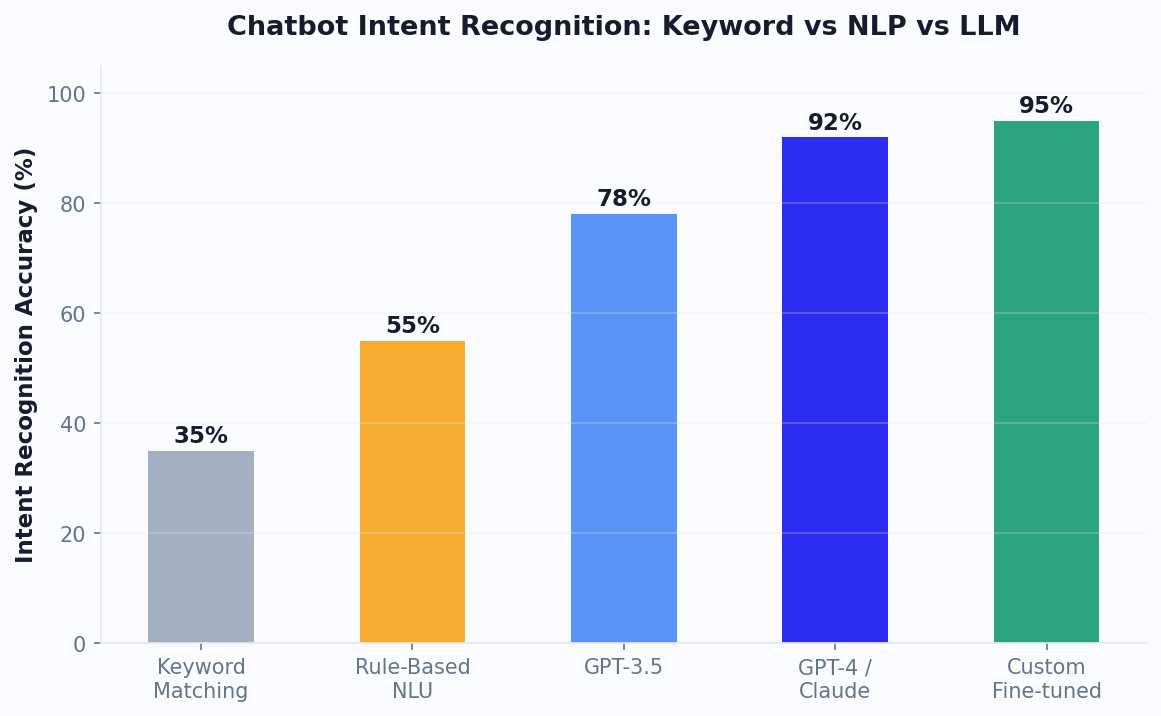
Natural Language Processing (NLP) is a branch of artificial intelligence that enables computers to understand, interpret, and generate human language in a meaningful way. NLP is what separates a modern AI chatbot from a simple scripted bot. In the context of chatbots, NLP is the technology that allows a bot to move beyond rigid keyword matching and actually comprehend what users are trying to say, regardless of how they phrase their request. Without NLP, a chatbot is essentially a glorified search bar that matches strings -- it can only respond to inputs it has been explicitly programmed to recognize. With NLP, the same chatbot understands that "I need to change my flight," "reschedule my booking," and "can you move my trip to next week" all express the same underlying intent.
The importance of NLP in modern chatbot deployments cannot be overstated. A 2024 Gartner study found that 78% of customers abandon chatbot conversations when the bot fails to understand their query on the first attempt. Conversely, chatbots with robust NLP capabilities achieve first-message resolution rates above 85%, keeping users engaged and reducing the load on human support teams. NLP-powered chatbots also collect richer data from conversations because they can extract structured information (names, dates, product IDs, sentiment) from unstructured text, feeding this data into CRM systems and analytics dashboards automatically.
Core Components of Chatbot NLP
- Intent Recognition -- classifying what the user wants to accomplish
- Entity Extraction -- pulling specific data points (dates, names, amounts) from text
- Sentiment Analysis -- detecting emotional tone to adjust responses
- Context Management -- maintaining conversational state across multiple turns
- Language Generation -- producing natural-sounding responses
Conferbot's NLP engine combines all five components into a unified pipeline that processes user messages in under 200ms. Whether you are building a WhatsApp chatbot or a website widget, the NLP layer works identically across all channels. For teams new to chatbot development, our guide to building chatbots without coding explains how to leverage NLP features through the visual builder without touching any code.
How NLP Works in Chatbots: The Processing Pipeline
Understanding how NLP processes a user message helps you design better chatbot conversations and troubleshoot accuracy issues. When a user sends a message to an NLP-powered chatbot, the text passes through a multi-stage pipeline before a response is generated. Each stage adds a layer of understanding, and the final output is a structured representation of what the user wants plus the specific details they provided.
Stage 1: Text Preprocessing
The raw message is cleaned and normalized. This includes tokenization (splitting text into words), lowercasing, removing punctuation, expanding contractions ("don't" becomes "do not"), and correcting common typos. Some NLP engines also perform stemming or lemmatization, reducing words to their root forms so that "running," "runs," and "ran" are all recognized as variations of "run." This stage ensures that superficial text differences do not prevent understanding.
Stage 2: Feature Extraction
The preprocessed text is converted into numerical representations (embeddings) that capture semantic meaning. Modern transformer-based models create contextual embeddings where the same word gets different representations depending on surrounding context -- "bank" in "river bank" versus "bank account" produces different vectors. These embeddings are the foundation for all downstream NLP tasks.
Stage 3: Intent Classification
The embedding is passed through a classification model that maps it to one of your defined intents. The model outputs a confidence score for each possible intent, and the highest-scoring intent above your confidence threshold is selected. If no intent exceeds the threshold, the message is routed to a fallback handler. Well-trained models achieve 90%+ accuracy at this stage with as few as 20 training examples per intent.
Stage 4: Entity Extraction
Simultaneously, named entity recognition (NER) identifies and extracts specific data from the message. Built-in entity types include dates, times, numbers, emails, phone numbers, and locations. Custom entities -- product names, plan tiers, order IDs -- can be defined through the integrations hub and trained with examples specific to your business. Extracted entities are stored as structured variables available to your chatbot logic.
Stage 5: Response Selection and Generation
Based on the classified intent and extracted entities, the chatbot selects or generates an appropriate response. This might be a pre-written template with entity variables filled in, a knowledge base lookup, or an LLM-generated response for complex queries. The entire pipeline executes in under 300ms for most messages, providing the instant response times users expect. For a hands-on walkthrough of configuring each pipeline stage, see our customer support chatbot guide.
NLP vs Keywords vs LLM: Detailed Comparison
Choosing between keyword matching, traditional NLP, and large language models is one of the most consequential decisions in chatbot architecture. Each approach has distinct strengths, limitations, and cost profiles that make it suitable for different scenarios. The following comparison breaks down the key differences across dimensions that matter most for production deployments.
| Dimension | Keyword Matching | Traditional NLP | LLM (GPT-4 / Claude) |
|---|---|---|---|
| Accuracy (real-world inputs) | 45-60% | 82-92% | 90-96% |
| Setup time | Minutes | Hours to days | Minutes (prompt-based) |
| Training data required | None | 20-100 examples/intent | Zero-shot capable |
| Cost per message | ~$0 | $0.001-0.005 | $0.01-0.08 |
| Latency | <50ms | 100-300ms | 1-4 seconds |
| Handles typos/slang | No | Moderate | Excellent |
| Multi-language | Manual per language | Model-dependent | 50+ languages native |
| Hallucination risk | None | None | Low-Medium |
| Best use case | Simple menus, surveys | Support FAQ, routing | Complex queries, sales |
The most effective modern chatbots do not pick just one approach. Conferbot supports a hybrid architecture where keyword rules handle structured inputs (button clicks, menu selections), the NLP engine classifies free-text messages into intents, and the OpenAI integration generates responses for complex or novel queries. This layered approach optimizes both cost and accuracy: simple interactions are handled cheaply and instantly, while complex ones get the full power of an LLM. Our ROI calculator helps you model the cost impact of different NLP tiers at your specific conversation volume.
Intent Recognition: Teaching Your Bot to Understand Goals
Intent recognition is the heart of any NLP chatbot. It answers the question: "What does this user want to accomplish?" Every message a user sends carries an intent -- whether that is checking an order status, asking about pricing, requesting a refund, or simply greeting the bot. The accuracy of intent recognition directly determines whether your chatbot can provide helpful responses or forces users into frustrating dead ends.
Building effective intent recognition starts with designing a clean intent taxonomy. The most common mistake teams make is creating too many intents with significant overlap. A chatbot with 200 intents where many are near-duplicates ("check_order," "order_status," "where_is_my_order," "track_package") will confuse the classifier because training examples for overlapping intents are too similar. Best practice is to start with 15-30 well-defined, distinct intents and expand only when analytics show clear demand for new categories. Each intent should be actionable -- it should map to a specific response or action the bot can take.
Training Data Best Practices
- Minimum 20 examples per intent -- include diverse phrasings, not just paraphrases of the same sentence
- Include negative examples -- messages that are close to an intent but should not match it help sharpen boundaries
- Add real user messages -- after deployment, feed actual user queries into training data for continuous improvement
- Cover edge cases -- typos, incomplete sentences, messages with multiple intents
- Balance your training set -- avoid having 500 examples for one intent and 10 for another
Confidence thresholds are your safety net. When the classifier is not confident enough about its prediction (typically below 70-80%), the bot should ask a clarifying question rather than guessing wrong. "I think you are asking about X -- is that right?" is always better than a confidently wrong answer. Conferbot's NLP dashboard shows confidence distributions across all intents, making it easy to identify intents that need more training data. Read our support chatbot guide for detailed intent design patterns used by high-performing support teams.
Entity Extraction: Pulling Structured Data from Natural Conversations
While intent recognition tells you what a user wants to do, entity extraction tells you the specifics -- the who, what, when, where, and how much. When a customer says "I need to reschedule my appointment from Tuesday to Thursday at 3pm," the intent is "reschedule_appointment" and the entities are: current_date=Tuesday, new_date=Thursday, new_time=3pm. Without entity extraction, the chatbot would understand the user wants to reschedule but would need to ask follow-up questions to gather every detail, adding friction to the conversation.
Conferbot's NLP engine supports both system entities (pre-built recognizers for common data types) and custom entities (trained for your specific business terminology). System entities cover the most frequent needs without any configuration:
- @date -- recognizes dates in any format: "tomorrow," "next Friday," "March 15," "3/15/2026"
- @time -- parses times: "3pm," "15:00," "half past two," "morning"
- @number -- extracts quantities: "two," "2," "a dozen," "500k"
- @email -- validates and extracts email addresses
- @phone -- recognizes phone numbers in various formats
- @location -- identifies cities, countries, addresses, and landmarks
- @currency -- detects monetary amounts with currency: "$50," "50 USD," "fifty dollars"
Custom Entity Training
For domain-specific data, you define custom entities with examples. An e-commerce bot might have @product_name, @size, and @color entities. A healthcare bot might define @symptom, @medication, and @body_part. Custom entities are trained through the same visual interface used for intent training -- provide 15-20 examples of each entity in context and the model learns to extract them from new messages. The extracted entities become variables in your chatbot flow, available for API calls, conditional logic, and personalized responses.
Entity extraction is especially powerful when combined with CRM and API integrations. A message like "What is the status of order #45231?" extracts the order_id entity and immediately triggers an API lookup -- no additional questions needed. This pattern substantially reduces average conversation length for transactional queries. Explore entity-powered flows in our template library.
Sentiment Analysis: Reading Emotional Tone to Improve Responses
Sentiment analysis adds an emotional intelligence layer to your chatbot by detecting whether a user is happy, frustrated, angry, or neutral. This capability is transformative for customer support bots because it enables dynamic response adjustment -- a frustrated customer receives a more empathetic tone and faster escalation to a human agent, while a satisfied customer might receive an upsell offer or review request. Research from Qualtrics shows that 80% of customers who switch to a competitor cite poor emotional handling as the primary reason, making sentiment-aware chatbots a retention tool, not just a support tool.
Conferbot's sentiment engine classifies messages on a five-point scale: very negative, negative, neutral, positive, and very positive. This classification happens alongside intent recognition in the same processing pass, adding no additional latency. You can use sentiment scores in your chatbot logic with conditional branching:
- Very negative sentiment -- immediately offer human agent escalation, apologize, acknowledge frustration
- Negative sentiment -- use more empathetic language templates, prioritize quick resolution
- Neutral sentiment -- standard response flow
- Positive sentiment -- opportunity to request reviews, suggest upgrades, or share promotions
- Very positive sentiment -- ask for testimonials, offer referral programs
Sentiment tracking over time also provides valuable aggregate insights. If sentiment scores drop for a particular intent (e.g., billing inquiries consistently trigger negative sentiment), that signals a systemic issue with your billing process or policies, not just a chatbot problem. Our analytics dashboard plots sentiment trends by intent and by time period, giving product and support leaders actionable data for improving the customer experience beyond the chatbot itself.
For Messenger chatbots and WhatsApp bots, sentiment analysis is especially important because messaging conversations tend to be more informal and emotionally expressive than web chat, making tone detection both more feasible and more valuable for response optimization.
Training Your NLP Chatbot: A Step-by-Step Process
Training an NLP chatbot is not a one-time setup task -- it is an ongoing process of refinement that improves accuracy over weeks and months. The initial training gets you to a baseline accuracy of 75-85%, but reaching 90%+ requires iterating on real conversation data. Here is the complete training workflow used by teams that achieve top-tier NLP performance with Conferbot.
Phase 1: Initial Intent and Entity Design (Day 1-3)
Start by analyzing your existing support data -- emails, live chat transcripts, FAQ page analytics -- to identify the 15-30 most common request types. These become your initial intents. For each intent, write 20-30 diverse training phrases that represent how real users express that need. Avoid the trap of writing overly polished examples; include casual language, typos, and incomplete sentences that mirror actual customer behavior. Define custom entities relevant to your domain and provide annotated examples showing where entities appear within training phrases.
Phase 2: Testing and Threshold Calibration (Day 4-7)
Use Conferbot's built-in testing console to send a mix of expected and unexpected messages to your bot. Track which messages are misclassified or fall below confidence thresholds. Adjust your confidence threshold -- start at 75% and increase to 80-85% as your training data grows. A higher threshold means fewer incorrect responses but more fallback triggers, so find the balance that suits your use case. For customer support, err on the side of higher thresholds; for casual engagement bots, lower thresholds are acceptable.
Phase 3: Soft Launch and Data Collection (Week 2-4)
Deploy the bot to a subset of traffic (10-20%) and monitor real conversations daily. Conferbot's analytics surface unmatched messages, low-confidence classifications, and conversation drop-off points. Each day, review 20-50 mishandled messages and add them as new training examples for the correct intent. This feedback loop is the single most effective way to improve accuracy.
Phase 4: Continuous Improvement (Ongoing)
After the first month, establish a weekly review cadence. Look at intent confusion matrices to identify intents that are commonly mistaken for each other -- these may need to be merged or their training examples need clearer differentiation. Monitor entity extraction accuracy and add new entity examples when the system misses extractions. As your product or business evolves, add new intents for emerging query types and retire intents for discontinued features.
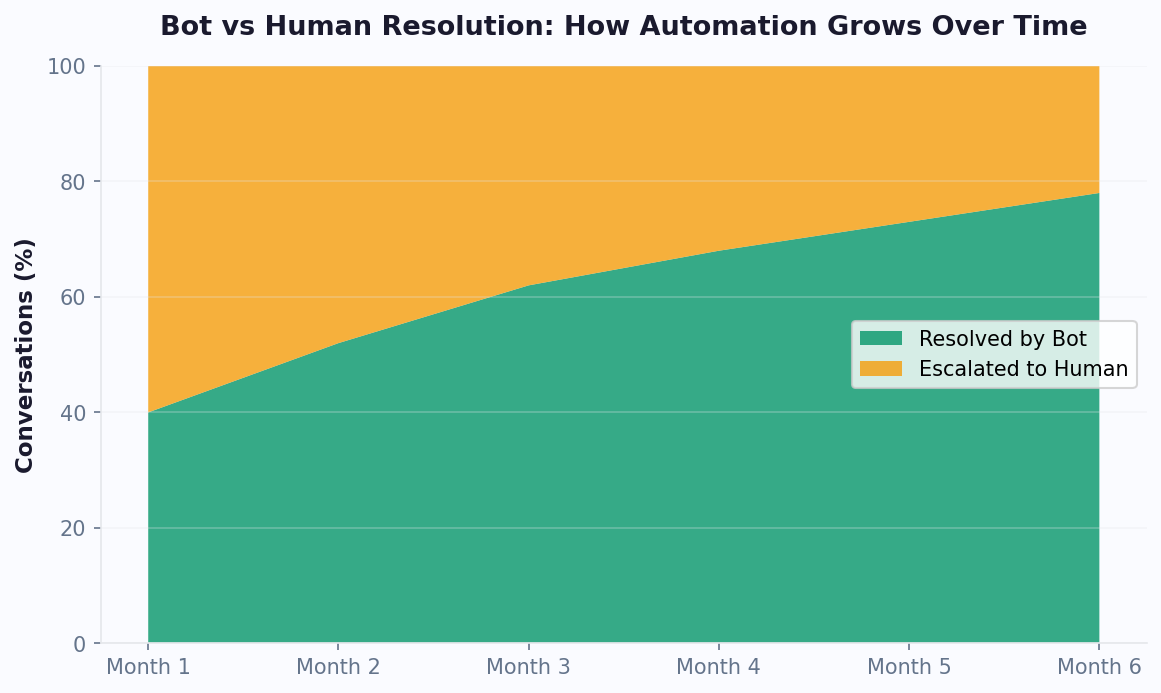
Teams following this process typically see accuracy climb from 78% at launch to 92% by month three and 95%+ by month six. The key is consistency -- small daily improvements compound into dramatically better performance. For implementation guidance, see our no-code chatbot building guide or explore pre-trained templates that give you a head start on training data.
When to Use NLP vs Rule-Based Logic: A Decision Framework
Not every chatbot interaction needs NLP. In fact, using NLP where simple rules would suffice can introduce unnecessary complexity, latency, and even accuracy issues. The decision of when to use NLP versus rule-based logic should be driven by the nature of the user input and the required response precision. Here is a practical framework for making this decision at each node in your chatbot flow.
Use Rule-Based Logic When:
- Inputs are constrained -- button clicks, menu selections, numeric inputs, yes/no answers. There is nothing to "understand" because the user is choosing from predefined options.
- Precision is critical -- financial transactions, medical triage, legal compliance scenarios where a misclassification could cause real harm. Rules give you 100% deterministic behavior.
- The conversation is linear -- form-filling flows (name, email, phone) where each step has one valid response type.
- Volume is extremely high -- if you process millions of messages daily and 80% are simple lookups, rule-based handling saves significant compute cost.
Use NLP When:
- Inputs are free-text -- users type in their own words rather than selecting options. Even "simple" questions like "what are your hours?" can be phrased hundreds of different ways.
- Multiple intents are possible -- the bot needs to route the conversation based on what the user wants, not just validate a data format.
- Context matters -- the meaning of a message depends on what was said earlier in the conversation.
- You cannot predict all variations -- new products, seasonal queries, trending topics mean new phrasings you have not pre-programmed.
Hybrid Architecture (Recommended)
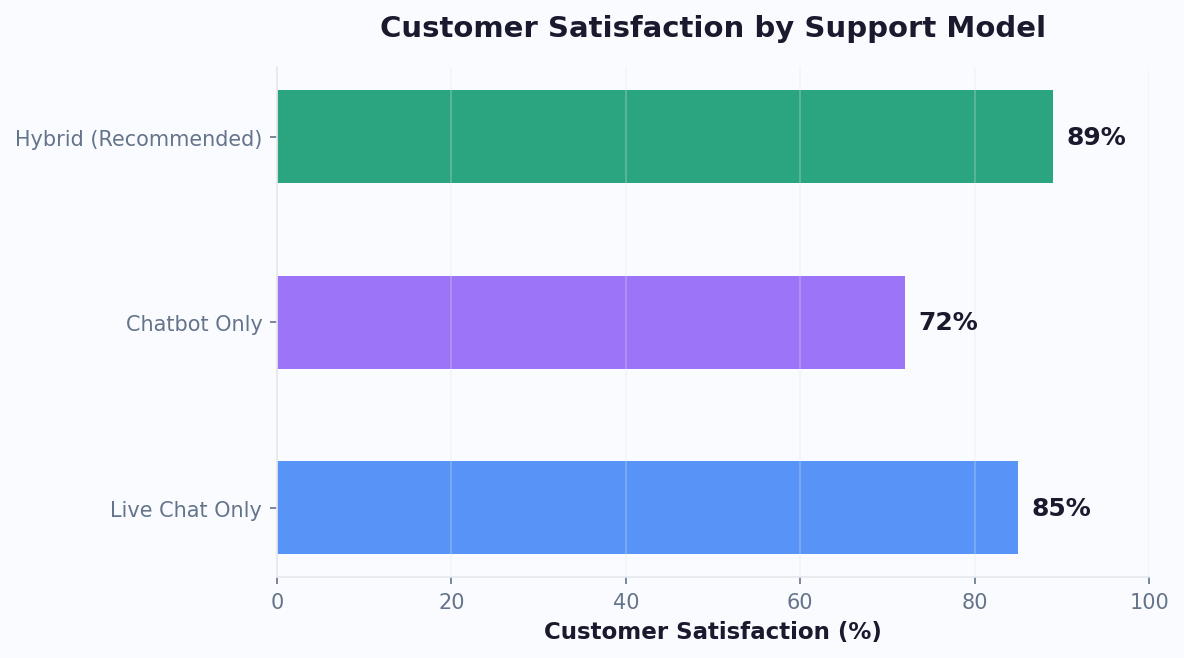
The most effective chatbots use both approaches strategically. Conferbot's flow builder lets you mix rule-based nodes (buttons, conditions, API lookups) with NLP-powered nodes (open text input, intent routing) in the same conversation. A common pattern: use NLP at the conversation start to understand what the user needs, then switch to rule-based flows for structured data collection once the topic is established. This gives you the flexibility of NLP where it matters and the precision of rules where it counts. Compare how this architecture performs against pure-NLP approaches on our comparison page, or see it in action in our template library.
NLP Accuracy Benchmarks: How Conferbot Compares
When evaluating NLP chatbot platforms, accuracy benchmarks are the most objective way to compare performance. However, published benchmarks can be misleading if you do not understand the testing methodology. A platform claiming "99% accuracy" on a curated test set with perfectly formatted inputs tells you very little about real-world performance where users send typo-filled, grammatically incorrect, multi-intent messages. True production accuracy -- measured on actual user conversations including edge cases -- is the metric that matters.
Conferbot NLP Performance Data
| Metric | Conferbot NLP | Industry Average | Top Competitor |
|---|---|---|---|
| Intent recognition (clean input) | 94.2% | 86% | 91% |
| Intent recognition (noisy input) | 89.7% | 72% | 84% |
| Entity extraction accuracy | 91.5% | 79% | 87% |
| Sentiment classification | 88.3% | 75% | 83% |
| Multi-language accuracy | 87.1% | 68% | 80% |
| Average response latency | 180ms | 450ms | 280ms |
These benchmarks are measured on a representative sample of 10,000 real user messages across multiple industries and languages. The "noisy input" category includes messages with typos, slang, code-switching (mixing languages), and grammatically incomplete sentences -- the kind of text real users actually send. Conferbot's advantage on noisy input comes from our preprocessing pipeline that includes typo correction, slang normalization, and contextual embedding models trained on conversational (not formal) text.
For teams evaluating platforms, we recommend testing with your own data rather than relying solely on published benchmarks. Export 100-200 real customer messages from your existing support channels and run them through each platform's NLP engine to see which achieves the highest accuracy on your specific domain. Start free to test with your own data, or see detailed feature comparisons on our comparison page. For budget planning, our pricing page breaks down which NLP features are available on each plan, and the ROI calculator models the cost savings from higher NLP accuracy.
Getting Started: Build Your First NLP Chatbot in 30 Minutes
You do not need a data science team or months of development time to launch an NLP-powered chatbot. With Conferbot's visual builder and pre-trained NLP models, most teams go from zero to a working NLP chatbot in under 30 minutes. Here is the quick-start path for teams ready to upgrade from keyword-based or rule-only bots to intelligent language understanding.
Step 1: Choose a Starting Point (2 minutes)
Browse our template library and select a template closest to your use case -- customer support, lead generation, appointment booking, or e-commerce. Each template comes pre-loaded with relevant intents, training phrases, and entity definitions that give you 80% coverage out of the box.
Step 2: Customize Intents (10 minutes)
Review the template's intent list and add, remove, or rename intents to match your specific business needs. Add 5-10 additional training phrases per intent using language your customers actually use. Pull examples from existing support emails or chat logs if available.
Step 3: Configure Entities (5 minutes)
Define any custom entities your bot needs to extract -- product names, plan tiers, department names, or other business-specific terms. The built-in system entities (dates, numbers, emails, locations) are already active and require no configuration.
Step 4: Set Up Response Flows (10 minutes)
For each intent, configure what happens when it is detected. Options include: sending a text response, triggering an API call via our integrations hub, escalating to a human agent through our live chat feature, or branching into a multi-step flow. Use extracted entities as variables in your responses for personalization.
Step 5: Test and Deploy (3 minutes)
Use the built-in simulator to test 10-20 sample messages and verify the bot responds correctly. Adjust confidence thresholds if needed. Then deploy to your website with a single line of embed code, or connect to WhatsApp and Messenger through the channel settings.
What Comes Next
After deployment, spend 5-10 minutes daily reviewing unmatched messages and adding them as training data. Within two weeks, your NLP accuracy will climb significantly as the model learns from real conversations. For teams that want AI-generated responses in addition to NLP routing, enable the OpenAI integration to handle complex queries with GPT-4 powered responses. See our pricing page for plan details, or calculate your expected savings with the chatbot ROI calculator.
NLP Chatbot FAQ
Everything you need to know about implementing AI chatbots for nlp chatbot. Get answers about features, pricing, implementation, security, and industry-specific solutions.
Continue Exploring
Explore features, connect third-party tools, and browse ready-made templates.
Deep-dive pillar guides, real use cases, and the chatbot & AI glossary.