The Hidden Cost of Internal Support: Why Every Company Needs an Employee FAQ Bot
Every organization has an invisible tax on productivity: the time employees spend searching for answers to routine questions. How many vacation days do I have left? What is the process for requesting a new laptop? Where do I find the expense reimbursement form? What is the company policy on remote work? These questions are asked hundreds of times per month across any organization with 100 or more employees—and each question interrupts both the asker and the person they ask for help.
According to McKinsey research on workplace productivity, the average employee spends 1.8 hours per day searching for information and answers—nearly 20% of their work week. For knowledge workers earning an average of $75,000 annually, that translates to $15,000 per employee per year in lost productivity. For a 500-person company, that is $7.5 million annually in time spent searching rather than doing.
The traditional approach to internal support—email HR, submit an IT ticket, ask a manager, or hunt through an outdated intranet—fails employees in multiple ways. Response times are measured in hours or days rather than seconds. Answers are inconsistent because different people interpret policies differently. Information is scattered across Confluence pages, SharePoint sites, Google Docs, and tribal knowledge that exists only in veterans' heads.
Employee FAQ bots solve this problem by providing instant, consistent, 24/7 access to organizational knowledge through a conversational interface. Deployed on platforms employees already use (Slack, Microsoft Teams, or the company intranet), these bots answer routine questions in seconds, escalate complex queries to the right human expert, and continuously learn from new questions to expand their knowledge over time.
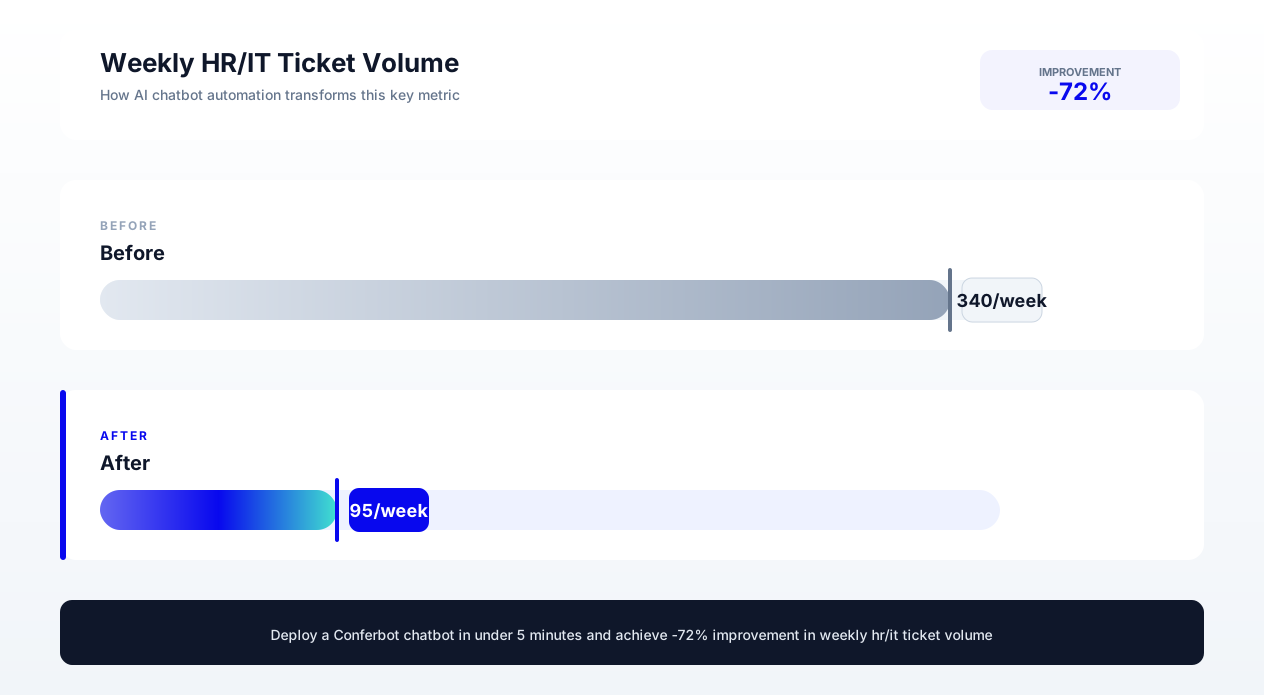
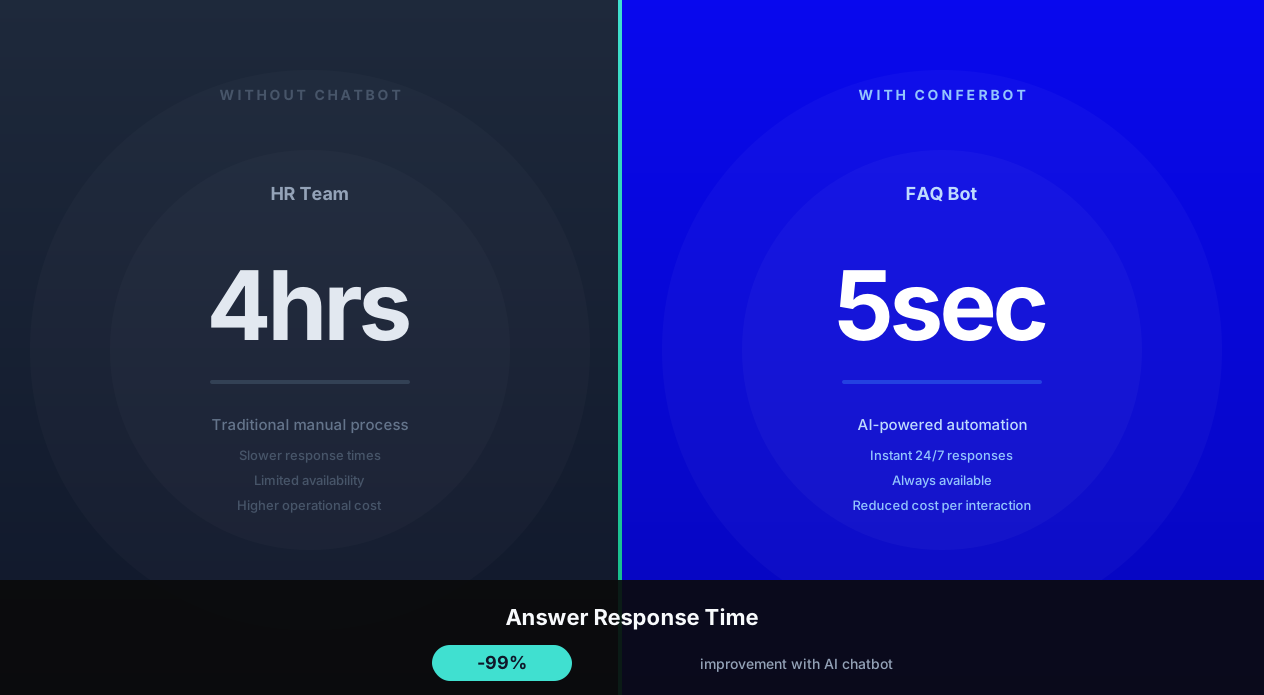
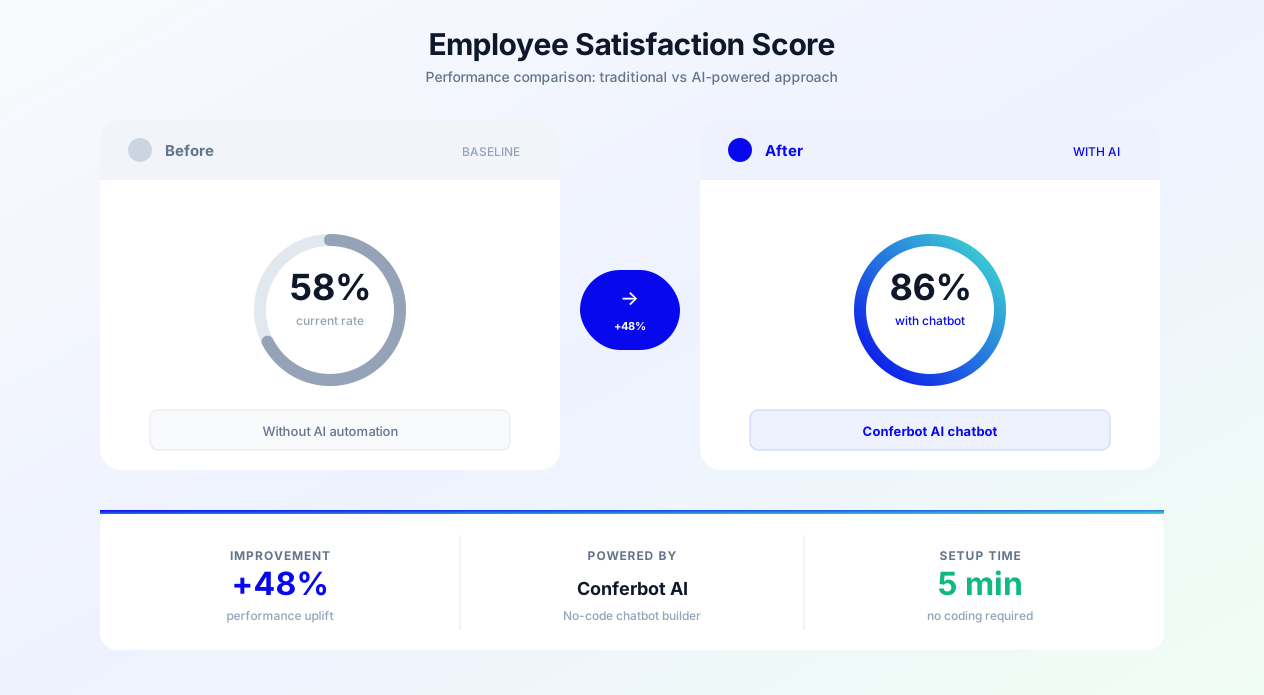
The business case is compelling: organizations deploying employee FAQ bots report 65% reduction in internal support ticket volume, 89% employee satisfaction with bot-provided answers, average response time reduction from 4 hours to 8 seconds, and $850 to $1,200 saved per employee annually in recovered productivity. This guide covers everything you need to implement an employee FAQ bot: common questions by department, setup strategies, knowledge base integration, adoption measurement, and critical security considerations for handling sensitive internal information.
Quantifying Internal Support Costs: The Business Case for Automation
Before building a solution, you need to understand the true cost of internal support. Most organizations drastically underestimate these costs because they are distributed across departments and not tracked as a single line item.
Direct Costs of Internal Support
| Support Function | Average Ticket Volume (500-person company) | Average Resolution Time | Monthly Labor Cost |
|---|---|---|---|
| HR (policy, benefits, PTO) | 320 tickets/month | 22 minutes | $4,693 |
| IT Helpdesk (access, software, hardware) | 480 tickets/month | 35 minutes | $11,200 |
| Facilities (office, parking, access cards) | 150 tickets/month | 15 minutes | $1,500 |
| Finance (expense, payroll, procurement) | 200 tickets/month | 18 minutes | $2,400 |
| Legal and Compliance (policies, approvals) | 80 tickets/month | 25 minutes | $1,333 |
| Total | 1,230 tickets/month | — | $21,126/month |
That is $253,512 annually for a 500-person company—just in direct labor cost to answer internal questions. But the indirect costs are even larger.
Indirect Costs (Often Unmeasured)
- Productivity interruption cost: Each question interrupts the person being asked, who takes an average of 23 minutes to return to their original task after an interruption, according to research from the University of California, Irvine. At 1,230 monthly interruptions, that is 472 lost hours per month ($23,600 in productivity).
- Employee frustration and disengagement: 67% of employees report frustration when they cannot quickly find answers to work-related questions. This frustration correlates with 12% lower engagement scores and 18% higher turnover intent.
- Inconsistent answers leading to errors: When different people give different answers to policy questions, employees make incorrect decisions—wrong expense submissions, policy violations, missed deadlines—creating downstream costs of $500 to $2,000 per error.
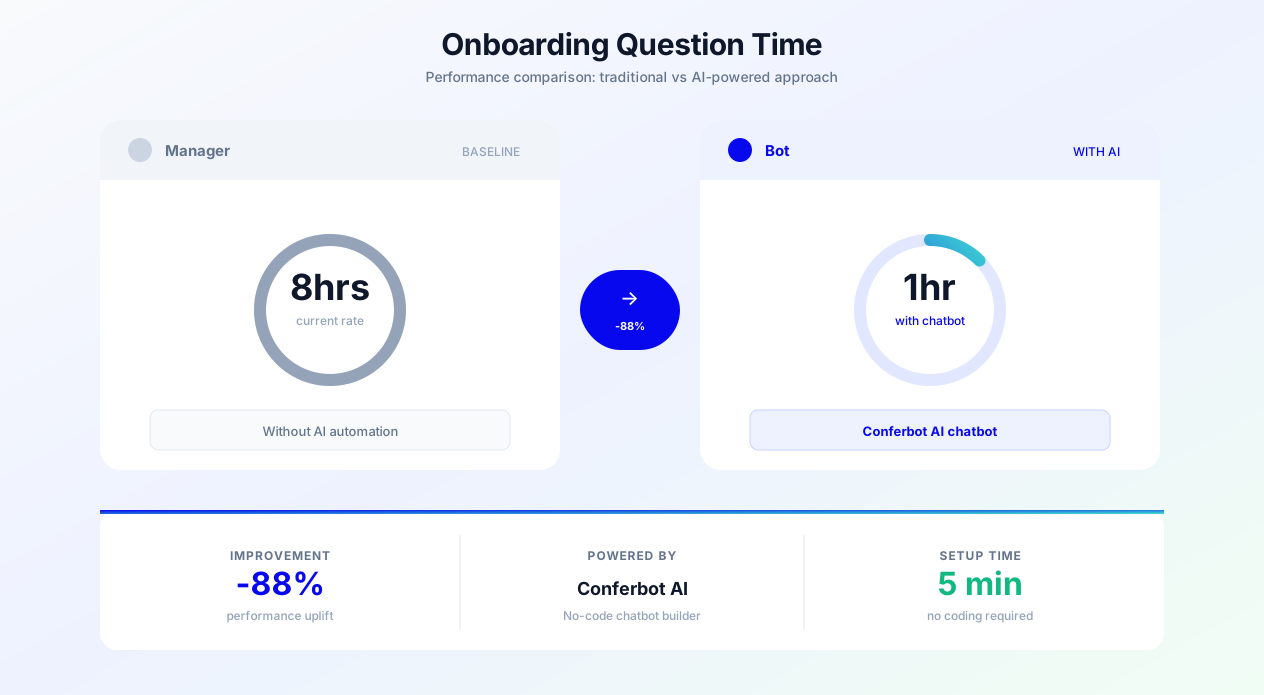
- New hire ramp-up delay: New employees asking onboarding questions consume 8 to 12 hours of existing team members' time in their first month. With 10% annual turnover in a 500-person company, that is 50 new hires consuming 400 to 600 hours of experienced employee time annually.
Total Cost of Internal Support (500-person company)
Annual total: $450,000 to $650,000 when combining direct labor, productivity interruptions, error costs, and onboarding inefficiency.
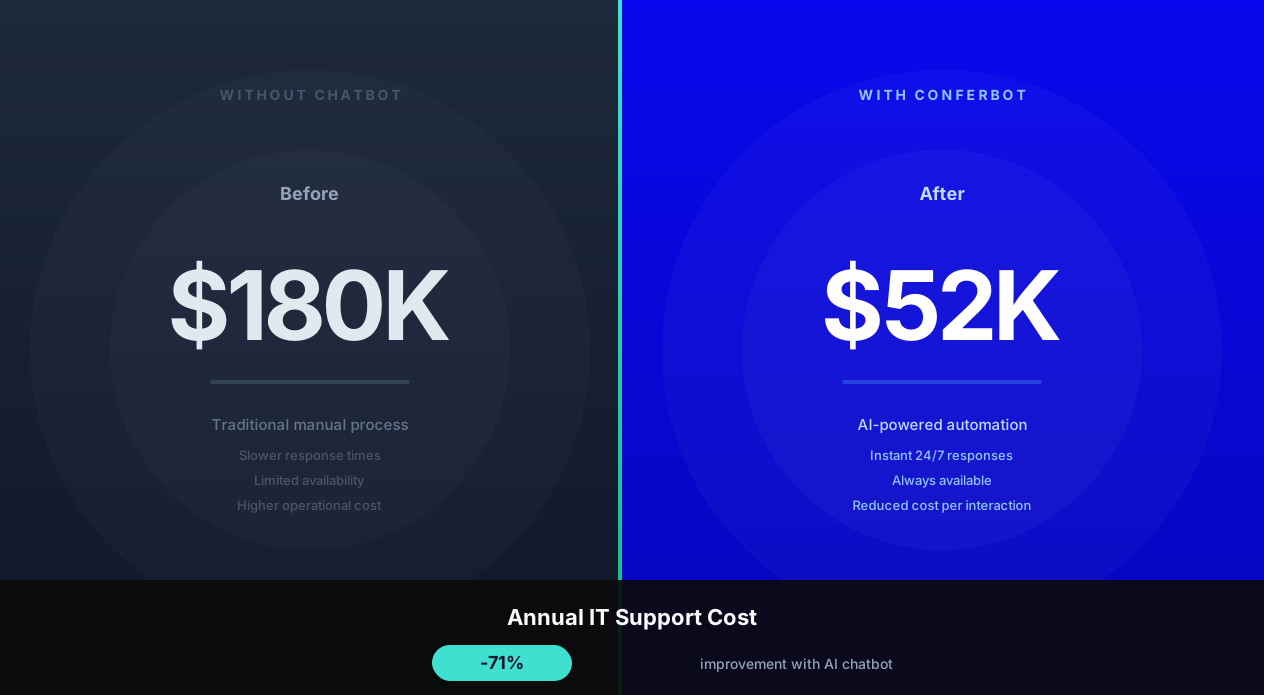
An employee FAQ bot that handles 65% of these queries saves $290,000 to $420,000 annually—a 30 to 50x return on the typical chatbot platform investment of $6,000 to $12,000 per year. This ROI makes employee FAQ bots one of the highest-return technology investments any organization can make. For additional context on IT-specific automation, see our detailed guide on AI chatbots for internal IT helpdesk automation.
Common Employee Questions by Department: What to Automate First
The fastest path to value is automating the questions that are asked most frequently, a strategy endorsed by SHRM's HR technology research and have straightforward, policy-based answers. Here is a prioritized list of automatable questions by department, ranked by frequency and automation suitability.
Human Resources (Highest Volume, Highest Automation Potential)
Benefits and PTO (40% of HR queries):
- How many vacation days do I have remaining?
- What is the process for requesting time off?
- When is open enrollment?
- How do I add a dependent to my health insurance?
- What is our parental leave policy?
- How do I change my benefits elections?
- What does our dental plan cover?
- How do I find an in-network provider?
Policies and Compliance (30% of HR queries):
- What is the remote work policy?
- What are the dress code guidelines?
- How do I report a workplace concern?
- What is the policy on side projects or outside employment?
- What are the company holidays this year?
- What is the bereavement leave policy?
- How does the performance review process work?
Payroll and Compensation (20% of HR queries):
- When is the next pay date?
- How do I update my direct deposit information?
- Where can I find my W-2 or tax documents?
- How does the bonus structure work?
- What is the salary review timeline?
IT Helpdesk (Highest Ticket Volume)
Access and Accounts (45% of IT queries):
- How do I reset my password?
- How do I connect to VPN?
- How do I set up two-factor authentication?
- I am locked out of my account—what do I do?
- How do I request access to a specific application?
- How do I set up my work email on my phone?
Software and Tools (35% of IT queries):
- How do I install approved software?
- Which video conferencing tool should I use?
- How do I request a software license?
- How do I share files securely with external parties?
- What collaboration tools does the company provide?
Hardware (20% of IT queries):
- How do I request a new laptop or monitor?
- What do I do if my laptop is damaged?
- How do I connect to the office printer?
- How do I return equipment when leaving the company?
Finance and Procurement
Expenses (60% of finance queries):
- How do I submit an expense report?
- What is the per-diem for travel?
- What expenses are reimbursable?
- What is the approval process for purchases over $500?
- Where is the expense report template?
Prioritization Framework
Start with questions that are: (1) asked more than 10 times per month, (2) have a single correct answer from existing policy documentation, and (3) require no subjective judgment to answer. These are your quick wins—typically 50 to 80 questions that cover 65 to 75% of total internal query volume. Build these first, launch, and then expand to more complex scenarios based on what employees ask that the bot cannot yet answer.
HR Policy Bot Setup: Automating Benefits, PTO, and Compliance Questions
HR is typically the highest-impact department for FAQ bot deployment because HR questions are frequent, policy-based, and consistent. Here is how to set up an HR policy bot that handles the majority of employee inquiries.
Knowledge Architecture for HR
Structure your HR bot's knowledge in layers:
Layer 1: Universal policies (apply to all employees): Company holidays, general PTO policy, dress code, remote work guidelines, expense policy, code of conduct. These are the highest-volume questions and the easiest to automate because the answer is the same for everyone.
Layer 2: Segment-specific policies (vary by employee type): Benefits packages differ by full-time vs. part-time vs. contractor. PTO accrual rates differ by tenure. Parental leave differs by location and employment law jurisdiction. The bot needs to know the employee's segment to provide the correct answer.
Layer 3: Individual data (specific to each employee): Remaining PTO balance, benefits elections, performance review dates, tenure milestones. This requires integration with HRIS (Workday, BambooHR, ADP) to pull real-time individual data.
Conversation Design for Sensitive HR Topics
HR conversations require special care around tone and sensitivity:
Benefits questions: Clear, factual responses with links to plan documents. "Your dental plan covers two preventive visits per year at 100% in-network. Here is the link to find in-network providers: [link]. Would you like information about any other benefits?"
Leave policies: Empathetic framing when the context might be sensitive. "Our bereavement leave policy provides 5 paid days for immediate family members and 3 days for extended family. I am sorry if you are going through a difficult time. Would you like me to connect you with our Employee Assistance Program as well?"
Workplace concerns: Never attempt to resolve these via chatbot. Immediately route to appropriate human. "I take workplace concerns seriously. Let me connect you with our HR Business Partner who can discuss this confidentially. Would you prefer to be contacted by email or phone?"
HRIS Integration for Personalized Responses
Integrating with your Human Resources Information System transforms the bot from a policy lookup tool into a personalized assistant:
- Workday integration: Pull PTO balances, benefits enrollments, pay dates, and org chart data in real time
- BambooHR integration: Access employee profiles, time-off accruals, anniversary dates, and document repository
- ADP integration: Payroll dates, tax document availability, direct deposit status
- Benefits platforms (Gusto, Justworks): Plan details, enrollment status, dependent information
With HRIS integration, the bot can answer: "You have 12 vacation days and 5 sick days remaining. Your next accrual of 1.25 vacation days will be on June 1st. Would you like to submit a time-off request?" This level of personalization eliminates the need to contact HR for the most common individual-specific questions.
Compliance and Audit Considerations
HR policy bots must maintain compliance with employment law and internal audit requirements:
- All policy answers must reference the current version of official policy documents (automatic updates when policies change)
- Conversation logs should be retained per your data retention policy for audit purposes
- The bot must clearly disclaim when it cannot provide legal advice and route appropriately
- Sensitive topics (discrimination, harassment, termination) must always be escalated to humans
- Access controls ensure the bot only provides information the employee is authorized to see
IT Helpdesk FAQ Automation: Password Resets, VPN, and Software Requests
According to Gartner's IT Service Management research, 40% of all IT service desk interactions can be fully automated. IT helpdesk automation via chatbot has the highest ticket deflection potential because IT questions tend to be procedural (follow these steps to solve the problem) rather than judgment-based. A well-implemented IT FAQ bot resolves 55 to 70 percent of IT tickets without any human involvement.
Self-Service IT Resolution Flows
Password Reset (25% of IT tickets): The bot guides the employee through self-service password reset: verifies identity via security questions or MFA, triggers the reset process via Active Directory or identity provider API, and confirms the new password is set. Resolution time: 60 seconds vs. 2 hours average for human-handled tickets (including queue wait time).
VPN Connection Issues (15% of IT tickets): The bot provides platform-specific instructions (Windows/Mac/Linux), verifies VPN client version, checks for known outages via service health API, and provides step-by-step troubleshooting. If the issue persists after basic troubleshooting, it creates a pre-populated ticket for Level 2 support with diagnostic information already gathered.
Software Installation (12% of IT tickets): The bot checks if the requested software is in the approved catalog, verifies the employee has appropriate licensing, and provides installation instructions or triggers a remote deployment via SCCM, Jamf, or Intune integration. For unapproved software, it routes the request to the appropriate approval workflow.
Account Access Requests (18% of IT tickets): The bot collects the required information (which system, what level of access, business justification), checks the approval matrix, and either auto-provisions access for pre-approved tools or routes the request to the appropriate manager for approval via the ticketing system.
Integration with IT Service Management (ITSM) Platforms
The FAQ bot integrates with your ITSM platform for seamless ticket management:
- ServiceNow: Auto-create incidents for unresolved issues, auto-populate fields, check knowledge base articles, and update ticket status conversationally
- Jira Service Management: Create and track requests, check SLA status, and provide updates on open tickets without employees needing to log into the portal
- Zendesk: Create tickets, check status, and route to appropriate support groups based on issue categorization
- Freshservice: Asset management queries, ticket creation, and approval workflow integration
Proactive IT Communication
Beyond answering questions, the IT FAQ bot proactively communicates important information:
- Planned maintenance notifications: "Heads up: email servers will be down for maintenance Saturday 2 AM to 6 AM EST. Save any drafts before Friday end of day."
- Security alerts: "Security notice: we have detected phishing emails targeting our company. Do NOT click links in emails claiming to be from IT. Report suspicious emails to security@company.com."
- New tool announcements: "We have deployed a new project management tool! Here is a quick start guide. Need help setting up? I can walk you through it."
This proactive communication reduces the flood of tickets that typically follows any IT change or incident, because employees are informed before they encounter issues. For deeper coverage of IT-specific automation, see our complete guide to AI chatbot for internal IT helpdesk.
Onboarding FAQ Automation: A New Hire's Best Friend
New employee onboarding generates a disproportionate share of internal questions. Research from SHRM (Society for Human Resource Management) shows that organizations with a strong onboarding process improve new hire retention by 82% and productivity by over 70%. A new hire asks 3 to 5x more questions per day than a tenured employee, and those questions consume time from HR, IT, their manager, and teammates. An onboarding FAQ bot accelerates time-to-productivity while reducing the burden on existing team members.
The New Hire Question Lifecycle
Pre-start (before day 1):
- What do I need to bring on my first day?
- Where do I park? What time should I arrive?
- What is the dress code?
- Will I get a laptop or should I bring my own?
- Who is my manager and what team am I on?
Week 1 (orientation and setup):
- How do I set up my email, Slack, and other tools?
- Where do I find the employee handbook?
- How do I enroll in benefits?
- What is my login for the HRIS?
- Where are the restrooms, kitchen, meeting rooms?
- How do I book a meeting room?
Weeks 2 to 4 (getting productive):
- Where is the documentation for project X?
- Who should I talk to about Y?
- How do I get access to the staging environment?
- What is the deployment process?
- Where do I find the style guide or brand assets?
- How do I submit a purchase request?
Months 2 to 3 (settling in):
- How does the performance review process work?
- What professional development budget do I have?
- How do I request time off?
- What are the team norms for meetings and communication?
Structured Onboarding Sequences via Chatbot
Beyond reactive question-answering, the FAQ bot can proactively guide new hires through onboarding with timed sequences:
Day 1 morning: "Welcome to the team! I am your onboarding assistant and I am here to help you get set up. Here is your day 1 checklist: [1] Set up your email [2] Activate your Slack account [3] Complete your benefits enrollment [4] Read the employee handbook. Need help with any of these?"
Day 2: "How is day 2 going? Here are today's priorities: [1] Complete your IT security training [2] Set up your development environment [3] Schedule a 1:1 with your manager. I can walk you through any of these."
Week 1 end: "You have been here a week! How is everything going? Is there anything confusing or any question you have been too shy to ask? No judgment—I am here to help."
Month 1 end: "Congratulations on your first month! Quick check-in: do you have everything you need to be productive? Are there any tools or accesses you are still waiting on?"
Onboarding Bot Impact Metrics
| Metric | Without Onboarding Bot | With Onboarding Bot | Improvement |
|---|---|---|---|
| Time to full productivity | 12 weeks | 8 weeks | 33% faster |
| Questions asked to teammates in week 1 | 45 per new hire | 12 per new hire | 73% reduction in interruptions |
| HR time per new hire (first month) | 6 hours | 1.5 hours | 75% reduction |
| New hire satisfaction (30-day survey) | 72/100 | 88/100 | +16 points |
| 90-day retention rate | 85% | 93% | +8 percentage points |
The 8 percentage point improvement in 90-day retention is particularly significant because early attrition is extremely expensive—replacing an employee who leaves within 90 days costs 50 to 200 percent of their annual salary with zero return on the onboarding investment. For a complete guide on chatbot-powered onboarding experiences, see our article on chatbots for employee onboarding.
Knowledge Base Integration: Connecting Your FAQ Bot to Existing Documentation
The most effective employee FAQ bots do not require manually entering every question and answer, relying instead on knowledge management practices recommended by Gartner's HR technology research. Instead, they integrate with your existing knowledge bases and documentation repositories, using AI to find and surface relevant information conversationally.
Supported Knowledge Sources
Document repositories:
- Confluence pages and spaces (most common for tech companies)
- SharePoint sites and document libraries (most common for enterprise)
- Google Docs and Google Sites
- Notion databases and pages
- Internal wikis (MediaWiki, GitBook, etc.)
Structured data sources:
- HRIS platforms (Workday, BambooHR, ADP) for employee-specific data
- ITSM knowledge bases (ServiceNow KB, Jira KB) for IT procedures
- Policy management systems for compliance documentation
- Learning management systems for training resources
How Knowledge Base Integration Works
1. Content ingestion: The FAQ bot crawls your connected knowledge sources, extracts content, and indexes it for retrieval. This happens on a scheduled basis (daily or real-time via webhooks) to ensure the bot always has current information.
2. Semantic understanding: The AI processes the content to understand meaning, not just keywords. When an employee asks "how do I get new equipment," the bot matches this to the IT asset request procedure document even if those exact words do not appear in the document title.
3. Answer extraction: Rather than linking to a 20-page document, the bot extracts the specific relevant paragraph or procedure steps and presents them conversationally. "To request new equipment: (1) Submit a request through the IT portal at [link] (2) Your manager will receive an approval notification (3) Once approved, IT will provision within 3 business days. Would you like me to open the request form for you?"
4. Source citation: The bot always cites its source so employees can verify and read more context: "This information is from the IT Asset Request Policy (last updated March 2026). Here is the full document if you need more detail: [link]."
Handling Knowledge Gaps
When the bot cannot find an answer in its knowledge base, it should:
- Acknowledge that it does not have the answer rather than guessing
- Offer to route the question to the appropriate person or team
- Log the unanswered question for knowledge base expansion
"I do not have information about that specific topic yet. Let me route your question to the [appropriate team]. In the meantime, here is who typically handles those questions: [contact]. I have also logged this so our team can add it to my knowledge base for future reference."
These unanswered question logs are gold for continuous improvement. Review them weekly to identify the most common gaps, then create content to address the top 10 unanswered questions each week. After 2 to 3 months of this cycle, the bot's coverage reaches 90 percent or more of employee questions. For a comprehensive approach to training chatbots on organizational knowledge, see our guide on how to train chatbots on knowledge bases.
Measuring Adoption and Satisfaction: KPIs for Internal FAQ Bots
An employee FAQ bot only delivers value if employees actually use it. According to Forrester's Employee Experience research, employee-facing technology tools achieve meaningful adoption only when they demonstrably save time in the first interaction—employees give new tools approximately two chances before abandoning them permanently. Measuring adoption, satisfaction, and impact requires tracking specific KPIs across three dimensions.
Adoption Metrics
| Metric | What It Measures | Target (3-month mark) | Target (6-month mark) |
|---|---|---|---|
| Monthly active users (MAU) | Unique employees who interact with the bot per month | 40% of workforce | 65% of workforce |
| Sessions per user per month | How frequently each user returns | 3 to 4 sessions | 5 to 7 sessions |
| Questions per session | Depth of engagement per visit | 1.5 to 2.0 | 2.0 to 3.0 |
| Channel distribution | Where employees engage (Slack, Teams, web) | Primary channel at 60%+ | Multi-channel usage |
| New hire adoption in week 1 | Percentage of new hires who interact with bot in first week | 70% | 90% |
Effectiveness Metrics
| Metric | What It Measures | Target |
|---|---|---|
| Resolution rate | Percentage of questions answered without human escalation | 70 to 80% |
| Answer accuracy | Percentage of answers rated helpful by users | 85%+ (based on thumbs up/down feedback) |
| Escalation rate | Percentage of queries routed to humans | Less than 25% |
| Average response time | Time from question to answer delivery | Less than 10 seconds |
| Ticket deflection | Reduction in HR/IT/Finance tickets vs. baseline | 50 to 65% reduction |
Satisfaction Metrics
- Post-interaction rating: After each conversation, ask "Was this helpful?" with thumbs up or thumbs down. Target: 85%+ positive ratings.
- Quarterly ESAT survey inclusion: Add a question about the FAQ bot to your employee satisfaction survey: "How would you rate the usefulness of our employee FAQ bot? (1 to 5)" Target: 4.0+ average.
- Unsolicited feedback: Track positive mentions in all-hands meetings, Slack channels, or employee forums. Organic positive mentions indicate genuine adoption rather than forced usage.
- Abandonment rate: Percentage of conversations where the employee leaves without getting a satisfactory answer and without escalating. Target: less than 10%. High abandonment indicates the bot is failing silently.
Driving Adoption: Strategies That Work
Common reasons FAQ bots fail to achieve adoption and how to address them:
- Employees do not know it exists: Announce via multiple channels, include in onboarding, pin in Slack/Teams channels, add to intranet homepage
- First experience was poor: Ensure the first 50 questions the bot can answer are bullet-proof and high-quality. First impressions determine whether employees come back.
- Easier to ask a colleague: Make the bot faster than asking a person. If it truly responds in 5 seconds with the right answer, it wins on convenience.
- Managers bypass it: Train managers to redirect questions to the bot: "Great question! Have you tried asking the FAQ bot? It can answer that instantly." Manager behavior modeling is the strongest adoption driver.
Security Considerations: Protecting Sensitive Internal Information
An employee FAQ bot handles sensitive organizational information—policies, personal data, internal procedures—that must be protected from unauthorized access, leakage, and misuse. Security is not optional; it is a prerequisite for deployment.
Access Control and Authentication
Identity verification: The bot must verify the employee's identity before providing any personalized or sensitive information. Integration with SSO (Okta, Azure AD, Google Workspace) ensures only authenticated employees can interact with the bot and that the bot knows who is asking.
Role-based access control (RBAC): Different employees should see different information based on their role, department, location, and seniority. A regular employee should not be able to ask about executive compensation policies. A contractor should not see full-time employee benefits information. The bot must check the asker's permissions before every response.
Information classification: Map your knowledge base content to classification levels (public, internal, confidential, restricted). The bot should never surface restricted information conversationally—those queries must route to authorized humans only.
Data Privacy and Compliance
- GDPR compliance: If operating in the EU, employee conversation data must be handled per GDPR. This includes purpose limitation (data used only for FAQ service), data minimization (store only what is necessary), and right to deletion (employee can request conversation history deletion).
- SOC 2 compliance: The chatbot platform must maintain SOC 2 Type II certification, demonstrating appropriate controls over data security, availability, and confidentiality.
- Data residency: For regulated industries or multi-national deployments, ensure conversation data and knowledge base content are stored in appropriate geographic regions per regulatory requirements.
- PII handling: The bot may process personally identifiable information (PTO balances, salary details, benefits elections). Ensure this data is encrypted in transit and at rest, access-logged, and never cached longer than necessary for the conversation.
Conversation Security
- Prompt injection protection: Modern LLM-powered bots must be protected against prompt injection attacks where a user attempts to trick the bot into revealing information outside its intended scope or executing unauthorized actions.
- Response validation: All bot responses should be validated against the approved knowledge base. The bot should not generate creative answers to policy questions—it should only cite verified documentation.
- Audit logging: Every conversation should be logged with timestamp, user identity, questions asked, answers provided, and escalations triggered. These logs support compliance audits and security investigations.
- Sensitive topic guardrails: Configure the bot to never respond to certain categories of questions (legal disputes, personnel actions, M&A information) and always route these to humans, regardless of what documentation might be available.
Deployment Security for Slack and Teams
When deploying via Slack or Microsoft Teams:
- Use OAuth 2.0 with minimal scope permissions (read messages in channels where the bot is added, send messages)
- Ensure the bot only processes direct messages and mentions—it should not read all channel messages
- Configure channel restrictions so the bot operates only in approved channels
- Implement rate limiting to prevent potential abuse or data scraping attempts
- Regular security reviews of bot permissions and connected systems
Implementation Guide: Deploying an Employee FAQ Bot in 4 Weeks
Here is a practical timeline for deploying an employee FAQ bot, following implementation patterns documented by McKinsey's organizational performance research that covers HR, IT, and policy questions across your organization.
Week 1: Knowledge Audit and Content Preparation
Days 1 and 2: Audit existing knowledge sources
- Inventory all internal documentation repositories (Confluence, SharePoint, Google Docs, wikis)
- Identify the 50 most frequently asked questions across HR, IT, and Finance (check ticket logs, search analytics, and ask department heads)
- Assess content freshness—flag outdated documents that need updating before bot training
Days 3 through 5: Prepare priority content
- Write clear, conversational answers for the top 50 questions
- Structure each answer with: direct answer, any necessary context, relevant links, and suggested follow-up questions
- Verify answers with department SMEs (HR, IT, Finance) for accuracy
- Identify questions that require personalization (HRIS integration) vs. universal answers
Week 2: Platform Setup and Integration
Days 6 through 8: Deploy Conferbot platform
- Set up the Conferbot project with internal FAQ configuration
- Configure SSO integration for employee authentication (Okta, Azure AD, or Google Workspace)
- Set up role-based access control rules
- Connect to primary deployment channel (Slack, Microsoft Teams, or intranet)
Days 9 through 12: Connect knowledge sources and integrations
- Integrate primary knowledge base (Confluence, SharePoint, or Notion)
- Connect HRIS for personalized answers (PTO balance, benefits elections)
- Connect ITSM for ticket creation and status checking
- Upload manually crafted Q&A pairs for the top 50 questions as priority overrides
- Test answer quality across a sample of 20 questions
Week 3: Testing and Pilot
Days 13 through 15: QA and internal testing
- Test all 50 priority questions for accuracy and tone
- Test personalized answers with sample employee profiles
- Verify access controls (contractors cannot see FTE-only info, etc.)
- Test escalation flows (does the right human get notified with full context?)
- Test on both desktop and mobile for Slack or Teams
Days 16 through 19: Pilot with select group
- Deploy to a pilot group (recommend: 1 department of 30 to 50 people or all new hires in the current month)
- Gather daily feedback from pilot users
- Monitor unanswered question logs and add content for gaps
- Measure resolution rate and satisfaction within pilot group
Week 4: Optimization and Company-Wide Launch
Days 20 through 22: Optimize based on pilot feedback
- Refine answers that received negative feedback or low ratings
- Add content for the most common unanswered questions from pilot
- Adjust tone or detail level based on employee preferences
- Fix any integration issues discovered during pilot
Days 23 through 25: Company-wide launch
- Deploy to all employees via announcement in all-hands, Slack/Teams, and email
- Provide a 60-second demo video showing common use cases
- Ask managers to encourage team usage and model behavior
- Set up monitoring dashboards for adoption and quality metrics
Days 26 through 28: Post-launch monitoring and expansion planning
- Monitor adoption curve (target 20%+ of employees using in first week)
- Review unanswered question logs daily and add content
- Plan content expansion roadmap for month 2 (additional departments, more complex scenarios)
- Begin planning proactive onboarding sequences for new hires
For a detailed ROI model to justify the investment to leadership, see our chatbot ROI calculator guide which includes internal support automation scenarios.
Advanced Features: Workflow Automation, Learning, and Analytics
Beyond basic question-answering, advanced employee FAQ bots provide workflow automation, continuous learning, and organizational intelligence.
Workflow Automation
The bot does not just answer questions—it takes action:
- PTO request submission: "I would like to take vacation next Friday." The bot checks the calendar, confirms eligibility, and submits the request to the manager for approval—all within the conversation.
- Expense report initiation: "I need to submit expenses from my trip." The bot opens the expense form, pre-fills known information, and guides the employee through submission.
- Meeting room booking: "I need a conference room for 8 people tomorrow at 2 PM." The bot checks availability and books the room, sending a calendar invite.
- IT ticket creation: When the bot cannot resolve an IT issue, it creates a fully detailed ticket in your ITSM with all diagnostic information gathered during the conversation.
Continuous Learning
The bot improves over time through multiple learning mechanisms:
- Feedback loops: When employees rate answers as unhelpful, the system flags those Q&A pairs for review and improvement.
- Unanswered question clustering: The system groups similar unanswered questions to identify content gaps that affect multiple employees.
- Knowledge base change detection: When source documents are updated, the bot automatically refreshes its understanding. No manual retraining required.
- Seasonal pattern recognition: The bot learns that open enrollment questions spike in October, tax document questions spike in January, and performance review questions spike quarterly—pre-loading relevant information proactively.
Organizational Intelligence
Aggregate conversation data provides valuable organizational insights:
- Policy confusion detection: If many employees ask the same question with different interpretations, the policy itself may be unclear and needs revision.
- Emerging concerns: Spikes in questions about specific topics ("is there a layoff coming?") signal organizational anxiety that leadership should address.
- Onboarding gap identification: If new hires consistently ask questions that should have been covered in orientation, the onboarding program has gaps.
- Department comparison: If one department generates 3x more FAQ queries per capita than others, they may need additional training or documentation.
These insights transform the FAQ bot from a cost-reduction tool into a strategic intelligence asset that helps HR, IT, and leadership understand what employees need, what confuses them, and where organizational communication is failing.
How Conferbot Powers Employee Self-Service
Conferbot's employee FAQ capabilities are purpose-built for internal support automation, with features designed for enterprise security requirements, multi-department knowledge management, and seamless integration with workplace platforms.
Enterprise-Grade Security
SSO integration with Okta, Azure AD, and Google Workspace ensures only authenticated employees access the bot. Role-based access control, SOC 2 compliance, data encryption, and audit logging meet the requirements of regulated industries. Conversation data never leaves your chosen data region.
Multi-Source Knowledge Integration
Connect Confluence, SharePoint, Notion, Google Docs, and custom knowledge bases through native integrations. The AI indexes content automatically, stays in sync with updates, and surfaces the most relevant answer regardless of where it is stored. No manual Q&A maintenance required for documented policies.
Slack and Teams Native Experience
Deploy as a native Slack app or Microsoft Teams bot that employees can message directly. The bot responds in threads to keep channels clean, handles DMs for private questions, and can be added to department channels for topic-specific support.
HRIS and ITSM Integrations
Native connectors for Workday, BambooHR, ADP, ServiceNow, and Jira Service Management enable personalized answers and workflow automation without custom development. The bot knows each employee's context and can take action on their behalf.
Analytics and Continuous Improvement
The analytics dashboard shows adoption trends, resolution rates, top unanswered questions, and department-specific usage patterns. Weekly automated reports highlight gaps to fill and trends to address, making continuous improvement systematic rather than ad hoc.
Whether you are starting with 50 employees or deploying across 50,000, Conferbot scales seamlessly while maintaining the security, accuracy, and personalization that enterprise internal support demands.
Was this article helpful?
Employee FAQ Bot FAQ
Everything you need to know about chatbots for employee faq bot.
About the Author
Conferbot Team specializes in conversational AI, chatbot strategy, and customer engagement automation. With deep expertise in building AI-powered chatbots, they help businesses deliver exceptional customer experiences across every channel.
View all articles