
WooCommerce Store Chatbot
Free Ecommerce And Retail Chatbot Template
Complete WooCommerce shopping assistant with deep product navigation



What Is a WooCommerce Store Chatbot?
A WooCommerce store chatbot is an AI-powered conversational assistant that integrates directly with your WooCommerce-powered WordPress store to handle customer inquiries, automate product discovery, process order-related questions, recover abandoned carts, and provide real-time support across every stage of the buyer journey. Unlike generic live chat tools that require human agents for every interaction, a WooCommerce chatbot connects to your store's product catalog, order database, and customer records through the WooCommerce REST API, enabling it to deliver accurate, personalized responses without human intervention.
WooCommerce powers 39% of all online stores globally in 2026, making it the single most popular e-commerce platform on the internet. With over 6.5 million active stores running WooCommerce, the platform serves businesses ranging from single-product creators to enterprise retailers processing thousands of orders daily. Yet the majority of these stores still rely on email-based support or understaffed live chat teams that leave customers waiting hours -- or days -- for answers to basic questions like "Where is my order?" or "Does this come in blue?"
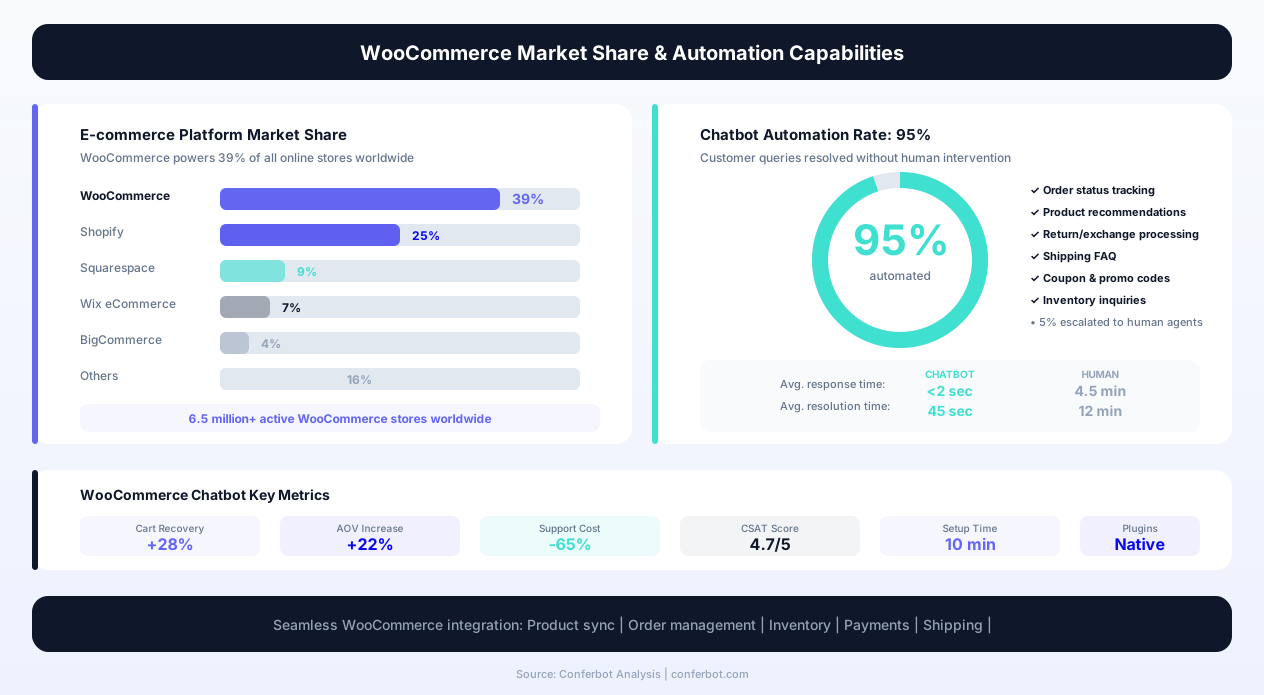
The operational cost of manual support is staggering. The average e-commerce support ticket costs $5-12 to resolve when handled by a human agent. For a store receiving 200 support inquiries per day, that translates to $1,000-$2,400 in daily support costs -- most of which address repetitive questions that a chatbot handles in seconds. Industry research from Juniper confirms that chatbots saved retailers $11 billion in 2025, and that number continues climbing as AI capabilities mature.
Conferbot's AI chatbot builder provides a purpose-built WooCommerce template that connects to your store via the WooCommerce REST API and WordPress hooks, giving the bot access to your full product catalog, order statuses, shipping methods, coupon rules, and customer data. The result is an always-on sales and support assistant that handles 95% of routine queries without human involvement, while intelligently escalating complex issues to your team via live chat handoff.
This page covers the complete architecture of a WooCommerce chatbot, its core capabilities, integration mechanics, ROI analysis, and a step-by-step deployment guide to get your bot live on your store within minutes.
Core Capabilities of a WooCommerce Chatbot
A WooCommerce store chatbot is not a single-purpose tool -- it is a comprehensive storefront assistant that handles the full spectrum of customer interactions. Each capability connects directly to your WooCommerce data through API integration, ensuring responses are always accurate and current.
Intelligent Product Search and Discovery
Customers rarely know the exact SKU they want. They search with natural language -- "waterproof hiking boots under $100" or "red dress for a wedding." The chatbot processes these conversational queries against your WooCommerce product catalog, filtering by attributes (color, size, price range, category), stock availability, and ratings. Unlike your store's built-in search bar that relies on keyword matching, the chatbot understands intent and synonyms: a query for "laptop bag" also returns results tagged as "notebook case" or "computer sleeve."
Product discovery through conversation converts at 3-4x higher rates than passive browsing because the bot actively narrows options based on stated preferences, eliminating the paradox of choice that causes shoppers to leave without purchasing.
Real-Time Order Status and Tracking
"Where is my order?" accounts for 40-50% of all e-commerce support tickets. The WooCommerce chatbot resolves these instantly by querying the WooCommerce Orders API with the customer's email or order number. It returns the current order status (processing, shipped, delivered), tracking numbers with carrier-specific tracking links, estimated delivery dates, and any notes attached to the order. For stores using shipping plugins like ShipStation or WooCommerce Shipping, the bot pulls real-time carrier data directly.
Cart Recovery and Checkout Assistance
With cart abandonment rates hovering at 69-75% across e-commerce, every recovered cart directly impacts revenue. The WooCommerce chatbot detects abandoned carts via session monitoring and WooCommerce's built-in cart tracking, then initiates recovery conversations through on-site widgets or WhatsApp messages. It asks why the shopper hesitated, addresses objections (shipping cost, sizing uncertainty, payment options), and provides one-click cart restoration links that bring shoppers back to a pre-populated checkout.
Coupon and Discount Application
Customers frequently have coupon codes they struggle to apply, or they want to know about current promotions. The chatbot validates coupon codes against WooCommerce's discount rules in real time, explains why a code may not apply (minimum cart value not met, expired, product excluded), and can proactively offer applicable promotions during the purchase flow. For recovery scenarios, it generates unique single-use coupons through the WooCommerce Coupons API.
Size and Variant Selection Guidance
For stores selling apparel, footwear, or products with multiple variants, the chatbot guides customers through selection with conversational sizing tools. It pulls variant data (sizes, colors, materials) directly from WooCommerce product attributes and presents them in digestible comparisons. For sizing specifically, it integrates size charts stored in product metadata and walks customers through measurement-based recommendations, reducing size-related returns by 20-30%.
Shipping Calculator and Delivery Estimates
Unexpected shipping costs are the #1 reason for cart abandonment (48% of cases per Baymard Institute). The chatbot proactively calculates shipping costs based on the customer's location and cart contents using WooCommerce's shipping zone and method configurations. It presents all available shipping options with costs and estimated delivery times before the customer reaches checkout, eliminating the sticker shock that drives abandonment.
Return and Refund Processing
Returns are inevitable in e-commerce -- the average return rate is 20-30% for online purchases. The chatbot streamlines the return process by checking order eligibility against your store's return policy (time window, product condition requirements), initiating the RMA process, generating return shipping labels when integrated with your fulfillment provider, and updating customers on refund status. This automation reduces return processing time from days to minutes.
Review Collection and Social Proof
Post-purchase review collection is a growth flywheel that most stores underutilize. The chatbot automatically follows up with customers after delivery confirmation (configurable delay of 3-14 days) and requests product reviews through a conversational interface. Asking "How are you enjoying your [product name]?" and then guiding the customer through a star rating and comment feels more natural than a generic review request email, yielding 2-3x higher review submission rates.
Complete Feature Matrix
The following matrix details every feature available in the WooCommerce store chatbot template, explaining what each does operationally and how it benefits both your business and your customers.
| Feature | Description | Operational Benefit | Customer Benefit |
|---|---|---|---|
| Natural language product search | Processes conversational queries against your full WooCommerce catalog with attribute filtering | Reduces support tickets for product inquiries by 60-70% | Finds products faster than browsing categories or using keyword search |
| Order status lookup | Queries WooCommerce Orders API by email or order number, returns status with tracking links | Eliminates 40-50% of support volume (WISMO queries) | Instant answers without waiting for email replies or phone hold times |
| Abandoned cart recovery | Detects cart abandonment, initiates multi-channel recovery with objection handling | Recovers 15-25% of abandoned carts, directly increasing revenue | Reminds shoppers of items they wanted and removes purchase barriers |
| Coupon validation and application | Validates codes against WooCommerce discount rules, explains restrictions, suggests alternatives | Reduces checkout friction and coupon-related support tickets | Understands immediately why a code does not work and gets alternative offers |
| Size and variant advisor | Guides customers through product variants using stored size charts and attribute data | Reduces size-related returns by 20-30%, saving $10-20 per avoided return | Confident sizing without measuring tape confusion or guesswork |
| Shipping cost calculator | Calculates shipping by zone, method, and cart weight before checkout | Reduces cart abandonment caused by unexpected shipping costs (48% of cases) | No checkout surprises -- knows total cost upfront including delivery |
| Return/refund processor | Checks return eligibility, initiates RMA, generates labels, tracks refund status | Automates return workflow, reduces processing time from days to minutes | Self-service returns without phone calls or back-and-forth emails |
| Review collection engine | Post-delivery follow-up requesting star ratings and written reviews conversationally | Increases review volume by 2-3x, improving SEO and social proof | Quick and easy review submission through natural conversation |
| Stock availability alerts | Notifies customers when out-of-stock items are restocked, maintains waitlists | Captures demand data for inventory planning, recovers otherwise-lost sales | Automated notification when desired items become available |
| Multi-language support | Detects customer language and responds in their preferred language using AI translation | Serves international customers without multilingual staff | Natural interaction in their own language without switching to English |
| Live agent escalation | Detects complex/emotional queries and hands off to human agents with full context | Agents handle only high-value conversations, improving efficiency | Seamless transition to human help when AI cannot fully resolve the issue |
Each feature is configurable through Conferbot's visual flow builder. You enable what you need and customize the conversational flow, tone, and escalation rules to match your brand voice and operational requirements.
Ready to try WooCommerce Store Chatbot?
Deploy this template in under 10 minutes. No coding required.
Use This Template Free →WooCommerce Integration Architecture
The power of a WooCommerce chatbot depends entirely on the depth and reliability of its integration with your store's data layer. A surface-level chatbot that cannot access real-time product and order data is nothing more than a glorified FAQ page. Conferbot's WooCommerce integration connects at the API level, giving the chatbot the same data access as your admin dashboard.
WooCommerce REST API Connection
Conferbot connects to your WooCommerce store via the WooCommerce REST API v3, the official programmatic interface for accessing store data. The connection is established through API keys (consumer key and consumer secret) generated in your WooCommerce settings, requiring no WordPress admin access or FTP credentials. The integration uses read-only permissions for data retrieval and write permissions only for specific actions (creating coupons, updating order notes) that you explicitly enable.
The API connection enables access to:
- Products endpoint: Full catalog with names, descriptions, prices, variants, attributes, images, stock levels, and categories
- Orders endpoint: Order status, line items, shipping details, tracking numbers, customer information, and order notes
- Customers endpoint: Customer profiles, purchase history, saved addresses, and account details
- Coupons endpoint: Active promotions, discount rules, usage limits, and expiration dates
- Shipping endpoint: Zones, methods, rates, and delivery estimates by location
WordPress Webhook Integration
For real-time event-driven responses, the chatbot also utilizes WooCommerce webhooks. These fire instantly when specific events occur in your store, eliminating the need for polling the API. Key webhooks include:
- Order created/updated: Triggers order confirmation messages and status update notifications
- Product restocked: Fires back-in-stock notifications to customers on the waitlist
- Coupon created: Updates the bot's knowledge of available promotions in real time
- Customer created: Initiates welcome sequences for new account registrations
Plugin Compatibility
WooCommerce's plugin ecosystem is vast, and the chatbot integrates with popular extensions that extend store functionality:
- WooCommerce Subscriptions: Manages subscription inquiries, pause/resume requests, and billing date changes
- WPML/Polylang: Pulls product translations for multi-language catalog search
- ShipStation/WooCommerce Shipping: Retrieves real-time shipping rates and tracking data from carriers
- Yoast WooCommerce SEO: Uses structured product data for richer search responses
- WooCommerce Points and Rewards: Checks and communicates customer loyalty point balances
The integration runs on Conferbot's infrastructure, meaning it does not add load to your WordPress server. API calls are cached intelligently (product data cached for 5-15 minutes, order data fetched fresh), so your store's performance remains unaffected even during high-traffic periods. This architecture supports stores with catalogs ranging from 50 to 500,000+ products.
Before and After: Measurable Impact
The business case for a WooCommerce chatbot is built on measurable metrics. The following comparison shows typical performance improvements observed by WooCommerce stores after deploying Conferbot's chatbot template, based on aggregate data from stores processing 100-10,000 orders per month.
| Metric | Before Chatbot | After Chatbot | Improvement |
|---|---|---|---|
| Average response time to customer queries | 4-12 hours (email) | Under 3 seconds | 99.9% faster |
| Support tickets requiring human agents | 100% manual | 5-15% (complex only) | 85-95% automation rate |
| Cart abandonment rate | 72% | 55-60% | 12-17 percentage point reduction |
| Monthly support costs (200 tickets/day) | $30,000-$72,000/year | $3,000-$7,200/year | 90% cost reduction |
| Customer satisfaction (CSAT) | 72% (slow responses) | 89% (instant resolution) | +17 points |
| Average order value | Baseline | +12-18% with recommendations | Revenue uplift from cross-sells |
| Product return rate | 25-30% | 18-22% | 20-30% fewer returns |
| Review collection rate | 2-5% (email requests) | 8-15% (conversational) | 3x more reviews |
| Support availability | Business hours only | 24/7/365 | Full coverage |
| Time to resolve WISMO queries | 2-4 hours | Instant (automated) | 100% reduction in wait time |
ROI Calculation for a Typical WooCommerce Store
Consider a mid-size WooCommerce store with the following profile: $50,000/month in revenue, 1,500 orders/month, 150 support tickets/day, and a 72% cart abandonment rate. Here is the annualized ROI:
- Support cost savings: 150 tickets/day x $8 average cost x 90% automation = $394,200/year saved
- Cart recovery revenue: 1,500 orders implies ~5,400 abandoned carts/month. Recovering 20% at $33 AOV = $427,680/year in recovered revenue
- Reduced returns: 375 returns/month (25% rate) reduced by 25% = 94 fewer returns/month x $15 average return cost = $16,875/year saved
- AOV uplift from recommendations: 15% increase on 1,500 orders x $33 AOV = $89,100/year additional revenue
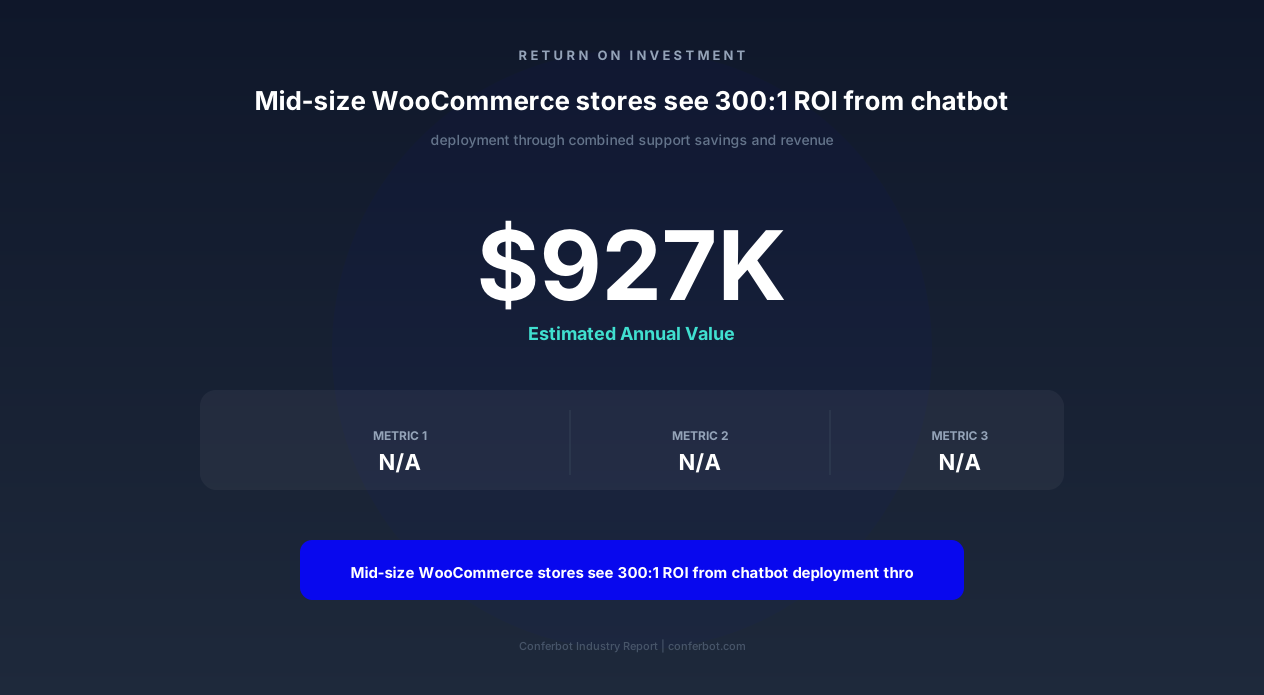
- Total annual impact: $927,855 in combined savings and revenue
Against a Conferbot subscription cost of $49-199/month, the ROI exceeds 300:1 for a store of this size. Even for smaller stores processing 100 orders/month, the cart recovery value alone typically covers the chatbot cost within the first week.
Industry-Specific Use Cases
WooCommerce serves every product category imaginable. The chatbot template adapts to the specific needs of different store types, with pre-built conversational flows tailored to common scenarios in each vertical.
Fashion and Apparel Stores
Fashion retailers face unique challenges: high return rates (30-40% online), sizing confusion across brands, and style-dependent purchase decisions. The WooCommerce chatbot addresses these through conversational size guides that ask body measurements and recommend sizes per brand, outfit suggestion flows that cross-sell complementary items ("This top pairs with these three bottoms"), and style quiz conversations that narrow the full catalog to a personalized shortlist. Fashion stores using the chatbot report 28% fewer size-related returns and 22% higher AOV from outfit recommendations.
Electronics and Tech Stores
Tech purchases involve comparison shopping and specification questions. The chatbot handles queries like "What is the difference between the 256GB and 512GB model?" by pulling variant data and presenting structured comparisons. It handles compatibility questions ("Does this case fit the iPhone 15 Pro Max?") by checking product attributes and tags. For stores selling components or accessories, the bot identifies compatible products based on the customer's existing equipment, reducing returns from incompatible purchases.
Health and Supplement Stores
Supplement and health product stores require careful product guidance due to ingredient interactions and regulatory requirements. The chatbot provides ingredient lookups, dosage recommendations based on product labels (never medical advice -- clearly disclaimed), allergen filtering (gluten-free, vegan, dairy-free), and subscription management for repeat purchases. It also handles the frequent "What is the difference between these two products?" queries that dominate supplement store support.
Home and Furniture Stores
Furniture purchases involve dimensions, material questions, and delivery logistics that standard product pages struggle to communicate. The chatbot handles "Will this couch fit through a 32-inch doorway?" by checking product dimensions, calculates room layouts by asking room measurements and suggesting appropriately-sized items, and manages complex delivery scheduling for white-glove installation services. Furniture stores report 35% fewer delivery-related support tickets after chatbot deployment.
Food and Beverage Stores
Online food retailers deal with dietary requirements, freshness concerns, and subscription boxes. The chatbot filters products by dietary restrictions (keto, paleo, nut-free), handles subscription box customization through conversational preference collection, manages delivery window scheduling for perishable items, and processes recurring order modifications without requiring customers to navigate complex account dashboards.
Digital Product and Course Stores
WooCommerce stores selling digital downloads, online courses, or software face distinct support patterns. The chatbot handles license key retrieval, download link regeneration, course access troubleshooting, and prerequisite recommendations ("Before taking Advanced Python, we recommend completing our Python Fundamentals course"). For membership sites, it manages subscription tiers, payment issues, and content access questions.
50,000+ businesses use Conferbot templates to automate conversations
Step-by-Step Setup Guide
Deploying the WooCommerce chatbot on your store takes 10-15 minutes. This guide walks you through the complete setup, from API connection to live deployment.
Step 1: Generate WooCommerce API Keys
In your WordPress admin, navigate to WooCommerce > Settings > Advanced > REST API. Click "Add Key" and create a new API key with the following settings:
- Description: Conferbot Chatbot Integration
- User: Select an admin or shop manager account
- Permissions: Read/Write (required for coupon generation and order notes)
Copy both the Consumer Key and Consumer Secret -- these are shown only once. Store them securely; you will enter them in the Conferbot dashboard in Step 3.
Step 2: Configure the Chatbot Template
Log into your Conferbot dashboard and select the WooCommerce Store Chatbot template. The template pre-configures conversational flows for product search, order tracking, cart recovery, and support escalation. Customize:
- Brand voice: Set the tone (professional, friendly, casual) and any brand-specific language
- Operating hours: Define when the bot handles queries alone vs. when it can escalate to live agents
- Escalation rules: Configure which query types trigger human handoff (complaints, refund requests over $X, etc.)
- Recovery settings: Set cart abandonment timeout (15-60 minutes), recovery message timing, and discount rules
Step 3: Connect Your WooCommerce Store
In the Conferbot integration settings, select WooCommerce as your platform. Enter:
- Store URL: Your WordPress site URL (e.g., https://yourstore.com)
- Consumer Key: The key generated in Step 1
- Consumer Secret: The secret generated in Step 1
Click "Test Connection" to verify the API responds correctly. Conferbot will confirm access to products, orders, and customers endpoints. If the test fails, ensure your site's REST API is accessible (not blocked by a security plugin like Wordfence or Sucuri) and that your SSL certificate is valid.
Step 4: Sync Your Product Catalog
Once connected, Conferbot performs an initial catalog sync that indexes your products for natural language search. For stores with under 10,000 products, this completes in 2-5 minutes. Larger catalogs (10,000-500,000 products) sync in the background and are fully indexed within 1-2 hours. The sync captures product names, descriptions, attributes, variants, prices, stock status, categories, and images.
Step 5: Install the Chat Widget
Add the Conferbot widget to your WooCommerce store using one of three methods:
- WordPress plugin (recommended): Install the Conferbot WordPress plugin from the plugin directory. It injects the widget script automatically on all pages.
- Theme header injection: Add the Conferbot script tag to your theme's header.php or via a header/footer scripts plugin.
- WooCommerce-specific placement: Use the Conferbot shortcode to place the widget only on product pages, cart pages, or checkout pages.
Step 6: Test and Go Live
Use Conferbot's preview mode to test common scenarios: search for a product, ask about an order status (use a test order), trigger a cart recovery flow, and attempt a return request. Verify that responses are accurate, links work, and escalation routes to the correct channel. Once satisfied, toggle the bot from preview to live mode. The widget becomes visible to all store visitors immediately.
Post-launch, monitor performance through Conferbot's analytics dashboard, which tracks conversation volume, resolution rates, recovery revenue, and customer satisfaction scores in real time.
WooCommerce Chatbot Solutions Compared
The WooCommerce ecosystem includes several chatbot solutions ranging from basic FAQ widgets to enterprise-grade AI assistants. Understanding the landscape helps you choose the right tool for your store's size and complexity.
Tidio for WooCommerce
Tidio is a popular live chat plugin with basic chatbot flows. It offers pre-built WooCommerce templates for order tracking and product recommendations. However, its chatbot logic is rule-based (not AI-powered), limiting it to exact keyword matches rather than natural language understanding. Pricing starts at $29/month for the chatbot add-on, with AI features locked behind the $59/month Tidio+ plan. Catalog search is limited to basic keyword matching against product titles.
ChatBot.com WooCommerce Integration
ChatBot.com provides a visual flow builder with WooCommerce integration through Zapier or direct API. It handles order lookups and basic product recommendations. The platform charges $52-$142/month depending on conversation volume, with overages billed per conversation. Its WooCommerce integration requires manual configuration for each flow, and natural language processing is limited compared to modern LLM-powered alternatives.
Zendesk Answer Bot
For stores already using Zendesk for support, Answer Bot provides automated responses from your knowledge base. However, it does not integrate with WooCommerce product data directly -- it can only reference help articles, not pull live order statuses or product attributes. At $49-99/agent/month plus the Answer Bot add-on, it is expensive for stores that primarily need automated WooCommerce-specific responses rather than knowledge base deflection.
Conferbot WooCommerce Template
Conferbot's purpose-built WooCommerce template combines modern AI language understanding with deep WooCommerce API integration. The chatbot processes natural language queries, accesses real-time store data (products, orders, inventory, coupons), handles multi-turn conversations with context retention, and operates across website, WhatsApp, and Messenger simultaneously. Pricing starts at $49/month with unlimited conversations, making it the most cost-effective option for high-volume stores.
| Capability | Tidio | ChatBot.com | Zendesk | Conferbot |
|---|---|---|---|---|
| AI natural language understanding | Limited | Basic NLP | Knowledge base only | Full LLM-powered |
| Real-time WooCommerce product search | Keyword only | Via Zapier | No | Native API |
| Order status from WooCommerce API | Yes | Manual setup | No | Yes (automatic) |
| Cart recovery with objection handling | Basic | Rule-based | No | AI conversational |
| Multi-channel (WhatsApp, Messenger) | Extra cost | Limited | Separate product | Included |
| Pricing (monthly) | $29-$59 | $52-$142 | $49-99/agent | $49 flat |
| Unlimited conversations | No (caps apply) | No | No | Yes |
For WooCommerce stores specifically, the combination of native API integration, AI-powered natural language, unlimited conversations, and multi-channel delivery makes Conferbot the most complete and cost-effective choice in 2026.
Advanced Customization and Automation
Beyond the template's default capabilities, the WooCommerce chatbot supports advanced customization through Conferbot's flow builder, custom webhooks, and third-party integrations that extend functionality to match complex business requirements.
Custom Conversational Flows
The visual flow builder allows you to create custom conversation paths for scenarios specific to your store. Examples include:
- Pre-order management: For stores with upcoming product launches, build flows that collect pre-order interest, notify customers on release day, and process priority purchases
- Wholesale inquiry routing: Detect B2B inquiries ("Do you offer bulk pricing?") and route them to your wholesale team with qualification data pre-collected
- Gift registry assistance: For stores offering gift registries, help customers find registries by name, suggest items within budget, and manage wish list additions
- Custom product configuration: For made-to-order products, guide customers through configuration options (engravings, custom colors, personalization) and calculate pricing in real time
Third-Party Integration Ecosystem
The chatbot connects to your broader tech stack through API integrations and webhook triggers:
- Email marketing (Klaviyo, Mailchimp): Add customers to segments based on chatbot interactions -- cart abandoners, size quiz completers, review submitters
- CRM (HubSpot, Salesforce): Create contacts and deals from high-value chatbot conversations, particularly wholesale inquiries
- Helpdesk (Freshdesk, Help Scout): Escalated conversations create tickets with full chatbot transcript attached
- Analytics (Google Analytics 4, Mixpanel): Track chatbot interactions as events for conversion attribution
- Fulfillment (ShipBob, ShipStation): Pull real-time fulfillment status beyond WooCommerce's native tracking
Conditional Logic and Segmentation
The chatbot's behavior adapts based on customer segments and conditions:
- New vs. returning customers: First-time visitors receive welcome offers; returning customers get personalized recommendations based on purchase history
- VIP customers: High-LTV customers are never shown discount offers (they will buy at full price) and receive priority escalation to senior support agents
- Geographic targeting: Customers in specific regions see location-relevant shipping options, local pickup availability, and region-specific promotions
- Cart value thresholds: Different recovery strategies apply based on cart value -- high-value carts get white-glove recovery with personal outreach; low-value carts get automated discount nudges
Custom Analytics and Reporting
Beyond Conferbot's built-in analytics, the WooCommerce chatbot exports data for custom reporting:
- Revenue directly attributed to chatbot conversations (cart recovery, upsells, recommendation clicks)
- Most common product questions (informing product page improvements)
- Top abandonment reasons (informing checkout optimization)
- Peak conversation hours (informing staffing for escalated queries)
- Customer satisfaction trends by query type and resolution method
This data feeds into your broader e-commerce analytics strategy, helping you optimize not just the chatbot but your entire store experience based on conversational insights that no other analytics tool captures.
Best Practices for WooCommerce Chatbot Success
Deploying the chatbot is step one. Optimizing it for maximum impact requires ongoing attention to conversation design, response quality, and performance tuning. These best practices are drawn from top-performing WooCommerce stores on the Conferbot platform.
Start with the 80/20 Rule
Identify the 20% of query types that generate 80% of your support volume. For most WooCommerce stores, these are: order status inquiries (WISMO), shipping cost questions, product availability checks, return/refund requests, and coupon issues. Configure and thoroughly test these flows first before expanding to edge cases. A bot that handles the top five query types flawlessly is infinitely more valuable than one that attempts to handle 50 scenarios poorly.
Match Your Brand Voice Precisely
The chatbot represents your brand in every interaction. Configure its tone to match your existing communications. A luxury jewelry store should not sound like a casual streetwear brand, and vice versa. Set specific guidelines: use of emojis (yes/no), formality level (1-5 scale), humor tolerance, and specific phrases to use or avoid. Customers notice when the bot sounds different from your emails and product descriptions -- consistency builds trust.
Design for Mobile First
Over 70% of e-commerce traffic is mobile. Ensure your chatbot responses are scannable on small screens: short paragraphs (2-3 sentences max), bulleted lists for multi-item responses, tap-friendly quick-reply buttons, and product cards with clear images that render well at mobile widths. Test every flow on an actual mobile device, not just a desktop browser's responsive mode.
Set Clear Expectations
The bot should identify itself as an AI assistant in its greeting and clearly communicate what it can and cannot do. This prevents frustration when customers attempt queries outside its capability ("I want to speak to a human" should always work immediately). A transparent bot that admits its limitations earns more trust than one that fails silently or loops customers through irrelevant flows.
Monitor and Iterate Weekly
Review chatbot analytics weekly, focusing on:
- Fallback rate: How often does the bot fail to understand a query? High fallback rates indicate training gaps.
- Conversation completion rate: What percentage of conversations reach a successful resolution? Drop-offs mid-flow indicate UX friction.
- Escalation reasons: Why are conversations being handed to humans? If the same reason appears repeatedly, it is a candidate for automation.
- Customer feedback: Post-conversation thumbs-up/down ratings identify specific flows that need improvement.
Leverage Seasonal Opportunities
Configure the chatbot for peak seasons proactively. Before Black Friday, update it with sale information, gift-finding flows, extended return policies, and shipping cutoff dates for holiday delivery. Before Valentine's Day, Mother's Day, or other gift-giving occasions, activate gift recommendation flows. Seasonal optimization can increase chatbot-attributed revenue by 3-5x during peak periods compared to an unconfigured default state.
Protect Against Abuse
Implement rate limiting for coupon generation, prevent the bot from sharing internal pricing or margin information, and configure it to not engage with clearly abusive inputs. Set maximum discount depths that the bot can offer during recovery sequences, and flag repeated coupon requests from the same user for review. A well-protected bot delivers generous but sustainable customer experiences.
WooCommerce Store Chatbot FAQ
Everything you need to know about chatbots for woocommerce store chatbot.
Why Use a Template vs Building from Scratch?
Templates encode years of optimization data into the conversation flow before you start.
| Factor | Conferbot Template | Build from Scratch | Hire a Developer |
|---|---|---|---|
| Time to deploy | 10 minutes | 2-8 hours | 2-6 weeks |
| Cost | Free | Your time | $5,000-$25,000 |
| Day-1 conversion | 15-22% | 5-8% | 10-15% |
| Proven flows | Yes, data-tested | No | Depends |
| Updates included | Automatic | Manual | Paid |
| Multi-channel | 8+ channels | 1 channel | Extra cost |
| Analytics | Built-in | Must build | Extra cost |
Ready to Deploy WooCommerce Store Chatbot?
Join 50,000+ businesses. Free forever plan available. No credit card required.