
Conference Assistant Chatbot
Free Events And Conferences Chatbot Template
An interactive conference assistant chatbot that helps attendees navigate agendas, discover speakers, find venue information, connect with other attendees, and get answers to common questions. Ideal for multi-day conferences, summits, and professional events.


What Is a Conference & Summit Assistant Chatbot?
A conference chatbot is an AI-powered digital assistant that serves as every attendee's personal concierge during a conference, summit, or large-scale professional event. It handles agenda navigation, speaker information, room directions, session Q&A routing, networking matchmaking, sponsor engagement, and live polling — all through a single conversational interface accessible from any smartphone, tablet, or laptop.
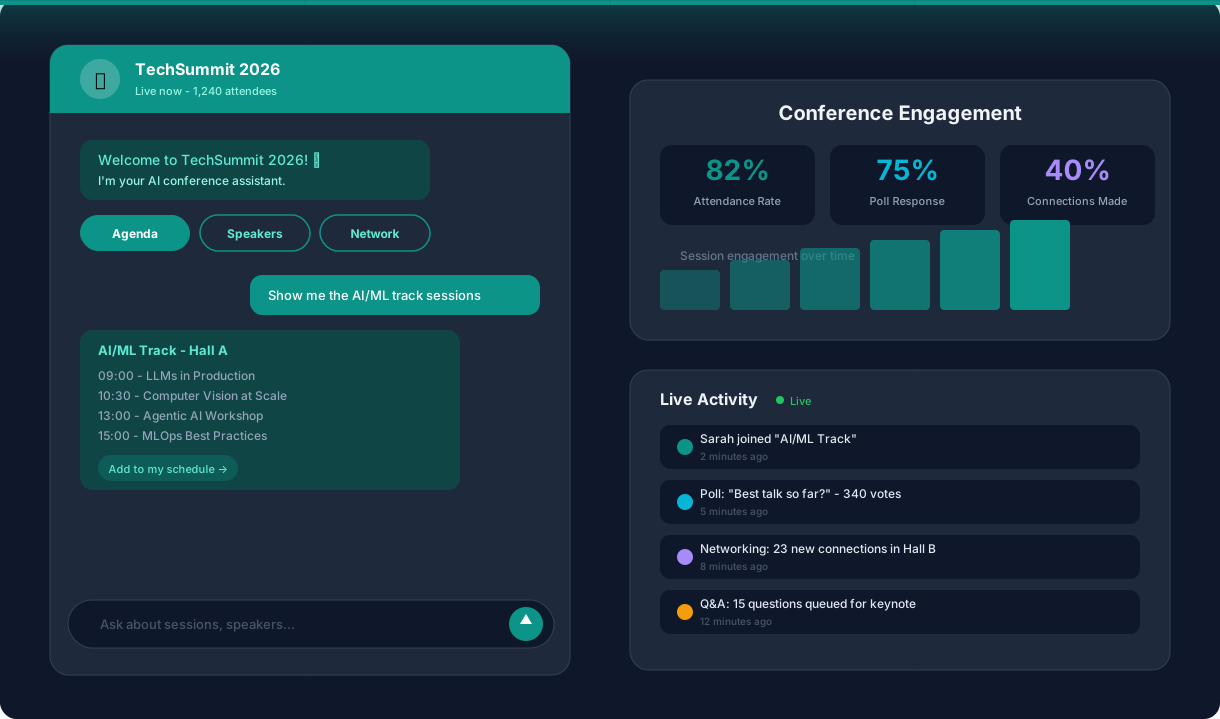
Large conferences are logistically complex environments. A 1,000-person conference with 40 sessions across 8 tracks, 50 speakers, 20 sponsors, and 3 networking events generates hundreds of attendee questions per hour — most of which are variations of the same 15-20 queries: "Where is Room B3?", "What time is the keynote?", "How do I connect with Speaker X?", "Where is lunch?". Without a chatbot, these questions flood the registration desk, overwhelm event staff, and leave attendees frustrated when they cannot find information fast enough.
A conference chatbot eliminates this bottleneck by providing instant, accurate answers to every logistical and content-related question — 24/7, at scale, without any wait time. Attendees type or tap their question and get the answer in seconds. Event staff are freed from repetitive inquiries to focus on high-value tasks like managing VIP experiences, troubleshooting AV issues, and handling genuine emergencies.
Conferbot's conference assistant template is built on a no-code visual builder that lets you configure your event's full agenda, speaker roster, venue map, sponsor directory, and networking features in under two hours. It deploys on your event website, event app, or messaging platforms, and scales from a 100-person executive summit to a 15,000-person industry conference. This guide covers everything you need to know about deploying a conference chatbot in 2026.
Speaker Q&A Routing and Audience Engagement
Q&A sessions are one of the most valuable parts of any conference, but they are also one of the most poorly executed. Handheld microphones create awkward silences. Audience members ask off-topic questions that derail the conversation. Shy attendees with great questions never raise their hands. A summit chatbot transforms Q&A into a structured, democratic, and scalable interaction.
Digital Question Submission
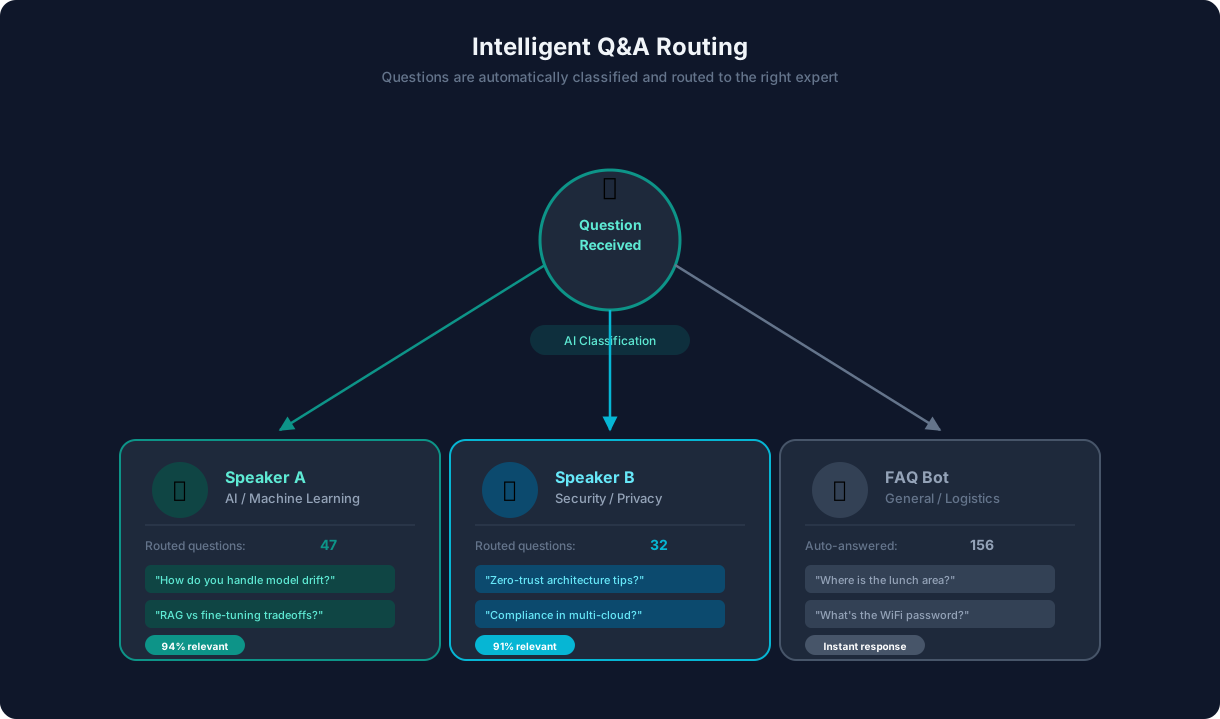
During any session, attendees can submit questions to the speaker through the chatbot. Questions are collected in a moderation queue visible to the session moderator, who selects the best questions to ask the speaker. This approach solves multiple problems simultaneously: attendees do not need to wait for a microphone, questions can be screened for relevance, and the session moderator has a curated list of audience interests rather than a random queue of raised hands.
Question Upvoting
Submitted questions are visible to all attendees in the session, who can upvote the questions they most want answered. The moderation queue automatically sorts by upvote count, surfacing the questions that the audience collectively cares most about. This democratic approach ensures that the most relevant and impactful questions are addressed during the limited Q&A window, rather than whoever happened to get the microphone first.
Post-Session Speaker Access
Questions that were not addressed during the session are not lost. The chatbot routes unanswered questions to the speaker via email after the session, giving them the opportunity to respond asynchronously. Attendees receive the speaker's response through the chatbot, maintaining the conversation beyond the session's time slot. This extended Q&A window is consistently rated as one of the most valuable features by both speakers and attendees — speakers appreciate knowing what their audience cares about, and attendees appreciate getting their questions answered even if time ran out.
Speaker Profiles and Contact
The chatbot maintains a comprehensive speaker directory with bios, session titles, social media links, and a "connect with this speaker" option. Attendees who want to follow up after a session can request the speaker's public contact information or send a connection request through the chatbot. For speakers who opt in, this creates a curated list of attendees interested in their work — a valuable networking asset that traditional conferences do not provide.
Ready to try Conference Assistant Chatbot?
Deploy this template in under 10 minutes. No coding required.
Use This Template Free →Networking Matchmaking: Connecting the Right People
Networking is consistently cited as the top reason people attend conferences — yet it is the feature that conferences execute worst. Attendees wander cocktail hours making random small talk, miss connections with the exact people who could advance their careers or businesses, and leave the event with a stack of business cards they will never follow up on. A conference chatbot transforms networking from chance encounters into intelligent, interest-based matchmaking.
Interest-Based Profile Matching
During or after registration, the chatbot collects networking preferences: industry, role, topics of interest, goals for the event (finding clients, hiring talent, learning a skill, finding partners), and willingness to be matched. Using this data, the chatbot identifies attendees with complementary interests and suggests specific connections. A startup founder looking for investors is matched with VCs attending the same event. A marketing director exploring AI tools is connected with AI solution providers exhibiting at the conference.
| Attendee A | Attendee B | Match Reason |
|---|---|---|
| CTO, Series B startup — looking for cloud infrastructure partners | Enterprise Sales, AWS — looking for startup clients | Complementary needs: buyer meets seller |
| Product Manager — interested in AI/ML integration | ML Engineer, consulting firm — showcasing integration services | Topic alignment: AI integration |
| HR Director — hiring 5 engineers | Senior Developer — exploring new opportunities | Talent match: hiring meets job seeking |
| Researcher, university — publishing on data privacy | CPO, health tech startup — building privacy-first platform | Knowledge transfer: research meets application |
Meeting Scheduling
When two attendees accept a match, the chatbot facilitates scheduling by showing available networking slots (breaks, lunch, dedicated networking sessions) and suggesting a meeting point. Both attendees receive a calendar reminder with the other person's name, role, and a brief context note explaining why the match was suggested. This structured approach converts vague "we should connect" moments into confirmed 15-minute meetings that actually happen. Organizers can integrate this scheduling feature with their existing calendar tools via Conferbot's calendar booking module, which syncs meeting slots with the conference schedule automatically.
Digital Business Card Exchange
The chatbot replaces physical business cards with instant digital contact exchange. When two attendees meet, they can share their contact information through the chatbot with one tap. All connections are stored in the attendee's networking log, which is exportable after the event. This eliminates the lost-business-card problem and gives attendees a clean, organized record of every connection they made — complete with context about where and why they met.
Networking Analytics
Organizers see networking metrics in the analytics dashboard: number of matches suggested, acceptance rate, meetings scheduled, and post-event connection follow-ups. These metrics help organizers understand the networking value their event delivers, which is increasingly important as attendees evaluate whether a conference ticket is worth the investment. Events that can demonstrate measurable networking outcomes command higher ticket prices and stronger repeat attendance.
Sponsor Engagement: Maximizing Sponsor ROI
Sponsors fund a significant portion of most conferences, but sponsor engagement is often limited to a booth in the expo hall and a logo on the lanyard. A conference chatbot creates digital sponsor touchpoints throughout the attendee experience, delivering measurable engagement that justifies sponsorship investment and drives renewals.
Sponsor Directory and Discovery
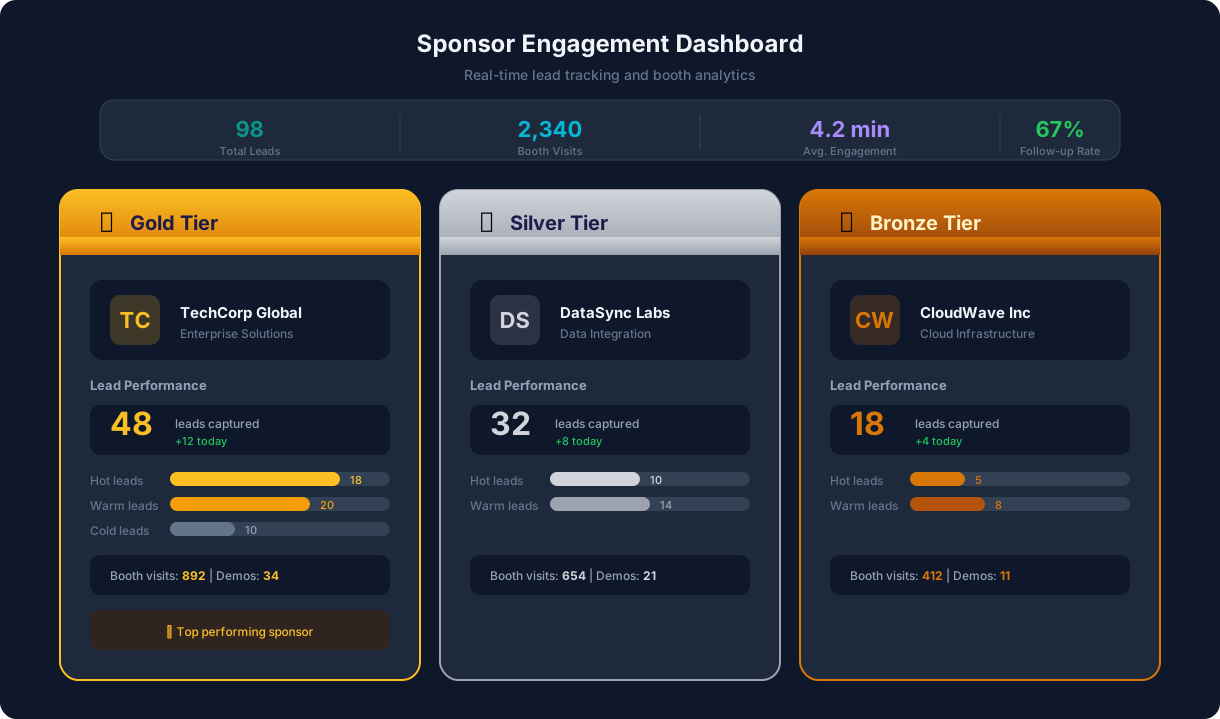
The chatbot maintains a searchable sponsor directory organized by tier (Platinum, Gold, Silver) and category (technology, services, solutions). Attendees can browse sponsors, filter by interest area, and access sponsor profiles that include company description, product offerings, booth location, and special conference offers. This is far more effective than a printed sponsor list in the event program, because attendees can access it on demand throughout the event rather than glancing at it once and forgetting.
Sponsored Content and Offers
Sponsors can place contextually relevant content within the chatbot experience. When an attendee asks about sessions on cybersecurity, the chatbot can display a sponsored message from a security vendor alongside the session listings. When an attendee navigates to the expo hall map, platinum sponsors are highlighted with booth descriptions and incentives. These touchpoints are non-intrusive — they add value by connecting attendees with relevant solutions rather than interrupting the experience.
Lead Capture Integration
The chatbot enables digital lead capture for sponsors. Attendees who express interest in a sponsor — by viewing the sponsor profile, requesting information, or accepting a meeting — are added to the sponsor's lead list with opt-in consent. This lead data includes attendee name, company, role, and the specific interest that triggered the lead (e.g., "viewed cybersecurity sponsor profile after attending the data protection session"). This contextual lead information is dramatically more valuable than a badge scan at a booth, which provides contact details but no intent data. Sponsor leads can be automatically synced to CRM platforms through Conferbot's integrations hub, eliminating manual data export and enabling immediate follow-up.
Sponsor ROI Reporting
After the event, each sponsor receives a detailed engagement report: profile views, content interactions, leads generated, meetings scheduled, and comparison to other sponsors at the same tier. This data-driven reporting transforms sponsor relationships from "trust us, the exposure was great" to "here are 47 qualified leads who actively engaged with your brand." Conferences that provide this level of sponsor analytics see 40-60% higher sponsor renewal rates and command premium pricing for digital sponsorship packages.
Live Polling, Surveys, and Audience Interaction
Live audience interaction transforms passive listeners into active participants. A summit chatbot integrates polling, surveys, quizzes, and real-time feedback collection directly into the conference experience — no separate apps, no QR code scanning, no login walls. Attendees interact through the same chatbot they are already using for agenda navigation and networking.
Session Polls
Speakers and moderators can launch polls during their sessions through the chatbot. Attendees receive a push notification with the poll question and tap to vote. Results are displayed in real time on the presentation screen and in the chatbot, creating an interactive dynamic that elevates the session from a one-way lecture to a collaborative discussion. Common poll types include opinion polls ("Which technology will have the biggest impact in 2026?"), experience polls ("Have you implemented AI in your workflow?"), and decision polls ("Which topic should we deep-dive into next?").
| Interaction Type | Use Case | Response Rate |
|---|---|---|
| Live polls | Gauge audience opinion during sessions | 60-75% of attendees |
| Word clouds | Collect open-ended responses visually | 50-65% of attendees |
| Quizzes | Test knowledge, gamify sessions | 45-60% of attendees |
| Ratings | Session feedback after each talk | 35-50% of attendees |
| Open Q&A | Collect and upvote audience questions | 25-40% of attendees |
Session Feedback Collection
After each session, the chatbot prompts attendees who bookmarked that session with a quick two-question feedback form: a 1-5 star rating and an optional comment. Because the feedback request arrives immediately while the session is still fresh in the attendee's mind — and because it takes under 15 seconds to complete — response rates are 3-5x higher than post-event email surveys. This real-time feedback gives organizers actionable data to adjust the agenda in multi-day events (moving a popular speaker to a larger room, extending a session that received overwhelming positive feedback).
Gamification and Engagement Scoring
The chatbot supports gamification elements that increase participation: points for attending sessions, completing polls, making networking connections, visiting sponsor booths, and submitting Q&A questions. A leaderboard displays the most engaged attendees, and prizes are awarded at closing. Gamification increases overall conference engagement by 25-40%, with the strongest impact on networking participation and sponsor booth visits — the two areas where attendees traditionally under-engage.
Ready to deploy your conference assistant? Explore all chatbot templates for more event automation options, or learn how the NLP chatbot engine can handle natural language queries about your event agenda and logistics.
50,000+ businesses use Conferbot templates to automate conversations
Omnichannel Deployment: Meeting Attendees Where They Are
Conference attendees interact with event communications across multiple channels — the event website before registering, email for confirmations, messaging apps for quick questions on the go, and the event app during the conference itself. A truly effective conference assistant chatbot must be accessible wherever attendees are, without requiring them to switch platforms or remember which channel to use for which type of question.
Website and Event App Deployment
The primary deployment channel for most conference chatbots is the event website, where potential attendees discover the event and registered attendees return for logistics information. The chatbot widget loads instantly on the site and provides pre-event information (agenda overview, registration, venue details) as well as day-of assistance. For conferences with dedicated mobile apps, the chatbot embeds directly within the app's interface, providing a unified experience that does not require attendees to leave the app to get answers.
Messaging Platform Access
Many attendees prefer to interact with the conference chatbot through messaging platforms they already use daily. Conferbot's omnichannel framework enables deployment on WhatsApp, Messenger, and other messaging channels simultaneously. Attendees can message the conference chatbot on WhatsApp to check session times while walking between buildings, ask for directions while in a taxi, or review their personal schedule from any device without opening a browser. The conversation state is synchronized across all channels, so an attendee who bookmarks a session on the website sees that bookmark reflected when they check their schedule on WhatsApp.
Mobile-First Experience
Over 80% of conference chatbot interactions occur on mobile devices during the event itself. The chatbot interface is optimized for mobile-first usage with large tap targets, minimal typing required (quick-reply buttons for common actions), and location-aware responses that factor in the attendee's proximity to different conference venues. For conferences with mobile SDKs or native apps, Conferbot's mobile SDK provides native-quality chatbot rendering that matches the app's design language.
Conference Assistant Chatbot FAQ
Everything you need to know about chatbots for conference assistant chatbot.
Why Use a Template vs Building from Scratch?
Templates encode years of optimization data into the conversation flow before you start.
| Factor | Conferbot Template | Build from Scratch | Hire a Developer |
|---|---|---|---|
| Time to deploy | 10 minutes | 2-8 hours | 2-6 weeks |
| Cost | Free | Your time | $5,000-$25,000 |
| Day-1 conversion | 15-22% | 5-8% | 10-15% |
| Proven flows | Yes, data-tested | No | Depends |
| Updates included | Automatic | Manual | Paid |
| Multi-channel | 8+ channels | 1 channel | Extra cost |
| Analytics | Built-in | Must build | Extra cost |
Ready to Deploy Conference Assistant Chatbot?
Join 50,000+ businesses. Free forever plan available. No credit card required.