
Bug Reporting Chatbot
Free Technology Chatbot Template
A structured bug reporting chatbot that guides users through submitting detailed, actionable bug reports. Users can select the product module, describe the issue, provide reproduction steps, specify expected vs actual behavior, set severity, and upload screenshots — all in a conversational format. Perfect for software companies, QA teams, and open-source projects looking to standardize bug reports, reduce incomplete submissions, and speed up triage.



What Is a Bug Reporting Chatbot?
A bug reporting chatbot is a conversational assistant that guides users — whether they are QA testers, internal employees, beta users, or customers — through a structured bug report submission process. Instead of a blank text field that invites vague descriptions like "the app is broken," the chatbot asks the right questions in the right order: what were you doing, what happened, what did you expect, which browser or device, and can you reproduce it? The result is a complete, actionable bug report that developers can investigate immediately without a single clarifying question.
Incomplete bug reports are one of the most persistent productivity drains in software development. Studies show that 40-60% of bug reports filed through traditional forms lack critical information — missing steps to reproduce, no environment details, vague descriptions, or no screenshot. Each incomplete report triggers a back-and-forth cycle between the reporter and the developer that adds 1-3 days to the fix timeline. Across hundreds of reports per sprint, this adds up to significant engineering time spent on triage and clarification rather than actual fixing.
A bug reporting chatbot solves this by making thoroughness the default. The conversational format feels less like paperwork and more like explaining the problem to a colleague. Users answer one question at a time rather than staring at a form with 12 required fields. The chatbot validates each answer before moving on, ensures no critical field is skipped, and compiles everything into a standardized report format that integrates directly with your issue tracker.
Conferbot's bug reporting chatbot template deploys on your product website, internal QA portal, or beta testing environment using a no-code visual builder. It integrates with Jira, GitHub Issues, Linear, and other trackers, and produces consistently complete reports from day one. This guide covers everything you need to set up effective bug report automation in 2026.
Structured Report Collection: Every Report Complete, Every Time
The core value of a bug reporting chatbot is transforming unstructured, incomplete reports into standardized, actionable submissions. The chatbot achieves this by breaking the report into a sequence of focused questions, each collecting one specific piece of information. This approach reduces cognitive load for the reporter while dramatically increasing report quality for the developer.
The Report Collection Flow
The chatbot walks reporters through seven essential fields in a natural conversational sequence:
| Field | What the Chatbot Asks | Why It Matters |
|---|---|---|
| Summary | "Describe the bug in one sentence" | Becomes the issue title — must be scannable |
| Steps to reproduce | "Walk me through exactly what you did, step by step" | Most critical field — without it, devs cannot investigate |
| Expected behavior | "What did you expect to happen?" | Defines the gap between actual and intended behavior |
| Actual behavior | "What actually happened instead?" | Clarifies the symptom versus the expectation |
| Environment | "Which browser/OS/device are you using?" | Environment-specific bugs are common and hard to reproduce without this |
| Frequency | "Does this happen every time, or intermittently?" | Deterministic vs. intermittent bugs require different investigation approaches |
| Screenshots/URLs | "Can you share a screenshot or the URL where this occurred?" | Visual evidence accelerates diagnosis by 50%+ |
Guided Input vs. Free-Form Fields
For fields like environment and frequency, the chatbot uses multiple-choice options rather than free text. The reporter selects their browser from a list (Chrome, Firefox, Safari, Edge, Mobile Safari, Chrome Mobile), their OS from another list, and frequency from a predefined scale (every time, most of the time, occasionally, once). This structured input eliminates ambiguity — "Chrome on Mac" is more useful than "my laptop" — and enables automated filtering and analytics on incoming reports.
For narrative fields like steps to reproduce and expected behavior, the chatbot uses free text but provides examples and prompts. If a reporter enters a single-sentence description for steps to reproduce, the chatbot follows up: "Can you break this into numbered steps? For example: 1. Go to Settings, 2. Click Profile, 3. Upload an image larger than 5MB." This gentle prompting produces dramatically better reports without making the process feel burdensome.
Impact on Report Quality
Teams that deploy bug reporting chatbots consistently report that incomplete reports drop from 40-60% to under 10%. The average report contains 3-4x more diagnostic information than form-submitted reports, and the time developers spend on clarification questions drops by 70%. The structured format also makes reports more searchable, more filterable, and easier to prioritize during sprint planning. When every report follows the same template, the entire bug lifecycle — from submission to triage to fix to verification — becomes faster and more predictable.
Duplicate Detection: Reducing Noise in Your Issue Tracker
Duplicate bug reports are a hidden tax on engineering productivity. When five users report the same issue independently, each report consumes triage time, creates confusion about whether the issues are truly identical, and inflates the apparent bug count in sprint metrics. In active products with large user bases, 15-25% of incoming bug reports are duplicates of existing known issues. A bug reporting chatbot can detect and consolidate these before they ever reach the issue tracker.
How Duplicate Detection Works
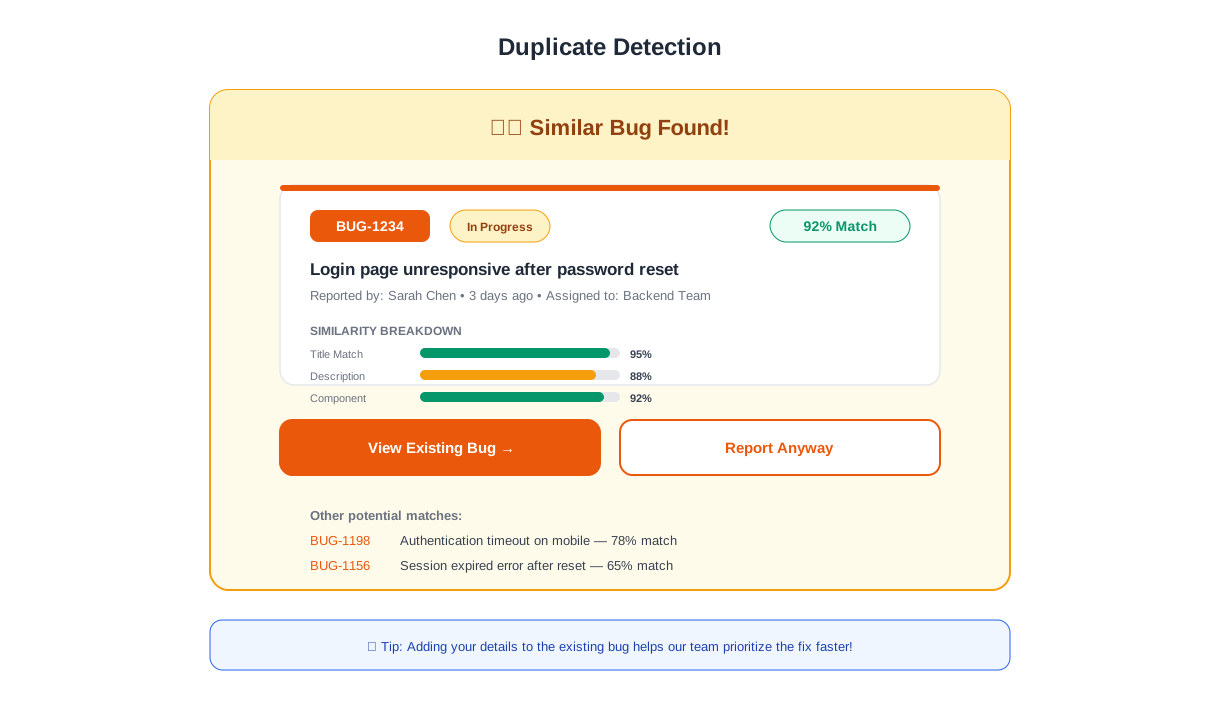
As the reporter describes their issue, the chatbot searches existing open issues by keyword, affected feature area, and error message. When a potential match is found, the chatbot presents it to the reporter: "We already have a report for this issue — [summary of existing report]. Is this the same problem you are experiencing?" If the reporter confirms, the chatbot adds their environment details and any additional context as a comment on the existing issue, increments the "affected users" count, and thanks the reporter for confirming the issue. No duplicate ticket is created.
Benefits of Consolidated Reporting
When duplicates are merged rather than filed separately, the engineering team gets a clear signal about which bugs affect the most users. An issue with 15 "me too" confirmations is obviously higher priority than one with a single report. This user-count signal is far more valuable than having 15 separate tickets that a project manager must manually identify as duplicates, merge, and re-prioritize.
The chatbot also captures environment diversity from duplicate reporters. If the original report was filed on Chrome/Windows and three subsequent reporters are on Safari/Mac, Firefox/Linux, and Chrome/Android, the development team now knows the bug is cross-platform — information that changes the investigation approach and the fix strategy. This aggregated environment data would be lost if each reporter's information lived in a separate, unlinked ticket.
When Duplicates Are Not Really Duplicates
The chatbot handles false matches gracefully. If the reporter reviews the suggested existing issue and says "No, my problem is different," the chatbot continues with the full report collection flow. The reporter's time is not wasted, and the system does not force a merge that would hide a genuinely distinct bug. This "suggest, don't force" approach maintains reporter trust while still capturing the majority of true duplicates before they clutter the tracker.
Ready to try Bug Reporting Chatbot?
Deploy this template in under 10 minutes. No coding required.
Use This Template Free →Severity Classification: Automated Priority Triage
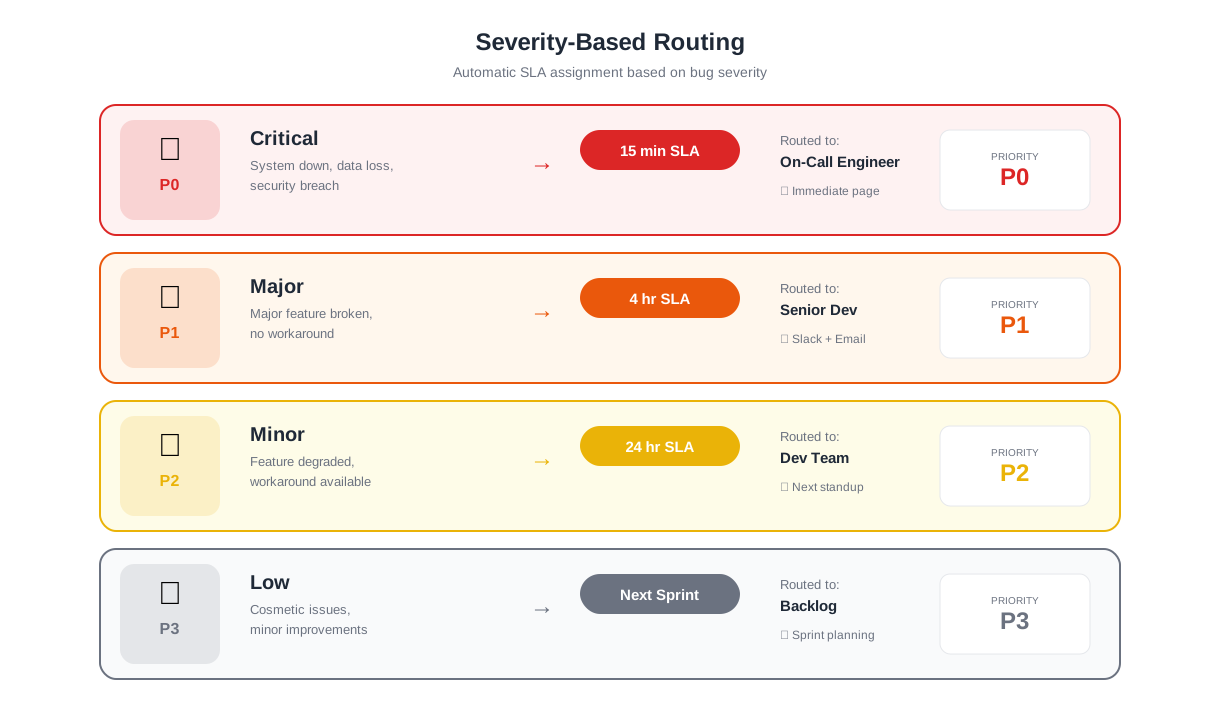
Not all bugs are created equal. A typo on a settings page and a data corruption bug in the checkout flow both arrive as "bug reports," but they demand radically different response times and resource allocation. Manual severity classification is subjective, inconsistent, and slow — different triagers assign different priorities to the same issue, and the classification step itself adds hours or days between submission and action. A chatbot automates severity classification by asking the right questions and applying consistent rules.
Severity Assessment Questions
The chatbot determines severity through three targeted questions after collecting the bug details:
1. Impact scope: "Does this affect just you, a group of users, or all users?" Single-user issues are typically lower severity than those affecting an entire user segment or the full user base.
2. Workaround availability: "Is there a way to accomplish what you need using a different method?" Issues with no workaround are higher priority than those where users can complete their task through an alternative path.
3. Data impact: "Is any data lost, corrupted, or displayed incorrectly?" Data integrity issues are almost always critical, regardless of the scope or workaround availability.
Automated Severity Matrix
| Severity | Criteria | Response Target | Example |
|---|---|---|---|
| P0 — Critical | All users affected, no workaround, data at risk | Immediate | Payment processing fails for all users |
| P1 — High | Many users affected or no workaround | Same day | Search returns wrong results on mobile |
| P2 — Medium | Some users affected, workaround exists | Next sprint | Export to CSV missing one column |
| P3 — Low | Single user, cosmetic, workaround available | Backlog | Tooltip text wraps incorrectly at 150% zoom |
This matrix is applied automatically based on the reporter's answers. A P0 bug triggers an immediate notification to the engineering lead and on-call developer. A P3 bug enters the backlog for future grooming. The chatbot removes human judgment from initial classification, ensuring that a critical production bug filed at 2am receives the same urgency response as one filed during business hours when the triage team is actively monitoring the queue.
Override and Adjustment
Automated classification is a starting point, not a final verdict. Engineering leads can adjust severity after investigation, and the chatbot's classification is clearly labeled as "auto-assessed" in the ticket. Over time, comparing auto-assessed severity to final severity reveals calibration patterns — if the chatbot consistently over-classifies certain issue types, the rules can be tuned. This feedback loop makes the classification more accurate with each sprint cycle.
Auto-Routing to Dev Teams: From Report to the Right Engineer
A perfectly written bug report that sits in the wrong team's queue is almost as useless as no report at all. Routing bugs to the correct team — frontend, backend, mobile, infrastructure, security, or data — is a triage step that adds latency and requires domain knowledge about code ownership. The chatbot automates this routing by mapping the reporter's inputs to team ownership rules, getting the bug in front of the right engineers within minutes of submission.
Feature-Based Routing
During the report collection flow, the chatbot asks which feature or area of the product is affected. The reporter selects from a categorized list: Authentication/Login, Dashboard, Billing/Payments, User Management, Reporting/Analytics, API, Mobile App, Integrations, or Other. Each category maps to a team and, in some cases, a specific engineer who owns that area. The routing configuration is maintained in the chatbot's settings and can be updated as team structures change.
| Product Area | Routed To | Notification Channel |
|---|---|---|
| Authentication / Login | Identity & Security team | #security-bugs + PagerDuty for P0 |
| Dashboard / UI | Frontend team | #frontend-bugs |
| Billing / Payments | Payments team | #payments-bugs + immediate alert for P0-P1 |
| API | Platform team | #api-bugs |
| Mobile App | Mobile team (iOS/Android split) | #mobile-bugs |
| Integrations | Integrations team | #integrations-bugs |
| Reporting / Analytics | Data team | #data-bugs |
Integration with Issue Trackers
The chatbot creates issues directly in your team's tracker — Jira, GitHub Issues, Linear, Asana, or ClickUp — via Conferbot's API integration. Each issue is created in the correct project or board, with the appropriate labels, priority level, and assignee pre-populated. The reporter receives a confirmation message with the issue link so they can track progress. For Jira users, the chatbot can map severity levels to Jira priority fields and product areas to Jira components, maintaining consistency with your existing workflow.
Deployment and Impact
Setting up the bug reporting chatbot with Conferbot's no-code builder takes under an hour. Configure your product areas, map them to teams, connect your issue tracker, and embed the chatbot on your product's help page, QA portal, or beta feedback channel. Teams that deploy structured bug reporting see report completeness jump from 40% to 95%, triage time drop by 70%, and average time-to-fix decrease by 1-2 days per bug — because developers start investigating immediately instead of waiting for clarification.
The cumulative effect across an engineering organization is substantial. If your team handles 200 bug reports per sprint and each incomplete report costs 30 minutes of clarification time, that is 60-120 hours per sprint wasted on back-and-forth. A chatbot that eliminates 80% of that waste recovers 48-96 engineering hours per sprint — the equivalent of adding one to two full-time engineers to your team without hiring anyone. Explore all chatbot templates or learn how NLP-powered conversations can add natural language understanding to your bug triage workflow.
50,000+ businesses use Conferbot templates to automate conversations
Bug Analytics and Trend Reporting: Turning Reports into Product Intelligence
Individual bug reports fix individual problems. But when you aggregate hundreds or thousands of structured bug reports over time, the data reveals patterns that inform strategic product decisions — which features are most fragile, which platforms generate the most issues, whether bug volume is increasing or decreasing sprint over sprint, and where your engineering investment should be focused. A bug reporting chatbot that collects structured, consistent data makes this analysis possible in ways that free-form reports never can.
Automated Trend Detection
Because every bug report collected through the chatbot follows the same structure — product area, severity, environment, frequency — the data is immediately queryable and analyzable without manual tagging or cleanup. Conferbot's analytics dashboard surfaces trends automatically: a sudden spike in reports for a specific product area after a release, a gradual increase in mobile-specific bugs over several sprints, or a correlation between certain environments and specific error categories. These patterns would be invisible in an unstructured pile of free-form bug reports filed through email or a generic form.
Sprint-Level Quality Metrics
Track bug report volume, severity distribution, and resolution time at the sprint level to measure whether your engineering quality is improving over time. Teams that deploy the chatbot gain access to metrics that traditional bug trackers cannot easily produce because the input data is inconsistent. With structured reports, you can answer questions like: "What percentage of P0 bugs were caught internally versus by customers?" and "How has our average time-from-report-to-fix changed over the last six sprints?" These metrics make quality a measurable dimension of engineering performance rather than a vague aspiration.
| Quality Metric | What It Measures | Target Benchmark |
|---|---|---|
| Report completeness rate | Percentage of reports with all fields filled | 95%+ (up from 40-60%) |
| Duplicate detection rate | Percentage of duplicates caught before filing | 70-80% of true duplicates |
| Routing accuracy | Percentage of bugs routed to correct team on first attempt | 90%+ (up from 60-70%) |
| Mean time to first investigation | Hours from report to developer starting investigation | Under 4 hours for P0-P1 |
| Clarification requests per report | Average follow-up questions needed from developers | Under 0.3 (one clarification per 3-4 reports) |
Multi-Channel Bug Collection
Bugs do not arrive only through your QA portal. Customers report them through WhatsApp messages, support emails, live chat conversations, and social media. Conferbot's omnichannel deployment ensures that regardless of the channel where a bug is first reported, the same structured collection flow activates, and the resulting report arrives in your issue tracker in the same standardized format. This eliminates the common problem of "customer-reported bugs" being lower quality than internally reported bugs — because the chatbot enforces the same completeness standards regardless of who is reporting.
The integrations hub connects the bug reporting chatbot to your entire development toolchain. Beyond issue trackers, configure notifications to Slack channels for specific product areas, trigger CI/CD pipeline runs when a P0 bug is confirmed, or update status pages automatically when multiple users report the same critical issue. The chatbot becomes the front door to your entire bug management workflow, not just a ticket creation tool.
Bug Reporting Chatbot FAQ
Everything you need to know about chatbots for bug reporting chatbot.
Why Use a Template vs Building from Scratch?
Templates encode years of optimization data into the conversation flow before you start.
| Factor | Conferbot Template | Build from Scratch | Hire a Developer |
|---|---|---|---|
| Time to deploy | 10 minutes | 2-8 hours | 2-6 weeks |
| Cost | Free | Your time | $5,000-$25,000 |
| Day-1 conversion | 15-22% | 5-8% | 10-15% |
| Proven flows | Yes, data-tested | No | Depends |
| Updates included | Automatic | Manual | Paid |
| Multi-channel | 8+ channels | 1 channel | Extra cost |
| Analytics | Built-in | Must build | Extra cost |
Ready to Deploy Bug Reporting Chatbot?
Join 50,000+ businesses. Free forever plan available. No credit card required.