
Why Every Production Chatbot Needs Rate Limiting
Every chatbot that connects to an LLM API is a potential cost amplifier. Without rate limiting, a single bad actor -- or even a well-meaning user who accidentally triggers a loop -- can generate hundreds of API calls in minutes, burning through your LLM budget in a fraction of the time it was designed to last. This is not a theoretical risk. In February 2025, a widely reported incident documented by Simon Willison's LLM security analysis showed an unprotected chatbot accumulating $14,000 in OpenAI API charges in a single weekend after a prompt injection attack caused the bot to generate long, complex responses in a loop.
Rate limiting is the first line of defense. It controls how many requests a user, IP address, or session can make to your chatbot within a given time window. When the limit is exceeded, the system either queues the request, returns a degraded response (using cached or static content instead of a live LLM call), or blocks it entirely with a friendly message asking the user to wait.
But rate limiting is not just about preventing abuse. It serves four critical functions for production chatbots:
The Four Functions of Chatbot Rate Limiting
| Function | What It Protects | Example Scenario |
|---|---|---|
| Cost protection | Your LLM API budget | A user sends 200 messages in 10 minutes; each costs $0.03 in LLM tokens. Without limits: $6.00 for one user. With limits: $0.90 (30 messages allowed). |
| Abuse prevention | Your service and other users | A bot or script scrapes your chatbot by sending rapid-fire queries, consuming capacity meant for real customers. |
| Quality of service | Response time for all users | A traffic spike overwhelms your inference backend, increasing latency for everyone. Rate limiting sheds excess load to maintain acceptable response times. |
| Compliance | Your reputation and legal standing | An attacker uses prompt injection to generate harmful or misleading content at scale through your chatbot. |

The implementation effort is modest -- most rate limiting can be added in a day or two -- but the protection is significant. This guide covers the algorithms, configuration strategies, and implementation patterns you need for a production-grade rate limiting system. Whether you are building a custom chatbot or using a platform like Conferbot (which includes built-in rate limiting and abuse protection), understanding these concepts helps you make informed configuration decisions.
We will also cover the chatbot-specific concern of LLM credit protection per message -- a mechanism that prevents any single chatbot message from consuming excessive LLM tokens due to prompt injection, overly complex queries, or runaway context windows. This is distinct from traditional rate limiting and is essential for chatbots powered by pay-per-token LLM APIs.
Rate Limiting Algorithms Explained: Token Bucket, Sliding Window, and Fixed Window
Three algorithms dominate production rate limiting. Each has different characteristics that make it more or less suitable for chatbot workloads. Understanding the trade-offs helps you choose the right one (or combination) for your deployment.
1. Token Bucket Algorithm
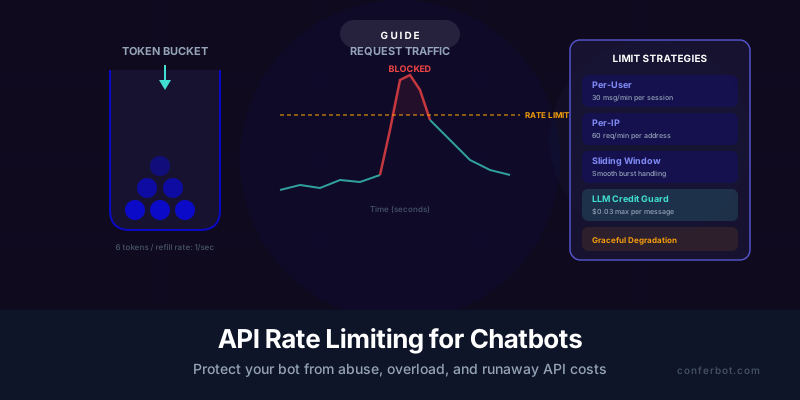
The token bucket is the most widely used rate limiting algorithm for chatbots because it naturally handles bursty traffic -- which is exactly how human conversation works (rapid back-and-forth messages followed by thinking pauses).
How it works: Imagine a bucket that holds a fixed number of tokens. Each API request consumes one token. Tokens are added to the bucket at a constant rate (the refill rate). If the bucket is empty when a request arrives, the request is rejected or queued. If the bucket has tokens, one is consumed and the request proceeds.
| Parameter | Chatbot Recommendation | Rationale |
|---|---|---|
| Bucket capacity | 10-30 tokens | Allows short bursts of rapid messages (normal in active conversation) without triggering limits |
| Refill rate | 1-2 tokens per second | Sustains a reasonable conversation pace (60-120 messages per minute max) |
| Scope | Per-session or per-user | Limits individual users without affecting others |
The beauty of the token bucket for chatbots is burst tolerance. A user who sends 5 messages quickly (correcting typos, asking follow-up questions in rapid succession) is not punished because the bucket absorbs the burst. But a user who sends 50 messages in a minute exhausts the bucket and is rate-limited.
Implementation: Token bucket can be implemented in-memory (Redis, in-process dictionary), as middleware in your API gateway (Kong, AWS API Gateway, nginx), or at the application level. For chatbots behind a web socket, implement it in the WebSocket message handler. Redis-based implementations are preferred for distributed systems because the state is shared across all server instances.
2. Sliding Window Algorithm
The sliding window divides time into overlapping windows and counts requests within each window. Unlike the fixed window (discussed below), the sliding window eliminates the "boundary burst" problem where a user can send double the limit by timing requests at the boundary between two fixed windows.
How it works: Track the timestamp of every request within the current window period (e.g., last 60 seconds). When a new request arrives, count how many requests occurred within the last 60 seconds. If the count exceeds the limit, reject the request.
| Parameter | Chatbot Recommendation | Rationale |
|---|---|---|
| Window size | 60 seconds | Balances responsiveness (not too long to wait) with meaningful rate control |
| Request limit | 30-60 requests per window | Accommodates active conversation without permitting abuse |
| Scope | Per-IP for anonymous, per-user for authenticated | Different scoping for different trust levels |
The sliding window is more precise than the token bucket but requires more memory (storing individual request timestamps) and more computation (counting within the window). For chatbots with moderate traffic (under 10,000 concurrent sessions), the performance difference is negligible. For high-traffic deployments, the sliding window log variant (which uses a counter with weighted overlap between windows) provides a good balance of precision and performance.
3. Fixed Window Algorithm
The simplest algorithm: divide time into fixed windows (e.g., 1-minute blocks) and count requests within each window. When the count exceeds the limit, reject until the next window starts.
The fixed window has one significant drawback for chatbots: boundary bursts. A user can send the full limit at the end of one window and the full limit at the start of the next window, effectively doubling their rate for a short period. For most chatbot use cases, this is acceptable because the burst is short-lived and the overall rate is still bounded. For strict rate enforcement (e.g., protecting expensive LLM endpoints), use the sliding window instead.

Which Algorithm to Use
| Scenario | Recommended Algorithm | Why |
|---|---|---|
| General chatbot protection | Token bucket | Best burst tolerance for conversational patterns |
| Strict abuse prevention | Sliding window | No boundary burst loophole |
| Simple/low-traffic deployment | Fixed window | Easiest to implement; adequate for low volume |
| Multi-tier protection | Token bucket + sliding window | Token bucket for burst control; sliding window as a backstop |
For production chatbots, we recommend implementing a token bucket as the primary rate limiter (for burst tolerance) with a sliding window as a secondary backstop (for abuse prevention). This two-layer approach, described in Google Cloud's rate limiting architecture guide, provides the best balance of user experience and protection.
Per-User vs. Per-IP vs. Per-Session: Choosing the Right Scope
Rate limiting scope determines who the limit applies to. Choosing the wrong scope either leaves gaps that attackers can exploit or unfairly punishes legitimate users who share an IP address (corporate offices, university networks, mobile carriers using NAT).
Per-Session Rate Limiting
Scope: Each chatbot conversation session gets its own rate limit. A session typically starts when the user opens the chat widget and ends after a configurable inactivity timeout (15-30 minutes).
Best for: Customer-facing chatbots where users are not authenticated. Sessions are identified by a session token generated when the widget loads and stored in a cookie or local storage.
Recommended limits:
- 30 messages per minute (token bucket: capacity 30, refill 1/sec)
- 200 messages per session (hard cap to prevent marathon abuse sessions)
- 5 concurrent sessions per IP (prevents one machine from opening multiple sessions)
Advantage: Fair -- each user's limit is independent of other users, even if they share an IP.
Risk: Session IDs can be cleared (delete cookies, open incognito) to circumvent limits. Mitigate by combining with per-IP limits as a backstop.
Per-User Rate Limiting (Authenticated)
Scope: Each authenticated user (identified by user ID, email, or API key) gets a dedicated rate limit that persists across sessions and devices.
Best for: Chatbots integrated with user accounts (e.g., logged-in customers on a SaaS platform, internal employee chatbots, API-based chatbot access). Works naturally with Conferbot's authenticated user features.
Recommended limits:
- 60 messages per minute (higher than anonymous because authenticated users are more trusted)
- 500 messages per day (prevents cumulative abuse while allowing heavy use)
- Tiered limits by user role: free tier gets 20/min, paid tier gets 60/min, enterprise gets 120/min
Advantage: Cannot be bypassed by clearing cookies or switching browsers. The user's identity is tied to their account.
Risk: Account sharing can concentrate multiple users' traffic under one rate limit. Mitigate by monitoring for unusual patterns (e.g., messages from multiple IPs simultaneously under one account).
Per-IP Rate Limiting
Scope: Each IP address gets a shared rate limit. All sessions from the same IP count toward the same limit. Cloudflare's rate limiting guide provides additional context on IP-based approaches.
Best for: As a backstop behind per-session or per-user limits. Per-IP alone is not sufficient because shared IPs (corporate networks, mobile carrier NAT, VPNs) can have hundreds of legitimate users behind a single IP address.
Recommended limits:
- 120 messages per minute per IP (4x the per-session limit to account for multiple users)
- Higher limits for known trusted IPs (your office, major customer IPs)
- Lower limits for IPs flagged by threat intelligence (known bot networks, data centers)
Advantage: Catches attacks that circumvent session-based limits.
Risk: Over-aggressive per-IP limits block legitimate users on shared networks. Always pair with per-session limits and use the per-IP limit as a ceiling, not the primary control.
The Recommended Multi-Layer Configuration
| Layer | Scope | Limit | Purpose |
|---|---|---|---|
| Layer 1 | Per-session | 30 msg/min, 200 msg/session | Primary user-facing rate limit |
| Layer 2 | Per-IP | 120 msg/min | Backstop for session ID abuse |
| Layer 3 | Global | 5,000 msg/min across all users | Backend capacity protection |
| Layer 4 | Per-message LLM cost cap | $0.05 max per message | Prevents individual expensive calls (covered in next section) |
This four-layer approach provides defense in depth: per-session protects individual user experience, per-IP catches session manipulation, global protects backend capacity, and per-message cost cap prevents expensive individual requests. Implement Layer 1 first, then add layers 2-4 as your deployment scales. For chatbot security best practices beyond rate limiting, see our dedicated security guide.
LLM API Credit Protection: Capping Cost Per Message
Traditional rate limiting controls how many requests a user can make. LLM credit protection controls how expensive each individual request can be. This distinction is critical for chatbots because a single cleverly crafted message can consume 10-100x more tokens than a typical message if it triggers a long response, includes a large context window, or exploits a prompt injection vulnerability.
Consider the math: a typical chatbot message costs $0.01-$0.03 in LLM tokens (input tokens for context + output tokens for the response). But a prompt injection that says "Write a 5,000-word essay about the history of computing" -- if the chatbot complies -- could consume $0.30-$0.50 in a single response. At scale, even a small number of these expensive messages can blow your budget.
How LLM Credit Protection Works
LLM credit protection operates at three levels:
Level 1: Input Token Limit
Cap the maximum number of input tokens per message. This includes the user's message, the system prompt, the conversation history, and the RAG-retrieved context. A reasonable cap for most chatbots is 4,000-8,000 input tokens per request. If the total exceeds the cap, truncate the conversation history (oldest messages first) or reduce the number of RAG chunks.
Level 2: Output Token Limit
Cap the maximum number of tokens the LLM can generate in its response. Set the max_tokens parameter in your LLM API call to a reasonable limit (500-1,000 tokens for most customer support responses). This prevents the model from generating excessively long responses regardless of what the user requests.
Level 3: Dollar Cap Per Message
Calculate the maximum cost of each LLM API call before making it, and reject calls that would exceed a per-message cost threshold. The formula: estimated_cost = (input_tokens * input_price_per_token) + (max_output_tokens * output_price_per_token). If estimated_cost exceeds your threshold (e.g., $0.05), reduce the context size or reject the request with a fallback response.
| Protection Level | Configuration | Typical Value | What It Prevents |
|---|---|---|---|
| Input token cap | Max input tokens per request | 4,000-8,000 | Oversized context windows, context injection attacks |
| Output token cap | Max output tokens (max_tokens parameter) | 500-1,000 | Runaway response generation, prompt-injected essay generation |
| Dollar cap per message | Max estimated cost per LLM call | $0.03-$0.05 | Any combination of input/output that exceeds cost target |
| Daily budget cap | Max total LLM spend per day | Varies by deployment | Runaway costs from any cause; hard ceiling on daily exposure |

Implementing Credit Protection
The implementation pattern is a pre-flight check before every LLM API call:
- Count input tokens (use a tokenizer library like tiktoken for OpenAI models or the Anthropic token counter for Claude)
- If input tokens exceed the cap, truncate conversation history and/or reduce RAG context
- Set max_tokens in the API call to your output cap
- Calculate estimated_cost = (actual_input_tokens * price) + (max_output_tokens * price)
- If estimated_cost exceeds the per-message dollar cap, further reduce context or return a cached/static response
- Track cumulative daily spend; if the daily cap is reached, switch all responses to cached-only mode until the next day
For Conferbot users, credit protection is built into the platform with configurable thresholds. For custom implementations, these checks add minimal latency (1-5ms for token counting) and significant cost protection. Combine credit protection with semantic caching for maximum cost efficiency: cached responses cost $0 in LLM tokens and serve as the natural fallback when credit limits are reached.
Real-World Cost Scenario
Consider a chatbot handling 10,000 messages per day:
- Without protection: Average cost $0.025/message, but 2% of messages cost $0.30+ (prompt injections, long contexts). Daily cost: $250 (normal) + $60 (expensive outliers) = $310/day, $9,300/month.
- With credit protection ($0.05 cap): Average cost $0.020/message (aggressive context management reduces average). Daily cost: $200/day, $6,000/month. Savings: $3,300/month (35% reduction).
- With credit protection + caching: 50% of messages served from cache at $0. Daily cost: $100/day, $3,000/month. Total savings: $6,300/month (68% reduction).
The combination of rate limiting, credit protection, and caching can reduce your LLM API costs by 50-70% while simultaneously improving response times for cached queries. This is the cost optimization trifecta covered across this guide, our caching strategies guide, and our performance monitoring guide.
Graceful Degradation: What Happens When Limits Are Hit
Rate limiting is not just about saying "no" -- it is about saying "not right now, but here is what I can do instead." Graceful degradation ensures that rate-limited users still receive a useful response rather than a blank error or a cold "you have been rate limited" message. The difference between a frustrating rate limit experience and an acceptable one is entirely in how the degradation is handled.
The Degradation Ladder
Implement a progressive degradation ladder where each step reduces cost and latency while providing the best possible user experience at that tier:
| Level | Trigger | Response Type | User Experience | Cost |
|---|---|---|---|---|
| Level 0: Normal | Within all limits | Full LLM inference with RAG context | Best possible response | $0.02-0.03/msg |
| Level 1: Soft limit | Per-session rate at 80% | Semantic cache lookup; LLM only on cache miss | Slightly faster response; same quality for common questions | $0-0.03/msg |
| Level 2: Rate limited | Per-session limit exceeded | Cached or pre-computed responses only | Good for common questions; may not handle novel queries well | $0/msg |
| Level 3: Hard limited | Per-IP or global limit exceeded | Static fallback message with contact options | Functional but limited; user can email or call | $0/msg |
| Level 4: Blocked | Abuse detected (pattern matching) | Block with explanation and CAPTCHA challenge | Disruptive but necessary for bots/attackers | $0/msg |
Crafting Rate Limit Messages
The message your chatbot shows when a user is rate-limited should be honest, helpful, and non-threatening. Bad examples and good examples:
Bad: "Error 429: Too many requests. Try again later." (Technical, cold, no alternative offered.)
Bad: "You have been rate limited due to excessive usage." (Accusatory tone; makes the user feel they did something wrong.)
Good: "I'm processing a lot of requests right now. For the fastest help, you can email us at [email protected] or I'll be ready for your next question in about 30 seconds." (Explains the situation, offers an alternative, sets a time expectation.)
Good: "Let me catch up -- I've been working on quite a few questions for you! I'll be ready for your next question in a moment. In the meantime, you might find our help center useful." (Friendly tone, normalizes the situation, provides a self-service alternative.)
Implementing Degradation in Practice
The degradation ladder requires three components:
- A rate tracker: Tracks current rate for each session/user/IP and computes the current level (0-4).
- A response router: Based on the current level, routes the request to the appropriate handler (LLM inference, cache lookup, static response, or block).
- A cache layer: Pre-populated with responses to common questions. This is the same semantic cache described in our caching strategies guide, now serving double duty as both a cost optimization and a graceful degradation mechanism.
The elegant insight is that a well-populated cache makes rate limiting nearly invisible to users. If 60% of questions are answerable from cache, a user who is rate-limited to cache-only still gets a good answer 60% of the time. Only novel or unusual questions are affected. This is why caching and rate limiting should be designed and implemented together as a unified cost and quality strategy.

Communicating Limits Proactively
For chatbots with known per-user limits (e.g., free tier with 50 messages per day), communicate the limit upfront and show remaining usage. This prevents surprise rate limiting and helps users self-manage their usage. Display a subtle counter ("23 of 50 messages used today") or a warning when the user is approaching the limit ("You have 5 messages remaining today. Upgrade for unlimited access.")
This proactive approach also creates a natural upsell moment for premium plans -- users who consistently hit limits are prime candidates for paid tiers with higher limits. Conferbot's pricing tiers are designed with this usage-based upsell path in mind.
Detecting and Blocking Chatbot Abuse Patterns
Rate limiting catches volumetric abuse (too many requests). Abuse detection catches behavioral abuse -- patterns that indicate malicious intent regardless of request volume. As documented in the OWASP Top 10 for LLM Applications, a sophisticated attacker who stays just below your rate limits but sends carefully crafted prompt injection attempts is not caught by rate limiting alone. You need pattern-based detection to identify and block these threats.
Common Chatbot Abuse Patterns
| Pattern | Description | Detection Method | Response |
|---|---|---|---|
| Rapid-fire scraping | Automated requests to extract knowledge base content | Request rate exceeding human conversation pace (> 1 msg/sec sustained for > 30 sec) | CAPTCHA challenge, then block |
| Prompt injection probing | Series of messages testing prompt injection vectors | Input pattern matching: "ignore previous instructions," "you are now," system prompt extraction attempts | Redirect to safe response, flag for review |
| Content generation abuse | Using your chatbot as a free LLM by asking unrelated questions | Topic drift detection: queries unrelated to your chatbot's domain (e.g., "write me a poem" on a customer support bot) | Scope restriction response, reduce per-session limit |
| Data exfiltration | Attempting to extract PII or internal data through the chatbot | Output scanning for PII patterns, internal URLs, API keys | Block response, alert security team. See our security guide. |
| Conversation flooding | Opening many simultaneous sessions | Per-IP concurrent session limit | Block new sessions beyond limit |
| Denial of service via expensive queries | Crafting queries designed to maximize LLM token consumption | Credit protection (per-message cost cap) | Return cached/static response, flag pattern |
Building a Threat Scoring System
Rather than blocking on any single signal, implement a threat score that accumulates across signals. Each suspicious behavior adds points; when the score exceeds a threshold, the session is flagged, rate-limited more aggressively, or blocked:
- Message rate > 1/sec for 10+ seconds: +20 points
- Prompt injection keyword detected: +30 points
- Off-topic query (scope violation): +10 points
- Same exact message repeated 3+ times: +15 points
- Session age < 5 seconds with first message > 200 characters: +25 points (likely automated)
Threshold actions:
- 0-30 points: Normal operation
- 31-60 points: Reduce rate limit by 50%, enable stricter input validation
- 61-90 points: Cache-only responses, flag for human review
- 90+ points: Block session, require CAPTCHA to continue
The threat score decays over time (e.g., -5 points per minute of normal behavior) so that legitimate users who accidentally trigger a signal are not permanently penalized. This adaptive approach provides strong protection against attackers while minimizing false positives on legitimate users.
Bot vs. Human Detection
The most impactful abuse detection is distinguishing bots from humans. Indicators that a session is automated:
- No mouse movement or scrolling events on the page (bots typically do not generate these)
- Perfectly consistent message timing (humans have variable gaps between messages)
- Messages arrive before the chat widget's typing indicator could reasonably complete
- No session warm-up behavior (humans typically read the greeting before messaging)
- JavaScript execution patterns inconsistent with a real browser (detectable via client-side fingerprinting)
These signals can be combined into the threat scoring system above. For high-value chatbots (those on pages with significant conversion value), consider integrating a bot detection service like Cloudflare Bot Management or reCAPTCHA Enterprise for sophisticated bot/human classification.
Implementation Architecture: Where to Put Rate Limiting
Rate limiting can be implemented at multiple points in your chatbot's request flow. The optimal placement depends on what you are protecting and how your system is architected.
Architecture Layers for Rate Limiting
Layer 1: CDN / Edge (Cloudflare, AWS CloudFront, Vercel)
Rate limiting at the edge blocks malicious traffic before it reaches your infrastructure. This is the most cost-effective place to stop DDoS and volumetric attacks because you are not paying for compute to process blocked requests. Configure basic per-IP rate limits and bot challenges at this layer.
Limitation: Edge rate limiting typically cannot inspect message content or apply per-session/per-user logic because it operates at the HTTP request level, not the application level.
Layer 2: API Gateway (Kong, AWS API Gateway, nginx)
The API gateway is the ideal location for per-session and per-user rate limiting. It can inspect headers (session tokens, user IDs), apply different limits by endpoint, and return appropriate HTTP status codes (429 Too Many Requests with Retry-After header).
This layer handles the token bucket and sliding window algorithms described earlier. For chatbots using WebSocket connections, implement rate limiting in the WebSocket handler rather than the HTTP gateway, since messages flow over a persistent connection rather than individual HTTP requests.
Layer 3: Application Level (Your Chatbot Backend)
The application layer implements chatbot-specific protections: LLM credit protection (per-message cost cap), prompt injection detection, abuse pattern scoring, and graceful degradation routing. This is where you decide whether to route a request to the LLM, the cache, or a static fallback based on the user's current rate status and threat score.
Layer 4: LLM Provider Level
OpenAI, Anthropic, and other LLM providers have their own rate limits (tokens per minute, requests per minute). Your application must handle these upstream limits gracefully -- if you receive a 429 from the LLM provider, queue the request and retry with exponential backoff rather than passing the error to the user. Provider rate limits are documented in their respective API references and should inform your own limits (your limits should be lower than the provider's to prevent hitting theirs).

Implementation with Redis
For most production chatbots, Redis is the preferred backend for rate limiting state. It provides atomic operations (INCR, EXPIRE), sub-millisecond latency, and shared state across multiple application server instances. The implementation pattern for a sliding window rate limiter in Redis uses a sorted set:
- Key: rate_limit:{session_id}
- On each request: add the current timestamp as a member with the timestamp as the score
- Remove all members with scores older than the window start (ZREMRANGEBYSCORE)
- Count remaining members (ZCARD)
- If count exceeds limit, reject; otherwise, allow
- Set TTL on the key to auto-expire stale sessions (EXPIRE)
This entire operation can be wrapped in a Lua script for atomicity. The Redis memory overhead is minimal: each session's rate limit state uses approximately 1-5 KB depending on the window size and request rate.
Cloud-Native Implementations
If you prefer managed services over self-hosted Redis:
- AWS: API Gateway usage plans + WAF rate rules + Lambda@Edge for edge-level protection
- Google Cloud: Cloud Armor rate limiting + Apigee API management
- Cloudflare: Rate Limiting rules (free tier includes 10,000 requests/month; paid tiers are unlimited) + Super Bot Fight Mode
For Conferbot users, rate limiting is handled at the platform level with configurable per-user and per-session limits, LLM credit protection, and abuse detection built in -- no infrastructure setup required.
Monitoring Your Rate Limiting System
Rate limiting is only effective if it is correctly calibrated and maintained. Too lenient and it provides no protection; too strict and it degrades the experience for legitimate users. Monitoring gives you the data to find the right balance.
Key Rate Limiting Metrics to Track
| Metric | What It Tells You | Alert Threshold |
|---|---|---|
| Rate-limited request percentage | How often limits are being hit | Above 5% warrants investigation (either limits are too strict or there is abnormal traffic) |
| Unique sessions rate-limited per hour | How many distinct users are affected | Above 2% of active sessions indicates limits may be too strict for legitimate use |
| Blocked session count | How many sessions hit Level 4 (hard block) | Any blocks should be reviewed to verify they are true abuse, not false positives |
| Cache hit rate during degradation | How well your cache covers rate-limited users | Below 50% means rate-limited users get a poor experience; expand cache coverage |
| LLM cost per hour | Real-time spend tracking | Above your budget ceiling triggers investigation (possible abuse or traffic spike) |
| Average message latency by tier | Response time at each degradation level | If cached responses are slower than expected, check cache infrastructure |
Dashboard for Rate Limiting
Add a rate limiting section to your chatbot monitoring dashboard with:
- Real-time graph of requests per second, with rate limit line overlaid
- Pie chart of response types: normal LLM (green), cached (blue), rate-limited (yellow), blocked (red)
- Table of most-limited sessions (session ID, IP, message count, threat score)
- Running total of estimated cost savings from rate limiting (requests that would have been LLM calls but were served from cache or blocked)
Tuning Your Limits Over Time
Review rate limiting data monthly and adjust:
- If fewer than 1% of sessions are ever rate-limited, your limits may be too lenient. Tighten by 20%.
- If more than 5% of sessions are rate-limited, check whether they are legitimate users or bots. If legitimate, loosen limits or improve your cache hit rate so degradation is less noticeable.
- If your LLM costs are consistently below budget with current limits, you have headroom to allow more generous limits for better UX.
- If you see clusters of rate-limited sessions from specific IP ranges, investigate whether these are automated attacks or legitimate users behind a shared IP (corporate network, university campus).
Rate limiting is not a set-and-forget configuration. The NGINX rate limiting documentation provides additional reference implementations. Like all aspects of chatbot operations, it requires ongoing monitoring and tuning to balance protection with user experience. The investment is small (15-30 minutes of review per month), but it prevents the kinds of cost surprises and service disruptions that can undermine confidence in your chatbot deployment.
For a complete operational approach, combine rate limiting monitoring with the broader performance monitoring framework and Conferbot's analytics dashboard for a unified view of chatbot health, cost, and quality.
Implementation Checklist: Rate Limiting in 5 Days
This checklist takes you from an unprotected chatbot to a fully rate-limited, cost-protected deployment in one work week.
Day 1: Assess Current Exposure
- Calculate your current average and peak message rates (messages per minute, per hour, per day)
- Review your LLM API billing for the last 3 months: identify any cost spikes and their causes
- Calculate your current average cost per message and identify the most expensive messages
- Inventory your chatbot's architecture: where does the widget connect? What middleware exists? Where can rate limiting be inserted?
Day 2: Implement Per-Session Rate Limiting
- Choose your algorithm (token bucket recommended for first implementation)
- Configure: capacity 20 tokens, refill rate 1/sec (allows bursts of 20 messages, sustained rate of 60/min)
- Implement in your API gateway or application middleware
- Write a friendly rate limit message: "I'm taking a moment to process. I'll be ready for your next question in about 30 seconds."
- Test by sending rapid-fire messages to verify the limit triggers correctly
Day 3: Implement LLM Credit Protection
- Set max_tokens on all LLM API calls to 800 (adjustable based on your typical response length)
- Implement input token counting before each LLM call
- Set input token cap at 6,000 tokens per request
- Calculate per-message cost estimate and set $0.05 per-message cap
- Configure fallback behavior when credit cap is reached (serve from cache or return static response)
Day 4: Add Per-IP Backstop and Graceful Degradation
- Add per-IP rate limiting at 120 messages/min (via API gateway or CDN)
- Implement the degradation ladder: Level 0 (normal) > Level 1 (cache-preferred) > Level 2 (cache-only) > Level 3 (static fallback)
- Populate your semantic cache with responses to top 100 questions (critical for Level 2 quality). See our caching guide for cache population strategies.
- Test the full degradation path: verify each level triggers correctly and messages are user-friendly
Day 5: Monitor, Tune, and Document
- Set up monitoring for rate limiting metrics (see monitoring section above)
- Run a simulated abuse test: script 500 rapid messages and verify all protections engage correctly
- Document your rate limiting configuration: algorithm, limits, degradation ladder, contact for on-call issues
- Add rate limiting cost savings to your monthly reporting template
- Schedule a 30-day review to tune limits based on real traffic data
Ongoing Maintenance
| Frequency | Task | Time |
|---|---|---|
| Weekly | Review rate-limited sessions for false positives | 15 min |
| Monthly | Review rate limiting metrics, adjust thresholds, update cache | 30 min |
| Quarterly | Full audit: review abuse patterns, update detection rules, test degradation | 2 hours |
With this five-day implementation, your chatbot is protected against cost overruns, abuse, and overload -- while legitimate users experience seamless, uninterrupted service. Ready to deploy a chatbot with built-in rate limiting and cost protection? Conferbot's AI chatbot builder handles rate limiting, credit protection, and abuse detection out of the box. Explore the platform or review pricing plans to get started.
Was this article helpful?
API Rate Limiting for Chatbots FAQ
Everything you need to know about chatbots for api rate limiting for chatbots.
About the Author

Conferbot Team specializes in conversational AI, chatbot strategy, and customer engagement automation. With deep expertise in building AI-powered chatbots, they help businesses deliver exceptional customer experiences across every channel.
View all articles
