
One Chatbot. Every Channel.
Build once, deploy everywhere. Reach 5B+ users across WhatsApp, Messenger, Instagram, Telegram, Discord, Slack, LINE, Microsoft Teams and your website - all from one dashboard.
Last updated September 2026 · Reviewed by the Conferbot team
How to pick a channel
Pick channels by where your customers already are, not by how many you can switch on. For most businesses that means the website widget first - it costs nothing, needs one embed script, and catches people while they are still looking at the product - and WhatsApp second, because it carries the follow-up conversation the website cannot. A third channel is worth adding only once you can name the audience that lives there: Instagram if buyers arrive from social, Telegram for developer and community audiences, Slack or Microsoft Teams when the bot is answering colleagues rather than customers.
Each channel below has its own page with setup time, cost and platform requirements. If you want to see the flows that suit a given platform before you commit, the templates by platform pages pair each channel with ready-made conversations, and which channels should you deploy on works through sequencing them by audience, region and use case.
Messaging channels
The platforms your customers already message on, plus the website widget. Every one runs the same flow.
Website Widget
Embed intelligent chatbots directly on your website
WhatsApp Business
Connect with customers on the world's most popular messaging app
Facebook Messenger
Engage customers through your Facebook Business Page
Instagram DMs
Automate Instagram Direct Messages for your business
Telegram Bot
Create powerful Telegram bots without coding
Discord Bot
Build community bots for Discord servers
Slack Bot
Internal automation for your Slack workspace
LINE
Reach customers in Japan, Taiwan, and Southeast Asia
Microsoft Teams
Enterprise chatbots for Microsoft Teams
Website & e-commerce platforms
The same website widget, with install instructions written for each platform - where the snippet goes, which theme file or app screen to use, and what to check afterwards.
Mobile SDKs
Native SDKs, not WebView wrappers, published to npm, pub.dev, Maven Central and CocoaPods. Adding one is a dependency and an init call.
Why omnichannel deployment matters in 2026
Your customers are not all on your website. They message on WhatsApp (2.8 billion users, 98% open rate), Facebook Messenger (1 billion users), Instagram DM (700 million users), and Telegram (900 million users). A chatbot that only works on your website leaves 60-70% of customer touchpoints uncovered.
Omnichannel deployment means building one chatbot and deploying it across every channel your customers use - website, messaging apps, social media, and native mobile apps. Same AI, same knowledge base, same analytics. No separate builds, no per-channel fees.
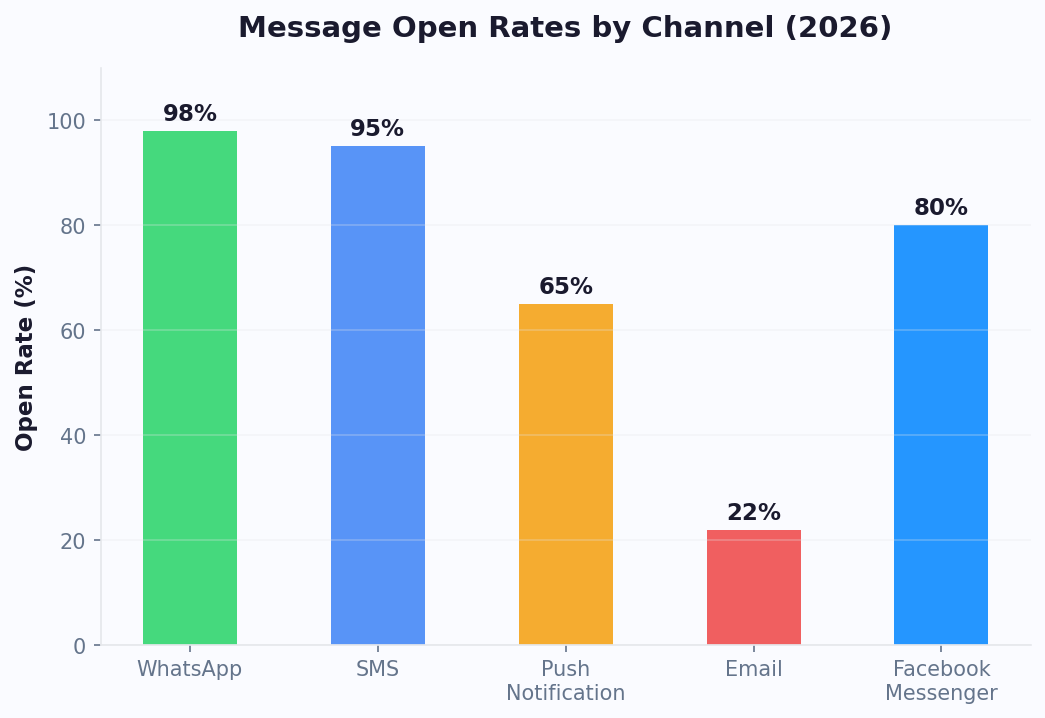
Channel engagement: the numbers
The difference between channels is not just reach - it is engagement quality. WhatsApp messages have a 98% open rate and 45-60% click-through rate, compared to email's 22% open rate and 2-3% click-through. When you deploy your chatbot on WhatsApp alongside your website, you are not just adding a channel - you are multiplying your engagement by 4-5x.
| Channel | Monthly users | Open rate | Click rate | Best for |
|---|---|---|---|---|
| 2.8B | 98% | 45-60% | Support, orders, reminders | |
| Messenger | 1B | 80% | 30-40% | Ads, marketing sequences |
| Instagram DM | 700M | 80% | 25-35% | E-commerce, visual brands |
| Telegram | 900M | 85% | 35-45% | Tech, crypto, communities |
| Website Widget | Your traffic | 35%* | 15-25% | Lead capture, support |
| Slack/Teams | Your team | 90% | 60-70% | Internal IT, HR, ops |
| Email (comparison) | 4.4B | 22% | 2-3% | Newsletters, promotions |
* With proactive greeting. Passive chat icon achieves only 2-5%.
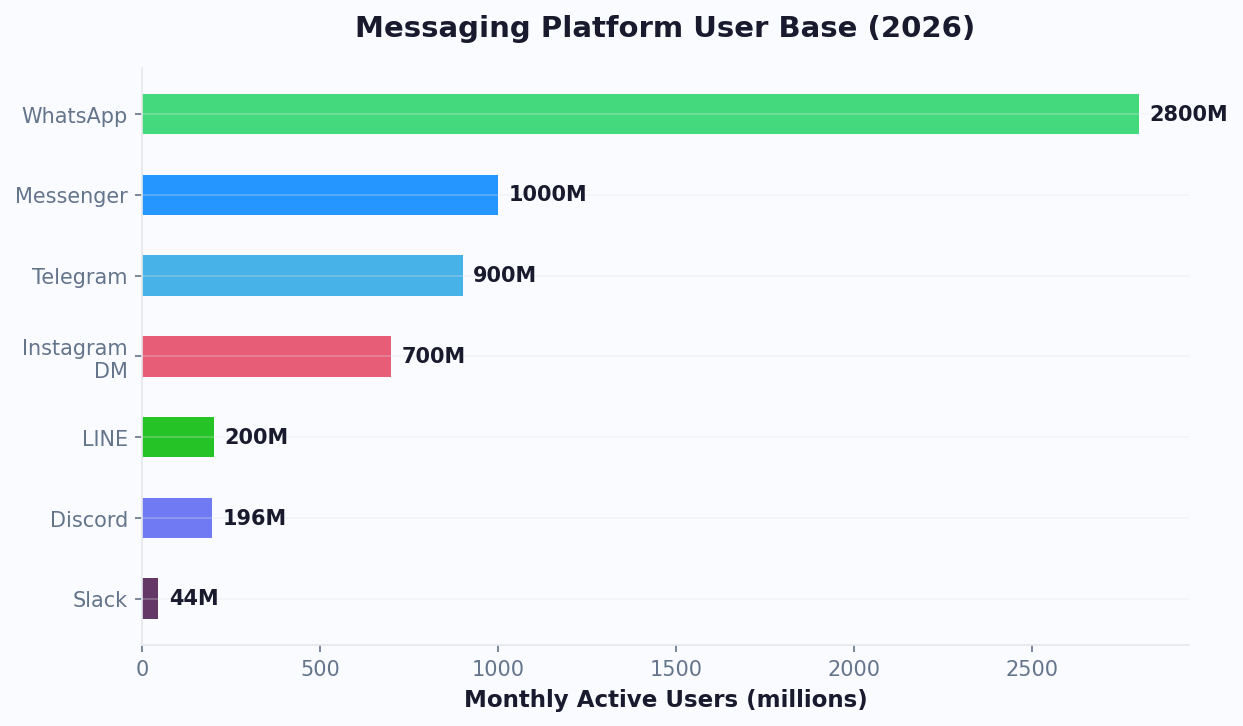
How one bot works across every channel
With Conferbot, you design your conversation flow once in the visual AI builder. Then connect any channel with one click. The platform automatically adapts message formatting, buttons, and media to each platform's capabilities. WhatsApp supports up to 3 buttons while Discord supports 25 - your bot handles the differences automatically.
For mobile apps, Conferbot provides true native SDKs - not WebView wrappers - for Android (Kotlin/Jetpack Compose), iOS (Swift/SwiftUI), Flutter, and React Native. All four SDKs are published to their respective package registries (Maven Central, CocoaPods, pub.dev, npm) and include 50+ node types, offline message queuing, push notifications, and full theming.
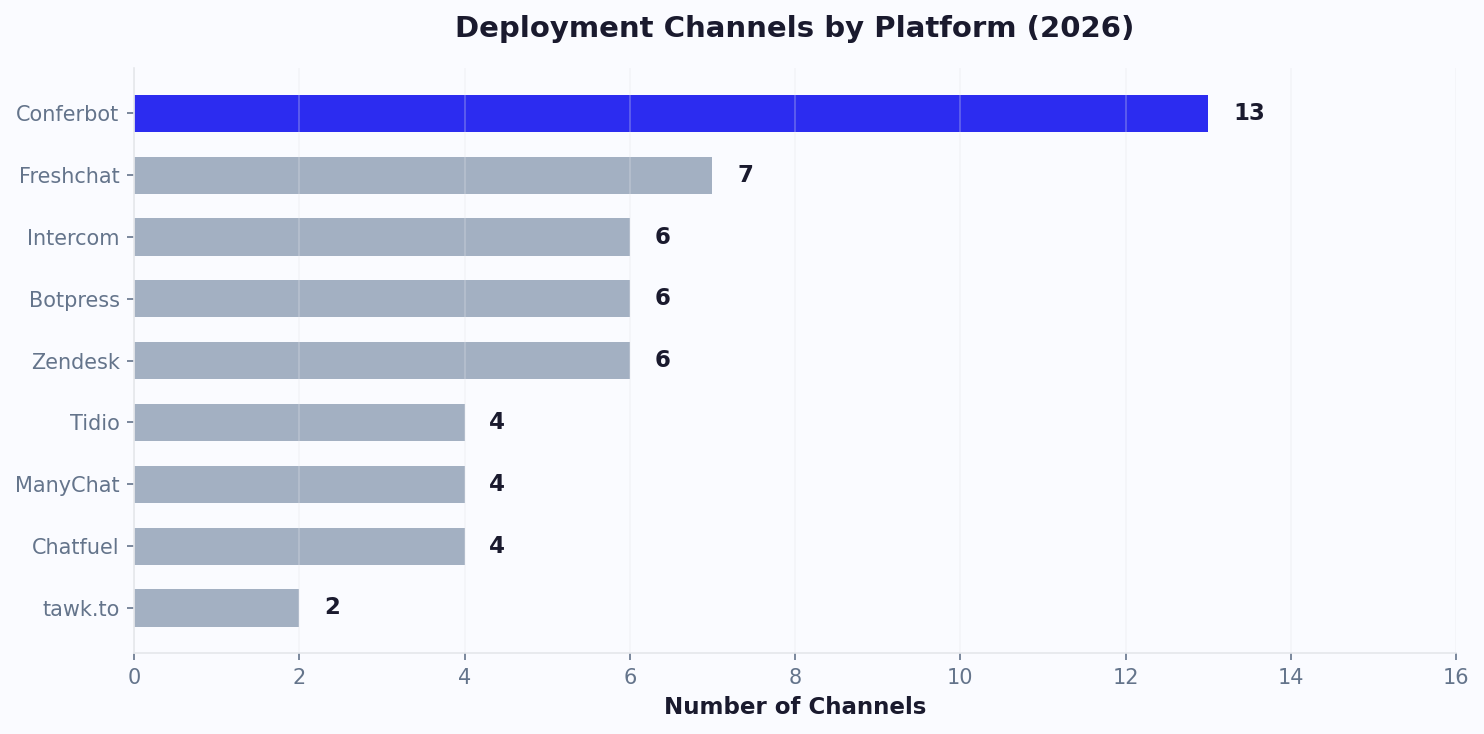
Which channels should you start with?
Start with website + WhatsApp - this combination covers 80% of use cases for most businesses. Your website chatbot captures visitors during browsing, and WhatsApp handles follow-ups, reminders, and ongoing conversations where open rates are 4x higher than email.
Add Instagram and Messenger if you run social media ads - Click-to-WhatsApp and Click-to-Messenger ads tend to achieve a substantially lower cost per lead than traditional landing page funnels. For internal teams, deploy on Slack or Microsoft Teams to automate IT help desk, HR queries, and onboarding.
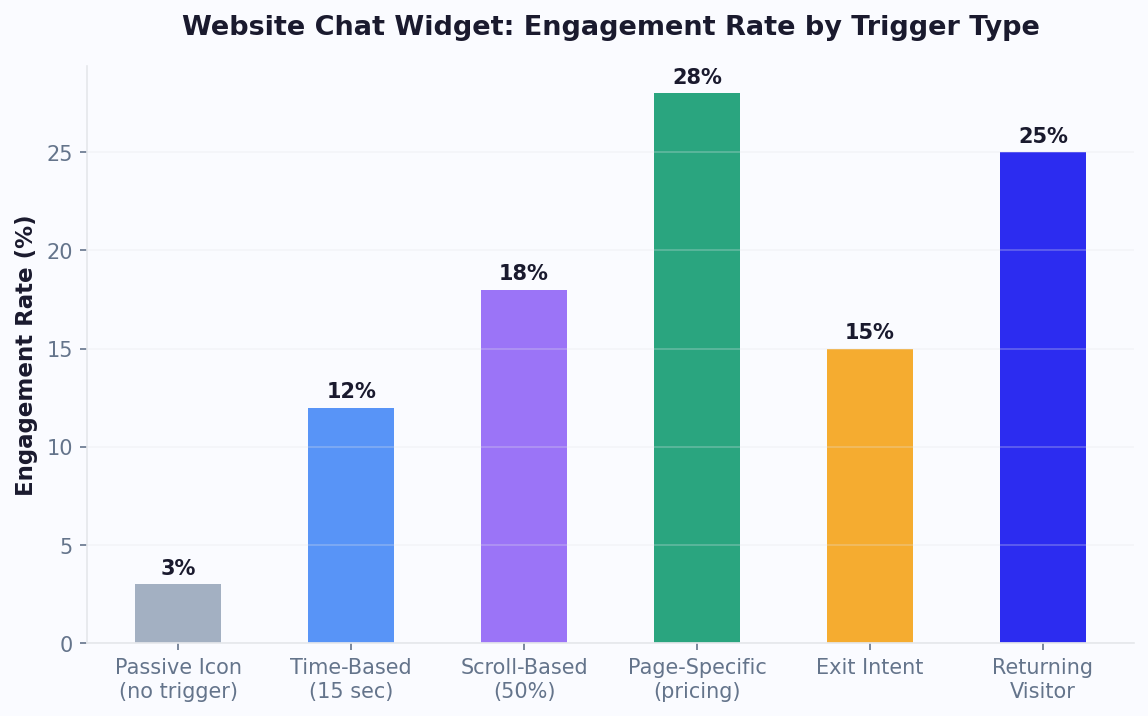
The cost of not going omnichannel
Businesses that deploy chatbots on a single channel miss 60-70% of their customer touchpoints. A customer who reaches out on Instagram and gets no response does not switch to your website - they switch to a competitor. Research shows that 78% of customers buy from the first company that responds, regardless of channel.
With Conferbot's flat-rate pricing, every channel is included in your plan. No per-channel fees, no per-message charges. Compare this to competitors who charge separately for WhatsApp, limit channels by tier, or don't support omnichannel at all.
Ready to go omnichannel? Build your chatbot free and deploy across every channel in under 10 minutes. Browse 250+ templates to get started instantly.
Debugging & reference
Running any of these platform APIs yourself? The error code directory documents 325 WhatsApp, Telegram, Discord, Messenger, Instagram, Slack, LINE and Teams error codes one by one - the literal message, what it actually means, and an ordered fix - and the platform limits reference collects each platform's rate limits, messaging tiers and size caps with sources. Channels connected through Conferbot handle tokens, webhook verification and retries for you, so these are for the moment you are debugging your own integration or deciding whether a failure is yours or the platform's.
Choosing a channel
Which channel should I start with?
Website plus WhatsApp covers most businesses. The website widget catches people while they are already looking at your product and needs nothing but an embed script; WhatsApp carries the follow-up, where open rates run far ahead of email. Add a third channel only when you can name the audience that lives there - Instagram if your buyers arrive from social, Telegram for developer and community audiences, Slack or Microsoft Teams if the bot is answering your own colleagues rather than customers.
Can one chatbot serve every channel at once?
Yes. You build the flow once and connect channels to it, so the knowledge base, integrations and analytics are shared. Conferbot adapts the rendering per platform - WhatsApp allows three buttons per message where Discord allows twenty-five, and unsupported media degrades to a link rather than failing. You can also point a different flow at a specific channel when that audience genuinely needs a different conversation.
What does WhatsApp require that the website widget does not?
A Meta Business Account with a verified phone number, and approved message templates for anything you send outside the 24-hour customer service window. Replies inside that window are free-form and need no approval. Meta also charges its own conversation-based fees on top of your plan. Budget 10-15 minutes for the connection and expect the first message-template review to be the slowest part.
Is the website chatbot free?
The website widget is included in every plan, including the free one, with no card required. Social messaging channels such as WhatsApp and Messenger sit on the Business and Enterprise plans, and the mobile SDKs are Enterprise. There are no per-channel or per-message charges from Conferbot on top of the plan itself.
Do I need a developer to add a channel?
Not for the messaging channels or the website widget - connecting them is an OAuth flow or a pasted snippet, and the dashboard walks through each one. The native mobile SDKs are the exception: React Native, Flutter, Android and iOS ship as packages on npm, pub.dev, Maven Central and CocoaPods, so someone needs to add the dependency and initialise it in your app.
Ready to go omnichannel?
Build your chatbot once and deploy it across every channel your customers use. Start free - no credit card required.
Go deeper on omnichannel
How omnichannel actually differs from multichannel, how to pick the right channels for your business, and the terminology behind it.
Omnichannel Chatbot FAQ
Everything you need to know about chatbots for omnichannel chatbot.
Continue Exploring
Explore features, connect third-party tools, and browse ready-made templates.
Deep-dive pillar guides, real use cases, and the chatbot & AI glossary.