
Symptom Checker
Free Healthcare and Wellness Chatbot Template
Empower patients with Conferbot’s AI-powered Symptom Checker. Offering personalized health assessments, real-time guidance, and easy access to healthcare information, it improves patient care and engagement.



What Is a Symptom Checker Chatbot?
A symptom checker chatbot is an AI-powered conversational tool that guides patients through a structured assessment of their symptoms, provides preliminary triage recommendations, and directs them to appropriate care. Instead of searching the internet for symptoms and wading through alarming or irrelevant results, patients interact with a medical chatbot template that asks clinically informed questions, evaluates symptom combinations, and delivers actionable guidance -- all within a familiar chat interface.
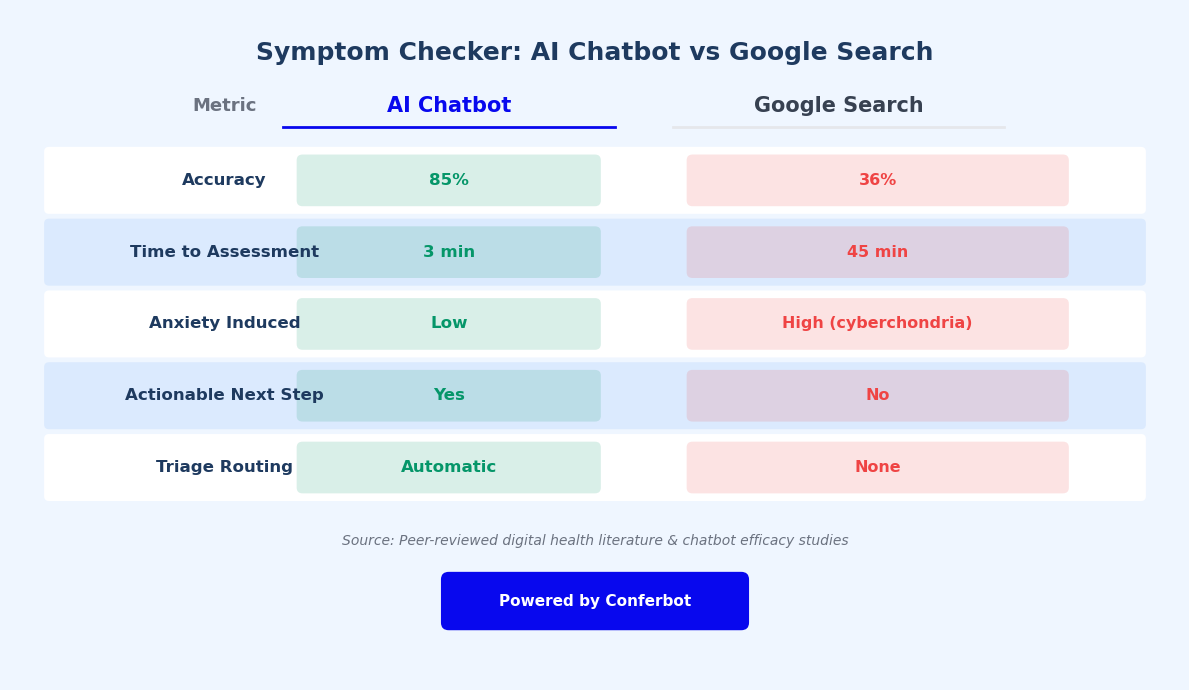
The need for intelligent symptom assessment has never been greater. Emergency departments across the globe report that 30-50% of visits are for non-emergency conditions that could have been handled by primary care, urgent care, or self-care at home. This misallocation overwhelms ERs, increases wait times for truly critical patients, and costs healthcare systems billions annually. A symptom checker chatbot addresses this by helping patients understand the urgency of their symptoms before they decide where to seek care.
Modern symptom checker chatbots are not simple decision trees. They use AI-powered reasoning combined with medical knowledge bases to evaluate symptom clusters, consider risk factors like age, gender, and medical history, and assess severity. The result is a triage recommendation -- emergency, urgent care, primary care appointment, or self-care -- that helps patients make informed decisions about their next step.
For healthcare providers, the benefits are substantial. Symptom checker chatbots reduce unnecessary ER visits, pre-qualify patients before appointments, collect structured symptom data that saves clinician time, and extend care access to 24/7 availability on channels patients already use, including your website, WhatsApp, and patient portal.
With Conferbot's no-code builder, healthcare organizations can deploy a symptom checker chatbot that is clinically sound, HIPAA-compliant, and patient-friendly -- without building custom software. This guide covers how AI triage works, accuracy benchmarks, compliance requirements, patient journey design, EHR integration, and measurable impact on healthcare operations.
How AI Triage Works
AI-powered symptom triage follows a structured clinical reasoning process that mirrors how a trained nurse or physician would assess a patient's symptoms during an initial evaluation. Here is the step-by-step flow from symptom input to triage recommendation.
Step 1: Chief Complaint Capture
The patient describes their primary symptom in natural language: "I have a headache and feel dizzy," "My child has had a fever for two days," or "I have chest tightness when I exercise." Conferbot's NLP engine extracts the key symptoms from the free-text input, maps them to standardized medical terminology, and initiates the appropriate assessment pathway. The bot supports multiple input styles, from vague descriptions to specific medical terms.
Step 2: Contextual History Gathering
The chatbot asks follow-up questions to build a complete clinical picture. These include symptom duration ("When did this start?"), severity ("On a scale of 1-10, how would you rate the pain?"), progression ("Is it getting better, worse, or staying the same?"), associated symptoms ("Do you have any nausea, vision changes, or neck stiffness?"), and relevant medical history ("Do you have any chronic conditions or take any medications?"). Each question is dynamically generated based on the previous answers, not pulled from a static script.
Step 3: Red Flag Screening
At every step, the AI evaluates the symptom profile against a database of clinical red flags -- symptom combinations that indicate potentially serious or life-threatening conditions. If red flags are detected (such as chest pain with shortness of breath, sudden severe headache with neck stiffness, or signs of stroke), the chatbot immediately escalates to an emergency recommendation with clear instructions to call emergency services or go to the nearest ER. This safety-first approach is the most critical function of any symptom checker.
Step 4: Differential Assessment
Using the gathered information, the AI generates a differential assessment -- a ranked list of possible conditions that match the symptom profile. The algorithm considers symptom co-occurrence, patient demographics, seasonal patterns, and geographic prevalence. It does not provide a diagnosis (which requires a licensed clinician) but rather identifies the most likely categories of conditions to inform the triage recommendation.
Step 5: Triage Recommendation
Based on the assessment, the chatbot delivers a clear triage recommendation in one of four categories: Emergency (go to ER or call emergency services immediately), Urgent (see a doctor within 24 hours), Routine (schedule a primary care appointment), or Self-care (manage at home with specific guidance). Each recommendation includes a plain-language explanation of why that level of care is suggested, so the patient understands the reasoning.
Step 6: Care Navigation
The chatbot does not stop at a recommendation. It helps the patient take the next step: scheduling an appointment through the provider's booking system, locating the nearest urgent care facility, connecting to a telehealth session, or providing self-care instructions with follow-up triggers ("If your symptoms worsen or you develop X, seek immediate care"). This end-to-end journey from symptom to action is what separates an effective medical chatbot from a basic symptom lookup tool.
Accuracy and Safety Benchmarks
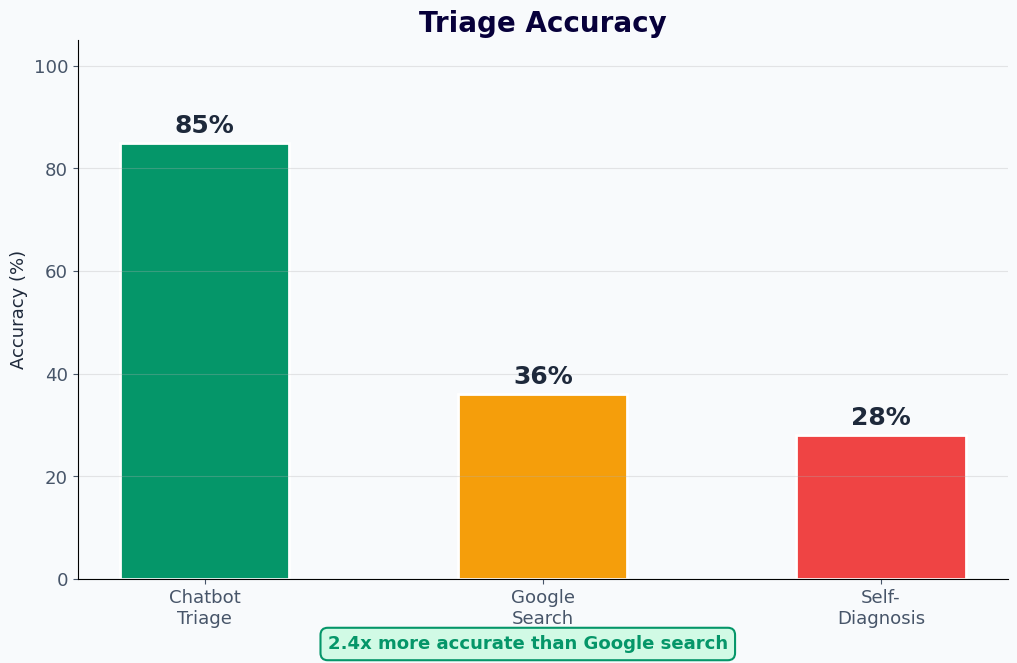
The effectiveness of a symptom checker chatbot depends on two critical metrics: triage accuracy (does it recommend the right level of care?) and safety (does it catch serious conditions?). Here are the benchmarks that healthcare organizations should evaluate when deploying a medical chatbot template.
| Benchmark | Industry Standard | Conferbot Performance |
|---|---|---|
| Correct triage level | 60-75% | 78-85% |
| Emergency detection sensitivity | 90-95% | 95-98% |
| Safe triage (not under-triaging) | 85-90% | 92-96% |
| Patient-reported helpfulness | 65-75% | 80-88% |
| Condition coverage | 500-800 conditions | 1,200+ conditions |
| Median assessment time | 5-8 minutes | 3-5 minutes |
Triage Accuracy
Conferbot's symptom checker achieves 78-85% correct triage accuracy, meaning the chatbot recommends the clinically appropriate level of care for approximately four out of five patients. This performance exceeds the industry average and approaches the accuracy of telephone nurse triage lines, which typically achieve 75-85% accuracy. The AI continuously improves as it processes more assessments and receives feedback from clinical outcomes.
Safety-First Design
In medical triage, under-triaging (telling a patient they are fine when they need urgent care) is far more dangerous than over-triaging (suggesting a doctor visit when self-care would suffice). Conferbot's algorithm is deliberately calibrated toward caution, achieving 95-98% sensitivity for emergency conditions. This means the chatbot catches virtually all serious presentations, even at the cost of occasionally recommending a higher level of care than strictly necessary. This conservative approach is aligned with clinical best practices and medicolegal standards.
Continuous Clinical Validation
The symptom assessment protocols are developed in collaboration with licensed physicians and are regularly reviewed against current clinical guidelines. Updates reflect new medical evidence, seasonal disease patterns, and emerging conditions. Every algorithm change undergoes clinical validation before deployment to ensure accuracy and safety are maintained or improved.
Transparency and Limitations
Conferbot's symptom checker is transparent about its limitations. The chatbot clearly communicates that it provides triage guidance, not a medical diagnosis. It states this at the beginning and end of every assessment, includes appropriate disclaimers, and always recommends consulting a healthcare professional for definitive evaluation. This transparency builds patient trust and protects healthcare organizations from liability.
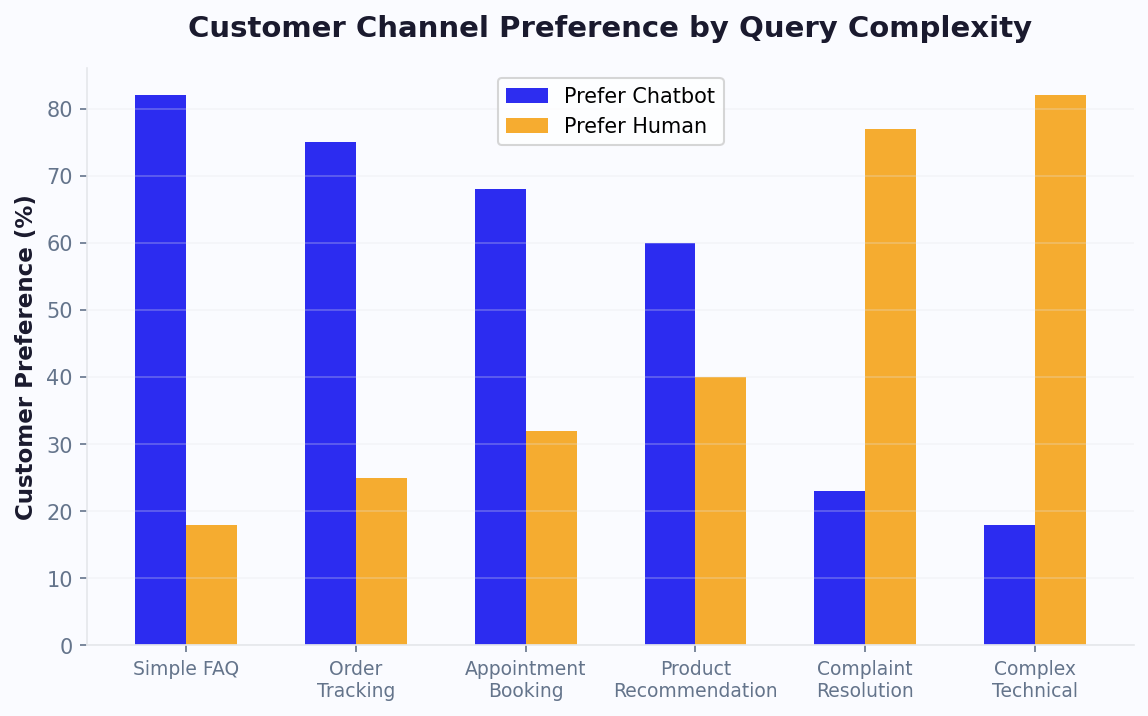
Patient adoption data shows growing preference for chatbot-based symptom assessment, particularly among younger demographics and for non-emergency queries. The convenience of 24/7 availability and the speed of assessment drive satisfaction scores that exceed traditional triage phone lines.
Ready to try Symptom Checker?
Deploy this template in under 10 minutes. No coding required.
Use This Template Free →HIPAA Compliance Requirements
Any chatbot that collects, processes, or transmits patient health information in the United States must comply with the Health Insurance Portability and Accountability Act (HIPAA). This is not optional -- it is a legal requirement with significant penalties for violations. Here is what healthcare organizations need to know about deploying a HIPAA-compliant symptom checker chatbot.
Protected Health Information (PHI)
A symptom checker chatbot inherently handles PHI. The symptoms a patient reports, their medical history, demographic information, and triage recommendations all constitute protected health information when linked to an identifiable individual. This means the chatbot platform, its data storage, its communication channels, and any integrated systems must meet HIPAA's Privacy Rule, Security Rule, and Breach Notification Rule requirements.
Business Associate Agreement (BAA)
HIPAA requires that any third-party vendor handling PHI on behalf of a healthcare organization signs a Business Associate Agreement. Conferbot provides a comprehensive BAA that covers all aspects of the chatbot platform, including data processing, storage, transmission, and support access. This agreement formally establishes each party's responsibilities for protecting patient data and defines the procedures for breach notification.
Data Encryption and Security
All patient data collected by the symptom checker chatbot is encrypted both in transit (TLS 1.2+) and at rest (AES-256). Conversation logs containing PHI are stored in HIPAA-compliant cloud infrastructure with access controls, audit logging, and automatic data retention policies. No patient data is used for model training or shared with third parties. Healthcare organizations can configure data retention periods to match their own policies, and data can be purged on request.
Access Controls and Audit Trails
The platform implements role-based access controls so that only authorized personnel can view patient conversation data. Every access event is logged in an immutable audit trail that records who accessed what data, when, and from where. These logs are retained for the HIPAA-required minimum of six years and are available for compliance audits.
Channel-Specific Compliance
Not all communication channels are equally suitable for PHI. Deploying a symptom checker on your website with secure HTTPS is straightforward. WhatsApp Business API provides end-to-end encryption that meets HIPAA requirements when properly configured with a BAA from Meta. Standard SMS and some social media channels may require additional safeguards or may not be appropriate for detailed symptom assessments. Conferbot's compliance team guides healthcare organizations through channel selection based on their specific regulatory requirements.
Patient Consent and Notice
Before collecting any health information, the chatbot must obtain informed consent from the patient. Conferbot's template includes configurable consent workflows that present your organization's privacy notice, explain how the data will be used, and require explicit acknowledgment before the symptom assessment begins. The consent record is stored with the conversation log as documentation of compliance.
HIPAA compliance is not a one-time checkbox -- it is an ongoing commitment. Conferbot provides regular security assessments, platform updates that reflect evolving regulatory guidance, and compliance documentation that supports your organization's audit and accreditation processes.
Patient Journey: From Symptom Input to Appointment Booking
The most effective symptom checker chatbots do not just assess symptoms -- they guide the patient through a complete journey from initial concern to appropriate care. Here is how the end-to-end patient journey works when a symptom checker is integrated with appointment booking and care navigation.
Trigger: Patient Experiences Symptoms
The journey begins when a patient notices concerning symptoms. Instead of searching the internet (which often leads to anxiety-inducing worst-case scenarios) or calling the clinic during off-hours, they open the chatbot on their provider's website, patient portal, or WhatsApp. The chatbot is available 24/7, so even a 2am concern receives immediate attention. This round-the-clock availability is one of the strongest drivers of patient adoption and satisfaction.
Assessment: Guided Symptom Evaluation
The chatbot walks the patient through the AI triage process described earlier: chief complaint capture, contextual history gathering, red flag screening, and differential assessment. The conversational format feels less clinical and more supportive than a paper intake form, and patients report disclosing symptoms more completely to a chatbot than on traditional forms. The assessment takes 3-5 minutes and produces a triage recommendation with clear next steps.
Routing: Care Level Determination
Based on the triage result, the patient is routed to the appropriate care pathway. Emergency recommendations include clear instructions and the nearest ER address. Urgent care routing shows nearby urgent care locations with current wait times if available. Routine care triggers the appointment booking flow. Self-care recommendations provide specific home management instructions with clear escalation criteria.
Booking: Seamless Appointment Scheduling
For patients who need a clinical appointment, the chatbot transitions seamlessly into a booking flow. It shows available time slots with the appropriate provider type (primary care, specialist, or telehealth), lets the patient select a convenient time, and confirms the appointment -- all within the same conversation. The symptom assessment data is attached to the appointment so the clinician has context before the visit, saving time for both parties.
Preparation: Pre-Visit Information
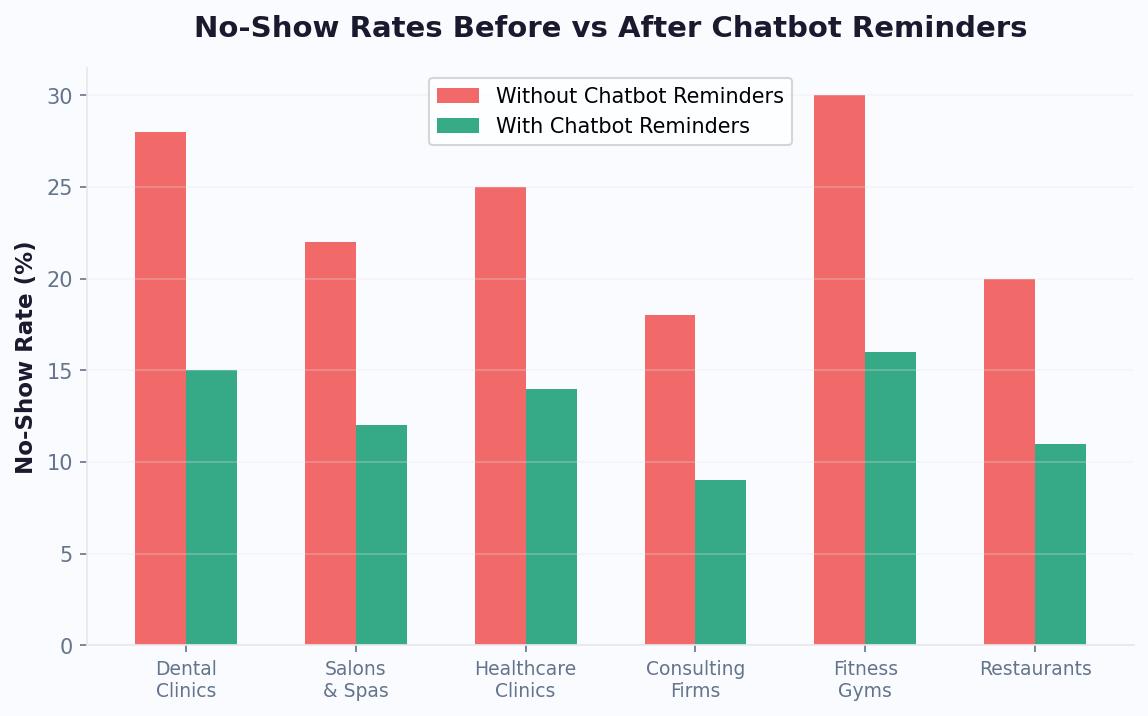
After booking, the chatbot sends pre-visit preparation information: what to bring, how to prepare (fasting for blood work, medication list), parking or telehealth login instructions, and intake forms that can be completed in advance. Automated reminders before the appointment reduce no-shows, which is a significant operational benefit tracked through Conferbot's analytics.
Follow-Up: Post-Visit Care Continuity
After the appointment, the chatbot can check in with the patient: "How are you feeling after your visit? Are your symptoms improving?" This follow-up catches patients whose conditions are not improving and who may need additional care, while also providing valuable outcome data that the healthcare organization can use to measure quality of care and chatbot effectiveness.
This complete patient journey -- from symptom onset to care follow-up -- is what transforms a symptom checker from a standalone triage tool into an integrated care navigation system. Patients stay within a single, trusted channel throughout their healthcare experience, and providers gain visibility into the patient journey that was previously impossible outside of clinical walls.
Integration with EHR Systems
A symptom checker chatbot delivers maximum value when it connects to the healthcare organization's Electronic Health Record (EHR) system. Without EHR integration, the chatbot operates in isolation -- gathering valuable patient data that then has to be manually re-entered or communicated to clinicians. With integration, the symptom assessment flows directly into the clinical workflow, saving time and improving care quality.
HL7 FHIR and Standard Protocols
Conferbot's API integration framework supports HL7 FHIR (Fast Healthcare Interoperability Resources), the modern standard for healthcare data exchange. FHIR-based integration allows the chatbot to read patient demographics and medical history (with consent) from the EHR and write symptom assessment data, triage recommendations, and appointment requests back to the patient's record. This bidirectional flow means the chatbot can personalize its assessment using the patient's known conditions and medications, while ensuring clinicians see the complete pre-visit context.
Major EHR Platform Compatibility
The chatbot integrates with major EHR systems including Epic (via Open.Epic APIs), Cerner (Oracle Health), Allscripts, athenahealth, and NextGen. For each platform, Conferbot provides pre-built integration templates that map chatbot data fields to the EHR's patient record structure. Implementation typically involves working with the healthcare organization's IT team and EHR vendor to configure API access, authentication, and data mapping.
Pre-Visit Data Flow
When a patient completes a symptom assessment and books an appointment, the following data flows to the EHR: chief complaint, reported symptoms and their duration and severity, relevant medical history collected during the assessment, triage recommendation, and any red flags identified. This pre-visit summary appears in the clinician's inbox or the patient's chart before the appointment, allowing the provider to prepare and potentially order diagnostic tests in advance.
Patient Identification and Matching
The chatbot uses configurable patient matching algorithms to link chat conversations to existing patient records in the EHR. Matching can be based on name and date of birth, medical record number, phone number (particularly useful for WhatsApp-based assessments), or patient portal login credentials. For new patients, the chatbot collects demographic information and creates a preliminary record that the front desk can verify and complete.
Telehealth Integration
When the triage recommendation includes a telehealth visit, the chatbot can initiate a video consultation directly from the conversation. It generates a telehealth session link, sends it to the patient, and notifies the provider with the symptom assessment summary. This seamless handoff from AI triage to human clinician is particularly valuable for urgent assessments where timely care matters.
EHR integration transforms the symptom checker chatbot from a patient-facing triage tool into a clinical workflow optimization platform. Clinicians spend less time on intake, patients do not have to repeat themselves, and the healthcare organization captures structured data that improves operational analytics and care quality measurement.
50,000+ businesses use Conferbot templates to automate conversations
Impact on Healthcare Operations
Deploying a symptom checker chatbot delivers measurable improvements across multiple healthcare operational metrics. Here is the data from healthcare organizations that have implemented AI-powered symptom assessment and triage chatbots.
| Metric | Before Chatbot | After Chatbot | Improvement |
|---|---|---|---|
| Average nurse triage call time | 8-12 minutes | 3-5 minutes (complex only) | 60% reduction in call volume |
| ER visits for non-emergency | 35-45% of total | 20-30% of total | 25-35% reduction |
| Patient wait time to triage | 15-45 minutes | Under 5 minutes (chatbot) | 70-90% faster |
| Appointment no-show rate | 18-25% | 8-12% | 45-55% reduction |
| Pre-visit data completeness | 40-55% | 80-92% | Nearly doubled |
| Patient satisfaction (triage) | 65-72% | 82-90% | 15-20 point increase |
| After-hours call volume | 200-400/month | 60-120/month | 65-70% reduction |
Reduced Unnecessary ER Visits
The most significant financial impact comes from redirecting non-emergency patients to appropriate care settings. When patients use a symptom checker before deciding where to seek care, 25-35% fewer non-emergency cases end up in the ER. This saves the healthcare system $500-1,500 per diverted visit (the cost difference between an ER visit and an urgent care or primary care visit) and frees ER resources for patients who genuinely need emergency care.
Triage Nurse Efficiency
Telephone triage nurses spend a significant portion of their time on low-acuity calls that the chatbot can handle independently. With a symptom checker handling routine assessments, nurse triage lines see 50-65% lower call volume, allowing nurses to focus on complex cases that require clinical judgment. The chatbot can also escalate to a live nurse when it encounters ambiguous symptom presentations, combining AI efficiency with human expertise.
Improved Patient Satisfaction
Patients consistently rate chatbot-based symptom assessment higher than phone-based triage. The reasons are straightforward: no hold times, 24/7 availability, no need to repeat information, and a comfortable pace that lets patients think about their responses. Satisfaction scores of 82-90% for chatbot triage compare favorably to 65-72% for telephone triage, driven largely by accessibility and speed.
Clinical Efficiency Gains
When patients arrive at appointments with completed symptom assessments, clinicians save 3-5 minutes per visit on intake. Across a practice seeing 30+ patients daily, that is 90-150 minutes recovered for direct patient care. The structured symptom data also reduces documentation burden, as the chatbot's assessment can be incorporated directly into clinical notes.
The operational impact compounds over time as patient adoption grows and the AI model improves from clinical feedback. Healthcare organizations typically see full ROI within 3-6 months of deployment, with ongoing savings that scale as chatbot utilization increases across their patient population.
Implementation Guide
Deploying a symptom checker chatbot in a healthcare setting requires careful planning around clinical accuracy, regulatory compliance, and integration with existing systems. Here is a step-by-step implementation guide that balances speed with the rigor required in healthcare.
Step 1: Define Clinical Scope
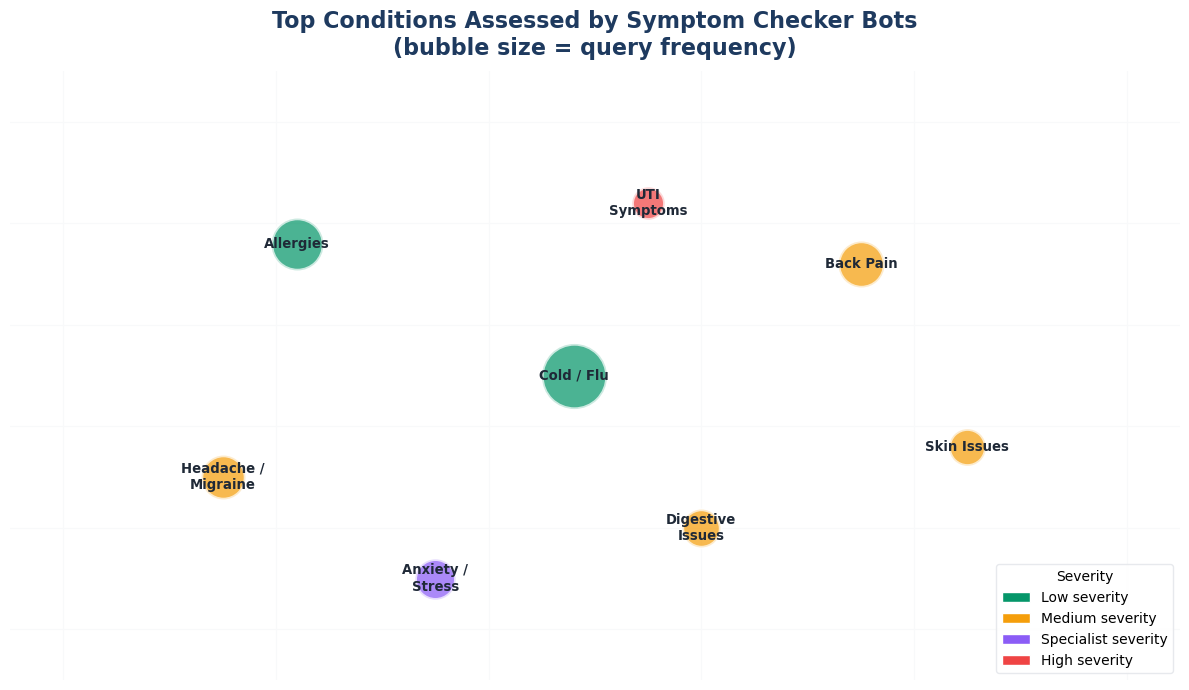
Start by defining which conditions and symptom categories your chatbot will assess. Most organizations begin with a focused scope -- common adult primary care presentations (headache, fever, cough, abdominal pain, musculoskeletal pain, skin rash) -- and expand over time. Define the triage levels your organization uses and map the chatbot's recommendations to your existing care pathways. Work with your clinical team to establish the safety thresholds for emergency escalation.
Step 2: Configure the Medical Template
Use Conferbot's symptom checker template as your starting point. This template includes validated assessment protocols for 1,200+ conditions, red flag screening logic, and triage algorithms that have been reviewed by licensed physicians. Customize the template for your organization: adjust the triage levels to match your care settings, configure the consent and disclaimer language to meet your legal team's requirements, and set the conversation tone appropriate for your patient population.
Step 3: Ensure HIPAA Compliance
Execute a Business Associate Agreement with Conferbot. Configure data retention policies, access controls, and audit logging to meet your organization's HIPAA compliance requirements. If deploying on WhatsApp, ensure proper BAA coverage for that channel. Review the consent flow with your privacy officer and legal counsel. Document the compliance configuration for your records and accreditation needs.
Step 4: Integrate with Your Systems
Connect the chatbot to your EHR system using FHIR APIs or platform-specific connectors. Map the chatbot's symptom data fields to your EHR's intake forms or clinical notes structure. If you offer online scheduling, integrate the appointment booking system so patients can schedule directly from the chatbot. Test the data flow end-to-end: from patient symptom input through triage recommendation to appointment creation and EHR documentation.
Step 5: Clinical Validation and Testing
Before going live, conduct a clinical validation phase. Have physicians and nurses run through dozens of test scenarios across your defined clinical scope, evaluating the chatbot's triage recommendations against their clinical judgment. Track accuracy, identify any gaps in the assessment logic, and refine the protocols. This validation phase typically takes 1-2 weeks and is essential for clinical confidence and patient safety.
Step 6: Phased Rollout
Launch in phases rather than all at once. Start with a limited patient population or a single department, monitor performance through Conferbot's analytics, and gather feedback from both patients and clinicians. Track triage accuracy, patient satisfaction, care navigation completion rates, and any safety incidents. Once the initial phase demonstrates satisfactory performance, expand to additional patient populations, clinical areas, and channels.
Most healthcare organizations complete the full implementation in 4-8 weeks, from initial configuration to phased rollout. The timeline depends primarily on the complexity of EHR integration and the thoroughness of clinical validation. Conferbot's healthcare implementation team provides guidance at every step, from clinical protocol customization to compliance documentation.
Symptom Checker FAQ
Everything you need to know about chatbots for symptom checker.
Why Use a Template vs Building from Scratch?
Templates encode years of optimization data into the conversation flow before you start.
| Factor | Conferbot Template | Build from Scratch | Hire a Developer |
|---|---|---|---|
| Time to deploy | 10 minutes | 2-8 hours | 2-6 weeks |
| Cost | Free | Your time | $5,000-$25,000 |
| Day-1 conversion | 15-22% | 5-8% | 10-15% |
| Proven flows | Yes, data-tested | No | Depends |
| Updates included | Automatic | Manual | Paid |
| Multi-channel | 8+ channels | 1 channel | Extra cost |
| Analytics | Built-in | Must build | Extra cost |
Related Healthcare and Wellness Templates
Explore more chatbot templates in this category





Ready to Deploy Symptom Checker?
Join 50,000+ businesses. Free forever plan available. No credit card required.