
Build Smarter Chatbots with AI-Powered Conversations | OpenAI, Claude, Gemini & More
No credit card required
Powered by OpenAI
Build intelligent chatbots powered by advanced AI that understand context, generate human-like responses, and learn from your data.
See it in Action: The AI Intent Detection Feature in Real Time
Explore the future of chatbots with our sample Conferbot chatbot powered by advanced AI models.
Introducing Conferbot New Feature Backed With The Power of advanced AI models
The smartest chatbot on the block just became a powerhouse! With two easy ways to equip our chatbots with training data, maximize customer satisfaction and minimize frustration. All in one place!
Advantages of Conferbot AI Intent Detection Feature
The smartest chatbot on the block just became a powerhouse! With two easy ways to equip our chatbots with training data, maximize customer satisfaction and minimize frustration. All in one place!
Why AI / OpenAI Matters
AI-powered chatbots go beyond scripted responses to deliver truly intelligent, contextual conversations.
AI-Powered
Leverage the latest AI models (OpenAI, Claude, Gemini) for human-like conversations. Understands context, nuance, and complex queries.
Custom Training
Train AI on your business data - upload docs, FAQs, and knowledge bases. Your AI speaks your brand's language.
Smart Fallback
AI handles complex queries that rule-based bots can't. Seamless escalation from scripted to AI-powered responses.
Guardrails & Safety
Built-in content filters, topic restrictions, and hallucination prevention. Keep AI responses accurate and on-brand.
Streaming Responses
Real-time streaming for natural, chat-like experiences. Users see responses appear word by word, just like ChatGPT.
Multilingual AI
AI responds fluently in 50+ languages. Auto-detect user language and respond naturally without manual translation.
How AI Integration Works
Add AI-powered intelligence to your chatbot in minutes.
Connect Your AI Model
Add your OpenAI API key or select Claude. Choose your model (advanced AI models, advanced AI, Claude) and configure temperature, token limits, and system prompts.
Train on Your Data
Upload your knowledge base, FAQs, product catalog, or documentation. The AI learns your business context for accurate, brand-consistent responses.
Deploy AI-Powered Conversations
Your chatbot now answers questions using AI - handling complex queries, multi-turn conversations, and nuanced requests that rule-based bots cannot.
AI for Every Use Case
See how businesses use OpenAI-powered chatbots to automate, assist, and delight their customers.
AI Customer Support
Resolve 95% of support queries automatically with AI that understands context and provides accurate answers
Shopping Assistant
AI-powered product recommendations, comparisons, and personalized shopping advice
Knowledge Base AI
Train AI on your docs and let it answer any question about your product, service, or company
Content Generation
Generate product descriptions, email drafts, summaries, and creative content within chat
AI Tutor
Interactive learning experiences with AI that explains concepts, answers questions, and quizzes students
Internal Assistant
AI-powered HR bot, IT helpdesk, or operations assistant trained on your internal documentation
Ready to Add AI to Your Chatbot?
Join thousands of businesses using AI-powered chatbots to deliver intelligent customer experiences. Start free, no credit card required.
OpenAI Integration FAQ
Everything you need to know about implementing AI chatbots for openai integration. Get answers about features, pricing, implementation, security, and industry-specific solutions.
What Is OpenAI Integration and How It Transforms Chatbots
OpenAI integration connects your chatbot to the most powerful large language models available -- GPT-turbo, and GPT -- enabling conversations that feel genuinely intelligent rather than scripted. Instead of relying solely on pre-written responses or keyword matching, an OpenAI-integrated chatbot can understand complex queries, generate contextual answers, reason through multi-step problems, and produce natural language that is indistinguishable from human writing. This capability transforms chatbots from simple FAQ tools into versatile business assistants capable of handling support, sales, onboarding, and creative tasks.
The integration works through API calls: when a user sends a message that triggers the AI flow, Conferbot packages the message (along with conversation history and system instructions) and sends it to OpenAI's API. The model processes the input and returns a response in 0.5-3 seconds depending on the model selected and response length. From the user's perspective, they are simply chatting -- the AI layer is invisible.
What OpenAI Integration Enables
- Open-ended question handling -- answer questions the bot was never explicitly trained on by reasoning from its general knowledge and your provided context
- Natural language generation -- produce responses in your brand's tone and style rather than rigid templates
- Multi-turn context retention -- maintain coherent conversations across 10+ message exchanges without losing track of the topic
- Summarization and extraction -- distill long customer messages into actionable data points for your team
- Content creation -- generate personalized recommendations, product descriptions, or follow-up emails within conversations
- Multilingual support -- respond fluently in 50+ languages without separate language models
Conferbot's integration handles the technical complexity -- API key management, token optimization, error handling, and fallback routing -- so you can focus on conversation design rather than infrastructure. The integration is available on all plans, with AI usage included in your monthly conversation quota. For teams new to AI chatbots, our no-code chatbot guide walks through enabling and configuring AI responses step by step.
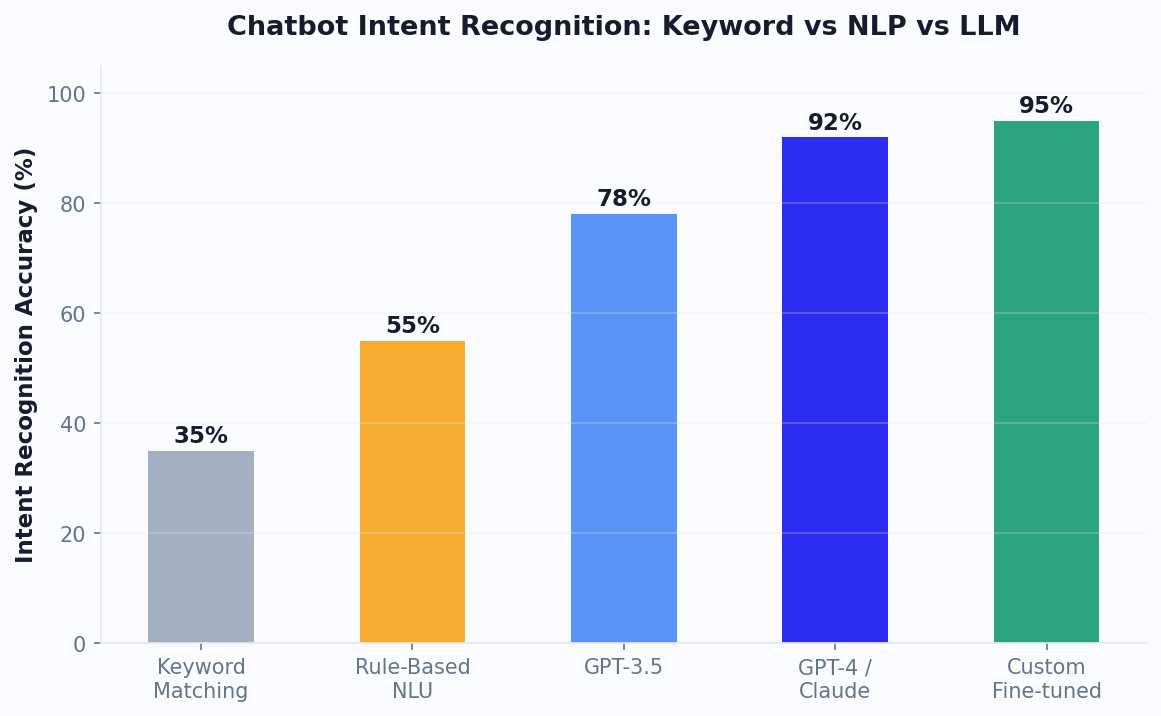
GPT vs Claude: Choosing the Right LLM for Your Chatbot
The two leading LLMs for production chatbots are GPT from OpenAI and Claude from Anthropic. Each excels in different scenarios, and understanding their strengths helps you select the right model for your specific use case -- or use both strategically across different conversation flows.
| Dimension | GPT / GPT-turbo | Claude (Sonnet/Opus) |
|---|---|---|
| General knowledge QA | 89.2% (HELM benchmark) | 87.8% (HELM benchmark) |
| Instruction following | Strong | Excellent (more consistent) |
| Creative generation | Excellent | Good |
| Context window | 128K tokens | 200K tokens |
| Multi-modal (images) | Yes (vision API) | Yes (vision capable) |
| Safety alignment | Good | Industry-leading (Constitutional AI) |
| Staying on-topic | Good (may drift with creative prompts) | Excellent (highly compliant) |
| Cost (per 1M input tokens) | $30 (GPT), $10 (4-turbo) | $3 (Sonnet), $15 (Opus) |
| Best chatbot use case | Sales, creative, multi-modal | Support, compliance, long-form |
For customer support chatbots handling sensitive topics (billing disputes, medical information, legal questions), Claude's stronger instruction adherence and safety alignment make it the safer choice -- it stays on-topic more reliably and is less likely to generate problematic content. For sales and lead generation chatbots where creative, persuasive copy matters, GPT's generative flair produces more engaging and varied responses.
Conferbot currently integrates natively with OpenAI models (GPT-turbo). The system supports model selection per conversation node, so you can use GPT for high-volume simple queries (at 1/30th the cost of GPT) and reserve GPT for complex reasoning tasks where accuracy justifies the cost premium. Compare AI capabilities across chatbot platforms on our comparison page.
Use Cases: Where GPT-Powered Chatbots Excel
GPT-powered chatbots are not universally better than rule-based alternatives. They excel in specific scenarios where their unique capabilities -- open-ended understanding, natural generation, reasoning -- provide clear advantages over deterministic flows. Understanding these use cases helps you deploy AI where it creates the most value rather than applying it indiscriminately.
1. Customer Support with Broad Knowledge Domains
When your FAQ database spans hundreds of topics and customers ask questions in unpredictable ways, GPT-powered responses significantly outperform rule-based matching. The AI can synthesize answers from multiple knowledge base articles, handle follow-up questions contextually, and provide nuanced responses that rigid templates cannot match. Teams using GPT for support tend to see notably higher first-contact resolution rates for complex queries.
2. Sales Qualification and Lead Nurturing
AI chatbots conduct natural qualification conversations that feel consultative rather than interrogative. Instead of asking a rigid sequence of questions, the GPT-powered bot adapts its questioning based on the prospect's responses, asks relevant follow-ups, and provides tailored recommendations. This conversational approach tends to generate more qualified leads than form-based alternatives.
3. Product Recommendations
When customers describe needs in natural language ("I need something for outdoor use that is waterproof and under $100"), GPT models can reason about product attributes and suggest appropriate matches from your catalog. Combined with e-commerce integration for real-time inventory data, this creates a conversational shopping experience.
4. Internal Knowledge Assistants
Employee-facing bots that answer HR questions, IT troubleshooting, policy inquiries, and onboarding questions benefit enormously from GPT integration. These domains are too broad for complete rule coverage, and the AI can synthesize answers from policy documents loaded into the system prompt or knowledge base.
5. Appointment Pre-Qualification
Healthcare, legal, and financial services chatbots use GPT to conduct preliminary intake conversations, gathering symptoms, case details, or financial situations in natural language before routing to appropriate professionals. The AI understands context well enough to ask relevant follow-up questions without rigid branching logic.
For each of these use cases, pre-built flows are available in our template library. See WhatsApp deployment and Messenger deployment options for AI-powered bots on messaging platforms.
Prompt Engineering: Crafting System Prompts That Perform
The system prompt is the single most important configuration in any LLM-powered chatbot. A well-crafted system prompt can substantially improve answer relevance, meaningfully reduce hallucinations, and ensure the bot maintains consistent personality across thousands of conversations. Yet most teams write a single paragraph and never iterate. Effective prompt engineering for chatbots follows specific principles distinct from general prompt writing.
Essential Prompt Structure
Every chatbot system prompt should contain these five sections in order:
- Role definition -- "You are [Name], a [role] for [Company]. Your purpose is to [primary goal]."
- Knowledge boundaries -- "You only answer questions about [topics]. If asked about anything else, politely redirect."
- Behavioral constraints -- "Never discuss competitor products. Never make promises about pricing not listed in the provided data. Never generate code."
- Response formatting -- "Keep responses under 3 sentences unless a detailed explanation is requested. Use bullet points for multi-step instructions. Always end with a relevant follow-up question."
- Tone and personality -- "Use a friendly, professional tone. Avoid jargon. Mirror the customer's formality level."
Advanced Techniques
Few-shot examples: Include 2-3 example exchanges in your system prompt showing the exact response format and tone you expect. This is the most reliable way to control output style.
Chain-of-thought for complex reasoning: For bots that need to process multi-step logic (troubleshooting, qualification), instruct the model to "think step by step" and format its reasoning before providing the final answer.
Grounding instructions: "Only answer based on information provided in the context below. If the answer is not in the provided context, say 'I do not have that information' and offer to connect with a human agent." This dramatically reduces hallucinations when paired with knowledge base retrieval.
Conferbot's prompt editor includes a live preview panel where you can test prompts against sample questions immediately. Iterate quickly by testing edge cases -- the questions most likely to trip up the AI -- and refine your constraints until edge cases are handled correctly. For temperature and parameter optimization, see the Cost Optimization section below. Our support chatbot guide includes complete system prompt templates for common use cases.
Context Management: Maintaining Coherent Multi-Turn Conversations
One of the most technically challenging aspects of LLM-powered chatbots is context management -- deciding what information from the conversation history to include in each API call. Every token sent to the model costs money and adds latency, but too little context causes the AI to "forget" earlier parts of the conversation and give contradictory or repetitive responses. Getting context management right is the difference between a chatbot that feels intelligent and one that feels amnesiac.
The Context Window Challenge
GPT-turbo supports 128K tokens of context, but that does not mean you should fill it. Longer context means: higher API costs (you pay per token for both input and output), slower response times (more tokens to process), and potentially worse accuracy (models can get "lost" in very long contexts, a phenomenon called the "lost in the middle" problem). The optimal context length for most chatbot conversations is 2,000-8,000 tokens -- enough for the current conversation thread plus key system instructions.
Context Management Strategies
- Sliding window -- keep only the last N messages (typically 10-20). Simple but can lose important early context like the customer's name or initial issue description.
- Summary + recent -- maintain a running summary of the conversation (updated every 5-10 messages) plus the full last 5 messages. Best balance of context retention and token efficiency.
- Selective retrieval -- extract and store key facts (name, issue, preferences) as structured variables, include them as context alongside recent messages. Most token-efficient for long conversations.
- Full history (short conversations only) -- for conversations that typically last under 10 exchanges, send the complete history. Simple and effective when conversations are brief.
Conferbot implements the "summary + recent" strategy by default, with configurable history depth. Key variables extracted during conversation (via NLP entity extraction) are always included in context regardless of window size, ensuring the AI always knows the customer's name, account info, and core issue even in long conversations. This approach keeps average context under 4,000 tokens while maintaining conversational coherence across 20+ message exchanges.
For conversations requiring extensive context (legal consultations, detailed troubleshooting), you can increase the window size per flow. Monitor token usage in Conferbot's analytics to find the optimal balance between context depth and cost for your specific use case.
Cost Optimization: Managing AI Spend Without Sacrificing Quality
AI-powered chatbot costs scale with conversation volume and model choice. An unoptimized deployment using GPT for every message can quickly become expensive at scale -- $0.03-0.06 per 1K tokens means a typical conversation (5 exchanges, ~2K tokens each) costs $0.30-0.60. Multiply by 10,000 monthly conversations and you are looking at $3,000-6,000/month in AI costs alone. Fortunately, several optimization strategies can reduce this by 70-80% without noticeable quality degradation.
Strategy 1: Model Tiering
Not every message needs GPT. Use a tiered approach:
- Simple queries (60% of traffic) -- handle with rule-based flows or GPT ($0.002/1K tokens, 15x cheaper than GPT)
- Standard queries (30% of traffic) -- process with GPT with knowledge base grounding
- Complex queries (10% of traffic) -- escalate to GPT for reasoning-heavy responses
This tiering alone reduces average cost per conversation by 70% while maintaining GPT quality for the interactions that need it most.
Strategy 2: Caching and Deduplication
Many customers ask identical or near-identical questions. Conferbot caches AI responses for common queries and serves cached responses for subsequent identical inputs -- zero API cost for repeat questions. Semantic similarity matching extends this to near-duplicates, so "What are your hours?" and "When are you open?" both hit the cache after the first response is generated.
Strategy 3: Token Optimization
Reduce token consumption by: keeping system prompts concise (every token in your prompt is sent with every message), using the summary+recent context strategy (fewer history tokens), and setting maximum response length appropriate to your use case (support answers rarely need 1000 tokens).
Strategy 4: Conversation Design
Design flows that resolve queries in fewer exchanges. An AI bot that asks 3 clarifying questions before answering costs 4x more than one that uses entity extraction to answer correctly on the first try. Invest in your NLP training to reduce the number of AI exchanges needed per conversation.
Conferbot includes built-in usage monitoring with daily/weekly/monthly cost tracking, per-flow cost attribution, and budget alerts. Set spending caps that automatically switch to GPT when limits are approaching. Model your expected costs with our chatbot ROI calculator, or see plan details on our pricing page.
Safety and Guardrails: Preventing AI Misbehavior
Large language models can generate problematic outputs -- hallucinated facts, inappropriate content, competitor recommendations, or off-brand messaging. For business chatbots where every message represents your brand, safety guardrails are not optional. A single viral screenshot of your chatbot saying something wrong can cause reputational damage that takes months to repair. Conferbot implements multiple layers of protection to keep AI-powered conversations safe and on-brand.
Layer 1: System Prompt Constraints
The first line of defense is explicit behavioral constraints in your system prompt. Clear, specific prohibitions ("Never discuss politics, religion, or competitor products. Never make promises about timelines not confirmed by the team. Never generate content that could be construed as legal, medical, or financial advice.") are remarkably effective at preventing most off-topic generation.
Layer 2: Output Filtering
Conferbot's safety layer scans every AI-generated response before it reaches the customer. Configurable filters check for: competitor mentions, profanity, personally identifiable information (PII) that should not be repeated, pricing or commitment language not in your approved list, and topic boundaries. If a response triggers a filter, it is blocked and replaced with a safe fallback response or escalated to a human agent.
Layer 3: Hallucination Prevention
The most dangerous AI failure mode is confident hallucination -- stating incorrect information as fact. Conferbot reduces hallucination risk through:
- Knowledge base grounding -- AI responses are generated with your verified content as context, and instructed to only answer from provided information
- Confidence indicators -- when the AI qualifies its response with uncertainty language, the system can automatically flag or escalate
- Citation requirements -- instruct the AI to reference specific knowledge base articles in responses, making verification easy
- Fact-checking layer -- for critical use cases (healthcare, finance), a secondary validation step checks key claims against your verified data
Layer 4: Human Oversight
For high-risk conversations (legal, medical, financial), configure mandatory human review before any AI response is sent. The agent sees the AI-generated draft, can edit it, and approves before delivery. This maintains AI efficiency (the draft is usually 90%+ correct) while ensuring zero unchecked outputs for sensitive topics.
Safety configuration is accessible in the Conferbot dashboard with preset templates for different risk levels. See our team management features for human oversight workflows.
Benchmarks: Real-World Performance of GPT-Powered Chatbots
Published benchmarks help set expectations, but real-world performance data from production deployments is more valuable. Here are illustrative, directional figures for what GPT-powered chatbots can achieve across different use cases; treat them as estimates and track your own numbers rather than fixed guarantees.
| Metric | GPT Chatbot | GPT Chatbot | Rule-Based Bot | No Bot (Human Only) |
|---|---|---|---|---|
| Query resolution rate | 78% | 62% | 45% | N/A |
| CSAT score | 87% | 79% | 72% | 82% |
| Avg response time | 2.1 seconds | 0.8 seconds | 0.1 seconds | 4.2 minutes |
| Cost per conversation | $0.35 | $0.04 | $0.001 | $8-22 |
| Hallucination rate | 2.1% | 5.8% | 0% | N/A |
| Handles novel queries | Yes (zero-shot) | Yes (lower accuracy) | No | Yes |
Key insights from this illustrative data: GPT chatbots can achieve CSAT on par with or above human-only support, primarily because of instant response times and consistent quality -- humans have bad days, AI does not. The cost advantage is dramatic: on a per-conversation basis, AI handling is far cheaper than the cost of human-only handling. The optimal deployment uses GPT as the primary handler with human escalation for the queries it cannot resolve, aiming for both strong CSAT and lower total cost.
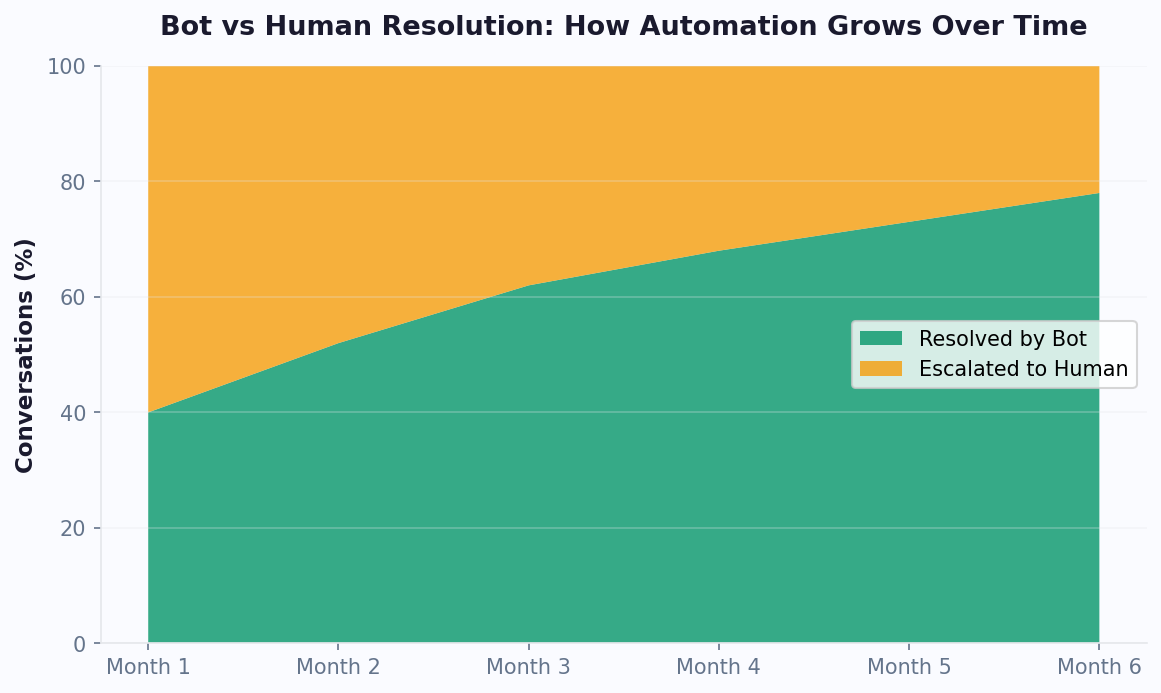
These benchmarks improve over time as your knowledge base grows and prompt engineering is refined. Teams typically see a 15-20% improvement in resolution rates during the first three months post-launch. Track your own benchmarks in Conferbot's analytics dashboard.
Getting Started: Enable OpenAI in Your Chatbot in 10 Minutes
Adding GPT-powered intelligence to your Conferbot takes under 10 minutes. The integration handles all the technical complexity -- API management, token optimization, error handling, and fallback routing -- so you focus exclusively on conversation design and prompt crafting.
Step 1: Get Your OpenAI API Key (3 minutes)
Sign up at platform.openai.com if you do not already have an account. Navigate to API Keys, generate a new secret key, and copy it. Add a payment method and set a usage limit ($10-50/month is typical for initial testing). Your key is encrypted and stored securely in Conferbot -- it is never exposed in client-side code.
Step 2: Connect in Conferbot Dashboard (2 minutes)
Navigate to Settings > Integrations > AI Models. Paste your API key, select your default model (we recommend GPT for initial testing due to speed and cost), and set basic parameters: temperature (0.3 for support, 0.7 for sales), max response tokens (150-300 for most use cases), and context window depth (last 10 messages).
Step 3: Write Your System Prompt (3 minutes)
Use the prompt editor to define your bot's personality and constraints. Start with one of our templates (Support Agent, Sales Rep, Product Expert) and customize with your company name, product details, and specific behavioral rules. Test against 5-10 sample questions in the live preview panel.
Step 4: Add AI Nodes to Your Flow (2 minutes)
In your chatbot flow builder, add AI Response nodes where you want GPT to generate answers. Common placements: after intent classification (for open-ended responses), as a fallback when no rule matches, or as the primary handler for knowledge-heavy flows. Each AI node can have its own system prompt override for specialized behavior.
Step 5: Test and Deploy
Run 10-20 test conversations covering normal queries, edge cases, and intentional attempts to break constraints. Verify responses are accurate, on-brand, and within guardrails. Deploy to your live channels -- the AI handles conversations on WhatsApp, Messenger, and web widget identically.
Post-Launch Optimization
Monitor the analytics dashboard daily for the first week. Look for: low-confidence responses (needs prompt refinement), conversations that escalate to humans (potential automation opportunities), and high-cost conversations (candidates for model tiering to GPT). Most teams achieve optimal performance within 2-3 weeks of iterative prompt improvement. See pricing details for AI usage included in each plan, or calculate expected ROI with our chatbot ROI calculator. Browse AI-powered chatbot templates for ready-to-deploy starting points.
Continue Exploring
Explore features, connect third-party tools, and browse ready-made templates.
Deep-dive pillar guides, real use cases, and the chatbot & AI glossary.