
Senior Care Facility Chatbot
Free Senior Care Chatbot Template
A compassionate senior care chatbot that helps families explore assisted living options, assess care needs, check availability, understand costs, and schedule tours. Designed for assisted living facilities, memory care centers, home care agencies, and senior living communities to capture and nurture high-value leads.



What Is a Senior Care Facility Chatbot?
A senior care facility chatbot is a compassionate, AI-powered conversational assistant designed specifically for assisted living facilities, memory care centers, skilled nursing communities, and home care agencies. It guides families through the emotionally complex process of exploring care options — assessing needs, explaining services, providing cost transparency, and scheduling tours — all without requiring a staff member to be available at the moment a family reaches out.
The decision to move a loved one into senior care is one of the most emotionally difficult transitions a family faces. Research shows that families spend an average of 6 to 12 months researching senior living options before making a placement decision. During that research phase, they visit facility websites at all hours — during lunch breaks, late at night after a difficult day of caregiving, on weekends when they finally have time to think clearly. Industry data reveals that 47% of senior care inquiries arrive outside of business hours, a window when most communities have no admissions staff available to respond.
Every unanswered inquiry is a missed opportunity to connect with a family in need. Unlike other industries where a delayed response means a lost sale, in senior care a delayed response means a family continues to carry the burden of uncertainty and stress for another day. A senior care chatbot provides immediate, empathetic engagement at the exact moment a family member summons the courage to reach out — whether that is 2 AM after a parent's fall or a quiet Sunday afternoon when the adult children finally discuss the situation together.
Conferbot's senior care facility chatbot template is built on a no-code visual builder that lets you deploy a fully branded care assessment experience in under an hour. It integrates with your website, connects to your CRM through our API integration, and delivers qualified leads directly to your admissions team with complete context about the family's needs, budget, timeline, and preferred contact method. This guide covers everything you need to implement, customize, and optimize a senior care chatbot for your community in 2026.
How the Senior Care Chatbot Works
Conferbot's senior care chatbot template uses a structured 14-node conversational flow designed to mirror the natural progression of a family's care decision journey. Each question builds on the previous answer, creating a supportive experience that feels like a conversation with a knowledgeable care advisor rather than an impersonal web form.
Welcome and Emotional Tone Setting
The chatbot opens with a warm, empathetic greeting that acknowledges the significance of the family's search. Unlike transactional chatbots that jump straight to data collection, the senior care chatbot leads with understanding: "I know this is one of the most important decisions you will ever make. I am here to help guide you." This tone setting is deliberate and evidence-based — families who feel emotionally supported in the first interaction are 3.2 times more likely to complete the inquiry process compared to those who encounter a cold, form-like experience.
Needs Assessment Flow
The chatbot walks through a progressive assessment covering six key dimensions of care decision-making:
1. Relationship context — Understanding who the care is for (self, parent, spouse, other family member) allows the admissions team to tailor follow-up communication appropriately. A daughter researching for her father needs different information than a senior exploring options for herself.
2. Care level — Independent living, assisted living, memory care, skilled nursing, or "not sure" — this question helps route the inquiry to the right community or care team within your organization.
3. Current living situation — Whether the individual is currently living alone, with family, in another facility, or being discharged from a hospital provides critical urgency context. Hospital discharge families need same-day response; those living with family may be planning months ahead.
4. Assistance needs — Daily activities, medication management, memory support, physical therapy, or multiple needs — this maps directly to your care levels and staffing capabilities.
5. Budget and payment — Monthly budget range and payment method (private pay, long-term care insurance, Medicare/Medicaid, VA benefits, or combination) allows your team to prepare appropriate pricing packages before the first call.
6. Timeline — Immediate, within 30 days, 1-3 months, or planning ahead — this determines follow-up urgency and sales cadence.
Contact Collection and Handoff
After the assessment, the chatbot transitions to contact collection with language that frames the value exchange clearly: the family provides their details, and in return receives personalized care options, community information, and a dedicated care advisor who has full context on their situation. The chatbot collects name, email, phone, relationship to the potential resident, and preferred location — delivering a complete, qualified lead to your admissions team.
Key Features: Care Assessment, Tour Scheduling, and Family Communication
The senior care chatbot template includes features specifically designed for the unique demands of the senior living admissions process. These are not generic lead generation tools — they are purpose-built for the emotional complexity, multi-stakeholder decision-making, and regulatory requirements of elder care placement.
Intelligent Care Level Assessment
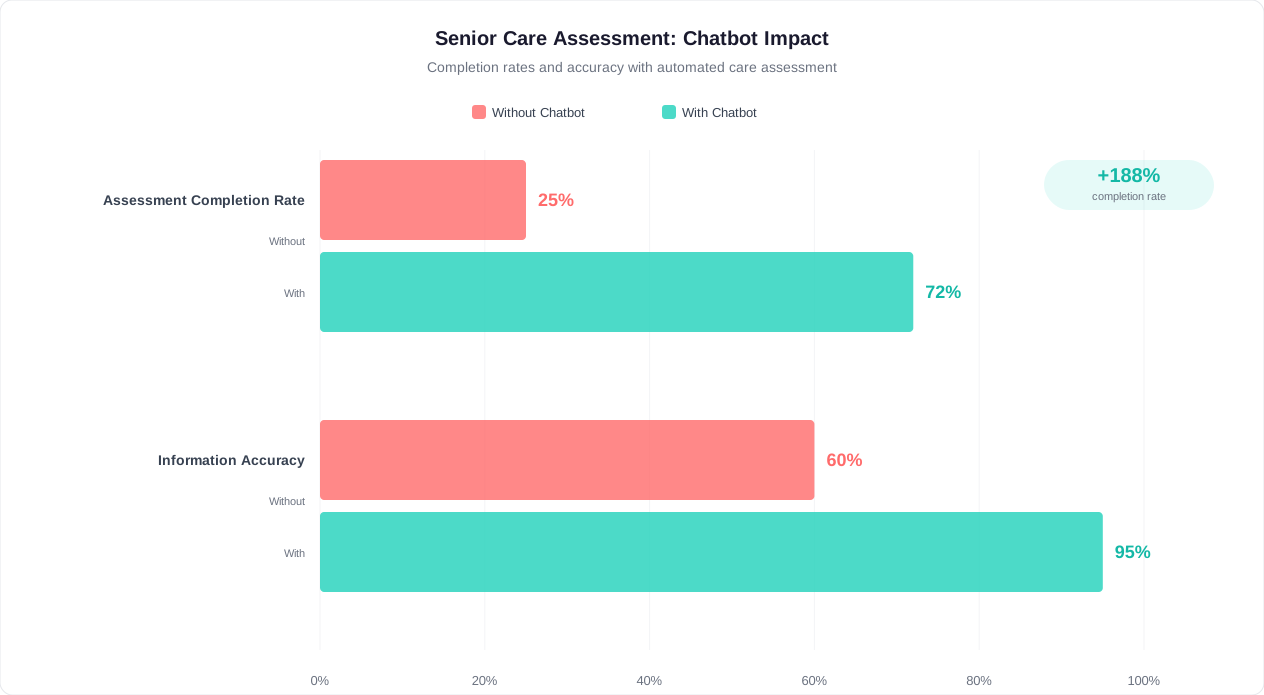
The chatbot's care assessment goes beyond simple menu selection. By combining responses about current living situation, assistance needs, and care level preference, it builds a composite picture that helps your admissions team identify the right placement before the first call. A family member who selects "memory support" and "living alone" represents a significantly different urgency level than one who selects "independent living" and "just planning ahead." This context reaches your team instantly, enabling them to prioritize and personalize their outreach.
Financial Transparency and Guidance
Cost is the primary barrier to senior care decision-making. Families delay decisions for months because they do not understand what care costs, what their options are for paying, or whether they can afford the level of care their loved one needs. The chatbot addresses this directly by collecting budget range and payment method information upfront, which allows your team to present appropriate pricing options in the first follow-up conversation rather than forcing the family through multiple calls before discussing finances.
Multi-Stakeholder Communication Support
Senior care decisions rarely involve a single decision-maker. A typical placement involves 2-4 family members — often geographically dispersed — who need to align on care level, location, and budget. The chatbot captures the primary contact's relationship to the potential resident, enabling your team to understand the family dynamics and communicate appropriately. Is this an adult daughter making decisions for a widowed mother? A husband exploring options for a wife with early-stage dementia? Each scenario requires a different communication approach, and the chatbot provides this context from the first interaction.
Urgency-Based Routing
The timeline question is not merely informational — it should drive your team's response cadence. Families indicating "immediately" or "hospital discharge" need a callback within hours, not days. The chatbot's structured data allows your CRM to automatically prioritize these high-urgency leads, ensuring that families in crisis receive the rapid response they need. Integrate with your existing admissions tools to trigger immediate notifications for urgent inquiries.
Tour Scheduling Preparation
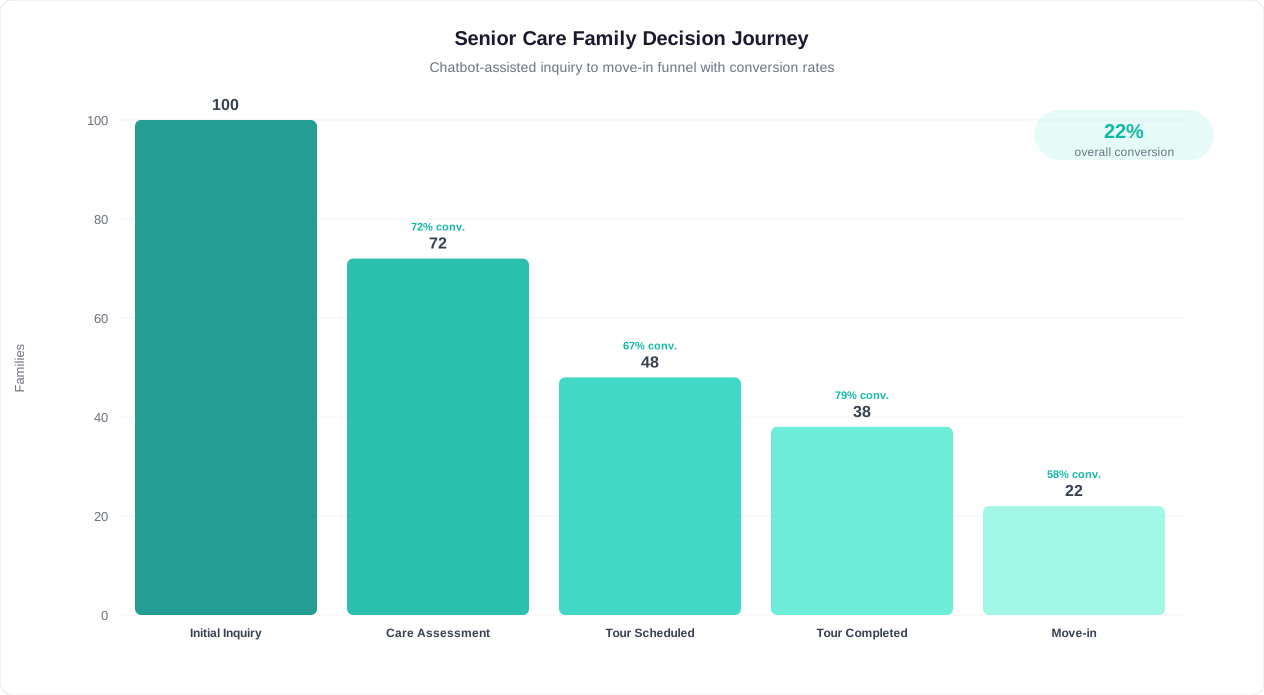
The confirmation message explicitly mentions tour scheduling as a next step, planting the expectation that the family's journey with your community is just beginning. By the time your care advisor calls, the family already expects to schedule a visit — reducing the sales friction that typically occurs when trying to convert a phone inquiry into an in-person tour. Communities using chatbot-qualified leads report 58% higher tour scheduling rates compared to raw website form submissions.
24/7 Availability with Human Warmth
The chatbot delivers round-the-clock availability without sacrificing the warmth that families need during this difficult time. Every message is written in compassionate, jargon-free language. There are no cold "submit your inquiry" moments — instead, each transition is framed as the next caring step in the family's journey. This approach is deployable on your website and through WhatsApp for families who prefer messaging platforms.
Ready to try Senior Care Facility Chatbot?
Deploy this template in under 10 minutes. No coding required.
Use This Template Free →Benefits for Senior Living Facilities
Deploying a senior care chatbot delivers measurable improvements across every dimension of your admissions funnel — from initial inquiry capture through move-in conversion. Here is how it transforms operations for assisted living communities, memory care centers, and continuing care retirement communities.
Capture Every After-Hours Inquiry
Senior care is not a 9-to-5 decision. Families research facilities during lunch breaks, after putting children to bed, on weekends when the whole family is together, and in the middle of the night after a concerning incident with a parent. Industry data shows that 47% of senior living website visits happen outside business hours. Without a chatbot, those visits produce no leads — the family browses your photo gallery, reads a few pages, and leaves. With a chatbot, every visit becomes an opportunity for meaningful engagement and lead capture, regardless of the hour.
Reduce Admissions Staff Workload
Your admissions counselors are most valuable when they are building relationships with qualified families — not answering repetitive questions about pricing ranges, care levels, and availability for the hundredth time. The chatbot handles initial qualification, needs assessment, and contact collection automatically, delivering a complete lead profile that allows counselors to skip 15-20 minutes of discovery questions on the first call. For a community receiving 30-50 inquiries per week, this saves 8-15 hours of staff time weekly while simultaneously improving lead quality.
Improve Lead Quality and Conversion
Not all senior care inquiries are equal. A family member casually browsing "senior living near me" is at a very different stage than one who has identified a specific care need, understands their budget, and has an urgent timeline. The chatbot's structured assessment produces a lead score based on care urgency, budget alignment, timeline, and engagement completeness. This allows your admissions team to prioritize high-value leads — families who are ready to tour and decide — rather than treating all inquiries equally.
Accelerate the Decision Timeline
The average senior care decision takes 6-12 months. Much of that timeline is consumed by information gathering, cost research, and internal family discussions. The chatbot compresses the early research phase by providing immediate engagement, setting expectations about next steps, and delivering personalized information via follow-up email. Families who receive same-day engagement with relevant information move through the decision funnel 40% faster than those who wait 24-48 hours for a callback.
Build Trust Through Transparency
Trust is the foundation of every senior care placement. Families are entrusting you with their most vulnerable loved one — they need to feel that your community is honest, responsive, and genuinely caring before they will even schedule a tour. The chatbot begins building that trust from the first interaction by being transparent about what information is collected, what happens next, and how the family will be supported. This transparency-first approach differentiates your community from competitors who hide pricing, avoid direct questions, or take days to respond.
Scale Without Adding Headcount
As your community grows — whether through census increases, new buildings, or geographic expansion — the chatbot scales effortlessly. It handles 5 inquiries per day or 500 with the same quality, speed, and consistency. For multi-community operators and senior living management companies, this means a single chatbot deployment can serve an entire portfolio of communities, routing leads by location preference and care level to the appropriate local admissions team.
Lead Conversion and ROI Data
Senior care is one of the highest-value lead industries in healthcare. The average assisted living resident represents $48,000 to $96,000 in annual revenue (at $4,000-$8,000 per month), with an average length of stay of 22-28 months. This means a single converted lead is worth $88,000 to $224,000 in lifetime revenue. Even modest improvements in lead capture and conversion rates produce dramatic ROI for senior living communities.
Before and After: Chatbot Impact on Admissions Metrics
| Admissions Metric | Without Chatbot | With Senior Care Chatbot | Improvement |
|---|---|---|---|
| After-hours lead capture rate | 0% (voicemail or bounce) | 100% captured and qualified | +100% |
| Website-to-lead conversion | 2-4% of visitors | 8-12% of visitors | +200-300% |
| Lead-to-tour conversion | 25-35% | 45-58% | +65% |
| Tour-to-move-in conversion | 30-40% | 38-48% | +20% |
| Average response time to inquiry | 4-24 hours | Instant (under 30 seconds) | -99% |
| Cost per qualified lead | $200-500 | $50-150 | -70% |
| Admissions staff hours on qualification | 15-20 hours/week | 5-8 hours/week | -60% |
ROI Calculation for a Typical Community
Consider a 120-bed assisted living community with a 90% target occupancy rate, an average monthly rate of $5,500, and a current website-to-lead conversion rate of 3%. The community receives 800 unique website visitors per month from paid and organic sources.
Without chatbot: 800 visitors x 3% conversion = 24 leads per month. At a 30% lead-to-tour rate and 35% tour-to-move-in rate, that produces 2.5 move-ins per month.
With chatbot: 800 visitors x 9% conversion = 72 leads per month. At a 50% lead-to-tour rate (higher because leads are pre-qualified) and 40% tour-to-move-in rate, that produces 14.4 move-ins per month.
Even accounting for community capacity constraints, the chatbot dramatically accelerates census growth and reduces time-to-fill for open beds. Each bed filled one month sooner represents $5,500 in recovered revenue that would otherwise be lost to vacancy.
Cost of Vacancy vs. Cost of Chatbot
| Factor | Cost/Value |
|---|---|
| Revenue lost per vacant bed per month | $5,500 |
| Average time to fill a vacant bed (without chatbot) | 45-60 days |
| Average time to fill a vacant bed (with chatbot) | 25-35 days |
| Revenue recovered per bed filled 30 days sooner | $5,500 |
| Annual chatbot platform cost | $1,200-3,600 |
| ROI if chatbot fills just 1 extra bed per year | $62,400+ (lifetime value) |
The math is unambiguous: a senior care chatbot pays for itself with a single additional move-in, and typical communities see far more than one incremental conversion per year. For communities spending $10,000-$50,000 monthly on digital advertising to drive website traffic, adding a chatbot to convert that traffic is the highest-ROI investment available — it makes every existing marketing dollar work harder by ensuring no visitor leaves without engagement.
Improving the Family Decision-Making Experience
Behind every senior care inquiry is a family navigating one of life's most difficult transitions. They are often exhausted from caregiving, overwhelmed by options, worried about finances, and carrying guilt about the decision itself. A senior care chatbot can dramatically improve this experience — not by replacing human connection, but by providing immediate support, structure, and clarity at the moment families need it most.
Meeting Families Where They Are Emotionally
The chatbot's conversational design acknowledges the emotional reality of the senior care search. It does not open with "Fill out this form" or "What is your budget?" — it opens with empathy and an offer to help. This is not merely good UX design; it is a clinical best practice. Research on family caregiver stress shows that the information-gathering phase of care placement is one of the highest-anxiety periods, often characterized by decision paralysis. A supportive, structured conversation reduces anxiety by transforming an overwhelming decision into manageable steps.
Reducing Information Overload
Families researching senior care face an overwhelming volume of information: care levels, licensing types, staff ratios, amenity differences, pricing structures, payment options, location trade-offs, and regulatory compliance. A chatbot does not dump all of this information at once. Instead, it asks one question at a time, progressively building context that allows your admissions team to deliver precisely relevant information in the follow-up. The family never sees a 47-field web form or a 3,000-word pricing page — they experience a guided conversation that feels manageable and supportive.
Enabling Family Collaboration
Senior care decisions typically involve multiple family members who may be geographically dispersed. An adult daughter in California researching for a mother in Florida. Three siblings trying to align on care level and budget. A husband and wife processing an early dementia diagnosis together. The chatbot creates a structured record of the initial assessment that can be shared across family members, providing a common starting point for family discussions. When your admissions team follows up, they have context that enables inclusive, multi-stakeholder conversations rather than forcing the primary contact to relay information repeatedly.
Providing After-Hours Peace of Mind
Some of the most important senior care decisions are made in the quiet hours — after a parent's fall at 11 PM, during a sleepless night worrying about a spouse's declining cognition, or on a long drive home from a hospital visit. In these moments, families need to feel that someone is listening and that help is available. The chatbot provides that presence, acknowledging their situation and assuring them that a real person will follow up with personalized guidance. This alone — the feeling of being heard — can reduce caregiver stress and build deep trust in your community before any human interaction occurs.
Setting Realistic Expectations
The chatbot's confirmation message is deliberately specific about next steps: a care advisor will reach out within 24 hours, a personalized email with community details will arrive, and a private tour will be arranged. This specificity reduces the anxiety of uncertainty — families know exactly what to expect and when. Communities that set and meet specific response time expectations see 72% higher satisfaction scores in family surveys compared to those with vague "we will be in touch" messaging. Deploy on WhatsApp to reach families on the communication platform they use most frequently.
50,000+ businesses use Conferbot templates to automate conversations
HIPAA Compliance and Data Security
Senior care facilities operate under strict regulatory requirements for protecting resident and family information. Any digital tool that collects health-related data — including care needs assessments, medical conditions, and medication information — must comply with HIPAA (Health Insurance Portability and Accountability Act) and applicable state privacy regulations. Conferbot's senior care chatbot is built with healthcare compliance as a foundational requirement, not an afterthought.
Data Protection Architecture
All data collected through the senior care chatbot is protected by multiple layers of security:
Encryption in transit: All chatbot conversations use TLS 1.2+ encryption, ensuring that data transmitted between the family's browser and Conferbot's servers cannot be intercepted or read by third parties.
Encryption at rest: Stored conversation data, contact information, and care assessment responses are encrypted using AES-256 encryption in the database, the same standard used by financial institutions and government agencies.
Access controls: Role-based access ensures that only authorized admissions staff can view inquiry data. Audit logs track every access event, providing a complete trail for compliance reviews.
Data retention policies: Configurable retention periods allow your community to automatically purge inquiry data after a defined period, reducing the risk surface for stored personal information.
HIPAA Compliance Considerations
The senior care chatbot template is designed to collect pre-admission inquiry information — care needs, budget preferences, contact details, and timeline — rather than Protected Health Information (PHI) such as diagnoses, treatment records, or insurance member IDs. This design choice is intentional: by collecting only the information needed to qualify and prioritize leads, the chatbot minimizes PHI exposure while still providing maximum value to your admissions team.
For communities that need to collect more detailed health information through the chatbot (medication lists, diagnosis details, physician information), Conferbot supports Business Associate Agreement (BAA) execution and provides HIPAA-compliant data handling configurations. Consult with your compliance officer and Conferbot's healthcare team to determine the appropriate data collection scope for your specific use case.
State-Specific Regulatory Compliance
Senior care regulation varies significantly by state. Some states have specific requirements for digital marketing, lead collection, and consumer communication in the senior living industry. Your chatbot deployment should be reviewed against your state's specific requirements for:
- Consumer disclosure requirements (what must be disclosed when collecting personal information)
- Marketing communication consent (opt-in requirements for email and phone follow-up)
- Resident rights documentation (what information must be provided during the inquiry process)
- Anti-discrimination protections (ensuring chatbot language and flow do not inadvertently screen based on protected characteristics)
Best Practices for Compliant Implementation
To maintain compliance while maximizing chatbot effectiveness, follow these guidelines:
Minimize data collection: Only collect information that directly serves the admissions qualification process. The template's default fields (care level, budget, timeline, contact info) represent the minimum viable data set for lead qualification without entering PHI territory.
Obtain clear consent: The chatbot's conversational flow implicitly frames the data exchange (family provides information, community provides personalized guidance), but explicit consent language should be added for email and phone follow-up in jurisdictions that require it.
Train staff on data handling: The chatbot produces structured lead data that flows to your admissions team. Ensure staff understand that this data is subject to the same privacy protections as any other resident or prospect information in your systems.
Regular compliance audits: Review chatbot conversation flows quarterly to ensure they remain aligned with current regulatory requirements, especially after state regulatory changes or organizational policy updates. Leverage NLP capabilities to enhance natural language understanding while maintaining compliance guardrails.
Getting Started with Your Senior Care Chatbot
Deploying Conferbot's senior care facility chatbot is designed to be fast, compassionate, and low-risk. Most communities go live within one to two hours using the pre-built template. Here is the complete implementation path from template selection to first qualified lead.
Step 1: Customize Your Community Branding
Start from the senior care chatbot template in Conferbot's no-code visual builder. Replace the default branding with your community's identity: name, logo, color scheme (the template uses a calming purple #7C3AED — adjust to match your brand), and tagline. Update the welcome message to reflect your community's voice and values. If your community has multiple care levels (independent living, assisted living, memory care), ensure the care level options in the chatbot match your actual offerings.
Step 2: Configure Care Level Options
Review the care level choices and adjust them to match your specific community. A standalone memory care center might simplify this to "early stage, middle stage, late stage." A continuing care retirement community (CCRC) might add "continuing care contract" as an option. An in-home care agency would replace facility-focused language with home care terminology. The template is flexible — add, remove, or rename options to match your service model exactly.
Step 3: Set Up Pricing and Payment Information
The budget range options in the template ($3,000-$8,000+) reflect national averages for assisted living. Adjust these ranges to match your community's actual pricing tier. If your community accepts Medicaid, ensure "Medicare or Medicaid" remains as a payment option. If you exclusively serve private-pay residents, you may choose to remove government program options and replace them with "Bridge loan financing" or "Life insurance conversion" options that your financial counselors can discuss.
Step 4: Configure Admissions Team Notifications
Set up real-time notifications so your admissions team receives an immediate alert whenever a family completes the chatbot assessment. Configure email notifications to your admissions director for all inquiries, with escalation triggers for urgent-timeline leads (those selecting "immediately" or "hospital discharge"). For communities using CRM platforms, connect the chatbot via API integration to automatically create lead records with full assessment context.
Step 5: Deploy Across Your Digital Presence
Embed the chatbot on every page of your community website — not just the homepage. Families navigating to your floor plans page, pricing page, or photo gallery are demonstrating high intent and should have immediate access to the guided assessment. Consider deploying on WhatsApp for families who prefer messaging, and on your Google Business Profile landing page where many local searches terminate.
Step 6: Train Your Admissions Team on Lead Handoff
The chatbot produces structured lead data including care level, current situation, assistance needs, budget, payment method, timeline, location preference, and relationship context. Train your admissions counselors to review this complete profile before making the follow-up call. A counselor who opens with "I understand you are looking for memory care for your mother, with a timeline of about 30 days" demonstrates immediate competence and care that builds trust from the first human interaction.
Step 7: Measure, Optimize, and Iterate
Track these key metrics weekly: chatbot engagement rate (percentage of visitors who start the assessment), completion rate (percentage who provide contact information), lead-to-tour conversion rate, and tour-to-move-in rate. Identify drop-off points in the flow and adjust question language or options to reduce friction. A/B test different welcome messages to find the tone that resonates most with your specific audience. Communities that actively optimize their chatbot see 15-25% improvement in conversion rates within the first 90 days of deployment.
Use live chat handoff for families who need immediate human support during business hours, creating a seamless transition from chatbot assessment to personal care advisor conversation. This hybrid approach delivers the best of both worlds: 24/7 automated qualification with warm, human connection when families are ready for it.
Ready to serve more families with compassion and efficiency? Start with Conferbot's senior care chatbot template today and transform your admissions process.
Senior Care Facility Chatbot FAQ
Everything you need to know about chatbots for senior care facility chatbot.
Why Use a Template vs Building from Scratch?
Templates encode years of optimization data into the conversation flow before you start.
| Factor | Conferbot Template | Build from Scratch | Hire a Developer |
|---|---|---|---|
| Time to deploy | 10 minutes | 2-8 hours | 2-6 weeks |
| Cost | Free | Your time | $5,000-$25,000 |
| Day-1 conversion | 15-22% | 5-8% | 10-15% |
| Proven flows | Yes, data-tested | No | Depends |
| Updates included | Automatic | Manual | Paid |
| Multi-channel | 8+ channels | 1 channel | Extra cost |
| Analytics | Built-in | Must build | Extra cost |
Ready to Deploy Senior Care Facility Chatbot?
Join 50,000+ businesses. Free forever plan available. No credit card required.