
After Hours Answering Chatbot
Free Support And Faq Chatbot Template
24/7 after-hours bot with message taking, urgency routing, and emergency escalation



What Is an After-Hours Answering Chatbot?
An after-hours answering chatbot is an AI-powered virtual receptionist that handles inbound inquiries on your website, WhatsApp, or messaging channels when your office is closed — capturing leads, triaging emergencies, scheduling callbacks, and delivering instant answers to frequently asked questions without requiring a single staff member to be awake or available. In 2026, businesses that rely solely on voicemail or "leave a message" contact forms after 5 PM are hemorrhaging revenue: research shows that 60% of callers who reach voicemail hang up without leaving a message, and those lost contacts represent qualified prospects who simply move to a competitor with immediate availability.
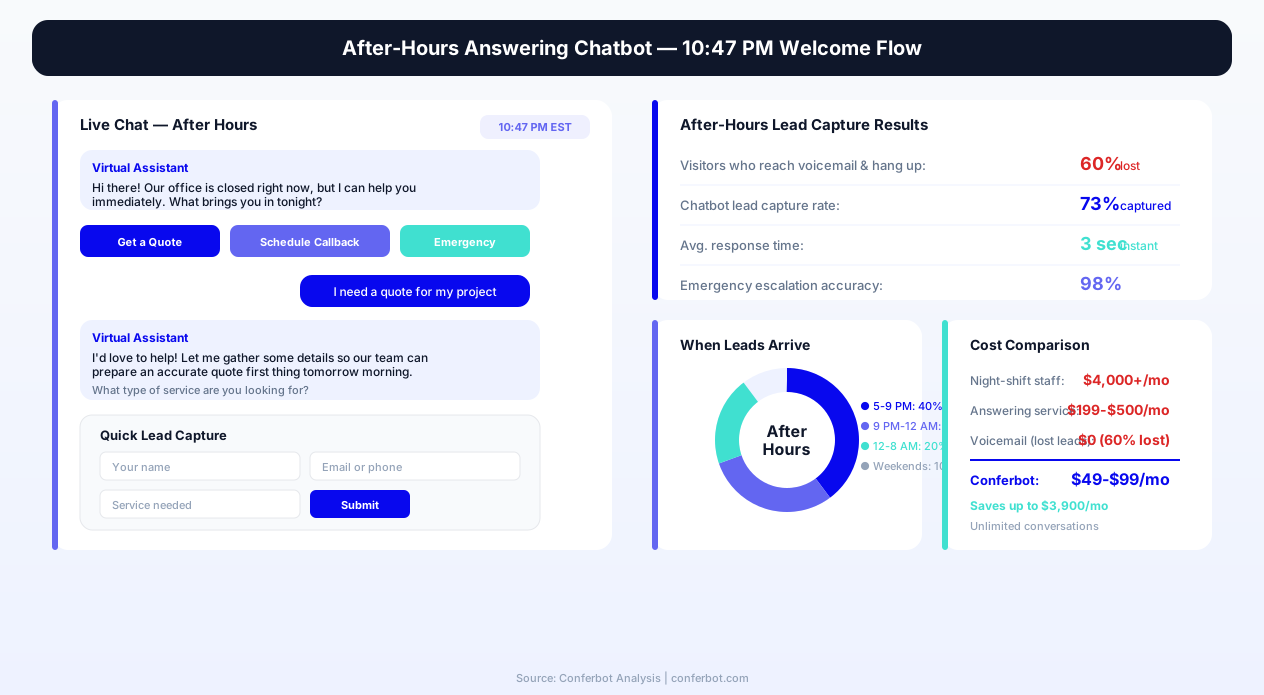
The virtual receptionist market reached $6.26 billion in 2026, driven by small and medium businesses seeking cost-effective alternatives to hiring night-shift staff or outsourcing to expensive answering services like Smith.ai ($199–$500/month) or AI Frontdesk. A traditional after-hours receptionist costs $4,000+ per month when you factor in salary, benefits, and management overhead. An after-hours answering chatbot built on Conferbot's AI chatbot builder delivers equivalent functionality — lead capture, message taking, FAQ handling, emergency routing, and appointment scheduling — at a fraction of that cost, with zero sick days, zero training time, and unlimited simultaneous conversation capacity.
Unlike a simple contact form that collects a name and email, the after-hours answering chatbot conducts a full qualification conversation: it identifies the caller's need, determines urgency level, provides immediate answers where possible, captures detailed context for the callback, and routes emergency situations through escalation protocols. Every interaction generates a structured lead record that your team reviews first thing in the morning — complete with the visitor's issue, contact details, urgency level, and preferred callback time. No more deciphering garbled voicemails or chasing incomplete form submissions.
This template is purpose-built for service businesses — law firms, medical practices, plumbing companies, HVAC contractors, property management firms, insurance agencies, and any business where after-hours inquiries represent high-value opportunities that cannot wait until morning. Deploy it on your website, connect it to your CRM via API integration, and start capturing the 60% of after-hours visitors you are currently losing to voicemail silence.
Why After-Hours Coverage Is a Revenue Imperative in ${year}
The assumption that business happens during business hours is a relic of the pre-internet era. In 2026, 68% of consumers research and contact businesses outside of traditional 9-to-5 hours — evenings, weekends, early mornings, and holidays. For many service categories, the peak inquiry window is actually 6 PM to 10 PM, when working professionals finally have time to address personal needs like finding a lawyer, scheduling a home repair, or researching insurance options. If your business is dark during these hours, you are invisible during peak demand.
The Voicemail Problem: 60% Abandonment
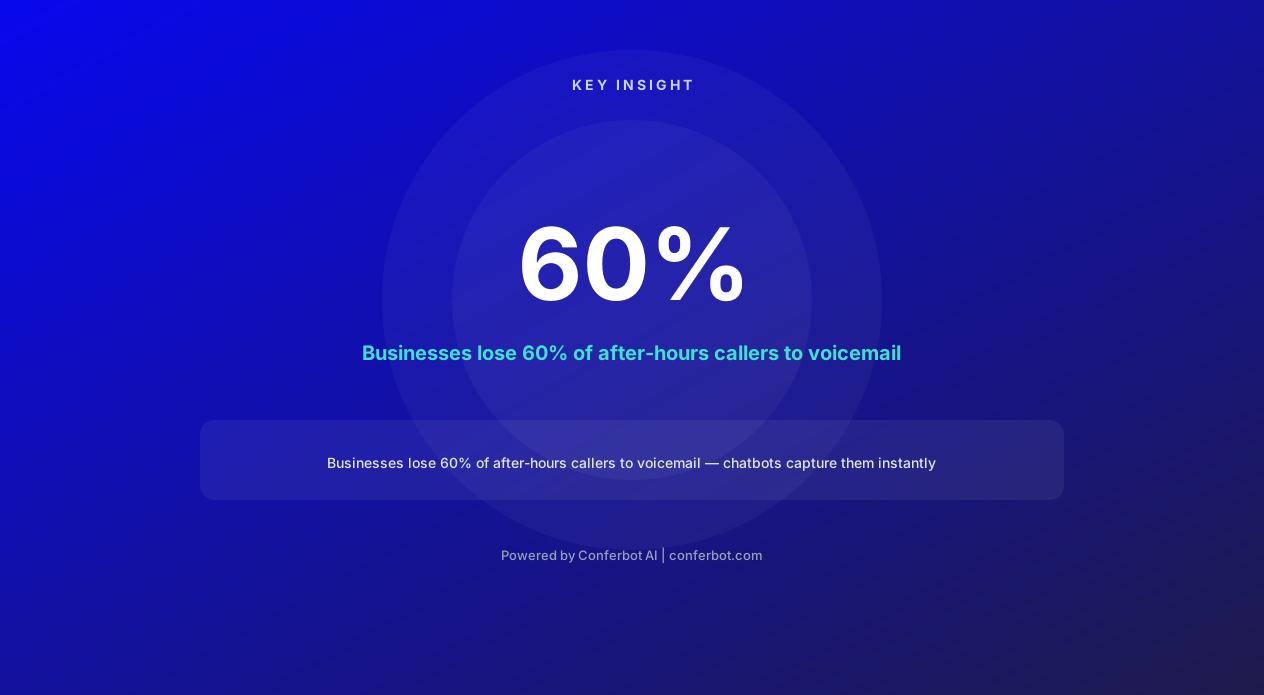
When a prospective customer calls your business after hours and reaches voicemail, the data is unambiguous: 60% hang up without leaving a message. They do not call back. They Google the next option — your competitor who has a chatbot, a live answering service, or simply appears more accessible. For high-value service businesses where each new client represents $1,000 to $50,000 in lifetime revenue, every abandoned after-hours call is a direct revenue loss that compounds over months and years. A plumbing company losing 3 after-hours leads per week at an average job value of $800 is losing $124,800 annually — far more than any chatbot implementation costs.
The Speed-to-Lead Imperative
Research from InsideSales.com (now XANT) established that responding to a lead within 5 minutes makes you 21x more likely to qualify that lead compared to responding after 30 minutes. After-hours inquiries that wait until the next morning for a response are often 12-16 hours old by the time a staff member sees them — well past the window where the prospect is actively comparing options. An after-hours chatbot responds in under 3 seconds, engaging the prospect at peak intent and capturing their information while they are actively looking for a solution.
Competitive Differentiation
Most small and medium businesses still rely on voicemail after hours. The business that responds immediately — even with an AI assistant that sets expectations clearly — creates a dramatically superior first impression compared to competitors who offer silence. When a homeowner has a leaking pipe at 9 PM and contacts three plumbing companies, the one that responds instantly with "I can help you assess the urgency and schedule a technician" wins the job. The other two get a voicemail they will hear tomorrow morning, by which time the job is already booked elsewhere.
Cost Comparison: Answering Alternatives
| Solution | Monthly Cost | Availability | Lead Qualification | Simultaneous Capacity |
|---|---|---|---|---|
| Night-shift receptionist | $4,000–$5,500 | Limited shifts | Variable quality | 1 call at a time |
| Outsourced answering service | $200–$1,500 | 24/7 | Script-based only | Shared agents |
| Smith.ai / Ruby | $199–$500+ | Business hours + some after-hours | Good | Shared pool |
| AI Frontdesk | $49–$199 | 24/7 | Basic | Unlimited |
| Conferbot After-Hours Chatbot | From $0 (free tier) | 24/7/365 | Fully customizable | Unlimited |
The economics are clear: an after-hours answering chatbot delivers the core functionality of expensive answering services — lead capture, message taking, FAQ handling, and emergency triage — at a cost that makes ROI inevitable for any business receiving more than a handful of after-hours inquiries per week.
How the After-Hours Answering Chatbot Works: Complete Workflow
The after-hours answering chatbot follows a decision-tree workflow designed to maximize lead capture while providing immediate value to every visitor. Unlike a generic chatbot that simply asks "how can I help you?" and records the response, this template routes visitors through purpose-built paths that mirror the intake process a skilled receptionist would conduct — but executes it instantly, simultaneously for any number of visitors, and without any capacity constraints.
Step 1: Time-Aware Greeting and Expectation Setting
The chatbot detects after-hours status (configurable per timezone and schedule) and delivers a greeting that immediately sets expectations: "Thanks for reaching us! Our office is currently closed, but I can help you right now." This honest framing builds trust — visitors know they are interacting with an AI assistant, not a human pretending to be available — and sets the stage for productive interaction. During business hours, the chatbot can switch to a different flow or hand off to live agents via Conferbot's live chat integration.
Step 2: Intent Classification and Routing
After greeting, the chatbot presents five primary options that cover the vast majority of after-hours visitor needs:
- Emergency/Urgent Issue — Routes to emergency triage protocol
- Schedule an Appointment or Callback — Enters booking flow
- Get Answers to Common Questions — Enters FAQ knowledge base
- Leave a Detailed Message — Structured message capture
- Get Business Hours and Location Info — Instant delivery
Step 3: Path-Specific Qualification
Each path conducts tailored information gathering. The emergency path assesses urgency level and provides immediate guidance while alerting on-call staff. The appointment path collects service needed, preferred date/time, and contact details. The FAQ path delivers instant answers from your knowledge base (configurable with unlimited Q&A pairs). The message path captures a structured message with name, contact method, issue description, and urgency level — far more useful than a rambling voicemail.
Step 4: Contact Information Capture
Every path except pure FAQ browsing concludes with contact information collection: name, phone number, email, and preferred callback time. The chatbot validates email format and phone number structure in real time, eliminating the garbled contact details that plague voicemail transcription. Each captured lead is tagged with the path they followed, the time of interaction, and a structured summary of their need.
Step 5: Confirmation and Next-Step Communication
The conversation concludes with a clear confirmation of what happens next: "Your message has been received. A team member will contact you by [specific time based on your next business day opening]." This commitment creates accountability and sets realistic expectations — eliminating the anxiety of wondering whether anyone received the message. The confirmation also reinforces your brand professionalism: even at 11 PM on a Saturday, the experience is structured, helpful, and reassuring.
Step 6: CRM Integration and Morning Briefing
All captured leads flow automatically into your CRM via Conferbot's API integration. Staff arriving Monday morning find structured lead records — not a stack of sticky notes from garbled voicemails — organized by urgency, service type, and preferred callback time. The highest-priority leads are flagged for immediate attention, ensuring your team's first hour is spent on the warmest opportunities rather than triaging a chaotic inbox.
Ready to try After Hours Answering Chatbot?
Deploy this template in under 10 minutes. No coding required.
Use This Template Free →Emergency Triage: Handling Urgent After-Hours Situations
Not all after-hours inquiries are equal. A homeowner with a burst pipe at midnight has fundamentally different needs than someone researching kitchen remodeling at 9 PM. A patient experiencing chest pain needs different handling than someone wanting to schedule a routine checkup. The after-hours answering chatbot includes a dedicated emergency triage protocol that identifies urgent situations, provides immediate guidance, and alerts on-call staff — all within seconds of the visitor indicating urgency.
Urgency Assessment Framework
When a visitor selects the emergency/urgent option, the chatbot asks a series of rapid assessment questions tailored to your industry:
- Home Services: "Is there active water flooding, gas smell, or electrical sparking?" → Immediate emergency instructions + on-call alert
- Medical: "Are you experiencing a life-threatening emergency? If yes, please call 911 immediately." → Safety-first protocol
- Legal: "Have you been arrested or is there an immediate legal deadline (court date within 24 hours)?" → After-hours attorney alert
- Property Management: "Is the issue preventing you from safely staying in your unit (no heat, flooding, security breach)?" → Emergency maintenance dispatch
Escalation Triggers and On-Call Alerts
When the urgency assessment confirms a genuine emergency, the chatbot triggers escalation protocols configured during setup: SMS alerts to on-call staff, email notifications to the emergency response team, and — for businesses with integrated phone systems — automated callback initiation. The visitor receives immediate instructions ("Turn off the main water valve, located behind your toilet or under the sink") while the escalation happens in parallel. This dual-track response addresses the immediate situation while mobilizing human support.
Non-Emergency Urgent Handling
Many after-hours inquiries are urgent but not emergencies — a client who needs a document for a morning meeting, a patient who needs a prescription refill before the weekend, a tenant reporting a maintenance issue that is inconvenient but not dangerous. The chatbot handles these by collecting full details, setting clear expectations for response timing ("A team member will see this first thing at 8 AM and respond within the hour"), and offering any self-service options that might resolve the issue immediately (knowledge base articles, downloadable forms, portal login links).
Liability Protection Through Documentation
The emergency triage protocol creates a complete, timestamped record of every emergency interaction: when the visitor reported the issue, what they described, what instructions the chatbot provided, when escalation was triggered, and what next steps were communicated. For businesses in regulated industries — healthcare, property management, legal — this documentation trail provides liability protection by demonstrating that the business responded appropriately and promptly to urgent situations, even outside business hours. Every triage interaction is logged and accessible through Conferbot's analytics dashboard.
After-Hours Lead Capture: Converting Night-Time Visitors into Morning Appointments
The primary revenue function of an after-hours answering chatbot is lead capture — converting anonymous website visitors who arrive after closing time into qualified, contactable prospects with structured information that your sales or service team can act on immediately the next morning. The difference between a chatbot lead and a voicemail lead is the difference between a dossier and a sticky note: one gives your team everything they need to close, the other requires another round of phone tag to get basic information.
Structured vs. Unstructured Lead Data
A voicemail typically provides: a garbled name, a phone number spoken too quickly to transcribe accurately, and a vague description of what the caller wants. A chatbot lead provides: validated name, verified email address, confirmed phone number, specific service interest, urgency level, preferred callback time, budget range (if applicable), and a text transcript of the full conversation showing exactly what the prospect asked and what information they received. This structured data means your team's first contact with the prospect is informed, personalized, and efficient — dramatically increasing the callback-to-appointment conversion rate.
Qualification Scoring
The after-hours chatbot assigns a lead quality score based on signals gathered during the conversation: visitors who specify a service, indicate urgency, provide complete contact information, and request a specific callback time score higher than those who browse FAQs casually. Your morning briefing sorts leads by score, ensuring the highest-intent prospects receive callbacks first — within minutes of the office opening, not hours later after working through a random-order call list.
| Lead Signal | Score Impact | Why It Matters | Action Triggered |
|---|---|---|---|
| Specified service needed | +20 points | Clear purchase intent | Route to specialist |
| Indicated urgency | +25 points | Time-pressured buyer | Priority callback queue |
| Complete contact info (phone + email) | +15 points | Serious about being reached | Multi-channel follow-up |
| Requested specific callback time | +15 points | Committed to conversation | Calendar hold |
| Asked about pricing | +10 points | In comparison/decision phase | Include pricing in follow-up |
| Mentioned competitor | +10 points | Actively shopping | Competitive response strategy |
| Browsed multiple pages before chatting | +5 points | Research-stage engagement | Nurture sequence |
| Returning visitor | +10 points | Deepening interest | Reference prior interaction |
Appointment Pre-Booking
For businesses with integrated calendar systems, the after-hours chatbot goes beyond lead capture to actual appointment booking. Visitors can see available time slots for the next business day, select their preferred time, and receive instant confirmation — meaning the prospect wakes up with a confirmed appointment on their calendar rather than waiting for a callback that may or may not happen promptly. Pre-booked appointments convert at 3-5x the rate of callback requests because the commitment is already made and the friction of scheduling is eliminated.
Multi-Channel Lead Routing
Leads captured after hours can be routed to different team members based on service type, urgency, or geographic area. A law firm might route personal injury leads to one attorney and family law leads to another. A multi-location plumbing company might route by zip code to the nearest service team. This intelligent routing means leads arrive pre-sorted and assigned — eliminating the morning scramble of figuring out who should call whom.
FAQ Handling: Providing Instant Answers Without Staff Involvement
A significant percentage of after-hours visitors do not need to speak with a human — they need a specific piece of information that exists in your business's knowledge base but is not easily accessible on your website. Business hours, service area, pricing ranges, document requirements, process explanations, and policy details are all questions that a chatbot answers instantly while a voicemail system forces the caller to wait until tomorrow for information that is fundamentally static and should be available 24/7.
Knowledge Base Integration
The after-hours answering chatbot includes a configurable FAQ module that draws from your business's knowledge base — the same information your receptionist delivers dozens of times daily. Common categories include:
- Business Information: Hours, location, parking, accessibility, team bios
- Service Details: What you offer, what you do not offer, service area, specializations
- Process Questions: "What should I bring to my appointment?" "How long does it take?" "What happens after I sign up?"
- Pricing Guidance: Starting prices, factors that affect pricing, payment options, insurance acceptance
- Policy Information: Cancellation policy, warranty details, satisfaction guarantees, privacy practices
Natural Language Understanding
Built on Conferbot's NLP engine, the FAQ module handles questions in natural language rather than requiring visitors to navigate a rigid menu tree. "What time do you open on Saturday?" "Do you accept Aetna insurance?" "Can I bring my dog?" — the chatbot understands the intent behind these free-form questions and delivers relevant answers from the knowledge base. This natural interaction style dramatically increases FAQ engagement compared to traditional FAQ pages where visitors must scan dozens of questions to find their answer.
FAQ-to-Lead Conversion
The FAQ module is not just an information delivery system — it is a soft lead capture mechanism. After answering a visitor's question, the chatbot offers natural follow-up actions: "Would you like to schedule an appointment?" "Can I help you with anything else?" "Would you like us to call you tomorrow to discuss this in more detail?" Visitors who came only for information often convert to leads when the next step is frictionlessly presented. FAQ paths that end with appointment offers convert at 15-25% — visitors who got their question answered feel positively toward the business and are receptive to taking the next step.
Reducing Next-Day Call Volume
Every FAQ question the chatbot answers after hours is one fewer call or email your staff handles the next morning. For businesses receiving 20-30 routine information requests daily, the chatbot eliminates 10-15 of those calls — reclaiming 1-2 hours of staff time that can be redirected to revenue-generating activities. Over a month, that is 40-60 hours of administrative labor eliminated by a chatbot that cost nothing to operate during those conversations. Track which FAQ topics generate the most volume through the analytics dashboard and continuously expand your knowledge base to handle emerging questions.
50,000+ businesses use Conferbot templates to automate conversations
Complete Feature Matrix: After-Hours Answering Chatbot Capabilities
The after-hours answering chatbot template includes a comprehensive feature set designed to replicate — and exceed — the capabilities of a trained receptionist handling after-hours communications. Every feature is configurable to your specific business requirements, industry, and communication style. Below is the complete capability matrix showing what the chatbot delivers across all operational dimensions.
| Feature | Description | Operational Benefit | Customer Benefit |
|---|---|---|---|
| Time-aware greeting | Automatically detects business hours status and adjusts messaging | No manual switching between day/night modes | Clear expectations about response timing |
| Multi-path intent routing | Routes visitors to emergency, booking, FAQ, message, or info paths | Structured lead data by category | Gets to the right help immediately |
| Emergency triage protocol | Identifies urgent situations and triggers escalation alerts | On-call staff alerted only for genuine emergencies | Immediate guidance for urgent issues |
| Lead qualification scoring | Assigns quality scores based on intent signals | Prioritized morning callback list | Fastest response for highest-urgency needs |
| Appointment pre-booking | Allows visitors to select available time slots | Calendar fills overnight without staff effort | Confirmed appointment without waiting for callback |
| Structured message capture | Collects name, contact, issue, urgency in organized format | Actionable records vs. garbled voicemails | Confidence that message was received correctly |
| FAQ knowledge base | Instant answers from configurable Q&A library | Eliminates repetitive next-day inquiries | Gets information immediately, any hour |
| Contact validation | Real-time email and phone format verification | Eliminates invalid contact details | Ensures callback reaches them |
| Holiday schedule handling | Detects holidays and adjusts response timing expectations | No manual updating for each holiday | Accurate expectations during holiday periods |
| Multi-language support | Serves visitors in their preferred language | Captures leads from non-English speakers | Comfortable interaction in native language |
| Callback time preferences | Collects preferred day, time range, and method | Staff calls when prospect is available | No missed callbacks or phone tag |
| CRM auto-sync | Pushes all lead data to CRM via API | Zero manual data entry | Seamless experience when staff follows up |
Before/After Comparison: Business Impact
Businesses implementing the after-hours answering chatbot consistently report measurable improvements across key metrics within the first 30 days of deployment:
| Metric | Before (Voicemail Only) | After (Chatbot Active) | Improvement |
|---|---|---|---|
| After-hours lead capture rate | 12–18% (voicemail leavers) | 45–62% | +250–350% |
| Average lead response time | 14–18 hours (next morning) | Under 3 seconds | Effectively instant |
| Contact info accuracy | 60–70% (voicemail transcription) | 98%+ (validated input) | Near-perfect |
| Lead qualification completeness | Minimal (name + vague need) | Full (service, urgency, budget, timing) | Complete dossier |
| Emergency response time | Discovered next morning | Under 60 seconds (alert triggered) | Critical improvement |
| Staff time on routine FAQ calls | 1.5–2.5 hours/day | 0.3–0.5 hours/day | -75% to -80% |
| Monthly after-hours leads captured | 8–15 | 35–60 | +300–400% |
These improvements compound over time as the chatbot's knowledge base expands, qualification flows are refined based on conversion data, and the business optimizes its morning callback protocols around the structured lead data the chatbot provides.
Holiday Handling, Business Hours Display, and Schedule Intelligence
One of the most operationally valuable features of the after-hours answering chatbot is its intelligent schedule awareness — the ability to know not just whether the office is currently open or closed, but when it will reopen, whether today is a holiday, and when the next available callback window is. This intelligence powers accurate expectation-setting that builds trust and reduces the anxiety callers feel when they cannot reach a human.
Dynamic Business Hours Communication
When a visitor asks about business hours, the chatbot delivers your complete weekly schedule along with context about the current status: "We are currently closed. Our next opening is Monday at 8:00 AM Eastern, which is in approximately 14 hours." This specificity — the exact next opening with a countdown — reassures visitors that their inquiry will be seen promptly and gives them a concrete expectation rather than the vague "we will respond during business hours" that most auto-responders offer.
Holiday Calendar Integration
The chatbot maintains a configurable holiday calendar that adjusts response-time commitments automatically. When a visitor contacts your business on Thanksgiving evening, the chatbot does not promise a "next business day" response without specifying that the next business day is Monday — it calculates the actual next opening and communicates it clearly: "Our office is closed for the Thanksgiving holiday. We reopen Monday, November 27th at 8:00 AM. Your message will be reviewed first thing Monday morning." This honesty — rather than a generic auto-response — demonstrates respect for the visitor's time and eliminates the frustration of expecting a Friday callback that never comes.
Timezone Intelligence
For businesses serving multiple timezone markets or operating in locations that differ from their primary customer base, the chatbot handles timezone conversion automatically. A California-based company serving East Coast clients configures both timezones; when an East Coast visitor asks about availability at 9 PM Eastern, the chatbot correctly identifies this as after hours for both the business (Pacific) and the visitor (Eastern) and sets expectations accordingly. This prevents the confusing situation where a visitor assumes "business hours" means their local time.
Extended Closure Communication
For planned extended closures — office renovation, company retreats, seasonal shutdowns — the chatbot communicates the full closure period and provides appropriate alternatives. "Our office is closed December 23 through January 2 for the holiday season. For emergencies during this period, please call our emergency line at [number]. For all other inquiries, we will respond beginning January 3rd." This proactive communication through the chatbot eliminates the need to update voicemail greetings, website banners, and email auto-responders separately — the chatbot handles it conversationally with far more nuance than a static message. Configure all schedule intelligence through Conferbot's visual builder with no coding required.
Schedule-Aware Appointment Booking
When the chatbot offers appointment booking, it only presents slots that account for holidays, closures, and staff availability. A visitor booking at 10 PM on Saturday night before a Monday holiday sees Tuesday slots as the first availability — not phantom Monday slots that would need to be rescheduled. This accuracy prevents the double-booking and rescheduling headaches that plague businesses using generic booking widgets without schedule intelligence. Connect your team's real-time availability through calendar integration for always-accurate slot presentation.
Industry Applications: After-Hours Answering Across Business Types
The after-hours answering chatbot template adapts to virtually any service business, but certain industries benefit disproportionately because their after-hours inquiry volume is highest and the cost of missed leads is most significant. Below are the primary industry applications with specific use-case configurations that maximize ROI for each vertical.
Home Services (Plumbing, HVAC, Electrical, Roofing)
Home service emergencies do not respect business hours. A burst pipe at 2 AM, an AC failure on a summer evening, or a power outage in a home with medical equipment — these situations generate urgent calls that represent premium-priced emergency service opportunities. The after-hours chatbot for home services includes an emergency assessment flow that determines whether the situation requires immediate dispatch (truly urgent, safety risk) or can wait for next-day scheduling (inconvenient but not dangerous). Emergency calls trigger on-call technician alerts; non-emergency calls capture the lead with a morning appointment offer. Home service companies report that after-hours emergency calls command 1.5-2x standard pricing — making every captured emergency call worth $300-$800 in additional revenue.
Medical and Dental Practices
Patients calling after hours range from those seeking routine appointment scheduling to those with genuine medical concerns. The medical-configured chatbot provides appropriate triage: life-threatening emergencies are directed to 911, urgent but non-life-threatening concerns receive on-call provider alerts, and routine scheduling requests are captured for morning follow-up. The chatbot also handles high-volume routine questions: "Do you accept my insurance?" "What should I bring to my first appointment?" "What is your cancellation policy?" — reducing next-day call volume while providing immediate answers to anxious patients.
Legal Firms
Legal emergencies — arrests, protective orders, accident documentation, time-sensitive filings — require immediate attention that voicemail cannot provide. The legal-configured chatbot identifies case type and urgency, provides immediate guidance (do not speak to police without an attorney, document the accident scene, preserve evidence), and alerts the on-call attorney for genuinely urgent situations. Non-urgent legal inquiries are captured as leads with case type, summary, and preferred consultation time — giving attorneys a pre-qualified intake packet rather than a voicemail to decode.
Property Management
Tenants calling after hours almost always have maintenance issues ranging from inconvenient (dripping faucet) to genuinely urgent (no heat in winter, flooding, security concerns). The property management chatbot assesses urgency, dispatches emergency maintenance for genuine emergencies, and captures work orders for non-urgent issues — all while providing tenants with the immediate acknowledgment and response timeline they need to feel heard. This reduces tenant frustration, documents all interactions for compliance, and ensures emergency maintenance is dispatched without waiting for a property manager to check voicemail.
Insurance Agencies
Insurance inquiries peak in evenings when policyholders review their coverage, experience incidents requiring claims, or research better rates. The insurance chatbot captures new policy inquiries with risk profile information (vehicle type, home value, coverage needs), routes claims to the appropriate adjuster with incident details, and answers coverage questions from existing policyholders. Each captured inquiry includes the information an agent needs to provide a quote or process a claim — eliminating the back-and-forth that typically consumes the first 10 minutes of a next-day callback.
Setup Guide: Deploying Your After-Hours Answering Chatbot in 30 Minutes
The after-hours answering chatbot template deploys without technical skills, developer involvement, or lengthy implementation projects. The entire configuration maps to decisions you already know the answers to: your business hours, your services, your FAQ answers, your emergency protocols, and your team's contact information. From template selection to live deployment takes 30 minutes or less for most businesses.
Step 1: Clone Template and Set Business Hours (5 minutes)
Start in Conferbot's AI chatbot builder by cloning the after-hours answering chatbot template. Configure your weekly business hours schedule (different hours for different days are supported), set your timezone, and add any upcoming holidays or closures. The chatbot immediately knows when to activate after-hours mode versus business-hours mode, and calculates accurate "next opening" times for expectation-setting messages.
Step 2: Customize Service Categories and FAQ (10 minutes)
Edit the five main menu options to match your specific business offerings. Replace generic labels with your actual service categories. Then populate the FAQ module with the 10-20 questions your receptionist answers most frequently — hours, location, pricing, what to bring, service area, accepted insurance/payment, and process explanations. Each FAQ entry takes 30 seconds to add. Start with your top 10 and expand over time based on conversation analytics showing what visitors ask that is not yet covered.
Step 3: Configure Emergency Protocols (5 minutes)
Define what constitutes an emergency for your business, set the assessment questions that determine urgency level, and configure escalation actions: who receives the alert (phone number and/or email), what the threshold is for triggering alerts (all emergencies vs. only confirmed critical situations), and what immediate guidance the chatbot provides while help is being mobilized. For businesses without after-hours emergency services, simply configure the emergency path to capture urgent details and promise first-thing-tomorrow response with the specific opening time.
Step 4: Connect Integrations (5 minutes)
Connect your CRM, calendar, and notification systems via Conferbot's API integration. Supported integrations include: Google Calendar and Calendly for appointment booking, HubSpot/Salesforce/Zoho for lead syncing, Slack/Teams for real-time notifications, Twilio for SMS escalation alerts, and Zapier for custom workflow automation. Each integration connects with API key or OAuth in under two minutes.
Step 5: Deploy to Your Channels (5 minutes)
Install the chatbot on your website with a single line of embed code (compatible with WordPress, Squarespace, Wix, Webflow, and custom HTML sites). Optionally extend to WhatsApp, Facebook Messenger, or SMS channels for businesses whose customers prefer messaging over website chat. The chatbot maintains conversation context across all channels and applies the same after-hours logic regardless of where the visitor initiates contact.
Step 6: Test and Refine (ongoing)
Before going live, test every path by simulating after-hours conversations through the preview mode. Verify that emergency alerts reach the correct staff member, that FAQ answers are accurate and complete, that appointment slots display correctly, and that CRM records are created properly. After launch, review conversation logs weekly through the analytics dashboard to identify questions the chatbot cannot answer (expand your FAQ), paths with high abandonment (simplify or clarify), and opportunities to improve qualification questions based on what your team actually needs to know when they call back.
After Hours Answering Chatbot FAQ
Everything you need to know about chatbots for after hours answering chatbot.
Why Use a Template vs Building from Scratch?
Templates encode years of optimization data into the conversation flow before you start.
| Factor | Conferbot Template | Build from Scratch | Hire a Developer |
|---|---|---|---|
| Time to deploy | 10 minutes | 2-8 hours | 2-6 weeks |
| Cost | Free | Your time | $5,000-$25,000 |
| Day-1 conversion | 15-22% | 5-8% | 10-15% |
| Proven flows | Yes, data-tested | No | Depends |
| Updates included | Automatic | Manual | Paid |
| Multi-channel | 8+ channels | 1 channel | Extra cost |
| Analytics | Built-in | Must build | Extra cost |
Ready to Deploy After Hours Answering Chatbot?
Join 50,000+ businesses. Free forever plan available. No credit card required.