
Lead Qualification Chatbot Template (Free)
Free Sales Chatbot Template
Qualify leads 7x faster than your SDR team with a free AI lead qualification chatbot. BANT and MEDDIC scoring, instant routing, and CRM sync. Deploy for B2B sales teams in minutes.


What Is an Advanced Lead Qualification Bot?
An advanced lead qualification bot is an AI-powered sales assistant that evaluates every inbound prospect against your ideal customer profile before a human sales rep spends a single minute on the conversation. Instead of your team manually reviewing form submissions, chasing cold leads, or spending 45 minutes on a discovery call only to find the prospect is not a fit, the qualification bot runs every lead through a structured scoring framework — instantly, at scale, 24 hours a day.
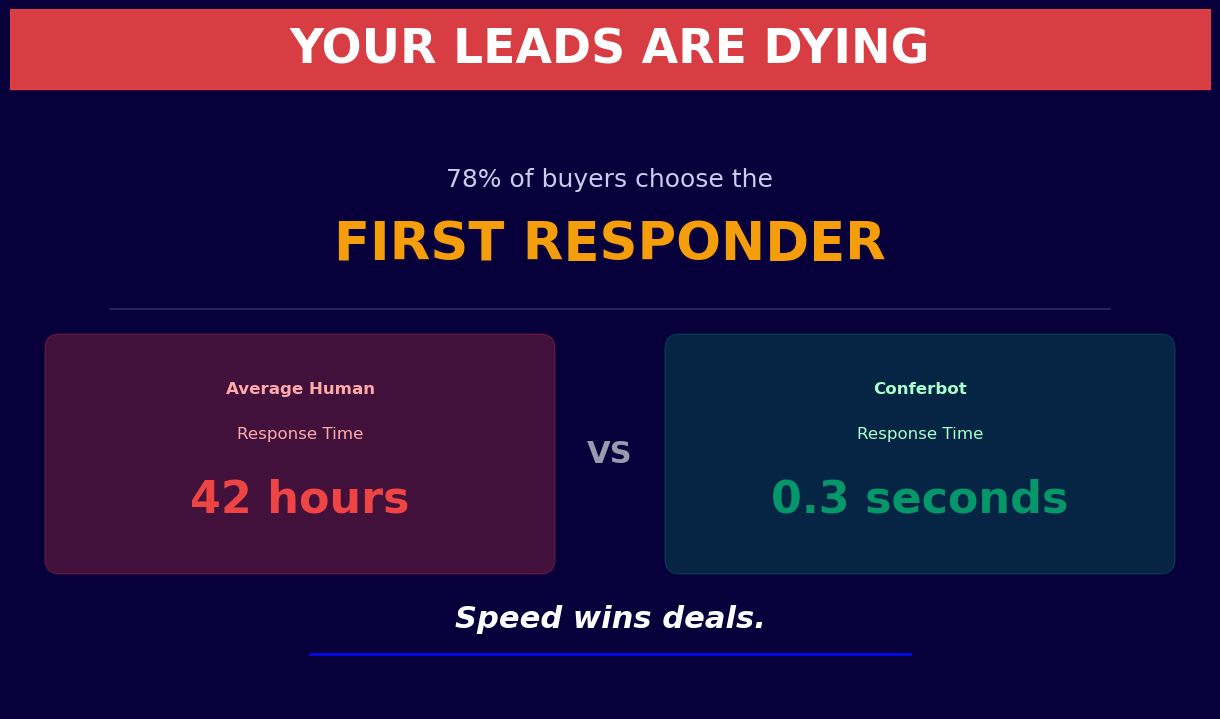
Traditional lead qualification relies on SDRs (Sales Development Representatives) asking qualifying questions over email or phone. This process is slow, inconsistent, and expensive. A single SDR can qualify 30-50 leads per day at best. A Conferbot qualification bot can process thousands of leads simultaneously, scoring each one within seconds using the same criteria every time. There is no variation in how questions are asked, no fatigue at 4pm on a Friday, and no leads slipping through the cracks because someone forgot to follow up.
The Gap Between Lead Capture and Sales-Ready Leads
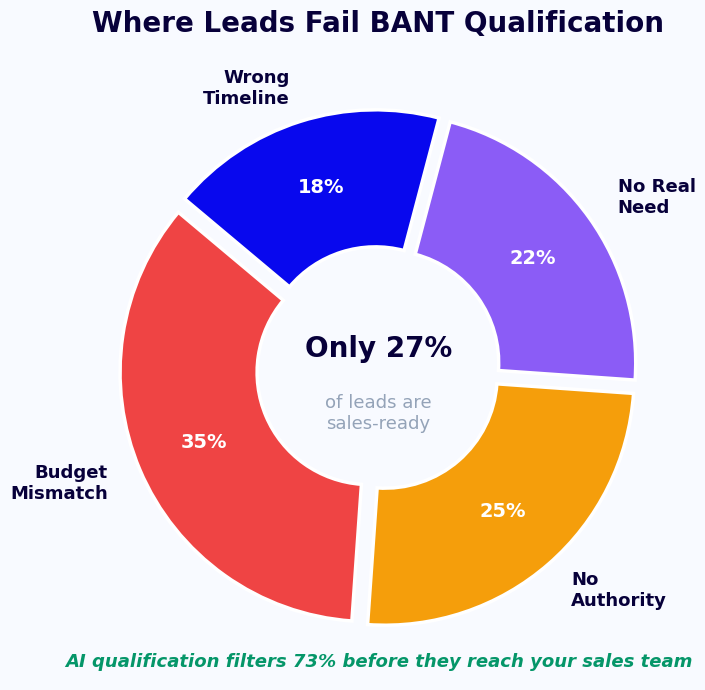
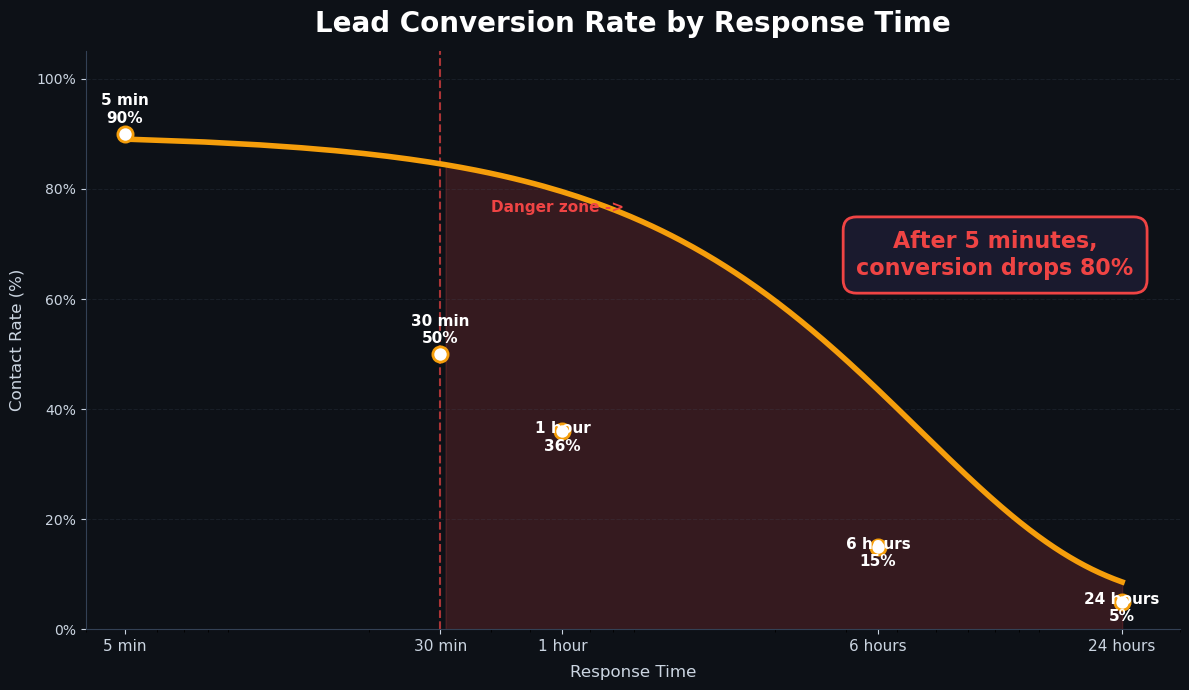
The average B2B company captures 1,000+ leads per month through their website, ads, and content channels. But Forrester Research estimates that only 5-15% of those leads are sales-ready at any given moment. The remaining 85-95% need nurturing, disqualification, or routing to a different track. Without a systematic qualification process, sales teams waste 60-70% of their time on prospects who will never convert — while genuinely high-value leads wait days for a response and lose interest.
- Speed-to-lead matters enormously: Research by the Harvard Business Review found that companies responding to leads within 1 hour are 7x more likely to qualify them than those responding after 2 hours, and 60x more likely than those waiting 24 hours. A qualification bot responds in seconds, not hours.
- Consistency drives accuracy: Human qualification is inconsistent. Different SDRs ask different questions, weight answers differently, and bring personal biases to scoring. A bot applies the same framework every time, making your pipeline data reliable.
- Scalability without headcount: Doubling your lead volume with an SDR-based model means doubling your SDR headcount. A chatbot qualification model scales to any volume at zero marginal cost.
Who Needs This Template
The advanced lead qualification bot is purpose-built for B2B SaaS companies, financial services firms, enterprise software vendors, professional services organizations, and any business where deal size justifies rigorous qualification. It is particularly valuable for companies with complex products, long sales cycles (60+ days), and multiple buyer personas that require different qualification paths.
Explore the full capabilities of Conferbot's AI chatbot builder and see how it powers sophisticated qualification logic without requiring engineering resources.
How It Works: BANT, MEDDIC Scoring, and Intelligent Routing
The qualification bot does not ask random questions — it follows proven sales qualification frameworks adapted to conversational AI. The two most widely used frameworks in B2B sales are BANT (Budget, Authority, Need, Timeline) and MEDDIC (Metrics, Economic Buyer, Decision Criteria, Decision Process, Identify Pain, Champion). Conferbot's template implements both, with configurable weighting so you can prioritize the factors most predictive in your specific market.
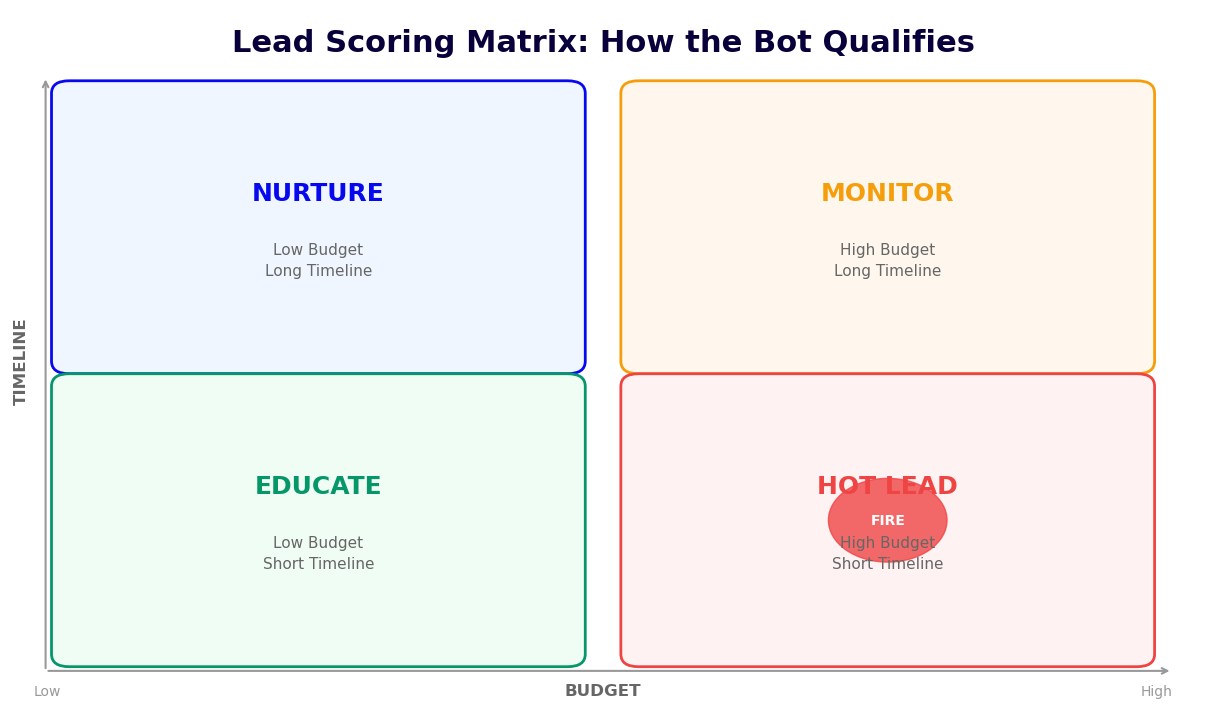
BANT Scoring Model
| BANT Dimension | Sample Bot Questions | Score: High (3pts) | Score: Medium (2pts) | Score: Low (1pt) |
|---|---|---|---|---|
| Budget | "What budget have you set aside for this initiative?" / "What are you currently spending on [category]?" | Defined budget, within your range | Estimated budget, directionally correct | No budget identified, needs approval |
| Authority | "Who else is involved in this decision?" / "Are you the primary decision-maker?" | Is the decision-maker | Strong influencer, champions the project | End user, not in buying process |
| Need | "What is driving this search right now?" / "What does success look like in 90 days?" | Active pain, immediate need | Future-state planning, 6-12 month horizon | Exploring casually, no defined problem |
| Timeline | "When are you hoping to have a solution in place?" / "Is there an event driving your deadline?" | Under 30 days | 30-90 days | 6+ months or undefined |
MEDDIC Overlay for Enterprise Deals
For high-value enterprise opportunities (deals above $25,000 ACV), the bot extends into MEDDIC territory. After initial BANT scoring, enterprise-flagged leads receive additional questions covering:
- Metrics: "What specific KPIs will this solution need to move?" Prospects who answer with specific numbers (reduce CAC by 20%, increase conversion by 15%) are materially more likely to close than those who give vague answers.
- Economic Buyer: "Who signs the contract at your organization?" Identifying the economic buyer early prevents deals from stalling because you spent 8 weeks selling to the wrong person.
- Decision Criteria: "What are the top 3 things your team will evaluate vendors on?" This reveals whether your strengths match their evaluation criteria before you invest in a full proposal.
- Identify Pain: "What is the business impact of NOT solving this problem in the next quarter?" Pain quantification is the single strongest predictor of close probability in B2B sales.
Intelligent Routing Logic
Once scoring is complete, the bot routes each lead automatically based on their total score:
- Score 9-12 (High-fit): Instant calendar booking for a discovery call with a senior AE. The bot presents available slots in real time via Conferbot's calendar booking integration.
- Score 5-8 (Medium-fit): Routes to an SDR for personal follow-up within 4 hours. The lead receives a nurture email sequence in the meantime.
- Score 1-4 (Low-fit): Enters a long-term nurture track. The bot delivers a relevant resource (case study, blog post) and sets a 90-day re-qualification reminder.
- Unqualified: Leads who fall outside the ICP entirely (wrong industry, company size, or geography) receive a polite explanation and, where possible, a referral to a more appropriate resource.
Key Features: Conversational Scoring, Dynamic Branching, and Live Handoff
The advanced lead qualification bot combines natural conversation with rigorous sales logic. It does not feel like an interrogation — it feels like a knowledgeable colleague who understands the prospect's situation and guides them toward the right next step. Here is what powers that experience under the hood.
Feature Overview
| Feature | Description | Sales Impact |
|---|---|---|
| Adaptive questioning | Skips irrelevant questions based on previous answers, dynamically adjusts depth for high-scoring leads | 40% shorter qualification conversations, higher completion rates |
| Real-time lead scoring | Calculates running score as conversation progresses, can escalate immediately if threshold hit mid-conversation | Hot leads reach a rep in under 2 minutes vs. 4+ hours |
| CRM auto-population | Creates or updates CRM records in HubSpot/Salesforce with all qualification data at conversation end | Eliminates manual data entry, 100% data capture rate |
| Calendar booking | Shows live AE availability and books meetings for qualified leads without leaving the chat | Meeting show rates 35% higher when booked immediately |
| Live chat escalation | High-value or confused leads transferred to a human rep with full conversation context visible | No context loss, rep picks up exactly where bot left off |
| Multi-language support | Qualifies leads in 40+ languages, detecting language from browser or first message | Captures international leads that would otherwise bounce |
| Lead enrichment | Pulls firmographic data (company size, industry, revenue) from Clearbit/Apollo to supplement qualification answers | Reduces question burden on prospects, improves data quality |
| Disqualification messaging | Delivers helpful content to disqualified leads rather than a dead end | Maintains brand goodwill, nurtures for future fit |
Conversational NLP: Understanding Intent, Not Just Keywords
The bot's NLP engine understands the intent behind answers, not just the literal text. When a prospect says "we have a budget but it needs board approval," the system correctly scores this as Medium authority rather than High budget. When someone says "we've been evaluating solutions for 6 months and need to decide by end of quarter," the timeline scores as High (under 30 days) while the extended evaluation period is flagged as a potential risk to note in the CRM record.
Live Chat Handoff with Context Preservation
When the bot encounters a high-value lead who asks a complex technical question, or when a prospect signals frustration, the live chat handoff triggers instantly. The receiving rep sees the full conversation transcript, the prospect's current BANT/MEDDIC scores, their company data, and a suggested next step — all in the same interface. There is no "can you tell me a bit about yourself?" from the rep, which is a common friction point when bots and humans hand off poorly. The rep enters the conversation already informed and can focus entirely on building trust and advancing the deal.
Analytics and Pipeline Visibility
Every qualification conversation feeds into Conferbot's analytics dashboard, showing you lead volume by source, average score by channel, drop-off rates by question, and conversion rates from qualified lead to booked meeting. This data lets you continuously improve your qualification criteria and identify which traffic sources produce the highest-quality leads.
Ready to try Lead Qualification Chatbot Template (Free)?
Deploy this template in under 10 minutes. No coding required.
Use This Template Free →CRM Integration: HubSpot, Salesforce, and Pipeline Automation
A lead qualification bot is only as valuable as the data it puts in the right hands at the right time. Qualification conversations that do not flow directly into your CRM create a data gap — reps receive leads without context, qualification scores get lost in spreadsheets, and the pipeline visibility your sales managers depend on remains incomplete. Conferbot's native integrations with HubSpot and Salesforce eliminate this gap entirely, turning every chatbot conversation into a fully enriched CRM record with zero manual effort.
HubSpot Integration
Conferbot's API integration with HubSpot is bidirectional and real-time. When a qualified lead completes the bot conversation, the following happens automatically within 10 seconds:
- Contact creation or update: The bot checks for an existing contact by email. If found, it updates the record with new qualification data. If not, it creates a new contact with all collected fields populated.
- Deal creation: For leads scoring above your defined threshold, a deal is automatically created in the appropriate pipeline stage (e.g., "SQL - Meeting Scheduled" or "MQL - Needs Follow-Up").
- Custom property mapping: BANT/MEDDIC scores, budget range, company size, and timeline map to custom HubSpot properties you define. This makes lead scoring data queryable in HubSpot reports.
- Workflow enrollment: Qualified leads can be automatically enrolled in HubSpot sequences — an SDR follow-up sequence for Medium scores, a direct AE outreach sequence for High scores.
- Meeting logging: Meetings booked through the chatbot appear as HubSpot meetings linked to the contact and deal, with the chatbot conversation transcript attached as a note.
Salesforce Integration
The Salesforce integration follows the same logic adapted to Salesforce's object model:
- Lead or Contact object: Bot creates Salesforce Leads for net-new prospects. Existing Contacts are matched and updated via email deduplication.
- Opportunity creation: High-scoring leads trigger automatic Opportunity creation with Stage set per your pipeline configuration and Lead Source set to reflect the specific chatbot campaign.
- Task assignment: SDR tasks are auto-created and assigned to the correct rep based on territory, product line, or round-robin logic defined in your Salesforce routing rules.
- Campaign membership: Leads are added to the relevant Salesforce Campaign, enabling accurate attribution for marketing ROI reporting.
Pipeline Automation Flows
| Lead Score | HubSpot Action | Salesforce Action | Rep Notification |
|---|---|---|---|
| High (9-12) | Create deal in "SQL - Demo Scheduled," enroll in AE sequence | Create Opportunity at "Discovery" stage, assign to AE | Slack + email to AE within 60 seconds |
| Medium (5-8) | Create deal in "MQL - SDR Follow-Up," enroll in SDR sequence | Create Lead at "Open - Not Contacted," assign to SDR | SDR daily queue update + email alert |
| Low (1-4) | Add to long-term nurture list, tag as "Revisit Q+1" | Create Lead with Status "Nurture," no task assigned | Weekly SDR review digest |
| Disqualified | Mark contact as "Disqualified," suppress from active outreach | Set Lead Status to "Unqualified," log reason | No notification; logged for reporting |
Data Integrity and Deduplication
Duplicate records are the silent killer of CRM quality. Conferbot's integration layer applies three-stage deduplication before writing any record: email match (exact), domain match (company-level), and phone number match. When a duplicate is detected, the bot enriches the existing record rather than creating a new one — maintaining a clean, accurate pipeline that your operations team will appreciate. Visit the integrations hub for full documentation on all CRM connection options.
Use Cases by Industry: SaaS, Financial Services, and Enterprise Sales
Lead qualification logic varies significantly across industries. The questions that identify a fit for a $500/month SaaS tool are completely different from those that identify a fit for a $250,000 enterprise software contract or a commercial real estate loan. Conferbot's advanced qualification bot ships with industry-specific question sets and scoring models that you can activate with a single toggle — no rebuilding required.
B2B SaaS
SaaS qualification focuses on company size, current tooling, team structure, and growth velocity. The bot asks about current solution (competitor identification), team size using the product, monthly active users needed, and integration requirements. A prospect saying "we are migrating from Intercom, we have 12 agents, and we need Salesforce integration" scores High immediately. SaaS qualification also emphasizes decision timeline aggressively — a company "evaluating options" with no deadline is fundamentally different from one whose current contract expires in 45 days.
Financial Services and Fintech
Financial services qualification requires additional compliance-sensitive fields: company revenue, assets under management, regulatory environment, and investment mandate. For lending products, the bot captures revenue, years in business, current debt load, and use of funds. For wealth management, it captures investable assets, risk tolerance, and investment horizon. These questions must be phrased carefully to avoid triggering fair lending concerns — the template includes legally reviewed question phrasing developed with compliance counsel.
Enterprise Software (ERP, HCM, Infrastructure)
Enterprise qualification goes deep on organizational complexity. Key questions cover number of employees, current ERP/HCM landscape, planned implementation timeline, executive sponsor identification, and IT resource availability. The MEDDIC extension is most valuable here — enterprise deals that lack a clear economic buyer and defined success metrics rarely close regardless of how good the product fit appears on paper.
Professional Services (Consulting, Agencies, Law Firms)
Professional services firms qualify on project scope, budget, decision authority, and relationship status (existing client vs. new). The bot identifies whether the prospect has a defined project (high-value) versus a vague exploration (low-value), whether they have worked with a similar firm before, and whether they have internal resources to support the engagement. Referral sources are captured here too — leads from client referrals score higher and route directly to senior partners.
Industry Score Weighting Comparison
| Qualification Factor | SaaS Weight | Financial Services Weight | Enterprise Software Weight | Prof. Services Weight |
|---|---|---|---|---|
| Budget defined | 25% | 30% | 20% | 25% |
| Decision authority | 20% | 25% | 30% | 30% |
| Active pain / need | 30% | 25% | 25% | 25% |
| Timeline under 90 days | 25% | 20% | 25% | 20% |
See how this template integrates with industry-specific lead generation workflows in the lead generation templates library.
Conversion Data and ROI: What Sales Teams Actually See
Sales leaders rightly demand proof before investing in new technology. The ROI case for an automated lead qualification bot is built on four measurable impact areas: faster response time, higher MQL-to-SQL conversion rates, reduced SDR overhead, and improved average deal size from better ICP matching. Here is what the data shows across Conferbot deployments in B2B sales environments.
Key Performance Benchmarks
| Metric | Without Qualification Bot | With Qualification Bot | Improvement |
|---|---|---|---|
| Lead response time | 4-8 hours (business hours only) | Under 60 seconds (24/7) | 98% faster |
| MQL-to-SQL conversion rate | 12-18% | 28-35% | +15-20 percentage points |
| SDR time per qualified lead | 45-60 minutes | 8-12 minutes (review + outreach) | 75% reduction |
| Demo show rate | 55% | 74% | +19 percentage points |
| Average deal size (qualified pipeline) | Baseline | +18% above baseline | Better ICP matching |
| Sales cycle length | Baseline | 22% shorter | Earlier qualification identifies blockers sooner |
| SDR capacity (leads/day) | 30-50 | 200+ (bot) + 50 (high-touch only) | 4x capacity increase |
ROI Model for a Mid-Market Sales Team
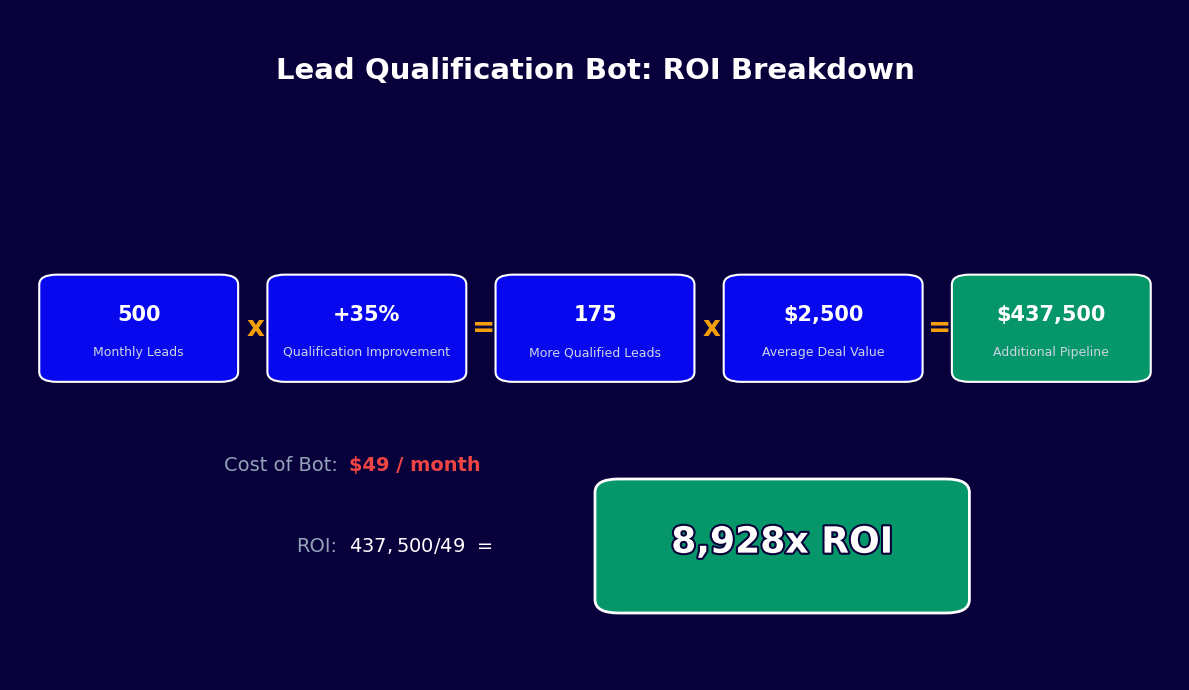
Consider a SaaS company with 500 inbound leads per month, an average deal size of $18,000 ACV, and 5 SDRs at $65,000/year fully loaded. The current process produces a 14% MQL-to-SQL rate (70 SQLs/month) with a 25% SQL-to-close rate (17-18 deals/month). Monthly revenue from inbound: approximately $315,000.
After deploying the qualification bot, the MQL-to-SQL rate rises to 30% (150 SQLs/month), demo show rate improves to 74% (111 demos vs. 70 previously), and close rate holds at 25% — producing 27-28 deals/month. Monthly revenue from inbound: approximately $495,000. That is $180,000/month in additional recurring revenue from the same lead volume, with no new SDR hires required.
Cost Comparison
Five SDRs at $65,000 fully loaded = $325,000/year. A Conferbot qualification bot handling the initial qualification pass costs a fraction of that, allowing your SDRs to focus on the high-value work only humans can do: building relationships, handling complex objections, and advancing enterprise deals. The typical deployment replaces 2-3 SDR headcount worth of qualification work while improving consistency and speed — a $130,000-$195,000 annual savings against a chatbot subscription cost measured in hundreds of dollars per month.
Run the numbers for your specific scenario with the chatbot ROI calculator, or explore Conferbot pricing to find the plan that fits your lead volume.
50,000+ businesses use Conferbot templates to automate conversations
Setup Guide: Deploying Your Qualification Bot in Under an Hour
Configuring an advanced lead qualification bot sounds complex, but Conferbot's template-based approach reduces it to a series of focused decisions rather than from-scratch development. Here is the complete setup process, from template selection to your first qualified lead landing in your CRM.
Step 1: Define Your Ideal Customer Profile (15 Minutes)
Before touching the bot builder, document your ICP clearly: minimum company size, target industries, geographic coverage, technology requirements, and budget range. This exercise often reveals that your current qualification criteria are either too broad (wasting SDR time) or too narrow (excluding valid opportunities). Write out explicit pass/fail criteria for each BANT dimension so you can configure the scoring accurately.
Step 2: Select Your Qualification Framework (5 Minutes)
Choose BANT for straightforward SMB/mid-market qualification, MEDDIC for enterprise deals above $25,000 ACV, or a hybrid approach (BANT entry questions with MEDDIC follow-ups triggered when Budget scores High). The template ships with all three frameworks pre-configured. Toggle the one that matches your sales motion.
Step 3: Customize Questions and Scoring (20 Minutes)
Review the default question set and adjust for your product and market. Key customizations:
- Budget range thresholds: Set the specific dollar ranges that map to High/Medium/Low scores for your price points. A $500/month SaaS uses different thresholds than a $200,000 enterprise platform.
- Industry filtering: Add or remove industries from your target list. Leads from excluded industries route directly to disqualified.
- Custom disqualifiers: Add instant-disqualification triggers (e.g., "We are a student project" or "We just need a free tool").
- Company size filters: Configure minimum employee count or revenue thresholds for your product's target segment.
Step 4: Connect Your CRM and Calendar (10 Minutes)
Navigate to the Integrations tab and connect HubSpot or Salesforce using OAuth. Map the qualification fields to your CRM properties — Conferbot's field mapper shows a side-by-side view of bot-collected data and available CRM fields. Then connect your calendar via calendar booking so qualified leads can book meetings immediately.
Step 5: Configure Routing Rules (5 Minutes)
Set routing logic based on your team structure: territory-based routing (leads from EMEA route to EMEA reps), product-line routing (enterprise leads route to enterprise AEs), or round-robin for flat SDR teams. Each routing rule specifies the score threshold, assigned owner, and notification method (Slack, email, or both).
Step 6: Deploy and Test (5 Minutes)
Deploy the bot to your website via the Conferbot embed snippet, or to WhatsApp, Messenger, or other channels via the omnichannel settings. Run three test conversations simulating High, Medium, and Low-scoring leads. Verify that CRM records are created correctly, calendar invites are sent for High-scoring leads, and routing notifications reach the right reps.
For teams deploying across multiple channels, see the full channel setup guide in Conferbot's no-code chatbot builder documentation.
Optimization Tips: Improving Qualification Accuracy Over Time
A lead qualification bot is not a set-and-forget tool — it improves continuously as you analyze conversation data and refine your scoring logic. Sales teams that invest 30 minutes per month in optimization see qualification accuracy improve by 15-25% over the first 6 months. Here are the highest-leverage optimization levers available in Conferbot's platform.
Analyze Drop-Off Points
The first optimization question is always: where do prospects abandon the qualification conversation? Conferbot's analytics dashboard shows drop-off rates for every question in your flow. If 40% of prospects abandon at the budget question, the question is either phrased threateningly ("What is your budget?") or appearing too early in the conversation before trust is established. Move budget questions later, after value has been established, and watch completion rates improve.
Validate Scores Against Close Rates
The most important optimization is validating that your scoring model actually predicts revenue. Pull a 90-day cohort of qualified leads, segment by High/Medium/Low score, and compare close rates. If High-scoring leads close at 35% but Medium-scoring leads close at 28% (not dramatically different), your Medium threshold may be set too conservatively — you are routing too many real opportunities to lower-priority follow-up. Tighten the segmentation by raising the threshold for High scores.
Enrich with Firmographic Data
Leads who provide minimal information are harder to score accurately. Enrich sparse records using API integrations with data providers like Clearbit or Apollo. If a prospect gives their business email, firmographic enrichment can automatically fill in company size, industry, annual revenue, and technology stack — reducing the number of questions the bot needs to ask and improving score accuracy for leads who give brief answers.
A/B Test Question Sequences
Conferbot supports A/B testing of conversation flows. Run two versions simultaneously — one asking about pain before budget, one asking about budget before pain — and measure which produces higher completion rates and more accurate qualification. Even small changes in question order can shift completion rates by 10-15%, which at scale translates to significantly more qualified leads per month.
Refine Disqualification Messaging
Disqualified leads are a missed nurturing opportunity. Rather than ending the conversation abruptly, configure the bot to deliver targeted content based on why the lead was disqualified. A prospect who is too small today but growing rapidly should receive content about how your product scales. A prospect who is not yet in active evaluation should receive a thought leadership article that keeps your brand top of mind for when they are. Leads nurtured well at disqualification have a 22% re-qualification rate within 12 months.
Monthly Optimization Checklist
- Review completion rates by question — flag any question with drop-off above 15%
- Compare score distribution to close rates from the prior 60-day cohort
- Check for any new objections or questions appearing frequently in conversation transcripts
- Review disqualification reasons — if a new pattern emerges (wrong region, wrong segment), create a routing rule to handle it proactively
- Evaluate meeting show rates — declining show rates often indicate that High-score thresholds are set too low, letting in leads that are not truly ready for a demo
See related templates in the lead generation section, or explore how Conferbot's OpenAI integration enables more sophisticated conversational qualification using large language models.
Lead Qualification Chatbot Template (Free) FAQ
Everything you need to know about chatbots for lead qualification chatbot template (free).
Why Use a Template vs Building from Scratch?
Templates encode years of optimization data into the conversation flow before you start.
| Factor | Conferbot Template | Build from Scratch | Hire a Developer |
|---|---|---|---|
| Time to deploy | 10 minutes | 2-8 hours | 2-6 weeks |
| Cost | Free | Your time | $5,000-$25,000 |
| Day-1 conversion | 15-22% | 5-8% | 10-15% |
| Proven flows | Yes, data-tested | No | Depends |
| Updates included | Automatic | Manual | Paid |
| Multi-channel | 8+ channels | 1 channel | Extra cost |
| Analytics | Built-in | Must build | Extra cost |
Ready to Deploy Lead Qualification Chatbot Template (Free)?
Join 50,000+ businesses. Free forever plan available. No credit card required.