Why IT Helpdesks Are Drowning: The Ticket Volume Crisis
Internal IT helpdesks are overwhelmed. The average IT support team handles 492 tickets per month per technician according to HDI's 2025 Support Center Practices Report, and that number has grown 35% since 2022. The causes are structural: remote and hybrid work has multiplied the technology surface area employees interact with, SaaS sprawl means more applications to support, and bring-your-own-device policies add endless device variation.
Here is what the typical IT helpdesk ticket breakdown looks like:
| Ticket Category | % of Total Volume | Average Handle Time | Automation Potential | Annual Cost (500-person company) |
|---|---|---|---|---|
| Password resets and account lockouts | 25-35% | 8-12 minutes | 95%+ automatable | $78,000 - $145,000 |
| VPN and connectivity issues | 12-18% | 15-25 minutes | 60-70% automatable | $62,000 - $105,000 |
| Software installation and access requests | 10-15% | 12-20 minutes | 80-85% automatable | $45,000 - $82,000 |
| Hardware issues | 8-12% | 20-45 minutes | 30-40% (triage only) | $52,000 - $95,000 |
| Email and calendar problems | 8-10% | 10-15 minutes | 65-75% automatable | $28,000 - $48,000 |
| Network and printer issues | 6-10% | 15-30 minutes | 50-60% automatable | $35,000 - $62,000 |
| Security incidents and access | 5-8% | 20-40 minutes | 40-50% (initial triage) | $38,000 - $68,000 |
| Other (misc. requests) | 10-15% | Varies | 30-40% automatable | $42,000 - $75,000 |
The numbers tell a stark story: 60-70% of IT helpdesk tickets are repetitive, predictable requests that follow standard procedures. Password resets alone — the single most common ticket type — are completely automatable and cost organizations $78,000-$145,000 annually for a 500-person company. According to Gartner's IT service management research, the average cost of a single IT helpdesk ticket is $22-$42 when including technician time, overhead, and tools. For a Tier 1 password reset that takes a technician 10 minutes, that is an absurdly expensive way to change a string of characters.
According to ServiceNow's employee experience research, poor IT support experience is the #2 driver of employee disengagement after management quality. The human impact is equally severe:
- IT staff burnout: 62% of IT helpdesk technicians report burnout from repetitive tasks, with an industry turnover rate of 40% annually
- Employee productivity loss: Employees wait an average of 24.2 hours for Tier 1 ticket resolution — that is 3 full workdays lost per issue
- Business impact: A locked-out employee who cannot access systems for 4 hours represents $200-$500 in lost productivity (salary + opportunity cost)
- Scaling impossibility: As companies grow, IT headcount does not scale proportionally — the ratio of employees to IT support staff averages 70:1 and is worsening
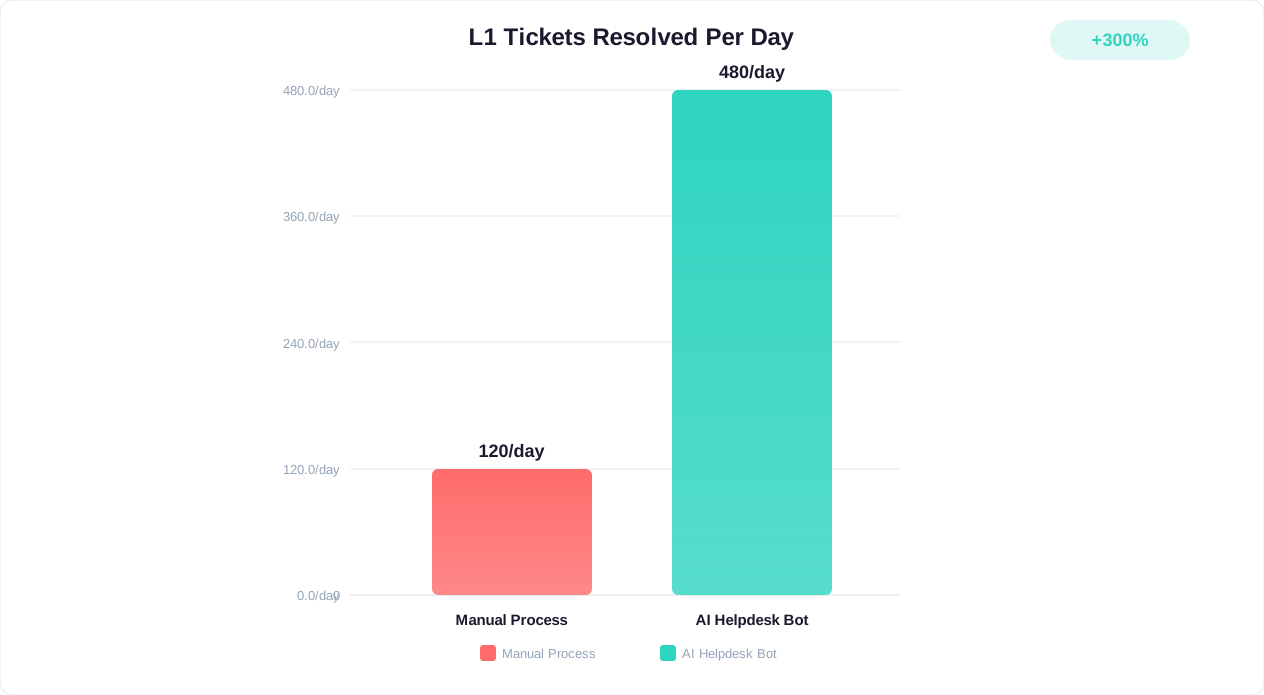
This is not a problem that more hiring solves. It is a structural automation problem. An AI chatbot deployed on Slack or Microsoft Teams — where employees already work — can resolve 60-70% of these tickets instantly, freeing IT teams to focus on complex projects, security initiatives, and strategic work rather than resetting passwords for the 50th time today.
Common Automatable IT Requests: What Your Chatbot Should Handle
Not every IT request should be automated, as ITIL's service management framework emphasizes — complex network architecture issues, security breach investigations, and hardware failures require human expertise. But the majority of Tier 1 tickets follow predictable patterns that an AI chatbot can resolve faster and more accurately than a human technician.
Category 1: Password Resets and Account Management (25-35% of tickets)
Password resets are the single largest category of IT helpdesk tickets and the easiest to automate. A chatbot handles:
- Self-service password reset: Verify identity (employee ID, security questions, manager confirmation) → trigger reset via Active Directory/Azure AD/Okta integration
- Account lockout resolution: Check lockout status, verify identity, unlock account — all within 60 seconds
- MFA issues: Reset MFA tokens, guide backup code usage, escalate to security if compromise suspected
- New account provisioning: For new employees, auto-create accounts based on role template + manager approval
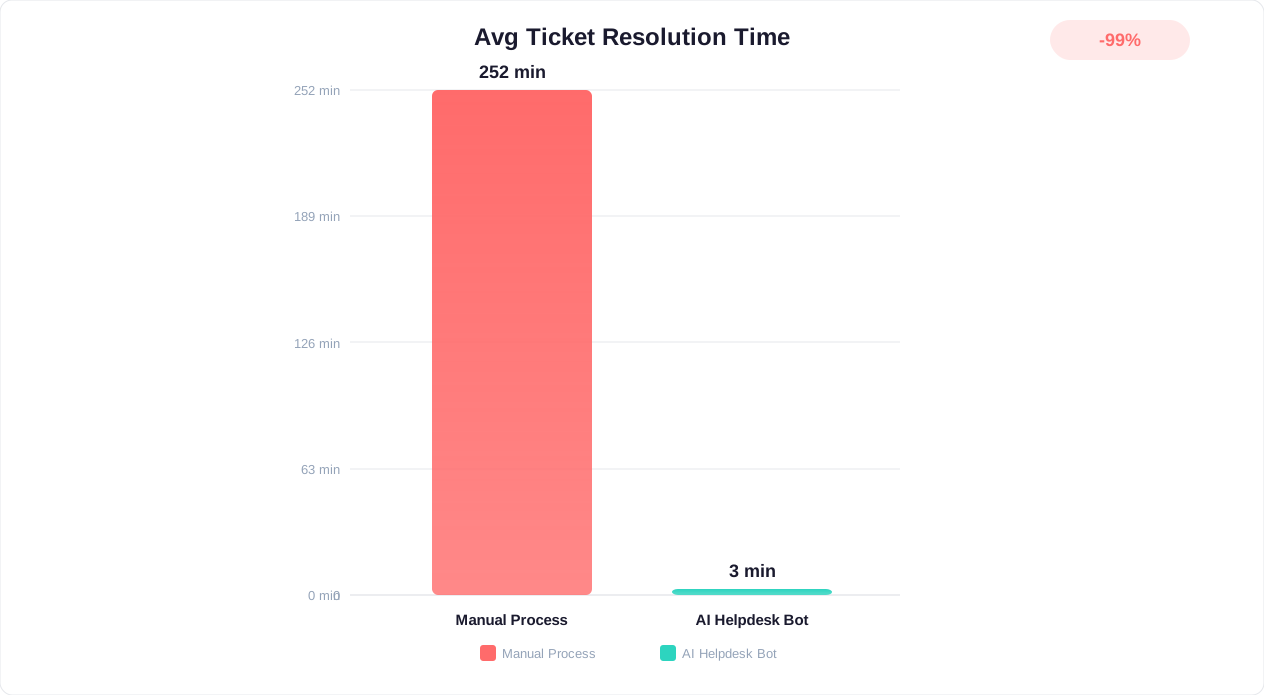
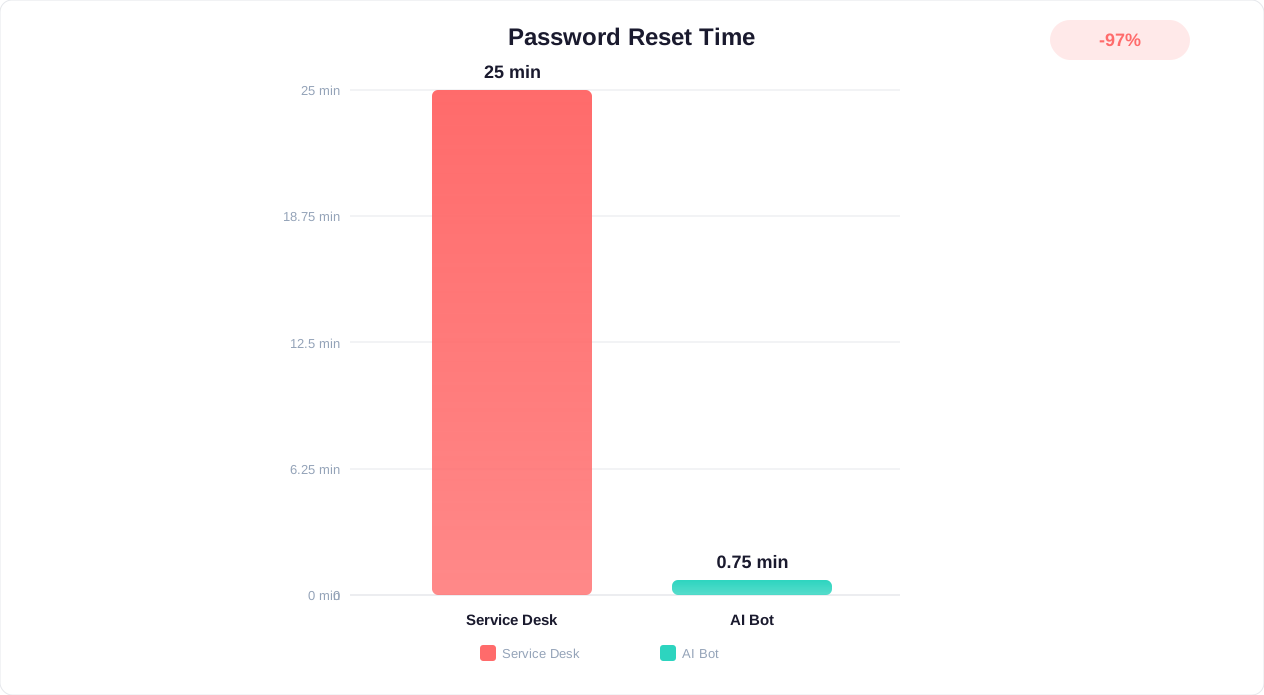
Automation rate: 95%+ | Resolution time: 30-90 seconds (vs. 8-12 minutes with human)
Category 2: VPN and Remote Access Issues (12-18% of tickets)
Remote work has made VPN troubleshooting a dominant ticket category:
- Connection failures: Guided diagnostic (check internet → verify VPN client version → test alternate server → clear credentials cache)
- Slow VPN performance: Check current server load, suggest optimal server, test split tunneling configuration
- Certificate expiration: Auto-detect expired certificates, guide renewal process, or push new certificates
- Access requests: Request VPN access for new employees or contractors with approval workflow
Automation rate: 60-70% | Resolution time: 2-5 minutes (vs. 15-25 minutes with human)
Category 3: Software Provisioning and Access Requests (10-15% of tickets)
Software requests follow repeatable patterns with clear approval chains:
- Standard software requests: Employee requests Zoom/Slack/Jira → chatbot checks license availability → routes approval to manager → provisions access automatically
- License management: Check if user already has license, suggest alternatives if no licenses available, queue for next available
- Software installation guidance: Platform-specific installation instructions (Mac vs. Windows vs. Linux), troubleshooting common install errors
- Access elevation requests: Temporary admin access with time-limited approval and automatic revocation
Automation rate: 80-85% | Resolution time: 1-3 minutes (instant if pre-approved)
Category 4: Email and Calendar Issues (8-10% of tickets)
- Distribution list changes: Add/remove members via chatbot with owner approval
- Shared mailbox access: Grant/revoke access with manager approval workflow
- Calendar sync issues: Guided troubleshooting for sync failures across devices
- Outlook/Gmail configuration: Step-by-step setup guides for new devices
- Email delivery issues: Check quarantine, whitelist addresses, verify SPF/DKIM status
Automation rate: 65-75% | Resolution time: 1-4 minutes
Category 5: Network and Printer Issues (6-10% of tickets)
- Wi-Fi connectivity: Forget/reconnect instructions, password verification, SSID guidance
- Printer discovery: Find nearest available printer, provide setup instructions, check printer status
- Network drive mapping: Auto-generate mapping commands based on department and role
- DNS issues: Flush cache instructions, verify connectivity, check known outages
Automation rate: 50-60% | Resolution time: 2-6 minutes
Total Automation Opportunity
| Category | % of Tickets | Automation Rate | Tickets Automated (per 1,000) | Technician Hours Saved (per 1,000 tickets) |
|---|---|---|---|---|
| Password/Account | 30% | 95% | 285 | 47.5 hrs |
| VPN/Remote Access | 15% | 65% | 97 | 32.4 hrs |
| Software Provisioning | 12% | 82% | 98 | 24.6 hrs |
| Email/Calendar | 9% | 70% | 63 | 13.1 hrs |
| Network/Printer | 8% | 55% | 44 | 14.7 hrs |
| Other (partial) | 26% | 35% | 91 | 22.8 hrs |
| Total | 100% | ~68% | 678 | 155.1 hrs |
An AI chatbot can automate approximately 68% of all IT helpdesk tickets, saving 155 technician hours per 1,000 tickets. For a company generating 3,000 tickets per month, that is 465 hours — nearly 3 full-time technician equivalents — freed up for higher-value work.
Integration With ITSM Tools: ServiceNow, Jira Service Management, and More
An IT helpdesk chatbot that cannot interact with your existing IT Service Management (ITSM) platform is just a glorified FAQ. The real power comes from bidirectional integration — the chatbot reads from and writes to your ITSM system, creating tickets, updating statuses, pulling knowledge base articles, and triggering workflows.
ServiceNow Integration
ServiceNow is the enterprise ITSM standard, used by 85% of Fortune 500 companies. ServiceNow's ITSM platform provides comprehensive APIs that enable deep chatbot integration. Key integration points for an AI chatbot:
- Incident creation: Chatbot automatically creates ServiceNow incidents with structured data (category, subcategory, priority, affected CI, description) — eliminating the free-text ticket quality problem
- Knowledge base access: Pull and present ServiceNow Knowledge articles within the chatbot conversation, with article rating feedback flowing back to ServiceNow
- Change request initiation: Standard change requests (software install, access modification) created and routed through approval chains automatically
- CMDB lookup: Chatbot queries the Configuration Management Database to identify the employee's assets, their software inventory, and their access rights
- Service catalog browsing: Present available services conversationally rather than forcing employees to navigate complex catalog pages
- Ticket status queries: "What's the status of my ticket?" → Real-time status from ServiceNow without agent intervention
Architecture pattern: Chatbot → ServiceNow REST API (Table API, Knowledge API, Service Catalog API) → Bidirectional data flow
Jira Service Management Integration
Jira Service Management (formerly Jira Service Desk) powers IT support for 45,000+ organizations. Atlassian's JSM platform offers REST APIs and automation rules that enable seamless chatbot integration. Integration capabilities:
- Request creation: Chatbot creates Jira requests using the correct request type, with all required fields populated from the conversation
- Approval workflows: Software access requests route to the correct approver in Jira, with approval/denial notifications sent back through the chatbot
- Queue management: Chatbot performs initial triage and assigns tickets to the correct agent queue based on category and priority
- Knowledge confluence integration: Pull answers from Confluence knowledge base pages and present them conversationally
- SLA tracking: Monitor approaching SLA breaches and auto-escalate through the chatbot or notify relevant teams
- Asset tracking: Query Jira Assets (formerly Insight) for hardware assignments and software licenses
Integration Comparison
| Integration Capability | ServiceNow | Jira Service Mgmt | Freshservice | BMC Helix | ManageEngine |
|---|---|---|---|---|---|
| Ticket creation via API | REST API (Table API) | REST API v3 | REST API v2 | REST API | REST API |
| Knowledge base query | Knowledge API | Confluence API | Solutions API | Knowledge API | API access |
| Approval workflows | Flow Designer trigger | Native approvals | Native approvals | Custom workflows | Native approvals |
| Asset/CMDB lookup | CMDB API | Assets (Insight) | Asset module API | CMDB API | CMDB API |
| Automation triggers | Flow Designer | Jira Automation | Workflow Automator | Digital Workplace | Custom triggers |
| User directory sync | Active Directory sync | User management API | AD/LDAP sync | AD integration | AD/LDAP sync |
| Real-time webhooks | Business Rules → outbound | Webhooks | Webhooks | Event triggers | Webhooks |
| Setup complexity | High (enterprise config) | Medium | Low-Medium | High | Medium |
Integration Architecture Best Practices
- Use service accounts with minimum required permissions: The chatbot should authenticate via a dedicated service account with read/write access limited to incident creation, knowledge access, and user lookup — never admin-level access
- Implement webhook-based status updates: When a ticket status changes in your ITSM, push the update to the chatbot so it can proactively notify the employee: "Good news — your access request was approved. You can now access Salesforce."
- Map conversation data to structured ITSM fields: Do not dump the entire chat transcript into a free-text field. Extract: category, subcategory, priority, affected system, error messages, and troubleshooting steps already attempted into structured fields
- Maintain a fallback for API failures: If the ITSM API is unavailable, the chatbot should still collect the request information and create the ticket when connectivity restores — never lose employee requests due to integration downtime
- Log all API interactions: Every chatbot-to-ITSM API call should be logged for audit, troubleshooting, and compliance purposes
Conferbot integrates with ServiceNow, Jira Service Management, Freshservice, and other ITSM platforms through its integrations hub — providing pre-built connectors that handle authentication, field mapping, and bidirectional sync without custom development. The integration enables the chatbot to create, update, and query tickets while maintaining your existing ITSM workflows and approval chains intact.
Deploying on Slack and Microsoft Teams: Meeting Employees Where They Work
The most effective IT helpdesk chatbot is not one employees have to seek out, a principle aligned with Atlassian's ITSM best practices — it is one that lives in the tool they already use 8 hours a day. For most organizations, that means Slack or Microsoft Teams. Deploying your IT chatbot as a native app within these platforms eliminates the adoption barrier entirely.
Why Slack/Teams Deployment Outperforms Portal-Based IT Support
| Support Channel | Employee Adoption Rate | Average Resolution Time | Employee Satisfaction | Context Switching Required |
|---|---|---|---|---|
| IT support portal (web) | 45-55% | 24+ hours | 62% | High (navigate to portal, log in, fill form) |
| Email to IT | 60-70% | 8-24 hours | 58% | Medium (compose email, wait) |
| Phone call to IT | 30-40% | 15-45 minutes (hold time) | 65% | High (find number, call, wait on hold) |
| Walk to IT desk | 20-30% (office only) | 5-30 minutes | 72% | Very High (physically walk there) |
| Slack/Teams chatbot | 85-92% | 30 seconds - 5 minutes | 88% | Zero (already in the app) |
The 85-92% adoption rate for Slack/Teams chatbots is the key metric. When IT support is one message away in the same app employees use all day, the barrier to asking for help drops to near zero. This means issues get reported faster, resolved sooner, and employee productivity loss is minimized.
Slack Deployment Architecture
Deploying an AI IT chatbot on Slack involves:
- Slack App creation: Register a Slack app with bot token scopes (chat:write, commands, im:history, im:read, im:write)
- Direct Message support: Employees DM the bot directly for sensitive requests (password resets, access changes)
- Channel-based support: #it-helpdesk channel where the bot monitors and responds to IT questions publicly — building a searchable knowledge archive
- Slash commands: /password-reset, /vpn-help, /new-software, /ticket-status for quick-access common flows
- Interactive messages: Buttons, dropdowns, and modals for structured data collection ("Which application do you need access to?")
- Thread-based conversations: Bot responds in threads to keep channels clean while maintaining conversation context
For detailed Slack deployment strategies, see our guide on Slack chatbot for IT support.
Microsoft Teams Deployment Architecture
Microsoft Teams deployment for IT support:
- Teams Bot registration: Register via Azure Bot Service with Teams channel enabled
- Personal chat: Employees chat 1:1 with the bot for sensitive IT requests
- Team channel deployment: Install in #IT-Support team for visible, searchable support
- Adaptive Cards: Rich interactive cards for forms, approvals, and multi-step flows
- Task modules: Pop-up dialogs for complex data collection (hardware request forms, access request details)
- Power Automate integration: Trigger Microsoft Power Automate flows for actions like Azure AD password resets or Intune device management
- SSO authentication: Leverage existing Microsoft 365 authentication — no separate login required
For Teams-specific deployment guidance, see our Microsoft Teams chatbot guide (covers HR use cases but the deployment architecture applies to IT equally).
Deployment Decision Framework
| Factor | Choose Slack | Choose Microsoft Teams | Deploy on Both |
|---|---|---|---|
| Primary workspace | Company uses Slack as primary | Company uses Teams as primary | Mixed environment |
| Identity provider | Okta, Google Workspace | Azure AD / Microsoft 365 | Both IdPs in use |
| IT infrastructure | AWS/GCP-centric | Microsoft-centric (Azure, Intune) | Hybrid cloud |
| Company size | Startups to mid-market | Mid-market to enterprise | Enterprise with acquisitions |
| Developer ecosystem | Slack API + Bolt SDK | Bot Framework + Azure | Platform-agnostic chatbot |
Conferbot deploys natively on both Slack and Microsoft Teams, using a single AI configuration that works identically across both platforms. This means you configure your IT chatbot once — knowledge base, escalation rules, ITSM integration — and deploy it on whichever platform your employees use, without duplicating effort.
Best Practices for Slack/Teams IT Chatbots
- Pin the bot in every employee's sidebar: Do not rely on employees remembering to message the bot. Pre-install it as a pinned app for all users.
- Use channel-based support for common issues: When one employee asks a question in a public channel, the bot's answer helps everyone who searches later.
- Implement smart notifications: Proactively notify employees: "Your password expires in 3 days. Want me to help you change it now?"
- Respect DM vs. channel context: Password resets should only happen in DMs. General how-tos can happen in channels.
- Set up an escalation flow that tags the on-call technician: If the bot cannot resolve, it should @mention the relevant IT team member with full context.
Knowledge Base Integration: Making IT Documentation Conversational
Most organizations have extensive IT documentation — runbooks, how-to guides, configuration manuals, policy documents — scattered across Confluence, SharePoint, Google Docs, or internal wikis. The problem is not a lack of documentation; it is that employees cannot find or understand it when they need help. An AI chatbot transforms this static documentation into an interactive, conversational experience.
The Documentation Access Problem
Research from McKinsey found that employees spend 19% of their workweek searching for internal information — that is nearly one full day per week. For IT-specific information, the problem is compounded by:
- Technical jargon that non-technical employees do not understand
- Documentation written for IT staff, not end users
- Outdated articles that were never archived
- Multiple documentation sources with no unified search
- Long-form documents when employees need a quick 3-step answer
How an AI Chatbot Makes Documentation Accessible
The chatbot acts as a conversational interface to your entire documentation library:
- Natural language queries: Employee asks "How do I connect to VPN from home?" instead of searching for "Remote Access Virtual Private Network Configuration Guide v3.2"
- Context-aware answers: The AI extracts the relevant 3-5 sentences from a 20-page document and presents just what the employee needs
- Platform-specific guidance: "I'm on a Mac" → the chatbot filters to macOS-specific instructions automatically
- Step-by-step delivery: Instead of dumping a 15-step procedure, the chatbot delivers one step at a time: "Done with step 1? Here's step 2..."
- Follow-up handling: "That didn't work" → the chatbot presents the alternative approach or escalates with the context of what was already tried
Knowledge Sources to Connect
| Source | Content Type | Integration Method | Update Frequency |
|---|---|---|---|
| Confluence | IT runbooks, how-tos, policies | Confluence REST API | Real-time (webhook on page update) |
| SharePoint | Company policies, IT procedures | Microsoft Graph API | Daily sync |
| Google Docs/Drive | Shared documentation | Google Drive API | Real-time (webhook) |
| ServiceNow Knowledge | IT knowledge articles | Knowledge API | Bidirectional sync |
| Internal Wiki | Technical documentation | Web crawler / API | Daily or weekly crawl |
| Video tutorials | How-to videos | Transcription + indexing | On upload |
| Previous tickets | Solved issues and workarounds | ITSM integration | Continuous (solved tickets feed KB) |
Building an Effective IT Knowledge Base for Your Chatbot
Not all documentation is chatbot-friendly. Here is how to prepare your IT content for conversational delivery:
Step 1: Audit and categorize existing content
- Identify the top 100 IT questions from ticket history
- Map each question to existing documentation (if it exists)
- Flag gaps where no documentation exists for common questions
Step 2: Rewrite for conversational delivery
- Convert long-form documents into Q&A pairs
- Write answers in plain language (eliminate unnecessary jargon)
- Add platform-specific variations (Windows, Mac, Linux, iOS, Android)
- Include troubleshooting branches ("If that doesn't work, try...")
Step 3: Upload and train
- Upload all sources to your chatbot's AI knowledge base
- The AI automatically indexes content, identifies question patterns, and builds response mappings
- Test with 50 real employee questions and verify accuracy
Step 4: Continuous improvement loop
- Monitor unanswered questions in chatbot analytics
- Convert resolved escalations back into knowledge base articles
- Auto-flag articles referenced in tickets that received low satisfaction scores
- Set quarterly documentation review reminders for each content category
A well-maintained IT knowledge base connected to a conversational AI chatbot resolves 60-70% of employee queries without any human involvement — and the resolution time drops from "search for 15 minutes, maybe find an answer" to "ask the bot, get the answer in 10 seconds."
Security Considerations: Keeping IT Automation Safe
Deploying an AI chatbot with access to identity systems, as outlined in the NIST Cybersecurity Framework,, ITSM platforms, and corporate infrastructure requires rigorous security controls. A misconfigured IT chatbot could become an attack vector — enabling unauthorized password resets, privilege escalation, or data exposure. Here is the security framework for safe IT helpdesk automation.
Identity Verification Before Sensitive Actions
The chatbot must verify the requester's identity before performing any privileged action. The verification level should scale with the sensitivity of the request:
| Action Sensitivity | Verification Required | Examples |
|---|---|---|
| Low (information only) | Workspace authentication (logged into Slack/Teams) | "How do I connect to VPN?" "Where's the printer?" |
| Medium (account changes) | Workspace auth + employee ID or email confirmation | Password reset, distribution list change, software request |
| High (access modifications) | Workspace auth + MFA challenge + manager approval | Admin access elevation, security group changes, data access |
| Critical (security-sensitive) | Workspace auth + MFA + manager approval + security review | Firewall changes, production access, compliance-related |
Principle of Least Privilege
The chatbot's service accounts should have the minimum permissions required:
- Active Directory: Reset password (not create/delete users), unlock accounts (not modify group membership beyond approved scope)
- ITSM: Create incidents, read knowledge base (not admin access, not delete capabilities)
- Software provisioning: Provision from pre-approved catalog only (not arbitrary software installation)
- Network: Read-only status checks (never modification access)
Audit Trail and Logging
Every action the chatbot performs must be logged with:
- Who requested it (employee identity)
- What was requested (specific action and parameters)
- Verification method used (how identity was confirmed)
- Approval chain (who approved, when)
- Action taken (API calls made, systems modified)
- Result (success/failure, any errors)
- Timestamp and session ID
These logs must be tamper-proof and retained according to your compliance requirements (typically 1-7 years for SOX, HIPAA, or PCI environments).
Preventing Social Engineering Attacks
A poorly configured chatbot could be manipulated through social engineering. Protections include:
- Never accept verbal identity claims: "I'm John from marketing" is not verification — require system-verified identity (Slack user ID maps to employee record)
- Rate limiting: Flag accounts attempting multiple password resets or access requests in a short period
- Anomaly detection: Alert security if a user requests access to systems inconsistent with their role or department
- Context verification: If an employee requests a password reset from an unrecognized device or location, require additional verification
- Manager-in-the-loop for elevated access: Any access beyond the employee's standard role requires explicit manager approval through the same chat platform
Data Protection in Conversations
- Never display full passwords in chat: Password resets should send the reset link via email or generate a temporary password that expires after first use
- Mask sensitive data: Account numbers, SSNs, and security answers should never appear in plain text in chat history
- Conversation retention policies: Auto-delete sensitive conversation segments after resolution, retain only metadata for audit
- Encryption: All API communications between chatbot and backend systems must use TLS 1.3
- Channel enforcement: Password resets and sensitive actions only available in private DM channels — never in public team channels
Security Compliance Checklist
| Security Control | Implementation | Compliance Relevance |
|---|---|---|
| Identity verification before actions | Multi-factor based on action sensitivity | SOX, HIPAA, ISO 27001 |
| Least privilege service accounts | Role-based API access with scoped permissions | ISO 27001, NIST, SOC 2 |
| Complete audit trail | Immutable logs with retention policy | SOX, PCI-DSS, HIPAA |
| Anti-social-engineering controls | System-verified identity, rate limiting, anomaly detection | General security best practice |
| Data masking | No plaintext credentials in chat | PCI-DSS, GDPR, HIPAA |
| Encrypted communications | TLS 1.3 for all API calls | PCI-DSS, SOC 2, ISO 27001 |
| Access review | Quarterly review of chatbot permissions | SOX, ISO 27001 |
| Incident response plan | Procedure for chatbot compromise scenario | All frameworks |
Security should not be an afterthought or a barrier to deployment — it is a design constraint that shapes how you build. Conferbot's platform includes identity verification flows, encrypted API communications, audit logging, and role-based access controls by default, making it straightforward to deploy an IT chatbot that meets enterprise security requirements without custom security engineering.
ROI Model: Cost Per Ticket Reduction and Financial Justification
IT leaders need hard numbers to justify chatbot investment. Here is a comprehensive ROI model that accounts for direct cost savings, productivity gains, and indirect benefits.
Direct Cost Savings: Ticket Deflection
The primary ROI driver is reducing the cost per ticket by automating Tier 1 resolutions:
| Metric | Without Chatbot | With IT Chatbot (6 months) | Savings |
|---|---|---|---|
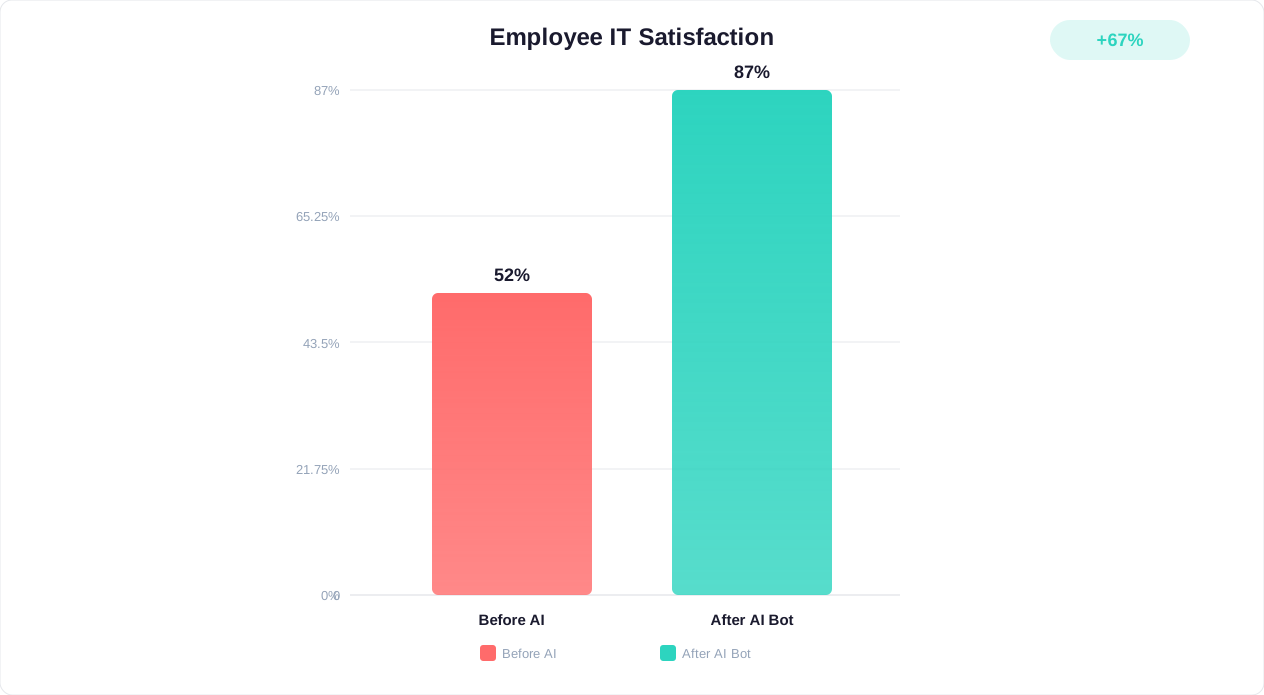
| Average cost per ticket (Tier 1) | $22-42 | $2-5 (chatbot resolution) | $17-40 per ticket |
| Tier 1 ticket volume (500-person company) | 1,800/month | 540/month (70% deflected) | 1,260 tickets/month |
| Monthly Tier 1 support cost | $39,600-$75,600 | $14,580-$27,810 | $25,020-$47,790/month |
| Annual Tier 1 support cost | $475,200-$907,200 | $174,960-$333,720 | $300,240-$573,480/year |
Productivity Gains: Employee Time Saved
Beyond IT team savings, the chatbot saves employee productivity by resolving issues faster:
| Scenario | Without Chatbot | With Chatbot | Time Saved Per Instance | Annual Value (500 employees) |
|---|---|---|---|---|
| Password reset wait time | 2-24 hours | 60 seconds | 4 hours avg | $125,000 |
| VPN troubleshooting | 30 min - 4 hours | 3-5 minutes | 1.5 hours avg | $45,000 |
| Software access request | 1-3 business days | 5 minutes (if pre-approved) | 8 hours avg | $62,000 |
| Finding IT documentation | 15-45 minutes | 30 seconds | 20 minutes avg | $85,000 |
| Total employee productivity value | $317,000/year |
Calculated at average fully-loaded employee cost of $65/hour, estimated incident frequency per employee.
Comprehensive ROI Calculation
| ROI Component | Annual Value (500-person company) | Annual Value (2,000-person company) |
|---|---|---|
| Tier 1 ticket deflection savings | $300,000 - $575,000 | $1,200,000 - $2,300,000 |
| Employee productivity gains | $317,000 | $1,268,000 |
| Reduced IT overtime | $45,000 | $180,000 |
| Reduced IT hiring (1-2 fewer hires) | $85,000 - $170,000 | $340,000 - $680,000 |
| Reduced employee downtime (revenue impact) | $95,000 | $380,000 |
| Total annual value | $842,000 - $1,202,000 | $3,368,000 - $4,808,000 |
| Annual chatbot platform cost | $12,000 - $36,000 | $48,000 - $120,000 |
| Implementation cost (one-time, amortized) | $15,000 - $30,000 | $50,000 - $100,000 |
| Net annual ROI | $795,000 - $1,136,000 | $3,198,000 - $4,588,000 |
| ROI percentage | 2,400% - 3,800% | 3,200% - 4,700% |
Payback Period
Given these numbers, the typical payback period for an IT helpdesk chatbot is:
- 500-person company: 2-4 weeks
- 2,000-person company: 1-2 weeks
- 5,000+ person company: Under 1 week
The payback period is remarkably short because the cost per deflected ticket ($2-5) is so dramatically lower than the cost of human resolution ($22-42) that even a modest 30% deflection rate in Week 1 generates positive ROI immediately.
Building the Business Case
When presenting to leadership, frame the ROI in terms they care about:
- For the CFO: "This reduces our IT support cost per employee from $1,800/year to $720/year — a 60% reduction that scales as we grow without adding headcount."
- For the CTO/CISO: "This improves our mean time to resolution from 24 hours to 5 minutes for Tier 1 issues, while maintaining full audit trails and security controls."
- For the CHRO: "This eliminates the #1 source of employee frustration (waiting for IT help) and frees our IT team from burnout-inducing repetitive work."
- For the CEO: "Every hour an employee spends locked out costs us $65 in lost productivity. This chatbot eliminates 70% of those hours — that's $317,000 in recovered productivity annually."
For a personalized ROI calculation based on your company size and ticket volume, see our chatbot ROI calculation guide or review real-world examples in our cost savings case studies.
Implementation Timeline: From Pilot to Full Deployment in 60 Days
Deploying an IT helpdesk chatbot requires coordination between IT operations, security, and the platform team. Here is a proven 60-day implementation timeline that balances speed-to-value with enterprise requirements.
Phase 1: Preparation and Pilot Scope (Days 1-10)
| Day | Task | Owner | Deliverable |
|---|---|---|---|
| 1-2 | Audit ticket data: top 50 ticket types, volume, handle time | IT Operations | Prioritized automation target list |
| 3-4 | Security review: define authentication requirements, data handling policies | Security/Compliance | Security requirements document |
| 5-6 | Select pilot scope: top 5 automatable ticket categories | IT Leadership | Pilot scope document |
| 7-8 | Prepare knowledge base content for pilot categories | IT Operations | 50-75 articles/procedures |
| 9-10 | Set up chatbot platform, configure ITSM integration | Platform Team | Connected chatbot environment |
Phase 2: Build and Test (Days 11-30)
| Day | Task | Owner | Deliverable |
|---|---|---|---|
| 11-14 | Build password reset flow with AD/Azure AD integration | Platform Team | Automated password reset via chatbot |
| 15-18 | Build VPN troubleshooting diagnostic flow | IT Operations + Platform | Multi-step VPN diagnostic chatbot flow |
| 19-22 | Build software request and approval workflow | Platform Team | Request → approval → provision flow |
| 23-25 | Configure Slack/Teams deployment with channel structure | Platform Team | Chatbot live in test channel |
| 26-28 | Security testing: penetration test, social engineering test | Security Team | Security validation report |
| 29-30 | UAT with 10-15 pilot users across departments | All Teams | UAT signoff |
Phase 3: Pilot Deployment (Days 31-45)
| Day | Task | Owner | Deliverable |
|---|---|---|---|
| 31-32 | Deploy to pilot group (50-100 employees, 2-3 departments) | IT Operations | Live pilot with real users |
| 33-38 | Monitor: resolution rate, accuracy, escalation patterns, user feedback | Platform Team | Daily performance metrics |
| 39-42 | Iterate: fix knowledge gaps, improve flows based on pilot data | IT Operations | Optimized flows |
| 43-45 | Pilot review: metrics, feedback, go/no-go for full deployment | IT Leadership | Deployment decision |
Phase 4: Full Deployment and Optimization (Days 46-60)
| Day | Task | Owner | Deliverable |
|---|---|---|---|
| 46-48 | Company-wide announcement, training materials, FAQ | IT + Communications | Launch communications sent |
| 49-52 | Full deployment: all employees, all channels (Slack + Teams) | Platform Team | Organization-wide access |
| 53-55 | Expand automation: add 5 more ticket categories based on pilot learnings | IT Operations | 10 automated categories total |
| 56-58 | Set up ongoing optimization cadence: weekly review, monthly expansion | IT Operations | Optimization playbook |
| 59-60 | First ROI report: deflection rate, cost savings, satisfaction scores | IT Leadership | Month-1 ROI report for stakeholders |
Success Metrics by Phase
| Phase | Key Metric | Target | Action if Below Target |
|---|---|---|---|
| Pilot (Week 5-6) | Deflection rate | 40%+ for pilot categories | Expand knowledge base, refine flows |
| Pilot (Week 5-6) | Employee satisfaction | 80%+ | Improve response quality, add escalation paths |
| Full deploy (Week 8) | Adoption rate | 70%+ of employees using bot | Improve awareness, add proactive notifications |
| Full deploy (Week 8) | Resolution accuracy | 90%+ | Retrain on failed interactions |
| Optimization (Week 9+) | Overall deflection | 60%+ of all Tier 1 tickets | Add more categories, enable more actions |
Change Management Tips
Technology is only half the challenge — employee adoption requires change management:
- Get IT team buy-in first: Position the chatbot as their ally (removes boring work) not their replacement. IT staff who see the bot handling password resets while they work on interesting projects become its biggest advocates.
- Soft launch with IT-friendly departments: Start with engineering or product teams who are comfortable with chat-based tools
- Celebrate wins publicly: "The bot resolved 500 tickets this week with a 92% satisfaction score" in all-hands meetings builds confidence
- Maintain the human option: Always allow employees to reach a real IT person — the bot should reduce load, not eliminate human access
- Iterate based on feedback: A visible feedback mechanism ("Was this helpful? Yes/No") and a monthly review of low-rated interactions shows employees their input improves the system
This 60-day timeline is achievable because modern platforms like Conferbot provide pre-built IT support templates, native Slack/Teams deployment, and ITSM integrations that eliminate months of custom development. The employee onboarding chatbot follows a similar deployment pattern and can be combined with the IT helpdesk bot for a unified employee experience.
Advanced IT Automation: Beyond Tier 1 Tickets
Once your chatbot handles basic Tier 1 requests, the next frontier is automating more complex workflows that traditionally require Tier 2 expertise. Here are advanced automation capabilities that push IT helpdesk chatbot value beyond simple Q&A.
1. Automated Device Diagnostics
The chatbot can run remote diagnostic scripts and interpret results:
- Performance issues: Chatbot triggers a diagnostic script that checks CPU usage, RAM consumption, disk space, and running processes — then recommends actions ("Your disk is 95% full. Want me to guide you through clearing temp files, or should I schedule a cleanup with IT?")
- Network diagnostics: Run traceroute, ping tests, and DNS lookups from the employee's machine and interpret results conversationally
- Software health checks: Verify application versions, check for pending updates, confirm license validity
2. Intelligent Ticket Routing and Prioritization
Beyond simple category-based routing, AI-powered triage:
- Sentiment-aware priority: Detect frustrated or urgent language and auto-escalate ("I've been locked out for 3 hours and I have a client presentation in 20 minutes" → P1 immediate escalation)
- Impact assessment: "Multiple users affected" → auto-escalates to Major Incident process
- Skill-based routing: Identify the specific sub-skill needed (networking, Active Directory, Mac-specific, Linux) and route to the correct specialist
- Workload-aware assignment: Check agent queue sizes and assign to the person with the lowest current load
3. Proactive Issue Prevention
Shift from reactive resolution to proactive prevention:
- Password expiry notifications: "Your password expires in 3 days. Want me to help you change it now?" — sent via Slack/Teams before the employee gets locked out
- Certificate monitoring: Alert employees when their VPN or email certificates are approaching expiry
- Patch compliance: "Your machine is missing 3 critical security updates. Want me to schedule the update for tonight?"
- License utilization: Proactively notify when licenses are underused or approaching limits
4. Self-Service Provisioning With Guardrails
Enable employees to self-provision within policy boundaries:
| Self-Service Action | Guardrail | Approval Flow |
|---|---|---|
| Install approved software | Pre-approved catalog only | Automatic (no approval needed) |
| Request SaaS license | Within department budget | Manager approval via chatbot |
| Create shared drive/channel | Naming conventions enforced | Automatic with compliance check |
| Temporary admin access | Time-limited (max 4 hours) | Manager + security team approval |
| Guest Wi-Fi access (visitors) | Duration-limited, isolated network | Automatic with requester accountability |
| New team member onboarding access | Role-based template | Manager confirmation of role |
5. Automated Compliance and Reporting
- Access reviews: Quarterly chatbot campaigns: "Hi [Employee], you have access to these 12 systems. Do you still need all of them?" Unused access automatically flagged for removal.
- Security awareness: Automated phishing simulation delivery and training assignment via chatbot
- Compliance reporting: Auto-generate reports on access provisioning, password reset frequency, and security incident response times from chatbot data
6. Multi-Language IT Support
For global organizations, the AI chatbot can provide IT support in the employee's preferred language:
- Auto-detect language from the employee's Slack/Teams locale setting
- Translate knowledge base articles on-the-fly
- Route to language-specific IT staff when escalation is needed
- Maintain consistent technical accuracy across languages
Automation Maturity Model
| Maturity Level | Capabilities | Deflection Rate | Time to Achieve |
|---|---|---|---|
| Level 1: Basic FAQ | Answer common questions, link to documentation | 25-35% | 2 weeks |
| Level 2: Guided Resolution | Multi-step troubleshooting, decision trees, ticket creation | 45-55% | 30 days |
| Level 3: Automated Actions | Password resets, software provisioning, account management | 60-70% | 60 days |
| Level 4: Intelligent Triage | AI classification, priority assessment, skill-based routing | 68-75% | 90 days |
| Level 5: Proactive + Predictive | Issue prevention, compliance automation, self-healing | 75-82% | 6 months |
Most organizations should target Level 3 within 60 days (the implementation timeline above) and Level 4-5 within 6 months. Each level builds on the previous one, and the ROI at each stage justifies the investment in reaching the next.
Real-World Results: IT Helpdesk Chatbot Deployments
Here are three documented examples of organizations that deployed AI chatbots for their internal IT helpdesks, with verified metrics and key learnings.
Example 1: Technology Company (1,200 employees) — 72% Ticket Deflection
Environment: Fully remote workforce, Microsoft 365 stack, ServiceNow ITSM, Microsoft Teams as primary communication
Pre-chatbot state:
- 2,400 IT tickets/month with 3-person Tier 1 team
- Average resolution time: 18 hours for Tier 1
- Password reset tickets: 720/month (30% of volume)
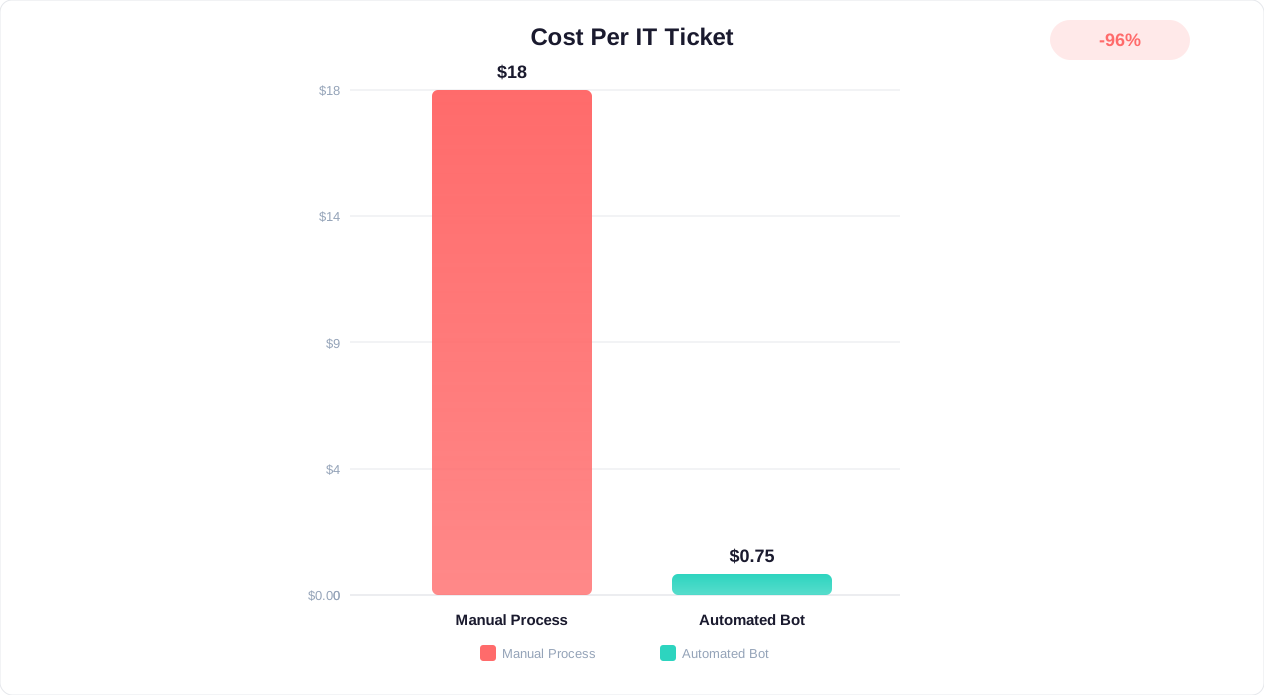
- Employee satisfaction with IT: 54%
Implementation:
- Deployed AI chatbot on Microsoft Teams with ServiceNow integration
- Automated: password resets (Azure AD), VPN diagnostics, software provisioning (Intune), meeting room issues
- Knowledge base: 200 articles migrated from Confluence
- Security: SSO authentication + MFA for elevated actions
Results after 90 days:
| Metric | Before | After | Change |
|---|---|---|---|
| Monthly tickets requiring human | 2,400 | 672 | -72% |
| Average Tier 1 resolution time | 18 hours | 45 seconds (bot) / 4 hours (escalated) | -99.9% / -78% |
| Password reset time | 4.5 hours avg wait | 38 seconds | -99.8% |
| Employee IT satisfaction | 54% | 89% | +65% |
| IT team headcount needed | 3 Tier 1 + 2 Tier 2 | 0 Tier 1 + 2 Tier 2 | -3 FTEs reallocated |
| Annual IT support cost | $680,000 | $290,000 | -57% |
Key learning: The 3 former Tier 1 technicians were not laid off — they were upskilled to Tier 2/3 roles focusing on security operations and infrastructure projects. This improved retention (previously 40% annual turnover for Tier 1) and expanded IT capabilities.
Example 2: Financial Services Firm (3,500 employees) — 65% Deflection With Compliance Focus
Environment: Hybrid workforce, heavily regulated (SOX, PCI-DSS), Jira Service Management, Slack Enterprise Grid
Pre-chatbot state:
- 5,800 IT tickets/month with 8-person support team
- Strict compliance requirements for access management
- Average resolution time: 32 hours (compliance slowing approvals)
- Major audit finding: inconsistent access provisioning documentation
Implementation:
- Deployed on Slack with Jira Service Management integration
- Automated: password resets (with dual-factor verification), software requests (with compliance-approved catalog), access reviews (quarterly automated campaigns)
- Added: complete audit trail for every chatbot action, automated compliance reporting
- Security: Mandatory MFA for any access modification, manager approval via Slack for elevated requests
Results after 120 days:
| Metric | Before | After | Change |
|---|---|---|---|
| Ticket deflection rate | 12% (knowledge base only) | 65% | +442% |
| Access provisioning time | 3-5 business days | 15 minutes (approved catalog) | -99% |
| Compliance audit findings | 12 findings | 2 findings | -83% |
| Access review completion rate | 45% (manual quarterly) | 94% (chatbot-driven quarterly) | +109% |
| Documentation compliance | 68% | 99.7% (auto-logged) | +47% |
| Annual compliance risk reduction (estimated) | — | $2.1M in avoided fines risk | — |
Key learning: In regulated industries, the compliance automation value often exceeds the direct cost savings. The automated audit trail and consistent provisioning process eliminated the manual documentation burden that was causing audit findings and potential regulatory penalties.
Example 3: Manufacturing Company (800 employees, 4 locations) — Multi-Site Deployment
Environment: Mixed workforce (office + factory floor), limited IT team (4 people), ServiceNow Express, mix of Slack (office) and kiosks (factory)
Pre-chatbot state:
- 1,600 tickets/month across 4 locations with only 4 IT staff
- Factory workers had no direct IT access (had to find a manager with a computer)
- Average resolution for factory workers: 48+ hours
- Lost production time from IT issues: estimated $45,000/month
Implementation:
- Deployed on Slack (office workers) + dedicated kiosk tablets on factory floor with simplified chatbot interface
- Automated: badge access issues, equipment login problems, shift system access, safety system questions
- Multi-language support: English and Spanish (40% of factory workforce Spanish-primary)
- Simplified interface for factory kiosks: large buttons, minimal typing, visual guides with screenshots
Results after 90 days:
| Metric | Before | After | Change |
|---|---|---|---|
| Factory worker IT resolution time | 48+ hours | 5 minutes (chatbot) / 2 hours (escalated) | -99% / -96% |
| Lost production time from IT issues | $45,000/month | $8,000/month | -82% |
| Overall ticket deflection | 8% | 58% | +625% |
| IT team overtime hours/month | 120 hours | 25 hours | -79% |
| Employee satisfaction (factory) | 38% | 82% | +116% |
Key learning: The chatbot's biggest impact was in democratizing IT access for factory workers who previously had no direct channel to IT support. The kiosk deployment with simplified UI and multi-language support addressed an entire workforce segment that was previously underserved.
These examples demonstrate that IT helpdesk chatbots deliver strong ROI regardless of company size, industry, or complexity — the key is matching the implementation scope to organizational needs and expanding iteratively. For more ROI examples across industries, see our chatbot ROI case studies collection.
Getting Started: Deploy Your IT Helpdesk Chatbot With Conferbot
Conferbot provides a purpose-built platform for deploying IT helpdesk chatbots on Slack and Microsoft Teams with native ITSM integrations. Here is how to launch your IT support automation.
Why Conferbot for IT Helpdesk
| Capability | How It Helps IT Teams |
|---|---|
| Native Slack and Teams deployment | Meet employees where they work — zero adoption friction |
| ITSM integrations (ServiceNow, Jira SM) | Create tickets, query status, trigger workflows from chat |
| AI knowledge base | Upload all IT documentation — chatbot answers from your content |
| Identity verification flows | Built-in MFA and approval workflows for secure actions |
| Audit logging | Every action logged for compliance (SOX, HIPAA, ISO 27001) |
| No-code flow builder | IT staff build and modify flows without developer involvement |
| Multi-language support | Support global and multilingual workforces automatically |
| Analytics dashboard | Track deflection, resolution time, satisfaction in real-time |
Quick Start: 3 Steps to Your First IT Chatbot
- Upload your IT knowledge base to Conferbot's AI knowledge base — paste Confluence URLs, upload PDF runbooks, or connect your ServiceNow knowledge articles. The AI indexes everything and creates a conversational interface automatically.
- Configure IT workflows using the chatbot builder — set up password reset flows, software request approval chains, VPN troubleshooting diagnostics, and escalation triggers using the visual flow editor.
- Deploy on Slack or Teams — connect your Slack workspace or Microsoft Teams environment with one click. The bot appears in every employee's app list immediately.
Recommended First Automations
Start with these high-impact, low-risk automations:
- Password resets (highest volume, easiest to automate, immediate ROI)
- Ticket status queries ("What's happening with my ticket?" — reduces duplicate tickets by 30%)
- Software request workflow (structured request → manager approval → provisioning)
- VPN troubleshooting (guided diagnostic that resolves 65% without escalation)
- IT FAQ answering (top 50 questions from your ticket history)
These five automations typically cover 55-65% of all IT helpdesk tickets and can be deployed within 2-3 weeks using Conferbot's pre-built IT support templates.
Scaling Beyond IT
Once your IT helpdesk chatbot proves its value, the same platform extends to other internal support functions:
- HR support: Policy questions, PTO requests, benefits inquiries — see our guide on employee onboarding chatbots
- Facilities: Room bookings, maintenance requests, office supply orders
- Finance: Expense report status, reimbursement questions, budget approvals
- Legal: NDA requests, contract status, compliance questions
The AI knowledge base, Slack/Teams deployment, and approval workflows are reusable across all internal functions — making the IT chatbot the foundation for a comprehensive employee self-service platform. Start with IT (highest ticket volume, clearest ROI), prove the value, then expand horizontally across the organization.
Was this article helpful?
AI Chatbot for Internal IT Helpdesk FAQ
Everything you need to know about chatbots for ai chatbot for internal it helpdesk.
About the Author
Conferbot Team specializes in conversational AI, chatbot strategy, and customer engagement automation. With deep expertise in building AI-powered chatbots, they help businesses deliver exceptional customer experiences across every channel.
View all articles