The Legal AI Revolution: Why Law Firms Can No Longer Ignore Chatbots
The legal industry is undergoing a seismic transformation driven by artificial intelligence, and law firms that fail to adapt risk falling behind competitors who are already leveraging AI to capture more clients and operate more efficiently. According to the 2025 ABA TechReport, 35% of law firms now use some form of AI technology in their practice, up from just 12% in 2022. Client intake -- the front door of every legal practice -- is where AI chatbots deliver the most immediate and measurable impact.
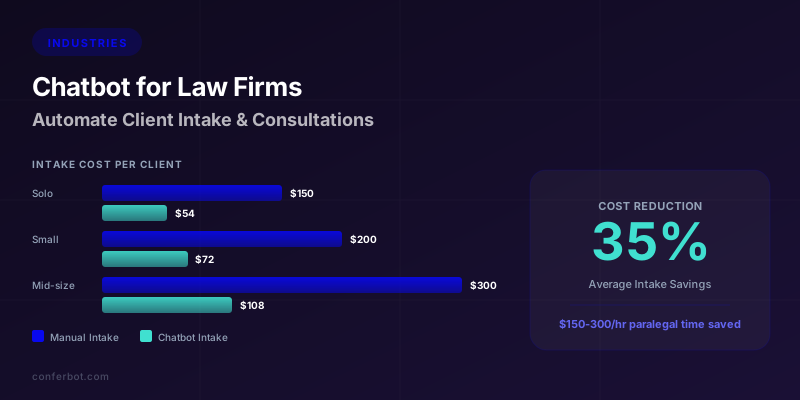
Consider the economics. A paralegal or legal assistant performing intake work costs the firm $150-$300 per hour in fully loaded compensation (salary, benefits, office space, technology). A single client intake call takes 15-30 minutes, which translates to $37.50-$150 per intake in labor costs alone. For a mid-size firm processing 200 intakes per month, that is $7,500-$30,000 per month spent on a process that follows a predictable pattern -- asking the same qualifying questions, collecting the same contact information, routing to the same practice areas.
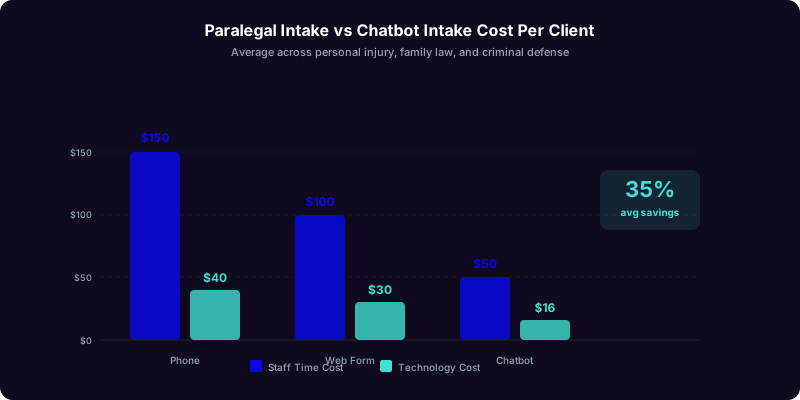
An AI chatbot performs this same intake process in minutes, 24 hours a day, 7 days a week, at a fraction of the cost. Firms that have adopted chatbot-driven intake report a 35% reduction in intake costs on average, with some achieving 50% or higher savings when combining chatbot intake with automated follow-up sequences. But cost savings are only part of the story. The Clio Legal Trends Report found that the average law firm responds to new client inquiries in over 8 hours, while clients expect a response within the first hour. This gap is where firms lose clients -- and where chatbots close it instantly.
This guide goes far beyond the basics of law firm chatbots. While our introductory guide to chatbots for law firms covered ethics compliance and foundational intake flows, this comprehensive resource dives deep into advanced automation for intake forms, real-time case status updates, intelligent appointment scheduling, automated conflict checks, compliance with legal advertising rules across all 50 states, and a detailed ROI framework that demonstrates the business case to every partner at your firm.
The firms winning the most business today are not necessarily those with the best attorneys -- they are the firms that respond first, qualify fastest, and make the onboarding process effortless for clients who are already under stress. Whether your firm handles personal injury, family law, criminal defense, immigration, or corporate matters, this guide provides the complete playbook for automating intake, consultations, and ongoing case communication with AI chatbots.
Automated Intake Forms: From Static PDFs to Intelligent Conversations
Traditional law firm intake is broken. Most firms still rely on static PDF intake forms emailed to prospective clients, paper forms handed out at the front desk, or long web forms that prospective clients abandon halfway through. The completion rate for a typical multi-page legal intake form is a dismal 23-31%, according to legal marketing industry data. That means two-thirds of your potential clients who start the intake process never finish it.
AI chatbots transform intake from a form-filling chore into a guided conversation. Instead of presenting a prospective client with a wall of fields to complete, the chatbot engages them in a natural dialogue, asking one question at a time, adapting the conversation based on their answers, and collecting all the information your attorneys need for an initial case evaluation.
How Conversational Intake Works
A well-designed legal intake chatbot deployed on your website follows a carefully structured but naturally flowing conversation:
- Welcome and disclaimer: The chatbot greets the visitor and immediately establishes that it is an AI assistant, not an attorney, and that the conversation does not create an attorney-client relationship. This satisfies ABA Model Rule 7.1 requirements.
- Practice area identification: Rather than a dropdown menu, the chatbot asks in natural language what type of legal matter brought them to the firm. Based on the response, it routes into a practice-area-specific intake flow.
- Adaptive questioning: For a personal injury case, the chatbot asks about the incident type, date, injuries, medical treatment, and insurance contact. For family law, it asks about the matter type, children involved, urgency, and opposing party information. Each practice area has a tailored question sequence.
- Urgency detection: The chatbot recognizes time-sensitive language ("I was just arrested," "court date next week," "domestic violence") and flags these for immediate attorney notification, bypassing standard intake queues.
- Contact capture and scheduling: After collecting case details, the chatbot captures contact information and offers to schedule a consultation directly through integrated calendar booking.
Intake Form Data Architecture
The information your chatbot collects should map directly to your case management system. Here is the standard data architecture for a multi-practice firm:
| Data Category | Fields Collected | Used For |
|---|---|---|
| Contact Information | Full name, phone, email, preferred contact method, best time to call | Attorney follow-up, CRM record |
| Case Details | Practice area, incident description, key dates, opposing parties | Case evaluation, conflict check |
| Qualification Data | Jurisdiction, statute of limitations, prior representation, case value indicators | Lead scoring, attorney assignment |
| Urgency Indicators | Court dates, custody emergencies, arrest status, imminent deadlines | Prioritization, immediate routing |
| Conflict Check Data | All party names, related entities, insurance companies, previous attorneys | Ethical conflict screening |
Completion Rates: Chatbot vs Traditional Forms
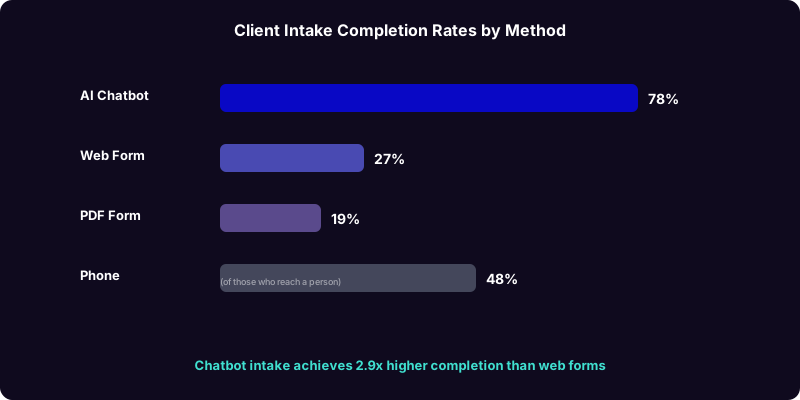
The data on completion rates strongly favors conversational intake. Research from Thomson Reuters' legal AI survey found that law firms using conversational intake tools see completion rates of 72-85%, compared to 23-31% for traditional web forms. The reason is simple: a conversation feels personal and guided, while a form feels bureaucratic and impersonal. Prospective clients are already stressed about their legal situation -- the last thing they want is to fill out a government-style form with 40 fields.
The chatbot also reduces abandonment at the contact information stage by building rapport first. After answering the prospective client's initial questions and demonstrating the firm's relevant expertise, the chatbot naturally transitions to: "Based on what you have described, this sounds like a case our personal injury team handles regularly. To have an attorney review your case and reach out personally, I will need your contact information." This context makes providing personal details feel logical rather than intrusive.
To build your law firm chatbot without any coding knowledge, use the Conferbot AI chatbot builder, which includes pre-built legal intake templates that you can customize for your practice areas in under an hour.
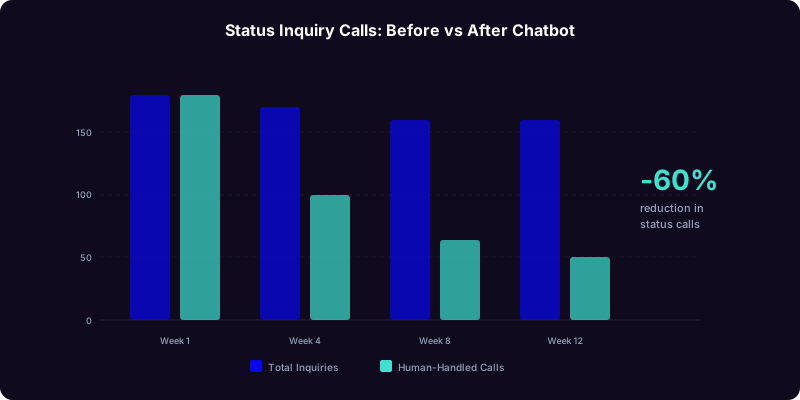
Real-Time Case Status Updates: Reducing "Where Is My Case?" Calls by 60%
Ask any law firm administrator what the single most common client call is about, and the answer is universal: "What is the status of my case?" These status inquiry calls consume enormous amounts of staff time, interrupt attorney workflow, and often result in frustration for both the client and the firm. According to industry surveys, status inquiries account for 40-55% of all inbound client calls at litigation-focused firms.
An AI chatbot connected to your case management system can answer status inquiries instantly, around the clock, without a single staff member being involved. The client types their question (or selects from a menu), authenticates their identity, and receives a current status update -- all in under 60 seconds.
How Automated Case Status Works
The chatbot integrates with your case management platform (Clio, MyCase, PracticePanther, or similar) through the integrations hub to pull real-time case data:
- Authentication: The client provides their name and a verification element (case number, date of birth, or last four digits of phone number) to confirm identity before any case information is shared. This satisfies confidentiality requirements under ABA Model Rule 1.6.
- Status summary: The chatbot delivers a plain-language summary of the case's current stage: "Your case is currently in the discovery phase. Your attorney filed interrogatories on May 15th, and the opposing party's responses are due by June 30th. Your next scheduled event is a deposition on July 12th."
- Recent activity log: A list of recent filings, correspondence, and milestones, presented in chronological order so the client can see forward momentum.
- Upcoming deadlines: Court dates, filing deadlines, and action items that require client involvement (document gathering, deposition preparation, settlement review).
- Document access: Links to filed documents, correspondence, and agreements stored in the client portal, allowing clients to review materials without calling the office.
Impact on Firm Operations
The operational impact of automating status inquiries is significant:
| Metric | Before Chatbot | After Chatbot | Improvement |
|---|---|---|---|
| Status inquiry calls per week | 120-200 | 45-80 | 58-62% reduction |
| Average staff time per status call | 8-12 minutes | 0 minutes (automated) | 100% time savings |
| Client satisfaction with updates | 3.2/5.0 | 4.4/5.0 | 37% improvement |
| After-hours status requests handled | 0 (voicemail) | 100% | Complete coverage |
| Staff hours saved per week | 0 | 16-40 hours | $800-$6,000/week saved |
For a firm with 500 active cases, automating status inquiries can save 16-40 staff hours per week -- hours that can be redirected to billable work, intake processing, or case preparation. At an average paralegal billing rate of $150/hour, those recaptured hours represent $2,400-$6,000 per week in potential billable revenue.
Proactive Status Notifications
The most advanced law firm chatbots go beyond reactive status checking. They proactively push updates to clients when significant events occur:
- Filing notifications: "Your attorney filed a motion for summary judgment today. Here is a summary of what this means for your case."
- Hearing reminders: "Reminder: Your deposition is scheduled for Thursday at 10 AM. Your attorney will contact you tomorrow with preparation details."
- Settlement updates: "The opposing party has responded to our demand letter. Your attorney will call you this week to discuss the response and next steps."
- Document requests: "Your attorney needs copies of your recent medical records for the upcoming hearing. Please upload them through your client portal or bring them to your next appointment."
Proactive updates dramatically improve client satisfaction because clients feel informed and in control rather than left in the dark. The Clio Legal Trends Report found that communication quality is the number one factor in client satisfaction ratings for law firms -- ahead of case outcome, cost, and attorney competence. A chatbot that keeps clients informed automatically delivers a measurably better client experience than manual communication that depends on staff remembering to follow up.
Intelligent Appointment Scheduling and Consultation Booking
Scheduling a consultation with an attorney should be effortless for the client and efficient for the firm. In practice, it is neither. The typical law firm scheduling process involves a phone tag cycle: the prospective client calls, reaches voicemail or a receptionist, gets transferred, waits on hold, and eventually either books an appointment or gives up. The ABA TechReport found that 42% of potential clients who attempt to schedule a consultation with a law firm abandon the process before securing an appointment.
An AI chatbot with integrated calendar booking eliminates every friction point in this process. The prospective client completes their intake, the chatbot determines which attorney handles their type of case, checks that attorney's real-time availability, and presents open time slots -- all within the same conversation.
The Intelligent Scheduling Flow
- Qualification-based routing: The chatbot uses intake data to determine the appropriate attorney. A personal injury case with clear liability and significant injuries routes to a senior partner. A straightforward traffic ticket routes to a junior associate. The routing logic maps practice area, case complexity, and case value to attorney assignments.
- Real-time availability: The chatbot pulls real-time calendar data from your scheduling system (Calendly, Acuity, Clio, or your firm's custom calendar), showing only genuinely available slots.
- Time zone handling: For firms serving clients across time zones (common in immigration, corporate, and federal practices), the chatbot automatically detects the client's time zone and presents options accordingly.
- Consultation type selection: Phone consultation, video call, or in-person meeting -- the chatbot offers the options your firm supports and adjusts available slots based on meeting type (in-person requires office hours; phone and video offer wider availability).
- Confirmation and reminders: The chatbot sends immediate confirmation with meeting details, followed by automated reminders 24 hours and 1 hour before the appointment. This reduces no-shows by 35-50%, consistent with data from our appointment booking automation guide.
Consultation Preparation Automation
Booking the appointment is only half the value. The chatbot also prepares both the client and the attorney for a productive initial consultation:
For the client:
- A pre-consultation checklist of documents to gather (police reports, medical records, financial statements, correspondence from opposing parties)
- Directions to the office or video call link
- What to expect during the consultation (duration, topics covered, fee discussion)
- Any required forms (engagement letter, fee agreement) to review in advance
For the attorney:
- A complete intake summary with all information the chatbot collected
- Conflict check results (run automatically after intake data is captured)
- Lead score and case value estimate
- Client's stated priorities and concerns
- Relevant prior communications if the client previously interacted with the chatbot
This preparation means the consultation starts with substance rather than data collection. The attorney walks into the meeting (or picks up the phone) already informed about the client's situation, and the client arrives with their documents organized and expectations set. Consultations that start this way are 40% more likely to convert to engagement, according to legal practice management data.
Revenue Impact of Streamlined Scheduling
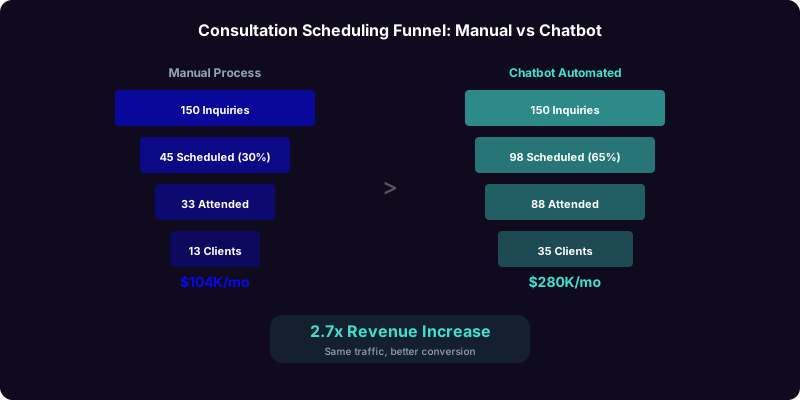
Consider the math for a family law practice:
| Metric | Without Chatbot | With Chatbot |
|---|---|---|
| Monthly website inquiries | 150 | 150 |
| Consultations scheduled | 45 (30%) | 98 (65%) |
| Consultation no-shows | 12 (27%) | 10 (10%) |
| Consultations completed | 33 | 88 |
| Engagements signed (40% close rate) | 13 | 35 |
| Average case value | $8,000 | $8,000 |
| Monthly revenue from new clients | $104,000 | $280,000 |
The chatbot nearly triples new client revenue not by bringing in more website traffic, but by converting a dramatically higher percentage of existing traffic into scheduled, attended, and converted consultations. This is why chatbot ROI for law firms is among the highest of any industry -- see our complete chatbot ROI calculation guide for the framework behind these numbers.
Automated Conflict Checks and Ethical Compliance at Scale
Conflict of interest checks are a non-negotiable ethical obligation for every law firm. Under ABA Model Rules 1.7 (current client conflicts) and 1.9 (former client conflicts), firms must screen every potential new client against their entire client and opposing party database before engaging. Manual conflict checks are slow, error-prone, and create a bottleneck that delays client engagement. A chatbot that collects complete conflict check data during intake -- and triggers automated screening -- eliminates this bottleneck while improving accuracy.
Conflict Data Collection During Intake
The chatbot collects all party names and entity information needed for a thorough conflict check as a natural part of the intake conversation:
- Prospective client's full legal name including maiden names, aliases, former names, and any business names or DBAs
- Opposing parties: The at-fault party in personal injury, the spouse in family law, the defendant or plaintiff in litigation, the opposing business in corporate disputes
- Related entities: Insurance companies, employers, co-parties, witnesses, and any corporate affiliates
- Previous attorneys: Any lawyers who previously represented the client or the opposing party in the same matter
- Corporate relationships: For business disputes, the chatbot collects parent companies, subsidiaries, officers, and directors
Automated Conflict Screening Workflow
Once the chatbot captures this data, the automated workflow proceeds through the integrations hub:
- Data normalization: Names are standardized (removing Jr., Sr., middle initials, common misspellings) to prevent false negatives in the conflict search
- Database query: The system searches against your complete client database in Clio, MyCase, PracticePanther, or your firm's conflict database, checking for exact matches and phonetic near-matches
- Results classification: Matches are classified as "clear conflict" (exact match on opposing party), "potential conflict" (partial match requiring human review), or "no conflict found"
- Attorney notification: Clear conflicts prevent the intake from routing to an attorney (with a polite message to the prospective client suggesting alternative resources). Potential conflicts are flagged for attorney review before engagement.
Compliance With Legal Advertising Rules
Law firm chatbots must comply with advertising and solicitation rules that vary by state. The core requirements based on ABA Model Rules 7.1-7.3 include:
| Requirement | ABA Rule | Chatbot Implementation |
|---|---|---|
| Truthful communications | Rule 7.1 | No outcome guarantees, accurate service descriptions, no misleading claims |
| AI disclosure | Rule 7.1 | Clear statement that the user is interacting with an automated tool, not an attorney |
| No attorney-client relationship | Rules 1.7, 1.18 | Explicit disclaimer at conversation start and before detailed case information collection |
| Confidentiality of prospective client info | Rule 1.18 | End-to-end encryption, access controls, secure storage |
| No legal advice | Rule 5.5 | General information only; case-specific analysis reserved for licensed attorneys |
| Advertising disclosures | State-specific | "Attorney Advertising" label where required by state rules (e.g., New York) |
The ABA TechReport specifically addresses AI chatbot use, noting that chatbots are permissible for client intake as long as they do not cross the line into providing legal advice or creating the impression that an attorney-client relationship exists. Several state bar associations, including California, New York, and Florida, have issued ethics opinions confirming that automated intake tools are permissible when properly configured with appropriate disclaimers.
For a comprehensive walkthrough of ABA compliance requirements for law firm chatbots, including state-specific variations and disclaimer templates, refer to our foundational guide to AI chatbots for law firms.
Practice Area Deep Dives: Chatbot Flows for PI, Family, Criminal, and Immigration
Each practice area has unique intake requirements, urgency patterns, and client communication needs. A one-size-fits-all chatbot flow will underperform compared to practice-area-specific flows that ask the right questions, use appropriate language, and route with the right level of urgency. Here are optimized chatbot flows for the four highest-volume practice areas.
Personal Injury: Capturing High-Value Cases Fast
Personal injury is the most lucrative practice area for chatbot intake because case values are high ($10,000-$500,000+) and speed of response directly correlates with client acquisition. The chatbot flow for PI should prioritize liability indicators and injury severity to help attorneys triage cases effectively:
- Incident classification: Motor vehicle accident, truck accident, motorcycle, pedestrian, slip and fall, medical malpractice, product liability, dog bite, workplace injury
- Timing and location: Date of incident, state/county (for jurisdiction and statute of limitations), police report availability
- Injury assessment: Type of injuries, hospitalization, ongoing treatment, impact on work and daily activities, total medical expenses to date
- Liability indicators: Fault determination, witness availability, photographic evidence, dashcam footage, police report conclusions
- Insurance status: Whether the client has filed a claim, received contact from the opposing insurer, or been offered a settlement (critical for assessing whether the case has been compromised by premature admissions)
High-value PI cases (severe injuries, clear commercial vehicle liability, wrongful death) should trigger immediate attorney notification with a push alert, while standard cases enter the regular intake queue.
Family Law: Sensitivity and Urgency
Family law clients are often emotionally distressed, and the chatbot must reflect appropriate sensitivity while efficiently collecting necessary information:
- Matter identification: Divorce, child custody, child support, spousal support, domestic violence protective order, adoption, paternity, prenuptial agreement
- Emergency detection: The chatbot screens for domestic violence situations, child safety concerns, and emergency custody needs -- these trigger immediate routing and may include resources for local shelters or crisis hotlines
- Household details: Children (ages, current arrangements), marital property overview, income information, length of marriage
- Tone calibration: Family law chatbot responses use empathetic language: "I understand this is a difficult time" rather than the more clinical tone appropriate for corporate or real estate intake
Criminal Defense: Speed Above All
Criminal defense inquiries often come at moments of acute crisis -- after an arrest, upon receiving charges, or before an arraignment. The chatbot must:
- Determine custody status: Is the person currently in custody? If yes, the chatbot pivots to emergency protocols and immediately notifies a criminal defense attorney
- Identify charges: DUI/DWI, drug offenses, theft, assault, domestic violence, white collar, sex offenses, traffic violations
- Capture critical dates: Arraignment date, bail hearing, next court appearance, probation check-in
- Operate via multiple channels: Criminal defense intake often happens via mobile device. Deploy the chatbot on your website and WhatsApp for maximum accessibility during crisis moments
Immigration: Multilingual and Deadline-Driven
Immigration practice requires multilingual capability and acute awareness of filing deadlines that can determine a client's ability to remain in the country:
- Current status: Visa type, expiration date, pending applications, any removal proceedings
- Service needed: Family-based petitions, employment visas (H-1B, L-1, O-1, EB categories), naturalization, asylum, DACA, TPS, deportation defense
- Language support: The chatbot operates in English, Spanish, Mandarin, Hindi, Arabic, and other languages relevant to your client base -- critical for immigration practices
- Deadline awareness: Visa expiration dates, filing windows, interview dates, and deportation hearing schedules are captured and flagged for urgency
For each of these practice areas, the chatbot should include a final step that summarizes what the prospective client shared, confirms the information is accurate, and sets expectations for next steps: "Thank you for sharing this information. An attorney from our personal injury team will review your case details and contact you within 2 hours during business hours, or first thing tomorrow morning if you are reaching us after hours."
ROI Framework: Proving the 35% Intake Cost Reduction to Partners
Convincing partners to invest in technology requires hard numbers, not promises. Here is a detailed ROI framework that quantifies the financial impact of a law firm chatbot across all major value drivers, using conservative estimates that will withstand scrutiny from even the most skeptical partner.
The Law Firm Chatbot ROI Formula
The ROI calculation for a law firm chatbot has four components, each independently measurable and defensible:
Component 1: Intake Cost Savings (35% Reduction)
The most direct and easiest-to-measure component. Calculate your current monthly intake cost and apply the benchmark 35% reduction:
| Firm Size | Monthly Intake Volume | Current Intake Cost | With Chatbot (35% savings) | Monthly Savings |
|---|---|---|---|---|
| Solo practitioner | 30-50 | $1,875-$7,500 | $1,219-$4,875 | $656-$2,625 |
| Small firm (2-5 attorneys) | 80-200 | $5,000-$30,000 | $3,250-$19,500 | $1,750-$10,500 |
| Mid-size firm (6-20 attorneys) | 200-600 | $12,500-$90,000 | $8,125-$58,500 | $4,375-$31,500 |
| Large firm (20+ attorneys) | 600-2,000 | $37,500-$300,000 | $24,375-$195,000 | $13,125-$105,000 |
Component 2: Recaptured Billable Hours
Every hour staff spends on non-billable intake is an hour not spent on billable client work. The Clio Legal Trends Report shows attorneys average only 2.5 billable hours per day. Chatbot intake automation frees paralegals and associates to redirect time to billable tasks:
- Hours freed per week: 12-40 (depending on firm size)
- Effective billing rate for redirected time: $150-$300/hour
- Monthly value of recaptured hours: $7,200-$48,000
- Annual value: $86,400-$576,000
Component 3: Incremental Revenue from Faster Response
The most impactful component. Firms that respond within 5 minutes are 78% more likely to secure the client than firms that respond in 1+ hours. The chatbot responds in seconds:
- Current inquiry-to-client conversion rate: 10-15% (industry average)
- Post-chatbot conversion rate: 20-30% (based on aggregated deployment data)
- At 150 monthly inquiries and $8,000 average case value, the incremental revenue from a 10 percentage point conversion improvement is: 150 x 10% x $8,000 = $120,000/month
Component 4: After-Hours and Weekend Lead Capture
40-50% of legal inquiries arrive outside business hours. Without a chatbot, these leads go to voicemail (where 80% never leave a message) or a web form (where follow-up takes 8+ hours). The chatbot captures and qualifies these leads instantly:
- After-hours inquiries per month: 60-100 (for a mid-size firm)
- Chatbot capture rate: 65-80%
- Conversion rate of captured leads: 15-25%
- Monthly revenue from after-hours leads: $72,000-$200,000 (at $8,000 avg case value)
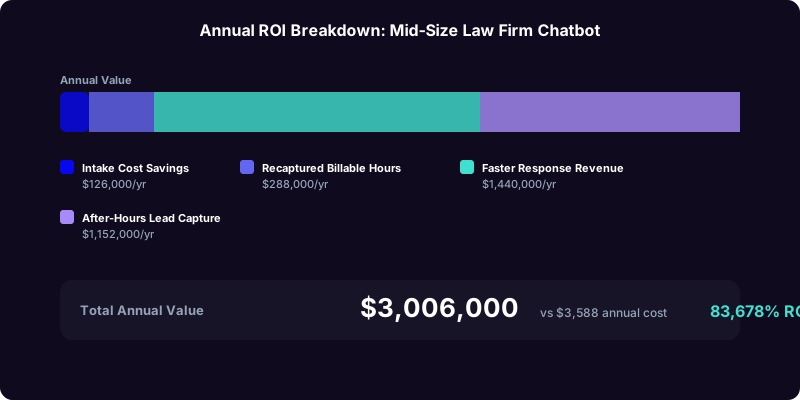
Total ROI Calculation: Mid-Size Firm Example
| ROI Component | Monthly Value | Annual Value |
|---|---|---|
| Intake cost savings | $10,500 | $126,000 |
| Recaptured billable hours | $24,000 | $288,000 |
| Incremental revenue (faster response) | $120,000 | $1,440,000 |
| After-hours lead capture | $96,000 | $1,152,000 |
| Total annual value | $250,500 | $3,006,000 |
| Annual chatbot cost (Conferbot) | $3,588 | |
| Annual ROI | 83,678% |
Even cutting every revenue estimate in half for conservatism, the ROI exceeds 40,000%. The cost denominator is so small relative to the value generated that the percentage becomes astronomical. This is why law firm chatbots consistently rank among the highest-ROI technology investments in legal practice management. For a more detailed ROI methodology applicable to any industry, see our complete chatbot ROI calculation guide.
Implementation Roadmap: From Decision to Live Chatbot in 3 Weeks
Implementing a law firm chatbot requires methodical planning that addresses both technical setup and ethical compliance. Here is a proven 3-week implementation roadmap that law firms of all sizes can follow to go from initial decision to a fully operational, compliant chatbot.
Week 1: Ethics Review and Flow Design
Days 1-2: Ethics and Compliance Foundation
- Review your state bar's rules on attorney advertising, solicitation, and technology use. While ABA Model Rules provide the framework, your jurisdiction may have additional requirements
- Draft disclaimer language for your specific state: non-attorney disclosure, no attorney-client relationship formation, confidentiality notice, advertising labels (required in states like New York)
- Determine data security requirements: encryption standards, storage location, access controls, data retention policies
- Consult your firm's ethics counsel or your state bar's ethics hotline if you have questions about any requirements
Days 3-5: Intake Flow Architecture
- Map each practice area's qualifying questions with input from attorneys in each department
- Define lead scoring criteria: what makes a high-priority, standard, or low-priority lead for each practice area
- Design routing rules: by practice area, attorney specialization, case complexity, geographic jurisdiction, and round-robin backup
- Script the chatbot's conversational tone -- professional yet approachable, empathetic for sensitive practice areas, and always ethically compliant
Week 2: Build, Integrate, and Test
Days 6-8: Chatbot Construction
- Build intake flows in the Conferbot builder using the legal intake template as a starting point
- Configure practice-area-specific question sequences, dynamic routing logic, and urgency detection rules
- Set up disclaimers at required conversation touchpoints (opening, before case detail collection, before contact capture)
- Create after-hours messaging and scheduling flows
Days 9-10: Integrations
- Connect to your case management system (Clio, MyCase, PracticePanther) through the integrations hub
- Set up calendar booking integration for consultation scheduling
- Configure notification channels: email alerts, Slack notifications, SMS for urgent matters
- Test data flow end-to-end: chatbot intake to CRM record to attorney notification
Week 3: Quality Assurance and Launch
Days 11-13: Testing
- Have attorneys in each practice area test their specific intake flows, verifying that questions are appropriate and routing is correct
- Test edge cases: after-hours inquiries, emergency situations, conflicts of interest, non-English speakers, practice areas you do not handle
- Verify all disclaimers display correctly and comply with your state's requirements
- Test mobile experience -- a large percentage of legal inquiries come from mobile devices
Days 14-15: Launch and Monitor
- Deploy on your website with the chatbot positioned on key landing pages: practice area pages, contact page, and homepage
- Monitor the first 48 hours closely, reviewing conversation transcripts and checking for issues
- Brief all attorneys and staff on the new intake system, how leads will be delivered, and expected response time protocols
- Set up weekly reporting using the analytics dashboard to track engagement, completion rates, and lead quality
Post-Launch Optimization Checklist
The chatbot should be treated as a living system, not a set-it-and-forget-it tool. Schedule monthly reviews to:
- Review conversation transcripts for common questions the chatbot does not handle well
- Add new qualifying questions that attorneys have identified as important
- Refine lead scoring based on which chatbot-captured leads actually converted to clients
- Update practice area information (new services, changed fee structures, new attorneys)
- Analyze drop-off points in the conversation flow and test improvements
- Track ROI metrics and present results to firm leadership
Security, Data Protection, and Confidentiality for Legal Chatbots
Law firm chatbots handle some of the most sensitive information in any industry. Prospective clients share details about arrests, divorces, injuries, immigration status, and financial disputes -- all before any attorney-client relationship is formally established. ABA Model Rule 1.18 extends confidentiality obligations to prospective client information, meaning the firm must protect intake data with the same rigor applied to current client communications.
Technical Security Requirements
A law firm chatbot platform must meet these minimum security standards:
- Encryption in transit: All data transmitted between the client's browser/device and the chatbot platform must be encrypted using TLS 1.2 or higher. This is non-negotiable for any chatbot handling legal intake data.
- Encryption at rest: All stored intake data, conversation transcripts, and contact information must be encrypted using AES-256 or equivalent encryption at the database level.
- Access controls: Role-based access ensures that only authorized personnel can view intake data. A family law intake should not be visible to the criminal defense team unless there is a legitimate need.
- Audit logging: Every access to intake data should be logged with timestamps and user identifiers, creating an audit trail that demonstrates compliance with confidentiality obligations.
- Data retention policies: Define how long intake data from prospective clients who do not engage the firm is retained. Many firms implement a 90-180 day retention period for non-engaged prospects, after which data is securely deleted.
- SOC 2 compliance: The chatbot platform should maintain SOC 2 Type II certification, which independently verifies security controls for handling sensitive data.
State-Specific Data Protection Considerations
Beyond ABA Model Rules, law firms must consider state-specific data protection requirements:
| State/Regulation | Key Requirement | Chatbot Implication |
|---|---|---|
| California (CCPA/CPRA) | Right to know, right to delete | Chatbot must support data export and deletion requests from California residents |
| New York (SHIELD Act) | Reasonable security safeguards | Technical, administrative, and physical safeguards for NY resident data |
| Illinois (BIPA) | Biometric data consent | If chatbot uses voice input or face recognition, explicit consent required |
| GDPR (EU clients) | Explicit consent, data minimization | Chatbot must collect only necessary data and obtain explicit consent before processing |
Ethical Walls in Multi-Practice Chatbots
For firms that handle both sides of a legal area (for example, representing both plaintiffs and defendants in personal injury, or handling both petitioner and respondent in family law), the chatbot must maintain ethical walls:
- Intake data from a potential plaintiff case should not be accessible to attorneys representing defendants, and vice versa
- The conflict check system must cross-reference across all practice areas and departments
- If a conflict is detected, the chatbot must immediately cease collecting case details and provide a generic response directing the prospective client to alternative resources
The Thomson Reuters legal AI research emphasizes that firms deploying AI tools must implement "responsible AI frameworks" that include transparency (clients know they are interacting with AI), accountability (clear governance for AI system outputs), and security (enterprise-grade data protection). These principles should guide every aspect of your chatbot deployment.
Measuring Success: Analytics, KPIs, and Continuous Optimization
A law firm chatbot is not a set-it-and-forget-it tool. The firms that extract the most value treat their chatbot as a living system that is continuously measured, refined, and expanded. Here are the KPIs that matter, how to track them, and optimization strategies that drive compounding improvement over time.
Essential Law Firm Chatbot KPIs
| KPI | Definition | Target | How to Measure |
|---|---|---|---|
| Intake completion rate | % of visitors who complete the full intake | 70-85% | Chatbot analytics dashboard |
| Lead-to-consultation rate | % of completed intakes that schedule a consultation | 55-70% | CRM pipeline tracking |
| Consultation-to-engagement rate | % of consultations that convert to signed clients | 35-50% | Case management system |
| After-hours lead capture | Leads captured outside 8am-6pm | 35-50% of total leads | Chatbot timestamps |
| Average response time | Time from inquiry to chatbot engagement | Under 5 seconds | Chatbot platform metrics |
| Status inquiry deflection | % of status calls eliminated by chatbot | 55-65% | Phone system analytics + chatbot logs |
| No-show rate reduction | Decrease in missed consultations | 35-50% reduction | Calendar system data |
| Cost per acquired client | Total marketing + chatbot cost / new clients | Decreasing month over month | Finance + CRM data |
Optimization Strategies That Compound
Use the Conferbot analytics dashboard to identify and act on these optimization opportunities:
1. Conversation drop-off analysis: Identify the exact question where prospective clients abandon the intake. If 30% drop off at the "describe your injuries" question, the question may be too clinical or intimidating. Rephrase it to: "Can you briefly tell me what happened and how it affected you?" Small language changes can improve completion rates by 10-20 percentage points.
2. Practice area conversion tracking: Track which practice areas have the highest chatbot-to-client conversion rates. If personal injury converts at 25% but immigration converts at only 8%, investigate whether the immigration flow needs better questions, more empathetic language, or multilingual support.
3. Attorney response time correlation: Measure the time between chatbot lead delivery and attorney follow-up, then correlate with conversion rate. If leads contacted within 30 minutes convert at 40% while leads contacted after 4 hours convert at 12%, you have a powerful data point to motivate faster attorney response. The chatbot captures the lead, but the attorney must close it.
4. Seasonal and day-of-week patterns: Legal inquiries follow predictable patterns. DUI inquiries spike on weekends and holidays. Family law inquiries peak in January (post-holiday divorce filings). Personal injury spikes during summer driving season. Use these patterns to optimize chatbot messaging and attorney staffing.
5. Client feedback loop: After engagement, ask new clients about their intake experience. Questions like "How easy was it to get started with our firm?" and "Was the chatbot experience helpful?" provide qualitative data that supplements the quantitative metrics.
Monthly Reporting Template for Partners
Present chatbot results to firm leadership monthly using this structure:
- Lead volume: Total intakes completed, broken down by practice area and source (website, WhatsApp, social)
- Conversion funnel: Intake to consultation to engagement, with comparison to pre-chatbot baseline
- Revenue attribution: Total new client revenue from chatbot-sourced leads, calculated using actual engagement values
- Cost savings: Staff hours saved on intake and status inquiries, converted to dollar value
- After-hours impact: Leads captured outside business hours that would otherwise have been lost
- Optimization actions taken: What was changed during the month and the impact of those changes
This data-driven approach transforms the chatbot from a technology experiment into a strategic asset that partners can evaluate with the same rigor they apply to any other business investment. For broader analytics guidance, see our guide to chatbot analytics metrics that drive business outcomes.
The Future of Legal AI: What Comes After Intake Chatbots
Intake chatbots represent the first wave of AI adoption in law firms, but the technology trajectory points toward far broader applications. Understanding where legal AI is heading helps you invest wisely today in platforms that can grow with the technology rather than becoming obsolete.
Near-Term Developments (2026-2027)
- Document generation from intake data: Chatbots that not only collect intake information but also generate draft engagement letters, retainer agreements, and initial pleadings based on the information gathered. The attorney reviews and edits rather than drafting from scratch.
- Intelligent triage with case outcome prediction: AI that analyzes historical case data to estimate case value and probability of success, helping firms make better case selection decisions at the intake stage.
- Voice-enabled legal intake: Chatbots that accept voice input for clients who prefer speaking to typing, with real-time transcription and sentiment analysis that adjusts the conversation tone based on the client's emotional state.
- Multi-channel case communication: Unified chatbot platforms that manage all client communication across website chat, SMS, WhatsApp, email, and client portals from a single interface.
Medium-Term Developments (2027-2029)
- AI-assisted legal research integration: Chatbots that pull relevant case law, statutes, and regulatory updates during intake, providing attorneys with a preliminary research package alongside the intake data.
- Automated discovery management: AI that manages the document collection process, automatically generating discovery requests based on case type and following up with clients on outstanding document submissions.
- Predictive scheduling optimization: AI that analyzes attorney productivity data, case outcomes, and client satisfaction to optimize how consultations are scheduled and which attorneys are assigned to which cases.
What This Means for Your Investment Today
The key takeaway is that a chatbot platform is not a one-time purchase but a foundation for ongoing AI adoption. When choosing a platform, prioritize:
- Extensibility: Can the platform add new capabilities (document generation, voice input, predictive analytics) as they become available?
- Integration architecture: Does the platform connect to your existing systems through APIs that can accommodate new data flows?
- AI model flexibility: Does the platform update its underlying AI models as better models become available, or are you locked into a specific AI generation?
- Vendor investment in legal vertical: Is the vendor actively developing features for law firms, or is legal a secondary market?
The firms that start with intake automation today will have the data, the integrations, and the organizational familiarity to adopt each successive wave of legal AI as it matures. Those who wait will face a compounding competitive disadvantage as early adopters build increasingly efficient and client-friendly practices.
To begin your firm's AI journey with a chatbot that handles intake, scheduling, and case communication from day one, explore Conferbot's pricing plans designed for legal practices. Most firms are fully operational within two weeks, with measurable ROI within the first month.
Was this article helpful?
Chatbot for Law Firms FAQ
Everything you need to know about chatbots for chatbot for law firms.
About the Author

Conferbot Team specializes in conversational AI, chatbot strategy, and customer engagement automation. With deep expertise in building AI-powered chatbots, they help businesses deliver exceptional customer experiences across every channel.
View all articles