What Are Multimodal AI Chatbots? Beyond Text-Only Conversations
For over a decade, chatbots have operated in a single modality: text. Customers type messages, bots respond with text. But human communication is inherently multimodal — we share screenshots, photograph problems, send documents, and often prefer speaking over typing. Multimodal AI chatbots bridge this gap by processing and generating multiple types of content: images, documents, audio, and video alongside traditional text.
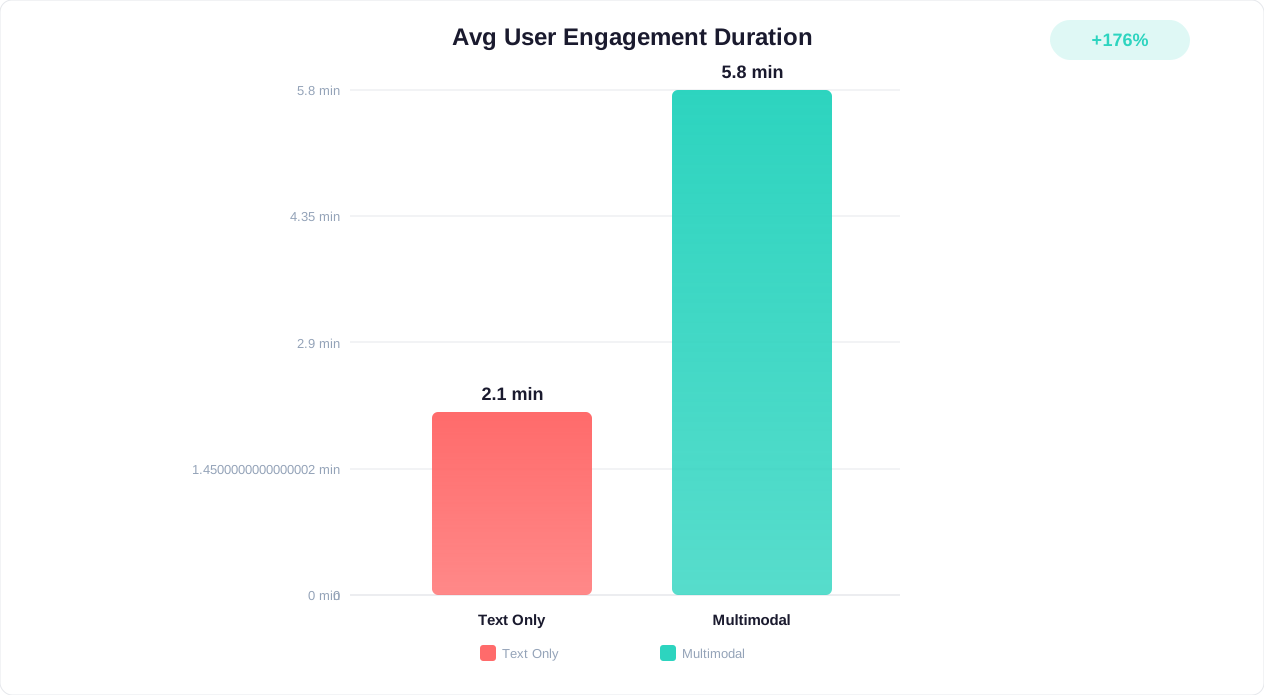
The business case for multimodal capabilities is substantial. A Salesforce State of the Connected Customer report found that 73% of customers expect companies to understand their needs across channels and modalities. When customers cannot share a screenshot of an error, a photo of a damaged product, or a voice message explaining a complex issue, they become frustrated — and frustration drives churn.
Consider the limitations of text-only chatbots in common scenarios:
- A customer receives a damaged package but cannot show the damage via text alone — they describe it poorly, the agent misunderstands, and resolution takes three exchanges instead of one
- A user encounters an error on screen but cannot accurately convey the error code, surrounding context, and what they were doing when it occurred
- A non-native speaker struggles to type their issue accurately but could explain it perfectly if they could just speak
- A customer needs to submit an insurance claim with receipts, but the chatbot cannot accept document uploads
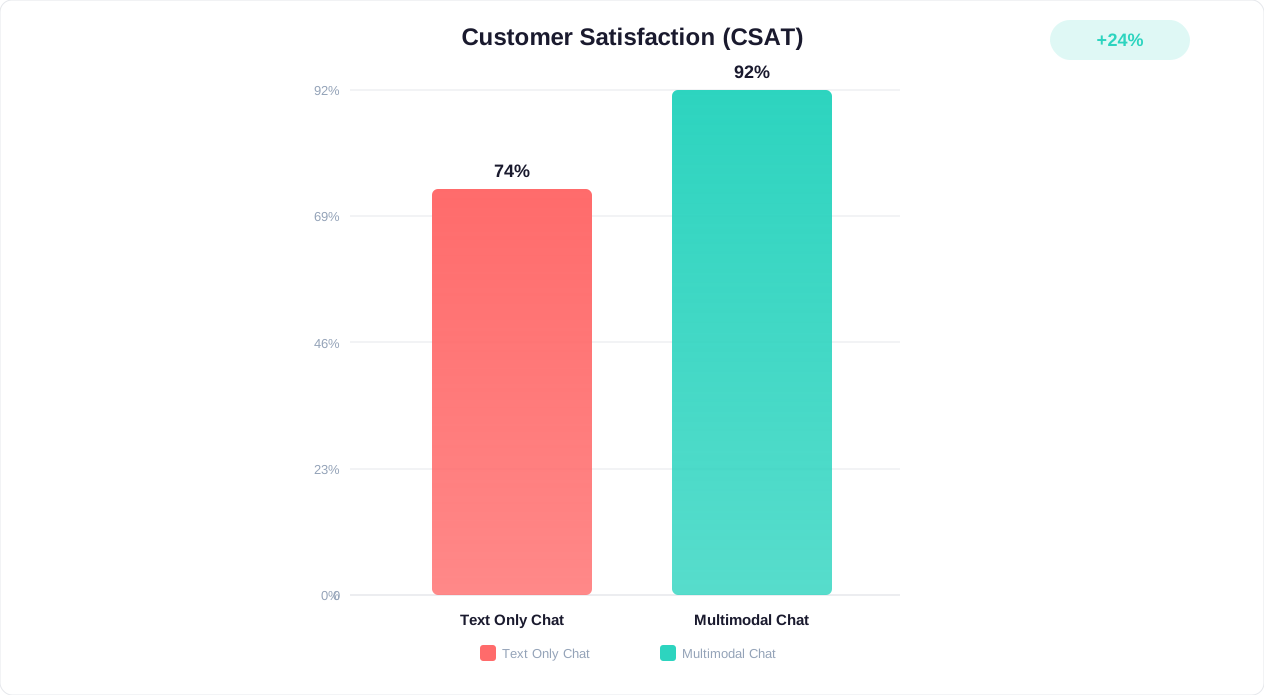
Multimodal AI eliminates these friction points. According to McKinsey research, companies deploying multimodal customer service AI report 35-45% faster resolution times and 22% higher customer satisfaction scores compared to text-only implementations. The technology has matured significantly through 2025-2026, with vision-language models achieving near-human accuracy on visual understanding tasks and speech recognition reaching 95%+ accuracy across major languages.
A Forrester CX report confirms that multimodal engagement increases customer lifetime value by 30% compared to single-channel text-only interactions. This is not a niche capability for tech-forward brands — it is rapidly becoming the expected standard. As customers grow accustomed to sharing images with AI assistants on their phones, they increasingly expect the same capability from business chatbots. Organizations still limited to text-only interactions risk feeling outdated, even if their conversational AI is otherwise excellent. The shift mirrors what happened with conversational AI versus traditional chatbots — multimodal is not replacing text but expanding what is possible in every customer interaction.
Image Recognition in Customer Chat: From Product Photos to Error Screenshots
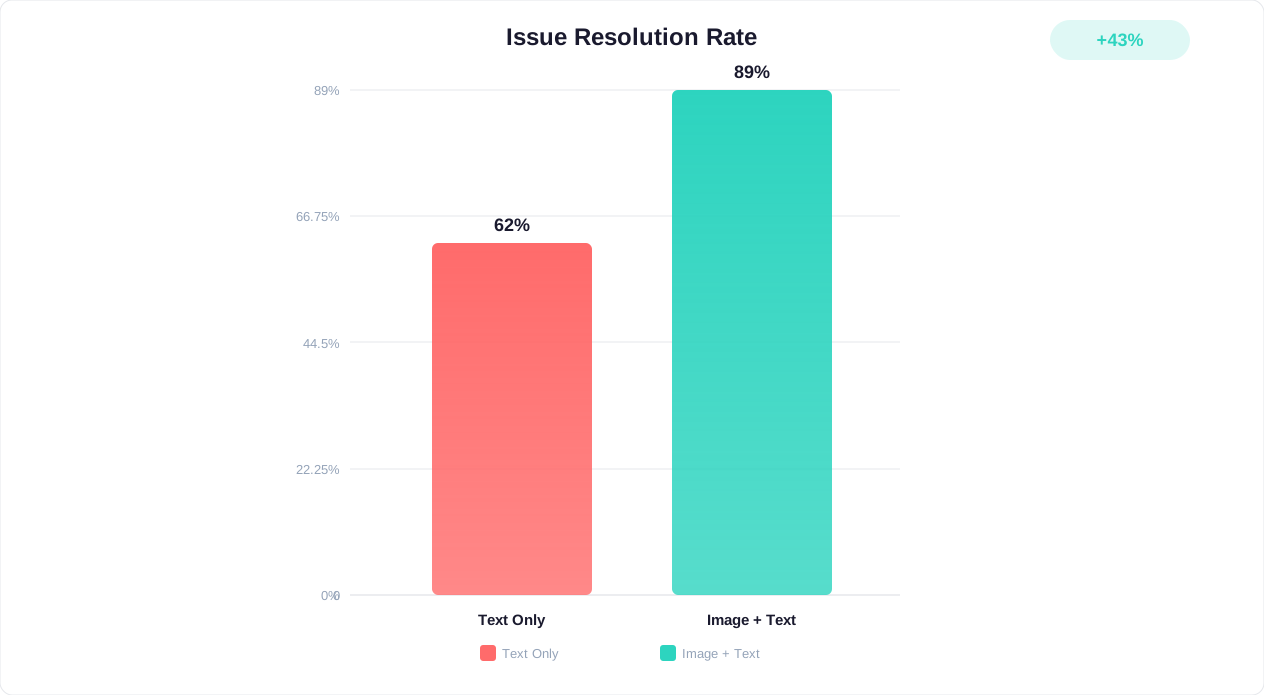
Visual input is the most immediately impactful multimodal capability for customer service, a finding supported by IBM's computer vision research. Customers can now share photos and screenshots directly in the chat window, and the AI processes them with the same fluency it processes text.
How Vision AI Works in Customer Service
Modern vision-language models (VLMs) process images through a pipeline that:
- Encodes the image into a high-dimensional representation using a vision transformer
- Aligns the visual representation with the language model's embedding space
- Reasons about the image in context of the conversation, generating understanding that combines visual analysis with domain knowledge
- Takes appropriate action based on what it sees — identifying a product, diagnosing a problem, or extracting specific information
This happens in under 3 seconds for most images, providing near-instant visual understanding that matches or exceeds what a human agent could determine from the same photo.
High-Value Image Recognition Use Cases
| Use Case | What the Customer Shares | What the AI Extracts | Action Taken |
|---|---|---|---|
| Product damage claims | Photo of damaged item | Damage type, severity, product identification | Auto-approve claim if damage is clear, initiate replacement |
| Product identification | Photo of product (in-store, from catalog) | SKU, variant, availability, pricing | Provide product link, check stock, add to cart |
| Error troubleshooting | Screenshot of error message | Error code, application context, system state | Provide targeted fix, escalate with full context if needed |
| Receipt processing | Photo of receipt | Date, items, amounts, store location | Process return, verify purchase, apply warranty |
| Setup assistance | Photo of hardware/wiring | Component identification, connection issues | Guide correct installation, identify missing parts |
| Identity verification | Photo of ID document | Name, document number, validity | Verify identity for account access (with consent) |
Implementation Best Practices for Image Processing
Accuracy and confidence scoring: Not every image is clear enough for reliable analysis. Implement confidence thresholds — if the model's confidence in its interpretation falls below 80%, present the interpretation to the customer for confirmation rather than acting on it automatically. "I can see what appears to be a crack on the screen. Can you confirm this is the damage you are reporting?"
Image quality feedback: Guide customers to provide useful images. If an uploaded image is too blurry, too dark, or does not show the relevant area, the chatbot should request a better photo with specific guidance: "The image is a bit dark. Could you retake the photo with better lighting, focusing on the damaged corner?"
Privacy-first image handling: Images often contain incidental personal information (faces in backgrounds, visible addresses, other items in frame). Process images for the specific purpose stated, discard unnecessary visual information, and communicate clearly what is extracted and retained. This aligns with the GDPR compliance requirements for minimizing data collection to what is strictly necessary.
Fallback strategies: Image processing can fail for various reasons (unsupported formats, corrupted files, extremely unusual subjects). Always provide a graceful fallback: "I was not able to process that image. Could you describe the issue in text, or try uploading a different photo?"
Platforms like Conferbot support rich media capabilities that enable image upload within chat widgets, combined with AI processing that extracts relevant information and maps it to resolution workflows automatically.
Document Processing: PDFs, Forms, and File Uploads in Chat
Document handling extends multimodal capabilities beyond simple images into structured and semi-structured content. Customers frequently need to share invoices, contracts, forms, insurance documents, medical records, or technical specifications as part of their support interactions. A multimodal chatbot that can ingest, parse, and reason about these documents eliminates the need for customers to manually extract and type information.
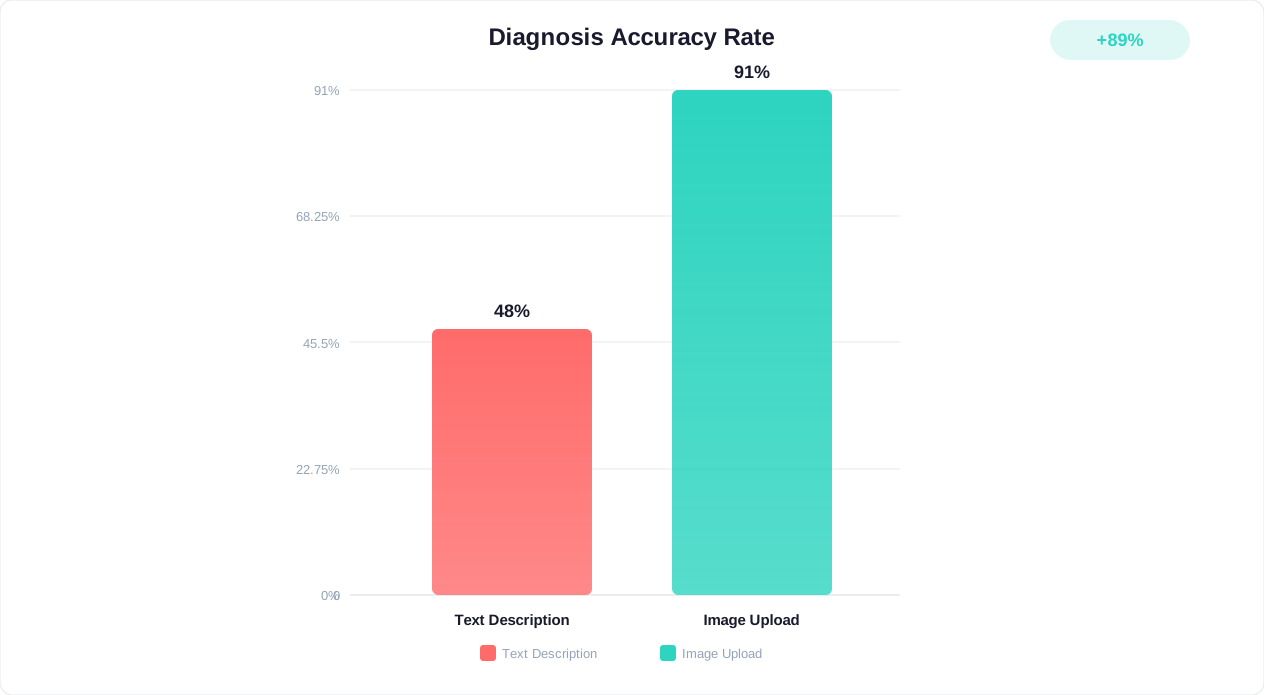
Document Processing Architecture
According to Grand View Research, the intelligent document processing market is projected to reach $11.6 billion by 2028, driven largely by customer-facing automation use cases. Processing documents within a chat interaction requires a specialized pipeline:
- File ingestion: Accept uploads in common formats (PDF, DOCX, XLSX, images of documents, scanned papers)
- Content extraction: Use OCR (optical character recognition) for scanned documents, direct parsing for digital-native files
- Structure recognition: Identify document type, locate key fields (dates, amounts, names, account numbers), understand tables and lists
- Information synthesis: Combine extracted document data with conversation context to understand what the customer needs
- Action execution: Use the extracted information to take appropriate action (process a claim, verify a purchase, complete a form)
Performance Benchmarks for Document Processing
| Document Type | Processing Time | Accuracy (Key Fields) | Common Use Cases |
|---|---|---|---|
| Digital PDF (text-based) | 1-3 seconds | 99%+ | Invoices, contracts, statements |
| Scanned document (clear) | 3-5 seconds | 95-98% | Receipts, signed forms, ID copies |
| Handwritten content | 5-8 seconds | 85-92% | Forms, notes, prescriptions |
| Complex tables/spreadsheets | 3-7 seconds | 93-97% | Financial statements, inventories |
| Multi-page documents | 5-15 seconds | 96-99% | Contracts, medical records, reports |
Industry-Specific Document Processing Use Cases
Insurance: Customers upload photos of damage, repair estimates, medical bills, and police reports. The chatbot extracts relevant claim data, cross-references against policy coverage, calculates potential payout, and either processes the claim automatically or prepares a complete submission for adjustor review. Processing time drops from 5-7 business days to under 10 minutes for straightforward claims.
Financial services: Account holders share bank statements, pay stubs, or tax documents for loan applications. The chatbot extracts income, expenses, and employment verification data, runs preliminary qualification checks, and either approves or requests additional documentation — all within the chat conversation.
Healthcare: Patients upload insurance cards, referral letters, lab results, or prescription documents. The chatbot verifies coverage, schedules appropriate appointments, and routes clinical documents to the right provider — a workflow explored in depth in our healthcare chatbot guide.
Legal services: Clients share contracts for review, upload documentation for case preparation, or submit forms that need processing. The chatbot identifies document type, extracts key terms, and routes to the appropriate legal specialist with a pre-parsed summary.
Security and Compliance for Document Processing
Document uploads introduce significant security considerations:
- Malware scanning: Every uploaded file must be scanned for malicious content before processing. This is non-negotiable
- Encryption in transit and at rest: Documents often contain highly sensitive information. TLS 1.3 for transit, AES-256 for storage at minimum
- Retention policies: Define how long uploaded documents are retained. For many use cases, extract the needed information and delete the original file within 24 hours
- Access controls: Limit which systems and personnel can access raw uploaded documents versus extracted data
- Compliance verification: For regulated industries, ensure document processing meets industry standards (HIPAA for healthcare, PCI DSS for financial documents containing card numbers)
Organizations handling sensitive document types should implement the same privacy frameworks discussed in our GDPR compliance checklist, with additional considerations for document-specific regulations like electronic signature laws and records retention requirements.
Voice-to-Text Integration: Enabling Spoken Conversations in Chat Interfaces
Voice input represents the most natural human communication modality, yet most chatbots still require customers to type every message. Integrating speech-to-text (STT) and text-to-speech (TTS) capabilities transforms the chatbot experience — particularly for mobile users, accessibility needs, and scenarios where typing is impractical.
The Voice Modality Opportunity
The numbers make a compelling case for voice integration:
- 71% of consumers prefer voice search over typing for queries, according to PwC research
- Speaking is 3x faster than typing on average (150 words per minute spoken vs. 40-50 typed)
- Mobile users (now 60%+ of web traffic) find voice input significantly easier than typing on small screens
- Accessibility requirements (ADA, WCAG 2.2) increasingly expect voice interaction options for users with motor impairments
- Non-native speakers often express themselves more accurately through speech than writing
Voice Integration Architecture
There are three common architectures for adding voice to chatbots:
Architecture 1: Voice-to-Text Transcription
- Customer speaks into their microphone
- Audio is streamed to a speech recognition service (Whisper, Google Speech-to-Text, Azure Speech)
- Transcribed text is sent to the chatbot as a regular text message
- Bot responds with text (optionally read aloud via TTS)
- Simplest to implement; works with any existing chatbot platform
Architecture 2: Voice-Native Processing
- Customer speaks, audio is captured
- The AI model processes audio directly (models like GPT-4o process speech natively without transcription)
- Model generates a response that accounts for tone, pauses, emphasis in the original speech
- Response delivered as synthesized speech or text
- Higher quality understanding but requires specific model support
Architecture 3: Full Duplex Voice Agent
- Real-time bidirectional audio connection (similar to a phone call)
- AI listens, processes, and responds simultaneously
- Supports interruptions, clarifications, and natural conversational flow
- Most natural experience but highest technical complexity and cost
Implementation Considerations
| Factor | Voice-to-Text | Voice-Native | Full Duplex |
|---|---|---|---|
| Implementation complexity | Low-Medium | Medium-High | High |
| Latency | 500ms-2s | 300ms-1.5s | 100-500ms |
| Accuracy (clear speech) | 95-98% | 96-99% | 94-97% |
| Accent handling | Good | Very good | Good |
| Cost per minute | $0.006-$0.02 | $0.02-$0.06 | $0.05-$0.15 |
| Background noise tolerance | Moderate | Good | Moderate |
| Multilingual support | 50+ languages | 20-30 languages | 10-15 languages |
Voice-Specific UX Design
Voice interaction requires different design principles than text chat:
- Confirmation patterns: Since users cannot see their "message" before sending, the chatbot should confirm understanding of key details: "I heard you would like to reschedule your appointment to next Thursday at 3 PM. Is that correct?"
- Progressive disclosure: Voice responses should be shorter than text responses. Break complex information into digestible segments with pauses for user confirmation
- Escape hatches: Always allow users to switch to text input if voice is not working well (noisy environment, accent issues, sensitive information they prefer not to speak aloud)
- Visual reinforcement: When possible, display a text transcript alongside voice interaction so users can verify what was understood
For a deeper exploration of voice-specific implementation, including IVR replacement and phone-based AI agents, see our comprehensive voice chatbot for business guide. The voice modality pairs especially well with the UI design best practices we recommend for creating intuitive chatbot interfaces.
Multimodal Implementation Architecture: Technical Requirements and Stack
Building a production-grade multimodal chatbot requires careful architectural decisions, following engineering principles outlined by Google Cloud's Architecture Framework about model selection, processing pipelines, and infrastructure. This section provides a technical overview for engineering teams evaluating implementation approaches.
Core Architecture Components
A multimodal chatbot system consists of four primary layers:
- Input Processing Layer: Handles file uploads, audio streams, and text input. Validates file types and sizes, performs security scanning, and routes each modality to appropriate processing
- Understanding Layer: Processes each modality (vision model for images, OCR for documents, STT for audio) and produces unified semantic representations
- Reasoning Layer: The language model that combines all modality inputs with conversation context to determine appropriate responses and actions
- Output Layer: Generates text responses, synthesizes speech (if voice output is enabled), and triggers system actions
Model Selection for Each Modality
| Modality | Processing Approach | Leading Options (2026) | Key Metric |
|---|---|---|---|
| Text comprehension | Large language model | GPT-4o, Claude 3.5, Gemini 1.5 | Reasoning accuracy |
| Image understanding | Vision-language model | GPT-4o Vision, Claude Vision, Gemini Vision | Object/text recognition accuracy |
| Document OCR | Specialized OCR + LLM | Azure Document Intelligence, Google Document AI, Textract | Field extraction accuracy |
| Speech recognition | Speech-to-text model | Whisper Large V3, Deepgram Nova-2, Google Chirp | Word error rate (WER) |
| Speech synthesis | Text-to-speech model | ElevenLabs, Azure Neural TTS, Google WaveNet | Naturalness (MOS score) |
Infrastructure Requirements
Processing capacity: Multimodal inputs are significantly more compute-intensive than text alone. Plan for:
- Image processing: 2-5x the compute cost of equivalent text queries
- Document processing: 3-10x depending on page count and complexity
- Voice processing: Continuous compute while audio streams (cost scales with duration, not message count)
Storage and bandwidth:
- Image uploads: Average 2-5 MB per image. At 1,000 conversations per day with 30% image sharing, budget for 600 MB-1.5 GB of daily image storage
- Document uploads: Average 0.5-10 MB per document. Lower volume but higher per-file size
- Audio streams: ~1 MB per minute of audio. For voice-enabled chats averaging 3 minutes, budget 3 MB per voice conversation
Latency requirements:
- Target total round-trip time (input received to response displayed): under 5 seconds for images, under 10 seconds for documents, under 2 seconds for voice
- Use streaming responses to improve perceived latency — begin displaying text while images or documents are still being processed
- Implement processing indicators ("Analyzing your image...") to set expectations during longer processing times
Integration Patterns
For organizations adding multimodal capabilities to existing chatbot infrastructure:
Pattern 1: Sidecar Processing
- Existing chatbot remains the primary interface
- Multimodal inputs are routed to a separate processing service
- Processing results are injected back into the conversation as context for the main chatbot
- Lowest disruption to existing systems; works with any chatbot platform
Pattern 2: Unified Multimodal Model
- Replace the text-only model with a natively multimodal model (GPT-4o, Gemini 1.5)
- All inputs (text, images, audio) processed by a single model in a single call
- Simpler architecture but requires platform support for multimodal model APIs
- Best quality understanding due to cross-modal reasoning
Pattern 3: Modality-Specific Agents
- Separate specialized agents for each modality (vision agent, document agent, voice agent)
- An orchestrator routes inputs to the appropriate agent
- Results are combined by the orchestrator for unified responses
- Best accuracy for specialized tasks but higher complexity and cost
For most mid-market implementations, Pattern 1 or Pattern 2 offers the best balance of capability and maintainability. Conferbot's architecture supports multimodal inputs through its rich media system, routing visual and document inputs through specialized processing before combining results with the conversational AI layer.
Multimodal Chatbot Use Cases by Industry: Where Visual and Voice AI Delivers Most Value
While multimodal capabilities benefit virtually any customer-facing chatbot, certain industries see disproportionate value from specific modalities. Understanding where each capability delivers the highest impact helps prioritize implementation investments.
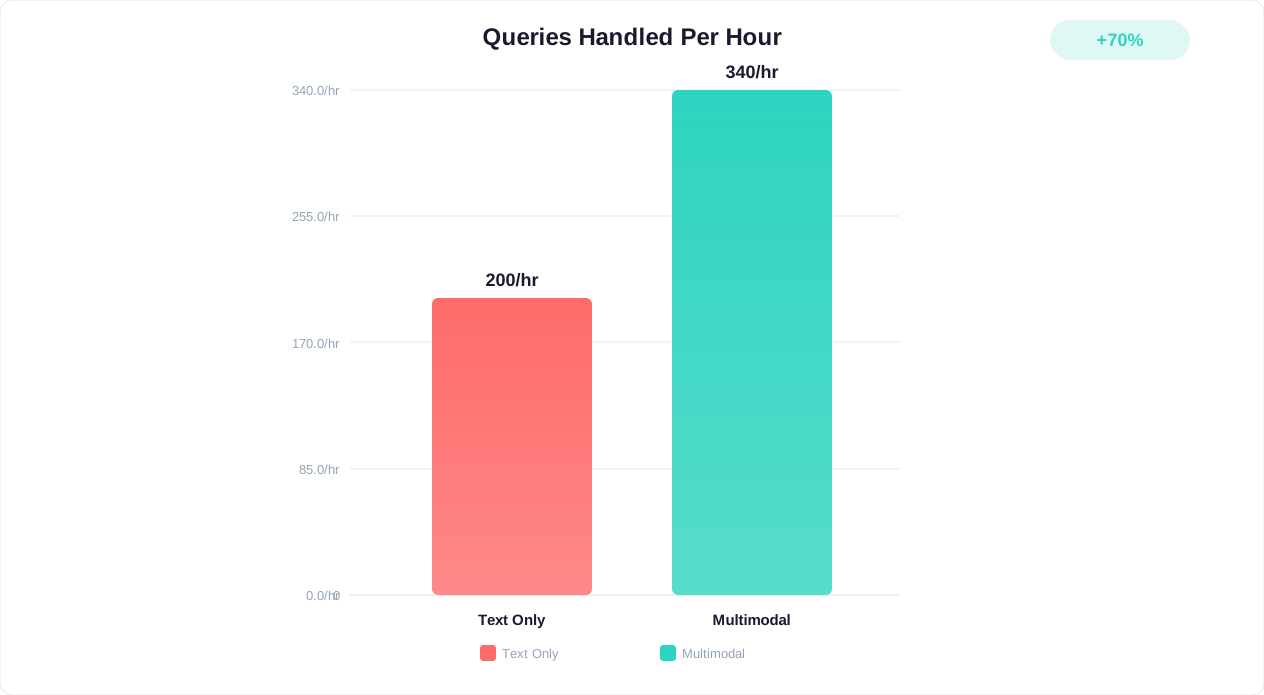
E-Commerce and Retail
| Modality | Use Case | Impact |
|---|---|---|
| Image | Visual product search ("find something like this") | 38% increase in product discovery conversion |
| Image | Damage documentation for returns | 65% faster return processing |
| Image | Size/fit estimation from product photos | 23% reduction in size-related returns |
| Document | Receipt upload for warranty claims | Eliminates manual data entry |
| Voice | Hands-free shopping while multitasking | 18% higher average order value via voice |
A customer photographs a piece of furniture they like at a friend's house. The multimodal chatbot identifies the style, suggests matching products from the catalog, and shows how they would look in different finishes — all from a single uploaded image. This represents a fundamentally different shopping experience than typing "mid-century modern coffee table dark wood."
Insurance
| Modality | Use Case | Impact |
|---|---|---|
| Image | First notice of loss (accident photos) | 72% faster initial claim processing |
| Image | Property damage assessment | Automated damage severity scoring |
| Document | Policy document queries | Customers ask questions about their specific policy |
| Document | Repair estimate upload and validation | Cross-reference against standard repair costs |
| Voice | Claims reporting while at accident scene | Critical for mobile-first claims |
After a car accident, a policyholder opens the chatbot, takes photos of the damage, speaks a description of what happened (hands may be shaking, typing is difficult), and uploads the other driver's insurance information. The chatbot processes everything, files the first notice of loss, assigns a claim number, and schedules an adjustor — all within 5 minutes of the incident. Traditional process: 2-3 phone calls over several days.
Healthcare
| Modality | Use Case | Impact |
|---|---|---|
| Image | Symptom documentation (rashes, wounds) | Better triage accuracy for visual conditions |
| Image | Medication identification | Patient safety verification |
| Document | Insurance card processing | Automated eligibility verification |
| Document | Lab result upload for telehealth prep | Clinician has results before appointment |
| Voice | Symptom description for triage | More detailed descriptions than typed text |
A patient uploads a photo of a skin condition along with a description of when it started. The symptom checker chatbot analyzes the visual presentation, correlates with described symptoms and patient history, and determines urgency level — routing to same-day dermatology if concerning features are detected, or providing home care guidance if the condition appears minor. This visual triage capability was not possible with text-only chatbots.
Real Estate and Property Management
| Modality | Use Case | Impact |
|---|---|---|
| Image | Maintenance request documentation | Contractors arrive with full context |
| Image | Move-in/move-out condition documentation | Objective damage assessment, fewer disputes |
| Document | Lease agreement queries | Tenants get answers about their specific lease terms |
| Voice | Emergency maintenance reporting | Faster reporting during urgent situations (flooding, gas smell) |
Technical Support and IT
| Modality | Use Case | Impact |
|---|---|---|
| Image | Error screenshot analysis | Instant identification of known issues |
| Image | Hardware setup verification | Visual confirmation of correct installation |
| Document | Log file analysis | Automated pattern detection in system logs |
| Voice | Troubleshooting while hands are occupied | Guide users through physical setup steps |
These industry applications demonstrate that multimodal AI is not a novelty feature — it fundamentally changes what a chatbot can resolve autonomously. For businesses looking to implement these capabilities, the starting point is identifying which modality delivers the highest-impact improvement for your specific customer interactions, then building outward from there. Our chatbot best practices guide covers the foundational elements you need in place before adding multimodal layers.
Performance Benchmarks: Speed, Accuracy, and Cost of Multimodal Processing
Deploying multimodal capabilities requires understanding the real-world performance characteristics of current technology — processing times, accuracy rates, and cost implications that affect both user experience and operational budgets.
Processing Speed Benchmarks (2026)
| Input Type | Average Processing Time | P95 Latency | User-Acceptable Threshold |
|---|---|---|---|
| Single image (product photo) | 1.8 seconds | 3.5 seconds | 5 seconds |
| Image with text extraction (receipt) | 2.4 seconds | 4.2 seconds | 5 seconds |
| Single-page PDF | 1.5 seconds | 2.8 seconds | 5 seconds |
| Multi-page PDF (5 pages) | 5.2 seconds | 8.1 seconds | 10 seconds |
| Voice input (10-second clip) | 1.2 seconds | 2.1 seconds | 3 seconds |
| Voice input (60-second clip) | 3.8 seconds | 5.5 seconds | 8 seconds |
| Complex image + reasoning | 3.5 seconds | 6.0 seconds | 8 seconds |
Accuracy Benchmarks by Task Type
| Task | Accuracy (Current Best) | Error Rate | Human Parity? |
|---|---|---|---|
| Product identification from photo | 94-97% | 3-6% | Approaching |
| Damage detection and severity | 88-93% | 7-12% | Below (requires human review for high-value claims) |
| Text extraction (printed, clear) | 99%+ | <1% | At or above parity |
| Text extraction (handwritten) | 85-92% | 8-15% | Below |
| Document classification | 96-99% | 1-4% | At parity |
| Speech recognition (clear audio, English) | 95-98% | 2-5% | At parity |
| Speech recognition (accented/noisy) | 85-93% | 7-15% | Below |
| Sentiment from voice tone | 78-85% | 15-22% | Below |
Cost Analysis per Interaction
Multimodal processing adds incremental cost to each interaction compared to text-only:
| Interaction Type | Cost per Interaction | Cost vs. Text-Only | Cost vs. Human Agent |
|---|---|---|---|
| Text-only chatbot | $0.01-$0.05 | Baseline | 95-99% savings |
| Text + 1 image | $0.03-$0.12 | 2-3x text-only | 92-98% savings |
| Text + document (1-5 pages) | $0.05-$0.15 | 3-5x text-only | 90-97% savings |
| Text + voice (avg 2 min) | $0.04-$0.10 | 2-4x text-only | 93-98% savings |
| Full multimodal (image + doc + voice) | $0.10-$0.30 | 5-10x text-only | 85-96% savings |
While multimodal interactions cost more per-unit than text-only, the key insight is that they often resolve issues that text-only chatbots cannot — meaning the comparison is not against text-only chatbot cost but against human agent cost ($8-$15 per interaction). Even the most expensive multimodal interaction at $0.30 represents a 96-98% cost reduction versus human handling.
Optimization Strategies
- Lazy processing: Only activate multimodal processing when the customer shares non-text content. Do not pre-load vision or audio models for text-only conversations
- Resolution-based routing: Use the text portion of the conversation to determine if visual/document input would actually help. "Can you share a photo of the damage?" triggers image processing only when relevant
- Compression and preprocessing: Resize images to the minimum resolution needed for accurate analysis (typically 1024x1024 for general understanding, higher for text extraction). Compress audio to opus format before transmission
- Caching: Cache processing results for common images (product catalog photos, standard forms) to avoid reprocessing identical inputs
These benchmarks help set realistic expectations and inform architecture decisions. As we discuss in our chatbot analytics guide, tracking multimodal-specific metrics (image processing success rate, document extraction accuracy, voice recognition confidence scores) alongside standard chatbot KPIs gives a complete picture of system performance.
Privacy and Compliance: Handling Images, Documents, and Voice Data Responsibly
Multimodal inputs introduce privacy complexities that text-only chatbots do not face, raising concerns addressed by NIST's AI Risk Management Framework. Images contain faces, documents contain sensitive personal data, and voice recordings are biometric data in many jurisdictions. A robust privacy framework is essential for compliant multimodal deployment.
Data Classification for Multimodal Inputs
| Input Type | Privacy Classification | Key Regulations | Retention Guidance |
|---|---|---|---|
| Product/damage photos | Low sensitivity (unless people visible) | GDPR Art. 6 (legitimate interest) | Process and delete within 30 days |
| ID document photos | High sensitivity | GDPR Art. 9, KYC regulations | Verify and delete immediately, or retain per regulatory requirement |
| Medical images | Special category data | GDPR Art. 9, HIPAA (US) | Explicit consent required, strict access controls |
| Financial documents | High sensitivity | GDPR, PCI DSS, SOX | Process and delete or encrypt with limited retention |
| Voice recordings | Biometric data (many jurisdictions) | GDPR Art. 9, BIPA (Illinois), CCPA | Transcribe and delete audio, or explicit biometric consent |
| Scanned contracts | Medium-high sensitivity | GDPR, eIDAS (EU) | Retain per contractual/legal requirement |
Voice Data as Biometric Information
Voice recordings deserve special attention. In the EU, voice prints are classified as biometric data under GDPR Article 9, requiring explicit consent for processing. In the United States, Illinois' Biometric Information Privacy Act (BIPA) imposes strict requirements including written consent, data retention limits, and provides a private right of action with statutory damages of $1,000-$5,000 per violation.
Best practices for voice data handling:
- Transcribe immediately, delete audio: Convert speech to text in real-time and discard the audio recording. This removes the biometric element while preserving the conversational content
- No voiceprint creation: Do not create or store voice biometric profiles unless you have explicit, specific consent and a clear use case (like voice-based authentication)
- Inform before recording: If you must retain audio (for quality assurance, compliance recording requirements), clearly inform the user before recording begins and offer a text alternative
- Regional compliance: Implement geo-aware policies that apply the strictest applicable standard. A user in Illinois gets BIPA protections; a user in the EU gets GDPR Article 9 protections
Image Privacy Considerations
- Incidental faces: Customer photos may contain faces of bystanders. Implement automatic face detection and blurring for any faces not relevant to the support request
- Location data: Images often contain EXIF metadata including GPS coordinates, timestamps, and device information. Strip EXIF data immediately upon upload unless location is relevant to the support case
- Background content: Images may unintentionally reveal sensitive information (visible monitors, documents, license plates). Process only the relevant portion of the image and do not retain analysis of incidental content
Document Security Requirements
- End-to-end encryption: Documents should be encrypted from the moment of upload through processing to storage (or deletion)
- Minimal retention: Extract needed information and delete the original document. Do not retain full documents unless legally required
- Redaction before storage: If transcripts must be retained for training, automatically redact personal identifiers from document content in the stored version
- Access logging: Every access to uploaded documents must be logged with who, when, and why
Consent Management for Multimodal Data
Extend your consent framework to cover each modality explicitly:
- "I consent to image analysis" — separate from text data consent
- "I consent to voice recording and transcription" — separate from image consent
- "I consent to document processing" — with specific mention of what data will be extracted and how long it will be retained
This granular consent approach aligns with GDPR's purpose limitation principle and the consent management frameworks discussed in our comprehensive GDPR compliance guide. Conferbot's consent management system supports modality-specific consent gates, ensuring each type of input is only processed when the user has provided appropriate authorization for that specific data type.
Getting Started: Building Your First Multimodal Chatbot
Implementing multimodal capabilities does not require rebuilding your chatbot from scratch. The most successful deployments follow an incremental approach — adding one modality at a time, validating its impact, and expanding based on data.
Step 1: Identify Your Highest-Impact Modality
Analyze your current support interactions to determine which modality would resolve the most issues:
- If your top issue is "customer cannot describe the problem" → Start with image upload (error screenshots, product photos)
- If your top issue is "customer needs to share documentation" → Start with document processing (receipts, forms, statements)
- If your top issue is "mobile users abandoning long forms" → Start with voice input for data capture
- If your top issue is "visual product questions" → Start with image-based product search
Review your chatbot analytics to identify which conversation types have the highest abandonment rates or escalation rates — these are candidates where multimodal input could provide immediate improvement.
Step 2: Choose Your Implementation Approach
Based on your current infrastructure:
| Current Setup | Recommended Approach | Timeline |
|---|---|---|
| Rule-based chatbot | Add image upload with external vision API processing | 2-4 weeks |
| LLM-powered chatbot (GPT/Claude) | Upgrade to multimodal model version (GPT-4o, Claude Vision) | 1-2 weeks |
| Platform-based chatbot (Conferbot, etc.) | Enable platform's built-in multimodal features | Days |
| Custom-built AI system | Add modality-specific processing pipeline (sidecar pattern) | 4-8 weeks |
Step 3: Design the Multimodal UX
The user interface must make multimodal input intuitive and discoverable:
- Clear upload affordances: Camera icon, paperclip icon, and microphone icon should be prominently visible in the chat input area
- File type guidance: Show supported formats and size limits before upload ("Upload an image: JPG, PNG, or HEIC up to 10 MB")
- Processing feedback: Display clear progress indicators during analysis ("Analyzing your image..." with a subtle animation)
- Contextual prompts: When the conversation suggests visual input would help, proactively suggest it: "Would you like to share a photo of the issue? It will help me diagnose the problem faster."
- Graceful fallbacks: If processing fails, offer alternatives without making the user start over
Step 4: Implement Safety and Quality Guardrails
- Content moderation: Screen uploaded images for inappropriate content before processing
- File security: Scan all uploads for malware. Restrict executable file types
- Size and rate limits: Prevent abuse through reasonable upload limits (5 images per conversation, 20 MB total)
- Confidence gates: When visual analysis confidence is below threshold, ask for human confirmation rather than acting on uncertain interpretation
- Audit logging: Record what was uploaded, what was extracted, and what action was taken — for both compliance and quality improvement
Step 5: Measure and Iterate
Track multimodal-specific metrics from day one:
- Adoption rate: What percentage of conversations include multimodal input? (Target: 15-30% within first month if promoted)
- Resolution impact: Do conversations with multimodal input resolve faster? Higher first-contact resolution?
- Processing success rate: What percentage of uploads are successfully processed versus failing or requiring fallback?
- Customer satisfaction delta: CSAT for multimodal conversations versus text-only (expect 10-20% improvement)
The multimodal chatbot space is rapidly evolving, with new capabilities appearing quarterly. Building a modular architecture now — where each modality can be upgraded independently — positions your chatbot to adopt improvements in vision AI, document understanding, and speech processing as they emerge. For organizations ready to begin, Conferbot provides built-in support for rich media uploads that integrate with AI processing pipelines, offering a foundation that can be extended as your multimodal needs grow. Pair this with training on your business data to ensure the AI understands your specific products, forms, and visual context when processing customer uploads.
Was this article helpful?
Multimodal AI Chatbots FAQ
Everything you need to know about chatbots for multimodal ai chatbots.
About the Author

Conferbot Team specializes in conversational AI, chatbot strategy, and customer engagement automation. With deep expertise in building AI-powered chatbots, they help businesses deliver exceptional customer experiences across every channel.
View all articles