
Improve Your Chatbot Conversion Rate Using Rich Media
Using GIFs, images, videos, decks, and HTML embeds you can make your chatbot more effective at converting prospects into leads.
Everything You Need to Engage Visually
From animated GIFs to video embeds, slide decks to emoji reactions - create conversations that captivate.
Make Lead Capture Fun Using GIFs
There's just no denying it. GIFs make conversations more fun. By adding them to your chatbot you can add turn lead generation into an enjoyable experience for your prospects.
Troubleshoot Queries Using Videos
Embed videos from Youtube, Wistia, and Vimeo into your Conferbot chatbot to troubleshoot any queries that your prospects might have during the lead generation process.
Convince Prospects Using Slide Decks
Slide decks are a great way to make a convincing case for your product or service. Embed your sales deck into your chatbot using services like Scribd and Speaker Deck.
Why Rich Media Matters
Turn every chatbot interaction into a memorable, conversion-driving experience.
Instant Visual Impact
Capture attention in seconds with eye-catching images, GIFs, and video content that stops the scroll.
Boost Conversions
Product carousels and visual CTAs drive 40-50% higher click-through and purchase rates.
Mobile-First Design
All rich media is automatically optimized for every device - phones, tablets, and desktops.
CDN-Powered Delivery
Lightning-fast media loading worldwide with automatic compression and caching.
Cross-Platform
Works seamlessly on WhatsApp, Messenger, Instagram, Telegram, Slack, and your website.
No Code Required
Drag-and-drop media blocks into your chatbot flow. Upload, configure, publish.
How it works 💁🏻♀️
Get started in minutes. No design skills required.
Create chatbot conversation workflow
Pick a pre-built chatbot template from 1000+ choices and make changes on it using our drag-n-drop builder.
Bring customers to your chatbot
Publish your chatbot either as a widget on your website, as a standalone page, or on WhatsApp
Sit & watch the data rolling in
View and analyze conversation data inside the Conferbot dashboard. Use 1000+ integrations to move data to your CRM/Database.
Rich Media for Every Industry
See how businesses across industries use visual chatbot experiences to drive results.
E-Commerce
Product galleries, video demos, size guides, and visual checkout flows
Real Estate
Property tours, floor plans, neighborhood maps, and virtual walkthroughs
Education
Video lessons, interactive quizzes, visual progress tracking, and resources
Healthcare
Visual symptom guides, appointment confirmations, and medical infographics
Restaurants
Menu carousels, food photography, reservation confirmations, and promo videos
B2B / SaaS
Product demos, onboarding videos, feature comparisons, and case studies
Ready to Make Your Chatbot Visual?
Join thousands of businesses using rich media to create engaging, high-converting chatbot experiences. Start free, no credit card required.
Rich Media FAQ
Everything you need to know about implementing AI chatbots for rich media. Get answers about features, pricing, implementation, security, and industry-specific solutions.
What Is Rich Media and Why Text-Only Chatbots Underperform
Rich media in chatbots refers to any non-text content element embedded within a conversation -- images, videos, carousels, GIFs, audio clips, file attachments, interactive buttons, and structured cards. These visual and interactive elements transform chatbots from text-only Q&A interfaces into immersive experiences that engage users, communicate complex information efficiently, and drive significantly higher conversion rates than plain text alone.
The data on rich media impact is unambiguous. HubSpot research shows that messages containing images receive 150% more engagement than text-only messages. Interactive carousels tend to generate substantially higher click-through rates than text links or static buttons. Video messages achieve 82% view completion rates when kept under 60 seconds, according to Wyzowl's 2024 video marketing survey. For e-commerce specifically, Shopify's internal data shows product carousels in chat increase add-to-cart rates by 35% compared to text product descriptions.
Why does rich media perform so dramatically better? Three reasons. First, visual processing is faster -- humans process images 60,000x faster than text, making product comparisons and feature explanations almost instantaneous with visuals. Second, interactive elements reduce friction -- a carousel with "Add to Cart" buttons converts better than a text description followed by a link because the action is embedded in the content. Third, rich media creates emotional engagement -- video testimonials, before-and-after images, and animated demonstrations trigger emotional responses that text cannot replicate.
Conferbot supports the full spectrum of rich media types across all deployment channels. Whether your bot runs on your website, WhatsApp, or Facebook Messenger, you can embed visual content that adapts to each platform's capabilities. The no-code builder makes adding rich media as simple as dragging and dropping elements into your conversation flow -- no design or development skills required. For data on how rich media impacts specific industries, see our customer support chatbot guide.
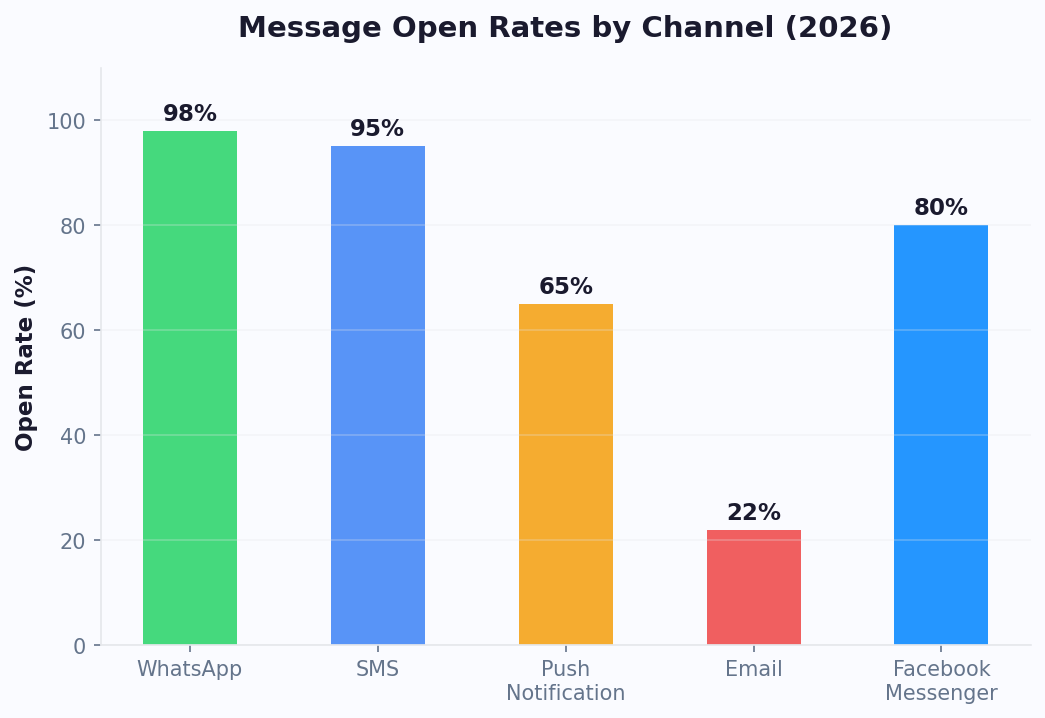
Media Types: A Complete Guide to Chatbot Visual Elements
Each rich media type serves a specific purpose in the conversation flow. Choosing the right format for each use case maximizes engagement while keeping conversations focused and fast-loading. Here is a comprehensive comparison of every media type available in Conferbot chatbots.
| Media Type | Formats | Avg CTR | Best Use Case | Size Limit |
|---|---|---|---|---|
| Static images | JPG, PNG, WebP | 14-18% | Product showcase, confirmations, maps | 5MB |
| Carousel cards | Image + text + buttons (up to 10) | 18-25% | Product browsing, plan comparison, portfolio | 5MB/card |
| Inline video | MP4, WebM, YouTube, Vimeo | 12-16% | Tutorials, demos, testimonials, tours | 50MB (or embed) |
| GIF animations | GIF, animated WebP | 10-14% | Micro-tutorials, reactions, onboarding steps | 8MB |
| Quick-reply buttons | Text buttons (up to 13) | 30-40% | Navigation, multi-choice, confirmations | N/A |
| File attachments | PDF, DOCX, XLSX, CSV | 8-12% | Brochures, price lists, reports, forms | 10MB |
| Audio messages | MP3, OGG, WAV | 6-9% | Personalized greetings, accessibility | 25MB |
| Location maps | Google Maps embed | 16-20% | Store locator, directions, service areas | N/A |
The key to effective rich media usage is matching the format to the communication goal. Showing a product? Use a carousel with action buttons. Explaining a process? Use a short video or animated GIF. Offering options? Quick-reply buttons give the highest CTR of any element. Sharing documentation? File attachments with preview thumbnails. Every template in our template library includes optimized rich media configurations for its specific use case.
Engagement Data: How Rich Media Impacts Conversion Metrics
Rich media is not just about making chatbots look better -- it directly and measurably impacts business outcomes. Across Conferbot deployments, we track the engagement and conversion impact of different media strategies, revealing clear patterns in what drives results versus what is merely decorative.
Key Engagement Findings
- Carousels lift product page visits -- when chatbots show product carousels rather than text links, significantly more users click through to product pages. The visual preview reduces uncertainty about what they will find.
- Video testimonials boost conversion -- embedding short customer testimonial videos at decision points (pricing discussion, feature comparison) provides social proof that text reviews cannot match.
- Image-based quizzes see high completion rates -- noticeably higher than text-only questionnaires. Visual quizzes ("Which style matches your preference?") feel like games rather than forms.
- Carousel + quick-reply combinations drive strong engagement -- showing options visually and providing one-tap selection creates the lowest-friction conversion path possible.
- GIF tutorials reduce support escalation -- showing how to do something in a 3-second animation resolves issues that would otherwise require a human explanation.
Conversion Impact by Industry
E-commerce chatbots with rich media tend to see higher add-to-cart rates, stronger cart recovery (with product image reminders), and higher average order value from carousel-based cross-selling. Real estate chatbots with property image carousels generate more viewing appointments than text-only property descriptions. Healthcare chatbots with visual symptom selectors speed up intake completion. Education chatbots with video course previews see higher enrollment rates.
The consistent finding across industries: rich media reduces the cognitive effort required to make decisions, and lower effort means higher conversion. For teams building lead generation flows, the combination of visual engagement and frictionless interaction creates a powerful conversion engine. Explore pre-built rich media flows in our template library, or calculate the revenue impact with our ROI calculator.
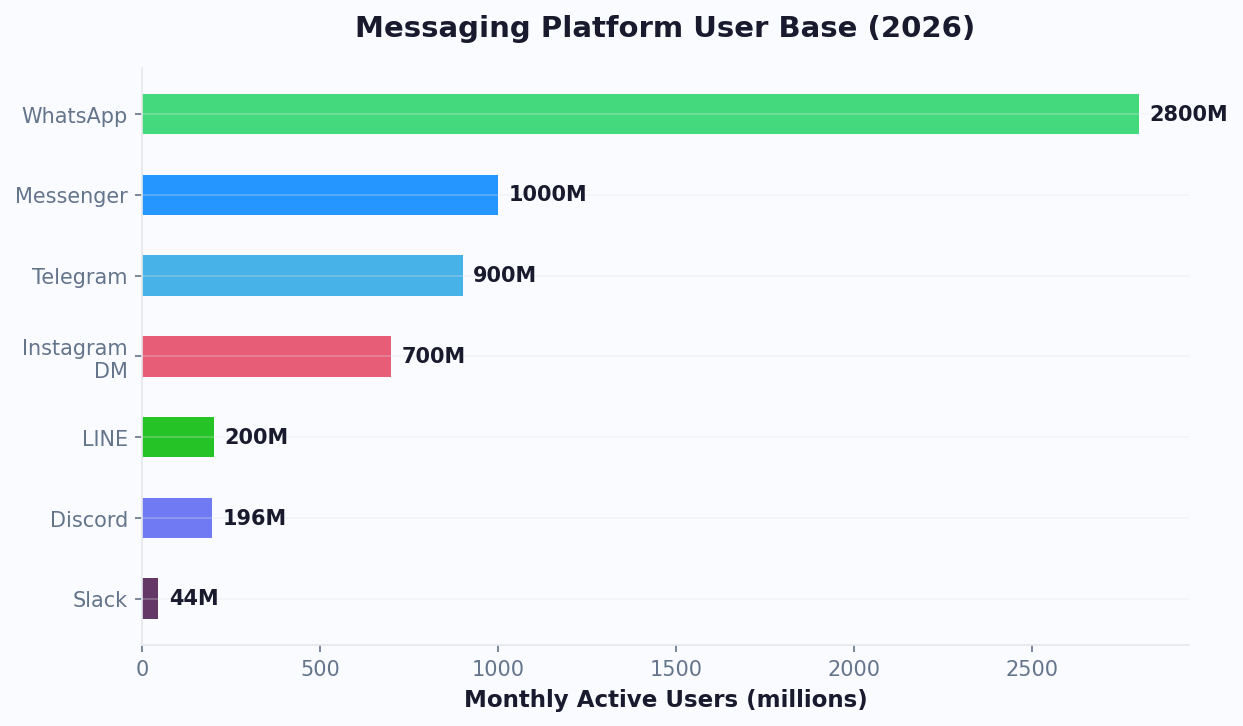
Mobile Optimization: Ensuring Rich Media Performs on Every Device
The majority of chatbot interactions now happen on mobile devices, making mobile optimization non-negotiable for rich media. Media that looks stunning on desktop but loads slowly, displays incorrectly, or overflows on mobile creates a worse experience than no media at all. Conferbot's media pipeline handles optimization automatically, but understanding the principles helps you choose and configure media for maximum cross-device performance.
Automatic Optimization Features
- Responsive image sizing -- images are served at appropriate resolutions based on device screen size. A 4K image is not downloaded on a phone -- a pre-scaled version is served instead, reducing load time by 80%.
- Lazy loading -- media below the visible chat area is not loaded until the user scrolls to it. This keeps initial widget load time under 200ms regardless of how much media the conversation contains.
- Format conversion -- images are automatically converted to WebP format for browsers that support it, reducing file size by 25-30% with no visible quality loss.
- CDN delivery -- all media files are served through a global content delivery network with edge locations in 50+ countries. Load times stay under 200ms worldwide.
- Carousel adaptation -- on narrow mobile screens, horizontal carousels automatically adjust card width and show navigation indicators. Touch gestures (swipe) work natively.
Mobile-Specific Best Practices
Even with automatic optimization, designing media with mobile in mind produces better results:
- Image dimensions -- design at 600x400px minimum. Images will be scaled to fit the chat bubble width (typically 250-320px on mobile), so ensure key visual elements are visible at small sizes.
- Text on images -- avoid small text overlaid on images. It becomes illegible on mobile screens. If text is essential, make it large and high-contrast.
- Video length -- keep under 60 seconds. Mobile users have shorter attention spans and are often on cellular data with bandwidth limitations.
- Carousel card count -- while you can have up to 10 cards, mobile users rarely scroll past 5. Front-load your best content.
- Button tap targets -- ensure all interactive elements have minimum 44x44px tap areas for comfortable mobile interaction.
Test your rich media on actual mobile devices using Conferbot's mobile preview mode. The simulator shows exactly how your conversation appears on iPhone and Android screens, including scrolling behavior, carousel swiping, and video playback. For teams with WhatsApp chatbots, mobile optimization is especially critical since WhatsApp is predominantly a mobile-first platform.
Channel Compatibility: How Rich Media Adapts Across Platforms
Not every channel supports every media type equally. WhatsApp has different limitations than Messenger, which differs from web widgets. Understanding these differences ensures your rich media displays correctly everywhere -- or gracefully degrades on platforms with limited support. Conferbot automatically handles cross-channel adaptation, but knowing the constraints helps you design more effective flows.
Platform Capabilities
| Media Type | Web Widget | Messenger | ||
|---|---|---|---|---|
| Images | Full support | Full support | Full support | Full support |
| Carousels | Full (up to 10 cards) | Limited (list messages) | Full (generic template) | Limited |
| Video | Inline + embed | Direct (opens player) | Inline playback | Direct |
| GIF | Autoplay | Autoplay | Autoplay | Autoplay |
| Quick replies | Full (unlimited) | Up to 3 buttons | Up to 13 | Up to 13 |
| Files/PDFs | Preview + download | Direct download | Direct download | Not supported |
| Audio | Inline player | Voice message format | Audio attachment | Not supported |
Graceful Degradation
When you design a flow with a carousel for web, what happens when that same flow is triggered on WhatsApp where native carousels are not supported? Conferbot automatically converts the carousel to WhatsApp's list message format -- showing items as a numbered list with selection buttons. The customer still sees all options and can select one, even though the visual format differs. Similarly, embeds that do not render on certain platforms are replaced with clickable links plus a thumbnail preview. This automatic adaptation means you design once and deploy everywhere without maintaining separate flows per channel. Review channel-specific capabilities on our comparison page.
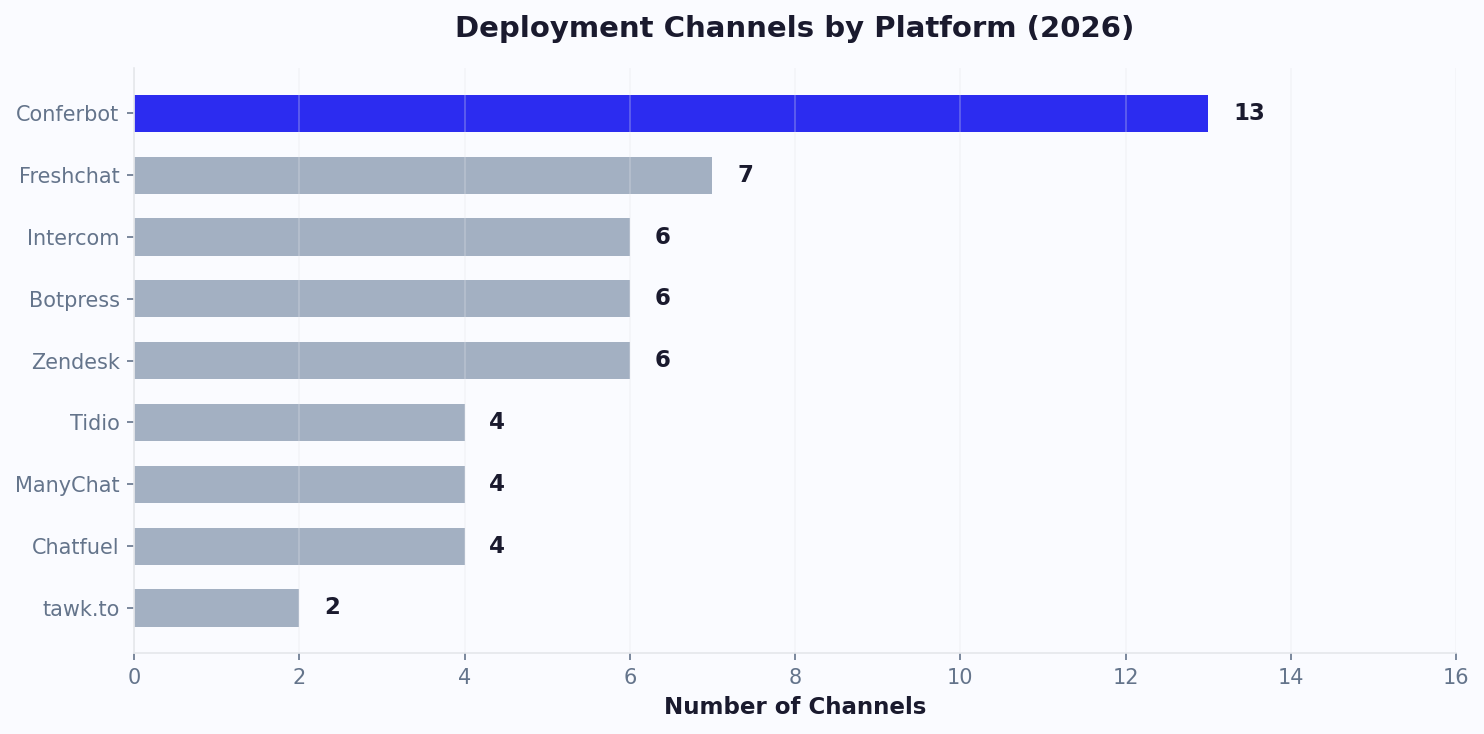
E-commerce Rich Media: Product Carousels, Reviews, and Visual Shopping
E-commerce is where rich media chatbots deliver the most measurable revenue impact. The ability to browse products visually within a conversation -- seeing images, comparing options side by side, and purchasing with a single tap -- creates a shopping experience that rivals dedicated apps while requiring zero downloads or navigation. Shopify merchants using Conferbot's product carousel integration tend to report higher add-to-cart rates and higher average order values compared to text-based product recommendations.
Product Carousel Integration
When connected to your e-commerce platform (Shopify, WooCommerce, or custom API), product carousels pull real-time data including product images, current pricing, inventory status, and customer reviews. A customer who asks "Show me running shoes under $100" sees a carousel of matching products with high-quality images, star ratings, prices, and "Add to Cart" buttons -- all generated dynamically from your live catalog. No manual product card creation needed.
Visual Shopping Flows
- Style quizzes -- image-based preference selection ("Which look do you prefer?") using visual grids that narrow product recommendations based on aesthetic preferences
- Before/after comparisons -- side-by-side images showing product results, especially effective for beauty, home improvement, and fitness products
- Video demos -- short product demonstration videos embedded at the moment of purchase consideration, boosting conversion
- User-generated content -- customer photos integrated into product recommendations for authentic social proof
- 360-degree views -- interactive product views on web widgets that let customers examine products from every angle without leaving the chat
Cart Recovery with Rich Media
When customers abandon their cart, rich media follow-up messages on WhatsApp and Messenger achieve strong recovery rates -- far higher than email reminders. The secret is showing the actual product images alongside a direct "Complete Purchase" button. The visual reminder triggers recognition and desire that a text-only "You left items in your cart" email cannot match. Browse e-commerce-optimized flows in our template library.
Design Best Practices: Creating Visually Effective Chatbot Experiences
Rich media enhances chatbot conversations only when used thoughtfully. Poorly chosen or low-quality media creates clutter, slows conversations, and can actually decrease engagement compared to well-written text. These design best practices, derived from analyzing top-performing Conferbot deployments, help you maximize the impact of every visual element.
Image Guidelines
- Minimum resolution: 600x400px -- anything smaller looks pixelated on high-DPI screens. For carousels, use consistent aspect ratios (3:2 or 16:9) across all cards.
- Custom over stock -- custom product photos and branded graphics outperform stock imagery in engagement. Users recognize generic stock photos and disengage.
- High contrast and simplicity -- images viewed in small chat bubbles need clear, uncluttered compositions. Avoid busy backgrounds, small text overlays, or detailed infographics that become illegible at chat scale.
- Consistent style -- maintain visual consistency across all media in a conversation. Mixed styles (some photos, some illustrations, some screenshots) feel unprofessional.
Video Guidelines
- Length: 15-60 seconds -- completion rates drop sharply after 60 seconds. For longer content, split into a series of short clips.
- First 3 seconds matter -- front-load the most compelling visual. Users decide whether to watch within the first 3 seconds.
- No sound dependency -- many mobile users browse with sound off. Add captions or ensure the video communicates visually without audio.
- Thumbnail selection -- choose a thumbnail that clearly shows what the video is about. Generic or blurry thumbnails dramatically reduce play rates.
Carousel Guidelines
- 3-5 cards optimal -- while you can add up to 10, data shows engagement drops after the 5th card. Put your best content first.
- One CTA per card -- multiple buttons per card create decision paralysis. One clear action ("View", "Add to Cart", "Book Now") performs best.
- Progressive disclosure -- use carousels to show options at the category level, then drill into detail when selected. Avoid overwhelming with all details upfront.
Conferbot's media library includes built-in optimization suggestions -- upload an image and get recommendations for cropping, compression, and format conversion. For inspiration, browse our template gallery where each template showcases optimized rich media usage for its specific use case.
Common Mistakes: What to Avoid with Chatbot Rich Media
Rich media misuse is surprisingly common, and the mistakes often go undetected because teams measure overall bot performance without isolating media impact. Here are the most frequent mistakes we see in chatbot deployments, along with specific fixes that have improved engagement when corrected.
Mistake 1: Using Media as Decoration, Not Communication
Adding a generic stock photo to "make the message look nice" without it communicating information is wasted bandwidth and visual noise. Every media element should answer a question, show a product, demonstrate a process, or provide a choice. If removing the media would not reduce the message's usefulness, remove it. Fix: audit every media element and ask "what information does this communicate that text alone cannot?"
Mistake 2: Overloading Conversations with Media
Sending 5 images, 2 videos, and a carousel in a single conversation turn overwhelms users. Cognitive overload leads to decision paralysis and conversation abandonment. Fix: limit to 1-2 media elements per turn. If you need to show many items, use a single carousel rather than separate image messages.
Mistake 3: Ignoring Load Times
A 5MB uncompressed image takes 3-5 seconds to load on 3G mobile connections. Users waiting more than 2 seconds for media to appear often send another message or leave. Fix: compress all images (target under 200KB), use WebP format, and implement progressive loading so text appears immediately while media loads.
Mistake 4: No Fallback for Unsupported Channels
A carousel designed for web that hits a channel without carousel support shows nothing -- the user sees a blank or error. Fix: always configure fallback content (text alternatives, image links) for media elements. Conferbot handles this automatically, but verify fallbacks in the preview for each channel.
Mistake 5: Static Product Images from Launch
Product images uploaded once and never updated become stale. New packaging, updated designs, or seasonal variations make old images misleading. Fix: connect product media directly to your e-commerce platform via integrations so images update automatically when your catalog changes.
Mistake 6: Carousels Without Clear Actions
Beautiful carousels without prominent action buttons are essentially slideshows -- engaging to browse but not converting. Fix: every carousel card needs a clear CTA button. "Learn More," "Book Now," "Add to Cart," or "Select This" -- make the next step obvious and one-tap accessible.
Avoiding these mistakes is the difference between rich media that drives measurable business outcomes and rich media that simply increases page weight. Review your current chatbot media against these criteria, or start fresh with optimized templates.
Implementation Guide: Adding Rich Media to Your Chatbot
Adding rich media to your Conferbot chatbot is a straightforward process through the visual builder. No design tools or development skills are needed -- the builder provides drag-and-drop media blocks with built-in optimization. Here is the complete implementation process from setup to deployment.
Step 1: Prepare Your Media Assets (10-15 minutes)
Gather the images, videos, and files you want to use. For product images, export from your e-commerce platform at 600x400px minimum. For videos, trim to 60 seconds maximum and export as MP4 (H.264 codec, under 50MB). For documents, ensure PDFs are under 10MB and properly formatted for mobile viewing. Store original high-resolution versions -- Conferbot will compress and optimize automatically during upload.
Step 2: Upload to Media Library (5 minutes)
Navigate to Content > Media Library in your dashboard. Upload files individually or in batch. The system automatically: compresses images, generates WebP variants, creates multiple size versions for responsive delivery, extracts video thumbnails, and generates preview images for documents. Tag media with descriptive labels for easy retrieval when building flows.
Step 3: Add Media Nodes to Your Flow (10 minutes)
In the conversation builder, add rich media nodes at appropriate points. Available node types include: Image Message, Video Message, Carousel, File Share, Quick Replies, and Gallery. Each node has configuration options for: media source (library or dynamic URL from API), accompanying text, action buttons, and fallback content for unsupported channels.
Step 4: Configure Dynamic Media (Optional, 10 minutes)
For chatbots connected to product catalogs or content APIs via the integrations hub, configure dynamic media that pulls images and data from external sources in real-time. This ensures product carousels always show current inventory, pricing, and images without manual updates.
Step 5: Test Across Channels (5 minutes)
Use the multi-channel preview to verify how your rich media appears on web widget, WhatsApp, and Messenger. Check that: images display correctly at mobile sizes, carousels scroll smoothly, videos play without buffering, and fallback content shows on limited channels. Make adjustments as needed.
Step 6: Deploy and Monitor
Publish your updated flow and monitor rich media engagement in the analytics dashboard. Track per-element CTR, video completion rates, carousel interaction patterns, and conversion attribution. Use this data to A/B test different media approaches -- Conferbot's split testing feature lets you compare carousel vs single image, video vs GIF, or different image styles to find what resonates with your audience.
See pricing plans for media storage limits and CDN bandwidth, or start with our template library where rich media flows are pre-configured and ready to customize. Calculate the revenue impact of rich media engagement with our chatbot ROI calculator.
Continue Exploring
Explore features, connect third-party tools, and browse ready-made templates.
Deep-dive pillar guides, real use cases, and the chatbot & AI glossary.