
SaaS Onboarding Chatbot
Free Technology Chatbot Template
Personalized onboarding flow for SaaS products


What Is a SaaS Onboarding Chatbot?
A SaaS onboarding chatbot is a conversational AI assistant embedded directly within your software product that guides new users from their very first login through complete product activation. Unlike static product tours or one-size-fits-all email drip sequences, an onboarding chatbot delivers personalized, interactive guidance that adapts to each user's role, goals, technical proficiency, and real-time behavior within your application. It functions as a dedicated customer success manager for every single user — available 24/7, infinitely patient, and consistently delivering the exact right information at the exact right moment.
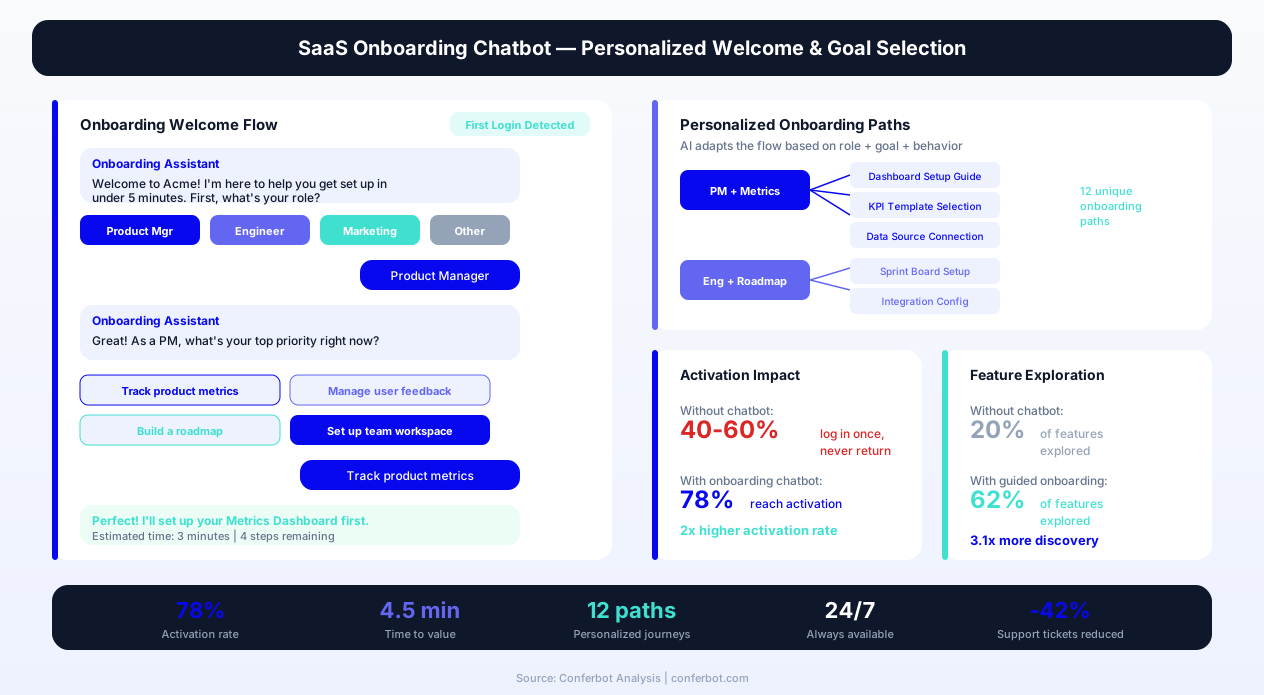
The challenge facing every SaaS company in 2026 is activation. Research from ProductLed shows that 40-60% of free trial users log in once and never return. Among those who do return, the average user explores only 20% of available features before making their upgrade decision. This means the vast majority of potential customers never experience the core value proposition that your product was built to deliver. They churn not because your product lacks value, but because they never found it.
Traditional onboarding tools — Intercom at $100-500/month, Product Fruits at $79-399/month, Appcues at $249-879/month — deliver tooltip overlays and guided tours that users dismiss within seconds. They are inherently one-directional: they push information at users without understanding whether that information is relevant, wanted, or understood. A conversational onboarding chatbot flips this model. It asks questions, listens to responses, adapts its guidance, answers follow-up questions in real time, and tracks comprehension through action — not just click-through.
Conferbot's SaaS onboarding template deploys on your product dashboard using a no-code visual builder. It integrates with your existing user database through our API integration layer, connects to your product analytics to trigger contextual interventions, and works alongside (not instead of) your existing onboarding emails and documentation. The result: 60%+ reduction in support ticket volume, 40% improvement in time-to-value, and measurably higher activation and retention rates across every user segment.
This comprehensive guide covers everything SaaS product teams, customer success leaders, and founders need to know about deploying, optimizing, and measuring conversational onboarding automation in 2026 — from initial architecture decisions to advanced personalization strategies that drive enterprise-grade results.
Welcome Flow Architecture: The Critical First 5 Minutes
The welcome flow is the single most important component of your SaaS onboarding chatbot. Research from Mixpanel's 2026 Product Benchmarks report shows that users who complete a meaningful action within 5 minutes of their first login are 3.2x more likely to become paying customers than users who do not. Your welcome flow must accomplish three objectives simultaneously: make the user feel oriented, surface their specific goal, and guide them to their first value moment — all within that critical five-minute window.
The Personalization Handshake
The welcome flow begins with what we call the "personalization handshake" — a brief, conversational exchange that collects just enough context to personalize the entire onboarding journey. This is not a lengthy survey. It is 2-3 carefully designed questions that feel natural and immediately useful:
Question 1 — Role identification: "Welcome to [Product]! To get you started quickly, what best describes your role?" Options: Product Manager, Developer, Marketer, Executive, Support Lead, Other. This determines which features to highlight first and which use cases to emphasize.
Question 2 — Goal selection: "What is the #1 thing you want to accomplish with [Product] today?" Options are dynamically generated based on role — a developer sees "Set up API integration," "Configure webhooks," "Test in sandbox," while a marketer sees "Create my first campaign," "Import contacts," "Build an automation."
Question 3 — Experience calibration: "Have you used a tool like [Product] before, or is this category new to you?" This calibrates the depth of explanation — experienced users get shortcuts and power-user tips, while novices get more detailed step-by-step guidance.
First Value Moment Routing
Based on the personalization handshake, the chatbot routes the user to their fastest path to value. This is not generic — it is a specific, actionable sequence tailored to their stated goal:
| User Role | Stated Goal | First Value Path | Time to Value |
|---|---|---|---|
| Product Manager | Track team progress | Create project → Add first task → Invite team member | 3 minutes |
| Developer | Set up API | Generate API key → Make first call → View response | 4 minutes |
| Marketer | Send first campaign | Import 5 contacts → Choose template → Preview email | 5 minutes |
| Executive | See reporting | Connect data source → View sample dashboard → Customize | 3 minutes |
| Support Lead | Set up helpdesk | Create first ticket category → Set up auto-reply → Test flow | 4 minutes |
Progressive Disclosure vs. Information Overload
The welcome flow uses progressive disclosure — showing only what the user needs right now, with the rest available on request. Instead of presenting a 15-item checklist on first login (which research shows creates anxiety and paralysis), the chatbot presents one clear next step at a time. After each step is completed, it celebrates the progress and introduces the next step with context about why it matters. This creates a sense of momentum and achievement rather than overwhelm.
The chatbot also provides an escape hatch for advanced users: "If you already know your way around, you can skip ahead — just ask me about anything specific." This ensures power users do not feel patronized while still providing comprehensive support for those who need it.
Feature Discovery Engine: Intelligent Surface Area Expansion
Most SaaS products suffer from a discoverability problem: they have invested millions in building powerful features that the majority of users never find. Pendo's 2026 State of Product report reveals that the average SaaS product has only 20-30% of its features actively used by 80% of its user base. The remaining 70-80% of features sit unused — not because they lack value, but because users never encounter them in the right context at the right time. A feature discovery engine built into your onboarding chatbot solves this by proactively introducing features when they become relevant to each user's workflow.
Context-Triggered Feature Introduction
Rather than dumping a feature list on users during their first session, the chatbot introduces new features when behavioral signals indicate readiness. Each feature introduction follows a three-part structure that maximizes adoption:
1. Context hook: "I noticed you just [completed specific action]. Nice work!" This acknowledges the user's progress and creates a natural bridge to the next recommendation.
2. Benefit frame: "There is a feature that makes [related task] even faster — it can save you [specific time/effort metric] each week." This frames the feature in outcome language tied to the user's demonstrated workflow.
3. Low-commitment action: "Want me to show you how it works? It takes about 30 seconds." This reduces friction by setting clear time expectations and making the commitment feel small.
Feature Discovery Matrix
| Feature | Description | Operational Benefit | Customer Benefit |
|---|---|---|---|
| Welcome Flow Builder | Visual drag-and-drop welcome sequence creator | Reduces engineering time for onboarding changes by 80% | Personalized first-login experience matching user role |
| Milestone Tracking | Automatic detection of activation events | Identifies at-risk users before they churn | Users receive timely help at exactly the moment they need it |
| Tutorial Walkthroughs | Step-by-step interactive guides triggered contextually | Deflects 60% of how-to support tickets | Learn features within the workflow without leaving context |
| Setup Wizard Automation | Multi-step configuration guided by chatbot | Reduces setup abandonment by 45% | Complex configurations feel simple and achievable |
| Upgrade Intelligence | Usage-based plan recommendation engine | Increases expansion revenue by 35% with contextual offers | Users discover premium features at moments of genuine need |
| Feedback Collection | In-context micro-surveys and NPS at key moments | 3x response rate vs. email surveys | Voice is heard without interrupting workflow |
| Integration Connector | Guided setup for third-party tool connections | Users who connect 1+ integration retain 45% better | Existing workflow tools work seamlessly with new product |
| In-App Knowledge Base | Conversational search across help docs | 70% reduction in live support contacts for common questions | Instant answers without leaving the product context |
Adoption Scoring and Gap Analysis
The chatbot maintains a real-time feature adoption score for each user — tracking which core features they have engaged with and which remain undiscovered. When the adoption score plateaus (the user stops exploring new features for 3+ days), the chatbot re-engages with a targeted feature suggestion based on the largest gap between what the user is doing and what similar successful users have done. This "users like you also use..." approach leverages social proof while delivering genuinely relevant recommendations.
Integration with your product analytics via API webhooks allows the chatbot to receive real-time event data — page views, button clicks, feature usage, errors encountered — and use this data to make intelligent decisions about which feature to surface next. This is not guesswork; it is data-driven personalization that improves with every user interaction.
Ready to try SaaS Onboarding Chatbot?
Deploy this template in under 10 minutes. No coding required.
Use This Template Free →Tutorial Walkthroughs: Interactive Learning That Sticks
Static documentation is where user engagement goes to die. Research from WalkMe shows that only 1 in 5 users who open a help article successfully complete the task they were trying to accomplish. The disconnect between reading instructions and executing them in the actual interface creates a cognitive load gap that most users cannot bridge alone. Interactive tutorial walkthroughs delivered by your onboarding chatbot close this gap by guiding users through actions step-by-step within the product itself.
Conversational Tutorial Design
Unlike tooltip-based product tours that advance automatically (and are dismissed by 74% of users within the first 3 steps), conversational tutorials are interactive dialogues. The chatbot explains a step, waits for the user to complete it, confirms success, and then advances. If the user gets stuck, they can ask questions in natural language — "Wait, where is that setting?" — and receive contextual help without abandoning the tutorial flow.
This approach has three structural advantages over traditional tours:
1. Comprehension verification: The chatbot confirms each step was completed correctly before advancing, catching misconfigurations early rather than letting errors compound across multiple steps.
2. Natural language support: Users can interrupt the tutorial at any point to ask clarifying questions. The chatbot answers within context and resumes the tutorial flow — something that tooltip overlays simply cannot do.
3. Pace adaptation: Fast users can say "I got it, next" to skip explanations. Slower users receive additional context, screenshots, and alternative approaches. The tutorial adapts to the user, not the other way around.
Tutorial Categories and Triggers
The onboarding chatbot offers tutorials across four categories, each triggered by different behavioral signals:
Setup tutorials (triggered on first login): Account configuration, team setup, integration connections, workspace customization. These are the "must complete" tutorials that form the foundation for everything else.
Feature tutorials (triggered by feature discovery): Detailed walkthroughs for specific features when the user first encounters or expresses interest in them. These go deeper than the initial feature introduction, covering advanced options and best practices.
Recovery tutorials (triggered by error or abandonment): When the user encounters an error, gets stuck in a workflow, or abandons a multi-step process, the chatbot proactively offers a guided tutorial to get them back on track.
Advanced tutorials (triggered by usage maturity): Once a user demonstrates proficiency with basic features, the chatbot introduces advanced tutorials covering automation, API usage, custom configurations, and power-user workflows.
Measuring Tutorial Effectiveness
Every tutorial interaction generates data that feeds back into optimization: completion rates per step, average time per step, common drop-off points, questions asked during tutorials, and post-tutorial feature adoption rates. The chatbot uses this data to continuously improve tutorials — rephrasing confusing steps, adding visual aids where users frequently ask questions, and splitting lengthy tutorials into shorter modules when completion rates drop below 70%.
Teams can build custom tutorials using Conferbot's AI chatbot builder — defining each step, expected actions, success criteria, and branching logic for common questions. No engineering resources required; product managers can create and deploy new tutorials within hours.
Activation Milestones: Measuring What Matters for Conversion
Activation milestones are the specific actions within your product that, when completed, dramatically increase the probability that a user will convert to a paying customer and retain long-term. Every SaaS product has them, but few companies have identified them precisely. Slack's famous activation milestone is "2,000 messages sent by a team." Dropbox's is "saving one file in a shared folder." HubSpot's is "importing contacts and sending first email." Your onboarding chatbot must be architected around your specific activation milestones — driving every user toward completing them as quickly as possible.
Identifying Your Activation Milestones
The process for identifying activation milestones involves analyzing the behavior of your best customers (those who converted, retained for 12+ months, and expanded their usage) and finding the common actions they completed during their first 7 days. These actions — which you might discover are "created a project with 3+ tasks," "invited 2+ team members," and "connected one integration" — become the targets your onboarding chatbot drives toward.
Conferbot's template includes a built-in milestone tracking system that monitors user progress against configurable activation criteria. When a user completes a milestone, the chatbot celebrates the achievement and immediately presents the path to the next milestone. When a user stalls before a milestone, the chatbot intervenes with targeted guidance.
Milestone-Driven Chatbot Architecture
| Milestone | User Action | Chatbot Intervention (If Not Completed) | Conversion Lift When Completed |
|---|---|---|---|
| M1: First Value | Complete core workflow once | Day 1: Step-by-step tutorial offered | Baseline (required for any conversion) |
| M2: Habit Loop | Return and use product 3+ days | Day 3: "Pick up where you left off" prompt | +40% conversion lift |
| M3: Social Proof | Invite 1+ team member | Day 5: "Collaboration makes [Product] 3x more powerful" | +65% conversion lift |
| M4: Integration | Connect external tool | Day 7: Integration recommendation based on role | +45% conversion lift |
| M5: Investment | Customize settings, create templates | Day 9: "Make [Product] truly yours" personalization guide | +55% conversion lift |
Milestone Velocity Optimization
The chatbot does not just track whether milestones are completed — it tracks how quickly they are completed and optimizes for velocity. Data shows that users who hit M1 (first value) within 24 hours convert at 2.4x the rate of users who take 3+ days. Users who reach M3 (team invitation) within the first week convert at 4.1x the rate of those who never invite a colleague. Every day of delay between signup and milestone completion represents decaying activation energy.
The chatbot accelerates milestone velocity through three mechanisms: friction removal (identifying and eliminating blockers in real-time), motivation boosting (progress indicators, celebration messages, social proof), and path shortening (offering shortcuts, templates, and pre-configured options that reduce the steps required to reach each milestone). Together, these mechanisms compress the time between signup and full activation — which directly translates to higher conversion rates and lower churn.
Setup Wizard Automation: Eliminating Configuration Abandonment
Configuration and setup flows are the silent killers of SaaS activation. Research from Totango indicates that 45% of users who begin a multi-step setup process abandon it before completion. The reasons are predictable: the steps are unclear, the technical requirements are unexpected, the process feels too long, or the user encounters an error they do not know how to resolve. A chatbot-driven setup wizard transforms these abandonment-prone flows into guided conversations that adapt, explain, troubleshoot, and persist until configuration is complete.
Conversational Configuration vs. Static Forms
Traditional setup wizards present users with forms — fields to fill, dropdowns to select, checkboxes to check. The user must understand what each field means, what format is expected, and what implications their choices have. A conversational setup wizard replaces this with natural language: "What email provider does your team use? I will set up the connection for you." The chatbot handles the technical mapping between user intent and system configuration, abstracting away complexity.
This approach reduces setup abandonment because:
Jargon is eliminated: Instead of asking "Configure SMTP relay with TLS 1.2 on port 587," the chatbot asks "What is your email address? I will figure out the rest." Technical users can still access advanced settings, but the default path requires zero technical knowledge.
Decisions are contextualized: When a configuration choice must be made, the chatbot explains the implications of each option in plain language: "Option A is best if you have a small team (under 10 people). Option B works better for larger organizations. Which fits you?"
Errors are handled gracefully: If a configuration step fails (API key invalid, connection refused, permission missing), the chatbot diagnoses the issue and provides specific remediation steps rather than displaying a cryptic error code.
Multi-Session Persistence
Not every setup can be completed in one sitting. The user might need to get an API key from their IT team, wait for DNS propagation, or simply run out of time. The chatbot tracks setup progress and gracefully handles multi-session configurations: "Welcome back! Last time we got through 4 of 6 steps. Ready to pick up where we left off? Next up is connecting your calendar." This persistence ensures that interrupted setups eventually reach completion rather than being permanently abandoned.
Configuration Validation
After each setup step, the chatbot validates the configuration: testing API connections, verifying email delivery, confirming webhook endpoints respond correctly, and checking that integrations sync data as expected. If validation fails, the chatbot immediately offers remediation rather than allowing the user to proceed with a broken configuration that will cause frustration later. This proactive validation approach catches 90% of configuration errors at the moment they are introduced — not days later when the user wonders why something is not working.
For complex enterprise setups requiring SSO, SCIM provisioning, or custom API configurations, the chatbot can escalate to a guided co-browsing session with your implementation team, pre-populating the handoff with all context collected so far. This ensures that even the most technical configurations begin with chatbot efficiency and escalate to human expertise only when genuinely needed — a seamless live chat handoff experience.
50,000+ businesses use Conferbot templates to automate conversations
Feedback Collection & Upgrade Intelligence: Data-Driven Growth
Your onboarding chatbot sits at the intersection of user experience and business intelligence. Every conversation generates data about user needs, friction points, feature requests, and value perception. Harnessing this data for both product improvement and revenue expansion transforms your chatbot from a support tool into a growth engine. Companies using conversational feedback collection see 3x higher response rates than email surveys and gather qualitatively richer insights because users provide context naturally within the flow of conversation.
Micro-Survey Architecture
Instead of interrupting users with lengthy NPS surveys or satisfaction questionnaires, the onboarding chatbot weaves micro-surveys into natural conversation moments. Each micro-survey is 1-2 questions, contextually relevant, and immediately actionable:
Post-tutorial completion: "How clear was that walkthrough? (1-5 stars) Anything I should explain differently?" This generates specific, actionable feedback for tutorial improvement.
Post-feature discovery: "On a scale of not useful to game-changer, how relevant is [feature] to your workflow?" This validates feature-market fit at the individual user level.
Post-milestone achievement: "You have been using [Product] for a week now. How would you describe your experience to a colleague?" This captures sentiment at moments of achievement when responses are most informative.
Pre-churn signal: "I noticed you have not logged in for a few days. Is something not working as expected, or did you find what you needed?" This surfaces churn reasons in real-time rather than in post-mortem exit surveys.
Usage-Based Upgrade Nudges
The most effective upgrade prompts are not time-based ("Your trial expires in 3 days!") — they are value-based ("You have saved 12 hours this month with [feature]. The Pro plan includes [related feature] that could save you another 8 hours."). The onboarding chatbot tracks usage data and presents upgrade opportunities at moments of peak value realization:
| Usage Signal | Upgrade Trigger | Messaging Approach | Conversion Rate |
|---|---|---|---|
| Hit free tier limit | Attempted action beyond plan | "You are growing fast! Upgrade unlocks unlimited [resource]" | 18-25% |
| Team expansion | Invited 3+ team members | "Teams on Pro collaborate 2x faster with [feature]" | 22-30% |
| Advanced feature attempt | Clicked locked premium feature | "Great instinct — [feature] is exactly right for what you are doing" | 15-20% |
| High engagement | Used product 10+ days consecutively | "You are a power user! Pro features would save you [X] hours/week" | 25-35% |
| ROI demonstration | Chatbot calculates value delivered | "You have generated $[X] in value. Pro costs $[Y] — that is [ratio]x ROI" | 30-40% |
Expansion Revenue Through Feature Education
The onboarding chatbot does not just convert free users to paid — it drives expansion revenue by continuously educating paid users about higher-tier features they are not yet using. When a user's workflow suggests they would benefit from a premium feature, the chatbot introduces it conversationally: "I have noticed you manually export reports every Friday. Did you know the Enterprise plan includes scheduled auto-exports? It would save you about 30 minutes per week." This consultative approach to expansion feels helpful rather than salesy — because it genuinely is.
Revenue attribution data flows through the chatbot analytics dashboard, allowing you to measure exactly how much ARR each chatbot interaction drives — from initial conversion through expansion over the customer lifetime. This makes your onboarding chatbot investment measurable and defensible to executive stakeholders.
Implementation Guide: Deploying Your SaaS Onboarding Chatbot
Deploying a SaaS onboarding chatbot with Conferbot requires no engineering resources for the initial setup. The process from template selection to live deployment takes 2-4 hours for a basic implementation and 1-2 weeks for a fully customized, analytics-integrated deployment. Here is the step-by-step implementation path for 2026.
Phase 1: Template Configuration (Day 1)
Step 1 — Template activation: Start with the Conferbot SaaS onboarding template, which includes pre-built flows for welcome sequences, feature discovery, tutorial walkthroughs, setup wizards, milestone tracking, feedback collection, and upgrade nudges. Each flow is fully customizable through the visual builder.
Step 2 — Brand customization: Configure the chatbot's name, avatar, color scheme, and tone of voice to match your product's brand identity. Set the personality — professional, friendly, playful, or technical — based on your user base expectations.
Step 3 — Content population: Replace template placeholder content with your product-specific information: feature names, setup steps, tutorial content, FAQ answers, and upgrade messaging. The AI assistant helps generate initial content based on your product documentation.
Phase 2: Product Integration (Week 1)
Step 4 — Event tracking connection: Connect your product analytics (Segment, Mixpanel, Amplitude, or custom events) to the chatbot via API integration. This enables the chatbot to receive real-time behavioral signals and trigger contextual interventions.
Step 5 — User data sync: Configure user attribute syncing so the chatbot knows each user's role, plan, signup date, and feature usage at conversation start. This enables personalization without asking redundant questions.
Step 6 — Milestone definition: Define your activation milestones in the chatbot dashboard, mapping product events to milestone completion. Configure the interventions that fire when users stall before each milestone.
Phase 3: Optimization (Weeks 2-4)
Step 7 — A/B testing: Deploy the chatbot to 50% of new signups and measure activation rates, support ticket volume, and conversion rates against the control group. This validates chatbot impact and identifies optimization opportunities.
Step 8 — Conversation analysis: Review chatbot conversation logs to identify common questions not covered by existing flows, frequent confusion points, and unexpected use cases. Use these insights to expand and refine the chatbot's knowledge base.
Step 9 — Iteration and scaling: Based on A/B test results and conversation analysis, refine flows, add new tutorials, and expand the chatbot's capabilities. Roll out to 100% of new users once results are validated.
Before/After Comparison: Key Metrics
| Metric | Before Chatbot | After Chatbot | Improvement |
|---|---|---|---|
| Time to first value | 3.2 days | 1.9 days | -40% |
| Activation rate (7-day) | 23% | 41% | +78% |
| Support tickets (onboarding) | 847/month | 312/month | -63% |
| Feature discovery rate | 22% of features | 47% of features | +114% |
| Trial-to-paid conversion | 14% | 22% | +57% |
| 30-day retention | 38% | 56% | +47% |
| Time-to-resolution (setup issues) | 4.5 hours | 12 minutes | -96% |
| NPS score (day 14) | 32 | 51 | +59% |
Technical Requirements
Conferbot's chatbot widget deploys via a single JavaScript snippet (under 50KB gzipped) that loads asynchronously and does not impact your product's page load performance. It supports all modern browsers, responsive design for mobile views, and accessibility standards (WCAG 2.1 AA). The widget communicates with Conferbot's infrastructure via WebSocket for real-time messaging and falls back to long-polling for restrictive network environments. No server-side changes are required for basic deployment; advanced integrations use REST API endpoints documented in our developer portal.
Use Cases & ROI: Real-World SaaS Onboarding Outcomes
The ROI of a SaaS onboarding chatbot is measurable across multiple dimensions: reduced support costs, increased activation rates, higher conversion rates, improved retention, and accelerated time-to-value. Let us examine specific use cases across different SaaS categories and the concrete outcomes they deliver in 2026.
Use Case 1: Project Management SaaS
A mid-market project management tool (50,000 free trial signups/month) deployed Conferbot's onboarding chatbot to guide new users through workspace creation, first project setup, and team invitations. Results after 90 days: activation rate increased from 19% to 34% (+79%), support tickets decreased from 1,200/month to 420/month (-65%), and trial-to-paid conversion improved from 11% to 18% (+64%). At a $49/month average plan price, the additional conversions generated $171,000 in incremental MRR.
Use Case 2: Marketing Automation Platform
An email marketing platform used the onboarding chatbot to guide users through contact import, template selection, and first campaign send. The chatbot detected when users struggled with list segmentation (the #1 abandonment point) and offered real-time guidance. Results: 52% of users who would have abandoned at the segmentation step successfully completed it with chatbot assistance. First campaign send rate improved from 28% to 51% within the first week.
Use Case 3: Developer Tools SaaS
An API-first developer platform used the onboarding chatbot to guide developers through API key generation, first API call, and webhook configuration. The chatbot detected common errors (authentication failures, malformed requests) and provided immediate, context-specific debugging help. Results: time to first successful API call decreased from 47 minutes to 11 minutes (-77%), and developer activation rate increased from 31% to 54% (+74%).
ROI Calculation Framework
To calculate the ROI of your onboarding chatbot, use this framework:
Revenue impact: (Additional conversions per month x Average plan price x 12 months x Customer LTV multiplier). If your chatbot converts an additional 200 users/month at $79/month average, that is $189,600 in additional first-year revenue — recurring.
Cost savings: (Support tickets deflected per month x Cost per ticket x 12 months). At an industry average of $15-25 per support ticket, deflecting 500 tickets/month saves $90,000-$150,000 annually.
Efficiency gains: (Customer success team hours saved x Hourly cost x 12 months). Automating onboarding conversations that previously required CSM involvement typically saves 200-400 hours/month for mid-market SaaS companies.
Total first-year ROI: For a typical mid-market SaaS product, the combined revenue impact and cost savings from a properly deployed onboarding chatbot ranges from $300,000 to $800,000 annually — against a Conferbot investment starting at $49/month. That is a 50-130x ROI in the first year alone.
Comparison: Chatbot vs. Traditional Onboarding Tools
| Capability | Conferbot Onboarding | Intercom ($100-500/mo) | Product Fruits ($79-399/mo) | Appcues ($249-879/mo) |
|---|---|---|---|---|
| Conversational guidance | Full AI conversation | Basic chatbot | None | None |
| Personalized paths | Unlimited role-based | Limited segments | Basic targeting | Segment-based |
| Natural language Q&A | Yes, context-aware | Yes, basic | No | No |
| Milestone tracking | Built-in with interventions | Requires custom code | Basic checklists | Goal tracking |
| Setup wizard automation | Conversational multi-step | Not available | Not available | Modal-based only |
| Upgrade intelligence | Usage-based AI nudges | Manual triggers | Not available | Not available |
| No-code customization | Full visual builder | Limited | Yes | Yes |
| Starting price | $49/month | $100/month | $79/month | $249/month |
The onboarding chatbot integrates seamlessly with your existing website chatbot for pre-signup visitors and your WhatsApp chatbot for mobile-first users who prefer messaging over in-app interactions. This multi-channel approach ensures that every user receives onboarding support in their preferred channel — maximizing engagement and completion rates across your entire user base.
Advanced Strategies: AI-Powered Personalization & Predictive Onboarding
The most sophisticated SaaS onboarding chatbots in 2026 go beyond reactive guidance and into predictive territory — anticipating user needs before they are expressed, identifying churn risk before disengagement patterns emerge, and delivering hyper-personalized experiences based on machine learning models trained on thousands of successful onboarding journeys. These advanced strategies separate companies achieving 20% activation rates from those achieving 50%+.
Predictive Churn Intervention
By analyzing behavioral patterns across your entire user base, the chatbot develops a predictive model for churn risk. Users exhibiting early warning signals — decreasing login frequency, shortened session durations, incomplete workflows, or pricing page visits without upgrade actions — receive proactive interventions before they mentally disengage. The chatbot might say: "Hey [Name], I noticed you started setting up [feature] yesterday but did not finish. Would a 2-minute walkthrough help, or is something not working as expected?" This preemptive approach catches users at the inflection point between engagement and abandonment.
Cohort-Based Optimization
Different user cohorts respond to different onboarding approaches. Enterprise users expect white-glove experiences with detailed explanations and compliance information. Startup users want speed and shortcuts. Technical users prefer documentation links and API references. Non-technical users need visual guides and plain language. The chatbot automatically classifies each user into the appropriate cohort based on their company size, role, behavior patterns, and stated preferences — then adapts its entire communication style accordingly.
Multi-Language and Multi-Channel Support
Global SaaS products need onboarding that works in every language and every channel. Conferbot's AI engine supports 95+ languages with native-quality translation, ensuring that users in Tokyo receive the same quality onboarding experience as users in Toronto — without requiring manual translation of every flow. The chatbot also operates across channels: in-app widget, WhatsApp, email, and SMS, meeting each user where they are most responsive.
Success Pattern Replication
The most powerful capability of an AI-driven onboarding chatbot is pattern recognition at scale. By analyzing the onboarding journeys of your most successful customers (highest LTV, lowest churn, fastest activation), the chatbot identifies the specific sequence of actions, timing, and feature adoption patterns that correlate with long-term success. It then guides every new user along these proven success paths — replicating the behavior of your best customers across your entire user base.
This is not theoretical. Companies implementing success pattern replication in their onboarding see 35-50% improvements in 90-day retention compared to generic onboarding flows. The chatbot effectively encodes the implicit knowledge of your best customer success managers — the intuition they have about what makes users successful — into a scalable, automated system that delivers that expertise to every user, every time, without human bottlenecks.
Integration Ecosystem Optimization
For SaaS products with rich integration ecosystems, the onboarding chatbot acts as an integration matchmaker — recommending specific integrations based on the user's existing tool stack, industry, and use case. Users who connect integrations during onboarding retain at 45% higher rates than users who do not, making integration activation a critical milestone. The chatbot uses calendar integration capabilities to even schedule implementation calls for complex integrations that require guided setup.
As you scale your onboarding automation, the chatbot becomes a continuously learning system — every conversation, every drop-off, every successful activation feeds back into the model, making it incrementally more effective with each cohort of new users. This compounding improvement effect means your onboarding experience gets measurably better every month without additional manual effort — a true competitive moat that deepens over time.
SaaS Onboarding Chatbot FAQ
Everything you need to know about chatbots for saas onboarding chatbot.
Why Use a Template vs Building from Scratch?
Templates encode years of optimization data into the conversation flow before you start.
| Factor | Conferbot Template | Build from Scratch | Hire a Developer |
|---|---|---|---|
| Time to deploy | 10 minutes | 2-8 hours | 2-6 weeks |
| Cost | Free | Your time | $5,000-$25,000 |
| Day-1 conversion | 15-22% | 5-8% | 10-15% |
| Proven flows | Yes, data-tested | No | Depends |
| Updates included | Automatic | Manual | Paid |
| Multi-channel | 8+ channels | 1 channel | Extra cost |
| Analytics | Built-in | Must build | Extra cost |
Ready to Deploy SaaS Onboarding Chatbot?
Join 50,000+ businesses. Free forever plan available. No credit card required.