
AI Chatbot Builder: Describe It, We Build It - In Seconds
Stop dragging and dropping. Just describe the chatbot you want in plain English and our AI builds a complete, production-ready conversation flow in seconds. Review, customize, and deploy - 10x faster than traditional builders.
Build Chatbots with Plain English
Describe your ideal chatbot in natural language and watch AI generate a complete conversation flow in seconds.
Natural language to chatbot in seconds
Our AI understands chatbot design patterns, conversation best practices, and industry-specific flows. Describe what you want - the AI handles message writing, logic branching, validation rules, and error handling automatically.
AI-optimized conversation design
Every generated flow follows proven conversation design principles: concise messages, logical progression, proper validation, graceful error handling, and engaging tone. The AI applies best practices so you don't have to learn them.
Iterate and improve with natural language
After generating your chatbot, refine it by typing instructions: 'Add a discount offer for returning visitors', 'Make the welcome message shorter', or 'Add Spanish language support.' The AI updates the flow instantly.
Why AI Builder Changes Everything
Traditional chatbot builders require hours of manual flow design. AI Builder does it in seconds.
Zero Learning Curve
No need to learn a visual builder interface. If you can describe what you want in words, you can build a chatbot. Anyone on your team can create bots instantly.
10x Faster Setup
What takes hours with traditional drag-and-drop builders takes seconds with AI. Generate complete flows, test, and deploy all within minutes.
Professional Quality
AI-generated flows include proper conversation design patterns: greeting, qualification, validation, error handling, and graceful endings - all built in automatically.
Template Suggestions
The AI suggests industry-specific templates and best practices based on your description. Get expert-level chatbot design without being an expert.
Easy Customization
Generated flows are fully editable in the visual builder. Change any message, add conditional logic, connect integrations, or restructure - complete creative control.
Continuous Improvement
Ask the AI to refine your chatbot after launch: 'Add a pricing question after the demo booking' or 'Make the tone more casual.' Iterate with natural language.
How the AI Chatbot Builder Works
From description to deployed chatbot in three simple steps.
Describe Your Chatbot
Tell the AI what you want your chatbot to do in plain English. For example: 'Create a lead generation bot for a real estate agency that qualifies buyers by budget and location.'
AI Generates Complete Flow
The AI instantly creates a full conversation flow with welcome messages, questions, branching logic, and response actions - ready to deploy.
Review, Customize & Launch
Preview the generated chatbot, customize any messages or flows in the visual editor, then publish to your website or channels with one click.
Build Any Bot In Seconds
From lead generation to customer support - just describe it and the AI handles the rest.
Lead Generation Bot
Describe your ideal lead qualification flow and AI creates a chatbot that captures name, email, company info, and schedules demos
Support Bot
Tell AI about your common support issues and it builds a triage chatbot with FAQ answers, ticket creation, and agent escalation
Booking Bot
Describe your booking process and AI generates a chatbot with calendar integration, service selection, and confirmation flows
Survey Bot
Outline your survey goals and AI creates engaging conversational surveys with conditional branching and result summaries
FAQ Bot
Paste your FAQ content and AI structures it into an interactive chatbot with search, categories, and follow-up suggestions
Onboarding Bot
Describe your onboarding steps and AI builds a guided walkthrough chatbot with progress tracking and resource links
Ready to Build a Chatbot in Seconds?
Just describe what you need and let AI do the building. Join thousands of businesses creating chatbots 10x faster. Start free, no credit card required.
What Is an AI Chatbot Builder?
An AI chatbot builder is a platform that uses artificial intelligence - specifically large language models (LLMs) - to generate complete chatbot conversation flows from natural language descriptions. If you are still weighing whether you need one, our what is a chatbot guide covers the basics. Unlike traditional chatbot development that requires coding expertise, an AI chatbot builder lets anyone describe what they want in plain English and receive a fully functional bot in seconds. The technology behind AI chatbot builders leverages the same foundation models that power tools like ChatGPT and Claude, but applies them specifically to conversation design patterns. When you type a prompt like "Create a lead qualification bot for a SaaS company that asks about company size, budget, and timeline," the AI understands the conversational structure needed and generates appropriate messages, input validation, conditional branching, and error handling automatically.
How AI Chatbot Builders Differ from Traditional Platforms
| Feature | AI Chatbot Builder | Traditional Platform |
|---|---|---|
| Input method | Natural language description | Manual drag-and-drop |
| Time to first bot | 30 seconds | 2-4 hours |
| Logic generation | Automatic | Manual configuration |
| Iteration speed | Describe changes in words | Edit individual nodes |
| Learning curve | None - just type | Hours of tutorials |
The market for AI chatbot builders has grown 340% since 2023, driven by businesses that need conversational automation but lack engineering resources. According to Gartner, by 2026, 80% of new chatbots will be created using AI-assisted generation rather than manual flow building. Conferbot's AI builder represents the leading edge of this shift, combining prompt-based generation with a visual editor for fine-tuning. Whether you are building a customer support bot, a WhatsApp commerce assistant, or an internal HR tool, the AI builder adapts to your use case based entirely on your description. For businesses evaluating their options, our comparison page breaks down how AI-powered builders stack up against legacy platforms.
How It Works: Plain English to Bot
The process of turning a natural language description into a working chatbot involves several AI processing stages that happen invisibly in under 30 seconds. Understanding this pipeline helps you write better prompts and get higher-quality results from your AI chatbot builder.
The Generation Pipeline
Step 1: Intent Parsing. The AI analyzes your description to identify the chatbot's primary purpose (lead generation, support, booking, etc.), target audience, and desired tone. It extracts entities like company names, product categories, and industry context to personalize the output.
Step 2: Flow Architecture. Based on thousands of high-performing conversation patterns, the AI determines the optimal flow structure - how many questions to ask, what order minimizes drop-off, where to place conditional branches, and when to present options vs. open text inputs.
Step 3: Message Generation. Each node in the conversation tree gets professionally written copy that matches your specified tone (formal, friendly, technical, casual). The AI applies copywriting best practices - short sentences, clear CTAs, progress indicators, and empathetic error messages.
Step 4: Logic & Validation. The AI adds conditional routing (if user selects "Enterprise," ask about team size; if "Solo," skip to pricing), input validation (email format, phone numbers, date ranges), and error handling (what to say when input is invalid).
Step 5: Output Formatting. The generated flow is compiled into Conferbot's visual format, ready for preview, editing, and one-click deployment.
Writing Effective Prompts
The quality of your AI-generated chatbot depends heavily on your prompt. Here are proven patterns:
- Be specific about purpose: "Lead qualification bot for B2B SaaS" beats "business bot"
- Include data points: "Ask about company size (1-10, 11-50, 51-200, 200+)" gives the AI exact options to use
- Specify tone: "Professional but warm, use first names" shapes the copy style
- Mention integrations: "Send qualified leads to HubSpot" triggers CRM connection nodes
- Define success: "End with calendar booking for qualified leads" tells the AI the desired outcome
Teams that follow these prompt engineering principles tend to be far more satisfied with first-generation results than those who start from vague prompts. For more on building effective chatbots, see our guide on how to build a chatbot without coding.
AI vs Traditional Development: A Complete Comparison
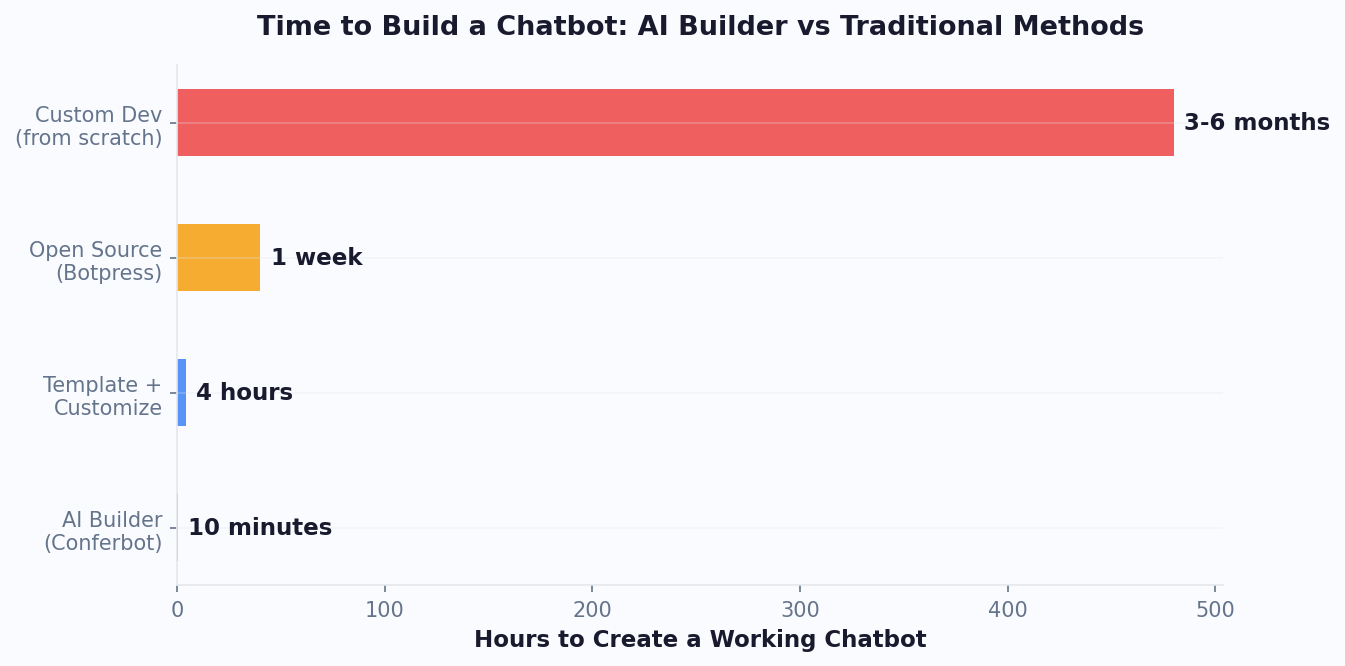
When organizations evaluate chatbot development approaches, they typically weigh three options: AI-powered generation, no-code visual builders, and custom development. Each has distinct strengths, costs, and ideal use cases. This comparison helps you make an informed decision based on your team's resources, timeline, and technical requirements.
Full Comparison Table
| Criteria | AI Builder | No-Code Visual | Custom Development |
|---|---|---|---|
| Time to deploy | 30 seconds - 5 minutes | 2-8 hours | 4-16 weeks |
| Cost (first year) | $228-$708 | $228-$708 | $30K-$150K |
| Technical skill needed | None | Basic logic understanding | Senior developers |
| Customization depth | High (AI + manual edit) | High | Unlimited |
| Iteration speed | Seconds | Minutes to hours | Days to weeks |
| Best for | Rapid prototyping, most use cases | Complex flows needing precise control | Proprietary NLP, deep integrations |
| Maintenance burden | Low - regenerate or edit | Low - platform handles infra | High - ongoing dev team needed |
The data overwhelmingly favors AI builders for the majority of business chatbot use cases. Custom development still makes sense for organizations building proprietary conversational AI products, those with complex regulatory requirements requiring custom NLP models, or businesses needing deep integration with legacy systems that lack APIs. For everyone else - and that includes roughly 90% of chatbot projects - the AI builder approach delivers equivalent functionality at 1/50th the cost and 1/100th the time.
Conferbot uniquely offers both AI generation and visual editing in a single platform. You can generate with AI, then fine-tune in the no-code visual builder, giving you the speed of AI with the precision of manual editing. Explore our pricing plans to see what is included at each tier.
5 Things You Can Build in 10 Minutes with an AI Chatbot Builder
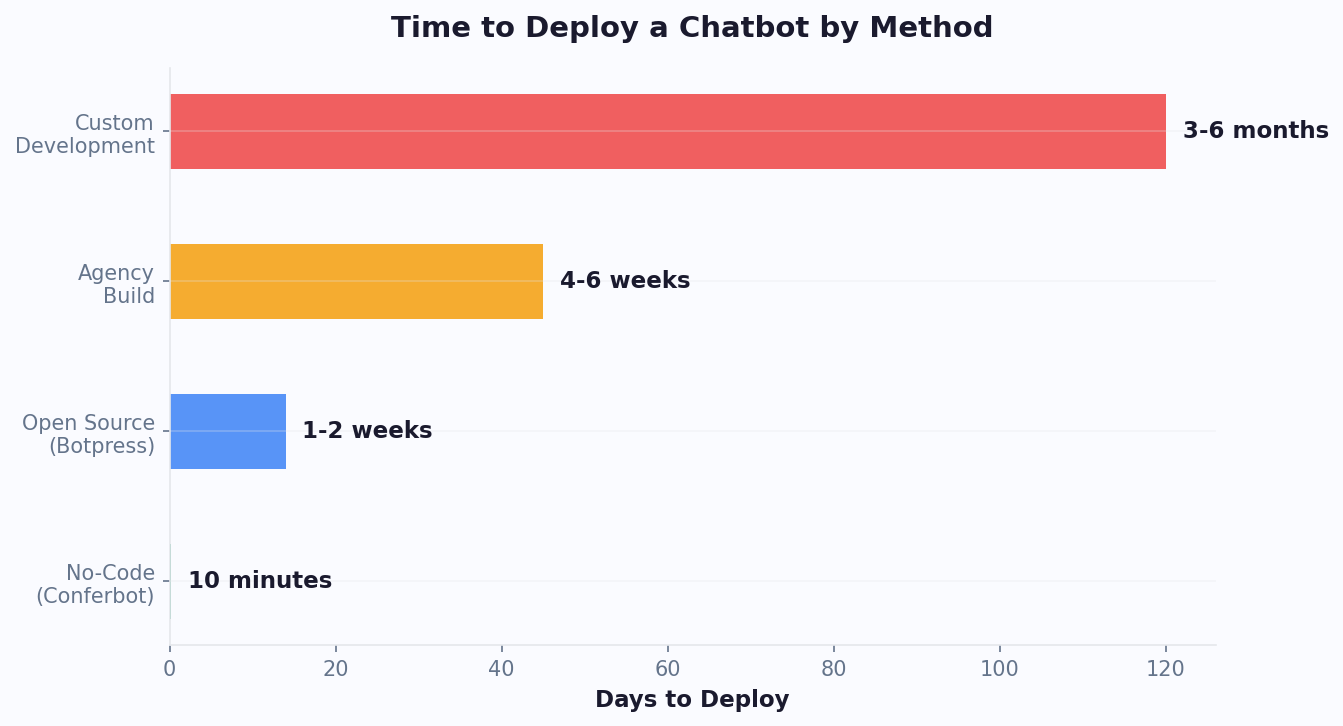
The true power of an AI chatbot builder becomes evident when you see what is achievable in the time it takes to drink a cup of coffee. Here are five production-ready chatbots you can generate and deploy in under 10 minutes each, complete with the prompts that create them.
1. Lead Qualification Bot
Prompt: "Create a lead qualification chatbot for a B2B SaaS company. Ask about company size, current tools they use, biggest pain point, budget range, and timeline. Score leads as hot, warm, or cold based on responses. Route hot leads to a calendar booking and send all data to CRM."
This generates a 7-step conversational flow with scoring logic, conditional routing, and calendar integration. Businesses using chatbot lead qualification often see meaningfully higher conversion rates than static forms.
2. Customer Support FAQ Bot
Prompt: "Build a support chatbot for an e-commerce store. Handle questions about shipping times, return policy, order tracking, and payment methods. If the customer's issue isn't resolved, escalate to a human agent with full conversation context."
This creates a menu-driven support bot with live chat handoff capability. Support bots typically deflect 60-70% of tickets, saving $5-$12 per deflected conversation.
3. Appointment Booking Assistant
Prompt: "Create a booking chatbot for a dental clinic. Ask about the type of appointment (cleaning, consultation, emergency), preferred date/time, insurance provider, and any specific concerns. Confirm the booking and send a reminder."
The AI generates a scheduling flow that integrates with calendar systems and helps reduce no-shows through automated reminders.
4. Product Recommendation Engine
Prompt: "Build a product recommendation chatbot for a skincare brand. Ask about skin type, primary concerns (acne, aging, dryness), product preferences (natural, fragrance-free), and budget. Recommend 2-3 products with links."
Recommendation bots can lift average order value by guiding customers to products that match their needs rather than overwhelming them with catalog browsing.
5. Event Registration Bot
Prompt: "Create a registration chatbot for a tech conference. Collect name, email, company, job title, dietary restrictions, and session preferences. Send a confirmation email and add to attendee list."
Event bots tend to achieve substantially higher completion rates than traditional registration forms, because the conversational format feels less intimidating than a long form. Browse more ideas in our template library with 100+ ready-made flows across every industry.
Step-by-Step: Building Your First AI Bot
This walkthrough takes you from zero to a deployed AI-generated chatbot in under 5 minutes. Follow along with your own Conferbot account to see the AI builder in action.
Step 1: Open the AI Builder
Log into your Conferbot dashboard and click the "Create with AI" button. This opens the AI generation interface - a simple text area where you describe what you want. No need to navigate complex menus or configure settings first.
Step 2: Write Your Description
Type a clear description of the chatbot you need. Include the purpose, target audience, key questions to ask, any conditional logic, and the desired tone. The more specific your prompt, the better the output. For example: "Create a friendly lead capture bot for a real estate agency. Ask about property type (house, apartment, commercial), location preference, budget range, and timeline. For budgets over $500K, offer to connect with a senior agent immediately."
Step 3: Generate and Preview
Click "Generate" and wait approximately 15-30 seconds. The AI processes your description and creates a complete conversation flow. You will see a preview of the chatbot where you can interact with it as a user would, testing different paths and responses.
Step 4: Review the Flow
Switch to the visual editor to see the generated flow as a diagram. Check that the branching logic matches your requirements, the messages sound right, and the validation rules are appropriate. Most AI-generated bots need only minor tweaks - perhaps adjusting a message tone or adding one more option to a multiple-choice question.
Step 5: Refine with Natural Language
Instead of manually editing nodes, you can ask the AI to make specific changes: "Make the tone more casual," "Add a question about how they heard about us," or "Change the budget options to $100K-$300K, $300K-$500K, $500K+." The AI applies changes while preserving the rest of the flow.
Step 6: Configure Integrations
Connect your bot to the tools you use. Link to your CRM via the integrations hub, set up email notifications, or connect to WhatsApp for multi-channel deployment. Integration setup takes 2-3 clicks for supported platforms.
Step 7: Deploy
Click "Publish" and choose your deployment channel - website embed, WhatsApp, Messenger, Instagram, or all of them simultaneously. Your bot is live instantly. Monitor performance in chatbot analytics and iterate based on real user behavior data.
The entire process takes 3-5 minutes for a standard bot. For a more detailed walkthrough with screenshots, read our complete guide on how to build a chatbot without coding.
Industry Use Cases for AI Chatbot Builders
AI chatbot builders are being adopted across every industry because they remove the traditional barriers to conversational automation - cost, time, and technical expertise. Here is how different sectors are using prompt-based chatbot generation to solve specific business challenges.
Use Cases by Industry
| Industry | Primary Use Case | Avg. ROI | Time to Deploy |
|---|---|---|---|
| E-commerce | Product recommendations, order tracking | 320% | 5 minutes |
| Healthcare | Appointment scheduling, symptom triage | 280% | 10 minutes |
| Real Estate | Lead qualification, property matching | 450% | 5 minutes |
| SaaS | Demo booking, onboarding | 380% | 5 minutes |
| Education | Course recommendations, enrollment | 250% | 8 minutes |
| Financial Services | Loan pre-qualification, account support | 400% | 10 minutes |
| Hospitality | Reservation management, concierge | 290% | 5 minutes |
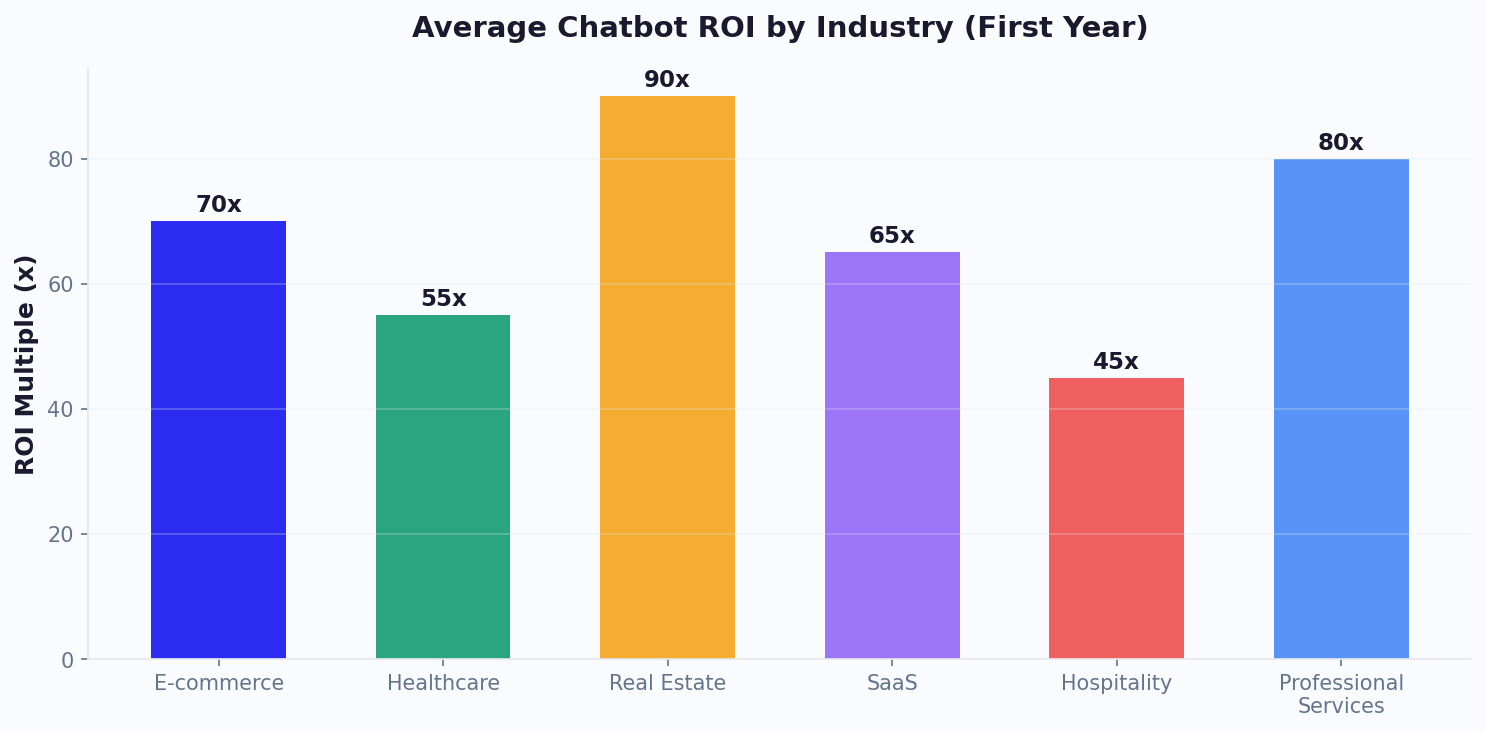
The ROI figures above are drawn from Conferbot customer data across a broad range of deployed bots. The key insight is that ROI is not driven by bot complexity - even simple 5-question lead qualification bots generate significant returns because they operate 24/7, never miss a lead, and qualify prospects before human time is invested.
Healthcare organizations use AI builders to create HIPAA-aware intake bots that collect patient information before appointments. Financial services firms generate compliance-friendly bots that handle loan pre-qualification questions. E-commerce brands build product finders that reduce return rates by helping customers choose the right product upfront.
The common thread across all industries is speed to value. When a new campaign launches, a product ships, or a seasonal promotion begins, the bot can be generated and deployed the same day. Calculate the expected ROI for your specific industry using our chatbot ROI calculator.
Common Mistakes to Avoid with AI Chatbot Builders
While AI chatbot builders dramatically simplify the creation process, there are still pitfalls that can reduce effectiveness. Avoiding these common mistakes will ensure your AI-generated chatbots perform at their full potential from day one.
Mistake 1: Vague Prompts
The most common error is providing insufficient detail in your generation prompt. "Make me a chatbot" will produce a generic result. Instead, specify purpose, audience, tone, questions, logic, and desired outcome. The AI can only work with the context you provide - treat your prompt like a brief you would give to a human conversation designer.
Mistake 2: Too Many Questions
Just because AI can generate a 20-question flow does not mean it should. Research shows chatbot completion rates drop 10% for every additional question beyond 5. Aim for 4-7 questions for lead generation and 3-5 for support triage. If you need more data, use progressive profiling across multiple interactions rather than one long conversation.
Mistake 3: No Clear CTA
Every chatbot conversation should end with a clear next step - book a call, visit a product page, submit a form, or connect with an agent. Bots without a strong call-to-action generate engagement but not conversions. Specify your desired endpoint in the AI prompt.
Mistake 4: Ignoring Analytics
Deploying a bot and never checking performance data means missing optimization opportunities. Use chatbot analytics to monitor completion rates, drop-off points, and conversion metrics. The AI builder makes iteration fast - use data to drive improvements weekly.
Mistake 5: Single-Channel Thinking
Many teams build for their website alone and miss the 70% of users who prefer messaging apps. AI-generated bots work across WhatsApp, Messenger, and Instagram with zero additional effort. Deploy to multiple channels from the start.
Mistake 6: No Fallback Strategy
AI-generated bots handle expected paths well, but users will always ask unexpected questions. Ensure your bot has graceful fallback handling - either a "I didn't understand that" recovery message or automatic escalation to live chat when confidence drops below threshold.
Mistake 7: Skipping Testing
AI-generated flows are 95% accurate on first generation, but that 5% can include critical issues. Always preview and test before deploying. Try edge cases, invalid inputs, and unusual paths. The visual editor makes fixes trivial - a 2-minute test run can prevent embarrassing production issues.
For a comprehensive guide to chatbot best practices, read our customer support chatbot guide which covers strategy, design, and optimization in detail.
How to Optimize Your AI Bot for Maximum Conversions
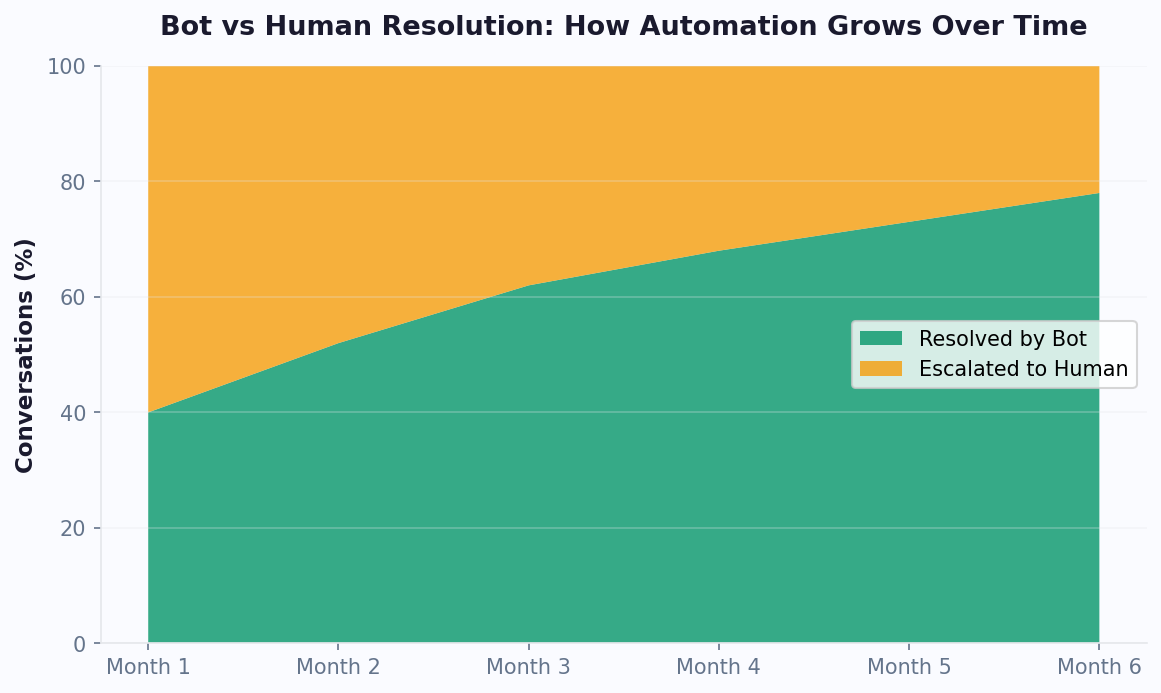
Generating a chatbot with AI is just the beginning. The real value comes from continuous optimization based on performance data. Teams that optimize their AI-generated bots weekly tend to see significantly higher conversion rates within the first month than those who deploy and forget.
The Optimization Loop
Week 1: Baseline. Deploy your AI-generated bot and let it collect data. Monitor total conversations, completion rate, and conversion events in your analytics dashboard. Identify the biggest drop-off point - this is your first optimization target.
Week 2: Message Optimization. A/B test the messages at your highest drop-off point. Try shorter versions, different question phrasing, or changing from open text to multiple choice. AI can regenerate specific sections - ask it to "rewrite question 3 to be more engaging and less formal."
Week 3: Flow Optimization. Analyze which paths users take most frequently. Remove questions that add friction without value. Reorder questions to put the easiest ones first (progressive commitment technique). Consider splitting long flows into shorter, sequential interactions.
Week 4: Conversion Optimization. Focus on the end of the conversation. Test different CTAs, add urgency elements, or offer incentives for completing the flow. Bots that show a progress indicator tend to see higher completion rates.
Advanced Optimization Techniques
- Personalization: Use early answers to customize later messages. If a user says they are in healthcare, reference healthcare-specific benefits in subsequent messages.
- Timing: Analyze when users are most engaged (often Tuesday-Thursday, 10am-2pm) and promote your bot during peak hours.
- Channel optimization: The same bot may perform differently on web vs. WhatsApp. Adjust message length and media usage per channel.
- Re-engagement: For users who abandon mid-flow, set up automated follow-up messages 24 hours later offering to continue where they left off.
Conferbot's AI knowledge base can also be layered on top of generated bots to handle unexpected questions intelligently, reducing fallback rates and improving user satisfaction. Track the impact of every optimization in real-time with our analytics suite.
Conferbot AI Builder vs Alternatives: Complete Comparison
The AI chatbot builder market has grown rapidly, with several platforms now offering AI-assisted generation. However, the depth of AI capability, editing flexibility, and deployment options vary significantly. Here is how Conferbot's AI builder compares to leading alternatives based on independent testing and feature analysis.
Platform Comparison
| Feature | Conferbot | Chatfuel | ManyChat | Tidio |
|---|---|---|---|---|
| AI generation | Full flow from prompt | Limited AI assist | No AI generation | AI response suggestions |
| Generation time | <30 seconds | N/A | N/A | N/A |
| Visual editor | Yes - full flow editor | Yes | Yes | Yes |
| Multi-channel deploy | Web, WhatsApp, Messenger, Instagram, Telegram | Messenger, Instagram, WhatsApp | Messenger, Instagram, SMS | Web, Messenger |
| Knowledge base AI | Yes - train on docs | Limited | No | Yes |
| Free tier | 600 conversations/mo | 50 conversations/mo | 1,000 contacts | 100 conversations/mo |
| Starting price | $19/mo | $14.99/mo | $15/mo | $29/mo |
| NL iteration | Yes - edit via prompt | No | No | No |
Conferbot's key differentiator is the combination of AI generation speed with full visual editing capability. Most alternatives offer either AI or visual building - not both in a seamless workflow. The natural language iteration feature is unique to Conferbot, allowing you to refine generated bots by describing changes rather than manually editing nodes.
For organizations evaluating multiple platforms, consider these factors: deployment channels needed, conversation volume, integration requirements, and team size. Our detailed comparison page provides head-to-head evaluations with specific alternatives. Check current pricing for the latest plans and features included at each tier.
AI Chatbot Builder FAQ
Everything you need to know about building chatbots with AI in seconds.
Continue Exploring
Explore features, connect third-party tools, and browse ready-made templates.
Deep-dive pillar guides, real use cases, and the chatbot & AI glossary.