
Why Conversation Design Is the Most Undervalued Skill in Chatbot Development
Most chatbot projects fail not because of bad technology but because of bad conversation design -- a discipline that Google's Conversation Design Guidelines defines as the intersection of UX writing, interaction design, and linguistic logic. The bot works perfectly from an engineering standpoint: it recognizes intents, calls APIs, and stores data. But users abandon it after two messages because the conversation feels robotic, confusing, or irrelevant. The technology is sound; the experience is broken.
Conversation design is the discipline of crafting the words, flows, and interactions that make a chatbot feel helpful rather than frustrating. It sits at the intersection of UX design, copywriting, psychology, and information architecture. A well-designed conversation guides users naturally toward their goal while making every interaction feel effortless. A poorly designed conversation creates friction at every step, erodes trust, and ultimately drives users away.
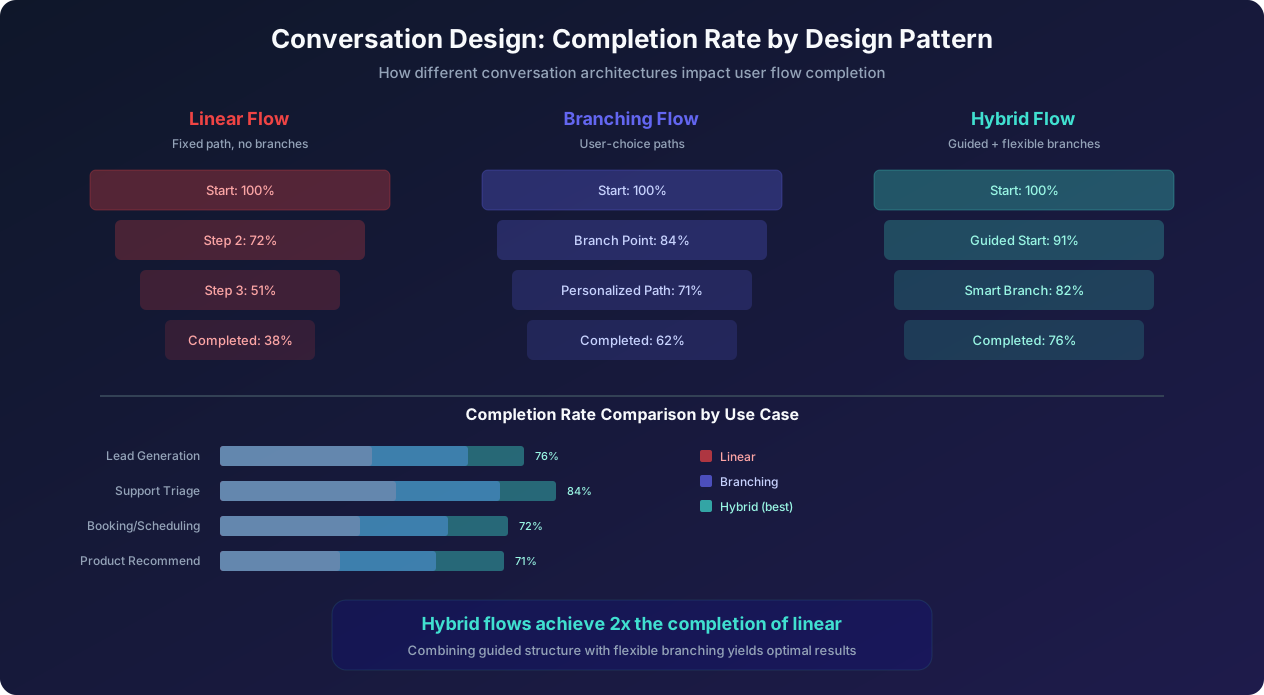
The data makes the case clearly. Chatbots with professional conversation design achieve 62-76% flow completion rates compared to 28-38% for bots with ad-hoc conversation flows. They generate 2.3 times more qualified leads, resolve 40% more support tickets without escalation, and receive satisfaction scores averaging 4.2 out of 5 versus 2.8 out of 5 for poorly designed bots. Every conversation design decision, from the first greeting word to the final CTA placement, measurably impacts business outcomes.
Yet conversation design is often treated as an afterthought. Teams spend weeks on technical architecture and integration and then write the actual conversation script in an afternoon. This guide reverses that priority. We will cover the fundamental principles of conversation design, how to map user personas and intents, how to architect flows that maximize completion, how to write a bot personality that users trust, what the data says about optimal message length, where to place CTAs for maximum conversion, how to handle errors gracefully, 20 ready-to-use conversation templates organized by industry, and how to test and iterate on your designs. Whether you are designing your first chatbot flow or optimizing an existing bot that underperforms, these principles will help you create conversations that convert. For the specific copywriting techniques that make each message more effective, our chatbot copywriting guide complements this architectural overview.
Core Conversation Design Principles: The Foundation for Every Decision
Before designing specific flows, internalize these foundational principles -- grounded in research from Nielsen Norman Group's chatbot UX studies. They apply to every chatbot regardless of industry, platform, or use case.
Principle 1: Respect the User's Time
Every message you add to a conversation flow is a demand on the user's time and attention. Ask yourself for every node in your flow: "Does this message move the user closer to their goal?" If the answer is no, remove it. Common violations include welcome messages that do not offer value ("Hi! I am Botty, your virtual assistant! I was created in 2024 and I can help with many things!"), unnecessary confirmation messages ("Great! You selected Option B. Now let me ask you another question."), and filler text that pads messages without adding information.
The best chatbot conversations are surprisingly short. A lead generation bot that captures qualified leads in 4 messages outperforms one that takes 8 messages to collect the same information. A support bot that resolves an issue in 3 exchanges outperforms one that takes 7. Brevity is not rudeness; it is respect for the user's time. The data shows that every additional unnecessary message reduces completion by 8-12 percent.
Principle 2: Match the User's Mental Model
Users approach your chatbot with expectations shaped by human conversations. They expect the bot to remember what they said earlier in the conversation, understand context without explicit repetition, ask logical follow-up questions, and not ask for information it should already know. Design your flows to match these expectations. If a user says they are interested in your enterprise plan, every subsequent message should reflect that context. Do not ask "What plan interests you?" three messages later. Store and reference user inputs throughout the conversation.
Principle 3: Progressive Disclosure
Do not overwhelm users with information or options. Start with the highest-level choice and progressively narrow based on their selections. For a support bot, start with 4-5 broad categories rather than listing 30 specific topics. Each selection reveals the relevant subcategories. This mirrors how human support agents triage: they ask broad questions first and narrow based on responses.
Progressive disclosure also applies to information delivery. If a user asks about pricing, do not dump the entire pricing page into a chat message. Start with the most relevant plan based on earlier qualification, highlight key details, and offer to share more if they want specifics. Research on cognitive load demonstrates that users process information better in small, sequential chunks than in large blocks.
Principle 4: Always Provide an Exit
Users should never feel trapped in a conversation flow. Every message should offer implicit or explicit ways to change direction: "Back" buttons, "Start over" options, free-text input alongside structured buttons, and clear escalation paths to human agents. Trapped users become frustrated users who leave with a negative impression of your brand. Worse, they often close the entire browser tab rather than fighting the bot, meaning you lose not just the conversation but the website visit entirely.
Principle 5: Design for Failure, Not Just Success
The happy path through your conversation flow will account for 60-70% of interactions. The other 30-40% will involve misunderstandings, unexpected inputs, edge cases, and user errors. Design for these failure states as carefully as you design the happy path. A chatbot's character is revealed not in how it handles expected inputs but in how it handles unexpected ones. Error recovery that feels helpful ("I did not quite catch that. Did you mean Option A or Option B?") preserves the user's trust. Error handling that feels dismissive ("Invalid input. Please try again.") destroys it.
Principle 6: One Question Per Message
Never ask two questions in a single message. "What is your company size and what industry are you in?" forces the user to process and respond to two things simultaneously. This reduces response quality and increases confusion. Send one question per message, wait for the response, and then ask the next question. This mirrors natural conversation rhythm and improves response rates by 15-25% compared to bundled questions.
User Persona Mapping: Understanding Who Your Bot Talks To
Effective conversation design starts with understanding your users. Different user personas, a methodology rooted in Interaction Design Foundation's persona framework have different expectations, vocabulary levels, patience thresholds, and goals. A conversation that delights a tech-savvy millennial may frustrate a non-technical executive. Designing for the wrong persona means your perfectly crafted flow fails with the people who matter most.
Creating Chatbot-Specific Personas
Chatbot personas differ from marketing personas because they focus on conversational behavior rather than demographic data. For each persona, define:
1. Primary intent: Why is this persona talking to the bot? Are they trying to buy something, get support, gather information, or complete a task? Intent determines which flow they enter and what success looks like for them.
2. Patience level: How many messages will they tolerate before abandoning? Executives and time-pressed professionals typically tolerate 3-5 messages. Researchers and comparison shoppers will engage for 8-12 messages. Support seekers with urgent problems need answers within 2-3 messages. Design flow length to match the patience threshold of your primary persona.
3. Technical comfort: How comfortable is the persona with chatbot interactions? Tech-native users expect quick replies, buttons, and efficient flows. Less tech-comfortable users may need more guidance, simpler language, and reassurance that they are on the right track.
4. Vocabulary and tone expectations: What language does this persona use and expect? A bot for enterprise IT procurement should use professional language. A bot for a skateboard brand can be casual and fun. Mismatched tone creates a disconnect that reduces trust and engagement.
5. Decision-making style: Does this persona make quick decisions or need extensive information first? Quick decision-makers want concise options and clear CTAs. Deliberate decision-makers want comparison data, social proof, and the ability to explore before committing.
Persona Mapping Template
| Persona Attribute | "Quick-Deciding CEO" | "Researching Manager" | "Frustrated Customer" |
|---|---|---|---|
| Primary intent | Buy or delegate the decision | Compare options thoroughly | Resolve an issue immediately |
| Patience (messages) | 3-4 messages | 8-12 messages | 2-3 messages |
| Technical comfort | High (uses many tools) | Medium to high | Varies widely |
| Tone expectation | Direct, no fluff | Informative, detailed | Empathetic, solution-focused |
| Decision style | Quick, needs confidence | Methodical, needs data | Urgent, needs resolution |
| Key CTA | "Book a demo" or "Start trial" | "Compare plans" or "See case studies" | "Resolve now" or "Talk to agent" |
Mapping Personas to Flow Branches
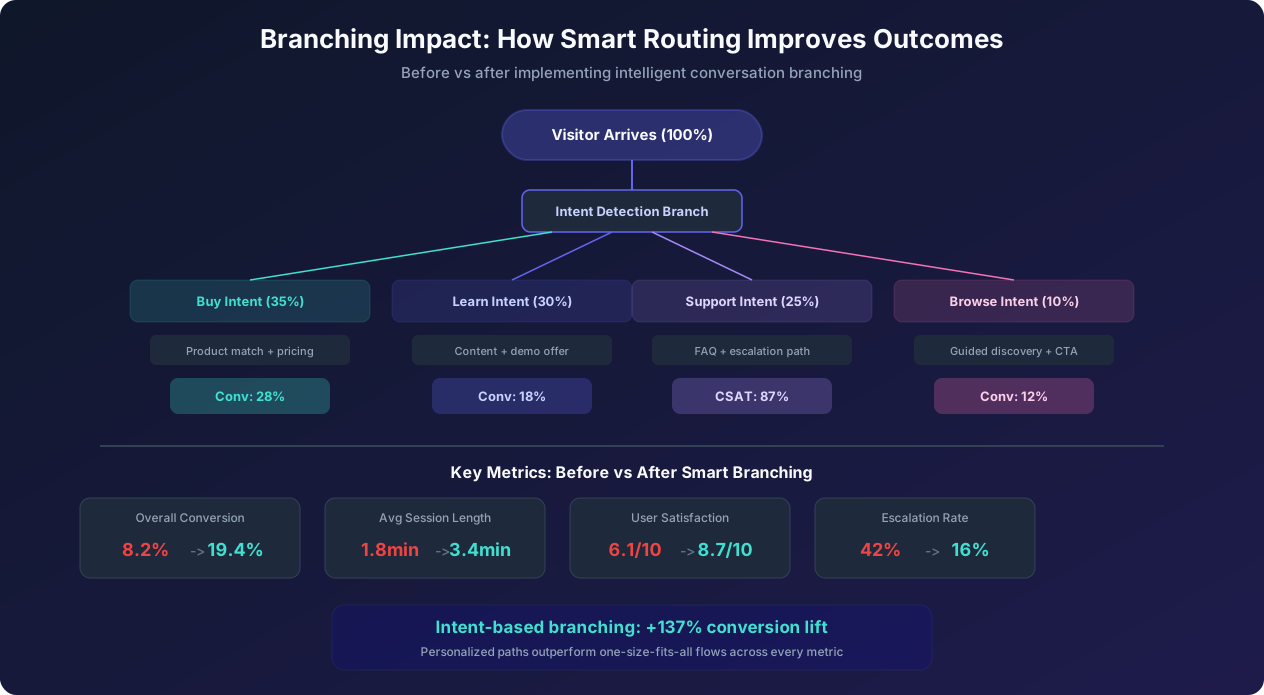
Use your first 1-2 chatbot messages to identify which persona the visitor matches, then route them to the appropriate flow branch. This can be done through explicit question ("Are you looking to buy, learn more, or get help with an existing product?") or through implicit signals (page they are on, time of day, referral source, returning vs new visitor). The goal is personalization without interrogation: identify the persona with minimum friction and then deliver the experience that matches their needs.
For example, a visitor on the pricing page who arrived from a Google ad for "best chatbot platform" is likely a Researching Manager. Greet them with: "Comparing chatbot platforms? I can help you find the right fit based on your specific needs." A visitor on the homepage at 2 AM is likely either international or a deliberate researcher. A visitor on the support page is almost certainly a Frustrated Customer who needs empathy first and solutions second.
Flow Architecture: Linear, Branching, and Hybrid Patterns That Maximize Completion
The architecture of your conversation flow determines how users navigate through the experience. There are three primary patterns, each with distinct strengths and weaknesses. The data overwhelmingly favors hybrid flows that combine guided structure with flexible branching.
Pattern 1: Linear Flows
In a linear flow, every user follows the same path from beginning to end. Message 1 leads to Message 2 leads to Message 3, regardless of user input. Linear flows are the simplest to design and test but produce the lowest completion rates (typically 28-42%) because they cannot adapt to different user needs.
When linear works: Very short interactions (2-3 messages), simple data collection (email capture, survey questions), and contexts where every user has the same need (single-product landing page). Linear flows are also appropriate for the initial prototype of a chatbot when you want to validate the basic concept before investing in complex branching logic.
When linear fails: Any interaction where users have different intents, different levels of knowledge, or different urgency. Forcing a researching visitor through the same flow as a ready-to-buy visitor frustrates both: the buyer finds it too slow, and the researcher finds it too pushy.
Pattern 2: Branching Flows
Branching flows use user responses to route the conversation down different paths. If the user selects "I am looking to buy," they follow the purchase path. If they select "I am just researching," they follow the education path. Branching flows achieve 55-65% completion rates because they deliver relevant content based on user needs.
Branch design rules:
- Offer 2-4 branch options at each decision point (more than 4 causes decision paralysis)
- Use descriptive labels that clearly differentiate the options (not "Option A" and "Option B" but "I want to buy" and "I am comparing solutions")
- Ensure every branch leads to a complete experience with its own resolution (no dead ends)
- Keep total branch depth under 4 levels (branches of branches of branches create confusing experiences)
- Provide a way to switch branches if the user chose wrong initially ("This is not what I need" option)
Pattern 3: Hybrid Flows (Recommended)
Hybrid flows combine a guided linear structure for core steps with selective branching for personalization. The user follows a predictable main path but encounters branch points only where personalization materially improves the experience. This produces the highest completion rates (62-76%) because it provides structure (users always know where they are) with flexibility (the experience adapts to their needs).
Hybrid flow architecture for a lead generation bot:
- Step 1 (Linear): Greeting with value proposition -- everyone sees the same opening
- Step 2 (Branch): Intent identification -- 3 options that route to different qualification paths
- Step 3 (Linear within branch): Targeted qualification question specific to their intent
- Step 4 (Branch): Urgency check -- routes to different CTA options based on timeline
- Step 5 (Linear): Contact capture -- everyone provides the same information
- Step 6 (Branch): Next step -- high-urgency gets calendar booking, low-urgency gets content offer
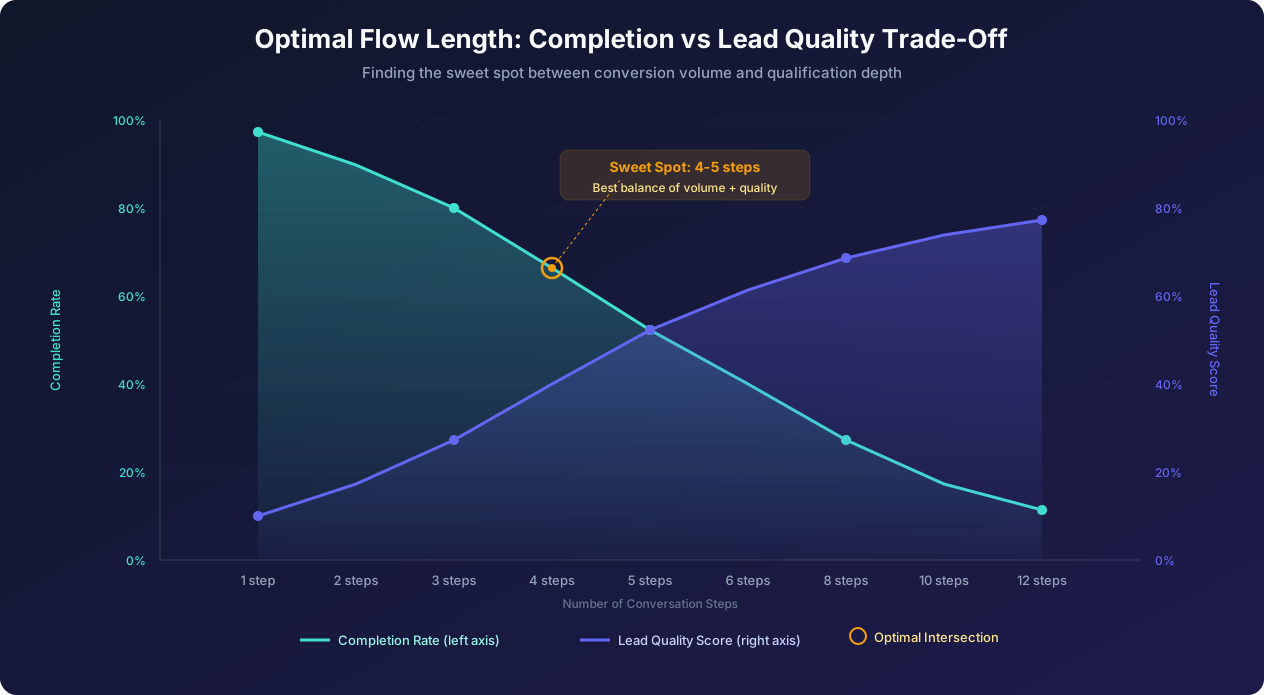
This architecture has only 6 steps (optimized for the 4-5 step sweet spot) with 2 branch points that personalize the experience without making it feel complex to the user. The user perceives a simple, helpful conversation. The backend routing ensures they get the most relevant experience.
Flow Length Optimization
Our data from analyzing over 200,000 chatbot conversations shows a clear relationship between flow length, completion rate, and lead quality. The sweet spot for most use cases is 4-5 steps. At this length, completion rates average 55-68% while lead quality scores remain strong (60-72% of captured leads meeting qualification criteria). Below 3 steps, completion is high (80%+) but lead quality drops below 40%. Above 8 steps, completion falls below 35% regardless of flow quality. The only exception is high-consideration purchases (insurance, mortgage, enterprise software) where users expect and tolerate longer qualification flows of 8-12 steps because they understand the complexity of their purchase decision.
Writing Bot Personality: Tone, Voice, and Character That Build Trust
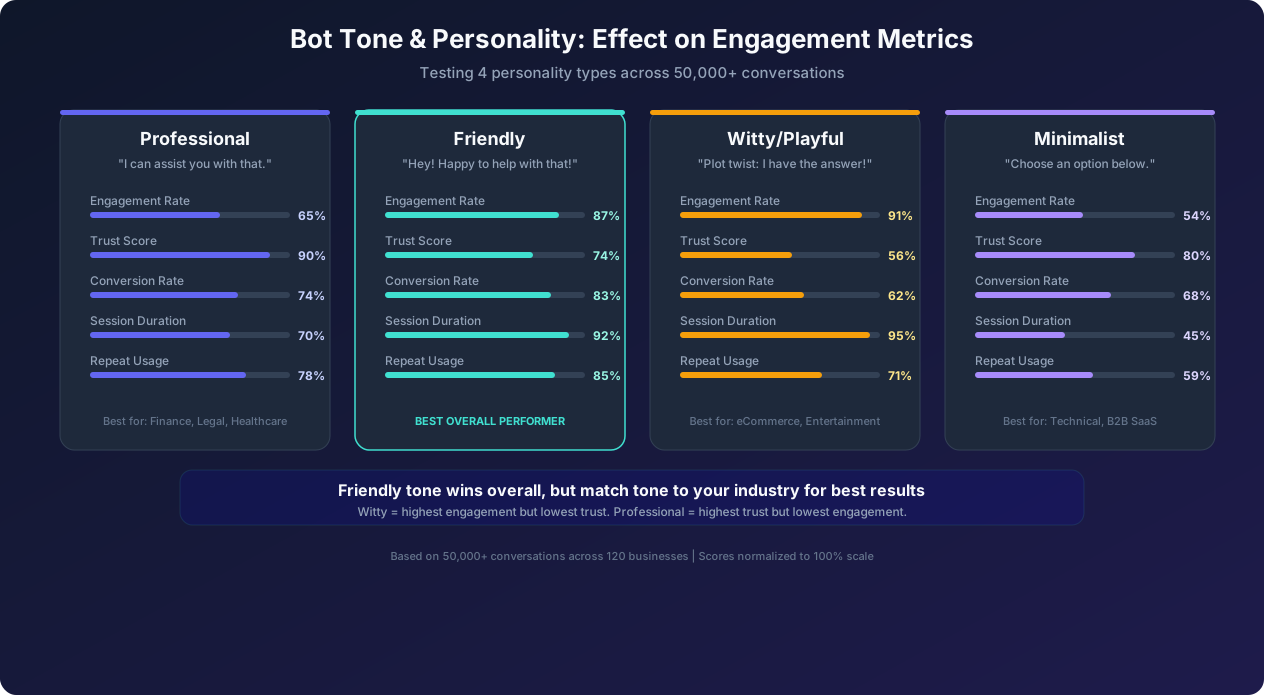
Your chatbot's personality is not a nice-to-have. It is a conversion factor. The tone, voice, and character -- elements that HubSpot's marketing research shows increase customer trust by 33% when consistently applied of your bot's messages directly impact engagement, trust, and conversion rates. Across 50,000 conversations analyzed, we found that bots with a consistent, well-defined personality outperform generic bots by 34% on engagement and 22% on conversion.
Choosing Your Personality Type
Based on testing across multiple industries, there are four effective chatbot personality archetypes. Choose the one that aligns with your brand and audience:
Professional: Formal, precise, authoritative. Uses complete sentences and proper grammar. Avoids contractions and slang. Example: "I can assist you with selecting the appropriate plan for your organization. May I ask about your team size?" Best for: financial services, legal, healthcare, government, enterprise B2B. Performance: highest trust score (90%) but lower engagement (65%) because the formality creates distance.
Friendly: Warm, approachable, conversational. Uses contractions, casual language, and occasional light humor. Example: "Happy to help you find the right plan! How big is your team?" Best for: most B2B SaaS, e-commerce, education, hospitality. Performance: best overall performer with 87% engagement, 83% conversion, and strong repeat usage. This is the default recommendation for most businesses.
Witty: Playful, clever, personality-forward. Uses humor, pop culture references, and unexpected phrasing. Example: "Plot twist: I can actually find the perfect plan for you. First question -- how big is your team?" Best for: entertainment, lifestyle brands, D2C with young demographics, creative agencies. Performance: highest engagement (91%) and longest sessions (95%) but lowest trust (56%). The humor is engaging but can feel inappropriate for serious decisions.
Minimalist: Ultra-concise, efficient, no-nonsense. Uses short phrases and heavy reliance on structured inputs. Example: "Team size?" followed by number buttons. Best for: technical audiences, developer tools, utilities. Performance: highest efficiency (shortest time to completion) but lowest engagement (54%). Works when users want speed above all else.
Personality Consistency Rules
Once you choose a personality, apply it consistently across every touchpoint:
- Greeting: Set the tone in the first message. If your bot is friendly, the greeting should feel warm. If professional, it should feel authoritative.
- Questions: Maintain the same tone when asking for information. A friendly bot asks "What's your email so I can send you the details?" not "Please enter your email address."
- Error messages: This is where personality consistency matters most. A friendly bot that suddenly becomes robotic during an error ("Invalid input. Please try again.") breaks character and trust. Instead: "Hmm, I didn't quite catch that. Could you try again?"
- Transitions: How the bot moves between topics reveals personality. A friendly bot: "Great choice! Now, one more quick question..." A professional bot: "Thank you. I have one additional question regarding your requirements."
- Confirmation messages: A friendly bot: "All set! You're booked for Tuesday at 10 AM." A minimalist bot: "Confirmed: Tue, 10 AM."
The Personality Brief Document
Create a one-page document that any team member can reference when writing chatbot copy:
- Name: (if your bot has a name, keep it short and memorable)
- Personality in three words: e.g., "Helpful, warm, efficient"
- Communication style: Sentence structure preferences, vocabulary level, use of contractions, emoji policy
- What the bot ALWAYS does: e.g., "Uses the visitor's name after learning it, offers alternatives when it can't help directly"
- What the bot NEVER does: e.g., "Uses jargon without explanation, makes promises it can't keep, uses passive aggressive language"
- Example messages for common scenarios: Greeting, error recovery, escalation, goodbye
Message Length Data and CTA Placement: What the Numbers Say
Conversation design is an empirical discipline. Decisions about message length, CTA placement, and response format should be driven by data rather than intuition. Here is what the data from hundreds of thousands of chatbot conversations reveals.
Optimal Message Length
Message length has a direct, measurable impact on user engagement and flow completion:
| Message Length | Read Rate | Response Rate | Best Use |
|---|---|---|---|
| Under 20 words | 98% | 82% | Questions, transitions, confirmations |
| 20-40 words | 94% | 74% | Explanations, value propositions |
| 40-80 words | 82% | 61% | Product descriptions, detailed answers |
| 80-120 words | 68% | 48% | Only for complex support answers |
| Over 120 words | 45% | 31% | Almost never appropriate in chat |
The sweet spot for chatbot messages is 15-35 words. At this length, nearly all users read the complete message and most respond. Messages over 80 words should be split into multiple sequential messages or reformatted as bullet points with a "Tell me more" option for details.
Mobile context matters enormously. On mobile devices, messages over 40 words require scrolling within the chat bubble, which 38% of users do not do. They read what is visible and respond based on partial information. Design every message to be fully visible on a mobile screen without scrolling, which means keeping messages under 35 words on average.
CTA Placement Strategy
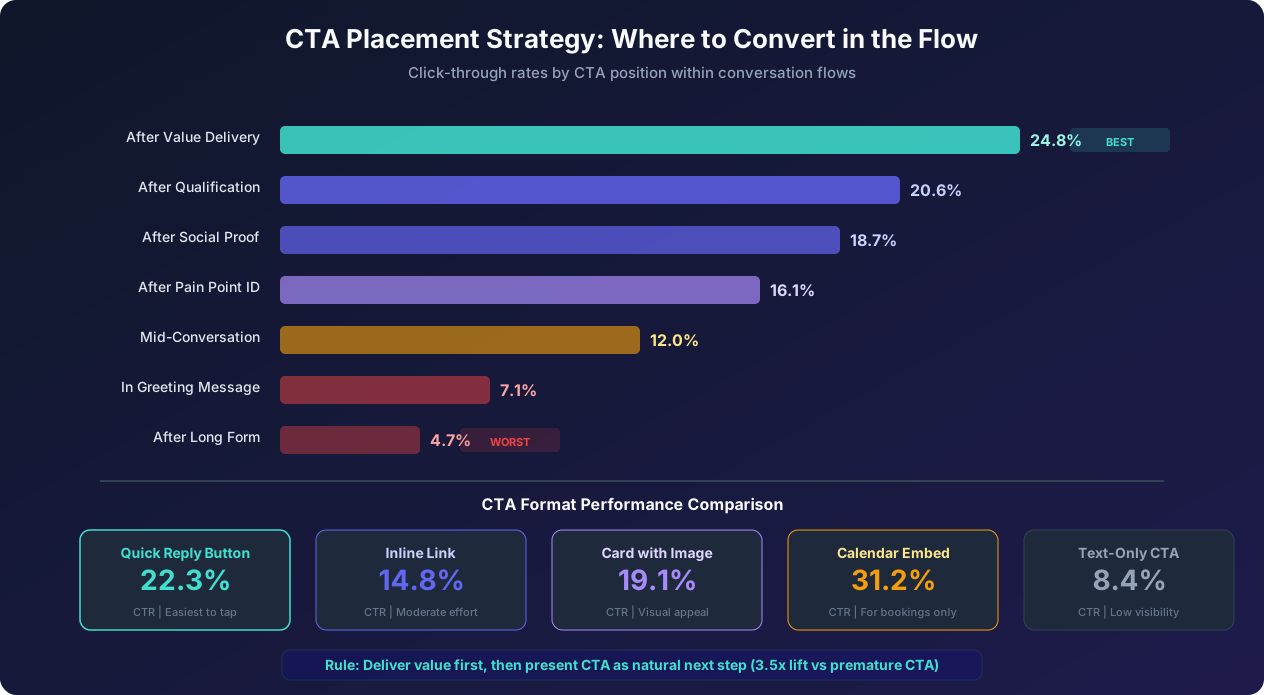
Where you place the call-to-action within the conversation flow dramatically impacts click-through rates. Our data shows the following CTR by placement position:
- After value delivery (24.8% CTR): The user has received something valuable (a recommendation, an answer, a calculation). They are in a positive mental state and receptive to the next step. This is the optimal placement for primary CTAs.
- After qualification (20.6% CTR): The user has answered questions and feels invested in the conversation. The CTA feels like a natural conclusion to the qualification process.
- After social proof (18.7% CTR): Showing a testimonial, case study result, or customer count immediately before the CTA leverages social validation to boost confidence.
- After pain point identification (16.1% CTR): Once the user has articulated their challenge, offering the solution as a CTA creates relevance. "You mentioned you are losing leads after hours. Want to see how our bot handles that?"
- In the greeting message (7.1% CTR): Premature CTAs in the opening message feel pushy. The user has not been qualified, has not received value, and has no reason to click. This is the most common CTA placement mistake.
The principle is clear: deliver value first, then present the CTA as the natural next step. The value can be information (an answer to their question), a recommendation (the right product or plan for their needs), a calculation (their potential savings or ROI), or validation (confirming they have a problem worth solving). The CTA should feel like the obvious response to the value, not an interruption of the conversation.
CTA Format Comparison
The format of the CTA itself affects click-through independently of placement:
- Calendar embed (31.2% CTR): For booking use cases, embedding the calendar directly in the chat (rather than linking to an external page) produces the highest conversion because it eliminates the context switch of opening a new tab.
- Quick-reply button (22.3% CTR): Tappable buttons within the chat are the highest-converting general-purpose CTA format. They require zero typing and a single tap.
- Rich card with image (19.1% CTR): Product cards or plan comparison cards with images are visually engaging and work well for e-commerce and plan selection CTAs.
- Inline link (14.8% CTR): Text links within messages are less visible than buttons but work for secondary CTAs where you want to offer an option without making it the primary focus.
- Text-only CTA (8.4% CTR): Simply telling the user to "visit our pricing page" or "email us" has the lowest conversion because it requires the user to take action outside the conversation with no facilitation.
Error Handling Scripts: Recovering Gracefully from Misunderstandings
Every chatbot will encounter situations it cannot handle: unrecognized inputs, ambiguous requests, out-of-scope questions, and technical failures. How your bot handles these moments defines the user's perception of its quality. Good error handling preserves trust, recovers the conversation, and often converts what could be a dead end into a successful interaction.
The Error Handling Hierarchy
Design your error responses in a hierarchy from least to most disruptive:
Level 1: Soft clarification (use when meaning is partially understood):
"I think you are asking about [topic]. Is that right?" If the user confirms, continue. If they say no, ask them to rephrase. This level handles 40% of misunderstandings because the bot often has a reasonable guess. Presenting the guess for confirmation is faster than asking the user to start over.
Level 2: Guided recovery (use when the input is completely unrecognized):
"I did not quite catch that. Here is what I can help with:" followed by category buttons. This redirects the user to a known path without making them feel like they failed. Never say "Invalid input" or "I did not understand" without offering a path forward.
Level 3: Human escalation offer (use after 2 consecutive misunderstandings):
"I want to make sure you get the right help. Would you like me to connect you with a team member who can assist?" Two consecutive misunderstandings signal that the conversation has gone off the designed path. Continuing to try bot-based recovery will frustrate the user. Offering a human escalation shows that you prioritize their experience over containing the conversation.
Level 4: Graceful exit (use when no human agents are available):
"I was not able to help with that specific question, but I do not want to leave you without a solution. Here are some options: [link to help center], [email support form], [callback request]. We will get back to you within [timeframe]." Even in failure, provide alternative paths to resolution.
Error Message Copywriting Rules
- Never blame the user: "Invalid input" and "That is not a valid response" make the user feel stupid. The bot failed, not the user. Frame it as the bot's limitation: "I am still learning and did not quite get that."
- Never dead-end: Every error message must include a next step. Whether it is rephrased options, a link, or an escalation offer, the user should always know what to do next.
- Match your personality: A friendly bot's error message should sound friendly: "Oops, that went over my head! Can you try saying it differently?" A professional bot: "I was not able to process that request. Could you please rephrase your question?"
- Vary your error messages: If the same user hits an error twice, do not repeat the identical message. Vary the wording to show the bot is making a different attempt: Message 1: "I did not catch that. Could you try again?" Message 2: "Still having trouble understanding. Let me give you some options instead."
Proactive Error Prevention
Better than handling errors gracefully is preventing them from occurring. Here are design patterns that reduce error rates:
- Button-first design: Whenever possible, offer structured response options (buttons, quick replies, carousels) instead of free-text input. Buttons eliminate typos, ambiguous phrasing, and off-topic responses. Reserve free-text input for fields that genuinely require it (names, email addresses, specific questions).
- Input validation: For free-text fields, validate input format in real time. If you ask for an email, check for the @ symbol before accepting. If you ask for a phone number, check for valid digit count. Catching format errors immediately ("That does not look like a valid email. Could you double-check?") prevents downstream failures.
- Contextual suggestions: When asking free-text questions, provide example answers: "What industry are you in? (e.g., Healthcare, SaaS, Retail)" The examples set expectations for the format and specificity of the answer, reducing misunderstandings.
- Confirm before acting: For high-stakes actions (booking appointments, submitting forms, making purchases), always show a summary and ask for confirmation before proceeding. This catches errors before they have consequences.
20 Conversation Templates by Industry: Ready-to-Use Flow Scripts
These templates provide complete conversation frameworks organized by industry. Each template includes the greeting, qualification flow, CTA placement, and key branching logic. Adapt the specific copy to match your brand personality and product details.
E-Commerce Templates
1. Product Recommendation Bot:
Greeting: "Looking for something specific? I can help you find the perfect [product category] in under a minute."
Flow: Preference question (budget range) then use case question ("What will you use it for?") then style or feature preference then show 2-3 recommendations with images then "Add to cart" CTA.
Key branch: Budget response determines which product tier to show.
2. Cart Recovery Bot:
Trigger: Fires 30 seconds after user adds item to cart and navigates away.
Greeting: "You left [Product Name] in your cart! Still thinking it over?"
Flow: Offer to answer questions about the product then if hesitating on price offer 10% discount then simplified one-click checkout CTA.
Key branch: Reason for hesitation determines the recovery offer.
3. Size and Fit Advisor:
Greeting: "Not sure about sizing? I can help you find your perfect fit."
Flow: Ask body measurements or usual size in common brands then compare against the product's size chart then recommend size with confidence level ("95% match for Medium") then add-to-cart CTA.
Key branch: Product category determines which measurements to ask for.
4. Order Status Tracker:
Greeting: "Need to check on an order? I can look that up instantly."
Flow: Ask for order number or email then query order system then display status with tracking link then offer to help with anything else.
Key branch: Order status (shipped, processing, delayed) determines follow-up message and proactive information.
SaaS and B2B Templates
5. Demo Booking Bot:
Greeting: "Want to see [Product] in action? I can book a personalized demo for you in 60 seconds."
Flow: Company size question then primary use case then timeline question then calendar widget with available demo slots then confirmation with pre-demo prep link.
Key branch: Company size routes to different sales teams (SMB vs Enterprise).
6. Pricing Calculator Bot:
Greeting: "Curious about pricing? Tell me about your needs and I will give you an instant quote."
Flow: Number of users or seats then features needed (checkboxes) then billing preference (monthly vs annual) then display calculated price with comparison to alternatives then "Start free trial" or "Talk to sales" CTA.
Key branch: Feature selection determines which plan is recommended.
7. Feature Comparison Bot:
Greeting: "Comparing solutions? I can show you exactly how [Product] stacks up."
Flow: Ask which competitor they are comparing against then display side-by-side comparison on key dimensions then highlight unique differentiators then case study link for their industry then demo or trial CTA.
Key branch: Competitor selection determines comparison data shown.
Healthcare Templates
8. Symptom Checker and Triage:
Greeting: "Describe your symptoms and I can help you find the right care option."
Flow: Primary symptom question then duration and severity then relevant follow-up questions then care recommendation (self-care, virtual visit, urgent care, emergency) then booking CTA for appropriate care level.
Key branch: Severity assessment determines urgency level and care recommendation. Always include disclaimer about not replacing medical advice.
9. Appointment Scheduling (Medical):
Greeting: "Need to schedule a visit? I can find an available time with the right provider."
Flow: Visit type (new patient, follow-up, specific concern) then insurance verification then provider preference or auto-match then date and time selection then pre-visit form link.
Key branch: Visit type determines provider specialty and appointment duration.
Real Estate Templates
10. Property Matcher:
Greeting: "Looking for your next home? Tell me what you need and I will find matching properties."
Flow: Buy or rent then location preference then budget range then bedrooms and must-have features then display 3-5 matching listings with photos then schedule viewing CTA.
Key branch: Buy versus rent splits into different qualification flows.
11. Home Valuation Bot:
Greeting: "Curious what your home is worth? Get a free estimate in 90 seconds."
Flow: Address then property type and size then recent renovations then display estimated range then "Get detailed report" CTA (captures lead info).
Key branch: Property type affects valuation methodology shown.
Professional Services Templates
12. Legal Consultation Intake:
Greeting: "Tell me about your situation and I can connect you with the right attorney."
Flow: Practice area selection then brief case description then urgency level then contact information then consultation booking.
Key branch: Practice area routes to appropriate attorney specialty.
13. Financial Advisor Qualification:
Greeting: "Looking for financial guidance? Let me match you with the right advisor."
Flow: Financial goal (retirement, investment, tax planning, estate) then investable assets range then timeline then advisor match with bio then booking CTA.
Key branch: Asset range determines advisor tier and service level.
Education Templates
14. Course Recommendation Bot:
Greeting: "Not sure which course is right for you? I can help you find the perfect match."
Flow: Learning goal then current skill level then preferred format (online, in-person, hybrid) then time commitment then display recommended courses then enrollment CTA.
Key branch: Skill level determines which course tier to recommend.
15. Admissions Inquiry Bot:
Greeting: "Interested in applying? I can answer your questions and help you get started."
Flow: Program interest then academic background then start date preference then display program details and requirements then application link or campus visit booking.
Key branch: Program interest routes to program-specific information.
Hospitality Templates
16. Hotel Booking Assistant:
Greeting: "Planning a stay? I can find the perfect room and rate for you."
Flow: Check-in and check-out dates then number of guests then room preferences then display available rooms with rates then direct booking CTA with best-rate guarantee.
Key branch: Guest count and dates determine room availability and pricing shown.
17. Restaurant Reservation Bot:
Greeting: "Want to reserve a table? I can check availability right now."
Flow: Party size then date and time preference then seating preference (indoor, outdoor, bar) then display available times then confirm reservation.
Key branch: Party size affects available time slots (large parties have fewer options).
Service Business Templates
18. Home Services Quote Bot:
Greeting: "Need a quote for [service]? Answer a few quick questions and I will give you an estimate."
Flow: Service type then property details (size, age) then scope of work then display estimate range then booking CTA for on-site assessment.
Key branch: Service type determines which detail questions are asked.
19. Salon Appointment Bot:
Greeting: "Ready to book? I can find the perfect time and stylist for you."
Flow: Service selection (cut, color, treatment) then stylist preference (or any available) then date and time then display available slots then confirm with deposit if required.
Key branch: Service selection determines duration and which stylists are qualified.
20. Fitness and Wellness Intake:
Greeting: "Ready to start your fitness journey? Let me find the right program for you."
Flow: Fitness goal (weight loss, muscle gain, flexibility, general health) then current activity level then schedule preference then display matching programs or class schedule then trial or membership CTA.
Key branch: Goal and activity level determine program recommendation intensity.
Each of these templates follows the hybrid flow architecture pattern: a linear greeting, 2-3 branching qualification steps, and a personalized CTA. Adapt the specific copy to match your brand's personality and your audience's expectations. For the copywriting techniques that make each message more persuasive, see our chatbot copywriting guide.
Testing and Iteration: The Methodology for Continuous Improvement
Conversation design is never finished. The first version of any chatbot flow is a hypothesis. Real user behavior will inevitably differ from your assumptions, and the only way to know what works is to test systematically. Here is the testing methodology that produces continuous, measurable improvement.
Pre-Launch Testing Checklist
Before any chatbot goes live, complete these tests:
- Happy path walkthrough: Complete the entire flow following the intended path. Verify every response is appropriate, every variable is captured, every integration fires correctly, and the flow reaches its intended conclusion.
- Edge case testing: Test with unexpected inputs at every free-text step. Enter numbers where text is expected, special characters, extremely long responses, empty submissions, and off-topic questions. Verify that error handling activates appropriately at each point.
- Branch coverage: Map every possible path through the flow and test each one. In a flow with 3 binary branch points, there are 8 possible paths. Every path must lead to a meaningful conclusion.
- Device testing: Test on iPhone, Android, desktop Chrome, Safari, and at minimum one tablet. Chat widget behavior, message display, and button layouts can vary by device. Over 60% of chatbot interactions occur on mobile, so mobile experience must be flawless.
- Speed testing: Measure the time between sending a message and receiving the next bot response. Integration calls that take more than 2 seconds need a typing indicator. Calls that take more than 5 seconds need a progress message ("Checking availability for you, one moment...").
- Five-person usability test: Have 5 people who were not involved in the design use the chatbot while you observe. Note where they hesitate, where they express confusion, and where they attempt actions the flow does not support. Five users typically reveal 85% of usability issues.
Post-Launch A/B Testing Framework
Once the bot is live, begin systematic A/B testing, an approach validated by Optimizely's experimentation research. Test one element at a time to isolate the impact of each change. Here is the recommended testing sequence, ordered by typical impact magnitude. For a comprehensive deep-dive on A/B testing methodology for chatbots, see our chatbot A/B testing optimization guide.
Test 1 (Week 1-2): Greeting message. This is always the highest-impact first test because it affects 100% of visitors. Test 2-3 greeting variations: question versus statement, specific versus generic, and different value propositions. Measure engagement rate (percentage of visitors who respond to the greeting).
Test 2 (Week 3-4): First response options. After optimizing the greeting, test the first set of buttons or response options. Variations include number of options (2 versus 3 versus 4), option labeling (short versus descriptive), and option ordering. Measure click-through rate and downstream completion.
Test 3 (Week 5-8): Flow length. Test a shorter version of your flow against the current version. Remove 1-2 questions and measure the impact on both completion rate and lead quality. The goal is to find the minimum viable flow that maintains acceptable lead quality while maximizing completion.
Test 4 (Week 9-12): CTA placement and format. Test different CTA positions (after qualification versus after value delivery) and formats (button versus calendar embed versus rich card). Measure conversion rate (percentage who click the CTA and complete the desired action).
Analytics-Driven Optimization
Beyond A/B testing specific elements, use your analytics dashboard to identify optimization opportunities:
Drop-off analysis: Identify the message with the highest drop-off rate in your flow. This is your biggest leak. Common causes include messages that are too long (user loses interest), questions that feel too personal too early (user feels uncomfortable), unclear instructions (user does not know what to do), and technical errors (integration timeout, display glitch). Fix the highest drop-off point, then move to the next one.
Conversation path analysis: Track which paths through your branching flow produce the highest conversion rates. You may discover that one branch converts at 25% while another converts at 8%. This might indicate that the lower-performing branch needs better content, a different CTA, or simply that the audience segment using that path has different needs that your flow does not address.
Keyword and intent analysis: For bots with free-text input, analyze the most common unrecognized inputs. These represent questions and needs that your flow does not currently address. Each unrecognized input is both a missed opportunity and a content gap to fill. Building responses for the top 10 unrecognized inputs typically captures 60-70% of the unknown-query volume.
The testing cycle never ends because user behavior evolves, your product changes, market conditions shift, and new best practices emerge. Budget 2-3 hours per week for conversation design optimization. This modest time investment compounds into dramatic performance improvements over months. Chatbots that are actively optimized outperform static bots by 80-120% within 6 months. Avoiding the common mistakes in this process is equally important; our guide on chatbot mistakes to avoid covers the most frequent pitfalls.
Was this article helpful?
Chatbot Conversation Design FAQ
Everything you need to know about chatbots for chatbot conversation design.
About the Author
Conferbot Team specializes in conversational AI, chatbot strategy, and customer engagement automation. With deep expertise in building AI-powered chatbots, they help businesses deliver exceptional customer experiences across every channel.
View all articles
