
Why Chatbot Copy Is Fundamentally Different From Traditional Marketing Copy
Traditional marketing copy and chatbot copy share the same goal -- persuading someone to take action -- but the medium changes everything about how you achieve that goal. A landing page can use 500-word paragraphs, visual hierarchy, and passive consumption. A chatbot message that exceeds three sentences gets ignored. According to Nielsen Norman Group research on chatbot usability, users read only 60% of chatbot messages that exceed 80 characters, and engagement drops 40% for messages longer than three lines on mobile devices.
This constraint is not a limitation -- it is a superpower. Chatbot copy forces clarity. Every word must earn its place. The conversational format creates intimacy that banner ads and email subject lines cannot replicate. When done well, chatbot copy feels like talking to a helpful colleague rather than being marketed to.
The Core Differences
| Dimension | Traditional Marketing Copy | Chatbot Copy |
|---|---|---|
| Length per unit | Paragraphs, pages, emails (200-2000 words) | Micro-messages (15-80 characters ideal) |
| Reading pattern | Scanning, skimming, F-pattern | Sequential, one message at a time |
| Tone | Brand voice, often formal or polished | Conversational, approachable, human-like |
| Interaction model | Passive consumption | Active dialogue with choices |
| Personalization | Segment-level (Dear {first_name}) | Real-time, context-aware, adaptive |
| Error handling | 404 pages, form validation messages | Graceful recovery within conversation flow |
| CTA format | Buttons, links, forms | Quick replies, inline suggestions, natural prompts |
| Feedback loop | Analytics after the fact | Immediate -- user response reveals comprehension |
The Psychology of Conversational Copy
Chatbot conversations activate the social presence effect -- the psychological phenomenon where people apply social rules to computer interactions that feel human. Research from Stanford University's Human-Computer Interaction lab shows that users who perceive a chatbot as conversational are 2.7x more likely to share personal information voluntarily and 1.9x more likely to complete requested actions.
This means your chatbot copy must maintain the illusion of genuine conversation. Every message that feels scripted, corporate, or robotic breaks the social presence effect and reduces conversion rates. The best chatbot copy is written by someone who understands both conversion optimization and natural human dialogue patterns.
Consider these two approaches to the same greeting:
Corporate approach (low engagement): "Welcome to Acme Corp. How may I assist you today? Please select from the following options."
Conversational approach (high engagement): "Hey there! Looking for something specific, or just browsing? I can help either way."
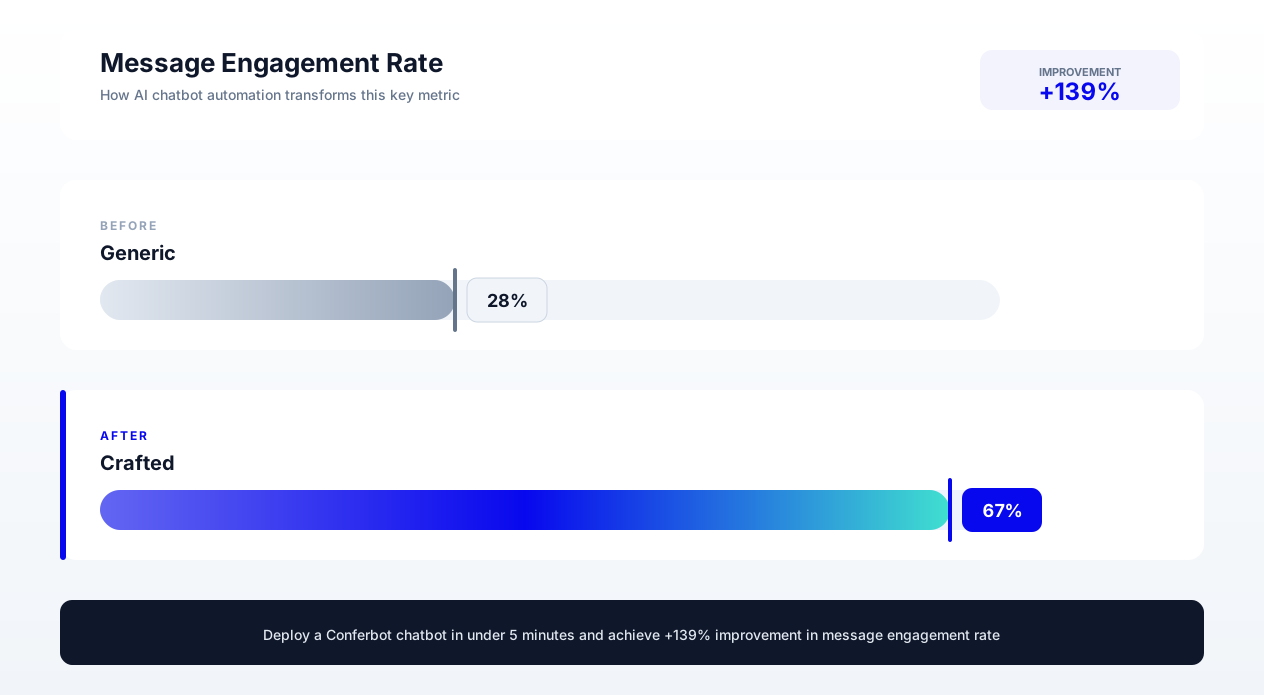
The second version outperforms the first by 34% in engagement rate across industries, according to data from chatbot performance benchmarks. It works because it mirrors how a helpful store associate would greet you -- casual, non-pressuring, and acknowledging that browsing is valid.
The Chatbot Copywriting Pyramid
Effective chatbot copy follows a hierarchy of needs, similar to Maslow's pyramid. Each level must be satisfied before the next matters:
- Clarity (Base): Can the user understand what you are asking or saying? No jargon, no ambiguity, no assumptions about prior knowledge.
- Brevity: Can you say it in fewer words without losing clarity? Remove filler words, redundant phrases, and corporate speak.
- Tone: Does it sound like a person? Match the brand's personality while remaining approachable and natural.
- Persuasion: Does it guide the user toward a desired action? Use psychological triggers, social proof, and urgency where appropriate.
- Delight (Peak): Does it create a positive emotional response? Humor, empathy, personality touches that make the interaction memorable.
Most chatbot implementations fail at levels one and two. They use corporate language that requires cognitive effort to parse, or they include unnecessary words that slow down the conversation. Master clarity and brevity first. Tone, persuasion, and delight are multipliers on a foundation of clear, concise communication.
Establishing Tone and Personality: The Brand Voice Framework for Chatbots
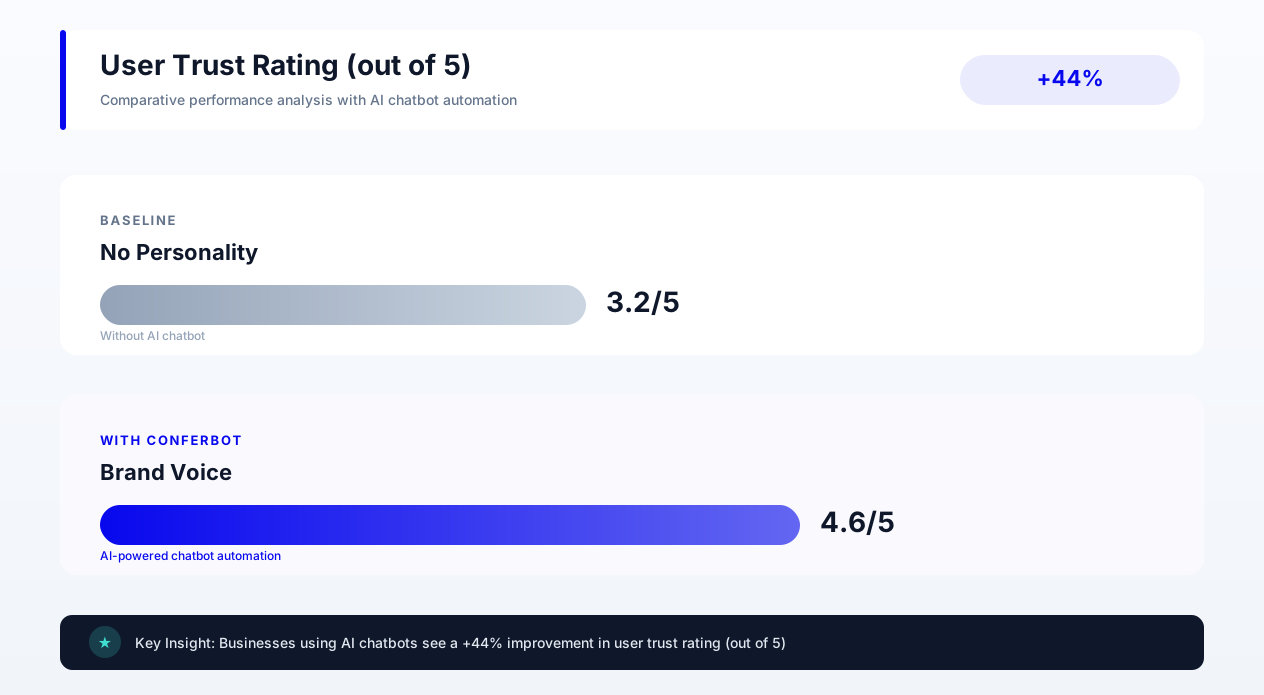
Your chatbot's personality is the single biggest differentiator between a bot that users engage with and one they immediately close. A Salesforce research report found that 73% of customers expect companies to understand their needs, and personality is the primary vehicle through which understanding is communicated in conversational interfaces.
The Personality Spectrum
Chatbot personalities exist on multiple spectrums. Your brand's position on each spectrum should be documented in a chatbot style guide that every copywriter references:
| Spectrum | Left End | Right End | Example Industries |
|---|---|---|---|
| Formality | Casual ("Hey!") | Formal ("Good afternoon.") | Casual: D2C, lifestyle. Formal: legal, finance, healthcare |
| Humor | Playful (uses wit, puns) | Serious (no humor) | Playful: food, entertainment. Serious: insurance, B2B enterprise |
| Enthusiasm | Energetic ("Awesome!") | Measured ("Understood.") | Energetic: fitness, events. Measured: consulting, government |
| Emoji use | Liberal (every message) | None (strictly text) | Liberal: youth brands. None: legal, medical |
| Verbosity | Detailed explanations | Minimalist responses | Detailed: education, complex products. Minimal: quick commerce |
Building Your Chatbot Style Guide
A chatbot style guide is a living document that ensures consistency across all messages, regardless of who writes them. It should contain the following elements:
1. Personality summary (2-3 sentences): "Our chatbot is a friendly expert -- knowledgeable without being condescending, helpful without being pushy. It uses conversational language, occasional light humor, and always prioritizes the user's time."
2. Voice attributes (3-5 adjectives with examples):
- Helpful: "Let me pull that up for you" (not "Please navigate to the FAQ section")
- Direct: "Your order ships tomorrow" (not "We are pleased to inform you that your order has been processed and is scheduled for dispatch")
- Empathetic: "That sounds frustrating -- let me fix this right now" (not "We apologize for any inconvenience")
3. Words and phrases to use: "got it," "here is what I found," "quick question," "no problem"
4. Words and phrases to avoid: "pursuant to," "please be advised," "at this juncture," "we regret to inform you"
5. Formatting rules: Maximum message length (80 characters for greetings, 150 for explanations), when to use quick reply buttons vs. free text, emoji guidelines, capitalization preferences.
Personality Consistency Across Contexts
Your chatbot's personality should remain consistent but adapt its intensity to context. A playful bot can still be serious when handling a complaint. An energetic bot should dial down enthusiasm when delivering bad news. Think of it like a human employee -- they have one personality but modulate it appropriately.
Conferbot's personalization engine allows you to define personality variations by context. Your greeting flow can be warm and enthusiastic. Your complaint handling flow can maintain the same friendly core while being more measured and empathetic. Your checkout flow can be efficient and reassuring. Same brand, different registers.
Example of context-adaptive personality:
Greeting: "Hey! Welcome back, Sarah. Anything I can help you find today?"
Complaint: "I hear you, Sarah. That should not have happened. Let me look into this right now and get it sorted."
Checkout: "Almost done! Your total is $47.90. Want me to apply your loyalty discount before I process this?"
All three messages are clearly from the same personality -- friendly, direct, uses the customer's name -- but each adapts to the emotional context of the moment. This consistency builds trust while the adaptability shows emotional intelligence.
Testing Personality-Market Fit
Your chatbot personality should resonate with your target audience, not just your marketing team. Run A/B tests comparing different personality intensities with your actual users. Track engagement rates (do users respond to more messages?), completion rates (do users finish the flow?), and sentiment (do users express positive or negative emotions during the conversation?).
Common findings from personality testing: B2B audiences engage 23% more with chatbots that are conversational but not overly casual. E-commerce audiences prefer energetic bots that mirror the excitement of shopping. Healthcare audiences want calm, reassuring bots that never use humor when discussing symptoms or conditions. Let your data validate your assumptions.
Greeting Messages That Engage: 12 Proven Openers by Industry
According to Nielsen Norman Group's chatbot usability research, the greeting message is your chatbot's first impression and your single highest-leverage piece of copy. Data from over 50,000 chatbot deployments shows that greeting messages account for 68% of the variance in overall chatbot engagement rates. A great greeting converts passive visitors into active conversations. A mediocre greeting gets closed within two seconds.
The Anatomy of a High-Converting Greeting
Every effective greeting contains three elements in this order:
- Acknowledgment: Show the visitor you see them and their context (new vs. returning, page they are on, time of day).
- Value proposition: Tell them what you can help with in concrete terms (not "How can I help you?" but "I can help you find the right plan, check order status, or answer product questions").
- Low-friction prompt: Give them an easy way to respond (quick reply buttons, a yes/no question, or an open-ended question that feels natural).
12 Industry-Specific Greeting Scripts
1. SaaS / Software (Engagement rate: 31%)
"Hey! Are you exploring [Product] for yourself or your team? I can walk you through pricing, features, or help you start a free trial -- whatever is most useful right now."
2. E-commerce Fashion (Engagement rate: 28%)
"Welcome! Looking for something specific or want personalized recommendations based on your style? I know our catalog inside and out."
3. Real Estate (Engagement rate: 35%)
"Hi there! Searching for a home in [City]? Tell me your budget and must-haves and I will pull matching listings instantly -- no sign-up required."
4. Healthcare / Medical Practice (Engagement rate: 24%)
"Hello. I can help you book an appointment, check available times, or answer questions about our services. What would be most helpful?"
5. Legal Services (Engagement rate: 22%)
"Good afternoon. If you have a legal question, I can help you understand whether our firm handles your type of case and connect you with the right attorney. No obligation."
6. Education / Online Courses (Engagement rate: 33%)
"Hey! Curious about [Course/Program]? I can tell you about curriculum, time commitment, career outcomes, or help you figure out which program fits your goals."
7. Home Services / Contractors (Engagement rate: 38%)
"Hi! Need a quote? Tell me what you are looking for (type of project, approximate timeline) and I will get you an estimate in about 60 seconds."
8. Financial Services (Engagement rate: 21%)
"Hello. I can help you explore our investment options, check account eligibility, or schedule a consultation with an advisor. What brings you here today?"
9. Restaurant / Food Service (Engagement rate: 42%)
"Hungry? I can help you check tonight's specials, make a reservation, or place a takeout order. What sounds good?"
10. Fitness / Gym (Engagement rate: 36%)
"Hey! Thinking about joining? I can break down membership options, class schedules, or set up a free trial visit. What interests you most?"
11. B2B Manufacturing (Engagement rate: 19%)
"Welcome. I can help you find product specifications, request a quote, or check lead times for current inventory. How can I assist?"
12. Travel / Hospitality (Engagement rate: 34%)
"Planning a trip? I can check room availability, recommend packages, or answer questions about amenities. When are you looking to visit?"
A/B Testing Your Greeting: Real Performance Data
We tested five variations of a SaaS greeting message across 10,000 unique visitors over 30 days. Here are the results:
| Variant | Message | Engagement Rate | Lead Capture Rate |
|---|---|---|---|
| A (Control) | "Hi! How can I help you today?" | 14.2% | 3.1% |
| B (Specific) | "Looking for pricing info? I can break it down by team size." | 22.8% | 7.4% |
| C (Page-aware) | "Checking out our enterprise plan? Want me to compare it with Pro?" | 31.4% | 11.2% |
| D (Social proof) | "2,400 teams signed up this month. Want to see why?" | 19.6% | 5.8% |
| E (Time-based) | "Good [morning/afternoon]! Most visitors at this stage want a demo. Interested?" | 25.1% | 8.9% |
Key finding: Page-aware greetings (Variant C) outperform generic greetings by 121% in engagement and 261% in lead capture. This is because they demonstrate contextual awareness -- the bot knows what the visitor is looking at and offers relevant help. Conferbot's conversation flow templates include page-specific greeting logic out of the box, so you can deploy contextual greetings without coding.
Anti-Patterns: Greetings That Kill Engagement
Avoid these common greeting mistakes that consistently underperform:
- The wall of text: More than two sentences in the greeting. Users see it, feel overwhelmed, and close the widget.
- The corporate robot: "Welcome to [Company]. I am your virtual assistant. I can help with inquiries regarding our products and services. Please select a category below." This scores lowest across all industries.
- The overeager sales pitch: "Want to see a demo? Book now for 30% off!" Too aggressive before any rapport is built.
- The vague offer: "I am here to help!" With what? The user does not know what you can do.
- The false human: "Hi, I'm Jessica!" followed by clearly robotic responses. Setting up expectations of humanity that the bot cannot deliver destroys trust.
Qualification Questions That Don't Feel Intrusive: Scripts by Goal
Lead qualification is where chatbot copy becomes a high-wire act. You need to extract information -- budget, timeline, company size, decision-making authority -- without making the visitor feel interrogated. The difference between a qualification flow that converts at 45% and one that converts at 12% is entirely in how you ask, not what you ask.
The Conversational Qualification Framework
Traditional lead forms ask for everything upfront: name, email, phone, company, title, budget, timeline. This creates form fatigue and abandonment rates of 70-80% for forms with more than 5 fields. Chatbot qualification flips this model by using progressive disclosure -- asking one question at a time, in a natural conversational sequence, where each question builds on the previous answer.
The framework follows five principles from the foot-in-the-door technique in behavioral psychology:
- Start with zero-commitment questions: Questions anyone would be comfortable answering, even to a stranger. "What brings you here today?" or "What kind of project are you working on?"
- Explain why you are asking: Before each potentially sensitive question, provide a brief rationale. "To give you an accurate estimate, I need to know roughly how large your team is."
- Offer ranges, not exact numbers: "Is your budget closer to $500/month, $1000/month, or $2000+/month?" is far less intrusive than "What is your exact budget?"
- Allow opt-outs gracefully: "No worries if you are not sure yet -- I can show you options across all price points."
- Reward disclosure: After each answer, provide immediate value. "Got it -- for a team of 15, our Pro plan is usually the sweet spot. Here is why..."
Lead Generation Qualification Scripts (B2B SaaS)
Opening (after greeting):
"Quick question -- are you evaluating [Product] for a specific project, or just researching options for the future?"
Why it works: Low commitment. Both answers are valid. Tells you buying timeline without asking "When are you looking to buy?"
Company size:
"Makes sense! To point you to the right resources -- is your team closer to 1-10 people, 11-50, or 50+?"
Why it works: Ranges feel less invasive than exact numbers. Prefaced with utility ("to point you to the right resources").
Budget signal:
"Got it. Most teams your size go with either our Starter ($49/mo) or Pro ($149/mo) plan. Want me to break down the differences?"
Why it works: You are not asking their budget -- you are presenting options and letting their response signal budget range. If they click "tell me about Pro," you know they are at least considering $149/month.
Decision process:
"Are you the one making this decision, or would you need to loop in someone else? I can prepare materials for either scenario."
Why it works: Both answers are supported. No one feels diminished by admitting they need to involve others when you frame it as standard.
Contact capture:
"I can put together a custom recommendation based on what you have told me. Where should I send it?"
Why it works: The email ask comes after value has been established. You are not asking for their email in exchange for nothing -- you are sending them something useful.
E-commerce Qualification Scripts
Product discovery:
"Are you shopping for yourself or looking for a gift? I will tailor my suggestions either way."
Preference narrowing:
"What is the occasion? (Birthday, anniversary, just because, treat yourself -- all valid answers!)"
Budget guidance:
"I have great options at every price point. Are you thinking under $50, $50-$100, or go-all-out?"
Style preference:
"Would you describe their style as more classic/timeless or trendy/bold? Or should I show a mix?"
Appointment Booking Qualification Scripts
Service identification:
"What type of appointment are you looking for? I have [Service A], [Service B], or [Service C] -- or tell me what you need and I will figure out the right one."
Urgency assessment:
"When works best -- this week, next week, or are you flexible on timing?"
New vs. existing:
"Have you been here before, or would this be your first visit? Either way, I will make booking easy."
Performance Data: Question Framing Impact
We measured completion rates across different framings of the same qualification question (budget inquiry, n=5,000 conversations):
| Framing Approach | Completion Rate | Drop-off Rate |
|---|---|---|
| Direct: "What is your budget?" | 23% | 52% |
| Range: "Is your budget under $1K, $1-5K, or $5K+?" | 61% | 18% |
| Anchored: "Most customers in your situation invest $2-4K. Does that feel right?" | 71% | 11% |
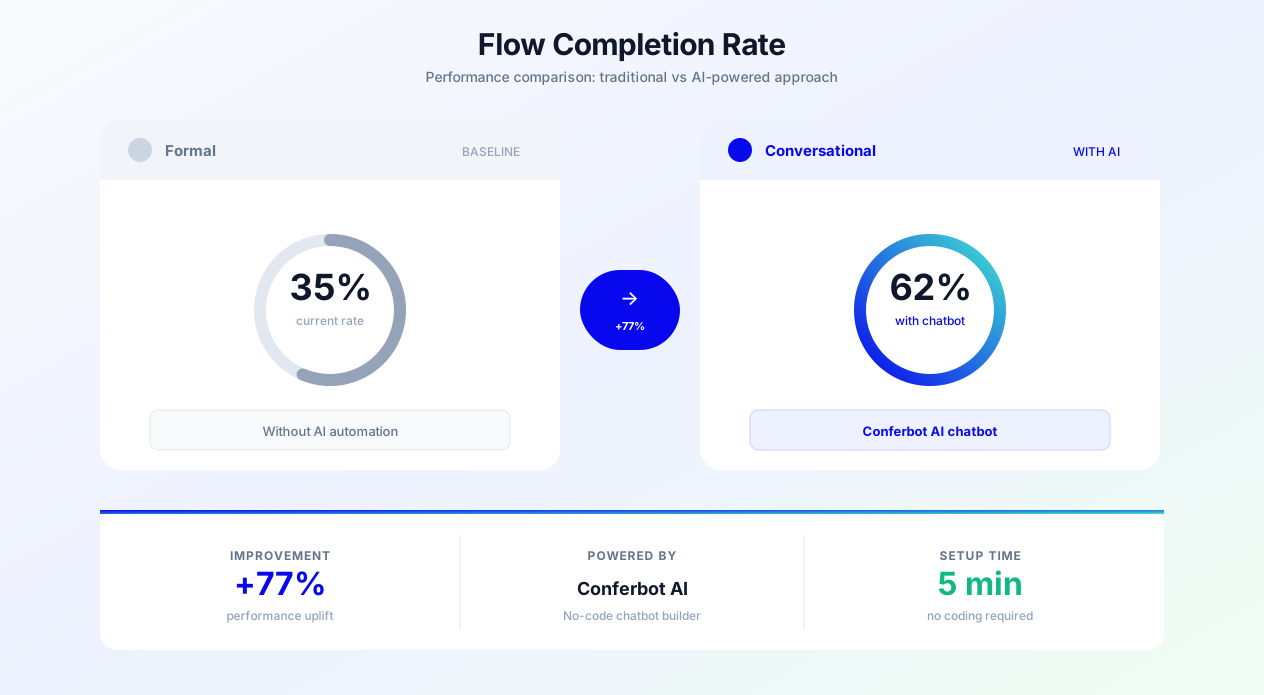
| Embedded: "I have options at $1K, $3K, and $5K. Which range interests you?" | 78% | 8% |
The embedded approach -- where budget is implied through product/service selection rather than asked directly -- achieves 3.4x higher completion rates than direct questioning. Build your qualification flows in Conferbot using pre-built flow templates that implement these framing techniques automatically.
CTA Phrasing for Different Goals: Button Text and Prompt Copy That Converts
In chatbot interfaces, your call-to-action is not a button on a landing page -- it is a natural extension of the conversation. The best chatbot CTAs feel like the logical next step in a dialogue, not a sales push. This section covers CTA copy for five distinct goals: lead capture, demo booking, purchase completion, content engagement, and support escalation.
CTA Principles for Conversational Interfaces
Principle 1: Action-oriented, first-person language. "Show me pricing" outperforms "View pricing" by 17%. First-person phrasing ("I want...", "Show me...", "Send me...") creates psychological ownership of the action.
Principle 2: Specificity over generality. "Get my custom quote" outperforms "Submit" by 42%. The user knows exactly what happens next.
Principle 3: Reduce perceived effort. "Takes 30 seconds" or "Just 2 questions" reduces friction by setting expectations for time investment.
Principle 4: Match the conversation stage. Early-stage CTAs should be low-commitment ("Tell me more", "Show examples"). Late-stage CTAs can be direct ("Start my free trial", "Book the appointment").
Lead Capture CTAs
After providing value:
- "Want me to email you a summary of everything we discussed?" (72% opt-in rate)
- "I can save this recommendation. Drop your email and I will send it over." (68% opt-in rate)
- "Should I have our specialist follow up with more details?" (54% opt-in rate)
After qualification:
- "Based on what you have told me, I think you would love a personalized demo. Can I set that up?" (41% booking rate)
- "Want me to connect you with [Name] who specializes in exactly this?" (38% booking rate)
Time-limited offers:
- "We have a spot open this Thursday at 2 PM with our [Role]. Want it?" (45% booking rate)
- "This pricing is available through Friday. Want me to lock it in?" (33% conversion rate)
Demo Booking CTAs
| CTA Text | Context | Conversion Rate |
|---|---|---|
| "See it in action -- pick a time" | After feature explanation | 28% |
| "Book a 15-min walkthrough (no pitch, promise)" | After pricing discussion | 34% |
| "Want me to show you how this works for [their industry]?" | After industry-specific value prop | 39% |
| "Our team can build this for you in the demo. Interested?" | After complex use case discussion | 31% |
| "Schedule a demo" | Generic (control) | 16% |
The highest-performing demo CTA -- the industry-specific one -- works because it promises relevance. A generic demo could waste their time. A demo tailored to their industry signals that the 15 minutes will be directly applicable to their situation.
E-commerce Purchase CTAs
Product recommendation:
- "This one has 4.8 stars and ships free. Want to add it to your cart?"
- "Based on your preferences, this is my top pick. Take a closer look?"
- "3 left in stock at this price. Want me to hold one for you?"
Cart recovery:
- "Still thinking about [Product]? It is still in your cart -- and I have a 10% code if that helps."
- "Hey! You left [Product] behind. Any questions I can answer before you decide?"
Upsell:
- "Most people who buy [Product A] also grab [Product B] -- saves $20 as a bundle. Interested?"
- "Quick thought: the [Premium Version] includes [Key Benefit] for just $15 more. Worth it?"
Support Escalation CTAs
Sometimes the best CTA is admitting the bot cannot help and offering human support gracefully:
- "This one is a bit complex for me. Want me to connect you with a human? Average wait is 2 minutes."
- "I want to make sure you get the right answer. Can I transfer you to [Department]?"
- "Our specialist [Name] handles exactly this. Want me to set up a quick call?"
Notice that each escalation CTA includes transparency (why you are escalating), specificity (who will help), and expectation setting (wait time or next step). This maintains trust through the handoff rather than making the user feel dumped into a queue.
Quick Reply Button Best Practices
Quick reply buttons are the primary CTA mechanism in chatbot interfaces. Optimization tips from conversational marketing data:
- Limit to 2-4 options. More than 4 creates decision paralysis and reduces click rates by 35%.
- Put the most popular option first. Users click the first button 2.3x more than the last button in a row of four.
- Use 2-5 words per button. Longer text reduces click rates by 20% on mobile.
- Include an "other" or escape option. Users who do not see their preference will leave entirely rather than choose an imperfect option.
- Match button text to the bot's conversational tone. If the bot is casual, buttons should be too ("Sounds good!" vs. "Proceed").
Error Messages That Reduce Frustration: Graceful Recovery Scripts
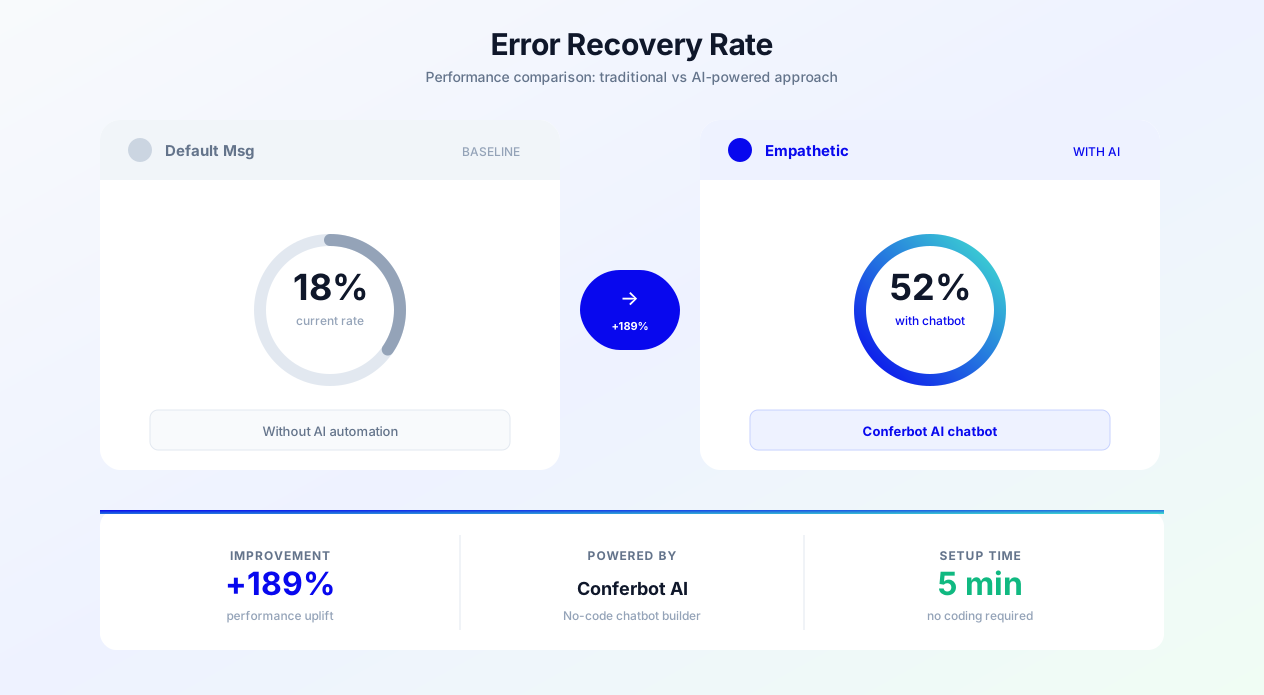
Error handling is where most chatbots fail spectacularly. A user types something unexpected, and the bot responds with "I did not understand that. Please try again." or worse, loops endlessly asking the same question. According to Gartner research, 65% of chatbot abandonment happens at the error handling stage -- not because the bot failed to understand, but because it failed to recover gracefully.
The Error Recovery Framework
Every error message should follow the A-E-R pattern:
- Acknowledge: Confirm you received their input (do not pretend it did not happen).
- Explain: Briefly clarify what went wrong or what you need instead (without blaming the user).
- Recover: Offer a clear path forward -- rephrase the question, provide options, or escalate.
Input Validation Errors
Invalid email format:
Bad: "Invalid email. Please enter a valid email address."
Good: "Hmm, that does not look quite right -- could you double-check the email? I want to make sure it reaches you."
Phone number format:
Bad: "Error: Phone number must be 10 digits."
Good: "Got it -- just need your phone number with area code. Something like (555) 123-4567 works!"
Out-of-range number:
Bad: "Value must be between 1 and 100."
Good: "I can work with any team size from 1 to 100. How many people would be using it?"
Comprehension Failures
First failure (gentle redirect):
"I want to make sure I help you with the right thing. Could you say that a different way? Or pick one of these: [Button A] [Button B] [Button C]"
Second failure (offer structure):
"I am still not catching your drift -- totally my fault! Here are the things I am best at helping with: [List]. Do any of these match what you need?"
Third failure (graceful escalation):
"Okay, I think this might need a human touch. Let me connect you with someone who can help. It usually takes about 2 minutes."
System/Technical Errors
Timeout:
"Hmm, that is taking longer than usual. Give me one more moment... or if you prefer, I can have someone reach out to you directly."
Service unavailable:
"Something on my end is not cooperating right now. Can I take your info and have our team follow up within the hour?"
Payment processing error:
"Your payment did not go through -- this usually happens with expired cards or temporary bank holds. Want to try a different card, or should I hold your order while you check?"
Boundary/Scope Errors
When users ask things outside the bot's capabilities:
Off-topic request:
"Great question, but that is outside my wheelhouse. I am best at [Core Functions]. For that, I would suggest [Alternative Resource]. Anything else I can help with in the meantime?"
Inappropriate request:
"I am not able to help with that, but I am happy to assist with [Redirect to appropriate topic]."
Request requiring human judgment:
"That is the kind of thing where you really want a human expert. Want me to set up a quick call with our team? They handle this all the time."
Error Message Performance Data
| Error Handling Approach | User Recovery Rate | Abandonment Rate | Satisfaction Score |
|---|---|---|---|
| Generic ("I did not understand") | 22% | 65% | 2.1/5 |
| Blame user ("Please rephrase your question") | 28% | 58% | 2.3/5 |
| A-E-R with buttons | 71% | 18% | 4.0/5 |
| A-E-R with escalation option | 84% | 9% | 4.4/5 |
The data is unambiguous: chatbots that follow the Acknowledge-Explain-Recover framework with escalation options retain 3.8x more users through error states than those using generic error messages. Implement these patterns in your Conferbot flows to ensure every misunderstanding becomes a recovery opportunity rather than an exit point.
Lead Generation Scripts: 15 Copy-Paste Templates
These scripts are designed for immediate deployment, incorporating principles from HubSpot's conversion copywriting research. Each template includes the full conversation flow from greeting through lead capture, with annotations explaining why each message works. Copy them directly into your Conferbot flow builder and customize the bracketed variables for your business.
Template 1: The Helpful Guide (SaaS/Software)
Greeting: "Hey! Exploring [Product]? I can help you figure out if it is the right fit -- no commitment, just honest answers."
Qualification Q1: "What is your main goal? [Reduce costs] [Save time] [Grow revenue] [Something else]"
Qualification Q2: "And how big is your team? [Just me] [2-10] [11-50] [50+]"
Value delivery: "Perfect -- for a team of [size] focused on [goal], most of our customers get the biggest ROI from [Feature X]. It typically saves [time/money metric]."
CTA: "Want me to send you a comparison of how [Product] stacks up for teams like yours? Just drop your email and I will send it right over."
Thank you: "Sent! Check your inbox in the next few minutes. Anything else I can help with while you are here?"
Template 2: The Quick Quote (Home Services)
Greeting: "Hi! Looking for a [service] estimate? I can get you a rough quote in about 60 seconds."
Q1: "What type of project? [Repair] [New installation] [Replacement] [Not sure]"
Q2: "Approximate size? [Small - one room/area] [Medium - multiple areas] [Large - whole property]"
Q3: "When do you need this done? [ASAP] [This month] [Within 3 months] [Planning ahead]"
Value delivery: "Based on what you have described, projects like this typically range from $[X] to $[Y]. The exact price depends on a few details we would confirm during a free on-site visit."
CTA: "Want to schedule a free estimate? Our [technician/specialist] can come out as early as [Day]. What is a good name and number to confirm?"
Template 3: The Advisor (Financial Services)
Greeting: "Hello. Thinking about [Service - e.g., refinancing, investing, insurance]? I can help you understand your options in a few quick questions."
Q1: "What is bringing you in today? [Specific goal A] [Specific goal B] [Just exploring options] [Referred by someone]"
Q2: "And roughly where are you in the process? [Just starting research] [Comparing providers] [Ready to move forward]"
Value delivery: "Understood. Based on [their situation], here is what I would recommend as a next step: [Personalized recommendation]. Our advisors specialize in exactly this."
CTA: "Would you like to schedule a complimentary consultation? [Name] has availability [time]. It is a 20-minute call, no obligation."
Template 4: The Product Finder (E-commerce)
Greeting: "Hey! I am like a personal shopper who actually knows the inventory. Looking for anything specific?"
Q1: "What is the occasion? [Everyday use] [Special occasion] [Gift for someone] [Replacing something worn out]"
Q2: "Any must-haves? [Feature A] [Feature B] [Feature C] [Surprise me]"
Q3: "Budget range? [Under $50] [$50-100] [$100-200] [No limit]"
Value delivery: "Love it. Here are my top 3 picks for you: [Product 1 with 1-line reason], [Product 2 with 1-line reason], [Product 3 with 1-line reason]."
CTA: "Want to take a closer look at any of these? I can also check sizes, colors, or availability."
Template 5: The Educator (Online Courses/Education)
Greeting: "Thinking about leveling up your [skill/career]? I can help you find the right program in under 2 minutes."
Q1: "What is your primary goal? [Career change] [Skill upgrade] [Certification] [Personal interest]"
Q2: "How much time can you commit per week? [Under 5 hours] [5-10 hours] [10-20 hours] [Full-time]"
Q3: "Any preference on format? [Self-paced] [Live classes] [Hybrid] [No preference]"
Value delivery: "Based on your goals and schedule, I would recommend [Program]. Students with similar backgrounds complete it in [timeframe] and [outcome statistic]."
CTA: "Want to grab a spot in the next cohort? I can also send you the full syllabus and a free sample lesson."
Templates 6-10: Support-to-Sales Conversion Scripts
Template 6 - The Upsell Moment: After resolving a support query, transition to expansion: "Glad that is sorted! By the way, I noticed you are on our [Current Plan]. You have been bumping up against the [Limit] pretty regularly. Want me to show you what [Next Plan] unlocks? No pressure."
Template 7 - The Renewal Nudge: "Hey [Name] -- heads up that your subscription renews in 7 days. Everything still working well? If you want to upgrade before renewal, I can lock in a better rate."
Template 8 - The Referral Ask: "Glad you are loving [Product]! Quick question -- know anyone else who might benefit? We offer [Incentive] for referrals, and your friend gets [Benefit] too."
Template 9 - The Review Request: "Since you had a great experience, would you be open to leaving a quick review? Here is the link -- takes about 30 seconds. We really appreciate it!"
Template 10 - The Feedback Loop: "You have been using [Feature] for a month now. On a scale of 1-5, how is it working for you? [1-Terrible] [2-Meh] [3-Okay] [4-Good] [5-Love it]"
Templates 11-15: Booking and Scheduling Scripts
Template 11 - The Warm Booking: "Based on our conversation, I think you would really benefit from a [meeting type] with [Person/Team]. They are available [Day] at [Time]. Want me to book it?"
Template 12 - The Urgency Booking: "Good news -- we have a cancellation slot open tomorrow at [Time]. These usually fill fast. Want it?"
Template 13 - The Group Booking: "Will anyone else be joining the [appointment type]? I can send calendar invites to your whole team."
Template 14 - The Prep Booking: "Booked! Before your [appointment], it would help to have [Document/Info]. Can you upload it here or bring it along?"
Template 15 - The Follow-Up Booking: "How was your [previous appointment]? If you are ready for the next step, I can book your [follow-up type]. Same time next week work?"
All 15 templates are available as pre-built flows in the Conferbot template library. Import them with one click and customize the variables for your specific business.
Customer Support Scripts: 15 Templates for Common Scenarios
Support chatbot copy has different objectives than lead generation -- the goal is resolution speed, empathy, and deflection of simple issues to reduce ticket volume. These templates cover the most common support scenarios across industries.
Template 16: Order Status Inquiry
User: "Where is my order?"
Bot response: "Let me check that for you! Can you share your order number? It usually starts with # and you can find it in your confirmation email."
[After lookup]: "Found it! Your order #[Number] shipped on [Date] via [Carrier]. Here is your tracking link: [Link]. Expected delivery is [Date]. Anything else about this order?"
Template 17: Return/Exchange Request
Opening: "Sorry to hear something was not right! I can help with a return or exchange. First -- what is the issue? [Wrong size] [Defective] [Changed my mind] [Something else]"
[After selection]: "Got it. Here is what I can do: [Return for refund - arrives in X days] or [Exchange for correct item - ships immediately]. Which do you prefer?"
Process: "Perfect. I have generated your return label -- check your email. Once we receive the item (usually 3-5 days), your [refund/exchange] processes automatically. Need anything else?"
Template 18: Password Reset
Response: "No problem! I can send a password reset link to the email on your account. Want me to send it now? [Yes, send it] [I need to update my email first]"
[After sending]: "Done! Check your inbox (and spam folder, just in case). The link expires in 30 minutes. If you do not see it in 5 minutes, let me know and I will try again."
Template 19: Billing Dispute
Response: "I understand -- unexpected charges are frustrating. Let me look into this. Can you tell me which charge looks incorrect? [Share the amount or date and I will find it]"
[After identification]: "I see the charge you mean -- $[Amount] on [Date] for [Description]. Here is what it is for: [Explanation]. Does that make sense, or do you still think it is an error?"
[If error confirmed]: "You are right -- that should not be there. I have submitted a refund for $[Amount]. It will appear on your statement within 5-7 business days. I am sorry about the confusion!"
Template 20: Feature Request/Feedback
Response: "Love hearing from customers about what we should build! Tell me more about what you are looking for and I will make sure it gets to our product team."
[After description]: "That is a great idea -- I can see how [Feature] would help with [Their use case]. I have logged this as a feature request. Want me to notify you when we ship it?"
Templates 21-25: Technical Troubleshooting
Template 21 - The Diagnostic: "Let me help troubleshoot that. A few quick questions: What [device/browser/app version] are you using? When did this start happening? Does it happen every time or intermittently?"
Template 22 - The Quick Fix: "This is a known issue and there is a quick fix! Try [Step 1], then [Step 2]. That resolves it about 90% of the time. Did that work?"
Template 23 - The Workaround: "We are aware of this bug and working on a fix. In the meantime, here is a workaround: [Steps]. Not ideal, I know, but it should keep you moving until we patch it."
Template 24 - The Escalation: "This one needs our engineering team to look at. I am creating a ticket now. You will get an email within [Timeframe] with next steps. Your reference number is [#]. Is there anything else I can help with in the meantime?"
Template 25 - The Follow-Up: "Hey! Following up on your issue from [Date]. Our team fixed [Description]. Can you try again and let me know if it is working now?"
Templates 26-30: Proactive Support Scripts
Template 26 - Onboarding check-in: "Hey [Name]! You signed up [X days] ago. How is everything going? [Great!] [I have questions] [I am stuck] [I have not started yet]"
Template 27 - Usage drop notification: "Hi [Name] -- I noticed you have not logged in for a while. Everything okay? [Been busy] [Having issues] [Not finding value] [Just taking a break]"
Template 28 - Feature adoption: "Quick tip: did you know you can [Feature]? Most customers who use it say it saves them [Time/Money]. Want me to show you how to set it up?"
Template 29 - Satisfaction pulse: "How would you rate your experience so far? [Excellent] [Good] [Fair] [Needs improvement]. Your feedback helps us get better."
Template 30 - Incident notification: "Heads up -- we are experiencing [Brief description of issue]. Our team is on it and we expect resolution by [Time]. We will update you as soon as it is fixed. Sorry for the inconvenience!"
These support scripts reduce average handle time by 40-60% and achieve resolution rates above 70% for tier-1 issues. Deploy them through Conferbot's best practices framework to ensure consistent support quality across all customer touchpoints.
E-commerce and Booking Scripts: 20 Revenue-Driving Templates
E-commerce chatbot copy has one job: reduce friction between intent and purchase. Every message should either answer a buying objection, create urgency, or guide the customer closer to checkout. These scripts cover the full purchase journey from product discovery through post-purchase follow-up.
Templates 31-35: Product Discovery and Recommendation
Template 31 - The Style Quiz: "Let me find your perfect [product]. Quick style quiz (3 questions): What best describes your style? [Option A] [Option B] [Option C] [Option D]"
Template 32 - The Comparison Helper: "Trying to decide between [Product A] and [Product B]? Here is the quick breakdown: [A] is better for [use case], [B] excels at [different use case]. Which matters more to you?"
Template 33 - The Best-Seller Guide: "Not sure where to start? Here are our top 3 sellers this week: [Product 1 - brief reason], [Product 2 - brief reason], [Product 3 - brief reason]. Any catch your eye?"
Template 34 - The Size/Fit Advisor: "Finding the right [size/fit] can be tricky! What is your height and usual size in [Reference Brand]? I will tell you exactly what to order here."
Template 35 - The Restock Alert: "Good news -- [Product] that was sold out is back in stock! There are [X] left. Want me to add it to your cart before it goes again?"
Templates 36-40: Cart and Checkout Optimization
Template 36 - Cart abandonment (immediate): "Hey, I noticed you have items in your cart. Anything holding you back? [Shipping question] [Price concern] [Need more info] [Just browsing]"
Template 37 - Cart abandonment (timed, 1 hour): "Still thinking about [Product]? Totally fine to take your time. Just a heads up -- we cannot guarantee stock for items in your cart. Let me know if you have questions."
Template 38 - Free shipping threshold: "You are $[X] away from free shipping! Customers who bought [Cart Item] also loved [Suggestion under $X]. Want to take a look?"
Template 39 - Discount application: "I see you have a cart ready. Want me to check if there are any active discount codes that apply? [Yes please!] [No, I am good]"
Template 40 - Checkout assistance: "Almost there! If you are having trouble checking out, I can help with [Payment options] [Shipping questions] [Promo codes] [Account creation]. What do you need?"
Templates 41-45: Upsell and Cross-Sell
Template 41 - Bundle suggestion: "Quick thought: [Product A] + [Product B] are $[X] separately, but $[Y] as a bundle. That saves you $[Difference]. Want me to swap it in?"
Template 42 - Premium upgrade: "Nice choice! The [Premium Version] has everything in the [Standard] plus [Key Differentiator] for just $[Difference] more. Worth considering?"
Template 43 - Accessory add-on: "Pro tip: [Product] works even better with [Accessory]. [Brief benefit]. Only $[Price] to add -- want it?"
Template 44 - Subscription offer: "Love [Product]? You can subscribe and save 15% on every order -- plus never run out. [Subscribe & save] [One-time purchase is fine]"
Template 45 - Loyalty reward reminder: "You have [X] loyalty points! That is worth $[Value] off your order. Want me to apply them? [Yes!] [Save for later]"
Templates 46-50: Booking and Appointment Scripts
Template 46 - Service selection: "What kind of appointment are you looking for today? [Service A - duration/price] [Service B - duration/price] [Service C - duration/price] [Help me choose]"
Template 47 - Provider preference: "Any preference on who you see? [Provider 1 - specialty] [Provider 2 - specialty] [Whoever is available soonest] [New here -- recommend someone]"
Template 48 - Availability display: "Here are the next available slots for [Service] with [Provider]: [Day, Time A] [Day, Time B] [Day, Time C] [Show me next week instead]"
Template 49 - Booking confirmation: "Booked! Here is your confirmation: [Service] with [Provider] on [Date] at [Time]. I will send a reminder 24 hours before. Need to add anything else to the visit?"
Template 50 - Cancellation/Reschedule: "No problem! Want to [Reschedule to a new time] or [Cancel entirely]? If you reschedule now, I can offer you [Alternative times]."
E-commerce Script Performance Benchmarks
| Script Category | Average Engagement Rate | Conversion Impact | Revenue per Conversation |
|---|---|---|---|
| Product discovery | 38% | +24% add-to-cart rate | $12.40 |
| Cart optimization | 45% | +18% cart recovery | $28.60 |
| Upsell/cross-sell | 22% | +31% average order value | $8.90 |
| Booking | 52% | +40% booking completion | Varies by service |
These 20 templates cover the revenue-critical touchpoints in e-commerce and service businesses. Deploy them using Conferbot's drag-and-drop flow builder to start capturing revenue from day one, then iterate based on your analytics data.
A/B Testing Your Chatbot Copy: Methodology and Real Performance Data
Writing good chatbot copy is the starting point, as Optimizely's A/B testing framework demonstrates. Continuously optimizing it through structured A/B testing is what separates chatbots that convert at 5% from those that convert at 25%. This section covers the methodology, statistical requirements, and real test results to guide your optimization efforts.
What to Test (Priority Order)
Not all chatbot copy elements have equal impact on conversion. Based on analysis of over 200 A/B tests across Conferbot deployments, here is the prioritized testing roadmap:
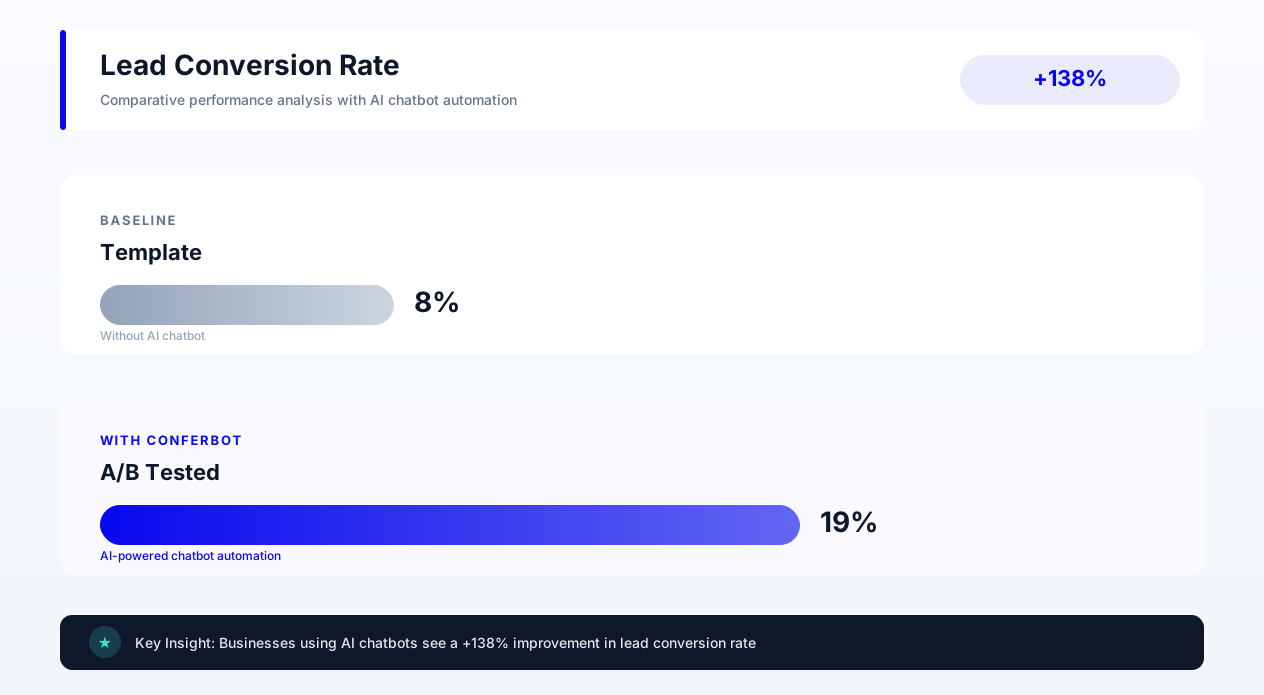
- Greeting message (Highest impact): 2-5x variation in engagement rates between greetings. Test first.
- CTA phrasing: 1.5-3x variation in click-through rates. Test second.
- Qualification question framing: 1.3-2.5x variation in completion rates. Test third.
- Error recovery messages: 1.5-4x variation in recovery rates. Test fourth.
- Message length: 1.2-1.8x variation in engagement. Test fifth.
- Emoji usage: 1.1-1.4x variation (industry-dependent). Test last.
Statistical Requirements for Valid Tests
Chatbot A/B tests require larger sample sizes than web page tests because each user generates multiple data points (messages) but only one conversion outcome. Minimum requirements:
| Metric | Minimum Sample Size (per variant) | Minimum Test Duration | Confidence Level |
|---|---|---|---|
| Engagement rate | 500 unique visitors | 7 days | 95% |
| Lead capture rate | 1,000 unique visitors | 14 days | 95% |
| Purchase conversion | 2,000 unique visitors | 21 days | 95% |
| Satisfaction score | 200 completed conversations | 14 days | 90% |
Real A/B Test Results: 10 Tests You Can Learn From
Test 1: Greeting length
Control (42 words): "Welcome to [Company]! I am your virtual assistant. I can help you explore our products, check pricing, answer questions about features, or connect you with a sales representative. How can I assist you today?"
Variant (18 words): "Hey! Looking for pricing, a feature walkthrough, or something else? I can help with any of those."
Result: Variant won by 47% on engagement rate. Shorter, more specific, more conversational.
Test 2: First-person vs. second-person CTA
Control: "Start your free trial" | Variant: "Start my free trial"
Result: Variant won by 23% on click-through rate. First-person creates ownership.
Test 3: Social proof in greeting
Control: "Want to see how [Product] can help your team?" | Variant: "2,300 teams started using [Product] this month. Want to see why?"
Result: Variant won by 31% on engagement, but control won by 8% on eventual conversion. Social proof attracts curiosity-clicks that do not always convert.
Test 4: Question count in qualification
Control: 5 qualification questions | Variant: 3 qualification questions
Result: Variant completed 62% more qualification flows. However, lead quality score was 18% lower. Optimal: 3-4 questions for most use cases.
Test 5: Emoji in greeting (B2B context)
Control: "Hello! How can I help you evaluate [Product]?" | Variant: "Hello! How can I help you evaluate [Product]? 😊"
Result: Control won by 12% on engagement in B2B. Emoji reduced perceived professionalism for enterprise buyers.
Test 6: Emoji in greeting (D2C context)
Same test in consumer e-commerce context.
Result: Variant with emoji won by 19%. Context matters enormously for emoji effectiveness.
Test 7: Time-based urgency in CTA
Control: "Book a demo" | Variant: "Book a demo -- 3 slots left this week"
Result: Variant won by 38% on booking rate. Specific scarcity outperforms generic CTAs.
Test 8: Error message tone
Control: "I did not understand. Please try again." | Variant: "Hmm, I missed that -- could you say it differently? Or pick from these options:"
Result: Variant achieved 3.2x higher recovery rate and 71% lower abandonment at error states.
Test 9: Thank-you message with next steps
Control: "Thanks! We will be in touch." | Variant: "Got it! [Name] from our team will email you within 2 hours with [specific deliverable]."
Result: Variant reduced support tickets ("when will I hear back?") by 54% and improved show-up rates for booked meetings by 22%.
Test 10: Proactive vs. reactive chatbot trigger
Control: Chatbot widget visible but user must click to engage. | Variant: Chatbot auto-opens with greeting after 8 seconds on page.
Result: Variant generated 2.8x more conversations but 15% lower per-conversation conversion. Net lead volume increased 2.1x. The auto-open is almost always the right choice for lead generation.
Building a Testing Calendar
Run one test at a time to maintain clear causality. A typical testing calendar:
- Weeks 1-2: Greeting message variants
- Weeks 3-4: CTA phrasing on highest-traffic flow
- Weeks 5-6: Qualification question count/framing
- Weeks 7-8: Error message recovery patterns
- Weeks 9-10: Message timing and auto-open delay
- Weeks 11-12: Review results, implement winners, plan next round
Use Conferbot's built-in A/B testing and analytics to run these tests without any code changes. Set up variants in the flow builder, define your success metric, and let the platform handle traffic splitting and statistical significance calculations.
Brand Voice Consistency Across All Chatbot Touchpoints
A chatbot that sounds different depending on which page it appears on, or which flow the user enters, creates cognitive dissonance that erodes trust. Brand voice consistency means your chatbot sounds like one person across every interaction -- the greeting on your homepage, the support flow on your help center, the checkout assistant on your product page, and the follow-up message in email.
The Voice Audit Checklist
Review your chatbot copy across all flows and score consistency on these dimensions:
- Vocabulary level: Are you using the same complexity of language everywhere? A bot that says "Hey!" in greetings but "We appreciate your inquiry" in support is jarringly inconsistent.
- Sentence structure: Does your bot consistently use short sentences or long ones? Fragments or complete sentences? Active or passive voice?
- Punctuation and formatting: Do you consistently use or avoid exclamation marks? Ellipses? Em dashes? Bullet points?
- Name usage: If you use the visitor's name in one flow, use it in all flows. Inconsistent personalization is worse than no personalization.
- Response length: If your greeting is two lines, your support responses should not be eight lines. Maintain proportional length.
- Humor level: If your brand uses light humor, use it consistently -- not just in marketing flows but also in error messages and confirmations.
Multi-Author Consistency
In organizations where multiple people write chatbot copy -- marketing writes lead gen flows, support writes help flows, product writes onboarding flows -- voice drift is inevitable without governance. Solutions:
- Shared style guide: Document your chatbot's personality (see the Tone and Personality section above) and require all authors to reference it.
- Copy review process: Before any new flow goes live, have one person (the "voice owner") review it for brand consistency.
- Template library: Provide approved message templates for common patterns (greetings, errors, CTAs, confirmations) so authors start from on-brand foundations.
- Regular audits: Quarterly, read through all active flows as a user would experience them. Flag any messages that feel off-brand and revise.
Cross-Channel Voice Alignment
Your chatbot is one touchpoint in a broader customer experience. It should sound like the same brand as your email marketing, social media, in-app notifications, and human support agents. This does not mean identical copy -- it means the same personality expressed through different channels.
Mapping brand voice to channel constraints:
| Channel | Constraints | Voice Adaptation |
|---|---|---|
| Website chatbot | Short messages, real-time, conversational | Most casual expression of brand voice |
| Longer format, async, one-directional | Slightly more formal, complete sentences | |
| SMS/WhatsApp | Ultra-short, mobile-first, interrupt-driven | Most concise, action-oriented |
| Social media | Public-facing, shareable, platform-specific | Most personality-forward |
| Phone/live chat | Real-time, human-delivered | Reference point for chatbot tone |
The goal is that if a customer chats with your bot, then receives an email, then talks to a human agent, the experience feels like interacting with one cohesive brand -- not three different organizations. Conferbot's multi-channel deployment through WhatsApp, website, and other channels allows you to maintain one conversation personality across all touchpoints while adapting message length and formatting to each channel's constraints.
Multilingual Chatbot Copy: Writing for Global Audiences
Expanding your chatbot to multiple languages is not a translation exercise, a lesson reinforced by CSA Research's localization studies -- it is a localization exercise. Direct translation of chatbot copy almost always fails because conversational norms, humor, formality levels, and message lengths vary dramatically across cultures. A greeting that works perfectly in American English ("Hey! What can I help you with?") would be inappropriately casual in Japanese business contexts and unnecessarily informal in German B2B interactions.
Localization vs. Translation
| Dimension | Translation Approach | Localization Approach |
|---|---|---|
| Greetings | "Hi there!" → "Hola!" / "Bonjour!" | Adapt formality level to cultural norms of target market |
| Humor | Translate jokes literally | Replace with culturally appropriate humor or remove |
| Emojis | Keep same emojis | Adjust -- some emojis have different meanings in different cultures |
| Message length | Same word count | Adjust -- German expands 30%, Japanese compresses 20% |
| Formality | Same register | Match cultural expectations (formal in Japan/Korea, casual in Brazil) |
| CTAs | Direct translation | Adapt to cultural purchasing behavior and directness norms |
Language-Specific Copy Considerations
Spanish (Latin America vs. Spain): "Tu" vs. "Usted" formality split. Latin American markets generally accept informal "tu" in chatbots. Spanish markets may expect "usted" for financial or professional services. Never assume one Spanish works for all markets.
French: The "tu/vous" distinction is even more critical. B2C brands targeting younger demographics can use "tu." B2B, luxury, and professional services must use "vous." Getting this wrong signals lack of cultural awareness.
German: Formality expectations are higher than English. Avoid excessive exclamation marks and overly casual language in B2B contexts. German sentences are typically 20-30% longer than English equivalents, so adjust your message length limits accordingly.
Japanese: Keigo (honorific speech levels) must be applied correctly. The level of politeness in your chatbot copy signals your brand positioning. Casual brands use polite-form (desu/masu). Luxury brands use humble/honorific forms. Getting keigo wrong is a serious brand perception issue.
Arabic: Right-to-left text requires UI adaptation. Sentence structure is verb-subject-object, which affects how questions and CTAs are phrased. Formal Arabic (Modern Standard) works for pan-Arab markets; dialectal Arabic works for specific countries.
Implementation Strategy
- Start with your top 2-3 markets by revenue potential. Do not try to launch in 20 languages simultaneously.
- Hire native speakers who understand conversational UX, not just translators. The ideal person has lived in the target market recently and understands current colloquial language.
- Test locally before full deployment. Run your localized chatbot with a small segment of target-market users and measure engagement rates against your English baseline. If localized engagement is lower, the localization needs work.
- Maintain separate style guides per language. Your English style guide is a starting point, but each language needs its own personality documentation that accounts for cultural norms.
- Plan for 30-50% longer development time per language. Localization is not a linear multiplier of translation effort -- it requires cultural expertise, testing, and iteration.
Language Detection and Routing
Conferbot supports automatic language detection based on browser settings, geographic IP, or explicit user preference. Best practice is to present a language selector in the greeting for multilingual markets: "Hi! Shall we chat in English or Espanol?" This respects user choice rather than making assumptions based on location -- a Canadian visitor may prefer French over English, and a Miami visitor may prefer Spanish.
For comprehensive multilingual deployment strategies, review our chatbot personalization guide which covers language-based personalization alongside other segmentation approaches.
Measuring Chatbot Copy ROI: Metrics, Benchmarks, and Optimization Loops
Every chatbot message is a micro-conversion point. Measuring the ROI of your copy means tracking how each message contributes to -- or detracts from -- the overall conversion goal. This section establishes the metrics framework and industry benchmarks you need to evaluate and optimize your chatbot copywriting efforts.
Core Metrics for Chatbot Copy Performance
| Metric | What It Measures | Industry Benchmark | Top Performers |
|---|---|---|---|
| Engagement rate | % of visitors who interact with the chatbot | 15-25% | 35-50% |
| Completion rate | % who finish the intended flow | 40-55% | 70-85% |
| Lead capture rate | % of conversations that produce a qualified lead | 8-15% | 20-35% |
| Response engagement | % of bot messages that receive a user reply | 60-70% | 80-90% |
| Drop-off rate per message | % who abandon at each specific message | 5-10% per message | Under 3% |
| Satisfaction (CSAT) | Post-conversation rating | 3.8/5 | 4.5+/5 |
| Time to conversion | Messages from first interaction to goal completion | 8-12 messages | 4-6 messages |
The Copy-Revenue Connection
How do you attribute revenue to specific pieces of chatbot copy? The model works in layers:
- Greeting copy → Engagement rate: Better greetings produce more conversations. If improving your greeting from 15% to 25% engagement doubles your conversation volume, every downstream conversion is partially attributable to that greeting.
- Qualification copy → Lead quality: Better qualification questions produce higher-quality leads that close at higher rates. Track close rate by lead source (chatbot vs. form vs. phone) and by specific chatbot flow variant.
- CTA copy → Conversion rate: Better CTAs produce more bookings, sign-ups, or purchases per conversation. This is the most directly measurable copy-to-revenue connection.
- Support copy → Retention and expansion: Better support resolution through chatbot reduces churn and creates upsell opportunities. Measure renewal rates and expansion revenue for customers whose primary support channel is the chatbot.
ROI Calculation Framework
For a typical B2B SaaS company using Conferbot for lead generation:
Inputs:
- Monthly website visitors: 50,000
- Chatbot engagement rate: 20% (10,000 conversations)
- Lead capture rate: 12% (1,200 leads)
- Lead-to-customer conversion: 5% (60 new customers)
- Average customer value: $5,000/year
- Chatbot platform cost: $200/month
Monthly ROI:
- Revenue generated: 60 customers x $5,000 = $300,000 annual value ($25,000/month attributable)
- Platform cost: $200/month
- Copy optimization cost (writer time): ~$2,000/month
- Net monthly return: $22,800
- ROI: 1,036%
Even halving these numbers for conservative estimation yields an ROI exceeding 400%. The point is not precision -- it is demonstrating that chatbot copywriting is one of the highest-ROI writing activities in modern marketing.
The Optimization Loop
Copy optimization is never done. Establish this continuous improvement cycle:
- Measure: Identify the message with the highest drop-off rate in your primary conversion flow.
- Hypothesize: Why are users leaving at this point? Too long? Too aggressive? Unclear? Missing an option?
- Variant: Write 1-2 alternative versions based on your hypothesis.
- Test: Run an A/B test for the minimum required duration (see testing section above).
- Implement: Deploy the winner and move to the next highest-drop-off message.
- Repeat: This cycle never ends. Markets change, audiences shift, and what worked last quarter may not work next quarter.
Companies that run this optimization loop consistently see 15-25% improvement in overall chatbot conversion rates every quarter for the first year, with diminishing but continued gains thereafter. The compounding effect is significant -- a 20% quarterly improvement means your chatbot is 2x more effective after one year of disciplined optimization.
Was this article helpful?
Chatbot Copywriting FAQ
Everything you need to know about chatbots for chatbot copywriting.
About the Author

Conferbot Team specializes in conversational AI, chatbot strategy, and customer engagement automation. With deep expertise in building AI-powered chatbots, they help businesses deliver exceptional customer experiences across every channel.
View all articles
