
Accountant & CPA Chatbot
Free Finance Chatbot Template
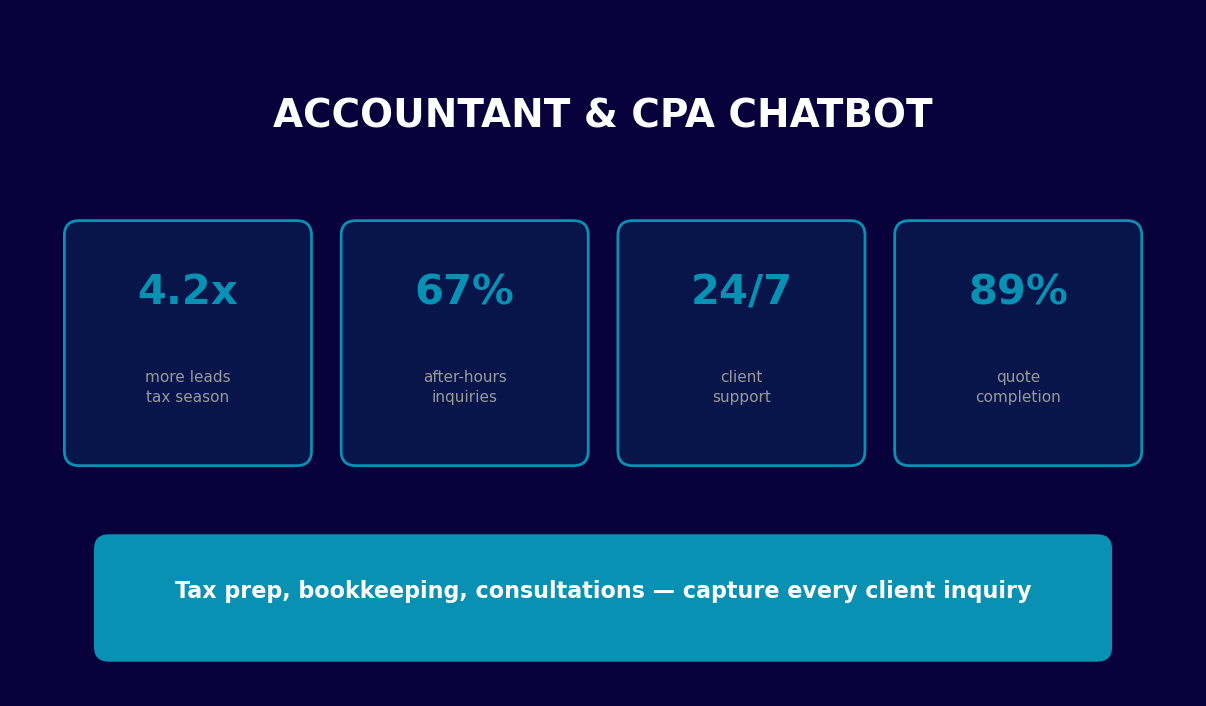
A complete accountant and CPA firm chatbot covering tax preparation, bookkeeping inquiries, consultation booking, pricing, and tax deadline information — available 24/7 to qualify leads and schedule appointments even during peak tax season.


What Is a Chatbot for Accountants and CPA Firms?
A chatbot for accountants is a conversational AI assistant deployed on an accounting or CPA firm's website to handle client inquiries, qualify leads, explain services, and book consultations around the clock — without a receptionist picking up the phone. For CPA practices and accounting firms in 2026, this means capturing every inbound inquiry whether it arrives at 9 AM Monday or 11 PM on April 14th during the peak of tax season.
Most accounting firms operate with lean administrative teams. A single receptionist or office manager handles incoming calls, responds to email inquiries, schedules appointments, and answers the same questions about services, fees, and deadlines dozens of times every week. During tax season, this capacity is completely exhausted. Potential clients call at 8 PM or on a Saturday, get voicemail, and call the next firm on their Google search results. The chatbot eliminates this problem entirely: it is available at all times, answers questions immediately, and routes qualified prospects to the booking calendar automatically.
The accounting chatbot handles the full range of first-contact client needs: identifying whether the prospect needs tax preparation, bookkeeping services, advisory, or payroll; gathering the information a CPA needs to assess the engagement; explaining document requirements; presenting pricing tiers; walking through tax deadlines; and confirming consultation appointments. All of this happens before a staff member is ever involved — which means every human interaction starts with a qualified, informed prospect rather than an uninformed inquiry that needs to be educated from scratch.
Built on Conferbot's AI chatbot builder, the accountant chatbot template deploys directly to your firm's website, integrates with your calendar and CRM via API, and can engage clients through WhatsApp for the growing segment of clients who prefer messaging over phone calls. The template covers every major service category a CPA firm offers and is fully configurable to your firm's specific service menu, pricing, and geographic market.
How the Accountant Chatbot Works: From First Visit to Booked Appointment
The accountant chatbot follows a structured qualification and booking workflow that mirrors the intake process a skilled receptionist would conduct — but executes it instantly, simultaneously for any number of concurrent visitors, and without business-hours restrictions. Understanding each stage clarifies why the conversion rate from website visitor to booked appointment increases significantly when the chatbot replaces or supplements traditional contact forms and phone calls.
Stage 1: Service Category Identification
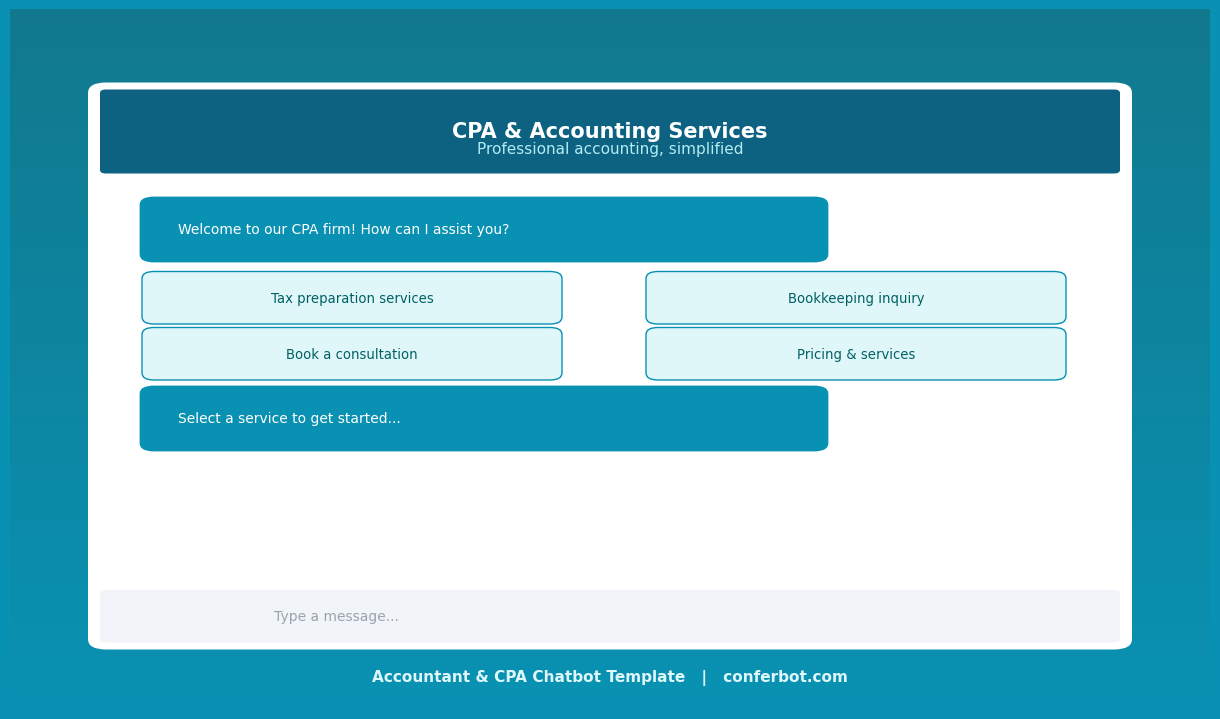
The conversation begins with a welcoming message that establishes the firm's professional brand, then presents the five service categories that cover the majority of inbound inquiries: tax preparation, bookkeeping, consultation booking, pricing information, and tax deadline guidance. This single menu question routes each visitor into the path most relevant to their immediate need — avoiding the frustration of generic conversations where the client must explain their situation multiple times.
Stage 2: Qualification by Client Type
Within each service path, the chatbot gathers the information that determines service complexity and fee range. For tax preparation, it distinguishes between individual returns (Form 1040), sole proprietors and LLCs (Schedule C), S-corps and C-corps (Form 1120/1120-S), and partnerships (Form 1065) — because these represent dramatically different levels of engagement and very different document requirements. For bookkeeping, it establishes business size and monthly transaction volume. This qualification step means the CPA who reviews the appointment request immediately understands what they are walking into.
Stage 3: Document Requirement Education
Rather than having clients arrive at appointments unprepared — one of the most consistent friction points in tax practice — the chatbot delivers tailored document checklists immediately after qualification. Individual filers receive the W-2, 1099, and deduction receipt list relevant to their situation. Business clients receive the profit and loss statement, payroll records, and prior-year return checklist specific to their entity type. Clients who arrive at appointments with the right documents complete those appointments 30-40% faster, directly increasing the number of returns a firm can process during peak season.
Stage 4: Contact Collection and Appointment Booking
The booking sequence collects name, email, phone number, and preferred appointment time — everything the firm needs to create a client record and schedule the meeting. Preferred time preferences are captured in five options that cover this week and next week, morning and afternoon, giving the scheduling team clear direction without requiring real-time calendar access from the chatbot. The booking confirmation message includes what to expect at the appointment and, for tax clients, the document checklist reinforced one final time as a pre-appointment reminder.
Stage 5: Goodbye and Follow-Up Trigger
Every path concludes with a professional closing message that establishes business hours and response time commitments — critical for managing client expectations in the often-anxious context of tax and accounting inquiries. The conversation data integrates with the firm's CRM via Conferbot's API integration, creating or updating the client record automatically and triggering any configured follow-up sequences.
Capturing Leads During Tax Season: The 24/7 Advantage
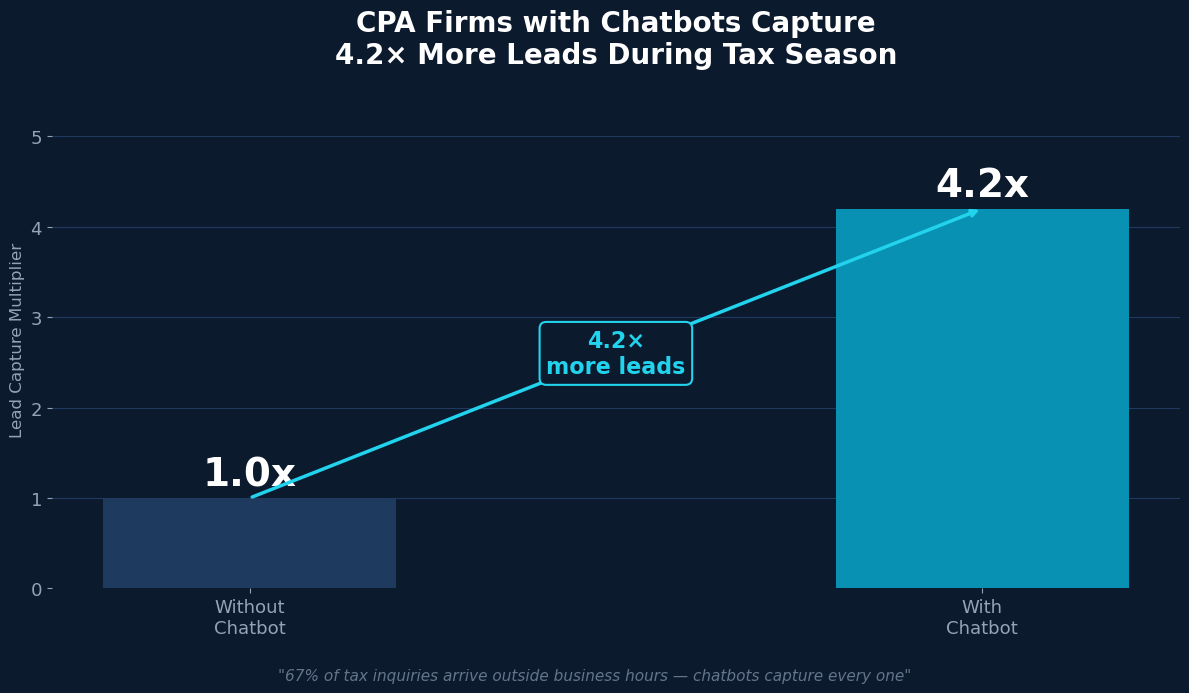
Tax season is the defining revenue period for most CPA practices and accounting firms. The window from January through April 15 determines annual revenue, and the firms that capture the most new clients during this period grow while others stagnate. The challenge is that the busiest time for client acquisition is also the most capacity-constrained time for the firm — preparers are fully booked, administrative staff are overwhelmed, and every missed call or unanswered inquiry is a potential client choosing a competitor.
After-Hours Inquiry Capture
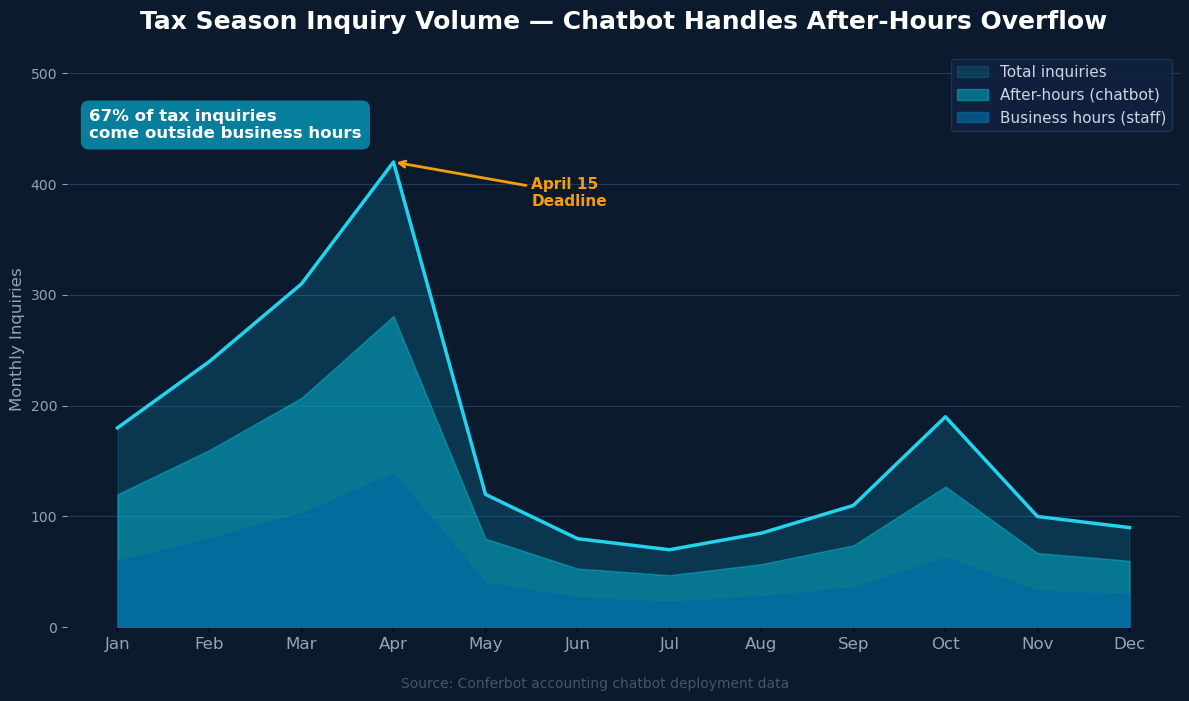
Research consistently shows that 67% of tax-related inquiries occur outside standard business hours — evenings, weekends, and especially the final weeks before tax deadlines when anxiety about filing peaks. A prospect who visits your website at 9 PM searching for a CPA has high intent: they have already decided to hire a professional, they are in research mode, and they are ready to book an appointment if the process is frictionless. A chatbot that engages them immediately, answers their questions about services and pricing, and offers to book an appointment captures that prospect. A contact form that promises a response the next business day often does not.
Simultaneous Capacity
Unlike a phone line or a staff member, a chatbot has no concurrent capacity limit. During the three weeks before April 15, when inbound inquiries spike to their peak, the chatbot handles every simultaneous visitor with equal quality and zero wait time. A firm that normally handles 30 inbound inquiries per week may receive 150 during peak season. The chatbot absorbs this volume surge without any staffing adjustment, qualifying all 150 and routing the genuine prospects to the booking calendar.
Consistent First Impression
The quality of a firm's first impression varies when it depends on which staff member answers the phone and how that person is feeling on a high-stress April afternoon. The chatbot delivers identical, professionally written, carefully considered responses every time — establishing the firm's competence and professionalism from the first interaction, regardless of how many simultaneous conversations are happening. For a professional services firm where trust is the primary purchase criterion, a consistently excellent first impression has measurable impact on conversion rates. Monitor your chatbot's performance metrics in real time through Conferbot's analytics dashboard.
Lead Qualification Before Calendar Access
Perhaps the most operationally valuable function of the accounting chatbot is that it qualifies leads before they reach the booking calendar. The service type, client type, transaction volume, and urgency all inform which CPA or service tier is appropriate — and the chatbot collects all of this before a minute of staff time is invested. Preparers receive appointment requests that include the prospect's service category, entity type, contact information, and preferred time — enabling them to prepare for the consultation before it begins.
Ready to try Accountant & CPA Chatbot?
Deploy this template in under 10 minutes. No coding required.
Use This Template Free →Bookkeeping Inquiry Management and Quote Generation
Bookkeeping services represent a recurring revenue opportunity that many CPA firms under-pursue because the sales process is time-consuming. Generating a custom quote for bookkeeping requires understanding the business size, transaction volume, software environment, reporting needs, and payroll complexity — a conversation that typically takes 20-30 minutes with a practice manager. The chatbot compresses this intake to under three minutes while gathering exactly the information needed for accurate quote generation.
Business Size and Transaction Qualification
The bookkeeping path begins by establishing entity type and employee count, then drills into monthly transaction volume — the primary driver of bookkeeping fee structures for most firms. The four volume tiers (under 50, 50-150, 150-500, and 500+ transactions per month) map directly to service tiers and pricing bands, allowing the firm to instantly know the expected fee range before a staff member is involved. This means the practice manager who follows up on a bookkeeping inquiry from the chatbot has a fully qualified prospect and a clear fee expectation — not an undefined inquiry that requires another round of questions.
Service Scope Communication
Before asking for contact information, the bookkeeping path explains exactly what the firm's bookkeeping service includes: monthly reconciliation, accounts payable and receivable management, payroll processing, financial reporting, and year-end close preparation. This scope explanation does the important work of differentiating between firms that offer bookkeeping and firms that offer this firm's specific service level — converting the comparison from price-only to value-inclusive. Prospects who understand the scope are better qualified and more likely to convert at the quoted price.
| Business Type | Monthly Volume | Typical Bookkeeping Tier | Starting Price Range |
|---|---|---|---|
| Sole proprietor / freelancer | Under 50 transactions | Starter | $150–$250/mo |
| Small business (2–10 employees) | 50–150 transactions | Growth | $300–$500/mo |
| Medium business (11–50 employees) | 150–500 transactions | Pro | $600–$900/mo |
| Larger business (50+ employees) | 500+ transactions | Enterprise | Custom quote |
Prospects who confirm interest in a bookkeeping quote are seamlessly routed into the consultation booking flow — collecting contact details and scheduling preference without the prospect needing to initiate a separate action. This frictionless handoff from inquiry to booking is where the chatbot's conversion advantage over static pricing pages becomes most visible: a pricing page creates intent, but the chatbot captures it immediately. All bookkeeping inquiry data flows into the firm's CRM via Conferbot's API integration.
Consultation Booking: Reducing No-Shows and Improving Appointment Quality
Consultation booking is the highest-value action a prospect can take on an accounting firm's website, and it is the step where the most friction traditionally exists. A prospect who wants to book must find the right contact method, reach a staff member or leave a voicemail, wait for a callback, and negotiate a time — a multi-step process that loses a meaningful percentage of interested prospects at each step. The chatbot compresses this entire process into a single conversation that ends with a confirmed appointment request.
Five-Question Booking Sequence
The consultation booking flow collects five pieces of information: full name, email address, phone number, business/client type, and preferred appointment time. These five questions are the minimum necessary to create a client record, identify the appropriate CPA for the consultation, and schedule the meeting with the right buffer and preparation time. Every additional question increases abandonment; every missing question creates a follow-up step. The five-question sequence is calibrated at the point of maximum conversion efficiency.
Client Type Routing for Consultation Quality
The business type question in the booking flow serves a routing function that goes beyond data collection. Individual clients, small business owners, corporate clients, and non-profit organizations have fundamentally different consultation needs, appropriate fee structures, and optimal preparer assignments. Capturing client type during booking allows the firm to assign the consultation to the right team member before it happens — ensuring the prospect is speaking with the CPA who handles their type of work, not the first available person. This routing directly affects conversion from consultation to engagement.
Appointment Preparation and No-Show Reduction
The consultation confirmation message sets expectations for what happens next: the team will respond within one business day, a calendar invite and intake form will be emailed, and the prospect should have any relevant financial documents available for the meeting. This confirmation message reduces no-shows by establishing commitment and next steps immediately after booking — a behavioral mechanism that transforms a tentative inquiry into a confirmed appointment that the prospect has mentally accepted. Firms using structured booking confirmation messages report 15-25% reductions in no-show rates compared to simple booking confirmations without preparation guidance. Build and deploy your consultation booking chatbot using Conferbot's visual flow builder with no coding required.
Communicating Accounting Fees: Transparency That Converts
Pricing transparency is one of the most debated questions in professional services marketing. Many CPA firms prefer not to publish fees, preferring to discuss pricing after understanding the client's situation. This approach protects against being compared on price alone but creates a barrier for price-sensitive prospects who want to know if the firm is in their range before investing time in a conversation. The chatbot resolves this tension by presenting pricing within a service-context conversation that has already established value — prospects see the prices after understanding what the service includes, not before.
Tiered Pricing Presentation
The pricing section of the accountant chatbot presents fees across four service categories with clear starting-point prices and notes that exact pricing is determined by individual situation complexity. This approach achieves three goals simultaneously: it filters out prospects who are genuinely outside the firm's price range (saving everyone time), it establishes a value anchor for the consultation (prospects arrive knowing the price range), and it creates an opening to book a consultation to get an exact quote. The "book a free consultation" offer at the end of the pricing section is the highest-converting call-to-action in the chatbot flow precisely because it appears after the prospect has seen prices and made an initial affordability assessment.
| Service Category | Description | Starting Price | Complexity Driver |
|---|---|---|---|
| Individual Tax Return (1040) | Personal federal and state filing | $275 | Number of income sources and deductions |
| Business Return (Schedule C) | Sole proprietor / single-member LLC | $450 | Business complexity, expense categories |
| Corporate Return (1120/1120-S) | S-Corp or C-Corp annual filing | $850 | Revenue size, number of shareholders |
| Partnership Return (1065) | Multi-member LLC or partnership | $750 | Number of partners, K-1 complexity |
| Bookkeeping (monthly) | Reconciliation, reporting, payables | $199/mo | Monthly transaction volume |
| Advisory / CFO Services | Strategic financial guidance | $175/hr | Engagement scope and frequency |
The pricing presentation also serves an important client education function: many prospects seeking a CPA for the first time genuinely do not know what their return type costs or what drives the variation. Explaining that a corporate return starts at $850 versus $275 for an individual return — and why — sets realistic expectations and builds confidence in the firm's expertise before the first human conversation. Price transparency in professional services consistently correlates with higher trust scores in post-engagement surveys. Share your pricing chatbot across all client touchpoints using Conferbot's omnichannel platform.
50,000+ businesses use Conferbot templates to automate conversations
Tax Deadline Information: The High-Volume Question That Chatbots Handle Perfectly
Every accounting firm receives the same questions about tax deadlines every year, from every client, across every communication channel. "When is the filing deadline?" "Can I get an extension?" "When are my quarterly payments due?" "When is the S-corp deadline?" These are high-frequency, low-complexity questions with definitive answers — exactly the question type that chatbots handle most effectively, freeing staff from repetitive information delivery while clients receive immediate, accurate answers at any hour.
Comprehensive Deadline Calendar in One Message
The tax deadline section of the accountant chatbot presents the full calendar of key dates for the current tax year in a single, organized message covering eight to ten distinct deadlines: W-2 and 1099 issuance, partnership and S-corp returns, individual and C-corp returns, estimated tax payment dates for all four quarters, IRA and HSA contribution deadlines, and the extended return deadlines. This comprehensive delivery answers the question the client asked plus the related questions they were likely to ask next — reducing the back-and-forth of deadline conversations and ensuring clients have a complete picture of their filing obligations.
Deadline Urgency as a Conversion Trigger
The tax deadline section ends with a direct call to action: "Would you like to get started with your filing before the next deadline?" This question is the most effective conversion trigger in the deadline path because it capitalizes on the urgency the client already feels — they asked about deadlines because they are concerned about meeting them. Clients who click yes are routed directly into the consultation booking flow. The conversion rate from deadline inquiry to consultation booking is typically the highest of any chatbot path because deadline anxiety produces immediate action orientation.
Deadline information also has year-round utility beyond tax season. Quarterly estimated tax payment reminders for self-employed clients and business owners create four natural touchpoints per year for client reengagement — each one an opportunity to remind clients of the firm's services, offer a mid-year tax planning consultation, or surface upcoming advisory needs. Configure these proactive deadline reminder sequences through Conferbot's NLP chatbot engine to trigger personalized outreach at the right moment for each client segment. Track all deadline-inquiry conversions in real time through the analytics dashboard.
Setup Guide: Deploying the Accountant Chatbot for Your Firm
The accountant chatbot template is designed for deployment by firms without dedicated technical staff. The configuration workflow maps directly to decisions a practice owner or office manager already knows how to make — service categories offered, pricing tiers, team member assignment rules, and calendar availability. No code, no developer, no weeks-long implementation project.
Step 1: Clone the Template and Configure Branding
Start in Conferbot's AI chatbot builder by cloning the accountant chatbot template. Update the header color to your firm's brand color (the template uses a professional cyan-blue; replace with your primary brand color), upload your firm's logo or a professional headshot of the principal CPA, and customize the welcome message with your firm's name and tagline. These three changes take under ten minutes and create a chatbot that looks like it was built for your firm specifically.
Step 2: Customize Service Menu and Pricing
Edit the main menu options to match exactly the services your firm offers — remove service categories you do not offer, rename categories to match your firm's terminology, and add any specialized services (estate planning, international tax, forensic accounting) that deserve dedicated paths. Update all pricing figures in the pricing section to match your current fee schedule. If your firm does not publish fees, replace the pricing section with a "request a custom quote" path that routes directly to the consultation booking flow.
Step 3: Connect Calendar and CRM
Configure the appointment booking integration to connect the chatbot to your scheduling system. Conferbot's calendar booking integration supports Calendly, Acuity, Google Calendar, and Microsoft Outlook. Define routing rules that assign consultation requests to the appropriate team member based on the client type selected in the chatbot. Set up the CRM integration to create lead or client records automatically when the booking flow is completed — populate the fields that matter most for your sales process: service interest, entity type, transaction volume, and preferred contact method.
Step 4: Update Annual Deadlines
The tax deadline section requires annual updates in mid-November after the IRS announces the following year's dates. Update the eight to ten deadline dates in the deadline message node — this takes five minutes and ensures the chatbot's deadline information is accurate for the full filing season. Set a recurring calendar reminder to complete this update annually. If the IRS announces a deadline extension mid-season (as has happened in disaster-affected years), update the relevant dates in the chatbot within hours of the announcement to ensure clients receive accurate information immediately.
Step 5: Deploy and Monitor
Embed the chatbot widget on your firm's homepage, services page, and contact page. For mobile clients, activate the WhatsApp Business channel through Conferbot's omnichannel setup — many clients prefer initiating conversations through WhatsApp rather than a website widget, particularly for after-hours inquiries. Monitor conversation completion rates, drop-off points, and consultation booking conversion rates through the analytics dashboard during the first two weeks of deployment, and make any flow adjustments indicated by the data before peak tax season begins.
Accountant & CPA Chatbot FAQ
Everything you need to know about chatbots for accountant & cpa chatbot.
Why Use a Template vs Building from Scratch?
Templates encode years of optimization data into the conversation flow before you start.
| Factor | Conferbot Template | Build from Scratch | Hire a Developer |
|---|---|---|---|
| Time to deploy | 10 minutes | 2-8 hours | 2-6 weeks |
| Cost | Free | Your time | $5,000-$25,000 |
| Day-1 conversion | 15-22% | 5-8% | 10-15% |
| Proven flows | Yes, data-tested | No | Depends |
| Updates included | Automatic | Manual | Paid |
| Multi-channel | 8+ channels | 1 channel | Extra cost |
| Analytics | Built-in | Must build | Extra cost |
Ready to Deploy Accountant & CPA Chatbot?
Join 50,000+ businesses. Free forever plan available. No credit card required.