
Why Shopify Stores Need AI Chatbots in 2026
With over 4.6 million active Shopify stores competing for customer attention in 2026, standing out means more than just having great products. Shoppers expect instant answers, personalized recommendations, and 24/7 support. An AI chatbot delivers all three without adding headcount.
Consider the numbers: the average Shopify store loses 70% of shopping carts to abandonment. That is not a minor leak; it is a flood of lost revenue. Research from the Baymard Institute's cart abandonment studies shows that 18% of cart abandonments happen because the checkout process is too complicated, and another 12% because shoppers cannot find answers to their questions fast enough. According to Statista's Shopify market data, the platform powers over $200 billion in annual gross merchandise volume, making every percentage point of conversion improvement worth millions in aggregate. A well-configured chatbot addresses both problems simultaneously.
Beyond cart recovery, AI chatbots transform the entire customer journey:
- Product discovery: Chatbots guide shoppers through large catalogs by asking about preferences, budget, and use cases, then surfacing relevant products instantly.
- Pre-purchase confidence: Answering sizing questions, shipping timelines, and return policies in real time eliminates hesitation.
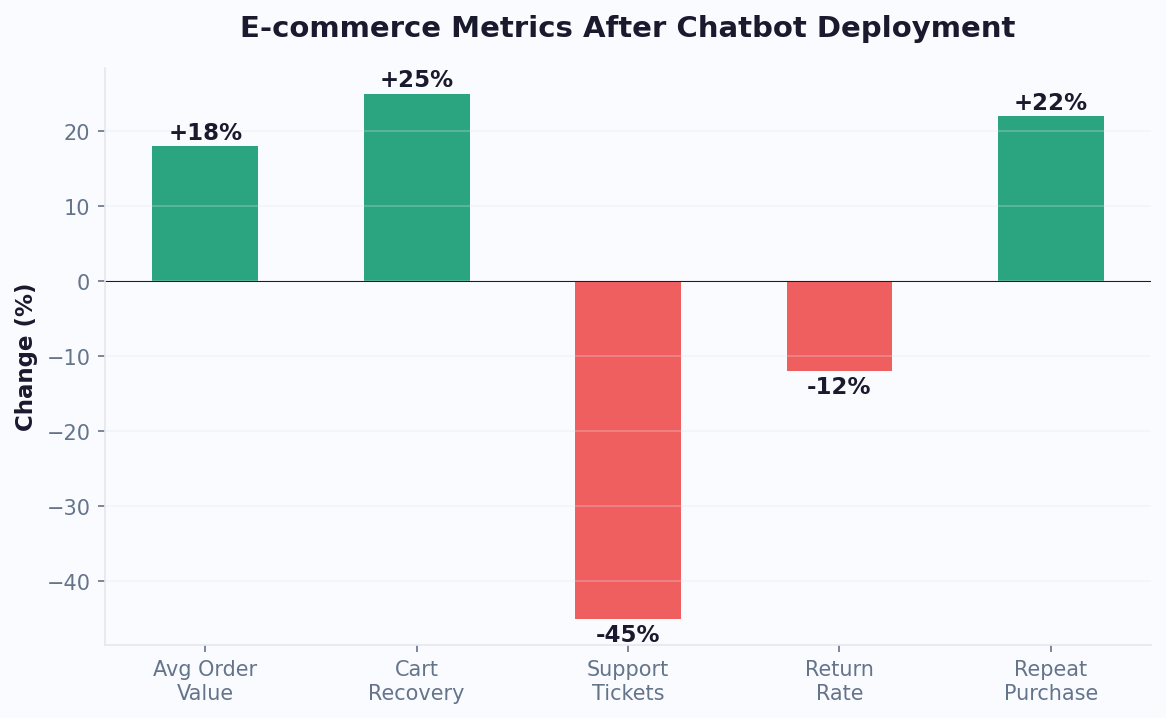
- Post-purchase support: Automated order tracking, exchange initiation, and FAQ handling reduce support tickets by 40-60%.
- Upselling and cross-selling: AI analyzes browsing behavior to suggest complementary products, increasing average order value by 10-15%.
Shopify merchants who deploy chatbots typically see a 15-25% recovery rate on abandoned carts, translating directly to recaptured revenue. For a store doing $50,000 per month in sales with a 70% abandonment rate, recovering even 15% of those lost carts means an additional $5,250 in monthly revenue.
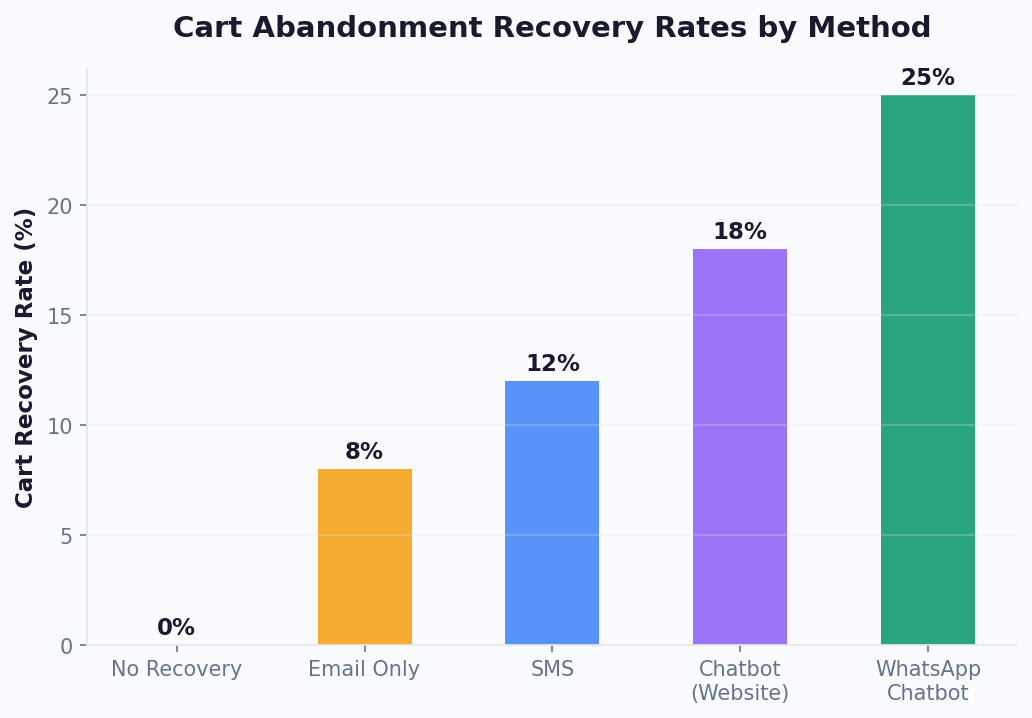
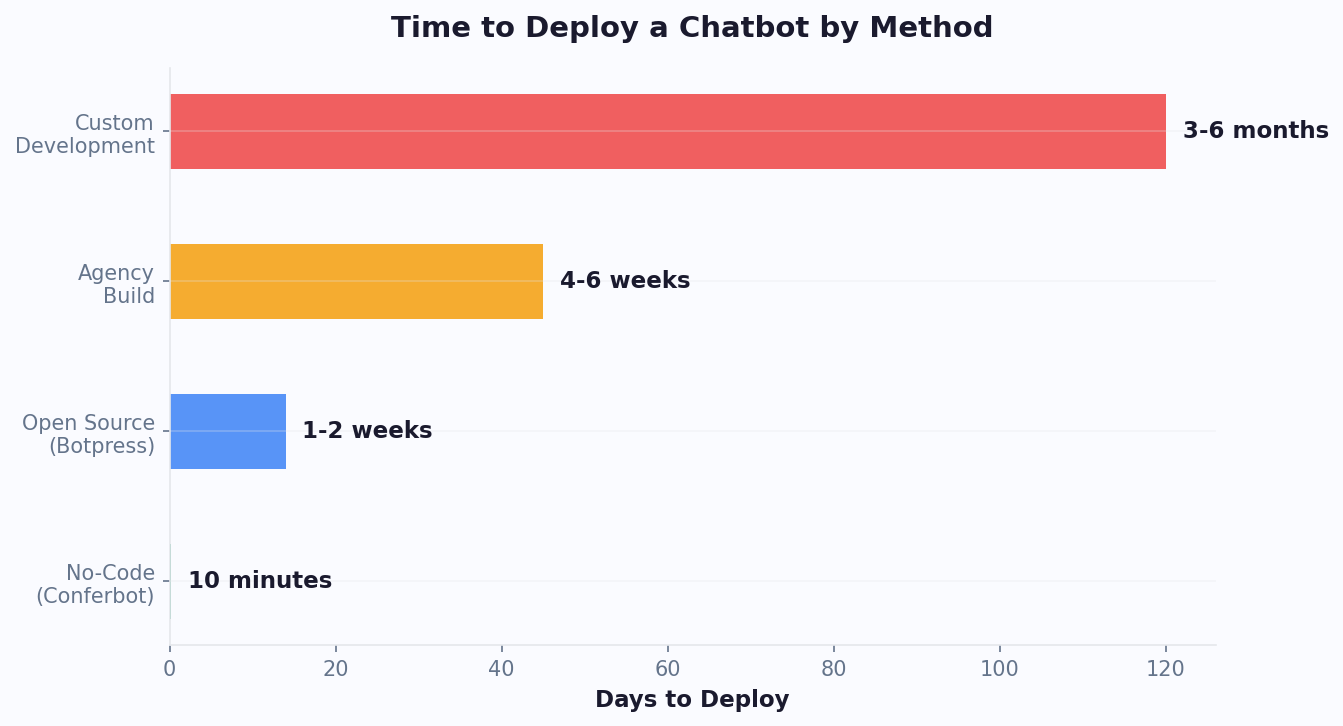
The best part? Modern no-code chatbot platforms like Conferbot integrate with Shopify in minutes, not days. You do not need a developer, and you do not need to modify your store's theme code. Let us walk through the entire setup process.
5-Minute Setup Walkthrough: Installing Your Chatbot on Shopify
Getting an AI chatbot running on your Shopify store is straightforward. Here is the step-by-step process using Conferbot as an example, though the general flow applies to most modern chatbot platforms.
Step 1: Create Your Chatbot Account (1 Minute)
Sign up on the Conferbot platform and select the Shopify ecommerce template. This pre-built template includes product recommendation flows, cart recovery sequences, and order tracking logic out of the box. You can customize everything later, but starting with a template saves significant time.
Step 2: Connect to Your Shopify Store (1 Minute)
Navigate to your Shopify admin panel and go to Settings > Apps and sales channels. From the Conferbot dashboard, copy your unique store connection code. Paste it into the Shopify custom app integration field. The platform will automatically sync your store data including products, collections, and order statuses.
Step 3: Configure Your Widget Appearance (1 Minute)
Customize the chat widget to match your brand. Set your primary brand colors, upload your logo, and write a welcome message. Choose the widget position (bottom-right is standard for ecommerce) and configure when it appears. Most merchants set the widget to show after 5-10 seconds or when a visitor scrolls past 25% of the page.
Step 4: Set Up Core Automations (1.5 Minutes)
Enable the three essential automations that drive ROI:
- Welcome flow: Greet new visitors and offer to help them find products.
- Cart recovery: Trigger a message when a shopper adds items to cart but shows exit intent.
- Order tracking: Let customers check order status by entering their email or order number.
Step 5: Test and Go Live (30 Seconds)
Use the built-in preview mode to test your chatbot on a staging version of your store. Verify that product searches return correct results, cart recovery messages fire at the right time, and order lookups pull accurate data. Once satisfied, toggle the chatbot to live mode.
That is the entire process. Your chatbot is now active on every page of your Shopify store, ready to engage visitors, answer questions, and recover revenue around the clock. For deeper customization, read on.
Connecting Your Product Catalog for Smart Recommendations
An AI chatbot is only as useful as the data it has access to. Connecting your full Shopify product catalog transforms your bot from a simple FAQ responder into an intelligent shopping assistant that understands your inventory, pricing, variants, and availability in real time.
Automatic Catalog Sync
When you connect your Shopify store, the chatbot platform pulls your complete product catalog via the Shopify API. This includes:
- Product titles and descriptions: The AI uses these to understand what each product is and match it to customer queries.
- Variants: Size, color, material, and other options are indexed so the bot can ask clarifying questions.
- Pricing and discounts: Current prices, compare-at prices, and active discount codes are all accessible.
- Inventory levels: The bot can check real-time stock and warn customers about low-stock items to create urgency.
- Product images: Visual product cards displayed in the chat widget increase click-through rates by 30-40%.
Configuring Product Discovery Flows
The most effective ecommerce chatbots use a guided selling approach. Instead of waiting for customers to ask questions, the bot proactively helps them discover the right products. Configure discovery flows based on your catalog structure:
For example, a clothing store might set up a flow like: "What are you shopping for today?" followed by category selection, then budget range, then style preference. Each answer narrows the product results until the bot presents 2-3 highly relevant options with images, prices, and direct add-to-cart buttons.
Handling Out-of-Stock Scenarios
Configure your chatbot to handle out-of-stock items gracefully. Rather than showing a dead end, the bot should suggest similar in-stock alternatives and offer to notify the customer when their preferred item is back. This turns a potential lost sale into a future conversion. Use rich media cards to display product alternatives with images and pricing side by side.
Keep your catalog sync running on an automatic schedule, typically every 15-30 minutes, so that new products, price changes, and inventory updates reflect instantly in chatbot conversations. For stores with frequent inventory changes, real-time webhook-based sync ensures zero lag between your Shopify admin and your chatbot's knowledge.
Setting Up Abandoned Cart Recovery That Actually Works
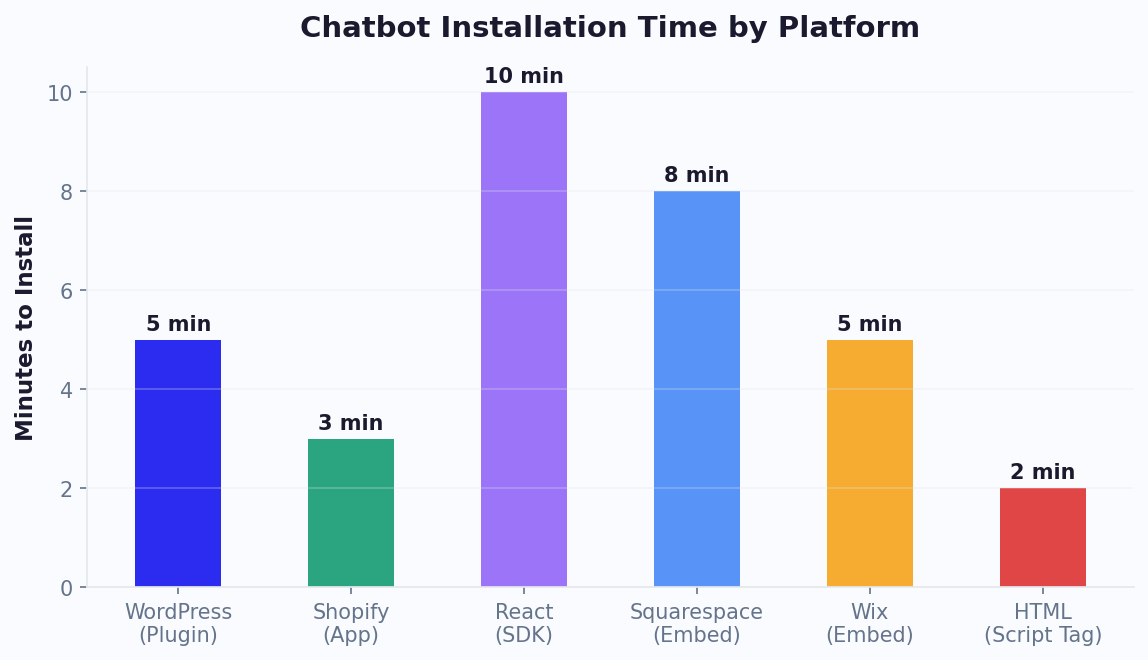
Cart abandonment is the single biggest revenue leak for Shopify stores. With a 70% average abandonment rate across ecommerce, a well-designed chatbot recovery flow can recapture 15-25% of those lost sales, often outperforming email-only recovery campaigns by 3-5x in response rate.
Understanding Cart Abandonment Triggers
Your chatbot should detect abandonment signals in real time rather than waiting until after the shopper has left. Key triggers to configure include:
- Exit intent detection: When a shopper with items in their cart moves their cursor toward the browser's close button or address bar, the chatbot activates a retention message.
- Idle timeout: If a shopper has items in cart and has been inactive for 60-90 seconds on the checkout page, the bot offers help.
- Page navigation away from checkout: When a shopper goes from checkout back to browsing, the bot can gently remind them about their cart.
Crafting High-Converting Recovery Messages
The messaging strategy matters more than the technology. Effective recovery messages follow a proven structure:
- Acknowledge the items: "I noticed you have the Classic Denim Jacket in your cart. Great choice!"
- Address common objections: "Just so you know, we offer free returns within 30 days and shipping is free over $75."
- Create gentle urgency: "This jacket is popular and we only have 3 left in your size."
- Offer a nudge: "Would you like me to apply a 10% first-purchase discount to your order?"
Avoid aggressive tactics. The goal is to be helpful, not pushy. A/B test your recovery messages to find the right tone for your audience. Most stores find that the combination of answering an objection plus a small incentive yields the best results.
Multi-Channel Recovery Sequences
For maximum recovery rates, extend your chatbot's reach beyond the website. If a shopper has opted in to WhatsApp or Messenger notifications, send a follow-up recovery message 1 hour after abandonment. Messaging apps achieve 80-90% open rates compared to 20-25% for email, making them dramatically more effective for cart recovery. Connect your chatbot to Conferbot's integrations hub to orchestrate these multi-channel sequences from a single dashboard.
Track your recovery metrics weekly: recovery rate, average recovered order value, discount usage rate, and time-to-recovery. Continuously optimize your messaging based on the data.
Automating Order Tracking and Post-Purchase Support
Post-purchase support accounts for 40-50% of all customer service inquiries in ecommerce, and the vast majority of those are simple "Where is my order?" (WISMO) questions. Automating order tracking through your chatbot eliminates this repetitive workload entirely while giving customers a faster, more convenient experience.
Setting Up Order Lookup
Configure your chatbot to let customers check their order status directly in the chat widget. The standard flow works like this:
- Customer types "Where is my order?" or clicks the "Track Order" quick-reply button.
- The bot asks for their order number or the email address used at checkout.
- The bot queries the Shopify Orders API and returns the current status: processing, shipped, in transit, out for delivery, or delivered.
- If shipped, the bot displays the carrier name, tracking number, and a direct link to the carrier's tracking page.
This entire interaction takes under 15 seconds compared to the 4-8 minute average for email support or the 2-5 minute average wait time for live chat with a human agent.
Proactive Shipping Notifications
Go beyond reactive tracking by sending proactive updates. When an order ships, the chatbot can push a notification via the customer's preferred channel (website widget, WhatsApp, or Messenger) with tracking details. When the order is out for delivery, send another update. This proactive approach reduces inbound WISMO inquiries by up to 70%.
Handling Common Post-Purchase Scenarios
Beyond tracking, configure your chatbot to handle these frequent post-purchase interactions:
- Return and exchange initiation: The bot walks customers through your return policy, generates a return label if applicable, and logs the request in your system.
- Order modifications: For orders that have not yet shipped, the bot can facilitate address changes, item swaps, or cancellations through the Shopify API.
- Delivery issues: If a package is marked delivered but the customer says they did not receive it, the bot collects details and escalates to your support team with full context.
- Reorder suggestions: For consumable products, the bot can proactively suggest reorders based on typical usage timelines, driving repeat purchases.
Use Conferbot's analytics dashboard to monitor which post-purchase queries are most common and refine your automation flows accordingly. The goal is to handle 80%+ of post-purchase inquiries without human intervention while maintaining high customer satisfaction scores.
Advanced Shopify Chatbot Automations: Flows, Tags & Segments
Once your basic Shopify chatbot is running — handling FAQs, recovering carts, and tracking orders — the next level of ROI comes from advanced automations that personalize the experience based on customer behavior, purchase history, and lifecycle stage. These automations run silently in the background, turning your chatbot from a reactive support tool into a proactive revenue engine.
Customer Tagging and Segmentation
Every chatbot interaction generates data. Advanced automations use this data to tag customers and trigger segment-specific flows:
| Customer Tag | How It Is Applied | Automated Action |
|---|---|---|
| high-intent | Viewed product 3+ times or added to cart | Proactive discount offer via chatbot |
| vip-customer | Lifetime spend exceeds $500 | Priority live chat routing, exclusive offers |
| at-risk | No purchase in 60+ days (was active) | Win-back campaign via WhatsApp |
| price-sensitive | Only purchases during sales events | Sale alerts and bundle deal recommendations |
| new-customer | First visit, no purchase history | Welcome discount, guided product discovery |
| repeat-buyer | 2+ purchases in past 90 days | Loyalty rewards, early access to new products |
| cart-abandoner | 3+ abandoned carts in past 30 days | Address objections (sizing? shipping? price?) |
These tags sync with your Shopify customer metafields and your CRM (via integrations hub), creating a unified customer profile that powers both chatbot interactions and email/SMS campaigns.
Behavioral Trigger Flows
Advanced chatbot automations trigger based on specific customer behaviors, not just explicit requests:
Browse Abandonment Flow: When a visitor views 3+ products in a category without adding anything to cart, the chatbot activates: "Tough choice? I can help you compare these [product category] options. What matters most — price, quality, or features?" This flow converts 8-12% of browse abandoners into active shoppers.
Repeat Visit Flow: When a customer returns to the same product page for the third time, the chatbot acknowledges it: "You keep coming back to the [Product Name] — great taste! Want me to answer any questions, or would a 10% first-purchase discount help you decide?" Conversion rate: 15-25% for third-visit triggers.
Post-Purchase Cross-Sell Flow: Triggered 3-7 days after delivery confirmation. The chatbot sends a personalized message based on what was purchased: "How are you enjoying your [Product]? Customers who bought it also love [Complementary Product] — here's 15% off to try it." This drives 8-15% repeat purchase rates.
Replenishment Flow: For consumable products (skincare, supplements, coffee, pet food), trigger a reorder prompt based on estimated usage: "You ordered a 30-day supply of [Product] 25 days ago. Running low? Reorder now and get free shipping." Replenishment flows achieve 20-35% conversion rates because the timing is perfect.
Shopify Flow Integration
Shopify Flow (available on Shopify Plus and Advanced plans) adds another automation layer. Connect your chatbot to Shopify Flow for workflows like:
- High-value order alert: When an order exceeds $300, the chatbot sends a personal thank-you message and offers VIP support
- Inventory-based triggers: When a popular product drops below 10 units, the chatbot adds urgency messaging: "Only [X] left in stock" to product page conversations
- Fulfillment-based follow-up: When an order is marked "delivered" in Shopify, the chatbot sends a delivery confirmation with a review request link
- Tag-based routing: Customers tagged "wholesale" in Shopify are routed to a B2B-specific chatbot flow with volume pricing
Advanced Discount and Promotion Automation
Move beyond static discount codes to dynamic, behavior-based incentives:
| Scenario | Discount Logic | Expected Impact |
|---|---|---|
| First-time visitor, high-value cart ($100+) | 10% off first order | +18-25% conversion |
| Returning visitor, no purchase in 30 days | Free shipping on next order | +12-18% reactivation |
| Cart value $10 below free shipping threshold | "Add $10 more for free shipping" + product suggestion | +22-30% AOV increase |
| Customer birthday (from Shopify metafield) | 20% birthday discount, valid 7 days | 40-50% redemption rate |
| 3rd abandoned cart in 30 days | 15% off + free returns guarantee | +25-35% recovery rate |
The key to advanced automation is layering — each automation runs independently, but together they create a personalized experience that feels intentional rather than automated. A customer who receives a birthday discount, then a replenishment reminder, then a VIP thank-you feels valued. A customer who receives generic blast messages feels spammed. The difference is behavioral targeting powered by your chatbot's data collection.
Monitor all automation performance through your analytics dashboard. Track trigger rates, conversion rates, and revenue attributed to each flow. Disable underperforming automations and double down on winners. Most Shopify stores find that 3-5 well-tuned automations generate more revenue than 15 mediocre ones. Start with cart recovery and post-purchase cross-sell — they consistently deliver the highest ROI — then expand based on your data. For more on building these flows without code, see our no-code chatbot building guide.
Automation Performance Tracking
Each automation should be measured independently so you know exactly which flows drive revenue and which need refinement. Set up tracking for these key metrics per automation:
| Automation Flow | Primary Metric | Target Benchmark | Review Frequency |
|---|---|---|---|
| Browse abandonment | Browse-to-cart rate | 8-12% | Weekly |
| Cart recovery | Recovery rate | 15-22% | Weekly |
| Post-purchase cross-sell | Repeat purchase rate | 8-15% | Monthly |
| Replenishment reminder | Reorder conversion rate | 20-35% | Monthly |
| Birthday/loyalty | Redemption rate | 40-50% | Monthly |
| Win-back (lapsed customer) | Reactivation rate | 10-18% | Monthly |
Use your analytics dashboard to compare actual performance against these benchmarks. If an automation consistently underperforms, A/B test the trigger timing and message copy before disabling it. Often a small change — sending the cart recovery message at 45 minutes instead of 2 hours, or changing the subject line from "You left something behind" to "Your [Product Name] is waiting" — can double the conversion rate. For multi-channel automations, also compare performance by channel: WhatsApp messages typically outperform Messenger and email for recovery and retention flows due to their 98% open rate, so prioritize WhatsApp for your highest-value automations.
Segment-Specific Automation Examples
The most profitable advanced automations are segment-specific — they target narrow customer groups with highly relevant messages. Here are five proven segment automations that deliver outsized ROI for Shopify stores:
- High-AOV first-time buyer: When a first purchase exceeds $150, the chatbot sends a VIP welcome sequence with exclusive perks: early access to sales, priority support via live chat, and a personal product recommendation based on their first order. This segment has 2-3x higher lifetime value than average — investing in their first post-purchase experience pays dividends.
- Serial returner: Customers who have returned 3+ orders in 6 months receive proactive sizing assistance before checkout: "Want help finding your perfect size? Tell me your measurements and I'll recommend the best fit." This reduces returns by 25-40% for this segment while maintaining their purchase frequency.
- Gift buyer: Customers who use gift wrapping or ship to addresses different from their billing address are tagged as gift buyers. During holiday seasons, they receive early gift guide recommendations and exclusive gift bundle offers via WhatsApp.
- One-time buyer at risk: Customers who made a single purchase 45+ days ago and have not returned receive a targeted re-engagement message: "We noticed you tried our [First Product]. Here's what customers like you order next — and 15% off to try it."
- Wholesale prospect: Website visitors who view 5+ products in a single session or repeatedly visit bulk pricing pages trigger a B2B inquiry flow: "Looking to order in bulk? I can connect you with our wholesale team for volume pricing."
Each of these automations targets a specific behavior pattern and responds with contextually relevant content. The compound effect of running 3-5 of these simultaneously can increase monthly revenue by 8-15% beyond what basic cart recovery and support automation achieve. Build them one at a time, starting with the segment that represents your biggest revenue opportunity, and validate each with 30 days of data before adding the next.
Optimization Tips: Maximizing Your Shopify Chatbot's ROI
Installing a chatbot is just the beginning. The merchants who see the highest returns continuously optimize their bot's performance based on data, customer feedback, and evolving best practices. Here are the strategies that move the needle most.
Personalization Based on Browsing Behavior
Configure your chatbot to use Shopify's customer data and browsing behavior for personalized interactions. Returning customers should see different messages than first-time visitors. A shopper who has viewed the same product three times in a week gets a different prompt than someone browsing your homepage for the first time. Personalized chatbot interactions convert at 2-3x the rate of generic ones.
A/B Test Everything
Run A/B tests on every element of your chatbot experience:
- Welcome messages: Test question-based openers ("What brings you in today?") vs. offer-based openers ("Want to see today's deals?").
- Widget timing: Test immediate display vs. delayed display vs. scroll-triggered display.
- Cart recovery incentives: Test percentage discounts vs. free shipping vs. free gifts.
- Quick-reply buttons: Test different category labels and ordering to see which drive more engagement.
Integrate with Your Full Tech Stack
Your chatbot becomes more powerful when connected to your other tools. Integrate with your email marketing platform to sync chatbot leads. Connect to your CRM to enrich customer profiles with chatbot interaction data. Link to your helpdesk software so that when the bot does escalate a conversation, the human agent receives full context. Conferbot's integrations hub supports connections with Klaviyo, Mailchimp, HubSpot, Zendesk, Gorgias, and dozens more.
Monitor Key Metrics Weekly
Track these metrics in your analytics dashboard and review them weekly:
- Engagement rate: Percentage of visitors who interact with the chatbot (target: 8-15%).
- Resolution rate: Percentage of conversations resolved without human intervention (target: 75-85%).
- Cart recovery rate: Percentage of abandoned carts recovered through chatbot intervention (target: 15-25%).
- Customer satisfaction: Post-chat rating (target: 4.2+ out of 5).
- Revenue attributed: Direct sales and recovered revenue tracked to chatbot interactions.
Optimization is an ongoing process. Schedule a monthly review to audit chatbot conversations, identify common failure points, and update flows. Stores that actively optimize their chatbot see ROI improvements of 30-50% over the first six months compared to a set-and-forget approach. HubSpot's marketing benchmarks confirm that businesses responding to inquiries within 5 minutes are 21x more likely to qualify leads, and Gartner predicts that chatbots will become a primary customer service channel by 2027. Use calendar booking integration to let the bot schedule consultations or demos directly, adding another conversion path to your arsenal. For more on measuring your chatbot's impact, see our guide to chatbot analytics metrics. If you are considering expanding beyond Shopify to other platforms, the WooCommerce chatbot guide covers how to replicate these strategies on WordPress-based stores. For a deeper look at abandoned cart recovery specifically, read our abandoned cart recovery chatbot playbook.
Seasonal Campaign Integration
Configure your Shopify chatbot to align with seasonal sales events for maximum revenue impact. Before Black Friday, update your welcome flow to highlight deals and create urgency with real-time stock counters. During holiday seasons, add gift recommendation flows that help shoppers find the perfect item based on recipient and budget. Post-holiday, switch to returns-focused flows that streamline exchanges and retain customer goodwill while reducing support ticket volume by handling routine return requests automatically.
Was this article helpful?
How to Add an AI Chatbot to Your Shopify Store in Under 5 Minutes (2026) FAQ
Everything you need to know about chatbots for how to add an ai chatbot to your shopify store in under 5 minutes (2026).
About the Author

Conferbot Team specializes in conversational AI, chatbot strategy, and customer engagement automation. With deep expertise in building AI-powered chatbots, they help businesses deliver exceptional customer experiences across every channel.
View all articles

